As we move closer and closer towards seeing Diablo IV launch in 2023, we’re bound to see several leaks appear over the next few months. It seems the latest ones have Blizzard running around on the internet trying to clear the images and updates from a secret Alpha test. Spoiler alert: you’re about to get some details you may not want to know about just yet.
The first bit of news was from Jason Schreier, a reporter at Bloomberg, heading to Twitter to announce some NDA leaks he discovered. Fortunately, he decided not to mention what the leaks were about, and there were some positive notes about Diablo IV.
Another fun but minor Blizzard tidbit that I haven't seen reported anywhere yet: a bunch of people are playing an early build of Diablo IV right now thanks to a friends-and-family alpha test. Players are under NDA, but I'm hearing mostly positive buzz
However, the actual testers and other fans on Reddit weren’t so kind. One post went all out and shared footage from the character customization section of Diablo IV. Despite many readers commenting that this act goes against NDA rules, the post is still live, and you can see how much detail will go into making an individual character for a class.
Another Reddit post focused more on the Smart Loot system. If you somehow missed out on Diablo III or didn’t take note of it, the Smart Loot system drops equipment and items related to your character’s class. That means you can’t grind levels with a wizard to get items for your future new Necromancer warrior.
While many players are divided on how they feel about this, it seems like it’s making a return in Diablo IV. Some feel they should have the freedom to grind items for other characters, while others love that they can focus on their main class. At least we know that the monetization that appeared in Diablo Immortal won’t appear in Diablo 4, right?
Diablo 4 won’t share the same monetization tactics as Diablo ImmortalREAD MORE
The dark web has developed a reputation as a frightening space to carry out serious criminal activity. While that’s a fair assessment, this subsection of the deep web also provides a way for activists and journalists in autocratic nations to share information anonymously. To safely access the deepest subsegments of the internet, you’ll need a special browser such as Tor. And while Tor is a great solution for online privacy, understanding how to use it in a way that protects your sensitive information is critical.
As an online privacy tool, Tor is entirely legitimate, with plenty of upsides, but using the Tor browser does carry risks. The dark web remains a haven for cybercriminal behavior and malware. Following the wrong link can expose your personal data and potentially result in a significant IT disaster. The best approach to securely browsing Tor is to connect to a virtual private network (VPN). This article discusses how the Tor browser works and how you can safely leverage it to stay anonymous online.
What are the surface web, deep web, and dark web?
The surface web, aka the regular World Wide Web that we use every day, makes up only about .03% of the internet. This includes all the websites, social media, e-commerce pages, blogs, and anything else indexed by Google. The rest of the internet falls within the deep web, which is anything not indexed by web crawlers. These sites include everything from your personal email and payment portals to private forums and hidden backend web pages. The dark web is a small segment of websites on the deep web with hidden IP addresses that can only be accessed by special browsers like Tor. While the surface and deep web contain mostly benign sites, dark web sites use encryption software to keep their users and locations concealed.
What is Tor?
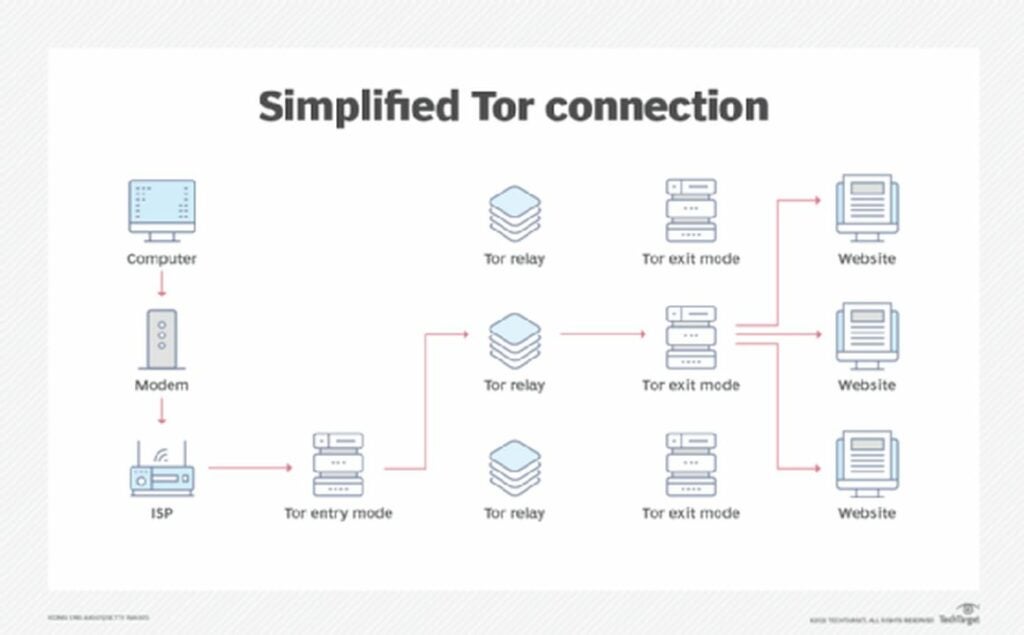
Short for The Onion Router, Tor is a free, open-source software that lets you browse the internet anonymously. The Tor browser relies on encryption layers to anonymize your traffic through a random relay. This process repeats itself three times across a decentralized network of nodes or a circuit, maintained and operated by volunteers and online privacy advocates. In short, this browsing method makes your information difficult to track. And, generally speaking, Tor prevents sites from determining the location of your IP address.
As your encrypted traffic passes through these randomized nodes, Tor eliminates your browsing history by removing cookies after each browsing session. Likewise, Tor deploys several other mechanisms to block and reduce your exposure to trackers. The browser identifies surveillance trackers that follow web users across different sites and introduces an additional circuit that tricks surveillance trackers into interpreting the connections as two distinct users. This means that questionable websites can’t trace your activity or identify you when you log in to another site.
Downloading and using Tor
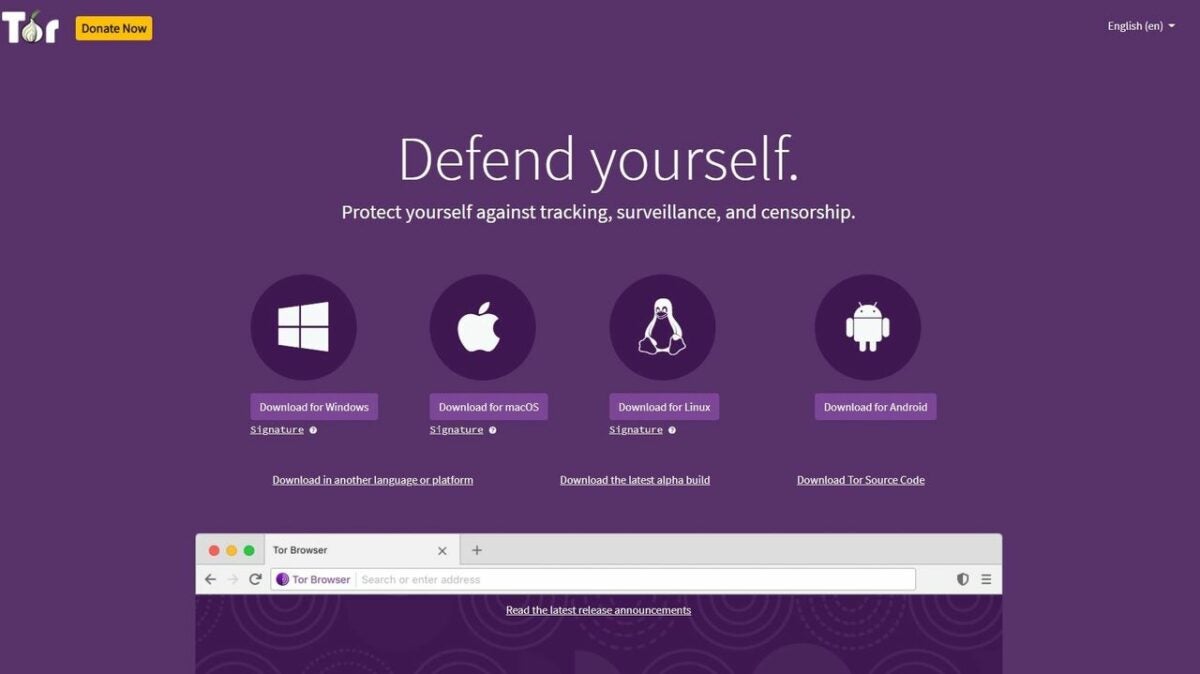
Downloading Tor is simple and fast, and you can access the software at your preferred application discovery site. Versions for your desktop PC and Android devices are available. You’ll also find an unsupported onion browsing edition for iOS. It is worth noting that Tor is blocked in several countries, and you may not be able to use it on specific networks, such as those controlled by corporations and universities where Tor is often banned for security reasons.
Upon initiating a Tor session, the browser presents the option to Connect or Configure. If you must access the Tor browser where the network is prohibited, you need to choose Configure. This option allows you to circumvent the blocked access through an array of custom browser configurations. Configuring the browser lets you occlude your traffic through pluggable transports that randomize Tor traffic and, instead of connecting to the onion network, make it appear as if your traffic is diverting to major sites such as Amazon. In the event that you cannot access the Tor browser, you can try one of the recommended configurations to bypass any blocks on the network.
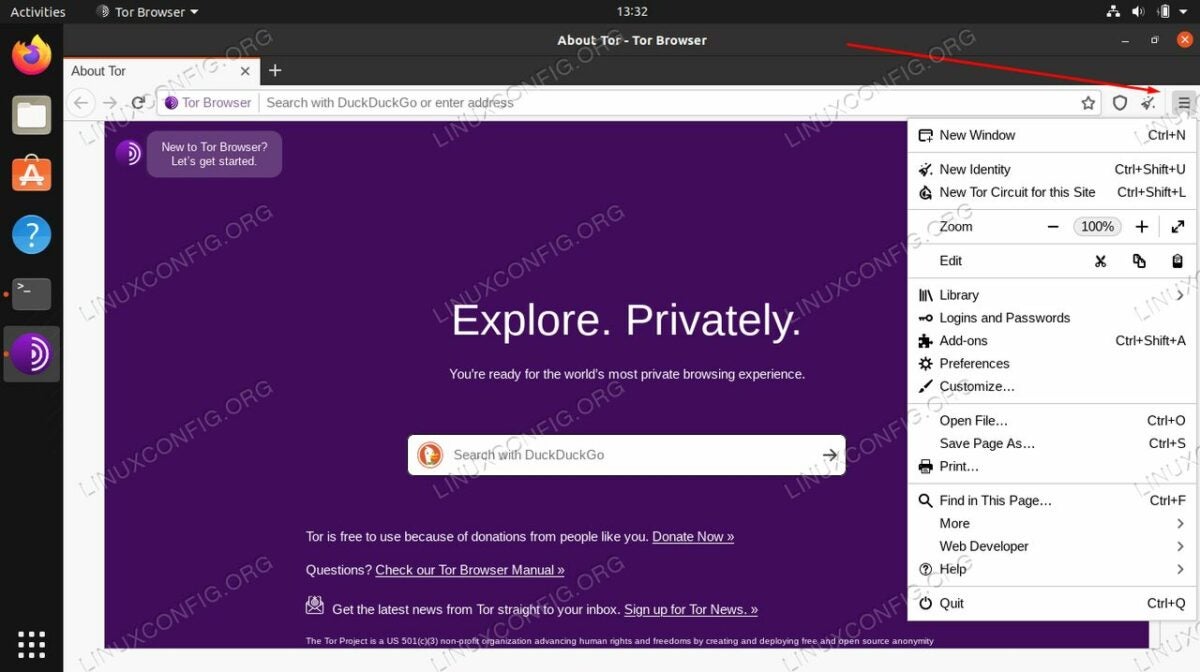
As previously discussed, security is a big issue with Tor. The browser offers various security settings that you can review by selecting the onion icon at the top left of your screen. Click on Security settings to display an intensity slider that allows you to adjust your security settings from standard to safest. The medium safer setting disables JavaScript on HTTP sites and prevents you from using some fonts, while audio and video will never play automatically. In other words, you have to manually press play to run audio and video in safer mode. The safest security setting disables JavaScript completely.
Accessing the dark web with Tor
Tor works like any other browser, but launching it is slightly more involved. In theory, you could do all your browsing in Tor, but it is far too slow to do this with any reasonable efficiency. You are more likely to encounter more CAPTCHAs than usual because the browsing behavior is considerably different from your other conventional options.
The use of VPNs when browsing the dark web with Tor can’t be stressed enough. However, the downside to virtual private networks is that they create security bottlenecks. All your traffic must necessarily run through the VPN. This means you have to trust the provider to act as a new ISP, whereas Tor is an inherently private decentralized network.
Tor and your online privacy
While Tor is an effective tool for browsing anonymously online, it is far from perfect. Even though pinging via Tor nodes is a challenge, it’s still possible. Furthermore, the dark web remains a haven for criminal hackers, spies, and other bad actors. Tor may not be a foolproof solution, but it is the best choice as of now for safeguarding your sensitive information online while navigating the dark web. Interested in improving your network security? Consider downloading these free antivirus and VPN software solutions.
If you’re a massive fan of all things Nintendo, you’re going to love this tidbit: Steam has been kitted out with support for Nintendo Switch’s Joy-Con Controllers.
Nintendo has a lot of hardware, more so than most other console manufacturers. The latest Steam update, which is still in its beta phase, focuses primarily on extended support for Nintendo’s numerous hardware setups. First off, the new Steam update adds support for the widely-used Joy-Cons. Secondly, the new update also ships with improved support for the plethora of modernized classic Nintendo controllers that have been showing up everywhere in recent years.
Valve addressed the new update to its Steam client with a short and incredibly concise set of patch notes. The gist of these was that the update exclusively affects players with a proclivity for Nintendo controllers. This is a particularly exciting update given that Nintendo Switch’s Joy-Cons now have expanded functionality outside of the Nintendo realm. They are, therefore no longer a niche purchase and rather significantly expand the ways in which players can interact with the games they purchase on Steam.
Here are the expanded patch notes, just in case we’ve missed anything:
Steam Client Beta August 4th
Added support for Nintendo Joy-Con controllers, both individually as a mini-gamepad and combined into pairs
Improved support for the Nintendo Online classic controllers
There you have it, the full patch notes for the latest Steam update.
Given that these are additions to the beta version of the Steam client, you’ll need to opt-in to test new features before you see them active. However, these additions should make it into the next stable update of Steam, so if you’re in no rush to see how this extended Nintendo controller support is going to affect your playstyle, you won’t be missing out on much.
If the new update isn’t going to change anything other than extended support for Nintendo controllers, why does it actually matter? Well, honestly, it’s all a matter of personal preference. Some gamers prefer to tackle Steam games with the now-supported DualSense controllers or newer controllers for Xbox consoles.
Other gamers prefer the simplicity or nostalgia associated with the legacy Nintendo controllers. This way, if you want to try them out and see what all the rage with these older controllers is, now you can. And if you have no interest, these updates will be nothing more than two lines of text in a set of patch notes.
We’re only a few weeks away from the commencement of the Call of Duty: Modern Warfare II beta! As confirmed by Infinity Ward at the recent Call of Duty Championship tournament, the beta release will be staggered according to console, with access hitting PlayStation first.
As has been the case with previous beta releases, the release of Call of Duty: MWII will also be staggered according to whether players pre-ordered the game or not. Those that have preordered the game will be able to play it first from the 16th to the 17th of September on PlayStation 4 and 5. On the 18th of September, the beta will open up to all PlayStation players. PlayStation early access will end on the 20th of September.
Pre-Order now for early access to the #MWII Open BETA!
Infinity Ward will also host a crossplay beta for the players who preordered the game on Xbox, PC, and PlayStation. This will kick off on the 22nd of September and end on the 23rd. The open cross-play beta, on the other hand, will start on the 24th of September and run through to the 26th. Each beta session will commence at 1 PM ET.
The Call of Duty Championship tournament was exciting for many other reasons too, however. For starters, Infinity Ward took the opportunity to tease a brand new multiplayer map that they’ve called Grand Prix. As suggested by the name, the new map is set on a racetrack and players will be able to enjoy it during the beta sessions.
On the subject of beta sessions, Infinity Ward also announced that it would be giving away beta codes that will give players early access if they haven’t pre-ordered the game yet. The publisher gave a few of the codes away at the event itself, but it has assured fans that they’ll be able to score some from prominent YouTubers and streamers as we get closer to the start date of the beta.
Infinity Ward has already given us a good deal to look forward to when the new game drops, but the publisher is expected to release even more information about its latest title as we get closer to launch. In the meantime, we can rely on the dedicated Call of Duty fanbase to pick up on leaks, as was the case recently with the leak that seems to have confirmed DMZ as a definite game mode.
AI has become increasingly intertwined with our daily lives thanks to virtual assistants like Alexa, Google Assistant, and Siri. Recently, however, we’ve been seeing innovative new AI iterations with the likes of DALL-E magically using AI to turn text prompts into images and increasingly impressive translation capabilities becoming available. Following this trend, Meta has now made available the third iteration of its AI chatbot, BlenderBot and is asking the public to help train it up.
Meta’s chatbot has had a checkered past with BlenderBot and BlenderBot 2 often exhibiting troublesome opinions. This has been the case for most AI chatbots, with Microsoft’s Tay famously having to be taken offline less than a day after it was made available because it was tweeting out hate-filled and bigoted nonsense. Meta is hoping BlenderBot 3 will be different.
The reason for the troubled past that comes with AI chatbots is the data they are trained on. As they learn from the conversations they have with human users, these naïve AIs can quickly pick up on whatever nonsense people say to them. Meta has tried to address this with BlenderBot 3 by ensuring that it won’t simply repeat what it has heard other users saying. Meta is training BlenderBot 3 with data from researchers, as well as giving it the opportunity to use the internet to find answers to questions that it didn’t know before.
BlenderBot 3 is now available for users in the US to try out. You simply have to go to this website, and you can start using the chatbot like you would use a search engine. Unfortunately, there doesn’t seem to be any way around the geolocation block either with popular and reputable VPNs not able to break through it. If you live elsewhere in the world, you will just have to wait before you can give it a try.
Meta is also asking the public to help train up BlenderBot 3 by giving feedback to the developers on how successful BlenderBot 3 is working. They are asking users to give them access to their usage data, which will help them better assess BlenderBot 3’s responses to the queries it receives.
If you are a privacy-first company like DuckDuckGo, then you are only as good as your privacy-protecting credentials. It is no surprise then that recently the privacy-focused search engine faced a backlash from users following an agreement it made with Microsoft that allowed Microsoft trackers to work on third-party websites on the DuckDuckGo browser. It now looks like that backlash has become too much for the company to take as DuckDuckGo has decided to overturn the agreement and block all Microsoft trackers. Let’s take a closer look.
DuckDuckGo struck a syndicated search agreement with Microsoft back in May, which allowed Microsoft trackers to work on the company’s own web browse despite the company’s long-standing history stating that it worked hard to block all hidden third-party trackers.
Although the browser was found to be successfully blocking trackers from Google and Facebook, the DuckDuckGo user base was not happy when security analyst Zach Edwards discovered that the browser was allowing Microsoft trackers to work unimpeded on LinkedIn and Bing domains. This is not surprising when privacy is the number one reason people use DuckDuckGo.
The company has now announced that it is rolling out an update that will block all Microsoft trackers most of the time. In the announcement unveiling the move, DuckDuckGo said:
“Over the next week, we will expand the third-party tracking scripts we block from loading on websites to include scripts from Microsoft in our browsing apps (iOS and Android) and our browser extensions (Chrome, Firefox, Safari, Edge and Opera), with beta apps to follow in the coming month.”
Some tracking will remain, however, as DuckDuckGo relies on Microsoft advertising for revenue generation meaning that limited tracking from Microsoft will be allowed whenever users click on ads when using the browser. The solution is not perfect, but it does seem good enough for Microsoft at least with a spokesperson telling BleepingComputer that improved privacy for DuckDuckGo users as well as the ability to track ad performance is a good enough solution for the software giant.
Moderating social media posts is a tough gig. When you are dealing with the population of an entire planet, it is certain that some people are going to post some of the most abhorrent material imaginable. It is the job of the moderator to protect the regular users from this material by bringing it down before anybody gets a chance to see it. This, however, brings with it its own set of problems and some TikTok moderators have been raising serious concerns. Let’s take a look at this in a bit more detail.
TikTok moderators working for a third-party company called Teleperformance claim that they have been asked to view a disturbing spreadsheet that details content that violates TikTok’s guidelines, including hundreds of images of children being abused to ensure that they know what needs to be taken down. Further to the concerns this raises for the mental well-being of the moderators themselves, they are also raising the alarm about a potential leak of the highly sensitive material as the spreadsheet is available to hundreds of people both at TikTok and Teleperformance.
This news has come to light following a report by Forbes into how TikTok handles child sexual abuse materials, which raises some frightening concerns about practices at the world’s biggest app. The report quotes on moderator as saying, “I was moderating and thinking: This is someone’s son. This is someone’s daughter. And these parents don’t know that we have this picture, this video, this trauma, this crime saved. If parents knew that, I’m pretty sure they would burn TikTok down.”
According to the report, moderators have simply been unable to keep up with the growth of TikTok, which has meant moderation efforts have often fallen outside of company policy. This led to the somewhat haphazard attitude described above being applied to training materials, which even caused employees to contact the FBI to ensure that they weren’t guilty of distributing images of abuse.
Unfortunately, moderators of all social networks will be exposed to harmful material, but it is the data privacy issues in this case that make it stand out. If the accusations are correct TikTok will have to shore up these potential data leaks that could see highly sensitive and inappropriate materials leaking onto the internet. Recently Meta had to pay out $90 million for privacy violations.
Microsoft’s Edge browser can be considered a success for the software giant as it has steadily grown in popularity ever since Microsoft switched it over to the Chromium open-source project, making it compatible with everything that runs on the Google Chrome ecosystem. Unfortunately, however, this also opens the browser up to the multitude of security issues that come with the world’s most popular operating system. This could be why Microsoft appears to be beefing up security on Edge. Let’s take a look.
As well as the usual bug fixes, performance tweaks, and general updates found in updated versions of browsers, testers have found an interesting security update in the new Microsoft Edge browser beta version 104.0.1293.44.
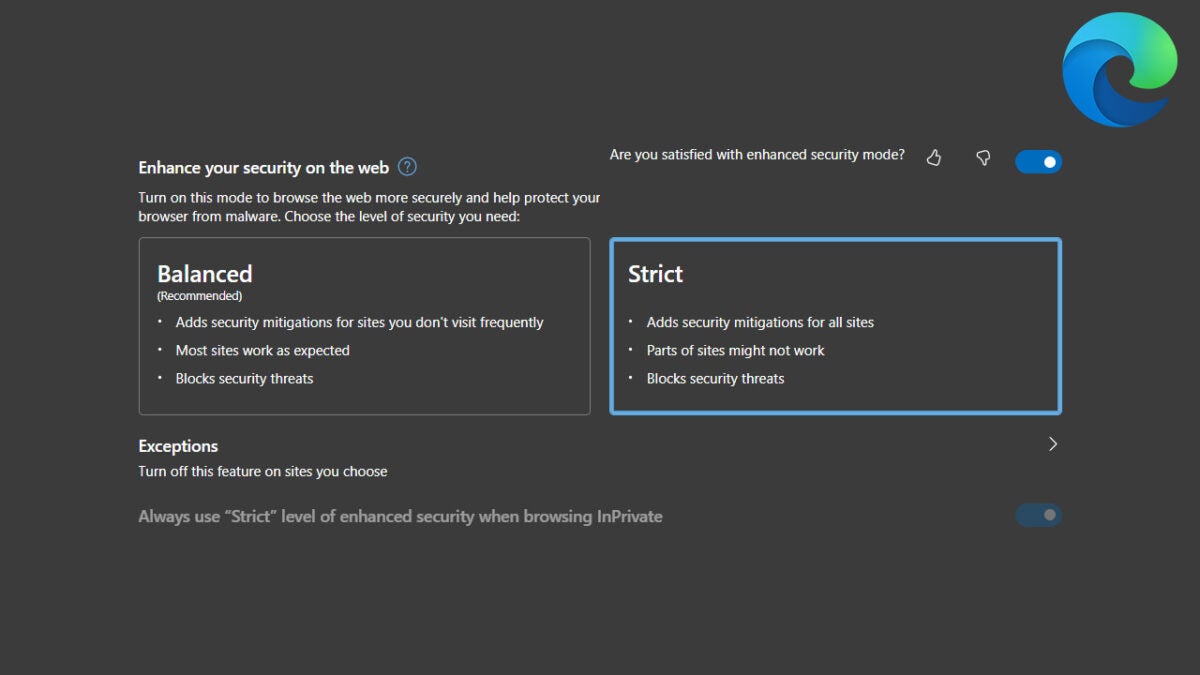
Edge offers users two different default security settings to choose from. Balanced mode adds security mitigations for sites that you don’t visit that often in a way to ensure that most sites work as the web developers intended. Strict mode does the same but ramps up the protections for all sites, including the ones you visit regularly, and doesn’t make promises about web page performance, also prioritizing security.
At the moment, Balanced mode is the default choice for all users and you actually have to activate the feature to be able to choose between them. The latest update will change this, however, enabling all users to activate the feature and select Strict mode as their default choice. Of the news Microsoft said:
“Enhance your security on the web. Improvements to Enhance your security on the web in edge://settings/privacy now include Basic as the new default option. With this option, Microsoft Edge will apply added security protection to the less visited sites. This preserves the user experience for the most popular sites on the web. For more information, see Browse more safely with Microsoft Edge.”
The move from Microsoft allows security-minded web users to bump up their security by disabling features such as the Just-in-time compiler, which makes it much harder for malicious websites and scammers to get malware onto their devices via their web browsers.
Chrome is by far the most popular web browser in the world and pure and simply because of this reason alone, it has to deal with a variety of new and evolving security threats all the time. It is no surprise then Chrome updates are usually filled with security fixes, which is the case with the latest Chrome update that you should probably go and install right away. Let’s take a look at the main details you need to know.
Chrome version 104 has been made available to all users via general release. In the update, as well as slight tweaks to features and minor performance upgrades there are also security upgrades and fixes that address 27 different security bugs that had previously been reported by third parties.
If you are sitting there worrying about whether any of these security bugs may have infected your device, you can stop right now. Google says that none of them have been actively exploited and that the move is more about boosting security proactively rather than reacting to any past exposure or exploitation. Google pays out rewards to bug bounty hunters, often in the thousands of dollars, and you can see details of these rewards in the release notes for Chrome version 104.
The fixes include closing down vulnerabilities that affect Google’s omnibox search bar, Google’s Nerrby share feature which runs like Apple AirDrop for Chromebook and Android devices, and the Dawn WebGPU implementation in Chrome.
Google has also released details of another important security update in Chrome 104, which is the removal of U2F API. This has been replaced by the newer Web Authentication API, which has become the official standard for web authentication. Google said:
“U2F never became an open web standard and was subsumed by the Web Authentication API (launched in Chrome 67). Chrome never directly supported the FIDO U2F JavaScript API, but rather shipped a component extension called cryptotoken… U2F and Cryptotoken are firmly in maintenance mode and have encouraged sites to migrate to the Web Authentication API for the last two years”
Google has long offered power users a chance to control their search results by adding prompts to their search terms. We’ve published a couple of guides showing you how to improve your Google search results. It now looks like Google is going to augment one particular search prompt as the company has released details of an update that will affect using quotation marks in your search terms.
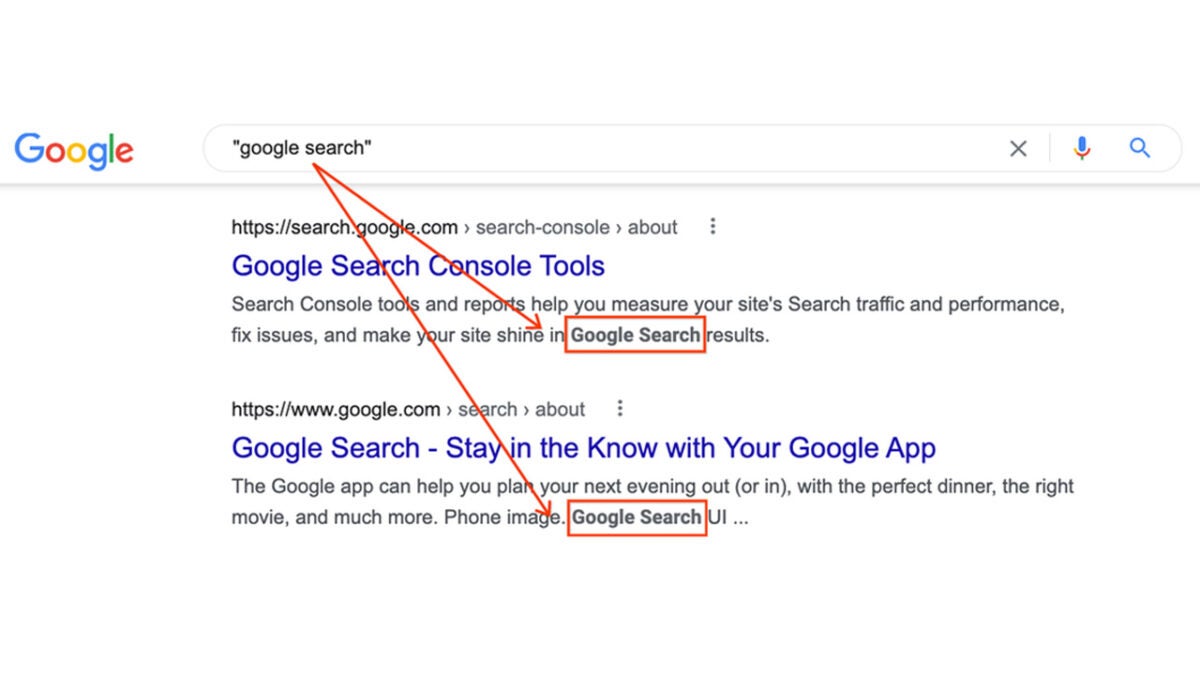
Adding quotation marks around certain words and phrases in your search terms tells Google that you only want it to show you pages that have those exact words and phrases on the page. As search has evolved, however, with Google now offering snippets of information from certain webpages right there on the search results page, Google is now looking to adjust the quotation marks search feature to work with snippets too.
The update will tailor the snippets of text shown in the Google search results around the text you have included inside the quotation marks. This means you’ll be able to see the on-page context where your key search term or phrase is being used, which should enable you to make a better and more informed decision about which search result to select. Google is also going to display the quoted text in bold to make it even easier for you to spot it in the snippets displayed in your search results.
Despite all this Google says that it is probably better to use the regular search function first and then focus your search attempts further afterwards if you haven’t been able to find what you were looking for. The search giant says:
“Using quotes can definitely be a great tool for power users. We generally recommend first doing any search in natural language without resorting to operators like quotation marks. Years ago, many people used operators because search engines sometimes needed additional guidance. Things have advanced since then, so operators are often no longer necessary.”
So that is a neat little tweak that could help you improve your Google search results and make it easier for you to find what you are searching for. In other Google-related news, Google Maps on Android is getting an exciting new upgrade.