Facebook stored hundreds of millions of user passwords insecurely

Hundreds of million of Facebook and Instagram user passwords were stored unencrypted as text on internal servers.

Facebook is becoming more famous for not being very good at looking out for its users than it is for being a social network. Although, over the last few years the scandals coming out of Facebook HQ have been much more serious and have had some pretty wide-reaching and devastating consequences, this latest blunder is the stupidest by far.

Hundreds of million of Facebook and Instagram user passwords were stored unencrypted as text on internal servers
Facebook password header
Image via: Facebook

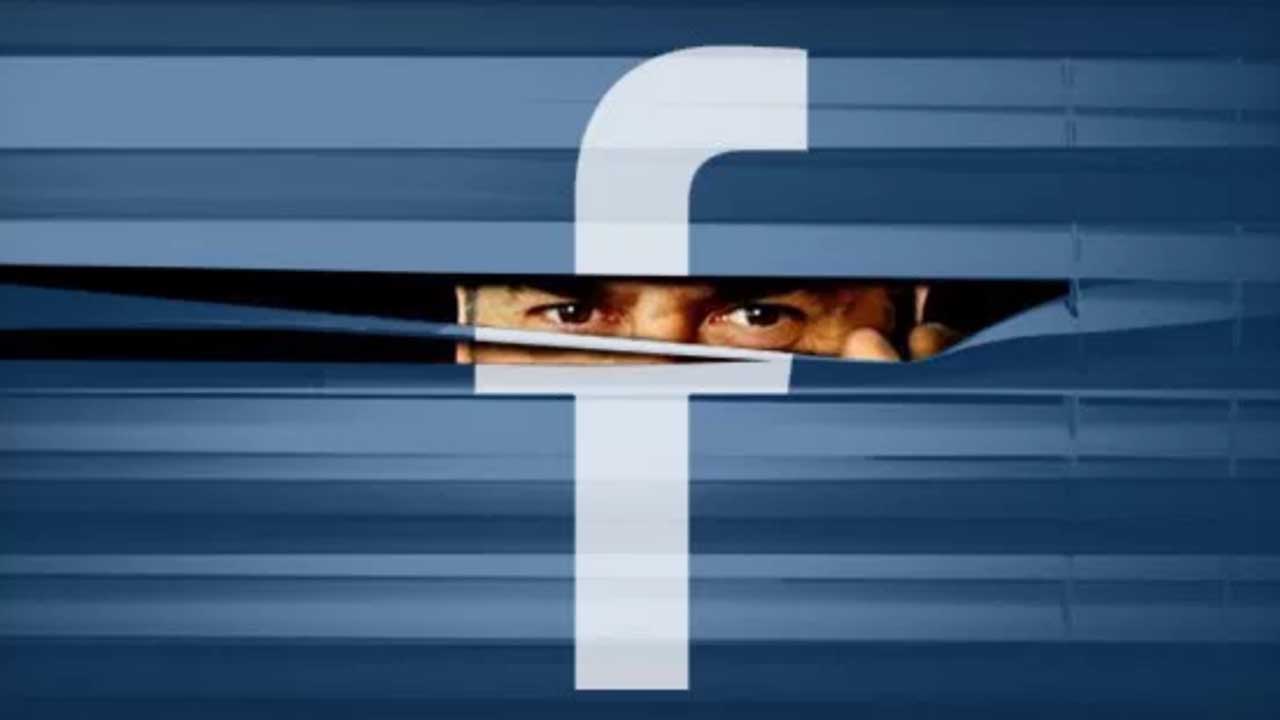
A recent Facebook blog post described how a routine security review showed that “some” user passwords were being stored in a readable text format. The post goes on to say that Facebook will be notifying all affected users and it is here that the “some” mentioned earlier magically becomes “hundreds of millions”

In the blog post, Pedro Canahuati who is Facebook’s VP for Engineering, Security, and Privacy writes, “We estimate that we will notify hundreds of millions of Facebook Lite users, tens of millions of other Facebook users, and tens of thousands of Instagram users.” If you’re a Facebook Lite user you are exponentially more likely to have had your password stored in this insecure manner at Facebook HQ.

Canahuati does go on to mention, however, that none of the passwords were visible to anybody outside of Facebook and that the company has found no evidence that any Facebook employee has abused or improperly accessed the insecure list of user passwords.

Outside of Facebook, security expert Brian Krebs has also written a blog post on the latest Facebook blunder. According to Krebs, who cites an insider at Facebook, the internal investigation “so far indicates between 200 million and 600 million Facebook users may have had their account passwords stored in plain text and searchable by more than 20,000 Facebook employees.” The insider goes on to say, “Access logs showed some 2,000 engineers or developers made approximately nine million internal queries for data elements that contained plain text user passwords.”
A lot of passwords
Hundreds of millions is a LOT of passwords

Krebs went on though to point out that the further the investigation progresses the easier Facebook’s legal team feels about the whole situation. It looks increasingly likely that although Facebook is going to have to notify all affected users, no actual password resets will be required.

This doesn’t come close to being one of the most serious scandals to rock Facebook recently. From causing depression to tracking location without permission the scandals just haven’t stopped coming at Facebook for a period of years now. This is symptomatic, however, of a wider malaise at Facebook. The social network just doesn’t seem to care about its users. Not even enough to store their passwords, which protect some of the most intimate parts of their lives, properly and in a secure manner. The social network needs to have a look at itself and start thinking about how it is going to fix itself.
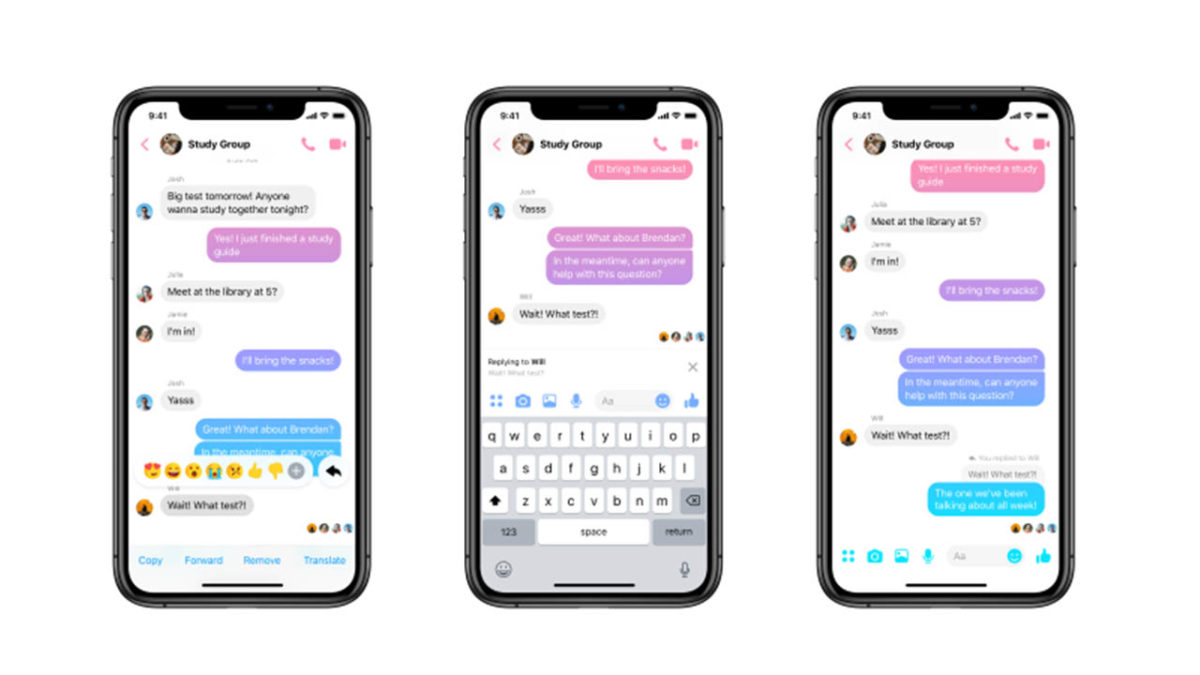
Facebook Messenger gets another WhatsApp feature

You can now send Quote Replies on Facebook Messenger.

Ever since Facebook bought WhatsApp, it has been cannibalizing all the messaging app’s best features. Over the years we’ve seen Facebook Messenger bolstered with WhatsApp features like the Delete for Everyone feature and the Unsend message feature. With WhatsApp being such a popular and easy to use messaging app, it makes sense for Facebook to want to emulate its success. So it is no surprise that Facebook Messenger now has another WhatsApp feature to call its own.

You can now send Quoted Replies on Facebook Messenger

Facebook Messenger Quote reply
Image via: Facebook

Quoted replies are an incredibly useful feature for a messaging app. Even in one-on-one chats, things can move too quickly for a conversation to flow simply and in one direction. This means you can end up answering a question that has since been pushed off your screen by other messages and replies. In a group chat, this problem is magnified. That is why being able to highlight the particular point you’re responding to and linking it to your response can help conversations flow smoothly and more naturally.

Messenger Download Messenger
7

WhatsApp has had this feature for a while and now Facebook Messenger has it, too. Furthermore, Facebook Messenger replies will appear chronologically, exactly like they do in WhatsApp. (That’s different from messaging apps such as Twitter or Slack, where replies open up their own threaded conversations.) You can reply to a message with text, an image, a GIF, or a video and it will appear in the chat just like any other message, except it will have the quoted message you’re replying to attached to the top.

How to reply to messages on Facebook Messenger

There are two slightly different methods for replying to messages on the Facebook Messenger app for mobile and on desktop. Let’s have a look at how to do both:

Replying to messages on Facebook Messenger on Desktop
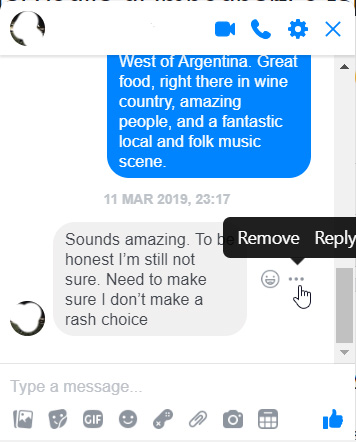
  1. Find the message you want to reply to and hover the mouse cursor over it.
  2. You should see a small emoji icon and a three-dot “…” icon appear next to the message.
  3. Click the three-dot icon and then hit Reply.
  4. Respond to the message however you see fit.

how to reply to messages on Facebook Messenger

Replying to messages on Facebook Messenger for Mobile
  1. Find the message you want to reply to and hold your finger down on it.
  2. Press the Reply button.
  3. Respond to the message.

There you have it, a simple way to better organize your Facebook Messenger chats. This method is available now to all Facebook Messenger users. It is worth noting, however, that at the time of writing, the feature wasn’t working on the Messenger Lite app.

Facebook Messenger jumps on the Dark Mode bandwagon

Dark Mode for Messenger is available now. Here’s the secret to unlocking it.

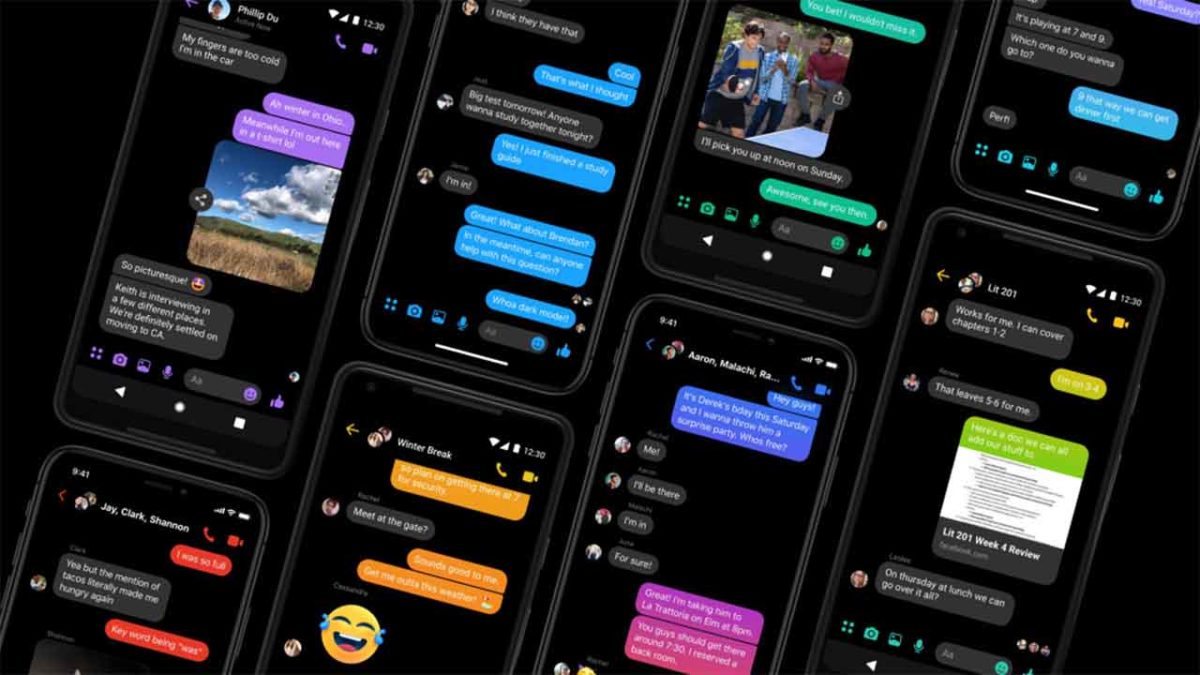
Dark modes have been around for a while now. They offer users the chance to go easy on their eyes by swapping out bright white backgrounds for dark greys and blues, or more commonly pitch blacks. Dark modes work well at night, but many people choose to use them all them the time. Also, on top of the aesthetics of it all, dark modes can actually help increase your phone’s battery life. This latest announcement from Facebook then is all good news.

Dark Mode for Messenger is available now, via secret code, but will roll-out in the settings menu soon

Facebook Messenger in Dark Mode
Image via: FB Newsroom

Ever since we first reported on all the changes coming to Messenger via the much-hyped Messenger 4 launch, we’ve been waiting with bated breath for the dark mode. It has finally come, although via a rather interesting path.

If you follow Softonic and read our articles regularly, you’ll have read a post from a while back about how to find secret games in Messenger. Basically, on mobile, you unlock a secret basketball game by sending the basketball emoji to your friend and then clicking the sent emoji. This unlocks the game that you then play against your buddy, seeing who can get the highest score. It also works with the soccer emoji and now, it is also how you unlock dark mode on Facebook Messenger.

Messenger Download Messenger
7

How to unlock Dark mode on Facebook Messenger

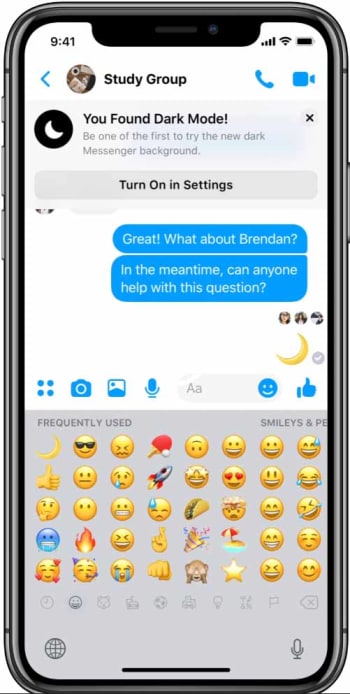
To unlock the new Facebook Messenger dark mode, you need to send the crescent moon emoji to a friend. When you do this, your chat will rain with happy crescent moons and you’ll see a box drop from the top of your screen telling you that, “You Found Dark Mode!” and giving you the option to turn it on in Settings. Clicking the option will create the Dark Mode toggle button in Messenger Settings and flipping the switch will change the background from black to white.

Messenger Dark Mode unlock screenshot

In the blog post announcing the change to Messenger, Facebook said, “Messenger’s dark mode provides lower brightness while maintaining contrast and vibrancy. Dark mode cuts down the glare from your phone for use in low light situations, so you can use the Messenger features you love no matter when or where you are.”

This all means that dark mode is now available to all Facebook Messenger users who are prepared to send a friend of theirs the crescent moon emoji. If, for whatever reason, you don’t want to send the moon emoji to any of your friends, don’t worry. Facebook has already announced that the feature will be added to everybody’s settings menu, whether they send emoji or not, in the coming weeks.

Everything you need to know about Facebook Messenger’s unsend feature

Here’s how to use Unsend, and why it may not solve all our problems.

messenger

It’s finally here.

Facebook Messenger now lets you unsend messages that perhaps should never have gone out in the first place. You’ll have 10 minutes to make up your mind, too.

If you’re a WhatsApp user, you’re already familiar with the app’s unsend feature — and its generous 60-minute unsend period. Or, Instagram’s unlimited window for takebacks.

And many of us have long been users of the Gmail unsend add-on, and lately, ephemeral apps that range from the fun (Instagram Stories, Snapchat) to the secure (Signal, Telegram).

Facebook Messenger Download Free
8

The basic rundown: what is Facebook Messenger Unsend?

We’ve already gone over how to “unsend messages.” But there’s been a lot of noise surrounding the topic since the feature was initially announced last year.

The new feature is available in version 191.0 of the app and Facebook says it comes in handy if you send the wrong information, photo, or message the wrong thread.

The feature allows you to rethink that text, and take it back. However, many critics feel that the timeframe is too short, and the feature doesn’t go far enough. Facebook says the limits imposed are an attempt to cut back on bullying.

We looked back at how the media reported on the feature — and there were several reports of bullying experts saying the feature was a bad thing — a step in the wrong direction for combatting the problem of cyberbullying. In April, experts told Business Insider that deleting messages could be used to gaslight victims.

Or this point raised by Sarah Jeong, who worries that the feature would allow sexual harrassers to send and unsend evidence.

Interestingly, the feature was announced Facebook employees discovered Mark Zuckerberg himself had been deleting messages.

Of course, this resulted in an uproar; users were not happy that Facebook execs like Zuckerberg could delete messages while average Joe Facebook could not.

Can you delete a message before someone reads it?

Yes, provided you act fast enough.

The reality is — you can’t control whether someone sees your message before you delete it.

So hopefully, you luck out. The difference between Facebook’s unsend and Gmail’s is, Gmail builds in a delay — that’s why you only have a few seconds to make your choice.

Facebook sends the message as usual but gives you a window of time to delete it. They don’t let you control who sees the message.

Facebook’s Help section says that there’s nothing keeping from people seeing your message — which, given that Messenger is a chat app, it’s likely they’ll see the message come through right away.

This means you still need to be careful about what you send.

Can you delete messages from both sides?

The unsend feature aims to reduce that embarrassment that goes hand-in-hand with sending out a text-based mistake. Or maybe a photo. You’ll have two options, you can choose to remove a message from your end only or remove for everyone.

Facebook unsend settings

Unfortunately, once that 10-minute period expires, the “remove for everyone” option is off the table — and your friend now owns that message.

The second is the less useful, “Remove for You,” which clears your screen of unwanted missives. There’s no time limit on this one — and it lets you at least forget about the embarrassing messages you’ve sent to your friends, even if it’s too late to erase it from their side of the thread.

We tried researching some workarounds for deleting messages after the 10-minute limit. Unfortunately, the advice is all quite convoluted and involves marking messages as spam or abuse. Or, flat out deleting your account.

Not exactly helpful.

You also can’t permanently delete messages

Should you be able to delete messages at any point? We don’t actually know how long Facebook hangs on to chat records.

We do know that if, say, you’re harassing someone online and delete the evidence, Facebook can still access the initial record.

Admittedly, we thought this feature was meant to be a convenience. Along the lines of Gmail’s unsend, the initial interpretation was: I can delete that message that I immediately regretted. Or, “Oh god, there’s an error,” etc.

In the end, it’s never been more obvious that if privacy features like being able to completely delete a record are important to you, Facebook isn’t the messaging app that meets your needs.

We’re torn on whether we think anything is wrong here — we like the crackdown on hate speech and the moves toward reducing cyberbullying are admirable.

However, this is a good reminder that all apps come with a certain set of risks — and it’s a good idea to familiarize yourself with how all of Facebook’s features work.

If you’re worried about Facebook storing your messages, it might be a better idea to use a fully encrypted app instead.

Here are a couple of options:

Signal Private Messenger Download Free ►
8
9

Facebook Messenger: Is this the new feature we’ve all been waiting for?

How to unsend messages on Facebook Messenger

facebook messenger

Being able to communicate with our friends at the click of a button on our smartphones has revolutionized modern life. We can now easily and securely talk to our friends anywhere in the world using any one of a number of free messaging apps. Despite our new technologically influenced powers, we all remain human, which means we can all make simple mistakes. This is why WhatsApp introduced the “Delete for everyone,” feature that allows users to delete messages they’ve sent in error. Facebook Messenger now has a similar feature too. You can now Unsend messages on Facebook Messenger.

As Facebook owns WhatsApp, it will probably come as no real surprise that the new Facebook Messenger Unsend feature is very similar to the WhatsApp Delete for everyone feature.

Messenger Download Messenger
7

How to unsend messages on Facebook Messenger

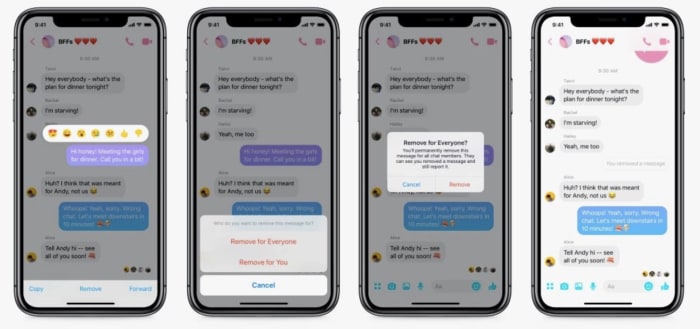
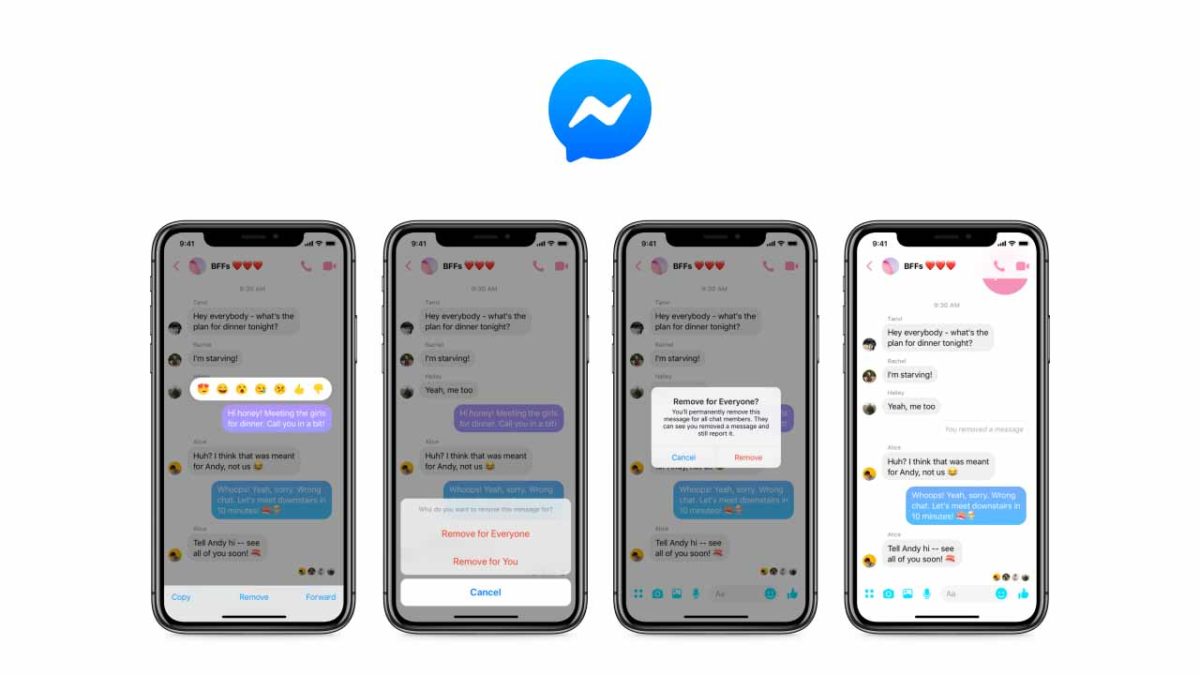
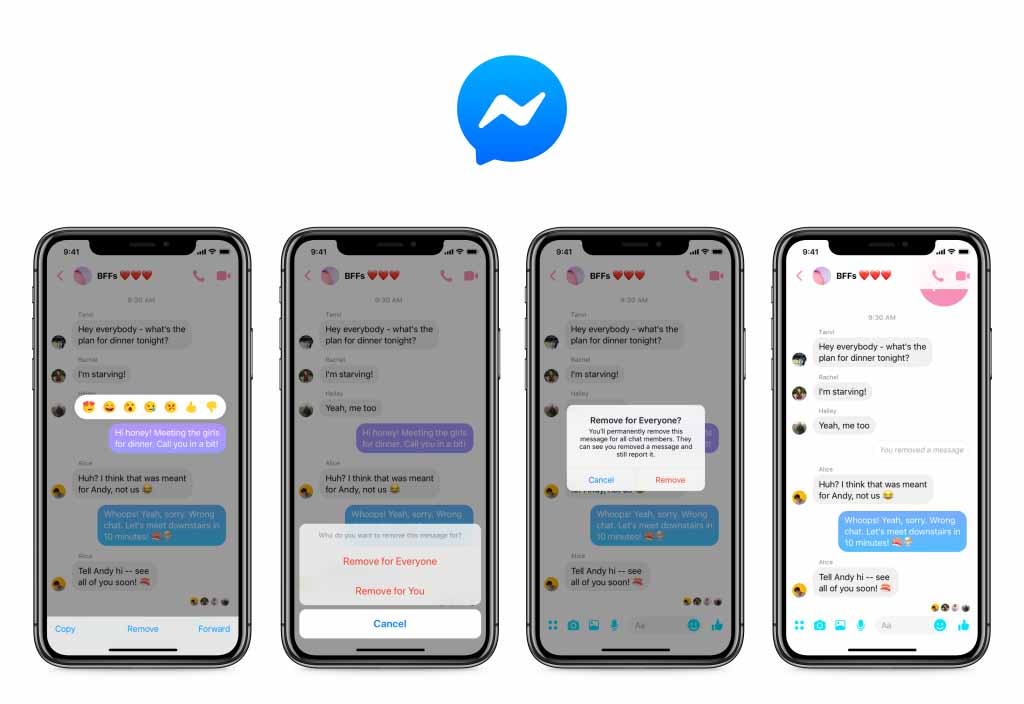
Thanks to this change, you now have 10 minutes to select messages they’ve sent but don’t want anybody to see. To select a message to be unsent, all you have to do is tap it to open up the message menu. From there you simply click the “Remove for Everyone” option and Messenger will delete it. Just like on WhatsApp, the message will be replaced with a notification for everybody involved in the conversation that says a message has been deleted.

As well as the Remove for Everyone option, Messenger also has a “Remove for You” setting. Selecting this option will delete the message in question from the local chat on your device. It will remain, however, for everybody else who is involved in the conversation.

Screenshots of Messenger unsend for everyone

It was back in April when Mark Zuckerberg first acknowledged the fact that the company has been deleting his and other Facebook exec messages for some time. The feature was first developed after the Sony Corp. data hack back in 2014 but only as a way for Facebook execs to delete their messages. It wasn’t originally planned for a general roll-out. The public response to Zuckerberg’s admission, however, pushed the social giant to start work on bringing the feature to all users.

With all users now having a 10-minute grace period that allows them to delete messages from their friends’ inboxes after they’ve been sent, Facebook can say it has come good on the promise it made back in the Spring. The only caveat to the roll-out of the Unsend for Everyone feature is that it is only available on Messenger for mobile. If you use Messenger on an Android or iOS device, you should already have the option to Unsend for Everyone. If you use Messenger on a PC or Mac, however, the option will not be there. Facebook hasn’t said whether the Unsend feature will make it to Messenger for desktop.

A strange Facebook bug brings up bad memories

Some Facebook users have been receiving old messages from their past as if they’re new messages from today

facebook messenger sending old messages

Nostalgia is a powerful beast. We love to look back with rose-tinted glasses that only allow us to see the good things or to just flat-out remember something that never actually happened. The ideas we have about our past are much more important than reliving what actually happened. In fact, whenever we do revisit something from our past, we’re often disappointed. This is why we should never actually re-watch the TV shows from our childhood. (Sorry, adult you, they don’t hold up.) This is also why a strange bug that has been affecting Facebook Messenger has ruffled a few feathers among users.

Some Facebook users have been receiving old messages from their past as if they’re new messages from today

Facebook users have taken to Twitter over the last couple of days to highlight a strange phenomenon they’ve been experiencing on Facebook Messenger. It seems that the messaging app has been sending old messages to their inbox as if they’d just been sent. In many cases, these old messages have been serving up embarrassing and sometimes even painful memories.

Speaking to The Verge about this strange problem, Facebook acknowledged that something is off and that the company is looking into it. “Some people are seeing older messages on Facebook.com. We are aware of the issue and are actively working to resolve it in as soon as possible… We apologize for the inconvenience.”

This issue offers another cold reminder that Facebook retains all of your old data. Unless you take the step of actively deleting your user history, Facebook and Messenger retain it all. Everything you’ve done on the big blue social network is just sitting there on Facebook’s servers. This strange new bug seems to have tapped into past conversations in some way and is serving up the old information as if it is a new interaction.

Facebook faced a similar issue to this when it On This Day feature began resurfacing painful memories back in 2015. The issue then was related to the algorithm being unable to differentiate between the positive memories it was supposed to highlight and the painful memories it wasn’t. This issue is different, however, as it is related to a general bug in the code rather than specific feature not working properly.

Since affected Facebook users took to Twitter, Facebook has said that it has resolved the issue. According to another statement made to The Verge, “Earlier today, some people may have experienced Facebook re-sending older messages. The issue, caused by software updates, has been fully resolved. We’re sorry for any inconvenience.”

Apparently, the issue was nothing more than a bit of errant code running wild while system-wide updates took place. This particular problem has gone away, but the reminder remains. Facebook keeps all of your data and is vulnerable to bugs taking control of that data in unforeseeable ways. Think about that. Are you feeling nostalgic all of a sudden for those innocent days before the dawn of social media?

Will we be able to unsend messages on Facebook?

Wish you could take back that message? Facebook may make that a reality.

Even though Facebook’s own terms of service don’t reference or indicate that the company can remove content from messages or accounts (unless it violates community standards), Mark Zuckerberg has confessed that the company has secretly deleted messages that he himself has sent. “We did so in full compliance with our legal obligations to preserve messages,” said a Facebook Spokesperson to TechCrunch back in Spring. Considering that users cannot delete messages from a recipient’s inbox at all, this generated a lot of justifiably angry accusations of hypocrisy.

In response to this leaking out, Facebook announced the following morning that it was now planning to incorporate this feature for all users.

Considering that they’ve already used it, it seems only fair.

Once this is integrated, users will be able to easily remove messages from both sides of the conversation. Right now it looks like this function will be on a timer, which implies that users will have only a window in which to decide whether they want to retract their message. How long this window lasts has not been disclosed either.

Soon we'll hopefully be able to delete messages as well.

Perhaps this is to eliminate awkward situations where users go back several weeks or months, delete something they said, and then claim never to have said it all. It’s a stretch, but honestly we’re just happy to see this function incorporated at all.

How do we know this is happening?

Besides rumor of it popping up left and right, we’ve actually seen it in action thanks to insider Jane Manchun Wong.

“We have discussed this feature several times,” The Verge quoted a Facebook spokesperson saying. “We will now be making a broader delete message feature available. This may take some time. And until this feature is ready, we will no longer be deleting any executives’ messages. We should have done this sooner — and we’re sorry that we did not.” We’ll begrudgingly accept the apology if we’re allowed to do it, too. Otherwise, this is pretty shady.

How will it work?

Deleted messages are still visible to the chat recipient.

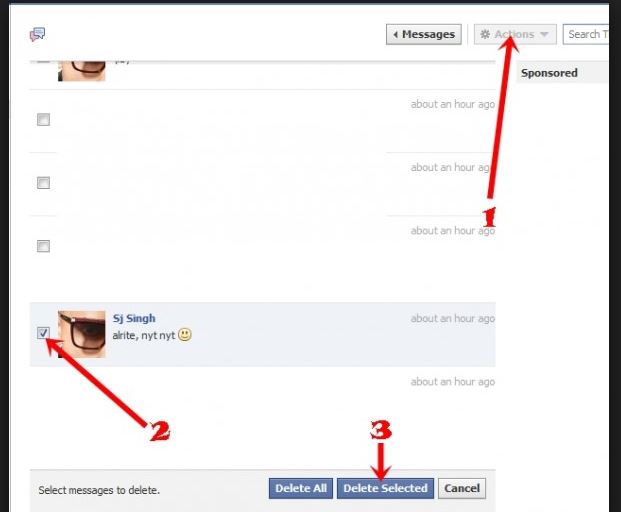
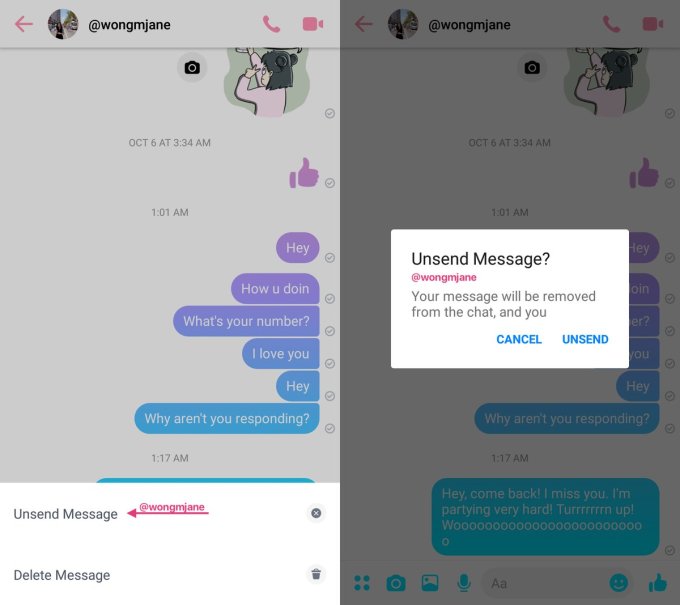
Until it’s fully integrated into Facebook, we can’t guarantee specifics. What we do know so far is that when you’re editing a message (either by click the ellipsis to the left of your chosen message or by clicking the Actions button (see above pic)) a new prompt will appear:

New unsend option

The prompt shows up at the bottom of the window asking if you’d like to ‘Unsend Message.’ Click it and another window opens asking you to confirm your decision. Do so and you’ll receive a notice that reads “your message will be removed from the chat, and you.”

Utility vs. new problems

The usefulness of this feature practically goes without saying. How many times have people said something they regretted, disclosed private information, or wish they could re-word something? People may begin to talk more openly over Facebook knowing that there’s a safety net to retract mistakes.

The bad news is that this also opens new opportunities for abuse: Imagine if online harassers could say whatever they wanted, then delete the evidence before anyone else could see it.

As for when this feature will be fully implemented we don’t have any specifics. Until it does, watch what you type!

Facebook wants to become your local mall

Facebook loves ads. Ads are what have made Facebook the Silicon Valley giant it is today. Ads pay the bills, and any time Facebook expands into a new space, ads quickly follow. Recently, we’ve seen auto-playing video ads introduced across the Facebook platform and even inserted into your private conversations on Messenger. Well now, Facebook wants its ads to evolve, and is going to use AR (augmented reality) to help them do so. Think Snapchat filters, but for products you might want to buy.

Augmented Reality ads to try on products in Facebook
Soon you’ll be able to try on products in your Facebook News Feed

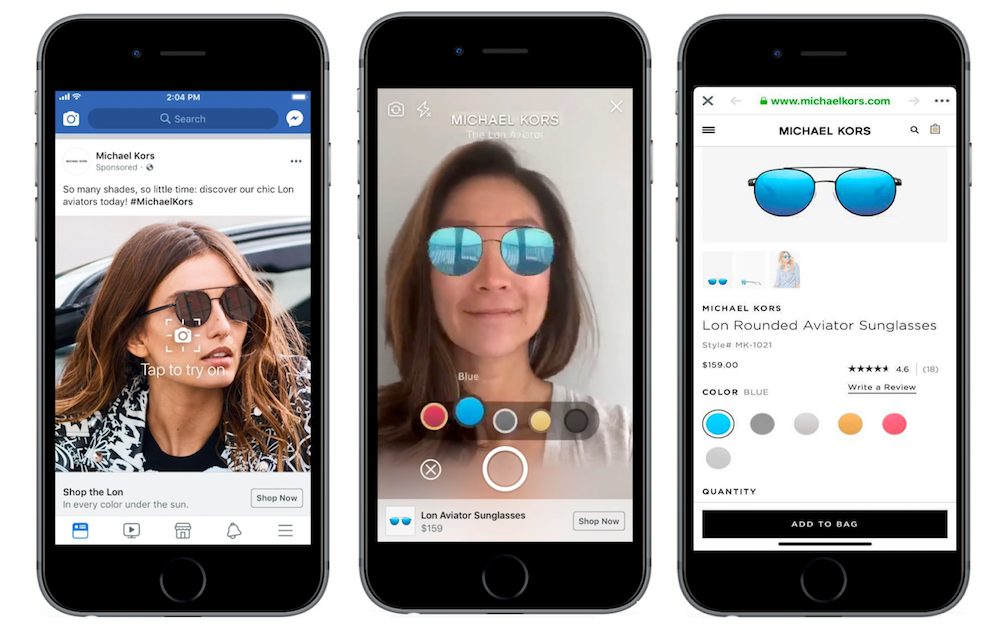
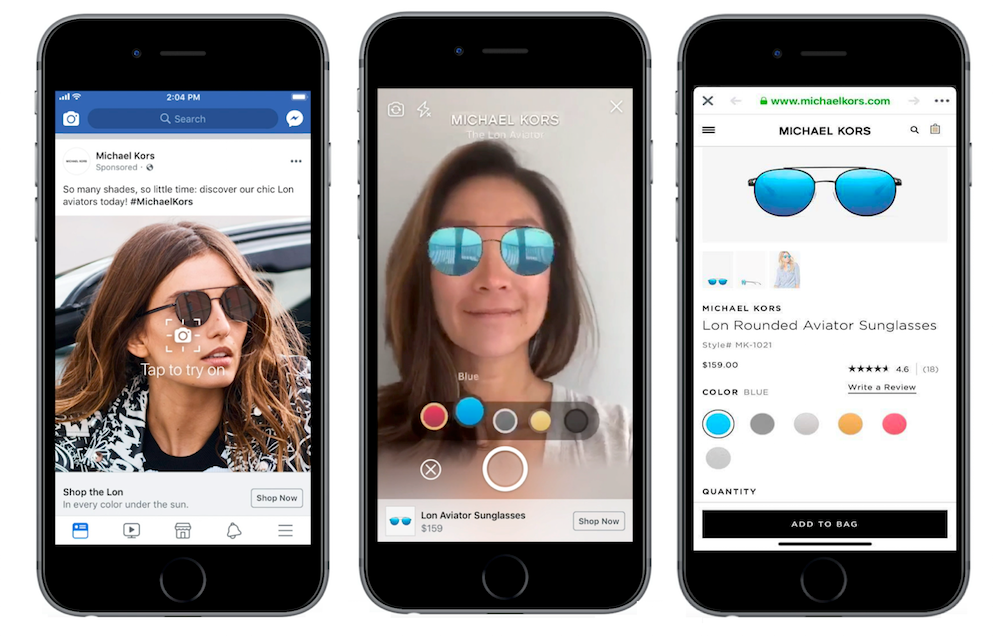
Facebook has already begun testing these new ads in the U.S. with Michael Kors sunglasses. The ads pop up in people’s News Feed and allow users to try on the sunglasses virtually using the AR filters. Other brands that will start implementing AR ads later this summer include Sephora, Bobbi Brown, Pottery Barn, Wayfair, and King.

At a launch event, Facebook’s global marketing solutions vice president of product marketing, Ty Ahmad-Taylor, described the ads as akin to trying on clothes in a store. He said:

“People traditionally have to go into stores to do this… People still really love that experience, but they would like to try it at home.”

He added this new type of ad,

“bridges the gap.”

In short, Facebook wants to become your local mall

These new AR powered ads appear completely normal in the News Feed, but they have a special Tap to try it on button, which opens up the AR features.

Since the Cambridge Analytica scandal has hit Facebook’s credibility hard, the social media company has refrained from moving into new spaces like a Facebook smart speaker, for example. This means Facebook is relying on ad innovation across its current products to maintain growth. As well as these new AR ads, Facebook also announced a new Video Creation Kit for advertisers, which will give advertisers access to a much more engaging template for ads on mobile.

These new ads seem fun and could be very effective. Do you think you’ll be persuaded to try something if you see the “Tap to try it on” button in the future?

(function(d,s,id){var js,fjs=d.getElementsByTagName(s)[0];if(d.getElementById(id))return;js=d.createElement(s);js.id=id;js.src=’https://embed.playbuzz.com/sdk.js’;fjs.parentNode.insertBefore(js,fjs);}(document,’script’,’playbuzz-sdk’));

Popular Facebook app hacked. Millions of users affected

The popular Facebook app Timehop, which highlights users’ old Facebook content has been hacked. The attack took place on the July 4 and resulted in the data of over 21 million users ending up in the hands of hackers.

The popular Facebook app Timehop, which highlights users’ old social media content has been hacked. The attack took place on the July 4 and resulted in the data of over 21 million users ending up in the hands of hackers. Due to the breach, Timehop has suspended all the social media permissions it held and has begun alerting its users.

Over 21 million users have been affected by the Timehop hack

In a blog post detailing the attack, Timehop claims to have discovered the attack while it was taking place. While the company was able to interrupt the attack, some user data was still taken. This data includes names, email addresses, and about 4.7 million user phone numbers. Timehop reports that no private/direct messages, financial data, or social media or photo content, or Timehop data including streaks were affected by the attack.

Timehop users who want to continue using the service will have to re-authenticate the Timehop apps they’re interested in keeping. Until affected users do this, as the apps no longer have permission, their apps will be running dormant. Any apps that are re-authenticated will receive a secure permissions chip, replacing the compromised chips affected by the breach.

The reasoning behind the breach seems to be an issue with the security of the cloud computing service Timehop was using:

“The breach occurred because an access credential to our cloud computing environment was compromised. That cloud computing account had not been protected by multifactor authentication…”

Timehop hasn’t released the specific details of the breach, but the lack of two-factor authorization means a hacker only needed to guess the password of the account to access all of the data.

Timehopp data breach 21 million users affected
Users will have to re-authenticate Timehop apps

This breach only highlights further the importance of taking adequate security measures to protect your data, with two-step authorization being a minimum level of security these days. Now could also be a good time to take a look at the permissions you’ve been giving to third-party apps via your social media and Google accounts. Apps like Timehop take our details and then we don’t even use them that often, while our details remain part of a database that is attractive to thieves and scammers. For information on how to secure your data, check out any of the Softonic tutorials below.


Top 6 tricks for Facebook comments

Do you regularly use Facebook and its comment feature? Comments on the social network are becoming more and more important to users, so much so that Facebook is constantly making updates to enhance this feature. Despite all these changes, many Facebookers don’t know the latest advances. If you’re one of them, today we’re bringing you the top six tricks for Facebook comments.

Add visual effects

Facebook has implemented a series of completely free and automatic visual effects. For example, if you add a “Congratulations” to the comments, the social network will add balloons and lots of confetti. Users won’t see it unless they hover their mouse over it, so it’s like a secret… but not that hidden. Also, there are other words such as “xoxo,” “hugs and kisses” or “congratulations.” Try them out, they’re great.

Remove visual effects

We’ve told you how to enable visual effects using words, but maybe you don’t want to have these specific animations. You can disable them. To do this, just click on the three dots that appear to the right of each comment. In addition to the classic commands of “edit,” “delete,” etc., you’ll also see one that says “Remove text effects.” Click there and say goodbye to the problem.

Edit comments

We’ve mentioned this above, but it’s key to highlight: you can edit your comments, too. Click on the three dots and click “Edit.” This way, you’ll be able to change any error you may have made. Of course, we’ll warn you that once you edit a comment, you’ll have to wait a little while to go back and edit it again if you want to.

Change the text font

Facebook doesn’t let you change the default font, but you can paste a text from another source to the social network. For example, Lingojam is one of the most popular web pages for recreating this effect. You just have to write the text you want and in the box to the right, the font will appear as requested. Copy and paste it into the Facebook comment box.

Change the privacy settings

Every post you write on Facebook has several privacy options. By default, it usually comes with comments enabled for friends only, but you can make it so your comments also appear for “friends of friends” or the general “public.” Our advice is that you set the privacy settings to friends only, though it’s up to you.

Add GIFs

It may be a little hidden, but there are several icons on the comments bar. The first is for emoticons, the second is for uploading an image… and the third is for GIFs! This effect brightens up any comment, so go nuts! Facebook’s database is bigger every day, so you’ll definitely find the GIF you want.