How to add your own music to Skyrim in 5 easy steps

It’s not hard to switch your Skyrim soundtrack. Here’s how!

skyrim music

Jeremy Soule made some of the best music to ever grace an open-world RPG when he composed the soundtrack for Elder Scrolls V: Skyrim. After nine years and hundreds of in-game hours, however, even the greatest soundtrack can get a little stale. Now there’s a way to add your own tracks to the game – tracks that follow the same rules for trigger events as Soule’s original music.

The best thing about it?

The process is very easy and requires zero coding knowledge. In fact, you don’t even need to use the Creation Kit. Here’s how to do it in 5 easy steps:

The Elder Scrolls V: Skyrim Special Edition Free Download
8

5 easy steps to add your own music to Skyrim

1. Download this mod

No_Aardvarks_Allowed created this Personalized Music mod for Skyrim back in March 2012 and was still treating it with updates four years later. This top-notch work is available both for the original version of Skyrim and for Skyrim: Special Edition which came out in October 2016.

This mod is the crux of the process, so it’s a good thing that, as with all Skyrim mods, it’s 100% free to download. As such, we encourage you to support and sponsor No_Aardvarks_Allowed for his hard work making Skyrim an even more unique experience for you. We also recommend installing Nexus Mod Manager to make the download process as streamlined as possible.

There’s also an option to download this mod while simultaneously removing all the default music from Skyrim. Click the first file on the page if this is your preference.
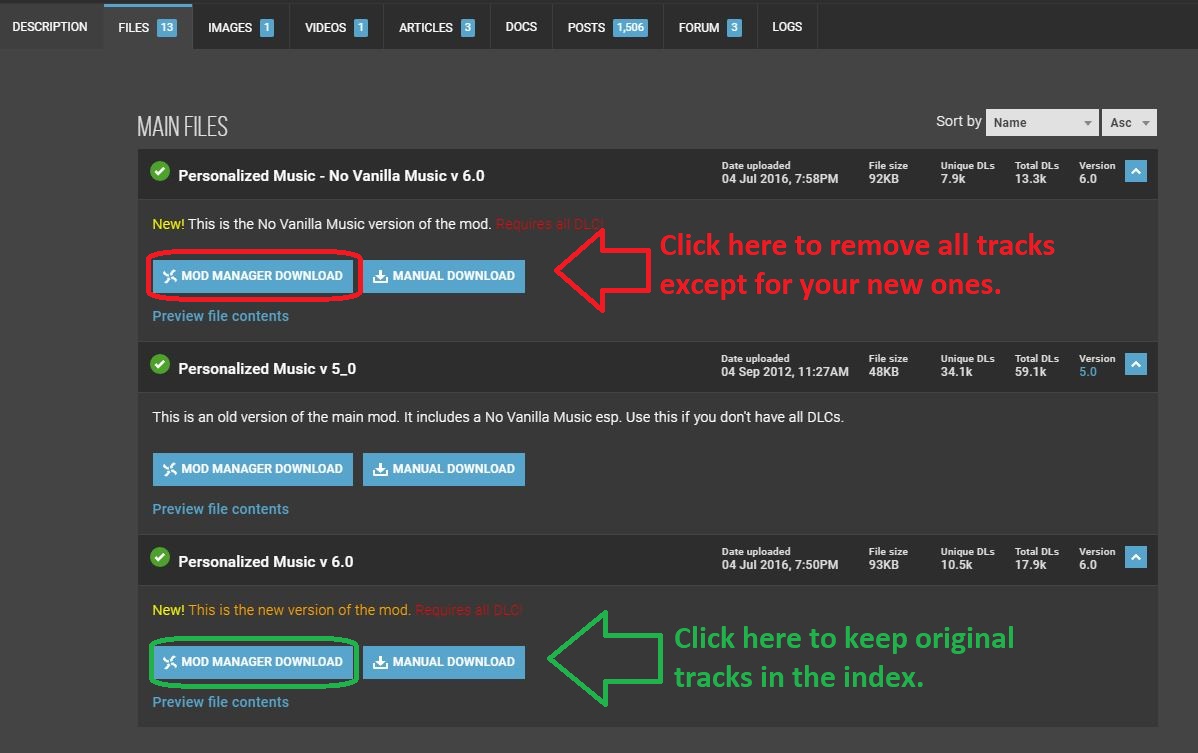
We like to keep them in; they're great, just a little overused by 2019!
Choose whether you want the original Skyrim tracks to remain in rotation.

2. Download this program to convert your music files
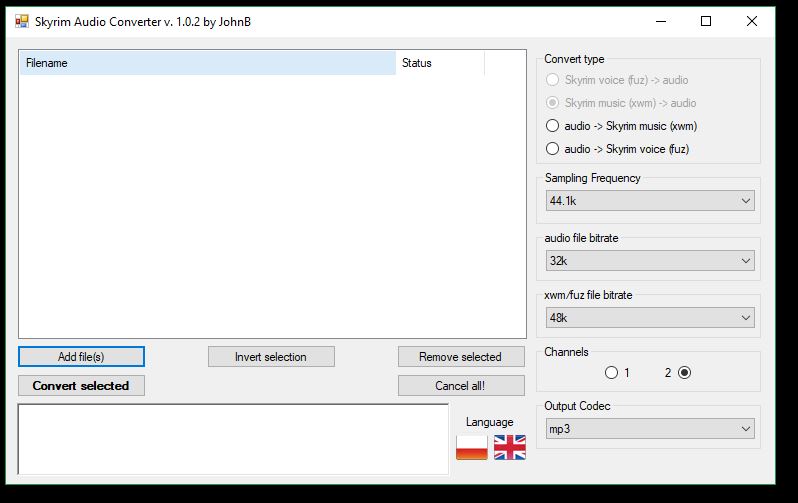
You can use .wav files too, but they're heavier and take more space.
Skyrim Audio Converter makes swapping files to .xwm as easy as possible.

Skyrim only recognizes audio files with a .xwm extension. This handy mod created by JohnBSkyrim is a lightweight package that’s easily installed and easier still to use. Grab it here, unzip the file using your favorite extractor and run the super quick install.

WinRAR Download
8

3. Convert your audio file

Once you have your audio file (whether it’s .mp3 or .wav doesn’t matter), open the Skyrim Audio Converter program that you just downloaded in the previous step. You might also want to copy the path where your audio track is so that you can easily paste it; Skyrim Audio Converter is going to ask for that path in just a sec. Click ‘Add file‘ and paste in that path. Then select the audio file you want the program to convert.
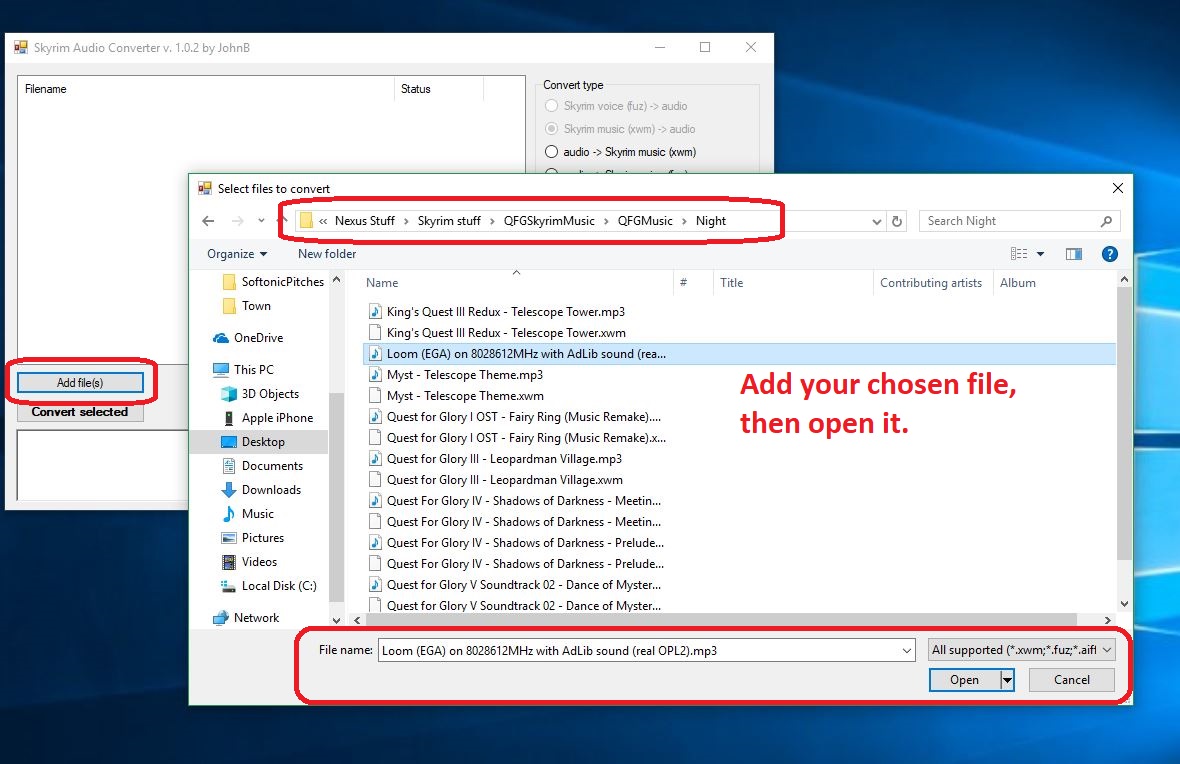
Then you convert it in the next step.
Click ‘Add file,’ locate it, then open it.

Click ‘Convert selected‘ and the audio file will convert (should take about 2-3 seconds) and magically appear in the same folder where the original audio file, now with a shiny new .xwm extension.
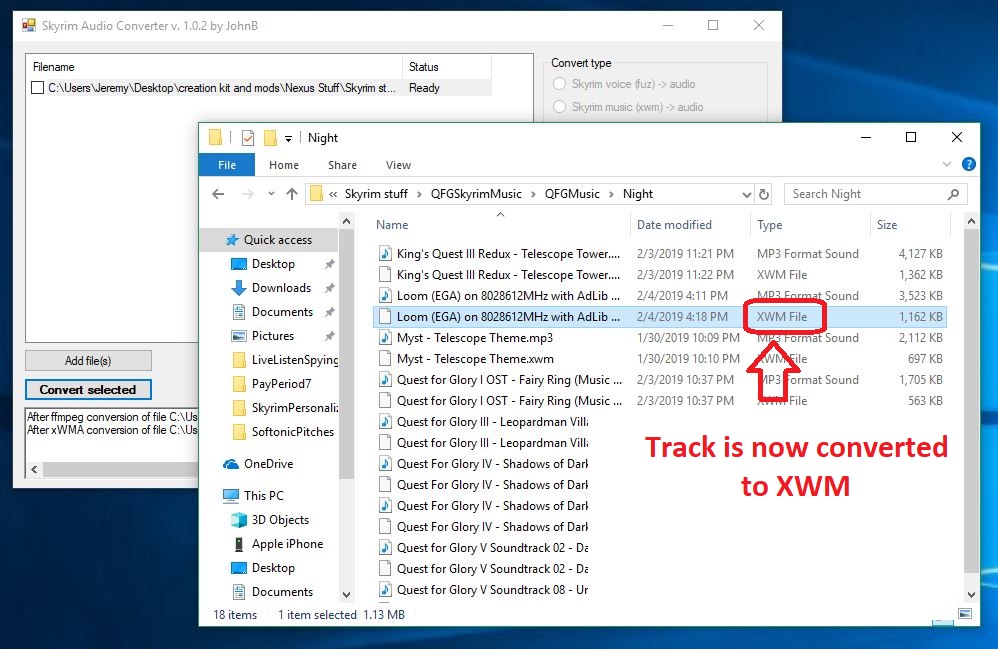
Now on to the fun part!
Now the audio file can be recognized by Skyrim’s engine.

4. Place the .xwm file in your chosen folder

Now all you have to do is put that soundtrack file in the folder of your choice. The options are laid out in front of you right here. Just paste this path into your File Explorer:

For original Skyrim:

C:\Program Files (x86)\Steam\steamapps\common\Skyrim\Data\Music

For Skyrim: SE:

C:\Program Files (x86)\Steam\steamapps\common\Skyrim Special Edition\Data\Music

Want it to play during combat? Maybe in an icy cave? In the Soul Cairn? There’s a folder for pretty much every event trigger, so the choice is yours. Check here for a description of when each folder will play. Simply open the folder and paste your newly-converted audio file right inside. Most folders can hold 20+ tracks so there’s tons of space for you to add as many tracks as you like!
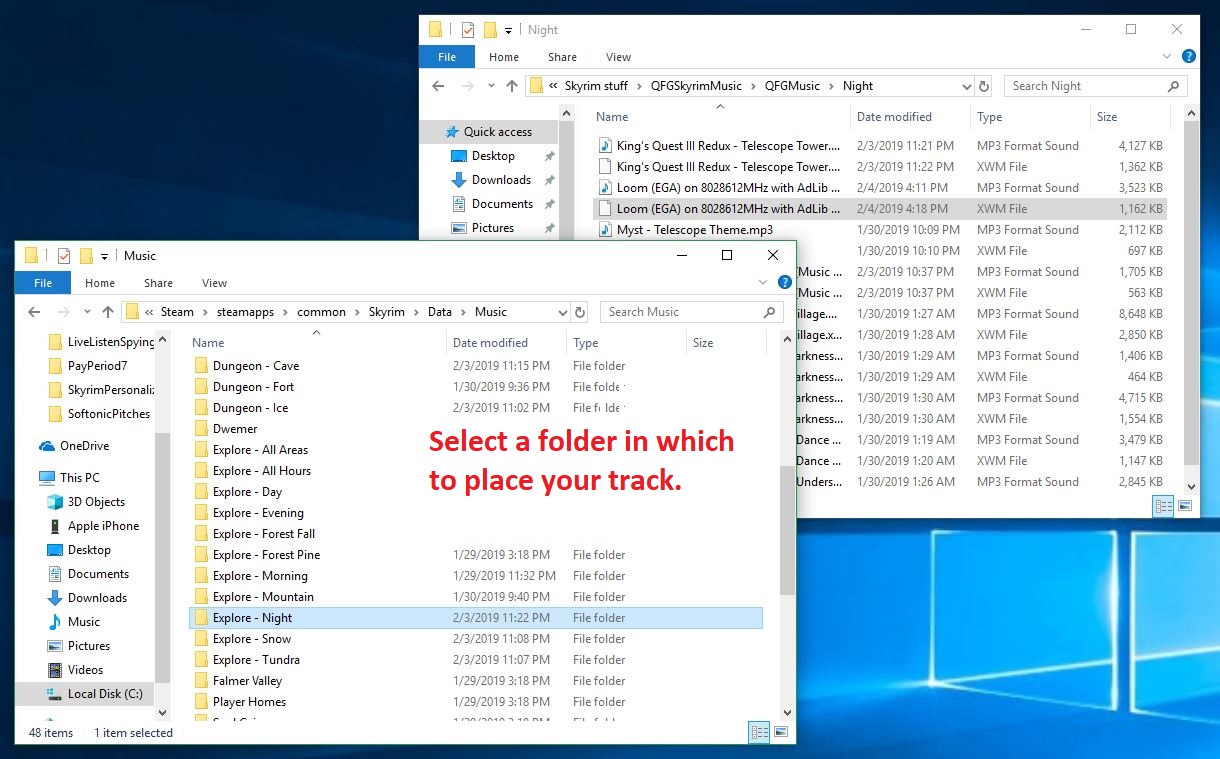
You can also place the same track in multiple folders.
Drop the xwm file into whichever folder you like; each folder is a trigger event in-game.

5. Re-name the audio file

The last step of the process is the easiest. Inside the folder that you chose in the previous step is a .txt file that explains how you need to re-name your new .xwm file so that Skyrim can read it. The names usually start with ‘MM’ and end up being pretty intuitive, such as ‘MMCombatAll03.’
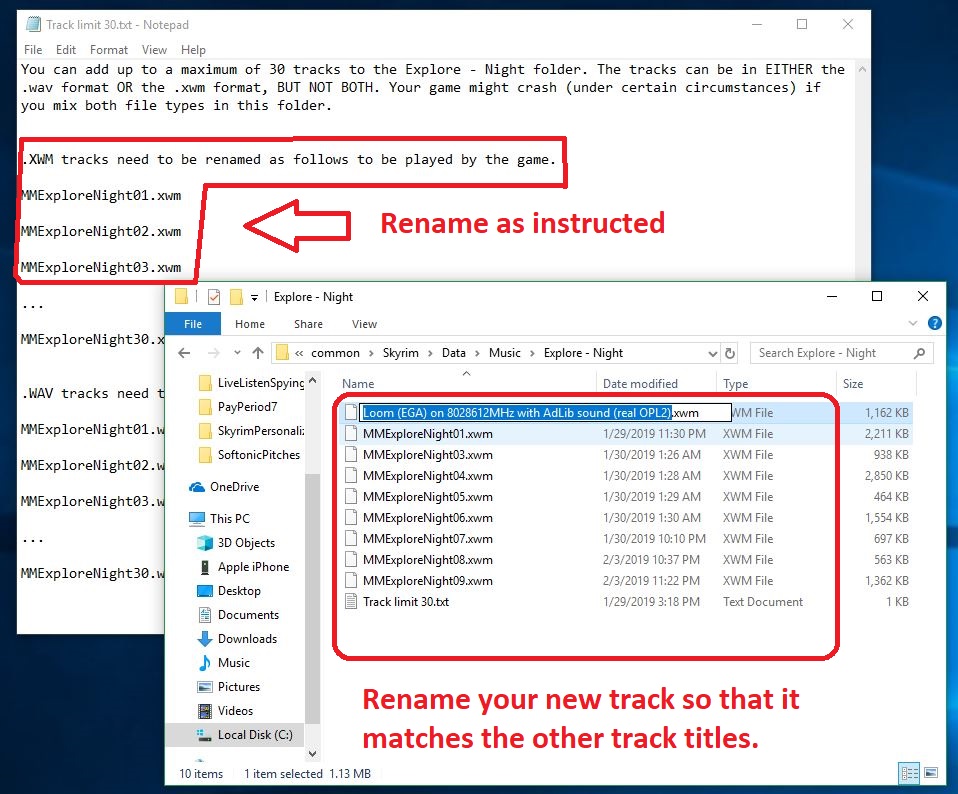
Then you should be all done!
Select the file and press F2 to rename it as the embedded .txt instructs.

After that, boot up the game and test to see if it works! If you’ve followed our above steps carefully, you should now be able to roam the snowy landscape of Skyrim and slay dragons to the beat of your favorite music! Comment below with your favorite choice for custom battle music, and stay tuned for more great Skyrim mods.

Watch free streaming movies and TV shows with IMDB Freedive

IMDB offers free streaming movies. What’s the catch?

Looking for another option for free movies and TV shows? IMDB Freedive is here to scratch that itch, provided you’re willing to watch a few ads.

Guide to IMDB Freedive

IMDB Freedive

How do I watch IMDB Freedive?

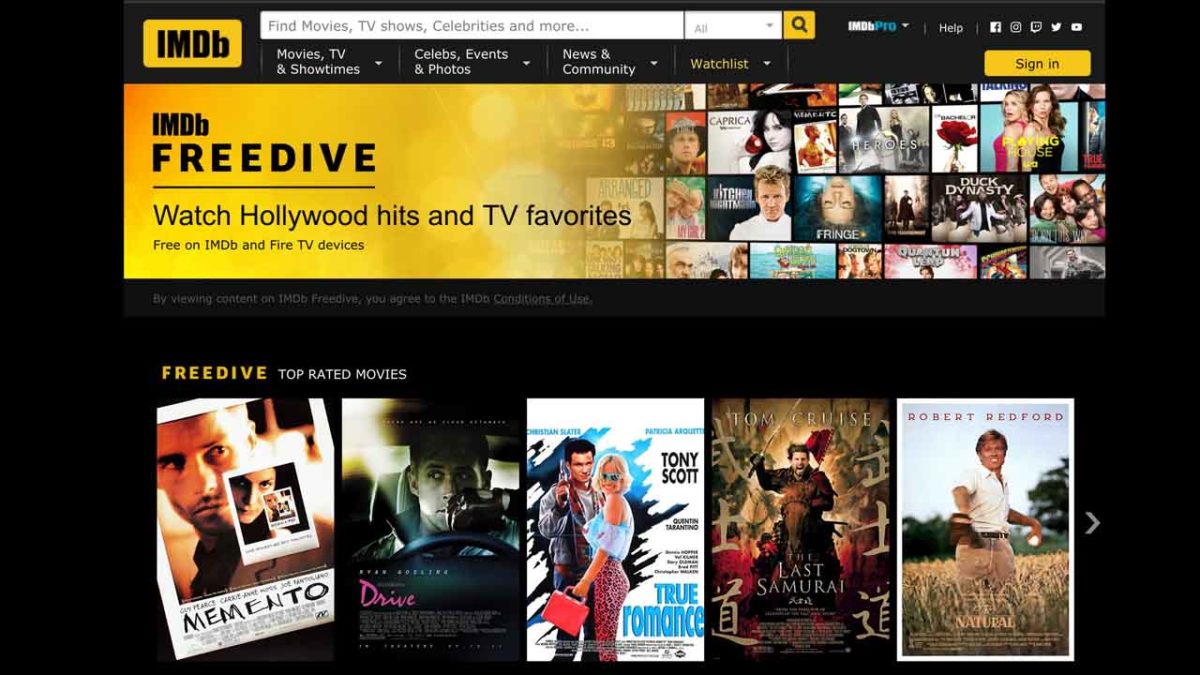
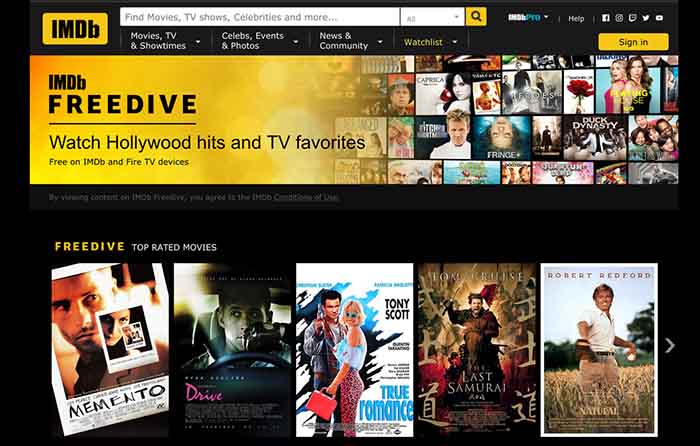
You can watch on your computer or any Amazon Fire TV device. Click here to access IMDB Freedive. You can also find the content by browsing the Amazon Prime Video app on an Android-enabled TV. Just keep scrolling down until you see the Freedive section.

What’s up with the ads?

The number and frequency of ads appear to vary, depending on what you’re watching. “The Last Samurai” has 14 commercial breaks. “Battlefield Earth” has five. You can’t skip or fast-forward the ads. You also can’t buy your way out of the ads; Freedive suggests buying movies through Amazon Prime if you want an ad-free experience.

On the plus side, the ad breaks are only 15-65 seconds and there’s a countdown so you know how long you’re stuck. Like many free streaming options, however, the ad breaks appear to be dropped totally at random. That can be jarring.

Is the Freedive selection any good?

There are some gems, but not many at the time of publication. Right now, there are just 15 films from the IMDB Top 1000:

  • Big Fish
  • True Romance
  • Drive
  • Memento
  • Midnight in Paris
  • The Last Samurai
  • The Illusionist
  • Adaptation
  • Donnie Brasco
  • Awakenings
  • Stranger Than Fiction
  • Run Lola Run
  • Tangerines
  • Drunken Master
  • Elite Squad: The Enemy Within

There are a few other quality films in the mix:

  • The Natural
  • The Fisher King
  • The Mask of Zorro
  • Legends of the Fall
  • Pollock
  • Blue Jasmine
  • Closer
  • Foxcatcher
  • Junebug
  • Roxanne
  • Multiplicity

And if you love bad or cheesy movies, they have some holy grails, including “Miami Connection,” “Anaconda,” and the aforementioned “Battlefield Earth.” You could also watch “The Net” and see how badly it holds up. Or watch all three movies in the “Look Who’s Talking” trilogy.

As with most streaming services, we expect the selection will rotate, but it’s a decent start.

Can you watch Freedive anywhere?

Right now, it’s only available in the United States and U.S. territories. That’s nothing a VPN can’t fix, however.

Any other cool stuff?

Here’s one area where IMDB Freedive surpasses every other streaming system: its search function.

Freedive Search

When you’re on Netflix, Amazon Prime, HBO Now, or its streaming cousins, you’re often stuck scrolling endlessly, hoping that the algorithm can pull an appealing title from the library.

With Freedive, you can cross-reference your search with IMDB’s data. So you can find free movies that have won Academy Awards (Freedive has nine Oscar-winners at the moment). Or find movies that filmed in Chicago (Freedive offers 13). Or get even more specific by choosing 20th Century Fox movies with Dolby Digital sound (Freedive has three.)

The ability to slice and dice your search according to your specific criteria is a feature no other streaming service can match.

What TV options are available?

It’s a mixed bag, but you may find something that appeals to you. “Heroes,” “Dallas,” “Quantum Leap,” “Fringe,” “Kitchen Nightmares,” and “Gilligan’s Island” are available. You can also watch “The Bachelor” and “The Bachelorette.” So it’s mostly “comfort food” TV.

Conclusion

Much like other free streaming options, the selection of films you actually want to watch is pretty small. Beyond that, IMDB Freedive is a weird junk drawer full of random content. But if you were to cobble together Freedive with Hoopla, Pluto, and some others, you’d have a respectable mix of free movie options.

Keep your eyes peeled to see if Freedive can set itself apart from the free streaming competition. The incredible search function alone is reason to give it a shot.

Guide to Polysphere

This free game is great for relaxing.

Have you ever stared at the sky and try to pick out shapes in the clouds? That’s basically Polysphere in a nutshell. And just like staring at clouds, the game is simple, relaxing, meditative – and now it’s right in your pocket for free.

What is Polysphere?

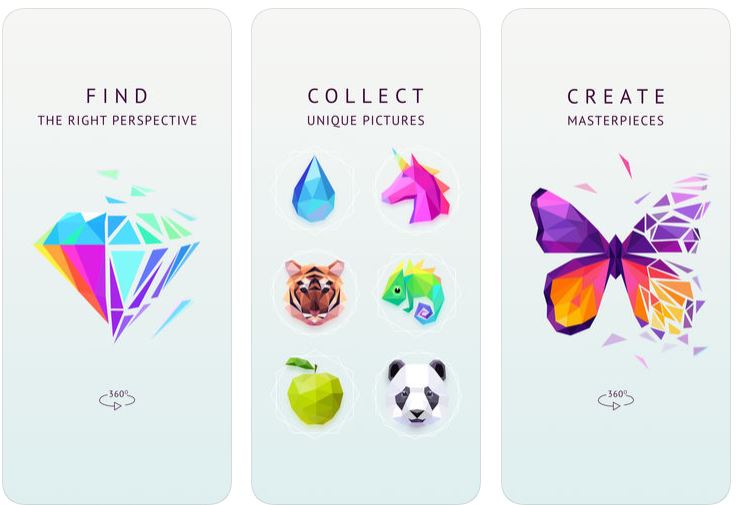
Polysphere ad; find perspective to solve and create masterpieces

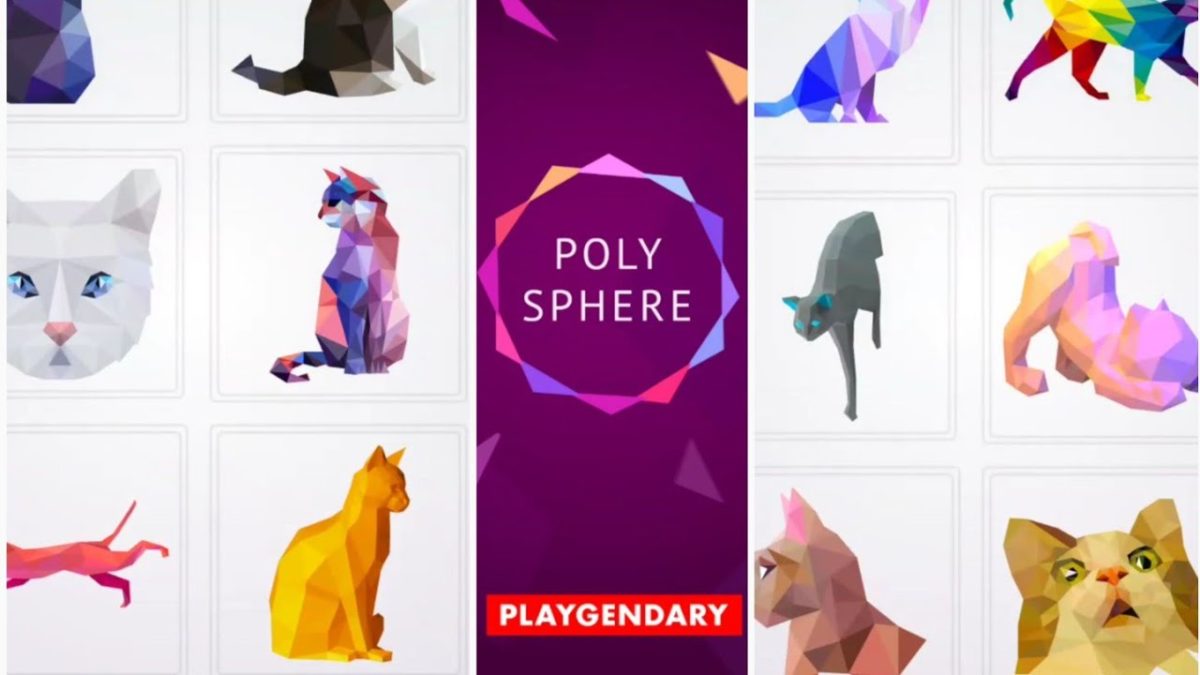
Polysphere is a mobile game from German developer Playgendary, and at its heart is a simple 3D puzzle experience. Available for free on Google Play and in the App Store, the game is a series of ‘puzzles,’ that are all fragmented images. What you’ll see on-screen is a series of colored shapes that stationary. Your job is to drag and spin the cloud of 3D pieces around until you angle it just right and the picture becomes apparent.

Tips

The best strategy to solving the puzzle is to start by matching the colors. This is especially useful with images that only use one two or three colors. If you start by matching them together, the image will quickly become more apparent. When you’re dealing with a smattering of green and a whole sea of red, clumping the green together makes the strawberry a lot easier to visualize. Another good tip is to remember to swipe up and down, too; not just left and right. All the puzzles are 3D, so depth is just as much of a factor as width and angle.

Polysphere strawberry puzzle
Pro tip: Match the colors together, then slowly rotate the image.

Once in a while, you’ll figure out what the image is, but things aren’t lining up quite right anyway. That usually means you’ve got the image backward. Try spinning the puzzle 180 degrees to reverse it, and it’ll probably match up right to the solution.

Unwind and decompress with Polysphere

Sure there are a couple of tips to mastering the game, but for the most part, this is not a difficult game; that wasn’t Playgendary’s goal. The game’s simplistic charm and intuitive controls are the real selling point, and for the price of “free,” you can see why the game has over 10 million installs.

“It doesn’t really have an objective,” wrote one 5-star reviewer. “Tranquil music plays while I spin the fragments round and round in space. There’s no pressure to achieve anything. I don’t have to slay dragons [or] play like I’m some kind of sharp shooter. With this game, I don’t have to be anything, just have fun. This is a great game for relieving stress, and just relaxing.”

Polysphere unicorn puzzle
After a busy day, chilling with Polysphere is very therapeutic

Polysphere takes up 54M of space and is available for free right now. Grab it today and enjoy!

Polysphere for Android Free Download ►
10

Top 5 apps for finding a new home

Home sweet home is just a click away.

home buying

Whether you’re a first-time homebuyer, or just looking for your next place to rent, searching for a new home is a tricky and difficult process. Thankfully there are dozens of apps and websites dedicated to helping you narrow your choices down a bit. Try these great apps and you’ll be rolling out your welcome mat in no time.

Top 5 apps for finding a new home


Zillow Free Download
7
Whether you’re looking to buy or rent, Zillow is a great app for everything involving getting a new home. You can even use it for flipping homes if you are interested in doing that.
Rent.com Free Download
7
It doesn’t matter if you’re looking for a house or an apartment, Rent.com uses a variety of databases to find what homes are available for rent in whatever area you’re looking for. It’s a great choice to look into if you’re struggling to find somewhere on the other apps on this list.
Homesnap Free Download
7
This app works as a great organizational tool if you’re trying to decide between a few homes. The filtering choices are pretty extensive, which can be really helpful.
Trulia Free Download
8
Trulia is similar to Zillow, but focused more focused on the immediacy of getting a home or apartment. If you are looking for a place to move into right away, then Trulia is your best choice.
Homes.com Download Free
8
One of the best apps out there for purchasing a home, Home.com allows you to do the majority of the home-buying process all on your phone. There is even a rental version of the app if you’re looking to rent a home instead.

While each of these has their own unique benefits, they are all based off finding you the perfect place to live. If you’re specifically looking to buy houses, however, our Softonic Solutions community suggests their own list of apps to do just that! Be sure to check it out for more help!

Secure Tor Browser comes to Android

Looking for a safer way to surf the web? Check out the new Tor browser

The Tor Browser is well known for being one of the most private browsers out there. Its main gimmick is its ability to prevent sites from gathering information through its browser. By doing this it becomes one of the most secure ways to use the internet. Currently, there is no mobile browser that has the same level of encryption ability as the Tor Browser for desktops. However, that is about to change with Tor’s newest release.

Previously, Tor had an app for both of the main operating systems: Onion Browser for iOS, and Orfox for Android. Each of these allowed for Tor connectivity but did not feature the same level of privacy that Tor does. In an effort to bring that privacy to mobile devices, Tor has released an alpha version of its service for Android.

Red Onion - Tor Browser Download
10

Tor stated that their main reason for doing this is to bring Tor’s privacy features to other parts of the world, some of which only have access to the internet through mobile devices. By creating a secure browser for these mobile devices, citizens of these countries don’t have to fear unsecured sites as often as they currently do.

Tor Browser for Android Alpha Free Download
7

With the full release of Tor Browser coming to Android sometime in early 2019, Tor has announced that it will stop Orfox services once browser leaves its testing phase. The alpha is currently available for free download.