Will Disney’s new streaming service kill Netflix?

Disney+ will launch in the US sometime in “Late 2019”

It has been on the cards for a while now, but it seems as though the single biggest  existential threat to streaming services like Netflix is officially on the horizon. In a recent earnings call at Disney, CEO Bob Iger had some very interesting news to report about Disney’s long-rumored streaming service.

Disney+ will launch in the US sometime in “Late 2019”
Disney first announced back in the summer of 2017 that it would be launching its very own streaming service to rival  Netflix. Since then, however, news on the service itself has been slow. The only real info we knew was that Disney will be pulling its movies from other streaming services. This includes all Disney and Pixar movies but also films and TV shows from the Star Wars and Marvel cinematic universes.

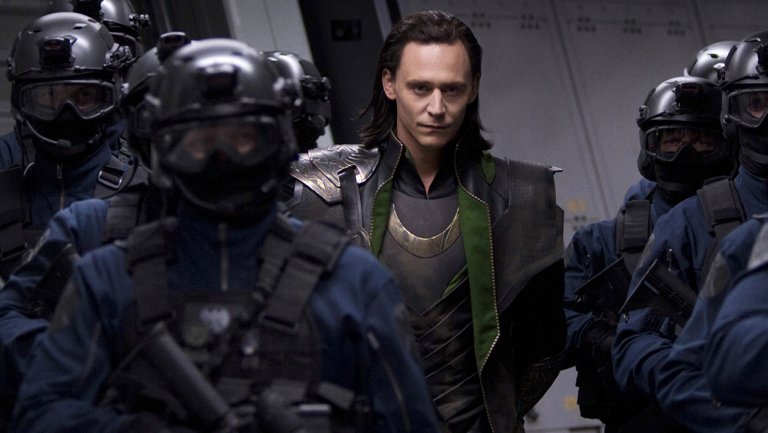
If you’re a Marvel fan who subscribes to Netflix, you’ll be sad to know that “Ant-Man and The Wasp” will be the final movie coming to the streaming service. Other draws to the new Disney+ service will be the “Captain Marvel” movie coming next year and the eagerly awaited finale to “Avengers: Infinity War,” which still doesn’t have a title. For the binge watchers out there, there is also an upcoming live-action Marvel series that will see Tom Hiddleston back on screen as the god of mischief, Loki.

The other major Disney property that Netflix is losing out on is, of course, “Star Wars.” Although Disney put a halt on its series of standalone “Star Wars” character movies after the mild box office response to “Solo,” it has been pushing ahead with the production of new TV shows based in the “Star Wars” universe.

Jon Favreau is currently deep into production of “The Mandalorian,” a show named after a character somehow related to the infamous bounty hunter, Boba Fett, and Diego Luna is set to reprise his role as Cassian Andor in a series following his exploits pre-Rogue One. Both series will now be Disney+ exclusives.

There is no news yet about pricing of the Disney+ service but you can sign up here to receive updates from Disney.

In worse news for Netflix, Disney is also planning a huge expansion of Hulu.
Disney owns 60 percent of Hulu, thanks to its acquisition of 21st Century Fox. In the same call mentioned above, Iger talked about pumping more money into Hulu’s content production budget, which is currently less than half that of Netflix, and possibly looking at making prices more competitive as Disney considers an international expansion of the service.

There is no doubt that Netflix has quickly established itself as the king of all the streaming services. It currently spends about $8 billion a year on creating Netflix exclusive shows and movies and many have gone on to become both fan favorites and critical darlings. With Disney coming at it from two different directions, however, Netflix is going to be put under some serious strain in 2019. This could get interesting.
There is good news and bad news for Nintendo fans

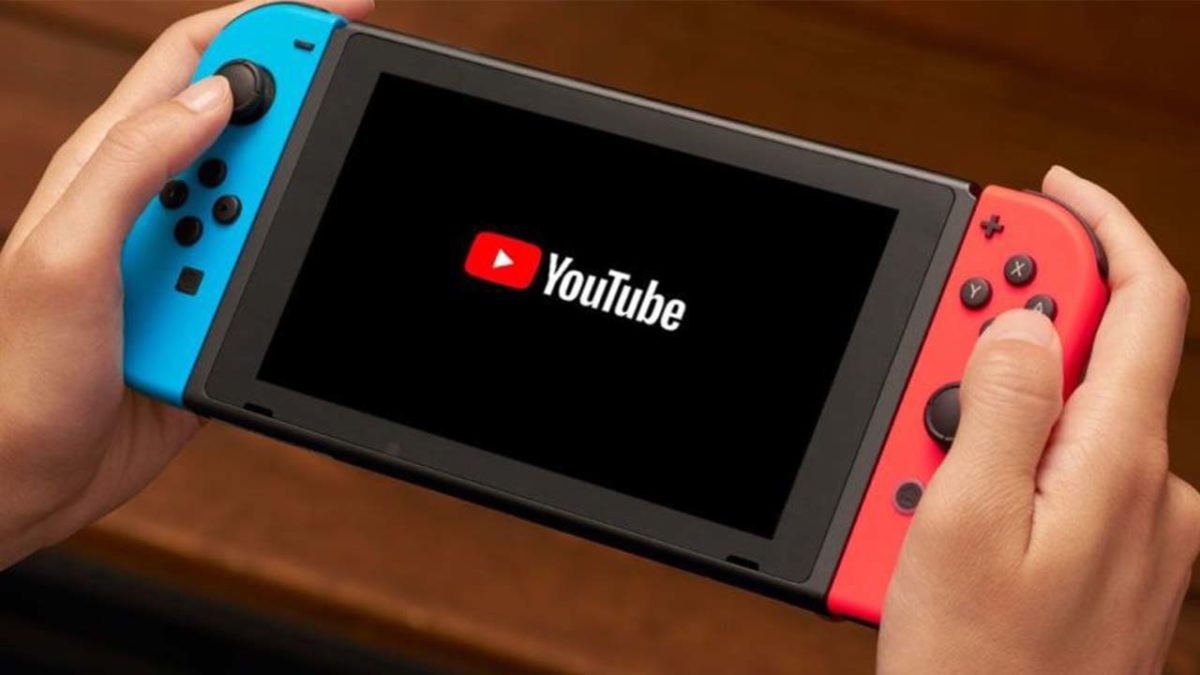
There is a new YouTube app for the Nintendo Switch but all streaming services on the Nintendo Wii will close on January 31 2019

new youtube app nintendo switch

If you’re a big fan of Nintendo and you like watching video on your Nintendo devices then there is some good news and bad news coming your way. Nintendo is simultaneously opening new ways of streaming video and closing down established ways of watching videos on its consoles.

There is a new YouTube app for the Nintendo Switch but all streaming services on the Nintendo Wii will close on January 31, 2019

Streaming video and your portable Nintendo Switch seems like a match made in heaven. In that respect, it is somewhat of a surprise that it has taken Nintendo so long to release a YouTube app for the Switch. Well, at long last, it is here and is free for all users.

The YouTube on Switch app has been optimized for use on Nintendo’s handheld console. It can be controlled via the Switch’s touchscreen and can even show 360-degree videos with the viewing angle being controlled by the left joystick. The app will also be useful both at home and while on the road. Content can be downloaded for later consumption and, if the Switch is docked, can also be watched on your TV.

The new YouTube app is available now in the Switch app store.

Soon, however, the Switch will be one of a shrinking number of ways owners of Nintendo consoles can stream video on their Nintendo devices. According to an email sent out by Netflix, Nintendo is putting an end to all video streaming services on the Nintendo Wii at the end of January next year. That means come February 1, 2019, streaming video will only be possible on the Nintendo Switch, the unpopular Wii U, and the handheld 2DS and 3DS devices.

“Unfortunately, Nintendo will suspend all video streaming services on Wii—including the Netflix Channel—after January 31, 2019.”

The Netflix email states that it won’t just be Netflix that is pulled from the Nintendo Wii. There is a clear indication that all services will be pulled including Amazon Prime and Hulu.

This is bad news for Nintendo owners as streaming is yet to take off on the Switch, despite the new YouTube app. When it first shipped, there were no streaming options, although Hulu was added not too long after launch. With YouTube there are now just two video streaming options on the Switch, even though it seems like the perfect device for consuming video. Perhaps with the announcement about the pulling of streaming services from the Wii, we can expect to see some news about services like Netflix and Amazon Prime coming to the Switch too. We’ll just have to wait and see.

Netflix for less than half price! What’s the catch?

Netflix is testing a $4 mobile only subscription

Since Netflix first burst onto the scene it has revolutionized our free time. We can now watch a film or series on our TV or PC at home and then, if we’re in a hurry to be somewhere, continuing watching it on our phones as we travel to where we need to be. This isn’t the case in other parts of the world, however, and now Netflix is trying to appeal to users who don’t have a TV or PC at home.

Netflix Download Now
8

Netflix is testing a $4 mobile only subscription in Malaysia

This move doesn’t just make sense in countries where not many people have PCs or smart TVs, but it is telling that Netflix has chosen one such country to test the new feature. There is a big difference between watching a movie on a big screen compared to watching on your smartphone. A full price subscription for people only watching on mobile devices seems a bit steep and could price people out of a Netflix subscription. The new cheaper mobile only package could open new markets around the world for Netflix to exploit. At home, there could well be plenty of people interested in signing up to only watch Netflix on their mobiles while saving some money in the process. There is a catch, though.

According to the Malaysian Star, which first reported on the test, the mobile only plan will offer unlimited access to all of the movies and TV shows available on Netflix in your region. The subscription will only cover a single device, which must be a mobile phone or a tablet. The biggest restriction, however, for the mobile-only plan is that all content will only be available in SD (standard definition) with HD streams only being available on the more expensive Standard or Premium plans.

Image via: Malaysian Star

As well as the mobile-only plan, Netflix is also testing an SD-only plan for a laptop. This plan again only covers one device but is significantly cheaper than the standard subscription model. According to the test, the price for the SD only service in Malaysia is around $7.99 whereas the standard subscription comes in at around $10.49.

The report in the Malaysian Star makes no mention of an international rollout of the two new tiers. If the test is successful, there is no reason to believe it won’t be rolled out across the world as Netflix aims to scoop up more users. The SD-only versions of Netflix content will prevent crafty users from figuring out a way to stream their mobile only subscriptions to bigger screens.

Watch streaming movies with friends using Rabb.it

There’s an easy way to watch movies with friends online. Here’s how to use Rabb.it!

friends watching movie

Rabb.it’s slogan is: “Watch anything. With anyone. Anytime.”

They mean it! If you’ve ever wanted to watch videos with friends online, we simply can’t recommend Google Hangouts or Discord chats: they bog you down with audio issues, especially when trying to transmit user audio along with video volume. Frankly, those programs aren’t made for this purpose! However…

Rabb.it was made to solve these problems and more. It lets you watch anything. With anyone. Anytime! And it’s pretty much the best thing ever.
So, before we give away any exciting stuff, let’s get right down to how you can…

Watch movies with friends using Rabb.it

Getting Started

As always, head to the Rabb.it website first!

Rabbits!
“So easy. So simple.” – Bane

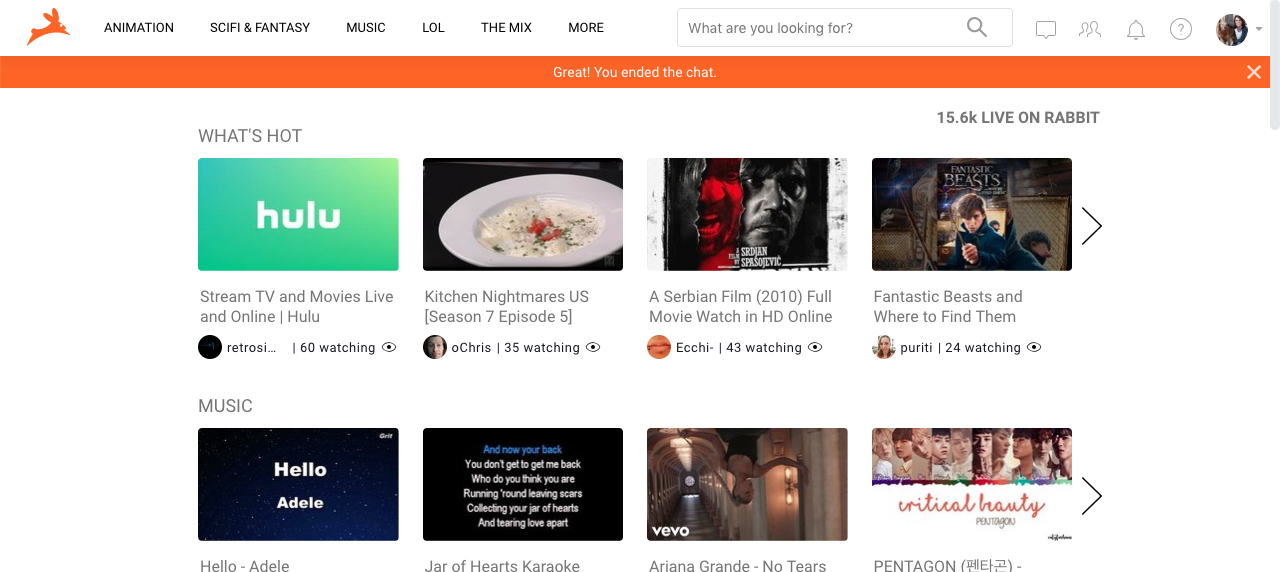
What you’re looking at is the main Rabb.it page, at the time we started writing this: these featured thumbnails are “rooms”, servers where users can watch videos and view content together.

When you start off, head to the top right, where you’ll find: options for your profile, the “Start a Room” button, and other important settings! But all that aside, let’s get to the meat and potatoes.

Making a Room With Friends

This is where the magic happens!

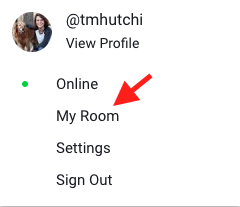
At the top right, hit the symbol for your profile picture. Guess what? The “My Room” option is right there! Click that sucka and see what happens.

Boom shaka laka

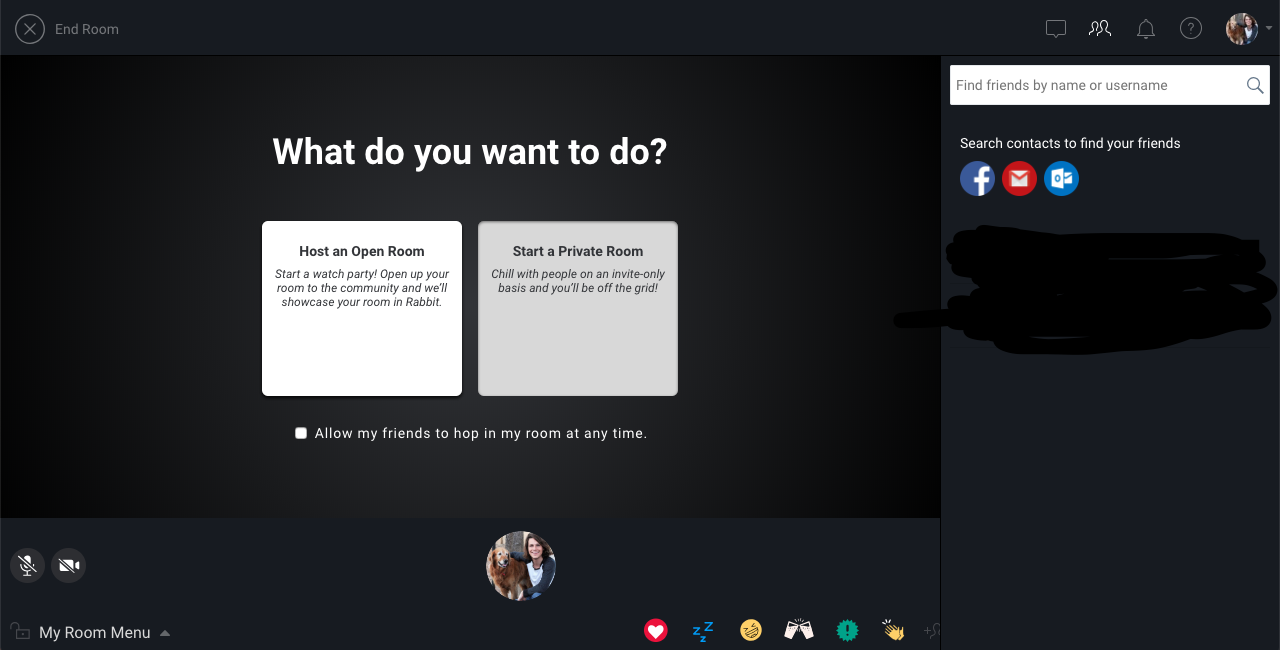
Welcome to your room, champ!

You might be able to tell… the main to options are Open Room and Private Room, seen in white text boxes. The open room allows any Rabb.it user to join, while private room only allows invitees inside, unless you check the “Allow Friends” box. We highly recommend the “Allow Friends” box, especially if you have friends!

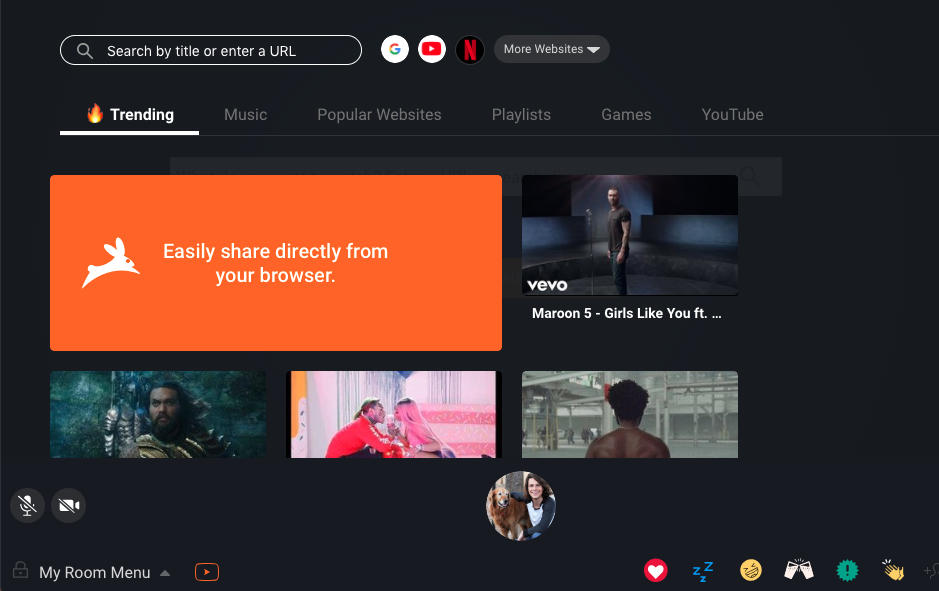
So, let’s say you select “Start a private Rom”. Your user interface will now look something like this…

What’s going on here? Well, Rabb.it allows you to select a number of streaming sites: Google, Youtube, Netflix, and so on (check in the More Websites option). You can search for others video outlets, but we suggest the ones already linked to Rabb.it: for some reason, the room works better when you do.

We don’t know why it works that way… but it does!

Netflix FREE DOWNLOAD
9

When you select your streaming site of choice, you’ll have to sign in with your username and password – Rabb.it helps you watch with friends for free, and does not give you a subscription to Hulu, per se.

Next step, visit the lower chat bar: on the left you’ll find audio and video mute, on the right you’ll see your profile circle. The outer ring will light up when you talk, and it will show a video of you if your webcam has been enabled:

After that comes the emote bar. Aww, how adorable! If you love something, are falling asleep, or noticed an enemy is nearby, you can send up a cloud of little emotes. Also, there’s a half-hidden “Send Invite” button on the right:

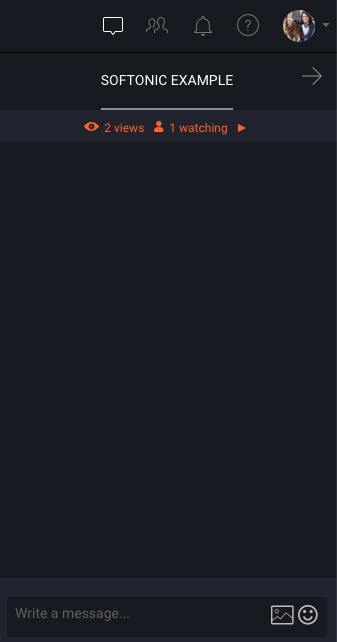
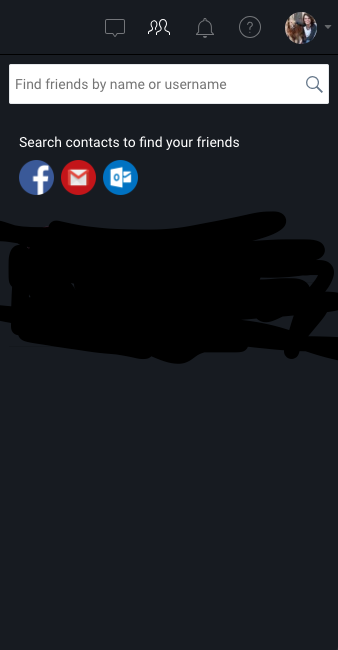
On the right, you should see your tabs. The first is a text chat log, which comes in handy when you want everyone to listen quietly. The “Friends” tab helps you get in contact with friends. Finally, you have the notifications and help buttons, which we’ll refrain from describing in detail:

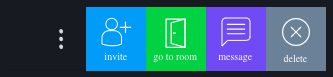
When you click on a contact, you find this menu.

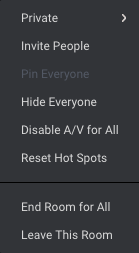
Finally, you have your room options at the very, very bottom left. This menu allows you to change the privacy, invite others (there are s many places for invitations), and hide all viewers. However, far more important, you can end the room entirely or leave the room using this menu. Keep that in mind!

The Many Rooms of Rabb.it

If you’re ever looking for something to do and have a laptop handy, try the many rooms of Rabb.it.

You may remember the option to create an “Open Room.” Guess what? Others can make open rooms, and you can join them! Unfortunately, you may not be able to choose what you’re watching, since someone else is the leader of the room. However, you’ll always be able to watch something with someone. Just remember to follow the room rules: don’t talk during a movie if you’re not supposed to!

Final Words

The developers made Rabb.it for the modern viewer: people who have friends in faraway places but still want to enjoy movies, TV shows, and good ol’ YouTube as if they were watching in the same room. So… make a virtual room, and get back together!

Thanks for reading, enjoy the show!

How to set up parental controls for Netflix

kid watching netflix

Kids watch Netflix. A lot. You probably don’t even want to know the screen time statistics for hardcore Netflix-lovers. We can’t blame them, though. With a regularly updated library featuring hundreds of TV shows, movies, and documentaries, there’s something for everyone in the family.

Of course, the shows that you love might not be appropriate for your kids. Even the most open-minded parent probably doesn’t want their little one checking out the latest episodes of “Orange Is the New Black,” for instance. Thankfully, Netflix has made it even easier to protect kids from seeing the wrong content with updated parental controls. Follow this easy guide to set them up.

How to set up parental controls for Netflix

Setting up PIN protection on Netflix

Netflix lets you create a unique personal identification number (PIN) that allows you to lock younger viewers out of mature content. Doing so is quick and easy. Start by logging into your desktop account.

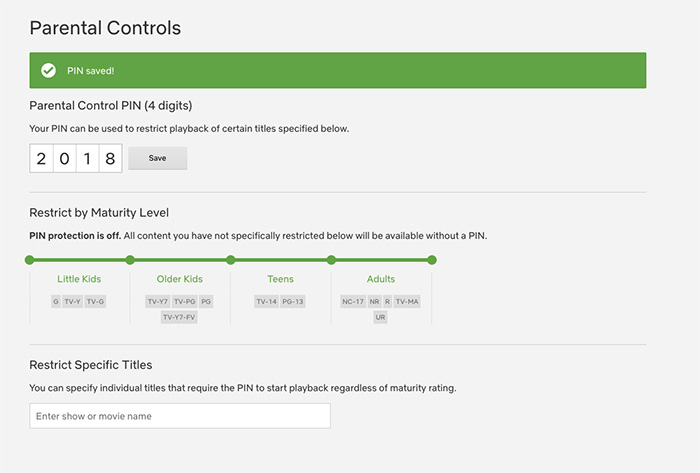
1. Click on the pull-down arrow displayed next to your profile icon (located at the top right of your screen) and select Account.

2. Scroll down to the Settings section of the page, and click on Parental Controls. You’ll have to enter your account password to proceed.

3. Next, you’ll be prompted to create a PIN for your account. The PIN must be four digits. Try to choose a series of numbers that will be easy for you to remember but difficult for your kids to guess.

netflix parental controls

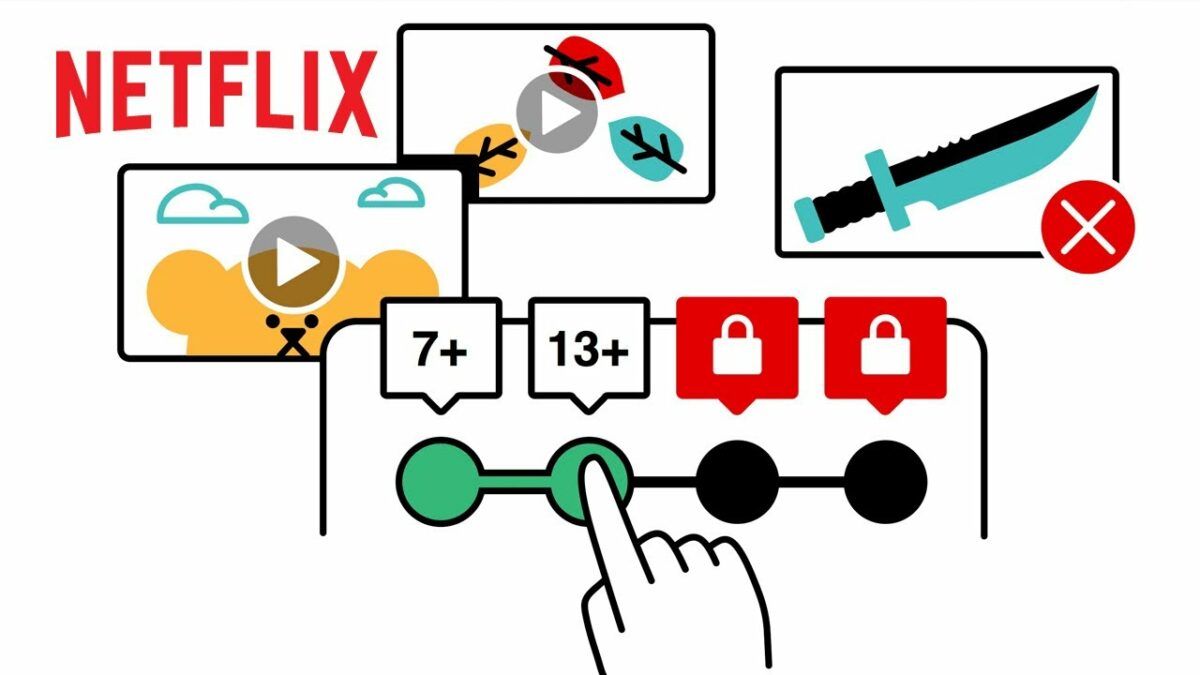
4. Now, you’ll have a couple of options. First, you can restrict content by maturity level. Choose your threshold, and anyone who wants to view content beyond a certain level will have to enter the PIN to gain access.

5. Alternatively (or in addition), you can restrict content by title. Just enter the names of the programs you want to restrict, and they’ll be PIN-protected, too.

8

Setting protections by profile

Instead of setting protections for the whole account, you can adjust the parental controls for each profile. This is helpful if you have kids of different ages in the house since your teenager’s favorite show might not be suitable for your preschooler. Here’s how to do it.

1. Click on the profile icon in the upper right corner of the screen. The “Who’s Watching?” screen should come up, displaying all of the profiles on your account.

2. Click on Manage Profiles, and then choose the profile you want to edit.

3. From the pull-down menu labeled “Allowed TV Shows and Movies,” select the desired maturity level for that profile.

Understanding Netflix maturity ratings

As you set parental controls, you’ll come across Netflix’s maturity level settings. Here’s how they work.

Netflix assigns maturity ratings to all of its content. These ratings are generally determined using local programming standards, although sometimes they are set by Netflix. The rating system breaks content into four maturity categories, each representing the overall maturity level of the programming. Keep in mind that maturity settings for ongoing programs reflect the series as a whole and are not assigned to each individual episode.

  • Little kids: Only shows programs that are suitable for all viewers, with ratings G, TV-Y, and TV-G
  • Older kids: Includes content rated PG, TV-Y7, TV-Y7-FV, and TV-PG
  • Teens: Allows programming rated PG-13 and TV-14
  • Mature: All programming, including content rated R, NC-17, and TV-MA

According to Netflix, it can take up to eight hours for your updated parental control settings to take effect. Logging out of your account and then logging back in may help to speed up the process.

Netflix ads: helpful interruption or worst thing ever?

Netflix is testing promos for other Netflix shows that will show up in between TV show episodes

yes, netflix is testing ads

As Netflix continues to conquer the globe, we’ve become blissful binge-watching zombies. That short countdown at the end of each episode doesn’t give us enough time to spring into action and hit stop before the next episode. But who cares? We’re getting the most out of our subscription! Soon, that could all change.

Netflix Download Now
8

Netflix is testing promos for other Netflix shows that will show up in between TV show episodes

Yep, it looks like your monthly subscription isn’t enough for Netflix anymore. The company is testing ads on its platform, but it isn’t all bad. In fact, if you believe the guys in Netflix’s marketing department these ads might actually be good for you.

Netflix is testing for other Netflix shows in the breaks between episodes. According to the bigwigs behind it all, Netflix will be running all sorts of algorithmic magic to ensure that the promos you’ll get will be for shows it thinks you will actually like. (All of this is based on your viewing history.)

The money men say this helps Netflix save money by not having to advertise so much on other networks. It appears Netflix is now big enough to be able to advertise to itself in order to make money.

There are a few other things to consider about Netflix’s ads, too. First off, each ad (or” promo” as Netflix wants us to call them), will only be 30 seconds long. We’re not talking an intrusive ad break here, just a short break from your constant consumption. Also, if Netflix ads get a wider roll-out to all users in their current form, you’ll be able to skip them. Not skip after however many seconds like on some YouTube ads, skippable as soon as they start.

This all means that technically they’re not real ads, they’re optional. In fact, they sound like nothing more than a multimedia version of the “Your Netflix” list that shows on the top of the screen every time you log in, or the recommendations you see after you finish a movie or complete a TV season you’ve watched from start to finish.

At the end of the day, whether these Netflix ads will make you angry or not is up to you. You’ll have the power to skip them if you wish so you’ll only be able to get angry about having to bother to hit skip. The other way of looking at it is that it might give you more of a chance to snap yourself out of the trance-like stupor “Stranger Things”, “Maniac”, or whatever it is you watch on Netflix always manages to ease you into. Having to hit skip might just be what you need to hit stop and then head out into the real world. We’ll just have to wait and see.

New trailer for Netflix’s spooky “Sabrina” reboot

Netflix’s “Sabrina” looks amazing. Watch the trailer!

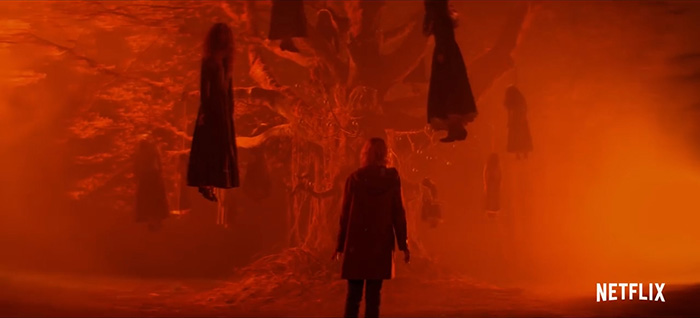
Netflix appears to be going all-in for Halloween. Remember the late 90s TV show “Sabrina the Teenage Witch” with Melissa Joan Hart? Imagine that, but way darker. It stars “Mad Men” actress Kiernan Shipka as the title character. Add a dash of “Buffy the Vampire Slayer,” a touch of “Mean Girls,” a hint of “Harry Potter,” and some spooky “Stranger Things” vibes and you’ve got what looks like a surefire hit.


View this post on Instagram


My Super(natural) Sweet 16. @sabrinanetflix

A post shared by Netflix US (@netflix) on Sep 12, 2018 at 7:33am PDT

Are you ready to watch this witch weave her spell? Here’s the first full trailer:

Dang, Sally Draper went dark, y’all. “The Chilling Adventures of Sabrina” will enchant Netflix starting October 26.

Netflix plans interactive Black Mirror episode

Ready to choose your own adventure?

Netflix has changed what we expect out of TV today: no commercials, binging entire seasons at once, and low-priced memberships. With this next update, it’s showing no sign of slowing down.

black mirror screenshot

According to a report from Bloomberg, Netflix has a few original series in the works that will be interactive, or have some interactive episodes. That’s right – you’ll have the opportunity to choose the storyline and what happens to some of your favorite characters.

Netflix Download Now
8

There are plans to release some of these interactive episodes before the end of 2018, and a lot of Netflix bingers seem to think that “Black Mirror” is the perfect candidate. If you’ve seen any of the science fiction anthology, you’ll know how intense it is. Every episode has a twist, each more shocking or unsettling than the last. Becoming part of the madness would be a truly incredible experience and if done right, Netflix may be onto something revolutionary.

black mirror screenshot

The streaming service has tried interactive elements in shows already; a children’s show called “Puss in Book” lets kids choose which adorable villain the “Shrek” character will battle. With “Black Mirror,” it would be the first time a show with an interactive element will be targeted to an adult audience.

There isn’t any word on what exactly the other interactive projects are right now, but the sources who spoke to Bloomberg noted that two of them are video game adaptations – and we are really hoping that one of them is “The Witcher.” Such a popular game with an incredibly rich storyline is sure to be a hit, since the game relied heavily on the player’s choices. Whatever the decision may be, we’re super excited.

Disney reportedly planning shows for Loki and Scarlet Witch

Could Disney be cooking up some streaming series for two MCU characters?

According to sources at Variety, Disney is planning to jump-start its new streaming service with limited series for a few Marvel Cinematic Universe characters without their own movies.

If you’re one of the three people on earth who hasn’t seen “Avengers: Infinity War,” there are some SPOILERS below:

Loki

Tom Hiddleston’s Loki has become one of the MCU’s breakout characters. Though the MCU is often criticised for its paper-thin villains, Loki has become a fan favorite due to his ambiguous morality, strained relationship with Thor, and cunning personality.

His shocking death at the hands of Thanos at the beginning of “Infinity War” perfectly foreshadowed the tragic events of the rest of the film. Due to his demise, his miniseries would presumedly be a prequel. Loki’s disdain towards Thor and his non-royal heritage gives his origin story gravitas and weight, lending itself perfectly for a miniseries. It is currently unknown if Chris Hemsworth, Idris Elba, or any other members of the Thor cast will make appearances in the series.

Infinity War spoilers end here, slowpoke. Now join the rest of mankind and go see the movie.

Scarlet Witch

Wanda Maximoff (a.k.a. the Scarlet Witch) has a relatively unexplored backstory in the MCU. In the comics, she is the daughter of mutant freedom fighter/terrorist Magneto and a practitioner of chaos magic, which often sees her encountering characters like Dr. Strange and Dr. Doom.

In the movies, however, Wanda’s powers are the result of experimentation with the Mind Stone. Her pre-powers upbringing in the war-torn country of Sokovia is harsh, with her and her brother Quicksilver protecting each other from a civil war fought with Stark weaponry. It is unclear if the series will be an origin story or a continuation of “Infinity War,” but it is doubtful Disney would continue the story of “Infinity War” in any capacity before the release of Avengers 4, making it much more likely to be an origin story. Wanda’s upbringing and psyche are more tortured than most of the other Avengers, and a miniseries that explores her pain in detail would make for an interesting show.

These shows aren’t the only ones planned for Disney’s streaming service. A continuation of the fan-favorite “Star Wars: The Clone Wars” is in development for the platform, as well as shows based on “High School Musical” and “Monsters Inc.” While consumers are not pleased with every major studio coming out with their own streaming platform, Disney’s massive catalog of movies and TV shows, as well as original content, is sure to sway uneasy viewers.

Top 10 video streaming services

When you think of video streaming services, there are probably a few that already come to mind. Almost everyone uses one nowadays, and they can save you a lot of money as an alternative to cable. They can even be used with cable for a larger variety of shows to check out.

Our Softonic Solutions community has assembled a list of the best streaming services to help you choose which ones are best for you! Here are a few of their answers:

10. YouTube

Most people know YouTube for its free content created by everyday vloggers, gamers, comedians, etc. However, YouTube also has a premium service called YouTube Premium (a.k.a. YouTube Red). This service is an ad-free version of YouTube that also features its own original web shows such as the popular “Escape the Night” and “Foursome.”

YouTube Free Download
8

9. Viewster

Viewster is a free streaming service that is mostly popular for its anime, gaming, and comedies. It’s kind of a cross between YouTube and Netflix, where it streams both content created by indie gamers as well as content created by established studios. Definitely worth checking out if you’re into geek culture!

Viewster Free Download
7

8. Popcornflix

Popcornflix is another free streaming service. While the variety of movies may not be as expensive as Netflix, Popcornflix can work as a nice free alternative. It also features app support on a large number of gaming consoles and Apple devices.

Popcornflix Free Download
7

7. Sony Crackle

Similar to the previous two, Sony Crackle is completely free. All three of these services use ads to keep their service running. The ads are typically short, and feel more like commercials than “ads.” Despite being owned by Sony, Crackle doesn’t feature nearly as many shows or movies as Netflix. However, it features quite a lot for a free service, including some of its own original content!

Crackle Free Download
10

6. Crunchyroll

If you’re an anime fan, then Crunchyroll is one of the best services out there for you. Not only does it offer hundreds of anime to watch, but it even has some current season anime you can check out as its airing.

Crunchyroll Free Download
7

5. Hulu

One of the more popular streaming services, the nice thing about Hulu is that it gets episodes for its shows as they air. Unlike other streaming sites, you don’t have to wait for the show to finish airing to be put onto the service. Likewise, Hulu has a large variety of exclusive shows at a reasonable price, the lowest being $7.99.

10

4. HBO GO

The cool thing about HBO GO is that you get it for free as long as you have access to HBO. While this typically means needing to have cable, HBO GO is a streaming service that comes with it. If you plan to get cable and are looking for a streaming service, then HBO GO is one of the easiest choices to include.

HBO GO Free Download
7

3. Amazon Prime Video

Similar to HBO GO, Amazon Prime Video comes with Amazon Prime. It has a pretty large selection including its own original shows as well. Amazon Prime gives you a lot of benefits for a reasonable price, and Prime Video is just another one of these great benefits.

Amazon Prime Video Free Download
5

2. STARZ

The Starz streaming service is great for fans of the network. While it’s selection is limited to its own content, it has some great original shows that are worth checking out! Definitely look into the shows it has available to it before subscribing, and make sure it has something you like.

7

1. Netflix

This is definitely the most well-known streaming service, and for good reason! It features thousands of movies and TV shows, along with hundreds of its own original series. It’s one of the cheapest streaming service compared to how much you actually get for it, being only $7.99 for the basic package. Out of every streaming service available, Netflix is still the best choice for variety and price.

Netflix Free Download
8

What do you think? Are there services our Solutions community missed? You can submit your own choices, vote on these options, and see seven more great video streaming options here.