Trump administration challenges California’s net neutrality laws

State governments are willing to go to war over net neutrality.

California pushes back against Trump on net neutrality

Just when you thought the fight for net neutrality was lost, the plot thickens.

Recently, California passed the toughest statewide net neutrality law in the country. Hours later, the Trump administration’s Department of Justice sued the state. The federal government, and by extension the DOJ, has its pockets deeply lined with “donations” from major telecommunication companies like Comcast, Verizon, and AT&T.

Essentially, California’s new law (SB822) rolls back net neutrality rules to what they were before they were gutted by the FCC. This prevents internet service providers from selectively throttling or blocking their users’ access to different websites or online services. For example, in states other then California, Comcast could block or slow access to Netflix in an attempt to draw more users to their On Demand service. The bill also outlaws anti-competitive data sponsorship programs, which allow ISP’s to exclude their video services from their customers’ data caps, giving them an unfair advantage over services like Hulu or Netflix.
California isn’t the only state defending net neutrality through legislation, Washington is pushing its own laws, too. The attorneys general of 22 states have filed a brief against the FCC in the U.S. Court of Appeals.

FCC chairman Ajit Pai accused California’s bill of being anti-consumer, even though the bill has the support of many consumer groups.

Trump does not appear to hold a strong opinion on net neutrality one way or another. His administration repealed it last year, but his personal stake in repealing it seemed to be revoking yet another Obama-era policy. It should be noted, however, that Trump has expressed concern in the past about ISPs blocking access to conservative online content.

American cable and internet providers have created one of the most unregulated, monopolistic industries in the world. Major ISPs, such as AT&T, Comcast, and Time Warner Cable, have essentially divided the country amongst themselves. They make no attempts to encroach on each others’ territories, and any smaller ISPs have a laughably small chance of succeeding in territories controlled by the main players.

Consumers essentially have no choice when it comes to internet or cable; it mostly depends on where they live and who the local ISP kingpin is. This lack of competition also results in lower quality cable and internet services for consumers, as these companies have no incentive to offer faster internet services (matching the speed of services like Google Fiber) because the customer has no other options.

If California wins their bout with the DOJ, you can expect more states to follow their lead.

How to create a Windows 10 desktop shortcut to use your photos as a screensaver

Manually trigger a screensaver of your favorite photos. It’s easy!

family photo

Stepping away from the computer for a few minutes? You might have your screensaver set to come on after a set time, but here’s the issue you run into: If you set it to come on after too long (or choose not to use a screensaver), your computer is still sitting on the same screen for a long time. Boring.

Set it to come on too quickly and you’ll have to keep jiggling your mouse to switch it off. Sounds trivial, but trust us – it gets distracting very quickly. So what’s the best option? To be able to manually decide whenever you want to pop on the screensaver. We can show you how to do that with just a simple double click.

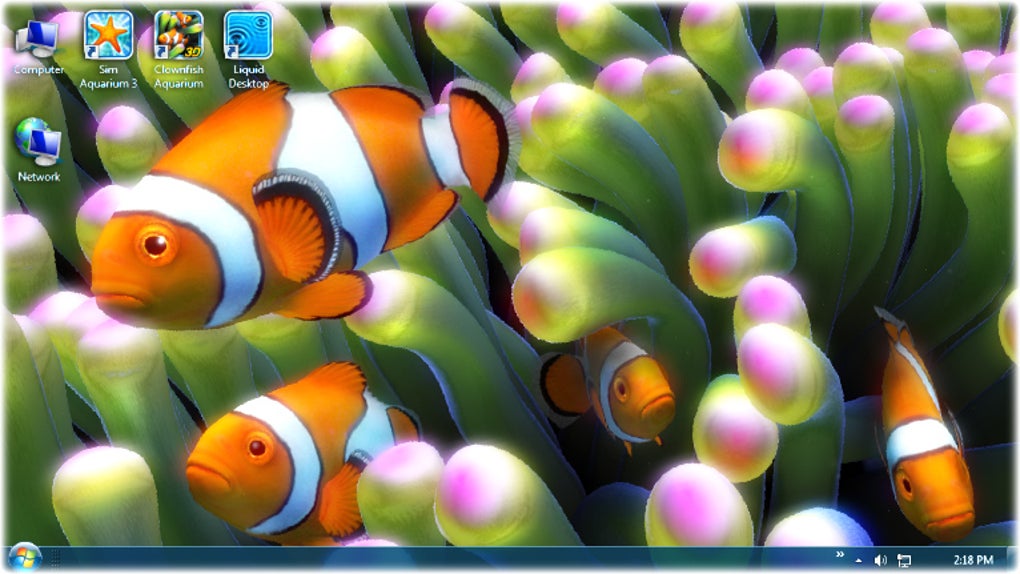
Clownfish Aquarium Live Wallpaper Free Download
7

One of our favorite screensavers is Photos. It’s great to set on the family computer, especially if you keep yours in a central spot in the house. It puts a smile on your face to walk past the den or living room and see a slideshow of your family vacation, your pets, or pictures from that party you had on your birthday. The following guide will work for any screensaver type you prefer, but we’ll be using Photos as an example since that’s the one we like best.

The following steps will work on Windows 10, Windows 7, Windows 8, and even Windows Vista. It’s easy. You can do it.

How to create a Windows 10 desktop shortcut to use your photos as a screensaver

1. Open your screensaver window

Search for Screensaver

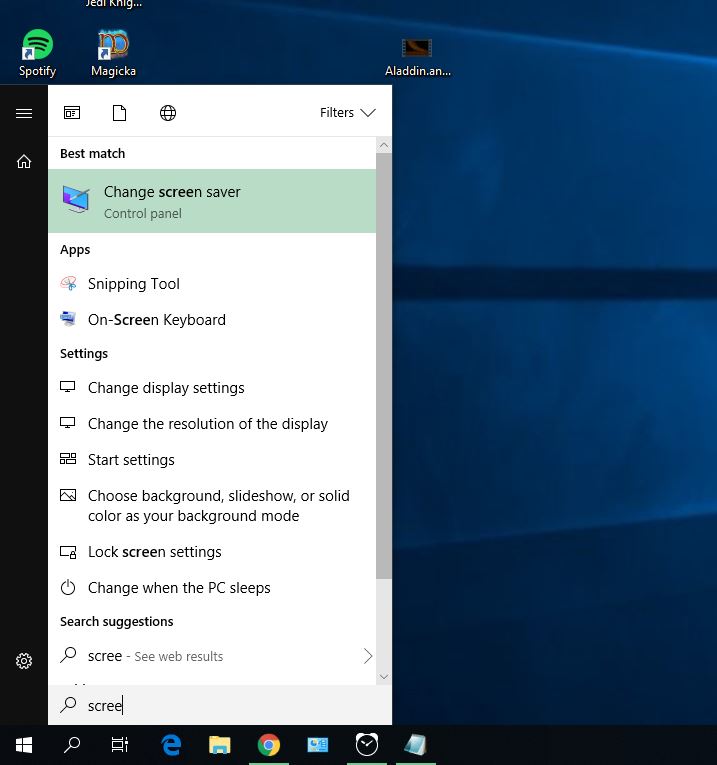
To start off, hit the Win key on your keyboard or click the Windows icon on the bottom left of your screen. Type ‘screensaver’ and the first option to appear should be change screen saver. Click on that.

2. Check and set your screensaver settings

Screensaver window

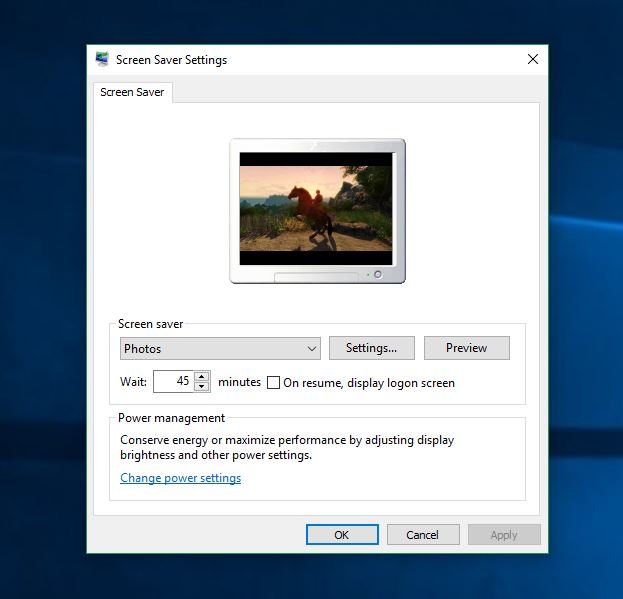
This will open a new window where you can view and change any of your current screensaver settings. If you don’t have a screensaver set up, we would encourage you to do so. While the need for a screensaver was originally to keep your PC healthier, that’s not really necessary with today’s computers. Still, it’s entertaining and makes for good conversation.

3. Choose your screensaver type

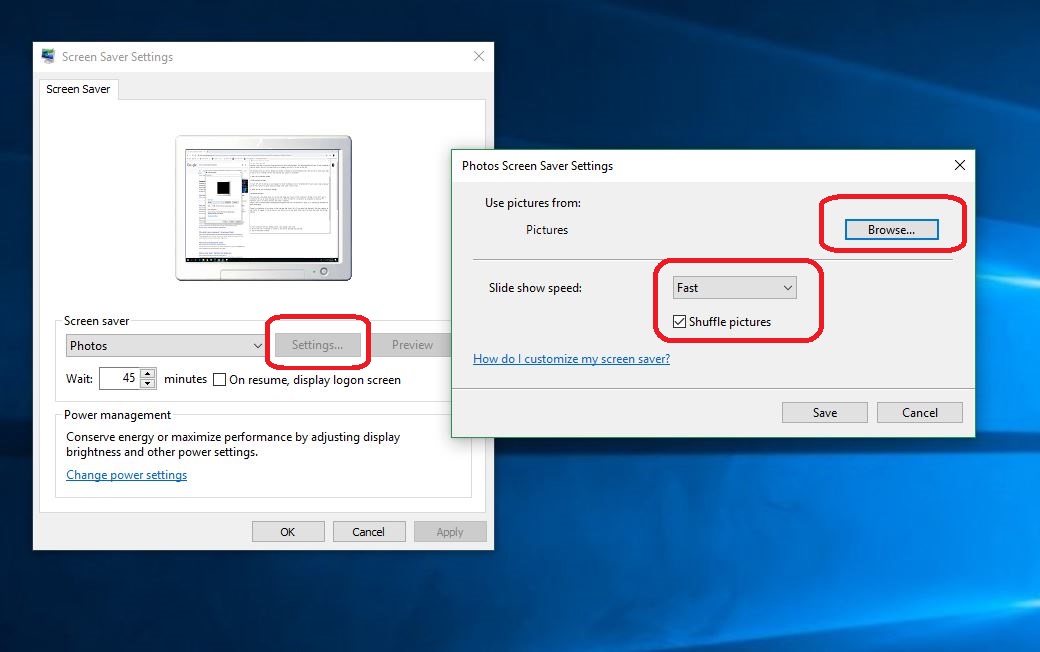
Choose the screensaver of your choice via the drop-down (go Photos! Do it!), and adjust how long you’d like your computer to wait before it engages. If you do choose to use Photos, you can pick which folder they’ll be shown from under the Settings options.

Set your screensaver settings

This is also where you can decide how fast the pictures change and whether you want them on shuffle. Once everything in the Screen Saver Settings is set to your preferences, click Apply.

4. Open your File Explorer

You can hit Win+E to get there faster

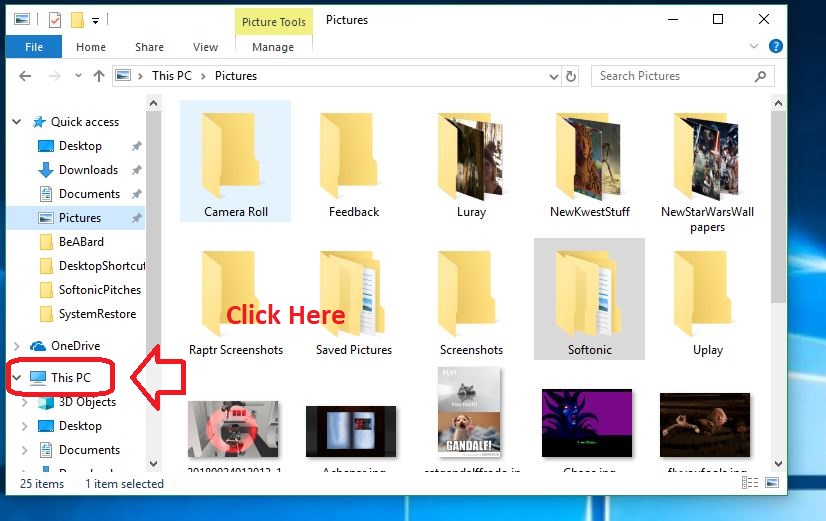
5. Navigate to This PC

Open This PC

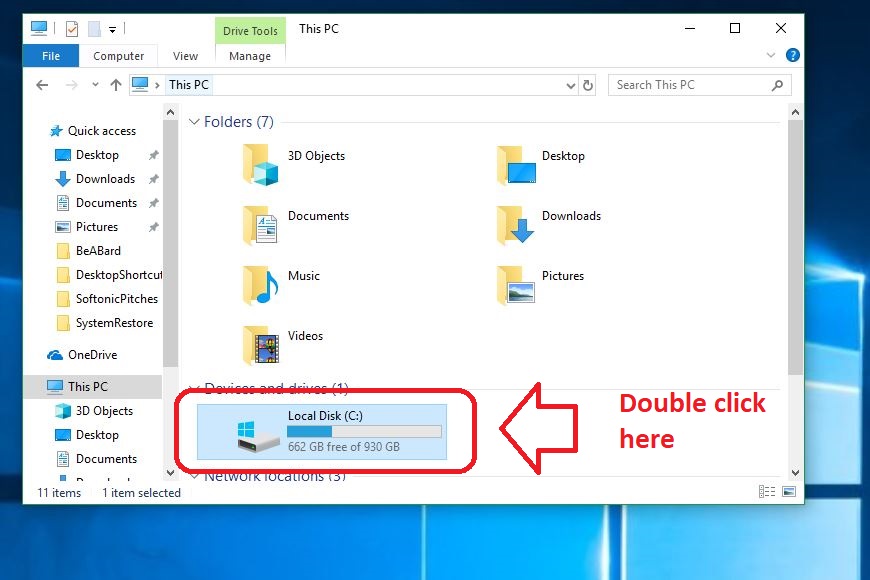
6. Go into your C: Drive

Open your C: Drive

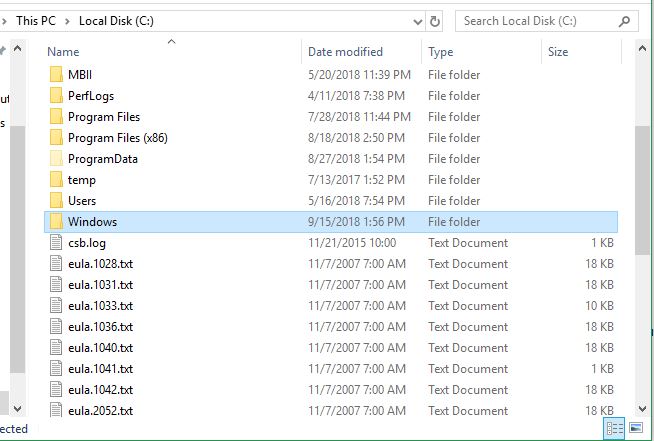
7. Open your Windows folder

Open Windows folder

Once in the C: Drive, scroll down to the Windows folder. File Explorer is largely alphabetical, so it should be easy to find. Open it.


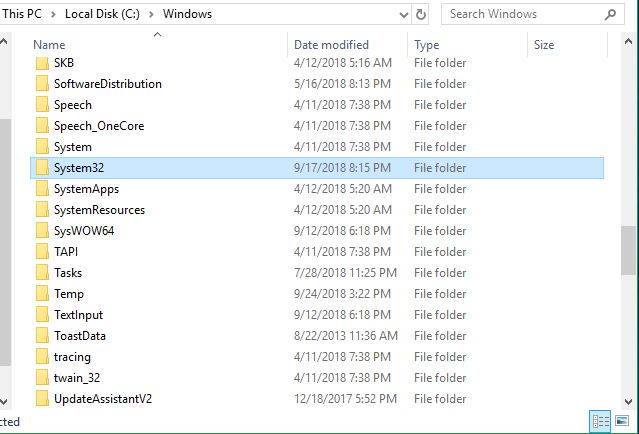
8. Open your System32 folder

Find System32 folder

Like the above folder, this sub-folder should be easily found; everything’s still alphabetical.

9. Find your screensaver.scr

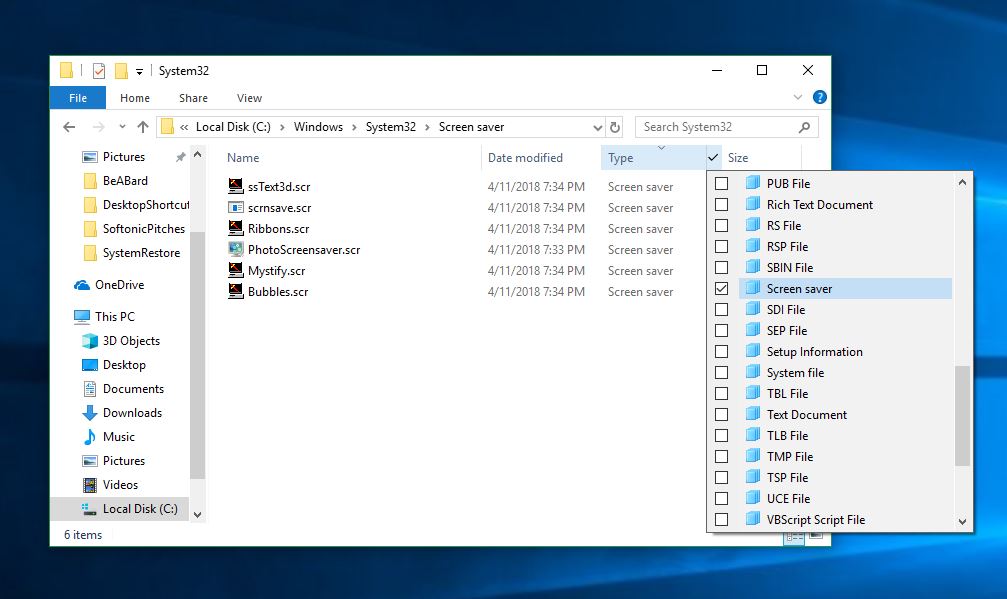
Now comes the important bit: You’ll need to find the .scr file for the screensaver type you chose. You can scroll through, but it’ll take a WHILE. You can either search by Type instead of by name as pictured below …

Find screensaver this way

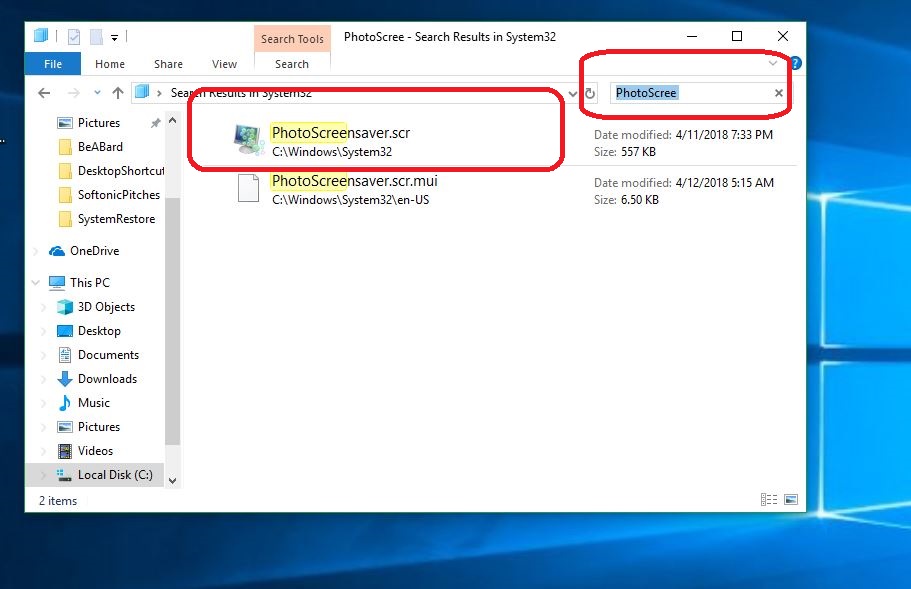
Or you can use our preferred method, which is to simply type ‘PhotoScreensaver’ in the search portal, or type in ‘Ribbons’ or whichever screensaver type you chose.

Find screensaver

10. Send this file to Desktop as a shortcut

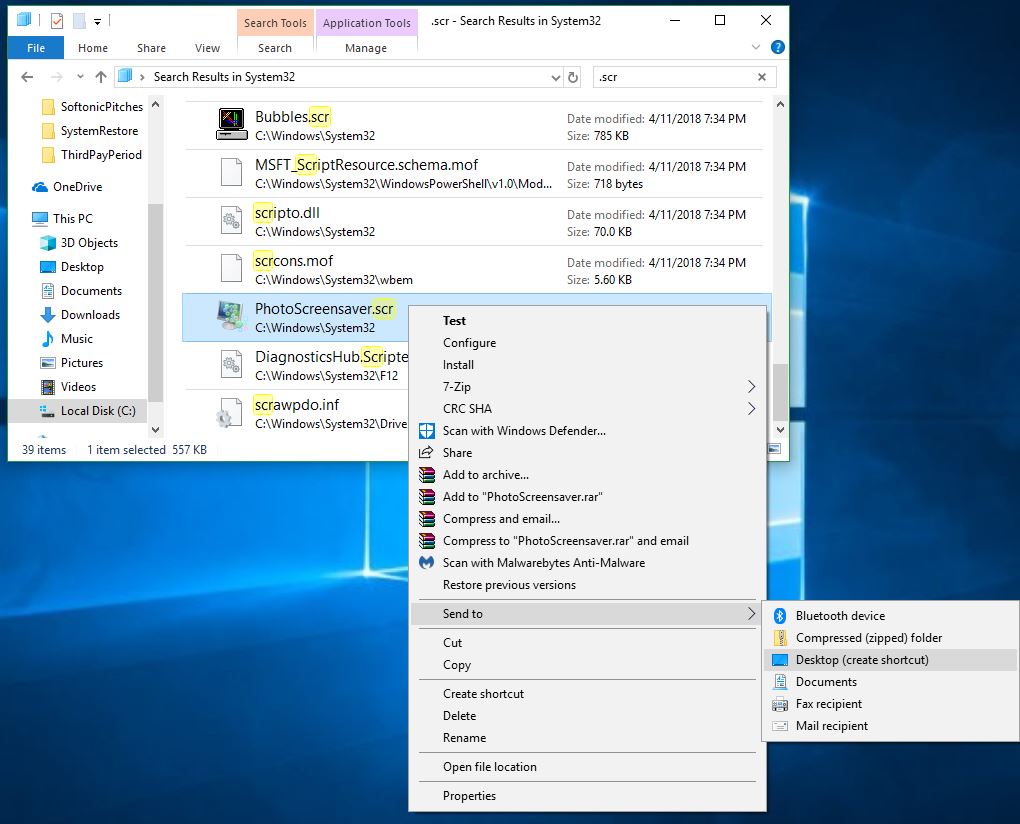
Right-click on the file and you’ll see a drop-down that shows a bunch of neat options. Hover over the one that says Send To and then choose Send to Desktop:

Send to desktop

Congratulations! You now have a quick shortcut that will run your choice of screensaver whenever you like. Let us know in the comments below whether you found our guide helpful, and enjoy your new manually controlled picture montage!

You won’t believe how much charities have earned through Facebook’s birthday fundraisers

Have you contributed to a Facebook birthday fundraiser? You’re not alone.

facebook

You’ve probably seen this on your Facebook feed: friends asking for donations to support a cause in particular to celebrate their birthday. These charities might help alleviate child hunger, illnesses, or another cause near and dear to your friend. And while you’ve likely come across these on your feed, you probably don’t yet know just how effective these campaigns are.

Facebook claims its birthday fundraisers feature raised $300M in its first year

Impressive donations

Interestingly, these campaigns have been quite beneficial to the charities they support. In its first year, Facebook’s birthday fundraisers feature raised a whopping $300 million. That’s a lot of goodwill!

Another important note about these fundraisers is that since November 2017, Facebook waived the fees on these donations. That means all the proceeds go to the nonprofits, which almost makes up for the Cambridge Analytica thing.

Popular causes

You may be wondering what charities were the most popular for these campaigns. Some of the top beneficiaries include St. Jude’s, the Alzheimer’s Association, the American Cancer Society, Share Our Strength – No Kid Hungry, and the ASPCA. All of these are noble causes worthy of a birthday bump.

How to get involved

How does this feature work? Users receive a notification about two weeks before their birthday asking them if they’d like to invite friends to donate. At that point, the Facebook user gets to choose a charity that they want to support. As their big day draws nearer, they can promote their cause and solicit donations from friends, setting a particular goal they’re looking to reach for the charity.

Celebrities have even participated in this socially responsible social media feature. For instance, Stephen Curry celebrated his 30th birthday on the platform by raising an astounding $82,512 for the charity, Nothing But Nets, which works to combat childhood malaria.

All in all, this is a fabulous feature that Facebook is only working to grow and refine. Consider using it on your next birthday to support a great cause, just as thousands of others have done.

Apple brings contactless ID to college students

Your phone will be your ID at select universities.

Students on college campuses are usually required to have their student ID on them at all times. With it, they have access to basically everything on campus. With Apple’s next update, being a student will be made a little easier.

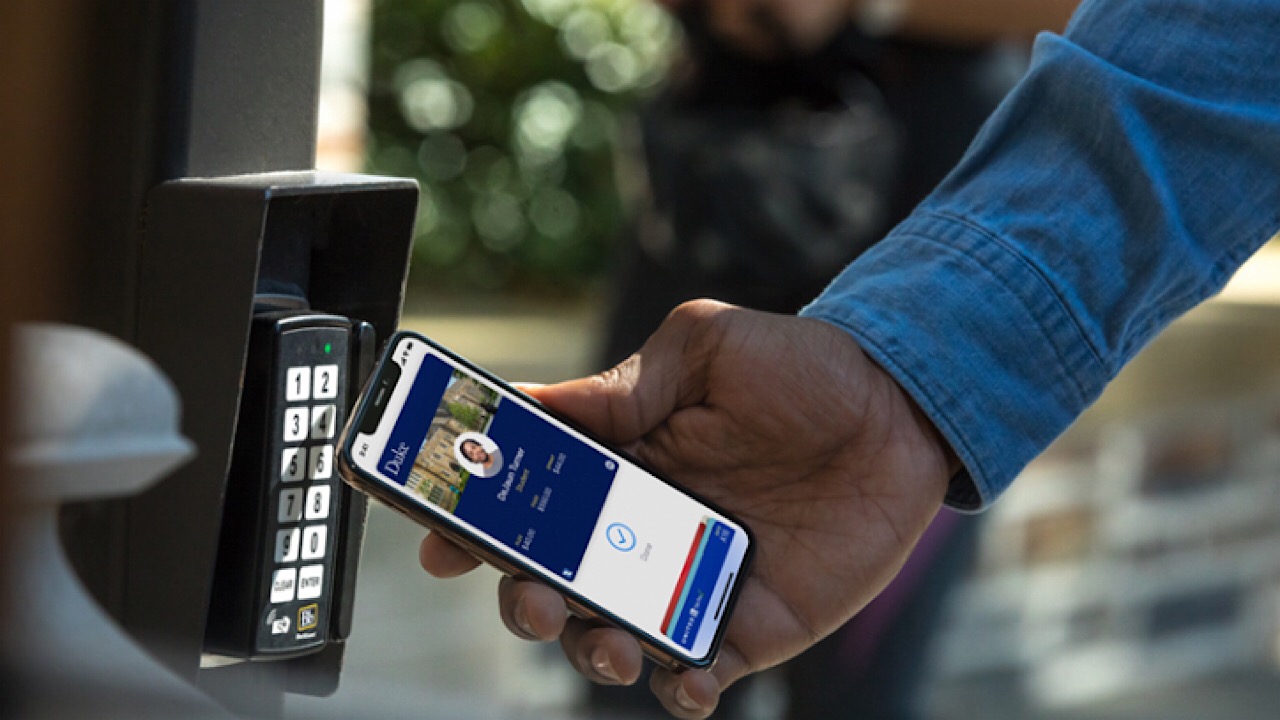
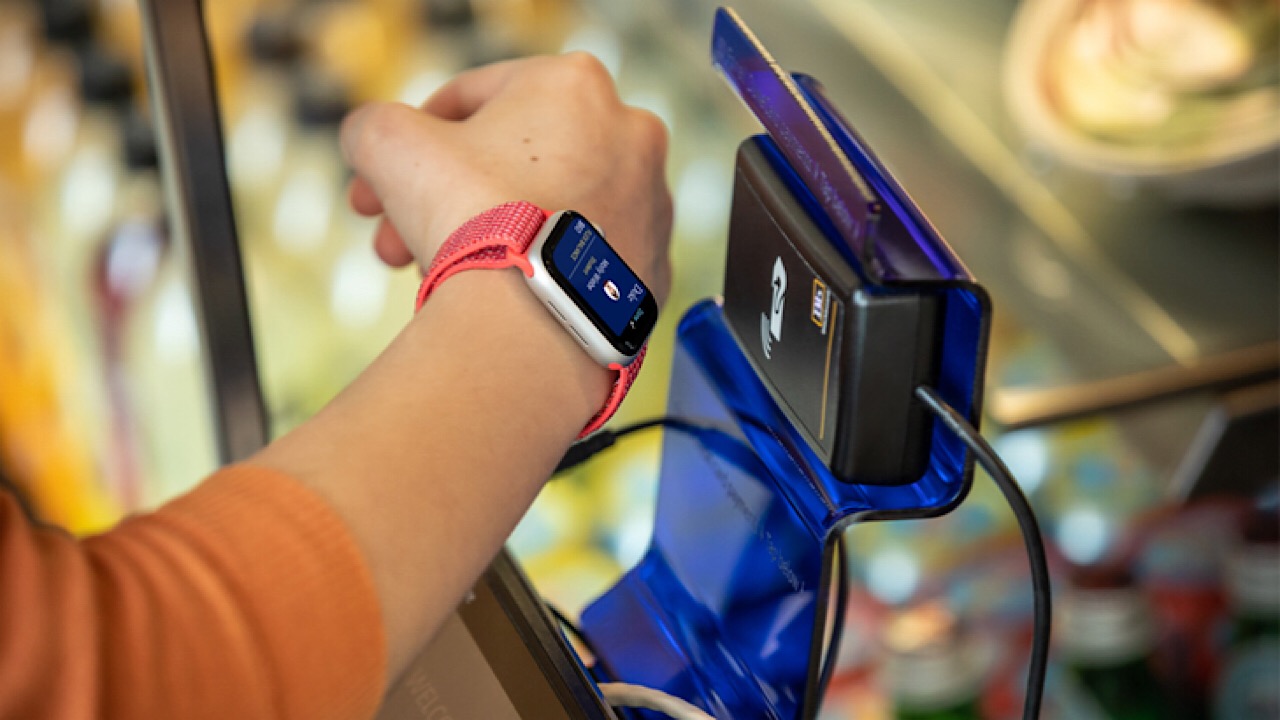
Apple announced on their newsroom page that they are working to integrate student IDs into the Wallet, a contactless payment system with Apple Pay that you can use on iPhones and Apple Watches. Just open Wallet, swipe your card, and you can pay for meals, laundry, and get into buildings that require ID like dorms.

iphone id swipe
Image via Apple

Apple Pay is one of the most popular contactless payment methods for phones out now. You can send an accept payments in stores, on the app store, and online. Apple says that using this system is cheaper than using your card because it uses a device-specific number and unique transaction code, and since your card number won’t ever be stored on the Apple servers, no sort of online shopping or transaction footprint exists.

Apple watch swipe
Image via Apple

Right now, the only universities that are a part of the integration are Duke University, the University of Oklahoma, and the University of Alabama. Many others may follow soon like Temple University, Johns Hopkins, and Santa Clara who will have this capability by the end of this year.

Not only is this integration good for payment’s sake, but it will also help people who have the tendency to lose their IDs. We remember those days, and wish this awesome system was around back then.

Is influencer marketing dead? Hmm… kind of

Think the Kardashians will save your company? Think again.

Is Influencer Marketing Done

Influencer marketing has been huge since, well, the dawn of social media. Between the Kardashians and their Fit Tea to Fashion Nova and Sugar Bear Hair, #sponcon  from varying degrees of celeb has hit a critical mass.

It’s undeniable that companies have tried to leach off of the successes of big names. But as marketers begin looking at the ROI of influencer campaigns, it’s becoming harder to justify the huge price tags.

Does that mean influencer marketing is on the way out?

Well, not exactly. We’ve declared all kinds of things dead—email, phone calls, etc. And yet, they persist. Here’s a little more about the future of influencer marketing and where it might be heading:

Influencer marketing can be a big risk

As influencer marketing matures, more regulations have hit the space. It’s no longer the free-wheeling, wild west of marketing. So, naturally, some brands are concerned about violating FDA restrictions or falling out of compliance with HIPAA regulations.

One of the most significant issues though is figuring out the right strategy. Often, brands reach out to influencers en masse in hopes that one will agree to represent the brand for the right price. This opens brands to risk in the form of fake followers. Instagram strongly discourages users from buying fake followers, which violate their terms of service.

Brands who fail to do their due diligence risk working with a fraudulent influencer, which can affect the brand reputation.

And then there’s the relevancy issue. We place a high premium on authenticity, and when brands fail to choose an influencer that represents their values and demographics, they stand to lose money.

Some big flops and the iron fist of the FTC

In 2017, the FTC introduced new regulations to improve disclosures. Thus, making it clear to consumers which posts were promotional. The change made news last year when the organization revealed that they sent 90 letters to influencers and brands, outlining the new requirements for sponsored posts.

Still, influencers mentioned that the changes made it more difficult to drum up engagement among followers with the now-required #ad or #sp. And, yeah… it makes sense that labeled ads aren’t as appealing to consumers. And, perhaps that’s why brands are looking at other approaches to gathering followers.

And then there are the flops. Most notably, the Kendall Jenner and Pepsi campaign left a bad taste in viewers’ mouths. Need a refresher?

Or, remember the Fyre Festival’s tent city for the rich — a PR disaster that Kendall and the Hadids couldn’t even save.

The ROI Factor is Huge

Rather than gamble with a big name charging thousands for a single post, marketers are adopting new influencer strategies. Micro influencers or influencers with a smaller, more niche base provide a more affordable, and potentially more effective solution. Studies have found that these influencers give a better ROI.

See, as follower counts rise, engagement decreases. So, brands do well when they hit that sweet spot: enough followers to provide a broader reach, but small enough that the influencer responds to fans.

This example from Sperry is one of several posts that leveraged a network of 100+ micro influencers. They chose this group by looking into which users were already fans of the brand and invited them to develop visual content for the brand’s account.

Employees, too, are seen as an effective alternative. They bridge the gap between being a “regular person” and having insider knowledge of a product/service.

As such, marketers are trying their luck with user-generated content and employee ambassadors. BlendTec’s “Will It Blend?” campaign is one such example. The brand created a series of short videos that test the power of the blender.

What’s next?

It’ll be interesting to see what influence 2.0 has in store—both for consumers and marketers. As social media matures, more regulations come into play, and users become increasingly aware of the thinly-veiled celebrity endorsements.

Social remains a personal platform, despite all of the branded content. As such, whether brands will start to abandon big influencer marketing campaigns, or lean into more sophisticated models remains to be seen.

6 default iPhone apps you shouldn’t delete

Your iPhone came with some amazing apps. Here’s why you should keep them.

Don’t be so fast to delete your default apps! Many default iPhone apps tend to go unused, and this causes a lot of them to be deleted fairly early on. However, some of these Apple apps are actually worth keeping, and are incredibly useful compared to similar apps. Here are some of the default apps that are worth using and why. Of course, this isn’t including the apps that can’t be deleted, such as Messages, Photos, Camera, Clock, Wallet, Health, Settings, Find My iPhone, and App Store. Each of these apps, besides Health, has an innate use for your phone, and wouldn’t make sense to be deletable.

6 default iPhone apps you shouldn’t delete

iBooks

Apple’s iBooks app is actually one of the best e-readers out there. It has extensive capabilities while being completely free. It is simple and easy to use compared to similar apps, while retaining a large library of choices. It even has audiobook capabilities that other e-readers are less likely to have.

iBooks Free Download
6

Calculator

Of course, there are some amazing calculator apps in the app store, but the one that comes pre-built with your Apple products is actually as capable as you would need in your everyday life.

Calculator Free Download
7

iMovie

If you’ve ever tried editing a video before then you’ve probably heard of iMovie. Despite being a free default app available on all Apple products, iMovie is one of the most popular and useful video editors out there. Whether you’re just trying to crop a short clip from a video of your kids, or you’re trying to produce high-quality advertisements, iMovie can edit more than you would expect.

iMovie Free Download
8

GarageBand

Similar to iMovie, GarageBand is a popular music creation app that is competitively useful. Apple has produced high-quality apps for both these types of media, and the applications have continued to progress as the company has. GarageBand lets you create, edit, and remix music with ease. While not everyone will find this a necessary app, those who like to experiment with music will all appreciate this free and useful default application.

GarageBand Free Download
7

News

Probably the most overlooked iPhone app, Apple News is great for people of all interests and political backgrounds. It lets you follow various news outlets in topics that you care about, so that you can stay up to date with all the news you want to hear. If you’re interested in video games, you can follow their news outlets like Game Informer. Alternatively, if you are into politics, you can follow whatever news site you prefer to listen to, whether it be CNN, FOX, MSNBC, etc.

Tips

Unlike the other apps on this list, Tips isn’t a particularly useful app. However, there are no other apps that function the same way, so it’s important to keep in mind if you enjoy its purpose. The Tips app exists to give you more insight into Apple products and app development. It can be an interesting app to check occasionally, especially if a new iOS has just been announced and you’re curious as to what the changes will be.

While there are other useful default iPhone apps, such as Keynote and Pages, these apps tend to have replacements in the app store that are also free and superior in most ways. The only exception being the Apple TV, Home, and Watch apps, which are useful, but require additional accessories to be functional.

5 Best Competitive Pokémon for VGC 2019 Sun Series

Want to do battle in Pokémon VGC 2019 Sun Series? Here are your best bets.

The Best competitive Pokémon for VGC Sun Series

The Pokémon VGC Sun Series has been underway for about a month now, and the addition of cover legendaries has caused pandemonium within the format. With so many gods and elemental beasts running around, it can be hard to choose which two to use on your team. Before jumping in, here are the rules for VGC 2019 and the Sun Series:

  • All battles will be Double Battles played in Pokémon Ultra Sun and Pokémon Ultra Moon.
  • All Pokémon from National Pokédex No. 001 through 807 are allowed, with the following restrictions:
    • Mythical Pokémon and Ash-Greninja are not permitted.
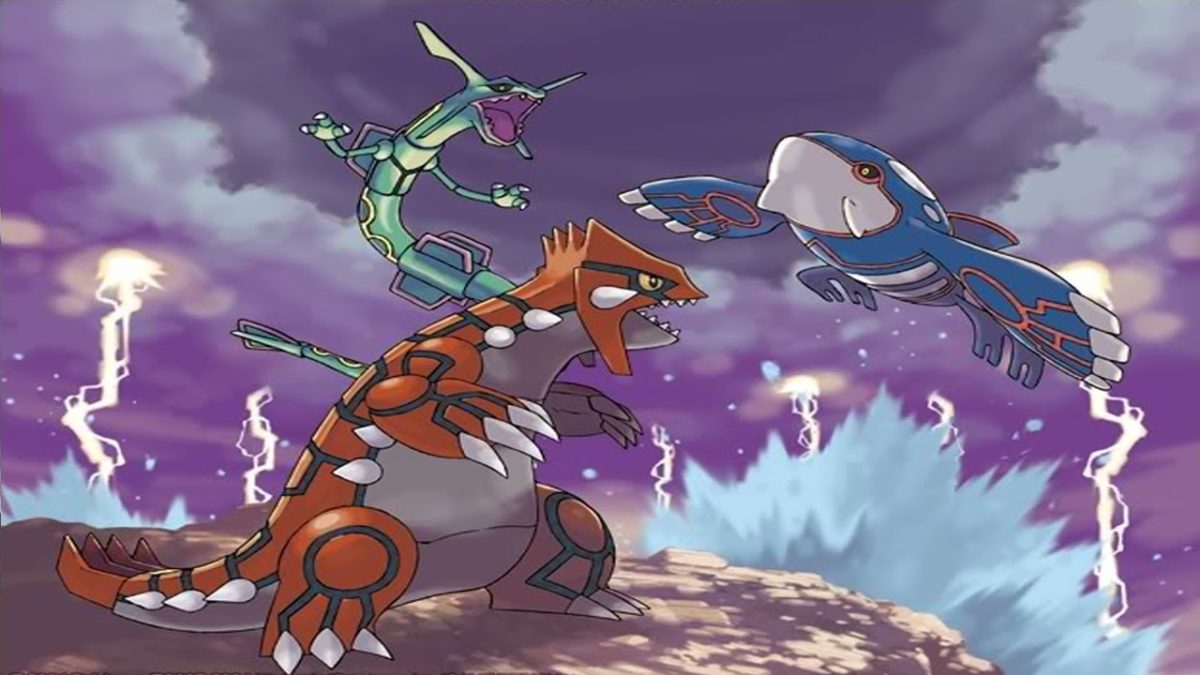
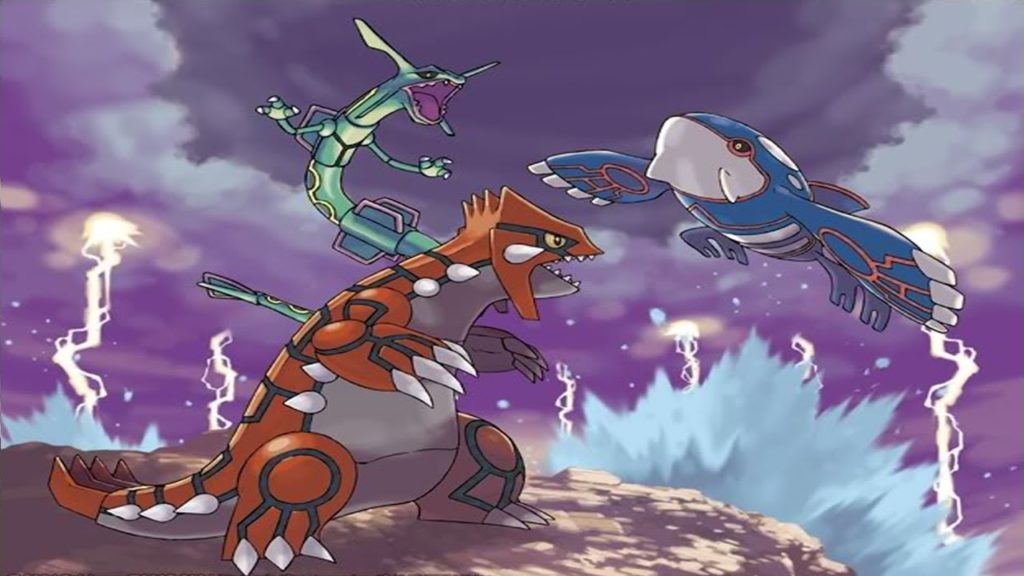
    • Players may only include two of the following Pokémon in their teams: Mewtwo, Lugia, Ho-Oh, Kyogre, Groudon, Rayquaza, Dialga, Palkia, Giratina, Reshiram, Zekrom, Kyurem, Xerneas, Yveltal, Zygarde, Cosmog, Cosmoem, Solgaleo, Lunala, Necrozma.
  • Pokémon must have the Alola symbol, showing they were caught in the Alola region.
  • Duplicate Pokémon are not allowed.
  • Duplicate held items are not allowed.
  • All Pokémon are set to Lv. 50, including Pokémon below Lv. 50.
  • Players will have 7 minutes of Your Time, up from 5 minutes in 2018.

The following additional rules will be in place only during their respective series.

Sun Series
September 4, 2018–January 7, 2019

  • Z-Crystals and Mega Stones are not permitted.
  • Blue Orb and Red Orb items are not permitted.
  • Rayquaza may not know the move Dragon Ascent.

Now that that’s out of the way, here are some of the best Pokémon in Sun Series so far.

5 Best Competitive Pokémon for VGC 2019 Sun Series

Incineroar

Incineroar @ Assault Vest/Figy Berry

Ability: Intimidate

Level: 50

EVs: 252 HP / 252 Atk / 4 SpD

Adamant Nature

– Fake Out

– Flare Blitz

– Knock Off

– U-turn/Roar/Protect/Snarl

The controversial heel wrestler absolutely dominated VGC 2018, and Sun Series looks no different so far, once again becoming the most commonly used Pokémon in the format. Incineroar’s monstrous attack stat and fantastic offensive typing allow it to hit opponents hard with STAB Flare Blitz and Knock Off. It’s bulky too, allowing it to survive a rain-boosted Origin Pulse from Kyogre while holding an Assault Vest.

Incineroar’s greatest strength, however, is its amazing utility with Fake Out and Intimidate. Intimidate is obviously one of the most broken abilities in doubles, lowering both of the opponents’ physical attack stats on a switch in. This broken ability combined with Fake Out pressure allows Incineroar to support its teammates, allowing them to set up utility moves like Tailwind or Trick Room. If you want additional utility, you can replace U-turn and your Assault Vest with a few different options. Roar can be used to phase out the terrifying threat that is Geomancy Xerneas, while Snarl does spread chip damage and lowers your opponent’s special attack stats.

Xerneas

Xerneas @ Power Herb

Ability: Fairy Aura

EVs: 4 HP / 252 SpA / 252 Spe

Timid/Modest Nature

– Geomancy

– Dazzling Gleam

– Protect

– Moonblast

This roided-out Bambi is arguably the biggest threat in Sun Series so far. Once it gets its Geomancy up, there is very little in the metagame that’s able to stop it. The set is fairly straightforward: set up Geomancy, then win. While using Xerneas, you need to make sure you can get your Geomancy up safely.

Common anti-Geomancy Pokémon include the aforementioned Roar Incineroar and Haze Crobat, both of which can waste Xerneas’s Power Herb, making it significantly less effective. Make sure you support your Xerneas with Fake Out and Taunt users that can ensure your precious deer’s ascent into godhood.

Kyogre

Kyogre @ Choice Scarf/Life Orb

Ability: Drizzle

EVs: 4 HP / 252 SpA / 252 Spe

Modest Nature

– Origin Pulse

– Water Spout

– Ice Beam

– Thunder

Even though it doesn’t have access to Blue Orb in Sun Series, Kyogre is still one of the best Pokémon in the game. If you can avoid Fake Out ruining your momentum, spamming scarfed Water Spout can net you a win. If you’ve been damaged a bit already, Origin Pulse still hits like a truck. Kyogre’s Drizzle ability also provides a lot of useful utility if you build your team around it. Swift Swim Pokémon like Ludicolo can run circles around the enemy team, abusing their blazing speed to remove threats to Kyogre and give you the win. Kyogre alone counters strong offensive Pokémon like Groudon and Incineroar, and if you can remove threats like Amoonguss and Ferrothorn, Kyogre should be able to clean up the enemy team easily.

Necrozma-Dusk-Mane

Necrozma-Dusk-Mane @ Weakness Policy

Ability: Prism Armor

EVs: 252 HP / 4 Def / 252 SpDef

Sassy Nature

– Photon Geyser

– Sunsteel Strike

– Trick Room/Earthquake

– Protect

After making waves in Ubers, Necrozma-Dusk-Mane makes its VGC debut with a vengeance. Its amazing ability Prism Armor reduces damage from super effective attacks by 25%, allowing it to tank through common moves like Earthquake or Flare Blitz. After taking a super effective hit, NDM’s Weakness Policy will activate, allowing it to sweep. In order to make sure NDM can sweep, your team must utilize speed control. Either have another Pokémon set up Tailwind or have NDM activate Trick Room itself. NDM is arguably the most powerful Xerneas counter in the format. If you can establish speed control and eliminate threats like Incineroar, your NDM sweep will be extremely hard to stop.

Ferrothorn

Ferrothorn @ Leftovers

Ability: Iron Barbs

EVs: 252 HP / 4 Atk / 252 SpD

Brave Nature

– Gyro Ball

– Power Whip

– Leech Seed/Thunder Wave

– Protect

This thorny annoyance has made constant appearances in competitive play ever since its debut in Black and White. Ferrothorn’s insane bulk and fantastic defensive typing allow it to tank hits from some of the most powerful Pokémon in the game. The two most powerful Pokémon in Sun Series, Xerneas and Kyogre, both fear Ferrothorn. It can easily absorb hits from both of them and respond in kind with a Power Whip for Kyogre or a Gyro Ball to a boosted Xerneas. Depending on their set, Ferrothorn can one-hit-KO either of those two Pokémon.

It can also easily stall out enemy teams with Protect and Leech Seed, proving once again that it’s an unkillable parasite. If you come up against a Ferrothorn, break out the Incineroar and light it up with Flare Blitz. Just be wary of its Rocky Helmet.

Want to put these powerhouses into practice? Find an event near you with Game Freak’s official VGC event locator!

How to make Google Chrome run faster

These 4 steps will make Chrome fly!

Has your Google Chrome been a little sluggish lately? Here are several things you can do to speed up your browser!

How to make Google Chrome run faster

1. Update Chrome

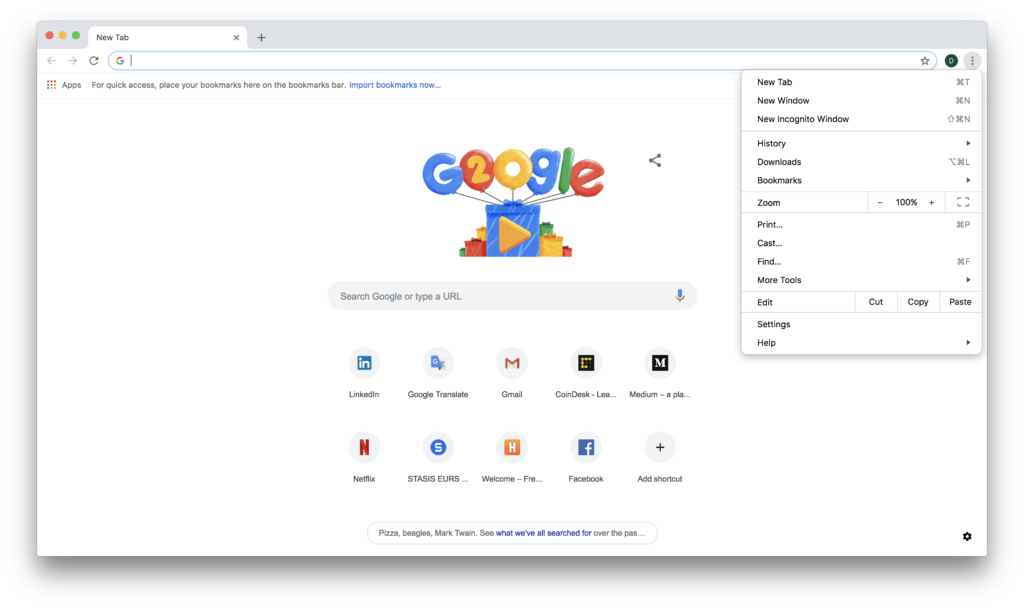
One thing that can slow down Chrome is using an outdated version. Chrome will always run fastest when you’re using the latest version, so be sure to update it! Chrome normally updates automatically, but you can check to see if there’s an update available by clicking on the More button in the top right corner of the browser (it looks like three vertical dots). If an update is available, you’ll see an option that says “Update Google Chrome.” If you don’t see this option, then your browser is already up-to-date.

2. Close tabs

The more tabs you have open, the harder Chrome has to work. Closing tabs that you’re not using can help Chrome run as quickly and efficiently as possible. To close a tab simply click the X in the right-hand side of the tab. If you’re using Windows, Linux, or Chrome OS, you can also close a tab by holding the “Ctrl” and “W” keys down at the same time. On a Mac, hold down “⌘” and “W” at the same time.

Google Chrome Download Free
7

3. Let Chrome pages open faster

Did you know that you can make your web pages open faster on Google Chrome? All you have to do is turn on network action predictions and select “page prefetch.” Once that setting is turned on, Chrome will automatically preload any links you might open to save you loading time.

To do this you first need to open Chrome. Click the More button at the top right corner of the browser and go to Settings. Once you’re in Settings, click the Advanced button at the bottom of the screen. Finally, find the “Privacy and security” section and turn on “Use a prediction service,” which will help you load pages more quickly in Chrome.

4. Check for malware or viruses

Finally, ensure there isn’t any malware slowing down your Google Chrome. These directions only work for removing malware on a Windows computer. First, you need to open Chrome then click More at the top right. Go to Settings. After that, click Advanced, which will be at the bottom of the screen. You will see a “Reset and clean up” option, where you should click “Clean up computer.” Finally, click “Find” and Google Chrome will scan your computer for unwanted software and offer to remove it for you. In order to remove the malware, all you have to do is click Remove.

A closer look at Amazon’s Alexa microwave

Do we really need to talk to our microwaves?

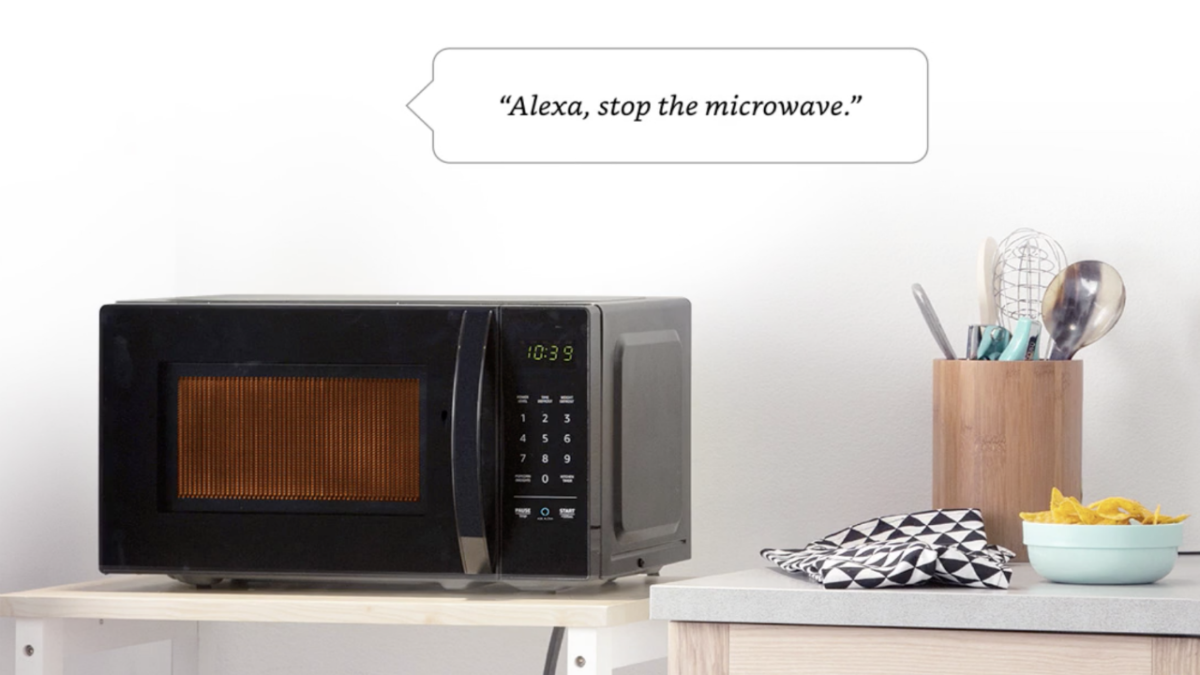
Amazon Basics Alexa Microwave

As you may have heard—Amazon is now in the microwave biz.

Announced alongside a whole slew of new Amazon hardware products, the microwave is the company’s first applianceone that seeks to make the virtual assistant an even bigger part of our daily lives.

It’s been a week since Amazon’s Alexa event and the news of an affordable, voice-activated microwave sparked groans, along with the promise of an endless supply of popcorn.

Where Siri, Google, and Microsoft have long dominated our digital worlds, Amazon is clearly angling for a prominent place in our physical lives.

Aside from Amazon’s obvious bid to get into our kitchens, what’s the deal with this device?

So, How Does it Work?

The Alexa Connect kit powers the device—a Bluetooth connected Wi-Fi module that brings smart technology to “dumb” home essentials. The kit communicates with Echo devices.

As such, you can’t ask Alexa to play your favorite cooking playlist through the microwave. Instead, it wirelessly connects to another Alexa device in the kitchen.

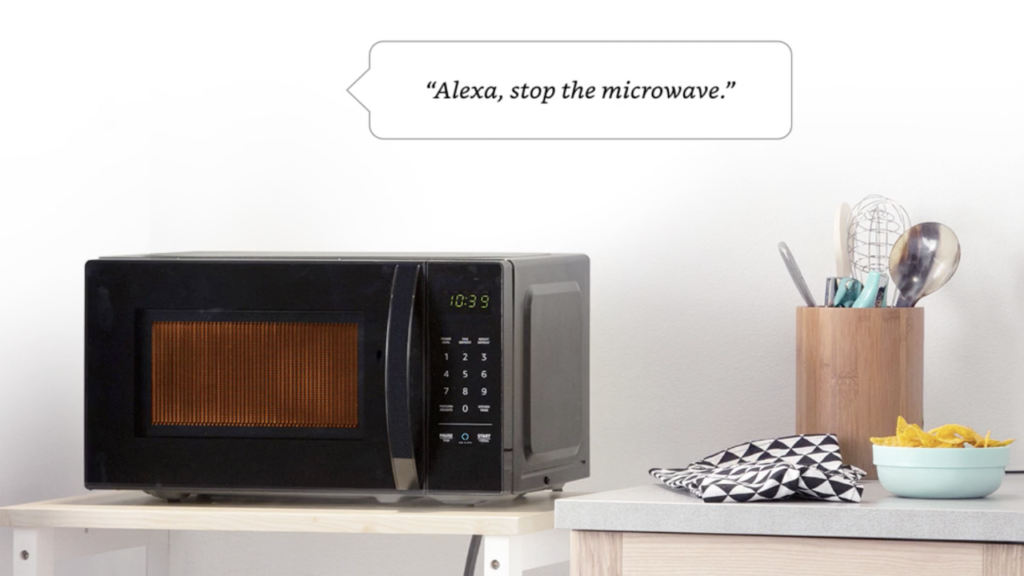
In case you were wondering, here’s an illustration that gives you the gist of how this thing works:

You can deliver commands like, “Alexa, one potato” or “Alexa frozen vegetables” and she’ll automatically cook your food for the required time—no need to fret over cook times.

The microwave comes with “dozens of quick-cook voice presets,” meaning the buttons that say pizza, potato, or popcorn are voice activated.

Integrates with Dash — Restock Your Snack Food Supply

One of the highlights of the Alexa event was the Dash demo. Equipped with Dash replenishment, you’ll soon be able to restock your popcorn supply through your microwave.

That said, you’d better love popcorn, because there doesn’t appear to be a dash app for ordering more Hot Pockets or a big bag of Russet potatoes.

Why?

While there are other Alexa-enabled microwaves on the market, GE, Samsung, LG, and Whirpool all make higher end smart microwaves —the benefit of the Amazon model is, it offers better Alexa integration.

As we mentioned above, Amazon has announced 13 new devices that expand Alexa’s reach both in and outside of the home. Amazon Auto—an in-car Alexa or the Alexa-powered wall clock are a couple of examples of what’s on the way.

These pieces of hardware seem silly or unnecessary to many of us, but Amazon’s goal is two-fold. One, these devices give the company more access to our data. Two, the microwave is something of a prototype you can buy—it’s a way to demonstrate how Alexa and Amazon work in the kitchen, the car, and wherever else you hang out.

When you start chatting up your microwave, Amazon begins to learn more about your eating habits, which may be worth a lot more to the company than the 60 bucks you paid for the device.

Embedding Alexa in more locations gives Amazon an even bigger pool of data to draw from. It also presents more opportunities to get users to sign up for Prime.

See, Amazon if can present multiple touchpoints—from your local Whole Foods to the place you heat up your organic meals, it becomes more challenging for users to opt out of the subscription service.

Is the Microwave Any Good?

At $60, there’s no hope that the device can compete with higher-end—or even mid-market microwaves.

At that price point, the Amazon microwave severely undercuts the competition—which means we’re sacrificing fast cooking times and better features for the novelty of asking Alexa to heat up a potato.

That said, the product rollout was reportedly less about the technology of the device and more about getting users to start considering the future of using Alexa as your virtual sous chef.

Ultimately, the product functions as a way to show off the Alexa Connect Kit, and they’ve chosen to let consumers purchase the demo.

Whether the device is actually useful remains to be seen. But, as Amazon rolls out are connected devices that keep tabs on your preferences and conversations, Amazon’s press events may be required to spend more time addressing privacy concerns.


Bowsette takes the internet by storm

Here’s the Super Mario fantasy dreamgirl that’s burning up the internet right now.

Oh boy, have we got a show for you.

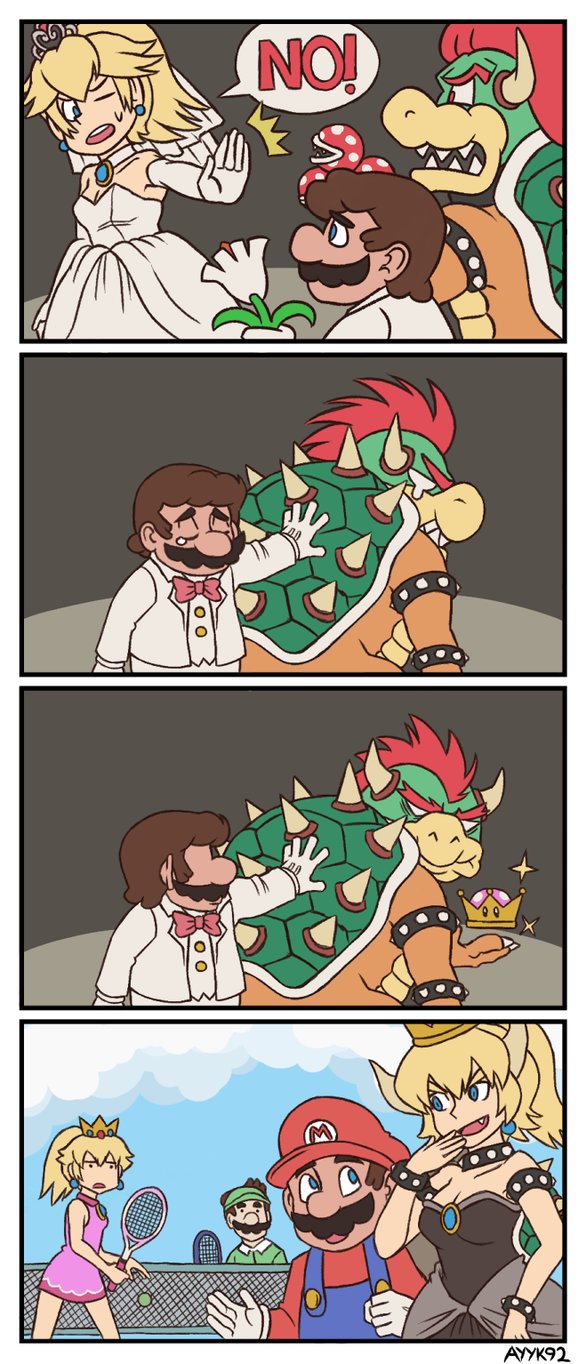
The mighty, flaming forge of internet creatives recently developed Bowsette – a mystical cross between Bowser and Peach (characters from Nintendo’s Mario series, for the seriously uninitiated). Hundreds of works of art, costumes, and composed music later, and Bowsette’s on her way to stardom! To give you a taste of what she looks like, here are two pictures. The picture that follows reportedly started the whole trend…

It Starts

(Before we move on, a warning: these are relatively Safe For Work (SFW) versions of Bowsette! We’re being serious: be careful when looking into this phenomenon, if you’re hoping for family-friendly content.)

How it Began

Recently, Super Mario Bros. U announced a Deluxe edition, coming soon to the Nintendo Switch!

And nobody cares anymore.

Because 20 seconds into the video, Toadette used a crown that partially gave her the likeness of peach, with a few mushroomy features. She was then called Peachette. Behold, the video in question:

Peachette. The whole snafu started there.

One thing led to another: first, the gamers started asking, “Does this crown work on other characters? Who else could become peach?” Then, in a moment of collective genius, they decided to bring their various combinations to life with arts, crafts, and music. Bowsette reigned supreme, and thanks to that little magic crown the awesome combination of Bowser and Peach became everyone’s dream girl.

YouTuber ProZD put out a great video poking fun at the hilarity of the situation. [language warning]

So there it is. The start. After the initial posts and hype, the sensation of Bowsette took off in every direction. Other artists created characters like Booette (Boo), Bloopette (Blooper), Kirbette (Kirby), Chompette (Chain Chomp), and Goombette (Goomba).

Chibi Booette !! from r/bowsette

You boys can have Bowsette. Bloopette is the future. from r/gaming

So basically from r/bowsette

Chompette by kamindani from bowsette

The cutest evil minion from r/bowsette

In some ways, the enormous response is an end goal in itself: lots of gamers are having a great time imagining the possibilities, from cute and cuddly to sexy and sensuous. Don’t miss out on the moment!

Moving Forward

Nintendo has a choice to make.

Bowsette and the other incarnations of Peach crossovers are in the public eye, and storming sites like Deviantart and Reddit. A lot of people want Bowsette to become canon, whether that’s her introduction to the Mario U game or Super Smash (which would be an awesome choice, especially if a choice were given between Booette, Chompette, and so on).

However, Nintendo prides itself on being a family-friendly gaming system. Bowsette, at this time, is a predominantly family-UNfriendly character. They would need to create a more modest incarnation, which is certainly possible, but there may be some backlash anyway. However, we believe too much potential resides in Bowsette and company to let the legend die: it deserves to live on, hopefully in the upcoming Super Smash game…

Against all odds, let’s hope she joins the official Mario cast!

Super Smash Bros. Ultimate – LEAK (Oh God…) from r/bowsette

Final, Random Words

Here’s a game: find a Bowsette cosplay. Now, try to decide: was it made after the craze started, or did they prophetically combine Bowser and Peach into a costume before it was cool? Just imagine the excitement when their old Bowsette cosplay launched into style! Crazy, right?

Anyhow! Here’s wa-wa-wan more for the road!

Best boy is perfect as he is. from r/bowsette