
Fortnite introduces Tournament Events

Are you ready to battle in Fortnite’s Tournament Events?

fortnite funk ops
Fortnite funk ops

If you’ve played Fortnite recently, you’ll probably have noticed a new tab on your main menu, labeled “Events.” Scrolling over to the tab will reveal this neon-tinted roster and the latest game mode to come to Fortnite: tournaments.

Fortnite: Battle Royale Play Now
10

Fortnite introduces Tournament Events

Tournament Modes
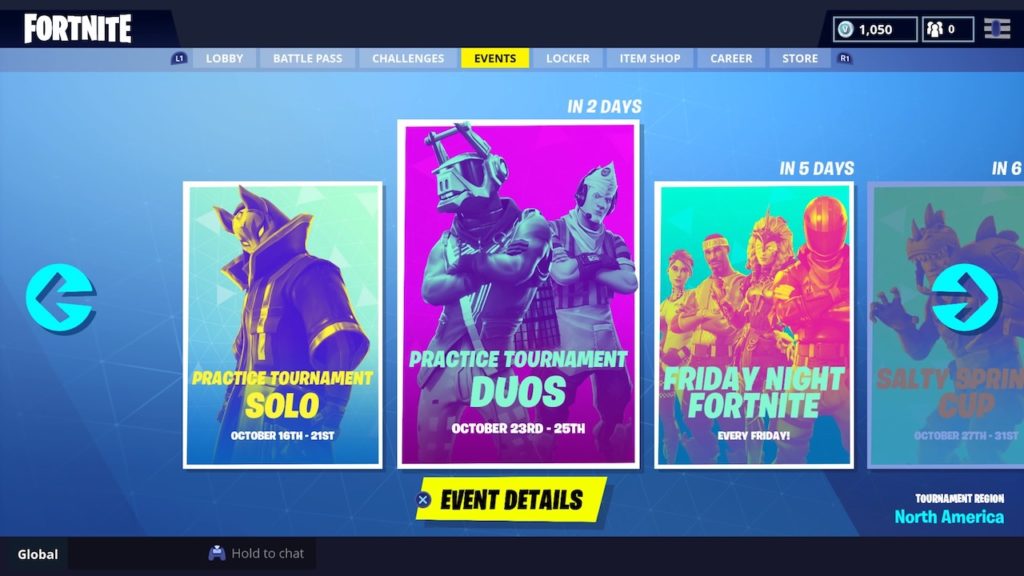
fortnite tournament events
Image courtesy Epic Games

As the name implies, Fortnite’s new tournaments are competitive game modes that task you with outlasting other players gunning for the top spot. How does it work? The tournaments themselves are broken up into regions, and specific tournaments have different themes: Solos, Duos, Squads and other events such as Friday Night Fortnite and the Salty Springs Cup. It should be noted that for Squad Modes, you can’t simply use matchmaking to hop into a squad: you’ll need to bring along friends of your own to join.
Also, unlike the base game, you’ll be matched with players of equal skill level, rather than players on the same platform. Skill is based on the number of points you accumulate throughout the tournament, with things getting more and more difficult as you progress further and rack up more points.

Rules and Prizes
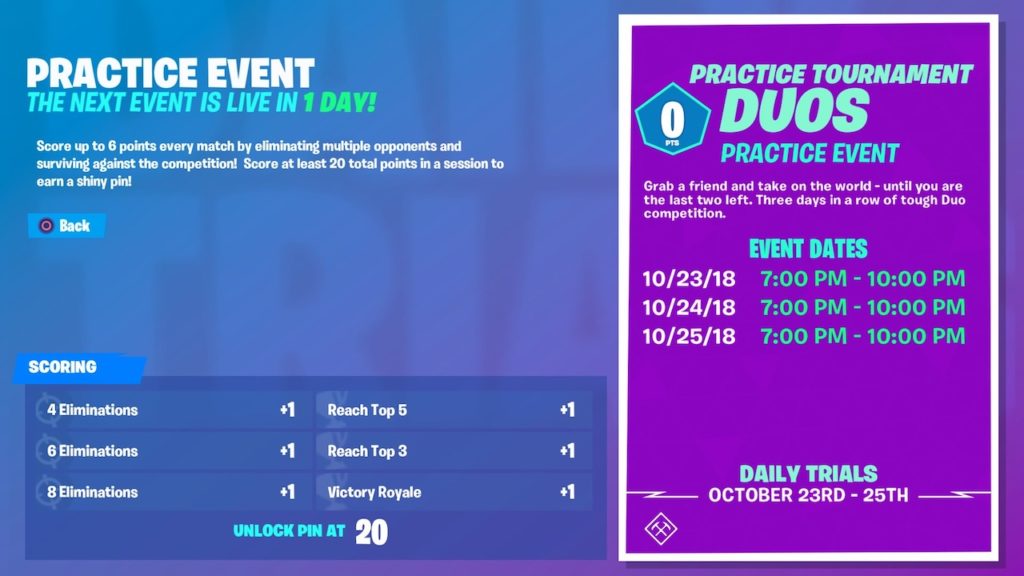
fortnite tournament rules
Image courtesy Epic Games

Fortnite’s tournaments are limited time events. The schedules and specific times that you’ll be able to participate in each tournament is located on the Events page. Selecting a tournament will also reveal a set of specific scoring rules. Scoring in Tournaments is based on a points system. Players must complete a specific set of tasks to receive a point, such as getting a certain number of eliminations or achieving a certain match placement.

Players that accumulate enough points will receive an in-game wearable pin as a prize. These pins are cosmetic items that are unique and themed to each specific tournament.

Rough Around the Edges

Despite being a currently available playable mode, the new Tournaments system isn’t without problems. Though Epic has stressed that the Tournaments available now are intended as a trial run for the later implementation of more intricate events and tournaments, it’s generated quite a bit of grumbling among the game’s player community.

Most criticisms seem to center around matchmaking. The matchmaking itself takes quite a bit of time, with some players left searching from 20 minutes to an hour. With the tournaments being implemented as limited time events, it can be rather frustrating to spend precious minutes in a queue rather than racking up points in-game. Players have also complained of significant in-game lag, a problem that Epic is currently working to address.
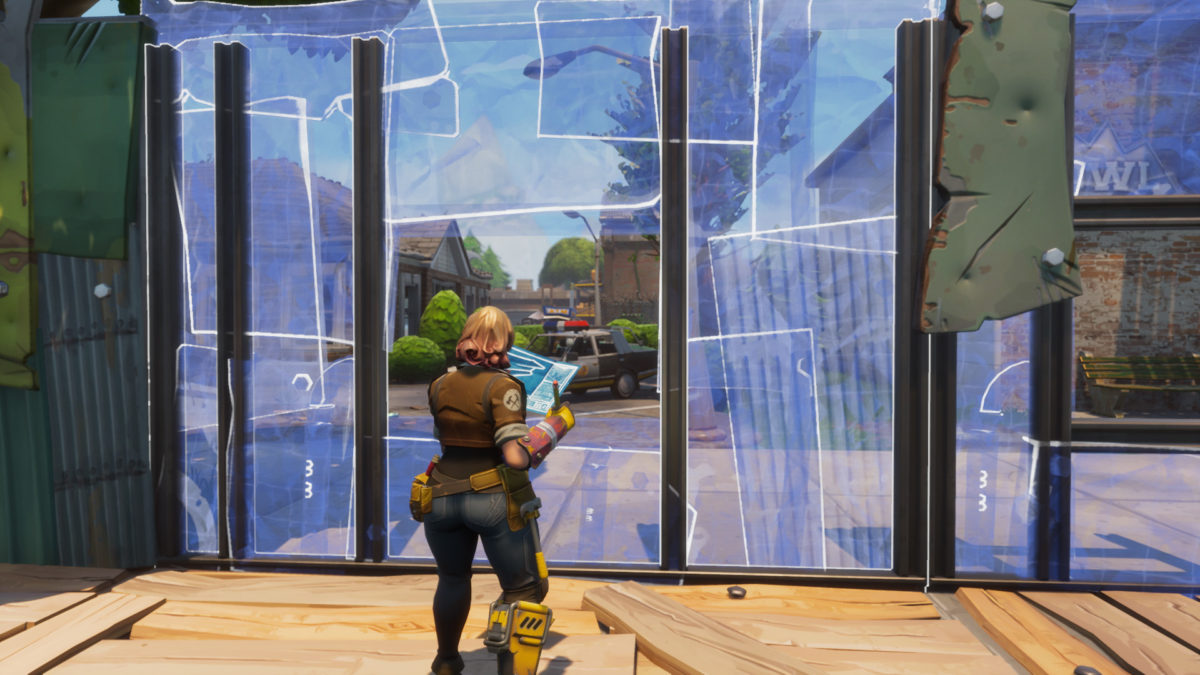
The “skill-based” matchmaking is also creating quite a bit of controversy. Because matchmaking is based on points, that means players on Android can be matched with players on PC and console. These players have a distinct leg up on gamers playing with a touch screen. It’s caused an outcry among mobile players who contend pitting them against players using a mouse or controller isn’t fair.

If these issues don’t bother you, head on over to the Events tab and try tournaments for yourself. It’s a mode that’s still in its infancy, and Epic will be continuing to tweak and improve Tournaments as time goes on.
 

WhatsApp tests a new ‘vacation mode’

WhatsApp is testing a “Vacation Mode” for the iOS version of the app, similar to a feature already available on Android

WhatsApp is one of the most useful applications we have. It can be a little distracting, though. This is especially true for people who are members of a lot of groups. It could be useful then for WhatsApp to add a mode that lets you take a break from certain groups whenever you like. Like, say, if you’re on a vacation from work.

WhatsApp Messenger Download WhatsApp ►
8

WhatsApp is testing a “Vacation Mode” for the iOS version of the app, similar to a feature already available on Android

WhatsApp’s new Vacation Mode works on archived messages and groups. Without Vacation Mode, all archived groups become un-archived whenever a new message is sent to group members. This means if you’re a member of a group at work, you’ll receive notifications for work messages even if you’re away from the office on your downtime. The new Vacation Mode solves this problem.

WhatsApp’s Vacation Mode stops archived groups and chats becoming un-archived whenever a message is sent. All messages will be added to the archived groups and chats and will wait there until you finally decide to un-archive the group. Vacation Mode can be used to silence work groups while you’re on vacation or to give yourself a break from emotionally taxing or annoying groups and chats that you don’t want to leave.

WhatsApp Vacation Mode
WhatsApp Vacation Mode means you won’t have to leave groups or chats to be able to ignore them

This is an important step by WhatsApp as it allows users to turn their back on messages from work. With chats and groups simply muted you still see the chat rise to the top of your inbox whenever you receive a message. Now, with Vacation Mode enabled, you won’t know if you’ve received a message from a group you want to ignore. Vacation Mode puts certain chats out of sight and out of mind, without the need to leave the groups and chats in question.

In France, it is forbidden for companies to send work-related messages to employees outside of work hours. This is because work emails and messages are hard to ignore and France has a strong and robust trade union movement. We don’t all live in France, but this latest WhatsApp feature offers us more freedom from work commitments whenever we’re away from the office.

The new Vacation Mode was discovered by the guys over at WABetaInfo in the latest beta version of WhatsApp for iPhones. This means we’ll have to wait a little longer before we see it released to all users. With a lot of other useful WhatsApp features currently at the advanced beta testing stage of development, we should expect a large general update soon.

Fortnite: How to beat the shooting galleries challenge

Follow our map and win the shooting galleries challenge!

fortnite shooting gallery risky reels
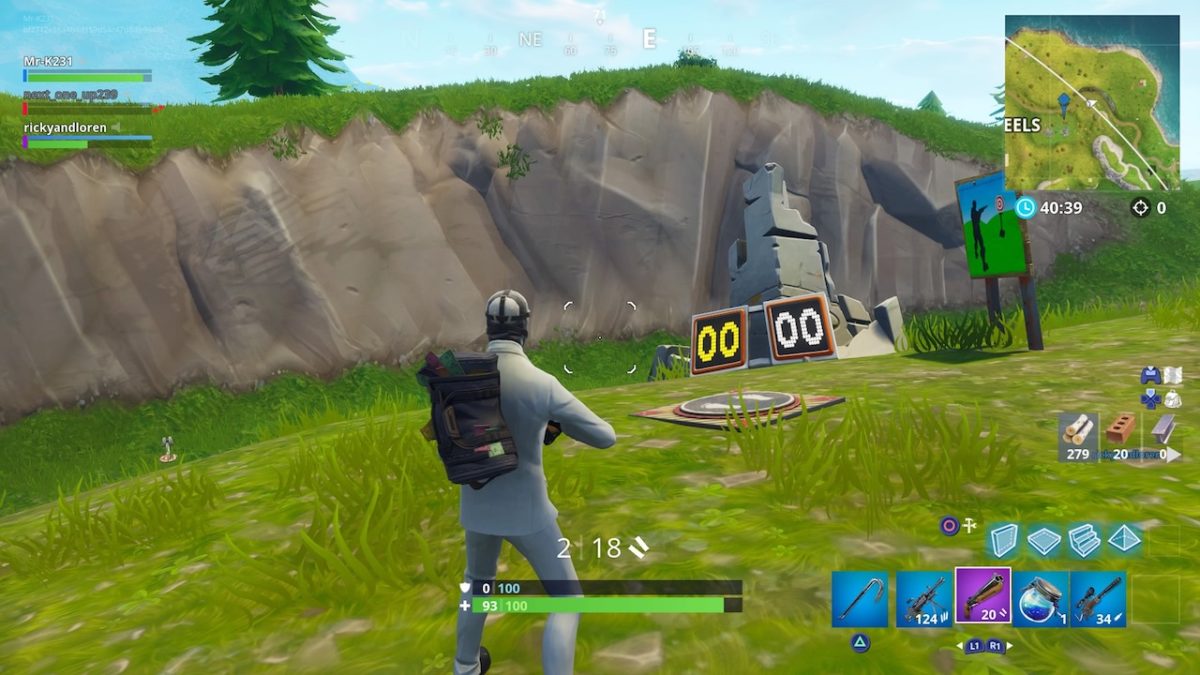
Risky Reels shooting gallery

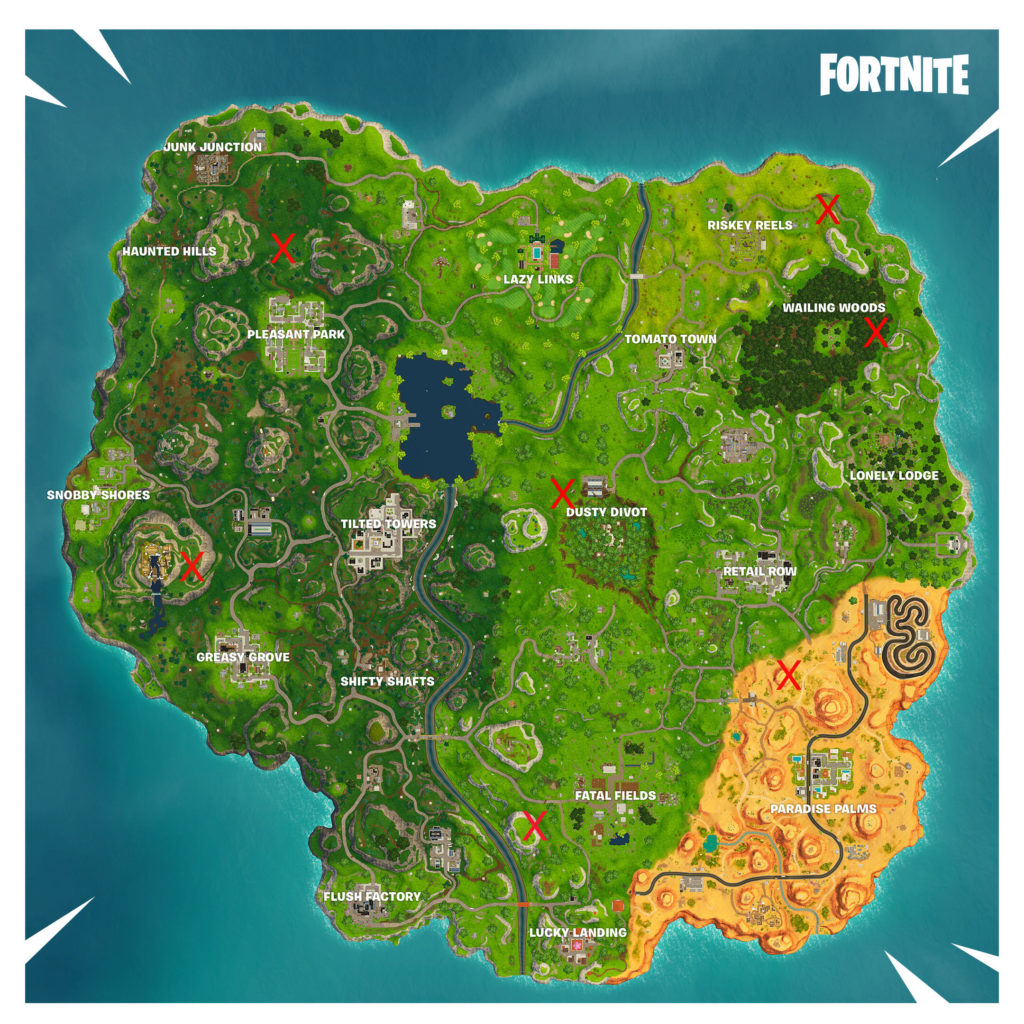
Fortnite’s latest set of challenges includes yet another mini-game challenge in the same vein as the timed trials. This week, players are tasked with scoring a 3 or higher at different shooting galleries scattered around the map. Take a look below to find a list of their specific locations and strategies for how to score high.

Fortnite: Battle Royale Download Fortnite: Battle Royale ►
10
fortnite shooting gallery map
Fortnite shooting gallery map

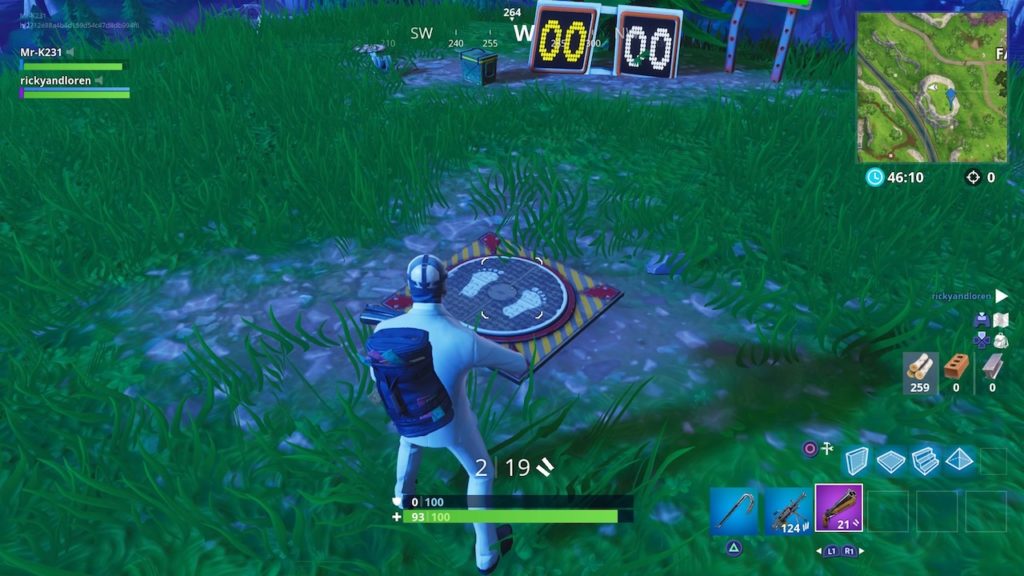
When you arrive at a shooting gallery, you’ll notice a pressure plate on the ground, such as this one:

shooting gallery pressure plate
Shooting gallery pressure plate

To activate the challenge, simply stand on the pressure plate and a series of targets will pop up around you. You must remain standing on the plate as you shoot the targets. Make sure you have a good stockpile of ammo and a few fast firing but accurate weapons on hand before starting the challenge. We’ve found the Assault Rifle and Pistol to be most effective. You’ll be on a timer as soon as the first target pops up, so aim fast and fire faster.

Desert Shooting Gallery

fortnite shooting gallery desert
Desert shooting gallery

This gallery is located atop a mesa on the northern border of the desert area, just south of the blighted area. You’ll need to build a ramp to get on top of the mesa, so bring some building supplies.

Wailing Woods Shooting Gallery

fortnite shooting gallery wailing woods
Wailing Woods shooting gallery

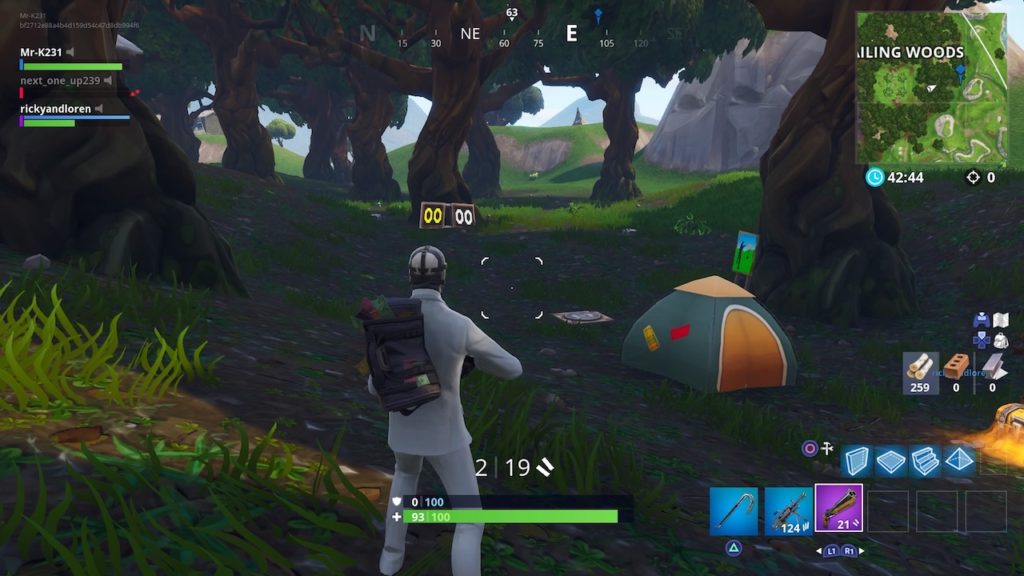
You’ll find this gallery in a small gully on the eastern edge of Wailing Woods, located near a camping tent and crashed RV. If you use these landmarks, this one should be fairly easy to spot.

Dusty Divot Shooting Gallery

fortnite shooting gallery dusty divot
Dusty Divot shooting gallery

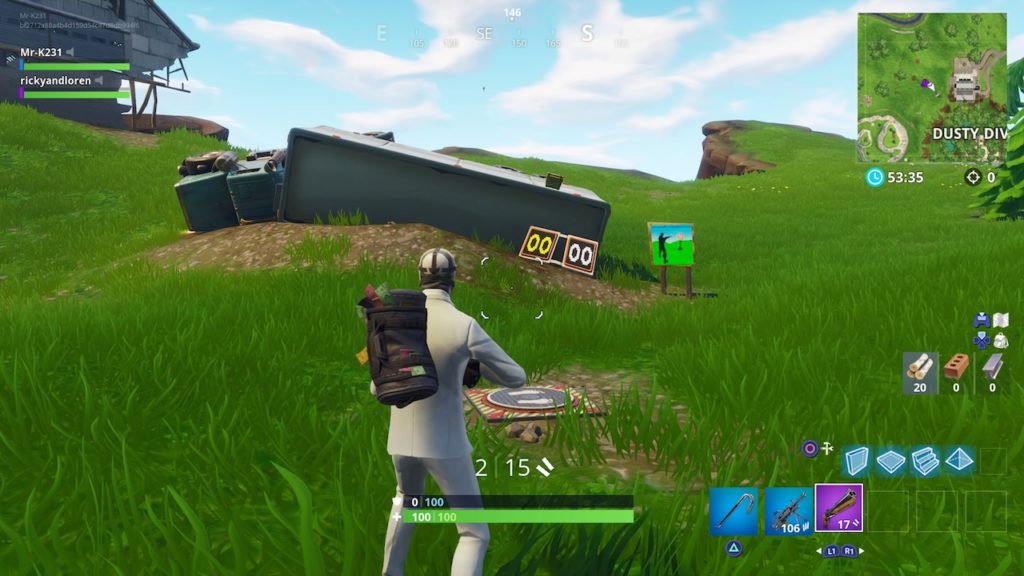
Dusty Divot’s gallery is located near this overturned truck just outside the museum. Careful, as this gallery is very exposed with little cover. Be on the lookout so you don’t get ambushed by an opponent as you try to complete the challenge.

Viking Village Shooting Gallery

fortnite shooting gallery viking village
Viking Village shooting gallery

You’ll find this shooting gallery on the dirt path leading up the mountain to the Viking Village, next to a set of tents and a campfire.

Risky Reels Shooting Gallery

fortnite shooting gallery risky reels
Risky Reels shooting gallery

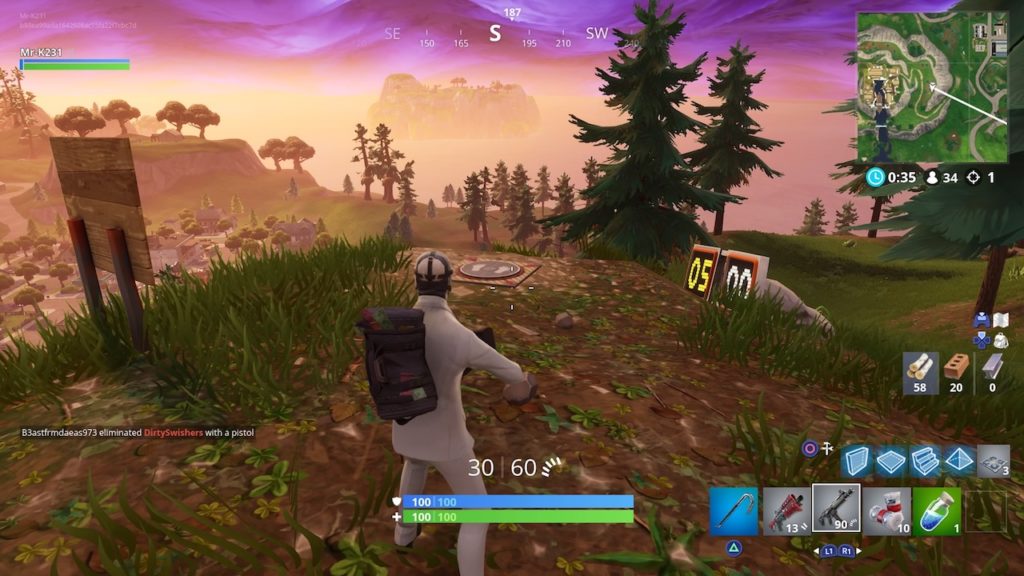
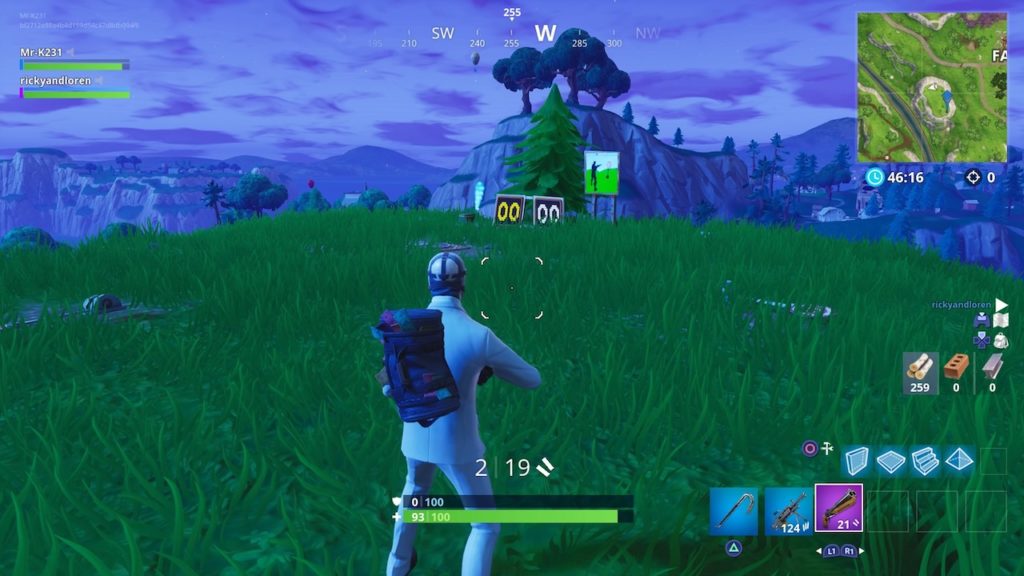
Head due west from Risky Reels to find this gallery. You’ll be shooting downwards into the gulch from atop this hill to hit your targets.

Pleasant Park Shooting Gallery

fortnite shooting gallery pleasant park
Pleasant Park shooting gallery

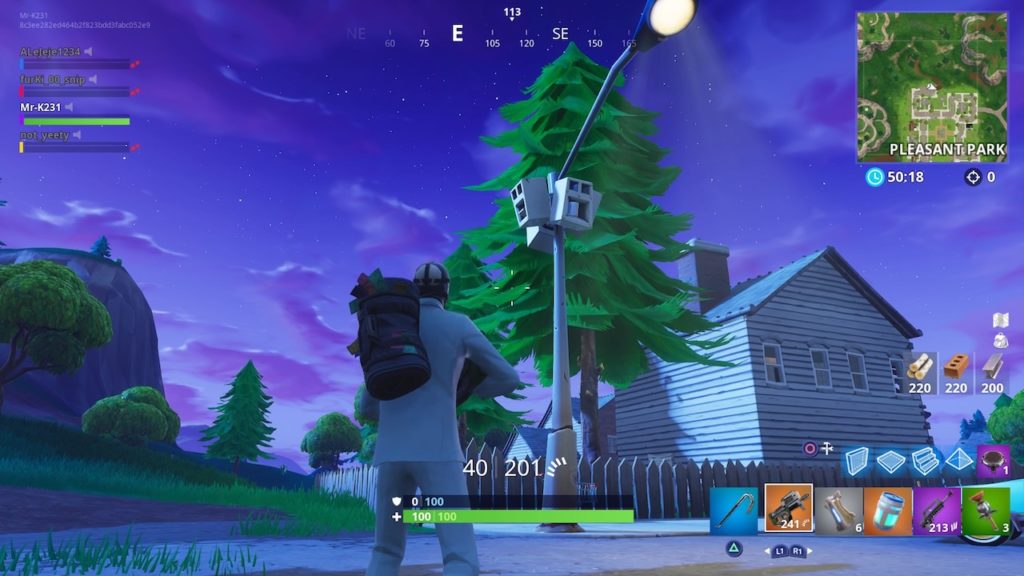
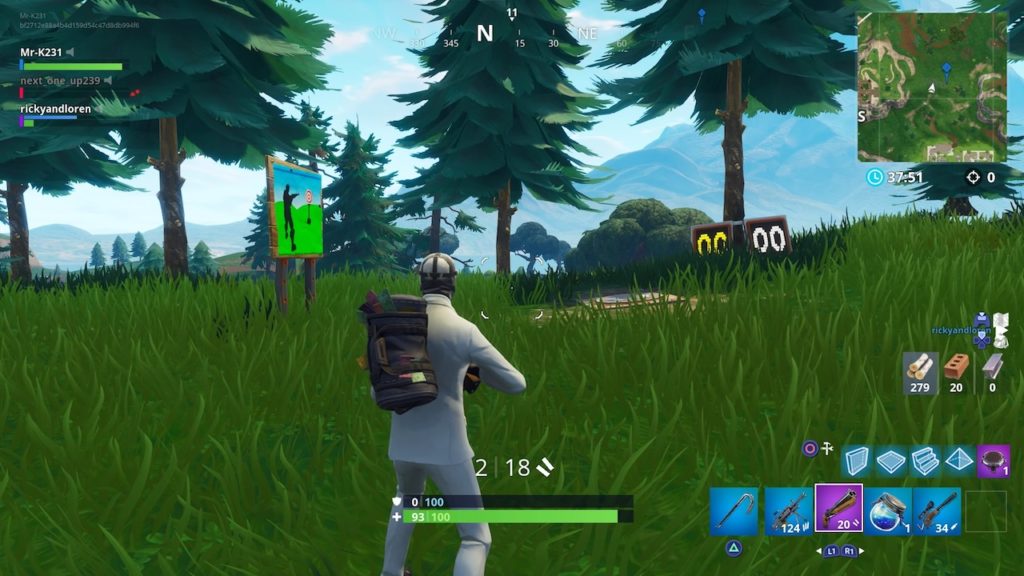
North of Pleasant Park and just to the east of Haunted Hills, you’ll encounter this gallery tucked into a grove of trees.

Fatal Fields Shooting Gallery

fortnite shooting gallery fatal fields
Fatal Fields shooting gallery

Like the desert gallery, the gallery near Fatal Fields is located atop a hill that you’ll need to build to get on top of. Take some building supplies with you, and happy shooting!

Lyft rolls out monthly ride subscription plans

Could Lyft be your daily ride? The service now offers monthly subscriptions.

lyft

Ridesharing has become one of the most popular ways to get around outside of having your own car. Many people opt for it instead of trying to catch a taxi, and it’s super tempting if you live in a place where weather goes to extremes. Catching a cheap ride would win any day instead of waiting for the bus in a snowstorm.

Lyft knows that a lot of people use ridesharing daily, and are looking to possibly sweeten the deal. Beginning earlier this year, Lyft had been testing various monthly subscriptions – a fixed price for a certain amount of rides, according to The Verge. It was in beta, so only a select number of users had access to this plan, and Lyft had been testing for a few months.

lyft subscription screenshot

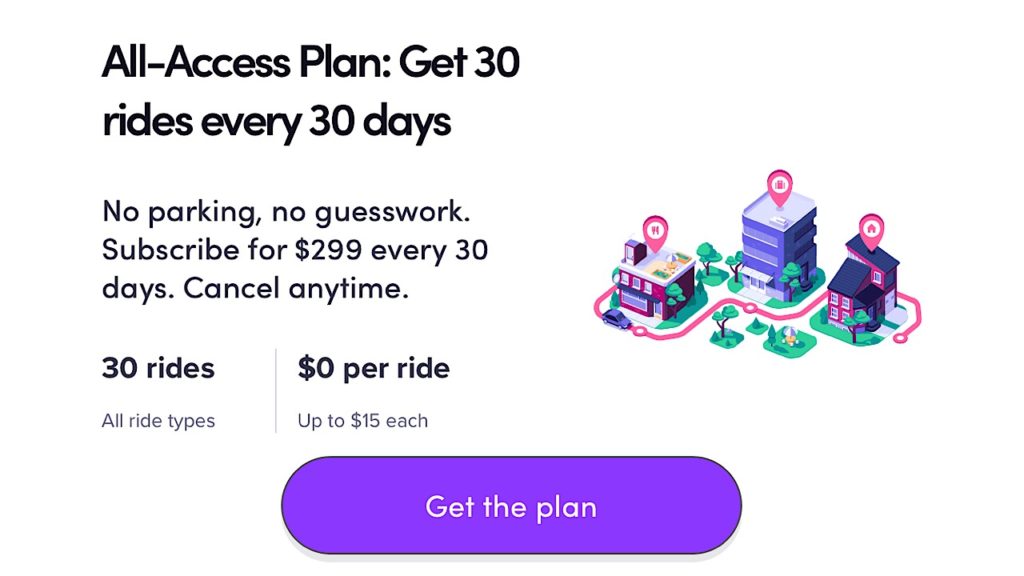
Now, the official deal is available for all Lyft users. For $299 a month, you can get 30 rides for up to $15 dollars each. If you go over $15, you pay the difference. You’ll also have to be sure to use all of them because the rides don’t roll over to the next month. If you go over the 30 rides, you’ll still get a small discount of five percent.

Unless you’re a serial ridesharer, $299 could be a little steep, but if you catch a ride more than a few times a week, the price tag might be worth it.

VLC hit with huge security leak

If you have VLC, update it NOW.

This morning, VLC, Mplayer, and other popular media players were discovered to have a critical vulnerability bug.

According to TechNadu, the research company CISCO Talos identified the bug, found in streaming media RTSP server which is found in the media players. Although the developers of the media players already know about the bug, they’ve still highly encouraged users to download patches and the newest versions of the software immediately in order to combat the threat. You can get the latest version of VLC here:

VLC media player download free ►
8

Lillith Wyatt, a security researcher for CISCO Talos detailed what the vulnerability means in a blog post, saying:

“An exploitable code execution vulnerability exists in the HTTP packet-parsing functionality of the LIVE555 RTSP server library. A specially crafted packet can cause a stack-based buffer overflow, resulting in code execution. An attacker can send a packet to trigger this vulnerability.”

Although all of the media players that could have been slammed with this bug haven’t yet been identified, many developers also recommend that you update your imaging hardware as the bug affects firmware in cameras used for streaming, as well.

VLC is an extremely popular media player worldwide. Even though the discovery of the bug was met with quick action by developers, VLC is also known to have had problems with security in the past and could do well to re-evaluate everything put into their player.


Rich people: You can buy a $4,000 Android phone

Money to burn? Here’s the phone for you!

British phone company Vertu has had a rough history. Manufacturing luxury phones made with materials like genuine leather and ringtones recorded by the London Symphony Orchestra, prices can soar into the thousands. As fancy as their phones may be, last year Vertu filed for bankruptcy for failure to pay off their debts – $2 million dollars worth. A report from The Telegraph said that around 200 jobs were lost after the company was liquidated. Now, seemingly out of nowhere, Vertu has returned to the luxury phone scene with a new Android device that will cost you at least $4000.

vertu phone screenshot

The Aster P model’s 4.9 inch display is made of sapphire crystal glass. Those into animal rights made have a tough time with this one – if the price doesn’t scare you off, the back of the phone wrapped in crocodile skin could. The black, brown, blue and orange versions come in at $4000 but if you’re interested in having yours gold plated, be prepared to fork over $10,000 more.

While the aesthetic of Aster P is admittedly kind of cool (read: insane), before you hop back on the Vertu boat, just know that the specs are a little behind. The model is running the outdated Oreo 8.1 OS, which was released in December of last year.

The device is a bit over the top for us, but if you decide to invest in the Aster P, you’ll be the owner of a truly extravagant phone.


6 must-have apps to take on vacation

Fill your phone with these 6 apps before your next vacation!

Vacation time is precious. Every minute spent stuck waiting for a cab is one less minute on the beach. Thankfully there are many apps that can save time by helping you navigate and find the hotels and restaurants that will make your vacation a 4-star affair. Here are the best apps for you to use while you’re traveling.

6 must-have apps to download before you travel

Waze is one of the greatest travel apps out there, as it uses other Waze users’ locations and information to determine nearby traffic alerts and even lurking police officers. The GPS accuracy is constantly updated, making it one of the most accurate apps out there.
Google Maps Free Download ►
7
Similar to Waze, Google Maps is one of the most accurate GPS apps out there. While Waze has a large number of features, Google Maps forgoes this in order to create a simple and accurate system. If you want a simple and easy to follow GPS app, then Google Maps can be a good alternative to Waze.
Citymapper Free Download
7
If you plan on using public transportation during your travels then Citymapper is the perfect app to have on hand. It maps out transit routes throughout various cities in order to make it easy for you to navigate subways and other metro-transit routes.
HotelTonight Free Download ►
7
Sometimes, plans go south. Maybe you have a long layover. Maybe your hotel overbooked. Maybe you need a place to crash mid-road trip. HotelTonight hooks you up with a great place to stay for the night when you need it in a hurry.
Yelp is a popular review app that’s perfect for anyone who’s traveling to a new place and looking for somewhere nice to eat. It is incredibly detailed with thousands of reviews for restaurants all over the world.
A little different than the other apps on this list, but still probably the best of its kind thanks to its near worldwide accessibility, Uber is a great app for when you’re in a pinch. If you find yourself in any situation that requires you to take a cab, then Uber can be a good alternative to trying to call a cab company.

Most of these apps are particularly useful for when you’re going on some kind of vacation or doing some personal travel. However, if you’re going on a business trip, out Softonic Solutions community has a few more apps for you to check out. Be sure to share your favorites!

How to stream music and video from your phone to your gaming console

You can play music and video from your phone through your TV. Here’s how to send the content through a gaming console.

Playstation

While many gaming consoles have their own apps that allow you to control them directly from your phone, most of them don’t have an innate way to allow your phone to stream content onto them. Despite this, practically all current gen gaming devices (such as PS3, PS4, and Xbox One) are able to connect to your phone through a variety of apps. This allows you to use your gaming console as a substitute for an Apple TV or similar televisions that let you stream directly to them. Here is the easiest way to go about this:  

How to stream from your phone to your gaming device

Step 1: Download iMediaShare

iMediaShare Free Download ►
7

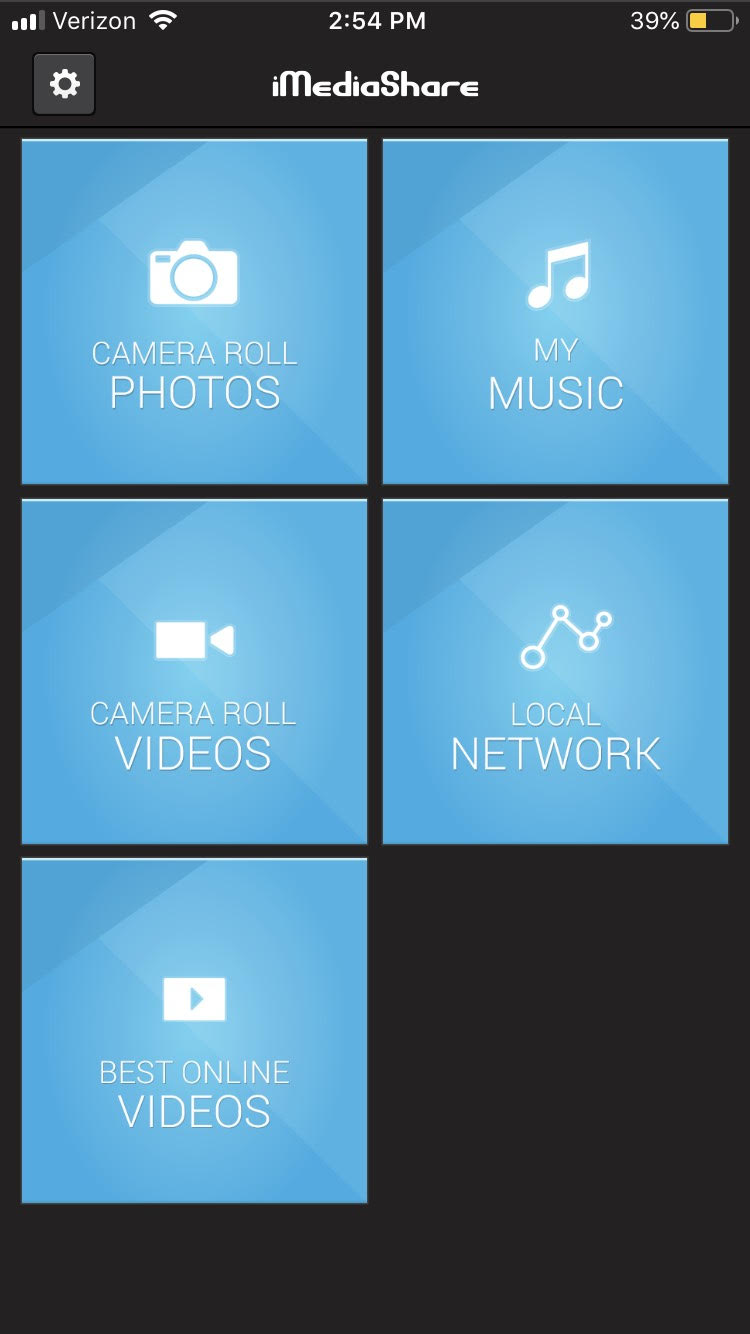
This app is currently the best one for both Android and iPhone to use as a streaming tool for gaming consoles. It’s completely free and lets you stream basically any saved content from your phone onto your gaming device. This means you can play home videos or your saved music from your phone directly to your TV. You can also use it to stream Facebook and a few other online services (though most of these can be streamed directly through your gaming console already).

iMediaShare

Step 2: Choose the content you want to stream

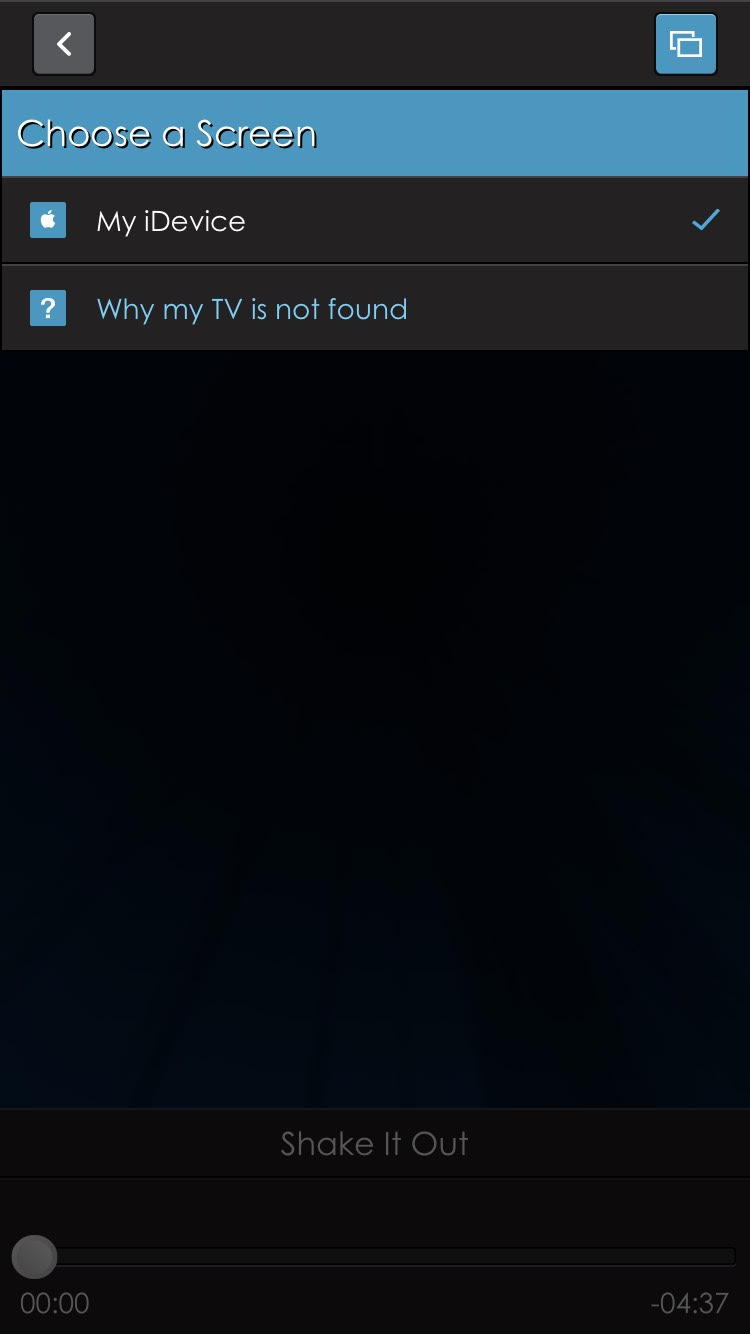
Once the app is installed, you can choose whatever content you want to appear on your gaming console. First, go into the category it would be under (such as camera roll photos), and then download the content you want to share onto the app. After selecting it, you will be promoted to “Choose a screen.” Assuming your phone and gaming device are connected to the same local network, then you will be able to choose the gaming device as an option.

iMediaShare

Step 3: Open content on your gaming device

Once everything is set up on your phone, you can open the content on your gaming device by finding the segment that says “iMediaShare.” It should be under the video streaming tab that your gaming console has.

If you don’t like the layout of iMediaShare, Plex is a similar application that you may find helpful. It effectively works the same way, though you’ll have to pay for some of its more advanced features.

Why you should manage your energy instead of time

Tracking your time may not be the key to productivity. Try this instead.

studying

With demands coming from all directions, managing time in reliable, 24-hour increments seems like the most practical approach to getting things done.

Most of us respond to increasing demands by putting in more time. We get up early and stay late at the office.

And what sounds like the hallmarks of a go-getter is really a recipe for disaster. High turnover. Distraction. Health problems. The list goes on.

Energy, of course, decreases as we spend it, of course. However, we can take some steps to regenerate our capacity to be more productive. Instead of thinking of out potential output in terms of hours and minutes, it might be smarter to look at energy management instead.

Why you should manage your energy instead of time

Energy management, an intro

Energy management as a concept isn’t especially new. But, it’s worth revisiting. These days, the line between work and home is increasingly blurring, leaving us feeling depleted on a regular basis.

Back in 2003, Tony Schwartz founded the Energy Project. The organization set out to find ways to improve productivity in the workplace, using scientific methods to help people feel energized at work.

Schwartz and his team found that we have four types of energy: physical, mental, emotional, and spiritual. And, each of these categories must be addressed in order to keep us feeling 100 percent.

82% of business leaders feel that they’re working at suboptimal energy levels. Which, let’s face it, is likely to trickle down the chain of command. Leaders set the tone for long work days, when instead, at least some efforts need to focus on helping workers recharge.

Here’s a short clip from Schwartz emphasizing the power productivity rituals.

Managing energy means learning more about yourself

Some of us are most productive in the morning, while others knock out tasks later in the day. While not everyone has the luxury to work when their body wants them to, you can choose how to organize your to-do list.

If you’re not sure, keep a diary of how you’re feeling every hour or so for a few days. Factors that can affect this include food, sleep, and stress levels.

A few things to work on:

  • Be comfortable: This goes for your environment as well as your person. Keep your space clean, at a comfortable temperature and well-lit. Wear clothing that feels good—no belts that press into your stomach, itchy shirts, etc.

  • Eat well: Lean proteins, vegetables, fruits, and minimal sugar. Drink lots of water, too.
  • Get enough sleep: Aim for eight hours and avoid staying up too late finishing tasks.

Understanding your patterns also means leaning into those waves of productivity. What we mean by “waves” are those times you’ve felt compelled to clean out your closet or wrote a whole article in one sitting. Sometimes, these waves come without warning, and if that’s the case, try riding it out if nothing is standing in your way.

Those waves also come after you take an action. Let’s explain: crossing a smaller action off of your to-do list gives you that feeling of accomplishment—which helps you muster the energy for the more difficult task at hand.


Make room for rest

Resting isn’t exactly respected in our culture. The idea conjures up spa days. Of treating yourself after a hard day of work. Or, you know, just being lazy.

In fact, many of us consider rest the opposite of work. That the two concepts are at odds with one another. But that’s the wrong way to think about it. Rest is essential to working smart. That downtime allows us to collect our thoughts and reacquaint ourselves with our brains.

The New York Times published an article about the benefits of sleeping for short stretches during the workday. The idea there was, sleeping in 20-60 minute intervals (pre-REM) gives users a chance to tap into their creative side and recharge those internal batteries.

As you may recall, this article came with a whole side helping of backlash. Talk of coddled millennials and the mocking of Silicon Valley’s sleep pods and other perks were buzzing around the web.

But it’s interesting how it’s all about optics. We’re told when we get our first jobs that we need to put in the hours. You know, show up early, but be the last one to leave.

Late risers get a bad rap, for whatever reason, regardless of output, and setting boundaries when it comes to work-life balance isn’t as easy as it sounds. And we get it. Maybe napping at work isn’t an option, but rest doesn’t have to involve a pillow and a blanket.

Here are a couple of ideas that seem perhaps, too basic to mention, but we’ll do it anyway.

Spend some time with a book

ebook

The benefits of reading cannot be overstated. For one, all of our leading innovators read—everybody from Oprah to Stephen King and Bill Gates spends part of the day with a book.

The practice not only keeps your brain sharp, it also reduces stress and bolsters our problem-solving skills. Even better—unlike taking a nap, you can squeeze in some on the job reading without causing a scene.

Give yourself space to think

Or, just literally give yourself some time to think quietly for a period. Making space for your thoughts is not the same as doing nothing. In fact, it’s been shown to boost job performance.

The idea is that a short timeout for reflecting can help you process and learn information. Especially if you’re working in a mentally demanding industry. While we benefit from team-oriented brainstorming and collaboration, solo-thinking sessions can energize us and help us better prepare for meetings or a long list of to-dos.

Finally, just stop multitasking already

You’re failing at it anyway. Few of us can actually handle multitasking.

Instead, learn to prioritize.

Make lists, rank your tasks in order of importance, and check one thing off at a time.

Doing things quickly and reworking them later is a waste of time. In the moment, it might feel like you’re being productive, but in reality, you’re just slowing yourself down.

Unfortunately, there are countless studies that demonstrate over and over that multitasking does not help you get more done.

In fact, each time you stop to check an email or take a peek at your phone, you’re increasing the total amount of time spent on the task. If you need a break, take one.

Top 10 Fortnite YouTubers

Can’t get enough Fortnite? Check out these great YouTube channels.

Fortnite

Fortnite is huge right now, and with that comes a plethora of content creators on a variety of platforms. While most of these content creators are on Twitch, many viewers prefer to watch their favorite creators on YouTube or prefer stream highlights to actual streams. With so many creators to search through, it can be tough figuring out which are the best ones to watch. We’ve helped narrow this choice down by finding you the top 10 Fortnite YouTubers.

Top 10 Fortnite YouTubers

10. Pokimane

While she is more of a streamer than a YouTuber, her YouTube content is still plentiful and hilarious. She used to be a League of Legends content creator, but has since switched most of her content to Fortnite.

9. Muselk

Muselk likes to try extreme things and see what will happen, which can be really interesting for players who have always been curious about some of the potential oddities within the game.

8. Fitz

Despite a somewhat infrequent upload schedule, Fitz and his group of gamers have some of the most consistently hilarious content with each upload. His editing is great, and he also creates CS: GO content for those who are interested in that game as well.

7. Ali-A

This YouTuber stays very up to date on Fortnite updates, and is a great creator to watch if you’re looking for timely commentary on what’s new in the game.

6. Raid Chico

Despite not being as popular as many of the other YouTubers on this list, Raid Chico has some of the best editing in his videos, that really brings a level of quality that isn’t always seen from other content creators.

5. Maximilianmus

Max features some older-style YouTube videos, filled with sarcasm and strange actions. This can be nostalgic for some viewers who miss the old style of gaming videos.

4. Noahsnoah

Very funny and great editing, Noahsnoah is one of the best Fortnite YouTubers to stay up to date with. He’s a great YouTuber to watch if you are just getting into Fortnite, since much of his humor is universal, instead of just game-specific.

3. Fe4Rless

His commentary is great, and his popularity speaks for itself with his captivatingly funny videos.

2. LazarBeam

While LazarBeam mostly sticks to Fortnite, he does play a few other similar games here and there, and is more of a “daily content” YouTuber than just a Fortnite streamer. He definitely creates the most videos of any person on this list, and is great to watch if you want a lot of content.

1. Ceeday

One of the most popular Fortnite YouTubers, Ceeday has a dedicated fanbase, and produces content on a pretty consistent basis, compared to some similar creators.

Many of these YouTubers are also streamers on Twitch, so be sure to check out their Twitch channels if you’re interested in seeing more of their content.