
Facebook’s future plans could eliminate all your privacy

facebook social scoring

Back in 2015, Facebook secured a patent that allowed them to analyze someone’s network in order to let them do something.

Pretty vague, to be sure.

But a bit of language in the patent proved troubling and made national headlines. A provided example of how the patent might work stated that a lender could examine the credit ratings of an individual’s social networks and if the average rating is lower than the average credit rating, they could reject the loan application.

So, digital guilt by association. Or, to put it more ominously, 21st-century redlining. Since the news broke three years ago, there hasn’t been much talk surrounding the issue.

While it could be that Facebook has been sitting on the patent, we were curious, what’s been going on in this arena since then?

Is Facebook still pursuing credit reporting?

Facebook is using another rating system
uninstall facebook

This past August, Facebook confirmed that it now ranks users on a trustworthiness scale, which, of course, has drawn comparisons to China’s social credit system.

According to the Washington Post, Facebook has been developing the scoring system for the past year or so. How it works is, users are assigned a score between zero and one, based on a number of factors. But it’s safe to assume you’ll have a lower score if you share a lot of links to PatriotNewsAndJetFuelCantMeltSteelBeams.org.

Reputation scoring is another piece of the crackdown on fake news. Facebook users have the ability to report posts that they believe are fake, offensive, or otherwise problematic.

However, according to Facebook product manager, Tessa Lyons, people were reporting posts as false or offensive when they didn’t agree with the content.

Now, while the idea of a social scoring system sounds ominous, it’s important to remember a few things. First, the system was designed to identify bad actors on the platform, measuring credibility based on how people use the tool. Second, China’s system is a government-run initiative with mandatory participation. Facebook is a private entity, so no one is required to use the platform.

After all, brands lose traffic, clicks, and views when they opt out and individuals miss out on connections and event invites from their network.
They’ve also been pursuing banking data

Recently, Senators Bob Menendez (D-NJ) and John Kennedy (R-LA) sent a bipartisan letter to Mark Zuckerberg, expressing concern over reports that Facebook had been courting big banks.

The social media giant has been asking for customer financial information from institutions like American Express, Bank of America, and Wells Fargo. Luckily, it seems that they haven’t made any deals just yet.

According to Facebook, the incentive for banks would be a platform to sell financial products — as well as incorporate online banking features into Facebook Messenger.

The senators raised concerns as there’s no definitive proof that this sensitive information would be secured. And in the wake of the Cambridge Analytica scandal, it’s hard to get on board with the concept.

And, they’ve filed for several more ‘creepy’ patents
facebook security

So, Facebook has applied for thousands of patents since going public in 2012. Recently, The New York Times reviewed several hundred of them, finding many of them creepy.

A few highlights:

Among the worst is a patent that uses your front-facing camera to analyze your expressions as you look at content on your screen.

There’s another that allows your phone’s microphone to listen in on you — to, apparently determine which TV shows you watch and whether you mute commercials.

Or, one that monitors your weekly routine, looking at where you sleep, work, and more. Or, weirder yet — a patent that looks at your posts and purchases to determine major life events like births, weddings, and death.

Advertisers, of course, find value in predicting when you and your friends will get married, graduate, and die.

As of yet, none of these technologies are a reality. In fact, Facebook VP Allen Lo says, most of the technology outlined in the patents have not been included in any existing products and likely never will be.

Brands often patent a concept in order to prevent competitors from using a similar technology. However, it’s worth noting that there’s no huge reason for Facebook to spend time and money on new ways to collect data if they don’t intend to use at least some of them.

So what are the issues?

While social media is technically optional, these days it’s not uncommon for employers to ask to see your page ahead of an interview. Online daters often ask for profile details ahead of meeting a stranger on the internet. In short, deleting your profile can have a negative impact on your social and professional lives.

And though we’re unlikely to take a cue from China’s monitoring program, it’s hard not to have a few concerns. Facebook hasn’t exactly been transparent about the reputation-scoring criteria. And new data collection methods stand to have a huge impact on our privacy and potentially our rights. Sure, the primary motivation behind Facebook’s data collection is driving ad sales and raking in cash from brands.

However, when those brands are creditors or banking institutions and even employers, we need to tread carefully.
How secure is the Google Home Hub?

Is the Google Home Hub a secure product?

Google Home Hub security update

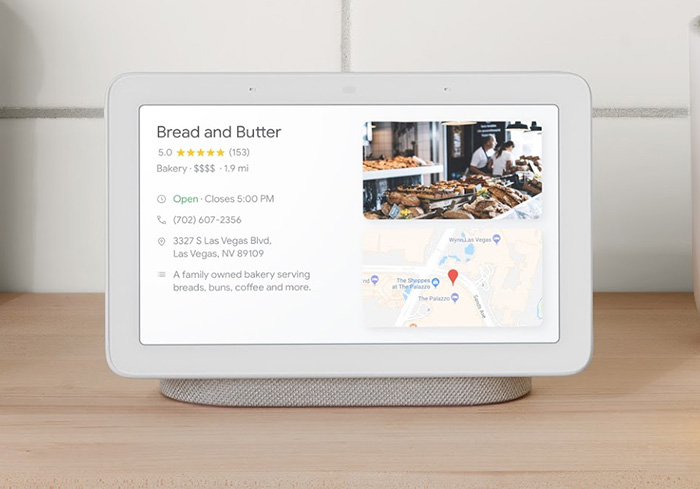
The Home Hub is Google’s first smart speaker to come with a screen. It works seamlessly with Google’s other products, which means it has some very interesting features. This has impressed almost everybody who has had a chance to play around with it and the Home Hub has subsequently been getting rave reviews across the internet. One person who hasn’t been impressed, however, is security advocate Jerry Gamblin. In a blog post, Gamblin has raised a rather serious security issue with the Google Home Hub so we thought we’d take a look at how secure Google’s latest product really is.

Is the Google Home Hub a secure product?

Surprisingly, the Google Home Hub doesn’t run on Android. Instead, the Home Hub runs on a version of the Google Cast software the company developed for use with its Chromecast products. According to Gamblin, this decision has led to a product that is “beyond dismal” at protecting user privacy and that is vulnerable to third-parties taking “near full remote unauthenticated control.”

In Gamblin’s very technical blog post he showed that he was able to reboot the device remotely, delete the saved Wi-Fi networks, and disable all notifications. If done correctly, he believes these vulnerabilities could be used to commandeer the device, turning it into a potential listening device and putting all user information at great risk. Gamblin’s research also discovered that Google has known about these vulnerabilities for a long time and still not acted on them. This last point is why he, as an independent security researcher, decided to go public with his discoveries rather than contact Google about the potential holes in their security.

Since Gamblin released all of his findings, many news outlets picked up the story that Google’s Home hub is an unsecured device. This has caused Google to react quickly and refute the claims. In a statement to Android Authority, Google said:

“All Google Home devices are designed with user security and privacy top of mind and use a hardware-protected boot mechanism to ensure that only Google-authenticated code is used on the device. In addition, any communication carrying user information is authenticated and encrypted. A recent claim about security on Google Home Hub is inaccurate. The APIs mentioned in this claim are used by mobile apps to configure the device and are only accessible when those apps and the Google Home device are on the same Wi-Fi network. Despite what’s been claimed, there is no evidence that user information is at risk.”

Google is saying that what Gamblin has discovered is true, but that he has missed one small point. As the Home Hub is supposed to be a control and display unit it needs to communicate with other smart objects connected to the Wi-Fi network. Gamblin was able to execute several worrying commands but only because his computer had been authorized to work on the same Wi-Fi network as his Google Home Hub. A hacker would not be able to execute the same commands unless he already had access to the home Wi-Fi network. This would explain why Google hasn’t acted on the issues Gamblin highlighted.

In answer to the original question then, the Google Home Hub is as secure as your home Wi-Fi network. For tips on how to boost your home Wi-Fi network security, check out our guide below.

How to set a volume limit on your Android

Different volume settings can be a lifesaver. Here’s how to set up your Android device so the sounds sound right.

Android phones have their share of perks. And just like all other smartphones, they’re constantly evolving. With that evolution, it can be hard to keep up with the latest and greatest ways of taking steps to ensure you’re getting the most out of the device.

Below, follow the step-by-step guide for how to set a volume limit on your Android. It’s quick, it’s easy, and it’s one less thing you have to Google. (Note: these instructions are for the latest Android OS, Pie 9.0.)

How to set a volume limit on your Android

3 Steps to setting your Android’s volume limit

Like most other smartphones, Androids can have different volumes for different notifications. In any given day, you may receive alerts about calls, emails, social media notifications, text messages, and more. Because sounds are so prevalent with these devices, it makes setting a volume max important. After all, you don’t want to scare your pets or jump out of your skin every time your phone rings!

  1. First, go to Settings. You can do this by swiping the notification panel down from the top and hitting the appropriate icon or manually finding the app in your drawer.
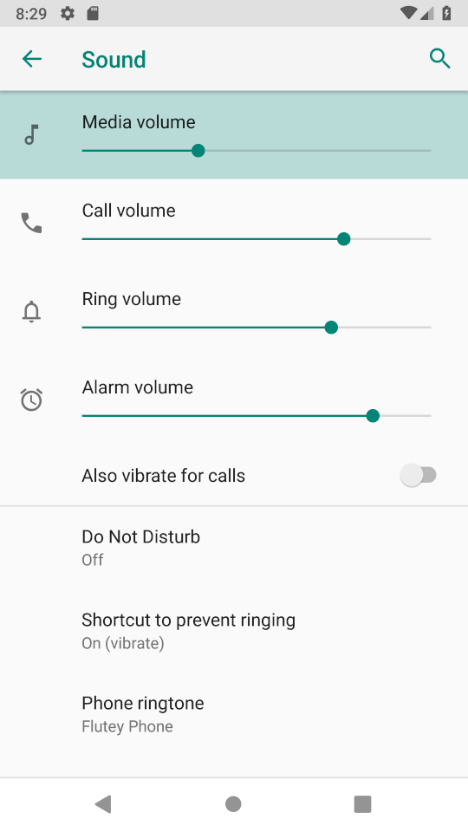
  2. In settings, click on Sound > Volume. Quick and easy!
  3. In this module, you’ll notice that there are different volume controls for different functions on the phone. There are sliders for a range of items: media, call, ring, and other alarm. Each of these different categories is allowed to have a separate and customized volume limit.

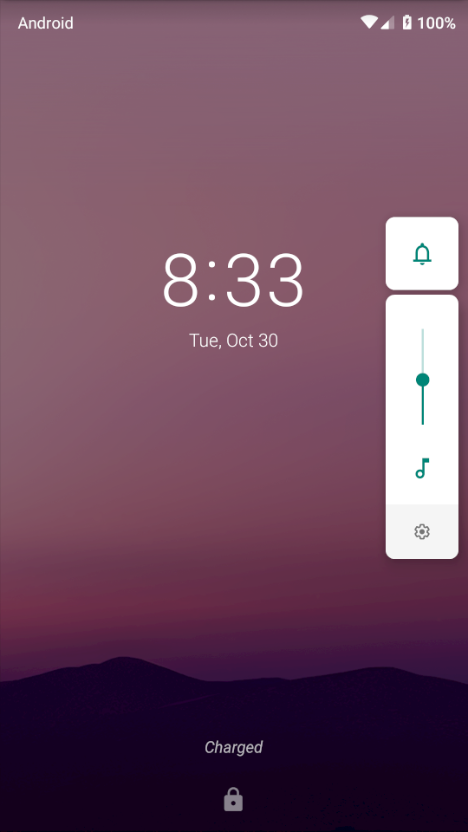
If you want to quickly change the volume of something you’re listening to, you can do so straight from the lock screen. Just tap the volume button and adjust the slider that comes up.

These volume controls may not seem like much, but it’s a nice feature to be able to set maximums across different categories. For instance, someone who has trouble getting up in the morning may want an extra-loud alarm. But they still may desire a lower volume for text notifications throughout the day. Use these steps to set volumes to your heart’s content to get the most out of your Android device.

5 smaller social media platforms that are challenging Facebook and Instagram

Sick of Facebook and Instagram? Ready to try something new? Check out these alternatives.

social media

You probably already have a Facebook account and an Instagram account. But sometimes the same old news feed can get old. Ready for a new frontier? Head over to one of these smaller social networking websites. You will find a lot of familiar features (and maybe even some familiar faces), but you’ll enjoy fun new ways to connect and play.

5 smaller social media platforms that are challenging Facebook and Instagram

1. Medium

Do you have a story to tell? Or do you want to read the stories others are telling? Whether fact or fiction, poetry or images, you’ll find content galore on this fast-growing site. The emphasis here is on community. Create a free profile, follow your favorite writers and publications, and “applaud” pieces or comments you find particularly amazing.

2. Ning

Why use a social network when you can build your own? That’s the thinking behind Ning, a social networking platform that allows its users to make a community of their own. Your social network can be public, private, or for members only. You can choose the type of access you want to allow to your website and determine what members are allowed to do within your site. Everything on your site, whether it was uploaded by you or one of your members, belongs to you.

3. hi5

Are you tired of seeing the same old thing on your social network feeds — the familiar faces and the constant complaining? Do you want to meet someone new? This social networking site boasts an impressive number of users. The site states you will make new friends “through games, shared interests, friend suggestions, browsing profiles, and much more.” Meet others by sorting through age, location, and more. They say it’s a place to “meet, chat, and flirt.” If you are looking for a different kind of social network, give hi5 a try.

4. Snapchat

You’ve likely heard of Snapchat. If you love taking pictures with your phone, this app is up your alley. Take a photo or shoot a video and send it to one of your friends. After they view your content, it disappears. To save photos, users would need to take a screenshot. Otherwise, it’s a great way to send something funny that may not be worth keeping around forever.

Snapchat Download Free
8

5. Kik

It doesn’t matter what device you and your friends have — on Kik, everyone can chit chat together, one-on-one, or with a bot. What do we mean by bot? Well, on Kik, bots offer up quizzes, advice, the latest news, fashion tips, and they even play games with your friends if you want to allow a bot in your group chat. If you aren’t into the whole bot idea, no problem! Gifs, emoticons, stickers, and images are allowed on Kik to help you add that extra little something-something to conversations with your friends.

Make new friends and keep the old

These smaller social networks could be your next favorite way to spend the day. Sign up, log in, and see what you think. Then, take a look at these other social networking sites to see where you fit in.

Hackers find a scary new way to target new Windows 10 users

The Bing search engine is showing up malicious and dangerous ads for search terms like “download chrome”

Microsoft Edge is a good browser. It is miles ahead of the Internet Explorer it replaced and Edge even does well when compared against modern browsers like Google Chrome or Mozilla Firefox. For many users though, this won’t matter.  Years of familiarity with their browser of choice means they’re unlikely to change to a browser like Edge, which was quite late to the game. This means that whenever they buy a new PC or laptop, or update their operating system to Windows 10, the default Edge web browser has one task: to download Chrome. This is a problem.

The Bing search engine is showing up malicious and dangerous ads for search terms like “download chrome”

Windows 10 bug Microsoft Edge Google Chrome Download
Be careful if you’re going to use Microsoft Edge to download Google Chrome

The issue arises because we’ve all become accustomed to typing basic phrases into the address bar when we want something rather than typing in complete domain names. Hackers know that we’re like this and they set up traps accordingly. They can set up fake sites on authentic sounding domains like GoogleOnline2018.com and place legitimate sounding download files like ChromeSetup.exe. It all looks and feels fine until your PC falls victim to the malware these fake domains and files contain.

For more tips on avoiding phishing scams like this one check out our infographic below:

This exact scam is what almost tripped up Gabriel Landau. He bought a new laptop and opened up Microsoft Edge so that he could download Google Chrome. Fortunately, he stopped himself from downloading the fake ChromeSetup extension when he noticed that the digital signature was linked to Alpha Criteria Ltd. and not Google.

The real issue here is that this is a problem that Chrome and Firefox deal with automatically. The fake phishing sites, which show as normal on Edge, show warnings on both the Google and Mozilla browsers. Even worse for Microsoft is that this is not a new problem.

According to a How-to-Geek report, a similar issue on the Bing search engine was reported way back in April. Microsoft removed that ad, but the fact that an almost identical ad appeared over six months later means it hasn’t addressed the underlying issue. This lack of action is putting Bing users who are looking for Google Chrome at risk. Could it be spite?

In the same report, Microsoft responded to say, “Protecting customers from malicious content is a top priority, and we have removed the ads from Bing and banned the associated account. We encourage users to continue to report this type of content so we can take appropriate action.” This almost feels like an abdication of responsibility as it puts the emphasis on users to report false ads rather than on Microsoft itself to filter them out.

This is just one more issue in a long list of problems Microsoft faces at the moment. It is also likely to hit the credibility of Edge that, default search engine aside, is an otherwise capable web browser.

To protect yourself against this particular threat you are going to have to take action that Microsoft isn’t going to like. To download Google Chrome or Mozilla Firefox, click either of the two download buttons below.

7
7

If you do want to continue using Microsoft Edge, however, we recommend changing the default search engine from Bing immediately. Google is an obvious choice but there are plenty of other options out there.

You’ll either love or hate the Facebook Messenger redesign

The Facebook Messenger redesign makes it much simpler to use and comes with a brand new dark mode

facebook messenger

After years and years of adding all sorts of features to Messenger, Facebook has decided to pull it back a little. The newest version of Facebook’s standalone messaging app, which has grown to include a whopping nine separate tabs offering a multitude of features beyond mere messaging, will focus on simplicity.

Messenger Download Messenger
7

The Facebook Messenger redesign makes it much simpler to use and comes with a brand new dark mode

Ever since Facebook forced all of its mobile users to download a standalone app to send private messages to their Facebook friends, Messenger has been a big deal. Messenger now has 1.3 billion active users and Facebook hasn’t stopped trying to cram more and more into what is primarily a messaging app. If there is a way to monetize it, then Facebook has probably tried to squeeze it into Messenger. This is why Messenger now has things like bots, business accounts, games, and even payments.

The problem with all that though, is that many users don’t want all the extra bells and whistles that come packaged in with Messenger. In fact, according to Facebook, “In a recent Messenger study, 7 out of 10 (71%) people told us simplicity is the top priority for them in a messaging app.” Now add to that the fact that the complicated extras use up battery power and hog device RAM even when they’re not being used, and it is plain to see that Facebook has a Messenger problem.

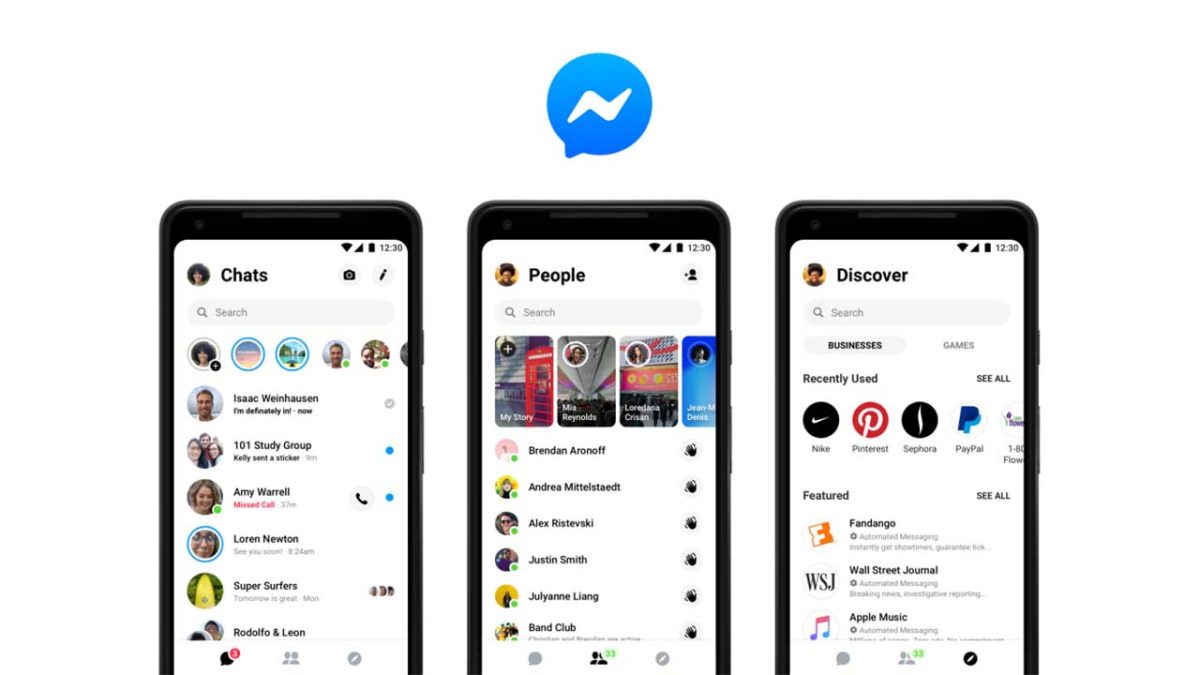
The social giant is hoping that what it is calling Messenger 4 will be the solution to that problem. The Messenger 4 redesign aims for simplicity and cuts the nine tabs down to three. Now, whenever you use Messenger you’ll find the Chats tab, the People tab, and the Discover tab. Chats is where you’ll find all of your private and group conversations; People is where you’ll be able to check in on your friends, read stories, see who is online etc.; and Discover is where you’ll be able to find all of those extras like games, business contacts, and even a place to book your next vacation.

Everything that Messenger has grown to be is still there. Now, though, thanks to this latest Messenger 4 redesign it is all much easier to ignore.

Messenger 4 update redesign simple to use
The Chats and People Tabs are where you’ll find everything you need to speak to your friends. Everything else will be in the Discover tab.

As well as the aesthetics, Messenger 4 brings with it two other innovations in an attempt to make it an improved product as well as just a better looking and less annoying one. The first new feature is the dark mode, which is designed to reduce the amount of glare coming from your screen. Dark mode is already popular across a whole range of apps including Twitter and YouTube. It is particularly useful at night and will be a welcome addition to Messenger.

The other new feature is much more focused on messaging. Color gradients will allow you to customize your individual chat bubbles with different colors. Whether you want to do this to reflect your mood or not is up to you, but when the Messenger 4 update drops onto your device, you’ll have the option to do so.

Messenger Download Messenger
7

The Messenger 4 redesign will be rolling out to all 1.3 billion Messenger users around the world over the next few weeks. Big changes on the way then, make sure you let us know whether you love or hate the Messenger update in the comments below.

Pizza Hut announces robotic mobile pizza factory

Would you eat a pizza made by a robotic truck?

As the fast food market heats up, Pizza Hut is rolling out robots to cut down on wait times. Partnering with Toyota (which is currently attempting to create self-driving cars with Uber), Pizza Hut has created a robotic pizza maker that sits in the bed of a truck. Take a look:

This robot, named the Tundra PIE Pro, is able to cook pizzas on the way to customers’ houses, ensuring that the pizza is nice and warm as soon as it arrives. The Tundra PIE Pro is also emission free, which is surprising of a robot of that size and power.

When an order is placed, the TPP uses its robotic arm to take the correct pizza out of the fridge and into the oven. After six or seven minutes, the pizza is cooked. Another arm then reaches into the oven and places the pizza on a cutting board. The arm then slices the pizza into six even slices and places it into a box. As it stands, a driver would physically deliver the pizza to the door once the TPP arrives at its destination. However, in the future Toyota will use its self-driving technology to skip the driver altogether, making pizza delivery a completely automated experience.

Pizza Hut isn’t the only fast food chain experimenting with futuristic technology. Rival Domino’s Pizza used unmanned drones to deliver pizzas to hungry customers in New Zealand last year. Domino’s cited the quick delivery times, as the drones would be able to fly over traffic and travel quickly and directly to customers.

Additionally, Chipotle used drones to rain down burritos on starving Virginia Tech students in a scene that can only be described as Heaven on Earth.

Pizza Hut has revealed that it plans to use the technology within months. As more advanced technology is used by common fast food chains, it remains to see what will happen to their employees. Because the technology is still in its infancy, they hopefully won’t have to worry about their livelihoods just yet.

What do you think about robotic pizza makers? Is it a gimmick or the future? Let us know!

Google and Disney want to add some magic to your kid’s story time

Google Home will now add sound effects and musical elements to Disney’s Little Golden Books

It is fair to say that today children live in a different world to the one kids were living in only a few years ago. This is thanks to mobile devices like smartphones, tablets, iPads and Nintendo Switches. There are now so many digital distractions for little ones to deal with, parents can be forgiven for worrying about whether their kids will be able to concentrate on more simple yet rewarding activities. Activities like reading, which will actually aid their development rather than just keep them occupied. Step forward Google Assistant and Disney.

Google Home will now add sound effects and musical elements to Disney’s Little Golden Books

Disney Google Home Little Golden Books

Story time is a magical time for kids, but with more and more vivid experiences available elsewhere, it has become much harder to get young children to focus on the simple task of reading words from a page. To combat this Google and Disney have teamed up.  The biggest name in tech and the biggest name in children’s entertainment have come together to try and turn the simple practice of reading into something that can compete with today’s multiple types of interactive entertainment.

Disney’s Little Golden Books include titles like “Toy Story 3,” “Coco,” “Alice in Wonderland,” “Peter Pan,” and many other classics and favorites. To make these titles more special, Google Home now has a brand-new skill that allows it to add relevant sound effects and music to go along with the story as it is being read aloud. All Google Home users have to do to activate the new skill is say, “Hey Google, let’s read along with Disney.” After that, the Google Home device will listen to the words of the story and know which sound effects and music it needs to play to bring the story to life.

Google Assistant Download now
8

Impressively, the system works on the words of the story alone, meaning should your little one want to skip to his or her favorite part of the story the Google Home will automatically catch up. In a blog post announcing the new skill Google said, “We wanted to reflect the way families actually read, so if you skip ahead in the book, Google Home will recognize that change and adjust to match the story. If you pause (because we all know kids love to chime in during story time), ambient music will play until you begin reading again.”

The Little Golden Books are already available up and down the country in the book sections of Walmart, Target, and Barnes & Noble. To get your hands on a Google Home click the link below.

-> See Black Friday offers from Walmart here <-

30%
Google Home

From: Walmart

$99 $129