16 best free online games

Sometimes the most fun video games aren’t on home console but on the internet.

On the internet, there are millions of cool free-to-play games.

You find many free online games tedious or bland, but there are some hidden gems out there.

Do not worry! We have explored the best online gaming sites to bring you the 16 best free online video games to play right now, with just one click.

16 best free online games

1. Slither.io

SLither.io

Slither.io is a modern and online version of the classic Snake. You control a serpent and your mission is to eat other smaller snakes to make yourself bigger while avoiding being eaten by the serpents bigger than you.

It is impossible to play just a single game. This online game is going to hook you.

2. Cookie Clicker
Cookie clicker

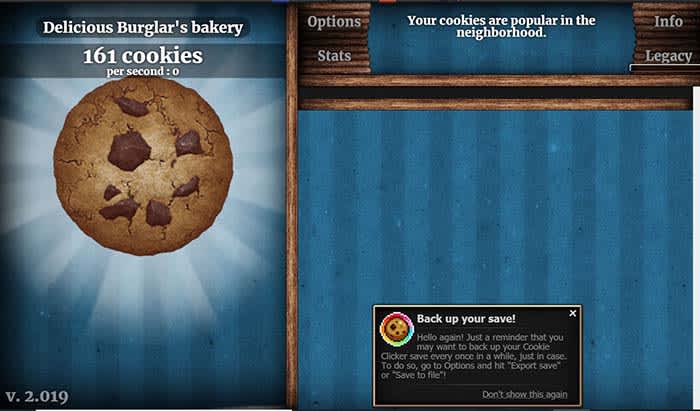
This is the “clicker game” that started it all. Your only mission is to click uninterruptedly to create cookies.

Little by little, you will unlock power-ups or updates.

3. Doom

Doom

The classic first-person shooter is fully available to play online for free from your browser. It includes all levels, difficulty modes, and some useful extras such as wireless command compatibility.

4. Gridland

Gridland

At first glance, Gridland looks like a Bejeweled clone. But in reality, it is an online strategy game in which you must watch the resources you collect protect you from the threats that will appear when it gets dark.

5. Die 2nite

Die2Nite

During the day, you and the other players must work together to build fortifications. At night, the zombies will attack and put your defenses to the test.
6. RuneScape

Runescape

Forget the typical searching missions like “Pick 7 mushrooms” or “Kill me 5 rats.” Here, every mission is full of puzzles, dungeons, and surprises. You play from your browser but you have to install a client.

7. SUPERHOT

Superhot

SUPERHOT is a great online shooting game in which time is always stopped until you take an action. This invites you to think through each movement. The full version costs money, but you can play a free trial of the prototype that started it all. The full version is available on Steam.

8. Candy Box 2

Candybox 2

Candy Box 2 starts out as such a simple title. You just sit and wait as a ticker keeps adding candy to your collection. However, the game quickly transforms into a bizarre role-playing game. You will buy weapons and power-ups as you embark on thrilling adventures.

9. Escape Goat

Escape the Goat

This platform game became so famous that it ended up having a Steam version. You control a purple goat that has been arrested for witchcraft. You must escape by solving puzzles, moving levers, and even allying yourself with other animals.

10. UNO
UNO

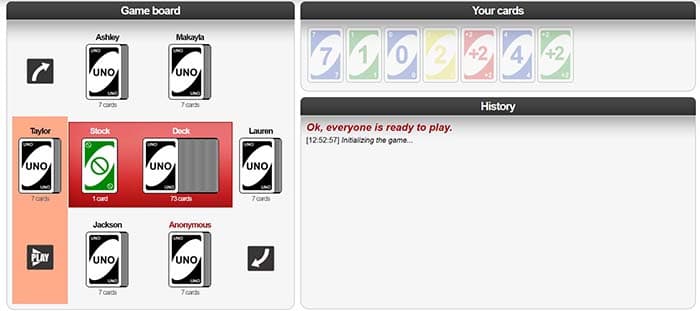
Yes, you can play the popular card game online with other players. You can select the difficulty level of the AI, the number of initial cards, and the speed of the game. There is a very competitive online community. If you like this roll, you will feel at home.

11. The World’s Biggest Pac-Man

PacmanUnless you live under a rock, you’ve probably played your fair share of Pac-Man. However, playing the same handful of levels over and over again can get old. This site features the classic Pac-Man levels as well as loads of more levels to navigate. Each labyrinth connects with four more labyrinths, and so on until the end of time. Users themselves create the labyrinths, so be prepared for strange designs or traps.

12. The Last Door

The Last Door
This is an episodic graphic horror adventure inspired by Poe and Lovecraft. Do not let the pixelated presentation fool you: many scares await. The puzzles are not particularly difficult and adapt very well to the story.

13. Blight of the Immortals

Blight of the Immortals
Blight of the Immortals comes off as boring but it manages to be exciting. You must defend yourself against hordes of zombies, but they are so slow that a turn takes six hours in real time. That gives you time to prepare your strategy.

14. Pandemic 2

Pandemic 2

Your mission in this free game is to eradicate all humans using a virus so powerful that no vaccine can stop it. You should be as efficient as possible.

15. Spelunky

Spelunky

The popular indie online game of traps, monsters, secrets, platforms first emerged in the world of browsers. The original version does not exist anymore. Now you can play a new version with tighter controls and more content, all for free.

16. A Dark Room

Firelit room
You start in a dark room, and from there, you will unravel the secrets of a strange event that has destroyed the world. Some common RPG elements are added, like rebuilding a town or dealing with its inhabitants.

Are there any other great free games we missed? Let us know in the comments below!

How to detect a Wi-Fi thief

These apps can keep Wi-Fi trespassers from slowing down your network.

Protecting Wi-Fi

Your Wi-Fi network at home is sacred. Allowing a friend to access to your Wi-Fi network is now the equivalent of letting them getting something out of your fridge.

When someone hijacks your Wi-Fi and slows it down, it is not only a breach of trust but a breach of privacy. However, we have the solution:

Two key applications

In order to find out if someone is accessing your network, we are going to use some applications: IP Tools Wi-Fi Analyzer and Who’s On My Wi-Fi.

IP Tools Wi-Fi Analyzer allows you to configure everything in the fabric of your internet connection. Likewise, it is also able to show if there are technical difficulties. You will know if there are connection failures as well. It also tells you which devices are currently connected to your network.

IP Tools: WiFi Analyzer Download now ►
9

In the case of Who’s On My Wi-Fi, the functions are more limited than in IP Tools Wi-Fi Analyzer. However, the name says it all. It sees who is on your Wi-Fi connection and takes the appropriate measures. We recommend downloading both applications, but we will use the latter to perform the analysis.

Who Is On My WiFi Download now ►
10

Open Who’s On My Wi-Fi and look for the network to which you are connected. In a matter of seconds, the application shows all the devices that are using your internet connection. From here, you can kick trespassers off your virtual lawn. You need to enter your network information to do so.

Who's on my wifi

Staying protected

Another way to do this is by changing the router password. Once you modify the password, that person cannot connect again.

You pay for your Wi-Fi connection with your hard-earned money, so you should get to decide who is using it. If someone is going to try and sneak into your system, don’t be afraid to virtually go “Gran Torino” on them. 

How to find the temperature of your computer’s CPU

Find out the temperature of your computer’s CPU.

overheating computer

Knowing the temperature of your CPU is critical. An overheating computer can cause problems as serious as blockages, spontaneous reboots, and even disable hardware pieces.

If your computer seems to be acting weird or running slightly hotter than usual, don’t leave it to chance! Check as soon as possible that the temperature of your CPU is within normal ranges. If it’s not, it’s time to take action to ensure everything is functioning properly.

How to find the temperature of your computer

The first method we recommend to find the CPU temperature is by using the free Core Temp program.

Core Temp Download now ►
7

IMPORTANT: Be sure to uncheck any box that invites you to install any other program during the installation of Core Temp.

Core Temp

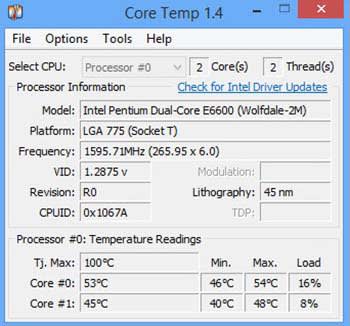
With Core Temp installed, open the application. From the main window, you can see the temperature of your computer’s CPU.

Find out with HWiNFO32

If you’d like another option, we have another really useful free program. HWiNFO32 is a powerful and light application that will let you know the temperature of each component with just one click.

HWiNFO32 Download now ►
8

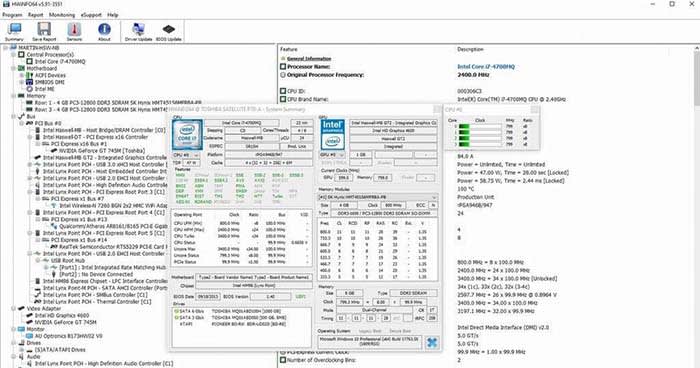
With HWiNFO32 installed on your computer, open it up. Compared with Core Temp, HWiNFO32 offers much more info. It not only offers info on the CPU temperature but also on the graphics card, hard drive, RAM, and even the fans.

HWiNFLO

What temperatures are normal?

Now that we know the temperature of the processor of our PC, it’s time to know if it is in the danger zone.

  • Below 60º: Everything is in order; your equipment works correctly.
  • Between 60º and 70º: The temperature is still between the acceptable ranges, but keep an eye on it.
  • Between 70º and 80º: Your computer is overheating. Check to see if your fans are working.
  • More than 80º: Your equipment is in a dangerous temperature range.

What do I do if the temperature is too high?

If the temperature of your processor exceeds the normal range, it is best that you take action as soon as possible.

One of the most common recommendations to lower the temperature of a computer is to clean its components and fans. The accumulated dust and dirt tend to increase the temperature.

CPU fan

If you are a laptop user, in addition to cleaning the fans of your computer, you should buy a base so that it cools more efficiently.

If your computer only seems to overheat when you use a certain program, stop using that program. Your processor is not powerful enough to support the application, and it is advisable to stop using it and not risk ending up with unused equipment.

4 free alternatives to PowerPoint

Tired of seeing the same presentation over and over again? Check out these PowerPoint alternatives!

Presentation

Whether for work or school, whenever we need to make a presentation, we often rely on the crutch that is Microsoft PowerPoint.

While PowerPoint is a great tool in the Microsoft Office Suite, we can’t help but think that it has gotten dull. Given the sheer amount of PowerPoint presentations we have all seen, whatever presentation we create just comes off as uninspired. 

Luckily, there are alternatives to PowerPoint that are free! We found some of our favorites. If you’re looking to spice up your next board meeting or your next presentation for class, these are all good options.

Microsoft PowerPoint Buy now ►
7

Alternatives to PowerPoint

Prezi

At about a decade old, Prezi is pretty well-known in the world of creating presentations.

To put it simply, Prezi makes your presentations look dynamic. It allows you to take a non-linear approach to your presentation so that you can jump in at any point.

Instead of your presentation being a straight line, Prezi makes it a spiderweb that you can journey through however you’d like.

PROS

1. It highlights the content very well.

2. It grabs your attention.

Cons

1. Expect to make a long presentation that will take a long time to make. If you were planning on just making around five slides, Prezi probably isn’t for you.

2. There is a learning curve. Watch others use it before you jump in to avoid headaches.

Google Slides

Yeah yeah yeah, Google has everything. Seriously though, if you don’t want to spend the dough on PowerPoint, Google Slides is basically the same thing, but it’s free. 

If you can work your way through a PowerPoint, you can work your way through Google Slides with no problem. To make things even better, you can also upload it right to Google Drive or Google Docs. 

Google Slides Download now ►
7

Microsoft Sway

We’re swapping one Microsoft product for another!

Sway is not PowerPoint by any means. You do not get some of the same functions you get with PowerPoint, so, for some, it can be a limiting experience. Then again, how often do you REALLY use all of the tools in PowerPoint’s toolbelt?

You can use Sway on both mobile and desktop. To make things even better, the presentation you create will stay in the cloud, so you don’t have to carry a USB around with you anymore.

Microsoft Sway Download now ►
8

PowToon

A big hurdle we all have to jump with our presentation is trying to figure out how to make it not boring. All of our hard work culminates into the presentation, so we want to make sure that our audience is going to pay attention. How do you make sure they listen? Add cartoons, of course!

PowToon adds comic characters and animations to make our presentations pop! It does a good job of keeping the tone of your presentation lighthearted, but still professional.

This obviously not the right format for every presentation. If you’re giving a presentation about something serious, you probably should avoid using PowToon. However, your average college presentation or work presentation could benefit from PowToon! 

8

Wrapping up

If you’re looking for basically a free version of PowerPoint, Microsoft Sway and Google Slides are going to essentially give you just that. However, if you are looking to go beyond what PowerPoint offers, PowToon and Prezi are top-shelf presentation tools.

Regardless of whichever program you choose, just remember that there is a world beyond Microsoft PowerPoint!

Samsung Galaxy S11: First images

Leak shows early patent images of the Samsung Galaxy S11!

Samsung

Although the Samsung Galaxy S10 just came out, the S11 has already been leaked!

Thanks to the Dutch SITE Letsgodigital , we have the first patents of the S11. Its design is quite different from the previous Galaxy. For a long time, it has been rumored that the Samsung Galaxy wouldn’t have borders, and that it would be all screen. This seems to be the case with the new Galaxy.

Samsung

The Galaxy S11 appears it will be a very compact phone, with no borders and with a curved screen much more pronounced than the current Samsung models.

The front camera and sensors will be perfectly integrated into the screen. To prevent this curvature from causing image distortions, the camera module will be placed at a slight angle.

The camera system in the back will have several objectives, which will be displayed vertically, not horizontally, as with the Samsung Galaxy S10.

For now, there is no sign of other new technologies, such as folding or rolling screens.

It must be said that patents never show final designs, so it is possible that the above image does not represent the final design of the Samsung Galaxy S11 completely.

We leave you with the conceptual designs that they have created:

Samsung

samsung

Samsung

Complete guide to fast charging

How does fast charging work?

Charging

Experts say that in the last 100 years we have had more technological advances than in the whole history of humanity. However, that entire history has led up to this moment: fast charging.

What is fast charging

The “what” always comes first. To put it simply, fast charging is a new technology that current mobile phones have to charge your battery quickly.

The manufacturers of smartphones realized that as you add more active apps on your phone, it’s going to run out of battery more quickly.

If they knew how to drain a battery quickly, they should figure out how to charge one quickly as well!

According to the studies carried out, the fast charger is capable of charging up to 30% of the smartphone in just 5 minutes. The times may vary, but it will always be faster than the usual method.

Everything you need to know about fast charging

How does it work?

Fast charging uses basic principles of physics and chemistry to fulfill its purpose.

Fast charging uses more voltage and amperage, – thanks to precisely better battery technology – to streamline the process. To give an example, it is as if you were filling a pool with a fire hose instead of a conventional one.

phone battery

Are all models fast charging?

Now comes one of those key questions: do all devices on the market have a fast charge? The answer is “no.” In general, the models launched during 2017 or earlier do not include this technology, but those that have been sold during 2018 do.

Does it affect the battery?

There is some concern for whether or not fast charging will deteriorate your battery. However, this does not happen. The hardware adapts to the requirements requested thanks to the software it uses. It’s that simple

Wrapping up

Normally, fast charging is not linear, but only affects a percentage between 1 and 80%. The idea is that the user can have the phone out of low power as soon as possible. Hopefully, this article was insightful for you in your ever-growing fight against your phone’s battery.

Download PlayerUnknown’s Battlegrounds free for PC

Get on the battlefield for free with PUBG Lite!

PUBG

It’s no secret: we are in the era of the battle royale shooters.

With the rise of games like Fortnite and the boom generated by Apex Legends since its launch, it is not surprising that more and more gamers are signing up to this frantic battle royale experience.

Fortnite: Battle Royale Download Fortnite: Battle Royale ►
10
Apex Legends Download FREE ►
9

The overall theme of these games is simple: you will be abandoned on a map where you must survive while eliminating the rest of the opponents. Whether as a team or individual, a Battle Royale game only comes to an end when there is only one team or player left alive.

If you love battle royale games, you need to give PlayerUnknown’s Battlegrounds a try. “PUBG” was huge until gamers were able to play Fortnite for free. Luckily, PUBG got the memo, and now you can play PUBG legally for free! Here’s how…

How to download PUBG free for PC

So far, PUBG has only been free in its mobile version, generating frustration among PC and console users.

With the overwhelming success of Fortnite Battle Royale, PUBG Corp has decided to stand up to Epic Games with its free version of PlayerUnknown’s Battlegrounds. This one is called PUBG Lite and in a similar way to Fortnite Battle Royale, it is a version with fewer features than the full title but it offers all the options of Battle Royale confrontation between players.

Playerunknown's Battlegrounds Download Now ►
9

In addition to being completely free, PUBG Lite has been optimized to offer a much more fluid gaming experience than its full version. In fact, this has always been one of the big complaints of fans of the game on Steam who were disappointed with the performance of the title unless you have a very powerful PC.

At the moment, PUBG Lite is in beta, offering the maps Erangel and Miramar, with three game types: alone, duo, or squad of four.

Downloading PUBG Lite for free is very simple. For this, you just have to access the website by clicking below and click on the Download button. Alternatively you can download it under these lines. Once this is done you, just have to double-click on the installer and start enjoying.

PUBG Lite Download FREE ►
9

What specs does the free version of PUBG require?

PUBG Corp has shared the recommended and minimum specifications to play the free version correctly:

Recommended specifications:

  • Operating System: Window 7,8,10, 64bit
  • CPU: Core i5 2.8GHz
  • RAM: 8GB
  • GPU: NVIDIA Geforce GTX 660 or AMD Radeon HD 7870
  • Hard Disk Space: 4GB

Minimum specifications

  • Operating System: Window 7,8,10, 64bit
  • CPU: Core i3 2.4GHz
  • RAM: 4GB
  • GPU: Intel HD Graphics 4000
  • Hard Disk Space: 4GB

Wrapping up

In addition, the website offers the latest drivers NVidia graphics cards, ATI Radeon and Intel Grafics as well as everything necessary for the game to work in Windows (Microsoft Visual C ++,. NET Framework 4.5.2 and DirectX 11).

Enjoy PUBG Lite!

4 best free accounting programs

Want to do your own bookkeeping? These programs can make it happen!

Accounting

Chances are the only thing you know about accounting has come from Ben Wyatt’s jokes from “Parks and Recreation.”

Well, those were painful to listen through. Anyway…

Basic accounting skills are very important in our adult lives. When tax season comes around, we need to know that we are getting what is rightfully owed to us on our returns. Basic accounting is also important when it comes to maintaining a budget.

If you didn’t take any accounting classes in high school or college (and even if you did) accounting can be very complicated. Luckily, there are plenty of free accounting programs that can help you along the way. Please note that even the best accounting program can be enhanced by your own basic accounting knowledge. It’s in your best interest to watch videos like the one below to teach you some basic accounting tools.

If you’re looking for a free tool to help you with your accounting needs, we found four of the best free accounting programs for you.  They can help you send invoices, help with bookkeeping, and help around tax season.

5 best free accounting programs

Wave

Wave

The creators of Wave have the mindset that accounting should be a free service for individuals and small businesses. That’s why accounting, invoicing, and receipting don’t cost a dime! 

However, there are premium features on Wave that you do have to pay to use. Conducting payroll, processing credit cards, and making transactions with the bank all cost money. That said, if you need a service that just helps you keep the books, Wave can help out!

Wave Accounting Download now ►
7

Standard Accounts BSA

Standard Accounting

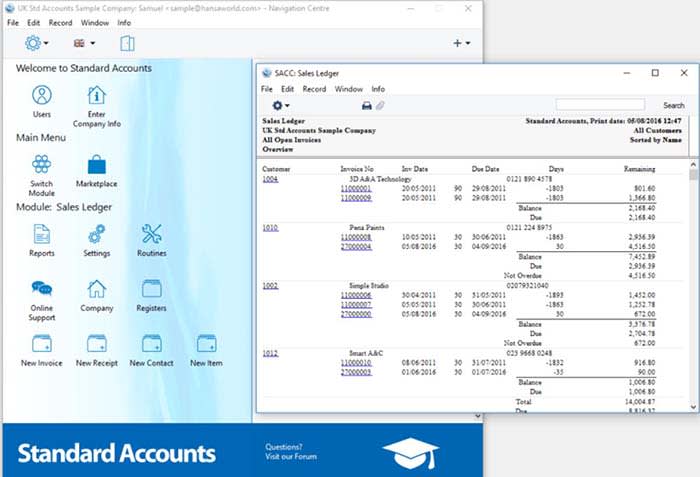
Standard Accounts BSA is a one-stop shop for your basic accounting needs. You can easily create tables for accounts payable and accounts receivable. If you need to maintain a ledger, it’s wildly easy.

As we said before, basic accounting knowledge can help with most software, and Standard Accounts BSA is no exception. If you don’t know basic accounting, you won’t know how to fill out a ledger financial reports. Basically, before you start balancing your books, you need to hit the books.

Standard Accounts BSA Download Free ►
9

Free Invoice Maker

Free Invoice Maker

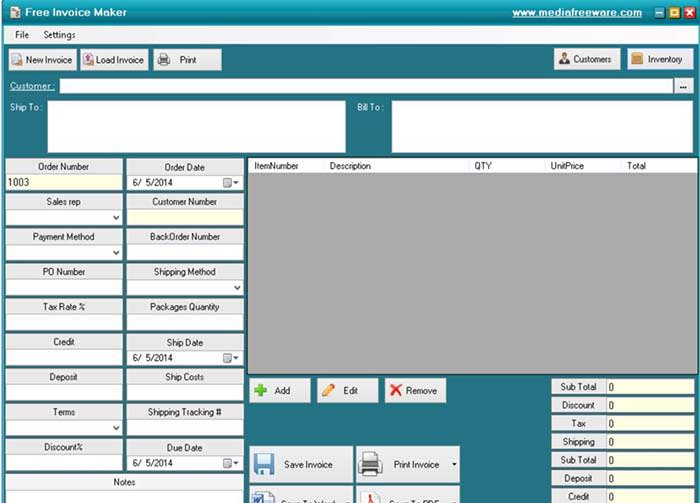
If you have a small business, you know just how much you need to create invoices. Free Invoice Maker makes it incredibly easy to make them to the point that even a child could do it. 

Throw in all of the necessary information into the template to create an invoice quick and easy. Unfortunately, the program will not save your information for you, so you will have to enter a lot of the same information over and over again. There also isn’t much you can use to make a more custom, visually appealing invoice. However, for the low, low price of free, we can’t really complain.

Free Invoice Maker Download Free ►
7

Manager Free Accounting

Manager Free Accounting

If you are like most people, all of your financial papers are probably thrown into a bin you keep tucked away. Manager Free Accounting is essentially the same as if that bin was neatly organized on your desktop.

All of your financial information organized into a simple and efficient dashboard. Everything you need to access is just a click away. It has basic accounting functions and tools to help you balance the books, and manage your own personal finances. If you want to ditch the clutter, this app can help!

Manager Free Accounting Download Now ►
7

Wrapping up

If you’re looking to manage your own bookkeeping, these programs are sure to help. However, do not be afraid to consult a professional.  Professionals like the people at H&R Block can help you save time and money in methods that might be unfamiliar to you. 

H&R Block At Home Premium Download now ►
10

13 best tricks for WhatsApp

Wanna be a WhatsApp master? These tips and tricks can help you get there!

WhatsApp

You may think you know all the functions of WhatsApp, but the fact is that this messaging app has many hidden secrets.

Did you know that you can hide your profile picture? That’s just the tip of the iceberg!

WhatsApp has endless tricks and hidden tools that only the most clever users have been finding over the last few years. Keep on reading below, and you’ll see all of the best tricks for WhatsApp!

WhatsApp Messenger Download free ►
8

The best tricks for WhatsApp

Trick 1: Disable the blue double-check

Without a doubt, this is the best-known trick since WhatsApp first came out.

Sometimes, we don’t want people to know when we saw their message. It isn’t that we’re trying to be antisocial, we just don’t want to leave our friends on “read,” and come off like a jerk.

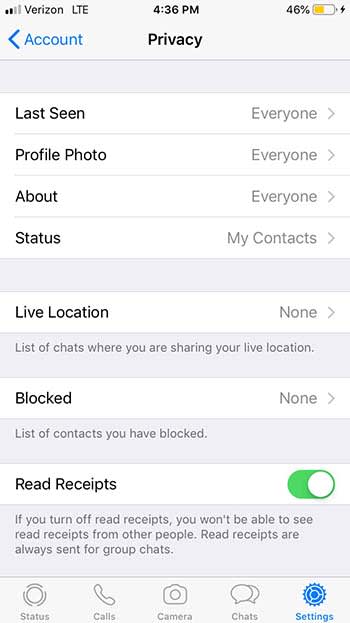
To deactivate this cumbersome option, simply go to the Settings menu WhatsApp, click on Account followed by Privacy and deactivate the Reading Confirmation option. It’s as simple as that!

WhatsApp Privacy

Trick 2: Meet your best friends

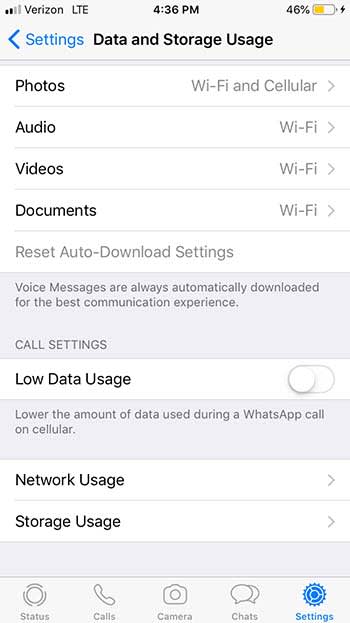
To see a list of your best friends on WhatsApp click on Settings, then on Data and Storage, and finally on Storage Usage. From this menu, you will see which groups are the ones you talk to the most and with which contacts you share more hours in front of your screen.

WhatsApp data

Trick 3: Find out when your messages have been read

If you are an Android user, press and hold a message until a menu appears. Then click on the Info option and you will see both what time you sent the message and when it was read.

If you use iOS, slide the conversation to the left and press Info.

WhatsApp Insta bro

Trick 4: Hide your profile picture

If you want to be a mysterious contact through WhatsApp you have two options. Find a profile picture of a masked hero in the style of Batman or simply hide your photo so no one can see it.

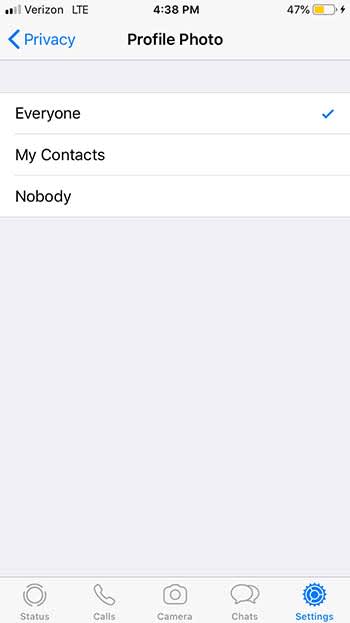
To keep your identity secret, click on Settings, Account, Privacy, and Profile Picture. From this menu, click on the option Nobody. Now nobody will know what you look like!

WhatsApp profile

Trick 5: Mute a group

Groups on WhatsApp can be really useful among small groups of friends or a living hell if it’s you’re annoying classmates in a group project. For those occasions, it’s valuable to know how to silence WhatsApp groups.

To mute a group, just click on it until the Group Information option appears. From there, click on Silence. You will have the option to block any type of message for eight hours, a week, or even a year.

Trick 6: Create shortcuts to conversations

WhatsApp allows you to create shortcuts to your most frequent conversations.

To create direct access to a conversation simply click on it until a menu appears. From here, select the option to create a shortcut and the chat will appear with the profile picture of the person. Unfortunately, this trick only works for Android smartphones.

Trick 7: Share your location with a friend

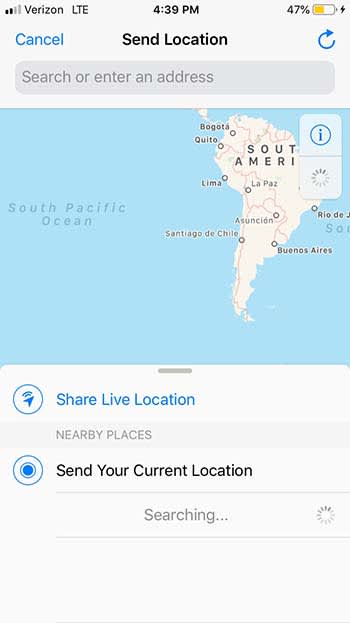
If you’re talking with a friend on WhatsApp, and you need them to find you, you can share your location with them. This option will add a pin with your current location that your contact can follow in the map application. You can also send a pin with the place you’re going to in case you have not got there yet. Finally, and for the more daring, you can also share in real time the place where you are at that moment.

If you are an iOS user you can start sharing your location by clicking on the “+” option and then on Location.

If you are an Android user, click on the Add option and then on Location. In both cases, you must authorize WhatsApp to use the location services of your mobile phone.

WhatsApp Location

Trick 8: Use Incognito mode

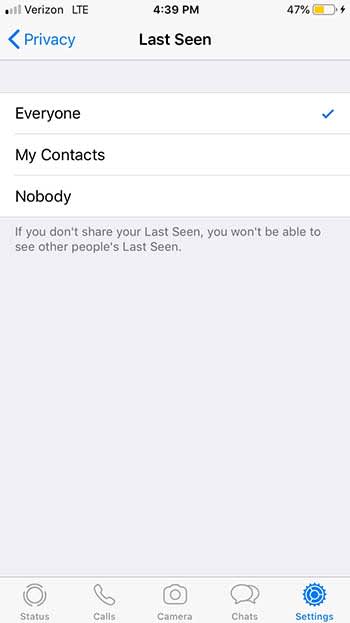
If you do not want to worry about your contacts seeing if you are connected or not, activate the Incognito mode. This is very simple to configure and will save you from more than one uncomfortable conversation if you forget to respond to a message.

To activate Incognito mode, go to the Settings and then click on Account. Enter the Privacy menu and then click on Last Seen. Change your status to Nobody so that no one can see when was the last time you were connected.

WhatsApp incognito

Trick 9: Send invitations privately

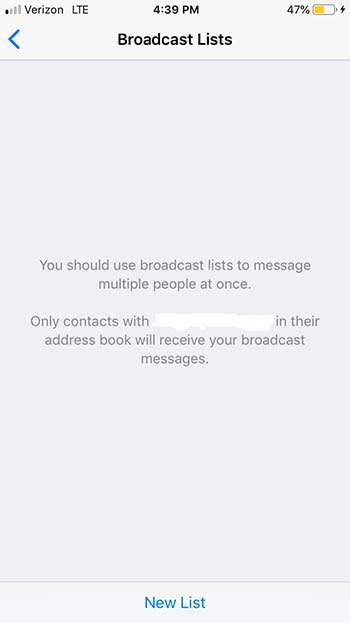
If you are having a party, you can send invitations to multiple contacts at once, and do it privately.

To do so, simply click on Chats and then on the Broadcast List option that is located just below the search bar. Create a new list, and add all the recipients you want. Create the message and that’s it! All your friends will receive it and believe that it is a personal invitation instead of a public one.

WhatsApp brodcast

Trick 10: Edit your photos

We have all sent photographs on WhatsApp on more than one occasion, but not everyone knows that we can edit them before sending them to our contacts.

To edit the images that you send through WhatsApp, use the icons that are at the top of the screen. You can add a message, draw, or even stick stickers and emoji on them. Keep in mind that depending on your phone’s OS, this option will not be available.

Trick 11: Respond to a specific message

When you get 30 messages from several different friends, it can be nauseating to sift through all of them in order to find the one or two you actually want to respond to. Luckily, WhatsApp has a trick to help you!

If you are an Android user, just click on the message you are interested in and click on the Reply option. If you are an iPhone user, swipe the message to the left and click on Reply. It’s as simple as that!

Trick 12: Keep your messages secret

Nosy mom

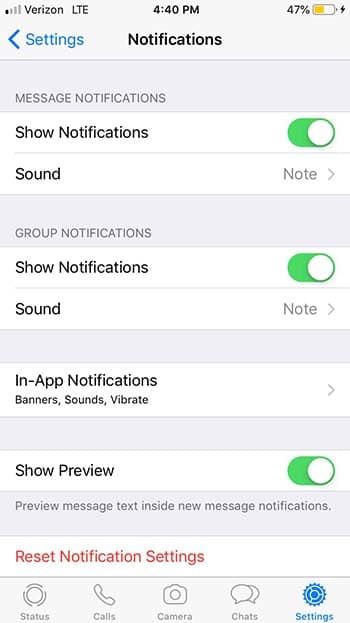
While it is true that WhatsApp messages are private, the notifications that appear on our phone are vulnerable to prying eyes. You know who we are talking about: moms and significant others. You’re having a casual conversation with someone, and your mother just has to be a Nosy Nelly and check to see if you have a new love in your life.

WhatsApp has an option to only show you who sent a message rather than the content of the message.

To activate this option and keep your notifications secret, go to Settings, Notifications, and then click the option to disable the preview. Take that, mom!

WhatsApp Notifications

Trick 13: Find a specific message within a conversation

It is likely that at some point you need to look for a specific message. However, in the sea of messages you have gotten since, it can be hard to find. For those cases, it is really useful to use the WhatsApp message browser.

To find a specific message, use the search bar located at the top of the chat window. This will give you all the conversations in which you have used the word or phrase you need to find.

If you prefer, you can also search within a single chat. If you are an iOS user, click on the chat in question and then on the name at the top of the screen. From there, click to search the chat.

If you are an Android user, click on the chat and then on the three bullets for more options. From there, hit Search.

Wrapping up

We hope that you learned something in this list! What are your favorite hidden secrets on WhatsApp? Let us know in the comments below!

How to write in different fonts on social media

Want to impress your friends on social media with mad font skills? Here’s how!

Facebook font

Did you know that you can write on Facebook, Twitter or YouTube using different fonts? All it takes is a simple trick!

When you write on Facebook and Twitter, there is only the default font. The text always looks really boring.

However, writing in another font is possible. To make things better, you don’t need to be a computer whiz to figure it out! Just look at what you can get!

Text converter

Do you want to use these fonts too? Then follow the steps:

How to write in different fonts on social media

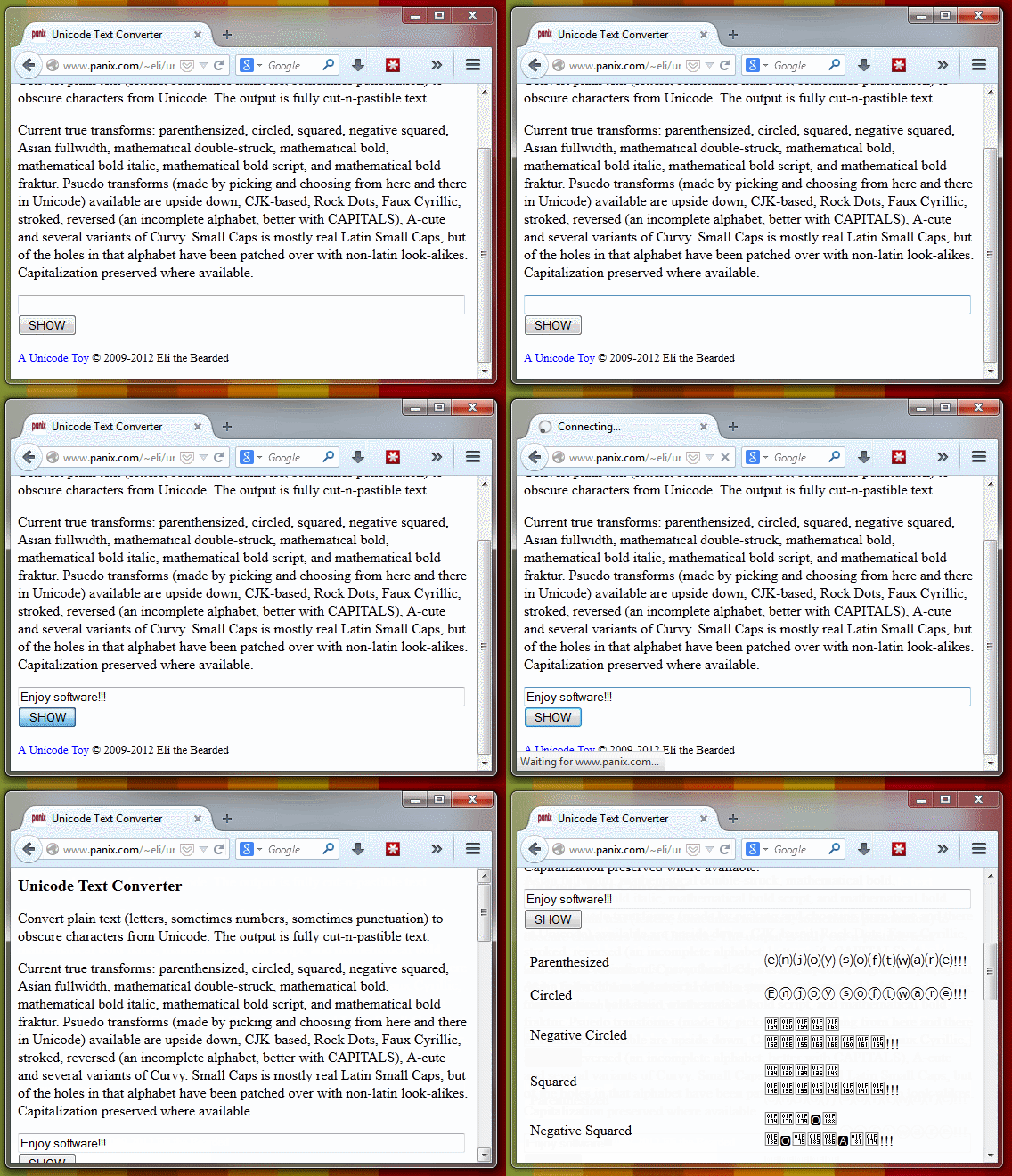
1. Go to Unicode Text Converter

Yeah, we’re sure there might be other methods for changing the font, but why not just go with the easiest?

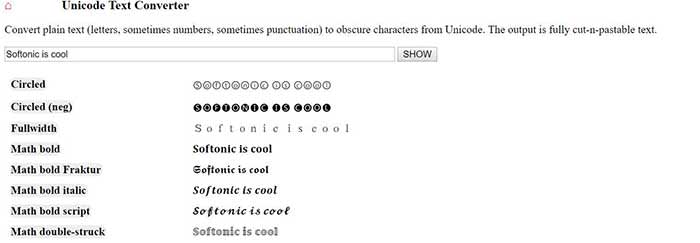
2. Write the text you want to convert

When you’re ready, take the text you want to post on social media, and throw it into the provided space. When you’re done, hit “Show,” and the text will be shown in the newly available fonts.

Text converter

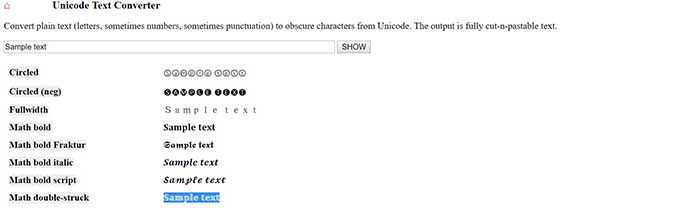
3. Copy the transformed text

Unicode sample text

Once you find your favorite font, copy it.

4. Paste the text and publish

New font in Facebook

Now you just have to go to Facebook, Twitter or any other web page and paste the text. One click on the publish button and … magic!


You can also use BabelPad

BabelPad is a free alternative to Windows Notepad that has support for the characters you just saw. These characters are not available from the Character Map; that’s why BabelPad can be very useful.

BabelPad Download now ►
7

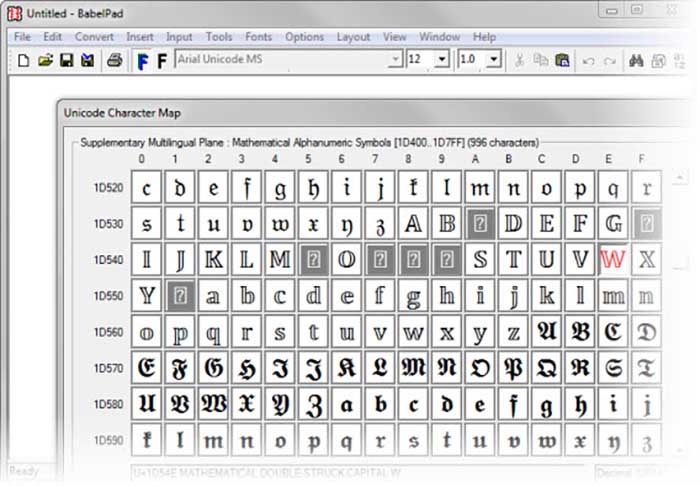
To access special characters, go to Input> Unicode and then go to Tools> Unicode Character Map. Your list of choices is massive.

BabelPad
With BabelPad you can access hidden Unicode blocks

It is much easier to use the online converter, but it might not last forever. To be fair, Facebook and Twitter might wise up and stop users from using the site. BabelPad will always be there to help you express yourself with different fonts and symbols.