
5 best apps to help you manage stress

Take control of your stress and anxiety with these apps.

Meditation

According to a recent poll from Gallup, 55% of Americans are stressed out at some point during the day.

When we are stressed, it affects those around us as well. We don’t sleep as well, we can fall into depression, and we can become irritable.

To help manage stress, there are apps that can help you make it through the day and keep your composure. Do yourself a favor and download some of these apps to help ease your tension. 

5 apps to help you manage stress

1. Breathe2Relax
Breathe2Relax

Breathe in. Breathe out.

It should be a simple concept, but when we fry ourselves, we don’t take the time to pause and calm down.

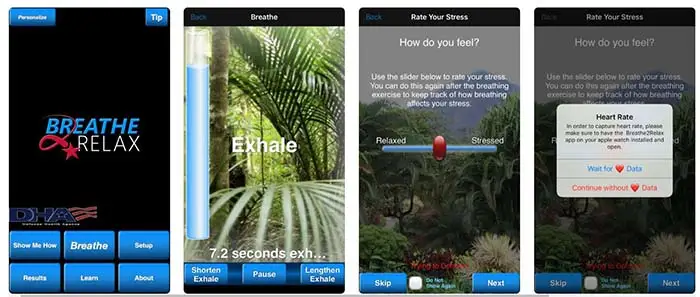
The app does so much more than give you breathing exercises. It also can pair with your Apple Watch to monitor your heart rate. It will also monitor your stress patterns for you and show you your progress.

Breathe2Relax Download now ►
7

2. At Ease

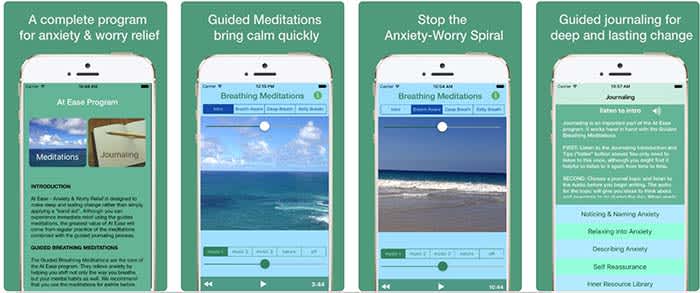
At EaseAt Ease comes with a lot of the tools you find in other stress-management apps. There are breathing exercises and meditations you can do to help manage your stress. However, where the app shines is in its guided journaling feature. 

Guided journaling helps the user become self-aware of the things causing them to feel stressed and anxious. You ask yourself some of the tough questions to help pinpoint the root causes of your stress. From there, you work on how to treat yourself.

This app costs $3, but for those who think this can help them, it’s well worth it.

9

3. Headspace

Headspace

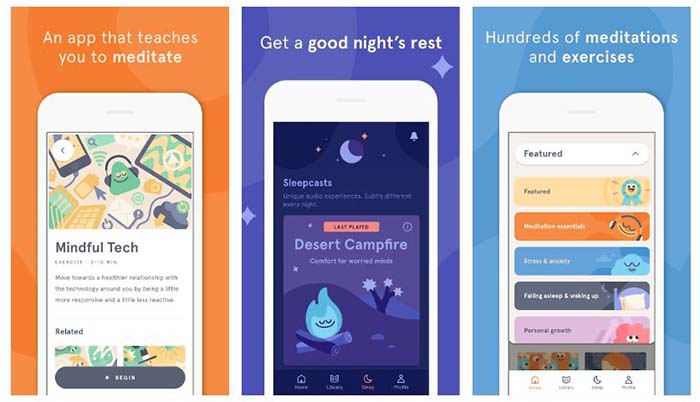
There is such a learning curve with meditation. It is so much more than sitting “criss-cross applesauce” while chanting “Om” over and over again.

Headspace has a 10-day course that teaches you how to properly mediate. That may sound excessive, but you only have to devote a few minutes a day to learning.

Headspace uses real-life science coupled with ancient meditation practices to help you reduce your stress and anxiety.

Headspace Download free ►
10

4. Happify

HappifyHappify uses activities and mobile games to help you manage your stress. Yes, we’re serious.

The app might sound a bit odd, but the experts and scientists at Happify have put research and studies into how the games operate. More than 80% of the people who used the app said that their stress levels went down because of the app.

The games help teach you positive skills like how to give, how to show empathy, and how to savor the moment. The app also helps you track your progress so you can see for yourself how far you’ve come on your journey.

8

5. Pacifica

Pacifica

We saved the best for last.

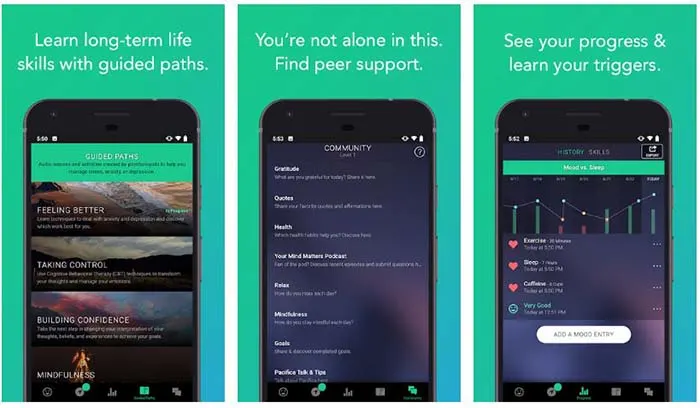
Pacifica is an all-in-one app to help manage stress, anxiety, and depression. The app features several different types of exercises to help you manage your breathing, relax your muscles, and even help give you a more positive outlook on life. 

The app also manages your lifestyle patterns such as how often you workout, how often you sleep, and your caffeine intake. Even better, the app can help you find a therapist in your area and help you find support systems such as groups and even podcasts.

10

Wrapping up

These apps can help, but the things causing you stress and anxiety might have a deeper meaning. If you have chronic anxiety, it may be in your best interest to see a therapist or psychiatrist. Anti-depressants and anxiety medication might be your answer.

Talk to your family and loved ones about your stress, and get the help you need.

Insight Timer is the best app to manage your stress

Could one app help manage your stress forever?

Two months ago HCA Healthcare called stress the “health epidemic of the 21st century” and frankly we’re not surprised. Last year 6,700 Americans nationwide between the ages of 18 and 64 were surveyed about how stressful their lives were, and health experts were genuinely surprised at the resulting harm brought about by chronic stress and the general apathy towards doing anything to curb it.

Mental health stress kitchen breakdown

Whether you’re a college student up to your eyeballs in exams, a millennial managing multiple jobs, a homeowner struggling to balance kids on one hand and a checkbook on the other, or a company manager trying to corral employees, it’s the same old cyclical issue: Your hectic life makes you stressed, and when you approach life from a stressed mental state everything gets harder.

We’re not going to preach life advice to you; no two people are the same, and what works to simplify and organize one person might have little effect on someone else. So instead we’ll point you towards one handy app that’s worked wonders:

Insight Timer

Insight Timer is a free app for Android and iOS that lets you escape the chaos and anxiety of the world for a period of time (which you can custom set), meditate (if you’re into that kind of thing), and come back stronger and more level-headed. Insight Timer won Apps of the Year in both TIME magazine and Women’s Health, and more time is spent on it than on any other meditation app.

Insight Timer Free Download ►
9

What does the app do?

At its core, Insight Timer is a free meditation app, but it also helps novices (which most of us are) learn how to meditate to the best effect. The app features guided meditations and talks led by the world’s mindfulness experts, teachers, neuroscientists, and psychologists from Harvard, Oxford, and Stanford who will coach you in achieving inner peace. Not only that, they’ll teach you how to achieve it at home, at work, or on the go.

Office meditation
Use Insight Timer to take five minutes at work to center your thoughts and get back in the ring.

Insight Timer also has thousands of discussion groups, forums, and community features, as well as stats and milestones to help you track your progress and manage how often you take the time to use the app, and helping you to build a simple daily health habit.

Get started in minutes

Here’s how easy it is to use Insight Timer:

1. Download the app

Insight Timer is free and can be downloaded right here.

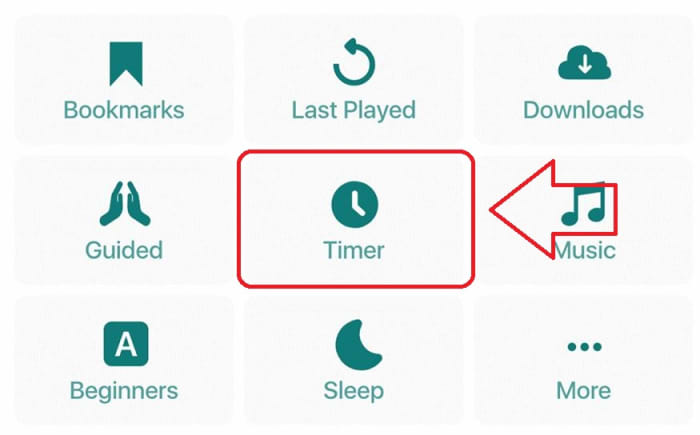
2. Select Timer

The “Timer” function is right on the app’s home page. When you’re ready to zen out, click right on it.

Insight Timer home page

3. (Optional) Choose your settings

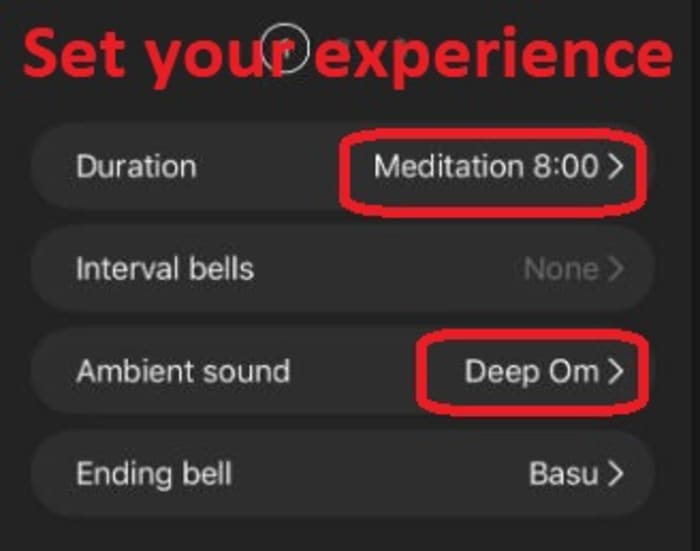
Under “Timer” you’re given a few simple customization options for duration and sound effects. We found that even five or 10 minutes was sufficient to clear our head and get us back in the zone. You can also choose from a variety of cool background tracks and bell sounds to play. Check out their catalog!

Insight Timer settings

4. Press “start”

Your chosen bell will ring, and your chosen background SFX will start up immediately. We recommend cranking the volume up so it really feels like you’re awash in the atmosphere. Close your eyes, get comfortable, and let the app work its magic.

How will Insight Timer help me?

Insight Timer doesn’t remove all the problems and everyday stresses of your life. Weave it into your daily life and it goes one step better: The app centers and strengthens you to face these problems with renewed energy and patience. If you let it do its job, Insight Timer is proven to reduce anxiety, calm the mind, manage stress, and even help battle insomnia (try putting it on for a few minutes while you’re trying to fall asleep)!

If any irksome, nagging responsibilities creep into your mind, acknowledge them, mentally partition them, and have the willpower not to tend to them until your timer rings. Insight Timer is like taking a deep breath before diving back into the ocean of stress.

Let us know in the comments below whether you’ll be giving Insight Timer a try. We hope it helps you experience the same rejuvenation that we found. Inhale deeply and feel the renewal!

Boost productivity with the best apps for time-tracking

Find the best app to help you manage your time and boost your productivity.

lady on the clock

There are a lot of factors in the mix when it comes to your productivity. There are external factors — the emails, notifications, and whether your colleagues are being especially chatty today. Also, there are things like whether your pants are comfortable or whether there’s a fresh cup of coffee to keep you company.

Sometimes you have trouble focusing or want to manage your output. Experts, bloggers, and productivity hackers alike recommend implementing some kind of schedule for “getting things done.”

The most popular approach is the Pomodoro Technique, which breaks your time into a series of 25-minute chunks. But, we were curious, are there other approaches to blocking off time?

Over and over, the app 30/30 came up — but it turns out, it’s been discontinued.

What is 30/30?

Time management

The 30/30 app was an iPhone app made by Binary Hammer. Weirdly, it still comes up a lot when you search for the best time-tracking apps, despite being discontinued a few years back. There is an app on the Play Store with a similar name, but it does not have the same functions.

The underlying concept was, you’d assign yourself a set of to-dos to work on in 30-second increments. The idea was that you can plan out your entire day, and can customize intervals ahead of time.

This means you’re not resetting a timer over and over, which is the basic premise behind the Pomodoro technique.

How is 30/30 different than the Pomodoro technique?

Well, classic Pomodoro is done with a simple egg timer.

Today, there are several options out there like TomatoOne which lets you customize your intervals. However, most don’t allow you to plan out your day and sort of “flow” through different tasks.

Some people like the simplicity and use the popular method to stay on task, not so much track their progress.

If that’s you, TomatoOne is a basic app you can download for your desktop or smartphone.

Tomato One Download Free ►
8

What are the best apps to track your time?

PomoDone

PomoDone

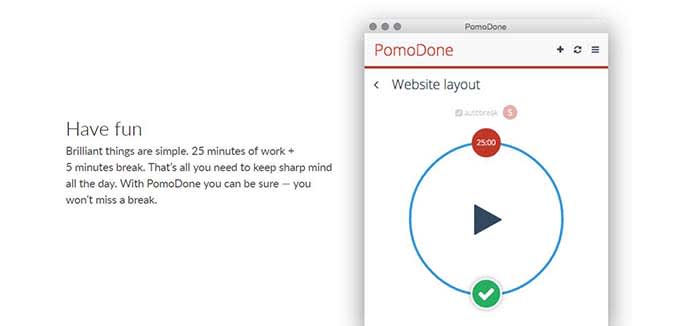
PomoDone is a productivity app built for Todoist users. The idea is that you can connect the two accounts and track the time spent on your to-do items.

What’s cool about PomoDone is that it allows you to drag your to-dos into the app and assign them by category. You can categorize your errands, emails, or work projects.

What’s more, you can also break out of the Pomodoro 25-minute cycle and assign time limits based on what you’ll need for each task.

PomoDone Download now ►
7

Focus Booster

FocusBooster

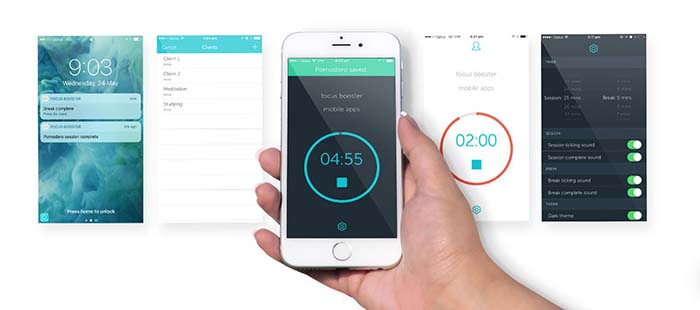
PomoDone and the Pomodoro technique can work for anyone with a to-do list and the willingness to track their output. However, Focus Booster is built for freelancers.

It comes with the standard timer app fare but allows you to break up your time-tracking by client or project. You can adjust the length of your sessions and turn your data into timesheets.

Focus Booster Download free ►
9

Focus List

FocusList

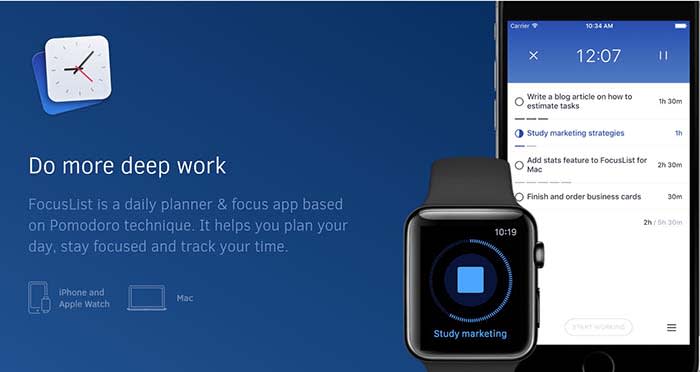
Focus List is another solid option for helping you plan your day, track your time, and review your progress. This app is something of a natural successor to 30/30, as you’ll “time box” your day. After using the app, you’ll start to understand how long it takes you to get things done.

FocusList Download Free ►
7

60-60-30 by Timerro

Timerro

The 60-60-30 technique is simple. You spend 60 minutes on one activity, then work for another 60 minutes followed by a 30-minute break.

Like Pomodoro, the hard part is getting used to staying on one task for an entire 60-minute block.

You’re supposed to take a 10-minute break between the two-hour-long chunks, which does make things slightly easier.

What we liked about 60-60-30 is that it allows time for more sustained blocks of focus than the 25 minutes Pomodoro blocks. Whether that’s invigorating or exhausting depends on how your brain is wired.

7

TL/DR: find a workflow that works for you

Stress relief

Working on a timer-system does come with some key benefits.

Short breaks can help you refill your creativity reserves and stay more productive throughout the day.

As you get used to working in a series of sprints, blocking out distractions will become second nature.

Over the long term, you’ll start to get better at managing your time. For instance, you’ll start to get a sense of how many sessions it takes to write an article, put together a report, or get through your inbox.

An article from Quartz article highlights an important point. Time-tracking is valuable, but you need to experiment with different intervals until you find what works for you.

Behavioral neuroscience professor from McGill University Daniel Levitin told Quartz that there’s no one workflow that suits every “neural style.”

For example, some people are able to focus for hours on end. Others depend on short bursts and are followed by short breaks to sustain energy throughout the day.

Levitin acknowledges that it’s a trial-and-error process, and it might take a while to find your ideal workflow.

Even Mr. Pomodoro himself, Francisco Cirillo, says it takes between seven and 20 days to master the system.

Find what works for you. The best method for your friend or coworker may not be what works best for you. Try a few different options, and stick with what fits you and your lifestyle.

5 awesome stress-relief apps to use right now

Breathe in, breathe out. Use these apps to silence your stress.

meditation and calm

Everyone faces stress. Whether you’re running late to class, waiting for an interview, or planning a wedding, stress impacts your life in a variety of situations. And while your phone may cause a lot of stress, the right app can help you unwind. Here are five apps that can help you get a handle on your stress, no matter how busy your schedule.

5 awesome stress-relief apps to use right now

Headspace Download Free
8
Headspace provides a vast variety of mindfulness services. In as little as 10 minutes, Headspace meditations improve users’ mood, concentration, and empathy. Headspace's clinically-proven services will provide you with new and improved stress management tools.
8
Is stress taking away your sleep? Try using Calm for stress-related sleep problems. In addition to meditation and relaxing music, Calm features gentle stretching exercises and even sleep stories. The app proves you deserve a healthy sleep schedule alongside your busy daily routine.
MINDBODY Download Now
8
MINDBODY promotes fitness and mindfulness to ease everyday stress. The software also alerts you to health and beauty professionals, such as salons and yoga studios. MINDBODY illustrates how stress relief improves everyone personally, physically, and professionally.
Buddhify Download Now
7
Buddhify relieves stress when you're on the go, even if you only have five minutes. Buddhify lets users customize their stress management techniques alongside prearranged routines. The app also encourages its users to spread mindfulness to others, a feature that extends stress relief beyond the individual. This approach validates the need to not only soothe yourself, but also other people.
6
Aura suits those who enjoy personal freedom in their stress management. You can enjoy a new meditation session each day as well as save older sessions for later use. Aura also allows users to choose the stress relief they feel at the moment. Aura demonstrates that stress relief includes anything from a light pick-me-up to a serious crisis.

People become more efficient and upbeat without excessive stress. As more stress relief apps appear, we all have more opportunities to find the best stress management program to use. Stress relief should serve as not only a useful tool for emergencies, but also as a crucial building block in enhancing daily routines. Try these apps and see how your life can improve with a few new smart routines.