
Prepare for Apple’s Catalina update by getting your Mac in fighting form

To get your Mac Catalina ready quickly, easily and effectively, you can’t do much better than CleanMyMac X, the latest release of the system optimizer from MacPaw.

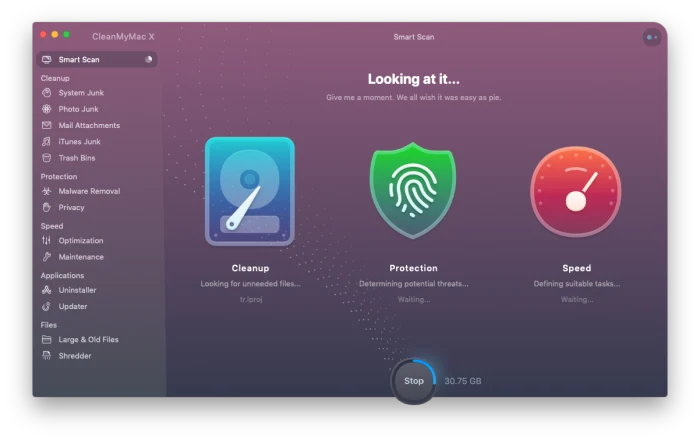
This fall, Apple will release the latest iteration of their operating system, Catalina.  While you can always upgrade your Mac’s operating system without any special preparation when updates are available, new OS releases offer the perfect time to clean up your computer. Why bring along malware, bloatware, or unused or corrupted files when you’re starting with a fresh operating system? To get your Mac Catalina ready quickly, easily and effectively, you can’t do much better than CleanMyMac X, the latest release of the system optimizer from MacPaw. Here’s what you need to know.

Smart Scan

CleanMyMac XAfter installing the software, the first order of business will be running the program’s Smart Scan, which can be handled with one click. This triggers five components of the software: Cleanup, Protection, Speed Optimization, and Applications and Files modules. Once the scan is done, you have complete control over which files to delete and which maintenance tasks to execute, so nothing is changed without your permission

Cleanup

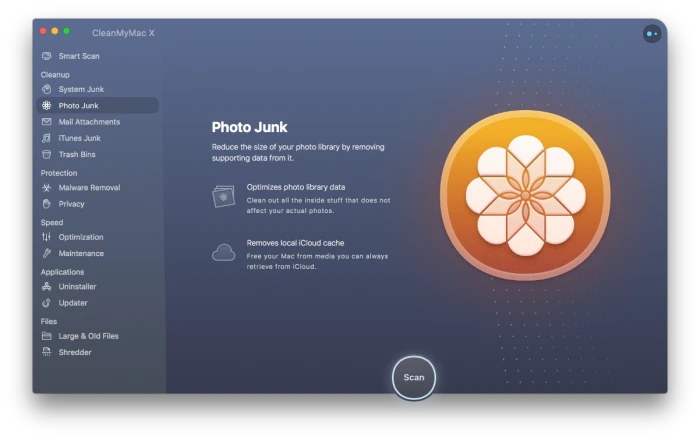
CleanMyMac XThe Cleanup portion of the software scrubs every inch of your computer to find a variety of unused or unneeded files and functions across several areas of your system. The System Junk scan looks for old cache files and logs, broken app data, unused languages and excessive versions of saved documents created in Sketch, Pages, Keynote and Numbers. The Photo Junk scan identifies the redundant, full-sized copies of images that you’ve edited in Photos, as well as cache files that identify faces and local copies of photos already stored in the cloud. The Email Attachment scan will find system-hogging resources that have landed on your computer from email attachments such as local copies of attachments, logos and images. Finally, the iTunes Junk scan will show you ways to reduce the size of your music library, while the Trash Bin scan will ensure items you’ve moved to you’ve intended to delete really are erased from your hard drive.

Protection

This latest version of CleanMyMac has an extensive Safety Database which it references during the initial scan to identify malicious files like adware, viruses, spyware and cryptocurrency miners. As each threat is identified, you have the option to remove it immediately. An additional privacy module allows you to instantly remove all tracking activity from your Mac such as your chat history, cookies, downloads and other files that are stored as you go about your daily digital routine. 

Speed
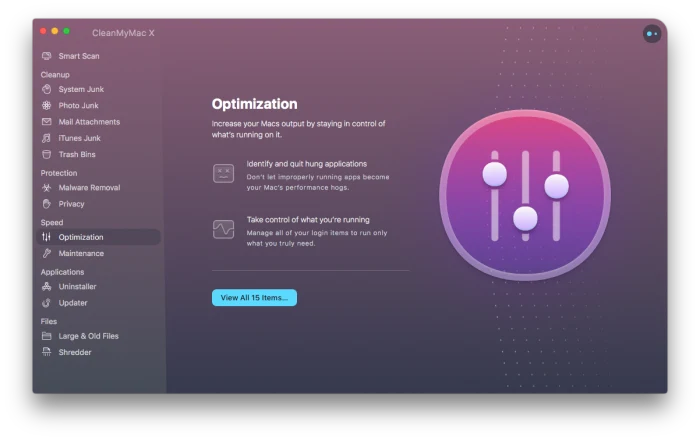
CleanMyMac XThe Speedup module of the software spots potential sources of performance slowdowns and gives you the option to alter them. It will identify login items, launch agents, and apps that are no longer responding or using an outsized portion of your resources. Additionally, this module can provide regular maintenance functions including repairing disk permissions, freeing up RAM, and flushing your DNS cache to resolve network issues and more. 

Applications

Even when you uninstall a program by dragging it your trash and them emptying it, traces of the program can still stay behind on your Mac. The Applications module will hunt them down and allow you to remove them. This portion of the software will also identify applications you no longer use and place them in a category so that you can review them, keeping only the ones you need. It can also automatically search for and install application updates. 

Files
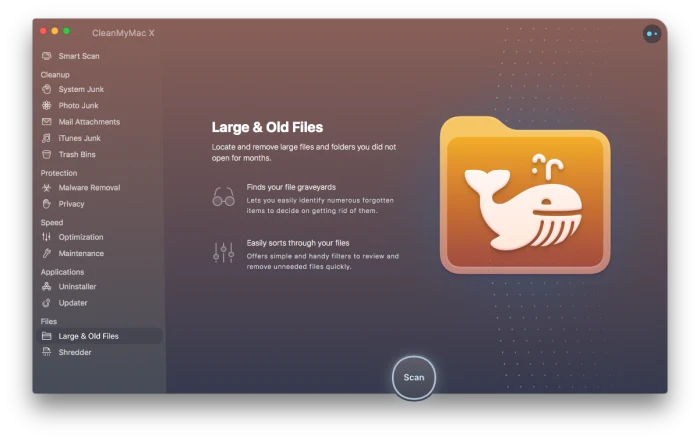
CleanMyMac XFinally, the Files module will organize every file on your computer according to size, kind and access date. This lets you look through a list to delete large files you never use, simplifying a task that might otherwise take hours.

Look, you really need to get a password manager

Honestly, password managers aren’t the most exciting topic.

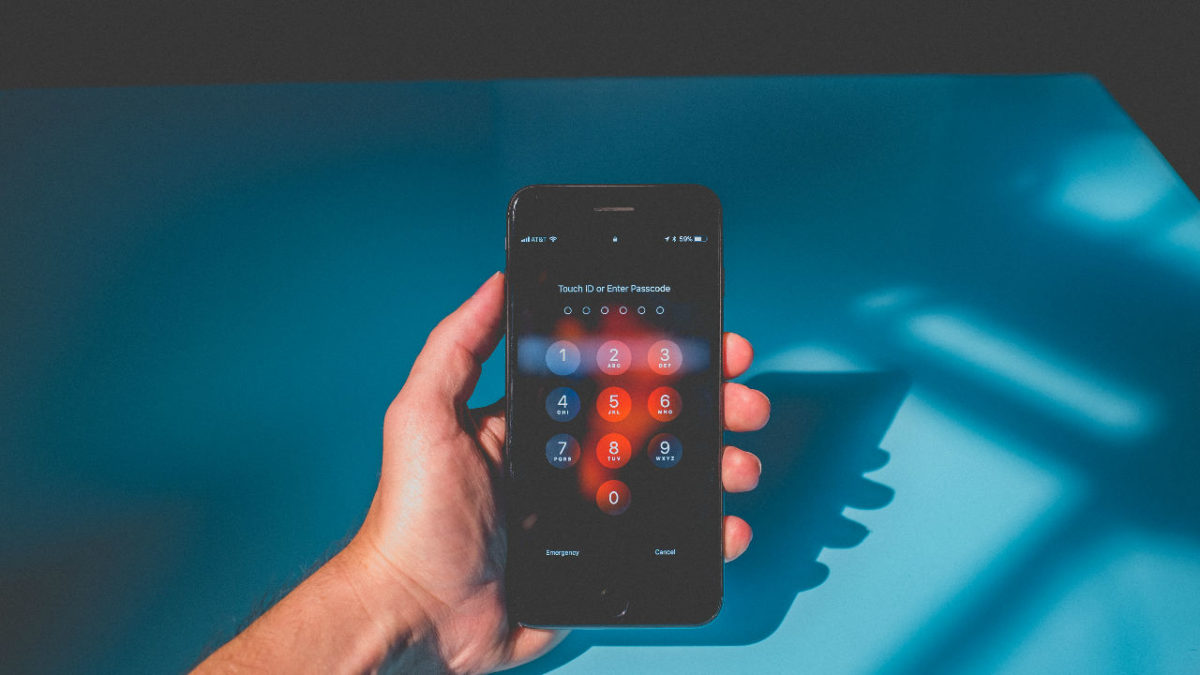
Between the thumbprints and the face-scanners—passwords are becoming obsolete, anyway, right? 

Not exactly. 

Yes, passwords are a big pain, but it seems they’re hanging around for the foreseeable future.

Between the bank accounts and streaming services, web apps you’re forced to use at work, emails, socials, and more—coming up with an endless supply of unique, unhackable passwords is near impossible.

Our brain is fairly good at remembering passwords, but we suck at creating log-ins that properly protect our information.

What does a password manager do?

As per Techopedia, a password manager is a software application that stores and manages your passwords for all of your online accounts.

They automatically generate hard to guess passwords you’d never remember on your own, and they’re stored in an encrypted format, that you can access with one master password.

A password manager is an app designed to keep your identity safe and save you the time and headache associated with the countless accounts few all have now.

Why you need to use one

The reason is pretty straightforward. You need strong, unique, unguessable passwords—with special characters, mixed case letters, and numbers.

Any password you can remember—is likely easy to hack. Add in the fact that, handling passwords manually means–you’re likely using the same password over and over or you’re dealing with frequent resets.

One of the biggest reasons to get one of these apps—many of which are free, BTW—is something called credential stuffing.

What this means is, if a hacker gets ahold of your information during a data breach, they’ll use that same password to log into multiple sites.

That’s why beyond some demographic details or privacy concerns, data breaches in places like Target or Facebook can put your identity and credit at risk.

Or, there’s the issue of phishing—you click on some malicious link posing as your bank or something and inadvertently install malware on your computer that collects keystrokes.

And, finally, a password manager means you don’t have to type in passwords. So, if you’re working in a public space like a coffee shop, no one can see over your shoulders.

While you might think, “hey, I’m pretty safe online, and I definitely know a phishing attack when I see one”—don’t be so sure. Better secure than sorry, right?

Which password managers work best?

There are a lot of options out there these days. 1Password, Dashlane, and LastPass are the first ones that come to mind.

LastPass is free, so long as you don’t want to shell out for the premium features (but, even so, we’re talking $36 per year). The app has dealt with security issues in the past, but they have done a good job addressing vulnerabilities and keeping the cloud-based system updated.

LastPass and Dashlane both update passwords automatically, though some users have reported that the feature doesn’t work as well as advertised.

Another option, KeePass doesn’t use the cloud. Instead, the open source program can be downloaded to your computer— no need to worry about data breaches.

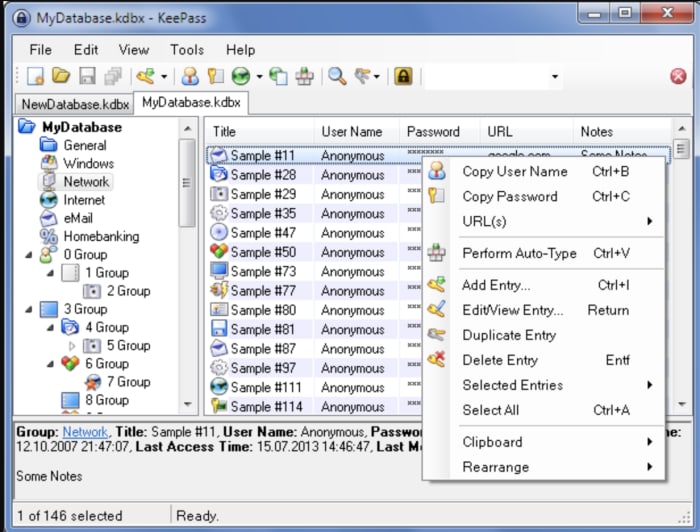
KeePass is OSI certified, and you can look at the source yourself to see whether the encryption algorithms are working correctly. As you can see, below, KeePass keeps things old school–no frills, just good old-fashioned protection.

KeePass portable password manager

Can you use them on your phone, too?

Yes—Dashlane, for example, is a cross-platform application—so one account works across all of your devices. It also allows you to set up autofill—so you can skip filling out online forms and check out fast. It also comes with a VPN, scans for dark web activity, and lets you securely store documents and notes containing sensitive information.

Dashlane Download Free
7

1Password records user names and passwords across mobile apps, websites, and online accounts across all devices—promoting single click or touch access.

1Password Download Free
6

LastPass, too, works across all devices—and comes with similar features—like simplified online shopping, digital record-keeping, and file sharing.

LastPass Download Free
9

But, can password managers be hacked?

Unfortunately, yes.

OneLogin was hacked in June 2017. LastPass has dealt with a handful of hacks over the past few years, too. But, it’s important to remember that any piece of software or website can potentially be hacked. If this is your biggest concern, KeePass may be your best bet, as it puts the control in your hands—not the cloud.

Still, LastPass, Dashlane, and 1Password are all solid options that employ several layers of security you won’t find on say, all the places you shop online.

The risks outweigh the benefits—reducing the risk of credential stuffing and keylogging attacks. And, you’ll free your brain from trying to come up with another Apple password you haven’t used yet but can easily remember.

In the end, you will need to remember your master password, no matter which one of these apps you choose. And, because this one password rules them all—you better pick a good one—be it a passphrase or some sort of code you can remember—or keep stored on a piece of paper.

Is it illegal to buy and sell Instagram accounts?

We all know the deal about /buying/ Instagram followers. It’s frowned upon, of course, and maybe even a little dangerous. You might get banned from the platform and it could have a negative impact on your reputation.

But there’s a whole other Instagram underbelly—the seedy world of flipping generic Instagram accounts.

The legality of these black market Instagram exchanges is murky at best. Here’s a little more about buying profiles and how it’s not exactly the same as buying followers.

Instagram Download Now ►
7

Buying Instagram followers vs. buying accounts

Brands that buy accounts are trying to jump-start their journey to success. It’s hard to get a social account off the ground and when people see that an account has followers, they’ll be more inclined to follow, too.

Buying accounts pre-loaded with niche-specific followers is a little sketch, but it doesn’t seem to cause harm on par with the practice of buying followers.

As a point of reference, we’ll point toward this New York Times article that looked closely at a company called Devumi.  Once a go-to source for athletes and celebrities to grow a social following overnight, Devumi advertised their service as “social media amplification.” In this case, customers believed they were paying for an advertising service that helped them get real fans — though it turned out, they were paying for bots that just looked like real people.

The fake follower racket is well-documented and Instagram takes a hard stance against the practice. But, buying accounts is a bit different. The idea is that you’ll get an account preloaded with followers within your target market and take over “legitimately” from there. Supposedly, the followers of these accounts are real. It seems like most are people who followed some random accounts that align with their interests be it yoga or cars.

When you buy an account, what you get is a generic account with people that represent your target demographic. From there, you can customize your new account and keep growing your following.

Instagram says you are not allowed to buy, transfer, or sell any aspect of your Instagram account. This means that there’s a chance Instagram could shut your account down at any time for violating its terms of service agreement.

How do you buy an Instagram account?

So, if you Google buy or sell Instagram accounts, you’ll see that there are a handful of companies that let people purchase Instagram accounts—fully stocked with followers–as if they were a pair of shoes.

SocialTradia is one such example. It’s actually pretty weird to look at the website. For example, the home page looks like an e-commerce shop—where you can buy accounts related to your niche. From there, we presume, you’ll slap your own branding on the accounts and start influencing away.

SocialTradia allows you to search for accounts by category: think yoga, fashion, or fitness. The accounts cover really broad topics, most with a collection of stock photos that haven’t been edited. They do provide a money-back guarantee, but it’s only good for 24 hours after making the purchase.

buy an instagram account

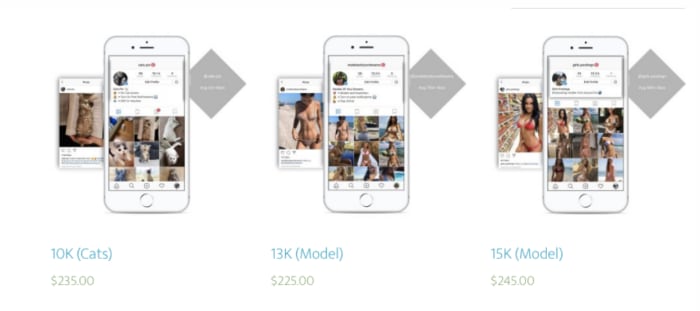
Or, there’s ViralInstas, another platform that offers accounts in the modeling, fashion, or animal niches. Follower counts won’t top 15k, which could be a sign that the platform does a decent job keeping fake followers off of the profiles. The accounts come with passwords, a hashtag research tool, and a list of hundreds of hashtags proven successful with the audience.

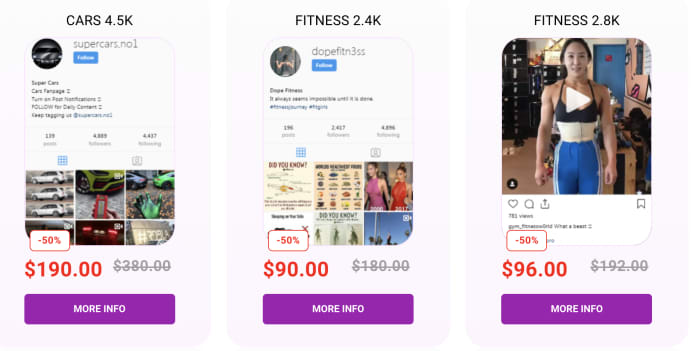
Or TooFame, another site that promises to provide users with a selection of high-quality accounts with real followers. Here, most accounts hover between 2k and 5k followers and are labeled by niche—fitness, sport, car, weed, are all options on here—and many accounts are marked down.

fitness niche profile for sale

Is it legal to buy an Instagram profile?

It’s not exactly illegal to buy Instagram accounts—and it’s certainly less of a problem that bot accounts and fake profiles. Instagram might ban your account—so the main concern is, you’ll be out a few hundred bucks, and you might waste some time growing a following — only to have it taken away.

The sites that sell Instagram accounts sometimes offer a layer of fraud protection like SocialTradia’s guarantee. Others aren’t such a smart idea.

5 tools for creating professional looking graphics–no design skills required

If you’ve spent any time in the digital marketing or design space, you know that people can’t get enough of infographics, charts, and things visual.

We can’t help it. 50% of the brain is involved with visual processing, and it only takes 1/10th of a second to understand a visual concept—much more natural than reading a big wall of text.

The problem is, whether you’ve got a blog that needs some extra pizzazz or you want to boost your social media feed—design can be intimidating when you’re not a trained professional.

Luckily, there are plenty of resources for creating graphics yourself—no need to invest in a designer or struggle with Photoshop tutorials.

1. Canva

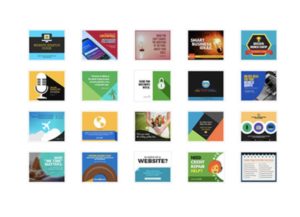
canva themes

Canva is a web app that centers on this idea that design should be something that anyone can do. When you enter the site, you’ll be greeted with a prompt that asks what you would like to design.

The app presents an attractive interface and a whole lot of presets. Preset templates are organized by type of content—so you can choose to design marketing materials, social media graphics, or visual assets to make your latest e-book pop.

Once you’ve selected a template, you can add various elements like text, graphics, borders, or your own images. There’s not a ton of customization built in, but the goal here is to create something that looks nice, without requiring any additional training.

2. Desygner

desygner app

Desygner’s primary selling point is that creating graphics on the go can be effortless. The set up allows for easy editing on iOS, Android, and the web, and the process is intuitive.

According to Desygner’s official site, the tool is made for people who aren’t trained designers but want access to professional level graphics for their business or social media channels.

The tool makes it easy by providing several templates you can make your own by using the built-in drag-and-drop editor.

3. Snappa

snappa templates

Low on time, but need to upload something slick in short order? Then Snappa is a sure bet for success.

The app—accessible on mobile and web alike—starts by asking you to choose from a selection of dimensions—so you’ll pick the right format for the channel you’re working with—Facebook, Twitter, etc. From there, you can start designing by picking a template, adding royalty-free stock photos, and adding text graphics, and more.

Create graphics, logos, and anything else that adds a layer of professionalism to your feed. What we liked most about Snappa is, you’ll receive step-by-step instructions that take you through the process within a few minutes.

4. Gravit Designer

gravit designer home

If you’re a little afraid of the more advanced software programs like Photoshop or Sketch, but want something a little more fleshed out than Snappa or Canva, Gravit Designer provides a happy medium.

You’ll spend less time creating from scratch than you would with Photoshop, but it’s not all pre-designed templates like some of the other tools out there. There are some templates included—pre-sized according to each channel’s optimal dimensions, and you’ll get some pre-loaded shapes and icons built in as well.

What’s more, Gravit Designer comes with access to the Gravit Cloud, which makes it easy to store and share your creations with clients, collaborators, and colleagues.

5. Skitch

Skitch is an app created by the same folks who gave us Evernote. It’s a photo editing tool with several extras built in like filters, overlays, and the ability to add helpful arrows to your images.

We should mention that Skitch is a little different than the other apps we’ve mentioned here. Its main functionality lies in its ability to visually communicate an idea with standout markups. While you can’t design your website’s logo or create a Facebook ad—this tool is essential for bloggers who rely on screenshots to enhance their content.

Best side hustle apps for earning some extra cash

What side hustles are out there other than Uber and Lyft?

Movers

People have long embraced the side hustle as a way to earn some extra cash in between jobs or shifts. In the past, that might have been babysitting or dog walking.

These days, there’s an app for that. And by that, we mean everything. There are a lot more options out there than just Uber. It doesn’t matter if your skills lean toward web design or manual labor, someone will pay you.

If you’re looking to earn a little bit of cash to heal your wallet post-holiday season, here is a roundup of a few apps that can help you do just that:

Best side hustle apps for earning some extra cash

Handy

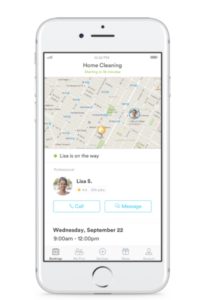
handy service app

At a glance, Handy appears to be one of the more lucrative gig economy apps.

This app provides a solid side gig for professional cleaners and handymen/women. The app claims that you can earn between $22 and $45 per hour, depending on the job. You also get to decide when you’re available.

We should mention that not everyone can sign up. You must have paid experience in cleaning or performing handyman tasks. Still, if you’ve done this type of work in the past and want to earn some cash on the weekend, this could be a good way.

Postmates

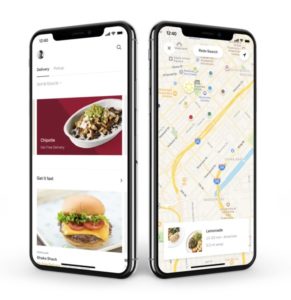
Postmates app interface

Postmates drivers deliver food and other supplies to nearby customers. They can earn up to $25 an hour at their convenience. The only requirement is that you make at least one delivery per every 90 days and that you use your own vehicle.

That said, it’s not necessarily a steady income. You might be able to hit that $25/hr threshold. However, the average reported salary is $10/hr, per Glassdoor. Additionally, all of that driving around will cause wear and tear on your car.

We don’t recommend driving for Postmates full-time, but this gig’s flexibility makes it a good choice for people who want to earn some money during their downtime.

Postmates Download Free ►
8

Instacart

Instacart shopping

Instacart is ideal for those who love shopping for groceries. Sign up through the app to become a driver, shopper, or both. This app sends out assignments and will send you notifications about where you’ll be shopping that day.

Shoppers earn between $10 and $20 per hour and must have their own car. You’ll pay for the groceries through a prepaid Instacart card, then drive them to someone’s house.

Be prepared for a few challenges. In some cases, shoppers must carry heavy bags from down the street if there’s nowhere to park. Other times, you might get sent all over the place — spending more time driving than shopping. This side hustle might work for you, but be prepared to possibly walk bags upon bags of groceries up a flight of stairs.

Instacart Grocery Delivery Download Free ►
8

Amazon Flex

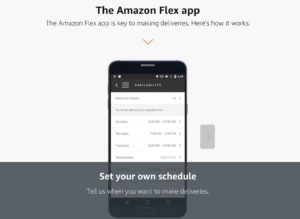
Amazon flex delivery app

Amazon Flex allows you to block off time in your schedule to deliver Amazon packages to customers. You can reportedly earn between $18 and $25 per hour.

As far as earnings go, Amazon’s civilian package delivery service presents some decent side cash. However, it’s not always easy. This Atlantic writer detailed their experience delivering packages in San Francisco and noted that it was a struggle to make deliveries on time and avoid getting a ticket.

City dwellers could find Amazon Flex a bit more trouble than its worth, but those in smaller cities with ample parking might have an easier time. Keep in mind, like other gig economy driving services, you’ll want to weigh auto expenses against earnings to see if the work is worth it.

Get Amazon Flex Download now ►
7

Dolly

dolly moving services gigs

Dolly is an app that allows those with some muscle to earn up to $15 an hour as a mover. Those with a truck or van of their own can make up to $30 an hour.

Dolly allows you to turn on notifications and accept the gigs that work with your schedule. The few “helper” reviews we’ve found online have mostly good things to say about the gig. A couple of people mentioned that there’s a lot of work available in cities where people frequently move around.

Rover.com

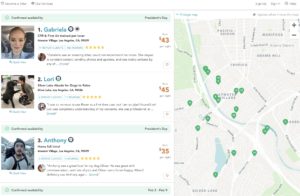
rover dog walking app

Rover is a dog walking service that provides dog owners with on-demand walking, boarding, and daycare. While you’ll need to pass a background check to sign up, Rover could be a good choice for those who already work from home. Supplement your income by hanging out with a rotating cast of furry friends. It doesn’t get better than that, right?

That said, it seems that you need to be prepared to send pet owners updates throughout the day. Also, be prepared for a steady amount of dog doo.

Still, the site guarantees that up to $1,000 worth of work is protected each month, and you’ll have access to 24/7 support.

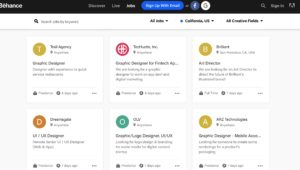
Behance

Behance design gigs

Behance is a gig website for freelance designers, photographers, and other visual arts pros. The site allows you to show off past work to prospective clients, lock down gigs, and find some inspiration.

While it can be difficult to get views on your work, it will be subject to professional review. At the very least, you’ll get feedback for your work.

Starting a side business on your own is one of those ideas better in theory than practice. Apps provide a convenient way to sidestep the funding and marketing part of the equation and let you get right down to business.

Wrapping Up

That said, we don’t entirely recommend using these apps if you’re looking for something more substantial. Instacart recently changed their policy, and it has impacted shopper take-home pay significantly.

If you’re looking into gig work as a freelancer — you may be better off looking for direct clients or applying for remote contract work.

In any case, if you’ve got some skills, dust em off once in a while, and maybe you can pocket some cash.

Guide to Mixer.com

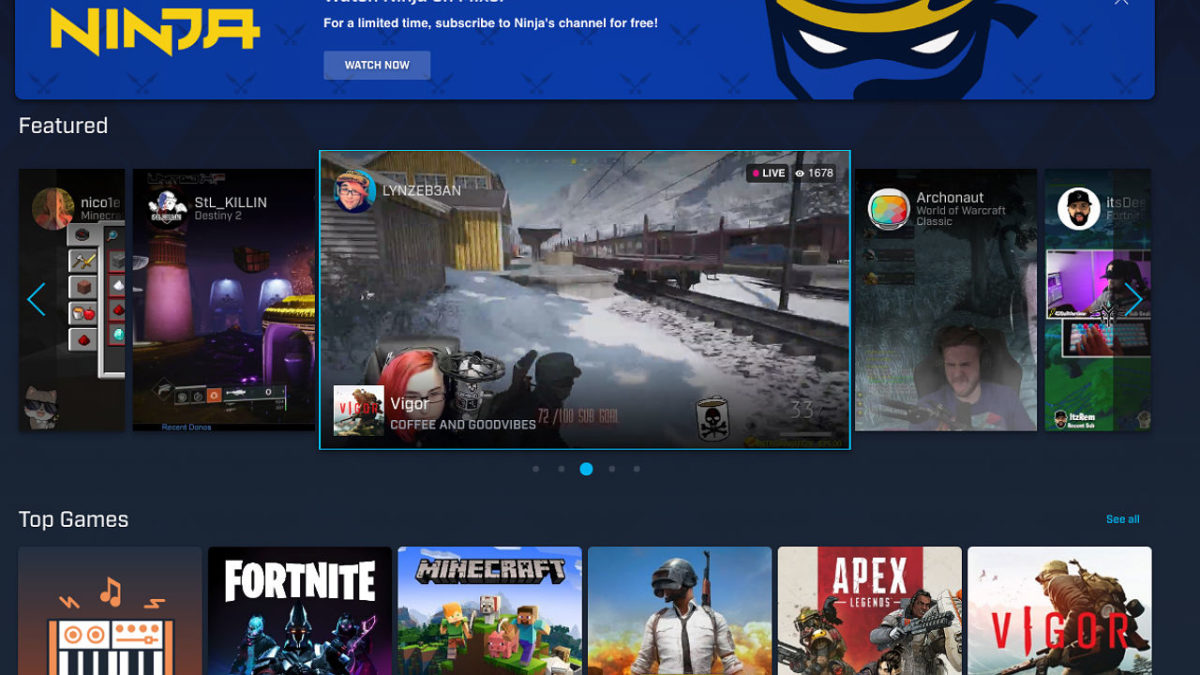
Mixer is Microsoft’s video game streaming app, designed in response to Twitch.

It’s an interactive platform that allows users to watch the latest games in action, share streaming experiences, and monetize their content.

While the streaming service has been around for a while, it recently made headlines after famous streamer, Ninja moved from Twitch to Mixer in August.

Additionally, Microsoft has been steadily releasing updates to the platform from more monetization opportunities to anti-trolling.

Overview

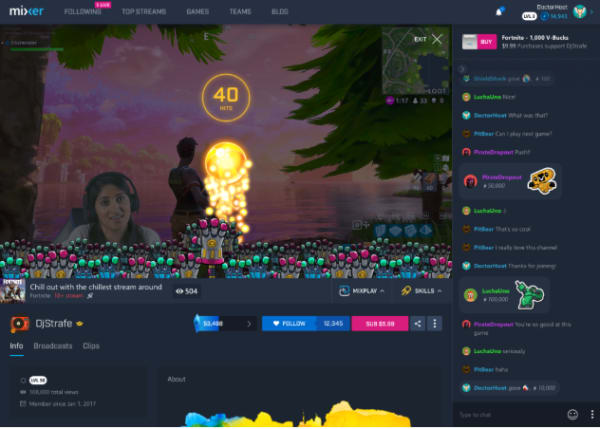
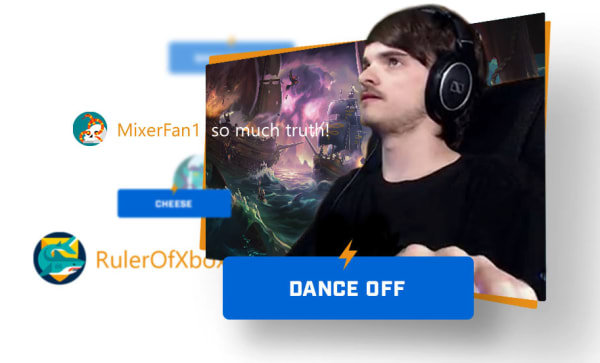
Mixer sets itself apart from Twitch and the now-defunct YouTube Gaming with a few interactive components that can impact different gameplay elements.

For example, streamers can opt to include their followers in the experience, allowing them to give streamers more ammo or health–or even take useful tools away for a more challenging experience.

As you can see here, the platform’s interactive features show up in the form of overlays, and there’s the option to include stickers in the chat.

mixer interactive play

There’s also a co-streaming option, which allows up to four users to play the game together and broadcast a split-screen stream.

That said, for those who want the traditional experience, they can opt out by using uninterrupted Let’s Plays.

Skills

Skills are a new addition to the Mixer universe, and the same is a little misleading. Skills let users show support to their favorite streamers through GIFs, animated stickers, and special effects. Any time someone uses a Skill on a streamer’s channel, the streamer gets a small financial benefit.

Sparks

Sparks, another new financial incentive, gives viewers the ability to support streamers without paying for a subscription. Viewers earn sparks by watching streams and can spend them on Skills.

Embers

Another form of monetization, known as Embers isn’t yet available. But the idea is, they’ll work as a virtual currency that viewers can buy and spend on high-value skills.

Embers are similar to Sparks, but offer the streamer direct funding and bigger celebrations.

How to watch Mixer streams

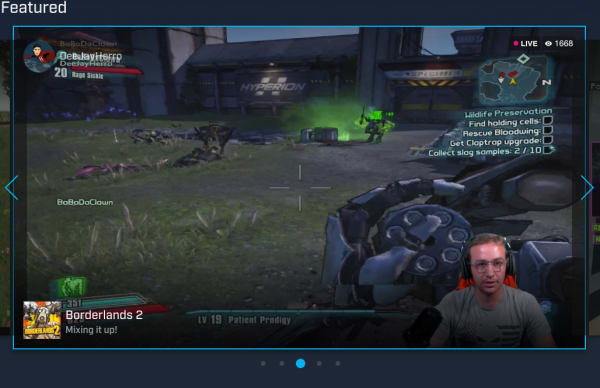
mixer streaming

Like other streaming services, all you need is an internet connection and a device to watch Mixer streams. Anyone can watch streams through their browser via Mixer.com.

There is a PC Mixer app, but it’s meant for hosting streams, not just watching. You will need to download a viewing app for Android and iOS if you’d prefer to watch on your phone.

Xbox One users can download the Mixer app to both watch and stream.

In any case, once you’ve got your app of choice set up, watching Mixer streams is as easy as tuning into Netflix or Hulu. The homescreen features some popular streams if you’re not sure where to start, or you can sort by game.

How to broadcast on Mixer?

One of the key benefits you’ll find with Mixer is, it’s relatively easy to start streaming on the platform. The first thing you need to do is make sure your Mixer account is linked to your Microsoft Account.

If you signed up back when Mixer went by the name, Beam, you’ll need to link your accounts.

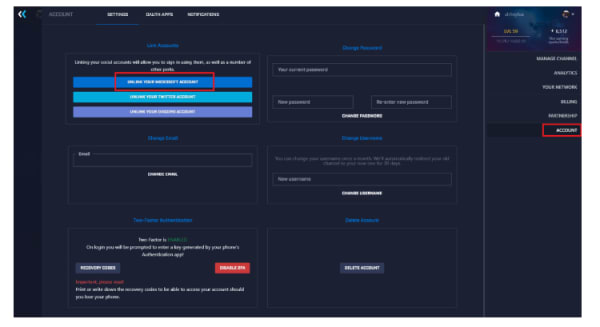
link your beam account to mixer

  • Head over to the Mixer site and log in.
  • Click on your avatar—found in the top right corner and select “account.”
  • Then select Link your Microsoft Account.

If using Xbox One, you won’t log in to broadcast—so you’ll need to sync your accounts on the computer.

Once you’ve done that, press the Xbox button on your controller to pull up the guide.

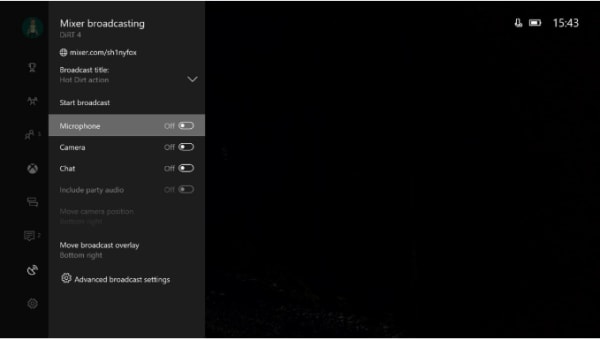
mixer how to stream

Scroll down to find the broadcast icon and select “broadcast your game.”

Enter a title for your stream and turn on the camera, chat, and microphone. You don’t need to enable chat or the microphone, though keep in mind that many users tune in for that interactive component.

MixPlays

mixplay interactive

Mixer offers a feature called MixPlay, which brings viewers and streamers together to play, chat, or even share control.

How to get people to follow you on Mixer

Ultimately, attracting followers on the platform is similar to growing a Youtube channel or getting more followers on Instagram.

A few tips:

  • Offer incentives to your audience–think merch or exclusive content in exchange for reviews, shares, or subscriptions.
  • Stream consistently–Don’t leave fans hanging, make sure you post content regularly so you stay top of mind.
  • Promote your channel on other social media platforms–Growing a following is a cross-channel effort, post links to your streams on social platforms and consider running paid ads to bring in more followers.
  • Team up with other gamers–This allows you to tap into other streamers’ audiences and brings another element into your own streams, as viewers get to see you interact with other gamers.

Can you make money?

Once you become a partner, you’ll have the ability to start making some cash from your streams.

According to Microsoft, you’ll need at least 2000 followers, stream for at least 25 hours a month, and have had an account for at least two months.

Partners gain access to ad revenue, subscription money, and get to test new features before the general public.

That said, streamers aren’t limited to this one method of monetization.

You can collect donations and tips from your audience by setting up links—similar to how podcasters use tools like Patreon to fund their shows.

A few options:

  • PayPal: Add a link to your bio so viewers can support your streams.
  • StreamJar: Allows you to accept tips and donations in exchange for incentives.
  • StreamLabs: A free, open-source service for Windows users, StreamLabs allows you to collect PayPal donations and add overlays to your stream. This tool also comes with access to chat, allowing you to keep in touch with viewers while you broadcast.

As mentioned above, you can also monetize using the Sparks and Skills system (and soon, Embers). This digital point system, which was introduced earlier this year allows streamers to reach milestones that translate into cash payouts.

While we’re not sure how the payout translates into any meaningful cash, it’s worth noting that you don’t need to be a partner or even a popular streamer to use the system.

And then of course, there’s the monetization holy grail, sponsorship. If you’re lucky enough to catch the eye of a sponsor, this is your best bet for earning money. Though that might mean including specific products or mentioning a sponsor during streams.

Ultimately, you’ll need to invest the time and energy into building a brand around your streaming channel before you’ll see any major payoffs.

How does Mixer compare to Twitch?

Well, for starters, Mixer is available on the Xbox One and Windows 10 PCs only. Twitch streams can be watched just about anywhere—PC or Mac, Roku, Playstation, Xbox, and more.

Mixer has some advantages—but when you compare the platform to Twitch or even YouTube streaming, it’s clear that this channel is designed almost exclusively for the Microsoft set, not the gaming community as a whole.

What’s next for Mixer?

Mixer’s latest round of updates make this platform one to watch. With Ninja’s move to Mixer and new streamers joining every day, the platform’s profile is on the rise.

We’re not entirely sure how the new monetization features will play out, but it’s certainly worth checking out if you’re an Xbox or PC gamer.

The Hero Hoodie is a simple solution to a common problem

The Hero Hoodie converts from a hoodie to a backpack in seconds!

Hoodie

Nobody likes being that loser in public who wears their hoodie around their waist. As soon as you tie those sleeves together, you can go from the suavest guy at the party, to everyone’s dorky dad in an instant.

You might be saying to yourself, “I don’t do that, I just drape it over my shoulder!” Well, you’re not better off than the waist dork. As soon as you need to reach for something in your pocket, or give one of your boys a high-five you will realize that your arm is already too busy with your fumbling hoodie.

Fear not, gentle reader. The Hero Hoodie is here to solve your hoodie dilemmas:

With just a flicka-da-wrist, you can transform your hoodie into a backpack! Along with being able to comfortably store your hoodie on your back, you can also put the rest of your stuff inside.

How good is this product? When it was pitched on NBC’s “Shark Tank,” several Sharks fought over the product, until the product eventually got a sweet deal.

Ladies, aren’t you tired of every pair of pants you own having the worst pockets imaginable? Well, now you can throw your phone, keys, or whatever you want into your Hero Hoodie! 

The Hero Hoodie runs a little bit more than the average hoodie you’d buy at Target or Kohls. However, the price tag is more than worth it as the design is both stylish and modern. You can buy it on Amazon, or from their store online! 

What would it take for the cloud to fail?

Life is pretty much in the cloud nowadays.

Information, money, stastistics, websites, Steam’s video game data…all of these things are stored in the internet, which means the destruction of the cloud would probably lead to some level of worldwide chaos!

So, who doesn’t enjoy imagining the chances of an apocalypse? We’re going to spend some quality time considering…

What would it take for the cloud to fail?

What the Cloud is

Data Bank

Hopefully it’s becoming common knowledge to internet users that the actual “internet” is comprised of huge data centers that are owned and operated by some of the world’s largest corporations: Facebook, Microsoft, Amazon, Google, etc. Want to visit a website? Your computer locates the information inside the data centers using the web address, it “requests” the website, and the server sends data to your computer…

Hence why our Computer and Information Sytems teacher always said: “You don’t visit a website, the website visits you.” (Side note: that’s also why you should never visit a malicious site, viruses can enter before you choose to “download” anything at all!)

Now, while it may seem scary that large companies run these data centers, we promise it’s a very good thing for a specific reason: safety! Before the cloud can fail, something would need to happen to these data centers, but thankfully they’re built at top of the line facilities, in safe locations near large population centers (and apparently the ocean, soon enough).

Which brings us back to the question: what would it take for those cloud servers to fail?

The Disasters

Massive Gray Failure
Gray
GRAAAAAY

Surprisingly, the internet isn’t perfect! Get this: the software, the coding itself, that organizes information in the cloud is constantly being updated and improved, which means slight failures happen. Even more surprising, the hardware itself (the physical data banks) can experience issues like data loss, shutdown, and more!

Some of those issues, considered “normal” failures, are detected and rectified regularly (like bank shutdown caused by overheating). However, other problems like data loss aren’t always so easy to track!

These are “gray failures”: problems that cloud creators cannot track. However…users are often quick to notice! Their computers are slow, their email is offline, their information is missing. This difference between the perceptions of users and creators is called differential observability, and it can lead to pretty large meltdowns.

What are the odds?

For this flavor of failure, we’re still going to give it a highly unlikely. Gray failures are usually isolated issues that slow internet service and drop data rather than shut down entire facilities. Also, given the fact that there are many data centers around the world, this just doesn’t have the power to wipe away the cloud. However…

Natural Disasters

Volcano

Hurricanes, fires, floods, volcanos, earthquakes, and more! We’ll assume you understand the basics of these events and go right to…

What are the odds?

Luckily, the odds are still pretty small, for a few reasons. First, as we mentioned, data centers are often located in areas known for having relatively few natural disasters, which reduces the overall potential of widespread failure from one or two earthbound cataclysmic events.

Also, thanks to the sturdy construction of the facilities, we can likely rule out hurricanes, fires, and floods, even in their most powerful incarnations. While these may shut down the servers temporarily and destroy a tower of two, they’re probably not even going to wholly destroy a facility.

Earthquakes of sufficient size could permanently destroy a data center! But once again, these are isolated incidents that would only hit maybe a few centers at a time. San Andreas would have to really ratchet up that seismograph and bring Yellowstones to the party, because…

Volcanoes could easily destroy a data bank, but it’s unlikely they’re going to suddenly rear up from the ground for pinpointed strikes on all data banks collectively! So lame.

When it comes down to it, there would need to be a bunch of biblical floods, world-ending tornadoes, tactical volcanoes, and shattering earthquakes to bring the entire cloud down to earth. Of course, at that point, we’re looking at armaggedon by natural disasters anyway, so what’s really the point?

THE SUN!

SunDoesn’t count as a natural disaster? Sweet! Becuase this is cool.
Some background and vocab: every once in a while, a solar flare (bright flash on the sun’s surface), is accompanied by a coronal mass ejection (big burst of plasma with a huge magnetic field). This acts like electromagnetic pulses (EPM’s) when they hit earth, and are called “solar storms“.

Remember the disaster from the Maze Runner trilogy? Totally possible. Except maybe for the Cranks.

What are the odds?

Actually pretty decent. A solar storm could put many data centers out of order, and a sufficiently large one could even torch the planet! But…

We presume the magnetic field wouldn’t pass through earth, so it’s likely a lee would be created on the side our planet that is opposite the solar storm’s landing zone, meaning not everything would be destroyed.

Also, ONCE AGAIN, if the solar flare really was that powerful it’s possible we’d be looking at a Maze Runner situation, where some parts of the earth are doomed to experience a sun-scorched apocalypse anyway. So again…the cloud failing is the least of our problems there.

Finally, coronagraphs can spot these jets of plasma, so it’s likely data centers would scramble to insulate their hardware somehow (“If we can stop Superman’s x-ray vision, we can stop the sun!” – probably the U.S. president at the time).

Still…with the right-sized storm, maybe drawn out successive waves to make sure all of earth is good and EMP’d, the cloud could be destroyed!

Human Involvement

In the end, the most likely enemy of the internet is, well, us.

Maybe a mom’s Facebook group gets tired of their kids’ video gaming and decides to truly shut down the internet. Maybe the “Storm Area 51” crowd declares a march on the data banks next. Or perhaps the companies in charge of these information centers randomly decide they want to commit corporate suicide and take humanity to the stone age in a handbasket.

You know, those incredibly likely situations. Because, when it comes down to it, it would literally take an act of God to destroy the cloud all at once through system failure and assorted environmental mayhem.

So, in the end, humans more likely than anything else (even the sun) to decide the cloud needs to die…

And on another note, “The Cloud Needs to Die” sounds like a pretty decent James Bond title!

Conclusion

Any type of technology can fail, it’s only a matter of what kind of catastrophe is required to keep it down. If you’re truly concerned about such a thing happening, remember this key piece of tech advice: always back up your important files. Family photos, your novel, and that graphic design project. Stay safe, friends!

What to know about Flipgrid

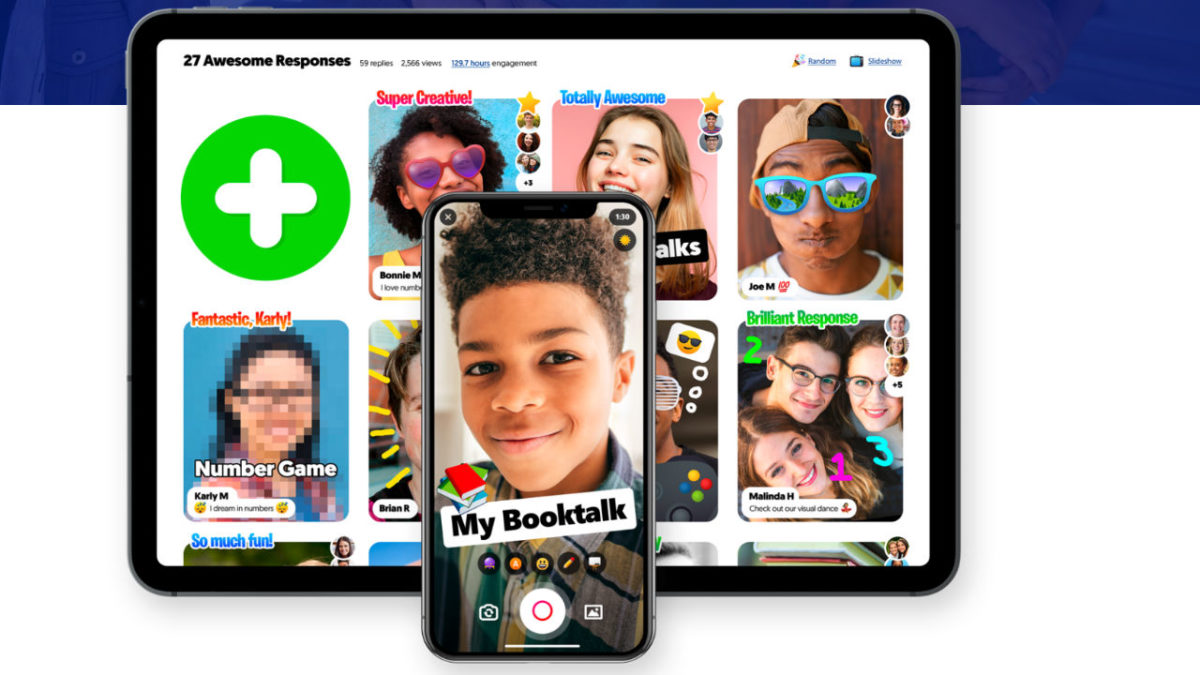
FlipGrid is an education app that allows teachers to bring tech into the classroom. Teachers can upload discussion questions to the platform and students can answer using a video response.

The platform can be used in classrooms from kindergarten through college and is quickly gaining in popularity with educators from all over the world.

Microsoft acquired the app about a year ago and has since made the platform free for educators, and has been rolling out new features like embedded videos, AR stickers, and integrations with tools like OneNote and Google Docs.

What exactly does Flipgrid do?

flipgrid view

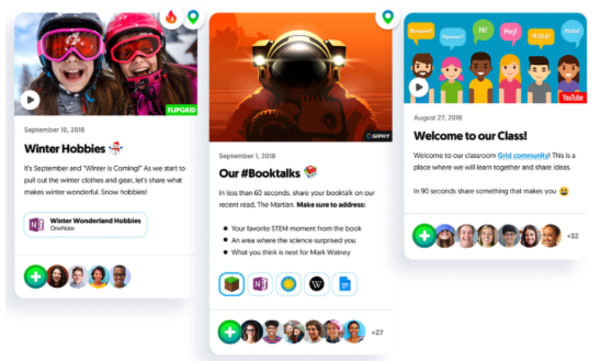
Flipgrid allows teachers to create what’s called grids to host video discussions. Each grid works like a message board where teachers can post questions—known as topics in the Flipgrid world.  Students respond to topics, which appear in a tiled display that, as you might imagine, appears in grid form.

Grids can be shared with an entire class, with smaller groups, or any configuration of users participating in a discussion. Each grid can hold unlimited topics and responses—which can be text-based or contain videos, GIFs, emojis, or an attached document.

On the student side, users can download an app or access the platform via desktop. Responses can range from 15 seconds to five minutes—though teachers can set time limits based on the assignment.

What’s more, teachers have the option to open up the discussion by allowing students to record replies to their classmates’ video responses. There are a variety of moderation features teachers can turn on or off per topic, depending on the lesson.

Student tools

flipgrid student view

Students can benefit by learning to articulate their ideas — speaking from the comfort of home rather than being put on the spot in class. They’ll also have the opportunity to see what their peers have to say—which encourages students to consider multiple viewpoints.

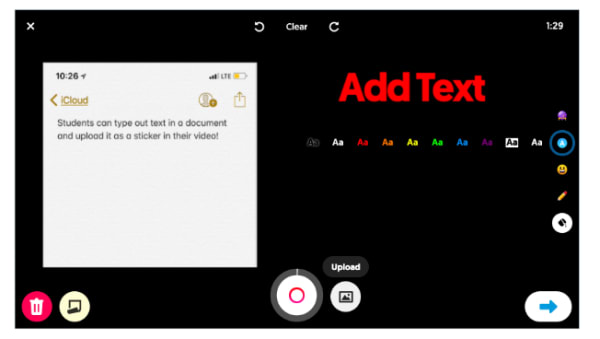
Students have access to this “sticky note” feature, which can be found on the recording screen. What it does is, it allows them to type out an outline or bullet points to include in the video, serving as a guide for the recording.

Pause, trim, and re-record buttons allow students to fine-tune their responses. Though, it’s worth pointing out, teachers need to be upfront about expectations, so students don’t waste time editing and re-recording in the pursuit of perfection.

Collaboration tools for teachers

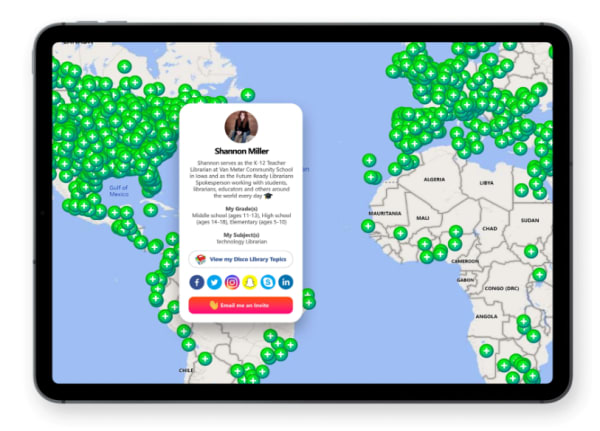
The CoPilot allows teachers to collaborate on grids and share moderator duties. There’s also the Disco Library, designed for sharing grid templates and GridPals, a social network that allows teachers to connect with other educators from across the globe.

gridpals map

Flipgrid AR

Fligrid recently added a new augmented reality feature, FlipgridAR, lets users print real-world QR code stickers that bring in-app creations into the real world.

flipgrid ar twitter shots

More content offerings

It’s not just individual teachers that can post resources to the app, either. Flipgrid now offers access to content from Code.org, Hacking STEM, NASA, Microsoft EDU, Find Your Grind, and Wonderopolis, and more.

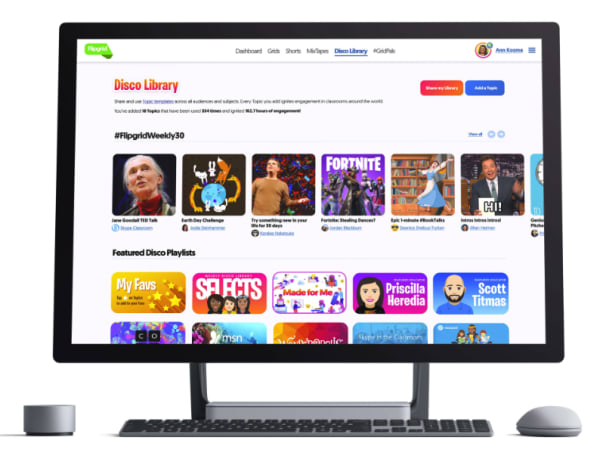
Within the Flipgrid Educator Admin panel, there’s launch-ready discussion prompts in the community-generated Disco Library.

flipgrid resources


Here, teachers can access discussion prompts and content from the community—downloading templates and other resources to bring into their own strategy.

Loop the family into the discussion

flipgrid guest mode

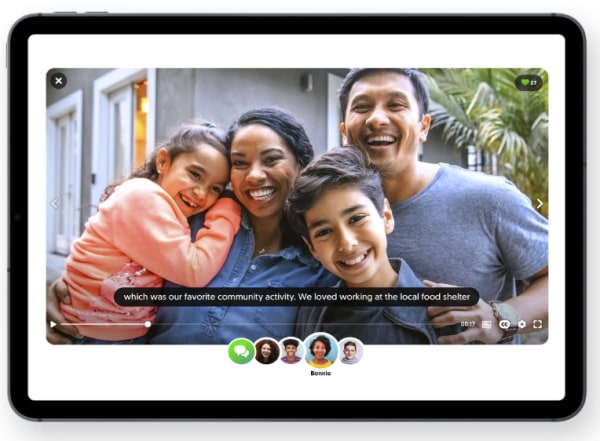
Beyond students and teachers using the platform, Flipgrid also brings family into the fold, allowing teachers to curate MixTape collections of videos so parents can see what their students are up to at school.

What’s more, there’s also the option to include Guest Mode Topics, where families can record responses from home.

Is Flipgrid an effective learning tool?

Flipgrid is an example of how educators can bring technology into the classroom in a way that helps students learn to use modern tools and get comfortable with being on camera.

The important thing to note here is, teachers need to be clear about how the platform works. Some students might assume that what’s meant to be an informal video response should be a full-blown presentation.

There’s also the issue that some kids might feel uncomfortable recording a response that their peers can review later on. As such, educators need to create a culture that emphasizes respect.

So far, Flipgrid has done a great job creating the kind of digital learning experience that takes the best parts of social media—collaboration and discussion—without resorting to the sorts of societal low points you’ll find on platforms like Facebook and Twitter.

What’s also great about this tool is, it allows educators to bring in community resources, but the teacher still leads the discussion. If you compare this experience to the disconnected MOOC environment, Flipgrid still offers that small classroom community, while pulling resources from relevant institutions that may offer more expertise.

Video chat with Marco Polo App

Marco Polo is a video messaging app that works with Android and iPhone.

We’ve seen a lot of mentions of the app calling it a digital “walkie-talkie,” others have dubbed it “Snapchat for old people.”

Essentially, Marco Polo is a call-and-response app that allows you to record a video then send it to a friend. When someone receives a message, they can watch it on the spot or save it for later.

All video messages are pre-recorded, so it’s not a live video chat like Facetime or Skype. Messages won’t disappear or expire, as is the case with popular alternatives like Instagram Stories and Snapchat.

The website states that you can react in real-time, but that comment is a bit misleading, and the experience is more akin to texting back and forth versus video chatting live.

How Marco Polo works

Marco Polo allows you to import your contacts using their phone numbers, and once set up, you can add them to a “Polo” or chat.

When you first download the app, you’ll have the option to either import all of your contacts at one or add friends manually.

You can only add people you already have in your phone’s contact list, and no one has access to your account unless they know your phone number, making it easy to stay safe online.

Though the app asks users for permission first, gains access to your entire contact base, which may make some people uncomfortable. And, as you’ll see in this Reddit thread, some users have accidentally spammed everyone in their contacts.

And much like LinkedIn, you’ll also have the option to automatically invite everyone in your address book to join the app by sending them a text message link.

how to add contacts in Marco Polo app

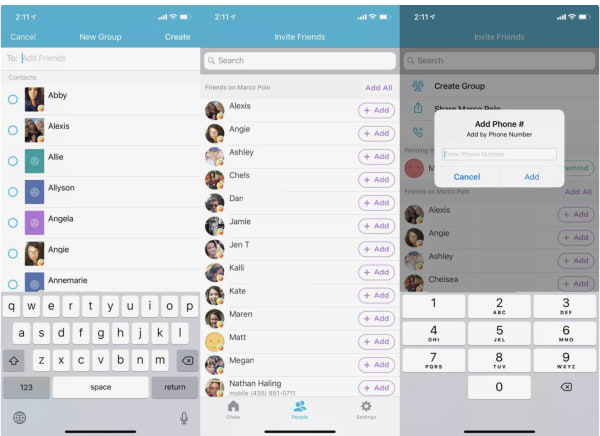
Here’s a quick look at how to add contacts:

  1. Tap on the People tab found at the bottom of the screen.
  2. Check “Friends on Marco Polo” list to see if anyone you know already has a Marco Polo account.
  3. Then, hit Add+ to start a Marco Polo with one contact or you can select Create Group from the top of your screen to start a group chat.
  4. If you’d like to connect with a friend that isn’t showing up on your Friends list, you can send them a message using their phone number. Your friend will get an invitation to join Marco Polo.

How to send a video message

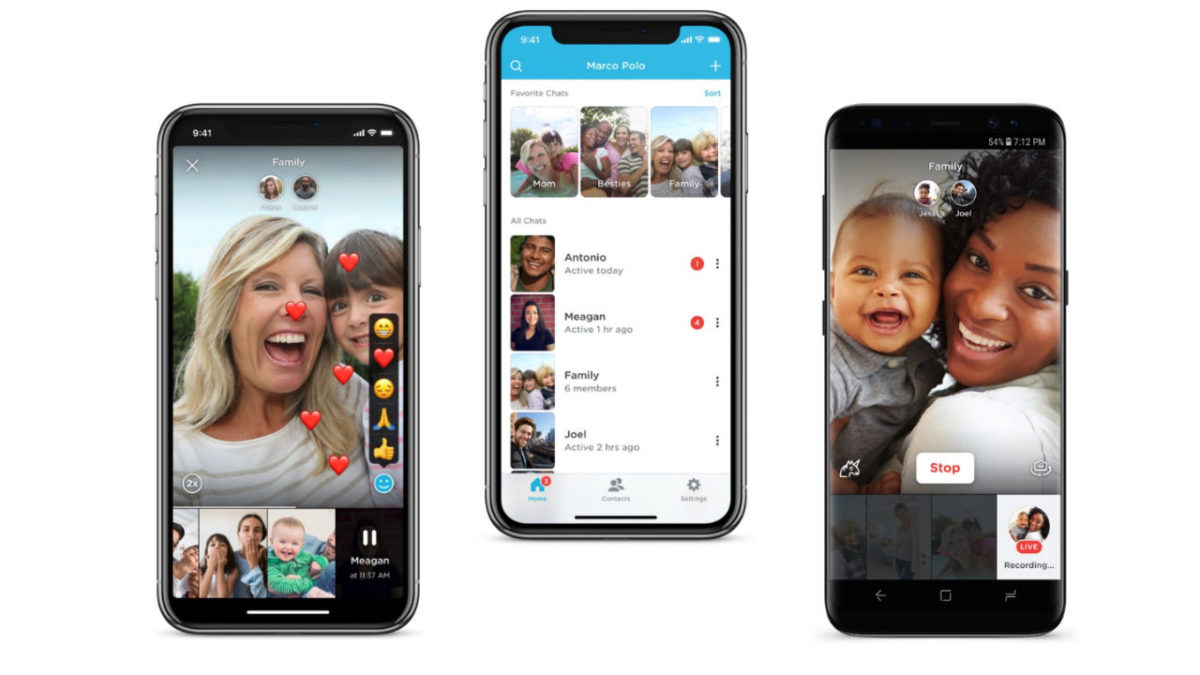
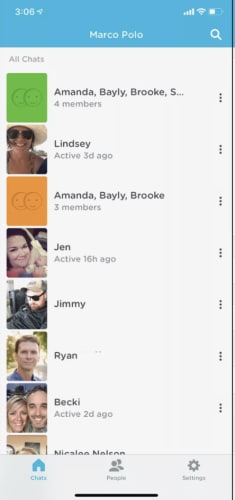
To send a Marco Polo video, you can start from either the Chats or People tabs inside the app.

The Chats menu displays your most recent posts, making it your best bet for responding to message threads. The People menu is best-suited for starting a new conversation.

marco polo chat screen

  1. Head over to your Chats menu, found at the bottom of the screen.
  2. Click on a group or individual contact to record your message.
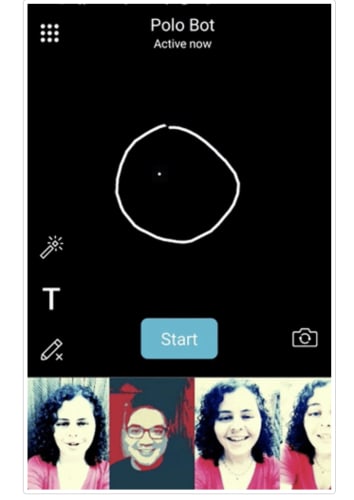
  3. This will open up the camera and you can start recording.
  4. You’ll also see a few options for adding effects to your video.
  5. Tap Start to begin recording your message.

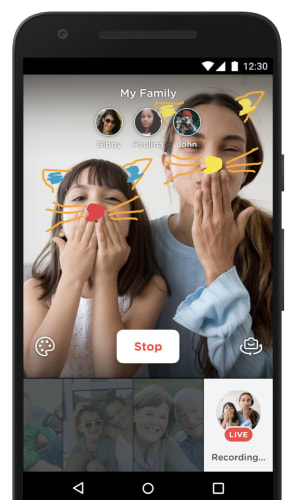
marco polo live

If you’d like to make things a bit more interesting, you can add the following elements to your video, as well.

    • T: Allows you to add text on top of your message.
    • Landscape Icon: Here, you can insert a photo and record audio to go with it.
    • Unicorn: This icon allows you to distort your voice.
    • Camera Flip: The default view in the app is selfie mode, camera flip allows you to get behind the camera and record your surroundings.

Add a doodle to your message

Marco Polo add doodle

To draw on top of your message, simply follow these steps:

  1. Open a conversation
  2. Tap on the Pencil icon, which can be found next to the Start button.
  3. Draw on top of your message with your finger.

Filters

If you’d like to add a filter to a video message, all you need to do is swipe left or right on the screen to make the change.

marco polo filters

Is Marco Polo worth checking out?

For the most part, people seem to like Marco Polo. Admittedly, the selling points like—it enables real conversations or it helps people not feel lonely–aren’t exactly measurable, but it’s kind of a neat way to connect with loved ones, getting more personal than a text.

We liked that user identities are based on phone numbers, so there’s no need to sign in with a Google account, or sync up to Facebook or Instagram.

The family-friendly branding—with imagery including military service people, grandparents, and groups of friends—position the app a wholesome, private way to keep in touch.

Marco Polo Download Free
8