4 easy ways to level up your phone photography skills

Do you suck at Instagram? Are your Facebook albums a bit of a bummer? Some of us just don’t have a knack for taking the pictures that get likes and impress your followers.

Look, anyone can pick up a smartphone and snap a few selfies and sunsets. But, without a few basics under your belt, your website, feeds, and personal albums won’t live up to their potential.

It takes more than filters to create a great image—you need to get the hang of things like focus, exposure, editing, and composition.

If you want to step up your Insta-game, it’s time to master a few key principles the pros already know. Here’s a look at some ways to get more out of your camera phone.

1. Getting set up

Before we dive into actually taking photos, you’ll want to make sure you’re setting yourself up for success. A few things to check out before you dive in:

  • Clean your phone’s lens—use a lens cloth and some cleaner to gently wipe dust, dirt, and finger print smudges from your phone’s lens. Chances are it’s pretty dirty.
  • Set phone to the highest resolution—If you take a shot you love, you want it looking its best.
  • Set white balance—Many phones come with the option to adjust white balance. The reason you’ll want to do this is, while the human eye adjusts for lighting—allowing white to appear white in most settings, cameras do not.
  • Turn off any effects—You can add these in later if you want. When you’re taking the photo, you want to start with a clean slate.

2. Compositional tips

Use the grid

One of the easiest ways to level up your photo skills is to take advantage of grid lines. Your smartphone has a setting that allows you to turn this feature on:

The benefit of the grid is, it allows you to intuitively follow the rule of thirds.

The rule is a compositional technique that involves dividing an image into thirds and positioning your subject within one of those areas.

grid

Use leading lines

Adding lines to your composition is a great way to lead the eye through the image, creating visual interest. Easy choices include things like train tracks, rivers, and roads.

As you can see, the photo below directs you to the people in the background. Because the lines converge, there’s a bit more interest than if the composition were to just have one line leading to the people.

leading lines example

Frame your subject

Framing means you’re arranging your photo in a way that allows you to outline your subject with something in the environment. The frame helps to highlight your subject and draws the viewer into the image.

frame your subject

Take advantage of negative space

Negative spacer is a term that refers to the areas around the subject of an image. The empty space, like in the photo below, makes your subject stand out. Things like a wide, open sky, a large body of water, and so on, can elicit a powerful reaction for viewers.

3. Lighting stuff

Lighting is the main thing to consider when you’re snapping shots for the gram or otherwise. While you can crop your way into a better composition, add filters, and special effects, you can’t edit away a poorly lit photo.

You’ll want to avoid low lighting and areas with super bright reflections. If you’re shooting on a phone, you don’t have the advantage of high ISO speeds, which allow cameras to take indoor photos without a flash.

Instead, take advantage of natural light. Smartphone photos that use flash don’t always look so hot. Instead, they may negatively alter colors or wash out your subject. In the daytime—indoor photos work best near a window, without any additional sources of artificial light, which can make your photos look yellow.

When shooting outdoors, the golden hour is your BFF.

The golden hour, or the period just before sunset or right after sunrise, is responsible for those dreamy, sun-kissed shots. During this time, the sun is closest to the horizon, and light must travel through more atmosphere—which softens the light. Thus creating a more flattering effect.

4. Editing your pics

Okay, beyond things like nailing the lighting and composition from your phone, there’s a trick to turning your social feeds into an influencer level curation.

Filters

Filters are kind of divisive in the realm of digital photography. Used correctly, they enhance an image and add some cool effects. If you’re using your iPhone or Instagram’s built-in filters, you’re using the same preset options that millions of other people are using.

Lightroom

Lightroom rules because while it’s a professional-grade tool, it’s also super easy to understand. The app comes with a wide range of features from lighting adjustments to gradients, allowing you to tweak your photos into something truly amazing.

You can even create your own filters and apply them to your next round of pics for a more customized appearance.

VSCO

VSCO is an easy-to-use app that many Instagrammers swear by. The app comes equipped with a selection of pre-set filters. You can use the built-in options, of course, but our recommendation is finding one you like and making custom tweaks. You can save your favorite filters, too. This way, you can use your favorite settings over and over again—saving time and allowing you to create a cohesive look on social media.

What’s more, the VSCO community is a great source of inspiration for those just starting out.

6

Snapseed

Snapseed is another option that makes it easy to take your photos and turn them into something more aesthetically pleasing. What we like about this app is, the developers have made it super easy to edit photos within a matter of clicks.

This option is simple, best for those who don’t want to take the time to learn Lightroom and it’s many nuances.


9

Best apps for finding new things to do

Whether you’re new in town or visiting a city for the first time, bored at home or looking for something a little different, finding things to do IRL isn’t always easy.

After all, there’s no guarantee that whatever you decide on doesn’t end up being totally lame.

Here, we’ve rounded up a handful of apps that will help you find something to do–whether it’s a concert, a sports game, or whatever else captures your interest.

Meetup

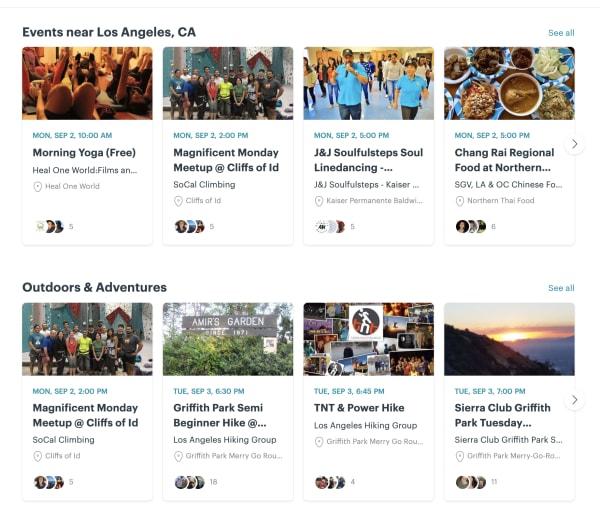
meetup local events

Okay, duh, we get it. Meetup is the most obvious choice, here, but it’s a good, low-stakes way to broaden your horizons. Activities will vary based on where you live, but at least in Los Angeles, you can use the app to find networking groups, people to hike with, book clubs, and so on.

There are groups for gamers—board and video—as well as people who like concerts, sports, or whatever else you’re into. The best part? You can join events someone else has already planned.

Meetup Download Free
9

Nearify

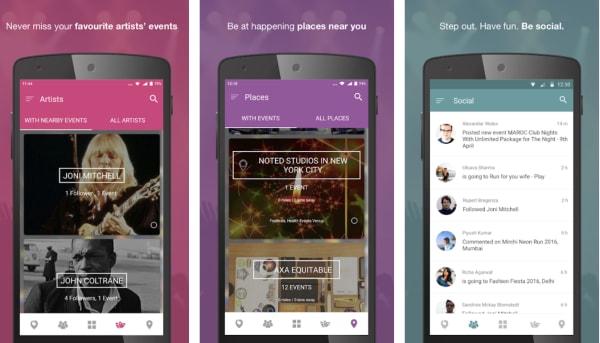
nearify event app

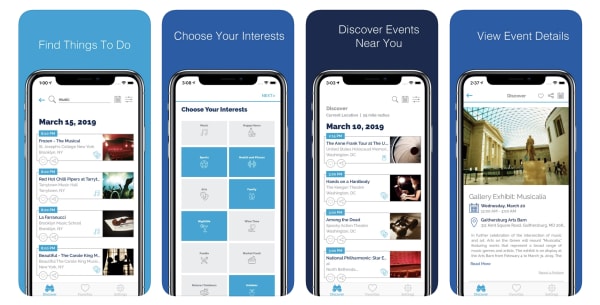
Nearify is an app for iOS, Android, and the web, that lets you know about all events happening near you—be it a concert, a music festival, a play, or a movie screening.

The app standout in this category due to a few unique features. There’s built-in AI that tracks your preferences over time and makes recommendations based on the bands you like, your favorite activities, and more. You can follow favorite artists and buy event tickets through the app, and it even helps you find stuff to do while traveling.

Eventbrite

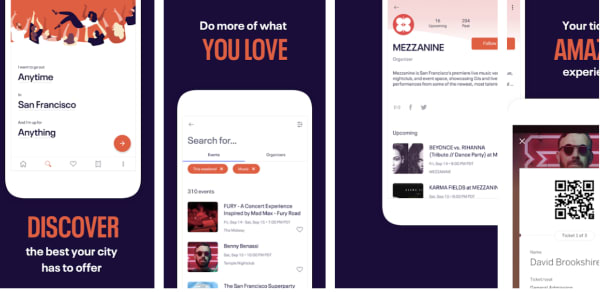
find events eventbrite app

Eventbrite may be best known as an app for event planners, that helps its users plan and promote their events.

But, they also provide a mobile app that anyone can use, regardless of professional planning status. The free mobile mobile app is a discovery engine that helps users find events in their communities. Inside you’ll find different categories like Editor’s Picks, Popular Events, and more.

Use it to discover popular events around you, see what your friends are doing, get recommendations, register for events, as well as pay for events and keep track of tickets.

Eventbrite Download Free
7

Facebook Local

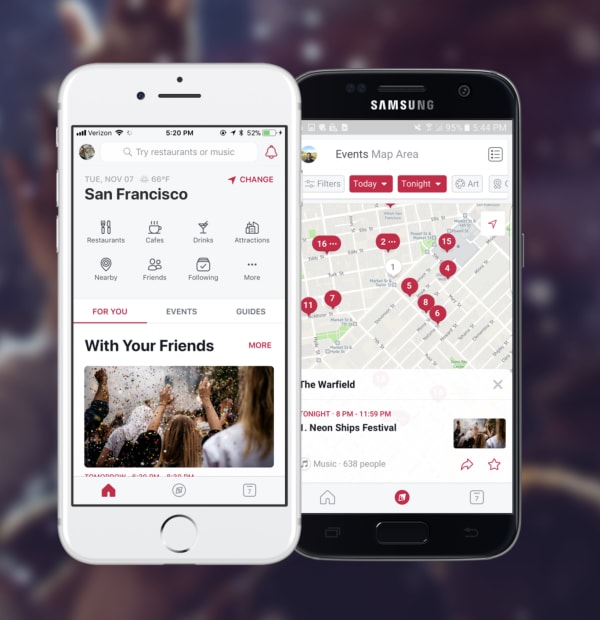
Facebook Local App

Chances are, you’ve been using Facebook forever, but there’s a good chance that you’ve missed a useful feature that’s been around the entire time.

Facebook Local is an event-finding app that, as you might guess, helps users find new things to do.

The app allows you to search for events, places, and nearby by activities–including things like concerts and local happenings, as well as events your friends posted.

The Local app is broken up into three sections. There’s a home screen that allows you to search for a restaurant or coffee shop and keeps track of event suggestions in your area.

There’s also a section that’s kind of like Yelp in that, users can search for places that are “open now” or you can browse by category. And then, you’ll have a calendar app which features all of the events you’ve RSVP’d to, along with other calendars that you connect to your account. The idea is, you’ll have all of your social activities stored in one place.

Check out events in the main app or website, or download the standalone Facebook Local app.

Facebook Local Download Free
9

Gravy Events

gravy event finder app

Gravy Events is another app built to help you find fun things to do near you. The app uses location data to find matches, all of which are available within walking distance unless you change the settings.

The app is available for free on both Android and iOS and is similar to other entries on this list, like Nearify and Facebook Local.

There’s a built-in calendar, the ability to search based on interests, and access to local recommendations. It also recommends related events and covers everything from museum exhibits to meetups for connecting with new people.

Sporty

sporty local sports activity app

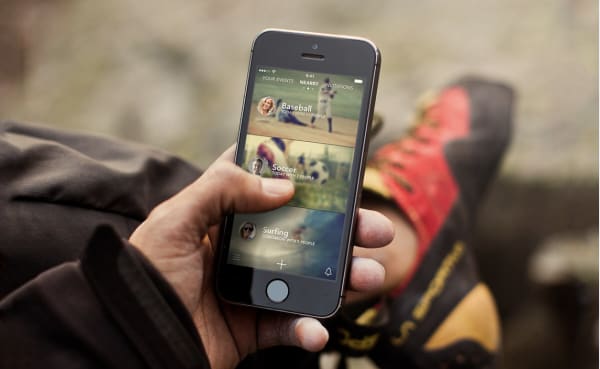
For people looking for others to move around with, Sporty makes it easy to discover ongoing sports activities happening nearby.

The idea is, you can find people up for a game of tennis or catching a few waves. You might signup for a pick-up soccer game, an amateur baseball league, or whatever your activity of choice.

Ransomware hackers have found a new type of institution to target

Hundreds of dentist offices all over the US have been hit by ransomware attacks

phishing scams

Of all the types of malware, ransomware is definitely the most Hollywood. We’ve commented before on the showy nature of its name and how it invokes ideas of Hollywood style face-offs between hostage takers and negotiators. Even in real life though, ransomware certainly knows how to grab the headlines. The nature of the threat sees it targeting large institutions rather than private individuals and this has led to some big targets and even bigger ransom payments.

We’ve seen hospital networks targeted, schools, and recently we’ve even had to deal with whole cities being crippled by ransomware attacks, with two cities in Florida being forced to stump up over $1 million in ransom between them. It seems that even moving on to smart devices like Wi-Fi connected cameras isn’t enough either, as ransomware hackers have found a brand-new type of institution to target. If you’re afraid of going to the dentist, look away now.

Hundreds of dentist offices all over the US have been hit by ransomware attacks

According to a report by ZDNet, two Wisconsin-based software providers, The Digital Dental Record and PerCSoft, were recently compromised by a ransomware gang. The gang was able to initiate a REvil (Sodinokibi) ransomware attack across the company’s customers’ systems, which total hundreds of dentists’ offices across the US.

a dentist
Time to be afraid

The breach occurred over last weekend but then only came to light on Monday morning when Dentists up and down the country found that they couldn’t log on to their systems when they returned to work. The ZDNet report goes on to say that the Wisconsin-based companies decided to pay the ransom and have since been sharing a decrypter with all of the effected dentists, which should help them recover their lost files. There is no mention, however, of how large or small the ransom was that they paid.

This isn’t the first time that this particular type of ransomware attack has been launched by a ransomware gang. A recent report listed the REvil (Sodinokibi) attack as one of the most prevalent types of ransomware attack out there. With this attack on nationwide dentist offices being the third time a major service provider has been targeted using this type of attack, it puts it as the fourth most popular type of ransomware attack out there.

Ransomware attacks usually encrypt or steal data from the victim’s database. The data is then held ransom, with the victim having to pay to recover it. As the attack requires a lot of work, it makes sense to target larger organizations rather than individuals. It also applies more pressure as the data that is held ransom usually plays a key role in the running of the victim organization and immediately starts applying financial pressure. This means you’re not likely to be targeted yourself by a ransomware attack, but there is every chance an organization you’re connected to could be.

Google’s new feature makes life easier for anybody with multiple accounts on Android devices

Google has introduced a swipe to switch account feature to Google Maps, Google Drive, and Gmail

Google’s search engine helped the Mountain View-based internet giant quickly rise to the ascendancy in the early days of the internet. Google was quicker than other search engines and always served up more reliable answers to queries. It wasn’t long though, before Google started branching out from web searches and the result now is a bunch of core products, which are among the most popular pieces of software ever developed.

Google programs like Gmail, Chrome, and Maps all have literally billions of users and other core products like Google Drive aren’t far behind them. At the heart of all these products, including the search engine that started it all, lies our Google accounts. Our accounts give us access to personalized versions of each core product. Yes, they do allow Google to collect data on our web usage, which is worth billions to the web giant, but our accounts also allow to have our own Google Drive allocation, individual Gmail inboxes, and keep a record of all the places we’ve searched for and been to while using Google Maps.

Most of us have reached the point now where we have more than one Google account too. Whether it be for work and personal use or more compartmentalized use of the Google products, like shopping accounts and travel accounts etc. it is becoming more and more common for Google users to have multiple accounts. It is good news for an awful lot of us then that Google is making it much easier for us to switch between accounts.

Google has introduced a swipe to switch account feature to Google Maps, Google Drive, and Gmail

Gesture control has been creeping in on Android for quite some time now. Google has been adding different gesture controls to try and replace the standard search and menu system. Although there are many more, my favorite and most used gesture control on my Pixel is the double tap of the power button to launch my camera app. It is easy, saves time, and means I take more pictures.

As always with most big tech innovations gesture control is supposed to shave precious seconds off our digital processes. The time we save searching through menus, can theoretically be used to do something else. The new swipe to change account feature does this quite well.

Switching between accounts is now easier on three of the core Google apps

The idea behind the new features is that rather than having to click on the account button in the top-right of your Google apps and then select the account you want to work with, you can simply swipe your finger up or down across it. This will move you between all the different accounts you have linked to your Android phone.

The new swipe to switch account feature will save you the grand total of two clicks every time you use it. That is reduced to one click though, if you count the swipe itself as a click. This might not sound like a lot but as is so often the case with these incremental feature upgrades soon you’ll be so used to using the new swipe feature that you’ll barely remember having to click through the account’s menu in the first place.

google maps
The swipe to change account feature landed on Google Maps first

Multiple reports have noted this new feature on Google Maps, Google Drive, and now most recently on Gmail too. The feature landed on Google Maps midway through August and then on Google Drive a week later. This means if you’re using the latest version of both apps, you’ll be able to swipe to switch accounts right now. The feature is much newer on Gmail, however, so you’ll have to wait until you’ve downloaded Gmail v2019.08.18 before you’ll have it on your email app.

The BBC is working its own version of Alexa and Google Assistant

The BBC is launching its own AI voice assistant called Beeb that will specialize in understanding regional accents


Amazon’s Alexa and the Google Assistant are everywhere now. It is fair to say that AI assistants have caught on a big way, even if they’re still far from perfect products. One of the ways that AI assistants can improve is through better understanding the commands we throw at them. If you’re an American reader, you might not feel like this is an issue that needs too much attention. Across the pond, however, British users might understand a little more as often US-developed AI assistants can struggle with different regional accents from across the British Isles.
For such a small place, the UK has a lot of diverse accents and more often than not Alexa and the like can’t get to the bottom of them. This has led to the British Broadcasting Corporation, more famously known as the BBC, taking things into its own hands.
The BBC is launching its own AI voice assistant called Beeb that will specialize in understanding regional accents

An in-house team at the BBC is working on a new voice assistant called Beeb, with a hope to launch in 2020. According to a report by the Guardian, there are no plans to launch any standalone hardware product to go with Beeb. There are plans, however, to integrate Beeb into other BBC products like the iPlayer app on smart TVs, and the corporation’s website. There are also plans to make Beeb available to other manufacturers who might want to use the smart assistant in their products.

The Guardian reports that the Beeb team have been recording the voices of BBC staff up and down the British Isles in a bid to train the assistant on all the different accent and dialect variations the UK has to offer.

Although Beeb will have a wake word like the Google and Amazon offerings, the BBC smart assistant won’t be able to perform nearly as many skills as the US-developed alternatives. When it launches next year, users will be able to activate the BBC smart assistant by calling out “Beeb” but will then be limited to the types of skills you’d expect a media corporation to need their AI assistant to be able to understand. The main function, however, will be understanding regional accents.

There is no word in the report on whether BBC will allow the likes of Alexa and Google Assistant to take advantage of its regional accent understanding abilities. It doesn’t look likely, however, as a BBC spokesperson claimed another reason behind Beeb’s development is a lack of trust in the other assistants. The spokesperson said, “People know and trust the BBC, so it will use its role as public service innovator in technology to ensure everyone – not just the tech-elite – can benefit from accessing content and new experiences in this new way.”

Judge asks Alexa for help in murder trial

If you’re a British user of either Google Assistant of Amazon Alexa, then you probably shouldn’t be expecting Beeb to start helping your AI assistant to understand you any better some time soon. That doesn’t mean they won’t start working on your accent independently though. As is usually the case with big tech firms, if they see a good idea, they’ll likely try to copy it. With voice control being one of the main draws that AI assistants bring to our smart homes, and with the UK being such a big and lucrative market, working on understanding regional accents there is definitely a good idea. Or as they say in Liverpool, a boss idea. Definitely one that could spread.

Will Smith, Martin Lawrence, ride together in ‘Bad Boys For Life’ trailer

Burnett and Lowrey are back to the streets of Miami in “Bad Boys for Life.”

Will Smith

It’s been 17 years since Will Smith and Martin Lawrence asked audience members “whatcha gonna do when they come for you.” Those years were nice to Will Smith as he continued to stay in shape and make more hit movies. However, those years definitely don’t look like they were kind to Lawrence as you can see in the new trailer for “Bad Boys for Life.”

Will Smith still looks like he is capable of taking down street-urchins in the drug-filled streets of Miami. However, Lawrence looks like he has a frequently used loyalty card to Krispy Kreme in his wallet and a gym membership that hasn’t been used since the Bush administration.

In the two previous Bad Boys films, Smith and Lawrence played Marcus Burnett and Mike Lowrey: two loose-canon cops that continuously get in over their heads. Their witty banter is only matched by their over-the-top detective antics and explosion-filled romps.

The movie centers around the two cops trying to figure out what to do with their lives. Burnett (Lawrence’s character) is now the police inspector while Lowrey is still looking for his next rush of adrenaline. However, when trouble comes a-knocking, the two suit back up for “one last ride.”

Yeah, it’s the same cliché story you’ve heard 1,000 times.

However, it looks like the days of over-the-top explosions might be behind them as Michael Bay did not return to direct the movie. Instead, an up-and-coming directing duo has taken the reigns. It still has yet to be seen whether or not the two will make or break themselves with “Bad Boys For Life.”

Top 5 Pokemon podcasts

As the highest-grossing media franchise in the world, it’s surprising to find that Pokemon podcasts are much more of an anomaly than the game series. That doesn’t mean, however, that there aren’t popular Pokemon podcasts. And even more so, it doesn’t mean that there aren’t interesting and wonderful hidden gems within the world of Pokemon podcasts. These are some of the best ones to find in your hunt for the perfect Pokemon podcast, featuring both the great popular ones, and the wonderful hidden ones:

Spotify Free Download
8

I Chews You

If you’re looking for a funny Pokemon themed podcast, this is a great one to check out. Every episode, the hosts discuss how they would cook and eat various Pokemon by comparing them to real-world food. Of course, this can lead to some hilarious antics, but the recipes are also genuinely interesting to hear about.

Gotta Watch’em All

Bringing a unique take on podcast structure, Gotta Watch’em All discusses pretty much every aspect of Pokemon, but ends every episode the hosts watching an episode of the Pokemon anime and talking about it. The podcast gives you a mixture of news, personal opinion, and anime consumption that everyone can enjoy.

Disaster League

While this podcast advertises itself as a queer cast actual play Pokemon podcast, it’s much more than that. There are mainly two types of actual play casts. One’s that pulls you into the world of their game, and one’s that pull you to the table they are playing at. This cast pulls you to the table, and you feel like you’re one of these players. They are all relatable, interesting, and dynamic people, and their characters really reflect those attributes. Every joke they make seems like an inside one, but an inside one that you can relate to. A great suggestion for anyone looking for a newer podcast filled with fun, relatable, and hilarious cast members.

It’s Super Effective!

One of the most professional Pokemon podcasts, this cast primarily focuses on news and discussion of various topics in every aspect of Pokemon. They provide funny and interesting commentary on both the Pokemon world itself, and the decisions made by the Pokemon Company. If you’re looking to learn more about Pokemon, stay up to date on the news, or just find out about other people’s interests in the series, then this cast is a great option for you.

The Roaring Trainers

The Roaring Trainers is an actual play a custom 5e Dungeons and Dragons podcast that takes place in a 1920s version of Pokemon’s Kanto region. While the backdrop of having a Pokemon world in the Jazz Age may already seem appealing, it is far from what makes this podcast one of the best.

The narrative design of The Roaring Trainers is seamless and brilliant. The GM, Gatlin, is able to give each of the three players their own individual character arcs that allow their characters to develop naturally as the campaign progresses. The series could be adapted into a media drama or even a novel, and it would still carry the same amount of emotional depth and complexity, as the characters continue to grow throughout the series, something that is hard to accomplish in an actual play podcast.

And it’s not just the story that is so great about this podcast. Each character has their own personal journey with different Pokemon by their side. It’s easy to become enthralled by each character and their Pokemon, as they try to help each other accomplish their goals. On top of this, the players, Aaron, Adam, and Nick, are all hilarious in their own way, and you’re bound to find one or a few that have the perfect sense of humor for you. Listening to this podcast makes you feel like you’re going on the Pokemon journey with them, and that includes all the wacky antics that the cast has to offer.  

All of these podcasts can be found on both Spotify and Apple Podcasts, so be sure to check them out on whichever medium you prefer. Additionally, you may want to check out the upcoming Pokemon podcast, Platinum Legends.

Google announces that the next version of Android will start rolling out on Tuesday, but it might not be what you’re expecting

The next version of Android will be called Android 10 and will start rolling out to Pixel phones on Tuesday September 3

Google’s mobile operating system Android has had some whacky names through the years. There’s been Android KitKat, Android Oreo and the latest incarnation is Android Pie. Each year, as Google has released an updated version of Android it has moved one letter along the alphabet and picked a sweet treat beginning with the corresponding letter to name the newest version of Android after.

This is a well-established practice, so much so that many analysts have been bending over backwards trying to think of a sweet treat beginning with the letter Q to follow up on Android Pie. The best they’ve come up with is quince, which let’s be honest isn’t that much of a treat. It all looks set to change anyway, however, as Google has made a couple of announcements regarding the next version of Android.

The next version of Android will be called Android 10 and will start rolling out to Pixel phones on Tuesday September 3

Yep, you’ve read that right, Google is dropping the sweet treat naming practice for Android. In a recent blog post the internet giant announced that Android Q will in fact be called Android 10. According to the blog post the original naming practice was only meant to be for internal code names of each Android build but that it developed into a fun part of the external releases too. Over the years though, basing the different versions on letters of the alphabet rather than numbers has raised a number of issues due to the global reach of Android.

VP of Product Management at Android, Sameer Samat, describes the problems in the Google blog post like this, “For example, L and R are not distinguishable when spoken in some languages. So, when some people heard us say Android Lollipop out loud, it wasn’t intuitively clear that it referred to the version after KitKat. It’s even harder for new Android users, who are unfamiliar with the naming convention, to understand if their phone is running the latest version.” The alphabet isn’t the same everywhere around the world and language phonetics raise up more complications. If you add the fact that not everybody is familiar with the Android naming convention, you have a confusing concept that could see Android users not knowing how new or old their version is.

We’re not even going to get into the verbal gymnastics that went on in order to find sweet treats that begin with each letter of the alphabet. Can you really class pie and marshmallows as the same types of anything? We’re not so sure.

So, all this means that Android Q has become Android 10 for the sake of clarity.

You don’t get, if you don’t ask

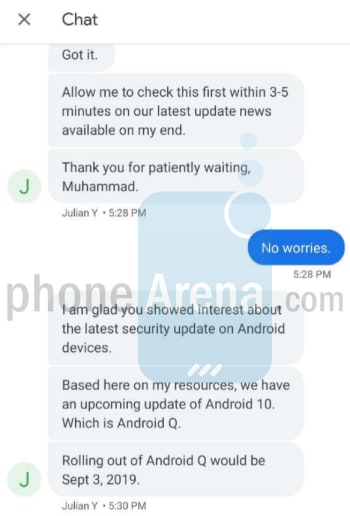
The other big Android news coming out of Google HQ, is a confirmed release date for the new and rebranded version of Android. According to a report by Phone Arena, which cites two independent Google support agents, Android 10 should start rolling out to Pixel phones on September 2.

Image via: Phone Arena

If you’re wondering what a Google Support Agent is exactly, you’ll likely be surprised to hear that we’re talking about customer support agents. Again, we have to stop you and tell that you did, in fact, read that right. Two Google support agents have given out information about Android 10’s release date that hasn’t even been released to the press yet. They did so to answer to a couple of support queries placed by Pixel phone users.

Image via: Phone Arena

This juicy piece of customer support information means that all Pixel 3/3XL, 3a/3a XL, 2, 2XL, and even original Pixel and Pixel XL owners will likely see the Android 10 update arriving on their phones from Tuesday. This is particularly good news for owners of the original Pixel whose smartphones now lie outside of their official 2-year support window.

This is of course only relevant, if you own a Pixel smartphone. Owners of other Android smartphones like the Samsung Galaxy S10 and the Galaxy Note 10 will have to wait a little longer. Best estimates place these phones as getting the Android 10 update sometime between late December of this year and early March of next year with other smartphones seeing the update even later.

Is the Android 10 update a big deal?

As well as a more mature naming convention, Android 10 is bringing with it a number of interesting features. We’ve already reported on a few key features including forced gesture control, with the removal of the back button and also the introduction of facial recognition security features like those found on the iPhone X. The latter, however, will require specialized technology so will likely only work properly on newer smartphones that have been built with the feature in mind.

Other big features shipping with Android 10 include improved digital wellbeing features, suggested actions, 5G support, a system-wide dark mode, and seamless background updates. There is also support for foldable phones but as hardware manufacturers like Samsung and Huawei have continuously run into difficulties developing these new types of phone, this feature will likely sit dormant for quite some time.

So, with all that then, you’re up to date on all things Android Q or should we say Android 10. From now on Android updates will increase numerically and if you’re a Pixel owner, you should have access to all of Android 10’s newest features from Tuesday this week. Global roll-outs of software updates often take time, however, so there is a chance your device might not get the update for a day or two. It is coming though, so be patient.

Twitter is working on a new scheduling feature for the web app

An advance tweet scheduling feature has been spotted in an upcoming version of the Twitter web app

Twitter is great for keeping yourself up to date with the latest news and all the latest action from ongoing breaking stories. If you’re on the other side of things, however, trying to publish your own tweets and maybe get yourself a viral tweet or two, things can be a little trickier.

There are so many different elements that go into a tweet becoming viral, or even just reaching a large enough audience from your own network, that go beyond the content of the tweet itself. One of these key elements is the timing of your tweet, with publishing at the right moment having a huge effect on how many people will get to see your tweet. This can mean sitting in front of your keyboard until that right moment comes along or it could mean scheduling a tweet. If you’ve ever tried to schedule a tweet though, you’ll know that to do so you’ve had to download a separate app like Tweetdeck or some other third-party app. At least you have until now.

An advance tweet scheduling feature has been spotted in an upcoming version of the Twitter web app

According to the always on-point social media spotter, Jane Manchun Wong, Twitter is currently testing a new tweet scheduling feature for the Twitter web app itself. Wong announced the new feature to her Twitter followers, including a screenshot, which you can see below of what the feature will look like.

The scheduling feature seems simple enough, sitting above the main body of text that will form the content of the tweet. Unfortunately, however, although Wong has included a screenshot of the feature, she hasn’t included much more information about how it will work. Furthermore, this leak includes no information at all about when it will hit the Twitter web app. We’ll have to keep you posted on that one.

Twitter page

This news will be music to the ears of social media managers all over the world as it will simplify their efforts to achieve maximum engagement with their Twitter followers. As we mentioned earlier, however, it will also be good news for anybody who posts to Twitter as it puts the power of scheduling into the more casual Twitter users out there.

If all you’ve ever used Twitter for is communicating with your friends and keeping up to date with your local interests, you’re unlikely to have downloaded a third-party tool to help you manage your account. When the scheduling feature lands in the Twitter web app though, you’ll have a brand-new tool in your arsenal. A tool that is vital to the pros. Enjoy!

NBA 2K20 in hot water over gambling controversy

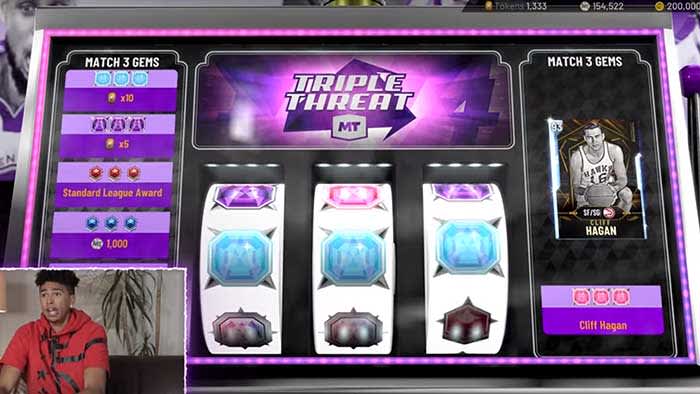
Slot machines and games of chance have caused gamers to call out NBA 2K20, and ratings boards.

NBA 2K20

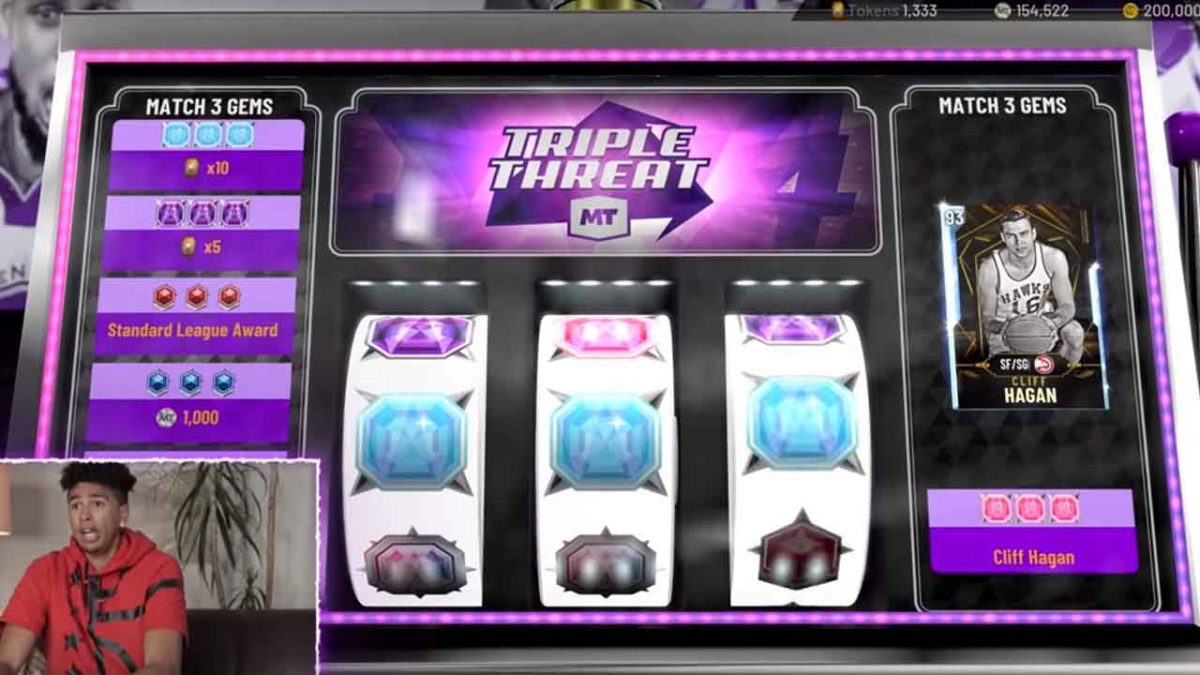
The internet has been abuzz ever since the most recent trailer for NBA 2K20. In the trailer, there are slot machines and other games of chance. What truly upset gamers is that despite the blatant gambling themes in the game, the ESRB rated the game “E for Everyone.” PEGI also didn’t flag the game either.

The game will also continue to have players buy packs of cards for the chance to unlock content in the game. This is similar to loot boxes which are also under fire for being deemed as gambling by many gamers.

Why should I care?

If you’re a parent, you obviously want to protect your kids from adult content such as gambling. However, even if you’re a seasoned gamer that is used to this kind of content, you should still be worried. 

It might seem like this isn’t a big deal for you, but this could set a new standard for modern video games. Loot boxes are nothing new, but they are getting more and more popular in video games. The issue is that you are already spending upwards of $60 for a game, but you’re then expected to dish-out more money hand over fist so that you can get more content. This content ranges from unnecessary stuff that’s just in the game for fun, and items that can actually make the game playable/winnable.

A game that is infamous for having these “pay-to-win” features is Star Wars: Battlefront. As many players know: either you buy the guns that help you win the game, or you get creamed over and over again by the players that do. 

What has been the response?

Gamers, fans of the franchise, and parents have all expressed their disgust for the game and the two rating boards. The trailer on YouTube has about an 85% dislike rating with comments filled with hatred for the game. This has caused the developers to unlist the video to try and stop the amount of attention it gets. 

In an article for Polygon, the PEGI board responded by saying that they didn’t flag the game for the gambling content because they can’t say for sure whether the gambling mechanics will be prominent in the game. 

The ESRB has not yet responded to the outcry from gamers and parents, and still marks the game as “E for Everyone.” On the ESRB website, they only flag the game for “mild language.”

What should I do?

If you really want this game, we probably aren’t going to convince you to boycott it. Just keep in all of this in mind in case you were considering buying this game for your little brother/cousin/nephew etc. However, the ESRB and PEGI need to held accountable for the game’s ridiculous rating. Voice your opinion on the matter, and get the discussion going.