
3 apps to help you budget and track your spending

Be smarter about your money with these 3 great apps.

budget apps

Groceries. Coffee. Movies. Whatever you spend your money on, sometimes it can be difficult to keep track. But with the help of a budgeting app, it’s easy to see where the majority of your spending money is going. If you want to get better at creating a budget and sticking with it, check out these three apps below.

3 apps to help you budget and track your spending

Mint Personal Finance Download Free ►
7
Mint is a tried-and-true budgeting app. In fact, it is one of the best-known finance apps on the market. With Mint, you can track your spending through your credit cards. Mint will sort every transaction you've made into different categories such as food, bills, and rent. Then you will be able to create a custom budget and see how your actual monthly spending compares with your set budget. This is a great way to organize your purchases and see what categories you spend the most on.
Fudget: Budget and expense tracking app Download Free ►
7
Fudget is great for anyone who wants a simple way to keep track of their spending. This app is extremely simple to use and can help you plan short-term budgets. For example, if you want to save up for a vacation in six months, Fudget can help you set a budget to ensure you will have enough money saved up for the trip of a lifetime. The best part of the app? It's free! That means that you can create a budget without any added cost.
PocketGuard Download Free ►
7
Do you ever find yourself wondering how much money you can afford to spend each day? With PocketGuard, you can set a custom budget, and it will create a goal for how much to spend every day so you can stay on track. Because you connect PocketGuard to your credit cards and bank account, it can calculate your monthly expense and set a goal for how much you can afford to spend without going over your budget.

There’s no need to manage your money alone. If you need help staying on track with your spending or creating a budget, these apps are here to help you save money.


The 5 best apps to help you track your runs

Get faster, stronger, and healthier with these great apps.

best running apps

With so many running applications on the market, it can be difficult to choose which one is right for you. To simplify the process, we’ve rounded up the five best running apps on the market. These handy tools will make tracking your runs a breeze!

The 5 best apps to help you track your runs

1. Strava Training

In addition to tracking your runs through GPS and creating a custom map of your run, Strava Training throws in some friendly competition: After you’ve completed your run, you can upload your data and compare it with that of your friends. If you’re competitive, this can be a fun way to race friends and family — even those who live across the world! However, even if you’re not competitive about your runs, you can also look at the different routes your friends take. This can be a great way to discover new running routes to try out in your hometown.

Strava Running and Cycling Download Free ►
10

2. Nike Run Club

Formerly Nike+ Running, the Nike Run Club app is designed to track your runs. One benefit of this program is that it enables you to develop a personalized plan that’s flexible enough to work with your schedule. You can also easily share photos of your run on social media. And as if that weren’t enough, the app also connects you with friends as well as runners across the world, so you can participate in challenges and cheer one another on.

Nike Run Club Download Free ►
7

3. Couch to 5K

This is the perfect app to track your runs if you’re not a dedicated runner. Couch to 5K will have you running 3.1 miles in just nine weeks of training. The best part? Each week the app has you walk and run at different intervals. Then, by the ninth week, you will be able to run the entire 5K without stopping to walk!

C25K (Couch to 5K) download free ►
8

4. Pacer

Pacer is different from most running apps. It serves as a pedometer, step counter, and weight loss tracker. One great feature of this app is that you can track your running history and trends. Do you tend to stop running after two miles? Pacer will track that as a trend and let you know. You can also keep track of your eating habits, take advantage of guided exercise plans, and even connect with others in the health and fitness community.

Pacer 5K: run faster races download now ►
7

5. UA MapMyRun

One of the biggest struggles for regular runners is deciding which route they would like to take. Running the same course every day can become tedious and even remove some of the fun. With UA MapMyRun, you can choose from over 70 million mapped running routes. MapMyRun also tracks your distance, your pace, and even the amount of calories burned. This app is perfect for any runner who wants to spice things up and try out a new route every once in a while.

Map My Run by Under Armour Download Free ►
8

Using smart running apps like these is an excellent way to get a leg up while you train. Whether you’re new to running or a seasoned pro, one (or more) of these apps should do the trick.

4 best apps to help you shop for clothes

clothes shopping

Shopping for clothes in person can be incredibly time-consuming. Drive to the store, find parking, scan for something you like, see if they have it in your size, try it on, imagine yourself being photographed in that thing, then fling it back on the rack and go home in frustration. Luckily, we have a collection of great apps that can make fashion shopping easy and fun. Here are four of our favorites!

4 apps to help you shop for clothes

1. ShopStyle

The problem with shopping in stores is that they usually have a limited amount of clothes. With ShopStyle, you have access to millions of items from different brands worldwide. The app is also very easy to use. You can scroll through clothes from your favorites shops to see the latest popular clothing styles.

You can also add filters to find the perfect item. Trying to find a green denim jacket? Simply click on the denim jackets category, and then use the color filter to select the color green. It’s never been easier to find exactly what you’re looking for.

ShopStyle: Fashion Lifestyle Download Now ►
8

2. Poshmark

Have you ever wanted to shop your friends’ closets? Now you can with Poshmark! This is an app where people sell their new or gently used clothes at extremely discounted prices. If you want to wear designer clothes on a budget, then Poshmark has hundreds of great designer styles at a discount. And if you’re looking to sell some of your clothes to make room for new ones, the app makes it extremely easy to list clothing items for sale.

Poshmark: Buy & Sell Fashion Download Free ►
7

3. Rent the Runway

Now that we live in the age of Instagram and Facebook, some people don’t want to be outfit repeaters. With Rent the Runway, you can rent a beautiful dress you know you’ll only wear once. Rent the Runway has great style options like gowns, cocktail dresses, and accessories that are all available to rent! The best part is these styles are just a fraction of their full retail price (if you fall in love and want to buy one).

Rent the Runway Download Free ►
8

4. The RealReal

With The RealReal app, you can shop from hundreds of pre-owned luxury goods. All of this top-notch merch is sold at a considerable discount. You can purchase designer clothing or even a Chanel bag quickly and easily through the app. If you’re afraid you might purchase a knock-off, don’t worry — all of the items on the app are authenticated by The Real Real’s team of luxury goods experts. And the prices are consistently a fraction of the retail cost.

The RealReal Download Free
7

Overall, if you’re looking for amazing clothing deals, these apps are the ones for you. Get started and download a few today!

3 great dating apps you might not have heard of

Tired of Tinder? Try these great alternative dating apps.

Are you sick of the usual suspects like Tinder and eHarmony? Dating apps should make dating as fun as possible, so check out these three options you might not have heard of before.

3 interesting dating apps you might not have heard of

1. Coffee Meets Bagel

Coffee Meets Bagel is more of a serious dating app than a “hookup” app. On Coffee Meets Bagel, your profile is fully fleshed out. Instead of just a few pictures and a short bio, you create a more in-depth profile. In addition, instead of endlessly swiping through potential matches, you’re sent potential matches, or “Bagels,” every day at noon. The curated matches are based on incredibly nuanced details and essentially friends of friends on Facebook.

Men receive pre-selected matches based on a careful algorithm, and women are only sent “Bagels” that have already expressed interest. Keeping it progressive, LGBTQ members are sent both male and female pre-selected matches. Once you connect, the app even provides a few icebreaker questions! So if you’re interested in finding a true connection with someone, Coffee Meets Bagel is a fun way to find your match!

CMB Free Dating App Free Download ►
7

2. Coupler

Coupler has a catch: the people who use it are already in relationships. But hold up, it’s not what you think! Coupler is a different kind of dating app — instead of pairing up potential romantic partners, it connects couples with other couples based on similar interests. So if you love double-dating, or you and your partner just want to make some new friends, Coupler might be worth a try!

3. Tastebuds

Are you a music lover looking to find a love connection? Tastebuds is a new dating app that uses your taste in music to set you up with potential partners, or simply make new friends should it not work out. Although most of the questions on your profile are centered around music, there are also a few personal questions so that you can get to know people. One unique aspect of this dating app is that you can include clips of songs that you like in your profile. Instead of sending a message to start the conversation, why not send a song?

Tastebuds - Music Chat and Dating Download Free ►
7

If you’re sick of the standard dating apps, you might as well give these unique dating apps a try. Who knows, you just might find true love!

How to set a volume limit on your iPhone

Here’s how to make sure your notification sounds don’t startle the entire office.

iphone volume limit

Your iPhone has so many different features — from messaging, to tracking stocks, to receiving notifications about important news headlines. Your notifications often cause your phone to emit a sound, which is great if you’re in a situation to receive them, but bad if you’re in a job interview or sitting in the front row of “Hamilton.” That’s why it’s time to set a volume limit.

Below, we’ll show you how to set volume limits on your Apple device in just a few simple steps. Read on to learn the ropes.

5 steps to set a volume limit on your iPhone

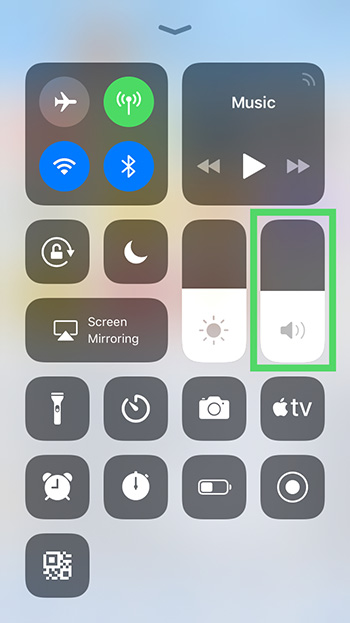
1. Open your control center by swiping up from the bottom of your screen (or down from the top if it’s an iPhone X or more recent version).

2. Here, move the volume slider, next to the brightness icon, to the full volume amount. This will set the volume level to maximum. If you want it lower, simply slide the bar back down to a volume you’re comfortable with.

iphone volume

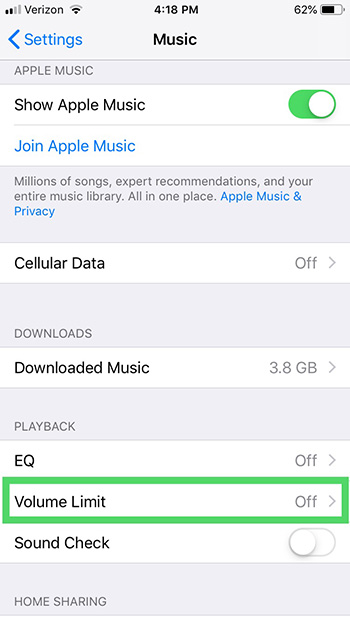
3. Go into Settings and choose the Music module. Tap Volume Limit under Playback and move the Max Volume slider to your desired spot.

iphone volume

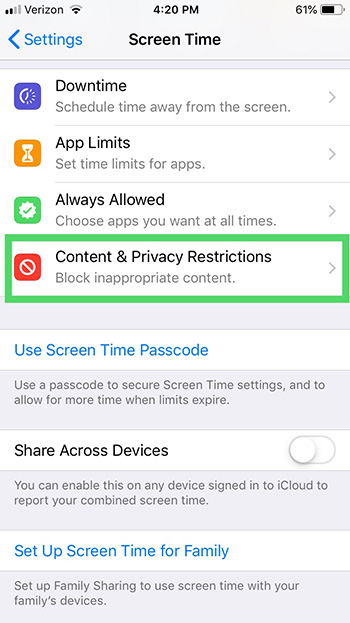
4. Next, with the most recent iOS, what was formerly “Restrictions” under General in your Settings has been updated to “Screen Time” in Settings. Open that.

5. Once in Screen Time, you can tap Content & Privacy Restrictions. Turn those on at that top, and then scroll down to Allow or Don’t Allow changes to your Volume Limit.

iphone volume

It’s as simple as that! This is important for protecting your ears. It’s also an important step for parents to take on their children’s iPhones to keep them from listening to music or obnoxious YouTubers too loudly. Happy listening!

5 user-created Snapchat lenses you’ll absolutely love

Snapchat lenses have taken social media by storm. They’re fun to use and exciting to look at, and Snapchat users just like you can create and submit them. We’ll briefly discuss what these lenses are and how they work — and then spotlight five great user-created lenses to enjoy.

5 user-created Snapchat lenses you’ll absolutely love

What are Snapchat lenses?

Snapchat lenses are the graphics that show up on your photos or videos in the app that cover your face, creating a “lens” around your face and virtually turning you into a character. These are a fun way to spice up your Snapchats and to get more enjoyment out of the app.

Snapchat Download Free
8

Pretty much everyone knows about the dog lens, the flower crown lens, and a range of others created by Snapchat itself. There’s even a lens specifically for your cat. But let’s talk about some user-created lenses that are worth checking out.

1. Mouth eyes lens

Mouth in Eyes Lens from r/SnapLenses

Welcome to your nightmares. Use this lens to turn the eyes of anyone in the frame into mouths. The mouth-eyes move as the person moves their real mouth. You’ll never sleep again after using this spooky lens.

2. Create your own thought bubble and fill it

Want to show that your dog is dreaming of chasing cats? Maybe you took a photo of someone sleeping and want to show that they’re dreaming of you! It’s possible with this creative, cute, and funny Snap lens.

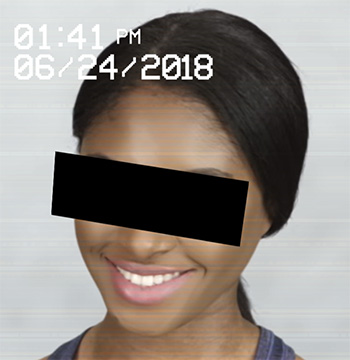
3. Security cam

security cam lens

This lens makes it look like the photo subject has been captured on a security cam. It blocks out their eyes and even adds a time and date stamp to the snapshot. Turn your friends into criminals with the press of a button!

4. Burger face

burger face lens

Do you love hamburgers and horrific images? This is the lens for you! Simple yet hilarious, this lens was created by a user with a passion for buns and beef. It puts a burger on your face whenever you use it.

5. X-ray face

X-ray from r/SnapLenses

Need to film a thrash metal video? This lens will come in handy. Show your friends what’s hiding beneath your skin in the form of a creepy face X-ray. Super fun!

These are just a few of the many user-created lenses for the wonderful world of Snapchat. Have fun with these, and if you need more lenses, here’s how to find some of the best.

3 businesses that tried using WhatsApp to help customers

Can WhatsApp be the future of customer service?

whatsapp

The WhatsApp Business API has opened a whole new world for businesses to provide customer support. Imagine the possibilities: Rather than wasting hours of your day on hold with customer support, perhaps one day you can WhatsApp message the customer support representatives for numerous businesses around the world. Here are just three of the innovative companies that have tested WhatsApp to provide customer support.

3 businesses that have tested WhatsApp for customer support

1. Wish

Wish is a shopping app where you can buy thousands of items at steep discounts. The company sells products that are brandless, so you don’t have to pay an unnecessary markup. Reports suggest Wish has tested the use of WhatsApp for its customer support.

The reason the app considered WhatsApp for customer support issues is that a lot of their merchandise is being shipped from overseas. That means it can occasionally get lost or damaged in transit. Successfully using WhatsApp for customer support would save many customers from having to wait around on the phone. The CEO of Wish called WhatsApp “a great solution to cut through the noise and connect with customers in the most critical moments of the purchase experience.”

2. Uber

The popular ride-sharing service dabbled with using WhatsApp for customer support. However, Uber didn’t turn to WhatsApp for its customers — it tested WhatsApp for receiving drivers’ questions.

WhatsApp’s role is to connect drivers to members of its team so they can voice any questions or complaints. This could save drivers a lot of time because messaging via WhatsApp is much quicker than the traditional methods of customer support.

Uber’s Head of Product VP noted, “We’re thrilled to partner with WhatsApp to give drivers in cities around the globe a fast, familiar and reliable way to connect with a member of our team and get their questions answered.”

3. Netflix

Netflix was one of the first business partners to explore the WhatsApp business feature of customer support. Netflix has tested this feature both in India and the United Kingdom. Users can expect more than just the basic customer service features on WhatsApp.

Netflix has designed its WhatsApp customer support specifically to send account messages and suggestions regarding what to watch. This means that you can simply message Netflix on WhatsApp about what TV shows you like and receive suggestions for what shows you should watch next. This is certainly some next-level customer support coming from Netflix.

The future of WhatsApp customer support

These innovative companies are truly pushing the boundaries for what customer service can be. With the help of WhatsApp, many large companies like Wish, Uber, and Netflix are discovering how to deliver amazing customer support through the ease of a smartphone application. And who knows what businesses will one day follow suit?

How to use Mailtrack to see when someone opens your email

Here’s how to know if someone read your email.

email

Do you find yourself wondering whether someone has opened the email you sent them? With the Mailtrack browser extension, you can find that out easily! The basic version of Mailtrack is free. But for just $5 a month (with an annual plan), you can get the pro version, which you can use for several different emails.

Stop feeling so in the dark. Follow these three simple steps to get Mailtrack so you never have to wonder again whether someone opened your email.

How to use Mailtrack to see when someone opens your email

1. Install Mailtrack

Mailtrack is a browser extension that works with many browsers such as Google Chrome, Firefox, and Opera. Also, Mailtrack is compatible with Gmail. Find it online at mailtrack.io/en.

2. Send an email

When you send an email with your Gmail account, Mailtrack will add a check mark next to the email in your Sent box. This check mark next to the email lets you know that the email has been successfully sent to the recipient. If the email bounces or cannot be delivered to the recipient, then the check mark will not appear next to it.

3. Check to see if your email has been read

Finally, once you send an email, you can sit back and wait to see if the recipient opens it. You will know it’s been opened because a second check mark will appear next to the first one and you’ll get a real-time notification.

If you’re looking for an easy-to-use email tracker, give Mailtrack a try.

5 AI programs you interact with every day

AI is lurking in places you may not expect.

artificial intelligence

Artificial intelligence (AI) is probably a big part of your life — far beyond using Alexa or Siri. In fact, many of the most popular apps and websites use AI technology to improve your online experience. Here are some of the many ways you might be interacting with AI without even knowing it.

5 AI programs you likely interact with every day

1. Email

Love the invention of spam filters? You have AI to thank for that. Essentially, your email uses AI software to learn how to detect spam and filter it out so it doesn’t end up in your inbox. You may have also noticed the Smart Reply option in Gmail, too. This option allows you to quickly respond to an email when you’re short on time but need to get a response out.

2. Streaming services

Every time Spotify introduces you to a new artist or playlist, it’s using AI to make that recommendation. Ditto for Netflix and other streaming services. You may feel like some services know you better than others, too. Maybe Netflix always knows just what you want to watch, but Amazon often gets it wrong. But, hey, it’s learning!

3. Google Maps

Google Maps doesn’t just help you get from Point A to Point B. It uses AI to help you get from Point A to Point B in the best way possible — by considering traffic, construction, and accidents in your area. That way, it can suggest the fastest, smoothest possible route for you to take.

AI can also help you to find the right street address. When an accurate address is hard to figure out, Google will analyze Street View images and other data to determine the correct address.

Ever use Google Maps to search for available parking near your destination? Google Maps uses AI to determine the likelihood that you’ll find parking by taking into account the time of day, location, and traffic.

4. Mobile banking

Every time you deposit a check in your bank or want to make a secure transaction, AI is behind the wheel. AI helps banks to decipher your handwriting and correctly deposit a check into your account.

Having a problem with your banking app? Next time you call customer service, you’ll likely be talking to an AI bot, too.

5. Social networking platforms

Facebook can instantly identify your face or your friends’ faces in photos to make it easier to tag photos or find pictures that you’ve been tagged in. It can do all of this with the help of AI. Further, AI helps apps like Instagram, Pinterest, and Facebook to predict which type of content or ads you’re likely to be most interested in. And it also helps Snapchat provide you with that much-loved puppy filter.

4 Chrome extensions to make you more productive

Increase your productivity with these great Chrome extensions.

Chrome

The internet can be an extremely distracting place. You tell yourself you’re going to buckle down and focus, but soon you get distracted and your productively drops. Lucky for you, we’ve found four great Chrome extensions that will take your productivity to new heights!

4 Chrome extensions to make you more productive

1. Noisli

Sometimes it can be tough to focus when everyone around you is chatting. If you work in a busy or loud office, then Noisli is perfect for you. This Chrome extension plays background noise like falling rain or a bonfire to help cancel out the background noise. In addition to the relaxing sounds, Noisli also comes with a timer to help you break down your work into sessions. Finally, one of the best features of all is that Noisli has a built-in text editor to help you gain productivity you while you write.

10

2. Strict Workflow

This is the Chrome extension for anyone who wants to be as efficient as possible. Strict Workflow lets you set a 25-minute timer that will block all popular, distracting websites so you can focus and get your work done. After your work period, you will get a 5-minute break where all of the popular websites will be available again. This timer system is great for holding yourself accountable while still giving yourself a reward for hard work.

3. Checker Plus for Gmail

This extension is a must-have for Gmail users. With it, you’ll be able to effortlessly stay on top of multiple Gmail accounts without even opening Gmail in Chrome. You’ll receive real-time notifications, and you’ll be able to read, listen to, or delete emails immediately. Other cool features include receiving notifications even when Chrome is closed, monitoring emails with custom labels in your Gmail account, and offline viewing.

4. Pocket

Pocket is the perfect Chrome Extension if you want to be productive without missing out on some seriously interesting articles. With Pocket, you can save any interesting website or article in one simple click. Then, when you’re done with your work you can open your Pocket and check out all the articles that you’ve saved throughout the day. (It’s also our favorite for offline reading situations, like catching up on interesting articles when you’re on a plane.) If you find yourself getting distracted by the latest news of the day, Pocket is the Chrome extension for you!

If you’re looking for a Chrome Extension that will keep you productive, these should fit the bill. Now get to work!