How to enable Chrome’s new Memory and Energy Saver modes

Google is rolling out two new features in Chrome Stable that improve the browser’s memory and power usage. The features are part of Chrome 108, which Google released in November 2022 to the public.

Features like these roll out over time to the entire Chrome population. This guide explains how these features work and how Chrome users may enable and configure them at this point in time.

Google Chrome DOWNLOAD

Web browsers are notorious for using lots of system RAM and power. The latter may not be obvious on most desktop systems, but mobile users may notice that web browsers require lots of energy. While it depends somewhat on the visited sites, a video streaming or gaming site uses more than a site with articles, it is fair to say that web browsers are quite power hungry.

Google decided to address the issue by developing Memory and Energy Saver modes for the web browser.

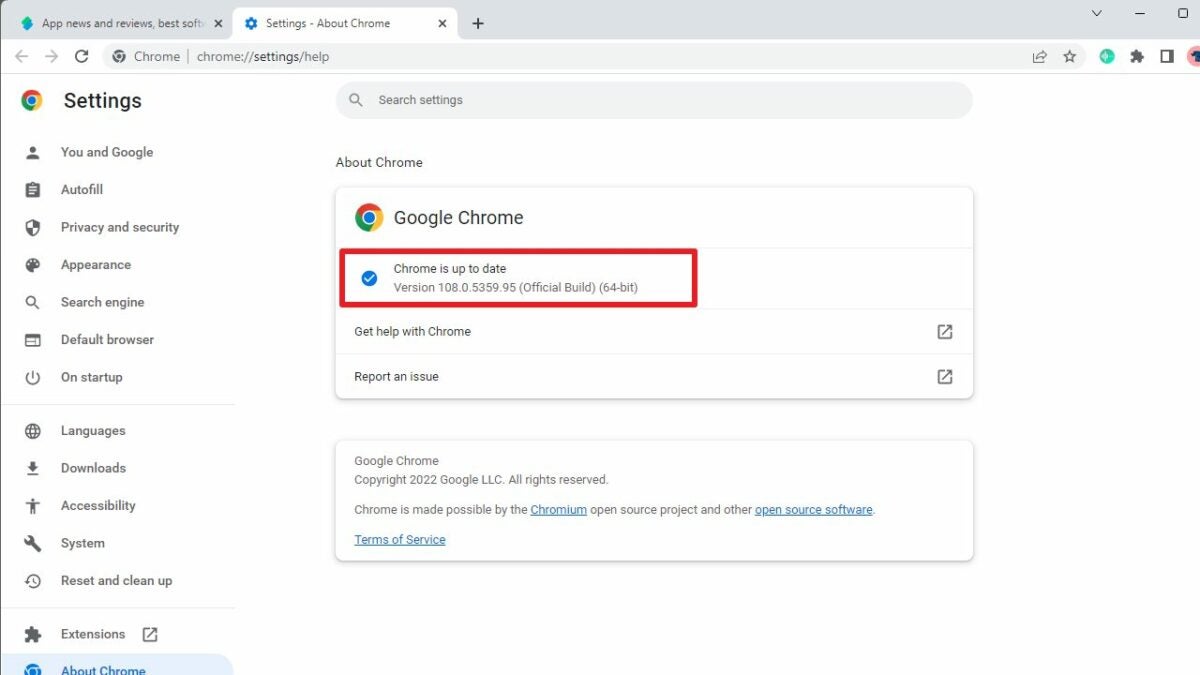
Tip: Load chrome://settings/help in the Chrome address bar to check the installed version of the browser. Chrome updates itself automatically when an update is available.

Memory and Energy Saver explained

Memory Saver frees up memory that Chrome uses by putting inactive tabs to sleep. Until now, all tabs of the Chrome web browser were active and used memory; this guaranteed that users could switch to any of the open tabs without delay.

Sites put to sleep by the feature remain open in Chrome, which means that they can still be accessed with a click. There is a slight loading delay, however, but it should not be noticeable on most devices.

Chrome selects inactive tabs automatically to free up memory when the feature is enabled by the user.

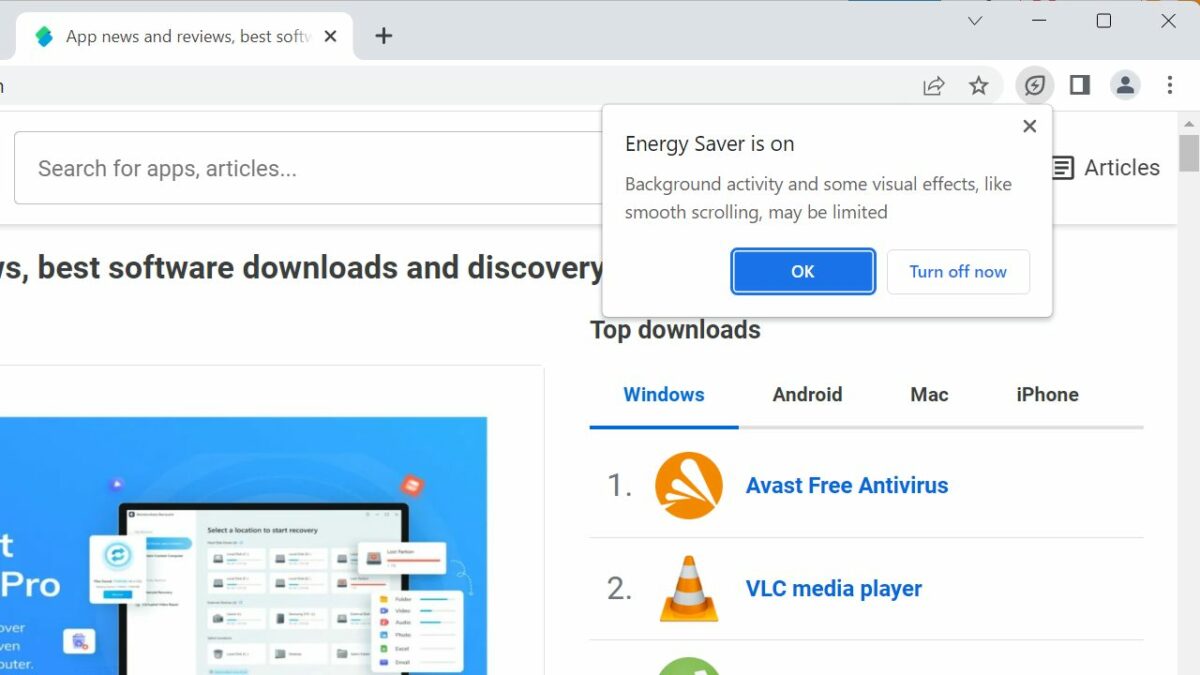
Energy Saver, on the other hand, may reduce the browser’s energy usage. It runs automatically, either when battery is dropping below 20% or when the computer is unplugged. An option to turn it on manually is provided as well.

How to configure Memory Saver in Chrome

Memory Saver needs to be enabled by the user or administrator. Before that can even happen, it needs to be available in Chrome.

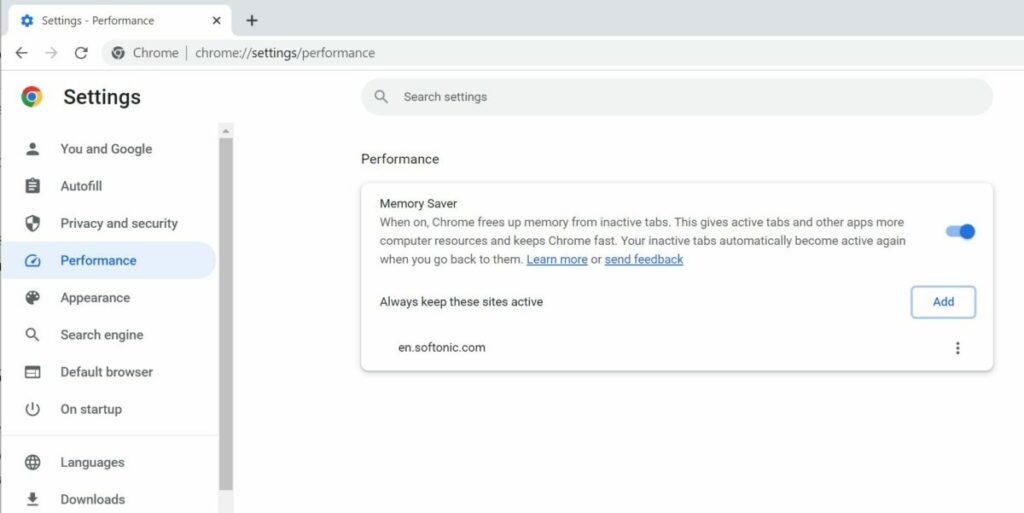
To check whether that is the case, load load chrome://settings/performance in the address bar, or select Menu > Settings > Performance to open the Settings. If Performance is not listed yet, do the following to enable it.

  1. Load chrome://flags/#high-efficiency-mode-available in the browser’s address bar.
  2. Set the status of the flag to Enabled.
  3. Restart google Chrome.

Flip the toggle on the Performance page to enable Memory Saver in Chrome. The browser puts inactive tabs to sleep automatically from that moment on.

There is an option to exclude certain sites from this. Activate the “add” button and type the domain that you want to exclude. Any site listed here is protected from the feature. In other words, it remains active all the time.

How to configure Battery Saver in Chrome

Battery Saver is the second performance enhancing mode. Like Memory Saver, it may not be available yet in Chrome 108. The feature is listed under Performance, when enabled, just like Memory Saver.

Note: the Memory Saver setting appears on battery-powered devices only, even after activation.

If it is not listed, do the following:

  1. Load chrome://flags/#battery-saver-mode-available in the browser’s address bar.
  2. Set the flag of the feature to Enabled.
  3. Restart Google Chrome.

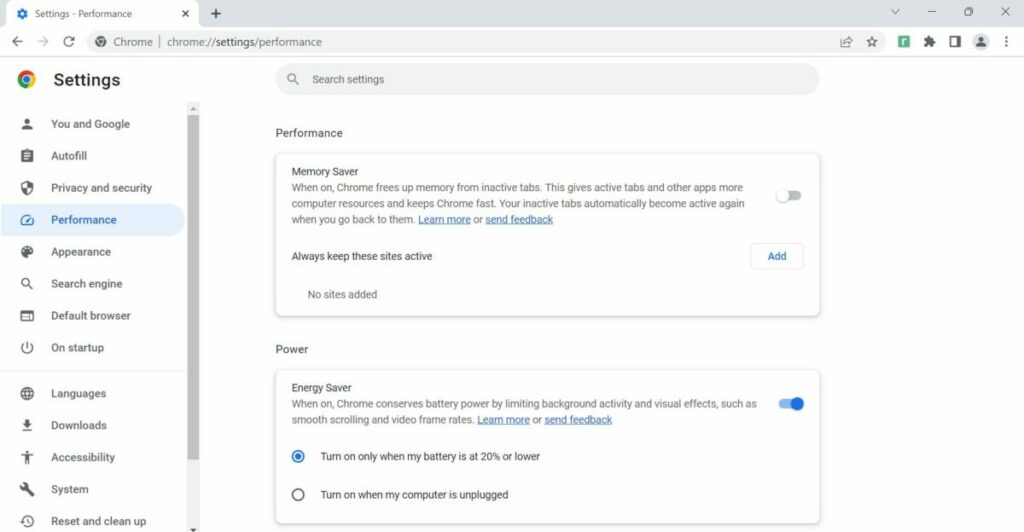
Energy Saver is a new option under Performance after the restart. The feature is enabled by default and set to turn on automatically when the battery is at 20% or lower.

An option is provided to switch Energy Saver on whenever the device is unplugged.

“Chrome conserves battery power by limiting background activity and visual effects, such as smooth scrolling and video frame rates” when the feature is turned on, according to Google.

Conclusion

Both modes improve usage of the browser, especially if low- to medium-powered devices are used, or if Chrome is used in a mobile setting frequently.

It helps users use the browser for longer while unplugged and more efficiently.

Google is not the only company that is introducing these types of improvements. Microsoft added Sleeping Tabs and Energy Efficiency modes to its Edge browser some time ago. These help users of Edge save memory and power, very similarly to the functionality of Chrome.

Google releases major security update for Chrome

Google released a security update for its Chrome web browser a moment ago that addresses a major security issue in the browser.

The update is available already, but Chrome users may want to speed up the installation to protect their devices and data. Google notes that malicious actors exploit the issue on the Internet already.

Chrome Download Now

The security update is available for desktop operating systems and for Android.

Chrome 108: how to update

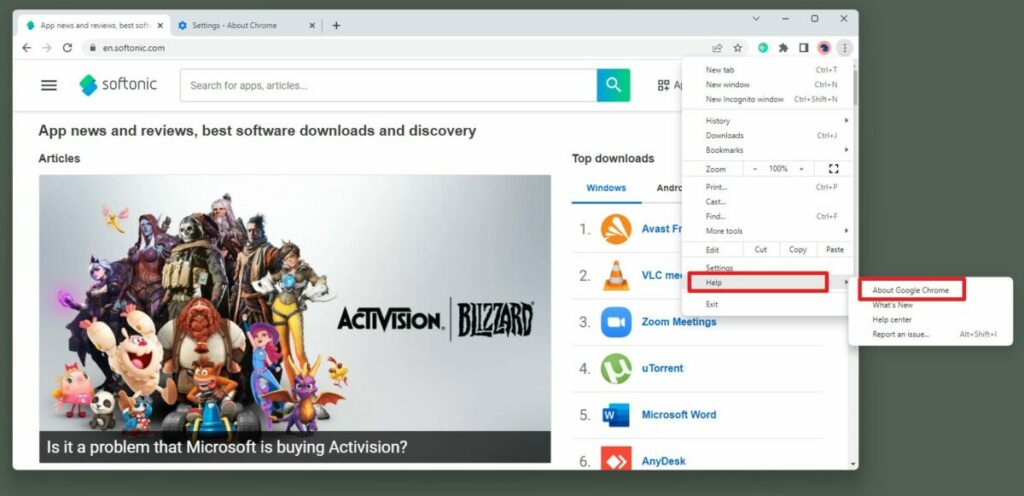
Chrome users may want to open Menu > Help > About Chrome in the browser to display the current version. Chrome runs a check for updates automatically when that page opens. Any update found will be installed automatically.

The following versions should be displayed after the update installation:

  • Chrome for Windows: 108.0.5359.94 or 108.0.5359.95
  • Chrome for Mac or Linux: 108.0.5359.94
  • Extended Stable channel for Mac and Windows: 108.0.5359.94
  • Chrome for Android: 108.0.5359.79

Just compare the listed version with the version that Chrome reports when you open the about page. Updating requires a restart of the web browser to complete the installation process.

Chrome 108: the security issue

Google’s release post on the official Chrome Releases blog reveals some information on the fixed issue.

The most important information conveyed is that the issue is exploited in the wild.

“Google is aware that an exploit for CVE-2022-4262 exists in the wild.”

In other words: Google is aware of attacks that target the security issue. The company does not provide further information, e.g., on the scope of the attacks or where these may be encountered.

Still, in the wild refers to attacks on the Internet that users of the browser may experience. A patched version of Chrome protects against these attacks, while an unpatched Chrome may be attacked successfully.

The security issue has a severity rating of high, which is second only to critical.

The CVE record — CVE stands for Common Vulnerabilities and Exposures — offers additional insights.

“Type confusion in V8 in Google Chrome prior to 108.0.5359.94 allowed a remote attacker to potentially exploit heap corruption via a crafted HTML page. (Chromium security severity: High)”

Attacks are carried out using webpages. These need to contain attack code to be executed. It is still unclear how widespread the issue is based on the description.

Summary

Chrome users and administrators need to patch the web browser immediately. The update to the latest Chrome 108 version protects the browser against attacks, which are carried out at the time of writing.

The new major security update comes just days after the update to Chrome 108; this update fixed another 28 different security issues in the Chrome web browser.

Chrome includes automatic update functionality, but updates do not happen in real-time. Chrome users may speed up the installation of updates using the method described above.

While that is not necessary for non-security or emergency updates, it is essential when it comes to security updates.

Amid more zero-day exploits, is it time to stop using Google Chrome?

Google has just released yet another emergency security update for its Chrome web browser on desktop platforms. This brings the total number of emergency zero-day vulnerability bug fixes to a troubling eight this year alone. In the analysis below, we’ll explore what a zero-day exploit is and how vulnerabilities like that, which Google is currently trying to get a handle on, happen.

This article will likely contain a plethora of terms and phrases used in the software development spheres but rarely in general conversation. Therefore, we’ll try as far as possible to explain this terminology in more accessible language. 

What is a zero-day vulnerability? 

In the most basic terms, a zero-day vulnerability is a weak point in a system’s software that the original developers, coders, and vendors of the software have yet to discover. Zero-day vulnerabilities are incredibly lucrative for those who find them, and detrimental to the vendors of the affected software, their customers, and the wider public who utilize the software.

In a 2021 article entitled What is the Current State of Zero-day Exploit Market, Lifars.com estimated zero-day vulnerabilities to be worth anything from $60,000 – as in the case with Adobe Reader) and $2,500,000 – as in the case of Apple’s iOS operating system. These are actual prices that threat actors have paid for single zero-day vulnerabilities. Simply put, if you manage to find a zero-day vulnerability within any popular piece of software’s code, you could be looking at a massive windfall. You’re more likely looking at severe punishment, though. As lucrative as the zero-day trade is, it’s also incredibly risky. 

The term zero-day is derived from the timeframe that the vendor’s developers and coders have had to create a patch; zero days. Zero-day is essentially the state of a vulnerability in a system before it is officially discovered by the vendor so that a patch can be created and distributed. This is why these types of vulnerabilities are so lucrative; they’re unknown to all except the threat actor who discovers them. Therefore, they’re an opportunity for a larger threat actor to gain access to data without users’ knowledge or potentially bring a service or entire company to its knees. 

zero-day vulnerability Google

What causes a zero-day vulnerability?

In many cases, vulnerabilities exist as a result of an error in a system’s code. If you make a syntax error when writing code, such as omitting a semi-colon or misspelling an instruction, your compiler will usually tell you exactly where the issue is so that you can fix it. However, other mistakes outside of the syntax realm are not always as easily spotted.

Zero-day vulnerabilities are caused by the same errors as other vulnerabilities. The only difference is that a zero-day hasn’t been noticed by the vendor and is instead uncovered by a threat actor or someone intending to sell their discovery to a threat actor. In short, zero-day vulnerabilities are often caused by errors in a system’s code

Why are zero-day vulnerabilities so dangerous? 

The entire nature of a zero-day vulnerability means that its danger lies in its potential. As we’ve mentioned, zero-day is the prefix automatically assigned to a vulnerability before the vendor or developer invested in the product’s safety and that of its users knows about it. As soon as a threat actor discovers a vulnerability, it becomes a zero-day vulnerability.

This is another reason these vulnerabilities are so dangerous. The vendor doesn’t know there’s a problem, and therefore, the vendor can do nothing to rectify the issue. The vendor is, at this stage, clueless and incredibly vulnerable. 

There have been many zero-day vulnerabilities since the advent of technology and computing. However, the reason that this term strikes so much fear in the hearts and minds of billions of people is that there are so many that have not been solved. The only way to know what the issue is is for the developer or the vendor to have knowledge about the vulnerability. However, in some cases, that knowledge only amounts to the awareness that your system is compromised, not how the compromise was achieved. 

One of these largely unsolved issues is Stuxnet, a worm-type exploit that was, allegedly, tasked with attacking Iran’s nuclear program. The vendor, in this case, the Iranian establishment, knew that there was a problem. Their gas centrifuges, a mechanical system for separating nuclear material, started tearing themselves apart.

There was mass physical damage, and it set Iran’s nuclear program back considerably. However, while Western establishments are widely believed to be behind the attack on Iran’s nuclear program, no one has claimed responsibility for the attacks. No threat actor has been identified as yet. Stuxnet isn’t even a relic of the past. The worm is still active. 

Fun fact: Stuxnet was deliberately engineered to attack three core systems; Windows operating systems, Siemens software, and Siemens S7 PCs. If these three criteria are not met, the worm renders itself inert and doesn’t activate. Each instance of infection was also deliberately restrained from propagating itself to more than three other computers. 

Zero-day vulnerabilities are so terrifying because the people who can fix them have no idea they exist. They’re so dangerous because it takes only one threat actor to turn a vulnerability into an exploit, and these exploits aren’t always caught by the developers or vendors

zero-day vulnerability Google

Why does Google keep falling prey to zero-day vulnerabilities?

The simple answer is that we don’t live in a perfect world. In a perfect world, we’d release software with zero vulnerabilities, which would prevent zero-day exploits from even being a term in our modern language. Unfortunately, this is not the case, even for a massive corporation like Google.

The issue likely lies in the fact that there are so many developers, coders, and programmers that are working on Google’s software. Google reported that in 2022, it currently employs 27,169 software engineers. Of these, an estimated 200 engineers actively work on Google Chrome, the currently affected service. This doesn’t even include the people who work on the many other tasks that go into making a product like Chrome work as it should – which, by the way, is a full-time job.

Google Chrome is one of the most widely-used internet browsers, and it takes a monumental workforce to keep it stable. However, issues still manage to slip through the cracks. Perhaps because there are so many different individuals working on the program at any given time. But, without so many individuals working on Chrome, it’s likely that the product would not be the success that it is. 

The latest high-severity flaw, discovered by Clement Lecigne from the company’s Threat Analysis Group on the 22nd of November 2022, is what experts call a ‘heap buffer overflow in GPU.’ The vulnerability is currently being tracked as CVE-2022-4135. The term ‘heap buffer overflow in GPU’ might sound like a bunch of tech garble, but it’s incredibly important terminology to understand. Essentially, buffer overflows result in access being granted to regions of your computer’s memory that software shouldn’t have access to. This means that threat actors have a potential back door into your system, and, thus, your data. 

This is why it’s of utmost importance that you download the latest Google Chrome patch before your data is breached. These vulnerabilities will likely continue happening well into the future, but, given that this is the eighth vulnerability this year in Google Chrome, is it wise to potentially start seeking out other browsers?

zero-day vulnerability Google

Should you use another browser? 

Honestly, as long as you are using a browser that uses code written by people, you’re likely going to have to deal with vulnerabilities. Errors and mistakes of all sorts underpin the entire experience of being human. Grammarly, a popular piece editing software for professionals in writing and editing, has built its entire brand upon the idea that ‘to err is human, to edit, divine.’

This is a sentiment that echoes something that Eckhart Tolle once said: ‘It is through the mistakes that the greatest learning happens on an inner level.’ The same is true for software engineering. Yes, engineers make mistakes, as does everyone else. But, we should be comforted by the fact that Google employs not just engineers but also auditors and independent contractors that put the software through its paces.

There are many teams of people dedicated to finding and solving vulnerabilities before they get exploited. However, sometimes vulnerabilities do slip through the cracks and are weaponized, and then we have a situation like the present one within which we find ourselves, where Google releases a patch that fixes the vulnerability. 

Therein lies the crux of this entire issue. Yes, there are vulnerabilities, but Google has already issued a fix for the most recently discovered of these, as well as those discovered previously. Google is permanently working on Chrome’s stability. 

However, if you are resolved and want to change your browser, my personal recommendation would be to try Brave. This opinion is mine alone and does not reflect the views of Softonic, an impartial party when it comes to software. However, I have found Brave to be an even more compelling browser than Chrome. Brave is far superior in its native ad-blocking technology and allows you to choose a default search engine to make the transition as smooth as possible.

For instance, I use Google as my default search engine within Brave, but I still have full access and usage to Brave’s numerous finely-tuned security protocols. While no piece of software is truly safe from vulnerabilities, Brave at least prioritizes the safety and security of your data and virtual personal space more than other browsers have managed. 

Google Chrome is still #1

In terms of browsers’ capabilities, Chrome is still the most compelling choice. Apart from personal preference, you won’t find a browser with a more dedicated workforce, more resources, or better ratings.

Yes, Google has had a decidedly bad year when it comes to Chrome vulnerabilities, but that shouldn’t cause you to question the stability of the system. As stated previously, Google has teams working on Chrome’s stability at all times. With Google Chrome, you’re still in good hands.

New Google feature allows easy GIF sharing

Share GIFs quick and easy with this new feature from Google!

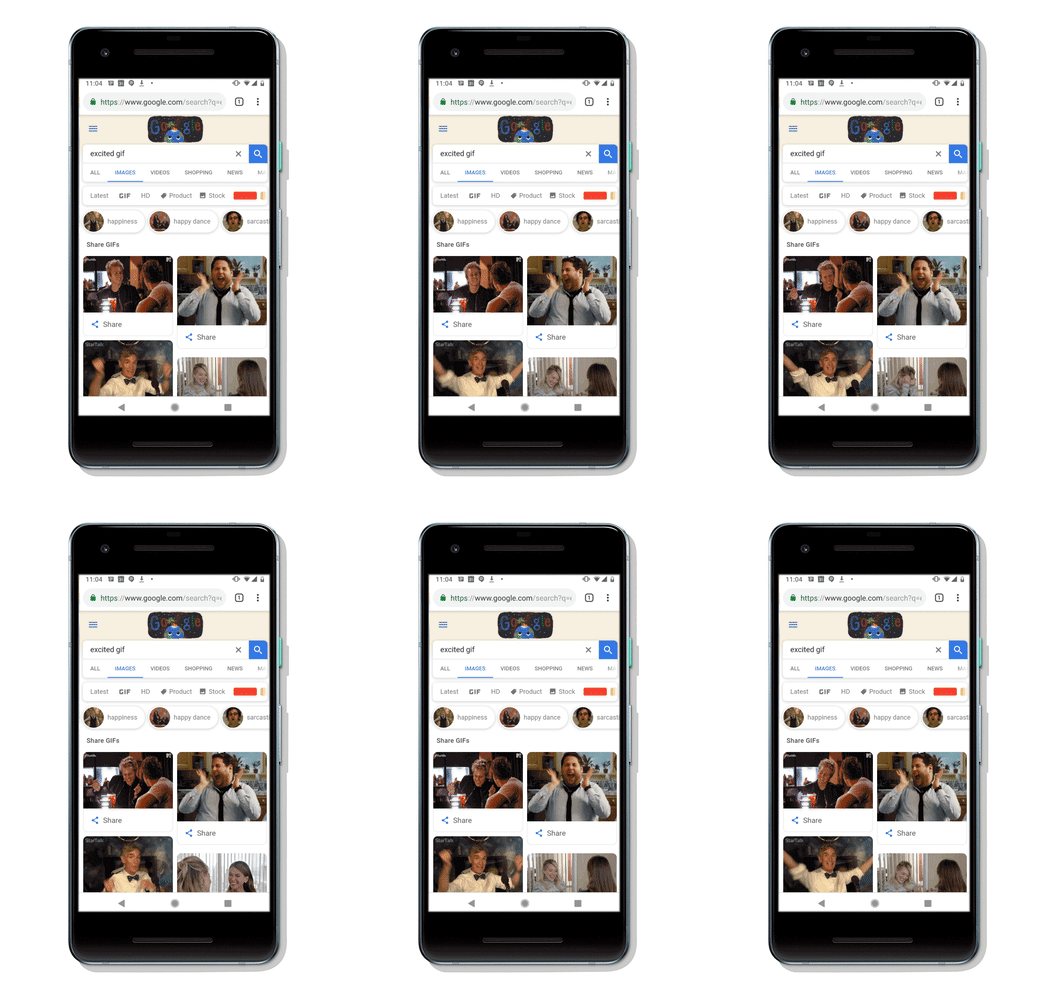
Google GifGoogle has made it easier to share GIFs from Google Images with our friends and family. This feature is available on the Google app on iOS and Android as well as on the Chrome app on Android.
Google Gif
Source: Google Blog

When you do a Google image search, just click the GIF section near the top. That will open up a search result page where you’ll see all the GIFs available to you. Click the “Share” button and you’ll be able to send the GIF via SMS text message, Facebook, Messenger, WhatsApp, Twitter, and even email.

Available GIFs will come from Tenor.com, or through a Google partner. You can fill out a form to connect with Google’s partnership team. 

Finally, we have the ability to quickly send our coworker a GIF when they ask if we want to do pizza for lunch.

If you are on mobile, you can conveniently click on the button to share a GIF. However, you still have an option to share GIFs from Google Images even if you are on desktop. If you are on desktop, click on the corresponding GIF you want to send, and hit the share button. You also can quickly send GIFs using Giphy on both desktop and mobile.

GIPHY World Download Now ►
7

Is Incognito mode really private?

Incognito mode can prevent a lot of embarrassing situations, but how much can it really protect us?

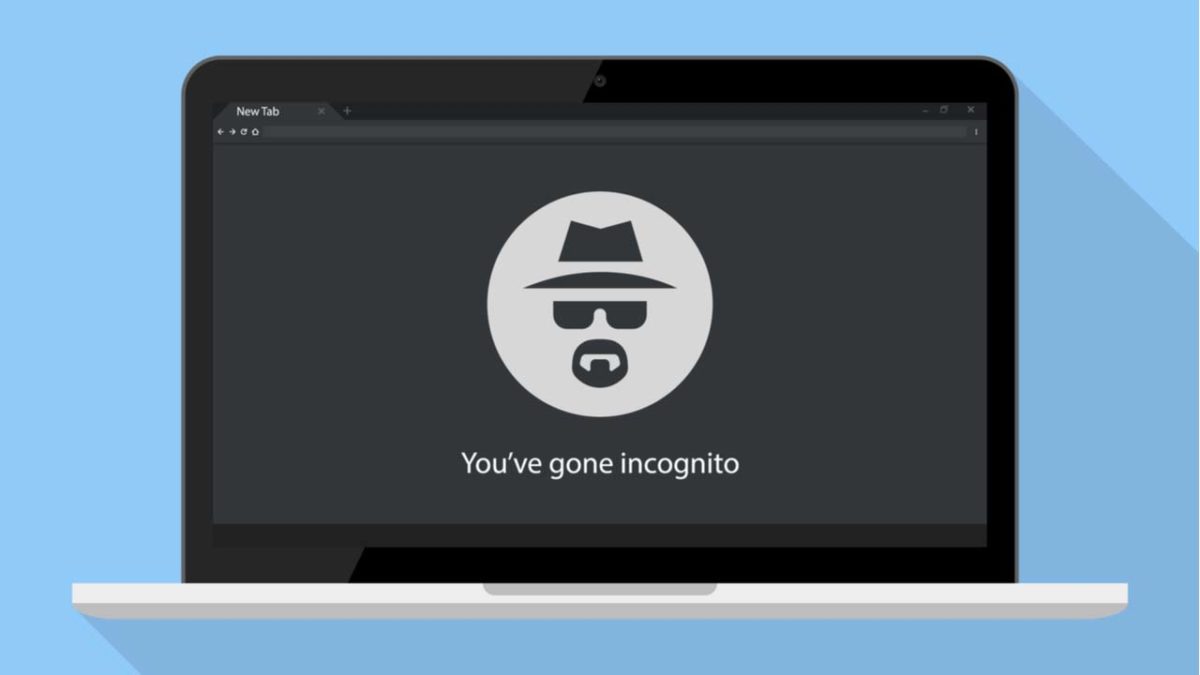
Incognito

Perhaps we’re collectively wising up to the various ways in which we’re being spied on at any given moment.

According to a 2016 study from the University of Washington, at least 75% of the world’s most popular websites use web tracking tools. Three years later, we’re sure that number has only gone up.

As such, there’s a lot to consider when it comes to privacy and how much we care about whether our browsing activities are genuinely private.

Which brings us to this question; how private is Google’s Incognito mode?

Is Incognito search really private?

Most of today’s mainstream browsers such as Google Chrome, Firefox, and Safari have some private browsing features, but it’s important to understand the difference between real private browsing and incognito.

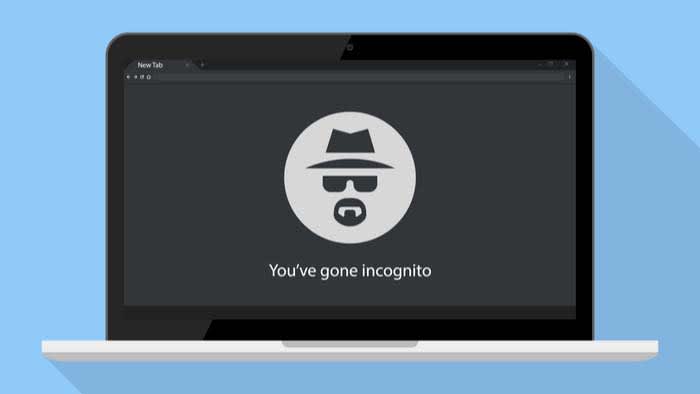
Chrome’s Incognito isn’t private browsing, and they do mention this when you open a new incognito window.

As the name suggests, you’re really just putting a “disguise” on your online activity so that your browser doesn’t store cookies or password info during your next session.

Google Chrome Download FREE ►
7

Chrome’s privacy issues

Chrome privacy

There’s a reason that Google Chrome is currently the most popular browser in the world. It’s easy to use, and it connects with all of your Google accounts. If you’re like most people, you’re probably using it on the regular.

Just think about how often you have to use Google Docs at work or how many people you know who use Gmail.

With all of its convenience and user-friendliness comes a darker side. Chrome stores a ton of information about you from names, addresses, and passwords to what you do online.

Are there any benefits to using an Incognito tab?

incognito

The idea is, if you’re using your own devices, you don’t have to keep logging into various accounts. Also, Google will help you keep track of calendar reminders, save your parking location, and remember multiple passwords, so you don’t have to.

However, if you’re on a public computer or other people have access to your device, you probably don’t want that information stored publicly. You especially don’t if you’re accessing sensitive content online.

That’s the main reason Google developed Incognito mode, not necessarily to provide a totally anonymous browsing experience.

This includes the websites you’ve visited and the information you may have entered, including passwords.

But while Incognito mode brings some privacy into the fold, it doesn’t provide total anonymity. It certainly doesn’t protect against hackers, government surveillance, or even your employer or school.

That said, here are a handful of benefits associated with Incognito search,

Open multiple Google accounts

Let’s say you’re juggling both work and personal accounts, but want to pull them up on the same device. Open an Incognito tab and log into the secondary account.

Get around (certain) firewalls

 HBR incognito browser

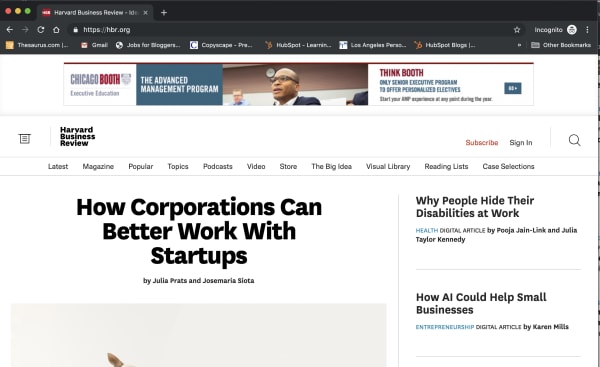
Some sites like the New York Times, the Harvard Business Review, and others have firewalls in place. Apparently, they use cookies to track whether you’ve reached your free article limit.

If you’d like to read an article without shelling out for the full subscription, opening an Incognito tab presents a (somewhat) reliable workaround.

However, it doesn’t work for every paywalled site. The Washington Post and Wall Street Journal, for instance, are onto this particular hack. Also, when you don’t pay for journalism, it has a tendency to die.

Do some benign sleuthing in an Incognito tab

If you’re stalking an ex on social media or scrolling through an acquaintance’s Instagram, or want to see someone’s LinkedIn profile without them knowing, Incognito is the perfect tool.

Sure, you might not be able to see every profile, but you’ll have a layer of protection against accidentally “liking” something.

You can prevent companies from tracking you

One of the key benefits of going incognito is that it prevents websites from tracking your cookies.

This means that you can browse freely without giving your browsing information to the sites you visit. Essentially, this allows you to opt out of remarketing campaigns.

That said, you can’t prevent your own company from monitoring your online activity — whether Chrome is wearing its spy fedora or not.

While your boss will need to install third-party tracking software to do so, you’re better off assuming that any company devices don’t offer much in the way of privacy.

Wrapping up

Incognito does have benefits, but the real downside is the fact that many people misunderstand its purpose.

However, the main thing to remember is that incognito doesn’t equal encrypted. If that’s your aim, you’ll want to make sure to use Tor, Brave, or use a VPN to keep online activity genuinely private.

What the Brave browser can do for you

There are better options than Chrome… Learn more about how the Brave browser stacks up the competition.

Not all browsers are created equally, and at this day and age when you’re spending so much time online, you should be using the best browsing tool possible. So which is it? Chrome? Firefox? Edge? The truth is there’s no objective ‘best browser,’ but there are certainly strengths and weaknesses to each. And we’ve got some compelling reasons why Brave could be the best browser yet. We’ve compiled a list of pros and cons for each one. Let’s run through them.

Mozilla Firefox

Pros:

  • More privacy than Chrome
  • Can be as fast as Chrome
  • Less likely to mine for data

Cons:

  • Runs slower on pages with lots of images, pop-ups, and videos
  • Lags behind Chrome once you install plug-ins to block those pop-ups and vids
  • No built-in support for Flash

Google Chrome

Pros:

  • Recognizes all plug-ins
  • Fast
  • Tons of extensions

Cons:

  • Bloated and heavy
  • Taxing on your RAM
  • Lacks trustworthy privacy features

Microsoft Edge

Pros:

  • Lightweight and smoother than Chrome
  • Built-in Cortana is very convenient
  • Reading mode fights distractions and blocks ads

Cons:

  • Unavailable on Mac or any Windows OS less than 10
  • If you have Windows 10, Chrome is still a better option
  • Even Internet Explorer is more popular

Opera

Pros:

  • Turbo mode speeds up page loads dramatically
  • Free, built-in VPN
  • Integrated wallet and messenger services, including WhatsApp and Messenger

Cons:

  • Fewer extensions
  • No parental controls
  • Middle of the road option, lacking where other browsers excel

Safari

Pros:

  • Default browser for Apple, very convenient
  • Works in tandem with all software designed by Apple
  • Default pop-up blocking

Cons:

  • Safari is over 15 years old, and its age is beginning to show
  • Lacking in customization
  • Useless if you don’t use Apple products

Brave

Brave is a relative newcomer for iOS, Android, macOS, Windows, and Linux created by Brian Bondy and Brendan Eich, the inventor of JavaScript and the co-founder of Mozilla.

Brave automatically blocks any third party trackers, shutting down anything that might worsen your browsing experience. Without ads in the way, Brave is up to eight times faster than the mobile competition, and offers numerous extensions as well. Brave also helps you support your favorite publishers.

Softonic is proud to partner with Brave. When you download from us, we may earn a commission.