Microsoft releases its new Chromium based Edge browser on Windows 10

The Microsoft Edge Insider Channels are now available for 64-bit Windows 10 users in English.

We’ve been following the development of Microsoft’s new Chromium-based Edge browser ever since we first learned it was on the way. We know you’ll be able to use all your favorite Chrome plugins on the new browser as well as all your Edge plugins, too. We’ve even seen screenshots so we already know what it looks like. Today, we’re here to tell you that the journey is nearly complete as Microsoft is releasing the first preview builds of its brand new browser.

The Microsoft Edge Insider Channels are now available for 64-bit Windows 10 users in English

New chromium edge developer channels
Image via: Microsoft

In December, Microsoft announced it was working on a new Chromium-based version of Microsoft Edge. The software giant pledges to have the first builds of the browser available in “early 2019” and now seems to be coming good on that promise.

Microsoft has now confirmed that Windows 10 users on 64-bit machines can download an English language version of the Microsoft Edge Insider Dev Channel and Canary Channel. If you follow our Google Chrome update articles, you’ll notice that Microsoft is calling the most experimental version of the new Edge browser Canary, just like Google does with Chrome.

The Canary Channel will show all the latest features that the Edge team have been working on. It will be updated on a daily basis, but may well end up containing buggy code that could cause issues on your machine. The Dev Channel will be updated every week and so will keep users up to date on what new features will coming to the Edge browser, while being a little more stable than the Canary Channel.
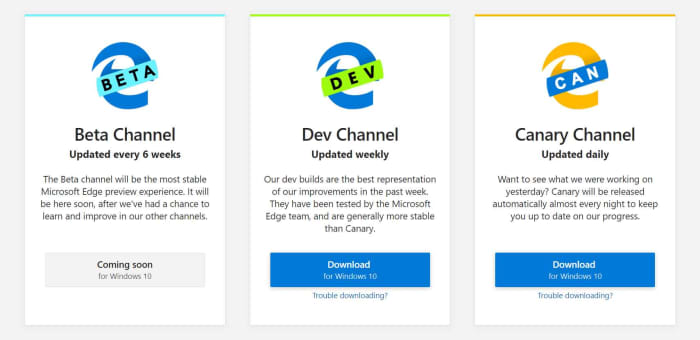
The different Microsoft Edge builds

You’ll notice from the image above that both of these channels come before the Beta Channel in the development process. The beta version of apps is the final testing phase in the development process, when users get to test out new features. The Beta Channel will be updated every six weeks. These new builds are more of a way of mapping out what the new Edge browser will be like. They’re not browsers you should be downloading so you can start surfing the web.

To be fair to Microsoft, it is clear that although it is building a browser using Chromium, it is determined to build something that can stand on its own two feet in the battle against Google Chrome. In an online PowerPoint presentation, a Microsoft Edge engineer included a slide that showed just how many Chrome features Microsoft has removed or replaced to make the new Edge what it is today.
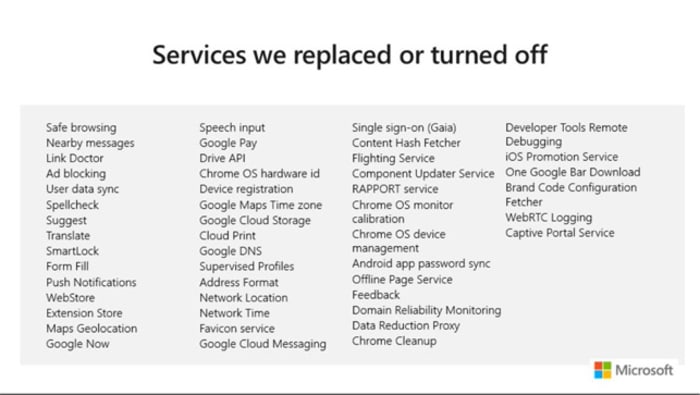
Chromium Edge won't just be a Chrome clone

This is all the stuff that independent developers won’t have the resources to build themselves. Microsoft does have the resources and wants it known that it has rebuilt the new Edge itself. The move to Chromium is more about better web compatibility for users, less fragmentation for developers, and an improved update cycle.

Different Edge builds for different Edge platforms
The Chromium Edge browser will also be available for Mac users

If you’re a developer, you can now get your hands on the early access version of the new Edge browser by checking out the Microsoft Edge Insider program. For the rest of us, there is still no news from Microsoft about when we’ll see a general roll-out of the new browser.

From the timetable Microsoft has laid out, we could expect to see a beta version in five-to-six weeks and then it is anyone’s guess how long it’ll take for a full version to come out after that. All the news about the development process has been positive so far though, and it really looks as though Chrome could soon have some serious competition at last.

Google Chrome will make it easier to browse more privately

New Chrome feature will tell you what sensors websites are trying to access and give easy option to prevent it.

These days, our devices can do a lot of different things. At the heart of this versatility lies a multitude of sensors collecting different types of data, which is then used to perform what seem to be technological miracles. From light sensors to gyroscopes, our modern devices are constantly working to detect our surroundings and how we’re interacting with them.

All our device collect a lot of data
Our devices are constantly collecting and sharing data about many things including where we are and what we’re doing

The positive half of all this is that we then get all sorts of insights and data into our behavior that we can use to inform our future decisions. The flip side, however, is yes, you’ve guessed it, privacy. With so much data constantly being collected, it is all too easy for us to just hand it over to whoever runs the websites we visit or the apps that we use. So it is good news that Google is planning to make it much easier to control who we share all this data with.

New Chrome feature will tell you what sensors websites are trying to access and give easy option to prevent it

The types of sensors listed above are found in laptops, smartphones, and tablets. Sites might try to access the data they’re collecting for a whole host of reasons. Knowing things like what device you’re using and how you’re using it is lucrative information, which gives a financial incentive for the tracking.

light sensors

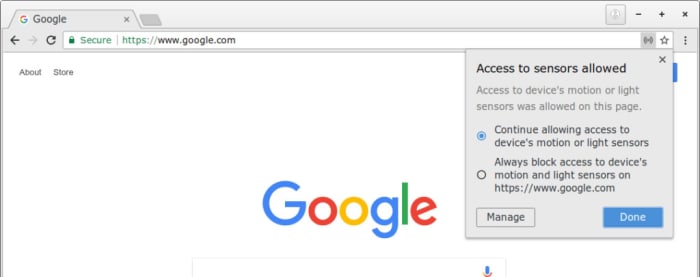
In a bid to make this whole process more transparent, Google is introducing a new feature that will show a pop-up any time a site tries to access one of your device’s settings. The pop-up will also include a switch, which will give the option of turning on or off the site’s ability to use data that sensor is collecting.

New Chrome sensor control

This new user-friendly privacy tool has been spotted in Google Chrome Canary, which is the advanced developer build of the famous web browser. Canary is where Google tests potential new features for Chrome and checks for bugs or potential coding issues. At the moment, a more fully functioned version the feature appears for the desktop version of Chrome, which gives control over each individual attempt to access a device’s sensors.

Google Chrome Canary Download now
7

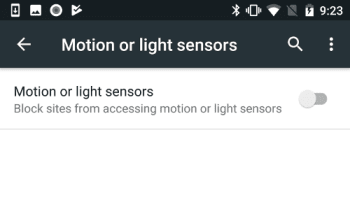
For now, at least, the Android version of the feature works simply as an on/off switch that gives users the opportunity to block all sensor data being shared or allow blanket access.

Android Chrome sensor support

There is no official word as yet about when this new feature will come to Google Chrome but the guys at Tech Dows believe Google has set it as priority 1 for it to be included the Chrome 75 update. As we’ve only just seen Chrome 73 receive a general roll-out, we can expect to have to wait a few months yet before we gain control over which of our sensors the sites we visit on Google Chrome have access to.

Google Chrome gets new privacy boost

Google has added the private search engine DuckDuckGo to the default search options on Google Chrome.

Google and user privacy aren’t exactly synonymous with each other. In fact, the search giant’s revenue stream depends on it gathering as much information about our web habits as possible and selling it all to advertisers. This means it is probably second only to Facebook in the big tech assault on our privacy. Thankfully, this latest move from Google makes it easier for us to control the data we create when we browse the internet.

Google has added the private search engine DuckDuckGo to the default search options on Google Chrome

The DuckDuckGo search engine has been around since 2008 and was founded to provide a private alternative to internet search. Since then, it has been growing steadily and in October, it saw over 30 million searches for the month. Just this January, the private search engine struck a deal with Apple to provide map support for its anonymous location searches.

The addition of DuckDuckGo to Google Chrome’s default search engine options is a big deal and was first spotted by the guys at Tech Crunch. They report that the option will now be available in 60 countries around the world. Chrome users in “Argentina, Austria, Australia, Belgium, Brunei, Bolivia, Brazil, Belize, Canada, Chile, Colombia, Costa Rica, Croatia, Germany, Denmark, Dominican Republic, Ecuador, Faroe Islands, Finland, Greece, Guatemala, Honduras, Hungary, Indonesia, Ireland, India, Iceland, Italy, Jamaica, Kuwait, Lebanon, Liechtenstein, Luxembourg, Monaco, Moldova, Macedonia, Mexico, Nicaragua, Netherlands, Norway, New Zealand, Panama, Peru, Philippines, Poland, Puerto Rico, Portugal, Paraguay, Romania, Serbia, Sweden, Slovenia, Slovakia, El Salvador, Trinidad and Tobago, South Africa, Switzerland, U.K., Uruguay, U.S. and Venezuela,” will now be able to have DuckDuckGo perform all the searches they make on Google Chrome.

These changes have been spotted in the Chromium 73 stable release, which has been getting pushed out over the last few days. According to a software engineer writing in the GitHub instance for the release, the addition of DuckDuckGo is based on usage statistics alone, with the privacy-focused search engine tending to be in the top four search engines in all of the countries listed above. It could just be a coincidence then that the introduction of comes at a time when Google is facing heavy scrutiny on antitrust and privacy violations.

the duckduckgo privacy search engine extension

DuckDuckGo has long been available for default searches on Google Chrome, but only as a third-party extension. This new move puts it at the heart of the Google Chrome browser, and it makes it much easier for users to set the search engine for their everyday searches. It will be very interesting to see how this move affects the number of searches that go through DuckDuckGo in the future and whether it will have a noticeable adverse effect on the number of Google searches, too.

Microsoft has a brand-new security extension to keep you safe on Chrome and Firefox

Microsoft brings Windows Defender Application Guard to Chrome and Firefox.

Microsoft is releasing a new extension for Chrome and Firefox that will help protect enterprise systems. The feature will work for businesses and takes what was once an Edge exclusive feature and puts it in the hands of businesses that use the Chrome and Firefox web browsers. There is a cool catch, however, that helps keep Microsoft’s Edge browser relevant, but we’ll get to that a little later on.

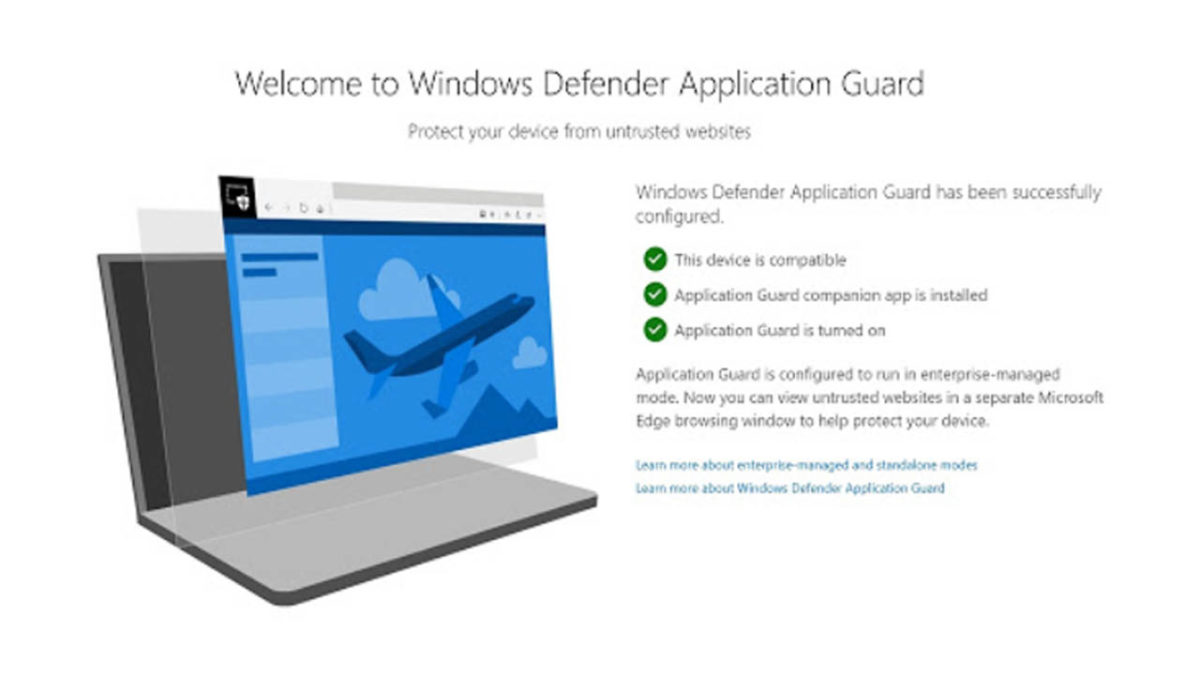
Microsoft brings Windows Defender Application Guard to Chrome and Firefox

Edge exclusive feature on Chrome and Firefox

According to the Windows blog post on the latest Windows 10 Insider preview, the new extension works by opening any web pages that aren’t on the network administrator’s trusted sites list in a virtual container.

7
Chrome is a young, fast browser that can browse any web page. It supports all major technologies and standards such as HTML5 and Flash.

The blog post says, “When users navigate to a site, the extension checks the URL against a list of trusted sites defined by enterprise administrators. If the site is determined to be untrusted, the user is redirected to an isolated Microsoft Edge session. In the isolated Microsoft Edge session, the user can freely navigate to any site that has not been explicitly defined as trusted by their organization without any risk to the rest of (the) system.” This means that the new extension won’t work without Microsoft Edge as it is in Edge where Microsoft keeps the virtual container. Theoretically, however, any link clicked in the isolated Edge session that is on the administrator’s safe list will then open again in the original browser.

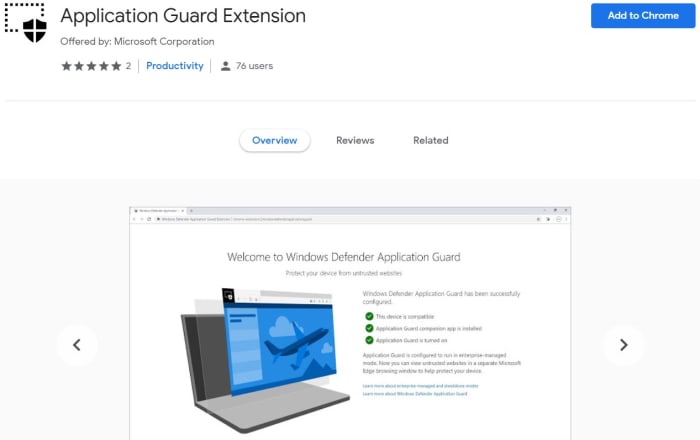
Application Guard Extension Google Chrome

To run on a PC the machine, you will first need the Windows Defender companion application and the browser extension installed on either Chrome or Firefox. For now, however, the feature is only in preview mode, so it is only available to members of Microsoft’s Insider program. We can expect a wider release soon, though.

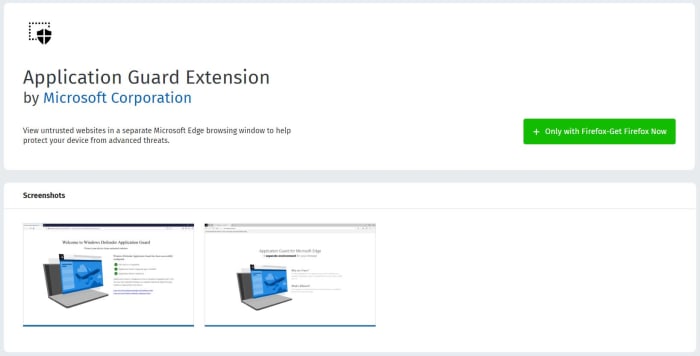
Application Guard extension Firefox

This isn’t the first time Microsoft has extended Edge’s security prowess to other browsers. Back in April of last year, Microsoft released another Chrome extension that helped defend against phishing attacks. The extension offers a dynamic list of reported malicious sites and now helps keep Chrome users safe against phishing attacks as well as if they were using Microsoft Edge.

7
Mozilla Firefox Quantum is a free, open-source web browser that offers numerous features and customization options. Its performance is excellent, and it's designed to protect your privacy.

Microsoft has had somewhat of a torrid time with Microsoft Edge. Even with the browser proving itself a more than capable competitor to Google Chrome, it has still failed to break Google Chrome’s stranglehold on the web browser market. Edge itself is soon to become a Chrome-based browser that will enjoy total compatibility with Chrome extensions. Maybe this lies behind Microsoft’s decision to share more and more of the Edge browser toolkit with the other web browsers via extensions.

You need to update Google Chrome right now

Google has released a patch that fixes a dangerous zero-day exploit in Google Chrome.

There is a very serious problem with Google Chrome’s security protocols right now. The problem is so serious that it has led to the Chrome’s lead security officer calling on all users to update their Google Chrome immediately, to avoid being vulnerable to attack. You need to update Chrome now.

Google has released a patch that fixes a dangerous zero-day exploit in Google Chrome

security vulnerability in Google Chrome

Justin Schuh, who is Google Chrome’s leading Security and Desktop engineer, took to Twitter to educate Chrome users about a brand-new vulnerability that has been discovered in the browser. The exploit is present both on Chrome for desktop and Chrome for Android.

The problem relates to Chrome’s FileReader API. File Reader is there to allow sites and web services to read files stored on the user’s device. Unfortunately, however, the bug also allows web sites to break out of their quarantined sandbox and even execute malicious code.

What makes this vulnerability more dangerous than others is that it hasn’t merely been discovered in a closed lab environment, like many of the other bugs we report on. Rather than being discovered by security consultants, this bug is already known to be being used in attacks by hackers. This is why Schuh took the specialist action of publishing the problem and advising users to update to the latest version of Chrome immediately. This is why you have to update Google Chrome now.

How to find out if Google Chrome on your PC is vulnerable

To discover if you are running the latest version of Google Chrome you need open the Chrome settings menu by clicking on the three dots in the top right of Chrome on your desktop. From here, you’ll need to click Help and then About Google Chrome. Here you will see which version of Google Chrome you have running on your PC.

Google Chrome desktop version page
If you don’t have this version of Google Chrome, you need to update it now.

The latest version, which includes the patch is Google Chrome version 72.0.3626.121. If your version of Google Chrome is lower than the above version, you need to update it. You’ll be able to do so on this screen, if Chrome doesn’t update itself automatically when you first open the About Chrome page.

How to find out if Google Chrome on your Android mobile is vulnerable

To find out if Google Chrome is up to date on your Android device, open the drop-down menu by hitting the three dots icon in the top right of the screen. Tap Settings and then at the bottom of the menu you’ll see the About Chrome option. Click this to find out what version of Chrome is running on your mobile. If it isn’t the latest version, you should go to the Play Store immediately and update Chrome.

This is what the new Chrome-based Microsoft Edge browser will look like

The first screenshots of the new Chrome-based Microsoft Edge browser are here.

Microsoft hasn’t had much luck at all with Internet browsers over the last few years. Internet Explorer has been little more than a laughing stock and Microsoft’s latest offering, Edge, never had the firepower to break through Google Chrome’s stranglehold on the market.

We were reporting that Microsoft was already thinking about killing Edge before Christmas, and it wasn’t long into the new year that this was confirmed with the news that Edge is migrating over to Chromium. Rather than continuing as a completely independent web browser, Edge is to be rebuilt around the open-source code that sits at the heart of Google Chrome. We now have some screenshots showing what the new Edge browser will look like when it lands.

If two web browsers had a baby…

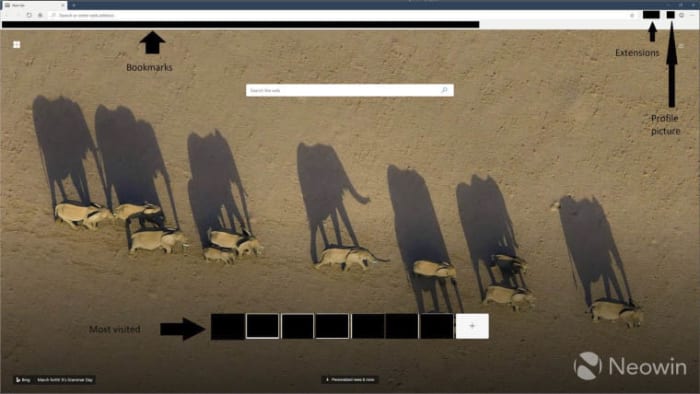
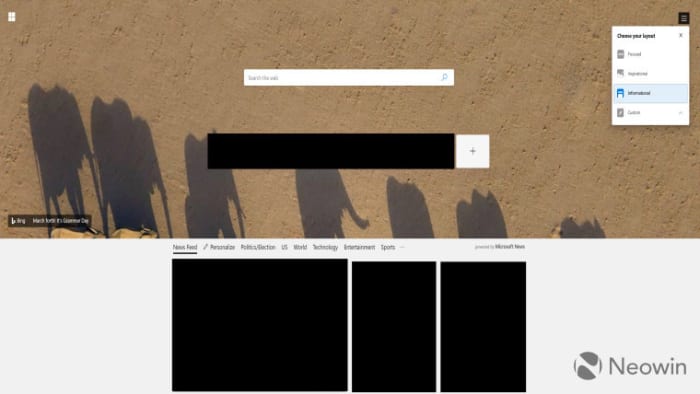
The guys at Neowin have been able to get their hands on screenshots of what the new browser will look like. Unsurprisingly, the browser looks a lot like Microsoft Edge but there are unmistakable elements from Google Chrome on show, too.

New screenshot of Microsoft Edge homepage

The first thing that catches the eye is the inclusion of the extensions button and a small profile picture in the top-right of the page. This set-up is as yet unseen on a Microsoft browser, but will be very familiar to Google Chrome users. Another feature familiar to Chrome users will be the bookmarks bar across the top.

What Edge looks like compared to Chrome
A comparison of the two browsers as they look now

On the flip, an Edge feature that is nowhere to be seen is the ability set aside currently open tabs. Edge features that are still there, however, include Bing as the integrated search engine and the ability to set New Tab backgrounds to Bing’s image of the day. Another Edge feature still in play is the personalized news feed, powered by Microsoft News, that is accessed by scrolling down on the homepage. There is also an option to personalize the appearance of this feed to one of four options.

news feed options on new Edge browser

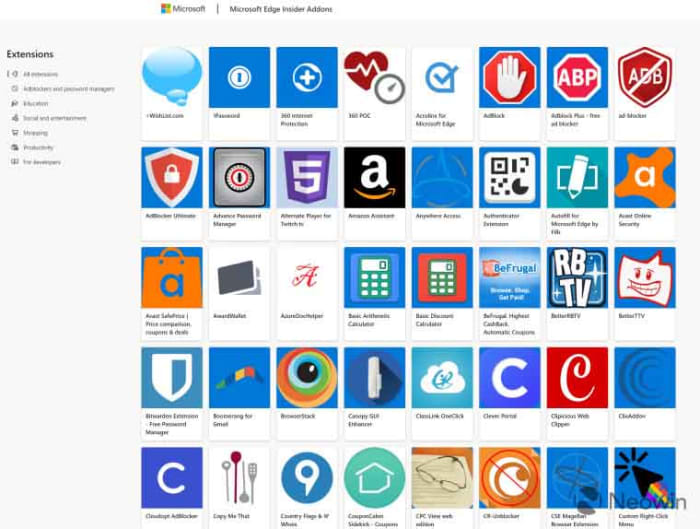
Another interesting development we can take from these screenshots is the continuation of the Microsoft store for Edge extensions. Microsoft will continue to maintain its own extension store with Edge extensions being recompiled to work on the new Chromium-based browser. Users can search the extensions from within the Edge browser and then download them via the Microsoft store.

As the browser is based on the open-source code that built Google Chrome, however, all Google Chrome extensions will also work on the browser. This means that users of the new Edge browser will have two separate stores offering extensions for the browser.

The Microsoft extension store for the new Edge browser

The final change Edge users will have to deal with is to the Settings menu. Rather than Settings coming from a slide-out menu, they will now have their own tab, you guessed it, just like they do on Google Chrome.

All these changes add up to a browser that offers more choice to Google Chrome users without presenting anything new or difficult to get used to. As to whether this latest move from Microsoft will see Edge gain a greater market share, we’ll have to wait and see.

All images via Neowin

Faster Google Chrome coming to slower, older PCs

An experimental new feature could cut Chrome RAM usage significantly.

Google Chrome is, without a doubt, the king of all browsers. It has quite literally devoured Microsoft’s Edge browser and all other web browsers are dwarfed by its insane market share. Google Chrome isn’t perfect though, and one of its biggest problems is just how much memory it needs to function properly. Unless you’re working on a top-of-the-line machine with plenty of RAM to spare, opening more than just a few tabs will slow everything down to a crawl.

This RAM problem has long been recognized by Google as an issue that needs fixing and it looks like we could soon see a solution to the problem.

An experimental new feature could cut Chrome RAM usage significantly

The new feature has been spotted in Google’s experimental Chrome Canary browser. Canary is a free-to-use browser that Google has long used to test out new Chrome features and this latest is an absolute doozy. Called “skip best effort tasks” the feature could finally see users not have to worry about how many tabs they have open, if they want their PC to work as it should.

Google Chrome Canary experimental browser
Google’s experimental Chrome Canary browser has a very interesting new feature

Skip best effort tasks works by delaying many of the low priority tasks Chrome usually runs until you shut it down. Rather than these tasks running continuously in the background while you browse, they are only carried out when you hit close after you’ve finished whatever it was, you were doing on the internet.

Low priority tasks include things like writing user data to the disk, telemetry, and cache cleaning. The new feature will take these drab-sounding yet necessary tasks, and a whole host of others like them, and hold them until Chrome is shut down. Individually, these tasks might not need much RAM, but if you add them all up and then multiply across all the Chrome tabs you generally have open, they quickly become a problem.

Describing the new feature, Google says, “With this flag on, tasks of the lowest priority will not be executed until shutdown. The queue of low-priority tasks can increase memory usage. Also, while it should be possible to use Chrome almost normally with this flag, it is expected that some non-visible operations such as writing user data to disk, cleaning caches, reporting metrics or updating components won’t be performed until shutdown.”

How to try “skip best effort tasks”

As this feature is still in the experimental stage there is no saying when, or even if, it will come to the version of Google Chrome used by 65% of all web users. If you’d like to give the feature a try in the meantime, however, you can do so by downloading Google Chrome Canary below.  The feature isn’t active by default though, so once you’ve installed and opened the experimental browser, you’ll have to type chrome://flags/#disable-best-effort-tasks in the address bar and tap enter to open up the Skip best effort tasks menu.

Google Chrome Canary Download now
7

New Chrome extension protects your passwords

New Chrome extension “Password Checkup” will automatically detect if your password has been exposed by a data breach

password

Passwords are one of the major weapons we have at our disposal in the battle to keep us safe and secure when we’re online. Strong passwords include many different characters, both numbers and letters, and should be at least eight characters long. We should also change our passwords regularly to keep ourselves as safe as possible.

The thing is though, that even if we have strong passwords that we change regularly there are still ways for our security to be undermined. Massive data breaches like the one that struck Yahoo could see our security credentials end up in the wrong hands, and our accounts compromised until the next time we change the affected passwords. Fortunately, Google is here to help us prevent such situations arising.

New Chrome extension “Password Checkup” will automatically detect if your password has been exposed by a data breach

Google has recently fallen victim to its own data breach, which led to the closure of the search giant’s long-suffering social network Google+. The bug exposed over half a million Google+ user accounts and exposed their data to third-parties.

It is unsure whether this lies behind Google’s move to develop a password checking Chrome extension, but the blog post announcing the move had this to say, “We built Password Checkup so that no one, including Google, can learn your account details. To do this, we developed privacy-protecting techniques with the help of cryptography researchers at both Google and Stanford University.”

screenshots from google password checkup

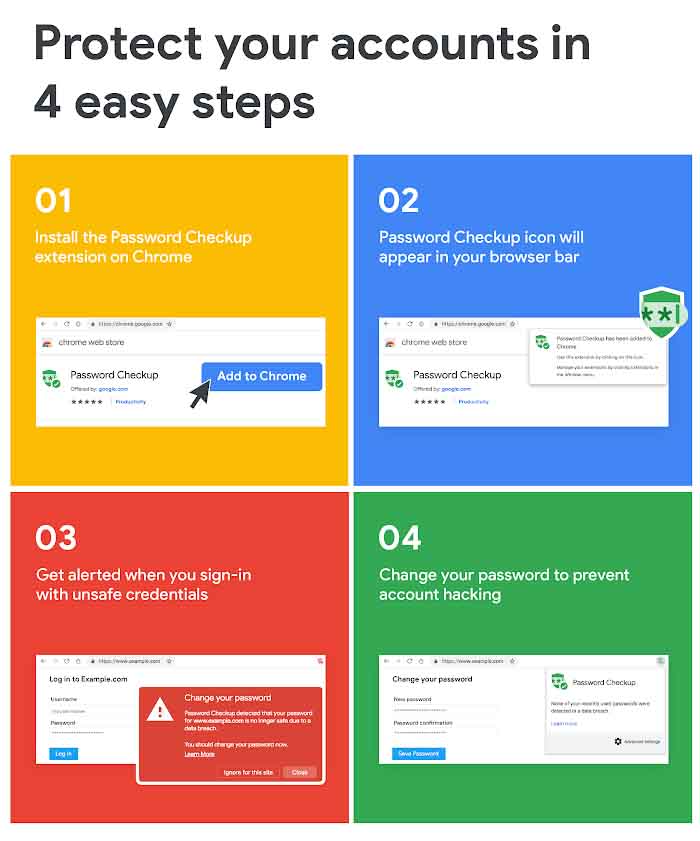
The way the new extension works is by cross-referencing every login detail you use against a database of over 4 billion security credentials Google knows to be compromised. The extension requires little-to-no effort once it has been installed. You’ll notice the icon in the top-right corner of Chrome and that will be it. The extension will then work in the background automatically, whenever you sign into websites. If it detects a compromised set of login details, it’ll alert you and prompt you to change them.

According to The Verge, the tool works with Chrome’s password manager and all passwords are stored in a hashed and encrypted form. Also, all warnings that the extension displays are local to the user’s system. Google has announced, however, that it will collect some user data on how the new extension affects user behavior. This will include data on whether an alert prompts action from the user like the changing of the compromised security details.

Password Checkup is available now as an extension for the Google Chrome browser. When announcing the extension, however, Google was quick to point out that this is still an early version of the tool and that it will continue to develop and refine it further over the next few months.

This is the Netflix browser extension you didn’t know you needed

The Netflix Extended Chrome extension adds keyboard shortcuts and removes intros and recaps

netflix

If you ask me, the greatest invention of the new millennium has to be the “Skip Intro” button on Netflix. Don’t get me wrong, it is not like I hate watching the intro to the shows I love, it is just that when I’m binging through a series, I don’t want to have to watch the intro again and again in between episodes. The same goes for recaps. They’re useful if you watched the last episode more than a few days ago but if the last episode just finished, I don’t need a recap. I know I’m not alone in this frustration.

8

OK, so there are skip buttons for these, but having to press them can be annoying, especially if you don’t have a wireless mouse setup. Thankfully, it is now possible to set Skip Intro and Skip Recap to default so that it happens automatically every time you watch a show. You won’t need to get up and tap a button, you’ll be able to stay right where you are and the next episode will begin, intro and recap free. This is the best Netflix Chrome web browser extension.

The Netflix Extended Chrome extension adds keyboard shortcuts and removes intros and recaps

Netflix Extended is a very easy to use Google Chrome extension that will enhance your Netflix experience. Once you’ve added the Extension to Chrome, you’ll notice a green Netflix style “N” next to the other browser extension logos in the top right of Chrome. Whenever you click this N, Netflix will open.

Once the extension is activated and Netflix is open, you’ll see a green dot in the control bar at the bottom of the screen whenever you’re playing a movie or show. Hovering the cursor over the green dot will tell you whether the extension is working properly.

favorite netflix extension

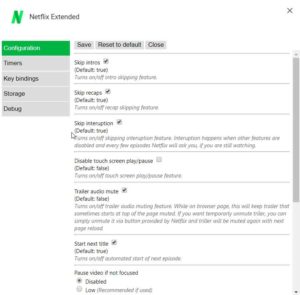
When you first activate Netflix Extended, it will already be set to automatically skip intros and recaps. If you’re not happy with the default settings, however, and you want to change them up, you need to right-click on the green N icon. From there click on the Options button to open the Netflix Extended settings menu.

netflix extended settings

As well as the Skip intros and Skip recaps options, you’ll also be able to set Netflix to automatically mute the trailers it shows at the top of the screen on startup. Another key feature is the ability to block the next episode from starting automatically if you think you might be binging a little too much.

Netflix Extended also has a number of keyboard shortcuts, which you can tailor to your needs via the Options menu. Clicking on the Key bindings tab will open up the shortcut defaults and give you the option to change which keys will do things like play the next episode or exit Netflix altogether.

If you’re a big Netflix fan like me, I recommend checking out Netflix Extended now.

Google Chrome could disable your ad-blocker

Which ad-blockers is Google Chrome going to kill off?

News has been coming through recently that Google has some rather big changes planned for Google Chrome. Some of the changes will affect the way Chrome extensions work on the web browser. And there is one change in particular that is bound to ruffle some feathers. Changes to certain Google Chrome pieces of code will block a number of ad-blocking extensions from working in the future. Many ad-blockers will stop working so it is worth our while to look again at which are the best ad-blocking extensions for Google Chrome.

Which ad-blockers is Google Chrome going to kill off?

A developer named Raymond Hill was the first to raise the alarm about the upcoming changes to Chrome. His concern relates to his own extension including uBlock Origin and uMatrix, which he says will be unable to exist once the changes kick in.

In a document called Manifest V3 Google has outlined what the change will look like and how it will affect the way you use the Chrome web browser. The key change relating to ad-blockers affects what extensions will do and which sites they can interact with. The other main factor is how permissions for extensions will be affected.

Google ad blocker information

Ad-blockers usually use one of two permission methods, webRequest and DeclarativeNetRequest to control what shows up on your web pages. This change will shut out all ad-blockers that use webRequest. The move is designed to stop extensions that claim to be one thing but then turn out to be malicious once they’ve been downloaded, but will also affect ad-blockers that aim to hide certain aspects that the web pages you visit want to show you.

The key difference is that webRequest ad-blockers allow the extension to block or modify the signal coming from the website’s servers. This is behavior that Google wants to block. The DeclarativeNetRequest ad-blockers, however, allow Chrome to handle network requests, which is still fine.

ad blockers for chrome
Chrome extensions are about to go through a big change. Including ad-blockers.

According to Hill’s blog post, which raised his issue’s with the change this will also change what ad-blockers will be able to block. Hill believes limiting ad-blockers how Google plans to will stop them from being able to block media elements larger than a certain size, disable JavaScript execution, and removing outgoing cookie headers.

Which ad-blocker should you choose?

The good news is that Adblock Plus won’t be affected by the change like uBlock origin and uMatrix will be. If you want to ensure your ad-blocker will work once Google implements these changes you should activate Adblock Plus. The bad news, however, is that according to Business Insider Google, Microsoft, Amazon, and Taboola pay Adblock Plus to whitelist their ads.