
5 best AI apps you can download right now

Use AI to make your life better. Here are some tools to use today!

Best AI Apps to Download Now

Artificial intelligence is here. And while we’re not quite at the point where we can’t separate humans from the rising robot class, this new wave of technology promises smarter work and new ways to play.

Below, we’ve compiled a list of some of the coolest AI apps you can download right now.

Best AI apps you can download right now

Hound

Hound Assistant

Hound is an artificial intelligence app available on Android and iPhone. It’s kind of like Google Voice Search, as you can search for information by talking through the interface.

Just say, “ok, Hound” and you can ask for directions, restaurant recommendations, and more. You can also use the tool to call an Uber, play music, etc.

While this app is a lot like Siri and Google’s offerings, it offers a few benefits. For one, Hound is made by the people who made the music app, Soundhound. If you want to know what song is playing, it will just let you know, rather than prompting you to buy from the App Store or Google Play.

It’s also better at helping you locate, say a coffee shop with Wi-Fi. Yes, Google does this, but sometimes the suggestions don’t fit the bill.

HOUND Voice Search & Assistant Download free ►
8

Elsa

ELSA Language Tutor

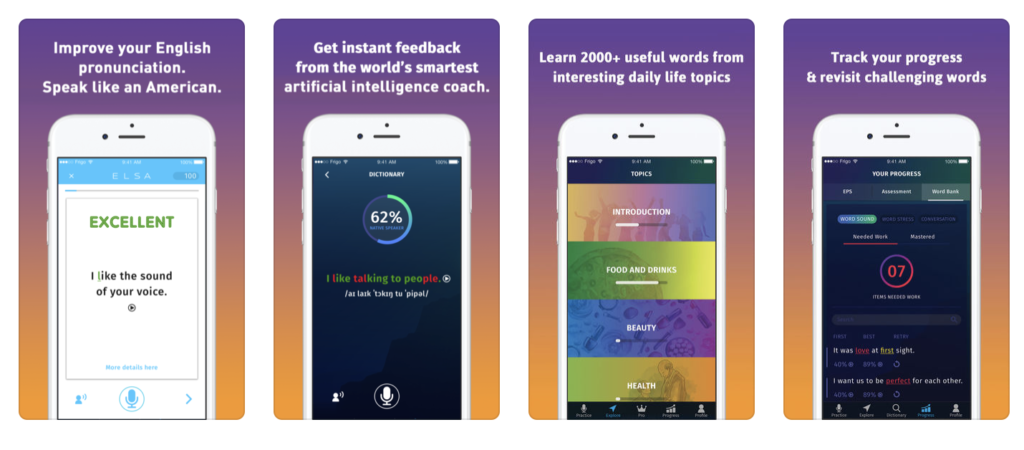
Not a native English speaker? The Elsa app is an English Language Speech Assistant—get it?

Anyway, Elsa is the first AI pronunciation app that asks you a few questions about your native language and adjusts the settings accordingly. The smart technology aims to help users with speech challenges specific to their native language—working through lessons like “ending sounds” The app is free, so there’s no excuse not to brush up on your language skills.


Google Allo

Allo Assistant Google

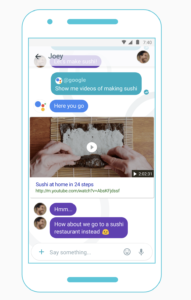
While Google already offers voice search within its apps, Google Allo is a separate digital assistant you can download to your Android or iOS device built to better your chat experience.

But, before you dismiss it, know that it offers more than what you’ll get with Siri and Voice Search. Allo is a smart messaging app that allows you to level up your responses.

Allo comes with Smart Reply, which suggests texts and emoji by learning your habits— while this feature is already available in Gmail, it makes texting a lot easier. Additionally, the app lets you locate information on Google without leaving the conversation—so if you’re trying to find brunch spots, you can quickly find and share some options without the cut and paste nonsense you’re used to.

Google Allo Download Free ►
8

Kono

Kono Scheduling Assistant

Kono is a scheduling assistant that aims to help the disorganized maintain a facade of professionalism…. Or, rather, it’s an AI tool that helps users update their calendar and interact with other meeting participants.

The benefit of Kono is, the AI understands natural language processing and analyzes responses quickly. You’ll eliminate the irritating back and forth that goes hand-in-hand with trying to find time for a Skype meeting or whatever that works for everyone.

Specify:

  • Your work schedule
  • Time zone
  • Location
  • When you take breaks
  • Conference details
  • Meeting duration
  • Meeting summary
  • Lunch breaks

Now, it’s not perfect—you may get sick of the canned emails filling up your inbox. And, you can only send out one request per email. Still, if you need help organizing your calendar, but don’t yet have the budget for a living, breathing assistant, Kono is definitely worth a try.

Socratic

Socratic Study Assistant

Socratic is an AI app built for students or students of life. If you’re hunkered down with a pile of homework, you can use the app to snap a picture of your homework and Socratic gets to work finding the answers to all of your problems.

Yes, this app is potentially a way to cheat using your smartphone, but the tool actually shows its work, so you can understand how it got from point A to point B.

Socratic supports more than just math, too. Use it for English, history, economics, chemistry, and more. While the program stands to help you navigate through your course load much faster, it’s well-advised to leave it home come exam day.

Socratic - Homework answers download free ►
8

While AI has a long way to go before it becomes the stuff of science fiction, it’s exciting to see that the technology is expanding to different areas that Siri and Alexa haven’t quite covered.

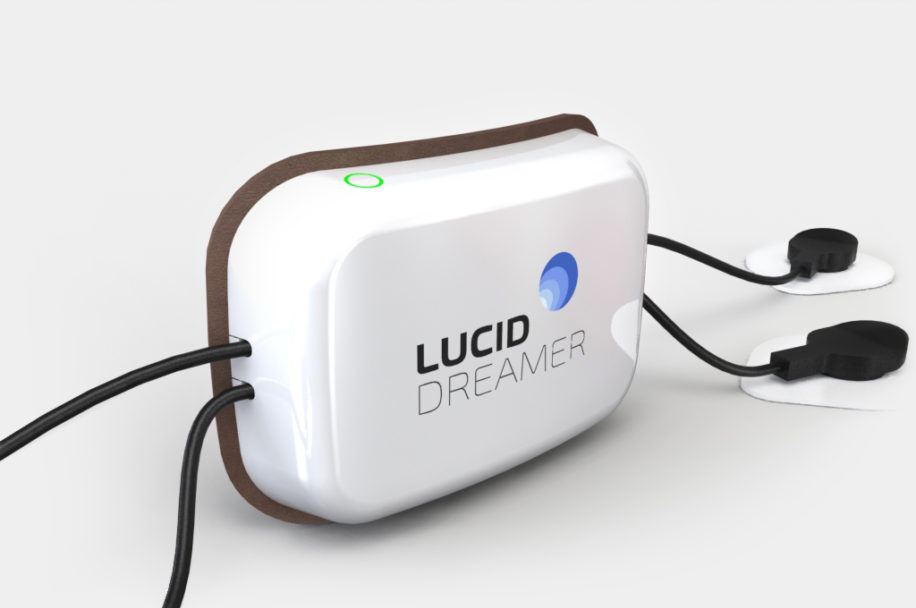
The future is here: New device lets you control your dreams

Wish you could control your dreams? This device claims to make that a reality!

Have you ever been aware that you’re dreaming? You’re in the middle of a dream and suddenly you’re acutely conscious that what you’re seeing is not in fact real, but rather a projection from your own mind? This rare state of semi-consciousness is called lucid dreaming and if you’ve already experienced it you know firsthand how incredible, how endlessly freeing it can be. If you’ve never been lucky enough to have one – and don’t be disheartened; they’re exceedingly rare – the Lucid Dreamer is about to give you the opportunity.

This device can trigger lucid dreams!

How does this work?

In development by neuroscientists Derk Mulder and André Keizer, the Lucid Dreamer is a wearable device that utilizes advanced algorithms to detect when the wearer starts to dream. These algorithms rely on electrical signals from the brain, detecting the onset of a dream accurately and consistently. It also uses light and audio stimulation, which are long-known methods for increasing the likelihood of having a lucid dream, and takes measurements of your brain activity…

Are we moving too fast? Let’s take a step back:

What is lucid dreaming?

Imagination is literally the limit

The philosopher Aristotle wrote that “often when one is asleep, there is something in consciousness which declares that what then presents itself is but a dream.”

In 1913, the Dutch psychiatrist and writer Frederik (Willem) van Eeden coined the term ‘lucid dream’ in his article A Study of Dreams. What this amounts to is an experience where you’re dreaming and yet realize that you’re dreaming. The result is that you can control the environment around you in whatever way you can think of.

Psychologist Celia Green dedicated her life to the study of lucid dreaming among other perceptual phenomena. She concluded in 1968 that lucid dreaming was closely associated with rapid-eye movement (REM sleep), coupled with a person realizing he is dreaming. Piggybacking on this, neuroscientist J. Allen Hobson theorizes that this recognition of a dream state may happen in the dorsolateral prefontal cortex, an area of the brain that is not active during REM sleep and where memory occurs.

Lucid dreaming creates fast electrical brainwave activity
(Source)

Most lucid dreamers falter immediately upon realizing that they are dreaming. This is because the only way to maintain the experience is to be cautious enough to let the dream continue while simultaneously being aware that you are in a dream. More often than not, the realization that one is dreaming renders them awake moments later. Treading the fragile line between conscious awareness and conscious dreaming is trickier than it sounds, and it nearly always ends with waking up without meaning to.

Is the Lucid Dreamer safe?

Yes. During the entirety of the Lucid Dreamer’s testing, no adverse events were reported. Though it may sound like the device is using electroshock therapy, that’s certainly not what’s happening here.

How to use it

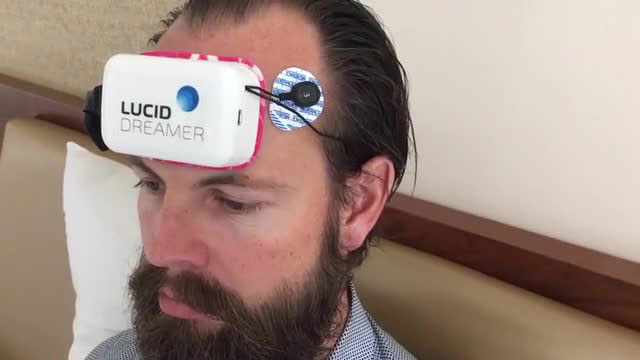
It does look pretty silly

Though it may look a little silly, using the device couldn’t be easier. The Lucid Dreamer comes with disposable, sticky electrodes. Attach these to the device, remove the protective covering and press the electrodes to the designated places on your forehead and behind your ears. Each use will require six electrodes: Four for your forehead, and then one behind each ear. If it sounds uncomfortable, you’re about to be pleasantly surprised; the Lucid Dreamer is designed with the wearer’s comfort in mind, so you should have no problem falling asleep.

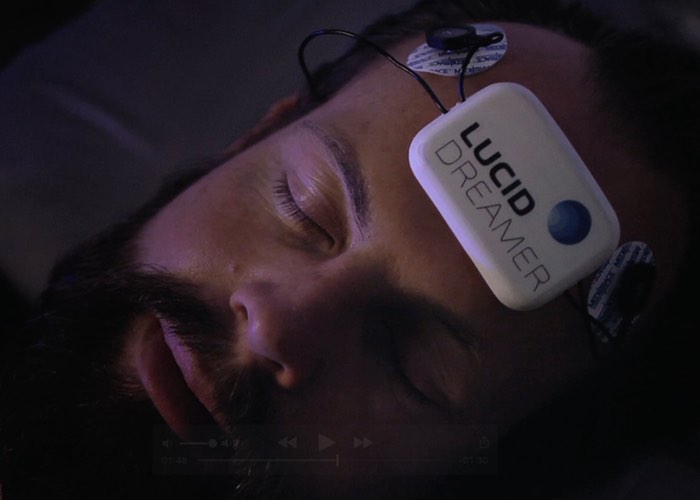
The Lucid Dreamer can be worn comfortably at night

There’s even an accompanying app. On it you can choose your stimulation protocol for the night (25Hz or 40Hz), which will likely be something you’ll need to tailor to your own preferences as you grow accustomed to using it; set the number of stimulations a night (three is the maximum); the duration of the stimulations (between 30 and 120 seconds); and the number of minutes the Lucid Dreamer will wait before triggering the lucidity.

If you opt for the pro package (which we wouldn’t recommend until you try the essential first) you can further modify the intensity of the stimulation, receive more control over the frequency of Hz, and also have access to the Protocol Builder, which allows for experimentation with different frequencies. You can check out more comparisons between packages here. Find the one that works most reliably for you!

Is it possible to lucid dream without using this device?

For sure! People have attempted to develop the ability to consistently have lucid dreams since as early as ancient Greece. It is a skill that you can learn, and there are a number of documented induction techniques.

These techniques are not infallible, however, and even the most reliable will undoubtedly take a lot of practice and even more luck. Without the Lucid Dreamer there’s no clear-cut induction technique guaranteed to cause lucid dreams consistently, though there are some that look promising.

When can you get one?

Not just yet!

The Lucid Dreamer is still in development, but you can stay up to date with its progress and learn more about the device on their website. For more information and reports about lucid dreaming, check here.

If you’ve never had a lucid dream before, you’re in for an unforgettable ride – one where your imagination is quite literally the limit!

Watch thieves steal a Tesla by hacking it

New thieves can jack your car with only a tablet. Watch what happens.

Watch thieves hack into a Tesla and steal it

The future is now, people. You can now steal cars by hacking into them. A (former) Tesla owner in the UK posted security footage online that shows thieves hacking into his car and driving away with it. The footage can be viewed below.

This looks like something out of Watch_Dogs. So, how exactly did these tech-savvy thieves hack into the car?

The thieves exploited something called a key fob. A key fob is a chip used in wireless car keys that send a randomly generated 40-bit code to the car, along with a command (unlock the doors, open the trunk, etc.). The car will recognize the code and then complete the command. The thief with the tablet is walking around in an attempt to catch the signal of the car owner’s key fob, while the other thief is presumably using his phone to boost the tablet’s signal. Once the key fob signal was picked up by the thief with the tablet, he could use it to give the car any command that could be used on a normal wireless car key.

For all of their technical prowess, the thieves seemed to have a lot of trouble unplugging the car from the charging cable. All you need to do is press a button on the cable.

There are a few things Tesla owners can do to protect themselves from technically proficient but cord-challenged thieves in the future.

First, disable “passive entry” mode while at home. Passive entry mode allows owners to unlock their car simply by walking towards it when their key is on the vicinity. Passive entry was enabled for the stolen car, allowing the thieves to access the fob key in the first place.

Second, enable “PIN to drive.” This feature allows users to set a code that must be entered before the car can actually be driven.

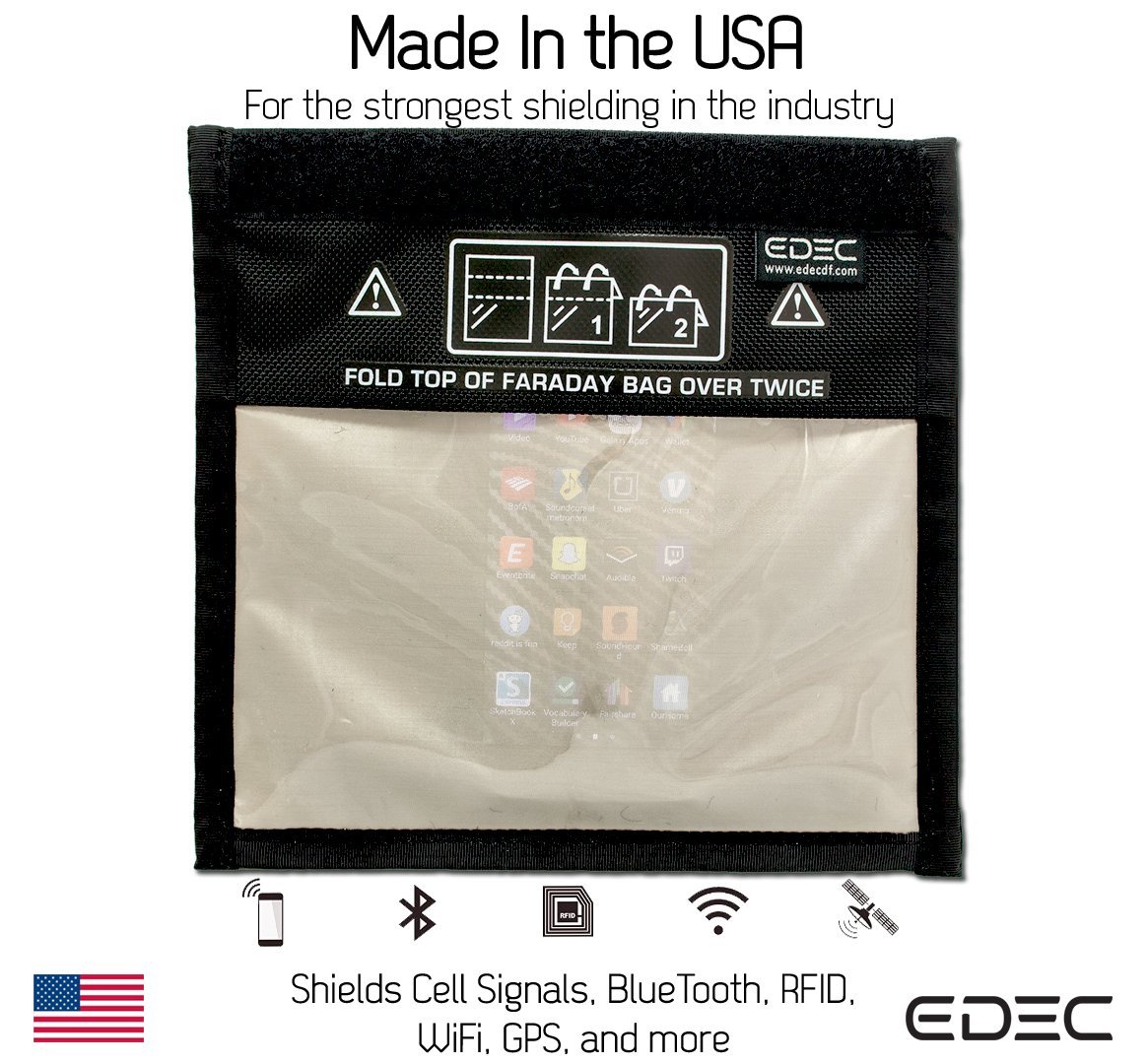
Third, place your wireless key in a faraday bag while at home. A faraday bag is a special pouch that prevents your key from transmitting signals while inside, preventing hackers from picking up on your key fob.

Be careful, Tesla owners. All of the fancy technology included in these cars can be used against them. We’ll end this article on a lighter note by telling a joke:

What do you call a stolen Tesla?

An Edison!

Pokémon Go update: Gen 4 and Meltan

Here’s what’s new in the world of Pokémon!

Halloween has become Pokémon Go’s standard time for releasing a new generation by having an early release of ghost-type Pokémon from that new generation. Generation 4 is following that same standard, though some non-ghost types have already been leaked into the game. This generation actually has a special connection to Halloween, by having a ghost type legendary, Giratina, to appear in raids from now until November 20.

Not only can you now get Sinnoh Pokémon, you may soon be able to get the newly revealed mythical Pokémon: Meltan. If you haven’t heard of this little guy, you can check out our coverage of his reveal to find out more about his initial release.

Pokémon GO Download Free ►
7

Since then Pokémon has released two new videos hinting at the future of Meltan. The first is episode two in a series called “Two Professors”, where Oak and Willow discuss the a new discovery involving how to obtain Meltan. It seems like they are hinting at a new field research being released soon, like the special research for Mew and Celebi.

The second video reveals another secret surrounding Meltan. It seems multiple Meltan can be put together to make a stronger one. Only time will tell the truth, and hopefully, these updates keep coming regularly until we have all of Meltan’s secrets uncovered.


Snapchat’s lens explorer feature lets you explore thousands of customer-built lenses

Upgrade your Snapchat game and check out these great snaplenses.

The best part of Snapchat has always been the different filters or lenses that can be applied to your face or background. But did you know that you can now create your own lenses? Not only can you be a creator, but you can also view lenses created by thousands of different artists and everyday people.

Find out more about the new customer-built lenses below.

Snapchat’s lens explorer feature lets you explore thousands of customer-built lenses

How to use them

So where can you find this Lens Explorer feature? Basically, Lens Explorer will appear in the row of lenses that pops up when you tap the camera screen. In previous versions of Snapchat, this is where you would normally find the filters and lenses that you wanted to apply to your picture. But now with the addition of Lens Explorer, you will have access to more than 100,000 lenses.

8

These lenses work just like the normal Snapchat lenses that you’re used to. If you’re scrolling through the thousands of new Explorer lenses and find one you like, you can simply swipe up on the one that you choose and it will be unlocked for you to use in your future snapshots.

Personalized lenses

Snapchat will use your location information to show you lenses that are customized to your current location. These are very similar to the location filters they have, only there are many more options now.

These lenses may also be personalized based on previous lenses that you have used. Snapchat may try to show you lenses similar to the ones that you already like, which will make it quicker to scroll through the hundreds of thousands of lens options.

No sponsored content

A problem for some people is that many of the latest Snapchat filters available have been sponsored by big brands. However, for now, Snapchat promises that none of the Lens Explorer lenses will be sponsored. All the lenses will be created by individual creators from across the globe.

Only available on iOS

As cool as this new feature is, it’s not for everyone: Snapchat announced that for now, it will only be available on iOS (and not Android). However, if this new feature becomes popular, you can expect it to arrive on Android in the coming months.

Overall, the new Snapchat Lens Explorer sounds like it will revitalize Snapchat and make using lenses even more fun. Why not download the app and check it out for yourself?

Top 12 pumpkin spice products (yes, really)

All hail our pumpkin spice overlords! Get that pumpkin flavor up in your mouth!

pumpkin

Halloween approaches… and so does the pumpkin spice craze!

To add metaphorical fuel to your pumpkin-infused fire, we compiled some of the best, wackiest pumpkin spice products! (we are not sponsored by any of these; we just like ’em!)

As you sip your pumpkin spice latte and set up those Halloween decorations, please enjoy our…

Top 12 pumpkin spice products!

Mrs. Meyers Clean Day Pumpkin Dish Soap

Yummay!

AW YEAH. Smell pumpkin spice, even while washing the dishes!

Honestly, if people will shove a lemon down the food disposal chute to keep the drains smelling like citrus, this just makes sense. Elementary, dear Watson.

Pumpkin Spice Cheerios

Cereal, baby!

If we’re collectively going to make pumpkin spice a lifestyle, why not make sure the dishes smell great even before they reach the dish soap? It’s simple math, really.

Oh, and they taste great! Sorry, we forgot to mention that.

Pumpkin Spice Frosted Mini Wheats

More cereal?? Seems so.

If you’re not about those delicious, cheery O’s, you might prefer our fiber-rich friends, the Frosted Mini Wheats! This version has everything thing the normal cereal offers – healthy fiber with those awesome, frosted bites – but with that special flavor to take things up to 11.

Pumpkin Butter

Buttah

There are too many brands of pumpkin butter to count, without even mentioning the guides for making your own! That’s just what happens when something smells great, tastes great, reminds us of fall, and can be spread across bread.

Want to get crazy? Put that deliciousness on a waffle.

Pumpkin Air Freshener

Did you know that Charmin (that toilet paper company) might create a pumpkin spice toilet paper? Since we have no timeline for when that may arrive, keep your bathroom and house smelling great with Air Wick fresheners in the meantime!

Each of these small bottles will infuse one room with the calming scent of Halloween Hopes and Fall Fantasies.

This Pumpkin Walks Into a Bar

For the uninitiated: Trader Joe’s has a series of granola bars called “This (insert fruit here) Walks Into a Bar.” Usually that blank is filled with Strawberry or something typical.

Right now, it’s pumpkins!

Trust us, the bars were already great, but with the surprisingly dulcet flavor of pumpkin spice, you have the perfect fall snack, on the go or at home.

Starbucks Pumpkin Scones

You already know about the Starbuck pumpkin spice latte, obviously. The ante has officially been upped with Starbucks scones! (Because, as all true Starbucks fans know, these little coffee shops pack some decent food options, no lie.)

Gosh, just look at that thing! A sheet of pure white frosting decorated with a dazzling drizzle, set upon a crumbly heaven of pumpkin spice perfection.

Pumpkin Spice Chapstick

You may be saying, “This has gone too far”…but no! We’re not even close.

Lip balm comes in many flavors because, let’s be honest, even if you’re not eating it, you will taste it eventually. Make sure you’re getting a lick of our friendly spice!

Pumpkin Caramels

Caramel

Oh yeah! If you think pumpkin spice can’t improve the flavor of good old fashioned caramel, you’re dead wrong…

When you have a pumpkin spice caramel.

Ice Cream

In addition to excellent cheese, Tillamook makes excellent ice cream! And every season, they roll out our favorite invention since sliced bread: Pumpkin Cookie Butter.

After you’ve eaten your pumpkin cereal, butter, and scones, this ice cream will be there for after dinner!

Or after a fall breakup…

Twinkies

Like many other items on this list, please look at Pumpkin Spice Twinkies and ask “Why not?”.

The answer becomes clear: they’re awesome!

Admittedly, Twinkies aren’t the healthiest option on this list. Far from it, in fact (even the ice cream must have some dairy value, amiright?). However, they’re nothing if not tasty! Also, they go great in a sack lunch.

Nestle Coffee Creamer

Morning hater? Smooth over the pain of your waking existence! Morning lover? Just the thing to kick off a new fall day!



Conclusion

Here’s some food for thought: bacon and pumpkins. Why do people go crazy for those two products? You can buy bacon deodorant, bacon mints, bacon vodka… it seems like these two groups should get together and make a pumpkin/bacon combination to rule the world.

Oh wait… it exists. Introducing Roasted Pumpkin Soup with Bacon and Thyme!

… Ew?

Pumpacon
Pumpacon? Bacumpkin? Who knows.

Official count of the word “pumpkin” in this article: 34.

How to block cookies on Google (and why you may not want to)

Cookies could be taking a bite out of your privacy. Find out how to protect yourself.

web security

Fellow Google users! If you haven’t heard, cookies are pieces of data that track your activity while you surf the internet. They save your searches, record your interests, and even file your forms.

If that sounds scary to you… DON’T PANIC!

There’s a simple solution provided by Google itself. We’ll take you through the steps so you can stay safe once again. Although…

As our title suggests, there are a number of reasons you may not want to delete cookies! We’ll go through these so you can see if any apply to you, and the measures everyone should take to remain safe, regardless.

How to block cookies on Google (and why you may not want to)

How to block cookies

There are two paths here: General, a comprehensive course in cookie blocking; and Wi-fi Hotspots, short advice for staying safe on the go.

General

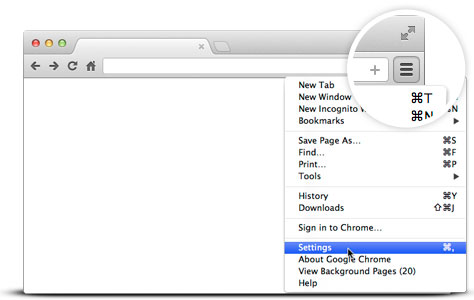
To reach Google’s cookie settings, open the Google Chrome settings icon at the top left:

Google

Our icon appears like three stacked dots. Yours may be the same:

Whatever the icon looks like, its location should be the same! Once you reach the settings menu, head down to the “Advanced” menu:
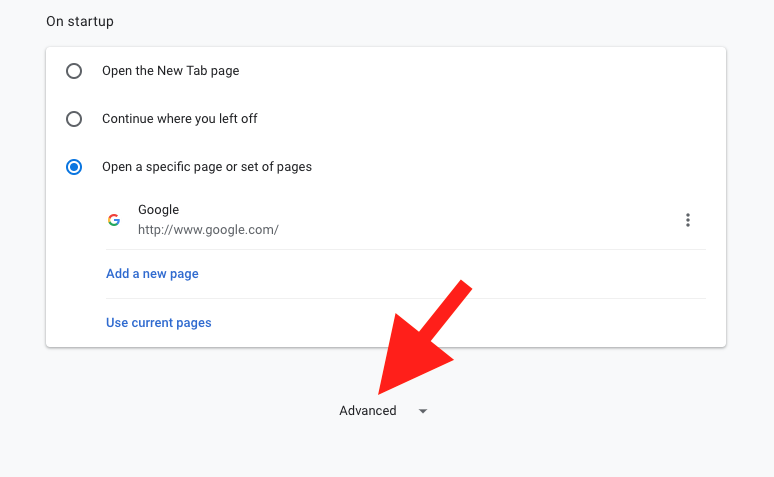


Within the advanced menu, find the “Privacy and Security” section. Near the bottom, you want to find “Content Settings.”

Keep scrolling down…
There it is!

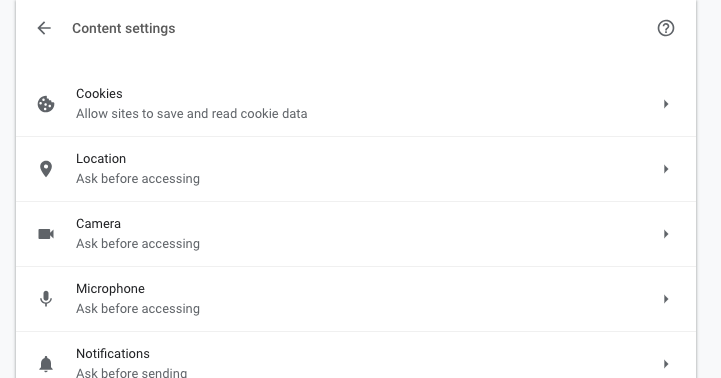
Content Settings has a number of great tools, but cookie controls tops the list:

Open the cookies menu. You’re here!

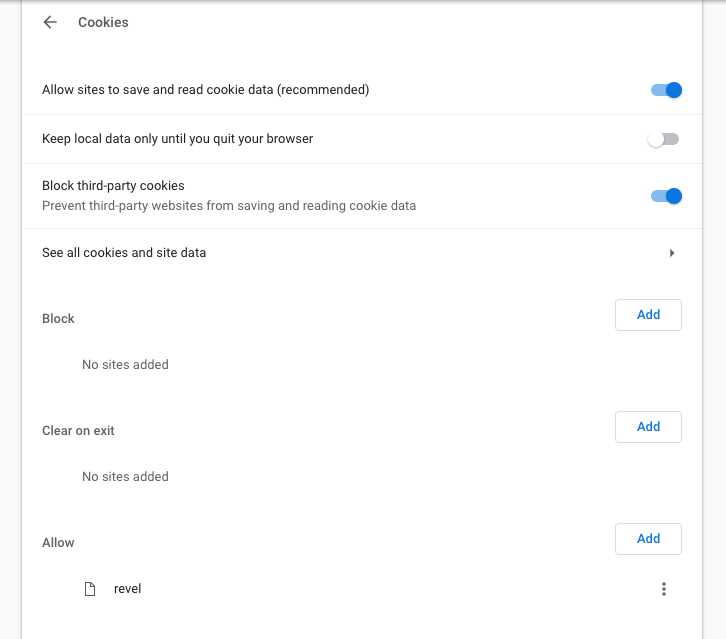
Let’s go down the list, step by step:

1. Allow Sites to Save and Read Cookie Data: turn this off if you want to block cookies altogether. We recommend this only if you greatly wish to protect your information from the potential of data hacks. Remember to read our section “Why you may not want to” before taking this step!

2. Keep Local Data Only Until You Quit Your Browser: remember that cookies are pieces of data sent to your computer (you don’t really visit websites, they visit you). Some cookies can still track you offline.

3. Block Third Party Cookies: we recommend that everyone use this all the time. Third party cookies are non-essential cookies that track your web history over long periods of time, often by large corporations. If the cookies don’t give you any added functionality, why keep them around?

4. See all cookies and site data: section that shows all cookies on your computer and the info they contain. If you’re like us, there are just too many cookies to sort through manually!

5, 6, and 7. Block, Clear On Exit, and Allow: you may notice that these are copies of the original three options. Rather than setting overall guides for Google, you can block, clear info, and allow cookies for specific sites. For example, we allow cookies on Revel, an academic site necessary for some college courses.

Wi-Fi Hotspots

While using public Wi-Fi sources, your cookies can be read by the Wi-Fi providers! Unsecured hotspots like “FreeCafeWifi” may not be safe…

So if you do, use incognito mode to make sure the Wi-Fi provider – malicious or not – can’t be able to track your information. Select “New Incognito Window” from the settings menu. Use this for web surfing!

Why you may not want to

As promised: there are a number of reasons to keep cookies around. Here are a few:

Preferences

Simply put: many cookies make life easier.

Oftentimes, companies use cookies to find the things you enjoy, and make sure to provide more related items. For example, online music sources like 8tracks, Pandora, and Spotify often use browsing history to find new music based on your previous interests. In our opinion, there’s nothing wrong with being introduced to new, great tunes!

Of course, there are more examples: everything from shopping assistance to quick passcodes. If you enjoy these benefits, consider allowing cookies on first-party sites.

Functionality

Put simply: some things don’t work without cookies.

As aforementioned, we allow Revel (by Pearson) to use cookies on our computer. Revel needs cookies to track internet usage during college exams tests. In this way, professors can ensure the computer didn’t venture to other sites, thereby deterring (though not eliminating) cheating.

Aside from Revel, there are many programs that won’t function without the use of cookies, with good reason. Remember: if you’re still worried about cookies in general, you can green-light specific programs in the Chrome security settings.

Conclusion

The internet, like many things, balances risk and freedom. Cookies provide benefits that accumulate into easier, personalized internet usage (barring nonessential third-party cookies and Wi-Fi sources), but keep your data stored where others could potentially find it. Make sure to select which settings work best for your preferences.

We hope this guide helps you understand cookies a little more!

The 3 worst microtransaction schemes in video game history

Microtransactions can wreck a game. Here are the worst offenders in history.

For all of the internet outrage surrounding video games and its culture, perhaps the only thing that everyone agrees to hate is microtransactions. For those out of the loop, microtransactions are small purchases involving real money that give some sort of benefit or content in-game. These purchases often appear as “loot boxes” or some form of premium currency that is either impossible or incredibly inconvenient to earn in-game. Microtransactions have crept into every conceivable game genre and triple-A franchise. Their astronomical profitability makes publishers require that developers include them in their games.

Publishers after discovering the magic words “loot box”

While there are some big games that arguably do microtransactions right, such as Fortnite and Overwatch, publishers have continued to push the limit of gamers’ tolerance towards the prominence of in-game purchases. Here are some of the worst examples of microtransactions in gaming.

The worst microtransactions in video game history

A disturbance in the Force

EA’s Star Wars Battlefront 2 is by far the most high-profile recent case of microtransactions ruining a game. Pre-release anticipation for the game was incredibly high, as the game included content from multiple eras of “Star Wars” movies and seemed to have more depth to its gameplay. This hype quickly died down after release as players quickly realized that progression in the game’s online multiplayer was tied to randomized loot boxes. Unlocking the ability to play as iconic characters like Darth Vader required either dozens of hours of tedious, loot box-based grinding or shelling out real life money.

Additionally, many of the game’s most powerful weapons and abilities were locked behind loot boxes, giving players who purchased them en masse an advantage. Understandably, players were furious, and one of EA’s responses to the controversy became the most downvoted comment in Reddit history.

Card

Thankfully, EA eventually revamped the progression system and removed the ability to pay for game-altering content with real money. Instead, only cosmetic items can be purchased with real money, similar to Overwatch. Unfortunately for them and fans of the game, the damage was done. The reputation of the game and the number of active players were both hit hard by the controversy. Hopefully, EA has learned its lesson moving forward, as there is a great Star Wars game hidden beneath all of the greed.

Evolve succumbs to natural selection

In case you haven’t heard of Evolve, it’s an asymmetrical multiplayer shooter in which 4 players are hunters fighting against a player who takes control of a monster that evolves throughout the match. It was made by Turtle Rock Studios, developer of the acclaimed multiplayer zombie shooter Left 4 Dead. Sounds like an awesome concept right?

Unfortunately, this awesome game concept was brought down by scores of microtransactions. Described by Forbes as a”$60 free-to-play game”, Evolve was filled with a confusing and money-sucking array of microtransactions, DLC, special editions, and season passes. Word of mouth quickly spread about the game’s egregious use of microtransactions, and the player base plummeted. To salvage the game, publisher 2K revamped the game as free-to-play in 2016. While this brought some players back for a while, the player base remained small, and the game’s dedicated servers were shut down in September 2018.

The failure of Evolve was incredibly disappointing to many gamers, as it was a brand new IP with creative game concepts. It just goes to show that a great game can be ruined by greed.

Middle-earth: Shadow of War wanders, gets lost

It should be noted that most games plagued by microtransactions are multiplayer based, as players are incentivized to either gain advantages over others or get exclusive cosmetics for real money. WB Interactive made the bold choice of including microtransactions in Middle-earth: Shadow of War, a primarily single player game. Now why in the world would you want to buy microtransactions in a single player game? WB purposefully made grinding for endgame content so tedious that many players would become frustrated enough to simply throw money at the screen. Including microtransactions and loot boxes in a single player game proves that game design is being created around squeezing money out of games rather than being creative or fun. Eventually, WB removed microtransactions and loot boxes from the game. However, they did this right around the time EA was being slammed for Battlefront 2, so it’s safe to say that they did this simply to gain some positive press.

How do you feel about microtransactions? What’re the worst examples you’ve seen? What’s the most you’ve spent on a game? Let us know!

Top 10 virtual reality console games

Step into another world with these 10 incredible games.

Regular old console games just not doing it for you anymore? Tired of holding that boring old controller? Fear not: its time to put on your headset and step into the world of VR. More and more consoles are taking the step into virtual reality, and with more VR platforms to choose from than ever, it’s easy and affordable to make virtual reality an actual reality. Not sure what to play? Here’s our list of the 10 best VR console games. All the games listed below are available on multiple consoles and headsets from the PS4 to the HTC Vive, so be sure to double check for compatibility before you buy!

Top 10 virtual reality console games

SUPERHOT DOWNLOAD NOW ►
7
'John Wick' meets 'The Matrix' in this refreshingly original take on the shooter genre. In SUPERHOT, time only moves when you move. You're in the middle of a gunfight with a bunch of baddies and you freeze. Guess what? Time freezes too. The bad guys are stuck in place, bullets stop midair, and you have time to plan out your next move. You'll be dodging bullets and taking out well-armed assassins with ease. Just don't start thinking that you're the next Neo!
Raw Data DOWNLOAD NOW ►
8
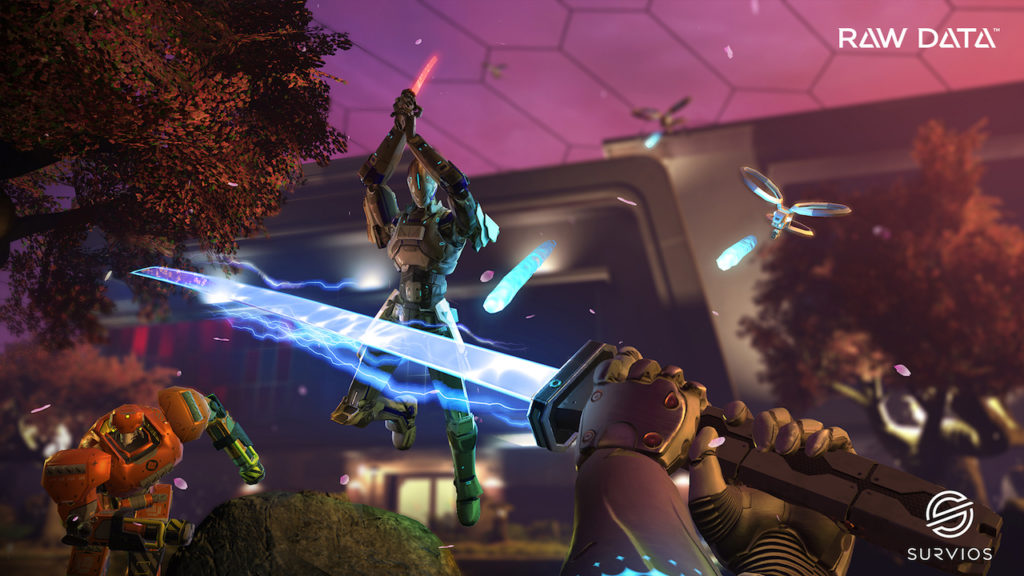
Raw Data is the ultimate VR wave shooter. You can choose from one of four playable classes, each with different abilities, and fight your way through wave after wave of enemy androids over the course of 10 campaign missions. You have a huge arsenal at your disposal: you can dual-wield handguns, blast away with shotguns, and slash up the opposition with laser katanas. You can also team up with a buddy in co-op or go up against other players in a 5 v 5 multiplayer competitive mode.
Farpoint DOWNLOAD NOW ►
8
Taking pages from sci-fi shooters like Crysis or Destiny, Farpoint is a satisfying single player story wrapped up in a VR package. You'll explore an alien planet while attempting to rescue members of a science team from hordes of hostile creatures. You have total 360-degree movement and you'll have to keep an eye on all angles as you search and explore the planet. Movement does feel somewhat limited at times, but the game's gun peripheral and well-realized story make it a totally worthwhile console experience.
Arizona Sunshine DOWNLOAD NOW ►
8
Think you've got what it takes to roll with Rick Grimes? Arizona Sunshine lets you step right into an episode of 'The Walking Dead.' It's the zombie apocalypse, and you're stuck in the sweltering deserts of Arizona. You'll find realistic weapons, scavenge for supplies, and land satisfying headshots on the zombie hordes. Best of all, movement isn't on rails, so you're free to explore the world as you choose. You'll want to make sure you put this feature to good use: you'll find the best supplies in the unlikeliest of places.
Batman: Arkham VR DOWNLOAD NOW ►
10
Batman fans: your time is now. That's right, it's time to don the armor and cowl of The Dark Knight himself to protect Gotham from evil. Arkham VR was developed by the teams at Warner Bros. and Rocksteady, the same crews who brought the much-lauded Batman: Arkham series to life. Despite this, you won't be seeing much of that fluid combat here. Instead, you'll be harnessing Batman's detective skills to solve the murder of one of his closest allies. You'll encounter the Riddler, the Penguin, and the Joker over the course of your investigation, and despite how short the game is, it does an excellent job of making you feel just like Batman himself.
Beat Saber DOWNLOAD NOW ►
9
Beat Saber is a rhythm game in the vein of Rock Band or Guitar Hero. Instead of using instruments to play along to the song, however, you'll be using swords. You'll need quick reflexes and a good beat as you hack and slash your way through onslaughts of neon cubes in time to the music. It's hugely addicting and a tremendously fun party game. Though the game has yet to arrive on PlayStation VR, it's available on Windows and is well worth playing.
Star Trek: Bridge Crew DOWNLOAD NOW ►
9
Cross your fingers and hope you don't get a red shirt, because you're about to become a crew member on a fully-functional Federation spacecraft. Star Trek: Bridge Crew does exactly what the name implies. You and a group of friends act as the bridge crew on a ship ripped straight out of the 'Star Trek' universe. You'll have to fulfill different roles and work together to overcome various obstacles and threats. Communication is key here, and successfully coordinating a difficult maneuver is actually tremendously satisfying. There's no better team building exercise than surviving a near-death experience together!
I Expect You To Die DOWNLOAD NOW ►
9
Tuxedo? Check. Gadgets? Check. License to kill? Check. Congratulations, agent, because you're ready to take on the role of a super-spy in I Expect You to Die. As a suave secret agent, you'll take on what is essentially a series of challenging escape rooms, all with a distinctly classic James Bond flavor. You'll defuse bombs, escape poison gas, dodge laser grids, and crack safes on your mission to save the world. It's a satisfying ode to retro spy movies that will leave you craving a vodka martini... shaken, not stirred.
Keep Talking and Nobody Explodes DOWNLOAD NOW ►
7
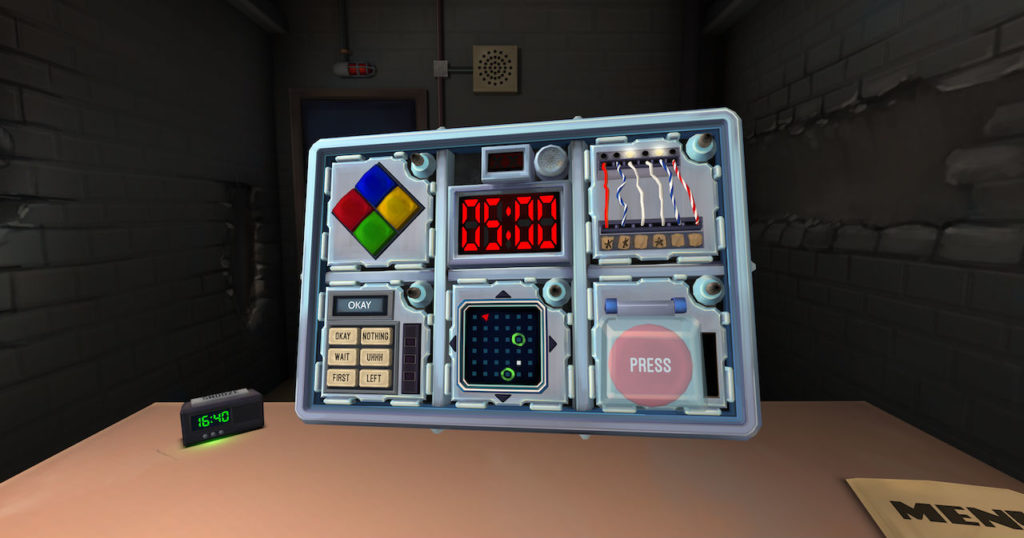
Red wire or blue wire? Or wait, maybe it's the green wire? You'll have to rely on your friends to tell you. Keep Talking and Nobody Explodes is a creative take on mixed reality and makes for an excellent party game. One player straps on a VR headset and is tasked with defusing a bomb within a certain time limit. Other players outside the headset will use physical guides and papers to instruct the player on how to defuse the bomb. You'll have to rely on the brainpower and communication skills of your friends if you want to stay in one piece. Oh, and a steady hand doesn't hurt either.
Resident Evil 7 DOWNLOAD NOW ►
10
Resident Evil 7 is the ultimate VR horror experience. Unlike some console games which get simply ported into VR, Resident Evil 7 was built from the ground up to be a virtual reality experience. This certainly shows, making for an intense survival experience as you try to escape the mansion of the murderous Baker family. Despite being the first Resident Evil game to go first person, it feels like a natural transition and fits the VR format surprisingly well. Get ready for a pulse-pounding survival horror experience, because once you have that headset on, you won't want to take it off.

Grab your headset and fire up your console. Whether it be defusing bombs, taking down bad guys, or commanding spacecraft, VR is the perfect way to escape the monotony of everyday life. Armed with this list of ten excellent games to choose from, there’s sure to be a VR experience for everyone to enjoy.


The Google Camera app might finally be getting this cool feature

Reports are suggesting that Google might have resumed working on a Time Lapse mode for its camera app

When all other smartphone makers were loading up their flagship handsets with multiple cameras, Google stuck with just one for their Pixel line. Despite this apparent handicap, Pixel phones are regarded as having industry-leading camera capabilities. The secret behind Google’s success has been its efficient use of Artificial Intelligence. It hasn’t all been hunky-dory, however, and to demonstrate a perceived lack of actual intelligence the Google camera app has been missing a common smartphone camera feature for quite some time now. To remedy that, change is on the horizon.

Reports are suggesting that Google might have resumed work on a Time Lapse mode for its camera app

Google Camera Download now ►
8

Time Lapse photos allow you to capture more than just split seconds using your camera. They take multiple images and then stitch them all together so that you can show extended periods of time in mere seconds. They’re particularly good at capturing natural events like sunrises and sunsets.

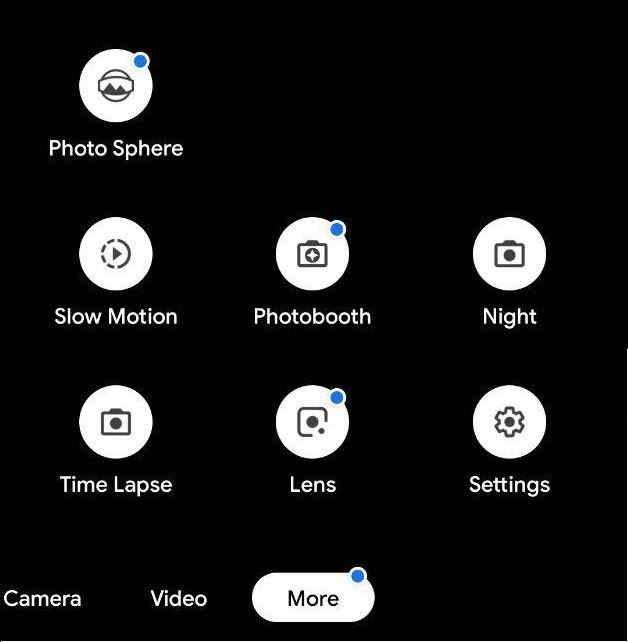
According to the guys over at XDA, Google might be looking to finally introduce a time-lapse mode into its camera app. After tearing down the APK file for the latest Google Camera 6.1 update and looking through the code, XDA discovered some development of the particular string relating to a Time Lapse mode. This string has been a part of the Google Camera code for quite some time, but it has always remained dormant and unchanged through multiple Google Camera versions.

Image via: XDA developers

The Time Lapse string has acted as a placeholder across multiple generations of the Camera app but now, finally, Google is adding code on top of it. When they looked at the version of the Google Camera that shipped with review handsets of Google’s new Pixel 3 and Pixel 3 handsets XDA discovered actual code that hasn’t been present in past versions of the app.

All this means that it is highly likely that Google has recently begun working on a Time Lapse mode for its Camera app. This doesn’t mean that we’re guaranteed to see a Time Lapse mode on our Google Cameras just yet. If Google has only recently begun developing the Time Lapse mode, it could still be quite some time before it is ready for a general release. That is, even if Google has plans to introduce the new feature in the first place.

If we are going to get a new Time Lapse mode though, we’ll likely see it in a beta version of the Google Camera app first. That means if you want to hear about it first, you should keep checking Softonic for more updates on your favorite apps. Better yet, put your email address in the box below and we’ll make sure we put the latest apps and software news right at your fingertips.