Cisco has been hacked! Names, addresses, emails, and phone numbers exposed on the Internet

Cisco has confirmed that it was the victim of a cyber attack that compromised the basic information of registered users on its Cisco.com platform. The incident was facilitated by a vishing attack, in which an employee was manipulated into providing access to corporate systems. The company became aware of the problem on July 24, 2025, when an attacker managed to access a third-party customer relationship management (CRM) system used by the company. They have mounted a Cisco The stolen information includes names, organization names, physical addresses, user IDs assigned by Cisco, emails […]

Cisco has confirmed that it was the victim of a cyber attack that compromised the basic information of registered users on its Cisco.com platform. The incident was facilitated by a vishing attack, in which an employee was manipulated into providing access to corporate systems. The company became aware of the issue on July 24, 2025, when an attacker managed to access a third-party customer relationship management (CRM) system used by the company.

They have made a mess

The stolen information includes names, organization names, physical addresses, user IDs assigned by Cisco, email addresses, and phone numbers. However, the company emphasized that no passwords or any sensitive data were compromised, which could have increased the risk for its users and customers.

The vishing attack highlights the growing threat of social engineering tactics, which aim to manipulate employees to gain access to internal systems. Cisco acted quickly to terminate the attacker’s access and launched a comprehensive investigation to assess the magnitude of the incident. The company emphasized that the intrusion was limited to a specific CRM and that other internal systems, products, or services were not affected.

As part of its remediation efforts, Cisco is implementing additional security protocols and re-educating its staff on how to recognize and defend against these increasingly sophisticated types of attacks. “We apologize for any inconvenience this incident may have caused,” the company stated, encouraging its customers and partners to reach out to their respective account teams for support.

Finally, Cisco has begun to inform the relevant data protection authorities and will notify affected users when necessary, thus complying with regulatory requirements.

iPhones can be hacked just by receiving a text

This bug can allow hackers access to all of your personal data just by receiving an iMessage!

iPhone

We’ve all had close calls when it comes to getting our phones hacked.

Sometimes we click on a malicious link while browsing the internet. Sometimes we download a shady app that is sending data in the background. All of these things typically boil down to our own human error whether it be from lack of knowledge, or taking a chance on a shady app. However, it was recently discovered that an iPhone can be hacked simply by receiving an iMessage. This has brought more attention to a  relatively new type of hacking tool known as “interaction-less” bugs.

Should I be worried?

At the Black Hat Security Conference this week, a Google Project Zero researcher showed that there are “interaction-less” bugs in iMessage that hackers can exploit to gain control. Once hackers gain control, they will be able to access your personal data on your phone.

You can click here to see the researcher’s full slideshow presentation. 

The bugs were found by looking for flaws while reverse engineering iMessage. The researcher, Natalie Silvanovich, did not find any similar bugs in Android phones. However, throughout the years, she and her team have found similar bugs in apps like WhatsApp and FaceTime. 

What should I do?

The best thing you can do is to make sure you are updating your phone whenever you can. According to Silvanovich, Apple has already patched six of these bugs in updates. 

You should also run regular virus scans on your phone to make sure that you are virus-free. We highly recommend using Malwarebytes since it is both free and efficient.

Malwarebytes Download now ►
8

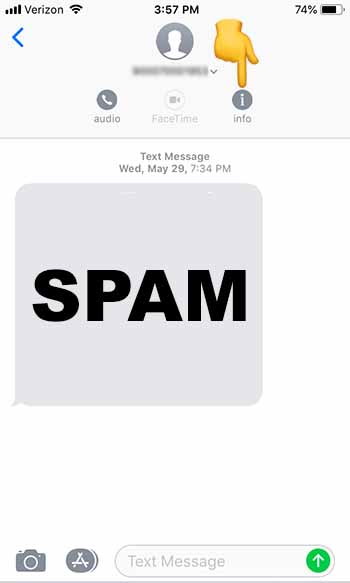
You can also block texts from unknown numbers so that you won’t hear from them again. To do this, follow these steps:

1. Go to the Messages app

2. Tap on the spam message you received to open it

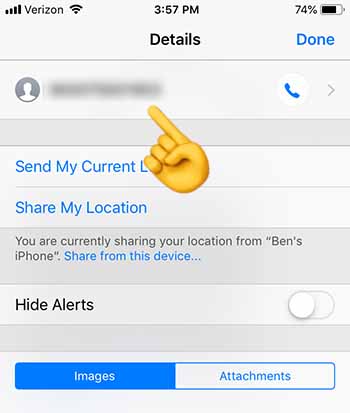
3. Tap at the top of your phone until the “Info” button appears.” Tap “Info”

Click info

4. Tap on the number at the top of the screen

Click number

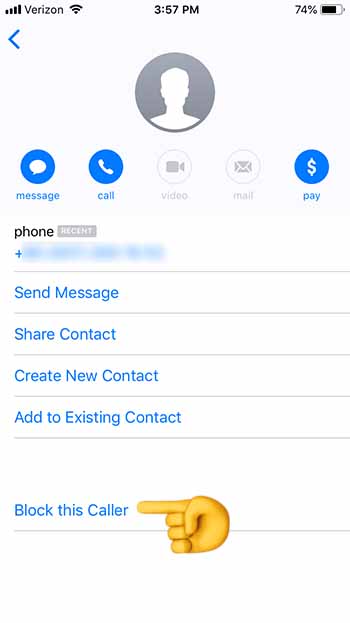
5. Scroll down to the bottom, and tap “Block this Caller”

Block this Caller

6. You should stop receiving texts from this number altogether

If you do receive a shady text from an unknown number, you should block the caller, and then run Malwarebytes. Once you’re done, check and make sure that your phone is up to date.

Wrapping up

Although there is virtually no chance that your up-to-date iPhone will be hacked through this method, the question now remains: “How did Apple leave this vulnerability in the first place?” If you’re spending hundreds of dollars on an iPhone, you should rest assured that it won’t be easy for a hacker to access your personal data. Just recognize that your security depends on your vigilence.

Airport charging stations could give your phone malware

Think twice before charging your device in public.

Airport charging station

By 2019, you probably know it’s not safe to hop on the internet without a safety net in place: Anti-malware protection, a firewall, a solid VPN, and a secure password manager. We create quintillions of bytes of data every day, and it’s easy to make an innocent mistake that puts it at risk. Now that innocent mistake can include plugging your phone into a charger at an airport.

It’s no secret that public Wi-Fi can be sketchy at best, and while it’s convenient to charge your phone at the nearest port, it’s not necessarily safe. Free public phone chargers can be used to secretly install malware on your device, malware that can eat up your data in a process called “juice jacking.”

What’s juice jacking?

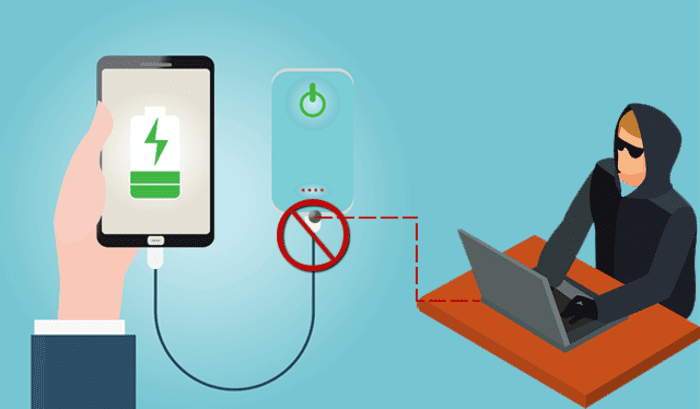
It sounds like tinfoil hat propaganda, but in reality, it’s an underrated but serious security threat. ‘Juice jacking’ was coined back in 2011, and refers to a hack attempt that uses public charging terminals to install malware on your device. It does so covertly via USB charging port, and it copies your phone’s data, pictures, and email into someone else’s hands.

juice jacking
Hackers can use public USB charging terminals to copy your personal data

“All they really need to do is load malware on the USB port,” explains IBM cybersecurity expert Charles Henderson. It’s unlikely you’ll even know it’s happened until it’s too late. “There’s really no way to tell,” says Henderson. “You really have to be extremely technologically savvy to detect such an attack.”

3 easy solutions to stay safe in airports

1. Use a portable charger

The best thing you can do is avoid airport charging terminals altogether. These days it’s not too hard to get your hands on a cheap, reliable portable charger. It’s a safe, convenient way to keep your phone charged and ready to go without putting your data at risk with a public outlet.

2. Use an electrical outlet instead

It should also be noted juice jacking can’t be done unless it’s via USB, so as long as you opt for an electrical outlet instead you’ll be safe.

3. Turn off your phone first

Lastly, if you’re in a situation where you’ve got no choice but to charge with a public USB port, completely powering off the device beforehand will prevent the download and transfer of your data.

Luckily, preventing your phone from being juice jacked is pretty easy. Just remember that any time you use public charging stations or Wi-Fi, your online activity could be at risk. Follow these easy steps, and stay informed!

How to tell if your PC is cryptojacked

What is cryptojacking and how do you know if you’re affected?

There are a lot of reasons a computer could be slow: Excessive programs running in the background; bloated temp files; a corrupted hard drive; or if you’re unlucky, it could be malware and viruses. One particularly sinister emerging threat is cryptojacking, which can increase overheating, slow down processing speed, and drain your batteries – all under the radar.

What is cryptojacking?

Cryptojacking is when someone takes hold of your computer to mine cryptocurrency. Often, hackers will ensnare you by infecting a website or online ad with an infected JavaScript code. The code auto-executes once loaded into your browser. Alternatively, a hacker might lure you into clicking a malicious link in an email. Once you click it, it uploads a cryptomining code to your computer and suddenly your processing power is getting leeched to an outside source.

Why would someone bother doing this?

Money.

Cryptojacking allows someone with malicious intent to steal computing resources from a victim’s device instead of having to build their own dedicated cryptomining computer. In this way, they can compete against sophisticated cryptomining operations without any of the costly overhead.

Stay protected

Even on a healthy computer, it’s tough to track the origin of a program that’s draining all your CPU. It’s harder still when you’re trying to do so on an infected computer that’s slow as dirt. Troubleshooting when your computer can barely chug along is a nightmare. As such, the best way to deal with cryptojacking threats is to not get infected in the first place.

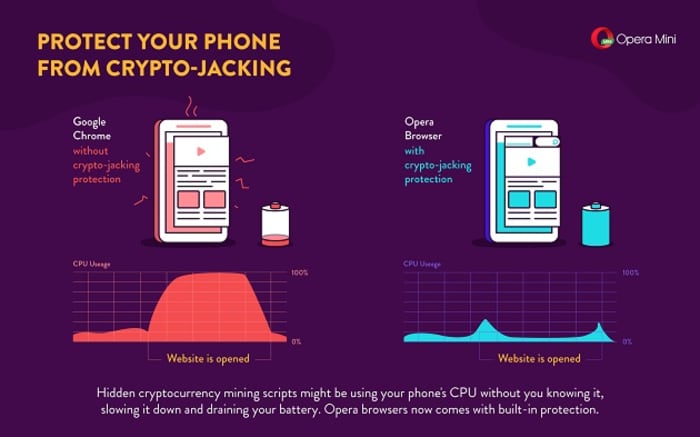
A smart, secure browser is your first line of defense – especially one that can block JavaScript. While this effectively closes any door on a cryptojacking attempt, the obvious drawback is that blocking JavaScript will also cull functions that you like and need. The best middle ground is Opera, a browser that’s been fighting the cryptojacking war since before we even knew about it. If you install Opera on your mobile device, it’ll actually block risky mining scripts when visiting a site. It’s analyzed over 100 mined websites, and noted how smartphones such as the Galaxy S8 or HTC One suffered reduced performance when exposed to cryptojacking.

Opera Mini cryptojacking

You can also download an extension like No Coin which blocks miners using your computer resources without consent. Opera even comes with the extension already installed on download.

Lastly, Opera even made this cool test to tell you whether you’ve been cryptojacked. If you’re a regular user of cryptocurrency, it might be a good idea to bookmark the page.

Using Opera in tandem with a strong anti-malware tool will help keep your PC protected from cryptojacking attempts, but it always helps to take extra precautions before clicking on that sketchy email, or opening a link that you don’t trust. Stay frosty, and stay tuned with Softonic for more tips and tricks to keep protect your computer protected.