What to know before your first Smash Ultimate tournament

Ready to play with the big boys? Here’s what you need to know.

Since Smash Ultimate’s release in December, thousands of new players have joined the Smash competitive scene. With dozens of balanced characters, improved gameplay mechanics, and hundreds of tournaments popping up, there never has been a better time to try getting into competitive Smash. For players that wish to join the scene, it’s understandable to be a little intimidated by the concept of playing Smash competitively for glory and money. If you’re interested in diving in, here are a few tips to get you started.

Pick one or two characters and stick with them

Smash Ultimate primary secondaryWith over 74 playable characters, it’s difficult to narrow down a favorite in Smash Ultimate. Play around online or with your friends and try out plenty of different characters in order to find your main. It’s common for newer competitive players to list off 10 or so characters as their favorites, which is fine, but if you’re preparing for a tournament you should try and narrow it down to two characters at most. This allows you to focus on getting better with these characters instead of splitting your efforts fruitlessly between many.

It should be noted that the characters in Smash Ultimate are balanced very well, so you can take any character you want to a local tournament (tier lists don’t really matter much at a lower level of competition, they only start really mattering once you go to larger national tournaments).

If you choose two characters instead of one, try to pick characters that cover each other’s weaknesses. For example, I mostly play as Incineroar, a slow, heavy hitter who does fine against most of the cast but struggles against hit-and-run characters like Sonic. For those situations, I have a practiced Mewtwo ready to go who can hunt down the quicker characters.

Don’t be afraid to drop a character and pick a new one if you think they aren’t working out for you, it’s very common.

Know how to practice

training mode Smash Ultimate

Knowing how to practice properly is just as important as practicing itself. The first rule you should be aware of is do not practice against the CPU. We cannot emphasize this enough. Playing exclusively against the CPU will ingrain bad habits into you and leave you unable to practice the human elements of Smash, like mind games and making predictions based on patterns.

Second, go into training mode with your character(s) of choice. Practice combos and kill setups, and take note of which percentages your opponents get KO’d at. Practice various combos to see when they kill light, medium, and heavy characters. This could save you in tournament because you’ll know “Oh, my opponent is playing Pichu and I know my up throw will kill at 100% and I should go for that.”

Third, try and practice with people in person or in online battle arenas. We already talked about CPU’s, but practicing online against random people can be a frustrating and unhelpful experience. Not only do you have to worry about lag, but people often use weird rulesets that force you to play the game in an unusual way. Elite Smash and GSP are not good representations of how skilled you are, and focusing on them will only frustrate you.

If you don’t have anyone to practice with in person, join online Smash communities on Reddit, Smashboards, and Discord and exchange friend codes. One of the best ways to find other players is through Facebook. Nearly every major U.S. city has a Smash Facebook group, so join the one relevant to your area to keep up with tournaments and find others to practice with. Practicing in private online battle arenas let you face a wide variety of people without all of the nonsense that comes with public matchmaking.

Treat your first tournament as a learning experience

Dr. Mario smash ultimate
Pictured: Dr. Mario thinking hard (just like you should be doing at your first tournament!)

It’s perfectly ok for you to be nervous heading into your first tournament. Be prepared to encounter players who are much better than you. Instead of being discouraged by losses, make sure to treat every match as a learning experience. Tournaments add a whole new set of variables to Smash that can’t be replicated at home on the couch. Nerves, mental exhaustion, and other factors happen to every player, even experienced ones. Learning how to deal with these factors is one of the biggest hurdles for new players, and they can only be overcome by continuing to go to tournaments.

The vast majority of players I’ve met at tournaments have been very kind and supportive people. They will act respectfully and give you gameplay tips if you ask them. Players who are rude, excessive, or otherwise unpleasant to be around are not tolerated in the community, so don’t worry about some clown insulting you. Be sure to network with people because you’re all Smash fans. It’s likely that you’ll make new friends, practice buddies, or maybe even doubles partners.

What to bring for your first tournament

gamecube controller smash ultimate

You should bring a small bag or knapsack to your tournament. Some useful items you could bring include:

  • Your controller of choice. Tournaments do not supply controllers, so it is essential that you bring your own.
  • A water bottle/jug. Venues can get crowded and hot, and staying hydrated will keep you at the top of your game.
  • A portable phone charger. Tournaments can often run for hours and hours so it’s important to keep your phone charged.
  • If you feel like it, bring your Nintendo Switch to get some practice in if the TVs are occupied. You can also use it to quickly exchange friend codes with other players.

Do you find this advice helpful? Is there anything else you’d like to know about getting ready for a Smash Ultimate tournament? Let us know!


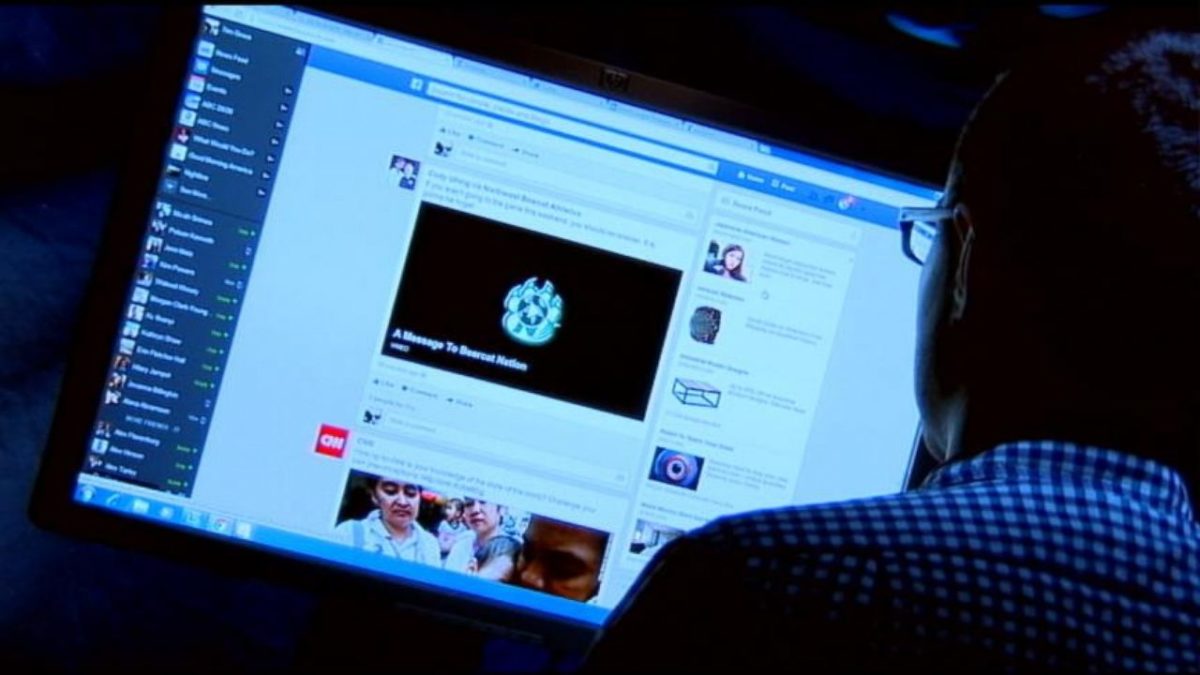
What happens to your Facebook page after you die?

Take these steps today to assist your loved ones after you’re gone.

Digital grave

Even though our physical bodies have a relatively short shelf life, our online presence is basically immortal. 

If you’re like us, it’s hard to go even half an hour without checking Twitter, Instagram, and Facebook. If you’re going to invest that much time into your social media presence, you might as well make sure it’s taken care of when your time is up.  

Chance are you know someone who has died, but their Facebook page lives on for their friends and family. Facebook has several options for you and your own page for when your time comes.

Below, we listed your options for digging your digital grave on Facebook.

What will the Facebook AI do for you?

It can be an awkward and depressing moment when Facebook suggests that you wish a happy birthday to your deceased friend. It’s even worse when Facebook suggest that you invite your dead grandfather to your birthday party.

Luckily, Facebook announced that new AI will stop profiles of deceased users from popping up in painful situations. (It’s unsettling to think exactly how this AI will know we’ve passed away. Details are unknown.)

Memorialized Facebook page

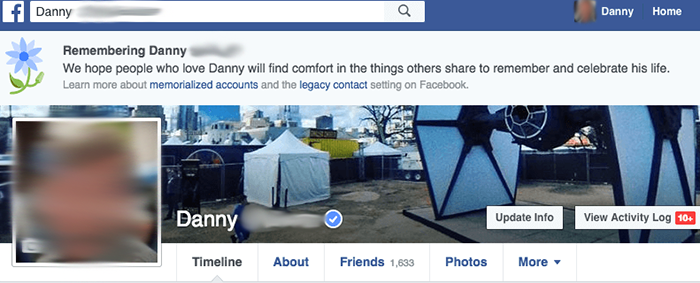
Memorialized Facebook page

There are currently more than 2 billion users on Facebook. Of those 2 billion, there are millions of dead users. 

For the dearly departed, Facebook does have the option to memorialize your account. Facebook’s Help Center lists the following features for memorialized pages:

  • The word “Remembering” will be shown next to the person’s name on their profile.
  • Depending on the privacy settings of the account, friends can share memories on the memorialized timeline.
  • Content the person shared stays on Facebook and is visible on Facebook to the user’s audience.
  • Memorialized profiles don’t appear in public spaces such as in suggestions for People You May Know, ads or birthday reminders.
  • No one can log into a memorialized account.
  • Memorialized accounts that don’t have a legacy contact can’t be changed.
  • Pages with a sole admin whose account was memorialized will be removed from Facebook if we receive a valid request.

Facebook tributes

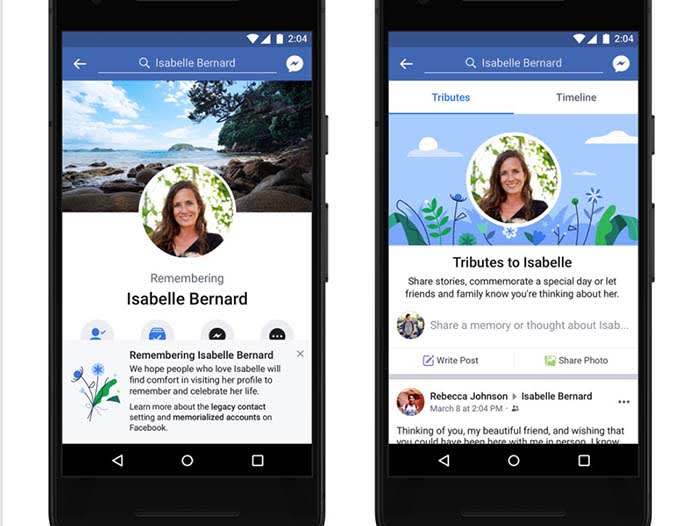
Facebook is also offering a tributes section on memorialized pages. Aside from what normally appears on the timeline, users can click a tab to see posts from others offering condolences.

Tributes are meant to allow grieving friends and family members to sift through their loved one’s content easily.

Facebook Tributes

Designate a legacy account on Facebook

To reduce confusion, setting up a legacy contact is a good best practice for Facebook users.

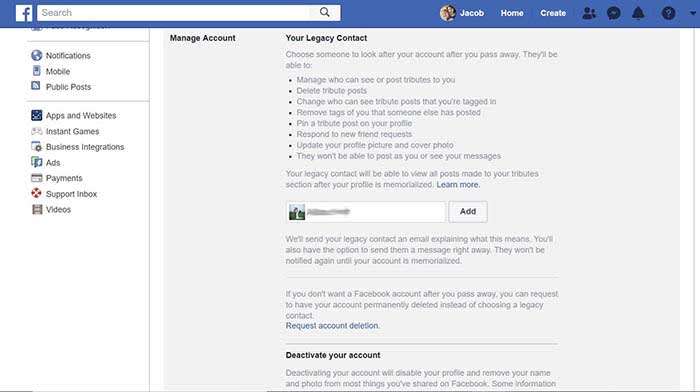
From the home page access the settings menu. From settings, click the “Manage Account” tab. From here, you can send a request to a trusted friend or family member to serve as your legacy contact.

Legacy contactYour legacy contact has permission to do the following to your page, according to the Facebook Help Center:

  • Write a pinned post for your profile (example: to share a final message on your behalf or provide information about a memorial service).

  • View posts, even if you had set your privacy to “Only Me.”
  • Decide who can see and who can post tributes, if the memorialized account has an area for tributes.
  • Delete tribute posts.
  • Change who can see posts that you’re tagged in.
  • Remove tags of you that someone else has posted.
  • Respond to new friend requests (For example: old friends or family members who weren’t yet on Facebook).
  • Update your profile picture and cover photo.
  • Your legacy contact will be able to turn off the requirement to review posts and tags before they appear in the tributes section.
  • Request the removal of your account.

Your legacy contact will not have the ability to log into your actual account. This means that they cannot read your messages, or remove or add friends. Legacy contacts can respond to friend requests, but cannot actively seek out friends. 

Users under 18 cannot designate a legacy contact, but Facebook now allows the parents of the user to serve as the legacy contact.

Paying respects to Facebook

You could easily leave a note for your next of kin saying, “Here’s my login info; sign in and delete my account.” However, Facebook has streamlined the process with all these features so you don’t have to worry.

While grieving, the last thing most of us are thinking about is the online persona of the dearly departed. When the time comes to work on their Facebook page, Facebook has given you the tools to make the process as painless as possible. 

Meet Emma, the Chrome extension that scans LinkedIn profiles

What does Emma think about your career prospects?

Emma Ai

Another day, another algorithm that aims to “make hiring bias disappear,” by way of analyzing your work style.

In the past, we thought that smarts alone were the best way to predict on-the-job success. Today, there’s an understanding that success depends on a collection of things: being a team player, a leader, and someone who is flexible and creative.

Of course, we live in a time where optimization trumps everything. Brands need to bet on their best candidates and now rely on personality tests and behavioral analysis to help filter.

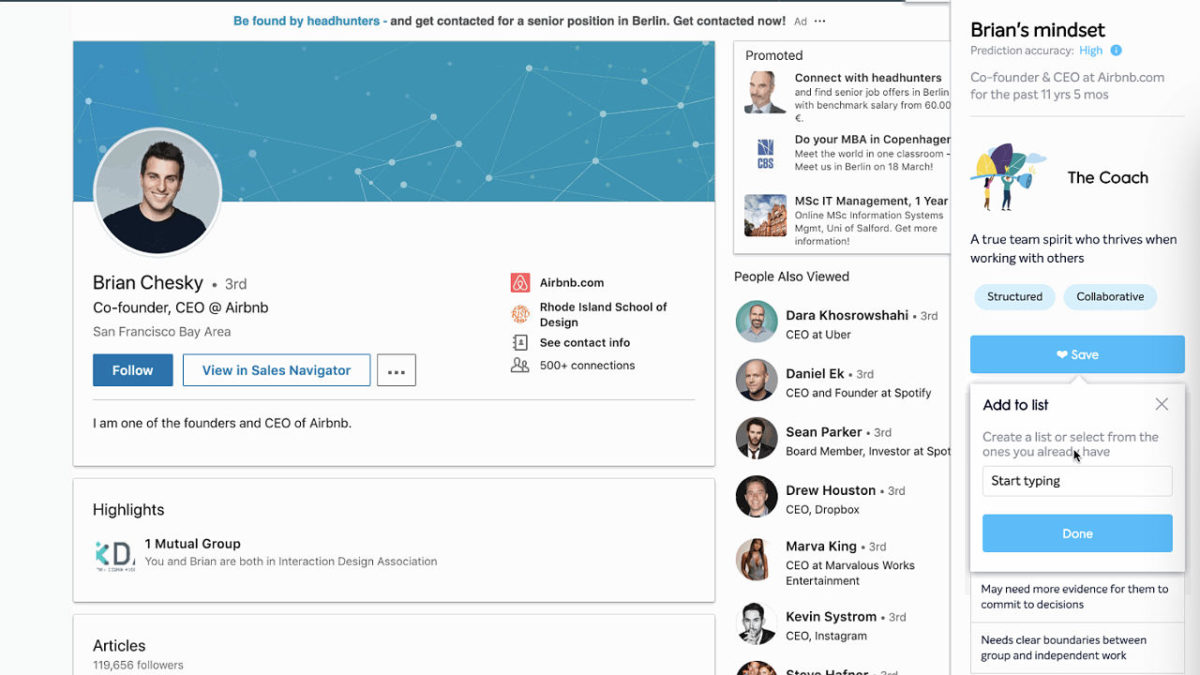
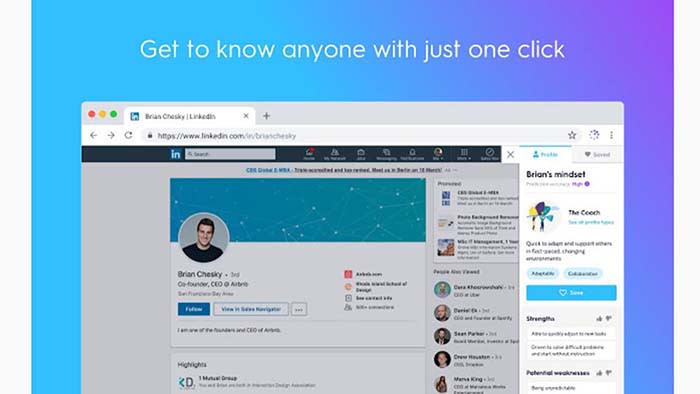
Enter, Emma. This is the latest offering from business intelligence firm, Bunch.ai. Emma is a Chrome extension powered by AI that analyzes LinkedIn profiles to learn more about a “person’s mindset, motivations, and work style.”

While it sounds a bit creepy, Emma provides some different insights than your standard big five personality test. Here’s a little more info:

What is Emma?

Job hunting

Emma is an extension of Bunch.ai’s AI-based hiring tools. Like some of the other platforms we’ve run into, it uses machine-learning algorithms to determine whether a person is likely to succeed in a job.

According to Bunch’s “about us” page, their technology looks for cultural signals within other workplace tools like Slack and JIRA. These insights are then used to “manage culture” and identify how specific teams work.

Recruiters and employers can then look for potential hires that fit in with their organizational culture through Emma. The idea is presented almost like a match-making approach, so companies can fill their offices with “results-driven” or “detail-oriented” staff.

Instead of asking potential hires to take a screening assessment, they can look at their LinkedIn profile, activate Emma, and identify a person’s strengths.

While the goal is to eliminate bias, we’re not so sure. Scanning for cultural words could lead to subtle forms of discrimination that leave out qualified candidates.

Anyone can use Emma to analyze LinkedIn profiles

What makes Emma unique is that you can use “her” insights as a recruiter, an employer, or as a way to gather intelligence.

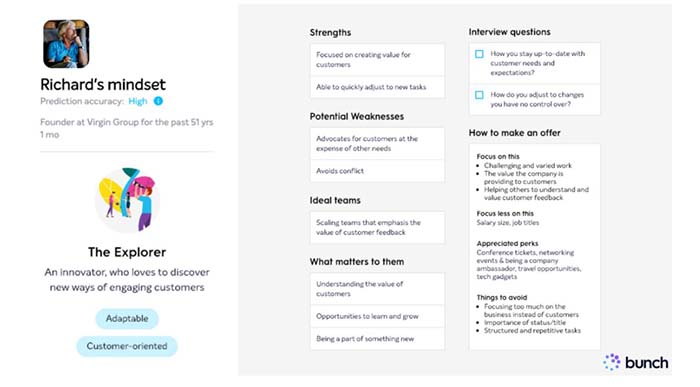
Emma uses your profile info to highlight strengths, weaknesses, and approach to work. She also sorts you into categories like “coach” or “sage.”

Or, you might be like Richard Branson, an “explorer,” who’s adaptable and customer-oriented.

Richard Branson

Overall, the breakdown is pretty appealing. Users can quickly identify personality traits by way of a sorting hat element. You can ask “am I a sage like Bill Gates or an explorer like Richard Branson?”

Does Emma violate GDPR?

GDPR

In case you’ve been living under a rock for the past couple of years, the GDPR is a regulatory measure passed last year in the EU designed to protect customers’ digital privacy.

Basically, GDPR dictates that any website that serves EU residents needs to obtain consent to add a user to their subscription list. It also must have a clear privacy policy that lets users know how their data will be used.

Sure while the extension doesn’t violate GDPR protocol, LinkedIn might not be happy with it. Emma actually violates their terms of service, as the AI technically scrapes data from the platform without the subject’s permission.

On Emma’s side, the company says that they aren’t exposing any information that you haven’t publicly shared. Instead, this is information that you’ve voluntarily shared on LinkedIn, so technically, there’s no violation.

This use of AI feels kind of iffy to us. On the one hand, Bunch.ai isn’t wrong. Insights come from information you’ve publicly shared, so there’s no technical violation. Still, this feels like the digital equivalent to that person who loves letting people know that they’re a body language expert.

Hey, it beats a traditional personality test

Personality test

Emma, according to the company website, isn’t out to put you in a box based on big five traits. According to this study, the only trait indicative of workplace success is conscientiousness — and that’s not necessarily true for every type of job.

For example, jobs that require out of the box thinking or creative problem-solving don’t necessarily depend on the worker’s ability to respond to every email ASAP.

We did like a few things about the tool. For one, the profiles break down user information in an appealing way. Also, insights are more about work style than highlighting the pros and cons of your Myers-Briggs personality results. And, it’s pretty cool that users can review their own data.

However, the consent issue kind of rubs us the wrong way. You might be fine publishing information about yourself. However, you might have reservations about a recruiter running your stats through an algorithm.

Users don’t need to ask for permission, either, so anyone can look up anyone else. While it could be useful, Emma is tinged with shades of that babysitter screening tool.

How to change your mobile phone number

Want to change your number? Here’s how.

Getting a phone number

Whether you’re avoiding someone, or just trying to start over, changing your phone number can be a confusing process. Some service providers require you to go through a lengthy system to get your number changed.

Others are just a quick trip to their website. Either way, each provider has a different system that you have to go through to get your number changed. Here is a list of the most common service providers, and how to change your number with each one:

AT&T

Unless you want to change your area code, AT&T has a pretty simple process to get your number changed. Just go to their mobile number change site, log into your account, follow the prompts, and choose the number you want to change.

If you wish to change your area code, you may have to call AT&T’s customer support line or visit an AT&T store. You may be allowed you to change it online if you fit certain specifications.

Additionally, if you’ve been with AT&T more than 30 days, you will have to pay a $36 fee to change your number. If you’re within that 30-day activation time, then you won’t have to pay anything. However, you will have to call their support line or visit an AT&T store to change your number.

AT&T Mobile Transfer Free Download ►
7

Sprint

While Sprint has a few restrictions on changing your number, the entire process can be done on their site. First, you’ll need to sign in to your Sprint account. Then go to “My Sprint dashboard” and select “Manage Devices.”

There will be a blue question mark next to each number associated with the account. Click the question mark next to the number you want to change, then press “change phone number.”

You’ll be given a few options based on whether you want to change your area code or billing address. Once you’ve selected the option that fits your situation, you’ll be given a random new phone number.

There is no fee for changing your number at Sprint. Although, you’re only able to do it three times within 30 days.

My Sprint Free Download ►
7

Verizon

You can change your Verizon phone number from their online site or on their mobile app. Either way, you’ll have to be the account owner or account manager to change any numbers.

In the My Verizon mobile app, click “Devices” under the main navigation menu, and select the number that you want to change. Then click “Manage” and scroll down until you see “change mobile number.” Afterward, you’ll be given instructions on how to proceed.

Verizon new number


If you decide to go through their online site to change your number instead, you’ll first have to go their mobile number change page. Then you’ll be prompted to sign in and select the mobile number you wish to change. Choose “Get new number” and then just answer the prompts that follow.

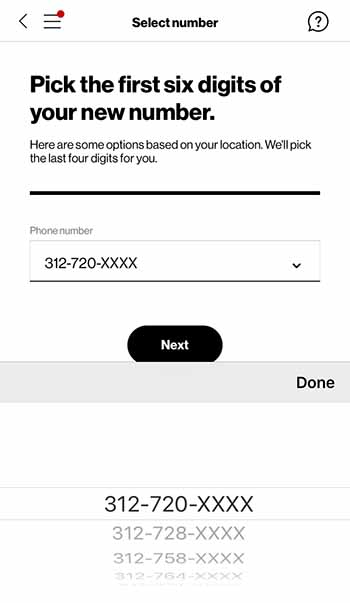
You’ll be able to select your area code and prefix when changing your Verizon number. However, the last four digits of your number will be randomly assigned to you. Additionally, there is no charge for changing your Verizon phone number.

My Verizon Free Download ►
7

T-Mobile

Unfortunately, unlike most providers, T-mobile doesn’t allow you to change your number online. You have to call their customer service center by dialing 611 or 1-877-746-0909.

From there, choose their service option and speak to a customer service representative. They will instruct you on how to proceed from there.

Your next bill will be charged a $15 fee.

Tmobile Tuesdays Free Download ►
8

MetroPCS

Just like T-mobile, MetroPCS requires you call their customer service line, 1-888-863-8768 to change your number. Once you get to a customer service representative, they’ll be able to help you through the steps

You most likely will have to pay a small fee as well, although this fee varies depending on your plan.

Other providers

Telephone lines

If your service provider is different then the ones listed above, you may still be able to change your number.

First, you should try seeing if they have the option on their site. Typically, this can be found in the preferences menu of your account details. If you’re unable to find information on changing your number through their site, then call their customer service center. A customer service representative should be able to help you. 

Also, you should be aware that switching providers will allow you to obtain a new number during that process. So, if you plan to switch providers soon, then it may not be worth changing your number right now. This is especially true if you’ll have to inform your contacts of your number change.

How to turn off read receipts in Facebook Messenger

Reclaim your privacy with these simple steps.

Install Facebook Messenger

Read receipts aren’t exactly popular.

They’re a great way to stir up a little drama among friends. They can also generate a ton of anxiety when you’re trying to figure out if that new guy you’ve been dating is serious or not.

Nothing is worse than knowing someone read your message and just didn’t respond.

There’s literally no benefit to this FB-sanctioned stalking tool. It’s just an added pressure designed, in Facebook terms, to add a conversational cadence to our online chat.

So, can you turn off Messenger’s read receipts?

The short answer is, no. Facebook doesn’t make it easy by allowing you to turn this setting off through your account.

That said, you do have some options.

How do you read a Facebook message without the sender knowing?

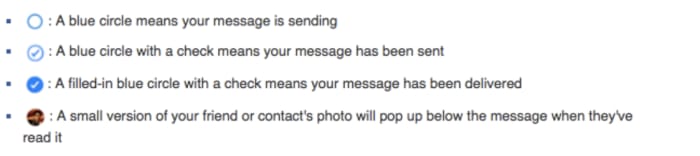
Facebook Messenger relies on a system of circles to show the status of each message you send. You’re probably familiar with the setup, but it looks like this:

Read receipt in Facebook messenger

We all know it’s a pain when you get a message, but don’t want to respond immediately. You could ignore the message, but, come on, that’s not entirely realistic.

There are a few workarounds to use here:

Turn on the airplane mode

One of the easiest ways to check your messages incognito is to prevent the internet from reaching your app.

Turn your phone on airplane mode, then open your app and read your messages.

Use the notifications screen

The other quick fix? Not opening the app at all. Instead, view your messages through your phone’s notification screen to avoid detection.

Just be careful you don’t accidentally open the app. This workaround is best used to quickly check if any notifications demand an immediate response.

Embrace the extensions

As with the mobile app, Facebook doesn’t provide an easy way to hide from your friends and family.

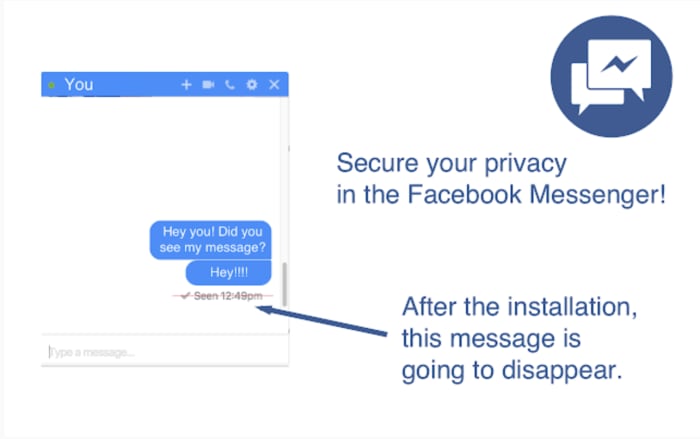
Chrome has a workaround, aptly named, Unseen, that you can add to your browser. You can start reading messages without feeling like you’re being watched.

Google Chrome Unseen feature

If you’re a Firefox fan, Message Seen Disable does the same thing.

Both browser extensions allow you to open the app and read your messages. However, that little ball with your profile picture won’t drop unless you turn off the extension.

Also, both apps are free and require no actual tech savvy. If read receipts are the bane of your existence, this is your best option.

FB Unseen Download Free
8

Read receipt drama is real — science confirms

For a deep dive into this subject matter, we recommend checking out an episode of the “Why’d You Push That Button” podcast. They interview researcher Lujayn Alhddad who literally wrote a paper on the topic.

The paper looks at the difference between how people feel about read receipts depending on whether they’re the sender or the recipient. Unsurprisingly, most people wanted to see when someone got their message but didn’t like the idea that someone might be tracking their behavior.

Alhddad brings up the real issue of social pressure associated with read receipts.

She says they serve as a reminder that we “need” to respond immediately. Otherwise, the sender will assume the recipient is not interested in what they have to say.

Another expert, Dr. Tony D. Sampson, of the University of East London has another thought. He says that apps like Facebook, iMessage, and WhatsApp are designed to “trigger negative emotions linked to compulsive behavior.”

This, admittedly, sounds troubling. Sampson says that unhealthy habits like compulsively checking read receipt time stamps keep us tuned in. This means we’re continuing to supply platforms with our data.

Next time you leave someone on “read,” give a thought to their mental state.

Best tabletop alternatives to Dungeons & Dragons

Tired of Dungeons and Dragons? Try one of these alternatives!

Dungeons and Dragons

When most people think of pen and paper (or “tabletop”) RPGs, they immediately think of Dungeons & Dragons. While this may be the most popular, there are hundreds of tabletop games, with at least a dozen new games coming out each year.

While D&D might not be for everyone, there is bound to be at least one tabletop game that catches your interest. Here are some of the best alternatives to look into.

Best D&D alternatives for tabletop gaming fans

Shadowrun

Shadowrun

While most high fantasy games like D&D are set in the past, Shadowrun is set in the distant future. It retains many magical elements of standard high fantasy games, such as varying races and magical abilities.

The game’s backdrop is cyberpunk rather than a mythical landscape. The game also uses a freeform skill system instead of actual classes. This makes character abilities incredibly customizable. This is a perfect game for anyone who enjoys futuristic settings.

Shadowrun Returns Download ►
7

Pathfinder

Pathfinder

The main competitor to D&D, Pathfinder is another high fantasy tabletop game that uses the same engine as Dungeons and Dragons. In fact, Pathfinder was actually created as an extension of D&D 3.5 editions.

As such, the gameplay between the two is very similar. Pathfinder is typically a good choice for anyone who wants more options. D&D only creates a finite amount of content per edition. Certain races and classes have to be homebrewed if you want to play them in a D&D campaign.

Pathfinder has continued to build on the same content, giving you dozens of options to choose from. This makes it a particularly good alternative to 3.5 fans, as it’s basically the same game but with more content.

Pathfinder Spellbook Download ►
7

Call of Cthulhu

Call of Cthulhu

Like D&D, Call of Cthulhu is a tabletop RPG from the ’80s that remains popular decades after its release. This is one of the oldest survival horror games, and it has created many spinoffs throughout the years.

The story follows the same adventures of the original H.P. Lovecraft’s “Call of Cthulhu” story. Players are regular people dropped into a mysterious world. The classes are based on normal professions, and give unique abilities to the players based on their past.

Players have to worry about both their physical and mental health in order to survive. The game is well known for major player deaths throughout an entire campaign.

Call of Cthulhu Download ►
10

All Flesh Must Be Eaten

All Flesh Must Be Eaten

Have you ever wanted to live out an episode of “The Walking Dead?” Well, this is the perfect RPG to live out your zombie apocalypse nightmares with your friends.

All Flesh Must Be Eaten’s expansions have made it possible to experience almost any version of “zombie” and “zombie fighters.” This gives GMs and players a lot of choices in how they envision the zombie apocalypse will go down. 

Apocalypse World

Apocalypse World

As one of the most successful Kickstarter RPGs, Apocalypse World is the first game to use the Powered by the Apocalypse engine. The game has one of the most unique GM roles ever developed, as there is no prior planning for the MC.

The MC, along with the players, develop the backstory and settings of their post-apocalyptic world. Players each follow a player book based on their class and develop a shared history together. This game has been the inspiration for other popular RPGs like Dungeon World and Monster of the Week.

Beyond the Wall and Other Adventures

Beyond the Wall

If you’re new to roleplaying games, then there is no better campaign to play then Beyond the Wall. This game features a simple and easy-to-learn system. The scenarios and character sheets are pre-built, so there is no need to take the time in coming up with new characters or situations. It requires no planning and low maintenance to keep the game going. This is the easiest RPG to get into when you want to have a small and fast campaign.

In conclusion

One of the best things that non-D&D tabletop games tend to have in common is how easy it is to be a GM. While D&D can require hours of planning before a game even begins, many of these games have preestablished settings and situations, making it a much easier adjustment. So, if you’re looking to GM for the first time, you may want to try one of these games before going to D&D.

Study shows social media impacts children’s diets

Learn how social media is impacting kids’ diets.

Kids social media

Social media is taking its toll on our mental health. That toll can come in the form of selfie dysmorphia, Instagram-fueled depression, or an increase in eating disorders. Study after study is discovering more ways social media can cause mental and physical harm. If you don’t believe us, even Oprah and Prince Harry are tackling these issues.

The latest discovery comes by way of a recent study published in “Pediatrics.” Social media (particularly channels like YouTube and Instagram) may have a negative impact on what kids choose to eat.

The findings revealed that social media influencers could inspire children to eat junk food like cookies and candy, but those powers did not extend to getting kids excited about eating more vegetables.

What was measured?

Anna Coates, a Ph.D. student at the School of Psychology at the University of Liverpool, was interviewed by NPR. She and her colleagues wanted to know how much children’s diets were influenced by the accounts they followed on social media.

The study involved 176 children between the ages of nine and 11. They were divided into three groups so researchers could see how social media influences junk food cravings.

The kids who saw the junk food versions of photos were more likely to snack on cookies and candy. Their peers who saw healthy food images were less likely. According to the researchers, the extra snacking meant that the students in the junk food group consumed, on average, up to 90 calories more than their peers.

Junk food

While that doesn’t sound like much, American Academy of Pediatrics spokesperson Natalie Digate Muth says otherwise. She said that just an extra 70 or 80 calories a day can make a difference. She also said that a small increase can cause a healthy child to become overweight.

Unfortunately, it doesn’t seem like that influence works the other way. Those kids who saw the healthy food-focused images did not eat any more carrots or grapes than the other groups.

Just the latest in fast-food marketing to youth

We’ve long known that junk food ads have influenced what kids want to eat. Think about the items that were in your lunchbox growing up. We remember the Dunkaroos, Capri Suns, Oreos, and Doritos. Carrots aren’t in our highlight reel.

It seems that social media is making things worse. The WHO reported that platforms use kids’ data to push out targeted ads. That’s just ads; influencers muddy the waters.

Influencers are so effective because they feel familiar to us.  Recommendations coming from these social media users feel authentic, like a recommendation coming from a friend.

Of course, parents should talk to their children about influencers and how advertising works. Kids (and all of us) are more susceptible to influencer ads and product placement more than traditional ads.

Is regulation a possibility?

There’s little in the way of regulation when it comes to how we handle ads promoting junk food. In general, the FTC does have social media regulations in place. They require that influencers disclose when a post is sponsored.

However, it’s not exactly realistic for the organization to monitor every incoming post for potentially harmful content. There are millions of influencers all posting regularly.

Influencers complicate junk food marketing

Ronald McDonald

The study recommends tighter restrictions on marketing junk food. The digital marketing landscape is much more complicated than it was in the days where TV was the main concern.

Sure, we don’t have tobacco-sponsored cartoon characters targeting today’s youth, but advertising has changed a ton. Seriously though, that happened:

Influencer culture has made it cool to participate in advertising. So, chances are, popular influencers have tremendous power over the kids that follow them.

In this day and age, where teens are creating fake sponsored content for real brands, what is the widespread impact of online advertising on children?

How do I break my social media addiction?

Do you find yourself reaching for your phone to check apps like Facebook? We can help break your addiction.

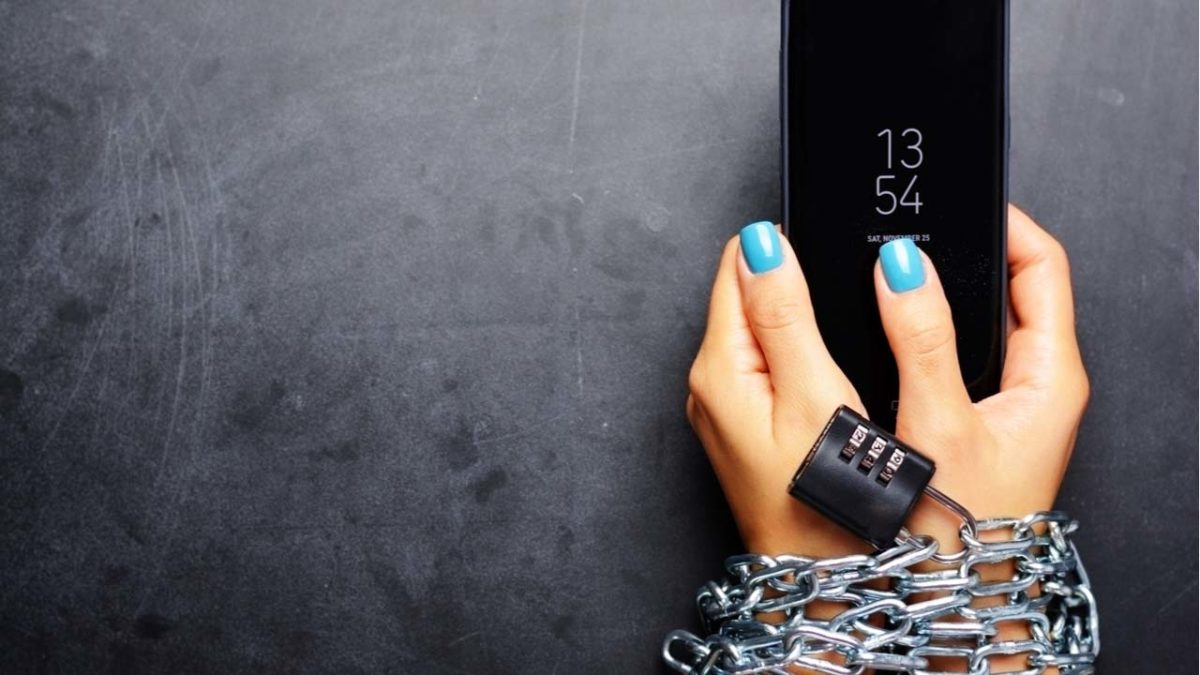
Smartphone addict

Social media connects us to new people and ideas — for better or worse. It’s also a massive time suck that can wipe out a whole day and get in the way of accomplishing goals.

The word “addiction” brings to mind drugs and alcohol. It might seem too strong a word to apply to something like social media, right?

Well, not exactly. Though social media addiction has yet to secure an official spot in the DSM, it’s already become quite prevalent in the U.S. and Europe. It is affecting up to 8.2% of the general population.

How often are you on track, knocking tasks off your to-do list when a friend request or Instagram comment derails your progress? One second you’re typing up an email, and the next, you’re deep into some acquaintance’s 2016 vacation pics.

All of us are susceptible to succumbing to these distractions, but there are some things you can do to fight full-blown social media addiction.

Here are some tips you can use to regain control:

Learn why you’re addicted to social media

Facebook addict

What is it you hope to gain from opening social media? Uncovering the “why” behind your bad habit does require some introspection.

You might not have a good reason for your endless scrolling. If that’s the case, take a closer look at your motive. Do you hit the ‘gram when you’re stressed or overwhelmed? Or, is it when you’re trying to put off a project you don’t want to start?

Perhaps, you’re seeking connections with the outside world or accessing new information.

In any case, we tend to lean on social media to fill a void. Psychology Today describes this endless scroll as this “wanting activity.” Meaning, we tend to keep looking at our feeds because we’re anticipating some reward.

It’s also a lot easier to veg out in front of your feed than picking up a book or phoning a friend. This just adds to the temptation.

Reset

Going on a hike

One way to fight social media addiction is by taking a day off. Consider taking a day each week where you avoid using the phone or your computer.

This gives you some space to schedule some in-person social time. Do some analog reading, or you know, go outside.

That said, a full day of no socializing might add to your anxiety for a lot of people. If that’s you, aim for a couple of hours at a time.

Set ‘micro-boundaries’

Micro-boundaries is a concept developed by University College London researchers. It refers to a handful of ways to set distance between you and your bad social media habits.

The researchers say there are four types of micro-boundaries.

  • Digital: Separating accounts or using apps that block out certain websites
  • Physical: Choosing to leave a device at home or keeping it in a drawer at work
  • Social: Turning your phone on airplane mode or do-not-disturb during social situations
  • Temporal: Turning alerts off or setting the phone to do-not-disturb for specific hours

The UCL paper does acknowledge that you may need to let others know about these digital boundaries. If you’re a quick responder, then you might need to give people a heads-up.

Focus on what you can add to your life

Woman meditatingLike going on a diet, prohibiting the use of social media isn’t sustainable for the long-term. Instead, you should try setting achievable goals. Habit formation depends on training the brain to get that reward satisfaction from a healthier source.


Plan a cell phone-free dinner once a week, get into hiking, biking, or exploring your neighborhood.

Disable your alerts

Alerts play into our brain’s reward center, providing a rush of dopamine when we hear those familiar sounds.

According to Harvard researchers, Instagram likes, and text messages activate the same release of dopamine you’d receive from completing a “successful social interaction.” The article also notes that dopamine paths are often dysfunctional in people will any type of addiction, be it substance abuse, gambling, or Facebook.

The thing about disabling notifications is, you still have access to everything you want from your phone/computer. However, it provides a level of separation between you and your apps.

Wrapping up

Women socializing

Most of the notifications you receive don’t contain critical time-sensitive information. But for a lot of people, opting out of push notifications can present interpersonal challenges. Your mom or your partner might get annoyed when you don’t respond ASAP.

This study, aptly named The Do Not Disturb Challenge had interesting results. They found that while participants felt more productive after turning off their notifications, they also felt anxious about not being as responsive as expected.

So, again, success may depend on convincing your colleagues and text-happy friends to take a more moderate approach to social media.

How an inclusive Silicon Valley helps everyone

When tech companies look like the populations they serve, everyone wins.

If I asked you to close your eyes and picture a typical Silicon Valley employee, what would you see? You’d probably picture someone like this:

tech bro
“It’ll be the Uber of (blank). I’m telling you bro, it’s gonna be big.”

Shown above is a tech bro: a white straight man in his 20s or 30s who dresses casually and works hard as a coder/engineer/entrepreneur in Silicon Valley. Unlike the geeks of old, these tech bros aren’t sniveling poindexters who can barely squeak out a word. Tech bros are more confident, modern, stylish, and generally more bro-y. Their culture combines the ruthlessness of entrepreneurship with modern digital acumen and has produced some of the most popular digital products of today including Facebook, Twitter, Snap, and Uber.

The problem with tech bro culture is that it alienates anyone who doesn’t fit into the archetype. People of gender, racial, and sexual minorities just can’t seem to find themselves accepted by Silicon Valley on a large scale. But why does this happen? Why should we care? And what can be done about it?

And before you say “We should just hire based on skill, not on race/sex,” minorities in tech are not equally given the chance to be competitive.

Why Silicon Valley mostly white and male

social network white male
Pictured: Mark Zuckerberg (Jesse Eisenberg) as depicted in “The Social Network.” The film paints a painfully accurate picture of tech bro culture.

It’s easy to think that Silicon Valley is a cultural institution built by white males, for white males, but that’s not entirely accurate. According to Emily Chang (author of “Brotopia: Breaking Up the Boys’ Club of Silicon Valley”) women played an instrumental role in the early American computing industry that would eventually become Silicon Valley. They served as vital programmers for NASA and the military, including on the Apollo 11 mission to the moon.

But by the time the late ’60s/the early ’70s rolled around, big companies started using aptitude and personality tests (themselves designed by straight white men) to find ideal programmers, making it significantly more difficult for women and minorities to be accepted in the industry and find work. Ever since, the technological powerhouse known as Silicon Valley has been dominated by what would become the tech bro.

Moving forward, Silicon Valley morphed into an institution that constantly worked to maintain its own demographics. This does not mean that it was always a conscious decision (i.e. straight up deciding not to hire someone because they’re black/female/gay) but one that plays off of generations of systemic biases against minorities.

For various reasons, minorities of all kinds are discouraged from going into STEM fields. Whether that be due to economic disenfranchisement or social biases (women being encouraged to study more “traditional” fields), there are fewer minorities joining STEM than there are white males. In terms of simple statistics, for every minority that graduates in a STEM field, there are dozens of white male graduates with similar qualifications, further narrowing the chance of getting hired.

A common counterargument to Silicon Valley’s homogeneity is, “What about Asians? There are so many Asians/Indians in tech!” While it’s true that there is a significant Asian/South Asian demographic in Silicon Valley, according to a study called The Illusion of Asian Success, Asian tech employees are the least likely demographic to obtain leadership roles. Despite outnumbering white men in certain areas, Asian employees have 3x fewer executive positions in Silicon Valley than white men. In Silicon Valley, power is consolidated in the tech bro demographic.

Why diversity in tech helps everyone

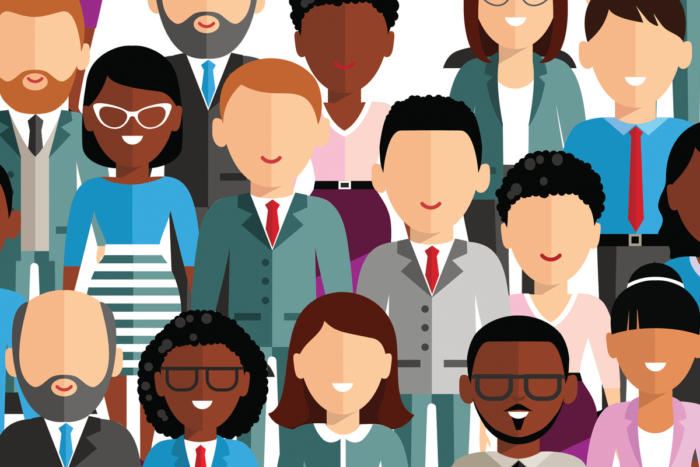
diversity


When online platforms are designed exclusively by white men, they are often unintentionally designed exclusively for white men. Twitter co-founder Evan Williams told Emily Chang that if there had been women present on the original design team, Twitter wouldn’t have such a problem with trolling and harassing women (as well as everyone else) that it does today. The original design team simply did not factor how the technology would affect people outside of their demographic because they had no outside perspective.

Similarly, Amazon is currently developing highly detailed facial recognition software to sell to the U.S. military. While the software can successfully identify the face of a white man with 99% accuracy, it only successfully identifies the face of dark-skinned women 70% of the time, something that could lead to false accusations or profiling. The reason the software is so much more adept at identifying white men is that it was designed by white men, and therefore, its application for white men is given considerably more weight in its design.

While these kinds of mistakes are usually unintentional and not malicious, they highlight a problem in how non-diverse dev teams create software for their own demographic. In today’s interconnected digital world, the best software should be designed to serve as diverse a crowd as possible. Silicon Valley has not only a moral obligation to diversify its workforce, but a functional obligation, too.

Population statistics indicate that by the year 2040 black people and Hispanic people will no longer be minorities in the U.S. If mass-produced digital technologies are still created solely by tech bros by then, then the design of their products will no longer reflect the needs or wants of the population. A diversity of demographics leads to a diversity of perspective, and a diversity of perspective leads to better products at the end of the day.

How Silicon Valley can be more inclusive

equality in tech

The key to achieving external diversity is to make sure your company is inclusive internally. What this essentially means is that simply hiring diverse workers won’t solve the inclusivity problem. If minority workers are brought into a workforce that is explicitly designed for tech bros, they may be ostracized and held back from their true potential.

Take Uber, for example. After making headlines for various HR scandals that stemmed from a non-inclusive and non-diverse workplace, the company focused hard on hiring minority employees. According to former Uber recruiter Pranam Lipinski, this led to even worse working conditions for minorities as they were thrust into a workplace that didn’t account for or appreciate their inclusion. Hiring diverse people doesn’t magically make a workplace inclusive, a company must be inclusive from the inside out.

So how can a company strive to be more inclusive internally? One solution is to make company policies that specifically address minority concerns but benefit all employees. For example, studies have shown that women and minorities are far more likely to be interrupted during company meetings than white men. Instituting a company-wide “No interruptions during meetings” rule would solve this. While this rule would help minority employees be able to speak freely, it doesn’t actually silence white male employees either. It gives everyone a chance to speak their mind.

The most successful inclusivity programs don’t single out minorities. Singling out minority employees applies pressure to them to act as a “model minority”, and can make them targets of contempt.  Emily Chang spoke of tech conferences where every woman in the room was asked to stand up and name themselves, something that, while done with good intentions, ended up making them feel alienated. The best inclusivity programs address the concerns of minority employees without explicitly calling them out.

Every tech startup in Silicon Valley wants to change the world. They want to rock the boat, make their mark, and change the status quo. How can a company truly claim to be an innovator or a disruptor if they don’t disrupt the racial and gender stranglehold over Silicon Valley? You can’t change the world without using the perspective of the global community. Ultimately, the goal of inclusivity is not to have minorities succeed in spite of the majority, but alongside the majority.

How to avoid eye strain after staring at screens all day

Discover what all these screens are doing to your eyes.

eye strain

Have you ever sat back and thought about how many hours a day you spend staring at a screen? No matter what age you are, or what lifestyle you live, the answer is probably “several.” The invention of screens that pump blue light into our eyes is an obstacle that the human eye could have never prepared for, even after millions of years of evolution. But what exactly is blue light and what effect does it have on your eyes?

Though blue light is often used by digital devices due to its environmental friendliness, it has been linked to negative side effects. It is unnatural for human beings to be exposed directly to the kind of concentrated blue light a screen provides for hours a day. Symptoms of eye strain caused by staring at a screen include red or irritated eyes, headaches, dry eyes, and blurred vision. Additionally, of all kinds of light, blue light is the one that most powerfully suppresses melatonin (a hormone in the body that helps it sleep at night). Obviously, a lack of sleep can cause or exacerbate all kinds of health issues.

We live in a digital age, so for many people being exposed to screens all day is unavoidable. Whether it be for their jobs or for their personal lives, it’s difficult to keep up in today’s fast-paced world without digital technology. Here are some ways you can continue to use your digital devices while avoiding the harmful effects of eye strain.

Protective Eyewear

blue light glasses

Once manufacturers were able to make blue light glasses that look like everyday glasses instead of yellow-tinted monstrosities, they really took off. Certain eyewear companies offer the ability to include blue-light-blocking tech in your glasses for an additional fee, while others offer standalone blue-light glasses.

Do the glasses actually work? Most consumers say that they feel less fatigue and digital eye strain while using the glasses. Researchers haven’t made definitive conclusions about blue light glasses as the technology has only gained popularity fairly recently. You can find a pair for as low as $15 however, and researchers have said that for the average consumer a low-end pair works just as well as a high-end one. For all the trouble we put our eyes through nowadays, for only $15 certainly it’s worth a shot.

Adjust your display

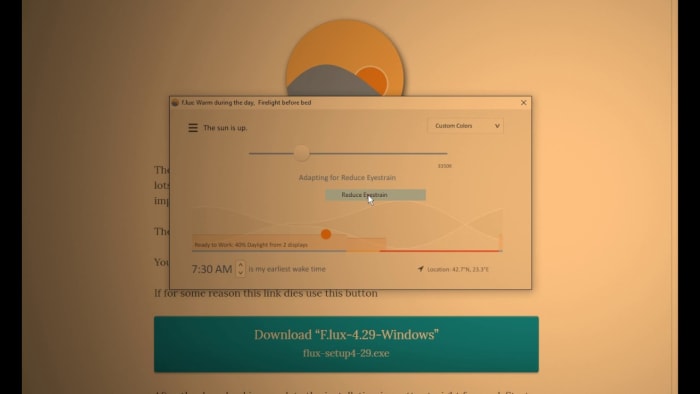
f.lux

If you’d rather adjust the display of your device instead of wearing eyewear (though you can do both) there are several programs that can automatically work to reduce eye strain. The most popular one by far for desktop computers is f.lux, a free and amazing program that automatically adjusts your display based on your location and the time of day.

The program gradually adjusts the display of your computer to show warmer colors the closer you get to sunset, allowing your eyes to better adjust to nighttime. At sunrise, the program will restore your display’s original colors. If you’re doing a color-sensitive activity at your computer, such as watching a movie or doing graphic design, you can disable f.lux for as long or as short as you need to. Installing f.lux will make you wish you got it years ago.

For macOS users, Night Shift can be activated to give your device similar functionality to f.lux. You simply set your usual wake and bedtimes and how warm you want your screen colors to be and your device display will automatically adjust throughout the day. For Android users, a preview version of f.lux is available.

Follow the 20/20/20 rule

20 20 20 rule

Lastly, the simplest thing you can do to reduce digital eye strain is to follow the 20/20/20 rule. Created by the Vision Council, the 20/20/20 rule states that every 20 minutes you spend looking at a screen, take a 20-second break and look at something that’s 20 feet away.

The 20/20/20 rule helps your vision by readjusting your focal point and refreshing your eyes. To easily view something 20 feet away without going crosseyed, try looking out your window.

Do you do anything to protect yourself from digital eye strain? Let us know!