PlayStation allows users to get a refund prior to downloading games in PlayStation Store.
Sony announced a change to its existing refund policy for digital content purchased on the PlayStation Store. Think of it as buyer’s remorse insurance.
Sony will refund you within 14 days of sale for games and DLC as long as you haven’t downloaded or installed them. The funds are added back to your PlayStation Wallet regardless of payment method.
If you download or install a game and the game is not working, you can receive a full download.
If you preorder a game, you can “return” the game any day leading up to the release date. You can return it for a refund as long as you did not download or install it. Essentially, you can’t return a game because you found out it sucks after downloading it. However, if you find out a game sucks before downloading it, you can return it.
If you buy a membership for a subscription service like Spotify Premium or PlayStation Now, you can also get your money back within 14 days. If you already started using the subscription service, you will be refunded for the amount of time you have not used.
You will be prompted to a customer service screen if you request a refund. Then file your claim through customer service. Once the request is processed, you can get your refund.
WhatsApp consecutive voice notes land on the beta for Android and an improved Picture-in-Picture mode is coming, too.
WhatsApp is an evolving app. Although the core feature of messaging our friends and family always stays the same, new features are being added all the time to help make the whole process easier. As well as adding new features, it is good to see the WhatsApp team working on old features to make them bigger, better, and, stronger. This is what today’s news is about, older WhatsApp features that are getting an upgrade.
WhatsApp consecutive voice notes land on the beta for Android and an improved Picture-in-Picture mode is coming, too
In December, we first brought you news of the WhatsApp consecutive voice notes feature. The new feature automatically plays voice notes one after another once you’ve hit play on the first one. The feature only works on voice notes that have been received consecutively and uninterrupted, so voice notes received later on in the conversation won’t play once the string is up. It also includes new tones that’ll let you know when a voice note has finished and also when the last voice note has finished.
Back in December, it was only a bit of code that had been spotted in the WhatsApp beta. It wasn’t usable. This has now changed. The Android WhatsApp beta version 2.19.86 includes a working version of the feature. Consecutive voice notes are officially out for public testing.
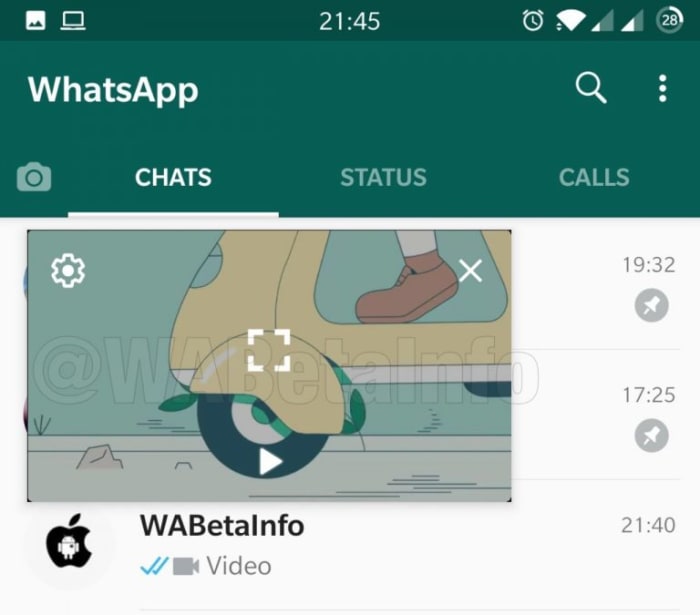
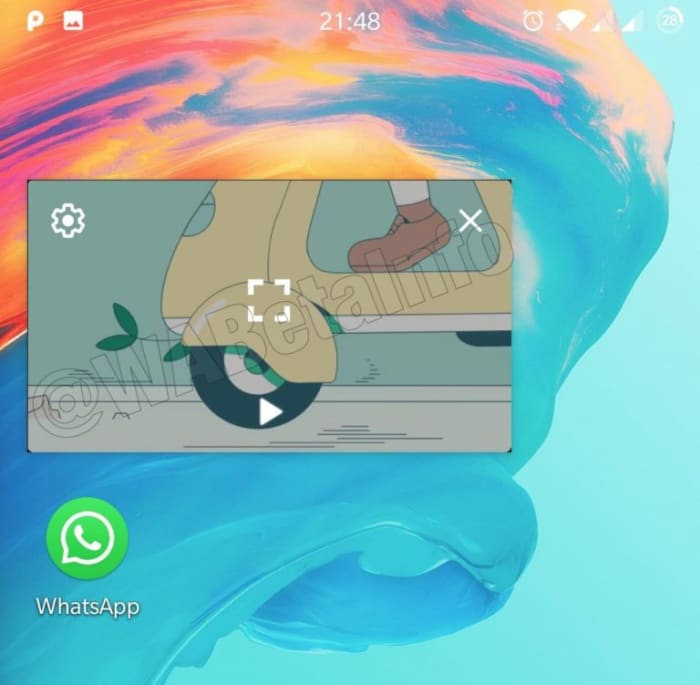
The other feature that WhatsApp is working on improving is the Picture-in-Picture mode. That allows you to watch certain types of videos that you’ve been sent in chats while you’re still chatting to your friend. The feature starts up a mini video player for videos from YouTube, Facebook, Instagram, and Streamable that hovers and plays while you’re chatting away.
Although useful, the feature has quite a few shortcomings, but it is now clear that WhatsApp is working to give it a bit more power. The biggest frustration with Picture-in-Picture is that you still have to close the video you’re watching if you want to switch between chats.Code in the latest WhatsApp beta indicates that this problem is being fixed. Also, it looks like WhatsApp is going further and making it possible to continue watching your video even when WhatsApp has been minimized and is only running in the background. It appears like these improvements to Picture-in-Picture will be available for Android 8 and newer when it receives a wider roll-out.
Unfortunately, with these features only making just making it into the beta version now, there is still no telling when they’ll make their way onto regular WhatsApp. Consecutive voice notes seem to be further down the development path than the improvements to Picture-in-Picture but there is still no official word about when either will be ready for general release. As soon as we know more, we’ll let you know.
Everything you need to know about the most fearsome weapons in the galaxy.
To the average person, trying to assemble a rock collection doesn’t sound like a very evil thing to do. To the Marvel fan, however, saying you want to collect the Infinity Stones raises as many red flags as running around screaming “Hail Hydra!” or “the Skrull are coming!” As Kevin Feige has been saying the past 11 years, “It’s all connected.” All 20 films starting with “Iron Man” and ending with “Captain Marvel” (with more yet to come) exist in the same continuity as each other, all pushing the meta-narrative towards greater heights, danger, and box office records.
Lurking in the background – and finally taking the forefront in “Infinity War” – are the Infinity Stones. Whether you’re new to the MCU or are a veteran trying to refresh your memory, here’s a quick rundown of any and everything you need to know about these uber powerful, all-encompassing, planet-melting plot devices.
** HUGE SPOILERS BELOW **
Ultimate Guide to Marvel’s Infinity Stones
Where did the Infinity Stones come from?
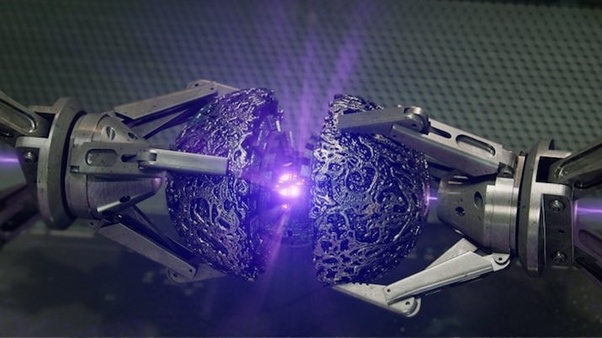
As The Collector excitedly explains, the Infinity Stones were created with the big bang. They are remnants of the beginning of the beginning, possibly (though unconfirmed) created by four Cosmic Entities: Infinity, Eternity, Entropy, and Death.
The explosion propelled the six stones apart, scattering them across the universe. Only beings of great strength are able to hold them, with fewer still able to actually use them. Eson the Searcher was one such being (shown in the video holding the purple stone) able to do so, and destroyed an entire planet.
And he only had one of them. Shortly after the beginning of “Infinity War,” Thanos has two.
How many Infinity Stones are there?
There are six:
The Power StoneThe Reality StoneThe Soul StoneThe Time StoneThe Space StoneThe Mind Stone
With the power of the Infinity Gauntlet, Thanos can harness the power of all six stones combined, making him capable of virtually anything – even destroying half of all life in the universe.
The Infinity Gauntlet helps Thanos control the power of all the stones simultaneously
What do the Infinity Stones do?
Each Infinity Stone is a capsule of vast power related to its namesake. The way this is portrayed in the MCU is as follows:
Space Stone
The Space Stone was housed inside the Tesseract
The blue Space Stone is the one we’ve seen the most. Red Skull tried to utilize its abilities in “Captain America: The First Avenger”, but Hydra did not truly understand what they were dealing with. As such, the stone jettisoned Red Skull into space where he wouldn’t be heard from for decades … or 18 movies.
The Space Stone was also in the Tesseract, which played a vital role in “The Avengers,” where it served as the gateway by which Loki was able to travel to Midgard with an army of angry Chitauri.
This stone grants Thanos the ability to warp space, teleporting from planet to planet like it’s nothing. It also allows him to open portals so he can phase in and out of locations, evade attacks, and – when combined with the Power Stone – even throw moons at people.
Power Stone
Rocket wanted to sell this orb to The Collector.
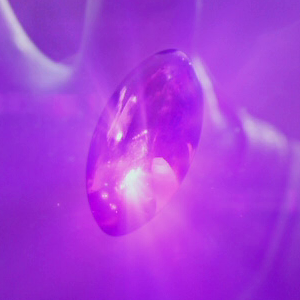
The Power Stone was the plot device in the first “Guardians of the Galaxy” film, the small purple stone that Star Lord stumbles upon at the start of the story. Ronin the Accuser was sent to deliver the stone to Thanos, but jealously kept it for himself.
The Power Stone serves as sort of an unbridled battery, a turbocharge that by itself is the pinnacle of raw untamed energy – the kind that can destroy planets with a single hit. It allows Thanos to shrug off mighty attacks, hit harder than anybody else, and let loose deathly energy strong enough to overpower even Iron Man.
When it’s combined with other stones, however, the Power Stone really hits its stride. Imagination is the limit when you combine immense power with the ability to tear holes in space, turn back time, or warp reality. At the start of “Infinity War” we learn that Thanos has already taken the stone from the Xandar government, where the Guardians of the Galaxy left it to be safeguarded. At the start of the film, Thanos is already in possession of it.
Reality Stone
The Reality Stone was the aether from Thor: Dark World
We first saw the red Reality Stone in a strange liquid form known as the aether in “Thor: The Dark World.” As with Red Skull and the space stone, when an Infinity Stone falls into mortal hands who don’t know what they’re dealing with, things get … weird.
“Dark World” showed the Reality Stone to be incredibly unstable, causing wormholes and rifts to open – kind of like a Space Stone that can’t get its act together. In Thanos’ hands we get a clearer idea of just what it is the Reality Stone can actually do: Create powerful and complex illusions, and temporarily alter reality to appear the way you want.
The stone can also be used in combat to pretty scary effect – effortlessly turning people into silly piles of geometric shapes and inanimate objects.
Time Stone
The Sorcerer Supreme must guard the Time Stone with his life
The green Time Stone was introduced in “Dr. Strange” as the power housed in the Eye of Agamotto. Arguably the most powerful stone of the bunch, the Time Stone lets the user travel back and forth in time on a whim, making them capable of undoing literally anything.
Dr. Strange used the powers of the time stone to defeat Dormammu by forcing him into an endless stalemate where he could return from death indefinitely. During the battle on Titan, however, the Doctor conceded the stone to Thanos in exchange for him sparing Tony Stark’s life.
Mind Stone
Remember how the Avengers got angry when they stood near Loki’s scepter?
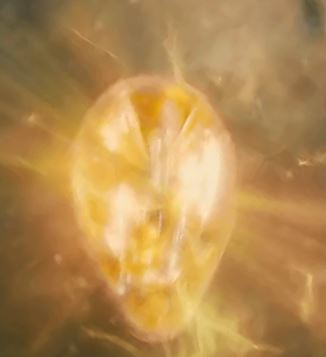
We’ve seen the yellow Mind Stone in “The Avengers,”“Age of Ultron,”“Civil War,” and “Infinity War,” though it’s changed hands a number of times. It was first given to Loki at the start of “Avengers” as a scepter – a weapon with which he could conquer Earth. The scepter allowed Loki to do two things: Fire powerful blasts of energy, and corrupt the minds of anyone he chose.
Poor Hawkeye. At the end of “Avengers,” the scepter was taken, eventually falling to Hydra following the events of “Captain America: Winter Soldier.”
The Avengers were able to retrieve the scepter at the start of “Age of Ultron,” but once the mad robot was unshackled, he broke the Mind Stone out of the scepter and implanted it into the yet-to-be-born Vision, a synthetic entity meant to be his replacement.
The Vision used the stone over the course of the movies to deadly effect until the closing events of “Infinity War.” Vision was destroyed by Thanos, and the Mind Stone taken – it was the final stone Thanos needed.
Soul Stone
Thanos had to sacrifice one he held dear to acquire the elusive Soul Stone
The orange Soul Stone is the most mysterious of the bunch, and is the only one whose powers have not been expressly stated. Before “Infinity War,” Marvel fans were clamoring for any details on the stone’s location, often leading to outlandish theories. As it turns out, the only one who knew the location of the final stone was Gamora, who had earlier discovered it on the planet Vormir.
Thanos took Gamora to the planet and found it to be the place where Red Skull was transported so long ago. Red Skull revealed to him that the stone would only come to him at the price of something he cared deeply about. Thanos was forced to kill his own daughter on the spot in pursuit of the stone.
What does the Soul Stone do?
What the Soul Stone is capable of is up to speculation, but chances are, it was the stone most responsible for the ‘deaths’ of so many character at the end of “Infinity War.” Since we’ve already gotten a trailer for “Spider-Man: Far from Home,” it’s probably safe to say that many of the roster will be returning shortly.
The stone is a purgatory for captured souls, but is also so much more.
The directors of “Avengers: Endgame”have already confirmed that the orange location we witnessed at the end of Infinity War is indeed Soul World, a dimension housed inside the Soul Stone. Expect to see Soul World play a big role in “Endgame,” and we’ll likely be seeing many ‘deceased’ characters make an appearance there. At least until something – or someone – can free them.
Stan Lee masterclass: How to create a good villain
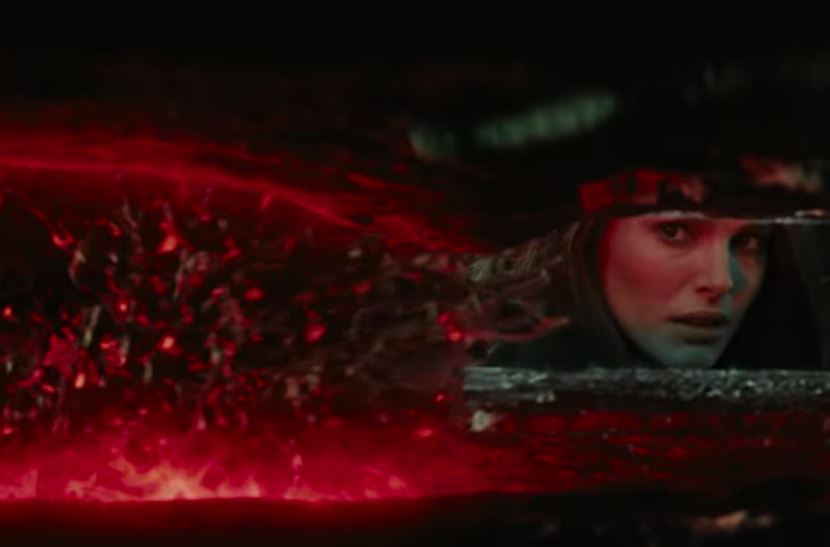
They are not. This was confirmed towards the end of “Infinity War” when we saw Scarlet Witch use her powers to explode the mind stone, killing Vision in the process.
While they can be destroyed, it takes a lot of power to be able to do it. So far, Scarlet Witch remains the only example, but there could well be others.
Can Infinity Stones be reversed?
Yes, they can. Immediately upon arriving in Wakanda, we see Thanos casually remark about the pointlessness of Vision’s death … as he uses the Time Stone to bring him back to life before ripping the Mind Stone from his head.
We hope this guide has brought you up to speed on one of the most pivotal continuity elements in the MCU, and are eager to see what’s in store come April 26 with “Avengers: Endgame.”
Let us know in the comments below what you think we’re in for, and what you think the Soul Stone will do!
Twitter rolls out new even-darker mode features and themes on iOS.
These are dark times indeed. There is a lot going on in the world to warrant such an ominous moniker, but we’re not going to get into them now. These are dark times because dark modes are on the march and it looks like no app is safe from their dark touch. We’ve seen dark modes arrive on Facebook Messenger, and we know that one is coming to WhatsApp. They’re everywhere, and the world is a little darker place for it.
Things aren’t dark enough for Twitter users, though. Again, we’re not talking about the type of darkness you need to download a web extension to block out, but almost. In response to popular demand, and maybe to get one over on all the other apps that have been adding dark modes lately, Twitter is rolling out an even darker mode.
Twitter rolls out new dark mode features and themes on iOS
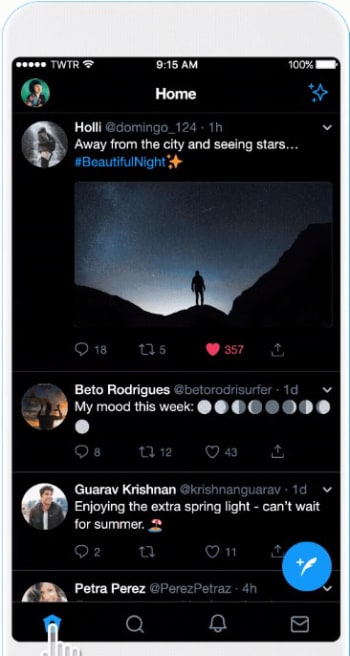
According to Twitter, iOS users now have access to a “Dim” dark mode and a “Lights Out” theme. The Dim dark mode uses the dark blue and grey color scale that anybody who has ever used Twitter’s dark mode will already know. The new Lights Out dark mode makes everything jet black. Funnily enough, until now Twitter had always referred to its dark mode as “Night mode” but this has now officially changed, for iPhone users at least.
It was dark. You asked for darker! Swipe right to check out our new dark mode. Rolling out today. pic.twitter.com/6MEACKRK9K
If you’re an iPhone user and you want to activate the new dark modes, all you need to do is follow these simple instructions. To activate dark mode on Twitter for iOS you need to:
Open the sidebar menu and tap Settings and privacy.
Then hit Display and Sound at the top of the General Settings menu.
Switch on Dark mode by hitting the toggle button found beneath Media previews.
Once you hit the toggle button the two new options will open beneath it. Select Dim if you want Twitter’s traditional dark blue dark mode or Lights out if you want the new jet-black dark mode.
Twitter’s new black dark mode.
Another cool new feature, which Twitter has added is the automatic dark mode. If you activate this feature, Twitter will automatically switch to dark mode at certain hours, like when you’re in bed.
This feature should now be live to all Twitter users who have the app on their iPhone. If you can’t see it on your version of the app you should try closing Twitter completely and then reopening it, as that has worked for a number of users according to a report by 9to5Mac.
Unfortunately, there is still no word about when this feature might land on Twitter for Android. As soon as we hear more on this, we’ll let you know.
Google Photos will soon start making crop and adjust suggestions pictures of documents.
Google has made a lot of noise about its in-house AI development. Thanks to its key position at the very heart of the internet, it enjoys a natural advantage when it comes to AI over other big players like Facebook and Microsoft. One of the key products that Google has been augmenting with AI is Google Photos. With Photos now able to make albums that include specific people or pets automatically and even add color to old black and white photos, it is clear that Google’s AI is already making quite the impact.
AI doesn’t just work on the headline-grabbing stuff like the features described above though. Much more basic features are taken care of by machine learning algorithms, too, and this latest innovation definitely falls into that category. It might not sound like the most exciting new feature on paper, but in practice, it will help you keep your Photos app tidy and much more presentable.
Google Photos will soon start making Crop and adjust suggestions for pictures of documents
Having a camera in our pockets all the time has changed our everyday behavior. Now, rather than noting basic information we see around us, most of us will just whip out our phones and snap a quick picture. This inevitably means that most (if not all) of us have random photos of scraps of paper interspersed between our everyday photos.
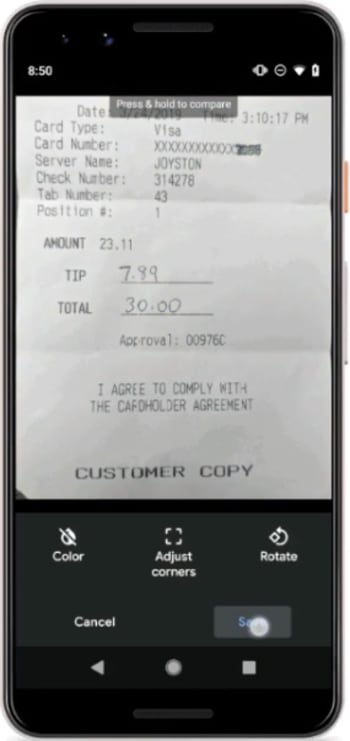
To help us tidy these up, Photos will start automatically suggesting these photos be edited in order to make them look better.
New! Crop documents in a single tap. Rolling out this week on Android, you may see suggestions to crop photos of documents to remove backgrounds and clean up the edges. pic.twitter.com/mGggRyb3By
In a tweet, Google described this new feature as a single-tap way of making these photos of documents look smarter. When the feature lands on your Android phone, a single tap will remove the background and tidy it up around the edges.
As well as removing the background, Photos will also open up a brand-new user interface designed specifically for documents. This will include the ability to rotate the document and switch the image to black and white should there be no color in the document.
All of the above happens automatically when Google Photos detects a picture of a document. There has been no word from Google so far, however, about whether or not the new document crop and adjust features can be activated manually. This may depend on how much faith Google has in its AI to recognize every single document we snap. Nothing is more frustrating than being unable to access a feature you need because your phone doesn’t know you need it and won’t give you the option to access it.
The new document editor features are rolling out to Google Photos now, so if you own an Android smartphone and use Google Photos, you should expect to see it on your phone soon.
Love food? Add these YouTubers to your subscription list.
In the last few years, YouTube has seen a huge influx of food-related content being uploaded.
Food ASMR (autonomous sensory meridian response), has become extremely popular. In these videos, creators focus on sounds like the tapping of the side of a soda can, crinkling fast food burger wrappers, or chewing crunchy foods in order to give viewers a heightened sense of pleasure. Mukbang videos are still going strong; the word Mukbang is Korean for “eating broadcast,” and this trend of recording yourself eating large amounts of food while having a conversation with an audience originated in South Korea.
While those videos are more trendy, a true staple of food content on YouTube is the good old food vloggers. There are many on the platform, and while some travel the world to introduce audiences to rare and unknown cuisines from other countries, others prefer to stay closer to home and encourage people to visit mom and pop restaurants and dive bars from their college days. Check out some of our favorites from both categories.
Best food vloggers on YouTube
1. Strictly Dumpling
Mike Chen is one of the most popular food YouTubers around. At over 2 million subscribers, his Strictly Dumpling channel is chock full of delicious content from all over. Our favorite videos (and some of his most well known) are his 7-11 and convenience store series. In a lot of Asian countries, the convenience stores are known for having near top quality dishes, both packaged and hot. Sushi from a 7-11 may seem crazy, but we’re definitely willing to give it a try.
2. Mark Wiens
Not only does Mark cover Michelin star restaurants, he also enjoys giving his audience a glimpse of the cuisine that you’ll have if you’re hosted by a family in a small village on the outskirts of countries that aren’t often vlogged. Most of the places Mark goes are in Asia, and along with describing in detail what our tastebuds would be experiencing, he also likes to sneak in some tips for safe travel.
The name says it all. Sonny is an American whose goal is to try and take viewers along for trips to places that aren’t usually in tourist pamphlets. Sonny’s silly humor reels us in and keeps us watching as he tries foods that even the natives won’t touch. His spicy challenges are painful to watch and eating poisonous pufferfish in Japan had us wondering if we’d ever see another upload from him – you have to be licensed to prepare it! We might pass on that one.
4. Shu
Shu is a London based food and travel vlogger and when not taking viewers around to quaint bars, cafes, and restaurants, gives a bit of insight into what it’s like being a freelancer. Her editing style is very relaxed with a quirky aesthetic, so if you’re into making Pinterest boards of pictures of cups of coffee in cute mugs, flaky pastries, and sunny beach vacations (as most of us are) then you should really give her videos a watch.
5. Kara and Nate
Kara and Nate are a couple from Tennessee who, after getting married, decided that they wanted to travel the world. They had only planned for one year, but that grew to four years on the road and a ton of funny, fascinating food and travel videos were created. They’ve tried the food (both delicious and a little suspect) from every place that you can think of, and have a goal of traveling to 100 countries by 2020.
6. Simon and Martina
This duo is one of the first food and travel vloggers on YouTube. After moving to South Korea from Canada to teach, they decided to start filming their food and culture adventures in a country that is the home of K-Pop and Mukbangs and called their business Eat Your Kimchi. After rubbing elbows with a lot of Kpop singers and actors, they decided to relocate to Japan and have been living there and recommending only the most delicious and magical food experiences that Japan has to offer. They go on vacations from time to time so there are a lot of European travel vlogs to watch as well.
Now that you’re good and hungry, try out some of the cuisines that you’ve seen from these YouTubers. What are you waiting for? Buy that plane ticket!
A shocking new satellite program could be a huge setback for privacy around the globe.
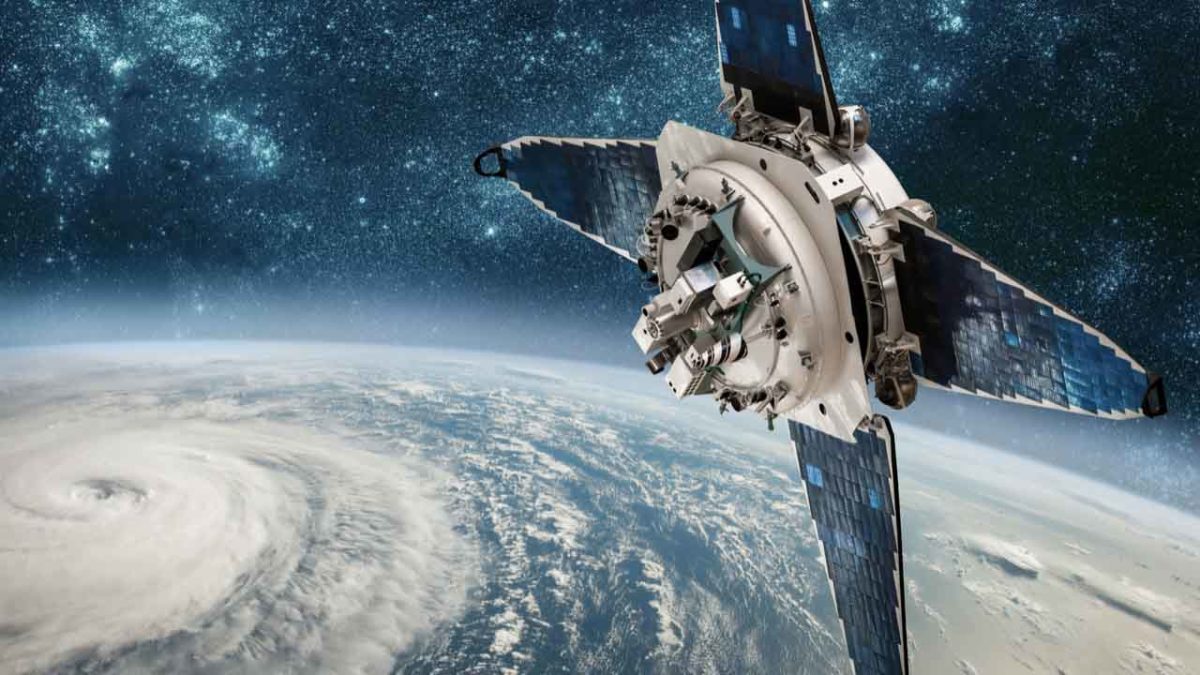
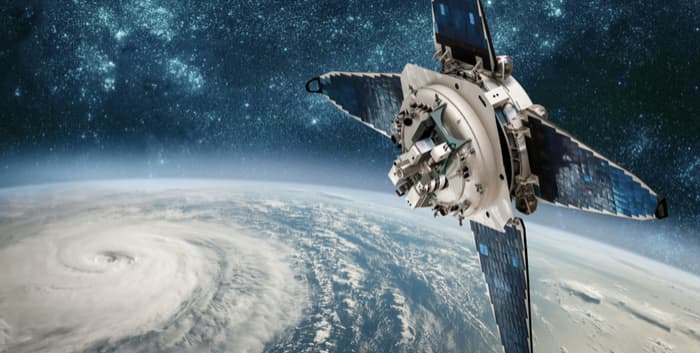
Space Soft Labs have today launched the ultimate Big Brother tool with its new Satellite Live application. Satellite Live goes one step further than Google Earth in that it allows you to see real-time video of what is going on, anywhere, anytime on Earth.
Space Soft Labs dismissed accusations that the application raises serious issues of invasion of privacy and national security claiming that Satellite Live is the “ultimate webcam” allowing you to observe only what people are doing in public areas – much like webcams do – but in crystal clear, high definition detail, anywhere on the globe. This can be anything from your local street to Times Square in New York or the middle of the Gobi desert.
The application has been apparently developed in complete confidentiality with only a few of Space Soft Lab’s most important developers assigned to the project. The company says they’ve had to develop it in this way because of what it calls “the obvious implications for personal privacy and associated national security issues that some groups may raise.” They were apparently concerned that major interests would try to “block” the launch of the app if it had become public knowledge that it was in development.
The application uses some of the latest military and space-age technology used by NASA in their last 3 space missions. At the moment, Satellite Live can only view public areas such as high streets, marketplaces and open-air leisure facilities. However, intriguingly according to one Space Soft Labs insider:
Depending on the position of the satellites and time of day, it is occasionally possible to see inside private property.
The program is based on the same infrastructure as Google Earth including an instant location feature, an embedded screen capturing tool (for publishing live action of what you’ve found on your blog) and navigational buttons to move around maps. As with Google Earth, however, the level of detail may vary from one place to another, which means that populated areas such as New York, Los Angeles, London or Tokyo are more detailed than the Nevada desert or the Amazon jungle.
Softonic is one of the first software portals allowed to distribute the application, so download the application here and let us know your thoughts on what is potentially the most exciting and controversial app ever released.
Please note, this blog post is a joke. April Fools!





























 developers assigned to the project. The company says they’ve had to develop it in this way because of what it calls “the obvious implications for personal privacy and associated national security issues that some groups may raise.” They were apparently concerned that major interests would try to “block” the launch of the app if it had become public knowledge that it was in development.