What is Imgur and what is it used for? Complete Guide

Curious about joining the Imgur community? We can teach you everything from the top users to the community culture.

Sometimes we just want to browse the internet without any pressure. Imgur is an excellent option for doing this. Whether you are looking for recipes, interesting life hacks (that sometimes work), cool DIYs to try, or even if you just need some mindless meme entertainment to reset after a long day – Imgur has you covered.

But what is Imgur and what is it used for? Join us on this journey as we show you.

What Is Imgur?

Imgur is a site for sharing pictures, memes, recipes, videos, and more. The popular website can be used on desktop and mobile platforms. When you upload anything to Imgur, the post first goes to a ‘User-Sub’ channel. From here, it gets voted on, and it can get upvoted, downvoted, or made a ‘Favorite’. If your post receives a lot of upvotes, it will be moved to the trending channel called ‘Most Viral’. This channel is also the home page for Imgur and where users spend most of their time. 

You can do different things to earn more upvotes to try and get your post to the ‘Most Viral’ channel. By interacting on your post and replying to comments, you might also get upvotes which count towards your total for that post. You can also use appropriate tags to boost traffic to your post in the hope of getting more upvotes.

With this platform, you can also favorite certain posts. Once favorited, these posts will appear in your ‘Favorites’ folder. This is especially handy for recipes or how-to’s that you might want to revisit in the future.

What Is Imgur App?

The Imgur app is available for free on both Android and iOS devices. Once downloaded and installed on your device, you can access the Imgur platform on your mobile device. This is the ideal solution for those who love to browse from their smartphones. 

What Is Imgur Used For?

Imgur is primarily known as an image sharing and discussion site. It has grown immensely in popularity and boasts 100 million users. Although known as an image-sharing site, you can also share videos, memes, and more on this platform. 

Most users use Imgur to share funny images, memes, and content, similar to how you’d use Facebook or Instagram. If you’re not a big ‘sharer’, you can also just browse through the posts already there and get a bit of a break from your reality. However, while looking into Imgur, you may come across the question: How to use Imgur to host images?

It’s true; some users use Imgur solely as a way to host their images and keep them somewhere safe. When you upload images to Imgur, they stay on the platform unless you delete them. This makes it a great solution to hosting images.

How to Use Imgur

If you are interested in starting to use Imgur, here are some valuable tips on how to use Imgur.

Points

Points and comments can earn you Imgur points. These “fake internet points” don’t mean much in real life, but they are heavily sought after on Imgur. Points feed your notoriety, which other users can see on your page.

You’re not going to make money or get famous in real life if you have a lot of points. However, you can immortalize yourself on Imgur.

Imgur points

Posting

Posts can be put into two separate groups: original content and reposts. Original content or “OC” means that the content came from you and you alone. GIFs you created, screenshots of your own social media pages, or videos you shot yourself are all examples of OC. Imgur also has a full catalog of tools and extensions to help your posts.

In theory, OC has a better chance of making it to the front page. However, most users would agree that there is not an airtight formula for getting on the front page. The title, description, tags, and even the time of day can affect whether you make Most Viral.

Reposts are posts that came from somebody else. This does not mean that they won’t make it to the front page, but some users do hound content for not being OC. If you make a repost, you should always include the source to give credit to the creator. If you don’t, you’ll probably get downvoted to oblivion as you see comments asking “sauce?” That’s not a typo; users say that to be funny. (It’s internet slang for “source?”)
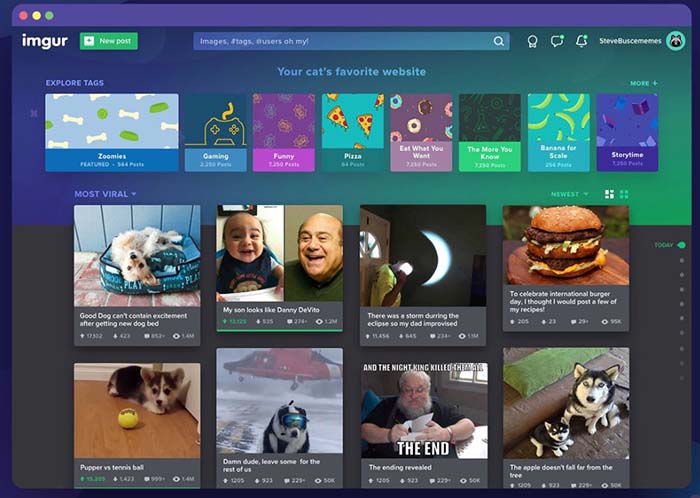
Imgur homepage

User Sub and mature content

If you are casually surfing Imgur, you should stay away from User Sub if you are anywhere public. The Imgur terms of service and community guidelines prohibit posting inappropriate content. However, it can take a while before these posts are caught by admin. This means that a lewd image can potentially grace your computer or phone screen if you aren’t careful.
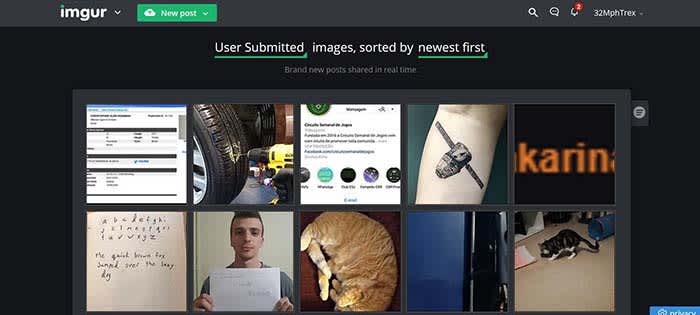
Imgur User Sub

Blatantly inappropriate content does not typically make it to the front page, so you are safe surfing Most Viral. Imgur has a bit of  a blurry line between what is explicit content and what is simply “mature.” Mature content can be provocative and sexual, but won’t include nudity, gore, etc. Posts should also be marked as mature if they contain mature material.  You do this by adding the mature tag when posting. If you fail to do so, Imgur will send you a courtesy message and mark the content “mature” for you.
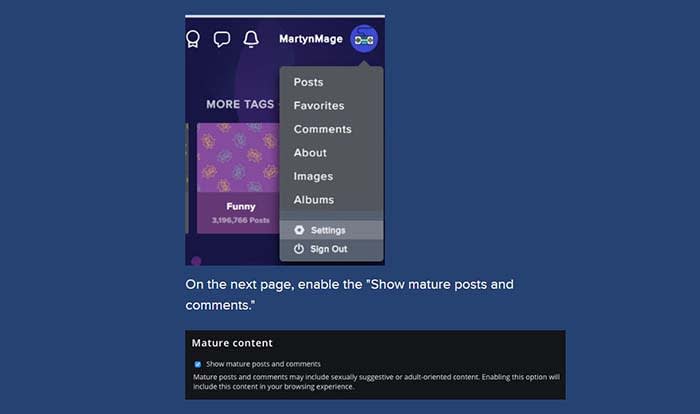
Mature content

For example, let’s say you want to post some of your favorite cosplays. If some of the cosplayers are scantily clad, you should mark the content as mature.

You can also choose whether or not you want to see mature content on Imgur.

The founders

Imgur was founded by Alan Schaaf in 2010. He still serves as president and CEO of Imgur. He doesn’t post often, but he does have an account on the site. 

One of the most prominent users you will find is @Sarah.  @Sarah is Sarah Schaaf, Imgur’s first employee and the head of the community team. She is also Alan’s sister and vice president of the company. Her account posts lots of news and updates about Imgur. She also urges users to message her with any questions or concerns they might have.

There is also a conspiracy theory floating around Imgur that @Sarah is actually Weird Al Yankovic. We’re not confirming or denying this theory, but have you ever seen both of them in a room together?

Imgur founders

Other popular users to follow

Given the millions of users, it’s hard to narrow down just a few that you should follow. What you should do is search by your favorite tags, and follow users who post a lot of that content.

However, Imgur has created some legendary users you might want to follow:

Two of the most popular users on Imgur are @thund3rbolt and @undercovergiraffe. The two have nearly 30 million combined Imgur points. Their viral content launches on Imgur before making its way to the rest of the internet. You can see it first by following both of these users.

You might wonder from time to time why Michael Cera’s face pops up so often. You can thank @ANewBadlyPhotoshoppedPhotoofMichaelCeraEveryday for that. Although he doesn’t habitually post daily anymore, he typically posts every few days. The community erupts when he does, and you can always count on seeing his content on the front page.

Sometimes even celebrities make their way to the Imgur community. Adam Savage from “Mythbusters” is an active Imgur user. His username is @mistersavage. He doesn’t post that often, but he does engage with users in the comments and has been known to participate in Imgur events.

Michael Cera's face on things

Imgur events

From time to time, Imgur sponsors special events. Some have died out, but there are some notable ones to mention.

Imgur users have their own personal birthday-like celebration known as “Cake Day.” Your Cake Day is the anniversary of when you first became an Imgur user. If you don’t remember when you first became an Imgurian, your account page will tell you.

Imgur cake day

On your Cake Day, it is Imgur tradition to make a post in celebration. Users who stumble on the post in User Sub will theoretically upvote you to the Most Viral. 

This isn’t your traditional office secret Santa. Imgur Secret Santa is looked forward to all year long. Users who sign up are randomly assigned someone to give a gift to, and your name is sent to a user as well. There is even a backup Santa program where you can have someone else send you a gift if your person flaked on you. When you get your gift, most users post it and tag their Imgur Secret Santa to thank them.

Imgur Secret Santa

Camp Imgur was an event in 2015 where Imgurians camped out in the woods of northern California. The event wasn’t as much focused on the camping aspect as it was focused on community members engaging with one another. Imgurians who missed out on the event have been begging the admins to bring it back. If and when it does return, you can count on @Sarah to give you the details.

Two weekly events you can always expect to see are Red Head Monday and Thigh-High Thursday. On RHM, users post lots of content featuring red-headed people. Typically, it’s a lot of attractive female redheads. On Thigh-High Thursday, you’ll see a lot of content of women wearing thigh-high legwear. Is it kinda creepy? Yeah, it’s pretty creepy. However, if this is not the content you want to see anymore, let the community know. Downvote the content you don’t like, and post your thoughts on the issue.

Imgur self-policing

You might be thinking to yourself, “This all sounds cool, but how do I stay protected on the site?” Imgur has a unique self-policing policy where the community itself can condemn bad behavior. 

Imgur admins do monitor posts and can remove them, but it does count on its users to help police the site. Admins will remove posts that violate community rules, but some can slip through the cracks for a while.

Imgur users post and comment to gain upvotes to build their clout on the site. If you post something toxic to the community, users will most likely downvote you. Those downvotes are reflected in your running total of Imgur points and will remain there until you delete the post or comment.
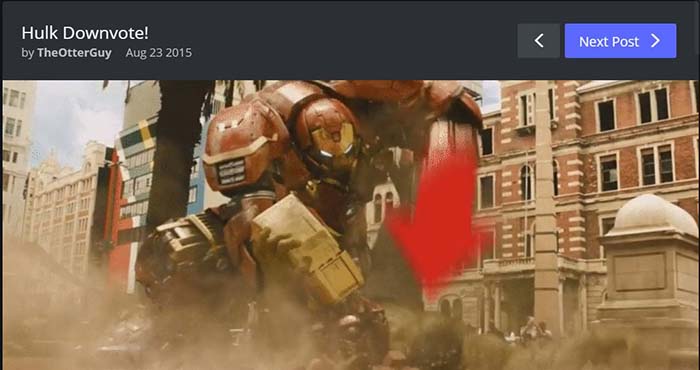
Imgur Downvote

Why you should use Imgur

Imgur is much more than just a way to share cat GIFs. It’s a community. People have made lifelong friends and even met their spouses on Imgur.

Imgur has been known to get hacked.  However, it is not common, and they are not blatantly stealing data like other social media apps. Also, Imgur is known for being very upfront about issues with the app, and hold themselves accountable.

Are you definitely going to meet your future husband or wife on Imgur? Probably not. Are you potentially going to make friends while surfing through your favorite content? Most definitely.

Have fun, don’t be a creep, and always upvote Zoidberg. 
Imgur upvote

Most helpful Microsoft Word keyboard shortcuts

Check out every keyboard shortcut you will ever need in Microsoft Word.

Keyboard shortcuts

We all think we are masters of Word, but we all could be a little better.

Keyboard shortcuts allow you to save time and effort when accessing specific functions of the program. They’ll help you improve productivity and create your documents even faster.

Best keyboard shortcuts for Microsoft Word

In Word, you can find the complete list of all the default keyboard shortcuts in the program. However, there are too many and trying to learn them all in one sitting is impossible.

For this reason, below you have a table with our favorite shortcuts. These can teach you how to select all, minimize a window, save, copy, delete, etc.

Make sure you bookmark this article so you don’t need to memorize all of these.

Let’s get started:

The most used Word keyboard shortcuts:

Chances are, you know about these. However, it’s never a bad idea to refresh your memory. 

  • CTRL + C: Copy
  • CTRL + X: Cut
  • CTRL + V: Paste
  • F7: Check spelling and grammar
  • CTRL + B: Apply bold to selected text or activate bold
  • CTRL + I: Apply italics to the selected text or activate italics
  • CTRL + U: Apply underline to selected text
  • CTRL + Z: Undo last action
  • CTRL + Y: Redo last action
  • CTRL + N: Create a new document
  • CTRL + O: Open a document
  • CTRL + W: Close a document
  • F12: Save as
  • CTRL + S: Save
  • CTRL + F: Search
  • CTRL + P: Print

The ones you probably don’t know about:

Let’s go one step further. These are the ones you will be glad you know when it comes time to write the 50-page term paper.

  • CTRL + E: Center a paragraph
  • CTRL + J: Justify a paragraph
  • CTRL + L: Align a paragraph to the left
  • CTRL + R: Align a paragraph to the right
  • CTRL + H: Opeh the find and replace dialog bax
  • Tab: Tab a paragraph
  • CTRL + 1: Define a single line spacing
  • CTRL + 2: Define double line spacing
  • CTRL + 5: Define a line spacing of 1.5 lines
  • CTRL + 0: Applies or removes 12 points of space above the current paragraph.
  • CTRL + Q:  Removes paragraph formatting that isn’t part of the style assigned to a selected paragraph.
  • CTRL + Delete: Delete a word to the left
  • CTRL + Enter: Insert a page break
  • CTRL + F4: Close the active window
  • CTRL + F12: Display the “Open” dialog
  • CTRL + SHIFT +<: Decrease font size
  • CTRL + SHIFT +>: Increase the font size
  • CTRL + SHIFT + Arrows: Select until the end of a word
  • SHIFT + F3: Change the letters to uppercase or lowercase
  • CTRL + SHIFT + L: Apply bulleted list
  • ALT + CTRL + D: Add the date
  • ALT + CTRL + N: Switch to Normal view
  • ALT + CTRL + I: Activate or deactivate the Preview
  • ALT + CTRL + O: Open Outlining tab
  • ALT + CTRL + C: Insert the copyright symbol
  • ALT + CTRL + R: Insert the registered trademark symbol
  • ALT + CTRL + T: Insert the trademark symbol
  • SHIFT + F3: Change uppercase or lowercase
  • SHIFT + Enter: Insert a line break
  • SHIFT + Right arrow: Select a character to the right
  • SHIFT + Left arrow: Select a character to the left
  • CTRL + Home or CTRL + End: Select until the end of a line

Armed with these shortcuts, you should be able to write more efficiently. Enjoy your new free time!

Facebook Messenger’s coolest hidden features

Learn how to use Facebook Messenger like a pro.

Look, Facebook Messenger is great for sending messages to your friends, but if that’s all you’re using it for, you’re seriously missing out.

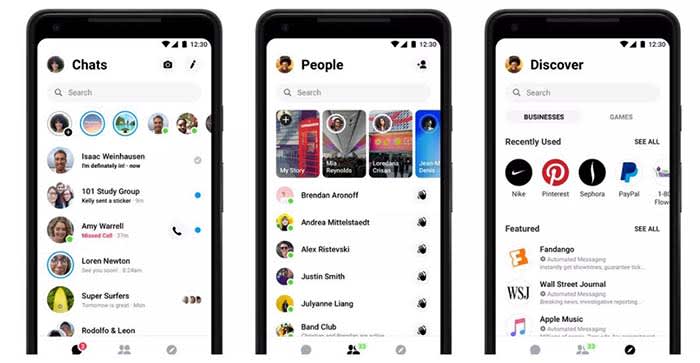
Over the past few years, Messenger’s lineup of features has beefed up a ton. It’s an all-in-one platform these days, teeming with games, chatbots, productivity features, and more.

At the beginning of the year, Facebook rolled out its buzzed-about redesign:

Facebook redesign

It gave the once overcrowded app a clean, fresh-looking interface. Now, some of the coolest features are hidden behind a four-dot icon.

Whether you’re new to Messenger or haven’t ventured beyond the dots, here are some features and tricks to know:

1. Use Messenger without an account

Facebook Messenger can work without Facebook? Well, yeah.

Hey, we get it, Facebook isn’t everyone’s thing. Many of us grapple with breaking up with FB, and a few actually go through with it.


Still, if all your friends are group messaging on Facebook without you, you don’t need to reactivate to join the thread.

Instead, download the app. When you get to the log-in screen, say you don’t have an account. From there, you can register your account with a phone number and use it to sign in.

2. Send money to your pals

fb messenger send payments

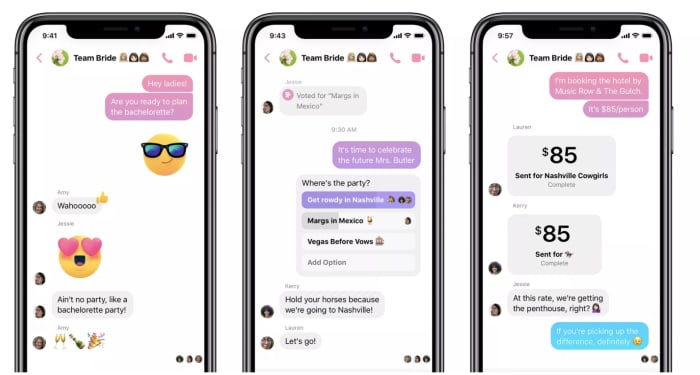
There’s no shortage of mobile payment apps, so this whole cashless revolution thing is old news at this point. However, hitting up your friends for money or paying them back for last night’s drinks no longer means you have to leave Facebook.

Add your debit card or PayPal account to Messenger by tapping your photo at the top of the app, then selecting “payments.” There, you can link the account of your choosing, along with a PIN or fingerprint for a layer of security.

To send or request money, all you do is choose the dollar sign next to the text field, fill in the amount, then add your payment information.

3. Add extensions to your chat

Facebook Messenger extensions are third-party apps that connect to your account. This way, you can access apps through your open chat window. You can also share articles, playlists, and more with your contacts.

Here, you’ll find games, apps like Spotify, OpenTable, Kayak, or The Wall Street Journal.

Want to make your friends a mixtape? Log into Spotify and share your picks through Messenger.

You’ll need to link your accounts (i.e. log into Spotify using your Facebook credentials).

8

4. Create Stories

Yep, just like Snapchat, Instagram, and now, even LinkedIn, Facebook lets you tell your story through videos and filters.

The app has a feature called My Day, which allows you to add videos and photos to your “day feed.” You can share moments with your friends. Like Instagram and Snapchat, FB’s version expires after 24 hours.

Instagram Download Now ►
7

8

5. Encrypted conversations

If you’re wary of how social media channels are stealing all of our data, you’re not alone.

But you don’t have to switch to Signal or WhatsApp to chat off the grid. Instead, Messenger allows you to encrypt from right inside the app. Messenger actually uses Signal protocol here to ensure that only you and the other person can see the message. Not even FB can read your messages.

To turn on Secret Conversations, all you need to do is, tap the little “I” at the top of the screen and select “go to Secret Conversation.”

There is a caveat — no group chats allowed. Secret Conversations are limited to one-on-one convos only.

WhatsApp Messenger Download Now ►
8

6. Send files

Sending files is something you can do with all sorts of platforms these days, but the beauty of messenger lies in its multifunctionality. The chat app supports multiple types of files, so you can easily send friends photos, PDFs, or Word Docs without clicking around multiple tabs. Sure, FB’s file sharing feature isn’t groundbreaking, but sometimes these little timesavers are a real gift.

7. Dark Mode

crescent moon dark mode

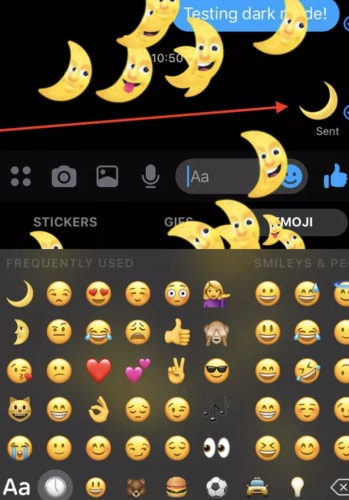
Dark mode was one of the most requested features for Messenger, and now our nighttime dreams have become a reality. Some users believe that dark mode reduces the eye strain that comes from looking at a bright white screen for hours on end. Others just think the inverted color scheme looks cool. Google says that activating dark mode preserves battery life on Android phones.

Here’s a step-by-step guide to activate dark mode on Messenger.

In summary

Messenger’s hidden tips and tricks can help you make the most of the messaging service. Although some of us have our issues with the big FB, Messenger’s free service keeps us coming back.

Do sleep apps work? What are the best?

We all want to get a better night sleep, but are sleep apps the solution?

Sleeping lady

It’s easy to understand the appeal of a sleep app. Lack of sleep can mess with our health, our happiness, and our productivity.

An app promises an easy fix. It sidesteps those sleep hygiene habits advising us to work out in the morning or stop drinking coffee before 2 p.m.

But, do sleep apps actually work?

Sleep tracking apps have a significant blind spot when it comes to providing accurate insights into your sleep habits. 

Here is a look at what sleep apps can and can’t do, according to science. 

Sleep apps don’t analyze your sleep

Sleep study

Admittedly, we’ve long been confused as to how sleep apps are supposed to work. 

Smartphones can lie right next to you when you hit the sack, but they don’t hook up to your brain or anything. So how can they tell if you’re catching some shallow snoozes or deep in the throes of REM?

The answer is this process called actigraphy. It’s a motion-tracking technology that analyzes each phase of sleep based on what your muscles are up to as you snooze.

How sleep apps work sounds complicated, but it’s pretty simple. Your movements directly correspond with each sleep phase. Your Fitbit or phone analyzes how much you move. Stillness indicates REM, while restlessness indicates light sleep.

When muscles are inhibited, you don’t get up or jump out of bed while sleeping. However, when you toss and turn, your muscles are uninhibited. Apps can also record snoring, which may be a sign of sleep apnea. The apps might be able to help you identify when in your sleep cycle you are waking up. 

If you are showing signs of sleep apnea, it is in your best interest to consult a doctor and seek treatment. 

The benefit of understanding the sleep cycle is that we feel more refreshed if we wake up during light sleep than deep sleep. Understanding when to set your alarm can leave you feeling more refreshed throughout the day. 

Still, doctors don’t agree on whether sleep apps are worthwhile. Columbia University’s Dr. Carl Bazil says, “I think they’re garbage.” 

Bazil told Inverse in an interview that the writer’s sleep data didn’t make sense — stating that one app showed the REM cycle starting way too early. 

So, what are sleep trackers good for?

Now that the bad news is out of the way, it’s worth pointing out that sleep trackers aren’t complete junk science. Doctors say that sleep apps offer a handful of benefits. It’s just important to note that mobile apps don’t paint a complete picture of your sleep habits and health.

It’s kind of like a sleep diary

Sleep diary

Another benefit of these apps is, they function as a digital sleep diary. Some doctors recommend that patients keep a sleep diary. They function as a way to help patients keep track of things like when they went to bed, what they ate, whether they experienced nightmares or restlessness, and more.  

Like fitness trackers, people get bored with tracking their personal data after a few short months. It’s an extra job to do, and it’s hard to identify how actually to leverage that data for a better experience. 

You can use them to spot trends

Man looking at data

If something changes in your life, a sleep app may be able to help you understand how these changes are affecting your sleep. 

Stress can make you more restless in your sleep, so if you’re feeling tired throughout the day, check out your data. Wearing a Fitbit or Jawbone at night can reveal whether you’re tossing and turning more than usual.

You can also learn how alcohol affects your sleep. Many of us live in denial, believing that alcohol makes us fall asleep more easily. In reality, it makes us wake up more often and get a lower quality of sleep. While we do fall asleep faster when under the influence, the effects of alcohol don’t last all throughout the night. As they wear off, quality of sleep diminishes.

Which apps are your best options? 

SleepScore

SleepScore

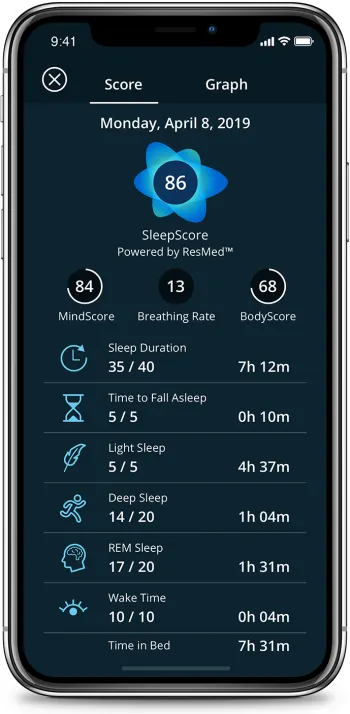
SleepScore provides more detailed sleep data than most of the competing applications. It comes with a smart alarm that aims to wake you up at the perfect time, preventing groggy mornings.

For $50 a year, SleepScore records sleep data long term and helps you create an improvement plan. The free version tracks sleep, but only for seven days at a time. 

SleepScore has partnered with a company called SlumberType, which offers DNA-based sleep insights. But the use of DNA to analyze health/wellness might also be junk science, so it’s important to take their recommendations with a giant grain of salt. 

SleepScore Download now ►
7

Sleep Cycle

Sleep Cycle

Sleep Cycle is a favorite among Apple and Android fans alike. It tracks sleep habits and wakes you up at the optimal time. The smart alarm won’t surprise you. Instead, you’ll select a 30-minute window for your wakeup call. What’s more, Sleep Cycle integrates with Apple Health so that you can analyze sleep habits, as well as your heart rate. 

Sleep Cycle Download Free ►
7

Pillow

Pillow

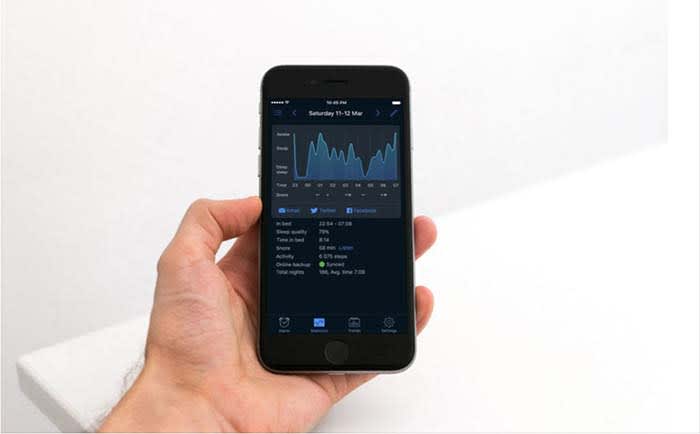
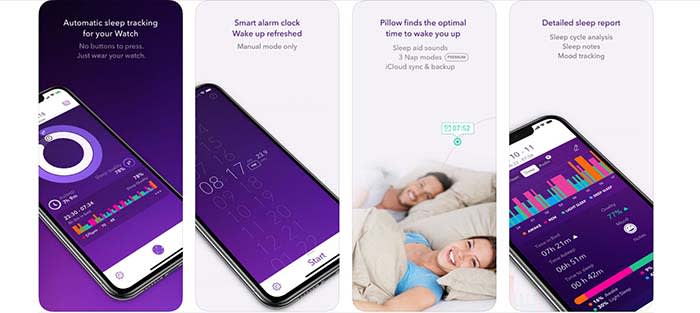
Pillow gives data nuts access to everything they might want to know about their sleep habits. It’s similar to Apple’s built-in sleep tracker, but it comes with a few extra features. For example, you can use the tool to time power naps, recovery naps, and full cycle naps. For the record, who knew there were multiple kinds of naps?

Additionally, Pillow gives you a look at your REM cycles, heart rate, and how long it takes to fall asleep. Maybe it’s not everything you need to know, but it’s useful nonetheless. 

7

Other tech on the horizon

Sleep apps leave something to be desired when it comes to analyzing and optimizing sleep. As a result, innovators are thinking up some clever ways to close the knowledge gap. 

There’s Dreem, a headband that measures brain activity. It’s $500 and designed by Yves Behar. The headband tracks sleeping patterns and conducts an initial assessment. Then, users have the option to enroll in a Sleep Restructuring Program. Here, an app will recommend steps toward better sleep. Also, your friends will all be jealous of your awesome new headband! 

Dreem Headband

There’s Dreamlight’s massive sleep mask that uses your 23andMe results to recommend adjustments to your sleep habits. It then projects infrared light to calm the user into a meditative state. This one kinda makes you look like Cyclops from X-Men. 

Sleep mask

Try some sleep hygiene tips before investing in expensive headgear

You know all of those articles about powering down before bed, ditching screens, and establishing a routine? 

Yeah, yeah. They elicit some groans, but science sides with the boring stuff in this case. 

If you’re struggling with sleep, maybe give some of the analog methods a try first. They are free, after all. At the end of the day, don’t we all just want to sleep better?

What is an APK file and how to install it?

Tired of finding a cool app only to discover it’s not on the Play Store? With our help, you can still get it.

If you own an Android device, then you’ve probably heard about or come across APK files before? Perhaps you’ve downloaded APK files without even knowing what they are? APK files are critical if you want to use leaked apps or personalize your Android experience beyond what the Play Store allows.

In this article, we will be looking at what an APK file is, how they work, how to open APK files, and how to install one on your Android device.

What Is an APK File?

An APK file stands for Android Package Kit. This is a package file format used by Android operating systems to distribute and install apps on mobile devices. Essentially it works the same way that a .exe file works on a Windows computer. When you download an app from the Play Store, it is essentially an APK file, but you aren’t always aware of the file extension since it installs automatically.

If you want to download apps for your Android device from other sources, you will download and install an APK file. There are a few reasons why you might want to download and install APK files from other sources than the Google Play Store. For one, the play store might not have the specific

Android app that you are looking for. Perhaps an app is not available in your country, it would not be listed in the Play Store, and you would need to download the APK files from a reputable third party. This also allows users to gain access to leaked apps before they are released on the Play Store.

What Is an APK File and How to Install It

Word of warning

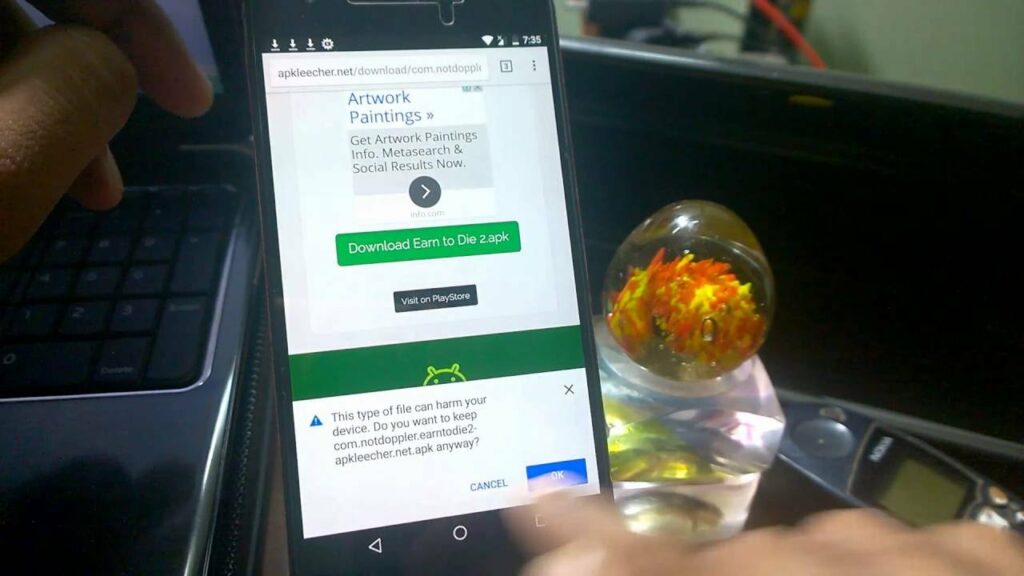
Downloading applications outside the Play Store is practical but it can also be dangerous for your phone depending on where you download the APK file. Many hackers use these applications to introduce malware into your phone and even steal data.

For this reason, we recommend downloading a good antivirus app.

Avira Free Antivirus Download Avira ►
8

How to allow installation of an APK file

All Android devices have a default option that prevents you from installing any application from unknown sources. As a result, you can only download and add applications that have been reviewed by the Play Store.

In order to install a third-party application, you will first need to follow these steps:

Step 1: Access the Configuration menu

The first step is very simple; you just have to click on the “Settings” menu of your phone or Android device.

Step 2: Allow the installation of unknown sources

Unknown sources


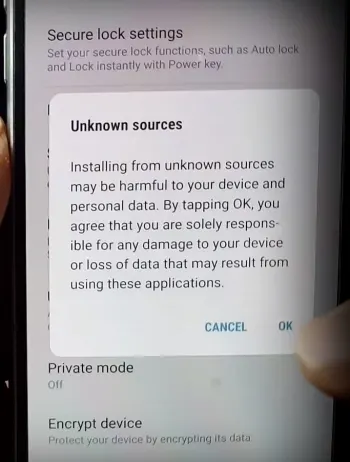
In the configuration menu, you will need to activate the option that will allow the installation of APK files. To do so, click on “Lock Screen and Security” and then look for the option “Unknown Sources.” This is usually at the bottom of the list.

Click on the option to allow the installation of applications from sources other than the Play Store. Your phone will warn you that it is dangerous to install third-party sources. Throw caution to the wind, and confirm the change.

  • If you use a Samsung Galaxy phone: The steps to activate this option on a Samsung Galaxy phone are very similar. The only difference is that you must go through “Sources” to activate the installation of unknown sources.
  • If you use an LG phone: If your phone is LG you will have to navigate first through “Settings” followed by “General.” In this menu, click on “Fingerprints and Security.” From here, click “Allow.”

How to install an APK file

After downloading the APK file to your Android device, you can install it. Search for the file in question within the downloads of our phone and click on it.

If you have trouble locating your phone’s download folder, we recommend that you install a free file browser for your phone such as Windows File Explorer.

Windows File Explorer Download now ►
7

Now, you’re free to download apps not featured in the Play Store. Again, please exercise caution when choosing which sites to get your apps, and what you download. You have the potential to download awesome apps for your phone, but you also have the potential to kill it.

How to Open APK Files on Windows 10

Don’t let the word Android in the file extension fool you. The app can also be downloaded to other devices, such as your Windows 10 desktop. Although Windows 10 cannot recognize APK files, there are many programs that will allow you to install these files on your computer. You can either use an Android emulator, like Bluestacks, or you can use a Chrome browser extension, like ARC Welder. 

To start, you’ll want to either download and install Bluestacks or Arc Welder. Next, you can download the app you want. If you’re using the Arc Welder Chrome extension, you can open that now and click on the ‘+’ to add the APK file. Bluestacks will work almost exactly as your Android device would. Search for the APK file you downloaded and click on ‘Install’ to start the process.

How to Open APK Files on iOS and iPhone

There is no easy way for an iPhone to open APK files as the programming language is difficult. While it would be possible to install APK files via an Android emulator, there are no such emulators available on the App Store. This would mean downloading one from a third party and may require jailbreaking your device.

This is not an ideal situation. As such, we would recommend first looking on the App Store for an iPhone version of the app you are looking for. The APK file version for iOS is known as .IPA files, so you could look for these files instead.

How to Open APK Files on Chromebook

On Chromebook, you can use the Chrome extension ARC Welder to open APK files directly in your browser. Alternatively, Chromebook has another way to open APK files. You can put your Chromebook in ‘Developer’ mode and enable installation from unknown sources. Once you’ve done this, you can open and install APK files.

It’s important to note that changing to developer mode will wipe your storage, and you’ll get messages notifying you that you’re in developer mode. Most of your storage might be backed up in the cloud anyways, and if it isn’t, we recommend doing so before switching to developer mode.

What Is an APK File and How to Install It

The world of APKs and Android

Now that you know what an APK file is and how to install it, you can have a look at which apps are available on the web. While the safest route is using an app store, you can also find gems on others sites where you can download them directly. Remember to protect your device from malicious files.

What to deactivate when you get a new phone

Make your new phone work even better!

New phone

If you just got a new smartphone, the first thing you should do is disable many default options. Yes, you read that correctly.

So many of a phone’s default settings are things you simply do not need. They can negatively affect your phone, so why not just give them the ax? Below, we listed the biggest offenders and why they deserve to get the boot.

Automatic brightness

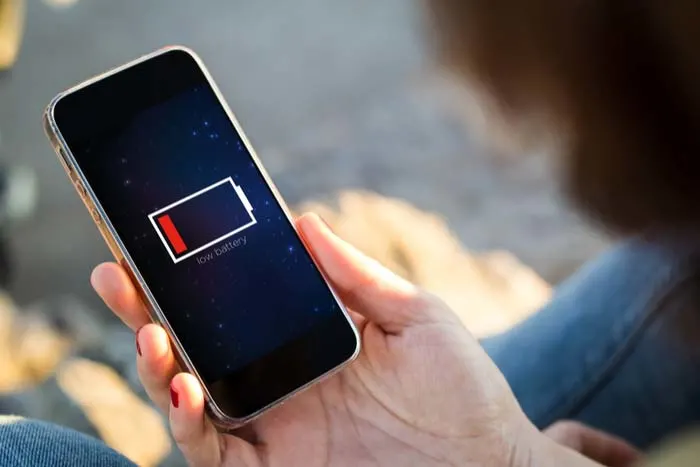
Screen brightness is one of the top things that drain your battery. Our recommendation is that you deactivate the automatic brightness. If you do, you will get the battery to last longer with each charge.

Background applications

Low battery

When the operating system starts for the first time, your phone comes loaded with applications that you will never use. Many of them work in the background, so we have a very basic recommendation: turn them off as soon as you can.

These things can drain your battery and slow down your phone. Do yourself a favor, and say goodbye to them.

Key vibration

One of the worst default programs is when you press a key, it vibrates or emits a sound. Sending a long text can sound like a bunch of mice tap-dancing. Although adorable, we don’t need to hear it every time we text our significant other what to get at the grocery store. This is not only annoying, but it consumes more battery than you can imagine.

You can remove it in the “Keyboard” menu in “Settings.” Most phones usually name it, “Sound when pressing key” or “Vibrate when pressing.” Either way, you’ll know your enemy when you see it.

Vibration in general

Phone vibrates

You can eliminate vibration altogether. Every time you enter an application or click somewhere, the phone vibrates like a GameCube controller during a heated round of Smash. This drains your battery and is just plain annoying.

The option to deactivate it is usually found under “Settings” > “Sound.” From here, you can find the option to stop it from vibrating in all of these unnecessary circumstances.

Notifications from secondary apps

You may need to know when you got an email or when you got a text message. However, why are you letting games and other secondary apps send you notifications? These notifications consume both data and battery.

Unless you really want dozens upon dozens of pointless notifications, delete this in the “Notifications” menu of your phone.

Keep your phone user-friendly

With these changes, your phone should run faster and you’ll get more battery use with less data drain. Enjoy your new phone!

How to measure your internet speed

Tired of slow internet speeds? Launch this test to see where you’re lagging!

Internet speeds

After paying an obnoxiously high price for fast internet speeds, you hop on your laptop only to be subjected to painfully slow speeds. What’s going on?

Measuring the speed of our internet connection is important. Whether we think that there’s a problem or we simply want to check how it is at that precise moment, speed rules. We scoured the internet and found the best tool for measuring your internet speed, and what the data means. Luckily, our internet was running pretty fast.

How to calculate it

internet cables

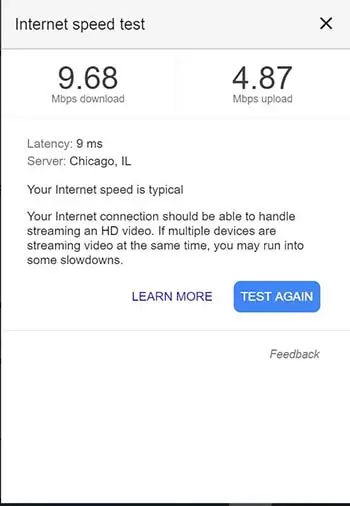
To find out what speed we have in a specific moment, you must conduct a speed test. There are dozens of options, but Google has the easiest one to find. Google “internet speed test,” and just click the button at the top of this page.

The Google speed test works with Measurement Lab and transfers a data packet of fewer than 40 megabytes.

The process lasts less than 30 seconds and we recommend closing programs that are slowing you down. In addition, the test works better if the connection is via cable instead of Wi-Fi.

If you really want to make your computer run faster, we would recommend MacPaw. Don’t be fooled by the name, MacPaw products are available for both Mac and PC. 

What does each value mean?

The speed test has two results: the download and the upload. The download refers to the speed data moves from the web to our computer.

Internet speed test

The upload, on the other hand, is the opposite process. Our PC is responsible for sending information through the network to the servers that are performing this speed test.

With the combination of both figures, you can get a decent idea of how fast your internet is performing.

What is latency?

Latency measures how quickly you get a response from the server. Low response times are important for real-time apps, like video calls and online gaming, according to Google.

Latency is expressed in milliseconds since the values ​​obtained are very small. However, latency can make a big difference. If you’re into online gaming, poor latency means your game will be very laggy. 

Try a VPN!

If you’re looking for a decent VPN service to try out on your computer, we would recommend Express VPN. By clicking this link, you can get 15 months of Express VPN for the price of 12!

How to change your mobile phone number

Want to change your number? Here’s how.

Getting a phone number

Whether you’re avoiding someone, or just trying to start over, changing your phone number can be a confusing process. Some service providers require you to go through a lengthy system to get your number changed.

Others are just a quick trip to their website. Either way, each provider has a different system that you have to go through to get your number changed. Here is a list of the most common service providers, and how to change your number with each one:

AT&T

Unless you want to change your area code, AT&T has a pretty simple process to get your number changed. Just go to their mobile number change site, log into your account, follow the prompts, and choose the number you want to change.

If you wish to change your area code, you may have to call AT&T’s customer support line or visit an AT&T store. You may be allowed you to change it online if you fit certain specifications.

Additionally, if you’ve been with AT&T more than 30 days, you will have to pay a $36 fee to change your number. If you’re within that 30-day activation time, then you won’t have to pay anything. However, you will have to call their support line or visit an AT&T store to change your number.

AT&T Mobile Transfer Free Download ►
7

Sprint

While Sprint has a few restrictions on changing your number, the entire process can be done on their site. First, you’ll need to sign in to your Sprint account. Then go to “My Sprint dashboard” and select “Manage Devices.”

There will be a blue question mark next to each number associated with the account. Click the question mark next to the number you want to change, then press “change phone number.”

You’ll be given a few options based on whether you want to change your area code or billing address. Once you’ve selected the option that fits your situation, you’ll be given a random new phone number.

There is no fee for changing your number at Sprint. Although, you’re only able to do it three times within 30 days.

My Sprint Free Download ►
7

Verizon

You can change your Verizon phone number from their online site or on their mobile app. Either way, you’ll have to be the account owner or account manager to change any numbers.

In the My Verizon mobile app, click “Devices” under the main navigation menu, and select the number that you want to change. Then click “Manage” and scroll down until you see “change mobile number.” Afterward, you’ll be given instructions on how to proceed.

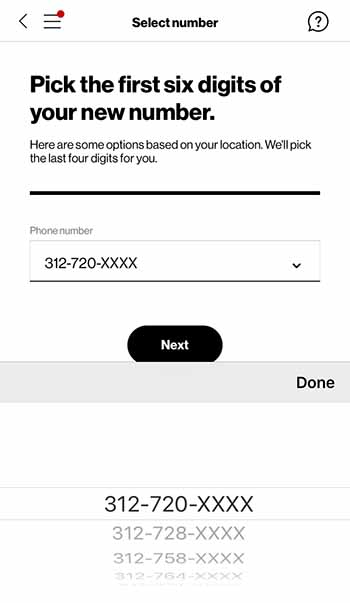
Verizon new number


If you decide to go through their online site to change your number instead, you’ll first have to go their mobile number change page. Then you’ll be prompted to sign in and select the mobile number you wish to change. Choose “Get new number” and then just answer the prompts that follow.

You’ll be able to select your area code and prefix when changing your Verizon number. However, the last four digits of your number will be randomly assigned to you. Additionally, there is no charge for changing your Verizon phone number.

My Verizon Free Download ►
7

T-Mobile

Unfortunately, unlike most providers, T-mobile doesn’t allow you to change your number online. You have to call their customer service center by dialing 611 or 1-877-746-0909.

From there, choose their service option and speak to a customer service representative. They will instruct you on how to proceed from there.

Your next bill will be charged a $15 fee.

Tmobile Tuesdays Free Download ►
8

MetroPCS

Just like T-mobile, MetroPCS requires you call their customer service line, 1-888-863-8768 to change your number. Once you get to a customer service representative, they’ll be able to help you through the steps

You most likely will have to pay a small fee as well, although this fee varies depending on your plan.

Other providers

Telephone lines

If your service provider is different then the ones listed above, you may still be able to change your number.

First, you should try seeing if they have the option on their site. Typically, this can be found in the preferences menu of your account details. If you’re unable to find information on changing your number through their site, then call their customer service center. A customer service representative should be able to help you. 

Also, you should be aware that switching providers will allow you to obtain a new number during that process. So, if you plan to switch providers soon, then it may not be worth changing your number right now. This is especially true if you’ll have to inform your contacts of your number change.

Study shows social media impacts children’s diets

Learn how social media is impacting kids’ diets.

Kids social media

Social media is taking its toll on our mental health. That toll can come in the form of selfie dysmorphia, Instagram-fueled depression, or an increase in eating disorders. Study after study is discovering more ways social media can cause mental and physical harm. If you don’t believe us, even Oprah and Prince Harry are tackling these issues.

The latest discovery comes by way of a recent study published in “Pediatrics.” Social media (particularly channels like YouTube and Instagram) may have a negative impact on what kids choose to eat.

The findings revealed that social media influencers could inspire children to eat junk food like cookies and candy, but those powers did not extend to getting kids excited about eating more vegetables.

What was measured?

Anna Coates, a Ph.D. student at the School of Psychology at the University of Liverpool, was interviewed by NPR. She and her colleagues wanted to know how much children’s diets were influenced by the accounts they followed on social media.

The study involved 176 children between the ages of nine and 11. They were divided into three groups so researchers could see how social media influences junk food cravings.

The kids who saw the junk food versions of photos were more likely to snack on cookies and candy. Their peers who saw healthy food images were less likely. According to the researchers, the extra snacking meant that the students in the junk food group consumed, on average, up to 90 calories more than their peers.

Junk food

While that doesn’t sound like much, American Academy of Pediatrics spokesperson Natalie Digate Muth says otherwise. She said that just an extra 70 or 80 calories a day can make a difference. She also said that a small increase can cause a healthy child to become overweight.

Unfortunately, it doesn’t seem like that influence works the other way. Those kids who saw the healthy food-focused images did not eat any more carrots or grapes than the other groups.

Just the latest in fast-food marketing to youth

We’ve long known that junk food ads have influenced what kids want to eat. Think about the items that were in your lunchbox growing up. We remember the Dunkaroos, Capri Suns, Oreos, and Doritos. Carrots aren’t in our highlight reel.

It seems that social media is making things worse. The WHO reported that platforms use kids’ data to push out targeted ads. That’s just ads; influencers muddy the waters.

Influencers are so effective because they feel familiar to us.  Recommendations coming from these social media users feel authentic, like a recommendation coming from a friend.

Of course, parents should talk to their children about influencers and how advertising works. Kids (and all of us) are more susceptible to influencer ads and product placement more than traditional ads.

Is regulation a possibility?

There’s little in the way of regulation when it comes to how we handle ads promoting junk food. In general, the FTC does have social media regulations in place. They require that influencers disclose when a post is sponsored.

However, it’s not exactly realistic for the organization to monitor every incoming post for potentially harmful content. There are millions of influencers all posting regularly.

Influencers complicate junk food marketing

Ronald McDonald

The study recommends tighter restrictions on marketing junk food. The digital marketing landscape is much more complicated than it was in the days where TV was the main concern.

Sure, we don’t have tobacco-sponsored cartoon characters targeting today’s youth, but advertising has changed a ton. Seriously though, that happened:

Influencer culture has made it cool to participate in advertising. So, chances are, popular influencers have tremendous power over the kids that follow them.

In this day and age, where teens are creating fake sponsored content for real brands, what is the widespread impact of online advertising on children?

How do I break my social media addiction?

Do you find yourself reaching for your phone to check apps like Facebook? We can help break your addiction.

Smartphone addict

Social media connects us to new people and ideas — for better or worse. It’s also a massive time suck that can wipe out a whole day and get in the way of accomplishing goals.

The word “addiction” brings to mind drugs and alcohol. It might seem too strong a word to apply to something like social media, right?

Well, not exactly. Though social media addiction has yet to secure an official spot in the DSM, it’s already become quite prevalent in the U.S. and Europe. It is affecting up to 8.2% of the general population.

How often are you on track, knocking tasks off your to-do list when a friend request or Instagram comment derails your progress? One second you’re typing up an email, and the next, you’re deep into some acquaintance’s 2016 vacation pics.

All of us are susceptible to succumbing to these distractions, but there are some things you can do to fight full-blown social media addiction.

Here are some tips you can use to regain control:

Learn why you’re addicted to social media

Facebook addict

What is it you hope to gain from opening social media? Uncovering the “why” behind your bad habit does require some introspection.

You might not have a good reason for your endless scrolling. If that’s the case, take a closer look at your motive. Do you hit the ‘gram when you’re stressed or overwhelmed? Or, is it when you’re trying to put off a project you don’t want to start?

Perhaps, you’re seeking connections with the outside world or accessing new information.

In any case, we tend to lean on social media to fill a void. Psychology Today describes this endless scroll as this “wanting activity.” Meaning, we tend to keep looking at our feeds because we’re anticipating some reward.

It’s also a lot easier to veg out in front of your feed than picking up a book or phoning a friend. This just adds to the temptation.

Reset

Going on a hike

One way to fight social media addiction is by taking a day off. Consider taking a day each week where you avoid using the phone or your computer.

This gives you some space to schedule some in-person social time. Do some analog reading, or you know, go outside.

That said, a full day of no socializing might add to your anxiety for a lot of people. If that’s you, aim for a couple of hours at a time.

Set ‘micro-boundaries’

Micro-boundaries is a concept developed by University College London researchers. It refers to a handful of ways to set distance between you and your bad social media habits.

The researchers say there are four types of micro-boundaries.

  • Digital: Separating accounts or using apps that block out certain websites
  • Physical: Choosing to leave a device at home or keeping it in a drawer at work
  • Social: Turning your phone on airplane mode or do-not-disturb during social situations
  • Temporal: Turning alerts off or setting the phone to do-not-disturb for specific hours

The UCL paper does acknowledge that you may need to let others know about these digital boundaries. If you’re a quick responder, then you might need to give people a heads-up.

Focus on what you can add to your life

Woman meditatingLike going on a diet, prohibiting the use of social media isn’t sustainable for the long-term. Instead, you should try setting achievable goals. Habit formation depends on training the brain to get that reward satisfaction from a healthier source.


Plan a cell phone-free dinner once a week, get into hiking, biking, or exploring your neighborhood.

Disable your alerts

Alerts play into our brain’s reward center, providing a rush of dopamine when we hear those familiar sounds.

According to Harvard researchers, Instagram likes, and text messages activate the same release of dopamine you’d receive from completing a “successful social interaction.” The article also notes that dopamine paths are often dysfunctional in people will any type of addiction, be it substance abuse, gambling, or Facebook.

The thing about disabling notifications is, you still have access to everything you want from your phone/computer. However, it provides a level of separation between you and your apps.

Wrapping up

Women socializing

Most of the notifications you receive don’t contain critical time-sensitive information. But for a lot of people, opting out of push notifications can present interpersonal challenges. Your mom or your partner might get annoyed when you don’t respond ASAP.

This study, aptly named The Do Not Disturb Challenge had interesting results. They found that while participants felt more productive after turning off their notifications, they also felt anxious about not being as responsive as expected.

So, again, success may depend on convincing your colleagues and text-happy friends to take a more moderate approach to social media.