How much data does Netflix use?

Discover how much data Netflix uses and how you can use less.

Netflix is a treat.

More quality TV shows and movies than you could watch in a lifetime, or at least, so it seems. The roster is always changing, which means unless you seriously watch too much TV there will always be something new to watch on Netflix (or something you love so much, you’re happy to watch it again). There is a catch in all this though, and that is data. Consuming video content online uses a lot of data. Let’s a have a little look at just how much data Netflix consumes.

This is how much data Netflix uses
This is how much data Netflix uses

Over on the Netflix Help Page, there is a pretty solid break down of just how much data you use when you’re watching your favorite shows or movies on Netflix. The basic information looks like this:

  • Watching shows or movies on Netflix in standard definition will consume about 1 GB of data for every hour of video you watch.
  • Watching shows or movies on Netflix in High Definition will consume about 3 GB of data for every hour of video you watch.

It is also interesting to note at this point that Netflix points out that streaming and downloading Netflix video consumes about the same amount of data. If you’re outside the house but think you might watch that episode of Kimmy Schmidt more than once, download it.

A deeper look at Netflix data usage

Of course, Netflix offers more than two viewing options. For a start, there is Netflix’s premier subscription package, which includes Ultra HD. If you watch your Netflix videos in Ultra HD, you will consume around 7GB of data for every hour you watch.

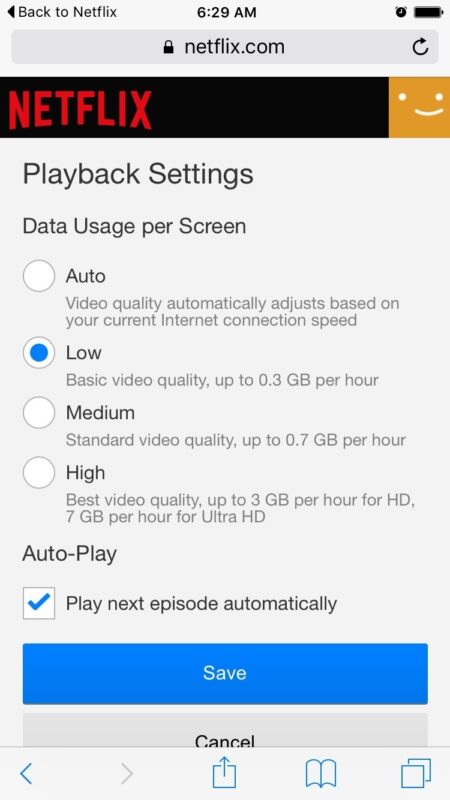
There is still more though, as Netflix also offers users the ability to limit their data usage at home or on a desktop or laptop PC to one of four pre-defined settings. These are:

  • Low – 0.3 GB per hour per device.
  • Medium – SD: 0.7 GB per hour per device.
  • High – Best video quality, up to 3 GB per hour per device for HD, and 7 GB per hour per device for Ultra HD.
  • Auto – Adjusts automatically to deliver the highest possible quality, based on your current internet connection speed.
How to use Netflix’s data limit settings at home
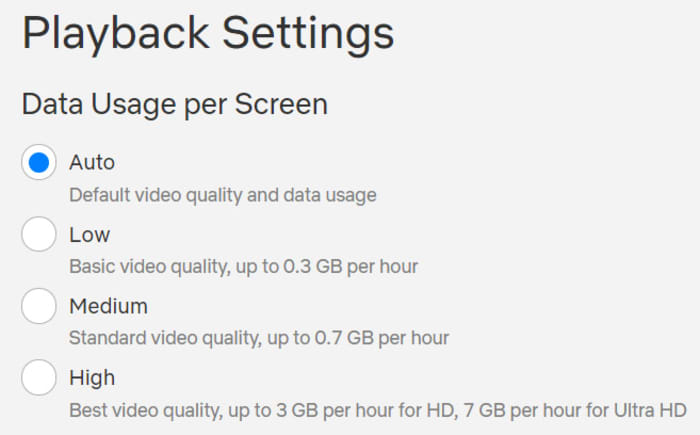
Netflix data usage screen

To enable one of Netflix’s data limiting settings all you have to do is head to Netflix and sign in. Then select the profile you’d like to change your data usage settings for. Once in click Account, then go to My Profile and hit Playback Settings. From there you select the setting you want and hit Save.
Netflix also offers details on mobile data usage settings that help you change how much data you consume when watching Netflix on a mobile device. These are as follows:

  • Automatic – Netflix will select a data usage setting that balances data usage with good video quality. Currently this will allow you to watch about 4 hours per GB of data.
  • Wi-Fi Only – You will only be able to stream on the device while connected to Wi-Fi.
  • Save Data – Watch about 6 hours per GB of data.
  • Maximum Data – Recommended only if you have an unlimited data plan. This setting will stream at the highest possible quality for your device and the content you are viewing. This may use 1 GB per 20 minutes or more depending on your device and network speeds.
How to use Netflix’s mobile data limit settings
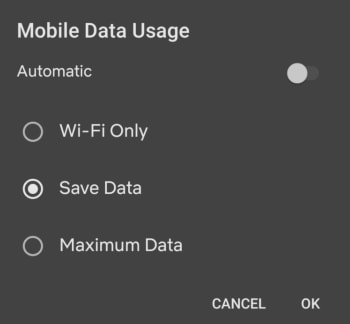
Mobile Netflix data usage screen

To enable one of Netflix’s mobile data settings, open the Netflix app and hit the Menu icon. You then need to tap App Settings, and after that Cellular Data Usage. From there you simply select which of the above settings you want to enable.

All this shows that Netflix gives you quite a bit of control over how much data you will consume when you’re watching your favorite shows and movies with the streaming service. The rule of thumb is 1 GB of data per hour of SD video and 3 GB of data per hour of HD video. There is, however, a lot you can do to alter how much data you use with Netflix and we hope we’ve helped you get to the bottom of it with this guide.
This is how Netflix can help you learn new languages

Netflix really can help you learn that language you’ve always wanted to learn

netflix

Languages are the gateway to the world. When you learn a language, you unlock a path to the heart of the society and culture that helped create it. This is a two-way street, however, as consuming culture from another society is a great way to learn the language. Need proof?

Poorer countries show movies and TV shows produced in English with their original soundtrack and native language subtitles. Richer countries create a brand-new soundtrack in their native language and then dub it on top of the English language soundtrack. You’ll hear English more often in poorer countries than in wealthier countries where they can afford the re-dub.

8

Learn languages with Netflix

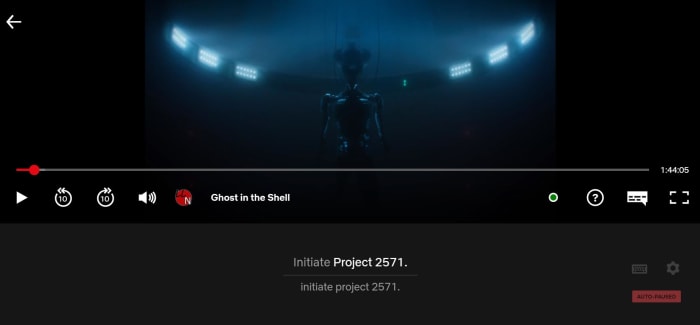
One way to learn a language is through passive consumption: watching movies in their native language and reading the subtitles. But you can learn faster with the Learning Languages with Netflix (LLN) Chrome extension. It uses the foreign language soundtrack of Netflix’s movies and shows to expose you to the language you’re trying to learn, and it uses the subtitle track to teach you the meanings of those words.

Learn languages with Netflix language catalog

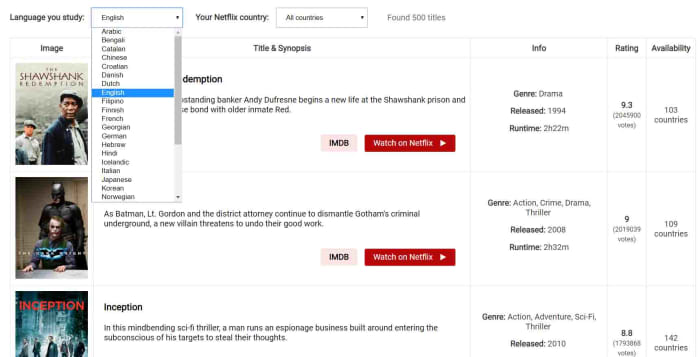
The LLN extension has a catalog of all the Netflix titles that come with high-quality subtitles in the language you’re learning, and also tells you about a few issues you should consider. For example, Netflix has high-quality subtitles for the original audio track, but whenever the soundtrack has been dubbed the subtitles might not always match.

Learn languages with Netflix at the right level

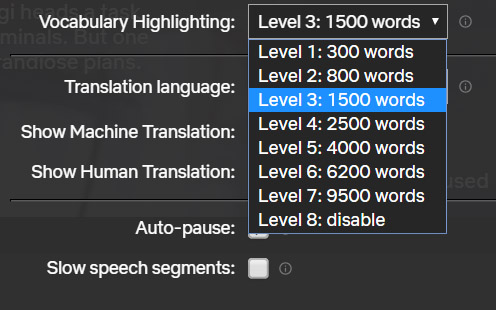
The extension works by giving you the option to select your translation target language and then select a vocabulary level based around the number of words you know in that language. This will then only highlight the words suitable for your current level of learning. This allows you to tier your learning, no matter how complicated the language in the movie or show you’re watching.

Subtitle learning with netflix

When activated, the LLN extension will show as a small icon in the Netflix control bar whenever a movie or show is playing. Then all you have to do is select the subtitle track for your target language in the normal way and hit the LLN icon. This will open up the subtitle track, which will run almost like a karaoke song with the word being spoken in the soundtrack lighting up as you hear it. This makes it very easy to match the sound of the word to the spelling.

You can use this method with subtitles showing your own language to expand your vocabulary or with subtitles in your target language to reinforce your learning. This reinforcement makes it easier to remember.

learn languages netflix keyboard shortcuts

As well as highlighting the words being spoken, the extension also offers a dictionary, so you can delve further into the meanings of the words you’re reading and hearing.

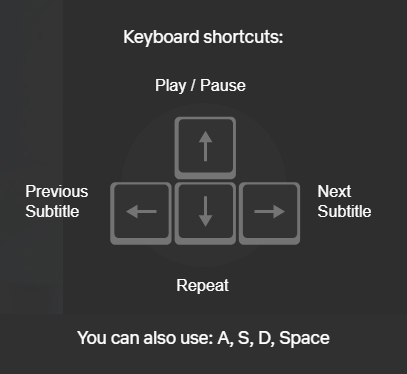
Another cool feature of the extension is keyboard shortcuts that make it easier to focus on particular words, phrases, and structures. This makes repeating phrases, skipping subtitles, and pausing on particular phrases as simple as pressing a key.

All in all, the LLN extension is a very interesting tool for anybody learning a new language. It gives you ease of control over the language you’re consuming when you watch shows and movies on Netflix. It also makes it easier to distinguish between different words being spoken in your target language, which is particularly useful for anybody just starting out with their language learning. Finally, it puts at hand in-depth explanations about the new vocabulary you’re consuming.

When it comes to language learning, practice is as important, if not more important, than the lessons themselves. The LLN extension makes it easy to practice your target language while watching Netflix, which should make a big difference for anybody trying to open that gateway to the world.

Free desktop and mobile wallpapers: Enjoy this treat from NASA

NASA is giving away some of the most stunning photos of earth ever taken

NASA Earth

The earth is such a beautiful and unique place. It can be easy to forget just how special it is. Earth’s natural beauty needs to be seen to be truly understood. But if your situation prevents you from seeing as much as you’d like in person, NASA has something special for you.

To celebrate Earth’s majesty, NASA has released a hardcover book filled with 69 of the best images of earth NASA has ever taken. There aren’t many people who will have seen the world like this. The book retails for $53 and will cost even more if you’re outside the U.S., but the good news is that NASA is giving away an electronic version of the book for free. These images will make some of the best desktop backgrounds we’ve ever seen.

NASA is giving away some of the most stunning photos of earth ever taken

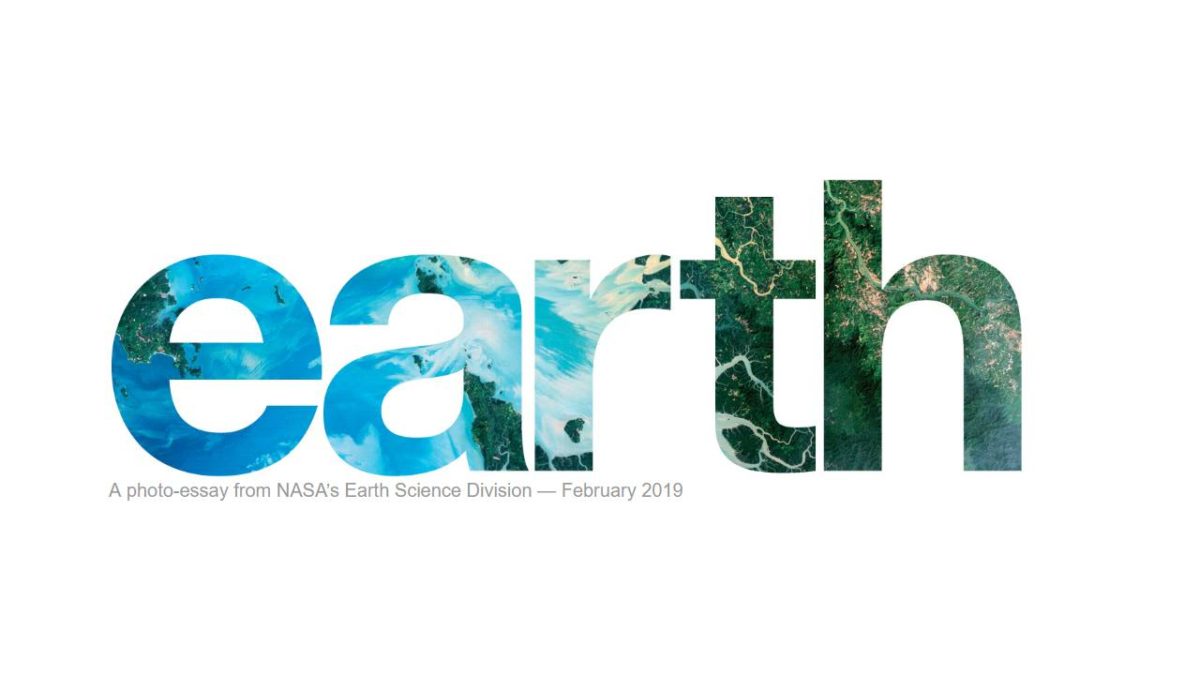
NASA’s new photobook is called “Earth” and takes all the best satellite images the space agency has taken of earth through the years and packages them up for you. There are two ways to get your hands on the incredible images for free. You can either download the ebook as a pdf, epub, or mobi file here; or you can check out NASA’s interactive online version here.

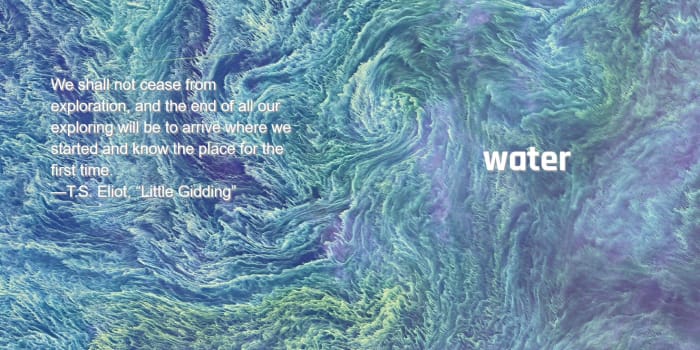
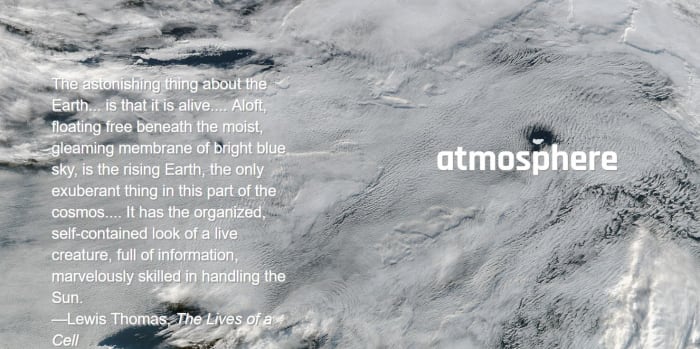
The online version of NASA’s book is split into four categories. These categories are atmosphere, water, land, and ice and snow. Each will show you stunning images that tell earth’s 4.5 billion-year-old story and give you an insight into how NASA uses these types of images to learn how the earth has developed over that time.

NASA satellite imagery

All the images come with a short description explaining what they’re showing and also include a link to the full story of the image, which will give a much more in-depth explanation of what is going on and how NASA captured the image. If you’re looking for new desktop or mobile wallpapers, this is also where you’ll find links to the full high-resolution versions of the images. These large files will give you the opportunity to zoom in and look at the earth in much greater detail.

Photos of earth nasa satelites

Michael Carlowicz who works at NASA’s Earth Observatory had this to say in the book’s foreword, “NASA has a unique vantage point for observing the beauty and wonder of Earth and for making sense of it. Looking back from space, astronaut Edgar Mitchell once called Earth ‘a sparkling blue and white jewel,’ and it does dazzle the eye. The planet’s palette of colors and textures and shapes — far more than just blues and whites — are spread across the pages of this book.”

NASA satellite photos of earth's atmosphere

The book is designed to show just how beautiful the earth is as it is… “no matter what the human mind can imagine, no matter what the artist can conceive, there are few things more fantastic and inspiring than the world as it already is.” Check out the free ebook now and you’ll see that it does just that.

Land from space nasa photos

If you like these types of images, you should check out this extension for Google Chrome. It will show you a new satellite image from around the world every time you open a new tab.

This is the Netflix browser extension you didn’t know you needed

The Netflix Extended Chrome extension adds keyboard shortcuts and removes intros and recaps

netflix

If you ask me, the greatest invention of the new millennium has to be the “Skip Intro” button on Netflix. Don’t get me wrong, it is not like I hate watching the intro to the shows I love, it is just that when I’m binging through a series, I don’t want to have to watch the intro again and again in between episodes. The same goes for recaps. They’re useful if you watched the last episode more than a few days ago but if the last episode just finished, I don’t need a recap. I know I’m not alone in this frustration.

8

OK, so there are skip buttons for these, but having to press them can be annoying, especially if you don’t have a wireless mouse setup. Thankfully, it is now possible to set Skip Intro and Skip Recap to default so that it happens automatically every time you watch a show. You won’t need to get up and tap a button, you’ll be able to stay right where you are and the next episode will begin, intro and recap free. This is the best Netflix Chrome web browser extension.

The Netflix Extended Chrome extension adds keyboard shortcuts and removes intros and recaps

Netflix Extended is a very easy to use Google Chrome extension that will enhance your Netflix experience. Once you’ve added the Extension to Chrome, you’ll notice a green Netflix style “N” next to the other browser extension logos in the top right of Chrome. Whenever you click this N, Netflix will open.

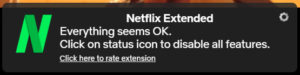
Once the extension is activated and Netflix is open, you’ll see a green dot in the control bar at the bottom of the screen whenever you’re playing a movie or show. Hovering the cursor over the green dot will tell you whether the extension is working properly.

favorite netflix extension

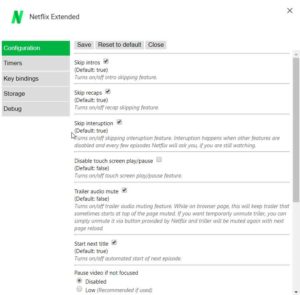
When you first activate Netflix Extended, it will already be set to automatically skip intros and recaps. If you’re not happy with the default settings, however, and you want to change them up, you need to right-click on the green N icon. From there click on the Options button to open the Netflix Extended settings menu.

netflix extended settings

As well as the Skip intros and Skip recaps options, you’ll also be able to set Netflix to automatically mute the trailers it shows at the top of the screen on startup. Another key feature is the ability to block the next episode from starting automatically if you think you might be binging a little too much.

Netflix Extended also has a number of keyboard shortcuts, which you can tailor to your needs via the Options menu. Clicking on the Key bindings tab will open up the shortcut defaults and give you the option to change which keys will do things like play the next episode or exit Netflix altogether.

If you’re a big Netflix fan like me, I recommend checking out Netflix Extended now.

This is how to block bands and artists you don’t like on Spotify

Users have been reporting on social media that they’ve spotted a new block artist feature on their Spotify apps.

Spotify

Music is a truly polarizing force. We love some artists and we hate others. Two true emotional extremes brought on by different arrangements of rhythms and beats. When it comes to loving music, nobody helps more of us find the music we love than Spotify, which has more monthly subscribers than any other music streaming service. For hating music, however, Spotify has always taken the position that it can’t be that bad.

Spotify Download Now
8

Back in 2017, Spotify publicly stated “after serious consideration” that it wasn’t going to start allowing us to block the artists we don’t want to hear. If we’re is listening to Discover or a public playlist and a song from that artist we just can’t stand is coming up, we just have to hit skip once it comes on. Spotify decided against offering a way of automatically filtering out those artists we hate. This has now changed.

Users have been reporting on social media that they’ve spotted a new block artist feature on their Spotify apps. According to a report by Thurrott, this roll-out has only reached members of the Spotify beta program on iOS, which means the streaming giant is still testing the feature. The same report goes on to say that, although Spotify’s official position is still that you can’t block artists, it has been testing this exact feature for months with a select group of users. The reason more people are reporting the feature now is that the test has recently been extended to a larger group.

How to block artists on Spotify

To block an artist on Spotify you need to click the icon on their profile page. This will take you to the settings menu for the artist. From here you’ll see the new option Don’t play this artist. Tapping this option will stop Spotify from playing music by that artist in the future. The feature will even prevent you from manually selecting music by blocked artists.

the ... menu on spotify
Seek out the artists you don’t like and look for the three dots.

If you want to play music by an artist you’ve previously blocked, you’ll first have to unblock them. The only way you’ll be able to hear music by a blocked artist is if they feature on a track by another artist. Spotify’s new block artist feature won’t block tracks the artist has featured on if they’re not the primary artist.

This is the feature all you haters out there have been waiting for. I’ve been waiting for it, too. For me, it is inane pop music and generic EDM that’ll be going straight into my Don’t playlist. On top of the music I can’t stand I’ll also likely use the new feature to block artists like R. Kelly and Chris Brown. There is still no official word about when the feature will roll-out to all of us, but it looks like iOS users, at least, will get it soon. When the block artist feature comes to your phone, PC, or Mac who will you be blocking first?

YouTube gets a new Instagram-like feature

YouTube to soon get video swiping on mobile

youtube

If you were to say that there is one video sharing site that dominates the web, you would have to say it was YouTube. There are other options out there. Instagram recently jumped in the mix with its roll-out of IGTV and the early results show it can be a serious contender in the battle against YouTube’s dominance. So it’s no big surprise to see YouTube adopting features first seen on Instagram.

YouTube Download Free
8

YouTube to soon get video swiping on mobile

Instagram and Snapchat have made swiping the popular feature it is today. It allows users to simply swipe their fingers across a video that is playing to move onto the next one. It appears that YouTube is testing its own version of the feature, which should appear on iOS soon.

According to a report by Android Police, the test was first flagged by a Pixel owner who noticed the new swiping function. Rather than being overly complicated, the test simply added the swiping function to the regular YouTube interface. Each swipe forward takes you to a new recommended video and then swiping backwards takes you back to where you left off on the video you were watching first. You can check out a demonstration of the new feature in the video below:

Via: The Next Web

Swiping between videos makes it much easier to choose a new video than having to select one from a list below the video player. It means that there is always a full-screen video playing and resembles the TV-like experience of switching between channels. The advantage to swiping between videos online, however, is that the videos will always start at the beginning.

Swipes make it much easier to binge watch all of the videos YouTube thinks you will want to watch the most. With a massive 70% of all videos watched on YouTube being viewed on mobile devices, this update could see a lot of us watching a lot more videos on YouTube using our phones. If it does, maybe it could be seen as justice if Facebook sees fewer people using Instagram due to YouTube copying one of its best features.

If this sounds like the kind of feature you could be interested in, you’ll be happy to know that it won’t be long until the feature hits your phone. The test was first spotted back in August and The Next Web writes that the feature is ready for a wider release. It will be coming to iOS as nearly as next week. Unfortunately, there is no news at the moment about when it will come to Android.

How your Netflix bill is about to change

The new Netflix prices explained

It isn’t overstating things to say that Netflix has completely revolutionized how we consume TV shows and movies. The online subscription model, which gives access to a vast repository of great shows and movies has enjoyed so much success, it has sparked its own cultural phenomena (“Netflix and Chill,” anyone?) and sparked a wide variety of competitors to also offer their media via the internet. You could even say that the influence has spread to other industries with Amazon looking to start a Netflix for video games sometime next year.

Netflix Download Now
8

As with all other companies, however, the good times can’t last forever and yes, this time, the bad news is true. Netflix has increased prices for its subscriptions, which means it will now cost more to access all of the streaming giant’s TV shows and movies. The news came out of Netflix HQ on Tuesday that all streaming plans will be going up in price. New customers will be faced with the new prices immediately and existing customers will see their bills go up over the next three months.

The new Netflix prices explained

If you are a Netflix subscriber in the U.S., you might want to know how much this is going to cost you. Well, that all depends on what type of Netflix subscription you have. The bad news is that Netflix’s most popular plan has seen the biggest increase. The plan which offers users high-definition streaming on up to two different devices at the same time has seen its price jump from $11 a month to $13. The cheapest Netflix plan has gone up from $8 a month to $9 and the Netflix ultra-high-definition plan now costs $16 a month, up from $14.

There is good news, however, for global Netflix subscribers. Speaking to Digital Spy, Netflix confirmed that “price increases are specific to each country.” This means the U.S. price hikes will not be repeated all around the world. It isn’t all good news, however, as the price increases will affect you if you normally pay in dollars, unless you are a part of key markets like Mexico and Brazil.

Netflix has been investing heavily in new content recently. The streaming giant spent an estimated $3 billion on original content last year and it is believed the company will spend the same amount next year. This is all to be expected though, as the online streaming market becomes increasingly competitive. Alongside the established big players like Amazon Prime and HBO, Disney has recently entered the fray with its new streaming service. This knocked a double blow to Netflix, which saw a number of its most popular titles stripped from its roster just as a powerful competitor began to take it on.

The increased prices may cause a few to turn off, but if the added revenue is put into new content then hopefully, the extra couple of dollars a month will be worth it.

Big news from VLC at CES 2019

VLC passed 3 billion downloads live in front of an audience at CES.

vlc download milestone

VLC Player is one of the most popular programs ever. For 23 years, it has been the universal video player of choice. If you have ever had a video file you couldn’t play, chances are you downloaded VLC and were then able to play it. It is available across nearly every platform, from phone to PC, and has continued adding new features year after year. It is a beast of a program, a true goliath, and at CES, the VideoLAN guys realized they weren’t going to simply talk about the cool new features they were adding to the VLC, they also needed to celebrate a huge milestone.

VLC passed 3 billion downloads in front of a live audience at CES

Now to put 3 billion downloads into perspective, the world only has around  7.53 billion people in total. That means just under half of all people in the world has downloaded VLC, assuming each person downloaded it once.

The number of VLC downloads has risen steadily since 2012 when VLC announced they’d broken 1 billion downloads. The other interesting news is that only a quarter of the downloads have been to mobile devices, which there could still be a lot more VLC downloads to come. At Softonic, we’re happy to have helped so many of you download such a popular, useful, and reliable program safely and securely and we look forward to helping many more of you do so in the future.

VLC for mobile Download now
8

AirPlay compatibility, new platforms like the PS4, and improved VR features

The other big VLC news from CES is about new features that will be coming to the incredibly popular program soon. VLC for Android is about to get a very interesting addition that will enable cross-play between Android and Apple devices. In about a month, VLC users on Android can expect to receive AirPlay compatibility. This means they’ll be able to beam videos from their phones onto Apple devices like Apple TV. If you live in a house that is split between iPhone and Android users, this will be very useful indeed. It’ll also come in handy if you’re visiting friends or staying in hotels that have Apple TV.

That’s not all either. VLC announced, in an interview with VentureBeat, that it also plans on bringing its flagship video player to new platforms like the PlayStation 4, Nintendo Switch, and Roku devices and that a lot of work has been going into the VLC VR app. The VLC engineers have reverse-engineered popular VR headsets and have also been working on support for 3D interactions and stereo sound, and a virtual theater feature.

So, some big news about an old friend. Congratulations to all the team working for the not-for-profit VideoLAN organization. We’re sure if you keep up the good work, it won’t be long before you hit 4 billion downloads.

VLC media player download free ►
8

Google Chromecasts: The vulnerabilities you need to know about

Hackers have hijacked thousands of Google Chromecasts to highlight security vulnerabilities.

Google Chromecast streaming dongle

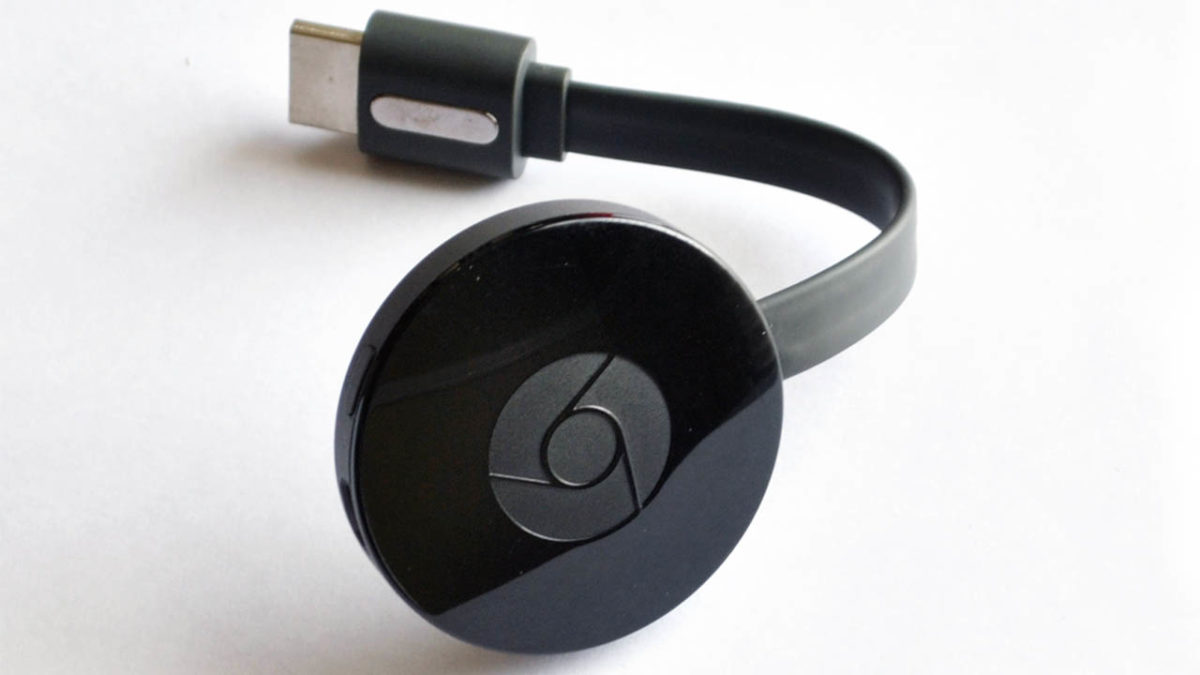
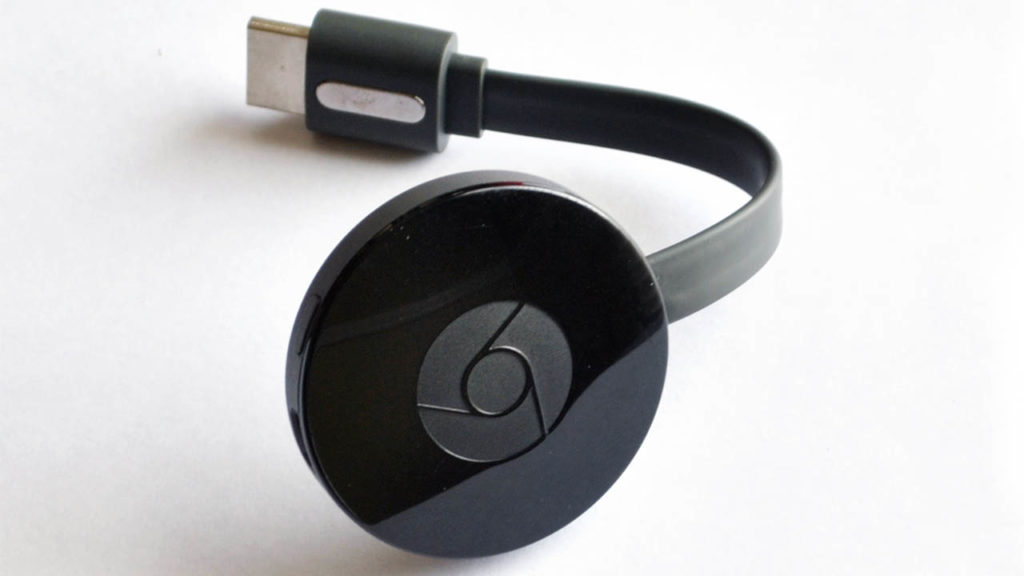
Google Chromecasts are interesting little things. Tiny hockey puck-like dongles that enable you to hook up your TVs and stereos to your home Wi-Fi network. This means you can hook them up to your mobile devices, which means you can have the movies or music on your phone playing on your big TV or blasting out your big speakers. They don’t grab the headlines like smart speakers do, but they have proven rather popular and there will be lots of us who received a Chromecast over the holidays.

Just like any device that connect to the internet, Chromecasts are vulnerable to being compromised by malware. As it is important for us to know about all of the vulnerabilities that affect us, a move by hackers known as Hacker, Giraffe, and J3ws3r could be seen as public service. Although others might not see it that way.

Hackers have hijacked thousands of Google Chromecasts to highlight security vulnerabilities

According to a report by TechCrunch, the three hackers figured out how to make Google Chromecasts play any YouTube video they want. They even found a way to play custom-made videos, too. Of course, upon discovering the vulnerability, they immediately exploited it to make sure that users knew about the flaw in their online security efforts.

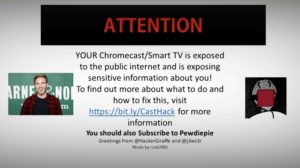
Thousands of Chromecast owners were shown a pop-up that warned them of their weakness. The message (shown below) highlighted the users’ misconfigured routers as the culprits and warned that other hackers would also be able to exploit the weakness and break in, too. They also asked users to subscribe to and follow YouTube personality PewDiePie’s channels.

Image via: TechCrunch

Google responded to the hack by saying the problem lay elsewhere and was not in the Chromecasts themselves. Speaking to TechCrunch, a Google Spokesperson said, “We have received reports from users who have had an unauthorized video played on their TVs via a Chromecast device… This is not an issue with Chromecast specifically, but is rather the result of router settings that make smart devices, including Chromecast, publicly reachable.”

The bug, known as CastHack, isn’t a new one and has been plaguing these types of devices since 2014. Whereas Google is right in saying that the vulnerability lays outside of its product, it is also true that hackers can use Google products to gain a foothold in users’ homes. With the problem going back four years, Google really should have fixed the bug by now.

Although the idea of playing videos on a screen might not seem like a huge problem on its own, the rapid expansion of the smart home industry, centered around smart speakers, opens up some chilling possibilities. If a hacked Chromecast can be made to say things like, “Turn off the house alarm” or to “Buy something from Amazon,” then all of a sudden, this problem can hit you in the wallet or even put your physical safety in jeopardy.

Security alert: new Netflix phishing scams

The Federal Trade Commission has issued a warning about Netflix phishing scams

netflix

While you were Netflix-and-chilling, some bad guys have been hard at work to make the streaming site considerably less chill. Netflix has been the subject of quite a few phishing attacks recently, leaving subscribers vulnerable to having their private data and even payment information compromised.

The Federal Trade Commission issues a warning about Netflix phishing scams

The new Netflix phishing attacks have appeared in email inboxes all over the world. They resemble regular spam that would usually end up in your junk folder. Somehow, however, these fake emails are getting through and the FTC has issued a warning.

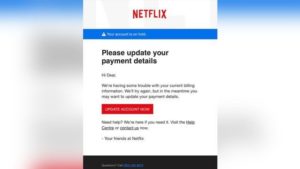
The attacks came to the attention of the FTC thanks to law enforcement in Ohio. Interestingly, however, the text in the screenshot of the scam that the FTC released was written in British English. This seems to indicate that Netflix users on both sides of the Atlantic have been targeted, which makes sense as phishing scams tend to try and catch as many people as possible. You can see the screenshot the FTC released below.

Netflix phishing scam
The Netflix phishing scam that the FTC is warning about

This particular type of scam isn’t anything new or innovative. It is a simple rehashing of the classic, ‘your payment details are out of date’ type scam. The fake emails tell unwitting victims that their Netflix account is on hold and that their payment details need updating. There is also a button that leads to a fake Netflix login page that will then ask for login details. The emails are designed to look as legitimate as possible but there are clear signs you can look out for. (We’ll go through those shortly.)

Although the scam isn’t new, it is obviously widespread enough to have set off alarm bells over at the FTC. This new Netflix scam also shows just how important it is to always double check everything that asks for login details or personal information. Even the oldest scams are still able to get the better of us.

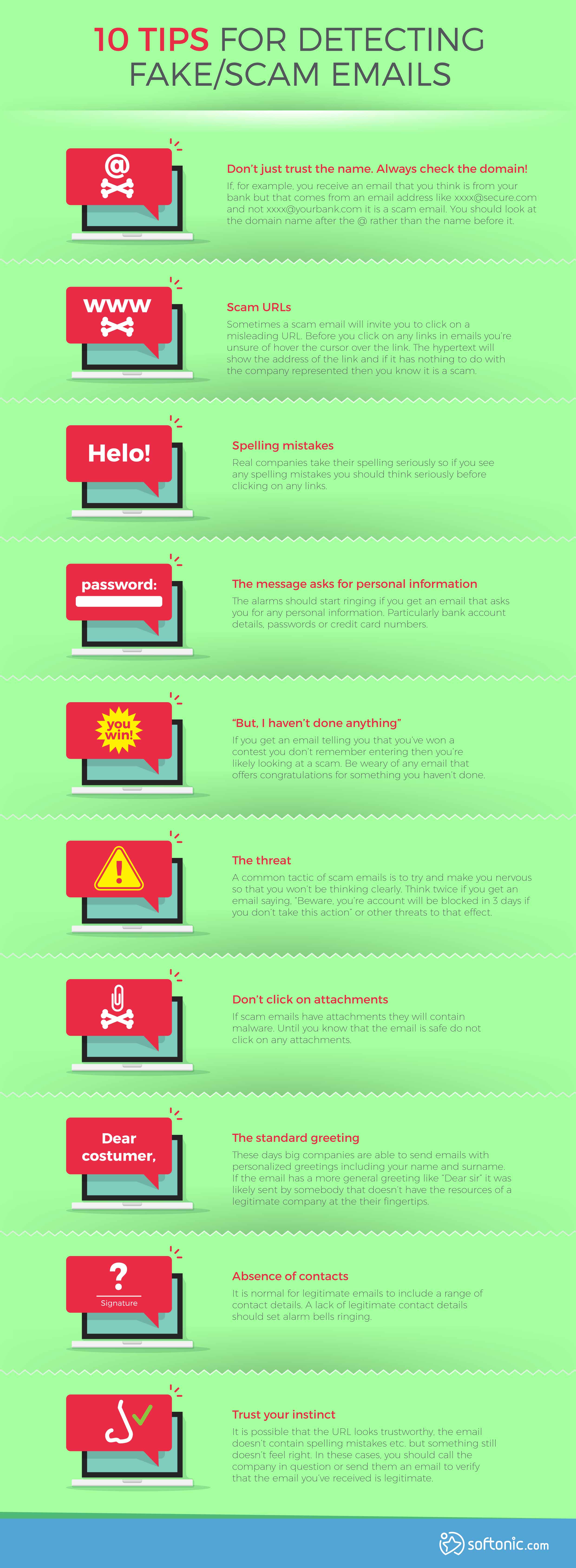
Check out our infographic below for ten tips to help you avoid fake emails and phishing scams.

How to Detect Fake/Scam Emails and Avoid Phishing Attacks

At Softonic, we’re committed to keeping you up to date with all of the latest software news and updates, and we also want to keep you safe when you’re online. To keep yourself up to date with all of the latest software news, and one step ahead of the hackers, keep scrollign down and fill out the form below to sign up for our regular email newsletters.