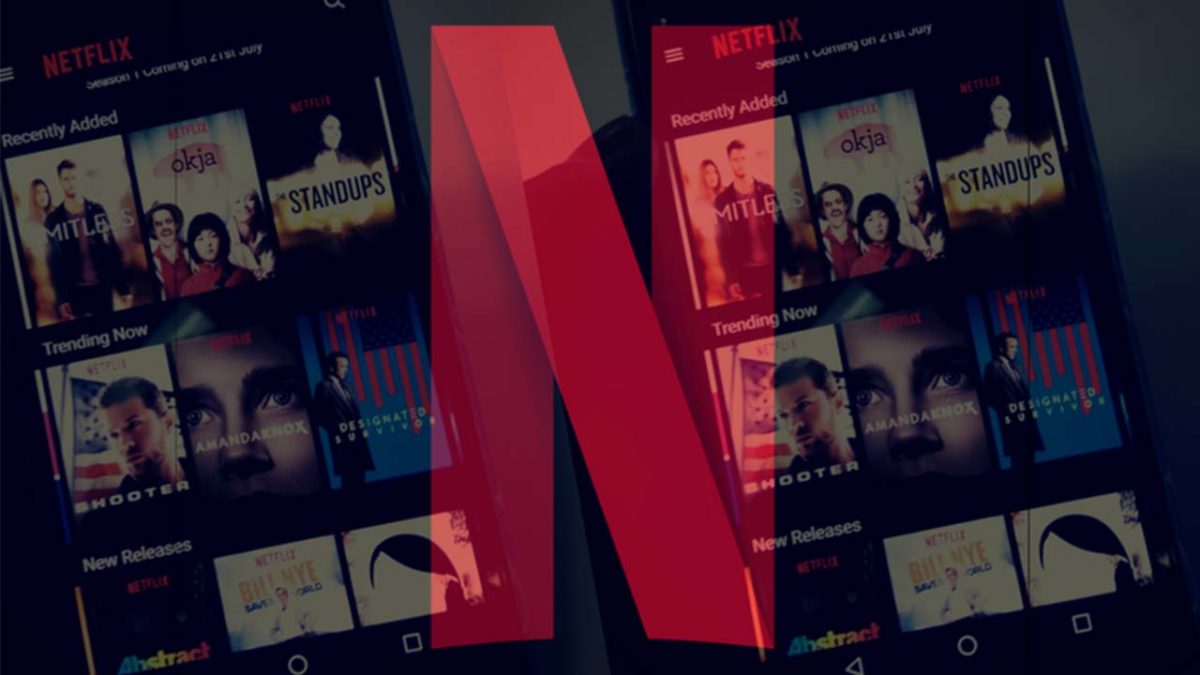
Netflix experimenting with Top 10 lists

Discover where the test will begin.

Netflix background

Netflix has quickly become an intrinsic part of modern culture. Its growth has seen the streaming platform spread around the world. On top of this, as well as offering diverse content, the streaming platform has been running a series of subscription model tests to find new ways of spreading Netflix to parts of the world that can’t really afford a full Netflix subscription.

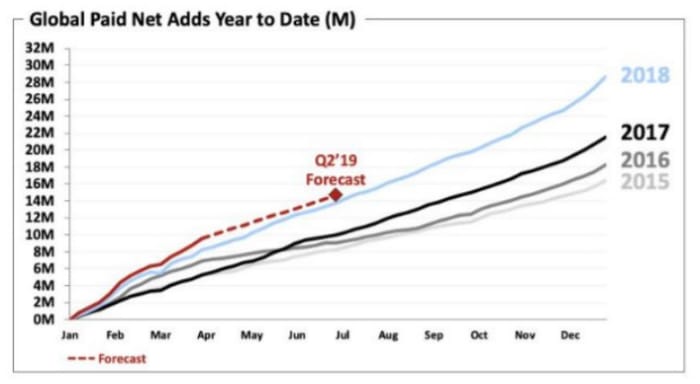
A new shareholder letter released by the streaming giant shows that this growth still continues with over 10 million new subscribers signing up between the beginning of January and the end of March this year. The letter also includes some interesting information about a new test Netflix is about to begin, which could see how you interact with it change significantly.
Netflix is going to test Top 10 lists in the UK

According to the shareholder letter, Netflix is going to begin, “running a test to improve our UK member experience by releasing weekly top 10 lists of the most popular content on our UK service across various programming categories. For those who want to watch what others are watching, this may make choosing titles even easier.” The top 10s will be based on the content’s popularity across the region you’re a part of.
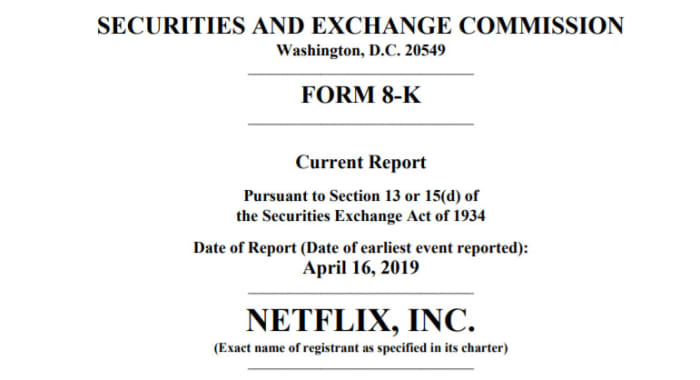
Netflix shareholders meeting
A recently released shareholder’s note has uncovered some interesting information about Netflix

These top 10 lists will stand aside from what you normally see on Netflix as they won’t be affected by your own viewing habits. Well, they will but only in so much as if you watch something, it will get one vote that will add to the overall ranking. Until now, all the movies and TV shows you see when you open Netflix, are based on things you’ve already watched and how Netflix thinks that fits with its current content roster.

Netflix went on to say that the British testing of top 10 lists will go on for a few months. After the test period is over, the streaming platform will analyze the results and decide whether to simply end the test or extend it to other regions.

If you’ve ever struggled to find something to watch on Netflix, these new top 10 lists could be a good way for you to find something you know is popular with other Netflix users. If you’re the type of person who tries to avoid the mainstream, however, you might be less interested in Netflix’s latest test.
New Netflix subscribers
Netflix keeps adding new subscribers

The real interesting thing to note from the Netflix shareholder’s letter is that the streaming platform has seen subscriber numbers continue to rise, despite price hikes in a number of its key markets including the U.S., Canada, Brazil, Mexico, and parts of Europe. If we’re talking about Netflix tests, it is clear that the price hikes have returned positive results for the streaming giant. It might not be a sure thing, but at this point, it looks like there is nothing stopping Netflix from looking to price hikes to boost revenue again at some point in the future.


Where to watch Broadway plays and musicals online

Enjoy the stage without leaving home with these great options.

HamiltonEven if you can’t make it to a live performance, the show must go on.

Being a Broadway fan is tough when you don’t live near a major city. Even if you do, Broadway shows can be expensive, with some tickets fetching hundreds of dollars. 

Ticketmaster Download now ►
8

Best options to watch Broadway plays and musicals online

While each trip to the theater is a unique experience, many of these plays have been professionally recorded at one time or another.

With a number of online resources to watch them, you no longer have to miss out on your favorite Broadway musical. 

Here are some of the best sites and apps you should check out:

BroadwayHD

Broadwayhd

If you’re looking for a Broadway streaming service, BroadwayHD should be your very first stop.

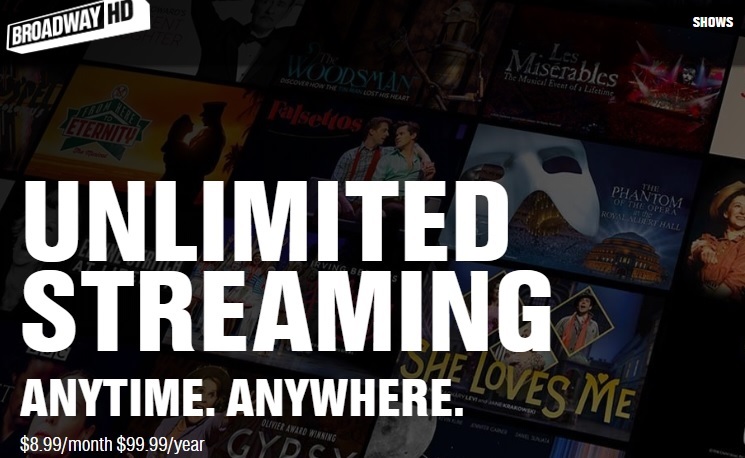
Often considered “Netflix for Broadway lovers,” BroadwayHD costs a simple monthly subscription of $8.99/month. The library is huge, and you will find many of your favorite titles. 

You won’t find any amateur work, which can be a bit of a downside. However, all filming is top quality and there are a few off-Broadway productions to be found. 

Oh, what a beautiful day you’ll have while streaming “Oklahoma” on BroadwayHD.

Netflix

Netflix

You won’t find many stage musicals here. However, You can take a chance on Netflix and watch film adaptations of musicals like “Mamma Mia.”

There are a few stage musicals you can find, such as “Shrek the Musical” and “Oh, Hello” on Broadway. However, you won’t find as many on this streaming service as you would on BroadwayHD.

Instead, Netflix is a great choice for anyone interested in movie adaptations of Broadway plays. Some examples include: “Burlesque,” “Grease,” and “Beauty and the Beast.” 

8

Hulu

Hulu

Like Netflix, Hulu has more movie adaptations than actual stage films. That being said, it’s one of the only places you’ll be able to find “Jesus Christ Superstar. So, you can find out what’s the buzz and what’s a-happenin’. 

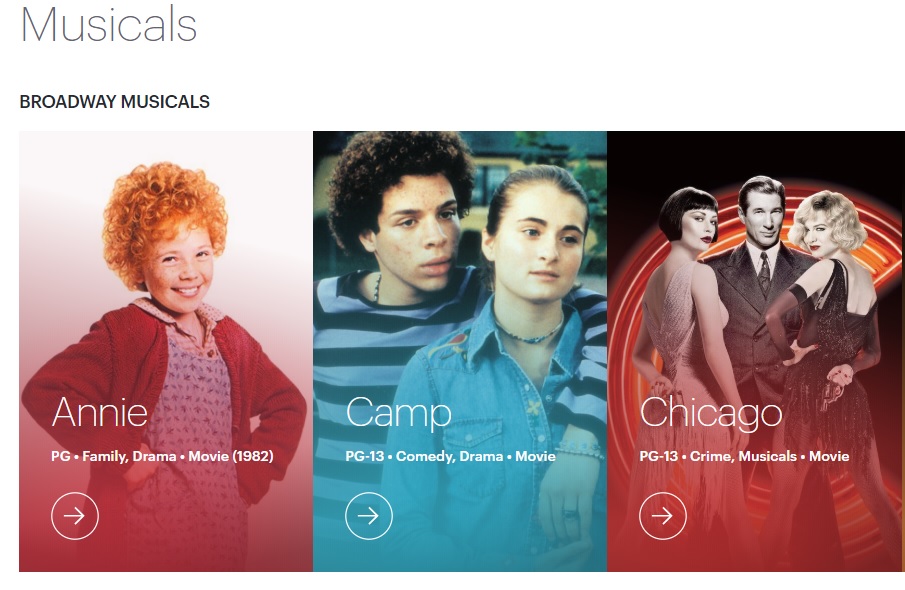
Hulu also features a lot of older musicals that can be hard to get, such as “The King and I,” “Hello Dolly,”  and “Annie.” You may want to compare Hulu and Netflix’s selection before deciding if you want to subscribe to one or both.

Fandango

Fandango

Most of you know Fandango as the app that helps you get tickets for your favorite movies. However, many movie theaters have special events where you can watch a recording from a live Broadway performance. 

You can search for those musicals on Fandango, and then go see them at a theater near you. The $10-$20 you pay for a movie ticket far outweighs the huge prices you’d have to dish out to see the show live. 

Basically, if “Hamilton” makes ever its way to the silver screen, don’t throw away your shot to see it through Fandango.

7

YouTube

Amateur and off-Broadway productions can be just as good, if not better than original Broadway plays. YouTube is full of well-filmed (and plenty of poorly-filmed) amateur work that you won’t be able to find on any of the other streaming services.

For example, we found this full performance of “Rent.” How can you measure that?

Of course, you may find full Broadway productions on YouTube, too. However, you’ll have more luck finding off-Broadway productions. You also can find full soundtracks to musicals. It’s easy to find soundtracks like “Heathers,” “The Book of Mormon,” “Legally Blonde,” “Spamalot” and many more. 

YouTube might not be the first option that comes to mind when looking for Broadway musicals. However, a little digging might bring up a hidden gem.

8

Beyond the Broadway barricade, there are musicals we long to see

Through these services, you can enjoy the Broadway stage straight from your device without having to pay Broadway prices.

If you must attend in person, check out this list of apps that our users picked as the best options for buying Broadway tickets. They can get you the best deals for buying Broadway tickets.

Netflix is testing something very interesting in India

Netflix is testing weekly subscriptions in India.

Last November, Netflix began testing a mobile-only subscription model in Malaysia. The test model, which allows users to pay less each month, but then only access Netflix on their mobiles has since been extended to India. As well as restricting Netflix to a smartphone or tablet, the mobile-only subscription model also limited streaming to Standard Definition (SD) only. Netflix is now extending this test in India, adding an interesting new element to its subscription model tests.

Netflix is testing weekly subscriptions in India

A man is watching Netflix

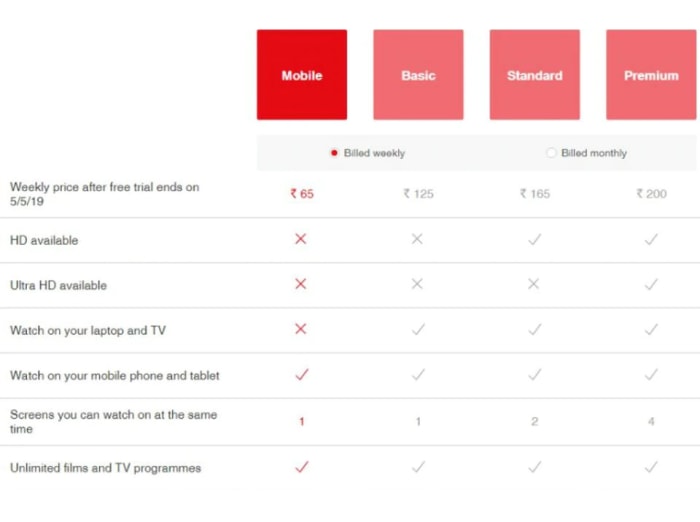
The new weekly subscription model that Netflix is introducing to Indian users will offer much more flexibility. Users will be able to subscribe one week but then not the other, allowing them to cut off their connection to the Netflix library during busy weeks and then hook themselves up again when they’ve got a bit more free time on their hands. It also works for users who might struggle to afford a full month’s subscription. A week’s subscription on one of the new plans will cost Indian users as little as Rs 65, which is only about 95 cents.

8

At such a low price, it will come as no surprise that the weekly subscription comes complete with restrictions. Fortunately, the restrictions do not hold back any of the Netflix catalog. All titles will be available to weekly subscribers, but like with the original mobile only plan, they’ll only be available in SD. The other main restriction is that the Netflix subscription will be limited to one device only, which must be a smartphone or tablet.

Netflix mobile headphones
The new weekly subscriptions won’t just be on the mobile-only plan

The Rs 65/week plan marks the cheapest of all the new subscription models that Netflix is testing. Prices will go up based on adding multiple devices to the basic package, the ability to watch on a laptop or TV, and also adding HD and Ultra HD to your weekly subscription. The most expensive weekly subscription, which offers Ultra HD content and allows streaming on up to four devices at the same time costs Rs 200, which is about $2.90 a week.

New weekly subscription prices for Netflix
Image via: Hindustan Times

If you’re an Indian Netflix user and you’re interested in this new weekly subscription model, you’ll be happy to know that Netflix is offering a four-week free trial to all new users. Unfortunately, however, you won’t able to take advantage of the free trial without first handing over your financial information.

U.S. Netflix users shouldn’t get too excited about a new super-cheap weekly subscription model just yet. Even if the new weekly subscription does make it over to the States, we shouldn’t expect similar pricing structure for a week’s worth of Netflix. These tests are designed to help Netflix expand into markets where people can’t really afford a full Netflix subscription, rather than as a way to make it more competitive in markets where it already competes.

YouTube gives up premium video fight

YouTube gives up its fight with Netflix. So what happens to “Cobra Kai”?

YouTube PremiumFear not; you will still be able to crane kick with Daniel-san on “Cobra Kai.”
YouTube is surrendering to Netflix and Prime Video in the paid-streaming race. According to reports from Bloomberg, YouTube will be moving away from paid premium content, and will be canceling two original shows in the process: “Origin” and “Overthinking with Kat & June.” YouTube Premium’s most popular show, “Cobra Kai,” will still return for its second season in late April, and the show’s creators are still in negotiations for a third season on YouTube.

YouTube has not made an official statement yet on when paid content will be removed, so we can’t give an exact date on when the change will take place.

8

The decision appears to have been made due to the high cost of competing with the big dogs in the market like Netflix. YouTube was able to compete for a while as “Cobra Kai” was the most-streamed show the week it was released, but YouTube has failed to consistently match those same numbers with other shows. YouTube Premium stopped reporting its subscriber numbers after the first year, when it had 2 million.

Formerly known as YouTube Red, YouTube Premium not only allowed access to original content, but also gave viewers an ad-free viewing experience and the ability to listen to videos without keeping the app open. YouTube is now working on a “shift to free” where all content on the site will be free for every viewer.

YouTube Premium will continue to exist with its other features, including ad-free and offline viewing. The change also suggests more focus on music, likely with a greater spotlight on emerging artists.

Stranger Things Season 3 trailer promises malls and monsters

“Stranger Things” returns on the 4th of July. Here’s your first look…

Stranger Things mall

Are you ready to go back to Hawkins, Indiana? Today, Netflix dropped the new trailer for “Stranger Things” Season 3. And like its previous editions, it’s throwing off some major throwback vibes. Take a look.

Let’s take a closer look at some of the standout shots from the trailer.

AntennaLooks like our heroes are channeling “E.T.” with this antenna rig. Whose home are they phoning here?

Mall aweIn the 80s and early 90s, walking into the mall always elicited this kind of reaction. You were either overjoyed or awestruck. Be adventurous and hit Spencer’s Gifts, girls. Maybe pick up something fun at K-B Toys or B. Dalton bookstore. Is it time for some new fashions from Montgomery Ward? Amazon hasn’t been invented yet! Live! Live for us!

8

TerminatorWhoa. Who’s this Terminator-lookin’ guy?

Terminator GuyLooks like the same Terminator knockoff is raising some hell…

SteampunkSome steampunk guy gets electrocuted in the coolest shot in the trailer.

Cary Elwes“Stranger Things” continues its tradition of showing love to 80s icons by introducing “Princess Bride” star Cary Elwes as the mayor. We approve.

MonsterAnd we can’t have “Stranger Things” without some kind of mutant from the Upside-Down.


The new season hits Netflix on July 4. You bring the popcorn, they’ll supply the fireworks.

Bear Grylls’ life is in your hands in new interactive Netflix show

Netflix brings interactive adventure to your couch.

You vs Wild

If you’ve ever yelled at your television because of a character’s bad decision, you now have the chance to actually change fate.

Last year Netflix released “Bandersnatch,” a show that blew up in popularity due to the fact that you could make decisions for the main character. Video game enthusiasts flocked to the show, as it truly felt like you were playing a game instead of just watching TV.  The program had a ton of endings, ranging from crazy to downright catastrophic, and you could spend hours exploring all of the possibilities and still not reach a happy ending – if that’s what you were going for.

8

Netflix is back at it again, this time putting real life into our hands – belonging to none other than the world’s favorite British survival show hosts, Bear Grylls. Grylls first popped up on our radars with his hit series on the Discovery Channel, “Man vs Wild,” during which Grylls would travel to far off locations all over the globe to try to survive in some of the world’s most dangerous places. In “You vs Wild,” all of Grylls’ decisions are made by the viewer in what may be the first ever interactive survival show.

Antartica or Africa? Lush jungle, scorching desert, or freezing tundra? Camp and wait out the storm, or brave the rain and make it to a destination before night falls? We’ll have to wait and see what our options for Grylls will be until April 10, when all 8 episodes of “You vs Wild” will be made available on Netflix.

Where would you like to see Bear Grylls survive a night the most?

How to change your Netflix avatar

Give your Netflix account a makeover with a new avatar.

Is that goofy little smiley face icon just not cutting it anymore? If you’re ready to add a little personal flair to your Netflix account, changing your icon is quick and easy. On shared accounts especially, using a custom avatar is a great way to stand out from the crowd. If you’re ready to spruce up your Netflix account, read on and we’ll show you how to change your avatar in just a few simple steps.

How to change your Netflix avatar

Step 1

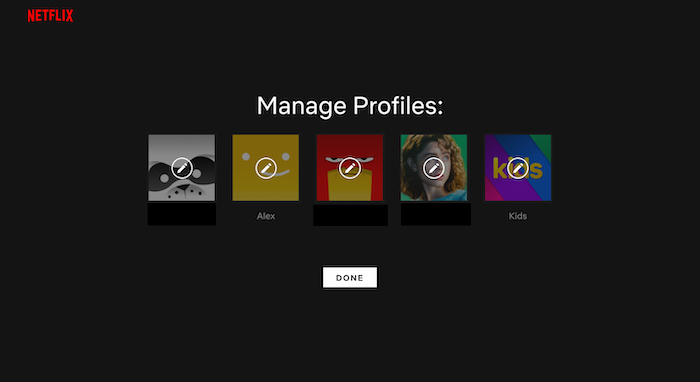
how to change netflix avatar step 1

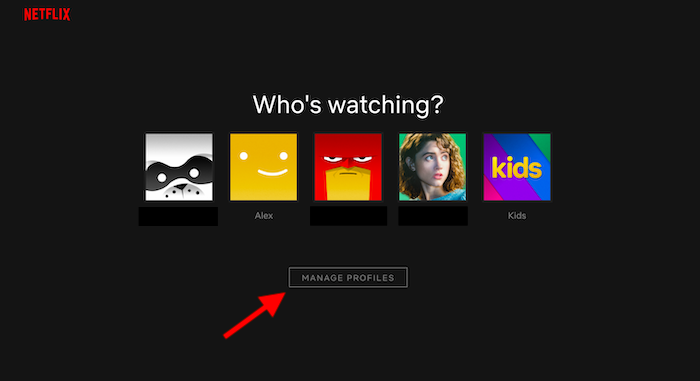
Firstly, you’ll want to pull up Netflix on your device of choice. Though there may be slight variations based on the device you’re using (like, say, a PS4), this process is pretty much universal anywhere you’re using Netflix. Once you reach the login screen, you’ll see your own profile and the profiles of anyone else sharing the account. You should also see a button towards the bottom of the screen labeled “Manage Profiles.” Click it.

Step 2

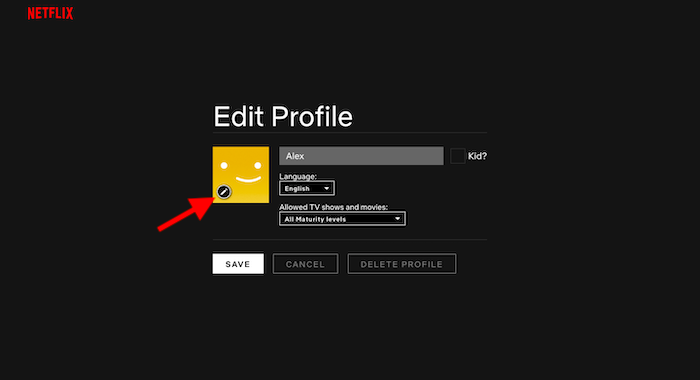
how to change netflix avatar step 2

Once you’ve clicked the “Manage Profiles” button, the screen will change slightly. You should see tiny pencil icons floating over the different account avatars. Click the icon floating over the account you’d like to change the avatar for.

Step 3

how to change netflix avatar step 3

Clicking that pencil icon will take you to the “Edit Profile” screen. Here, you’ll have the options to change a variety of settings and preferences, such as your display name and preferred language. You’ll also see your avatar again, and once again, you’ll see a tiny pencil icon located in the corner of the avatar. Click it to edit your profile image.

8

Step 4

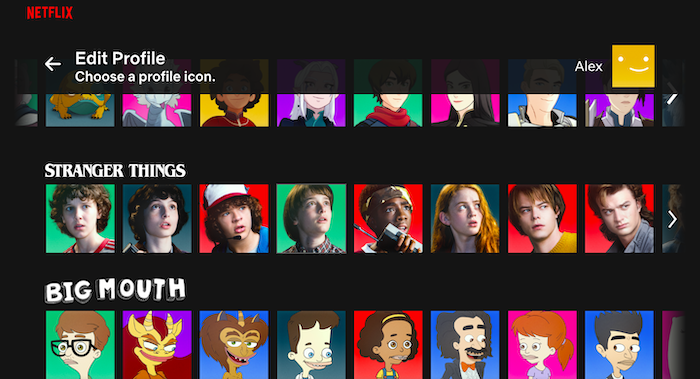
how to change netflix avatar step 4

Now it’s time to make the important decisions. After clicking that pencil icon, you’ll be taken to the avatar selection screen. Here, you’ll find a library of icons and avatars from various Netflix shows, from Stranger Things to House of Cards and beyond. There are quite a few to choose from, so take a look through and pick an avatar that fits your own impeccable tastes.

Step 5

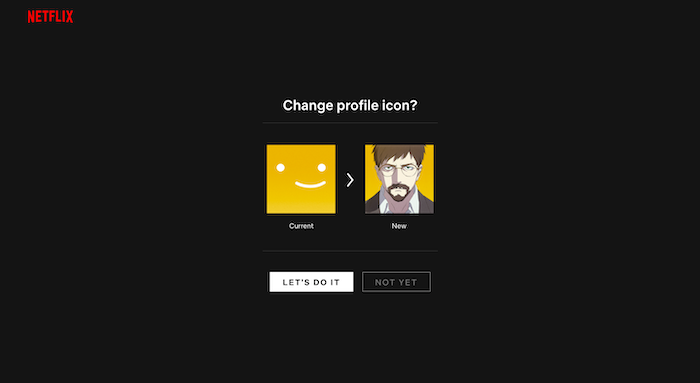
how to change netflix avatar step 5

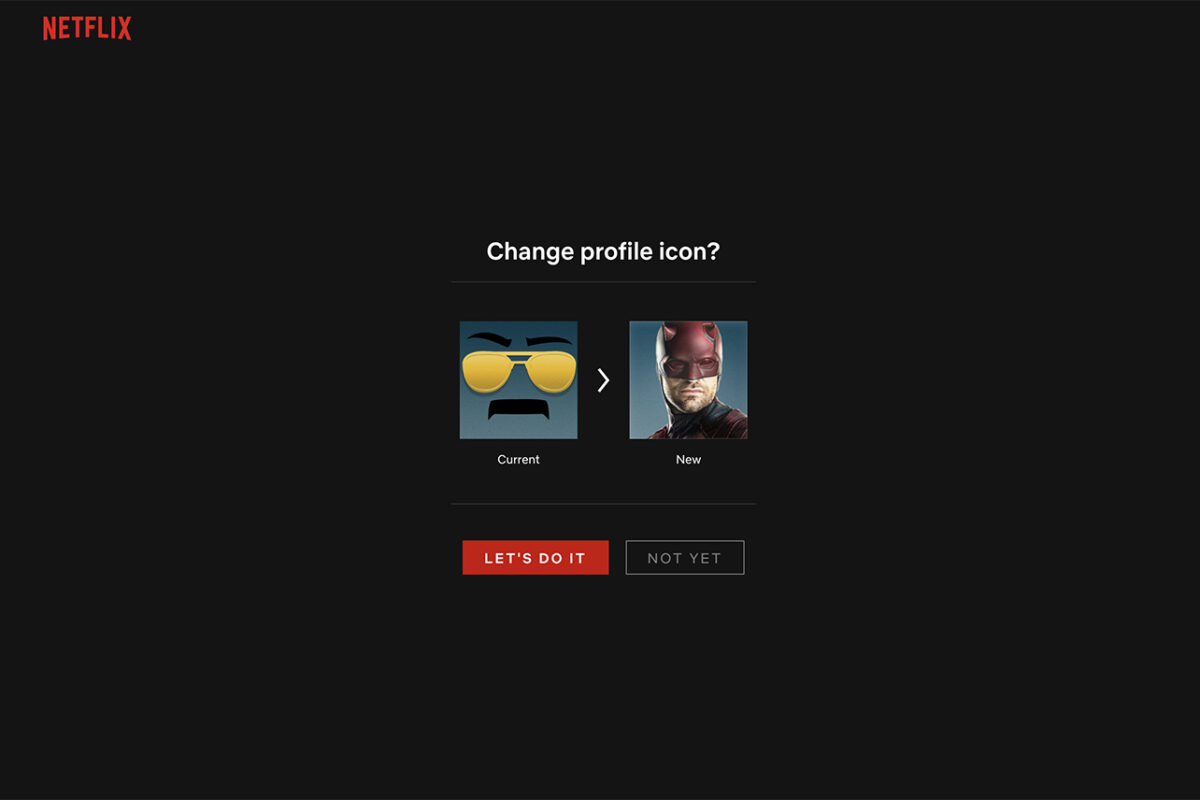
After clicking on the avatar you want, you’ll be taken to one final screen to confirm that you’d like to make the change. If you’ve found the avatar for you, simply click “Let’s Do It” and you’ll be taken back out to the Edit Profile screen. You can then save your changes and enjoy your stylin’ new look. If you decide at any point you need another makeover, you can change your avatar at any time by following the steps listed above.

How much data does Netflix use?

Discover how much data Netflix uses and how you can use less.

Netflix is a treat.

More quality TV shows and movies than you could watch in a lifetime, or at least, so it seems. The roster is always changing, which means unless you seriously watch too much TV there will always be something new to watch on Netflix (or something you love so much, you’re happy to watch it again). There is a catch in all this though, and that is data. Consuming video content online uses a lot of data. Let’s a have a little look at just how much data Netflix consumes.

This is how much data Netflix uses

This is how much data Netflix uses

Over on the Netflix Help Page, there is a pretty solid break down of just how much data you use when you’re watching your favorite shows or movies on Netflix. The basic information looks like this:

  • Watching shows or movies on Netflix in standard definition will consume about 1 GB of data for every hour of video you watch.
  • Watching shows or movies on Netflix in High Definition will consume about 3 GB of data for every hour of video you watch.

It is also interesting to note at this point that Netflix points out that streaming and downloading Netflix video consumes about the same amount of data. If you’re outside the house but think you might watch that episode of Kimmy Schmidt more than once, download it.

A deeper look at Netflix data usage

Of course, Netflix offers more than two viewing options. For a start, there is Netflix’s premier subscription package, which includes Ultra HD. If you watch your Netflix videos in Ultra HD, you will consume around 7GB of data for every hour you watch.

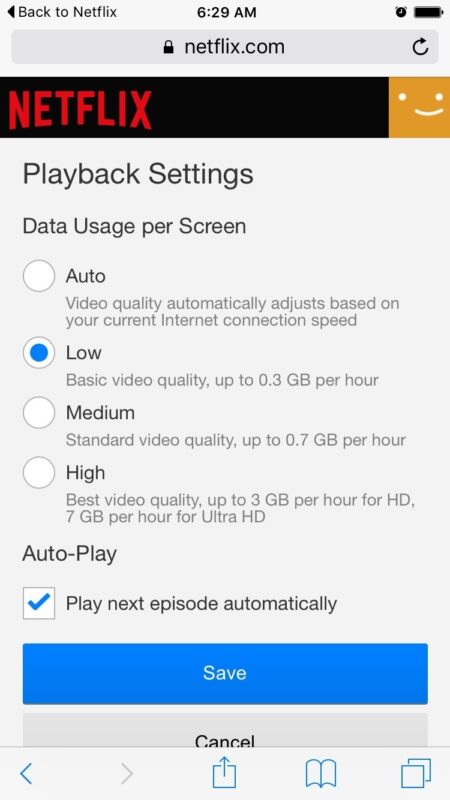
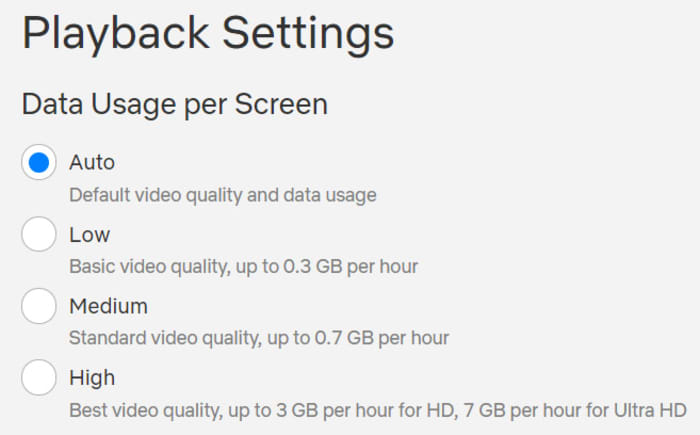
There is still more though, as Netflix also offers users the ability to limit their data usage at home or on a desktop or laptop PC to one of four pre-defined settings. These are:

  • Low – 0.3 GB per hour per device.
  • Medium – SD: 0.7 GB per hour per device.
  • High – Best video quality, up to 3 GB per hour per device for HD, and 7 GB per hour per device for Ultra HD.
  • Auto – Adjusts automatically to deliver the highest possible quality, based on your current internet connection speed.
How to use Netflix’s data limit settings at home

Netflix data usage screen

To enable one of Netflix’s data limiting settings all you have to do is head to Netflix and sign in. Then select the profile you’d like to change your data usage settings for. Once in click Account, then go to My Profile and hit Playback Settings. From there you select the setting you want and hit Save.

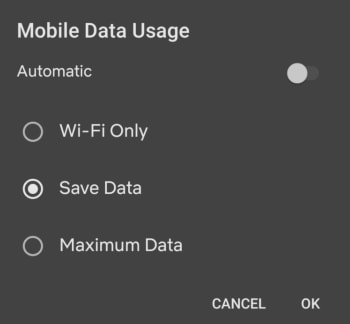
Netflix also offers details on mobile data usage settings that help you change how much data you consume when watching Netflix on a mobile device. These are as follows:

  • Automatic – Netflix will select a data usage setting that balances data usage with good video quality. Currently this will allow you to watch about 4 hours per GB of data.
  • Wi-Fi Only – You will only be able to stream on the device while connected to Wi-Fi.
  • Save Data – Watch about 6 hours per GB of data.
  • Maximum Data – Recommended only if you have an unlimited data plan. This setting will stream at the highest possible quality for your device and the content you are viewing. This may use 1 GB per 20 minutes or more depending on your device and network speeds.
How to use Netflix’s mobile data limit settings

Mobile Netflix data usage screen

To enable one of Netflix’s mobile data settings, open the Netflix app and hit the Menu icon. You then need to tap App Settings, and after that Cellular Data Usage. From there you simply select which of the above settings you want to enable.

All this shows that Netflix gives you quite a bit of control over how much data you will consume when you’re watching your favorite shows and movies with the streaming service. The rule of thumb is 1 GB of data per hour of SD video and 3 GB of data per hour of HD video. There is, however, a lot you can do to alter how much data you use with Netflix and we hope we’ve helped you get to the bottom of it with this guide.

5 Netflix alternatives for streaming movies

Tired of Netflix, Amazon, and Hulu? Try these alternatives to expand your entertainment options.

We’re all well aware of the big names in video streaming: Netflix, Hulu, Amazon. But Netflix is upping its prices. And traditional cable feels like a scam — add in a few additional services and you’re racking up a pretty big entertainment bill before you know it. If you’re looking to watch movies online, there are all kinds of options available to you.

Below, we’ve compiled five solid options for expanding your media library without expanding your budget.

5 great Netflix alternatives for streaming movies

1. TeaTV

TeaTv app

One of the best free movie apps for Firestick, TeaTV operates on the BitTorrent protocol and is a solid alternative to apps like Terrarium TV.

Since the original Terrarium is gone, TeaTV presents a solid alternative for fans of the bygone app.

TeaTV is a movie streaming app that offers users access to thousands of movies and TV episodes at up to 1080p quality. The app is available for Android and may be installed on a jailbroken Firestick for big screen viewing.

Keep in mind, however, TeaTV lives in some murky legal territory. You may want to use a VPN to protect your security and identity when streaming on TeaTV or similar apps.

2. Pluto TV

PlutoTV menu

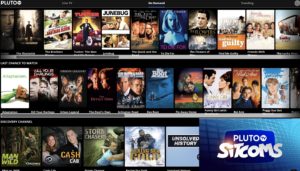
Pluto TV is a live TV-streaming service, similar to apps like Playstation Vue, Vizio’s WatchFree, and Rabbit TV. The app, designed for the cord-cutting crowd is available on just about any device: Android, iOS, web, Firestick, Apple TV, Roku, the list goes on.

Pluto TV’s content lineup consists of a blend of live TV channels, on-demand movies, and weirdly, reruns of “sick day” faves like “Maury” and “Jerry Springer.”

As far as movies go, however, there are some gems in there. Indie flicks like “Adaptation” and cult favorites like “Cube” are nestled among “Hell’s Kitchen” repeats and “Dog the Bounty Hunter.”

So, yes, while Pluto TV is a bit all over the place, it’s worth a look because A: it’s free. And B: it’s a straightforward download: 100 percent legal, no need for a VPN or roundabout pirating process.

3. SnagFilms

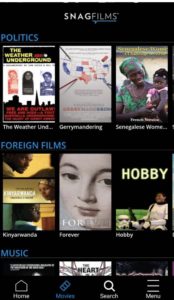
snag films free documentaries

Snagfilms is one of the best movie streaming apps around if you’re interested in documentaries and foreign films. The free app is completely legal and provides the option to download movies for offline viewing or stream directly.

You might be a bit disappointed if you’re hoping to watch new content like the latest TV episodes or newly released movies. That said, the app has the cult classics, festival faves, and climate change documentaries on lock. Worth checking out if you need a break from the Netflix algorithm.

4. Flipps HD

Flipps movies

Flipps HD is a free movie streaming app for Android, Apple TV, Chromecast, and smart TVs like Samsung, LG, and Sony. Like Pluto TV, Flipps comes with access to 100+ channels, a long list of movies, music videos, and YouTube.

What’s cool about Flipps is, the app turns your phone into a remote control. You’ll make your selection on the phone, then tap to stream the content to your connected TV.

5. Kodi

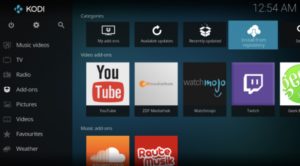
Kodi interface

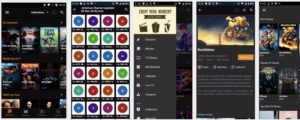
Kodi, formerly known as XBMC is a streaming platform for all types of content — from illegal cam versions of new releases to TV episodes, music and more. What it is, is an open-sourced media platform that allows users to upload their own media collections — BluRay, DVD, and downloaded files from personal hard drives.

Kodi offers a lot of the same features found in Terrarium TV, provided you download the right plug-ins. Kodi plugins range from the perfectly legal — use it to watch videos on YouTube and Vivo — to the illegal — torrent services and unpaid access to paywall content.

If you do choose to use Kodi for torrenting, you’ll want to invest in a VPN. Check our VPN articles if you’re not sure where to start the hunt.

Wait, what about sites like 123Movies?

123Movies reportedly shut down last year. But, these illegal sites always have a way of bouncing back, and they’re definitely out there. There’s also GoStream and several others. Unfortunately, these apps do present some risks. Aside from the potential legal risks, these apps and sites are hotbeds for malware. Unless you have some crazy virus protection in place, steer clear.

In the end, you can cobble together a diverse range of viewing options by exploring the wide array of free streaming services. Tread carefully with Kodi or TeaTV, though and invest in a VPN before catching up on those blockbusters.

This is how Netflix can help you learn new languages

Netflix really can help you learn that language you’ve always wanted to learn

netflix

Languages are the gateway to the world. When you learn a language, you unlock a path to the heart of the society and culture that helped create it. This is a two-way street, however, as consuming culture from another society is a great way to learn the language. Need proof?

Poorer countries show movies and TV shows produced in English with their original soundtrack and native language subtitles. Richer countries create a brand-new soundtrack in their native language and then dub it on top of the English language soundtrack. You’ll hear English more often in poorer countries than in wealthier countries where they can afford the re-dub.

8

Learn languages with Netflix

One way to learn a language is through passive consumption: watching movies in their native language and reading the subtitles. But you can learn faster with the Learning Languages with Netflix (LLN) Chrome extension. It uses the foreign language soundtrack of Netflix’s movies and shows to expose you to the language you’re trying to learn, and it uses the subtitle track to teach you the meanings of those words.

Learn languages with Netflix language catalog

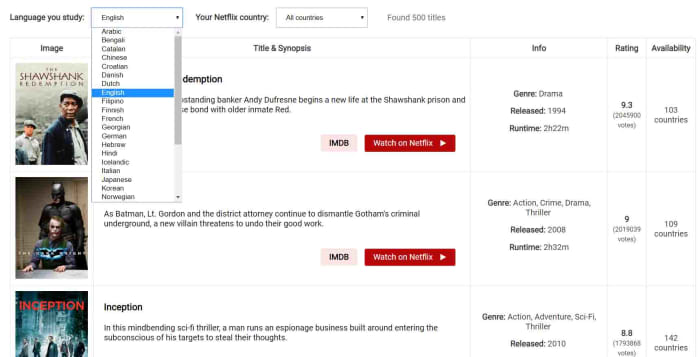
The LLN extension has a catalog of all the Netflix titles that come with high-quality subtitles in the language you’re learning, and also tells you about a few issues you should consider. For example, Netflix has high-quality subtitles for the original audio track, but whenever the soundtrack has been dubbed the subtitles might not always match.

Learn languages with Netflix at the right level

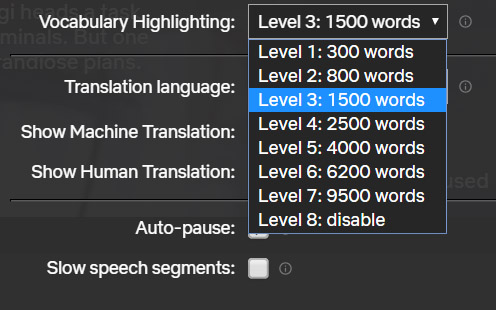
The extension works by giving you the option to select your translation target language and then select a vocabulary level based around the number of words you know in that language. This will then only highlight the words suitable for your current level of learning. This allows you to tier your learning, no matter how complicated the language in the movie or show you’re watching.

Subtitle learning with netflix

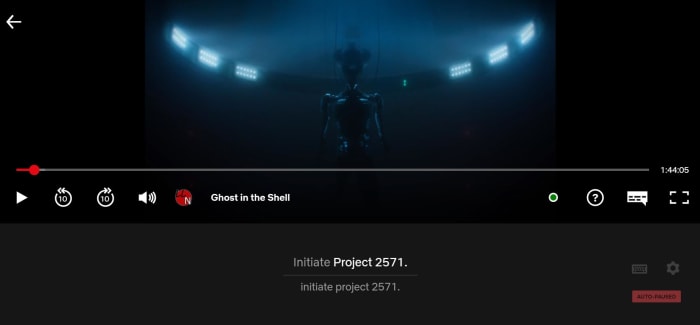
When activated, the LLN extension will show as a small icon in the Netflix control bar whenever a movie or show is playing. Then all you have to do is select the subtitle track for your target language in the normal way and hit the LLN icon. This will open up the subtitle track, which will run almost like a karaoke song with the word being spoken in the soundtrack lighting up as you hear it. This makes it very easy to match the sound of the word to the spelling.

You can use this method with subtitles showing your own language to expand your vocabulary or with subtitles in your target language to reinforce your learning. This reinforcement makes it easier to remember.

learn languages netflix keyboard shortcuts

As well as highlighting the words being spoken, the extension also offers a dictionary, so you can delve further into the meanings of the words you’re reading and hearing.

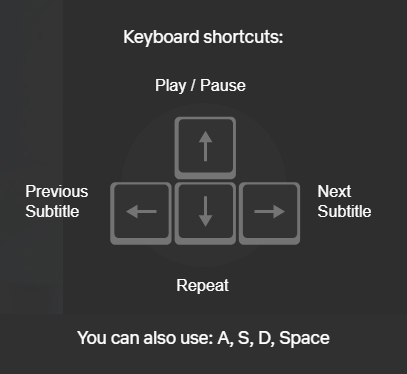
Another cool feature of the extension is keyboard shortcuts that make it easier to focus on particular words, phrases, and structures. This makes repeating phrases, skipping subtitles, and pausing on particular phrases as simple as pressing a key.

All in all, the LLN extension is a very interesting tool for anybody learning a new language. It gives you ease of control over the language you’re consuming when you watch shows and movies on Netflix. It also makes it easier to distinguish between different words being spoken in your target language, which is particularly useful for anybody just starting out with their language learning. Finally, it puts at hand in-depth explanations about the new vocabulary you’re consuming.

When it comes to language learning, practice is as important, if not more important, than the lessons themselves. The LLN extension makes it easy to practice your target language while watching Netflix, which should make a big difference for anybody trying to open that gateway to the world.