
PC Security: Microsoft changes its mind on certain password protocols

Microsoft now believes password expiration and renewal policies are useless.

a password combination lock

Your password is one of the most important tools you have in your digital security toolbox. Without a strong and secret password, our online accounts, memberships, and subscriptions could end up wide open to cyber-criminals and hackers. As more and more of our lives move online this becomes increasingly more important.

A good password should be long, complex, and not include any recognizable data from your life. For a long time, however, there has been another recognized security requirement that we’ve been forced to adhere to when it comes to our passwords; expiration and renewal. At regular intervals, we’re reminded that our current password will expire soon, and we need to choose a new one.

Without too much thinking, it is easy to see why this might seem like the most secure course of action. If you keep mixing it up, your account will stay secure even if your password falls into the wrong hands. When you add expiration and renewal to password length, complexity, and independence from any past passwords, however, it proves to be a regular annoyance to everyday users. Having to come up with a unique password that contains a lot of different characters of all types every six months is more difficult than it sounds. It often leads to the wrong password being entered time and again in the first few weeks following the renewal or, even worse, passwords being written down.

The good news is that this regular pain may soon be about to change thanks to a new security blog post from Microsoft. The better news is that Microsoft deciding to remove expiration and renewal from all its password security protocols won’t compromise your digital security.

Microsoft now believes password expiration and renewal policies are useless

According to the Microsoft blog, recent scientific research has been shedding new light onto password policies and, in particular, expiration and renewal. There is little value in constantly forcing users to change their passwords as, “When humans are forced to change their passwords, too often they’ll make a small and predictable alteration to their existing passwords, and/or forget their new passwords.”
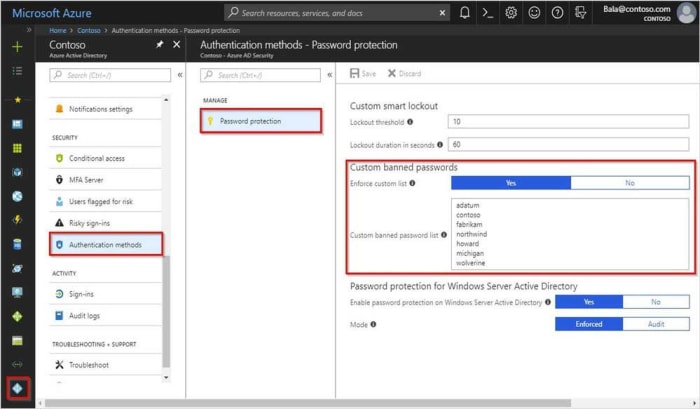
Azure password protection
Image via: Microsoft – Microsoft now believes security protocols like banned password lists are much more secure than expiration and renewal

Microsoft goes even further in its dissection of expiration protocols because when you look at the practice in greater detail, it really does begin to fall apart. “If a password is never stolen, there’s no need to expire it. And if you have evidence that a password has been stolen, you would presumably act immediately rather than wait for expiration to fix the problem.” Simply put, why change a password if it hasn’t been breached, and if it has, why would you wait until the expiration period is up to change it, and not just do it immediately?

So, Microsoft has laid out its new ideas on password expiration. The blog post goes further, however, and states that the software giant has removed the practice from its security baseline for Windows 10 v1903 and Windows Server v1903. This means, in practice, the change won’t affect too many people, but it gives network administrators the ability to remove password expiration from their office systems. If you have to update your expired passwords in work, you might already be on your last ever password.
Scary Chrome message could suggest malware

The new “managed by your organization” message is all about policy management.

Google Chrome logo

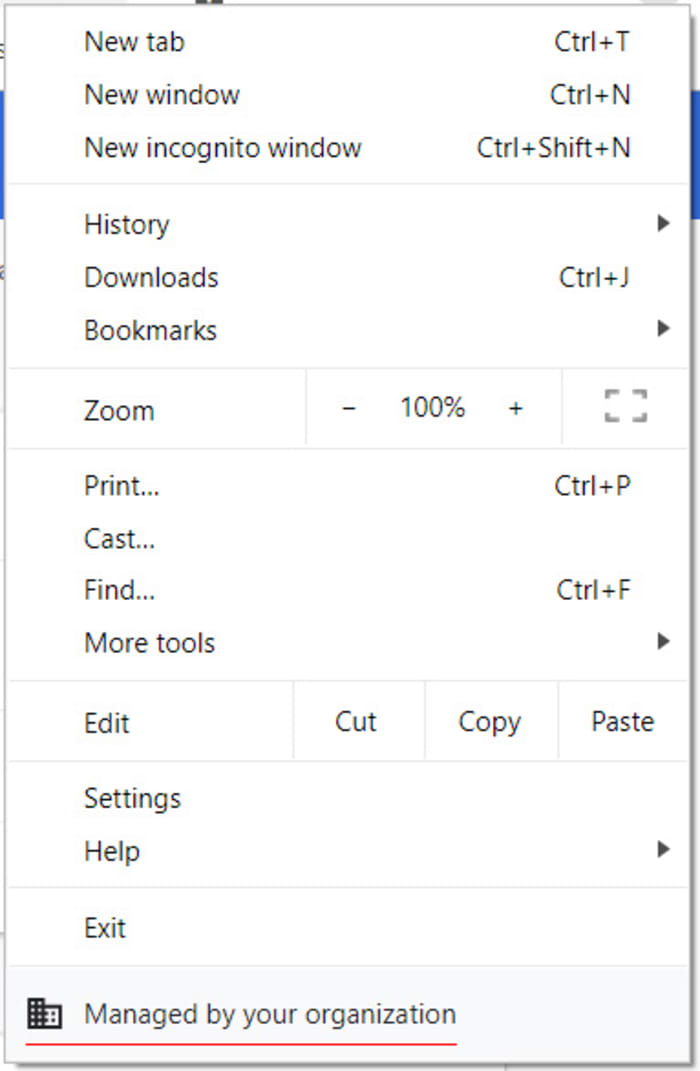
Google Chrome’s latest update, version 73, has started showing up a strange new message when users open the main settings menu by clicking the three vertical dots icon found in the top right of the of the browser. At the bottom of the settings menu, many users are reporting seeing a message saying, “Managed by your organization.” Let’s have a look at what this message means, particularly for personal users who aren’t a part of any organizations.

The new ‘managed by your organization’ message is all about policy management

Google Chrome 73 marks the first version of Google’s illustrious web browser that communicates Chrome’s policy management system. According to the Chrome help pages, Chrome policies can be set at the user level and apply whenever that particular user logs in to Chrome. They are the definitions that your particular version of Chrome works within whenever you’re using it.

new chrome settings menu message

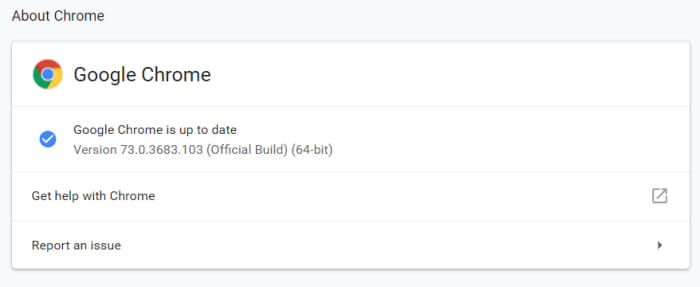
Policy selection is normally a network admin level issue, which means personal users won’t be familiar with it. Chrome 73, however, changes all this as now, whenever Chrome detects a policy in the registry, it will show the “Managed by your organization” message in the settings menu. If you don’t see the message, you either don’t have any policies registered or you don’t have the latest version of Chrome. To see which version of Chrome you have open the settings menu, hover the cursor over Help, and then click About Google Chrome.

The Google Chrome version page

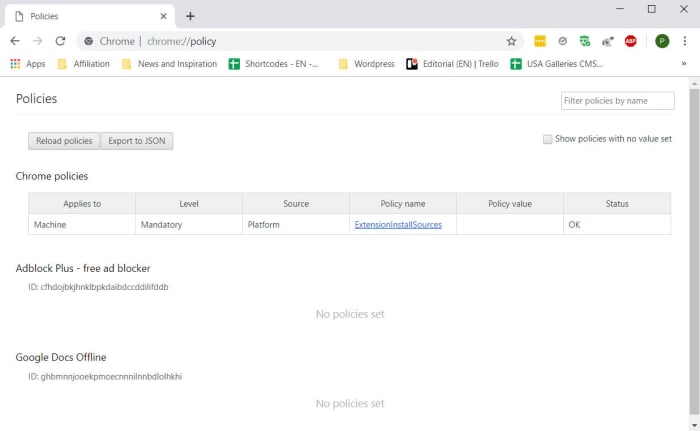
If this all sounds a little confusing, don’t worry. As well as administrators, Chrome policies can also be configured by software, which is why you might have one even without knowing where it came from. Most of these policies are harmless. I have one relating to Chrome extensions, which is why I see the Managed by your organization message.

The Policy Registry tab on Google Chrome

The problem, however, is that malware can also register policies to execute malicious commands when you use Chrome. As Bleeping Computer pointed out, malware could install a malicious extension, which could cause you any number of problems and security issues.

What to do when you see the ‘Managed by your organization’ Chrome message

This means that when you see the message, you shouldn’t automatically disregard it. Google has said that there is nothing to worry about when we see these messages, but it is also worth noting that Google also says it is worth checking on the policies you have registered with Chrome, should you see the message. To do this you need to open Chrome and type chrome://policy into the omnibox. Doing this will open the Chrome Policies tab where you’ll be able to see all policies registered with your personal version of Google Chrome.

Each policy should appear as a link you can click to go and see its support page. Clicking each link should inform you as to whether the policy is legitimate or malicious. If you find a policy you want to remove, you can find a tutorial on how to do so at the Chrome Support pages.

Firefox moves to prevent browser spam notifications

If you allow the wrong sites to send you push notifications you will end up receiving a lot of spam messages on your PC or spam notifications on your mobile

Desktop and mobile push notifications from your web browser are a great way to keep yourself up to date with all that is important to you. By signing up for notifications from your favorite websites, you give them permission to bring you all the latest and greatest news and updates direct to your PC or mobile, even when your web browser isn’t open.

Whether you want to stay up to date with all the latest news about apps, software, tech, games, and more like you can with Softonic push notifications or if you want updates any of the thousands of other legitimate websites offering push notification updates, you have the power. You give permission for the site to send you notifications, you receive the notifications, and then if you’re interested in whatever that notification is talking about, you can open the link, or if not, you dismiss it. Easy.

The problem, though, is that illegitimate sites will try to get in on the action, too. Yes, we’re talking about spam. Just like with emails, telephone calls, SMS messaging, and pretty much every other form of communication ever invented, push notifications are also subject to attempts to fill our lives with spam.

Dangerous spam o your desktop via push notification

If you allow the wrong sites to send you push notifications, you will end up receiving a lot of spam messages on your PC or phone

Push notification spam is all about permissions. Whenever you visit a site you like that offers push notifications, it will ask your permission to send you notifications in the future. Without this permission, sites can’t send you anything. Trouble is, we don’t only visit sites we’re happy to receive updates from and there are plenty of disreputable sites out there looking to make their owners a quick buck.

These dark sites are now utilizing push notifications as a way to bombard us with spam. A report by Bleeping Computer shows the types of tactics used to coerce users to sign up for push notifications they don’t want to receive. These include blocking the site content unless you click “Allow” on the push notification permission button, and creating specialized website messages that urge you to enable push notifications before you can access the website’s services. Any users who hit the “allow” button are bombarded with spam message after spam message promising everything from free cash to unbelievable celebrity gossip.

Examples of push notification spam
Image via: Bleeping Computer

The guys at Mozilla are all too aware of this push notification spam problem and they’re now introducing a test to see what will happen if it removes push notification subscription prompts altogether. The test is running on Firefox now; it began April 1 and will end April 29. The main section of the test will put the onus on Firefox users to allow sites to send them push notification subscription messages in by clicking on an icon in the address bar. Unless they take the action shown below, users will not see any push notification subscription messages.

Via: Mozilla

The issue for Mozilla is that whereas only 3% of users accept these subscription requests, 19% of users leave a site as soon as they see the request. There could be an argument that the subscription messages themselves are having an adverse effect on browsing behavior.

Once the test is over, Mozilla will use the data to decide how it will treat push notifications in the future. It could set it so that you have to activate push notification permission requests yourself by default, which would mean you’d never see them unless you changed the setting.

Whatever your relation to push notifications, this news could prove significant in the future. Push notifications can be annoying if you’re getting them from the wrong websites, but as long as you keep on top of your subscriptions, they can provide a great way to stay up to date with the things that matter to you most. This means as long as you know how to unsubscribe to the sites you don’t want to receive notifications from, there is no reason push notifications can’t be the useful tool they’re supposed to be. If Firefox decides to cut off permission requests altogether, it could be a case of cutting one’s nose off to spite one’s face.

Microsoft releases its new Chromium based Edge browser on Windows 10

The Microsoft Edge Insider Channels are now available for 64-bit Windows 10 users in English.

We’ve been following the development of Microsoft’s new Chromium-based Edge browser ever since we first learned it was on the way. We know you’ll be able to use all your favorite Chrome plugins on the new browser as well as all your Edge plugins, too. We’ve even seen screenshots so we already know what it looks like. Today, we’re here to tell you that the journey is nearly complete as Microsoft is releasing the first preview builds of its brand new browser.

The Microsoft Edge Insider Channels are now available for 64-bit Windows 10 users in English

New chromium edge developer channels
Image via: Microsoft

In December, Microsoft announced it was working on a new Chromium-based version of Microsoft Edge. The software giant pledges to have the first builds of the browser available in “early 2019” and now seems to be coming good on that promise.

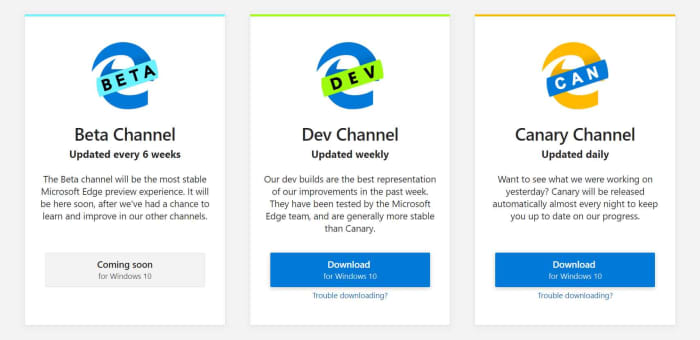
Microsoft has now confirmed that Windows 10 users on 64-bit machines can download an English language version of the Microsoft Edge Insider Dev Channel and Canary Channel. If you follow our Google Chrome update articles, you’ll notice that Microsoft is calling the most experimental version of the new Edge browser Canary, just like Google does with Chrome.

The Canary Channel will show all the latest features that the Edge team have been working on. It will be updated on a daily basis, but may well end up containing buggy code that could cause issues on your machine. The Dev Channel will be updated every week and so will keep users up to date on what new features will coming to the Edge browser, while being a little more stable than the Canary Channel.

The different Microsoft Edge builds

You’ll notice from the image above that both of these channels come before the Beta Channel in the development process. The beta version of apps is the final testing phase in the development process, when users get to test out new features. The Beta Channel will be updated every six weeks. These new builds are more of a way of mapping out what the new Edge browser will be like. They’re not browsers you should be downloading so you can start surfing the web.

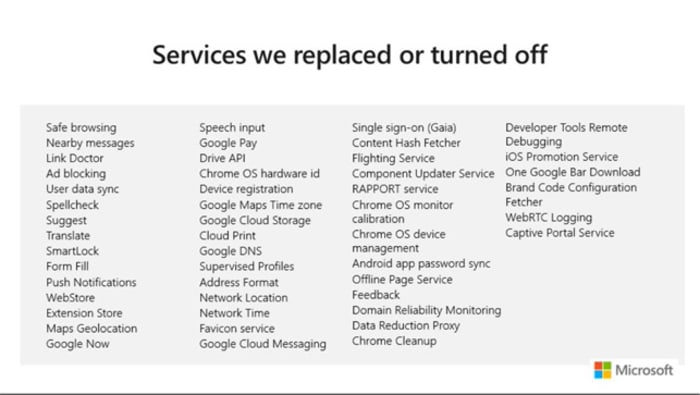
To be fair to Microsoft, it is clear that although it is building a browser using Chromium, it is determined to build something that can stand on its own two feet in the battle against Google Chrome. In an online PowerPoint presentation, a Microsoft Edge engineer included a slide that showed just how many Chrome features Microsoft has removed or replaced to make the new Edge what it is today.

Chromium Edge won't just be a Chrome clone

This is all the stuff that independent developers won’t have the resources to build themselves. Microsoft does have the resources and wants it known that it has rebuilt the new Edge itself. The move to Chromium is more about better web compatibility for users, less fragmentation for developers, and an improved update cycle.

Different Edge builds for different Edge platforms
The Chromium Edge browser will also be available for Mac users

If you’re a developer, you can now get your hands on the early access version of the new Edge browser by checking out the Microsoft Edge Insider program. For the rest of us, there is still no news from Microsoft about when we’ll see a general roll-out of the new browser.

From the timetable Microsoft has laid out, we could expect to see a beta version in five-to-six weeks and then it is anyone’s guess how long it’ll take for a full version to come out after that. All the news about the development process has been positive so far though, and it really looks as though Chrome could soon have some serious competition at last.

Google Chrome will make it easier to browse more privately

New Chrome feature will tell you what sensors websites are trying to access and give easy option to prevent it.

These days, our devices can do a lot of different things. At the heart of this versatility lies a multitude of sensors collecting different types of data, which is then used to perform what seem to be technological miracles. From light sensors to gyroscopes, our modern devices are constantly working to detect our surroundings and how we’re interacting with them.

All our device collect a lot of data
Our devices are constantly collecting and sharing data about many things including where we are and what we’re doing

The positive half of all this is that we then get all sorts of insights and data into our behavior that we can use to inform our future decisions. The flip side, however, is yes, you’ve guessed it, privacy. With so much data constantly being collected, it is all too easy for us to just hand it over to whoever runs the websites we visit or the apps that we use. So it is good news that Google is planning to make it much easier to control who we share all this data with.

New Chrome feature will tell you what sensors websites are trying to access and give easy option to prevent it

The types of sensors listed above are found in laptops, smartphones, and tablets. Sites might try to access the data they’re collecting for a whole host of reasons. Knowing things like what device you’re using and how you’re using it is lucrative information, which gives a financial incentive for the tracking.

light sensors

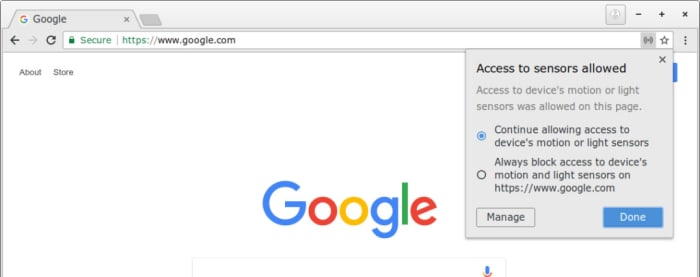
In a bid to make this whole process more transparent, Google is introducing a new feature that will show a pop-up any time a site tries to access one of your device’s settings. The pop-up will also include a switch, which will give the option of turning on or off the site’s ability to use data that sensor is collecting.

New Chrome sensor control

This new user-friendly privacy tool has been spotted in Google Chrome Canary, which is the advanced developer build of the famous web browser. Canary is where Google tests potential new features for Chrome and checks for bugs or potential coding issues. At the moment, a more fully functioned version the feature appears for the desktop version of Chrome, which gives control over each individual attempt to access a device’s sensors.

Google Chrome Canary Download now
7

For now, at least, the Android version of the feature works simply as an on/off switch that gives users the opportunity to block all sensor data being shared or allow blanket access.

Android Chrome sensor support

There is no official word as yet about when this new feature will come to Google Chrome but the guys at Tech Dows believe Google has set it as priority 1 for it to be included the Chrome 75 update. As we’ve only just seen Chrome 73 receive a general roll-out, we can expect to have to wait a few months yet before we gain control over which of our sensors the sites we visit on Google Chrome have access to.

If you hate annoying autoplay videos, you need to see this

Firefox update will block autoplay videos with sound and stop slow loading ads

Good old Mozilla. The Mozilla Foundation has built itself a solid reputation for protecting user privacy while offering top-notch web services. We recently saw the introduction of Firefox Send, which offers a free and easy way to send huge files to whoever you want. Firefox though, Mozilla’s ever-present web browser is the not-for-profit foundation’s jewel in the crown. The browser is Google Chrome’s biggest competitor and Mozilla keeps working hard to give it the latest features.

Mozilla Firefox Free Download
7
Mozilla Firefox is a free, open-source web browser. Now with new features, faster and more secure.

Firefox update will block autoplay videos with sound and stop slow loading ads

new Firefox update
Image via: Mozilla

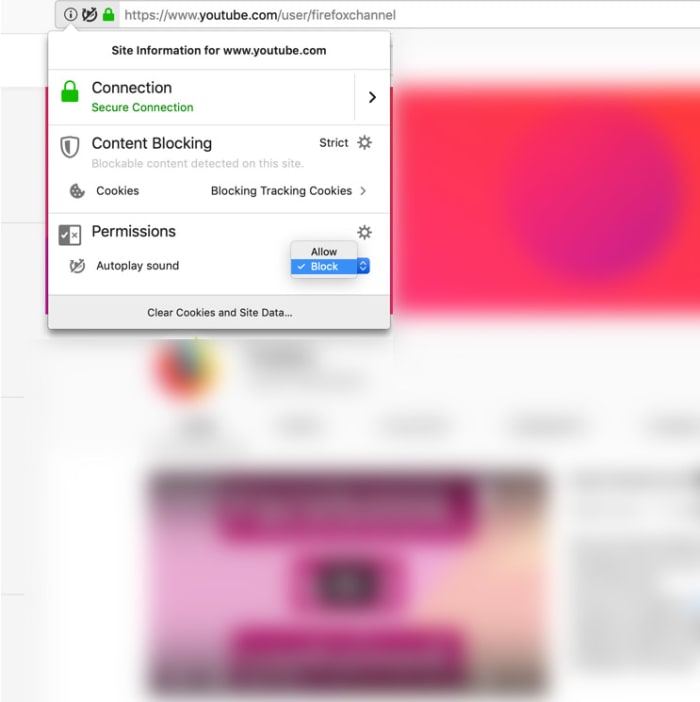
This is now a standard feature – blocking all autoplay videos you come across that play with sound. Videos that autoplay without sound, however, will not be blocked. This means videos that play in your Facebook feed or Twitter feeds will make it through the blockade. This will either be good news or bad news for you, depending on your social media habits.
The new feature was announced in the release notes for the latest Firefox update, Firefox 66, with a couple of scenarios fleshed out. If you think autoplay videos with sound are annoying or if you usually browse the internet in environments were silence is paramount, you’ll be interested in the first scenario.

“Scenario #1 – For anyone who wants peace and quiet on the web:  Go to a site that plays videos or audio, it could be a news site or site known for hosting movies and television shows, the Block Autoplay feature will stop the audio and video from automatically playing. If you want to view the video, simply click on the play button to watch it.”

The second scenario Mozilla highlighted speaks to all you binge watchers out there. Should you be watching your favorite TV shows on Netflix, Hulu, or YouTube (autoplay videos with sound) the new feature won’t block them from playing so you still won’t have to budge from the couch.

block autoplay videos with sound on Firefox
Image via: Mozilla

Google Chrome has had a similar feature for almost a year now, but the feature is limited in scope and a bit tricky. Whereas the new Firefox solution blocks autoplay videos with sound automatically, you have to do a lot of messing around to get it set up on Chrome. Chrome allows autoplay videos with sound from 1,000 popular sites and blocks the rest. To block those 1,00 sites, though, you need to fiddle around with bits of code in the address bar. If you’d like a full tutorial on this, hit us up in the comments.

The Firefox solution works the opposite way to Chrome. By default, all sites are blocked from auto-playing videos with sound, and the onus is on you to allow videos through the default block or turn the block off altogether. You’ll find full instructions on how to do both here.

Mozilla Firefox Free Download
7
Mozilla Firefox is a free, open-source web browser. Now with new features, faster and more secure.

Google Chrome gets new privacy boost

Google has added the private search engine DuckDuckGo to the default search options on Google Chrome.

Google and user privacy aren’t exactly synonymous with each other. In fact, the search giant’s revenue stream depends on it gathering as much information about our web habits as possible and selling it all to advertisers. This means it is probably second only to Facebook in the big tech assault on our privacy. Thankfully, this latest move from Google makes it easier for us to control the data we create when we browse the internet.

Google has added the private search engine DuckDuckGo to the default search options on Google Chrome

The DuckDuckGo search engine has been around since 2008 and was founded to provide a private alternative to internet search. Since then, it has been growing steadily and in October, it saw over 30 million searches for the month. Just this January, the private search engine struck a deal with Apple to provide map support for its anonymous location searches.

The addition of DuckDuckGo to Google Chrome’s default search engine options is a big deal and was first spotted by the guys at Tech Crunch. They report that the option will now be available in 60 countries around the world. Chrome users in “Argentina, Austria, Australia, Belgium, Brunei, Bolivia, Brazil, Belize, Canada, Chile, Colombia, Costa Rica, Croatia, Germany, Denmark, Dominican Republic, Ecuador, Faroe Islands, Finland, Greece, Guatemala, Honduras, Hungary, Indonesia, Ireland, India, Iceland, Italy, Jamaica, Kuwait, Lebanon, Liechtenstein, Luxembourg, Monaco, Moldova, Macedonia, Mexico, Nicaragua, Netherlands, Norway, New Zealand, Panama, Peru, Philippines, Poland, Puerto Rico, Portugal, Paraguay, Romania, Serbia, Sweden, Slovenia, Slovakia, El Salvador, Trinidad and Tobago, South Africa, Switzerland, U.K., Uruguay, U.S. and Venezuela,” will now be able to have DuckDuckGo perform all the searches they make on Google Chrome.

These changes have been spotted in the Chromium 73 stable release, which has been getting pushed out over the last few days. According to a software engineer writing in the GitHub instance for the release, the addition of DuckDuckGo is based on usage statistics alone, with the privacy-focused search engine tending to be in the top four search engines in all of the countries listed above. It could just be a coincidence then that the introduction of comes at a time when Google is facing heavy scrutiny on antitrust and privacy violations.

the duckduckgo privacy search engine extension

DuckDuckGo has long been available for default searches on Google Chrome, but only as a third-party extension. This new move puts it at the heart of the Google Chrome browser, and it makes it much easier for users to set the search engine for their everyday searches. It will be very interesting to see how this move affects the number of searches that go through DuckDuckGo in the future and whether it will have a noticeable adverse effect on the number of Google searches, too.

Firefox Send delivers a new, free file-transfer service

Firefox Send is a new free service from Mozilla for sharing large files.

Mozilla, famous for its privacy-focused web browser Firefox has launched a rather handy new product. Firefox Send is a file sharing program that enables users to send huge files, up to 2.5GB, to friends, relatives, and colleagues. Just like the Firefox browser, Firefox Send is built around privacy meaning users will have control over a number of different factors that’ll help them stay on top of who can access the files they’re sending. If all this sounds like a useful service, you’d be interested in, let’s take a deeper look.

Firefox Send is a new free service from Mozilla for sharing large files

There are two ways you can send large files using Firefox Send.  All you have to do is go over to send.firefox.com where you can sign up for a free account that enables you to send files up to 2.5GB. The other way is to send files without signing up. If you decide to go down this route, however, you’ll only be allowed to send files up to a maximum of 1GB.

Mozilla Firefox Free Download
7
Mozilla Firefox is a free, open-source web browser. Now with new features, faster and more secure.

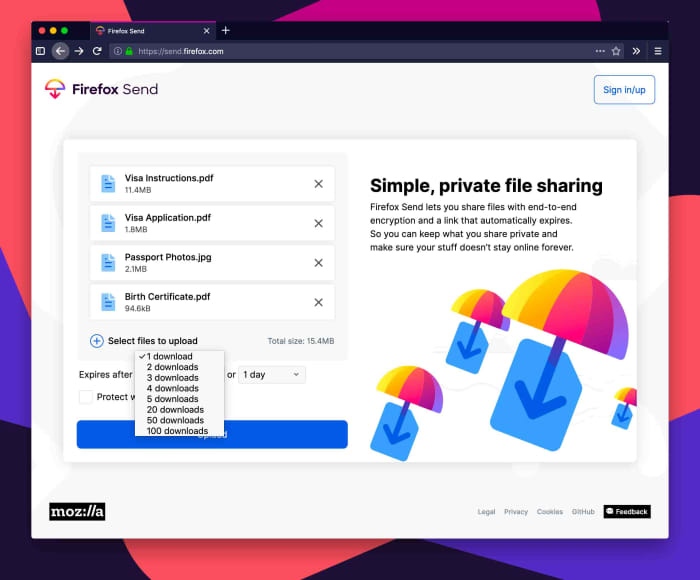
To send files, you first upload them to Firefox Send and then you’ll have a number of different customization options to choose from. As well as who you choose to share your file with, Firefox Send will give you control over how many times your file can be downloaded in total and how long it will remain available for download. You’ll also be able to password protect your file before you upload it.

A screenshot of Firefox Send
Image via: Mozilla

Once uploaded, your file will be shared via link. Anybody who receives the link will be able to download your file, as long as they fit all the criteria as laid out above. The key thing here is that the person receiving your file doesn’t need to have signed up to Firefox to be able to download it.

As you’d imagine with a product coming from Mozilla, privacy sits at the very heart of Firefox Send. In the blog post announcing Firefox Send, Mozilla cited its long-standing Mozilla Manifesto and had this to say of its latest offering, “Send uses end-to-end encryption to keep your data secure from the moment you share to the moment your file is opened. It also offers security controls that you can set.”

Mozilla isn’t fazed by the fact the file-sharing market is quite crowded with the likes of WeTransfer already out there and cloud storage operators like Dropbox and Google Drive offering collaborative editing of shared files. The privacy-focused foundation went on to say, “We know there are several cloud sharing solutions out there, but as a continuation of our mission to bring you more private and safer choices, you can trust that your information is safe with Send.” By offering a secure and simple way to share large files, even with people who haven’t signed up themselves, Mozilla might just be on to something with Firefox Send.

Mozilla Firefox Free Download
7
Mozilla Firefox is a free, open-source web browser. Now with new features, faster and more secure.

Skype has a brand-new web app, but there’s a catch

The new Skype for Web has arrived, but only on Chrome and Safari.

Skype has been around for years now. Unlimited free voice and video calls to anybody around the world is quite the draw and Skype has spawned a multitude of copycats and competitors since it first burst onto the scene. Even Skype’s regular phone call function, which enables you to pay cash to call landlines and mobiles has grown popular over time and again spawned competitors like Google Voice.

To use Skype though, you’ve always needed to download an app. On your phone, that’s fine, but on desktop, it is annoying. With powerful web browsers like Chrome able to do pretty much anything these days, most web services are available via web page, just like WhatsApp Web for example. Not Skype though, for Skype you’ve always needed to download an app, and an annoying app at that. That is, until now.

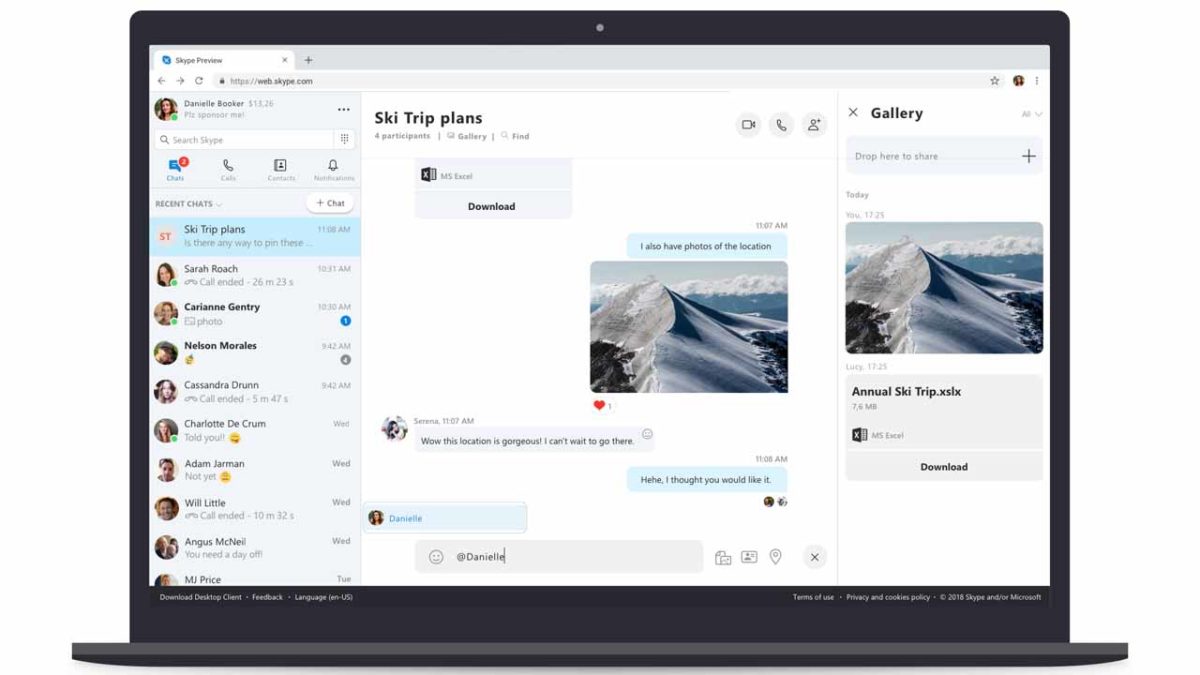
The new Skype for Web has arrived, but only on Chrome and Safari

At long last, Skype has finally released a web version of Skype. As long as you’re using Windows 10 or Mac OSX10.12 or higher and you browse the internet using the latest version of Google Chrome or Microsoft Edge, you can now use Skype on the internet by going to web.skype.com. Once there, all you have to do is log in with your Microsoft account and you’re ready to make Skype calls, send messages, and more. This news of course, also means that you can’t use Skype for Web on other browsers like Firefox, Safari, or Opera.

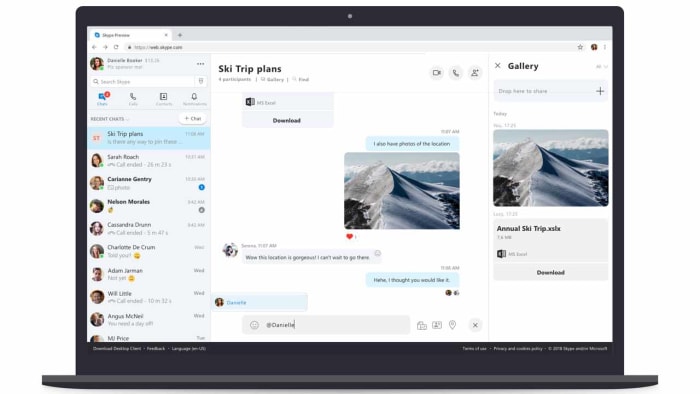
A screenshot of the new Skype for Web
Image via: Microsoft

Skype for Web has an impressive set of features if you have the right browser. In the blog post announcing Skype for Web, Microsoft laid out the following features:

  • HD video calling — Experience HD in one-to-one or group video calling, now with call reactions.
  • Call recording — Capture special moments in a Skype call with your loved ones or record important meetings with colleagues.
  • Notifications panel — Grab a cup of coffee and catch up on what you’ve missed in your notifications panel. Click the bell icon to see reactions to your messages, @mentions in group conversations, or if someone quoted you — all in one central place. Just click a message in the notifications panel to jump into the conversation.
  • Find within conversations — You can now easily find messages in the current conversation by typing the word or phrase you want to find in the search box.
  • Chat Media Gallery — Looking for the link or photo sent a few weeks ago? The Chat Media Gallery makes it easy to find files, links, and photos shared in a conversation, whether it was yesterday or last month. No more scrolling through your chat history—just click Gallery under the chat name to see all the files, links, and photos in the conversation.

Microsoft has also compiled a list of expected FAQs about Skype for Web, which you can find here. Unfortunately, there is nothing in the there about when Skype for Web might be coming to other browsers. If you’ve been waiting to get rid of the Skype app for a while now but you don’t use Chrome or Edge, you can download one of the Skype for Web compatible browsers using the links below.

7
6

You need to update Google Chrome right now

Google has released a patch that fixes a dangerous zero-day exploit in Google Chrome.

There is a very serious problem with Google Chrome’s security protocols right now. The problem is so serious that it has led to the Chrome’s lead security officer calling on all users to update their Google Chrome immediately, to avoid being vulnerable to attack. You need to update Chrome now.

Google has released a patch that fixes a dangerous zero-day exploit in Google Chrome

security vulnerability in Google Chrome

Justin Schuh, who is Google Chrome’s leading Security and Desktop engineer, took to Twitter to educate Chrome users about a brand-new vulnerability that has been discovered in the browser. The exploit is present both on Chrome for desktop and Chrome for Android.

The problem relates to Chrome’s FileReader API. File Reader is there to allow sites and web services to read files stored on the user’s device. Unfortunately, however, the bug also allows web sites to break out of their quarantined sandbox and even execute malicious code.

What makes this vulnerability more dangerous than others is that it hasn’t merely been discovered in a closed lab environment, like many of the other bugs we report on. Rather than being discovered by security consultants, this bug is already known to be being used in attacks by hackers. This is why Schuh took the specialist action of publishing the problem and advising users to update to the latest version of Chrome immediately. This is why you have to update Google Chrome now.

How to find out if Google Chrome on your PC is vulnerable

To discover if you are running the latest version of Google Chrome you need open the Chrome settings menu by clicking on the three dots in the top right of Chrome on your desktop. From here, you’ll need to click Help and then About Google Chrome. Here you will see which version of Google Chrome you have running on your PC.

Google Chrome desktop version page
If you don’t have this version of Google Chrome, you need to update it now.

The latest version, which includes the patch is Google Chrome version 72.0.3626.121. If your version of Google Chrome is lower than the above version, you need to update it. You’ll be able to do so on this screen, if Chrome doesn’t update itself automatically when you first open the About Chrome page.

How to find out if Google Chrome on your Android mobile is vulnerable

To find out if Google Chrome is up to date on your Android device, open the drop-down menu by hitting the three dots icon in the top right of the screen. Tap Settings and then at the bottom of the menu you’ll see the About Chrome option. Click this to find out what version of Chrome is running on your mobile. If it isn’t the latest version, you should go to the Play Store immediately and update Chrome.