Google’s visual refresh aims to give you more information about where your searches will take you on the web.
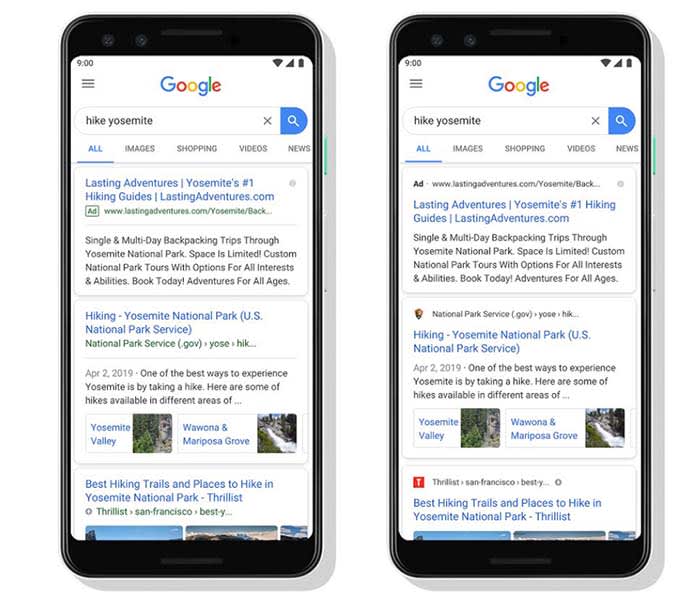
You might not have noticed it but over the last few days, Google has been implementing a redesign for Google search results on mobile. The change isn’t big, which is why you probably missed it, but it does mark an important step for the search giant.
Source: Google
Can you see the change?
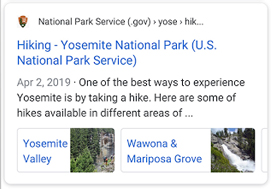
It is tiny, but it is there. All search results are still displayed in a separate card, much like they are on the Google app. What’s new is the branding of the site at the top of the card. Each search result now comes with the logo and name of the website hosting the search result displayed clearly at the top. This branding is only small, but it is clear. Also, whenever Google is showing an ad in your search results it will clearly state “Ad” in bold.
Working on transparency
Google’s visual refresh aims to give you more information about where your searches will take you on the web.
According to a Google blog post, the search giant is trying to help you “better understand where the information is coming from and what pages have what you’re looking for.”
When it comes down to it, search engines don’t actually offer us much information on the search results they show us. We type in our query and then they serve up the results they think answer it best.
Almost everything we see comes from the sites the search results link to. We basically click based upon headlines and descriptions that come from the sites themselves. The search results teach us very little about the sites writing those headlines and descriptions. This new move from Google is trying to address this by putting the websites’ branding at the top of each result.
It may only be a small change but it icould make a big difference.
As well as giving us more information about where on the web our search results will take us, Google’s mini redesign is also meant to open up new possibilities.
The blog post went on to say, “As we continue to make new content formats and useful actions available… this new design allows us to add more action buttons and helpful previews to search results cards, all while giving you a better sense of the web page’s content with clear attribution back to the source.”
Google has been working hard on implementing new features to search, including buying movie tickets and streaming podcasts. This way users don’t have to leave the results page. This new design allows users to do so by providing more information about how their queries are being processed.
Wrapping up
This is just a small change, but it should have a decent effect on how we use the web. It is more important than ever these days to be able to trust the information the internet serves up. If this redesign from Google helps us do so then, we have to see it as a positive move.
Google Chrome on Android is redesigning the tab screen and introducing tab groups.
We all do it. Despite the fact that having lots of tabs open on Google Chrome can slows our devices down a lot, we all have a lot of tabs open all the time. Take a look right now, we bet you have at least five open if you’re on desktop and upwards of 10 if you’re on your mobile.
Ever since tabs were first introduced to modern web browsers, they’ve completely changed the way we use the internet. They have, however, remained very much in their original state. We open them up, we use them, we don’t, and if we need them later on, we can save them all as bookmarks. Despite their revolutionary initial effect, tabs haven’t really changed much at all. Until now.
Google Chrome on Android is redesigning the tab screen and introducing tab groups
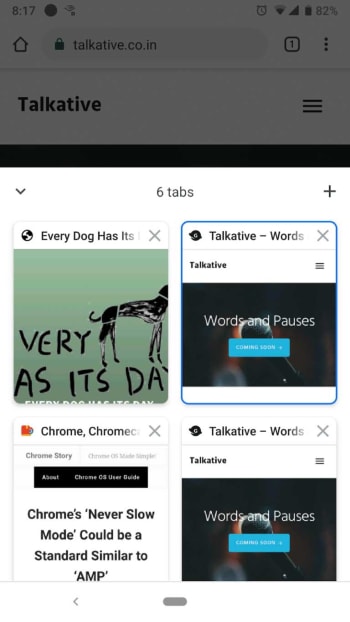
At the moment, whenever you hit the tabs icon in Chrome on Android, you’re presented with all your open tabs as individual cards. You scroll through them until you find the one you want and then when you find it you tap it and return to browsing the web. This is fine, but it quickly becomes tiresome scrolling through the cards, the more tabs you have open.
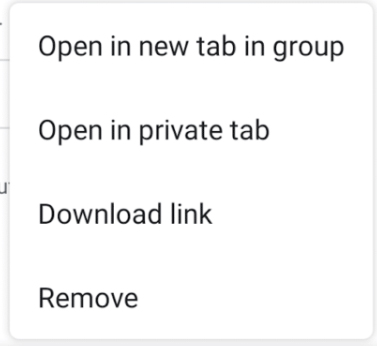
Google is looking to change this on Chrome for Android by adding a new option when you long press on a link. The “Open in new tab group” option will allow you to bunch together various tabs of your choice into groups. When you start a new group, you’ll see a new navigation bar appear at the bottom of the page, which will show all the tabs you’ve placed in the group as favicons. This should make it much easier to switch between them and allow you to start grouping tabs together based on common subjects.
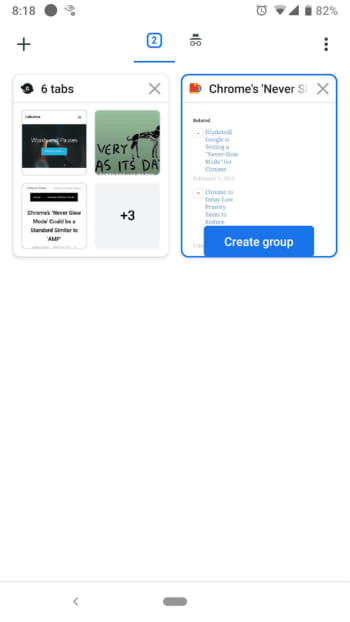
This means that when you click the tabs icon, you’ll no longer be taken to the card scrolling interface. Instead you’ll get a new display that shows all your open groups as in a similar fashion to how you see folders in other file exploring programs. Each group will show a preview of the first four tabs that are open in it, and as mentioned, favicons for the sites they’re on. Clicking on a particular group will then take you to an interface that looks more similar to the current tab card scrolling system, as you scroll through the tabs open in the group.
Unfortunately, this new and very useful feature has only been spotted on the Android version of Google Chrome Canary, which Google uses to test advance new features. The feature is still a little rough around the edges, which means Google still has some work to do before we all get to use it.
This all looks very promising, however, and seems set to see tabs again completely revolutionize how we use the web. Don’t be surprised if once this feature lands on your phone, you start to notice that you’ve many many more tabs open that you used to have.
There is good news and bad news for Flipboard users.
Flipboard is a popular online news service and mobile app that takes stories from various news sites around the web and puts them together in an aesthetically pleasing interface. Since it first hit the web, Flipboard’s popularity has grown to the point where it enjoys 150 million active users every month. Unfortunately, however, the last few days have been bad both for the app and its users as notices have been going out to tell users that Flipboard has been hacked and user data has been exposed.
There is good news and bad news for Flipboard users
Flipboard has released information on the data breaches it has suffered via a security note posted to its website. The note says, “We recently identified unauthorized access to some of our databases containing certain Flipboard users’ account information, including account credentials.” It goes on to say that following the discovery the Flipboard team launched an investigation, which revealed some telling information.
“Findings from the investigation indicate an unauthorized person accessed and potentially obtained copies of certain databases containing Flipboard user information between June 2, 2018 and March 23, 2019 and April 21 – 22, 2019.” Yes, you read that right, the hacker had access to certain Flipboard databases for nine months.
The security note also points out that not all Flipboard accounts have been compromised by the breach and that the company is still trying to determine just how many accounts have been compromised. There is some good news there but the uncertainty surrounding which accounts have been breached and which haven’t, is probably why Flipboard is prompting all users to reset their passwords.
Fortunately the stolen passwords are protected by a robust hashing encryption technique
The real good news, however, is that unlike with recent events at Facebook and Google, Flipboard had encrypted the vast majority of passwords it had stored on the breached database. Flipboard uses a strong password-hashing algorithm named bcrypt, which is widely regarded as being very difficult to break. The hacker may have been able to copy the database containing the sensitive user information, but there is good chance he/she won’t be able to access the data. Unfortunately, Flipboard also pointed out that passwords created or changed before March 14, 2012 were hashed using a weaker algorithm so may be easier to crack.
So, what should you do, if you have a Flipboard account?
As we’ve already pointed out, Flipboard is contacting users and prompting them to change their passwords. Follow the instructions it sends you and your account will be secure once again. The other thing to consider, however, is whether you’ve used the same password on Flipboard as you have on other accounts. This is the type of situation hackers dream of as it enables them to test the security credentials, they steal from one site on various other sites, too. Find out if any password you frequently use has been exposed here.
If you frequently use the same password, this is great time to reset all of your passwords. A password manager is the easiest and most secure way to do this. We recommend Last Pass – its free version offers multi-device support so you can use it to log in to sites on your computer and phone.
If you used Flipboard, but only signed in using your Google or social media accounts, Flipboard says you have nothing to worry about as it doesn’t store these credentials on internal databases. You will, however, have to log in again.
All this goes to remind you that you do need to take your online security seriously. A single breach can bring it all down like a house of cards if you’re using the same password across multiple accounts. That said, don’t wait. Act today, change your passwords and activate two-stage verification when possible, and stay safe online.
Google Lens is getting some great new “dining filters” to help us out in restaurants
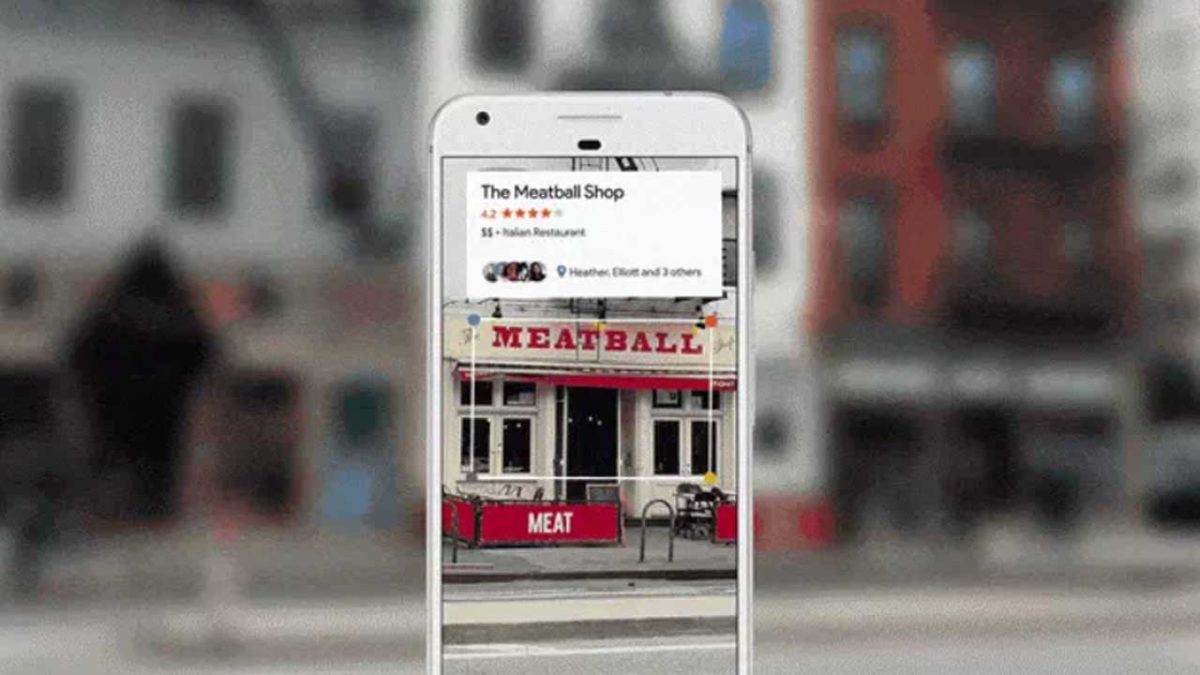
Google Lens is one of those apps that blew us away when we first heard about it but has since sat dormant on all our phones. It is, of course, a logical move for Google to allow you to “search what you see” by simply pointing your phone’s camera at it. It is very impressive that Google’s AI can take contextual information from what it sees and perform a relevant web search to help you find out what you’re looking at. It is just not something we turn to very often.
In fact, the biggest use cases that go along with Google Lens relate to buying things you see when you’re not in shops or learning about things when you’re traveling. Not everybody is interested in these types of activities, however, which is probably why a lot of us don’t think of Lens that often. Google, however, is now adding new skills to Google Lens that’ll give it the power to help us in a much more popular activity: eating out in restaurants.
Google Lens is getting some great new ‘dining filters’ to help us out in restaurants
Not everybody wants to buy the latest clothes and gadgets and not everybody does a lot of traveling. Almost all of us, however, eat out in restaurants occasionally and these new Google Lens filters could help us decide what to eat. If you’ve ever felt rushed in a restaurant and didn’t know what to order, Google Lens can now help you out.
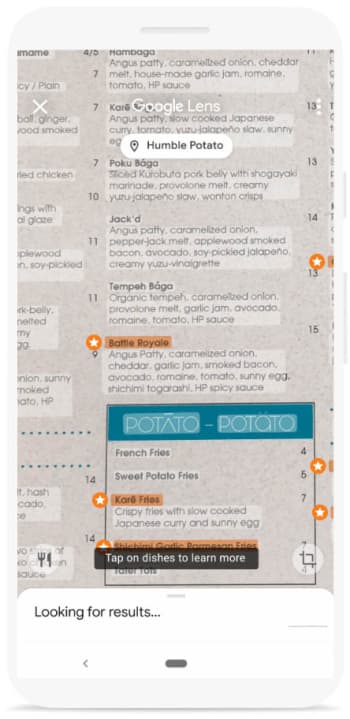
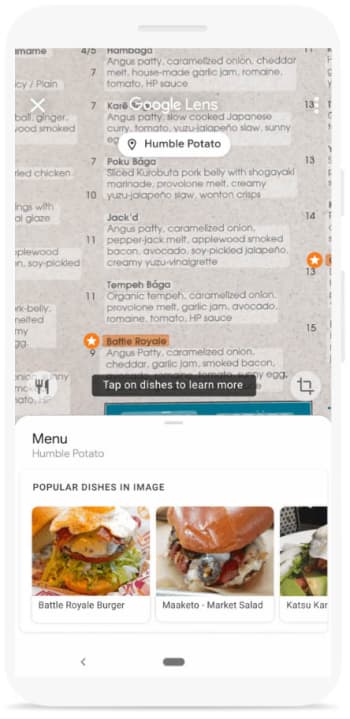
The first new Google Lens skill relates to the restaurant’s menu. If you point Google Lens at the menu, as long the restaurant’s name is visible, it will overlay the restaurant’s most popular dishes on top of what you see. You should see stars next to the restaurant’s most popular dishes and then tapping on them will show more information including pictures of what the dish looks like and reviews other patrons have written about them.
The other key dining-related skill that Google Lens is getting will help you out at the end of your meal. Once your waiter has brought you your bill, show it to Google Lens. Lens will then be able to calculate the tip you should leave and will even help you split the bill evenly, should you need to do so.
It is good to see Google Lens getting some more widely useful features. One of the main reasons Lens hasn’t really grabbed our attention is because it is often quicker to input the search query yourself than it is to wait for Lens to grab the information. Recognizing large amounts of text quickly, however, is one of Lens’ best skills so the new menu feature could offer a genuinely useful use case. The bill feature should be useful too if it works quickly enough.
A Chinese internet artist is selling a laptop that contains the six most dangerous pieces of malware in existence.
Viruses and malware are an ever-growing threat in today’s world. We’re constantly trying to keep you ahead of the game when it comes to the latest online threats, so hopefully you’ve stayed safe up to now. The threats are out there though, and the biggest of them have wreaked havoc on a global scale. This is why continued vigilance is always recommended.
We’re not here today, however, to talk about how to stay safe when you’re online. We’re here to talk about six of the biggest threats and, surprisingly, a laptop that is on sale that comes fully loaded with each of them.
A Chinese internet artist is selling a laptop that contains the six most dangerous pieces of malware in existence
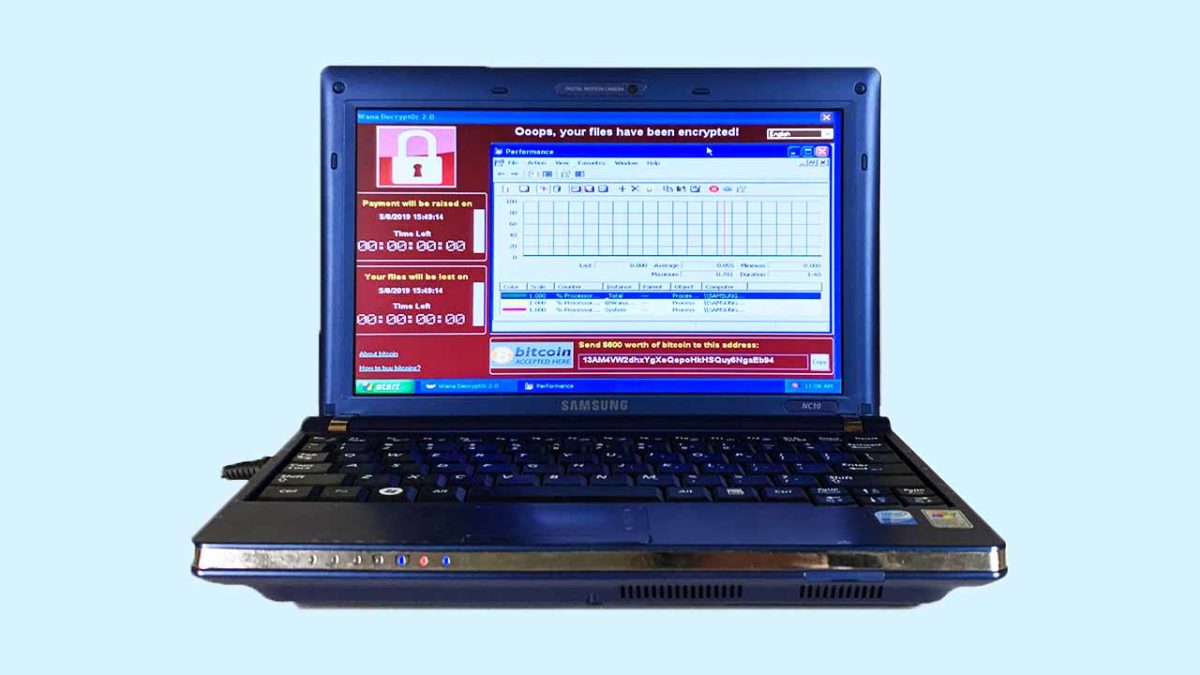
Guo O Dong has done something interesting, if not a little bewildering. In the name of art, he has taken an old Samsung NC10 notebook, filled it with the six most dangerous pieces of malware out there, and put it up for sale in an online auction. He has imaginatively named his dangerous creation “The Persistence of Chaos.” The real kicker, however, was that the reserve for Dong’s auction was set at over $1,000,000.
The destructive power of the six pieces of malware installed on the machine can’t be underestimated. Between them, it is estimated that they’ve caused more than $95 billion worth of damage worldwide. Guo has published information on each of them on the auction page, the numbers attached to each will blow you away:
ILOVEYOU
The ILOVEYOU virus, distributed via email and file sharing, affected 500,000+ systems and caused $15B in damages total, with $5.5B in damages being caused in the first week.
MyDoom
MyDoom, potentially commissioned by Russian e-mail spammers, was one of the fastest spreading worms. It’s projected that this virus caused $38B in damages.
SoBig
SoBig was a worm and trojan that circulated through emails as viral spam. This piece of malware could copy files, email itself to others, and could damage computer software/hardware. This piece of malware caused $37B in damages and affected hundreds of thousands of PCs.
WannaCry
WannaCry was an extremely virulent ransomware cryptoworm that also set up backdoors on systems. The attack affected 200,000+ computers across 150 countries, and caused the NHS $100M in damages with further totals accumulating close to $4B.
DarkTequila
A sophisticated and evasive piece of malware that targeted users mainly in Latin America, DarkTequila stole bank credentials and corporate data even while offline. DarkTequila costed millions in damages across many users.
BlackEnergy
BlackEnergy 2 uses sophisticated rootkit/process-injection techniques, robust encryption, and a modular architecture known as a “dropper”. BlackEnergy was used in a cyberattack that prompted a large-scale blackout in Ukraine in December 2015.
Between them, the malware loaded onto the Samsung laptop have caused over $95 billion worth of criminal damage
For safety reasons, Guo built his laptop in collaboration with privately owned New York-based cybersecurity company, called DeepInstinct. Together they built a laptop that is completely isolated and air-gapped from the internet at large. The auction page also highlights that all the internet capabilities and available ports will be disabled on the machine once bidding has concluded.
The big question relating to all this is why? Why create a collection of some of the most dangerous internet viruses and malware known to man and then sell it to the highest bidder? This could literally be the plot a second-rate James Bond movie.
To answer the obvious question, Guo cites his laptop as a work of art. He has created a catalog of historical threats, built to remind us that digital threats can have real world consequences. We shouldn’t ignore the online threats that are out there.
This is something we all know too well and so it is heartening to see an internet artist create a piece of art that is designed to instill vigilance in internet users. The big test for Guo will be whether the security credentials built into the laptop by Deep Instinct are strong enough to prevent the threats from breaking out.
Interestingly enough, according to Guo’s auction site for The Persistence of Chaos, where you can watch a livestream of the laptop just sitting there, somebody has bid on the laptop and the huge reserve has been met. It looks like somebody is going to buy the riddled laptop and all the viruses that come with it. As most of us can’t afford to outbid the current bid of $1,200,749, all we can do is hope that the winner is simply going to put the laptop in a museum and doesn’t want to crack it open and spill its nasty contents onto the internet.
Research shows that two-step authentication blocks most attacks!
Keeping safe online can sometimes feel like a Herculean task. We have a growing number of online accounts and each of them needs a long, complicated, and unique password. If we don’t have them, we’re at risk of exposing multiple accounts should one fall. Add to this the regular data breaches that affect even the biggest companies and it can feel like we must keep on top of it.
Password managers are a great weapon to wield in this online battle. Once you’ve set one up, they’re easy to use and will automatically set strong passwords for each of your accounts and store them securely.
Strong passwords aren’t enough though. These days there is another important tool that we need to use if we’re to make sure we’re as secure online as we should be. This, of course, is two-factor authentication. You have to confirm your identity on one device by proving who you are on another one. There are even physical devices you can buy that only exist to authenticate your identity.
The problem with two-factor authentication is it’s annoying.
Having to scramble around finding your phone or tablet, whenever you want to do something important online, can be very frustrating. The thing is though, two-factor authentication works and new data from Google proves it.
Research shows it works!
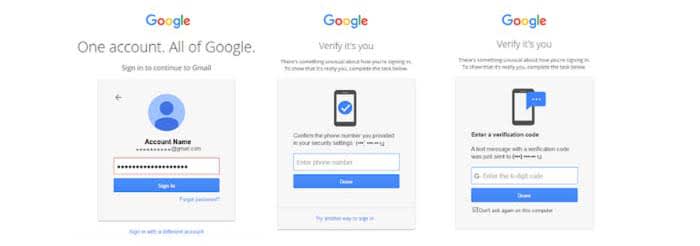
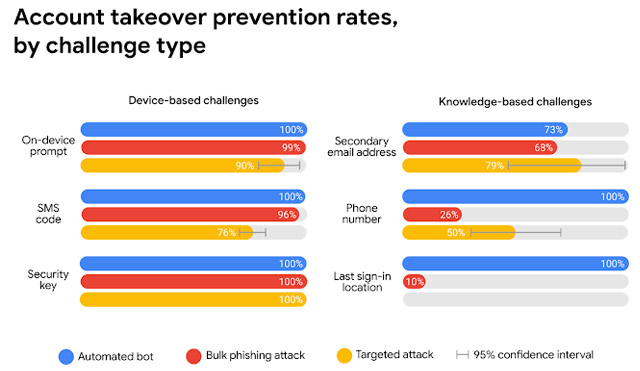
Google teamed up with researchers from New York University and the University of California San Diego. They performed a year-long study looking into various types of cyber-attack and how basic security procedures can block them. The results were striking. The simple act of adding a recovery telephone number blocks every single automated bot attack and 99% of all bulk phishing attempts.
With two-factor authentication, Google was keen to point out the difference between the different types you can use. The first uses a code that is sent by SMS to your nominated recovery phone. You enter it on the site that needs to confirm your identity. In Google’s tests, this type of two-step verification protected against 100% of automated bots, 96% of bulk phishing attacks, and 76% of targeted phishing attacks.
The other type of two-factor authentication uses an on-device prompt. Rather than receiving a code, you receive a button to press that will prove who you are. This type of verification scored even higher than the SMS code type. It protected against 100% of automated bots, 99% of bulk attacks, and an impressive 90% of targeted attacks.
The message here is clear: If you don’t have two-stage verification enabled on the online accounts that offer it, you need to enable it now. Google pointed out in its report that there are other defenses it uses like last sign-in location if you don’t have 2-stage activated. However, protection rates can fall to as low as 10% for these other methods. It is clear that two-factor authentication is the big boss when it comes to online security. If you don’t have it set up, you should do it now.
No more switching tabs to message people on WhatsApp or Messenger. Opera browser has fully-featured WhatsApp and Messenger integration.
There aren’t many web browsers that stand out for having truly unique features. These days we’re all looking for a quick and secure browser and pretty much all of the big ones can offer this. After that, there isn’t too much to choose between them. Sure, privacy advocates veer towards Firefox and Apple fanboys use Safari, but it is difficult to put your finger on discernible differences between the offerings of the big web browser developers. That is, apart from Opera.
New features come to the internet all the time but has any web feature had such a huge impact on our daily lives as instant messaging? Who doesn’t have a separate tab or window with either Facebook Messenger or WhatsApp open right now? Well, Opera has long been studying how we use the web and innovating new features designed to accommodate common web practices. The Opera browser now has fully integrated versions of WhatsApp and Messenger built into the browser.
No more switching tabs to message people on WhatsApp or Messenger
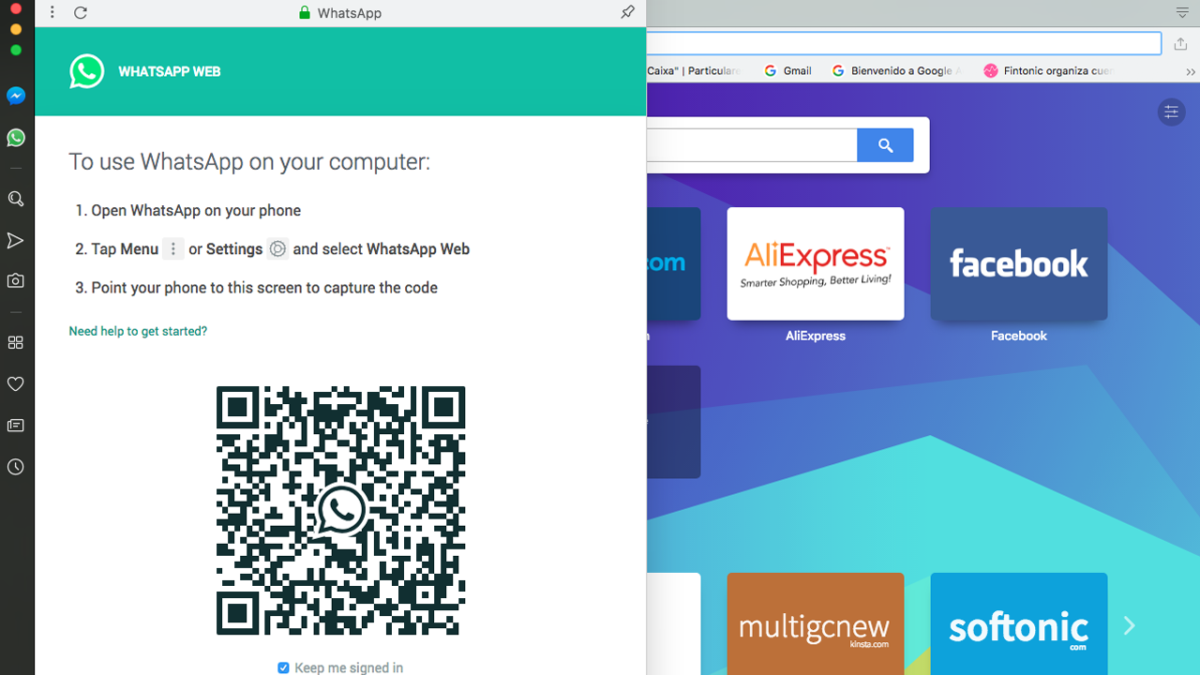
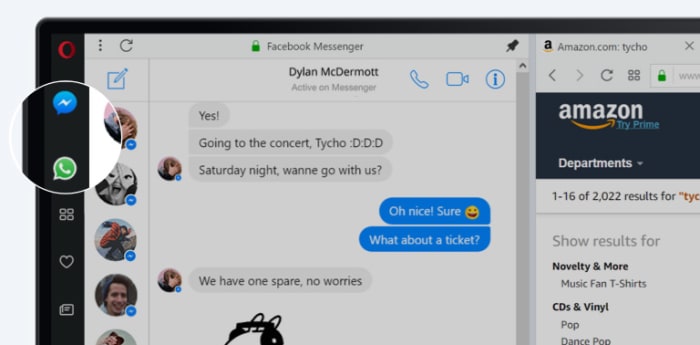
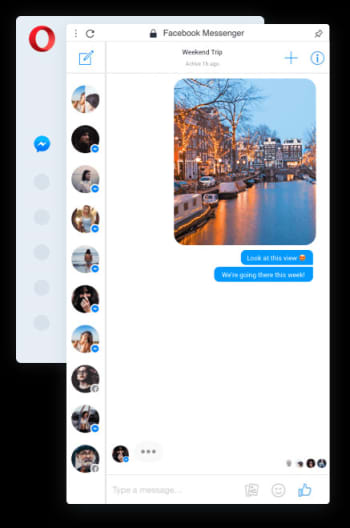
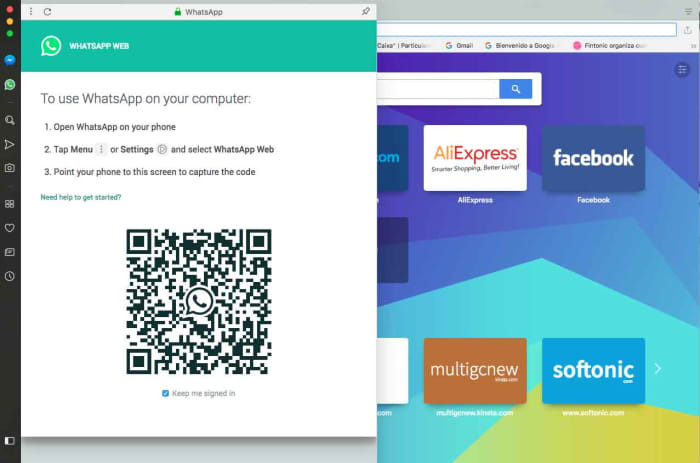
One of Opera’s key features for a while now has been its sidebar, which sits stealthily at the left-hand side of the browser. The sidebar gives quick and easy access to common web tools like search, downloads, favorites, etc. Last October, Opera also added two new buttons to the sidebar; the WhatsApp and Messenger chat bubbles.
Clicking the WhatsApp and Messenger icons opens out fully functional and well-designed chat widgets from the sidebar. They offer all the features you’ll find on the web versions of both apps, but sit above the web page you’re currently browsing and only cover about a sixth of the page.
With the integrated messengers being so small, the design is key, and Opera has pulled it off nicely. All the buttons and features are there but they’re tastefully placed in a way that feels right. Contact icons are down the left and hand side, with the conversation taking up most of the display space.
On top of the neat design and full feature sets, the Opera browsers WhatsApp and Messenger integrations offer other key messaging app tools to ensure you’ll never have to leave the web page you’re browsing to check your messages again. You can activate in-browser notifications for incoming messages, pin your favorite chats, mute conversations, or log off from the services altogether.
The key here is that when you get a new message all you have to do is click the icon to the left of your page, read the message, and then respond, should you feel the need. Throughout that whole process, there is no need to switch tab and the web page you’re viewing stays on the screen the whole time.
In the tech world, small things make big differences, but with WhatsApp and Facebook Messenger integration, Opera has added a large feature to its browser that creates a smoother workflow and makes it harder to become distracted from what you’re doing. This is more than a big difference; this is a big deal.
If you’ve never used AliExpress to shop, you’re in for a treat.
AliExpress has been around for quite some time now, but the Chinese shopping portal is still clouded in mystery. In many ways, AliExpress is comparable to a Chinese version of Amazon, but in other ways, it is completely different. The differences come from AliExpress’s genesis as a retail version of the wholesaling website Alibaba, while the similarities come from being able to buy pretty much anything from a single site/app.
What is the difference between Alibaba and AliExpress?
With China famous for its immense manufacturing sector that can build almost anything, it makes sense that a wholesaling platform established itself so that the millions of Chinese factories would have somewhere to sell their wares. Alibaba is China’s leading wholesale platform and you can find everything on it, from DIY basics like nuts and bolts to the latest consumer tech via fashion and accessories. It is all built for business, however, with minimum orders often starting in the thousands. For personal users, this is no good. Who wants to buy 5,000 phone cases when you only have one phone?
How does AliExpress compare to Amazon?
This is where AliExpress comes in. While it is possible to find factories on AliBaba that will sell you a single unit, it is rare. AliExpress, on the other hand, is designed for vendors or retailers to sell single units. AliExpress is where you go to buy one phone case while AliBaba is where you go for 1,000 phone cases.
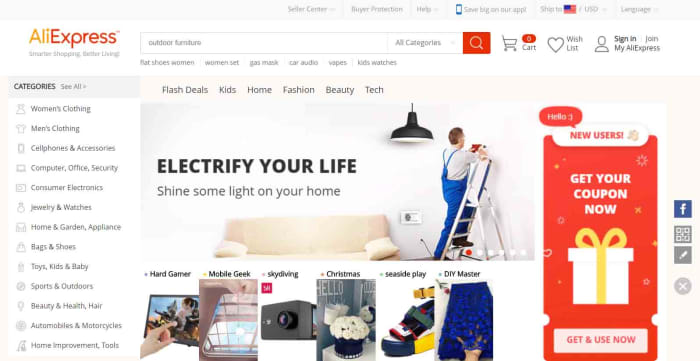
The AliExpress homepage for desktop
This means that AliExpress ends up as a mix between eBay and the Amazon marketplace. When you buy things off AliExpress, you’re buying them from individual stores and vendors rather than off a centralized store. You can search for items or you can search for stores.
Since AliExpress was founded, it has grown to become the world’s largest online store. Its proximity to factory supply lines allows it to offer extremely competitive prices compared to local retailers and online retailers like Amazon. If we look at phone cases again, just as an example, it is easy to find them on sale for as little as 30 cents, which is a lot cheaper than you’ll find them at Best Buy.
Things to consider when buying off AliExpress
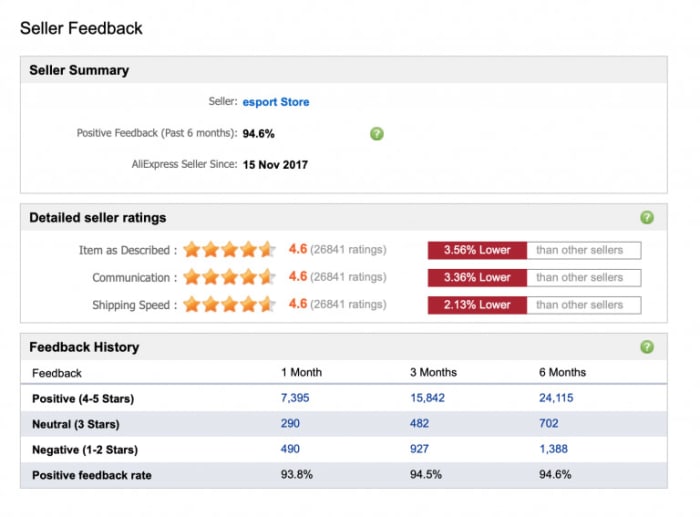
Image via: AliExpress – You need to make sure you can trust the vendor you’re dealing with when you’re shopping on AliExpress
If you’re thinking of buying something from AliExpress, it is likely the low prices are what caught your attention. When buying from AliExpress, however, you need to consider more than just the retail price of whatever you’re looking to buy. The main things you need to be aware of when shopping on AliExpress are the trustworthiness of the seller, shipping times and costs, and potential import fees. Another thing you might want to look at, if buying a branded item, is whether or not you can guarantee its authenticity. Fortunately, AliExpress has created a guide on how to check for all of these, which you can read here.
How to use the AliExpress app for Android and iPhone
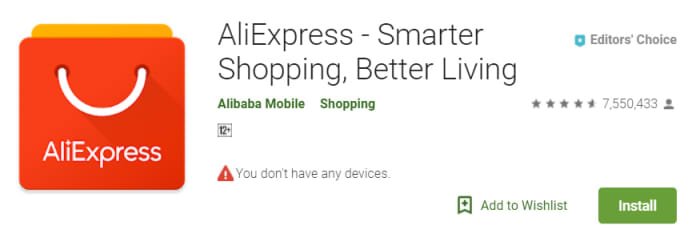
Now let’s have a look at how to use the AliExpress app. AliExpress has an app available for both the iPhone and Android smartphones and you can download them both here:
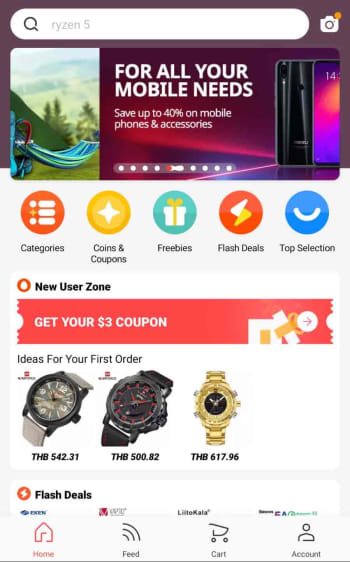
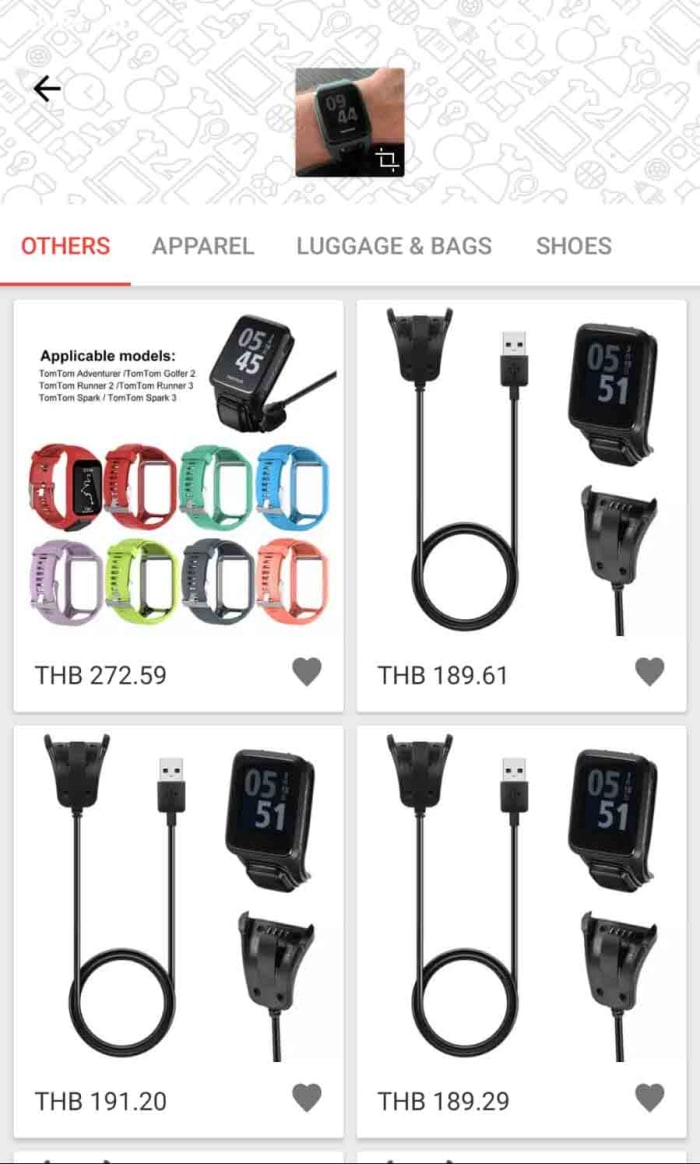
When you first open the app, you’ll find something that looks rather similar to the homepage you’ll find on the AliExpress website. In the middle of the screen, the app shows scrolling special offers and various buttons including coupon codes, flash deals, freebies, and searchable categories. You’ll also be able to scroll up and down the page to see different shopping sections filled with many different types of items like USB cables, sports footwear, makeup, and toys.
At the top and bottom of the homepage, you’ll find the function keys that will help you navigate the app, your account, and the shopping process. You’ll see a search bar at the top of the screen and a toolbar at the bottom. The toolbar includes a home button, a feed button that gives you a personalized feed based on your shopping history, a shopping cart button, and an account button. Whenever you click on an item or a store, the toolbar will disappear, but you’ll be able to find all the toolbar buttons by clicking on the three dot icon that appears in the top-right of the screen.
Next to the search bar across the top of the app, you’ll find a camera button, which activates some very interesting features.
The AliExpress camera app
The AliExpress image search function is rather impressive
Clicking the camera icon in top-right of the AliExpress app homepage gives you three options. AR scan and QR code scan use your smartphone’s camera to scan for links to AliExpress items and pages. The really cool feature, however, is the image search feature, which can detect what you’ve taken a picture of and search for similar products or accessories. In all our tests this feature worked really well and was able to determine things like the brand of the item we’d snapped and, in some cases, even the model.
How to buy things using the AliExpress app
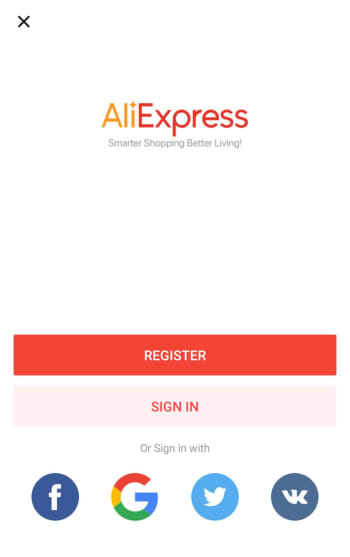
Step 1 Sign up
The first thing you need to do when buying something on the AliExpress app is to create an account. This process is simple, and similar to how you’ve signed up to a million other online accounts. You can even use your social media account details to create your account for you. You can do this using your Facebook, Twitter, or Google accounts.
Step 2 Add items to your cart
You can find what you’re looking for using all of the homepage tools we highlighted earlier. Once you have an item you want you can either add it to your cart or hit the buy now button.
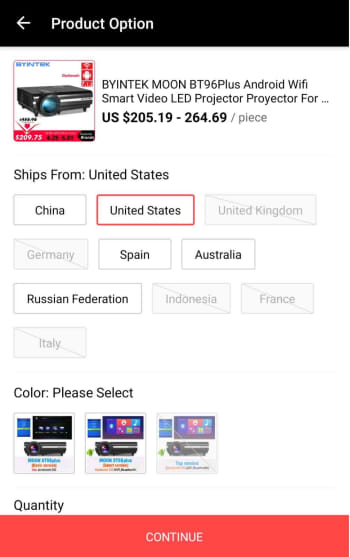
Depending on what you’re buying, you might have to select a few extra options at this point. This could include where your item will be shipped from. Here, it may be more expensive to have the item shipped from the U.S., but then you won’t have to worry about long shipping times, import duties, and taxes. This decision is up to you. You can find information on importing goods into the U.S. from abroad here.
Step 3 Select the items you want to buy
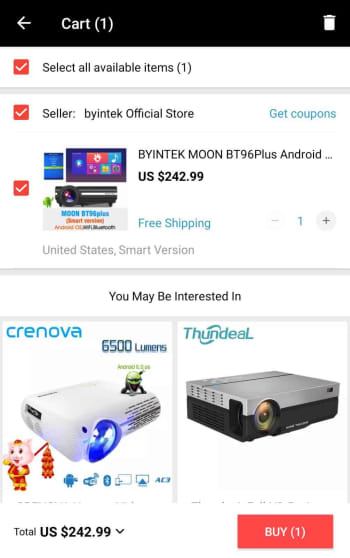
The AliExpress cart works a little differently to other online shopping carts. Rather than automatically selecting all the goods in your cart for purchase, you’ll have to select the items you want to buy by selecting the box next to each item.
Step 4 Add shipping address and place order
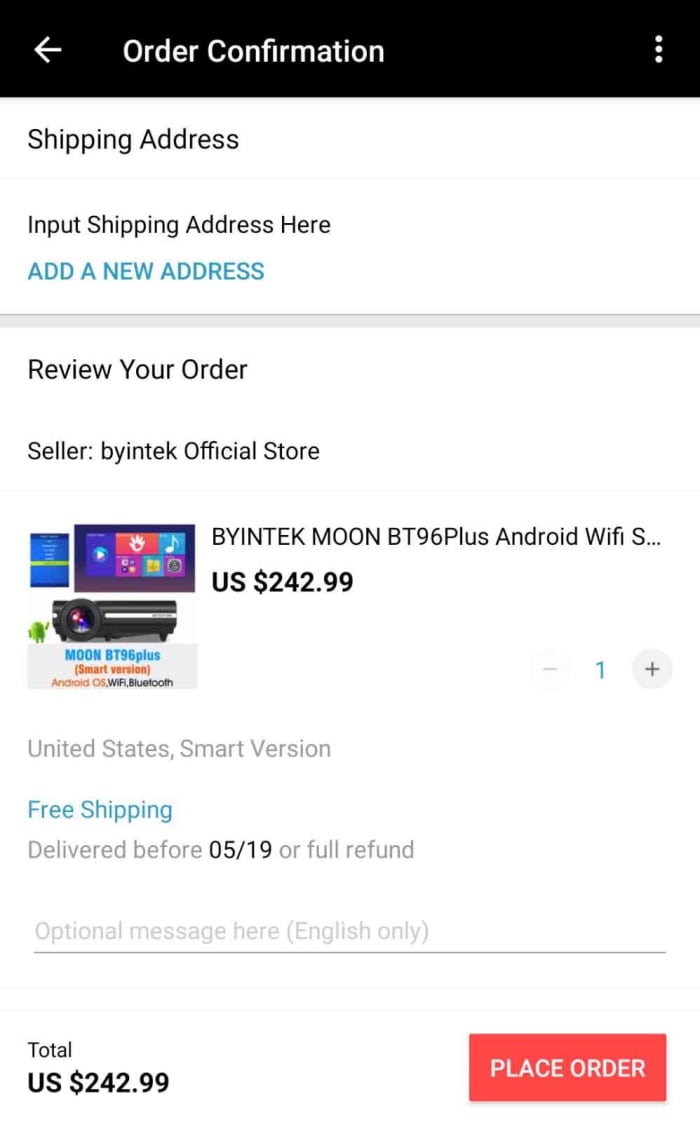
Once you’ve confirmed the items you want to buy, you’ll be taken to an order confirmation screen where you need to input your shipping details and check all of the information relating to your purchase. This will include any potential discount coupons and will also inform you of whether there are any shipping-related issues attached to your item. Sometimes you’ll see the seller offering a full refund if it hasn’t arrived by a certain date.
Step 5 Payment details
After you’ve input your shipping details, you’ll need to enter your payment details. AliExpress accepts a number of payment methods including its own version of PayPal called AliPay, card payments, and bank transfers as well as a host of other payment methods including WebMoney, Western Union, Yandex.Money, QIWI, DOKU, MercadoPago, Ticket, and American Express. For full information on all the different payment methods available on AliExpress and the risks attached to them click here.
Conclusion
As you can see, using the AliExpress app itself is very simple. It is intuitive, easy to use, and also offers some cool and innovative features. This is reflected in the high ratings the app has on both the Apple app store and the Google Play Store. The app has an impressive 4.6 rating on the Play Store even after more than 7.5 million downloads.
The tricky business relating to shopping with AliExpress, however, is the mystery of it all. This is why we’ve gone through a bit of context for you to show you how the company operates and where it came from.
There are things you need to consider when you’re buying from AliExpress, and first and foremost you need to ensure that the vendor you’re dealing with can be trusted. Secondly, you need to consider shipping times, costs, and any import duties and taxes you may be liable for; we’ve also pointed out, however, that this might not always be necessary as the vendor may also ship items from your region. If you’re confident in the seller and understand all the shipping details, however then you should think of AliExpress as another viable option when you’re looking to buy something online.
A database including sensitive information about millions of Americans has been discovered online.
Two security researchers at the VPN testing site vpnMentor have stumbled across a massive open database filled with sensitive information belonging to millions of Americans. The database is hosted by a Microsoft cloud server and contains extremely detailed information. As yet, they’ve been unable to figure out who the database belongs to or what its purpose is and they’re reaching out to users to help them get to the bottom of it.
A database including sensitive information about millions of Americans has been discovered online
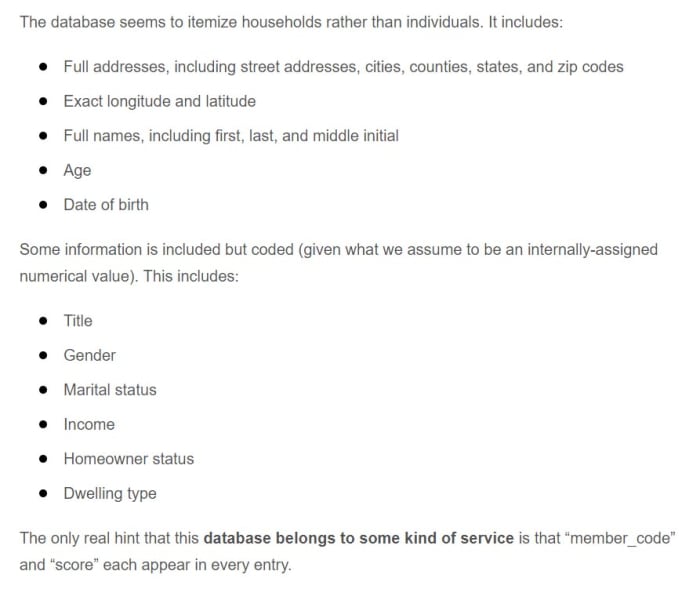
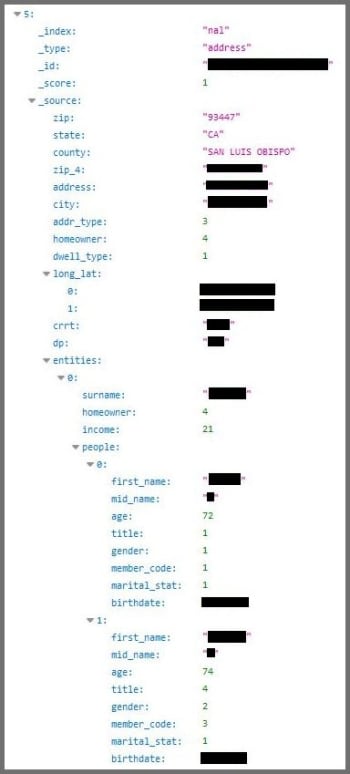
Noam Rotem and Ran Locar found the database while carrying out research for vpnMentor. The massive file, containing a staggering 24 GB of data, has a wide range of sensitive information including addresses, GPS coordinates, full names, age, and date of birth. Other coded information includes title, gender, marital status, income homeowner status, and type of dwelling.
The database focuses on households rather than individuals but, incredibly, it holds information on 80 million American households, which is upwards of 65% of all households in the US.
The research duo has been unable to determine who the database belongs to, although they were able to highlight a few clues. The addition of a member ID could mean that the database belongs to an organization or company offering a service, and the income category is something you’d expect to see from an insurance provider, or a healthcare or mortgage company. In a bid to decipher the mystery, the pair have reached out to all readers with a riddle. The answer to the riddle could well be who the database belongs to.
“What service is used by 80 million homes across the U.S. – but only the U.S. – and only by people over 40? What service would collect your homeowner status and dwelling type but not your social security number? And what service records that you’re married but not how many children you have?”
Fortunately, the massive database doesn’t contain any truly dangerous information like social security numbers or credit card information, but it would still be seen as a treasure trove for cyber-criminals and identity thieves. It could make it easier for hackers to guess your email address and bombard you with phishing scams.
Another scary possibility is related to the recent outbreak of widespread ransomware attacks. If the attackers had access to your income details, they’d know how much you could afford to pay in a ransom demand if they encrypted your personal data.
Other risks posed by the database include the potential for thieves learning your whereabouts via social media and cross-checking that with your address via the database. They could use this information to figure out when your home is empty and make plans to break into your house. The fact that that the database includes age brackets could also allow potential attackers to target aging households where the occupants might be more vulnerable.
These threats all go beyond the obvious, which is that much of the information listed in the database marks common answers to online account security questions. The only things missing are the names of first pets and mothers’ maiden names.
If you want to take action to try and help close this massive data breach, you should try to solve the riddle above. If you can come up with an answer, contact Rotem and Locar here.
Wi-Fi is like the keys to the universe these days. Many people even ask for the Wi-Fi password even before they’ve said hello. We all want it and we all need it, seemingly all the time. We need Wi-Fi so much that that there are a lot of apps out there, all designed to help us find it and connect to it. Unfortunately, not all these apps are as well made or secure as they should be and now it seems the inevitable has happened.
The app Wi-Fi Finder has leaked over 2,000,000 Wi-Fi passwords online
Wi-Fi Finder has been downloaded by over 100,000 people and has collected over 2 million passwords. The app is designed to help users locate public Wi-Fi spots and then, in some cases, provide the required login details to help them connect to the network.
The way the app collects passwords is by asking users to upload their password lists to the central server. Theoretically, this makes all of the Wi-Fi hotspots they’ve ever signed into available to all users of the app. The flipside of this, however, is that the app can’t differentiate between home Wi-Fi networks and public hotspots. This means it is highly likely that all users who’ve uploaded Wi-Fi security credentials to the app have unwittingly uploaded the security details of their home networks to the Wi-Fi Finder password list too.
It gets worse for Wi-Fi Finder users, of which there are tens of thousands in the U.S., as the list of over 2 million Wi-Fi passwords has now been leaked online. As well as containing network names and passwords, the list also contains precise location data on where each network is. If you’ve uploaded passwords to that list, then not only is the name of your Wi-Fi network and the password needed to access it available online, but its exact location is available, too.
Potential issues that could arise from this kind of vulnerability include the spreading of malware across your home network and the takeover of smart devices like security cameras and AI augmented speakers. In practice, however, this type of action on a targeted and personal level would likely fall low on a list of priorities for a serious cyber-criminal or hacker.
The fact remains though. If you downloaded Wi-Fi Finder, you need to delete it and change your home Wi-Fi password immediately.
Common sense: If you’re not careful when you download new apps, you could be sabotaging your own cybersecurity.
Unfortunately, downloading apps safely requires vigilance and awareness. To avoid this type of thing happening to you, you should always check the developer behind the app you’re looking to download and also go through the permissions the app is asking for. Wi-Fi Finder asked for a startling number of permissions including locations, full contact lists, and even the ability to read, modify, and delete data. Asking for too many permissions is a dead giveaway that an app shouldn’t be trusted.
For more information on how to avoid downloading disreputable apps check out our tutorial below.
How to detect fake apps in the Google Play Store in just 3 steps









 In fact, the biggest use cases that go along with Google Lens relate to buying things you see when you’re not in shops or learning about things when you’re traveling. Not everybody is interested in these types of activities, however, which is probably why a lot of us don’t think of Lens that often. Google, however, is now adding new skills to Google Lens that’ll give it the power to help us in a much more popular activity: eating out in restaurants.