This is what the new Chrome-based Microsoft Edge browser will look like

The first screenshots of the new Chrome-based Microsoft Edge browser are here.

Microsoft hasn’t had much luck at all with Internet browsers over the last few years. Internet Explorer has been little more than a laughing stock and Microsoft’s latest offering, Edge, never had the firepower to break through Google Chrome’s stranglehold on the market.

We were reporting that Microsoft was already thinking about killing Edge before Christmas, and it wasn’t long into the new year that this was confirmed with the news that Edge is migrating over to Chromium. Rather than continuing as a completely independent web browser, Edge is to be rebuilt around the open-source code that sits at the heart of Google Chrome. We now have some screenshots showing what the new Edge browser will look like when it lands.

If two web browsers had a baby…

The guys at Neowin have been able to get their hands on screenshots of what the new browser will look like. Unsurprisingly, the browser looks a lot like Microsoft Edge but there are unmistakable elements from Google Chrome on show, too.
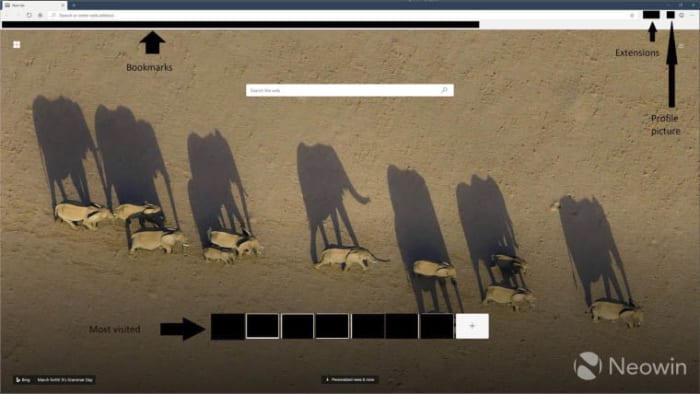
New screenshot of Microsoft Edge homepage

The first thing that catches the eye is the inclusion of the extensions button and a small profile picture in the top-right of the page. This set-up is as yet unseen on a Microsoft browser, but will be very familiar to Google Chrome users. Another feature familiar to Chrome users will be the bookmarks bar across the top.

What Edge looks like compared to Chrome
A comparison of the two browsers as they look now

On the flip, an Edge feature that is nowhere to be seen is the ability set aside currently open tabs. Edge features that are still there, however, include Bing as the integrated search engine and the ability to set New Tab backgrounds to Bing’s image of the day. Another Edge feature still in play is the personalized news feed, powered by Microsoft News, that is accessed by scrolling down on the homepage. There is also an option to personalize the appearance of this feed to one of four options.
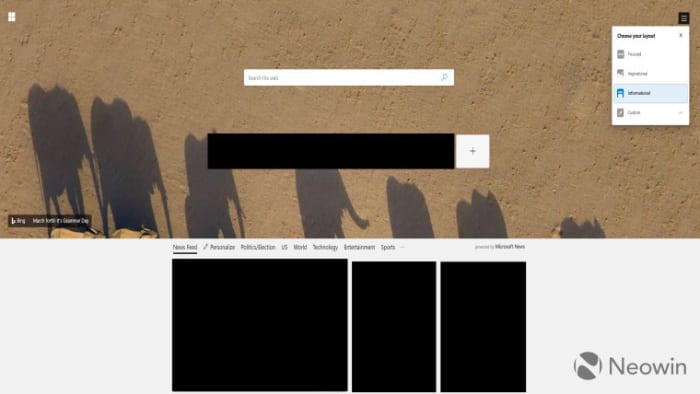
news feed options on new Edge browser

Another interesting development we can take from these screenshots is the continuation of the Microsoft store for Edge extensions. Microsoft will continue to maintain its own extension store with Edge extensions being recompiled to work on the new Chromium-based browser. Users can search the extensions from within the Edge browser and then download them via the Microsoft store.
As the browser is based on the open-source code that built Google Chrome, however, all Google Chrome extensions will also work on the browser. This means that users of the new Edge browser will have two separate stores offering extensions for the browser.
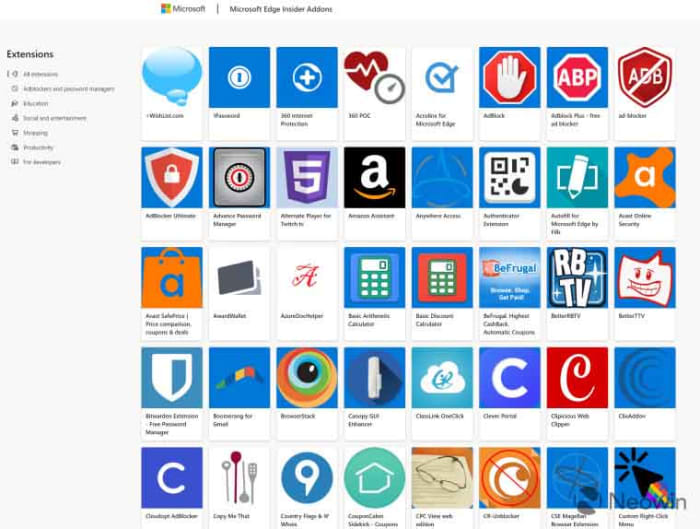
The Microsoft extension store for the new Edge browser

The final change Edge users will have to deal with is to the Settings menu. Rather than Settings coming from a slide-out menu, they will now have their own tab, you guessed it, just like they do on Google Chrome.

All these changes add up to a browser that offers more choice to Google Chrome users without presenting anything new or difficult to get used to. As to whether this latest move from Microsoft will see Edge gain a greater market share, we’ll have to wait and see.

All images via Neowin
You could soon earn money just by posting memes to Reddit

Reddit is currently testing a real-money inter-user tipping system.

If you use Reddit, you’ll probably know about Reddit Silver, Gold, and Platinum. These coins or badges, depending on how you see them, give users a way to reward other users whenever they make a particular post that they absolutely love. Reddit coins show up next to the post they’ve been awarded to and some of them bestow particular bonuses upon the user who receives them. A Gold award gives a week’s free access to Reddit Premium while Platinum gives a month’s access.

Whereas access to the ad-free Reddit Premium certainly has its perks, there is nothing in this world like hard cash-money. The big news? Reddit is working on a tipping system that will allow users to give other Reddit users real cash.


Reddit is currently testing a real-money inter-user tipping system

Reddit is testing a tipping feature

The new tipping feature is currently only available in one subreddit and only a single user on the whole site is currently able to receive tips. The subreddit in question is r/shittymorph and that lucky user is, well, u/shittymorph.

The new feature was announced in a post on the shittymorph subreddit and laid out just how it will work. The post reads, “Anyone in r/shittymorph can now tip u/shittymorph for the content he posts to this subreddit. Tipping is only available on new Reddit. Furthermore, this is an experimental feature available only in this subreddit, and no other community… Tip payments are handled entirely by Stripe. We don’t store any of your payment information.”

Tips received for a comment show up where you’d normally see Reddit Silver, Gold, and Platinum awards and at the time of writing r/shittymorph had received $81 in tips for his top comment on the post.

Below each post r/shittypost makes, there is now a new tip button. Clicking the button opens up a tip box, which shows four tipping options. Users can tip $3, $5, $10 or select other and tip anything up to $100. According to the post announcing the new feature, the recipient will receive around 78.5% of all tips given. Reddit will receive a massive 18.5% and Stripe, which handles all the payments will take 3% of every tip.

When users decide to make a tip, the tip box will give the option to input credit card details and then Stripe will handle the transfer.

There is no news yet about a general roll-out but this is a very interesting feature for Reddit to be testing. The Reddit community is vast, and conversations cover all sorts of topics. Some of the most heartwarming Reddit stories, however, come from users seeking financial advice during times of hardship and other users responding with offers to send food or even cash. It’ll be interesting to see if tips will soon be sent in such situations.

There’s also the potential for some shady activity, as Reddit is often a promotional tool for adult models, who are already asking fans to support them financially in exchange for certain photos or videos. We’ll have to stay tuned to see how this all plays out.

Facebook Privacy: It is now easier for Android users to hide their location

Is Facebook finally getting the message about user privacy?

facebook privacy

It is no secret these days that Facebook wants to know absolutely everything about us. So much so that the social giant even tracks people who aren’t members of Facebook and keeps tracking people who are even when they’re not using the Facebook app. Now, in a gesture that’ll make you ask why they even had to do this in the first place, Facebook is making it easier for Android users to stop its app from tracking their location when they’re not using it.

Is Facebook finally getting the message about user privacy?

Location settings have always been a little more nuanced on iOS than they have been on Android. Android Facebook users have a simple on/off switch for sharing their location with Facebook and other apps. iOS users, however, have always had the option to share their location with the app always, never, or only when the app is in use.

Practically, this makes a huge difference, as it means iOS users can have full location services when using Facebook and not have to worry about Facebook tracking their location for the rest of the day. Android users, on the other hand, have always had to manually switch location services on and off again should they want to use them but then not be tracked. In practice, this usually ends with Android users leaving location tracking on all the time.

Facebook location services
Does Facebook know where you are?

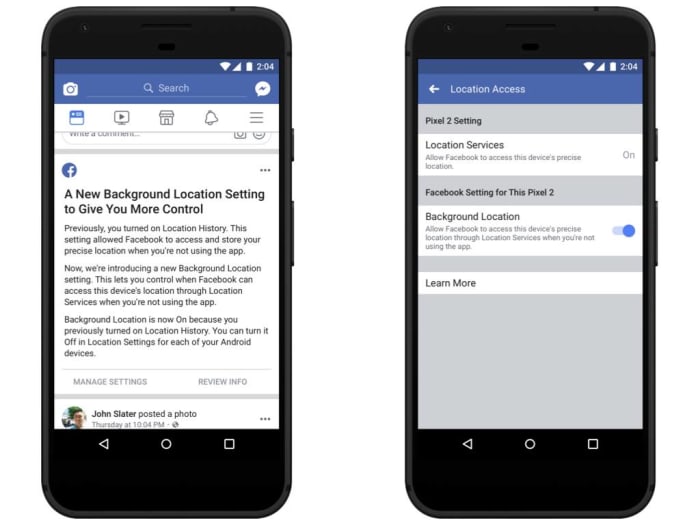
Now though, this has changed. The blog post announcing the change had this to say, “Today we’re introducing a new background location control on Facebook for Android so people can choose if they want us to collect location information when they’re not using the app… Until today, people using these features were asked to enable Location History. If you enabled this setting, two things happened: you would share your location when you weren’t using the app and you would allow Facebook to store a history of your precise locations. With this update, you’ll have a dedicated way to choose whether or not to share your location when you aren’t using the app.”

Facebook FB location settings on Android phones

This is a big change as it now makes it easier for Android users to take advantage of location services without having to submit to 24/7 surveillance. It also means that Facebook features like “Nearby Friends” will no longer show your location, even if you’re not on the app.

iOS users won’t see any change, and neither will Android users who have always had location services set to off. Those privacy-minded Android users won’t be affected as their location services will remain off.

Faster Google Chrome coming to slower, older PCs

An experimental new feature could cut Chrome RAM usage significantly.

Google Chrome is, without a doubt, the king of all browsers. It has quite literally devoured Microsoft’s Edge browser and all other web browsers are dwarfed by its insane market share. Google Chrome isn’t perfect though, and one of its biggest problems is just how much memory it needs to function properly. Unless you’re working on a top-of-the-line machine with plenty of RAM to spare, opening more than just a few tabs will slow everything down to a crawl.

This RAM problem has long been recognized by Google as an issue that needs fixing and it looks like we could soon see a solution to the problem.

An experimental new feature could cut Chrome RAM usage significantly

The new feature has been spotted in Google’s experimental Chrome Canary browser. Canary is a free-to-use browser that Google has long used to test out new Chrome features and this latest is an absolute doozy. Called “skip best effort tasks” the feature could finally see users not have to worry about how many tabs they have open, if they want their PC to work as it should.

Google Chrome Canary experimental browser
Google’s experimental Chrome Canary browser has a very interesting new feature

Skip best effort tasks works by delaying many of the low priority tasks Chrome usually runs until you shut it down. Rather than these tasks running continuously in the background while you browse, they are only carried out when you hit close after you’ve finished whatever it was, you were doing on the internet.

Low priority tasks include things like writing user data to the disk, telemetry, and cache cleaning. The new feature will take these drab-sounding yet necessary tasks, and a whole host of others like them, and hold them until Chrome is shut down. Individually, these tasks might not need much RAM, but if you add them all up and then multiply across all the Chrome tabs you generally have open, they quickly become a problem.

Describing the new feature, Google says, “With this flag on, tasks of the lowest priority will not be executed until shutdown. The queue of low-priority tasks can increase memory usage. Also, while it should be possible to use Chrome almost normally with this flag, it is expected that some non-visible operations such as writing user data to disk, cleaning caches, reporting metrics or updating components won’t be performed until shutdown.”

How to try “skip best effort tasks”

As this feature is still in the experimental stage there is no saying when, or even if, it will come to the version of Google Chrome used by 65% of all web users. If you’d like to give the feature a try in the meantime, however, you can do so by downloading Google Chrome Canary below.  The feature isn’t active by default though, so once you’ve installed and opened the experimental browser, you’ll have to type chrome://flags/#disable-best-effort-tasks in the address bar and tap enter to open up the Skip best effort tasks menu.

Google Chrome Canary Download now
7

Windows 10 has a new free Microsoft Office app

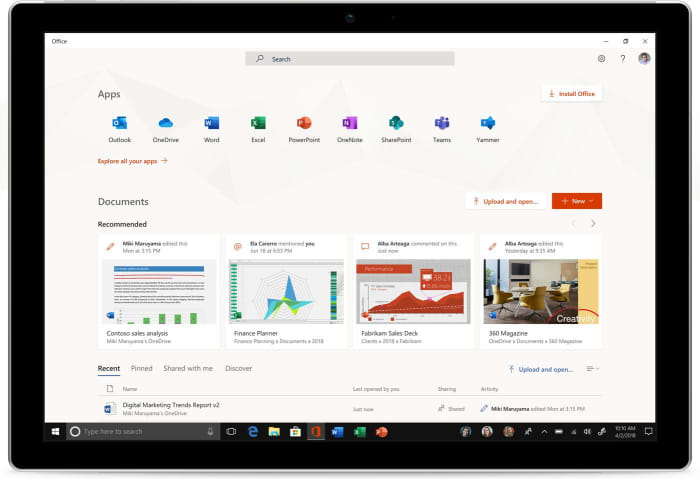
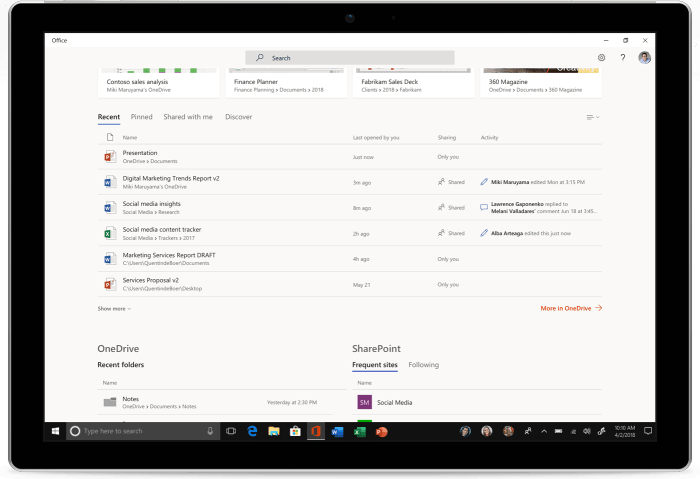
Microsoft has released a brand-new version of Microsoft Office, which will give Office 365 users a new way to connect the work they do online and offline.

Microsoft Office

Microsoft has released a brand-new version of Microsoft Office, which will give Office 365 users a new way to connect the work they do online and offline. The new office app is a progressive web app (PWA) and works like an app version of Office.com. If you have Windows 10 version 1803 or later, you’ll be able to try the new app, as it is only from version 1803 that Windows 10 is compatible with PWAs.

6

All your office apps right there at your fingertips

Microsoft is aiming the Office app at business and enterprise as it gives companies the ability to add branding to their office apps. It also gives users the ability to access other third-party apps via the new Office app. The app is available to individuals, however, and still has plenty to offer the personal user.

New Microsoft Office app screenshot

The key features for individuals revolve around the link the app provides between online and offline work and the ability to pin Office to the taskbar, putting all of your office apps right where you need them. The Office app will automatically open any office programs like Word or Excel locally, if they’re installed on the PC. If the program being accessed isn’t available locally, however, it will launch the web version of the app as found on Office.com. The same goes for files, too. It will act as a bridge between files stored on the PC and files found in OneDrive or SharePoint.

Microsoft has demoed the new app on YouTube. The demo shows the new Office app able to work on a device in airplane mode as it has enough content in the cache to load app icons and recommended documents.

The new Office app is designed to replace the My Office app, which comes pre-installed on all Windows 10 devices. If you still have the My Office app on your PC, you should see it automatically update in the next few weeks. If you want to get your hands on the app in the meantime, however, or if the automatic update doesn’t happen, you can download and install the app from the Microsoft store.

Office app screenshot

Although this new Office app is free, it doesn’t actually give you access to any of the popular office apps like Word, Excel, PowerPoint, Outlook etc. It is simply a way to manage these programs and you will still need to have paid to access the office programs or have an ongoing Office 365 subscription to use them. If you’d like to check out some free alternatives to Microsoft Office check out our guide below.

Gmail update will make your email inbox much more functional

Gmail is overhauling and updating its right-click feature.

Gmail is the preferred email client of 1.5 billion people around the world. That means any and all changes to Gmail will affect, in one way or another, the lives of almost a quarter of all people on the planet. We’re very happy to fill you in on what is going to be a very positive change to the way Gmail works.

Gmail Access now
8

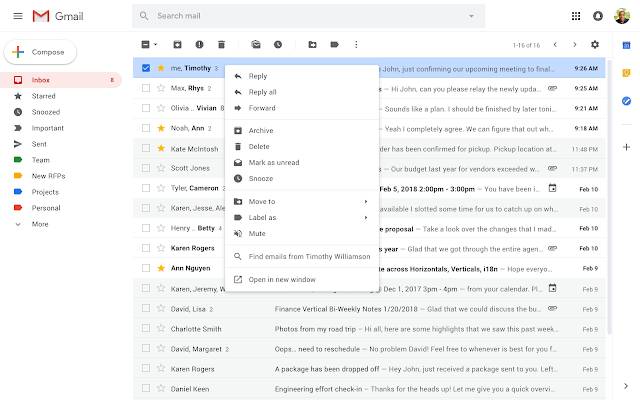
Gmail is overhauling and updating its right-click feature

I know what you’re thinking. That sub-headline is hardly a thing of rock and roll legend, but bear with me. At the moment, right-clicking in Gmail will only bring up a very limited four option menu. These are the Move to tab, Archive, Mark as Read, and Delete options. You can already see just how useful these features are in an email inbox context. They’re probably the most used email features, which is why Google likely chose them for its right-click menu in the first place. Having these features just one click away makes it a lot easier to stay on top of your inbox. Ask yourself though, why could right-clicking not do more?

It seems that is exactly what Google has been asking itself recently and now it looks like the internet giant has come up with a few answers. In a recent blog post, Google announced that it has begun a phased roll-out of a ton of new features for Gmail, including a new and improved right-click menu. Yep, it is all happening already. There is a chance the new features will already be available on your Gmail. If they’re not, all you’ll have to do is be patient. They’re on their way.

new improved right-click on Gmail
Image via: Google

Once the update hits your Gmail account, what can you expect to see? The new right-click menu will include a whole host of new options like Reply, Reply all, Forward, Archive, Delete, Mark as unread, Snooze, Move to, Label as, Mute, and Open in new window. These are all commonly recognized email tools, but you’ll also see a cool new feature, which will allow you to search your inbox for all emails written by the author of the message you’ve right-clicked on.

The Mark as read option is no longer on the right-click menu, which means now you’ll have to select the email you want to mark as read, using the tick box to the left of the message in your inbox. Then you’ll need to hit the Mark as read icon at the top of the page, just below the search bar.

All-in-all this is a small change, but it is one that could have a big effect on the productivity of a lot of people all around the world. Let us know if you think this will affect how you use Gmail in the comments below.

WinRAR bug put half a billion users at risk

This WinRAR bug has put half a billion users at risk. Here’s how to know if you’re affected.

winrar threat

WinRAR is one of those programs that almost everybody has. Nobody can remember where the file compression program came from or how they got it, a lot of people don’t even know it does, it is just there on their PC and always has been. Unfortunately, there is bad news for all of us as security experts Check Point have just found a bug that has been sitting in WinRAR for over 19 years.

This WinRAR bug has put half a billion users at risk

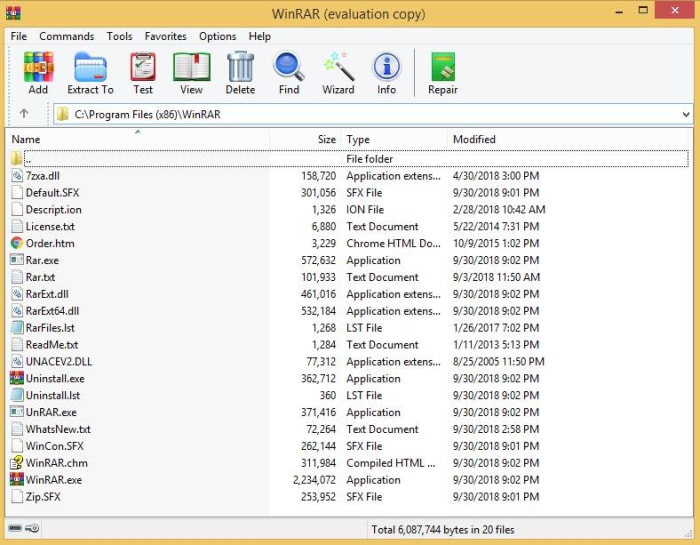
The researchers at Check Point have discovered something rather disturbing. Buried in one of WinRAR’s code libraries is a flaw that could allow hackers to execute a malicious code whenever a “booby-trapped” file is opened with the program. What’s worse about this whole thing is that the code library in question, UNACEV2.dll, hasn’t been used since 2005.

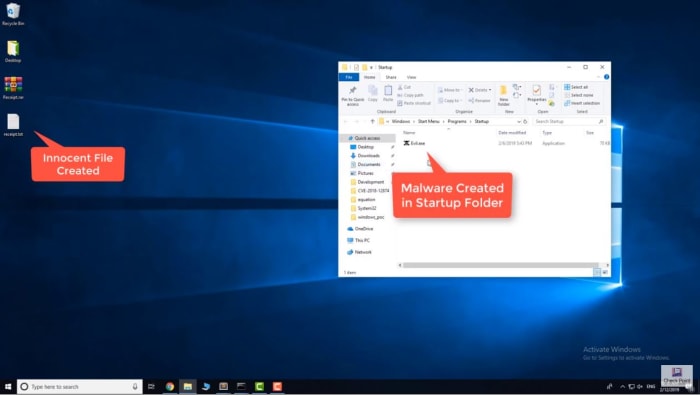
According to Check Point, the bug meant they were able to insert a file into the Windows’ startup folder. This file would then start automatically when Windows was booted and wouldn’t need any sort of administrator’s privileges to do so. Theoretically, this file could be used to grant any third-party full control over the victim’s computer.

WinRAR screenshot
Image via: Check Point

The real shocker is just how many people could have been exposed to the vulnerability. Check Point puts the number at somewhere around 500 million. Yes, half a billion people could have had their computer taken over using this newly discovered WinRAR vulnerability. That means you’ve probably been at risk for the last twenty years.

If you think the fact that this bug is so old means you’re in no rush to deal with it, think again. The fact that the vulnerability is now public means there is much more of a chance that hackers will try and exploit it. This doesn’t mean that Check Point has acted irresponsibly by releasing the details, on the contrary, Check Point notified WinRAR about this vulnerability some time ago, and WinRAR has already taken action to fix it.

Demo on WinRAR bug
Screenshot from video demo of the bug on YouTube

The WinRAR website says, “Nadav Grossman from Check Point Software Technologies informed us about a security vulnerability in UNACEV2.DLL library. Aforementioned vulnerability makes possible to create files in arbitrary folders inside or outside of destination folder when unpacking ACE archives.” WinRAR has since dropped the UNACEV2.dll code library and no longer supports the ACE archive format, which opened the door to nefarious action. Furthermore, WinRAR has released a patch for the problem, WinRAR version 5.70 beta 1, which you can download here.

We highly recommend that if you have WinRAR installed on your PC, you update it immediately. Stay safe, people.

New Chrome extension protects your passwords

New Chrome extension “Password Checkup” will automatically detect if your password has been exposed by a data breach

password

Passwords are one of the major weapons we have at our disposal in the battle to keep us safe and secure when we’re online. Strong passwords include many different characters, both numbers and letters, and should be at least eight characters long. We should also change our passwords regularly to keep ourselves as safe as possible.

The thing is though, that even if we have strong passwords that we change regularly there are still ways for our security to be undermined. Massive data breaches like the one that struck Yahoo could see our security credentials end up in the wrong hands, and our accounts compromised until the next time we change the affected passwords. Fortunately, Google is here to help us prevent such situations arising.

New Chrome extension “Password Checkup” will automatically detect if your password has been exposed by a data breach

Google has recently fallen victim to its own data breach, which led to the closure of the search giant’s long-suffering social network Google+. The bug exposed over half a million Google+ user accounts and exposed their data to third-parties.

It is unsure whether this lies behind Google’s move to develop a password checking Chrome extension, but the blog post announcing the move had this to say, “We built Password Checkup so that no one, including Google, can learn your account details. To do this, we developed privacy-protecting techniques with the help of cryptography researchers at both Google and Stanford University.”

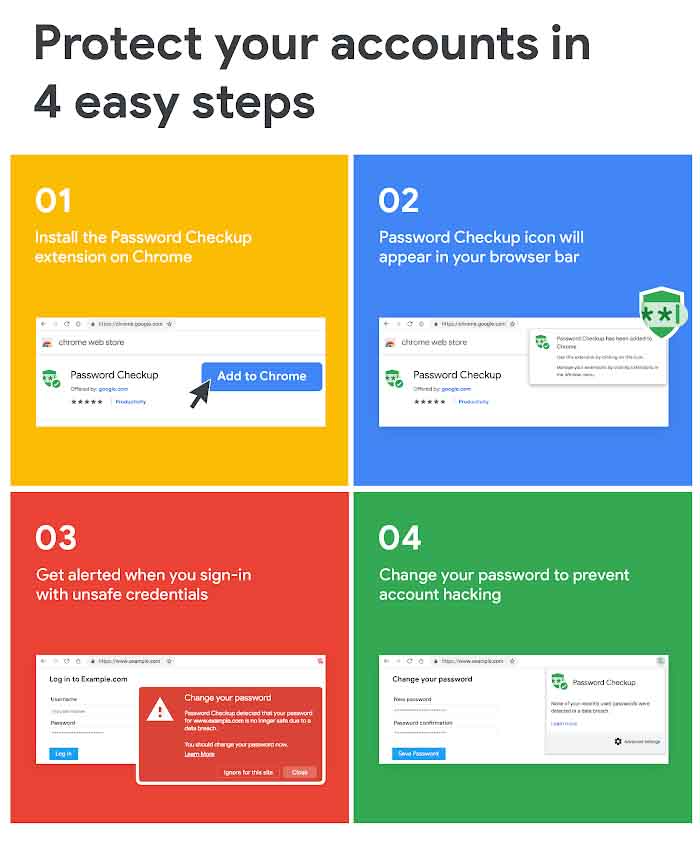
screenshots from google password checkup

The way the new extension works is by cross-referencing every login detail you use against a database of over 4 billion security credentials Google knows to be compromised. The extension requires little-to-no effort once it has been installed. You’ll notice the icon in the top-right corner of Chrome and that will be it. The extension will then work in the background automatically, whenever you sign into websites. If it detects a compromised set of login details, it’ll alert you and prompt you to change them.

According to The Verge, the tool works with Chrome’s password manager and all passwords are stored in a hashed and encrypted form. Also, all warnings that the extension displays are local to the user’s system. Google has announced, however, that it will collect some user data on how the new extension affects user behavior. This will include data on whether an alert prompts action from the user like the changing of the compromised security details.

Password Checkup is available now as an extension for the Google Chrome browser. When announcing the extension, however, Google was quick to point out that this is still an early version of the tool and that it will continue to develop and refine it further over the next few months.

Google Chrome could disable your ad-blocker

Which ad-blockers is Google Chrome going to kill off?

News has been coming through recently that Google has some rather big changes planned for Google Chrome. Some of the changes will affect the way Chrome extensions work on the web browser. And there is one change in particular that is bound to ruffle some feathers. Changes to certain Google Chrome pieces of code will block a number of ad-blocking extensions from working in the future. Many ad-blockers will stop working so it is worth our while to look again at which are the best ad-blocking extensions for Google Chrome.

Which ad-blockers is Google Chrome going to kill off?

A developer named Raymond Hill was the first to raise the alarm about the upcoming changes to Chrome. His concern relates to his own extension including uBlock Origin and uMatrix, which he says will be unable to exist once the changes kick in.

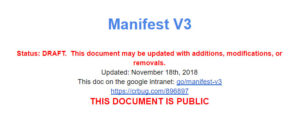
In a document called Manifest V3 Google has outlined what the change will look like and how it will affect the way you use the Chrome web browser. The key change relating to ad-blockers affects what extensions will do and which sites they can interact with. The other main factor is how permissions for extensions will be affected.

Google ad blocker information

Ad-blockers usually use one of two permission methods, webRequest and DeclarativeNetRequest to control what shows up on your web pages. This change will shut out all ad-blockers that use webRequest. The move is designed to stop extensions that claim to be one thing but then turn out to be malicious once they’ve been downloaded, but will also affect ad-blockers that aim to hide certain aspects that the web pages you visit want to show you.

The key difference is that webRequest ad-blockers allow the extension to block or modify the signal coming from the website’s servers. This is behavior that Google wants to block. The DeclarativeNetRequest ad-blockers, however, allow Chrome to handle network requests, which is still fine.

ad blockers for chrome
Chrome extensions are about to go through a big change. Including ad-blockers.

According to Hill’s blog post, which raised his issue’s with the change this will also change what ad-blockers will be able to block. Hill believes limiting ad-blockers how Google plans to will stop them from being able to block media elements larger than a certain size, disable JavaScript execution, and removing outgoing cookie headers.

Which ad-blocker should you choose?

The good news is that Adblock Plus won’t be affected by the change like uBlock origin and uMatrix will be. If you want to ensure your ad-blocker will work once Google implements these changes you should activate Adblock Plus. The bad news, however, is that according to Business Insider Google, Microsoft, Amazon, and Taboola pay Adblock Plus to whitelist their ads.

The Microsoft Edge mobile browser will soon tell you if you are looking at fake news

How to use the new Microsoft Edge mobile fake news detector.

edge browser fake news detector

Fake news is like the bad smell that just won’t go away. It has helped subvert democracy across the western world and continues to cause terrible local problems in countries like India and Malaysia. Efforts to curb the spread of fake news have gained urgency over the last few years, but the problem is still growing and spreading. This latest announcement from Microsoft comes as welcome news.

Microsoft is pairing up with the company NewsGuard to add a new feature to Edge on mobile that automatically flags up fake and untrustworthy news sites. The feature has been available as a desktop Edge plug-in for a while now. The NewsGuard extension is now being built into the Edge mobile browser for both Android and iOS. According to Endgadget, the update will be rolling out in stages and Edge users will receive a notification about the update soon.

The way NewsGuard works is by rating news websites across various criteria. These include things like repetition of false content, misleading headlines, and transparency. These criteria are then pooled to create an overall trustworthy rating, which is displayed as a color-coded icon. A green icon indicates the news source is trustworthy, while a red icon will show if the source is unreliable. Clicking the icon will also open up what NewsGuard calls a “Nutritional Label,” which provides a more detailed credibility and transparency rating.

Microsoft first announced the partnership back in 2018 as a part of its Defending Democracy Program. Bringing NewsGuard to mobile apps is a big step for the fake news fighting democracy defenders. In the press release announcing the move to mobile, NewsGuard Co-CEO Gordon Crovitz said, “Releasing on the Microsoft Edge mobile apps is a milestone in the fight to bring consumers the information they need to counter false information, misinformation and disinformation online… We appreciate the opportunity to work with Microsoft, which is taking the lead among technology companies in providing its users with the information they need to counter unreliable news sources.”

How to use the new Microsoft Edge mobile fake news detector

Once the NewsGuard feature lands on your version of Microsoft Edge, you’ll have to open up Edge and go to the Settings menu. When you’re there, you’ll have to enable the new news rating option. Once active, this will display the rating icon for each site in the address bar. To see the more detailed version of the rating, simply click on the ratings icon. The more detailed credibility and transparency score will show information like who owns the site, who finances it, and more information about the credibility of the content.