NordPass: A great password manager gets even better

When we first reviewed NordPass, we mentioned that compared to other password managers, it was pretty barebones, lacking a few of the bells and whistles that set other such programs apart. Thanks to a refresh that loaded the app with useful, powerful features, NordPass is now the one to beat in the password-storage space.

Why NordPass?

Well, for starters, it’s free. You can download a full-featured version of the app on pretty much any device you want across Android, iOS, Mac, PC, and Linux platforms. The only limitation with the free service is that you’ll have to choose only one device, as multiple devices require an upgrade to the Premium Plan, which currently costs a reasonable $2.50 per month based on a two-year plan. 

But starting with one device is a great way to try out the service without spending a penny. 

It’s also super secure

You might have heard of NordVPN, which is our top pick for a VPN (virtual private network) provider. One of the reasons we like the company so much is that it has the best suite of online protections out of all competitors. The same holds true for its password manager. Your data is encrypted by the cutting-edge XChaCha20 encryption algorithm. This encryption protocol is used by tech giants like Google to protect its data and it has yet to be cracked by a hacker – and likely never will be. Additionally, NordPass has just completed a comprehensive security assessment from an outside agency and got top marks. 

So what’s new? 

NordPass has incorporated some winning features in the most recent release of the app.

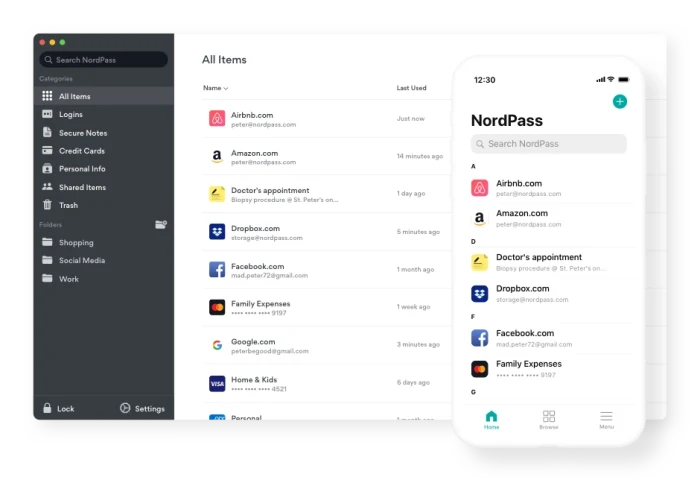
ScreenshotYou can now store your personal data in the app and then use it to easily autofill any forms that you come upon while surfing. It also allows you to securely store your credit card details so that if you find yourself without your wallet, you can still get at your digits. The password manager itself now incorporates a biometric scanner so that you can access your data using physical details like your fingerprint (or you can still use a master password); an OCR scanner to allow the easy import of credit card information; an autosave feature; and a vault in which you can save secure notes.

Perhaps most impressively of all, the app can now import all your password details from your browser, so there’s no need to start from scratch. And speaking of browsers, a new Safari extension joins those for Chrome, Firefox, Opera, and Edge.

Still to come

Those improvements to NordPass are impressive enough, but the company is not stopping there. In the coming months, users will get 3GB of free cloud storage for keeping important documents, photos, and other files safe and shareable across devices. A password health checker will also be released that scans your current passwords and lets you know where there is room for improvement. And finally, a data-breach scanner will let you know if a site on which your data is stored has been hacked. 

VPN Proxy Master: Safe, Powerful and Free

Download VPN Proxy Master for free for mobile and upgrade to premium to connect up to 5 devices. Surf the net, stream, and download files safely and anonymously.

You’ve likely heard about VPNs – virtual private networks that let you tunnel into remote locations to access the internet while protecting your real identity and location. You may even use a VPN on your computer already. But have you thought about protecting your mobile devices as well? If not, VPN Proxy Master can get the job done for you easily, effectively and at no cost.

 What it is

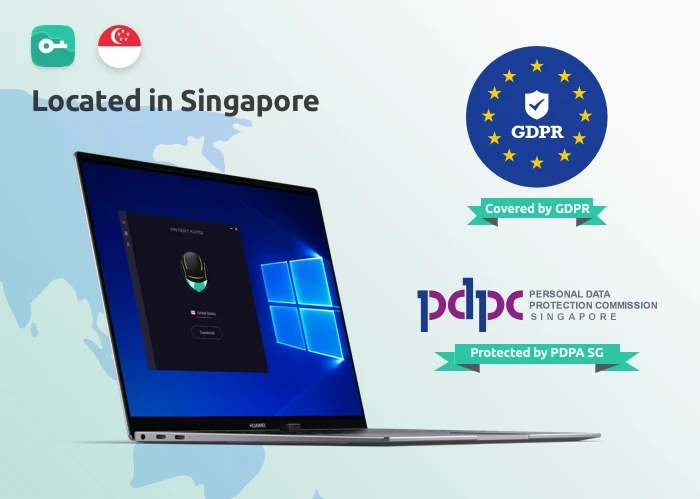
VPN Proxy Master is a VPN service provided by Lemon Clove Pte. Limited in Singapore. As such, all activity that routs through their servers are protected by the EU’s General Data Protection Regulation and Singapore’s own Personal Data Protection Act – both pieces of legislation meant to safeguard the privacy of individuals surfing the internet.

VPN Proxy MasterWhile that should give you some confidence about VPN Proxy Master, you might be more interested in how the software actually works. And we have one answer to that question: simply.

After opening the app on your Android or iOS device, you’re presented with an attractive screen showing a spinning globe. You simply press the “Connect” button and the software will automatically connect you to a VPN server somewhere in the world. To cancel the VPN link, pressing the “Disconnect” button does the trick. 

 Under the hood

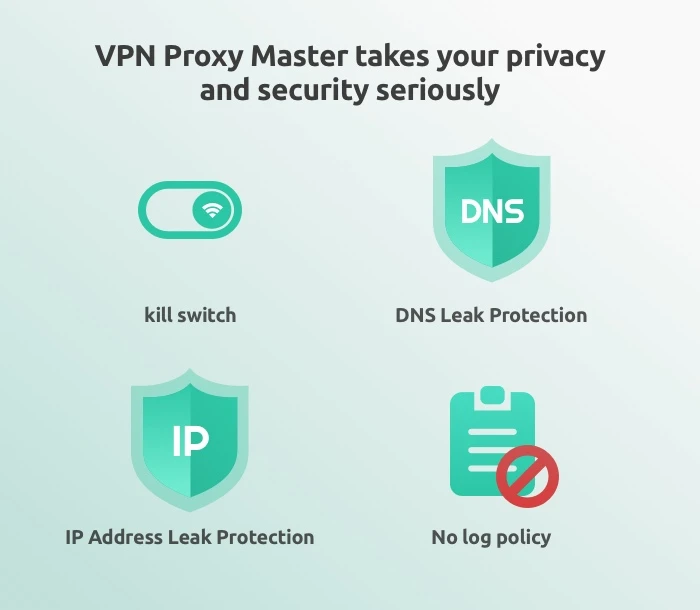
For a free piece of software, VPN Proxy Master delivers quite impressive features. You get: military-grade encryption on all your online activity; DNS leak protection; IP address leak protection; a no-log service; access to servers around the world; and industry best connection protocols that make both your connection to the service and your surfing speeds truly zoom

VPN Proxy MasterWhile most of these features are common in many VPN services, VPN Proxy Master also allows unlimited video streaming from online entertainment providers – including Netflix and Disney+. This is a feature not all VPN services provide, but you’ll have to upgrade to the Premium version to get it (see below). Fortunately, thanks to a Grand Launch Promotion Sale, VPN Proxy Master’s Premium service is now the cheapest of all the major VPN providers

Options

VPN Proxy Master

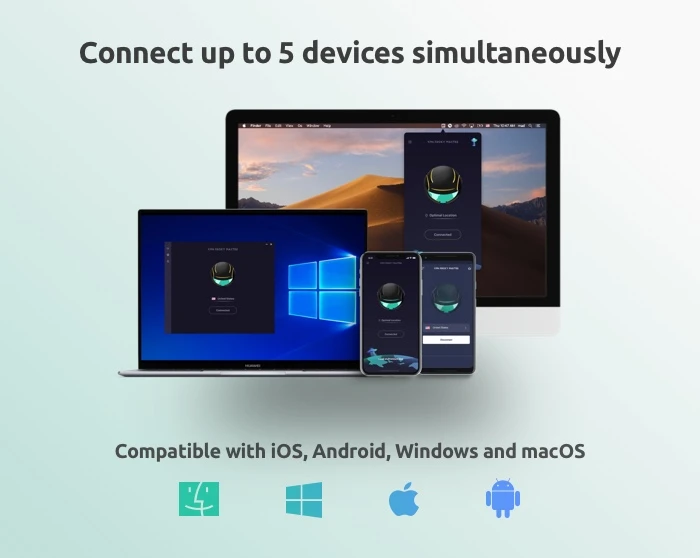
While VPN Proxy Master shines in covering both iOS and Android devices, the service can also be downloaded to both Mac and PC desktops

Additionally, we certainly recommend that you download one of the free versions of the software to give it a try. But be advised that the mobile apps will be chock full of advertisements that seem to appear after almost every tap you make. All the free versions of all the software also have caps on the amount of data you can protect each day (500 MB) and doesn’t allow you to choose your own servers. 

If you like the software, then you can upgrade to the Premium version, which provides unlimited VPN protection; access to 6000 servers in more than 40 locations, special servers for accessing Netflix and Disney+; an internet kill switch that terminates your online connections if the VPN drops for any reason; the ability to connect up to five devices at once; 24/7 online support; surfing speeds that are four times faster than the free version; and a WiFi auto-protect feature that protects you while using public WiFi.

Note: The ability to connect five devices at once is only available with: VPN Proxy Master iOS, VPN Proxy Master macOS, VPN Proxy Master Windows, and VPN Proxy Master Pro Android.

The Premium version of the software is currently available with a 7-day trial for just $0.99 with no contract required, neither commitment: you can cancel anytime.

VPN Proxy Master
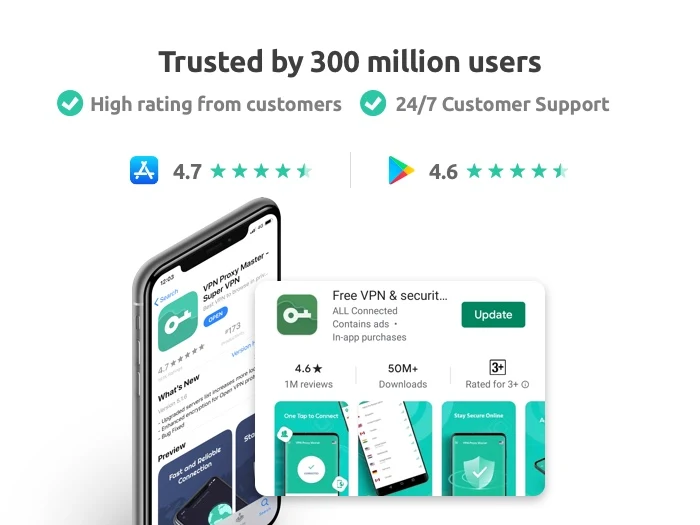
VPN Proxy Master is trusted by 300 million users and has a 4.7/5 Apple App Store rating and 4.6/5 Google Play Store rating, so we’re pretty sure you’ll be satisfied with your download no matter which version you choose.


IObit Software Updater is even stronger with its third release

If you’ve never heard of IObit Software Updater, now’s a great time to download the helpful free software. And if you’ve been a regular user, you’ll want to redownload the program. The reason for both is the same: Version 3 has just been released and now it’s an even more powerful and comprehensive software management tool than it’s been before.

What is IObit Software Updater 3?

Before we tell you about what’s new, we thought you should know a little about the program’s capabilities. 

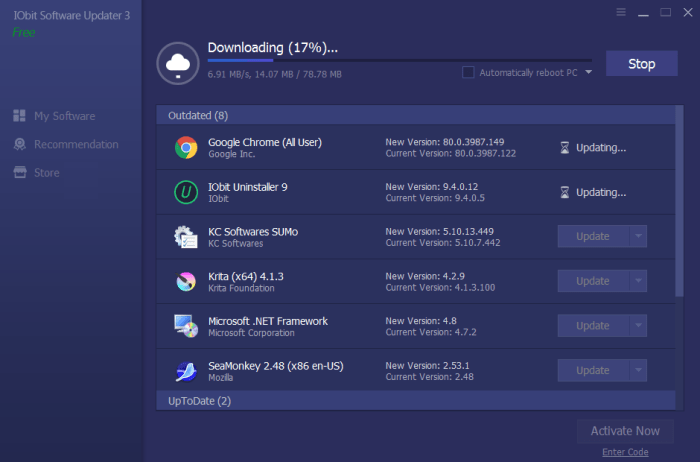
IObit Software Updater is a light yet effective program that can be installed on any computer running Windows (10, 8/8.1, XP or Vista). It operates in the background to automatically keep your applications up-to-date, so that you never miss a critical release that might bring more stability to your machine, or offer enhanced features. 

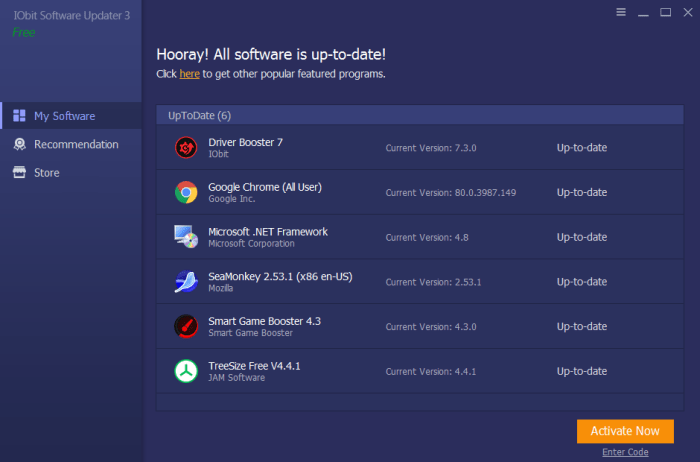
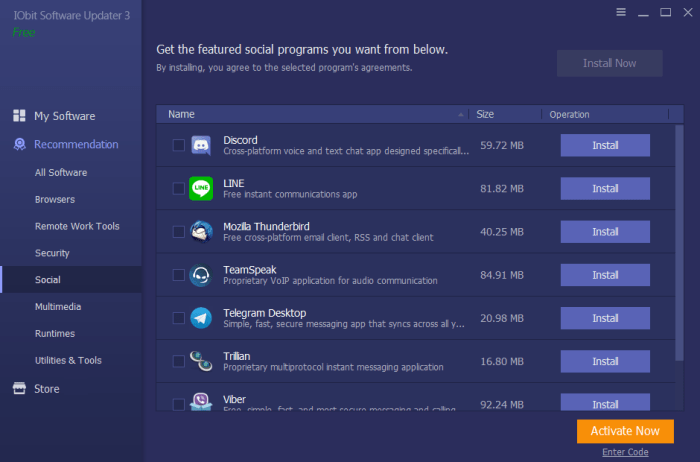
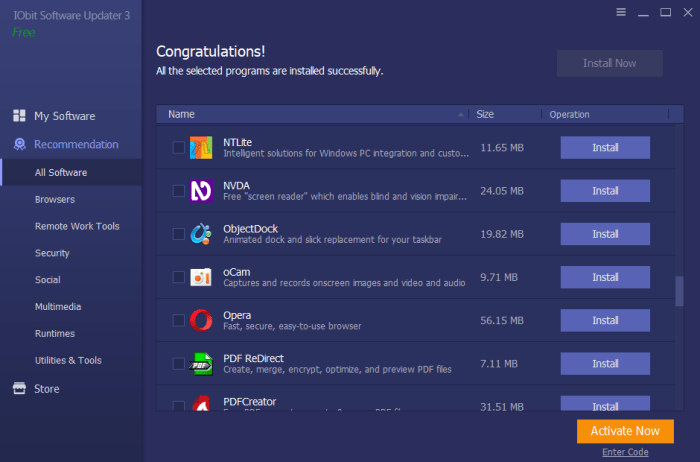
Software UpdaterIObit Software Updater also ensures that any new software you download is a correct and clean version for your operating system – and not a version that might be a scam or one filled with ads or bundleware. The program also helps you navigate the complicated world of software options by categorizing trusted downloads into distinct categories. So, instead of combing the web and reading dozens of reviews, you can simply pull up the category in IObit Software Updater (for example, for social, multimedia or remote work tools) and download the program that sounds best for your needs.

software updaterFinally, IObit Software Updater allows you full control over which programs are auto-updated and which aren’t. This allows you to keep a version of a program that might suit your needs better than a newer option, while choosing to have the very latest releases of other programs.

software updater

What’s new?

When IObit Software Updater was last updated to version 2, it included a 180% increase in the amount of software it could monitor, download and keep up to date. Now, with the release of IObit Software Updater 3, this database has been increased another 150% – meaning that the program’s capabilities have increased over 300% since its initial release. This is quite a commitment for a company to make in a free software tool.

Also improved in this version is the amount of time it takes to download new programs and updates. This too has been ramped up by 150% over version two.

Software Updater“IObit Software Updater 3 is a very light and simple tool for those who want to install or update software for their Windows computers”, said Bing Wang, Product Director at IObit. “Through the program, users can get the most popular software with a few clicks. IObit Software Updater 3 saves users’ time and effort and keeps their computer away from bundleware, infected installers, and annoying ads while installing or updating software.”

While IObit Software Updater 3 is quite robust as freeware, users can also upgrade to a paid option for a discounted price of $10.00. This allows users to schedule software updates, access 24/7 customer support, and it removes the ads that come with the free version. A smart strategy would be to start with the free version and upgrade if it turns out you need or want the expanded functionality – or if you find the ads too distracting.

Is the free version of Ad Guardian Plus all you need for surfing sanity?

If you’ve ever shopped for an item online and then had an ad for that same item appear on practically any site you visit, then you’ve experienced the complicated world of online tracking. At their best, browsers that track your movements across the web can serve up ads that are relevant to your interests. But more often, ads are major annoyances – sometimes advertising the very thing you just bought.

Ad Guardian Plus is a lightweight yet powerful Windows-only solution to swatting trackers and ads off your devices. BitGuardian, the company that developed the software offers a free and several paid versions of Ad Guardian Plus. Here we’ll tell you what you need to know to choose the right version for your online lifestyle.

The free version

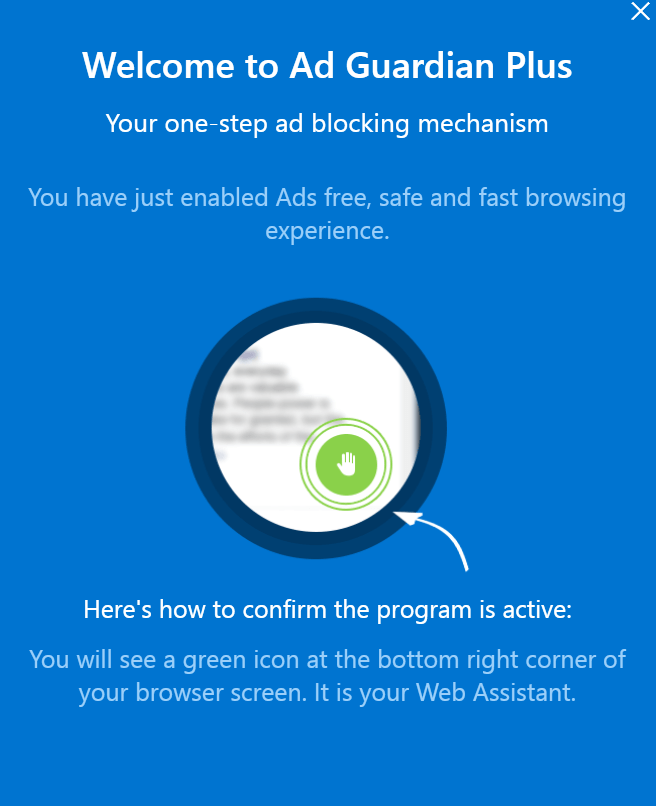
While you can read our complete review of Ad Guardian Plus here, what you need to know is that the software offers free-for-life cross-browser ad blocking. Unlike plug-ins that need to be installed on each browser and device you use, Ad Guardian Plus works at the network level. You install it once on your machine, then no matter which browser you use, you’ll be protected from sites serving up ads, which can often slow down your browsing experience. 

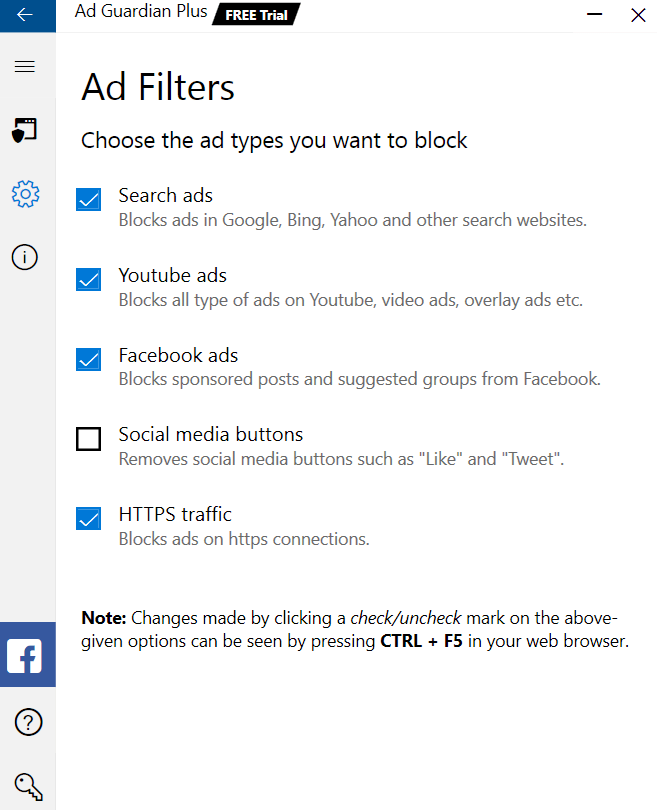
Ad Guardian PlusAmazingly, this function of the software is completely free. After you install the software package, Ad Guardian Plus gets to work in the background, automatically doing its job blocking ads. Installation is quick, hassle free, and simple. You can tailor which ads you’d like to block and even let the software know if there are sites on which you don’t want it to function.

Ad Guardian Plus

Paid Versions

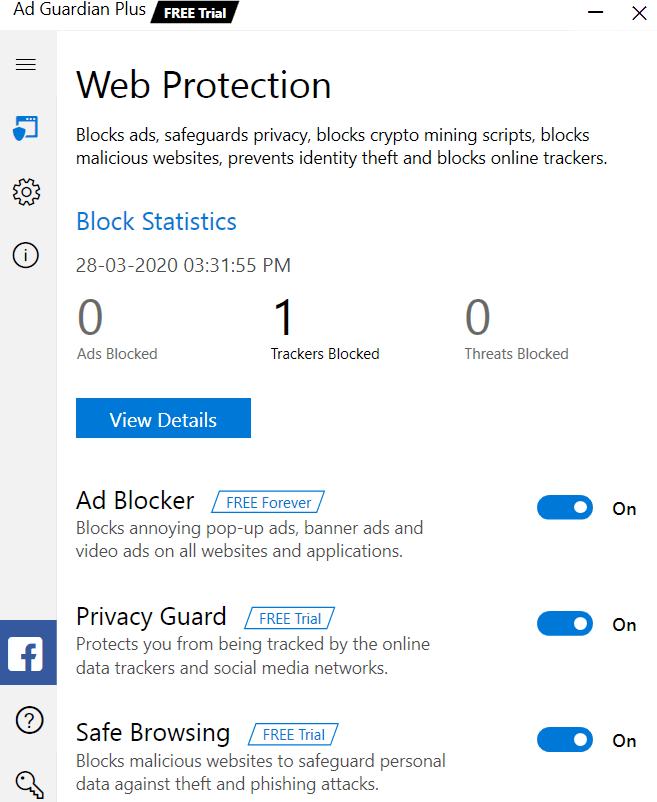
Stepping up to the Basic version of Ad Guardian Plus will get you Privacy Guard. This function adds an extra level of browsing protection by blocking trackers from social media sites, YouTube, and any other website you visit. This means that aggressive marketers won’t know which sites you frequent, what you’ve liked on Facebook, what videos you’ve watched, or what you’ve shopped for.

This Basic level of subscription, which costs $9.25 for a month-by-month payment plan, also adds on Safe Browsing, a function that blocks suspicious websites and protects you from malicious activities like phishing and data theft. You also get a 60-day money-back guarantee and email support.

Ad Guardian Plus

Stepping up to a Standard Plan ($5.25/month billed in six-month intervals) adds 24/7 live support

Going for the Premium level of subscription ($3.25/month billed as one annual payment) throws in a free copy of McAfee Internet Security, which is top-level privacy protection software.

Summary

So, which plan is right for you? 

If you’re a casual internet user who’s not too concerned about tracking, and you’re careful with how you share your personal information online, the free version may be just fine for you. In fact, we can’t think of any reason why you shouldn’t add that version to your PC right now

If you are a bit more worried about your online privacy and don’t necessarily want your browsing habits shared with marketers and corporations, moving up to the Premium plan simply makes sense. Not only is the average monthly price the lowest of all options, but the protection is top-notch, especially when you consider the inclusion of McAfee Internet Security, a $75 value.

Perhaps the best strategy is to download the free trial version of Ad Guardian Plus, which lets you try all the features it offers free for a full week. Then you can decide exactly what you’d like to keep and what, if anything, you’re willing to do without. 

PDF Reader is packed with every PDF editing, creating, and converting tool you could wish for

Even though PDFs were first created by Adobe in 1992, many other software companies have since built programs that work with the file type. So while you were once forced to use only Adobe’s software to work with PDFs, now you can choose from among dozens of both free and paid programs to do the same thing. This allows you to find just the right solution for your needs and budget. 

Chances are pretty good though that the software you choose will be PDF Reader by Kdan Mobile Software. With more than 60 million downloads worldwide, it is one of the leading PDF manipulation tools on the market, and for good reason. 

Every PDF tool you could possibly need

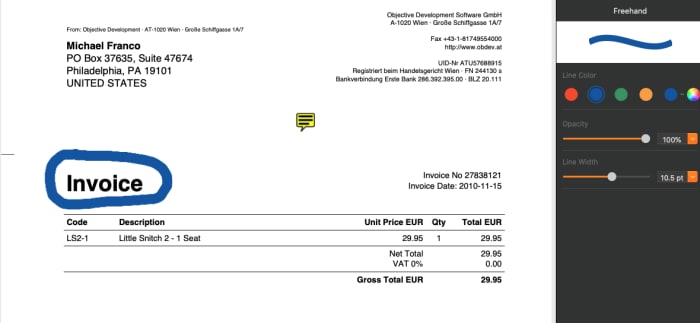
Want to move text around in a PDF? Increase the font size of a particular line? Change the spelling of a word? Use a freehand drawing tool to mark it up? Sign it using your finger, your trackpad or your mouse? PDF Reader has you covered. It does all of this and much, much more

One of the ways in which PDF Reader distinguishes itself from the competition, is just how intuitive it is to use. Colorful icons at the top of the screen help you find the right tool for nearly any task, and then drag-and-drop functionality makes it a breeze to move things wherever you want them. 

PDF ReaderYou can add images, tables, form fields, buttons, stamps and shapes with ease. What’s more, the formatting toolbar that appears at the side of the screen lets you adjust the size, color and opacity of many items you drop into your document like lines and highlights. And, as you’d expect with any PDF processing software, you can also add sticky note comments, as well as cross out, underline and highlight text. A hideable thumbnail panel on the left lets you easily navigate and rearrange pages. 

A nice additional feature of PDF Reader is the inclusion of a “night mode,” which makes the software easier on the eyes when using it in dimly lit conditions.

PDF Reader

Robust file management

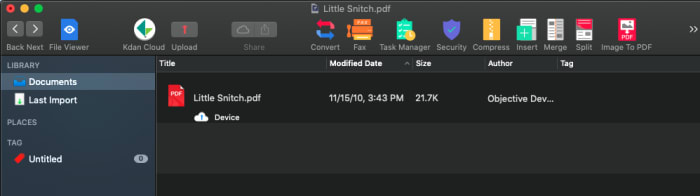
Another way in which PDF Reader stands apart from the competition is with its impressive file-management system. By hitting a toggle button at the top of the screen, you enter the file-management area where you can tag and organize any files you add.

PDF ReaderHere is where you can also import practically any other file type to create a PDF; compress your files; add or delete pages; merge different files into one PDF; adjust security settings; and even fax or email your document right from the program. When you want to save a document, you can do so with easy conversion tools that turn your PDF into a Microsoft Office, iWorks, ePub or text or image files with a click. 

Free vs Paid

The free version of PDF Reader might be satisfactory for many users. You can mark up any PDF, add comments and notes, insert form elements, password protect documents; and use the freehand signing tool. It’s a much more robust software package than what is offered in Adobe’s free PDF software. 

However, if you want even more functionality, upgrading to the paid version might be a good bet. Upgrading moves you to Kdan’s Document 365 subscription for $5/month billed annually, which works across all operating systems including iOS, Android, Mac and Windows 10. 

Upgrading also adds in all of the really fun features including: converting PDFs to ePub, Microsoft Office, HTML, JPEG and PNG files; using OCR scanning to allow text to be edited, moved and deleted; adding backgrounds and watermarks; splitting and saving PDFs; encrypt and decrypt PDF files; sending files as faxes; and converting your PDFs to a wide range of other file types. 

Fortunately, you can download a free, fully-functioning 7-day trial of the software to see just how many features you’ll use before choosing the version that’s right for you.

The latest release of Smart Game Booster will turbocharge your computer’s performance

As any gamer will tell you, speed is critical. Whether you’re hunting aliens, driving an F1 car, or fighting off enemy troops, you need your computer to function at a flawless level with no glitches, slowdowns or stalls of any kind. By optimizing your computer’s performance in several ways and overclocking (see below) several of your computer’s functions, Smart Game Booster will keep you at the top of your game. And its latest release has some extra goodies that make it an indispensable piece of software for any serious gamer – or PC user.

What Smart Game Booster does

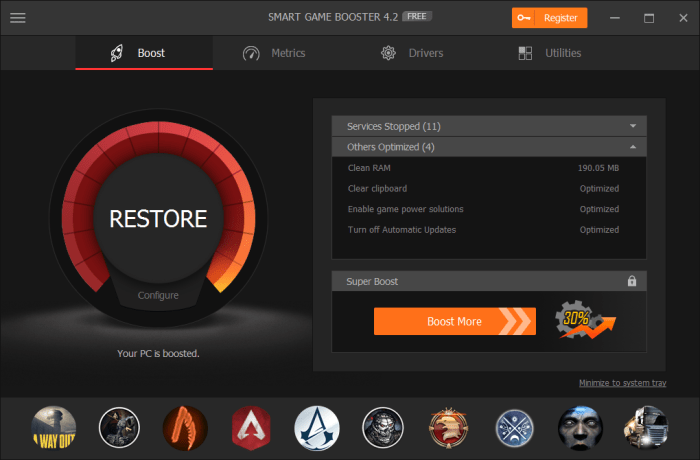
First and foremost, Smart Game Booster overclocks your CPU, GPU (graphics processing unit), and your memory card. Overclocking is a process in which these systems are pushed to behave at a higher level than that set by the manufacturer when you received your computer. The result is increased performance and often, an increase in your frames per second (FPS), which not only helps you game glitch free, but it will make your games look better as well. In the latest version of Smart Game Booster, this feature is built in as an easy slide switch called Super Boost.

Smart Game Booster also shuts down background operations whenever you launch a game, so that maximum system resources are directed to your gaming, rather than being wasted on non-essential functions. And, because overclocking can cause your computer to run a little hotter, an onscreen temperature monitor is now included. This helps you keep your CPU in the recommended range of between 75-80° C and your GPU lower than the recommended temperature of 85°C. If you see the range climbing higher on the monitor, you’ll know it’s time to give your system a rest – or install a better cooling system.   

Smart Game Booster

What else is new

Smart Game Booster 4 has a collection of new tools that seriously clean up your PC for some seriously fast gaming.

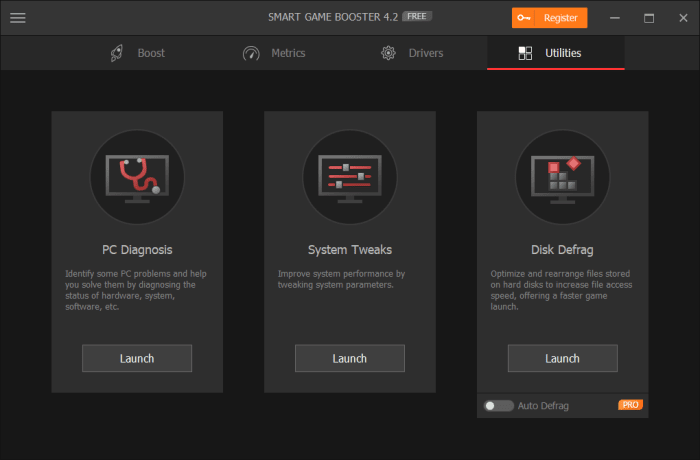
For starters, it has a disk defragmenter utility, which organizes data on your hard drive to make it more accessible and efficient, which naturally makes it faster. The new version of the software also contains a PC diagnosis feature that lets you examine your entire system at a glance, and a system tweaks feature that lets you further boost your computer’s speed by allowing you to set different system parameters.

Smart Game Booster

On top of this, Smart Game Booster 4 lets you easily take still shots or videos of your gaming exploits and comes with a do-not-disturb feature that means the software won’t interrupt you if you’re working on another task in full screen mode. The software also automatically checks popular gaming sites for new releases and now has a more powerful detection algorithm, so that you’ll always know what’s new and updated from your favorite sites like Steam, Origin, Epic and more. 

Great for non-gamers as well

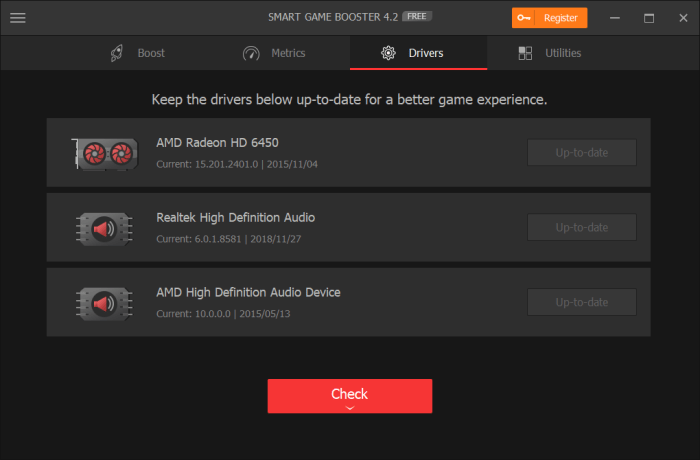
While Smart Game Booster 4 is aimed at improving the gaming experience, it is also valuable software for anyone who wants to boost his computer’s performance. With the disk defragger, the system tweaks and PC diagnosis, the software can improve computing performance for anyone. On top of that, the new release also automatically checks for driver updates so that the components in your computer are always functioning their best – another valuable benefit to all PC users.

Smart Game Booster

Get the deal

You can download a trial version of Smart Game Booster 4 to see just how much it can improve your gaming – and computing – experience. After that, a license for one computer is being offered for Softonic readers for just $14.99 per year, while a license for two computers is a very reasonable $19.99.

New PDFelement 7: An easy, affordable way to unlock the power of the PDF

PDFelement 7: Create, edit and manipulate PDFs the easy, affordable way. Free for iOS and Android!

As the world continues to go paperless, it’s more crucial than ever that you have access to a software program that can handle the most common file type used to share statements, contracts, and other documents: PDF. While you can always use Adobe Acrobat from the company that created PDFs, you might find that the price tag is a little too high or that the software is a little too complicated.

Enter PDFelement, now in its seventh release, which provides you with every PDF tool you could possibly want at a much more reasonable price, and with an interface that will have even novices creating, changing, and marking up PDFs like pros in no time.

Edit all aspects of a PDF

One of the most frustrating parts of working with PDFs has been the inability to edit them; PDFelement 7 eliminates this concern. The software basically turns a PDF into a word processing document. You’re able to move text around and alter its font, color and more; permanently hide text or images using the “redact” feature; add text and images; add signatures; and, turn any part of the document into a hyperlink.

PDFelement

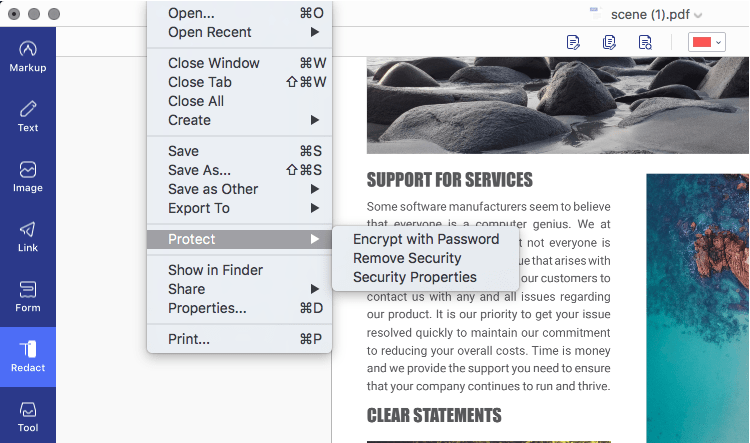
Once your document is edited, you can use the extensive PDF protection tools to secure it. Applying password encryption, redacting confidential data, restricting print, edit, and other permissions are quite simple and have its own section in the File menu (Mac version) or in the top toolbar in the Protect tab (Windows version).

Create PDF from or Convert PDF to a range of sources

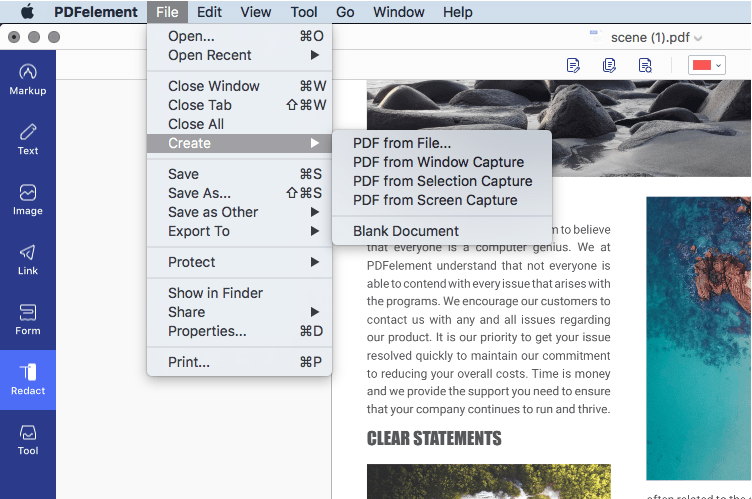
PDFelement 7 not only lets you fully manipulate existing PDFs, but it allows you to convert other document types to create PDFs, as well as letting you start completely from scratch. To do this, you can start with a blank document, or the software can create a PDF from a screen capture, a window capture, or a selection capture, as well as from any image file, Microsoft Office file, scans, a connected scanner (scan to PDF) or HTML code.

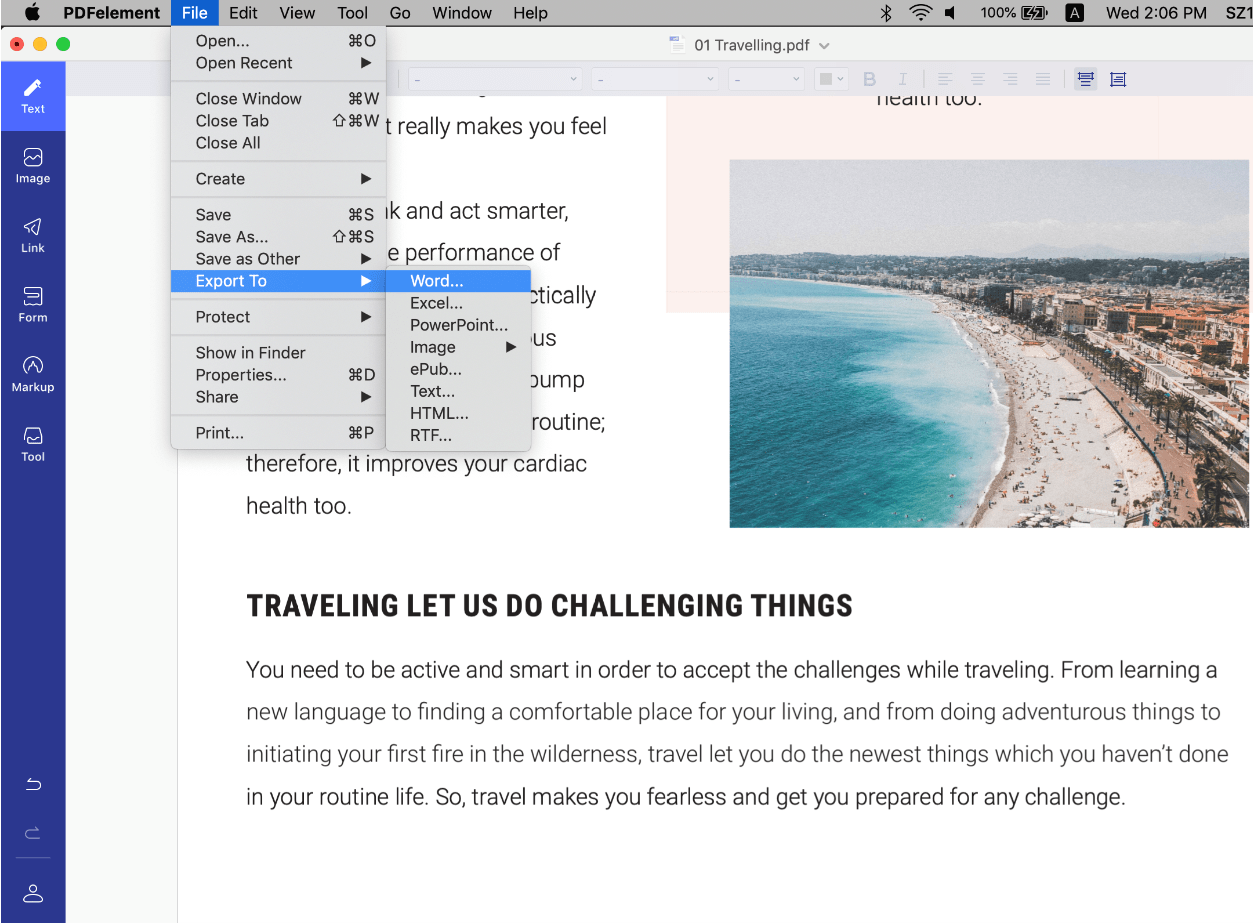
The Convert PDF function in PDFelement 7 is a powerful tool for communication because not everyone has a premium PDF editor. Some stakeholders in a particular process may require the information in a different format, such as Excel or a plain text file. In such cases, the improved conversion engine makes sure that the output file preserves the integrity of the source PDF. The output and input file options are extensive in PDFelement 7, including Excel, Word, PPT, HTML, EPUB, Text, and other file formats, making it a holistic document management software.

Simplified, intuitive navigation

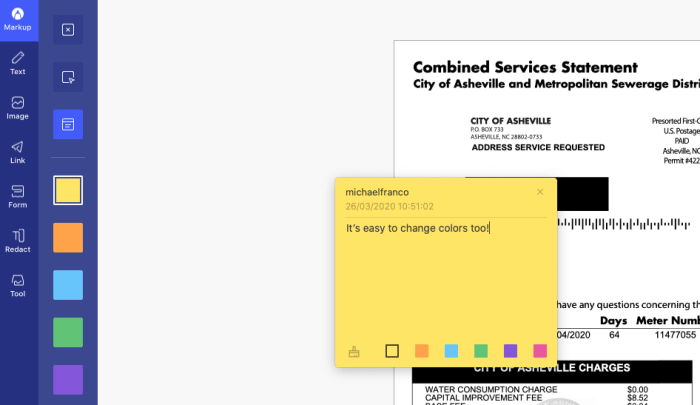
Working with PDFelement 7 is impressively easy. When you begin moving around images, altering text and marking up the file using a range of tools including sticky notes, text callouts, highlights and much more, you’ll view PDF files in an entirely new light. And the software is also quite intuitive.
PDFelement

A toolbar on the left lets you decide how you want to annotate PDFs: Markup, Text, Image, Link, Form, Redact, and Tool. Once you select the appropriate one, an additional formatting toolbar on the top of the screen lets you fine-tune your work. Down the right side, you’ll find simple document-navigation tools.

Create forms, change backgrounds and more 

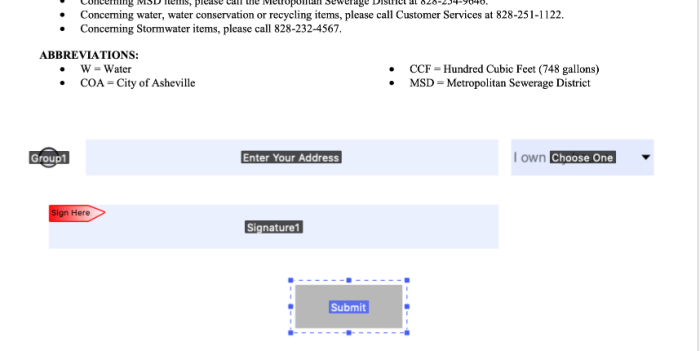
As if all of those features weren’t enough, PDFelement 7 has a few other tricks up its sleeve that allow you to truly transform PDFs from being one of the most clunky file types to work with to one of the easiest. First among those is the ability to create or add forms to any document. The software allows you to insert fillable text fields, selectable drop-down windows and radio buttons, and a field requesting a digital signature that is legally binding.

You can also convert non-interactive content into fillable PDFs, have the software automatically recognize form fields, extract data and images, and a lot more.
PDFelements
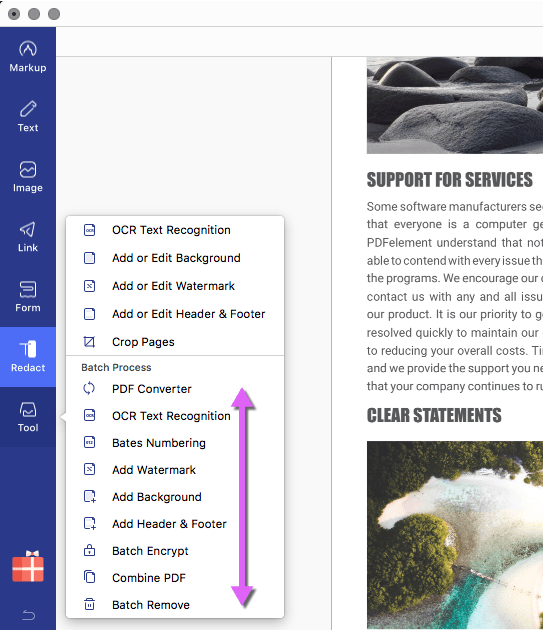
Additionally, under the “Tools” section, you’ll find a range of extra goodies, including the ability to add a watermark or change the background, add a header or footer, and combine multiple PDFs into one file. But the standout feature in this section is the OCR scan function, which makes all the text in a PDF searchable or editable, per the conversion setting you choose. The OCR functionality works across 29 languages.

In PDFelement 7 Pro, you also have several Batch Process options for conversion, encryption, watermarking, OCR, merging PDFs, and so on. These allow you to handle large workflows containing hundreds of documents and process them in an automated queue instead of doing it manually, one by one.

Besides the macOS system, PDFelement is also available on these OS platforms: Windows, Android, and iOS. Plus, you can get the PDFelement for iOS and Android for free.

Extensive Product Support

Wondershare, the creator of PDFelement, offers full backup for its key PDF productivity product. This includes video tutorials, online help tools, an extensive knowledge base, user guides, and a live chat service in case you need immediate help, it will be more helpful to find the solutions.

Save up to $60 on PDFelement Pro

PDFelement allows you to download a free version of the software that lets you use nearly all of the program’s functionality. The only caveats are that files are saved with a watermark and there are some conversion caps/limits. Nevertheless, every basic PDF function is free to use.

For $79 per year (a savings of $40), you can upgrade to a Pro version, which includes complete functionality – or for $69 per year, you can snag the Standard version, which eliminates the OCR function, the ability to turn scanned PDFs into editable PDFs, the ability to add and edit form fields and digital signatures, and several other features. In our opinion, the upgrade to Pro is well worth the extra $10. Furthermore, you can also opt for a lifetime license so you don’t have to remember to renew your subscription every year or every month.

Super-powerful MiniTool MovieMaker is now free!

Download MiniTool MovieMaker: create top-notch videos has never been simpler. And even better – the software is completely free for a limited time!

All it takes is a quick scroll through an Instagram feed to realize just how important video has become in today’s world. In fact, according to advertising software provider, Wordstream, one-third of all time online is spent watching video content. Creating videos was once a task only reserved for the pros – but now, thanks to MiniTool MovieMaker, creating top-notch videos has never been simpler. And even better – the software is completely free for a limited time!

Free: Truly free!

You might expect that free video-creation software would come with certain limitations. But that’s simply not the case with MiniTool MovieMaker. Not only are there no limits on file sizes, no watermarks or ads, and no bundle upsell – but there’s a multitude of helpful features included. 

Easy-to use templates

When you start up the MiniTool MovieMaker software, you’ll be given a range of templates to choose from including “Our Love Story,” “Photo Album,” “Wedding Slideshow,” and “Travel.” Select one of these templates and you’ll be prompted to add the recommended number of photos, which will then be stitched into a professional-looking movie you’ll be instantly proud of. 

Once the photos are uploaded, you can change their order, as well as the duration any one of them remains on the screen in your creation. You can also change and edit the musical or narrative track that can accompany each video. 

Powerful tools

If you want to start a video project from scratch, you simply upload your content into the software and you can then add and edit musical tracks, build in great effects to enhance or artfully manipulate your photos, and control the transitions between each image.

On top of that, MiniTool MovieMaker comes with features usually only found in big-budget professional software like the ability to merge videos and change a video’s resolution, format and quality. 

 It’s also possible to use a variety of overlay templates to add text to any image, or to have your text appear on a graphic background to really grab the attention of your viewers. Text templates include those suited for credits, title slides and narration.

Drag-and-drop simplicity

While MiniTool MovieMaker puts pro-level tech in your hands, it remains easy to use thanks to a simple drag-and-drop interface. You simply drag in images, video clips, transitions and text slides to a running strip on the bottom of the page and you’re practically ready to debut your masterpiece!

Did we mention that it’s free?

Just in case you missed it – all of the features of the simple yet powerful MiniTool MovieMaker are completely free for a limited time. We’re not really quite sure how such an amazing opportunity came along – but we do know that’s it’s one you should take advantage of today!

This holiday season, let Santa in, but keep the spies out

Shopping online can bring a lot of great gifts right to your door. But with all that increased surfing, it can also bring something else you don’t want to your computer: spyware.

Some spyware can be relatively harmless – like adware or cookies that track your surfing and purchase history for marketing purposes, such as serving you relevant ads. But spyware such as Trojans and system monitors can watch everything you do at your computer and harvest personal details including social security numbers, credit card numbers and more.

Defeat the mighty Trojans

Trojans generally arrive on your computer via a download link that you’ve clicked. For example, you might get a notice that your browser is out of date and needs to be updated. When you click on the link however, you’ll actually download spyware onto your system that can be very hard to detect. What’s worse, Trojans can continue to download more malware once they settle onto your system.

If you don’t have an antivirus program to identify them, the most likely way in which you’ll notice their presence is through system slow downs and frequent crashes. Other telltale signs include unusual icons in your toolbar that you’ve not seen before or error messages that seem unrelated to your activities.

Every click you make

System monitoring software is often masked as freeware and will log every keystroke you make, every site you visit, and every program you run. Again, caution is king when deciding what to download to your machine. Even if a site looks reputable, be smart when clicking on a download that seems too good to be true, or one that appears on your machine as a pop up.

If you suspect that your computer has been infected with spyware, you really only have one choice for removing it: aggressive antivirus and antispyware software. Just like spies in the real world, spyware is created to avoid detection, so without the right software to sniff it out, it could run on your computer indefinitely.

Avast Free Antivirus is one of our top picks for preventing, detecting and removing spyware. With continuously updated databases and algorithms, this software is tops in keeping your computer clean and your data safe.

Of course, you can also take steps on your own to limit your exposure to spyware by ensuring that your browser, operating system, and software have the latest updates and security patches; setting your browser security and privacy levels higher; using extreme caution if you frequent file-sharing sites; and not clicking on pop-up ads.

Once you’ve run your antispyware software and know what type of threats existed on your computer, you may want to contact your financial institutions to change credit cards and account numbers if it turns out that your personal data was at risk. You might also want to freeze your credit through national monitoring services to thwart identity theft.

Taking these steps should ensure that your online holiday shopping will deliver gifts Santa would be proud of, while keeping the spies out in the cold.

IObit turbocharges latest release of Advanced SystemCare Ultimate to keep PCs safe and speedy

If you own a PC, you’re already familiar with the need for robust antivirus software. You might also be acquainted with software that scans your computer and helps you make tweaks to keep it humming along efficiently rather than getting bogged down with useless files and malware. What you might not know is that IObit has been producing a software solution that combines both of these functions, and that in its latest release of the program – Advanced SystemCare Ultimate 13 – it has injected a significant dose of new tech to ensure that its solution is one of the best on the market at this time.

For starters, Advanced SystemCare Ultimate 13 has been bestowed with an antivirus database that is 30 percent larger than in the previous release, along with a spyware database that is a whopping 200 percent larger than in the past. This bleeding-edge digital gold mine ensures that the software is now entirely equipped to identify even the most recently unleashed online threats. 

On top of this, IObit partnered with Bitdefender, a global cybersecurity leader, to update its antivirus algorithm – meaning that real-time protection against threats including viruses, malware, worms, Trojan horses, spyware and ransomware are now at an industry-leading level. 

Advanced SystemCare Ultimate 13’s protective features have also been expanded to monitor system emails to guard against spam, phishing scams and more, while the program’s Surfing Protection functionality indicates unsafe links when search results are returned, allowing users to steer clear of potentially troublesome websites.
So that covers the improvements to Advanced SystemCare Ultimate 13’s protection software. What about its PC cleaning and optimizing functions? IObit has introduced significant improvements here as well.

As with the protective side of the software, it starts with a database upgrade. The Startup Organization database has been increased by 30 percent to speed boot time by eliminating unnecessary processes and system services. Beyond this, Advanced SystemCare Ultimate 13 has a stronger PC cleaning function, which zaps junk off your hard drive like temp files and the cache files kept by programs such as Dropbox, Steam, Chrome Firefox and more. A file shredder functionality completely eliminates deleted files, a context menu helps clear out unwanted shortcuts without a trace, more robust privacy shields guard against the leakage of personal information, and a multiple accounting cleaning utility allows full machine optimization without the need to switch accounts. 

“With the continuous appearance of new viruses, we consistently value the expansion of our anti-virus & spyware database, we believe that only if we insistently extend the anti-virus database we can truly deal with rampant viruses” said Bing Wang, the Product Director at IObit, “Advanced SystemCare Ultimate 13 aims at providing users a more secure and stable PC with a larger anti-virus database and more powerful cleaning, that can rank among the top comprehensive utilities of antivirus and system optimization.”


Advanced SystemCare Ultimate 13 is now available on Softonic. It provides full support for Windows 10, Windows 8/8.1, Windows 7, Windows XP and Vista.