
Don’t gift your credit card number to a scammer this holiday season

So far, 2019 has smashed records for online shopping as people embrace the ease and relative security of making purchases electronically. Unfortunately, this also means that scammers such as phishers are also out there in record numbers trying to score a gift of their own: your credit card number. Here’s how to keep your data private and stop them in their tracks.

Know your phish

Phishing, which is the term for when someone uses fraudulent methods to gain access to your personal data, generally originates from an email – perhaps even from an organization that you already do business with. But here’s the catch. Phishing emails need to get you to a website where you will be asked to fill in personal information – something reputable organizations simply don’t do. So if you receive such an email, beware.

During the holidays you might even receive an email asking you to confirm your order details, which seems like a logical request. But even if you follow the link asking for this information and the website you arrive at looks like you’d expect, be extra cautious if you’ve already provided your shipping address and credit card information to an online retailer. If you’ve done it once, you don’t need to do it again.

Remove the disguise

One easy-to-find telltale sign of a phishing scam has to do with the link you’re being asked to follow. It’s very easy for scammers to create a link that seems legitimate, but that actually masks its real destination. Let’s say you see a link that reads “paypal.com” in an email. It looks legitimate, and that is indeed a correct web address for the company. To see where the link really leads however, simply hover your mouse over it. The true address will pop up in a small box. If it’s not what you expect, DON’T CLICK!

Protect yourself

Lastly, no one should be online these days without some kind of antivirus software securing your private details. Avast Antivirus Free has consistently been one of our top picks because it offers protection rarely seen in a free package. Avast Antivirus comes loaded with technology that will not only scan your email for dangerous attachments, but it will warn you that a site is unsafe if you’ve unwittingly clicked a link in a phishing email so that you can steer clear.

Additionally, Avast beefed up its anti-phishing efforts recently by incorporating robust artificial intelligence (AI) coding into the software. This cutting-edge technology not only compares links to known phishing sites, but it goes much deeper.

By using computer vision to analyze the composition of a site and determining if a site might be stealing images from another, phishing scams are more readily uncovered. Plus, the AI also investigates sites based on their ranking in search engines. Because phishing sites are not usually online long enough to be indexed by search engines, finding out a page’s ranking adds to the information gathered, allowing the software to warn you – with extreme accuracy – when a site is to be avoided.


Vegas Pro 18 Gets Faster, Easier and Smarter than Ever

Vegas Pro 18 now collaborates with proDAD Mercalli V5 Suite to give you the best video editing and production experience.

The “pro” in the title of the new Vegas Pro 18 video production software package really means two things. The first is that if you’re a professional video editor, the software has a mind-blowing array of tools that you’ll be able to use in order to get your clips looking exactly the way you want. The second is that if you’re an amateur, the software’s suite of tools – many of which are powered by AI – will have your videos looking professional-grade in no time. In either case, Vegas Pro has long stood as one of the top non-linear editing tools out there, and with the release of the 18th version, it’s gotten even stronger.

Vegas Pro 18 now collaborates with proDAD Mercalli V5 Suite to give you the best video editing and production experience. This real-time video stabilization and image optimization will save you up time and energy: no need for a thorough video analysis prior to stabilizing, your footage will be stabilized live on your timeline. This additional software with a value of $299 comes for free when buying the Vegas Pro 18. An offer not to be missed!

Fantastically Fast

Vegas Pro 17 was already super speedy, especially considering the large amounts of data NLE programs need to process. The new version ramps the speed factor up a bit more, thanks to the inclusion of more AI than ever before, along with smart, top-of-the-line hardware acceleration algorithms. The software has been retooled to make the most of your GPU and to also alert you when the drivers for your graphics card need updating.

These changes enable you to create, edit, and undo your edits nearly instantaneously – no more waiting for long stretches for effects to render or changes to take hold.

Creative Control

The newest release of Vegas Pro also includes some creative control features that truly makes the software stand out from the pack.

A new Style Transfer feature lets you turn your video into a masterpiece with a range of filters that mimic the world’s greatest artists and paintings. The Colorization feature analyzes your black and white work and lets you add a touch of color or deeply saturate the screen with full color. And speaking of color, this version of Vegas Pro includes enhanced color-grading abilities including tools to get skin tone perfect (and blemish-free), and an algorithm-powered option for adjusting the look of your work based on actual camera exposures.

The software also comes with the industry-leading Action VFX and Boris FX Continuum suite of effects that allow you to add particle flows, special effects like explosions and fire, and much more with one-click ease.

And lest you think the Vegas team forgot about sound, you’ll be happy to know that the new release features the integration of Sound Forge Pro 14, a powerful sound editor that lets you automatically remove background noise, enhance sound components you want to bring to the forefront and much, much more.

Quick Clean Up

In addition to creatively enhancing video, Vegas Pro 18 can also clean up clips that need a bit of help. A new Flicker Filter turns flickering fluorescent lights into steady beams with a click, a Video Noise Reduction feature gets rid of the grain that often afflicts clips shot in low light, and a Black Bar Fill Filter will take a portion of the video and use it to fill in the black bars that show up when clips are shot vertically instead of horizontally on a mobile device.

Easy Flow

One of the nice things about the Vegas brand is that the engineers behind it not only focus on better, faster features, but they also continue to improve their software’s interface. Vegas Pro 18 is no exception, so you’ll find an easy way to search for or bookmark your favorite plug-ins; quickly access the motion tracking feature; and organize your footage and clips into a cohesive library with collections of related assets and a tagging function that lets you easily find files.

Great Deal

As we said at the beginning, Vegas Pro 18 now comes with top-notch image stabilization software proDAD Mercalli V5 Suite. An offer not to be missed! If you’re serious about reaching a professional level in your video production pursuits, we would recommend this software at any price, but with this deal, it’s almost too appealing to pass up.

Secure all your passwords for free

Dashlane is a world-class passwords manager and generator. Store up to 50 passwords accounts and autofill your information for free. Try the Pro version with a free VPN. Download it now!

Let me ask you a question.

You probably have an account with Google, Spotify, Facebook, Instagram or Netflix, right? Do you remember all of your passwords?
Or do you simply use one password for all these websites?
Using the same password is far from safe, but it makes life so much easier, wouldn’t you agree? But what if I tell you that there is now a solution which simplifies your life, uses only one single password guarantees you stay super safe, and on top of all, it is completely free.

I can hear you thinking: “Wait. What? What are you talking about?”
I am talking about a popular and secure free password manager: Dashlane.

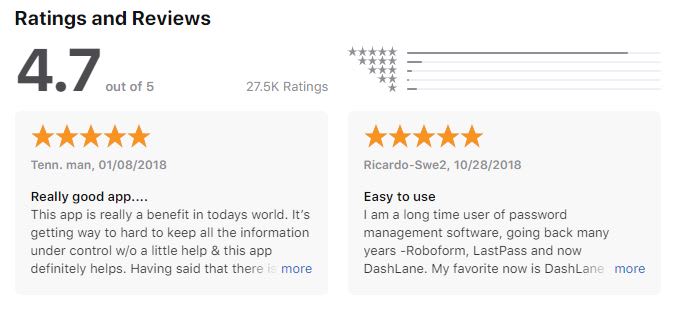
Look at what users think about Dashlane – rankings and comments directly from the Apple Store:

Why you need Dashlane

Being safe online for free is a real choice

Now, this is probably the most appealing feature: Dashlane is absolutely free as long as you don’t exceed more than 50 stored passwords. All your passwords on your Windows, iOS, Mac or Android devices are completely safe. Do yourself a huge favor and make your (online) life easier. With Dashlane you have to remember only one password, plus it doesn’t limit its power to passwords but you can also save your notes, codes, and anything highly private you cannot lose.

Super strong password generator

Your password won’t be hacked anymore with Dashlane. Your password is probably something like 123456 or supersecret1 (at least, that’s mine) but Dashlane generates passwords up to 40 random characters made up of a combination of numbers, letters and symbols.

Every time you visit a website which asks you to register or log-in, Dashlane will prompt you to create a password and it will store it for you. Set it and forget it. All you need to do is create your one single Master Password which will give you access to the Dashlane app. With Dashlane, remembering all those different passwords is a thing of the past.

What else does it do to make your life easier? Dashlane fills out forms with one click. Also tired of filling out forms over and over again with your address and shipping details? The next time you order something online and you are being asked to fill out your billing or shipping details, one simple click and Dashlane will take care of everything.

Dashlane Auto-fill option

Secure digital wallet

There is an option to add your credit card details which will be securely stored by Dashlane. You don’t have to pull your credit card out of your wallet every time you buy something online – a simple click will fill out your card details. Safe and Easy. Store secure notes within the app. Confidential information like your WiFi password, your passport information or the access code to the alarm system of your house, it’s all in safe hands. You no longer have an excuse to keep this type of info as a note on your fridge or in some random app on your phone. Dashlane keeps its secure and will only be visible to you.

Two steps to check out! No need to remember all details, Dashlane does it for you. Keep your data safe, always.


Go Pro!

Besides the free version, there is also a Premium version which has two major benefits. First of all, it allows you to synchronize your passwords across all your devices. Keeps passwords safe on your pc and on your mobile phone at all times. The second BIG benefit is that it comes with a free VPN service included. This is a great feature if you are using public wifi or are relaxing by the pool on your holidays. You want to make sure you maintain your privacy at all times.
Dashlane offers great value for money since most VPN services charge more per month for just a VPN service alone. Dashlane premium offers the best of both worlds: a world-class security product PLUS a VPN service.

Dashlane is a trustworthy app, try it for yourself! Get your free Dashlane here!

New Driver Booster 7 will banish Windows error blues

Install the updated Driver Booster 7, the best driver updater to improve users’ PC performance and gaming experience.

Drivers are integral to the smooth running of your computer, enabling games and other applications to work with your Windows operating system so that you can do what you want when you want to do it.

But keeping up to date with the latest drivers required for all those apps and games is tiresome. It’s all too easy to overlook an essential update and before you know it you’re staring at the Blue Screen of Death, your gaming wrecked at a vital moment.

Happily, there’s an easy solution to these woes and that solution just got a huge upgrade with the release of IObit’s Driver Booster 7.

Available at IObit and Softonic, Driver Booster 7 provides full support for Windows 10, Windows 8/8.1, Windows 7, Windows XP and Vista.

So what’s the big deal?

Well, Driver Booster 7 has an expanded database of over 3.5 million device drivers. Within this vast stable are the likes of Intel graphics drivers, NVIDIA game-ready drivers and AMD Radeon™ Software Adrenalin Edition.

Install the Driver Booster 7 app, choose your preferences for automatic driver updates and your worries are pretty much over.

The program can update all outdated, faulty or missing drivers with just one click, so all-too-common driver malfunctions like nvlddmkm.sys, igdkmd64.sys and the dreaded DPC watchdog violation error should now be a thing of the past.

The new version also has a vastly enhanced scanning engine that achieves scanning speeds double the previous edition.

You’re also guaranteed peace of mind – all drivers in the Driver Booster 7 database are sourced from the official manufacturers’ websites and have passed both WHQL and IObit tests to ensure security and authenticity.

The app can become your computer’s best friend, fixing various issues that are all too common with Windows such as a lack of sound, network failure and poor resolution.

But unlike some of your friends, Driver Booster 7 isn’t high maintenance and doesn’t indulge in attention seeking – activate silent mode and you won’t receive any notifications from it while you’re in full-screen mode, whether that’s to play games or watch a movie.

Some new game components such as Microsoft Visual C++ 2019 redistributable, Microsoft .NET Framework 4.8 and Java Runtime Environment 10 have been added to Driver Booster 7 to enhance gaming performance.

Driver Booster 7 is the best driver updater to improve users’ PC performance and gaming experience,” said Bing Wang, Product Director at IObit. “More than 3.5 million drivers are fully supported and there’s no need to worry about compatibility. Driver Booster 7 will match the most suitable drivers for your computer’s hardware devices. It will also fix more Windows issues for a better user experience.”

To download Driver Booster 7, click here.

How to choose the right anti-virus protection for your business

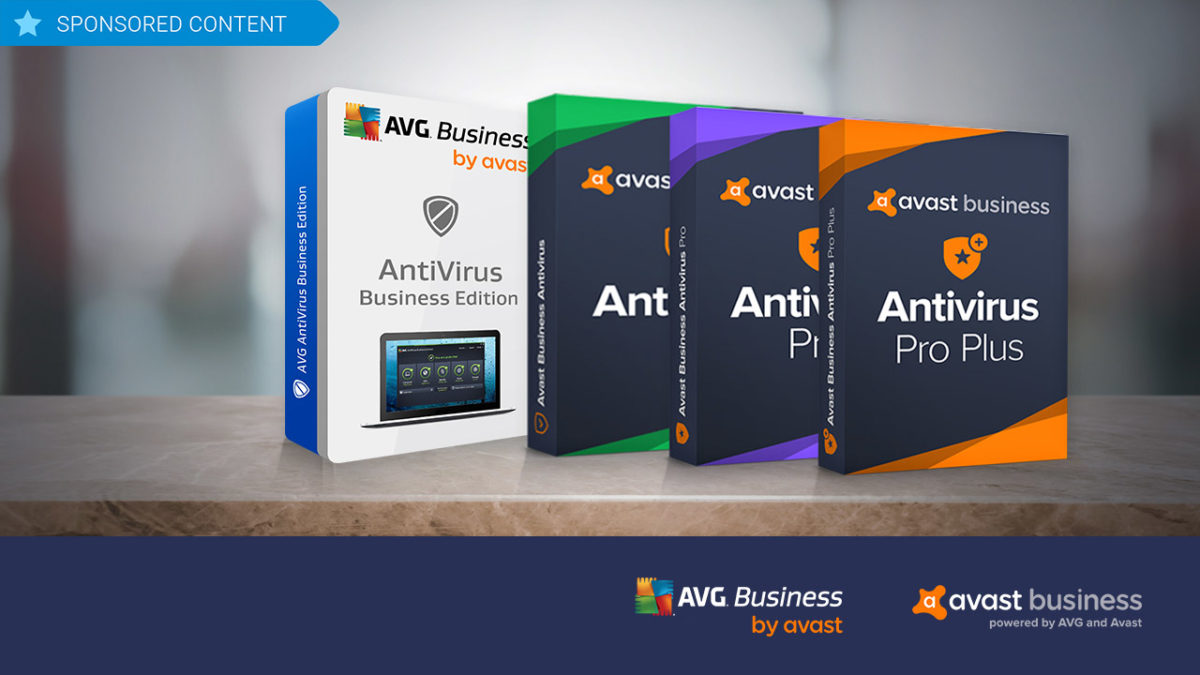
Avast, a leader in security software, supplies two different business security solutions: AVG Antivirus Business Edition and Avast Business Antivirus. Try them out!

While there are lots of anti-virus software programs on the market for individuals, when it comes to protecting your business, the choices tend to shrink. Avast, a leader in security software, believes that businesses should have all of the flexibility in anti-virus and hacker protection offered to individual consumers. This is why it supplies two different business security solutions, each further broken down into additional options that let business owners choose exactly the kind of coverage they need based on budget and requirements: AVG Antivirus Business Edition and Avast Business Antivirus.

AVG Antivirus Business Edition

As with all Avast products, AVG Antivirus Business Edition has world-class antivirus protection baked in, and is an ideal solution for larger businesses with multiple workstations. 

The software employs cloud-based Real-Time Outbreak Detection to ensure that it is continuously updated and prepared to thwart the latest attacks whether they be from spam, viruses, hackers or malware – or through problematic email attachments or downloaded files. The program also includes a behavioral shield that looks for suspicious behavior that might be hiding in programs on devices across your network. 

Additionally, AVG Antivirus Business Edition provides a WiFi inspector, a data shredder that overwrites files multiple times to permanently erase potentially sensitive data, and a sandbox, which isolates troublesome files in a safe, virtual environment for deeper analysis. 

To add even more protection, AVG’s Internet Security Business Edition adds exchange server protection where your emails are scanned at the server level and you are protected from spam and phishing schemes before it even hits your network. 

Avast Business Antivirus

If you’re a smaller business owner, Avast Business Antivirus lets you choose the exact level of protection you need to keep your operations safe and smooth, as it’s available in three versions: Business, Business Pro, and Business Pro Plus.

The base-level program offers the same file, web, email and behavioral shields as AVG Antivirus Business Edition, as well as the sandbox and WiFi inspector, but it does so in a lighter-weight program that takes up less resources on your network.

Stepping up to the Business Pro level adds the data shredder function, the exchange server email protection and SharePoint Server Protection – a scanner that monitors all files on your shared storage system to ensure that they stay malware free.

Moving on to the Pro Plus level adds four additional features including the ability to protect employees’ login details with a secure master password; VPN functionality; a browser cleanup function to remove cookies that contain personal data; and a webcam shield. These features are also not included in either of the two AVG Antivirus Business Edition products, so for true 360-degree protection for your business, Avast Business Antivirus Pro Plus really is the way to go.

 All the software is compatible with Windows 10, 8 and 7 as well as Mac OS.

34 handy keyboard shortcuts for Audacity

Edit audio like a pro for free with these Audacity shortcuts!

Audacity

If you’ve ever done any kind of audio editing you’ve probably at least heard of Audacity – that free program that covers the basics but probably isn’t as good as a more pricey DAW like Pro Tools, Logic, or Ableton. While a heavyweight DAW like Ableton can get the job done like a champ, don’t overlook Audacity just because it’s free. Spend some time with the program and you can work absolute magic with it. People will hear your final mix and be absolutely shocked that you made it with freeware.

7

One easy way to take your Audacity skills to the next level is to familiarize yourself with its many keyboard shortcut commands. This will allow you to work faster, gain a more discerning edge over your audio product, and fine-tune your tracks more accurately and meticulously. Here’s a list of 34 different shortcuts you can use as you work:

Universal commands

Starting with the absolute basics, these are general Windows commands that seamlessly translate over to Audacity for ease of use. You’ve probably used many of these before in a program like Microsoft Word or Photoshop, and Audacity conveniently keeps the paradigm.

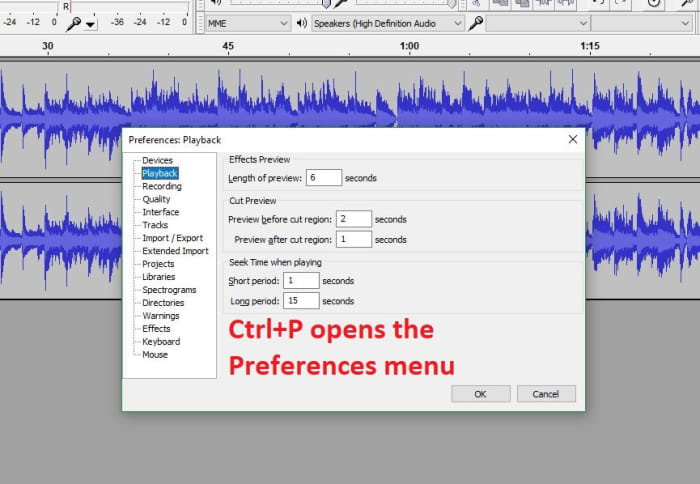
Audacity preferences menu shortcut

CTRL+N New project

CTRL+O Open project

CTRL+W Close project

CTRL+S Save project

CTRL+Z Undo

CTRL+Y Redo

CTRL+X Cut

CTRL+C Copy

CTRL+V Paste

CTRL+A Select all

CTRL+D Duplicate

CTRL+P Preferences

Playback commands

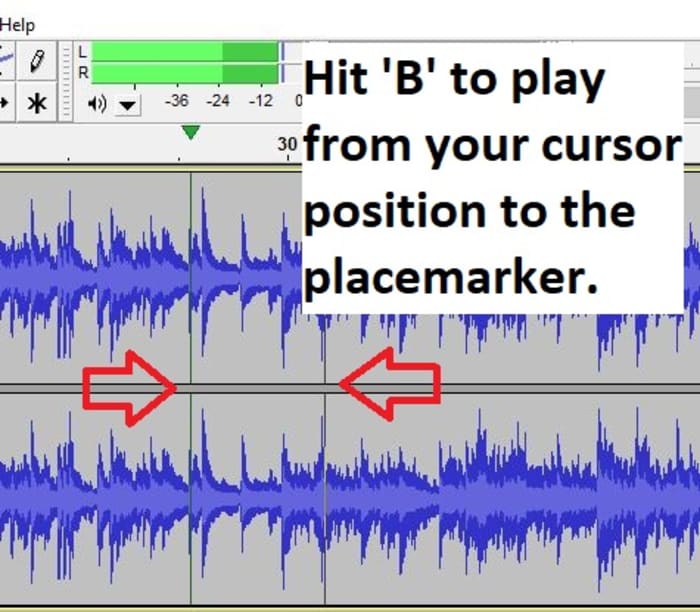
Audacity shares similar audio playback functionality as other digital audio workstations (like Pro Tools, Reaper or even Finale). If you start using Audacity more consistently you’ll be using these functions a lot. These shortcut commands will save you a ton of time:

Audacity play shortcut B

Space Play/Stop

Shift+SPACE or L Loop

P Pause

R Record

1 Preview for one second

B Play from cursor to selection

Navigation commands

Editing audio is a lot of zooming in and out, selecting parts of the file, syncing tracks, and picking just the right nanosecond where you want to start that Fade Out effect or modify the volume a touch. Navigating your project is a cornerstone of using the interface, and getting a grasp of the relevant keyboard commands will grant you more finesse, maneuverability, and precision.

Audacity zoom feature
Set your zoom level faster with CTRL+#

CTRL+1 Zoom in

CTRL+2 Zoom normal

CTRL+3 Zoom out

CTRL+E Zoom to selection

F4 Zoom tool

F1 Selection tool

Edit commands

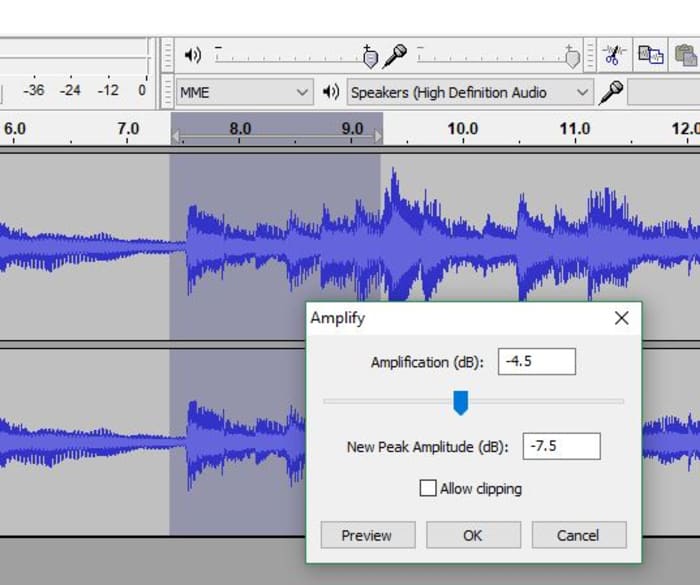
At its heart Audacity is free editing software, and that’s what the program’s all about. The following edit commands are what you’ll probably be using the most, to avoid having to keep clicking on obscure toolbar buttons or hunting through menus. Get used to these and you’ll be able to add effects, switch tools, and remove unwanted noise on the fly.

Audacity Amplify tool window
Switch to the right tool for the job.

F3 Editing tool

CTRL+R Repeat previous effect

Delete or CTRL+K Delete

CTRL+L Silence

F2 Envelope tool

F5 Timeshift tool

F6 Multi tool

D cycle tool forward

A cycle tool backward

For editing audio on a budget, you can’t do much better than Audacity. While it does suffer a few shortcomings (such as an inability to import WMA, AAC, AC3, or proprietary file formats), you’re getting a program that can keep up with other digital audio workstations, and that does it all for free. Other Audacity functions include multi-track mixing, vocal reduction and isolation, MIDI playback, and even full cross-platform operation.

We hope these helpful shortcut commands save you time! Stick with Softonic for more Audacity tips and tricks.

Keep your software humming along with Avast Business Patch Management

Avast has now released Business Patch Management, a program that can be added to any of the company’s anti-virus products. Try it out!

Software patches are a bit like the annoying little brother of the IT world. 

These updates that can enhance efficiency, repair security vulnerabilities and deliver new features, seem to pop up sometimes on a daily basis, asking IT professionals to interrupt the smooth flow of their networks to deploy the fixes, which can sometimes take hours. In fact, deploying patches is such a constant and unrewarding task that in a recent survey conducted by cybersecurity firm Avast, out of 500,000 devices analyzed, only 304 were fully patched.
Wanting to address this glaring problem and help businesses keep their IT products 100 percent up-to-date, Avast has now released Business Patch Management, a program that can be added to any of the company’s anti-virus products. The solution works in the background to monitor the software on all devices on a network to discover and deploy patches automatically, saving a significant amount of administrative time.

Centralized Dashboard

To make the patch process as painless as possible, Avast has built this new software right into its existing dashboard for its antivirus products, known as the Management Console. Here, IT professionals can see at a glance where patches are needed and what the severity level of the patch is, along with the name of the patch, release notes and the release dates.

Working in the Console, users can also choose when to scan their systems for patch requirements. Scans can happen daily, weekly or monthly and can be run at any time of the day, and are downloaded to a master agent that then distributes the patches across the network. 

Furthermore, it’s possible to schedule automatic patch rollouts, which can be deployed at low-usage times, such as overnight. Applications that should be excluded from patches can also be designated and, the Console will provide automatic alerts if certain patches failed to install, so that they can be redeployed.

Flexible and comprehensive

One of the standout features of Avast Business Patch Management is that users can set the automatic system to scan and install all patches or to activate only when patches reach a certain level of severity. It’s also possible to block scans by vendor or product. 

And, speaking of products, the program not only scans the Windows operating system for needed patches, but it also analyzes thousands of other applications including widely used programs like Chrome, Firefox, Skype and Adobe Acrobat as well as lesser-known software like Blue Jeans and KeePass. Products from one hundred vendors in all are covered.

Avast Business Patch Management also features robust reporting features, so that you can easily customize the kind of data your business operations require, export that data to a PDF and print it for sharing with team members and management. Along with automatic patch update alerts and a simple sorting feature, the program truly is an incredible assistant for IT pros. 

Avast Business Patch Management is available for a free 30-day trial, and can then be purchased for $29.99 per device per year. While it is currently only available for all Windows operating systems including Windows Server, the company is working on a version for iOS, which it expects to release later this year.

Powerful PC IObit Software Updater gets an update of its own

IObit Software Updater is a program that takes care of keeping all of the software on your computer updated with very little effort on your part. The company has just released a new version. Check it out!

IObit Software Updater

Just like the components of any machine, the software on your computer needs constant maintenance. Yet software updates can often be annoying, time-consuming and distracting, which means you’re more likely to simply ignore them. This can lead to a slower operating system and security issues.

Fortunately, as we mentioned a few months ago, there is a program that takes care of keeping all of the software on your computer updated with very little effort on your part. It’s called IObit Software Updater, and the company has just released a new version that does its job better, faster and more invisibly than ever before.

IObit Software Updater Free Download
8
New faster version with extended program database and silence mode.

IObit Software Updater is free software that installs on your PC and monitors your other programs including browsers, components of Microsoft Office, security software, patches and overall system software. It then offers a single click to update your programs to the latest versions. If something doesn’t seem right, the software offers a system restore point, so you are able to roll back your computer to a previous point, much in the same way Time Machine works on Macs.

The latest version, IObit Software Updater 2, delivers several improvements.

  • The database of supported programs has grown by 180%, which means it can handle an incredibly broad range of updates.
  • The download algorithm has been updated, which has increased the download speeds on new programs and updates by 10%.
  • A “smart update” feature has been developed so the program checks for software status updates in real time from manufacturers’ websites. You can then set the software to deliver updates immediately or you can schedule them to happen at certain times – overnight, for example, when computer usage is low.
  • Perhaps most significantly, IObit Software Updater 2 brings a silent mode to its functionality. This allows users to apps with a single click rather than through the multi-step process that’s typically involved in such a process.

As with the original version of the software, all of IObit’s updates come directly from the sites of the manufacturers, so safety is guaranteed.

“IObit Software Updater 2 is a better choice to update your outdated Windows software”, said Bing Wang, Product Director at IObit, “You will enjoy faster and safer software updating experience with the latest updater. Also, you won’t be bothered when installing the new packages on Windows. Everything works silently and efficiently.”

In addition to its Software Updater program, IObit also offers a range of other programs that help speed up, protect and optimize PCs, Macs and Android devices. IObit Software Updater is compatible with Windows 10, 8/8.1, XP and Vista.

IObit Software Updater Free Download
8
New faster version with extended program database and silence mode.

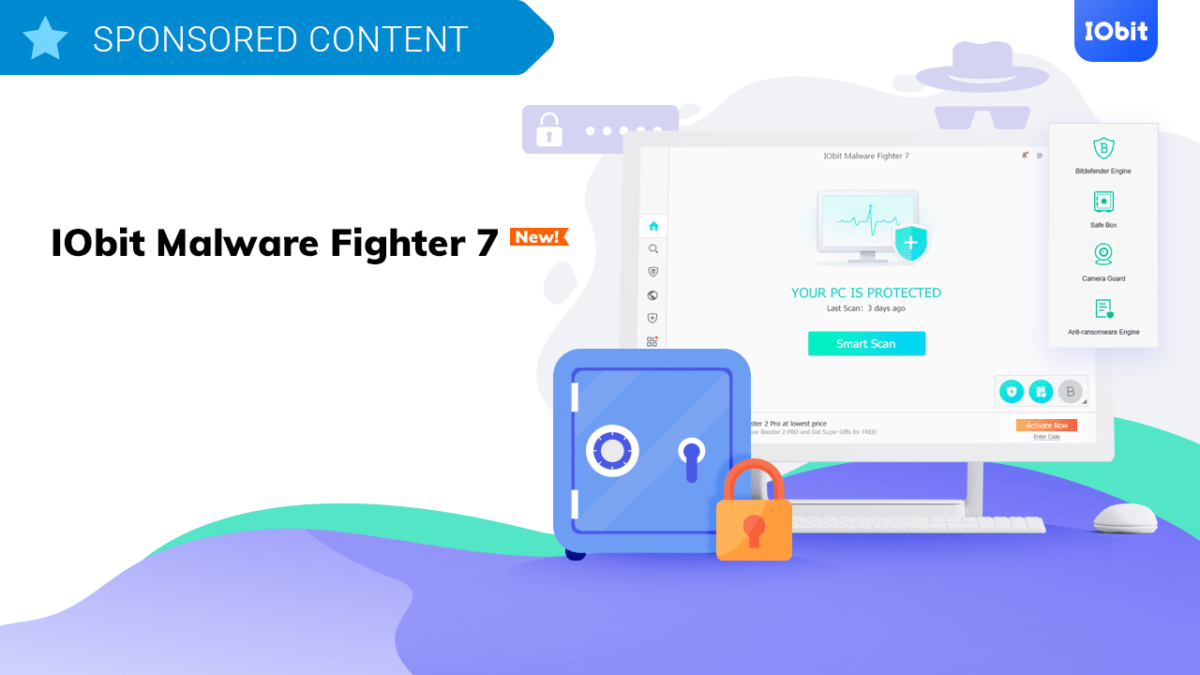
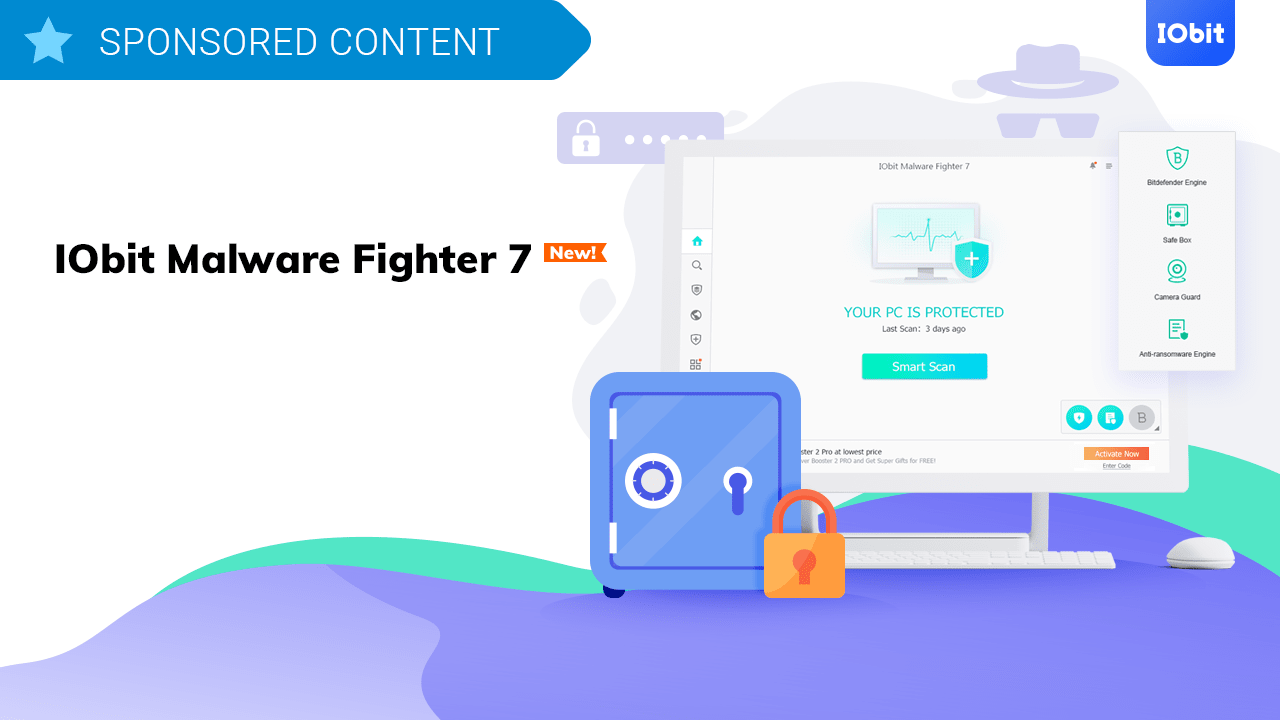
Why IObit Malware Fighter 7 is all the security protection you’ll ever need

Why IObit Malware Fighter 7 is all the security protection you’ll ever need. IObit is running an exclusive sale for the new release. You can get IObit Malware Fighter 7 on Softonic now at a lower price or download for free.

The more time you spend online, the greater the risk to you and your data. Today, a simple antivirus program just isn’t enough. Cybercriminals are using increasingly sophisticated methods to hijack, corrupt, and exploit your machine, and if you don’t keep up with the toughest security protection, you’re putting yourself and your data at risk.

Earlier this month, IObit launched the latest version of its award-winning system protection suite, IObit Malware Fighter 7. As an advanced security solution for Windows, IObit Malware Fighter has already won praise from press and users alike. Now boasting a 60% larger threat database, faster performance, and even easier to use interface, this could be the only online protection you’ll ever need. Read on to find out why.

IObit Malware Fighter Free Download
The free anti-malware and antivirus program that offers total protection to your PC against ransomware and malicious files of all types

How IObit Malware Fighter 7 protects you

Cybercriminals think they know more than you. They count on you being too lazy, busy, or ignorant to employ the best system protection. They will use your indifference against you, so it’s therefore important to invest in protection that covers all angles.

IObit Malware Fighter 7 is no ordinary PC security suite. It incorporates the latest and best antimalware, antivirus, and anti-ransomware engines to detect, alert, and remove all threats to you, your data, and your machine, including:

  • Trojans
  • Worms
  • Keyloggers
  • Malware
  • Spyware
  • Adware
  • Phishing
  • Trackers
  • Cryptojacking

And many more.

In this latest release, you benefit from redesigned antimalware and anti-ransomware engines, as well as the industry-leading BitDefender antivirus engine. As a result, IObit Malware Fighter 7 now runs 63% faster than the previous version in detecting threats on a full system scan. Since timely detection is important to avoid damage, this is a huge boost to your protection.

IObit Malware Fighter 7 now has a 60% larger threat database, too, updated daily. The number of known threats continuously increases as cybercriminals change tactics, so having a diverse database helps to identify risks as they evolve. Outsmarting the cybercriminal is an endless battle but IObit Malware Fighter 7 is only too willing to fight it.

IObit Malware Fighter Free Download
The free anti-malware and antivirus program that offers total protection to your PC against ransomware and malicious files of all types

One of the most worrying cybercrime trends is cryptojacking – the hijacking of your computer’s CPU to mine cryptocurrency, usually through your internet browser. Since you often don’t realize it’s happening, cryptojacking is one of the most insidious threats to you online. Without the right protection, you could be lining criminals’ pockets while system performance suffers.

Thankfully, IObit Malware Fighter 7 integrates anti-cryptojacking protection, including an extension that prevents malware and cryptojacking scripts from running whenever you browse. This forms part of much broader and more advanced surfing protection in IObit Malware Fighter’s latest release. In short, it’s their best online security suite ever.

Universal protection, inside and out


Threat detection and elimination is just one weapon in the IObit Malware Fighter 7 arsenal. Protection extends to your devices, too. Threats don’t simply affect your system, but also your data, boot drive, integrated webcam, and peripherals. Anything you plug into your machine via USB is also at risk.

IObit Malware Fighter 7 acts like a security guard for your entire system, preventing unauthorized access to your webcam, USB-connected devices, and other hardware. It also includes MBR (Master Boot Record) protection that prevents malicious software from holding your data to ransom, such as in the GoldenEye and Petya ransomware attacks.

Finally, IObit Malware Fighter 7 includes an enhanced and redesigned Safe Box that password-protects your data. This prevents anyone from accessing your sensitive information without your consent – not even the most powerful ransomware programs can break IObit Malware Fighter’s file encryption. Use a strong password, and you can rest assured your data is safe.

Why get IObit Malware Fighter 7?

IObit has been engineering world-class security software for over 10 years. Their software has been downloaded over 250 million times, they have millions of users around the world, and their software has been translated into 40 languages. So if you’re looking for proven reliability, you’re in safe hands.

Better yet, IObit is running an exclusive sale for the new release. You can get IObit Malware Fighter 7 at a lower price here for excellent protection. Download IObit Malware Fighter 7 today – your computer is counting on it.

IObit Malware Fighter Free Download
The free anti-malware and antivirus program that offers total protection to your PC against ransomware and malicious files of all types

The final Windows 10 update you’ll ever need

Will this fix Windows updates problems for all time?

Windows 10

If Windows 10 told you it was giving you a system update, would you be happy about it? Or would you sigh and resignedly restart your computer, awaiting the worst? Why is this even a question? Updates from Microsoft offer the promise of improved software, faster speed, and better functionality.

Take the update we got back in October, for example: Cloud clipboard, a more responsive Task Manager, improved screen capture tools, even the fancy app mirroring. Who wouldn’t want these awesome new features? DON’T DO IT. The update literally deleted user files. Whoops.

Lucky for us, all that’s about to change. Does this mean Microsoft will magically never send forth a broken update again? Not quite. Instead, the new May update will not only be offering the usual array of new features and improvements – it will also overhaul how the company handles Windows updates from this point forward.

Release Preview means ‘don’t get it yet’

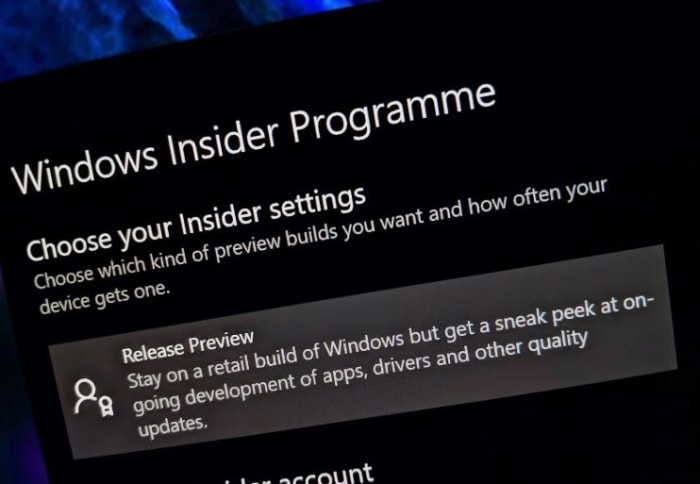
Microsoft acknowledged the October update debacle, and for starters, they’re promising that the May Update for this year will spend an extended period of time in Release Preview. This is for the purpose of more extensive beta testing, optional public availability, and ironing out kinks. General availability for the update won’t land until later in the month.

Windows Insider Programme Release Preview
Extended Release Preview means more time in testing. That means fewer bugs.

The end result is that while version 1903 will be up for grabs at the scheduled time, it’s still spending at least another month in testing. It’s a smart move on Microsoft’s part.

Download and Install

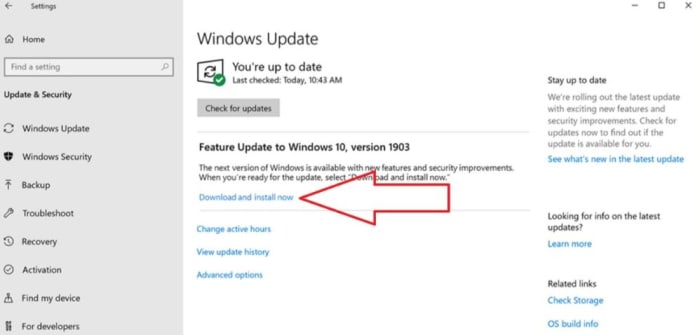
The past few times Microsoft rolled out an update, it gave the feature improvements to anyone manually checking for the new build. Since these updates are occasionally busted, that meant that by installing a cumulative update, users were actually installing broken features on their PC. 1903 is integrating a new (and much appreciated) “download and install” mechanic.

Windows Update download and install now
To install it, go to Settings –> Update & Security

In 1903 you’ll get a message here that alerts when the next feature update is ready. If you want to download and install it, just click. No longer will the update be mandatory, sticking on your shutdown button so you can’t turn it off without accepting. The only instance where Microsoft will force an update on you from now on is if Windows 10 is approaching the end of your current version’s support.

A step in the right direction

The problems we ran into back in October were caused by two issues: The first is obvious bugs (we’d prefer Microsoft not erase our files, thanks). The second reason for the catastrophe was that Microsoft tends to be pushy with their updates. While 1903 isn’t guaranteed to be without its flaws, they did manage to fix the second issue; updates are now given ample time to grow and improve. You can install them on your own volition. Microsoft has even promised that by the end of May, “download and install” will be available in versions 1803 and 1809.

The decision couldn’t have been an easy one for the company, but it’s gotten a very positive response so far. Microsoft is making a lot of changes and improvements to the system, but not risking the well-being of its users in the process. The Release Preview of 1903 comes out this week, and Microsoft is providing cumulative updates on it for the entirety of this month. Let us know in the comments below if you’ll be checking it out, and stay tuned with us if any build issues pop up!