WhatsApp users beware this new hacker trick

Your phone number could leave you vulnerable.

Security researchers at Sophos have discovered a startling new WhatsApp vulnerability. The trick can be used to exploit anybody who hasn’t changed a certain default setting and can crack a WhatsApp account wide open.

New WhatsApp vulnerability can give complete control of your WhatsApp account to anybody who knows your phone number

Hackers can take control of your WhatsApp account
You need to activate two-factor authentication to protect yourself

The trick comes via a WhatsApp video or voice call as the vulnerability is found in RTP (Real Time Protocol). RTP is used by many online calling apps. In the name of efficiency, RTP doesn’t check to see if data that has been transmitted has arrived, and packets of data might not arrive in the same order they were sent. This allows the online calling apps using RTP to deliver the speech and video present in the data, and only cut out the speech and video from lost packets rather than lose the whole conversation.

Another key step in the complicated process required to perform an online voice or video call is squeezing all of the data into small binary packets and then unraveling them all again when they’ve arrived. This process, if not done correctly, can lead to data being moved where it shouldn’t be and left unprotected.

The trick that Sophos uncovered exploits these two minor vulnerabilities and enables hackers to take control of any WhatsApp account they can call. If a hacker calls you on WhatsApp who knows the trick, and you answer, they can take control of your account.

There is good news, however. The flaw was reported and there does seem to be a patch available in the latest update.

WhatsApp Messenger Update WhatsApp ►
8

Unfortunately, as pointed out by the guys at Sophos, there is a slight discrepancy between the date the trick was closed and the date the patch was released. This means there are two things you need to do to protect your WhatsApp account against this trick.

How to protect your WhatsApp account

1. Ensure your apps are updated regularly. If you set your apps to update automatically, they’ll always have the latest security patches that have been built to close off known vulnerabilities.

2. Turn on two-factor authentication by going to Settings, then Account, and opening Two-step verification. Hit Enable and you’re done.

Two-factor authentication means you will need to confirm whenever you log into WhatsApp via a new device using a second login credential of your choosing. As this information isn’t available via the trick Sophos have highlighted, it’ll block the hackers from using the information they can steal via a video or voice call with your account from taking it over. It is highly recommended that you activate two-factor authentication across your other apps and social accounts wherever possible.


India fights digital colonization

How can India compete with global tech firms when its own laws make for an uneven playing field?

India is often recognized by experts as one of the most important territories in the world in regards to technological growth. Its huge population of 1.3 billion represents not only a huge marketplace but a huge workforce, especially in the technological sector.

Since freeing itself from British imperialism in 1947, India has grown to become one of the world’s premier emerging superpowers. However, as Web 2.0, globalization, and the rapid adoption of social media have gone underway, some experts fear India is going through an entirely new process of subjugation: digital colonization.

India’s digital landscape is completely dominated by American tech companies. The most popular video sharing site is YouTube, the most popular messaging app is WhatsApp, and the most popular social media platform overall is Facebook. The biggest competition India has is its e-commerce giant Flipkart, which is only barely beating Amazon in the country.

WhatsApp Messenger Download WhatsApp ►
8

Indian officials attribute this to a number of factors. Most notably, they say that local laws and regulations apply to Indian companies only, allowing American companies to come in and beat them. For example, Indian hotel booking websites must pay a pricy hotel tax, something their American competitors don’t have to do. This allows American booking websites to cheaply beat out the homegrown competition. American digital services already had a huge head start over Indian ones, and outdated regulations only widen the gap.

In response to this phenomenon, Indian officials are suggesting protectionist policies that give Indian digital services an overdue leg up from their foreign competition. American companies obviously oppose these regulations, saying that costs will increase and access to valuable Indian data will suffer.

What Indian officials intend to do is create a closed, China-like digital environment without completely shutting off the foreign digital services that millions of Indians love and use daily. By completely banning American digital services, China has since grown gigantic digital services like Alibaba, WeChat, and Baidu. While India is not trying to completely shut themselves off as China did, they’re hoping that harsher regulation on foreign services will allow them to create homegrown, competing digital corporations on the scale of Google or Facebook.

Watch out for this fake app that will steal your WhatsApp data

A fake Viber app is allowing hackers to steal your information. Don’t download it!

A clone of the popular Viber messaging app contains malware that steals all WhatsApp related data including photos, videos, and phone call records

Fake versions of popular apps are becoming a growing problem these days. Hackers and other bad guys know that they can get their viruses onto people’s devices if they can hide it in convincing versions of the apps we use every day. We’ve seen many popular apps cloned, and we’ve also seen less popular apps pumped full of malware and then pushed onto the Google Play Store. Once installed, these fake apps infect our devices and are then very difficult to get rid of. The popular messaging and video call app Viber is the latest app to get this treatment.

There is a fake version of Viber that aims to steal all of your WhatsApp data

You need to avoid Viber Messenger, which is described as a Lite Chatting App. Victims fall prey to a phishing scam as the fake version of Viber is peddled on a website that has been built to look just like Google Play Store. The site even includes fake security certificates and the clone version of Viber comes with a fake Most Secure Messenger checkmark and shield, a claim of 500 million downloads, and a 4.3-star rating just like it would on the original Google Play Store.

Viber is a very popular messaging app that works on multiple platforms and has been downloaded over 900 million times all over the world. It offers users instant messaging complete with stickers, GIFs, and even games. On top of that, Viber users have access to free video and voice calling over the internet and can pay a subscription for local and international calls to landlines and mobiles.

Viber Download Now
8

With fake apps on the rise, it is more important than ever to only download apps from reputable catalogs like Softonic or direct from the Google Play Store. As this case involves a fake version of the Google Play Store, it is also important that you familiarize yourself with phishing scams so that you’re best equipped for spotting false sites. Check out our guide to avoid phishing scams to keep yourself one step ahead of the hackers.

This fake version of Viber was discovered by Lukas Stefanko, who is a malware researcher at the Slovakia-based online security company ESET. He posted the malicious code on Twitter to build awareness.

Remember, you are your best weapon in the battle against threats like this. You should always double check the source of all your downloads and look out for spelling mistakes, confirm the name of the developer attached to the program, and watch for other errors that could indicate that something isn’t right. Most importantly, however, whenever possible make sure you only download apps from sites that you can trust.

Why Facebook is losing teens

It’s been shown again and again that digital services age in dog years. There was a time when having a MySpace profile was edgy and cool, with its Top 10 Friends feature and music-based model. However, the arrival of Facebook, with its simple interface and lack of ads, toppled MySpace completely. Falling as quickly as it rose, MySpace went the way of the telegram; an archaic means of communication mentioned only as the butt of the joke. Facebook laughed, and it’s been laughing for years. But with the coming of newer, hipper rivals like Instagram* and Snapchat, Facebook isn’t laughing anymore.

Facebook: Boomer Central?

A commonly cited reason for leaving Facebook among teenagers is the influx of parents and older people to the website. Facebook is still the most popular social media platform by far amongst people outside the 12-17 year old demographic. When you’re a teenager, there is nothing less cool in the world than your parents. Why on earth would you want to share a social media platform with them? There’s no quicker way to have your hot new pic seen as uncool than to have your mom comment “CUTE! That’s my baby!! Love, Mom” underneath.

Old people and social media mix to hilarious results

The presence of relatives on Facebook has deterred teenagers from acting like themselves while posting, wary that whatever they say will be brought up at the dinner table. Teenagers have to moderate what they post so much that Facebook might as well be LinkedIn.

For today’s teenagers, their presence on social media is crucial for their social status. They don’t want to present themselves as some sort of sanitized, grandma-friendly figure. They’re teenagers; they want to seem rebellious, unique, and aloof. The demographics of Facebook do not allow them to do that.

Snap Today, Gone Tomorrow

Snapchat has stolen Facebook’s teenage users away, and they show no signs of turning back. The main appeal of Snapchat to teenagers is its impulsivity and lack of permanence. The Snap Stories feature, which allows users to upload videos or photos that last for 24 hours before being deleted, is incredibly popular among teenagers because users are encouraged to post more spur of the moment content, as opposed to Facebook’s timeline model encouraging the posting of more “significant” content. People aren’t going to post that shaky three-second clip they took of that cute dog on Facebook, but it would be perfectly normal to see it on a Snap Story.

By encouraging off the cuff, mundane content, Snapchat constantly stays in the back of its user’s heads. Facebook recognizes this design philosophy and has copied it wholesale with its “Moments” feature. Facebook’s core design is that of a timeline, displaying significant events or content chronologically on a user’s profile.

Snapchat is the exact opposite, being a social media platform that focuses on content that’s in the moment. For teenagers, who constantly ebb and flow between what they see as cool, having your embarrassing or uncool posts erase themselves only to be replaced by cooler and newer content is highly appealing.

Facebook in the Future

Snapchat currently stands as the most popular social media platform among people 12-17 years old. Reports from eMarketer suggest that Snapchat will gain 1.2 million new users in that demographic by 2022, while at the same time Facebook will lose 2.2 million teenage users. Because Facebook is still the most popular social media platform outside this demographic, they may double down and cater to their older user base. While this may alienate their younger users even further, it seems that Facebook is now past its trendy, younger days.

* Yes, Facebook owns Instagram. But the migration from the lucrative Facebook platform is a problem for the company.

How to use WhatsApp on your computer

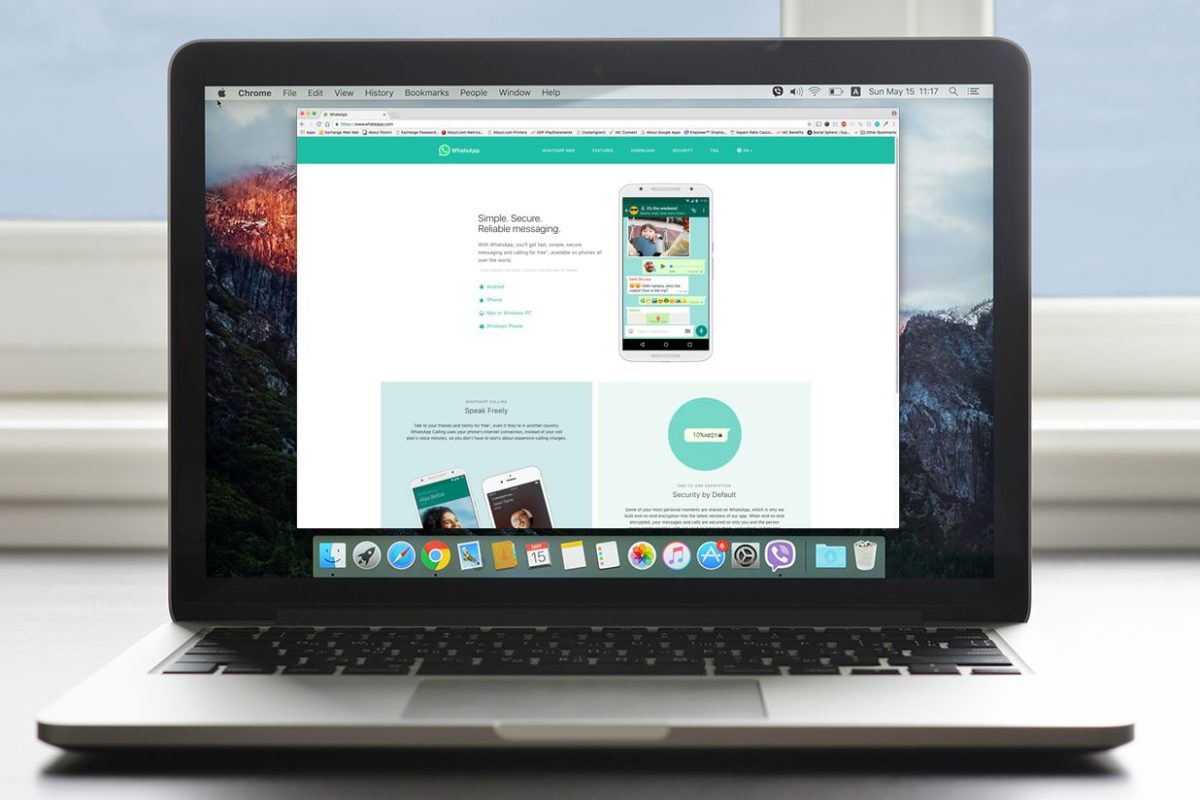
Although there are some limitations, using WhatsApp on your computer has some advantages over using it on your phone. Here’s how to set it up on your PC or Mac.

Although WhatsApp is used primarily on your phone, you can actually use it on your desktop as well. This can be really useful if want to message people while on your computer, or if you’ve temporarily lost your phone and need to send some important messages.

How to use WhatsApp on your computer

There are two ways to go about using WhatsApp on your computer:

Using a browser

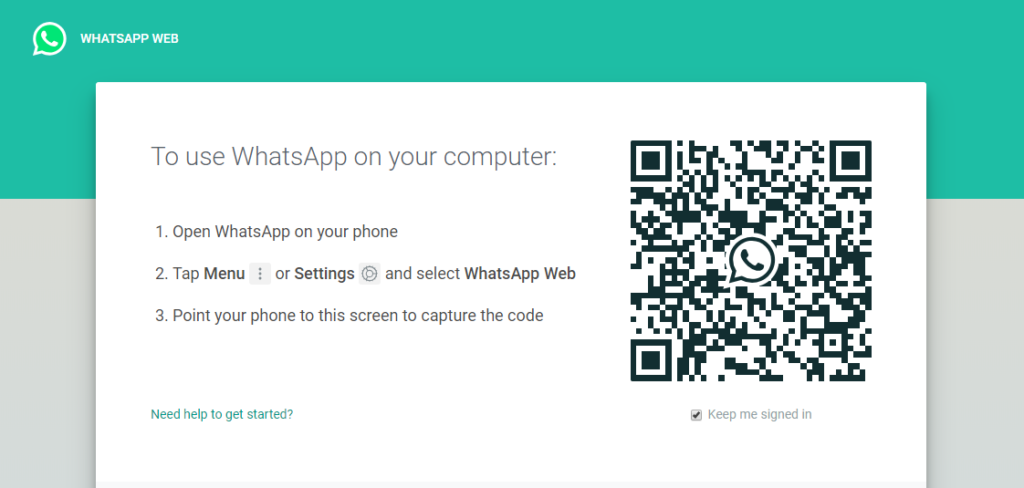
By going to the WhatsApp website, you can scan a QR code with your WhatsApp app on your phone in order to sync it with the browser. Not everything can be done through the browser version of WhatsApp, but it retains its basic functionality.

WhatsApp on PC

As you can see, the WhatsApp website explains exactly what you need to with the QR code to scan it. First, you open the app on your phone, then press Settings, then WhatsApp Web/Desktop. Your phone will open a camera that you can use to scan the QR Code.

WhatsApp on PC

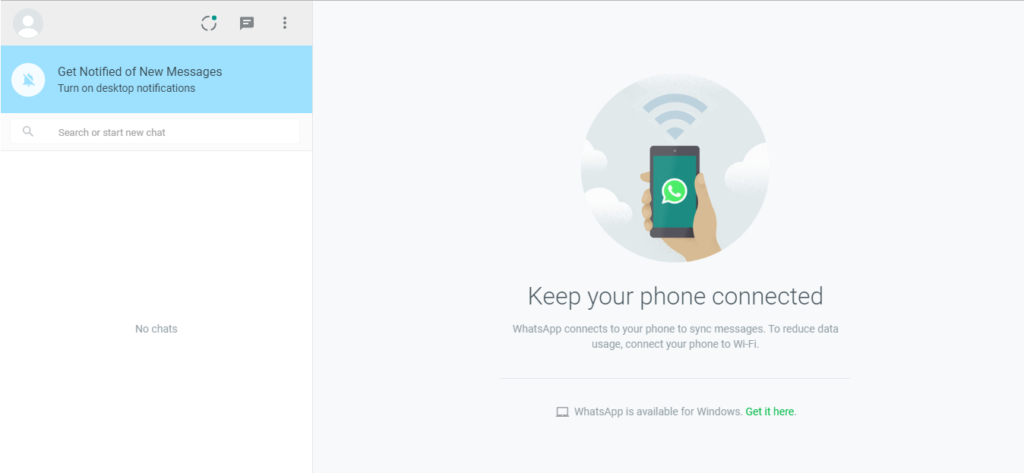
Once that is done, you should see this screen with all your account information and messages on the left side. From here, you can send messages or adjust your account settings.

Installing the application

Instead of using the browser, you can install WhatsApp directly onto your desktop. This version of WhatsApp features full functionality, and runs much smoother (though it may not work on some older computer models). You will have to scan a QR code once installation is complete, just like with the browser version.

WhatsApp Free Download
8

The advantages of using WhatsApp on your computer

Although there are some limitations, using WhatsApp on your computer has some advantages over using it on your phone:

1. It is useful to send documents to your contacts that you have on your PC

In addition, PC connections tend to be faster, so your attachments will be sent and received sooner.

2. It is easier to write long texts without mistakes

You will avoid the embarrassment of falling prey to autocorrect! Your fast fingers on a phone could lead to a terrifying error. Installing Whatsapp on your computer allows you to work on other tasks at the same time and copy text from other websites more easily.

3. It is also practical to manage and delete chats

How many times have you wanted to review and delete conversations but avoided it out of laziness? With a keyboard and mouse, this process is much faster.

In addition to these three advantages, WhatsApp for PC and Mac has practically the same options as its app : creation and management of groups, configuration and editing of the profile, possibility of sending voice notes and/or photos (as long as you have microphone and/or camera on the computer, of course).

WhatsApp notifications are getting a massive update

WhatsApp is going to start showing photos, GIFS, and videos in notifications

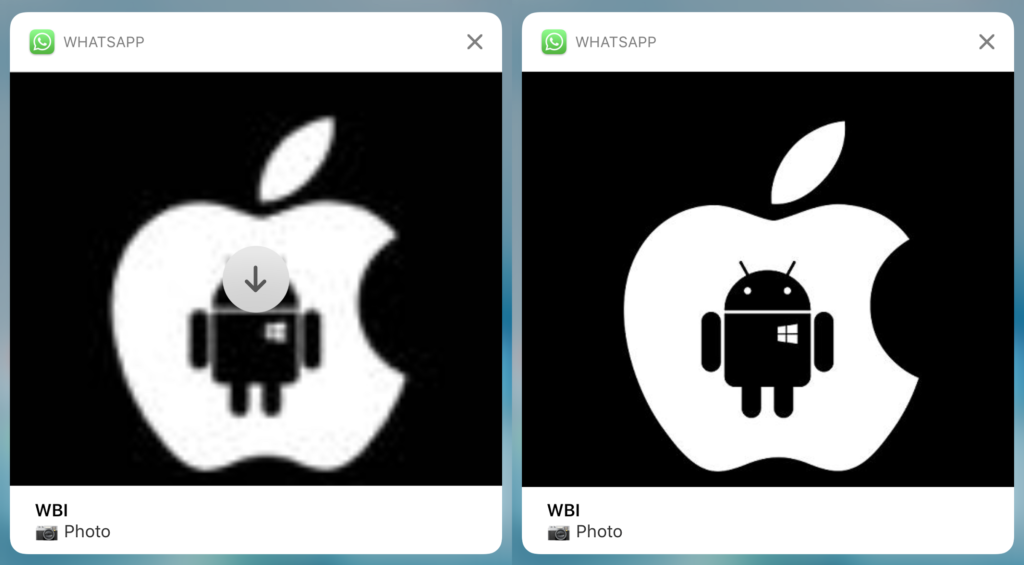
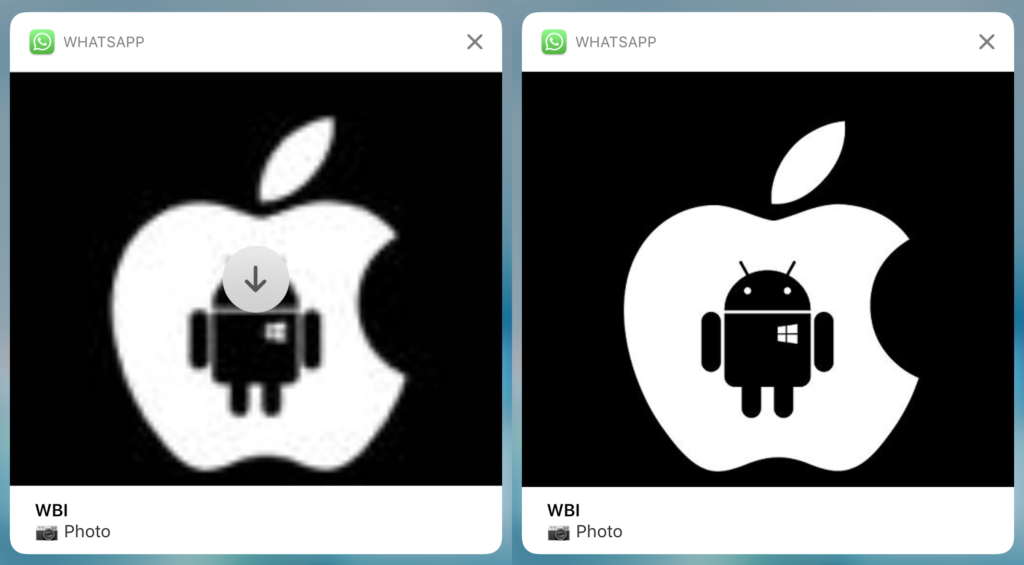
You’ll soon start noticing a rather large change when you receive WhatsApp notifications. They are going to start including the multimedia content your contacts sent, including photos and videos. They should start to look something like this:

Multimedia WhatsApp notifications
WhatsApp will start showing message multimedia in the notifications

This news comes from the guys over WABetaInfo, who are constantly monitoring additions to the advanced beta version of WhatsApp. The new notification feature has been found in WhatsApp version 12.18.80 of WhatsApp for iPhone. There is still no official word from WhatsApp about this new feature.

If you don’t want huge multimedia-filled WhatsApp notifications, you’ll have the ability to disable this new feature. If you like the sound of WhatsApp’s updated notifications, however, you’ll also be able to download the multimedia directly from the notification.

As mentioned earlier, we still don’t know when or if WhatsApp will roll this new feature out to everybody. The beta version of the app runs like a test for the developers so that they can receive feedback on new features from the testing community. If you’re interested in testing advanced beta versions of your favorite apps, check out our handy guide to becoming a beta tester below.

WhatsApp is giving away $50,000 to people who answer this question

WhatsApp will offer a $50,000 prize to those who effectively answer this question: “What would you do to end fake news?”

Facebook has created the WhatsApp Research Awards (WhatsApp Research Awards for Social Science and Misinformation) with the aim to end hoaxes and lies spread virtually on this popular app.

Want to make $50,000? Anybody can enter the competition (whether you have programming knowledge or not), but you have to propose a research project that tries to block fake news, while ensuring the correct use of technology. This last requirement implies subtopics such as the handling of information, the way to process sensitive content and how to timely detect inappropriate behavior.

“We welcome proposals from any social science or related discipline that foster insights into the impact of technology on contemporary society in this problem space. The WhatsApp Research Awards will provide funding for independent research proposals that are designed to be shared with WhatsApp, Facebook, and wider scholarly and policy communities,” explains Facebook.

WhatsApp Messenger Download WhatsApp ▶️
8

Besides this prize, Facebook will prepare two workshops related to fake news. In the first, chosen projects will be presented, while the second will deal with the practical application of these ideas.

You have until August 12 to submit. For more information, here’s the official website for the prize.

WhatsApp copies Telegram: restricted groups are now here

WhatsApp groups now have a new feature: administrators have the power to decide if other members can write messages or not.

WhatsApp Messenger Download WhatsApp
8

Although at first this feature seems a bit like censorship, it’s best to look at it another way: with this option, WhatsApp closes in on one of its rivals, Telegram, which has groups that you simply join to receive information, nothing more.

8

For example, this option is very useful for creating WhatsApp channels to send news, offers or any other information to group members. Also, restricting comments avoids spam and the disclosure of private data.

Although in restricted groups, normal members can’t write messages, there’s an option to get in touch with the administrators privately.

At first, this option will only be available for the iOS and Android versions of the app. To check if you have it activated, just go to the group where you’re an administrator, enter the group options and look for the option “Group settings” or something similar. Once here, you can adjust the settings for “Sending messages.” You can select who can send messages: just admins or all chat participants.


Why WhatsApp will be cut from millions of phones

Starting February 1, 2020, users with old versions of Android or iOS won’t be able to use WhatsApp. Specifically, cell phones will stop being able to use WhatsApp if they have Android 2.3.7 or earlier and iOS 7 or earlier.

WhatsApp has announced that from now on, they will stop supporting cell phones with these versions. This means that, if you’re included in this group, you could be left without future WhatsApp updates. It’s also possible that some existing features may stop working.

There aren’t specific numbers on how many users this change will affect. We know from Google that 0.3% of its users still have cell phones with Android 2.3.7. This translates to about 6 million cell phones and tablets. What about versions before 2.3.7.? Well, that remains a mystery.

Last December, WhatsApp also announced that it would stop supporting cell phones with Windows 8.0 or earlier, as well as the Nokia Symbian S60, Blackberry OS and Blackberry 10.


This WhatsApp bug could be eating your data

WhatsApp is leaking! Leaking your data, that is. Some users are reporting a problem with WhatsApp that is eating up their data. A few have complained that the messaging app has used up to 5GB of data in a matter of hours.

A WhatsApp bug is eating people’s data!

The issue is found in the chat backup function. WhatsApp allows you to automatically back up all WhatsApp items including conversations, photos, videos, and documents as regularly as every 24 hours. WhatsApp files are uploaded to Google Drive or iCloud so that you can then delete them from your mobile.

This latest WhatsApp bug interrupts the upload process and causes it to begin again. This means that a never-ending upload cycle is triggered, causing a constant consumption of user data. If this happens outside the house then that means mobile data is on the hook and WhatsApp will keep using it until there is nothing left.

Another version of the bug sees all data being backed up rather than just the data from the last 24 hours. This isn’t quite as bad as a continuous loop, but if you think about all the media you send and receive over WhatsApp, you know that this can still be bad enough.

The best way to safeguard against this WhatsApp leak is to make sure WhatsApp only ever backs up your files over Wi-Fi. To do this go to Settings then Chats and tap Chat backup. At the bottom, you’ll find the Back up over option where you can select Wi-Fi only. It is probably safest to do this until news of a fix comes out.