WhatsApp takes steps to prevent the spread of fake news

WhatsApp is testing out a new feature that could help solve the huge fake news problem that is spreading across the platform. Although still in its early stages this new feature could make a real difference and is a positive step from the Facebook-owned company.

WhatsApp found itself in hot water recently due to the spread of fake news across its messaging platform. The problem became so acute, that the Indian government called out the Facebook-owned company. Many Indians have died due to fake news reports sent via WhatsApp, and the government had had enough. WhatsApp responded that it has been working on halting the problem, but it has come to light that it is currently working on a new feature to address the issue.

WhatsApp Messenger Download WhatsApp
8

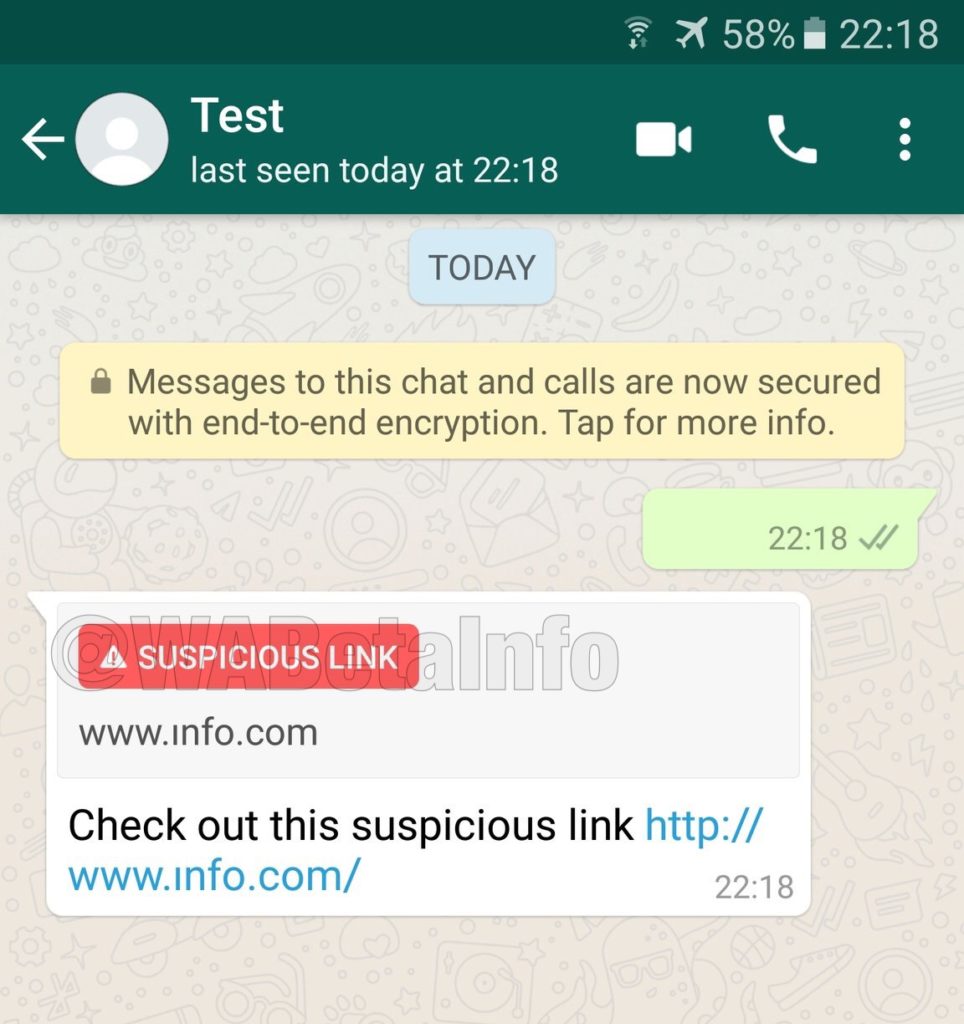
According to WhatsApp experts, WABetaInfo, WhatsApp is testing a new feature that will highlight suspicious links. The latest beta version of the app, submitted to the Google Play Beta Program, is very similar to older versions, with the only real difference being the new suspicious link detection feature.

Image via: WABetaInfo – WhatsApp is testing a Suspicious Link flagging feature

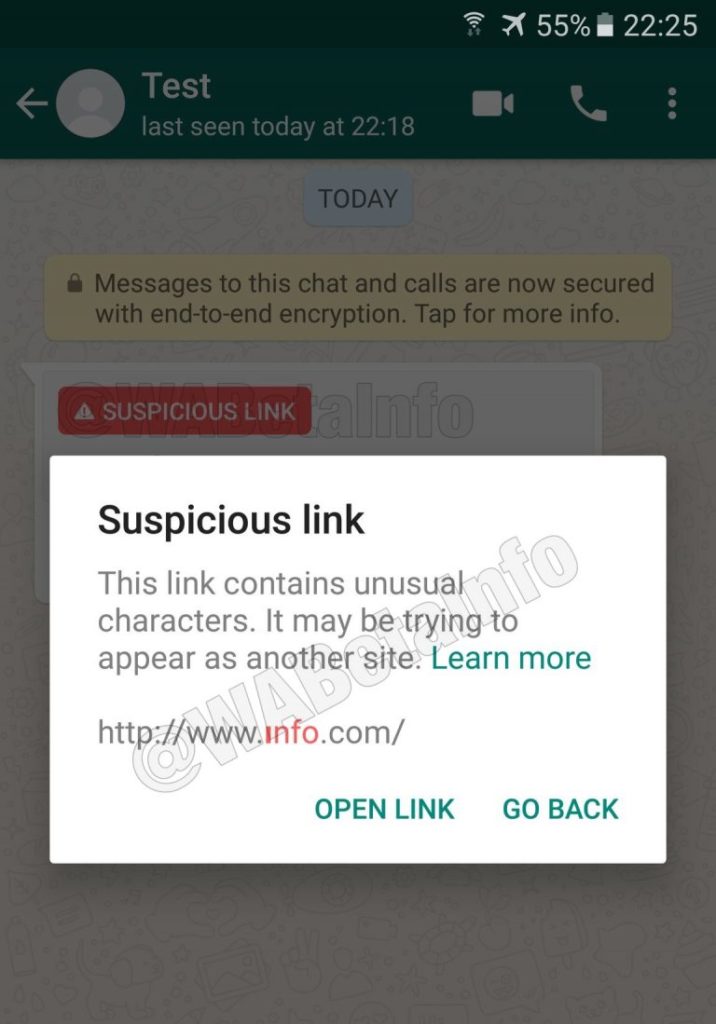
The feature isn’t too complicated, but it could make a difference. WhatsApp will run background checks on all links shared across the platform. The check will determine whether the information contained in the link is accurate or not. Any link failing the WhatsApp verification test will receive a Suspicious Link flag. A second warning will flash up for anybody who decides to ignore the first flag and clicks the link anyway. According to WABetaInfo, the checks will be carried out on individual devices so they won’t consume extra user data.

Image via: WABetaInfo – Users will who ignore the first warning and click a suspicious link will receive a second warning before the link opens

For now, this new feature is still a long way from a broader rollout to all users. It still has a lot of development ahead of it before it‘ll be stable enough to come to the primary version of the app. This shows, however, that WhatsApp is taking its fake news problem seriously and is actively searching for solutions.


The Indian government is not happy with WhatsApp

Fake news spread via the WhatsApp messaging service is causing extreme violence across India and the government has called on the messaging service to take action. Will it be that easy to halt a problem spreading across one of the biggest messaging services in the world?

We recently told you about disturbing stories coming in from around the world relating to the spread of fake news over WhatsApp. Particularly nasty stories have been coming out of India, with people being lynched and beaten to death to due to fake reports of child snatching spread across the messaging platform. The Indian government has now responded to this fake news crisis and has asked the Facebook-owned company to take action.

In a statement made on July 3, India’s Ministry of Electronics & IT said:

“Instances of lynching of innocent people have been noticed recently because of large number of irresponsible and explosive messages filled with rumors and provocation are being circulated on WhatsApp… Deep disapproval of such developments has been conveyed to the senior management of the WhatsApp and they have been advised that necessary remedial measures should be taken to prevent proliferation of these fake and at times motivated/sensational messages.”

Many people in India use WhatsApp
WhatsApp has a massive presence in India and needs to work with the government to help the spread of fake news.

Events like this are troubling, and it isn’t the first time that Facebook-owned messaging platforms have been used to spread fake news and incite violence. Messenger has been used to incite violence in Myanmar with the UN pointing out that Facebook played a decisive role in the Rohingya crisis.

The Indian government’s statement on the current crisis engulfing WhatsApp makes it abundantly clear that it expects WhatsApp to act, saying:

“The Government has also conveyed in no uncertain terms that WhatsApp must take immediate action to end this menace and ensure that their platform is not used for such malafide activities.”

The statement, however, only talks about using “appropriate technologies,” to halt the spread of fake news, so it doesn’t offer a roadmap towards implementation. The problem is WhatsApp’s, and India expects it to act.

WhatsApp definitely needs to do more, but this is a very simple position for the Indian government to take. It is a position that ignores the cultural issues that are maybe contributing to the spread of fake news. After all, WhatsApp is available in countries around the world, but most of the violence caused by the spread of fake news is coming out of India.

This report from the BBC shows the extent of the problem facing WhatsApp and the Indian Government – Warning: contains disturbing scenes.

In response to the Indian statement, WhatsApp has said that the problem is beyond the control of the messaging service alone. The Wire reports that WhatsApp sent a letter to Ministry of Electronics & IT in India saying:

“Like the government of India, we’re horrified by these terrible acts of violence and wanted to respond quickly to the very important issues you have raised…”

But then adding that it is a problem:

“…that requires government, civil society and technology companies to work together.”

The messaging service cites a number of recent changes that should help stem the spread of fake news. These include forwarded message notifications, increased admin control over groups, and the funding of academic research on misinformation and fake news. These actions alone, however, will not solve this problem. Education is going to be the most significant tool available to the people trying to fix it.

The people using WhatsApp need to learn to recognize fake news stories before spreading them or, even worse, becoming involved in a mob that will act on them. WhatsApp has committed to efforts in this direction with fact-checking organizations like Boom Live already available on the messaging service but is also clear that it is a job for the Indian government to take up also.

Does WhatsApp spread fake news?
Fake news can spread quickly, and cause harm, if people don’t take the time to read and scrutinize stories before sharing them.

The spread of fake news and resulting acts of misplaced violence is a serious and complicated problem that will not go away soon. The Indian government, WhatsApp, and individual community leaders will have to work together to help bring it to an end. A long and challenging education program lies ahead, but fortunately, everybody involved has the perfect weapon for teaching important lessons to people in rural parts of a country like India. WhatsApp alone isn’t to blame for the recent violence in India, but it is part of the problem. If used correctly, there is nothing to stop it from being part of the solution also.


The new “Google WhatsApp” is already available on PC

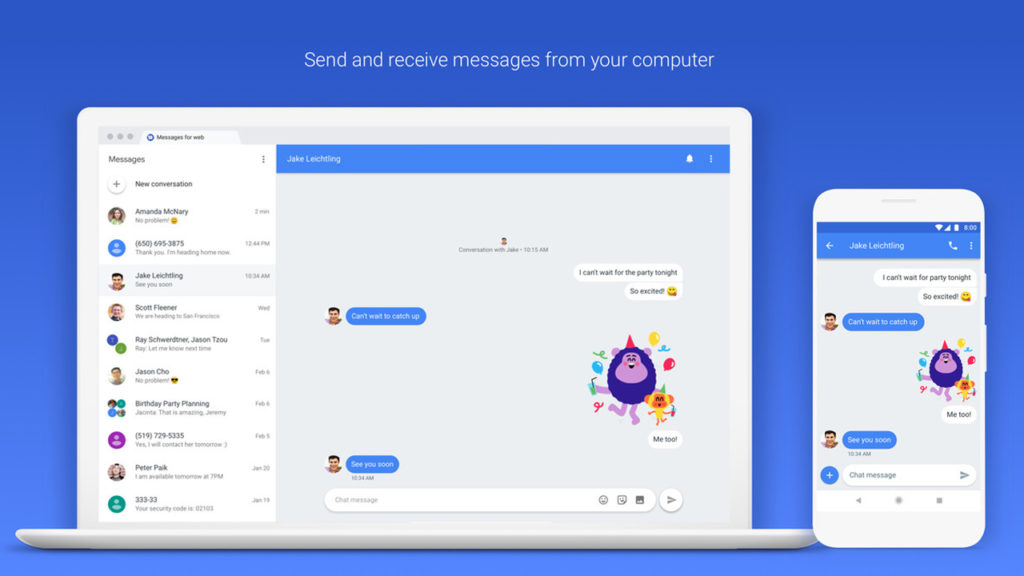
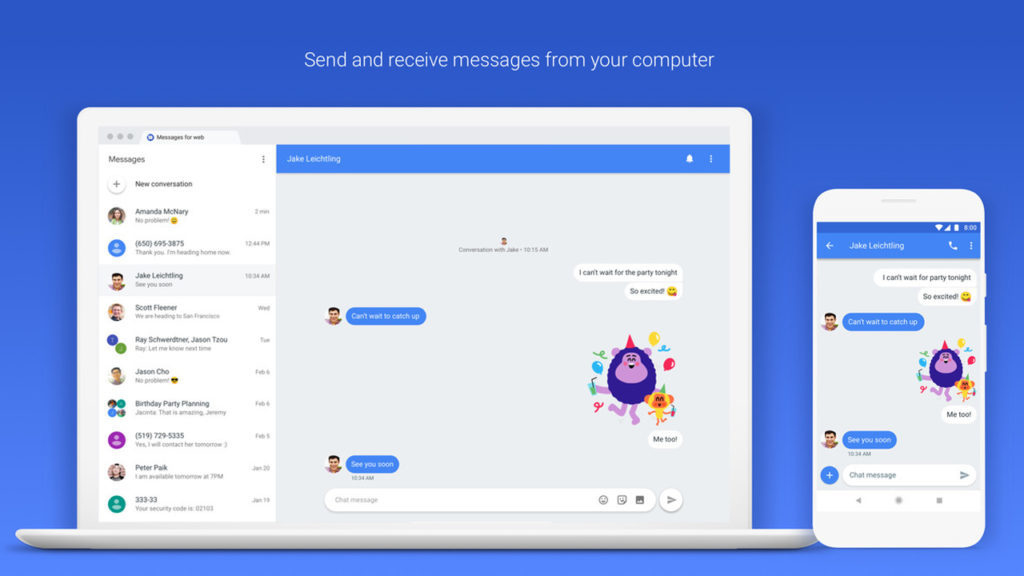
So last year Google announced that it was giving the humble SMS app an upgrade. Not just any upgrade though, SMS was going to get the full-on messaging upgrade it needed to take on WhatsApp. Well now, Google’s messaging app is now available to download on PC.

8

The PC version of Google messages works a lot like WhatsApp Web but is a reflection of the SMS app found on Android phones. It can send texts and photos to all of your contacts. As well as this, however, it’ll even allow users to send messages to email addresses using their phone number.

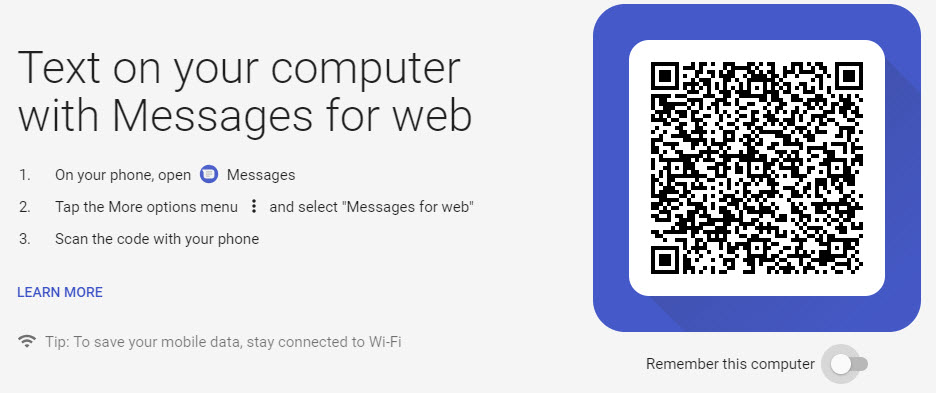
To use Messages on PC all you have to do is:

1. Check that you have the latest version of the Messages app installed on your smartphone. If you don’t click here to download it.

2. Once you have the app installed, open it, tap the three dots in the upper right corner, and then Messages for Web.

3. On your desktop, using any browser, go to messages.android.com.

4. Scan your QR code with your smartphone’s camera and you’re good to go.

Messages on PC does still have some shortcomings that you need to consider. You can send images, emojis, and stickers; but you can’t send GIFs like you can with the mobile app. It does, however, have a Dark Mode, which is exclusive to the web version.

It is worth remembering, however, that this app does send SMS, so you’ll have to be wary of your data plan if you don’t want to incur a lot of unwanted charges.

What do you think of this move from Google? Do you think you might give it a try and turn away from WhatsApp? Let us know in the comments below.


Tricks for staying offline on WhatsApp

Image via: Pixabay

Privacy on WhatsApp is a serious matter. But anybody can add an extra security layer to their profile by taking a few steps. If you would like to hide your personal data and avoid being exposed to other users, we’ll help you out with a few tricks for staying offline on WhatsApp.

WhatsApp Messenger Download WhatsApp
8

Get rid of the “last seen” and blue check

The first trick to be less trackable on WhatsApp is the simplest: get rid of the “last seen” timestamp and blue checkmark read receipt. To do this, go to WhatsApp and open the Settings section. Of all the boxes available, the only one we want is “Account,” so go there and then “Privacy.”

Once inside, click on the first field: “Last seen.” Here you can confirm who can see your “last seen” connection time. If you select “Nobody” as a default, say goodbye to seeing the “last seen” connection for your own WhatsApp contacts. Likewise, if you scroll down, you’ll see the box “Read receipts.” By unchecking it, WhatsApp won’t use the famous blue checkmark if that person has read your message. Is that a problem for you? The feature goes both ways: it’s either enabled for both or disabled for both, but nothing in between.

Airplane mode

We always say airplane mode for smartphones is extremely underrated. It’s not just for air travel. This feature is useful for our everyday lives.

If you enable airplane mode, your data connection is completely cut off. So the person sending you a WhatsApp message will only see one checkmark in their app (the sent receipt). Until you turn off airplane mode, the tool won’t work, so you can read your messages up to that point.

Pop-up notifications

The last way to read messages from somebody without going online has to do with pop-up notifications. This WhatsApp feature was introduced relatively recently, but more and more people are making the most of this gem. To enable them, go to “Settings,” click on “Notifications” and enable “Pop-up notifications.” Several options will appear, though what you need to stay offline is “Always show pop-up notifications.”

From now on, all messages you receive on your cell phone will also appear as pop-ups, without needing to go to WhatsApp to check them. You can read, view or listen to them all “from the shadows,” which gives you an extra level of privacy. And of course, secrecy. We won’t deny it.

WhatsApp Messenger Download WhatsApp
8

Is WhatsApp helping the spread of fake news?

Disturbing stories are coming in from around the world about crimes being carried out due to misinformation spread via WhatsApp. The Guardian reports that Indian police have linked dozens of murders and serious assaults to WhatsApp rumors. One incident, in particular, saw two men, who were returning from a trip to a waterfall, dragged from their car and beaten to death:

“The villagers got suspicious of the strangers as for the last three or four days messages were going around on WhatsApp, as well as through word of mouth, about child lifters roaming the area,”

Other incidents include a yellow fever outbreak taking hold in Brazil after WhatsApp was used to spread anti-vaccine videos and audio messages, politically motivated fake news spread in Kenya, and fake news about the divorce of David and Victoria Beckham distributed in the UK.

WhatsApp has over 1.5 billion users worldwide and its lauded end-to-end encryption means it is almost impossible for the content of messages sent across the messaging service to be monitored. Everything sent across WhatsApp is private and arrives at its destination precisely as it was sent. There isn’t any sort of algorithmic interference ranking content based on the supposed interests of the recipient or the factual accuracy of the content. This means that big companies like Cambridge Analytica can’t pay to manipulate what users are seeing, but it also means that false information can quickly spread across the messaging service.

According to a report by the University of Oxford’s Reuters Institute, more and more people are turning to WhatsApp for news, as the credibility of other more public social networks has been drawn into question. The nature of the messaging service, however, means that it acts more as a conduit for gossip than a reliable newswire. The idea of being in on a secret is just too alluring for some to bother checking the news they’ve received before they send it on again.

Does WhatsApp spread fake news?
WhatsApp knows it has a fake news problem.

A WhatsApp spokesman has said that the company is aware of the problem and that they’re working to prevent the spread of fake news:

“We’ve made it easy to block a phone number with just one tap – and are constantly evolving our tools to block automated content. We’re working to give people more control over private groups, which remain strictly limited in size. We’re also stepping up our education efforts so that people know about our safety features, as well as how to spot fake news and hoaxes.”

A recent update, highlighting forwarded messages, does make it easier to see if you’re receiving fraudulent messages. With robust encryption meaning there is no way for fact checkers to verify information sent across WhatsApp, there is still a lot more work for the messaging service to do if it is going to help prevent the spread of fake news. As Nic Newman, who co-authored the Oxford University report, says on WhatsApp’s fake news story:

“It’s very early days but I’ve got a hunch this is going to become a much bigger story.”

Do you ever receive news stories via WhatsApp? We’d love to hear from you if you have.


Is this what the new Windows 10 version of WhatsApp will look like?

WhatsApp’s current app offering on Windows doesn’t do much. It is a port of its web app, which itself has a few shortcomings. Using the web app or the current Windows app, you can send and receive messages, images, files, voice notes, and videos but there is no voice or video calling. As WhatsApp voice and video calls have continued to improve this has become more of something WhatsApp’s desktop offerings needs to add. It now looks like WhatsApp and Microsoft are working closely on a Universal Windows Platform (UWP) version of the popular messaging service.

8

This is an important development for both Microsoft and WhatsApp, so it makes sense that we’re starting to hear about it. WhatsApp still updates its current Windows phone app, but this is a Silverlight based app, built for Windows 8.1 devices. If Microsoft were to release new mobile devices, like the rumored Andromeda (surface mini) foldable phones, users wouldn’t be able to download WhatsApp. With Windows 10 being a multi-device platform any app designed for Windows 10, will work across all devices, including both concept phones for the future, and current desktop PCs.

Image via: Windows Central

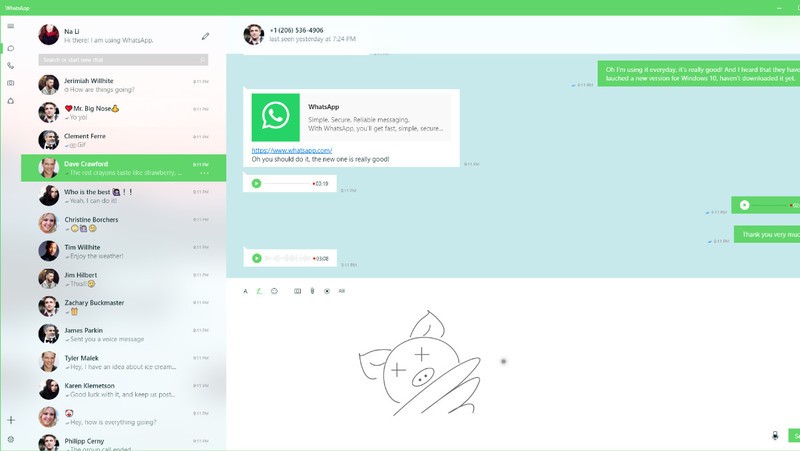
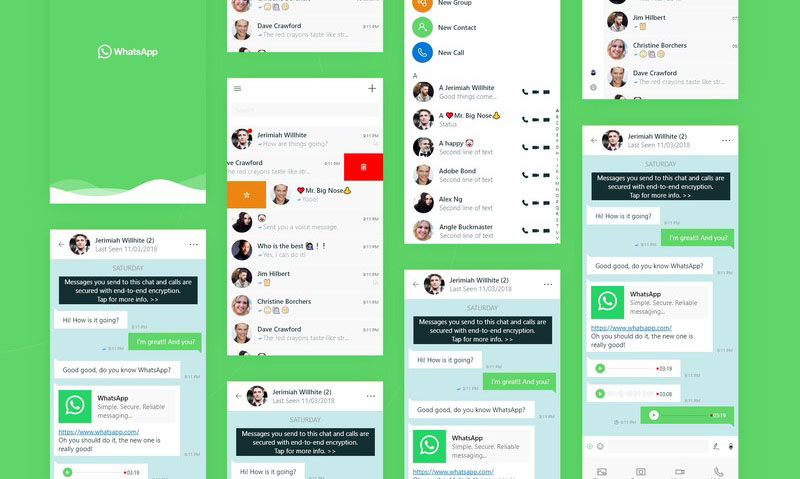
A design concept for the UWP WhatsApp project appeared on the website Behance. The design was then removed, when Windows Central approached the designer, who posted it, for comment. Windows Central did manage to get their hands on the paragraph the designer posted with the design:

“WhatsApp is a free cross-platform app owned by Facebook. You can make video calls and send text messages, voice messages, documents, and user locations. I have been supporting the team with porting WhatsApp from Silverlight to UWP. We want them to bring their app to Windows 10 desktop and integrate unique Windows 10 features like Ink and Fluent Design. The project had [a] successful result which led to WhatsApp partnering with Microsoft, and we earned high praise from the WhatsApp team.”

Image via: Windows Central

The design concept clearly shows call buttons, meaning WhatsApp on your desktop could soon be able to make audio and video calls, just like it can on your smartphone. Of course, this would make the app a direct competitor to Microsoft owned Skype, so there is a chance this functionality might be retained for hybrid devices like the Andromeda.

So far, all we have are these concept designs so we still might not be getting a new version of WhatsApp for Windows 10. These designs certainly point to an interesting future partnership between WhatsApp and Windows, but we’ll have to wait for official confirmation before we can start to get really excited about this one. Stick with us, and we’ll keep you informed as soon as we know more.


9 out-of-this-world features on your favorite apps that NOBODY knows about

Our favorite apps are updated almost every week. The bad news is that these updates usually go unnoticed. Did you know that Facebook helps you look for public Wi-Fi? Or that Gmail can write your emails for you? So you don’t miss out on the best new features on your favorite apps, we’ve compiled the best updates in recent months. 

1. Gmail writes your emails for you

Gmail offers an option called “Canned Responses.” This feature saves messages or phrases that you use most often and suggests them when you draft an email, saving you time.

Want to enable this option? You have to go to the settings section in Gmail called Labs. Gmail Labs is a testing center with “far-fetched” experiments (according to Google) of all kinds. You can access Gmail Labs here.

The feature you’re looking for is called “Canned Responses” and all you have to do is click on “Enable” and then “Save Changes” at the bottom of the page. 

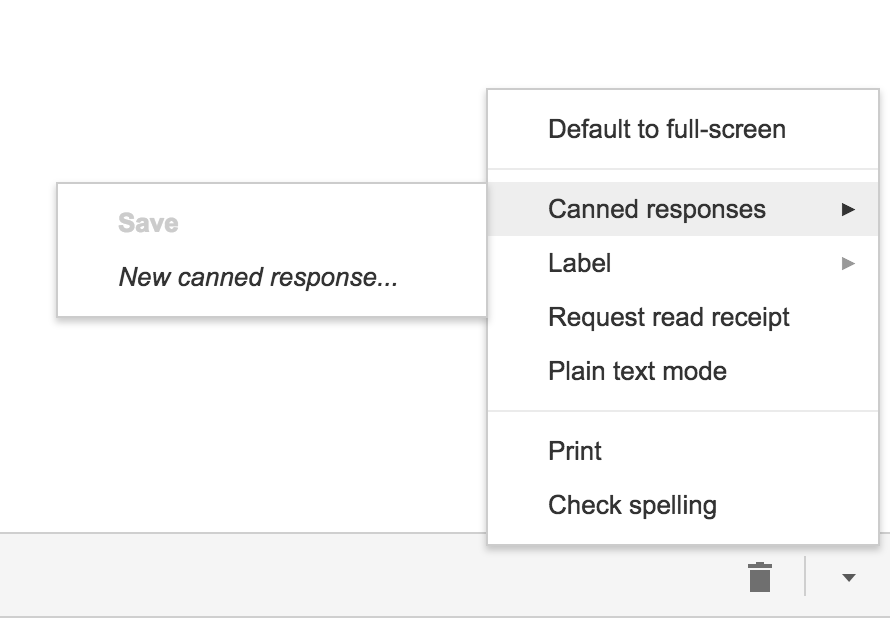
Next time you compose an email you’d like to save as a canned response, click the little triangle on the lower right-hand side of the screen. That opens a menu with an option for “Canned responses.” Just move over and click “Save” if you’d like to save that email so you can fire it off again someday.
You may have noticed a basic AI version of this at the bottom of messages you read on the Gmail app on your phone. They look like this:

2. Gmail’s most invisible feature

It’s unlikely that you’ve noticed this Gmail update because it’s designed to go unseen.

Haven’t you noticed lately that you’ve received fewer spam emails with suspicious links? Gmail has enhanced its ability to detect and delete this type of email even before it reaches your inbox. It’s not yet 100 percent foolproof, but it’ll keep you safer than before.

3. Make wish lists on Google Maps

Google Maps lets you make lists of places you’d like to visit. Imagine that you’re planning a vacation to Paris. You can make a list of those museums, restaurants, and attractions that you’d like to visit. And you can share the list with those you’re traveling with. Or with anybody, for that matter!

Google Maps users are making the most of this feature to share recommended places or themed attractions. To use this feature, it’s as easy as pinpointing a place in the app, clicking “Save” and choosing the list with the green label that says “Want to go.”

4. Share anything with WhatsApp

WhatsApp lets you share any file type (mp3, videos…) between contacts provided that these files do not exceed 100MB in size. Instead of sending 100 photos one-by-one, why don’t you send them as a .zip file, for example?

5. WhatsApp gets their act together…kind of

It’s taken a while, but WhatsApp now has filters, like Instagram and the rest! At the time of writing this article, there are just five filters and they’re only available on iOS; no news on when they’ll arrive on Android.

6. Facebook helps you find Wi-Fi

Facebook has a relatively new feature called “Find Wi-Fi.” It’s a little bit hidden. First you have to click on the three horizontal lines on the lower menu bar. Click on “See More.” There you’ll find it and you can enable “Find Wi-Fi.”

After enabling it, Facebook will show you a map with the closest Wi-Fi hotspots as well as details about these hotspots, like which businesses they belong to.

7. Download movies and TV series from Netflix

Taking a plane somewhere? Bring your tablet packed with your favorite Netflix movies and shows! Not all Netflix offerings are available: pay attention to the download icon that appears on the TV series or movie listing. Amazon Prime also offers this feature.

8. Spotify Codes

Spotify has a feature called Spotify Codes. Have you noticed that below songs, playlists, and albums, there is a barcode in the shape of a sound wave? If you don’t see it, click on the three dots to access Spotify’s advanced options.

You can exchange these sound codes with your friends and they only have to open the Camera feature within Spotify for apps to scan them.

Also, Spotify Codes are an excellent way for artists to become known, as they can insert their codes on social media so the rest of the world can quickly access their songs.

9. Muting on Twitter

Got some people on Twitter who won’t stop spoiling your favorite TV series or spewing goofy conspiracy theories? Don’t want to block them because sometimes you talk to them and some of their Tweets are interesting?

Twitter now lets you mute whoever you want. Muting means that their messages will not appear on your feed, all without their knowledge. You’ll receive notifications if they mention you in a Tweet or if you receive direct messages from them. And you can check their Tweets when you feel like it.

Muting is as easy as clicking on the “down arrow” on one of their Tweets. You’ll see this option, among others.

Have you found any hidden features you’d like to share? Let us know in the comments!

 

WhatsApp will now notify you when you receive potentially dangerous messages

The latest version of the WhatsApp beta has something new: a feature that will alert you when you receive a message forwarded from another chat. This will make it much easier for you to spot spam messages and potential scams.

Specifically, the notice will appear at the top of the message, with a little arrow pointing it out:

If you use WhatsApp often, you will no doubt be familiar with messages advising you to click a link unless you want to start paying for WhatsApp. Or messages that offer free trials of Netflix if you click a link and input your data.

All these messages are traps designed to steal your info. The new warning will show that these messages are a part of a chain, alerting you to the potential scam. The notification will simply highlight that message has been forwarded so you might also see it if somebody passes you a funny meme, highlights a news story, or is spreading the latest viral phenomenon.

WhatsApp Messenger Download WhatsApp
8

For now, this feature is only available in the beta version of WhatsApp, but it is expected to get a wider roll out soon.


WhatsApp payments should make your life easier

Back in August of last year, WhatsApp added a mobile payment system to the beta version of the app. The beta WhatsApp payments used a UPI-based money transfer system that allowed users to make peer-to-peer bank transfers across the messaging platform. Now, according to Bloomberg, WhatsApp will roll out the payments system to users across the regular version of the app within a week or so. If you owe anybody money, now is the time to block them on WhatsApp!

WhatsApp has partnered with a number of banks to make its new payments system possible. Bloomberg reports that WhatsApp wouldn’t launch the service until it had at least four major banks backing it up. With HDFC Bank, ICICI Bank, Axis Bank and SBI all behind it, WhatsApp feels free to push on with the wider roll-out of the project.

WhatsApp Messenger Download WhatsApp
8

Digital payments have become big business over the last few years, so it makes sense for WhatsApp to try and break into the market. If the messaging giant can produce a seamless experience that doesn’t take away from its core purpose, then digital wallet and payment apps like Paytm, Google Tez, etc. will have to start looking over their shoulders.

Have you already started sending digital payments using your phone? Would you be happy sending money over WhatsApp? Let us know in the comments below.

How to recover a deleted WhatsApp photo or video

It’s one of the most frequently asked questions when you’re having issues: “How can I recover a deleted WhatsApp photo or video?” For some reason, you deleted that snapshot and now want to get it back on your device. Yes, friends, you can recover it. In fact, today at Softonic we’re going to teach you how.

Before we get started, check carefully

We’re going to recommend a series of recovery programs, but before we get started, we want to ask you something: are you sure you’ve checked carefully?

We’re asking this question for a simple reason: WhatsApp saves all your images and videos in two different folders. One is the device’s “Image gallery” and the other is a dedicated folder for the app called “WhatsApp Images” (within the “Gallery,” of course).

In the case of iOS, the images are also found within every user. If you click on the profile name once the chat is open, you’ll see a field called “Multimedia, links and docs.” Go in and you’ll have access to all the images that you’ve downloaded since you installed the app (if you didn’t delete them previously, of course).

With apps

Once you’ve checked that the images aren’t there, it’s time to use apps to recover the snapshots. For this, we have two tools that work fairly well: DigDeep and Disk Digger, the first free and the second paid.

Starting with DigDeep, this app is extremely easy to use, so much so that its design is the most complex part. With a rough and ugly appearance, this software lets you recover all deleted images with two simple clicks. Literally. Once you have it downloaded and installed, you’ll see that several pictures of deleted images will pop up. Click on the one you would like to recover and click on “Restore.” It doesn’t get any easier.

DigDeep Image Recovery Download Free
9

For Disk Digger, the ins and outs are the same, except the free version of the app only recovers a thumbnail of the photo. Of course, the developers’ idea is that you’ll see the images or videos that you want to recover. And you won’t think twice about upgrading to the paid version.

DiskDigger Undelete Download Free
8

About WhatsApp Web

We’ll wrap up with a little trick that you may not know: WhatsApp Web, i.e. the computer platform for this app, may have your photos. For this, you only have to enter the site, scan the QR code that it requests (following the instructions that WhatsApp indicates) and you’ll see the app opens on your computer.

If you click on the chat of any user, you’ll see that same box as the iOS version (“Multimedia, links and docs”). Go in and you’ll have all the photos and videos that you’ve exchanged with that person at your fingertips!