Look out for these dangerous Chrome extensions

Chrome users beware. There are fake extensions in the Chrome store offering free movies that could cause you harm. If you see an extension offering films like Ready Player One or the Avengers, do not click on them. The promise of full access to HD and 4K versions are false.

Image via: The Telegraph

Anybody falling for this trick will find themselves redirected to a site called Vioos.co. Vioos looks like a streaming page but clicking on any of the videos on offer will take the user to another website called Zumastar. Zumastar then prompts you to create a “free” account that’ll you access to unlimited free movies, but this is just a scam to steal your data and infect your PC with malware.

Another possibility is being taken from vioos to EtnaMedia.net, which is blocked by MalwareBytes. MalwareBytes took action against the domain to halt suspected fraudulent practices. Users who found themselves on EtnaMedia.net reported charges to their credit cards without their knowledge or consent.

It is best to only download Chrome extensions from trusted developers and always think twice about clicking links.


New Pokémon game confirmed: Watch the trailer now

Pokémon Let’s Go Pikachu and Let’s Go Eevee will be the next Pokémon games for Nintendo Switch. The games are a mix between a Pokémon Yellow sequel and remake and will hit the shelves on November 16. In more exciting news, the games will also add Pokémon Go dynamics to the action.

Players will capture Pokémon just like they do in Pokémon Go. The Pokémon will appear on the map, and then players will have to fight them catch them using their Poke Ball. To throw the Pokémon ball you simply press a button on the joy-con, give it a shake, or you can use this Christmas’ must-have gift, the Poke Ball Plus.  A cool feature of the Poke Ball Plus is that players can put a Pokémon they’ve captured on the inside the Poke Ball and then take it with them everywhere they go.

Battles in the new games will be against other coaches. They’ll follow the same turn-based dynamics players will be used to, but there is little else known about whether new features will be added before release.

Players will be able to share Pokémon or fight both locally and online. Also, Pokémon can be transferred between Pokémon Go and Pokémon Let’s Go Pikachu / Eevee, but there’ll be a completely new story. Team Rocket will return, and Mewtwo will be back in his cave.

Pokémon GO Download Free
7

The 151 Blue / Red / Yellow Pokémon will be available in the game along with the Alola variants and an all-new mysterious Pokémon.

As the titles indicate, the Initial Pokémon will be Pikachu or Eevee. You will not be able to evolve them, but you will be able to capture other wild Pikachu or Eevee and evolve them to Raichu or Jolteon / Vaporeon / Flareon. Pikachu or Eevee will accompany you on your adventure on your cap. You’ll also be able to customize them.

Another great new feature of the game is the local cooperative mode. Another player can join the adventure at any time and help you capture Pokémon and fight other coaches.

Pokémon director, and producer, Junichi Masuda is involved in the development of the game. He clarified that Let’s Go Pikachu / Eevee are not the games that were announced at E3 of 2017. These games will be more classic deliveries in the style of Sun and Moon and will arrive on the Switch in the second half of 2019.

Facebook banned: New national policy aims to limit negative effects of social’ media

The government in Papua New Guinea has decided to ban Facebook for a month. The move comes in a bid to study the effects of social media on the people of the small island nation. In addition to the study, fake users will also be targeted and eliminated from the social platform.

Papua New Guinea’s communication minister, Sam Basil, said:

“The time will allow information to be collected to identify users that hide behind fake accounts, users that upload pornographic images, users that post false and misleading information on Facebook to be filtered and removed.”

With recent scandals like the Cambridge Analytica Facebook data leak still fresh in people’s minds, Basil says that the country is acting with its citizens’ best interests at heart. There are also plans for a local social network being set up on the island, but Basil says the government will wait until the results of this study are known before action is taken.

This isn’t the first time a country has temporarily banned Facebook. Sri Lanka did the same at the beginning of the year to prevent the spread of racial hatred. Banning Facebook is no doubt a controversial option but with the social network getting in trouble in Myanmar recently for helping incite racial violence, it is clear Facebook isn’t doing enough to meet its global responsibilities.

What do you think? How would you feel if Facebook was banned in your country?

The teenager squashing big bugs for big bucks

Most 11 year olds like playing video games or hanging round with friends. Not Ezequiel Pereira. Pereira got his first computer age 10 and has been programming since he was 11. He came so close to being a normal kid, when he is anything but. Now 16, Pereira has just found a bug that left Google’s internal systems vulnerable to hackers.

Source: CNBC

For the trouble, Google paid him a whopping $36,000. Not bad for a teenager, not bad at all. There is more though, as this latest bug is the fifth Pereira has reported to Google.

It took Pereira a lot of hard work to develop his bug hunting prowess, but he did start with early success. He spent years teaching himself different programming languages. He even earned himself a trip to Google HQ for the work he did in a coding competition. When he started bug hunting though, it didn’t take him long to find his first bug and net himself $500.

Since that first paycheck his continued hard work has paid off again and again. Other prizes for his bug hunting include a $10,000 bounty that he spent trying to get into US universities. Apart from that his earnings go on helping his mum pay the bills.

Pereira encourages his friends to search for bugs too and wants to earn a Master’s in Computer Security. Although he wasn’t able to break Ito the US education system, he is currently learning at home in Montevideo. Something tells us that it won’t be long before this kid achieves his dream and is working for one of the biggest tech firms in the world. Good luck Ezequiel.

Spare change or credit cards

London is a city that leads the world in many ways. A global destination and financial powerhouse, the English capital really is a city to be reckoned with. Others might say that the concentration of the world’s wealth in a single municipal area has created a city so expensive that ordinary people are being hounded out by bloodthirsty developers with money on their mind. In such an environment the humble busker can help soothe the worries of the overworked population, yet they too have extortionate rents to pay. What can they do, how can they live? In another world first for London, cockney buskers have come up with a rather novel, if not a little cheeky way of making ends meet.

Source: BBC

“Now, more Londoners will be able to show their support to the capital’s brilliant, talented street performers,” London Mayor, Sadiq Khan

This new initiative, that has sparked celebration in London Town Hall, is contactless payments for buskers. You know that the main reason you never give money to buskers is because you never have any change ?. Never again will you be plagued by such misfortune. A simple tap will hand over a pre-determined amount of your hard earned cash to the plucky busker playing Wonderwall.

Buskers in London have started asking for 2 pounds a tap and it seems the new system has really helped boost their takings. One busker reported it having, “a significant impact on contributions.”

This new initiative is powered by iZettle, a Swedish tech that was recently bought by PayPal. They’ve provided London organization Busk with card readers, which plug into smartphones. After a successful trial, Busk says the card readers distributed all over the British capital.

Is it time to dig out your old guitar and hit the streets?

Tweet to the top

Records are there to broken. What’s more you don’t need bells and whistles to break a record, you don’t need a fancy show, you don’t need a studio audience. You simply need grit and determination.

That is what Denver Post journalist, Elizabeth Hernandez discovered this Memorial Day weekend when she turned up to report on an attempt to topple the world record for highest stack of waffles. What she found was a few friends in a backyard and a whole load of glory.

Want to see more? Click here!

Daenarys takes stock…

Playing Daenarys Targaeryan in Game of Thrones, Sarah Connor in Terminator, and most recently starring in the Star Wars universe has cemented Emilia Clarke a place in pop culture history forever. Why stop there, however, when there are so many more mountains to climb and challenges to conquer. That seems to be the attitude Clarke is taking as she has recently risen straight to the top of another media world that is vying for our attention. Yes, the Queen of dragons is now also the queen of stock photography.

You might need an image for a blog post, a presentation, or to make an essay pop. Whatever you need, this new career defining moment for the young queen of dragons is there for you. With classics like it is all going round and it is going to be ok now a part of Clarke’s repertoire you’ll never need to use a stock image without a global superstar in it ever again.

Hollywood or home movie? How to get the most out of your smartphone content

Are you making the most of your smartphone?

Photos, videos, music – you name it, chances are your smartphone can do it. Heck, you can even film your own award-winning, critically-acclaimed movie with an iPhone 5S.

Your smartphone empowers you with all the tools you need to be creative, without the need to buy lots of expensive hardware. And while this is great, it’s only as good as the effort you put into it. No point in having a 12MP camera if you’re not going to use it, right?

So what do you do with your smartphone content? Share it on social media and wait for the likes to pour in? Why stop there? Why not take your content further and create ringtones from your favourite music, movies out of your happiest memories, or multimedia gifts for friends and family. Make use of your content in a meaningful way, or your creations will fade as quickly as the latest viral post.

At Softonic, we spend a lot of our time working with and reviewing creative software to help you get more out of your content. One of our favourites is this multimedia suite from AVS4U that includes five simple yet powerful tools to convert, edit, and rework audio and video.

AVS4U’s suite includes the following five programs:

AVS Video Editor

A versatile, feature-packed editor to splice, split, and enhance your smartphone videos. AVS Video Editor takes you through the entire movie-making process, from helping you storyboard your ideas to correcting hand-shake, exposure, and colour. Choose from over 300 effects to really make your video project stand out.

AVS Video Converter

AVS Video Converter does exactly what it says – takes virtually any file format and converts it into another of your choosing.

If you’re creating a wedding video, for example, and want to include guests’ smartphone footage, you might find them in different formats. AVS Video Converter solves this problem by converting video clips into a single format for easy editing and playback.

AVS Video Remaker

Imagine your friend sent you a video clip of her dancing at a party. She wants to upload the video to social media, but without the part where she trips over her heels and lands in the punch bowl. With AVS Video Remaker, you can remove the embarrassing moment and send the edited version back to your friend without reconversion. This ensures the original file remains compatible with her social media account.

AVS Audio Converter

If your music library is filled with MP3s, FLACs, ALACs, and WAVs, but you’ve got a DJ playlist to create in less than an hour, you need AVS Audio Converter. It’ll take your preselected tracks and convert them to a single, universally-compatible file type and size (of your choosing), ensuring you can blow the roof off the party without fiddling with file types.

AVS Audio Editor

If you’re feeling creative, take that DJ playlist and add your own sounds, effects, and mix edits with the AVS Audio Editor. You can clean up interference, add echo or delay, cut, splice, and trim – even mix together several tracks at once like DJ Woody. It’ll even make ringtones out of your favourite tracks.

The AVS4U multimedia package costs just $29,50 (Introducing the coupon AVS-Softonic18), down from its original price of $59 (70% off ). That’s for the unlimited version. That’s excellent value for money, but don’t take our word for it – download and try it for yourself. But hurry – the discount ends soon, so avoid disappointment by downloading it today.

How to use Facebook Marketplace to sell what you no longer use

When Facebook implemented its own system for buying and selling, many wondered if it would actually be successful. And although it has a long way to go before overthrowing Craigslist, Facebook Marketplace is making a dent. At Softonic, we want to tell you about this option, so we’ll show you how to use Facebook Marketplace to sell what you no longer use.

How to access it

The first thing you should know is that Facebook Marketplace isn’t an extra app or hidden site. This buying and selling hub is available from the main Facebook app or browser. You can access the marketplace from PCs or smartphones, and the only requirement is to have a Facebook account.

In the case of PC, the option appears on the left, fourth from the top. As for Android or iOS devices, the Marketplace can be found in the drop-down menu that appears next to “Notifications.”

How to use it

The first thing to clarify is that the Marketplace isn’t a place where you can make financial transactions like Ebay or Paypal, for example. On Facebook Marketplace, you can put a product for sale, but the money needs to be sent with another method, whether that’s Venmo or Zelle or whatever.

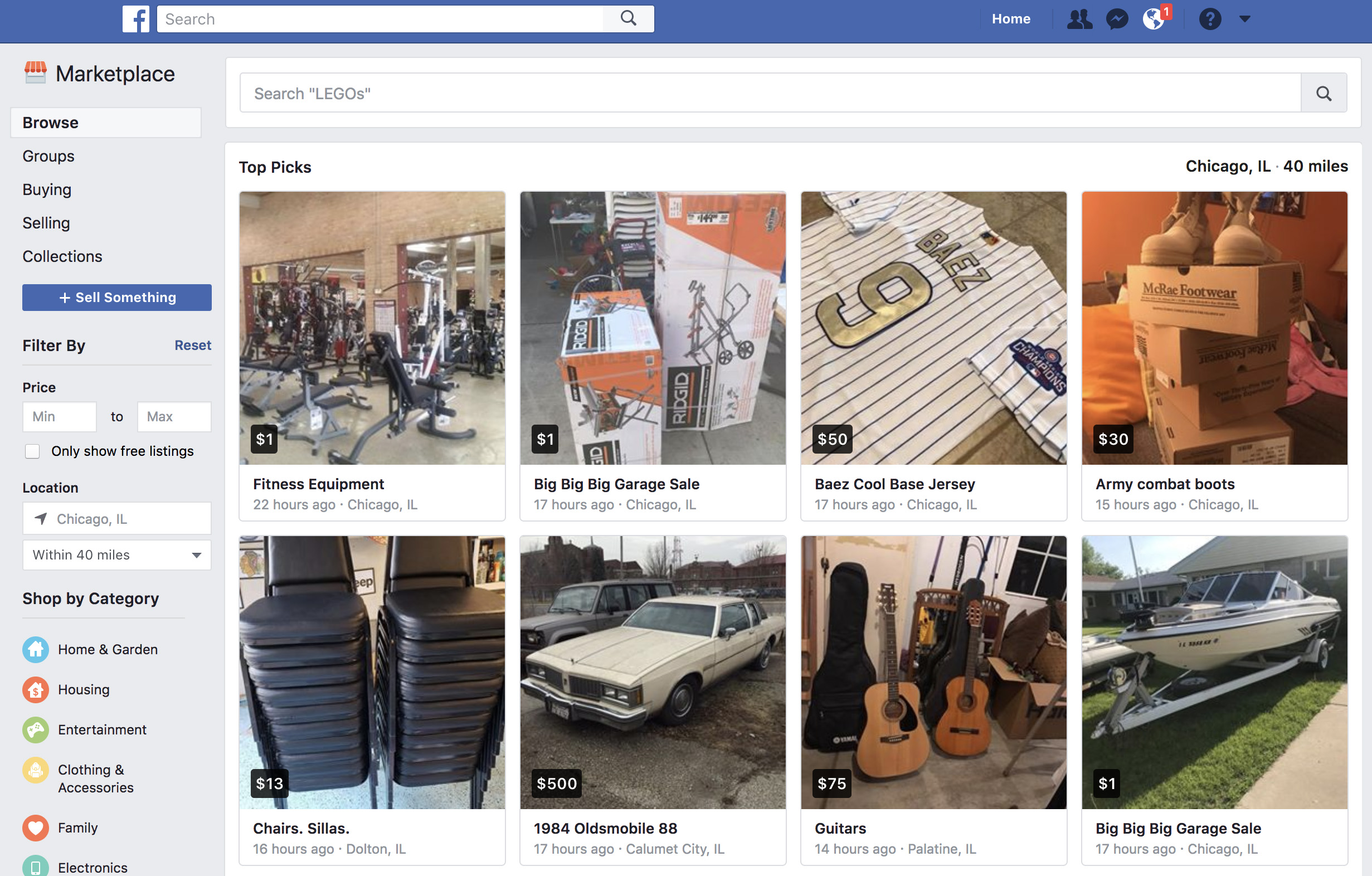
Once you enter Facebook Marketplace, you should check out the categories that appear on the top left: “Browse,” “Buying,” and “Selling.” “Browse” is self-explanatory: it’s where you can search for products. Enter the name of the item you’re searching for and look carefully at the settings that appear on the left, where you can narrow the price and the location. Once you’re interested in the product, click on it and get in touch with the seller. 

As for the other option (“Selling”), this is for everything you want to get rid of, once somebody has contacted you. However, you just have to click on “Sell something” to create a corresponding ad. Just fill in the “What are you selling?” field, add a price, a location, select a category and upload the photos that best highlight the item. Once you’ve got everything, click on “Publish” so it appears on the Marketplace. Then sit back and let the money roll in!

How YouTube chat works and what you can do with it

YouTube got non-stop updates in 2017. The video streaming platform knows that industry competition is fierce, so last year it launched a lot of new features, and developed some features that were already available but easy-to-miss. This is where YouTube chat comes in. Although it’s hard to believe, the system has a messaging service like WhatsApp or Facebook Messenger. Today at Softonic, we’ll tell you how YouTube chat works and what you can do with it.

Step by step

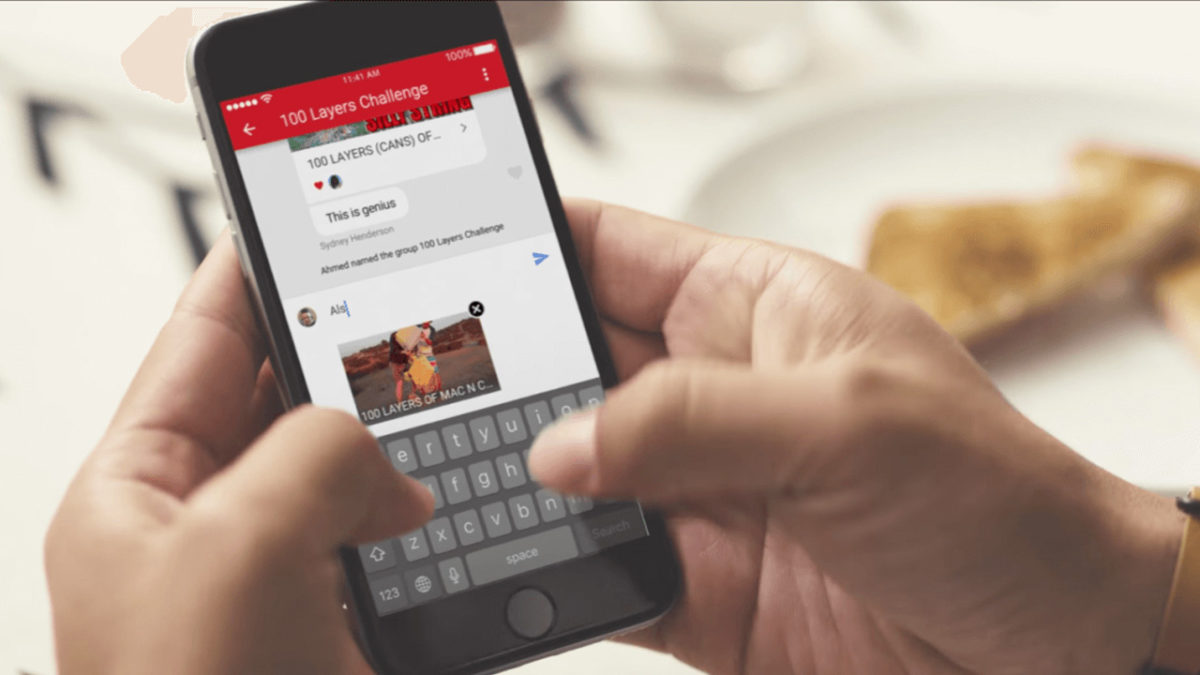
YouTube chat isn’t any different from what you see on major messaging services. In other words, you can write messages, send emojis and hold a normal conversation. However, the biggest difference is that everything is focused on YouTube. Instead of attaching videos or images, the icon is of sharing a YouTube clip. It’s a chat designed for browsing on the platform.

YouTube Download Free
8

For whatever reason, Google hid the chat feature in a place you’re unlikely to look. To chat, we’re going to select a video and click “Share.” When the menu opens, select the user you want to send the video to. Do this and the chat will open.

This screen is the main conversation interface, which hides some secrets. If you click on the three dots that appear on the top, the app will display a menu where some options appear, such as “View participants” of the chat, “Add participants,” “Delete chat” and “Mute notifications.” Of course, each name indicates what you can do under each.

In case you want to see the chat you’ve opened previously, all you have to do is click on “Activity” and then “View contacts.” There all your previous conversations will appear, as well as all possible chats of yours.

A big asterisk to this is that you have to have a confirmed name on YouTube or none of this will work. We spent about an hour looking for these options and couldn’t find them in the app, probably because we don’t want to use our real name on the site.