
3 apps to help you budget and track your spending

Be smarter about your money with these 3 great apps.

budget apps

Groceries. Coffee. Movies. Whatever you spend your money on, sometimes it can be difficult to keep track. But with the help of a budgeting app, it’s easy to see where the majority of your spending money is going. If you want to get better at creating a budget and sticking with it, check out these three apps below.

3 apps to help you budget and track your spending

Mint Personal Finance Download Free ►
7
Mint is a tried-and-true budgeting app. In fact, it is one of the best-known finance apps on the market. With Mint, you can track your spending through your credit cards. Mint will sort every transaction you've made into different categories such as food, bills, and rent. Then you will be able to create a custom budget and see how your actual monthly spending compares with your set budget. This is a great way to organize your purchases and see what categories you spend the most on.
Fudget: Budget and expense tracking app Download Free ►
7
Fudget is great for anyone who wants a simple way to keep track of their spending. This app is extremely simple to use and can help you plan short-term budgets. For example, if you want to save up for a vacation in six months, Fudget can help you set a budget to ensure you will have enough money saved up for the trip of a lifetime. The best part of the app? It's free! That means that you can create a budget without any added cost.
PocketGuard Download Free ►
7
Do you ever find yourself wondering how much money you can afford to spend each day? With PocketGuard, you can set a custom budget, and it will create a goal for how much to spend every day so you can stay on track. Because you connect PocketGuard to your credit cards and bank account, it can calculate your monthly expense and set a goal for how much you can afford to spend without going over your budget.

There’s no need to manage your money alone. If you need help staying on track with your spending or creating a budget, these apps are here to help you save money.


How to future-proof your career

What skills will be the most coveted in the future?

skills for the future

For today’s students, figuring out what to study is a big, hairy challenge.

Machines are on the verge of taking the jobs that their parents had, data mining is changing our relationships with brands, and even things like law or coding — relatively safe bets in the past — are changing.

So, how do we prepare for the robot revolution? The answer, it seems, may lie into learning into our inherent humanity. Here’s why.

Future-proofing your career

Work is changing

Technology, of course, reshapes every job. Some people believe that there will be no work in the future — but, chances are, we’ll all need to do some sort of job for the foreseeable future.

For example, work stands to become more fluid — focused more on mission-based teams, rather than rigid org charts.

Additionally, the gig economy isn’t going anywhere either, so future workers can expect to earn money from various sources — often working remotely on their own or with a changing cast of characters.

According to Deloitte’s Future of Work report, the skills of the future tend to fall into this “soft skills” category.

If you look at the skills we’ve outlined below, you’ll notice that things like being able to work with others bring big advantages to workers, same goes for flexibility, problem-solving, and creativity.

With that in mind—we may need to lend the liberal arts some respect that they haven’t seen in a long time. Here is a look at some of the skills that are increasingly in-demand.

Most-coveted work skills of the future

Creativity

Creativity is no longer exclusively the domain of painters and novelists. Rather, it’s a leg up when you can work alongside algorithms. Thinking in abstract terms, creating original content, and coming up with novel solutions to complex problems are valued skills when nothing is certain but change.

Teamwork

Social skills, of course, rule in the age of automation  Learning to manage teams, work collaboratively, and use your empathy at work will all help you go far in the workplace of tomorrow.

Problem-solving

Technology is bound to make things easier, as well as more complicated. Human workers will need to be able to analyze technology’s performance and its impact on the people its supposed to help.

Cognitive flexibility

Cognitive flexibility is a big one as the pace of tech-driven change has increased dramatically. So, the expectation that you enter a career and stop taking classes or earning certifications no longer makes sense.

So, where should we focus our efforts?

Students still face some tricky decisions. This McKinsey interview asked a panel of experts what, exactly, should incoming students study in college?

While all had different answers, there was this sense of agreement — students should develop core skills that can fit in anywhere. Things like being creative, being able to write and persuade, may serve students better than preparing for a specific career path.

The other thing we keep seeing over and over is this idea that humans need to develop their human talents and learn to use them in a range of diverse settings.

But, this also means people need to have a clear understanding of how their skills fit in with the skills that AI brings to the table.

According to Pew, experts seem to believe that technological advancements will push governments, educational institutions, and the private sector to create more educational and training opportunities that support flexible, lifelong learning, as it will no longer be reserved for those people who want to earn a promotion or change careers.

Final thoughts

In looking at the skills with a rising profile, there’s a sense of optimism there. Social skills, collaboration, creativity, and problem-solving are these very human things — and in the end, make us more valuable to our employers and lay the groundwork for success.

While we may need to adjust our mindset to get used to the idea of an abstract, ever-changing workplace, how we earn a paycheck in five, 10, 20 or years could get a lot more interesting.

How much does “trust” in the internet matter?

How can we navigate a less trustworthy internet?

does trust matter on the web?

Trust has been brought up a lot lately, especially in the context of our digital lives and the real-life implications of our online activities.

There’s no doubt that people have become increasingly susceptible to conspiracy theories. And, opinion and fact have seemingly morphed into one powerful tool for preying on emotions.

But who is responsible for fixing this information crisis? Is it up to us to educate ourselves or does a massive media intervention need to happen?

Let’s dive into this problem area.

How to navigate trust in the internet era

What’s next for news?

According to Pew Research, experts are pretty evenly divided on what the future holds for online narratives.

The 51% of respondents who said that things wouldn’t get better, say the fake news landscape preys on our survival instincts, and humanity’s manipulators will use new tools to take advantage of our natural desire for convenience and comfort — you know, our fear of change.

Others say our brains just weren’t built to handle change on the scale of what we’ve experienced in the past two decades. These respondents predicted the future information landscape would be overcrowded with false information, making it more difficult to find trustworthy sources.

The 49% of hopeful experts believe technology might fix the problems it caused in the first place, predicting better methods of weeding out fake stories and promoting quality reporting.

A Vox discussion from earlier this year looks at the role of Facebook and fake news in the 2016 election. In it, Brooke Binkowski of Snopes brings up a good point. She says that everyone was so quick to bring up the failure of the media, when we, as a society have failed journalism.

So, perhaps it is a matter of giving more funding to investigative projects and quality outlets, reviving the victims of pivot to video.

Binkowski also says that quality news organizations have hurt themselves by publishing articles based on Twitter gossip or other unchecked sources.

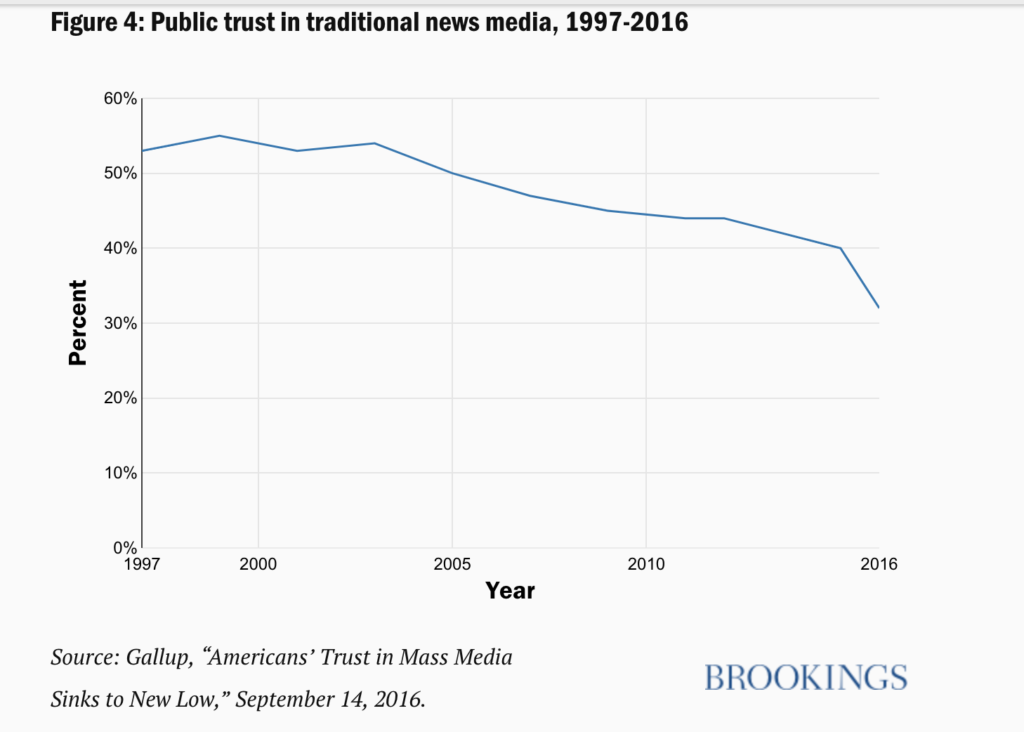
There’s also the fact that public trust in the media overall has eroded. So, whether NPR and the New York Times continue to push out quality news, will people increasingly just write them off as fake news?

peoples' in the media trust declines

Are we responsible for identifying fake news ourselves?

The reason we even pose the question, “should trust matter on the internet?” is, it seems that making clear distinctions between informational sources was once common sense.

For example, citing someone’s blog as a primary source is generally a no-no.

But, is it elitist to assume that people know this?

There are plenty of resources available for students; just about every university has a page dedicated to evaluating information on the internet. Filtering questions like: is news coming from an established institution? Are sources clear and documented? Does that information reflect bias? should maybe be part of the social media experience.

The Brookings Institute report dove into how we can combat fake news as a group effort. Their report mentions that fake news “fools” American adults about 75% of the time.

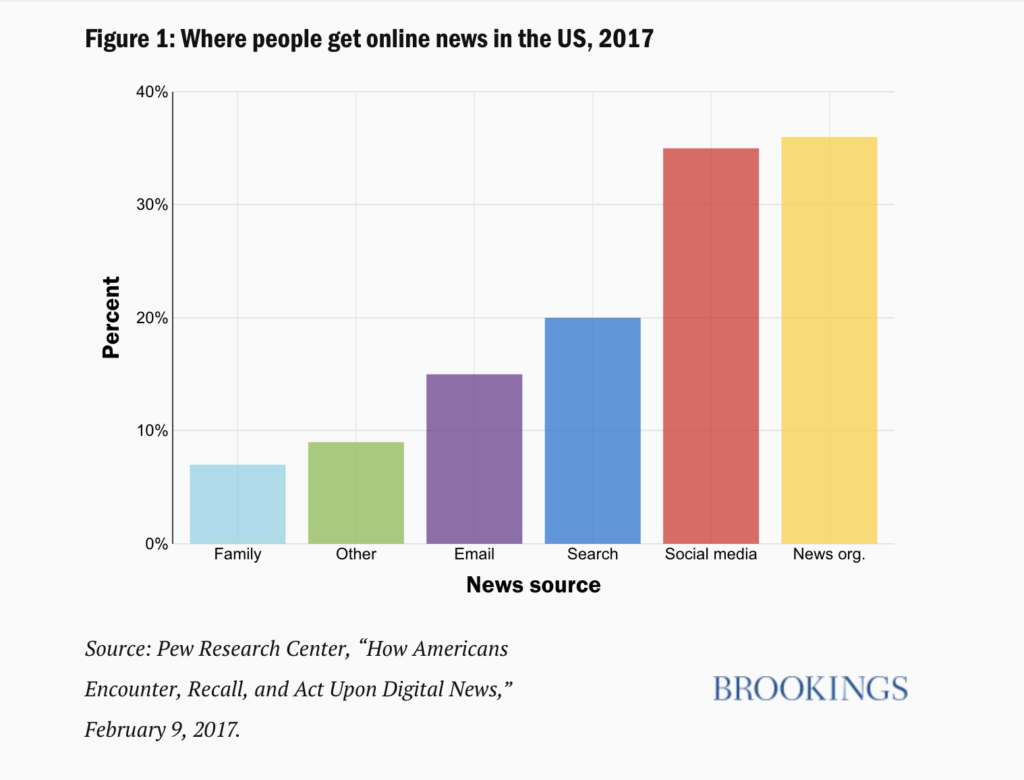
And recent data from the Reuters Institute for the Study of Journalism found that less than 25% of Americans feel social media channels do a good job separating fact and fiction. Yet, people get a good chunk of their news from social media and continue to share misinformation.

social media top news source

What do we do about this problem?

The Brookings report recommends that news organizations focus their efforts on quality journalism that builds trust and stresses the importance of calling out misinformation as they see it.

They also say that technology companies should focus on developing better ways to identify and remove harmful, fake content and that online users should learn to be skeptical about what they read online.

The point is, in an era of fake news, maybe we should revisit these research basics when it comes to informing our understanding of the world.

Trust matters, but we all need to work together if we want to improve the digital news landscape.

The 5 best apps to help you track your runs

Get faster, stronger, and healthier with these great apps.

best running apps

With so many running applications on the market, it can be difficult to choose which one is right for you. To simplify the process, we’ve rounded up the five best running apps on the market. These handy tools will make tracking your runs a breeze!

The 5 best apps to help you track your runs

1. Strava Training

In addition to tracking your runs through GPS and creating a custom map of your run, Strava Training throws in some friendly competition: After you’ve completed your run, you can upload your data and compare it with that of your friends. If you’re competitive, this can be a fun way to race friends and family — even those who live across the world! However, even if you’re not competitive about your runs, you can also look at the different routes your friends take. This can be a great way to discover new running routes to try out in your hometown.

Strava Running and Cycling Download Free ►
10

2. Nike Run Club

Formerly Nike+ Running, the Nike Run Club app is designed to track your runs. One benefit of this program is that it enables you to develop a personalized plan that’s flexible enough to work with your schedule. You can also easily share photos of your run on social media. And as if that weren’t enough, the app also connects you with friends as well as runners across the world, so you can participate in challenges and cheer one another on.

Nike Run Club Download Free ►
7

3. Couch to 5K

This is the perfect app to track your runs if you’re not a dedicated runner. Couch to 5K will have you running 3.1 miles in just nine weeks of training. The best part? Each week the app has you walk and run at different intervals. Then, by the ninth week, you will be able to run the entire 5K without stopping to walk!

C25K (Couch to 5K) download free ►
8

4. Pacer

Pacer is different from most running apps. It serves as a pedometer, step counter, and weight loss tracker. One great feature of this app is that you can track your running history and trends. Do you tend to stop running after two miles? Pacer will track that as a trend and let you know. You can also keep track of your eating habits, take advantage of guided exercise plans, and even connect with others in the health and fitness community.

Pacer 5K: run faster races download now ►
7

5. UA MapMyRun

One of the biggest struggles for regular runners is deciding which route they would like to take. Running the same course every day can become tedious and even remove some of the fun. With UA MapMyRun, you can choose from over 70 million mapped running routes. MapMyRun also tracks your distance, your pace, and even the amount of calories burned. This app is perfect for any runner who wants to spice things up and try out a new route every once in a while.

Map My Run by Under Armour Download Free ►
8

Using smart running apps like these is an excellent way to get a leg up while you train. Whether you’re new to running or a seasoned pro, one (or more) of these apps should do the trick.

iPhone users finally get a great Google app

Google Lens can now be accessed from the Google app on iOS.

Google lens Google app ios

iPhone or Android? Possibly the toughest of tech choices boils down to so much more than whether you are just an Apple fan or not. Both tech giants have brought their own magic to the market, which often ends up being exclusive to their respective operating systems and the smartphones that use them. Sometimes, however, Apple and Google come up with apps and features they think are so good that everybody should be able to use them. This now appears to be the case for Google with its Google Lens app.

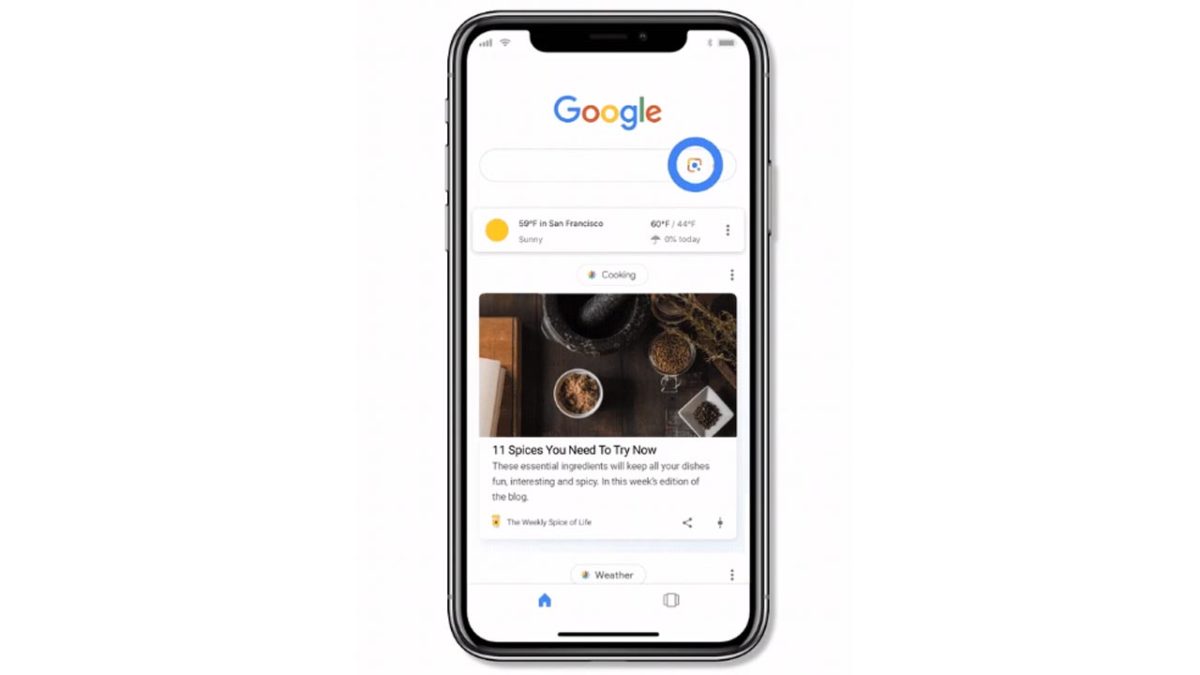
Google Lens can now be accessed from the Google app on iOS

If you are unfamiliar with Google Lens, you will likely be impressed by its capabilities. Lens allows you to point your smartphone camera at objects in the real world to try and find out information about what they are. It uses Google’s famous AI to scan what your phone is looking at and then serve up the relevant information. This is a key part of Google’s strategy of moving towards a future that contains so much more than mere text-based search queries.

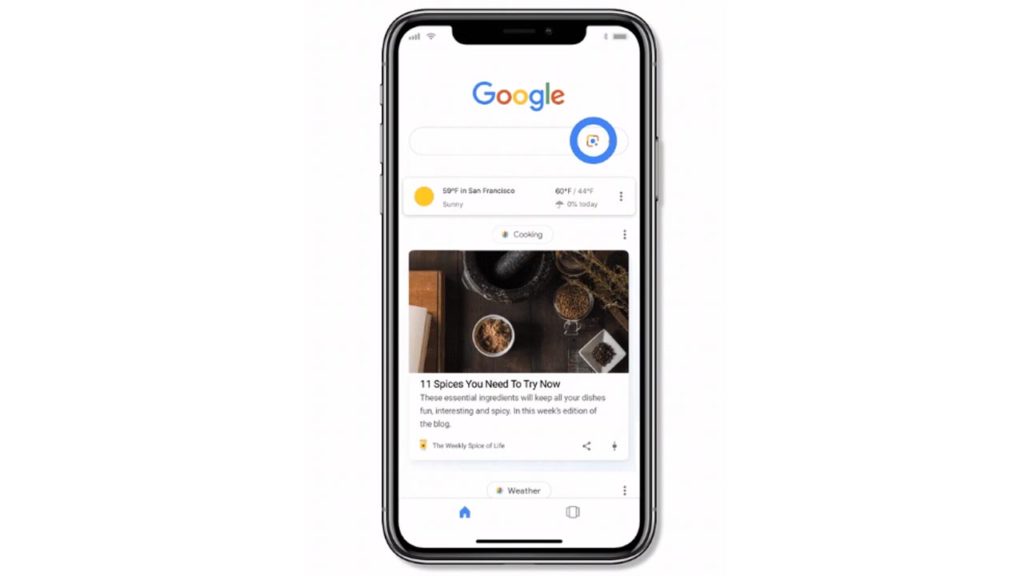
If you are an iOS user and you want to try out Google Lens for yourself, read on. All you have to do is open up the Google app on your iOS device and look for the new Lens icon. You should see it next to the microphone icon in the Google search bar. If you tap the Lens icon, your phone’s camera will switch on and you’ll see a number of moving bars, which indicate that Google’s AI is working away in the background. You’ll be able to use Google Lens to identify most things that you point your camera at including bars and restaurants, and more natural things like plants and animals. It also works very well as a quick and efficient way of copy and pasting analog text.

Google App Download Now
8

Until now, iOS users were only able to use Google Lens’ capability by scanning photos in the iOS version of the Google Photos app. The move to the Google app, and the introduction of a live scanning feature makes the whole process much more fluid and easier to pull off. iOS users can now simply tap on an object they are looking at through their phone, rather than having to first take a photo.

The Lens update to the Google app has been rolling out slowly over the last few weeks. If you still haven’t received it on your iOS device, don’t worry: it is on its way.

Google Maps update will help you get to work on time

Accident and incident reporting coming to Google Maps.

The team behind Google Maps seems to have been working overtime in recent months. We’ve seen a handful of updates that have turned Maps into a great app for searching for businesses in your area and then communicating with them once you’ve found what you are looking for. We’ve also seen updates that have improved the driving experience for people using Google Maps as their navigation app. Today we can tell you about a new feature update that falls into the second category.

Google Maps Download Google Maps
7

Accident and incident reporting coming to Google Maps

Like Facebook, which owns many different social networks and messaging apps, like Instagram and WhatsApp, Google owns more than one navigation app to help users get where they are going. As well as the famous Google Maps, the other major navigation product owned by Google is Waze. The key feature that distinguishes Waze from Google Maps is its crowdsourced incident reporting, which allows it to offer up to date news on all the traffic incidents users might run into as they attempt to get from A to B.

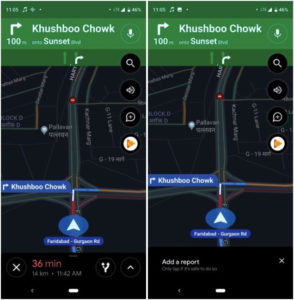
According to Android Police and BGR, Google is working on bringing this Waze feature to Google Maps. Screenshots published by Android Police show a new button, found when using Google Maps Navigation. Just below the volume button for navigation voice commands, you’ll soon be able to find the new speech bubble with a plus sign button, which will take you to the Add a report menu. From here you’ll be able to file an incident report about any traffic-related issues you encounter on your route.

new accident reporting for Google Maps

For now, this feature remains inactive, but Android Police report that it is showing up in a number of countries around the world. Although it does appear, it doesn’t work. There could be several reasons for this type of limited roll-out; it may be that Google has been running tests on the new feature. It could turn out that the roll-out was accidental during a testing phase.

It has long been rumored that Google has been working on an incident reporting feature for Google Maps. Waze users are able to report both accidents and speed traps and leaks in the past have indicated that Google wanted to bring the functionality to Google Maps, too. With a lot of new features arriving on Google Maps in the last few months, and this latest leak, it seems that Google has finally decided to pull the trigger on this Waze-like feature.

When we hear more about a wider roll-out of a fully functional incident reporting feature for Google Maps, we’ll let you know.

New Instagram update gives it one of WhatsApp’s best features

Instagram gets WhatsApp-style voice notes for direct messages.

WhatsApp and Instagram

Once a humble text messaging app, WhatsApp quickly grew to become an all-conquering communication service with lots of incredibly useful features. WhatsApp’s most loved features include the quick and easy voice notes users can send to each other. Voice notes are so popular, WhatsApp has been working on ways to make them better. They’re also so popular that another Facebook-owned service, Instagram, is trying to get in on the action.

Instagram Download Instagram
7

Instagram gets WhatsApp-style voice notes for direct messages

The new Instagram voice notes are easy to use. They work in much the same way as voice notes on WhatsApp. When you’re sending direct messages in Instagram, all you have to do to send a voice note is tap and hold the microphone button that is now found in the text box. Instagram will record your voice note until you release the button and then send it to your friend.

Voice notes are great for when you are messaging in a hurry, but they are also excellent for when you are trying to send a lot of information at once or some sort of complicated explanation. In these situations, if you don’t want to keep holding the microphone button while you are recording your voice note, you can lock the recording, so it will continue once you release the button. To do this, all you have to do is drag your finger up when you are holding the microphone button. If you make a mistake while you are recording a voice note and you want to cancel it, you can do so by either dragging your finger across to the trash can icon or, if you’ve locked the recording, you can simply tap it.

whatsapp style voice notes Instagram

Voice notes are a great feature for any messaging service to have so this is a real boost for anybody who sends most of their direct messages using Instagram.

We’ve recently seen a number of updates coming to the hip social network. The recent Close Friends update makes it easier for you to control who will see your Instagram Stories, and user profiles have also recently been tweaked to emphasize the user bio more, rather than follower count. All of these added to an updated messaging service that now comes complete with voice notes make Instagram a much friendlier social network. One that could help foster genuine communication between real friends rather than open up our lives to a world of new strangers who can peer into our lives from behind the veil of anonymity that the internet provides. This represents a move back towards the original core missions of the first social networks.

Instagram voice notes have already received a global roll-out on both iOS and Android. All you have to do to use them is open up a direct message to one of your friends.

Microsoft Edge will soon support all your Chrome plug-ins

Microsoft is moving to Chromium for future development of the Edge browser.

microsoft edge

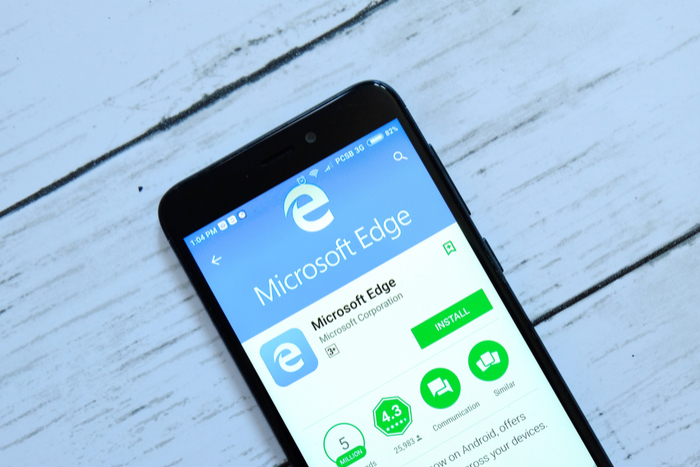
Microsoft Edge has had a short but strange life. It was billed as the Microsoft web browser that would finally kill all of Microsoft’s Internet Explorer demons. In many respects, it was successful. It is known as being a reliable web browser with a number of interesting and unique features. Despite its features, it hasn’t been able to break Google Chrome’s dominance of the market. With Edge only able to command a tiny percentage of market share, Microsoft has decided to take a bold step with its web browser.

6
The idea of Microsoft Edge is to be as fast, clean, and lightweight as possible to cope with the demands of different devices, whether it be a PC, tablet or phone.

Microsoft is moving to Chromium for future development of the Edge browser

Chromium is the open source project that lies at the heart of the Google Chrome browser. Like with Android, Google has made the core code of the Chrome browser open source, so independent developers can create their own web browsers and introduce their own features. Essentially, Microsoft is giving up in its efforts to develop its own, fully independent, web browser and Edge will become just another flavor of Chrome.

It isn’t all doom and gloom, however. There have been some very capable browsers built using the Chromium open source code. Some could even be said to be better than Google Chrome itself. This could be what Microsoft is aiming for as it moves its flagship web browser into the coding ecosystem of one of its biggest rivals.

In the blog post announcing the move, Microsoft cited a move away from fragmentation as being a driver of the decision. The software giant believes it is making things easier for both users and developers. Web developers won’t have to worry about code for another type of web browser and users will be able to enjoy greater cohesion between different web browsers. As Edge will become another Chromium browser, Google Chrome plug-ins will soon work on the Microsoft browser. Another key improvement, in Microsoft’s eyes, is that the move will make it much easier for Edge to make the move to macOS.

There is still a long road ahead for this Microsoft migration, but at least now we have the roadmap. Microsoft Edge users won’t have to do anything for a while yet, as developers won’t have access to a preview build of the new Chromium fueled Edge browser until early 2019.

Rumors of this move have been circling for a while now, and they led many to ponder whether the end was near for Microsoft Edge. This news tells us that there is still life in Microsoft’s flagship browser yet, it is just about to take on a whole new look and feel. As to whether Microsoft’s decision to give up its attempts to compete with Google independently is a good move for the web browser industry in general, however, remains to be seen.

Google Assistant can now accurately predict the future

Google Assistant can let you know with 85% accuracy if your flight will be delayed.

google assistant flight delays

If you’ve ever used an AI assistant like Amazon’s Alexa or Google Assistant, you’ll know that they have many skills that can help you throughout your daily life. Often these skills are just novelties or bits of fun, like calling Santa Claus in his workshop, but they can also be useful and practical like making your coffee in the morning, cooking your lunch, or setting reminders for your schedule. Rather impressively, Google Assistant has developed a new skill that allows it to see into the future and give you useful information when you’re about to embark on a trip or vacation.

Google Assistant Download now
8

Google Assistant can let you know with 85% accuracy if your flight will be delayed

The major advantage that Google Assistant has over other AI assistants is that it can call on data from across all of Google’s products to help provide you with the information you need when you need it. Assistant can dip into your Gmail inbox and bring back the flight times from the booking you made a few months ago as if it always had the information on hand anyway.

In a recent blog post, Google announced that soon Assistant will be able to access data from another Google product that will broaden this skill. Google Flights has been publishing flight statuses for a while, and this historical flight data allows Google to make predictions about whether flights will be delayed with an astonishing 85% level of accuracy.

Soon, data from Google Flights will be available to Google Assistant, which means you’ll soon be able to holler, “Hey Google, is my flight on time?” or “Hey Google, what’s the status of the American Airlines flight from Philadelphia to Denver?” to get up-to-date information about your flight status.

As well as providing information on flight statuses when we ask for it, Google Assistant will also start proactively updating us. If the Google Flight data indicates that there is a high likelihood your flight will be delayed, Assistant will ping you a notification telling you so, before you even ask for it. This approach puts Google Assistant ahead of Apple and even the airlines themselves, which will only send you a notification once the flight delay has been confirmed.

As we push further into the new year, we move into the most popular time of the year for booking vacations. With trips supposed to be relaxing and stress relieving, it is good to know that our virtual assistants will be working away in the background to keep us up to date about potentially stressful occurrences. Google Assistants flight delay predictions will keep us one step ahead of the game when we’re trying to relax. The big question will be, however, if Google says it thinks your flight will be delayed, will you risk staying at home on an 85% certainty?

Is Google about to kill Android?

Google has dropped the Android name from a number of products.

Will Google delete Android

Android is the most widely used mobile operating system in the world by a large margin. There are more than 2 billion Android devices being used every month. That is almost one for every three people in the whole world. Recent moves from Google, however, seem to indicate that the internet and technology giant could be about to pull the plug on the world’s most popular mobile operating system.

Google has dropped the Android name from a number of products

As we reported a while back, Google has been working hard on upgrading its native messaging app for Android phones. Messages, formerly known as Android Messages, has been through quite the renovation and Google has even furnished the app with its own desktop version, which runs in a very similar way to how WhatsApp Web works. To use Messages on a desktop PC, you have to go to a special website, which can be found at messages.android.com.

The news here is that in a recent posting of an updated piece of Chromium code, there seems to be an indication that the desktop website for Messages will soon transition from the android.com domain to the google.com domain. The Android messaging app, which Google has been working hard to update and turn into a genuine competitor for big apps like WhatsApp and Facebook Messenger is abandoning the Android web domain. The code indicates that soon the desktop version of Messages will be hosted at messages.google.com.

On its own, this might not sound like a big deal, but there have long been rumors flying around about Google ditching the Android branding. Furthermore, this change from Android Messages to just Messages fits a pattern. There are many prominent Google and Android products that have recently had the word Android removed from their names. Android Wear, Google’s operating system for wearable smart devices like smartwatches is now simply called Wear OS. Android Pay has become Google pay and we now have Messages jumping the Android ship too.

So far, the evidence is patchy, but it can’t be denied that a pattern is emerging. Google is removing the word Android from the branding of a number of its most prominent products. Does this mean that the biggest Android product of them all, Google’s open-source mobile operating system, could also be about to receive a major re-branding too? We’ll just have to wait and see and keep an eye out for evidence and announcements from Google. Make sure you stick with us to keep yourself in the know.

In the meantime, however, anybody who heads over to the rumored new domain for the desktop version of Messages, messages.google.com, will find nothing but an error message, so maybe we shouldn’t get too carried away just yet.