GameStop killer: Microsoft announces Xbox without a disk drive

Microsoft announces an Xbox that only plays digital games. What does this mean for the industry?

Xbox digitial editionThat storage bin in your parent’s basement filled with your old NES cartridges might need to make room for your Xbox discs.

Presumably in response to Sony’s PlayStation 5 announcement yesterday, Microsoft gave us details on a new Xbox One S. 

The new system will support digital content only. You read that correctly. The system does NOT have a disk drive. 

The system comes with digital versions of Minecraft, Forza Horizon 3, and Sea of Thieves. The system along with the three games costs $250. Since those three games together can run more than $100, this is a heck of a deal. 

What does this mean?

Does this mean that the next big Xbox console will be digital only? Well, maybe. This could all be a test to see if gamers are ready for the switch.

If this idea intrigues you, it might be time to start looking into the best games for the Xbox One.

Moving to digital only would be a big step. Brick-and-mortar stores like GameStop would suffer from the lack of games on the shelves.

Returning and refunding games would also be a bit trickier. Companies like Steam have a return policy for downloaded games.  However, selling old games for money to buy new games could very well be a thing of the past. We may no longer be able to sell a dozen $60 games for a total of eight bucks.

The Xbox One S All-Digital Edition is set to go on sale May 7.

WhatsApp: new security update and improved Doodle feature

WhatsApp is adding a Conversation Screenshot Blocker and improving the Doodle user interface.

WhatsApp has been on fire with recently with a spate of updates to the WhatsApp beta promising new and updated features for the main app. These have included a Dark Mode, a better way to ignore chats you don’t want to deal with, a much improved audio file organization system, and a new advanced search feature. It seems there is no rest for the wicked at WhatsApp HQ because today we can bring you news of two more updates that have landed on the WhatsApp beta.

WhatsApp is adding a Conversation Screenshot Blocker and improving the Doodle user interface

WhatsApp

In January when we first broke the news that WhatsApp was working on introducing fingerprint authentication as a way to add an extra layer of security to your chats. The added authentication will work on top of the phone’s security to give users a chance to put the WhatsApp inbox behind two separate security protocols.

WhatsApp Messenger Download Now ►
8

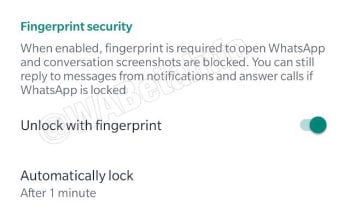
There is no news to report on this feature’s development, but it has been spotted in the latest WhatsApp beta for Android, with an interesting note next to it. The settings page for the new security feature includes this snip bit, “When enabled, fingerprint is required and conversation screenshots are blocked…” There is no other context given to the feature, the note goes on to talk about being able to answer calls and reply to messages if WhatsApp is locked, but it seems clear that WhatsApp is working on a way to stop users taking screenshots of chats.

New feature coming to WhatsApp
Image via: WABetaInfo

At this point, this is the only information we have on this new and mysterious feature, but it could mean that soon you might be able to set WhatsApp to block your friends from snapping screenshots of your chats. We’ll have to wait for more information before we can confirm this.

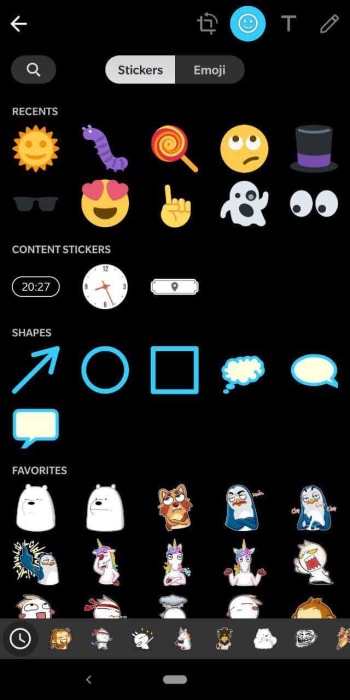
The other key thing in the latest WhatsApp beta for Android is the improved UI for WhatsApp Doodle. Doodle is WhatsApp’s way of allowing you to draw on top of any media you’re sharing and also add stickers and emojis, too.

New Doodle UI for WhatsApp
Image via: WABetaInfo

The update adds separate tabs for Stickers and Emojis and then also groups stickers into Favorites and Categories. This should make it much easier for you to manage the stickers, emojis, and shapes you want to put on top of any images, videos, or GIFs you might be sending to your contacts.

We’ve got the guys at WABetaInfo to thank for sharing all the data from the latest beta version of WhatsApp for Android and, as always, need to point out that as yet there is no official word from WhatsApp about when we can expect these features to make it to the main app. If you’d like to give the WhatsApp beta a try, check out our tutorial below.

Netflix experimenting with Top 10 lists

Discover where the test will begin.

Netflix background

Netflix has quickly become an intrinsic part of modern culture. Its growth has seen the streaming platform spread around the world. On top of this, as well as offering diverse content, the streaming platform has been running a series of subscription model tests to find new ways of spreading Netflix to parts of the world that can’t really afford a full Netflix subscription.

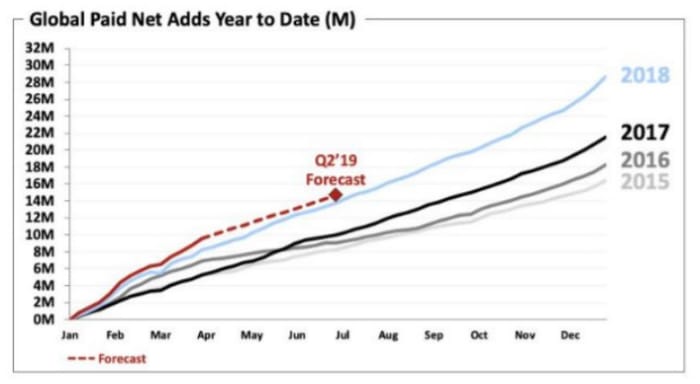
A new shareholder letter released by the streaming giant shows that this growth still continues with over 10 million new subscribers signing up between the beginning of January and the end of March this year. The letter also includes some interesting information about a new test Netflix is about to begin, which could see how you interact with it change significantly.

Netflix is going to test Top 10 lists in the UK

According to the shareholder letter, Netflix is going to begin, “running a test to improve our UK member experience by releasing weekly top 10 lists of the most popular content on our UK service across various programming categories. For those who want to watch what others are watching, this may make choosing titles even easier.” The top 10s will be based on the content’s popularity across the region you’re a part of.

Netflix shareholders meeting
A recently released shareholder’s note has uncovered some interesting information about Netflix

These top 10 lists will stand aside from what you normally see on Netflix as they won’t be affected by your own viewing habits. Well, they will but only in so much as if you watch something, it will get one vote that will add to the overall ranking. Until now, all the movies and TV shows you see when you open Netflix, are based on things you’ve already watched and how Netflix thinks that fits with its current content roster.

Netflix went on to say that the British testing of top 10 lists will go on for a few months. After the test period is over, the streaming platform will analyze the results and decide whether to simply end the test or extend it to other regions.

If you’ve ever struggled to find something to watch on Netflix, these new top 10 lists could be a good way for you to find something you know is popular with other Netflix users. If you’re the type of person who tries to avoid the mainstream, however, you might be less interested in Netflix’s latest test.

New Netflix subscribers
Netflix keeps adding new subscribers

The real interesting thing to note from the Netflix shareholder’s letter is that the streaming platform has seen subscriber numbers continue to rise, despite price hikes in a number of its key markets including the U.S., Canada, Brazil, Mexico, and parts of Europe. If we’re talking about Netflix tests, it is clear that the price hikes have returned positive results for the streaming giant. It might not be a sure thing, but at this point, it looks like there is nothing stopping Netflix from looking to price hikes to boost revenue again at some point in the future.

Fortnite: Loot Lake dig site revealed

What’s inside that hatch?

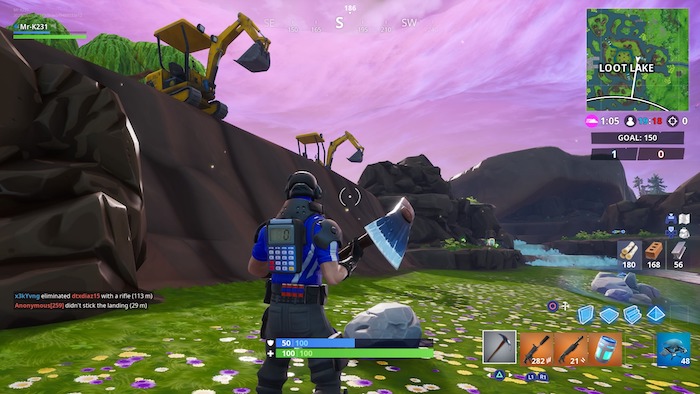
Mysterious events have been occurring all across the Fortnite map over the past few weeks. First, a mysterious helicopter showed up near Lazy Lagoon and began circling the map, jumping to a new spot every day or so. As the helicopter made its route, dig sites began appearing in its wake. Excavators and other equipment arrived at dig locations near Paradise Palms and Dusty Divot, but appeared to find nothing of interest. It seems, however, that the helicopter and the mysterious organization that operates it has arrived at its final target: Loot Lake is gone, replaced instead with a massive excavation site and a mysterious metal hatch.

Fortnite: Loot Lake dig site revealed

fortnite loot lake dig site
Image courtesy Epic Games

As seen in the image above, Loot Lake as we know it is no more. The mysterious organization behind the helicopters and dig sites has completely uncovered the center of the lake to reveal a massive metal door. Though we can only speculate at the purpose of the door, this latest event has revealed quite a bit about this mystery organization.

Veteran Fortnite players will recognize that the construction vehicles bear the same emblems and color scheme as the organization that built the research facility over Dusty Divot way back in Season 4. Though this organization doesn’t have an official name, it appears they’ve returned to start some sort of new project.

fortnite loot lake excavator
Image courtesy Epic Games

The big question that now remains is what this new hatch conceals. There certainly isn’t a shortage of theories. Players will remember that Loot Lake was a central location for the events of Season 6, where the enigmatic Cube began its floating journey around the map, and eventually exploded to reveal an alternate dimension. Some theories have speculated that this hatch has something to do with the Cube and the alternate dimension that it was connected to, which, in turn, is connected to the Rifts that appear in certain locations around the map.

Fortnite: Battle Royale Download Fortnite: Battle Royale ►
10

Other theories suggest that the menacing Ruin is imprisoned inside the hatch. Ruin was recently revealed to be the Season 8 Discovery reward skin and appears as a sinister looking knight-like figure with glowing orange and black armor. Epic Games has teased Ruin’s arrival for some time now, and players have long theorized that Season 8’s finale will take the form of a giant raid-like boss battle. If this theory is correct, that means that this organization will release Ruin when the hatch is opened, allowing him to wreak havoc across the island.

fortnite ruin skin
Image courtesy Epic Games

Whatever the case, it seems that the threads of Fortnite’s past seasons are all being tied together. So far, the events of the past several weeks have called back to Seasons 4,5,6, and 7. Perhaps the Season 8 finale will finally reveal the answers to some of the questions that have persisted about Battle Royale’s loose plot.

Who is this organization? What is the Cube’s true nature? What is the alternate dimension and how does it relate to the Rifts? The only questions that don’t seem any closer to being answered pertain to Season 8. The treasure hunt that’s been the central focus of this past season may end up being tied to this hatch. With any luck, all the answers will be revealed during the Fortnite Season 8 finale event in the next few weeks.

TikTok banned in India

TikTok is banned in India for showing inappropriate content to minors, but are they alone?

Tik Tok

TikTok has been removed from the App Store and Google Play store in India today after a court ruling. TikTok is fighting the removal in court. You can still download it through Softonic’s catalog here:

9

In a statement to CNN Business, TikTok said, “We have faith in the Indian judicial system and we are optimistic about an outcome that would be well received by over 120 million monthly active users in India.”

TikTok has about half a billion downloads across the globe. Of those, about 25% of users are in India making this a massive hit for the company.

Why is TikTok being blocked in India?

TikTok has been blocked in India due to the fear that the app is helping to spread inappropriate content to children.

TikTok does list policies against inappropriate content such as porn, cyberbullying, and harassment. Those who violate TikTok’s policies can be reported and banned from the service. This is the protocol for most apps.

The app description suggests it is for ages 12+, but the purpose of the app is not to share material for an 18+ audience. The main purpose of TikTok is to share original videos, typically with musical flair like this:

Does TikTok have inappropriate content?

As we all know according to Rule #34 of the internet, “If it exists, there is a porn version of it.” TikTok is no exception.

Users have been using the app to make pornographic content. Finding pornographic material through the app is not difficult. Then again, finding porn on the internet isn’t hard.

Sure, you can use the app to shoot and share inappropriate content, but you can do that with a slew of other apps as well. 

You can potentially cyberbully people on any social media platform as well. TikTok is not the only offender, so they shouldn’t be singled out for this.

What does this mean for TikTok?

We’re guessing that this ban will only be temporary. This happened before in Indonesia for the same reason, but it was overturned.

The 18+ crowd in India that loves to use TikTok will voice their stance on the issue. Most likely, the app will return to making more videos like these:

Where do we go from here?

The inappropriate content is far from the only reason why you might want to consider removing TikTok. In February, the app had to pay nearly $6 million in fines for stealing information from its 13-and-under users. 

TikTok might be unintentionally exposing kids to inappropriate content. However, it is intentionally stealing their data. 

Banning one app won’t keep children safe. If you don’t want your children looking at inappropriate content, TikTok is far from the only app you need to worry about. Parental vigilance and child education are your best bets to keeping your family safe.

How to recover deleted WhatsApp conversations

Whether or not you meant to delete them, we can help you bring back WhatsApp conversations.

WhatsApp

In most cases, if you deleted a conversation on WhatsApp it wasn’t by accident.

Maybe your friend sent you a bunch of spoilers for the next big Marvel movie, and you want to avoid those at all cost. Perhaps that guy you met on Tinder is now annoying you. After deleting those conversations, you might regret it after realizing all of the messages now lost to the ethers of WhatsApp.

Regardless of your reasoning, if you need to recover those conversations, we can help you. 

WhatsApp Messenger Download Now ►
8

There are several methods with which you can recover WhatsApp conversations, so breathe easy. You can read those messages that you thought were lost forever.

How to recover WhatsApp conversations on Android

WhatsApp Android

Step 1: Make sure you have the backup function activated

WhatsApp for Android has a backup function that saves all your conversations on the app and keeps them even if you erase them for a week. If you erase something and regret it, you will be able to recover it easily.

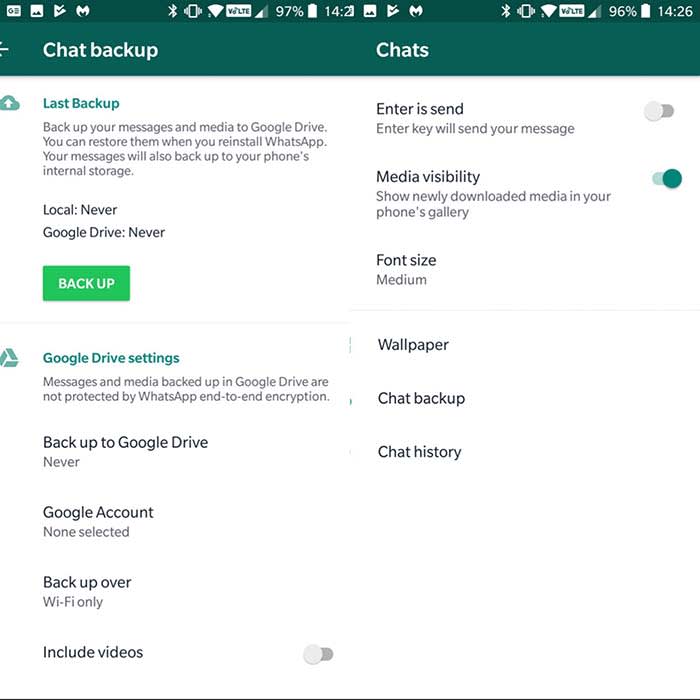
First, make sure you have the backup function enabled. To do this open WhatsApp on your phone, click on the three dots in the upper right corner, and then click “Settings.”

Once inside the Settings menu, click on “Chats” and then on “Backup.” Click on “Save” to make a backup. You will also have the option of selecting the frequency with which you want this backup to be made. Options include: never, only when I hit”save,” daily, weekly, and monthly.

For more security, you can link your WhatsApp account with Google Drive by clicking on “Google Drive Settings.” This way, your messages do not take up space and these are automatically saved in the Google cloud.

Step 2: Recover your deleted messages

WhatsApp Android

Now that we know that WhatsApp will keep a backup copy of our messages, here’s how you will be able to recover them. Remember that these copies exist for just seven days, so you will not be able to recover them without altering the files on your phone after that window.

To recover your messages, you will have to delete the app from your phone. We’re not joking. Erase the application in its entirety and download it again.

Once reinstalled, click on the “Restore” option to recover all the history of messages that you had saved in your backup. Voilà! Your messages will reappear by magic.

How to recover WhatsApp conversations on iPhone

WhatsApp on iPhone

Step 1: Make sure you have activated iCloud

Unlike the Android version, where messages are stored on your phone, if you are an iPhone user, your conversations will be stored in iCloud. To recover them, you must have this option activated.

Activating iCloud is very simple. Access iCloud in your settings. Follow the prompts and your info should synchronize automatically.

You can always just ask Siri to help you out as well. 

Step 2: Configure WhatsApp to create backup copies

Once we have activated and configured the iCloud, it’s time to configure the backup system of WhatsApp.

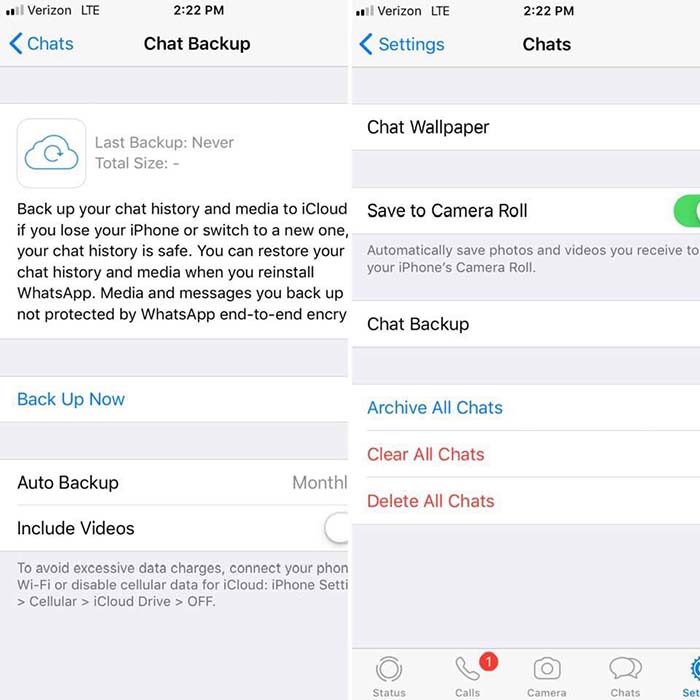
To activate it first open the WhatsApp application, click on “Settings,” followed by “Chats.” Finally, click on “Backup.” From here, click on “Auto Backup” to choose how often your conversations will be saved in iCloud.

WhatsApp iPhoneStep 3: Recover your conversations from the iCloud

Finally, to recover the messages deleted by mistake, you must first delete WhatsApp from your iPhone and then reinstall it. Once the phone is verified, select the “Restore backup” option and your messages will appear on your iPhone again.

Where to watch Broadway plays and musicals online

Enjoy the stage without leaving home with these great options.

HamiltonEven if you can’t make it to a live performance, the show must go on.

Being a Broadway fan is tough when you don’t live near a major city. Even if you do, Broadway shows can be expensive, with some tickets fetching hundreds of dollars. 

Ticketmaster Download now ►
8

Best options to watch Broadway plays and musicals online

While each trip to the theater is a unique experience, many of these plays have been professionally recorded at one time or another.

With a number of online resources to watch them, you no longer have to miss out on your favorite Broadway musical. 

Here are some of the best sites and apps you should check out:

BroadwayHD

Broadwayhd

If you’re looking for a Broadway streaming service, BroadwayHD should be your very first stop.

Often considered “Netflix for Broadway lovers,” BroadwayHD costs a simple monthly subscription of $8.99/month. The library is huge, and you will find many of your favorite titles. 

You won’t find any amateur work, which can be a bit of a downside. However, all filming is top quality and there are a few off-Broadway productions to be found. 

Oh, what a beautiful day you’ll have while streaming “Oklahoma” on BroadwayHD.

Netflix

Netflix

You won’t find many stage musicals here. However, You can take a chance on Netflix and watch film adaptations of musicals like “Mamma Mia.”

There are a few stage musicals you can find, such as “Shrek the Musical” and “Oh, Hello” on Broadway. However, you won’t find as many on this streaming service as you would on BroadwayHD.

Instead, Netflix is a great choice for anyone interested in movie adaptations of Broadway plays. Some examples include: “Burlesque,” “Grease,” and “Beauty and the Beast.” 

8

Hulu

Hulu

Like Netflix, Hulu has more movie adaptations than actual stage films. That being said, it’s one of the only places you’ll be able to find “Jesus Christ Superstar. So, you can find out what’s the buzz and what’s a-happenin’. 

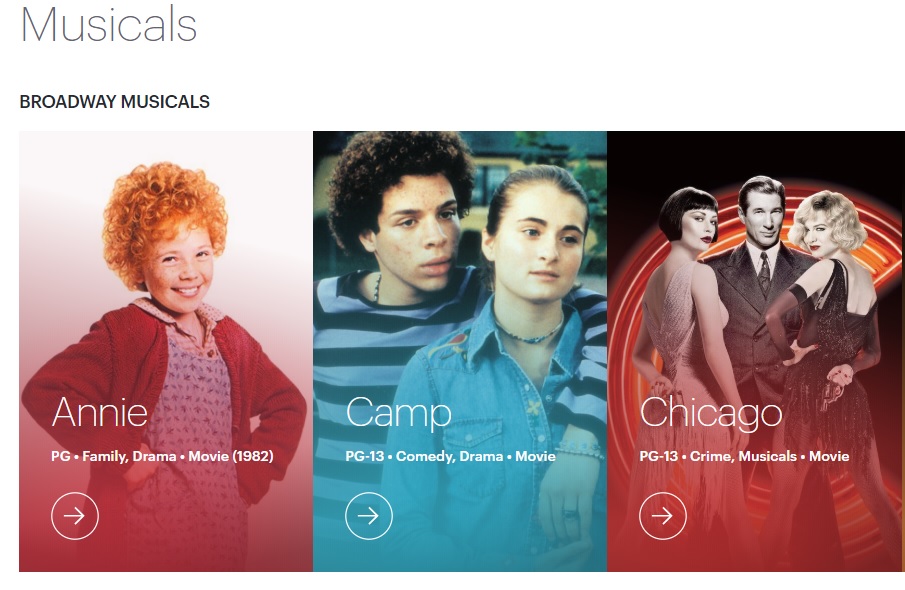
Hulu also features a lot of older musicals that can be hard to get, such as “The King and I,” “Hello Dolly,”  and “Annie.” You may want to compare Hulu and Netflix’s selection before deciding if you want to subscribe to one or both.

Fandango

Fandango

Most of you know Fandango as the app that helps you get tickets for your favorite movies. However, many movie theaters have special events where you can watch a recording from a live Broadway performance. 

You can search for those musicals on Fandango, and then go see them at a theater near you. The $10-$20 you pay for a movie ticket far outweighs the huge prices you’d have to dish out to see the show live. 

Basically, if “Hamilton” makes ever its way to the silver screen, don’t throw away your shot to see it through Fandango.

7

YouTube

Amateur and off-Broadway productions can be just as good, if not better than original Broadway plays. YouTube is full of well-filmed (and plenty of poorly-filmed) amateur work that you won’t be able to find on any of the other streaming services.

For example, we found this full performance of “Rent.” How can you measure that?

Of course, you may find full Broadway productions on YouTube, too. However, you’ll have more luck finding off-Broadway productions. You also can find full soundtracks to musicals. It’s easy to find soundtracks like “Heathers,” “The Book of Mormon,” “Legally Blonde,” “Spamalot” and many more. 

YouTube might not be the first option that comes to mind when looking for Broadway musicals. However, a little digging might bring up a hidden gem.

8

Beyond the Broadway barricade, there are musicals we long to see

Through these services, you can enjoy the Broadway stage straight from your device without having to pay Broadway prices.

If you must attend in person, check out this list of apps that our users picked as the best options for buying Broadway tickets. They can get you the best deals for buying Broadway tickets.

Which apps are secretly recording your phone screen?

Big name apps are secretly recording your phone screen, but should you be worried?

Phone recording

A recent TechCrunch investigation revealed several mobile apps were recording in-app activity. To make matters worse, they were doing it without users’ knowledge.

Major companies such as Abercrombie and Fitch, Air Canada, and Expedia were found to be working with a third-party analytics firm. The firm secretly records users’ swipes, taps, and shopping activity to learn more about “customer habits.”

This revelation is just one of many stories revealing just how pervasive data collection has become.

According to the report, none of the apps they looked at told users that they were recording their screens. They also didn’t specify that they were sending data back to Glassbox Analytics, their third-party insights provider.

Wait, it’s not just a case of people failing to read the privacy policies?

Terms and Conditions

Apps are required to disclose any tracking or data harvesting methods in their terms of service agreements. However, Glassbox’s offering provided a workaround of sorts to its customers.

Glassbox Analytics provides an API that allows them to collect information about their customers. The API masks sensitive information like credit card or passport numbers. Glassbox says that they just provide the technology; they’re not there to enforce disclosure on behalf of their customers.

According to Glassbox CEO Yaron Morgenstern, the tool is primarily used to spot issues within the app like bugs.

According to a follow-up story from The Atlantic, those insights are then used to deliver a better customer journey. This means that marketers make changes that allow them to gently nudge customers toward the desired action.

These apps — which include financial institutions like Bank of America and Wells Fargo — are taking consent out of the equation.

Following this revelation, Apple announced a plan to crack down on the apps secretly recording your screen. App Store guidelines explicitly state that any logging, tracking, or recording, must be included in the terms of service. If a company fails to inform the consumer, then they violate Apple’s regulations and will be pulled from the App Store.

No guarantee that sensitive info is protected

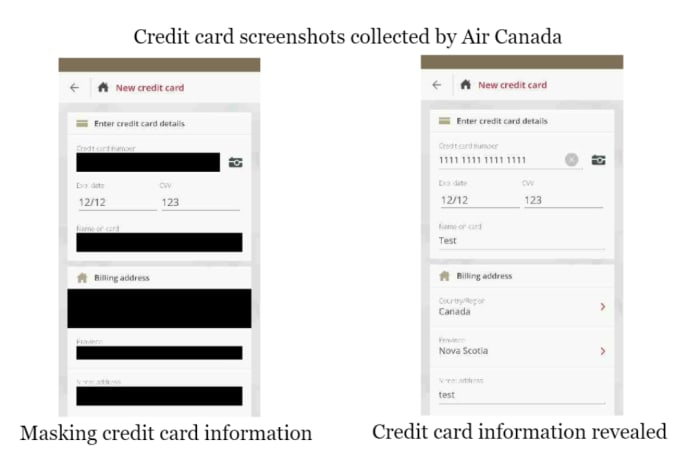
Not every company involved with this process successfully secured customer data. The App Analyst took a closer look at AirCanada’s attempt to mask user data — and, let’s just say, they did not do a great job.

The airline experienced a data breach back in August 2018. What’s important to note here is that the company was not masking their data. Instead, they were screenshotting users’ passwords.

AirCanada mishandling consumer data

So while Glassbox might not support this kind of violation, whether their clients can mishandle data is outside of their control.

Should we be worried?

As Morgenstern says, the technology isn’t meant to record your activity; rather it tracks your habits as you move through the site.

So, if you’re casually shopping around on Hollister’s native app, the company can see that you’ve put some items in your bag but didn’t complete the checkout. Or, they might see that you went straight for the clearance section, which might prompt them to alert you next time there’s a sale.

This is basically what all websites do these days. They track activity so they can ID problems and present recommendations you actually want. Except, just about every website gives you that little cookies pop-up, letting you know it’s “designed to give you a better experience.”

Apple says customers should be aware of how companies collect data. This way they can choose whether they want to proceed with the download. It’s a consent issue.

Obviously, all brands collect data in one way or another, Apple included. The only real news is the lack of transparency. In no way is this surprising.

The fact that such a workaround exists means that there’s the possibility other branded apps are pulling a similar one over on their audience.

WhatsApp: How to talk to someone who has blocked you

Save a friendship before its too late; message someone who blocked you on Whatsapp.

WhatsApp block a call

Maybe it was something you said. Maybe it was a misunderstanding. Or, maybe the friendship just ran its course. Regardless, when someone blocks you on WhatsApp, it can hurt.

WhatsApp Messenger Download Now ►
8

There is no specific or magical way with which we can make your contact unblock you on WhatsApp. However, there are a few simple steps with which you will be able to communicate with the person and, if all goes well, get back in touch with them.

How to talk to someone who blocked you on WhatsApp

Step 1: Are you sure your contact has blocked you?

Before starting, it is a good idea to spend a few minutes and think whether that person really blocked you. Sometimes people are busy or just do not look at their phone as often as before. Just because someone does not answer your messages in a few seconds does not mean you are blocked.

If someone blocked you, it might be in your best interest to wait before reaching out to them again. Sometimes the friendship needs time to heal before you can work on rebuilding.

Step 2: Talk to this person in a group

Group Chat

Group messages can be fun, but they can also be annoying when you get a new message every two seconds. If you are a member of a group with the person who blocked you, you’re in luck! You will be able to get in touch with them.

Although WhatsApp has created a function to block direct messages to a user, it has not yet done so in group conversations. So, if you do not mind that the other members of the group become part of your particular soap opera, you can always send a message and wait for your friend to respond.

Keep in mind that if the person who has blocked you leaves the group, this will not work.

Step 3: Ask the administrator of a group to add the person who has blocked you.

WhatsApp does not allow us to add people who have us blocked to a group, but you can ask the administrator to do it for you. Talk to them and explain the situation.  If you have a just reason as to why you need to contact them, the administrator should help you out. 

Step 4: Try to recover the lost friendship

Friends having a conversation

Once that person who has blocked you is in the group, be calm, patient and sincere. Ask them why they blocked you. Above all, put yourself in their shoes before telling them how you feel. It is likely that something happened or that you damaged that person without realizing it. A simple “I’m sorry” can recover the friendship.

Hopefully, this tutorial has helped you when it comes to making peace with a contact who blocked you. Life is too short to be angry with someone you love; do not let a misunderstanding destroy a beautiful friendship.

Google Cardboard VR apps to download ASAP

Looking for something to do with that VR headset? Check these out!

Google Cardboard

Virtual reality is everywhere these days, but shelling out for an Oculus Rift might be a pricey investment if you’re a VR novice. Google Cardboard, though not the flashiest headset, is the perfect entry point into 3D gaming.

Now, before you start exploring the library, you should download the actual Cardboard app:

Google Cardboard download free ►
7

The app helps you set up a viewer and get familiar with the VR landscape. Plus there are some cool experiences built right in — from a tour of the Northern Lights to an Urban Hike. This lets viewers walk around the world’s greatest cities.

If you’re looking for a cheap VR option, this can be your answer. If you’re looking for something else, we’ve still got you covered:

After you’ve learned the ropes, you’ll likely want to broaden those virtual horizons.

Below, we’ve compiled a list of the best apps you can download for Google Cardboard. Whether you’re up for a bone-chilling horror game or just chilling with friends.

Best Google Cardboard VR apps

vTime
vTime Google Cardboard

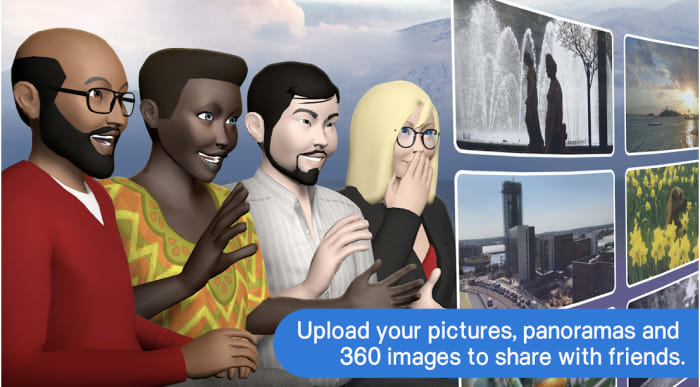
A real step up from Second Life,  vTime is a VR app designed for socializing in immersive, virtual destinations. The app is device-agnostic and has a lot in common with traditional social media apps. Users create an avatar and customize their profile. From there, you can chat with friends, family, and strangers.

While this does just look like a digital hangout — you’re dropping yourself into a video game landscape. vTime also allows you to share photos and videos from your camera roll with your digitized pals.

vTime isn’t exactly the kind of app that creates an adventure. It’s a more sedentary experience. You and your pals can hang around a campfire, on a rooftop, or on top of your photo album.

vTime XR Download now ►
7

Netflix VR

VR living room Netflix

“Netflix and chill” may have a whole new meaning.

Even though no one talks about it, Netflix has had a VR offering for quite a while now. The Netflix VR app lets users watch content through the cardboard headset through two different viewing modes.

One is a zoomed-out view of a living room and the other is just the content. The second mode takes away the living room environment and plops you right into the next episode of “Stranger Things” or “Bojack Horseman.”

Netflix has yet to release any 3D Netflix Originals, but you can watch everything in the catalog through your headset. Hopefully, we’ll see some VR content soon. In the meantime, the immersive viewing experience is still pretty cool.

Netflix VR Download Free ►
8

Sisters

Sisters app VR

Don’t play this game with a full bladder.

Sisters VR is a horror game that’s been around for a few years but still holds up as one of the best entries in the Google Play store.

The ghost story takes place in a Victorian mansion, loaded with creepy portraits, dusty furniture, and plenty of jump scares.

While Sisters is an entry-level game, it’s the perfect way to get used to Google Cardboard and get your horror fix.

10

Star Wars VR

Star Wars VR

Now you can find a wretched hive of scum and villainy in VR!

More than a game, Star Wars VR is fans’ mobile connection to the franchise.  There’s a big trivia component built-in and it’s a go-to source for announcements and new content.

This VR experience transports you to the Jakku Desert from “Star Wars: The Force Awakens” as a resistance agent. Hone your lightsaber skills in the immersive Star Wars universe, unlock 3D characters, and take selfies from inside the app.

Star Wars Download Free ►
10

CINEVR

CINEVR Google Cardboard

Why go to the movies when you can experience the theater from the comfort of home?

CINEVR aims to bring the movie-going experience to you with a realistic 3D movie theater with customizable lighting effects to boot.

You can watch movies through the app from various streaming sources and invite up to eight friends to watch with you. You can talk over the movie and send emoji reactions.

7

Minos Starfighter VR

Minos google cardboard

Minos Starfighter VR is a first-person space shooter with Android graphics that rival PlayStation quality.

Players fight off enemy ships in waves and shoot them down using a trigger button from your Bluetooth or USB controller. If you don’t have a controller, no big deal. You’ll also have the option to play using gaze navigation.

While the premise of Minos Starfighter is standard arcade fare, experiencing the flight simulation in VR breathes new life into the classic style.

Minos Starfighter Download Now ►
7

Google Expeditions

Google expedition cardboard

Google’s Expeditions is a VR field trip app that makes learning fun. The app used to be exclusively available to teachers and their students. However, now anyone with Cardboard (or Daydream) can sign up for the field trip, too.

Okay, it’s actually pretty cool. Adventurers can visit the International Space Station, the African Plains, the Great Barrier Reef, or another planet. You can choose to be a leader, which means you’re given information to present to a group. You can be a tour guide in a museum, or you can be an adventurer and let someone else do the talking.

The app will pair you with people on the same Wi-Fi network if you’re a solo explorer, you can just join a tour.

Google Expeditions Download Now ►
7

Wrapping up

If you haven’t tried virtual reality yet, Google Cardboard is just $15 and offers a low-stakes intro into VR. Whether you’re into exploring the world from home, hanging out with friends, or up for an adventure, Cardboard is a great way to find out if VR is up your alley. And hey, if you happen to get motion sickness, it’s no major hit to the wallet.