Is your phone secretly recording you?

Noticing ads popping up that are a little too personalized? Here’s why.

Phone Recording

Between Alexa and Google, we can’t expect everything to remain confidential.

But, your phone? It’s your biggest confidant. Always by your side — between dating apps and panicked disease searches. So what’s all this talk that your phone is spying on you? Is it a conspiracy? Can you turn it off?

There is no shortage of Google searches asking the question, “Is my phone spying on me?” But the answer is not so cut and dry. The usual suspects like Facebook and Google claim they’re not recording your calls. Yet, there are games in the app store that access your microphone, despite not having an audio element included in the gameplay.

Here’s what you need to know before you start speaking in hushed whispers — phone stored in a separate area.

Why people are suddenly paranoid

There are countless videos online where someone will mention a keyword under their breath, “paper towels,” “dog food,” “engagement rings.”

And then, magically, some on-point, targeted ads (hours, days later) that item — something they’ve never mentioned before, starts following them around the web as though they had shopping carts full of the stuff across various websites.

That’s not how it works. According to Dr. Peter Henway, a security consultant from Asterix, your phone is technically listening — in the sense that, it is prepared to answer when you say the magic word: “Okay, Google,” “Hey Siri.” The point is, your phone is listening for those keywords, but it doesn’t start recording until the trigger words cross your lips.

To process your requests, the phone does need to be ready, just in case you talk to it. But, researchers say, that your phone is not actively listening in on your conversations, then using that information to sell you more stuff.

Henway also says that while phones are designed to wait for these trigger words, there may be thousands of unknown triggers that can prompt devices to mine for advertising data.

Are Google, Amazon, and Facebook recording your voice?

Facebook is adamant that the company does not listen to your real life conversations in order to load your browser with relevant ads. Your browsing data and Facebook activity has you covered there. In case you’re curious, here’s a brief rundown of how Facebook decides which ads to show you.

FB only listens in when you give the app permission to access the microphone. And, beyond that, the platform only accesses the microphone when you use a feature that requires audio.

And Google, it’s worth pointing out, does record what you say to your Google home. But again, it is supposed to record only what you say after the “okay, Google” trigger. That said, there is the chance that you may inadvertently trigger a recording.

We recommend logging into your Google account. Go to My Activity -> Voice & Audio and from there, you can delete some or all of your activity.

delete Google recordings

Same goes for Alexa — but there have been some issues. Remember Alexa’s buggy laughter?

Or the instance of Alexa sending a recording of a couple’s private conversation to their contacts? The creep factor is there, to be sure.

If you’re concerned about what your Alexa speakers know, it’s easy to delete your query history. See photos:
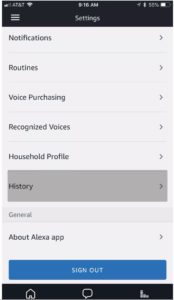
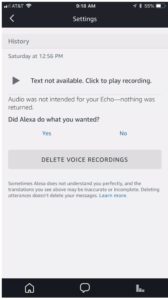
alexa query history delete alexa recordings

But — users should be aware of which apps have microphone access

Just because Facebook isn’t actively trying to listen in on every call, that doesn’t mean that they, and other applications aren’t picking up on the sounds that happen around the microphone.

Then, it’s also worth mentioning the fact that a lot of apps ask for microphone access to detect TV ads and viewing habits taking place on and around your mobile phone. The New York Times ran a report on the long list of Android Apps that track viewing apps by way of a piece of software called Alphonso — which collects TV viewing data and passes that information along to advertisers.

According to the NYT, there are over 250 games that use Alphonso. Most are Android games, but some are available in the App Store, as well. Alphonso does provide opt-out instructions, and the Times article mentioned that the apps were relatively easy to identify. Apparently, you can type in “Alphonso automated” or “Alphonso software” and it will turn up a long list of games.

If you want to take a pre-emptive approach to games listening in on your media habits, turn off app permissions by taking the following steps:

iPhone:

Go to Settings —> Privacy —> Microphone. Swipe the switch off on the apps you don’t want listening in.
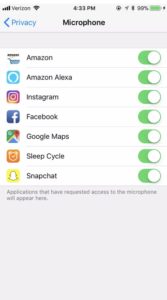
turn off microphone by app

Android:

Settings —> Apps & Notifications —> App Info —> App Permission. Then, turn off each app’s access to the microphone.

Bottom line

Look, Facebook, Amazon, and Google are not actively trying to record your conversations, but that doesn’t mean you should blindly trust them to protect your privacy. Triggers aren’t this airtight thing, yet and software gets bugs every now and again.

Again, it pays to check your settings now and then and delete recordings. Also, make sure you look at app permissions when you download something new — otherwise, you could be playing a game that is monitoring your TV habits and recording your voice.

How to do the open office plan right

Does your company have the dreaded “open office” floorplan? Here’s how to cope.

Open Office

Today’s office is more for show than anything. Bright colors and the trappings of a fun, creative culture are powerful recruiting tools.

For startups, well-designed open spaces signal to visitors that things are happening. Which can lend them some credibility when they need to impress angel investors, VCs, and the board.

At a glance, it’s easy to see the appeal. A lack of walls visually represents a silo-free workplace. A place where ideas flow freely and workers can talk to each other on an equal playing field.

Optics aside, study after study has shown that the open plan is not so good for those who need to work inside it. According to a 2013 study from the University of Sydney, a lack of sound privacy was by far the biggest offender associated with participants’ working environments.

And it makes perfect sense. There’s very little privacy, causing performance anxiety for those who need to make a call.

These spaces might even make us feel less positive about collaborating. That total lack of alone time can lead people to retreat inward.

People have tried all sorts of things like working at home after hours to arriving super early to beat the rush. Some organizations have coped by implementing strange rule sets aimed at clarifying the new norms.

Why are we committed to an open office plan if it doesn’t work?

The office (one with private rooms) was established in the 1960s. When open plans came on the scene in the 1990s, there was a sense of excitement that came with tearing down the walls.

But, as the inventor detailed in a 2016 Planet Money episode, that initial excitement quickly turned into a nightmare for workers.

Yet, here we are in 2019 and open offices keep hanging around. In part, because it’s cheaper than renovating.

The floor plan allows offices to fit more people into less space, thus saving money. They also make it easier for companies with high turnover rates — think startups who hire en masse — and sometimes downsize at that same scale.

The point is, we’re kind of stuck with the bad choices we made in the 90s. And workers are left to deal with the fallout.

Here are some thoughts on how to do the open office right, because we all know, it’s probably here to stay for the long haul.

Respect peoples’ need to get things done

If you don’t love the wide open space, make sure you’re a good example yourself. Don’t add to the noisemaking culture if it drives you up a wall.

Send messages to coworkers via email or chat to see if they are available to talk about something. Or, consider whether the issue demands an in-person conversation at all.

While we’re not advocating that you avoid the IRL conversations, it’s smart to consider when it’s appropriate and when it risks knocking yourself or a colleague out of a productive session.

Are you the chatty one in the mix? Chances are unless you’re an extreme introvert or hate your coworkers, you’re guilty of joking around on the job or chatting up other bored colleagues. We are human, after all.

Still, if you work in one of these spaces, it’s partly your responsibility to learn to read the “I’m busy” cues your coworkers are putting out and making sure that your desk neighbors are able to get their work done.

Minimize distractions

work distractions

Everyone presumably needs to work at work.

While entering your average open plan might have you believe that we’re all here to socialize, deadlines need to be met and solutions implemented.

As mentioned above, noise pollution is the biggest threat to productivity in the modern office. Employers should do their part to reduce noise levels. Sometimes it’s not so simple — certain rooms lend themselves to echoes, of course.

But, things like area rugs, large plants, adding noise canceling panels to certain walls — these things might be within a company’s budget.

Employees should invest in a great pair of noise-canceling headphones. The benefits are two-fold — there’s nothing like a big pair of headphones to say, “leave me alone.” And second, well, the noise-canceling aspect.

But, beyond that — focus on controlling other elements that can throw your focus out of whack. For example, keep your desk clean and make sure you have a comfortable space to work. Have sweaters at the ready if it gets cold and space for your favorite beverages.

Things like checking email at designated times or silencing notifications are also good ways to keep on task. As is listening to white noise or music that helps you concentrate.

Colleagues can talk all day and it’s often out of your control. But taking some measures to ensure you carve out your own space — comfort, noise-canceling, and some smart routines — can help you deal.

Dedicated quiet and loud spaces

This one is more on management, but the office needs to change to accommodate different tasks and different working styles.

One solution is designing a workspace that emphasizes compromise. There are indeed some benefits of tearing the walls down. It’s great for the brainstorming phase — just not the actual implementation of the ideas you generate.

But these collaborative conversations should be limited to specific spaces — conference rooms, a cafeteria, a walk around the business park.

There’s a reason those portable phone booths have blown up over the past couple of years — these pods present an affordable solution for companies recognizing this growing need to provide a refuge from noise.

We all need to look toward flexible work cultures

Maybe the modern workspace should take a cue from the modern co-working space. What we mean is, organizations may be wise to incorporate a flexible schedule or a partial remote policy.

Instead of forcing employees to suffer at their desk for a set number of hours each day, allow them to choose the space and time that works for them.

Sure, flexibility depends a lot on the types of jobs people do, but employers need to closely consider why some employees need to be at their desks. Knowledge workers, in particular, spend a lot of time working on the internet — many of them can do their job from anywhere,  but require focus to actually tap into their knowledge.

Complaining about the floor plan, unfortunately, won’t get anyone far. Unless the company is discussing a major remodel — most of us are stuck with these plans for the foreseeable future.

That said, we are starting to see more organizations adopting solutions that lessen the pain. From quiet phone booths to a variety of flexible rooms, this approach may well be the best compromise.

How to uncover your hidden talents

Feel like you’re supposed to do something else? Here’s how to find your hidden talent.

Work daydream

We all talk about the dream: doing what we’re passionate about. It’s a noble aspiration, but realistically, we’re not all able to pull this off.

Some of us start careers we thought we wanted, only to find the shine wearing off sooner than expected. In other cases, we try to make moves from a job that’s just a paycheck to something that offers more than food on the table.

It’s frustrating to watch other people dive into careers they care about, while you’re feeling side-lined, waiting for your hidden talents to reveal themselves.

Is there a way to distill this down to a science? Or are we doomed to hoping we luck out and stumble upon our greatest gifts when we least expected?

Here are some tips for finding out what you’re good at, as well as how you might apply them in the real world.

How to find your hidden talents

What makes you lose track of time?

Imagine you have a full day with nothing on the books — what activity would you do to pass the time? Is it going for a long run? Starting a new art project or playing an instrument? Writing short stories?

Identify a few of these activities and write down what you like about them.

If you’re a writer in your downtime, take note of what you like about it. Is it inventing new worlds or analyzing current events and sharing your opinion?

If it’s the latter, those qualities could lend themselves to being a blogger or an analyst. The former, you might find yourself helping brands tell their story.

An artist looking for a more reliable career path could be well-suited to UX design or something with a strategic component — as it takes a lot of big-picture planning to execute a series of paintings.

The point is, the things you like about your existing hobbies could be transferrable — it just might not be obvious from the outset.

Do some personality testing

Personality testing does have some limitations, but they might get you to think outside of the box when it comes to finding your strengths.

We recommend taking a few and being as honest as possible — not answering with aspirational responses.

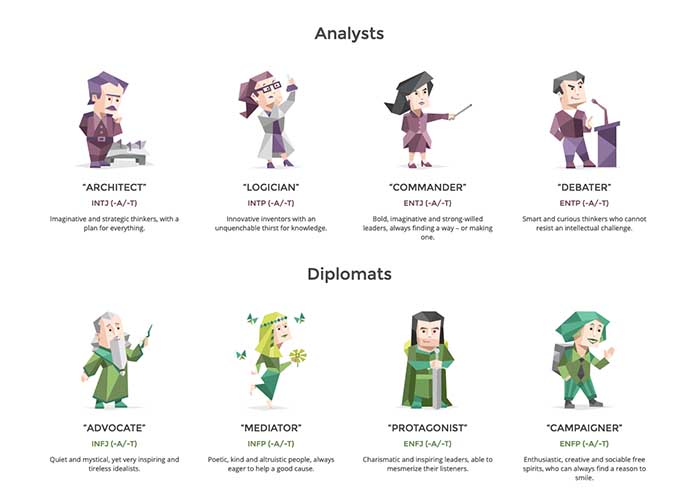
The 16 Personalities Test is one of the more popular choices around, and the free test goes into great detail when it comes to the best career paths and why your personality might be attracted to those choices.

There are longer personality inventory tests, as well. There’s the Revised NEO Personality Inventory, a test aimed at measuring the Big-5 personality traits (openness, conscientiousness, extraversion, agreeableness, and neuroticism).

OCEAN personality

Or, the HEXACO Personality Structure Inventory, which measures those same traits — both are around 200 questions long and take about an hour to complete.

Ultimately, test results should be taken with a grain of salt. They’re not perfect — but they can give you a sense of the qualities you might want to seek out in a career.

Ask around

Obvious, right? It might be a little uncomfortable, but one of the most effective ways to identify your strengths is to get some external feedback.

The key is to ask a handful of people — friends, family, colleagues — those who know you well and likely to be honest.

Frame it like this, “I’m doing some self-work and could use some feedback.” “Or, I’m considering a career change and am crowdsourcing suggestions.”

Then ask some questions:

  • What do you think I’m good at?
  • What stands out about me?
  • What was your first impression?
  • What was I good at when I was younger?

What kind of compliments do you receive?

Compliments

Building on the last suggestion, take stock of the compliments and criticisms you receive from others.

What praises or frustrations are documented inside the inbox? Understandably, it’s no fun to go searching for feedback, but looking back at everything from your LinkedIn endorsements to emails that highlight a forgotten detail can be eye-opening — and serve as a starting point for future careers.

Also, make sure you take stock of those compliments you tend to brush off. These are the qualities that could help you find a hidden gem in an unlikely place.

Take a class, do some research — really, just broaden those horizons

Upskilling is one of the best ways to carve a better career path and broaden your horizons.

If you have an existing skill set, consider looking into ways to specialize more and become an expert — or cultivate a rare, valuable skill.

We’ll add one big caveat here — if you’re looking to secure better paying, fulfilling work, your best bet is to level up skills that relate to one another. For example, if you work in marketing, you might want to take data science courses or polish your social media skills.

Another thing to consider when looking for classes or certifications is, will these skills be needed in the future?

Look at the stats before investing in a new skill. A good starting point is the U.S. Bureau of Labor Statistics; you can search their database by occupation and learn more about which roles are in demand. Payscale or LinkedIn’s Salary Tool offer a more user-friendly approach to sizing up the job market. These sites provide you with information about careers, their pay, and job outlook.

Finally, talk to people already working in the industries you’re looking at. From influencers on LinkedIn and Twitter, to forums like Reddit and Quora, there are countless opportunities to chat with people of all experience levels. Ask questions to find out more about paying your dues, leveling up, and what the daily grind entails.

Be honest with yourself

Again, the passion thing comes into play. When you’re looking into potential paths, you definitely want to find something that pays the bills.

Really look at whether there are opportunities available before you head down a new path. Following your passion is one of those fantasies, like the American Dream. Some people really luck out.

Instead, your best bet is to find where your skills are needed and valued, then seek to find where those skills intersect with your passion.

As much as money can’t buy everything that contributes to happiness, removing financial worry from your daily life is a big part of finding fulfillment.

Your complete guide to dating with Bumble

Looking for love? Here’s how to make the most of Bumble.

Bumble

You might know Bumble as that dating app where women make the first move. The women-centric app aims to give users a less sleazy platform for finding dates online — as compared to Tinder, Plenty of Fish, or OK Cupid, that is.

Bumble is a good option for people looking for serious relationships or something more casual. It’s got a relatively equal gender balance, and according to the app’s data, roughly 60% of matches result in a conversation.

While an increasing number of us meet our dates — and potential mates — on the apps, it can be daunting if you’re new to the “beehive.” Below, we’ve put together a guide to getting started on Bumble, plus a look at some of the key features.

Bumble Download Free
6

How does Bumble work?

Like Tinder, Bumble is all about the swipes. Swipe right on a potential match, left if you’d rather pass. If two users indicate interest, a “connection” is made. From there, you can start sending messages.

For straight daters, only the woman can send the initial message. From there, the man can respond and hopefully, the conversation takes off. With same-sex couples, either person can send the first message after that initial connection is made.

Once that initial message is sent, the recipient has 24 hours to respond, or else the message disappears.

The women-first approach was intended to provide women with a dating app that put them in control of the experience. Other apps, unfortunately, are known for guys sending bulk messages and unsolicited nudes, which really knocks the experience down a few pegs.

Create a Bumble profile

profile example

Where you used to need a Facebook account to access Bumble, CEO Whitney Wolfe removed this requirement last year in the wake of the whole Cambridge Analytica debacle.

What should I write in my Bumble profile, anyway?

Look, people already assume that you like going on vacation or eating food.  And on Bumble, you’ve only got 300 characters to package your charm and personality in a way someone else might be into.

A few options:

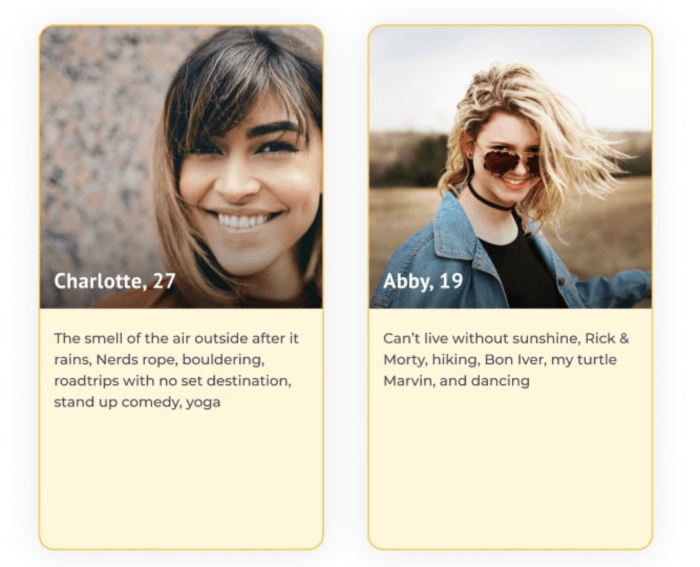
A rundown of your likes: Unique likes. Not walks on the beach, rather a few things that make you stand out. These ladies have the right idea:

profile examples bumble

Quotes — a reference to a movie, song, or book can help you cut through the noise and help you find someone who “gets” you. Too obscure and you might isolate potential matches.

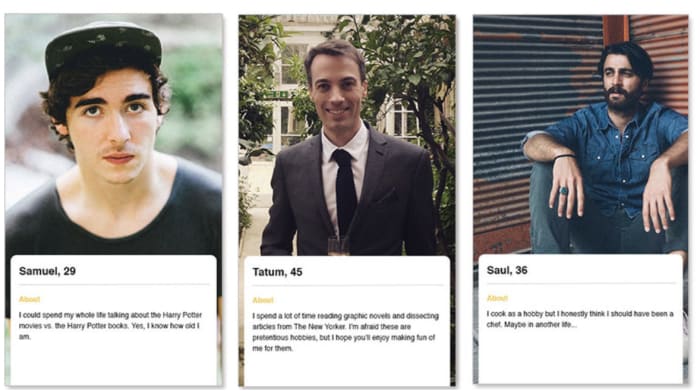
Personal statement: here, this line up of dudes have a self-deprecating approach — citing pretentious hobbies, Harry Potter, and adding a little suggestion of vulnerability.

bio bumble

Pros and cons list: look, it’s not the same as that dreaded interview question — what are your greatest strengths and biggest weaknesses? See below — kind of a cute approach, no?

bumble bio pro con example

Dating profile photos

things to avoid bumble profile

Picking the right profile pics is tricky. You want to look appealing, but not like you’re trying too hard. Off the bat, you’ll want to make sure that pictures represent who you are in real life. That means things like age, weight, and style should be close to what they can expect when you eventually meet up.

As per Bumble, your first post is your “calling card.” It should be your standout, most attractive pic in the lineup. Here are a few things to include:

  • Smile — Putting your best face forward means projecting warmth and approachability — so, smile! Most people are hoping they find someone happy, with a good sense of humor.
  • Action — a pic or two where you’re running a race, skateboarding, skiing, whatever activity you do can reveal more about your personality than a pouty selfie.
  • Recent — Again, needs to look like you. If your images are 10 years old or 20 pounds in one direction or another, your date is in for an IRL surprise.
  • Be the focus — choose pictures where you are front and center. Definitely no bridesmaid/groomsmen shots, group dinners, you get the idea. Sure, maybe you want to prove that you have friends, but it’s better to stick to images where you’re the only one in the foreground.

Oh, and in case you’re wondering — the magic number when it comes to how many pictures to include is apparently six. That’s enough to present a few looks — and contexts — but it’s more highlight reel than your entire feed.

OKCupid did a pretty in-depth study of what makes online dating profile pictures successful back in 2010, but it’s possible some of that has changed since then.

Chatting on Bumble

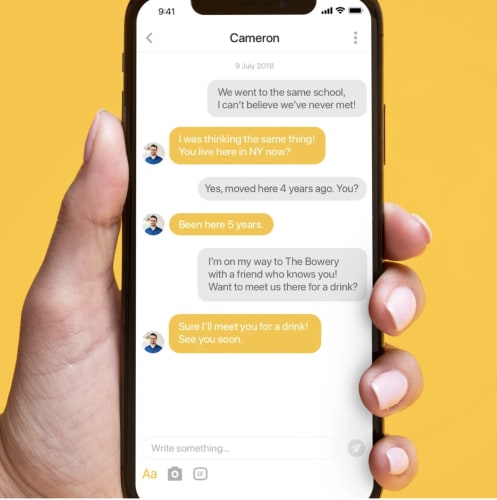
bumble chat screen

Opening remarks

Oh man… nothing is worse than an inbox full of “heys”. That’s the equivalent of someone “poking you” on Facebook. It’s dumb, pointless, and puts the communications onus on the recipient.

Some people like to open with a cute one-liner or a joke, but not everyone loves this approach. That’s fine.

On the one hand, that creativity can make you stand out, but others might feel pressured to compete by coming up with a wittier response. Which, let’s face it, may slow down the flow of the conversation.

Ask questions

Sounds basic, but when we get nervous, the tendency is to talk about ourselves. As such, remember to ask questions.

Asking a question about something in their profile is probably the safest bet. Sure, it’s a little tired, but that’s because it works.

Plus, asking a question means, they’ll likely hit the ball back — answer, then ask you a question… which — boom, that’s a conversation.

One at a time, though. And keep it simple. Start by asking questions that reveal what kind of food they like, where they’re from, and work up into common interests.

Keep it light

Save the tough conversations for when you’re in a real relationship. Hate to be harsh, but try to stay on the fun, playful side of the conversational spectrum. Flirtatious banter, benign sarcasm, and witty comebacks work best here.

Cut to the chase

Look, it’s good to text a bit before meeting someone outright. But one of the most frustrating things about the online dating scene is the people who use the app to text with no plans for a meeting.

For one, sometimes you have a great rapport with someone via text but not in person, or vice-versa. We all have friends and family that totally suck at texting, but they’re funny, smart, whatever, in person.

Second, texting can get in the way of the actual meeting. Be direct and ask the person if they are interested in going on a date — at a specific time and place. Don’t just say, “Hey, let’s go out sometime” — we all know that’s just code for, “We are never going to meet.”

From there the person can just say “Sure, that sounds great.” Or they’ll give you another time/place that works better or well, say no. In any case — the goal is to establish an initial meeting or find out if there’s a mutual interest.

Is Bumble free?

dating apps

Mostly, yes. You don’t need to enter your CC info to sign up, but there are some in-app purchases that unlock access to better features. Bumble boost is $10 a month and gives you a list of users who “liked” you.

There’s Rematch, which keeps expired matches in your queue for an extra 24 hours, and Busy Bee, which gives you unlimited 24-hour extensions. Basically, if you pay, you can get around some of the rules.

How do I filter Bumble matches?

This past December, Bumble rolled out a new time-saving feature, that limits their pool of potential mates to those with the most “relevant interests.”

That said, the new filters (at least on the dating side) are kind of what you’d expect. Filters include age, height, location, political preferences, relationship type, and astrological sign (you know, the important stuff).

Be prepared for ups and downs

Unfortunately, we live in a world where ghosting — be it at work or in our dating lives — is all too easy.

As such, it helps to prepare for the highs and lows of online dating. Some people will text you for a long time, and you’ll never meet. Others might disappear after a few great dates. But, then, that next person could be this fantastic match. You won’t know unless you swipe, right?

Now that you know how to get started with Bumble, what do you say — maybe it’s time to jump right in and see who you match with.

Still, it’s not so hard. To recap — make sure your pictures look like you, and your bio is short, witty, and representative of you. Keep conversations light and for god’s sake, make plans after a few texts, not a few weeks.

Happy swiping.

LinkedIn Live: What to know about the “professional” take on Stories

Will you watch live video broadcasts on LinkedIn?

LinkedIn

LinkedIn users are about to get their own version of Instagram Stories. The professional social networking platform rolled out a beta version of a new feature, LinkedIn Live.

As it stands, Live is an exclusive club, invite-only. But the platform says interested users who didn’t make the first round of cuts can request access within the next few weeks.

LinkedIn Live won’t come equipped with cute summer-themed stickers or funny face filters. But it does promise a platform where users can stream content to a (potentially) receptive audience.

Participants of the closed beta now have the ability to broadcast live content to groups, their network, or even all of LinkedIn.

Why do we need LinkedIn Live?

Initially, we heard the news and thought, do we really need LinkedIn Live? It sounds a bit like the network is trying to get in on the Live streaming action a little bit late.

We’ve just learned that the pivot to video was based on a lie — and here, we have LinkedIn trying to be relevant.

But, considering the feature further, it seems like it’s actually a pretty useful tool. Brands using Instagram Stories get a ton of engagement through the use of filters, shoppable links, and most of all — a slick set of visuals.

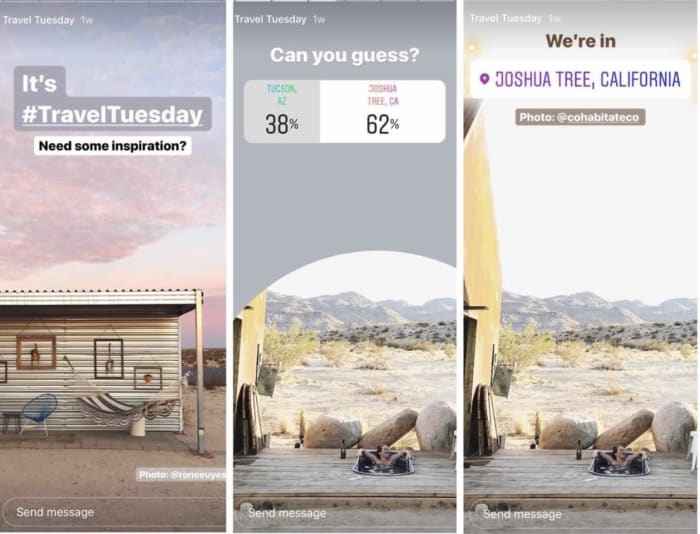
See below example from Airbnb. They’re killing it on the aesthetic front. They’re a “cool” brand with tons of visual content — images from global travel destinations.

Airbnb photo content

Where LinkedIn Live adds value is, it’s a platform for industries that don’t quite have the Instagram “it” factor that startups and e-commerce brands have. Instagram doesn’t make sense if you’re a thought leader in the logistics business or an industry titan in clean energy.

How will LinkedIn Live work?

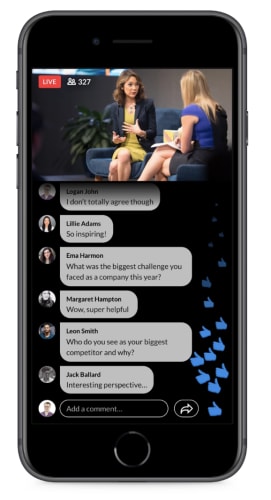
The concept is pretty straightforward. LinkedIn told TechCrunch that their hope is that users upload live broadcasts that appear in feeds alongside blog posts, shared content, and status updates.

LinkedIn Live feed

So, this might take the form of Q&A sessions, announcements, talks, and webinar-type content.

LinkedIn does have several deals in the works with third-party developers that will give LinkedIn users access to professional-grade broadcasting tools for a more polished approach to live-streaming.

Live is the latest in a slow move toward video content

LinkedIn isn’t the earliest adopter in the social media game, but they do understand the value of video. They’ve been rolling out a series of video features over the past year and a half, clearly gearing up for the big launch.

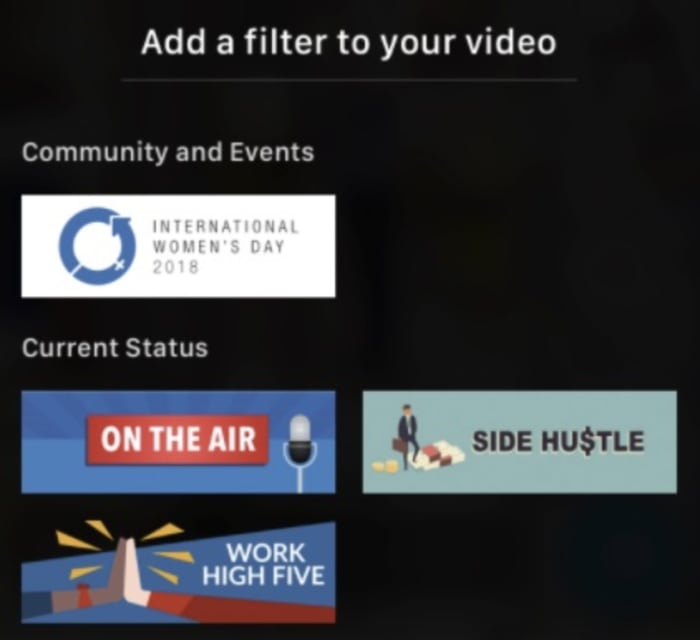
In October, LinkedIn announced stickers and overlays (like Snapchat) which give users the ability to create event frames that conference attendees can use with the photos they post.

add frames on LinkedIn

Video filters and text overlays have a distinctly “Stories” vibe, though some of the stickers are pretty dorky. The side hustle option is… cringe-y.

LinkedIn work stickers

Internal data reports that LinkedIn users are 20 times more likely to share a video on the social platform than other channels like Facebook or Instagram.

LinkedIn’s director of product management, Pete Davies says that Live has been the most requested feature. But it’s also important to highlight that it stands to be a big revenue generator. Last summer, the company introduced video sponsored content — which apparently sees 30 percent more comments than non-video ads.

While LinkedIn is a little late to the game, it seems like they’ve got some quality features on the way. No word, though, on how long it will take for LinkedIn Live to become available to the general public.

Do you need a digital detox?

Spending too much time on your screens?

Digital Detox

Technology is the backbone of our lives. No joke.

More and more, we’ve been hearing about these digital cleanses, diets, or detoxes, aimed at reconnecting with society.

What are these so-called digital detoxes, and do they actually work?

We decided to take a look at the idea of the digital detox to see if it’s a whole lot of BS or if there’s something to it. Let’s have a look to see if the “screen-free week” is worth a shot.

What is a digital detox, anyway?


View this post on Instagram


A post shared by Craig Ballantyne (@realcraigballantyne) on Jan 25, 2019 at 4:00pm PST

A digital detox, as per Techopedia, is a when someone quits using social media or a piece of digital equipment and instead, use that time for social interactions or offline activities. You can do a digital detox simply by pausing regular use, deleting apps, or otherwise refraining from social media or other online activities.

There is also a whole market of digital detox retreats — which might sound like a rehab center for Facebook addicts, but these retreats seem more focused on getting people away from their phones in an effort to connect with themselves, with others, and potentially, with nature.

Still, there’s a lot of weird diet language associated with this trend. Vogue and Shape, among others, have written articles that talk about cutting back on screen time like they might have talked about cutting calories two decades ago.

Psychology Today recommends “fasting” from electronics. And Quartz published a whole piece on digital detoxing, using food metaphors to emphasize each point.

MIT’s Carlo Ratti makes an interesting counterpoint to all of this “digital detox nonsense.” He points out that virtual assistants like Alexa, Siri, and the Google Assistant are pushing technology into the background — away from our faces.

Ratti gets at the idea that the internet of things might be the thing that saves us from the digital isolation/addiction/whatever these detoxes are supposed to fix.

Still, he makes the point that we do benefit from pulling our eyes away from the screen now and again — but says we don’t need to shun technology in the name of good health.

DIY digital detox

The most basic form of the digital detox is changing some habits on your own. This might mean keeping your phone on do-not-disturb for a set amount of hours, switching to a manual alarm clock, or deactivating Facebook and Twitter.

Of course, attempting to do this on your own is more about self-control and implementing new habits — so some may find it hard to unplug without taking more dramatic steps.

Retreats — a.k.a. a $$$ screen-free week

Call it rehab or whatever, but those who have trouble unplugging on their own and the time and money to spare can shell out a couple thousand bucks for a digital detox. Prices are comparable to a yoga retreat — this digital detox retreat in Ibiza is $2,200, sans airfare.

The idea sounds, honestly, a bit dumb. But, it comes down to a branding thing. The name digital detox elicits some serious millennial burnout vibes — from someone who, like, just needs to get away from Instagram.

However, a lot of the detox experiences we found online sound kind of cool — and geared toward a wide range of analog interests. For example, this blogger detailed her experience in Canada’s Northwest Territories.

This retreat was a snow-covered outdoor adventure where participants went cross country skiing, ice fishing, and more. There’s also something like Camp Grounded, an adult summer camp featuring everything from arts and crafts to archery, improv, and stargazing. No screens, of course.

Tech addiction therapy

Tech addiction therapy, unsurprisingly, is a thing now. It makes sense — experts are pushing for official disorder status in the DSM-5, and people do experience a range of issues related to technology.

There’s reSTART, a residential facility for people addicted to the internet, video gaming, social media, and gambling. In other cases, those who feel like they have a problem with technology addiction can seek the help of a traditional therapist that meets once a week.

Smartphone addiction symptoms include things like feeling anxious, stressed, angry, or nervous when separated from the phone.

Others experience a fear of being disconnected, a looming sense that something bad will happen if that person can’t connect to the internet.

Of course, there are likely several other ways that technology is impacting our mental health — for better or worse.

How much screen time is healthy?

Screen Time

Screen time is a term that gets thrown around a lot, usually in the context of adults hand-wringing over the latest teen tech trends.

Unfortunately, there’s no prescribed amount of screen time indicative of healthy use. We all have different jobs and obligations that dictate a good chunk of that screen time, anyway.

That said, the average adult in the U.S. spends a whopping 11+ hours a day looking at some type of screen, which really seems like a lot.

Too much screen time could pose health risks: think back problems caused by poor posture or extended periods of sitting.

Eating in front of a screen can make us become unaware of what we’re eating — in some cases, causing us to eat more. And, there’s the favorite tip — keep screens out of the bedroom, as the glowing blue lights can keep you awake.

In all, though, it doesn’t seem like being around the screen itself is all that bad — it’s more a matter of remembering to eat well, exercise, and talk to actual people once in a while.

What’s healthy, however, depends on what you hope to change by spending less time online.

What’s the verdict on digital detoxing?

Digital detoxes — vacation or not — are a great way to get back in touch with physical activity, human connection, and could be an opportunity to make time for something new.

Obviously, we’re starting to see evidence that technology has similar effects on our brains as addictive drugs—and certainly qualifies as a behavioral addiction in the vein of sex or gambling addiction.

Our skepticism likely comes from a place of disliking the name, “digital detox.” However, like “Friendsgiving,” “Staycation,” or “Bromance” digital detox is a good thing with a dumb name.   

The best online productivity tools for writers in 2019

Whether you write for fun or for a living, these great apps will supercharge your workflow.

writer

We can’t speak for everyone, but life as a writer can feel like a constant race to get things done. We’re either going full speed ahead, banging out a few pieces of content last minute or trying to combat our worst time-wasting habits.

One second, you’re trying to come up with your latest greatest blog post and the next, you’re looking at socks on Amazon and skimming articles.

And look, there are so many productivity tools out there, but for writers, many of them present more distractions than they aim to destroy.

What makes a great app depends on several factors: your process, the type of writing you do, where your productivity challenges lie. Are you a blogger, a novelist? Are you writing a company handbook or trying your hand at a passion-fueled screenplay?

Here, we’ll look at some of the best apps for writers – be it a distraction-free digital space or a better way to work out your big ideas.

Best productivity apps for writers

Things

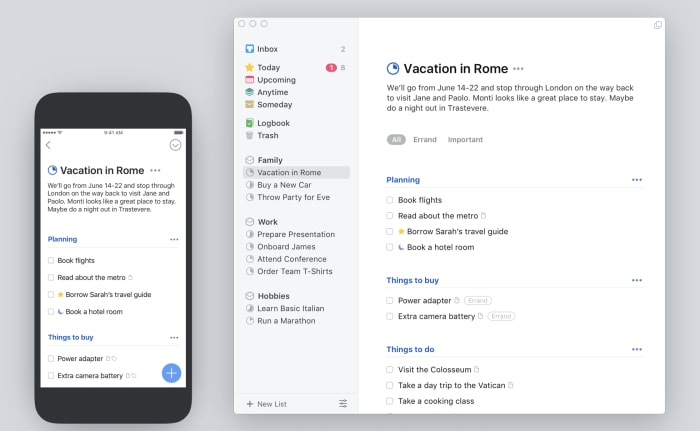
Things iOS and desktop

The Things app is probably the best to do list app, at least in our opinion. It’s a paid app, and it’s a little spendy for a lot of folks — but if you need a task manager that can do it all, this is a good choice.

The reason Things is a good thing for writers is — it’s not complicated.

In fact, it kind of feels like a mashup of Google’s tools and the apps that come standard with your Mac — you know, Notes or iCal. The benefit is, Things brings the basics together in a central hub — so you can track your deadlines, write down new ideas, and turn your notes into checklists.

What’s more, Things comes with a searchable archive, as well as the ability to set long term and short-term goals — that’s more important than one might imagine.

Things Download Free
8

Scrivener

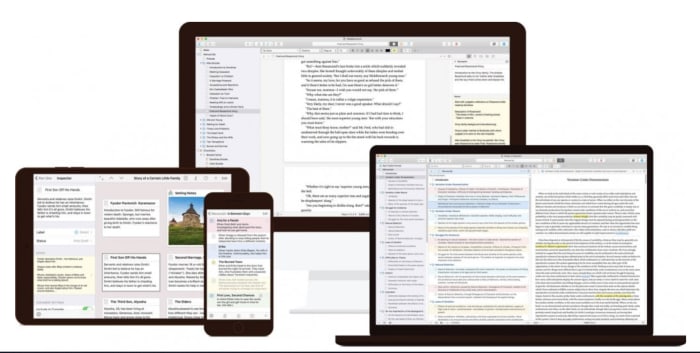
Scrivener writing app

Scrivener is a favorite among the screenwriter set, as well as those taking a crack at a novel.

The productivity benefits you’ll find here are primarily formatting oriented. You can use the platform to create comprehensive outlines, break your writing into scenes or chapters, and move full sections around without the risk of messing up your masterpiece-in-progress.

This isn’t necessarily the best tool for bloggers or those writing shorter pieces of content. But, if you’re writing academic content, this app is a real lifesaver.

They’ll help you stick to Chicago or AP guidelines, no problem. And Scrivener takes care of your formatting woes. When you start a project, you’ll select a template that matches the pilot episode, nonfiction book, or whatever creative project you’ve got up your sleeve.

Scrivener Download Free
7

Ulysses

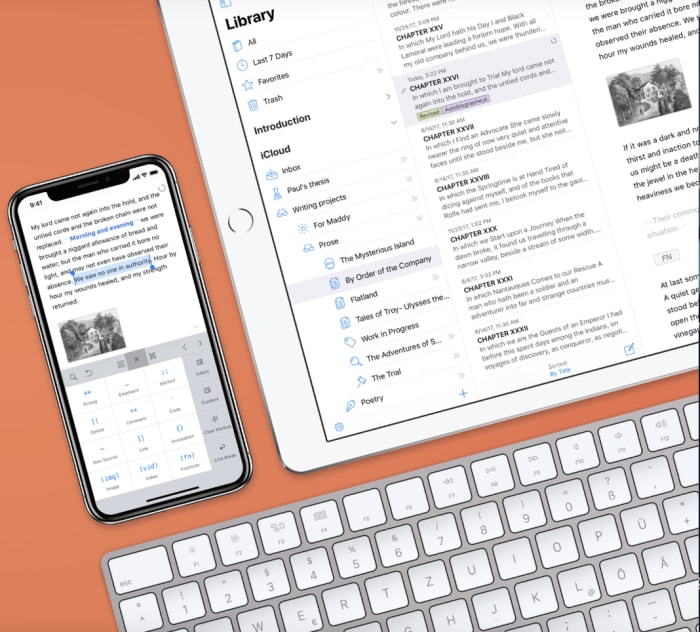
Ulysses mac iOS

Ulysses is a writing environment app with a cloud-based component. Basically, it’s a clean digital space that seeks to eliminate distractions while you strive to meet that word count minimum.

And while there are a lot of “writing environment” apps, this one brings more to the table than some of the others we’ve encountered.

Honestly, it looks like a better version of Apple’s Notes. And it also syncs your content across all devices — so you can work on your laptop, make some edits on your phone, and review your work from the iPad.

Ulysses Download Free
8

iA Writer

iA writing app

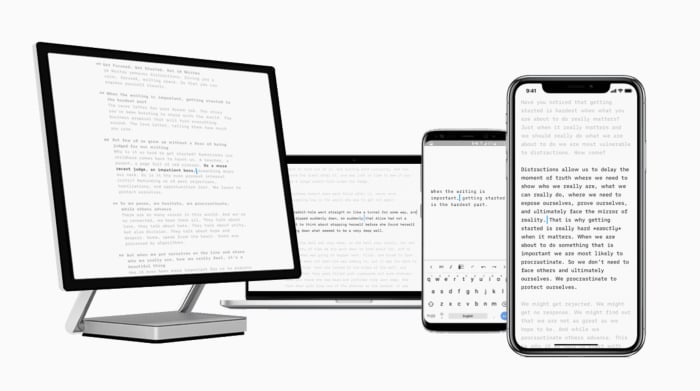
iA Writer is a distraction-free writing app for iOS, Android, Mac, and Windows. The app offers several features that help users get more done. iA writer supports full markdown language and makes it easy for bloggers that need to translate their final draft into Medium or WordPress. What’s more, the app allows you to embed images and tables into the document — which any web writer knows can be a real time-waster.

iA Writer is a minimal tool — offering few distractions and a few handy tools. Syntax highlight highlights specific parts of speech, while focus mode highlights one paragraph or sentence at a time.

iA Writer Download Free
10

MindMeister

MindMeister sample map

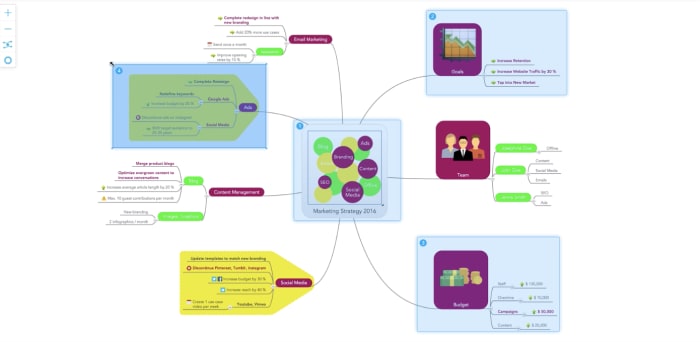
MindMeister is an online tool that allows you to capture and work out ideas as a visual map. While it might not sound like a writing tool at first glance, this tool is a great way for users to work out just how they want to tell a story.

This tool works on Mac OS, Windows, and Linux — or you can just keep things in the web app, download-free. MindMeister is sold with a collaboration bent, but we envision this as being just as useful for solo brainstormers as the whole team.

There are several features built in, but we liked that this tool comes with an online storage system for all inspirational materials — like Evernote, but connected to the mapping feature.

Unpaywall

Unpaywall extension

Ever spend way too much time cruising the internet for reputable sources — only to find reports that cost like $200 just to review? Yeah… us, too.

Unpaywall comes in to provide a workaround. It’s a digital library of 50,000+ journals and open-access repositories. Their goal is to bring scholarly articles to everyone — whether they’re writing an article or have a school project due.

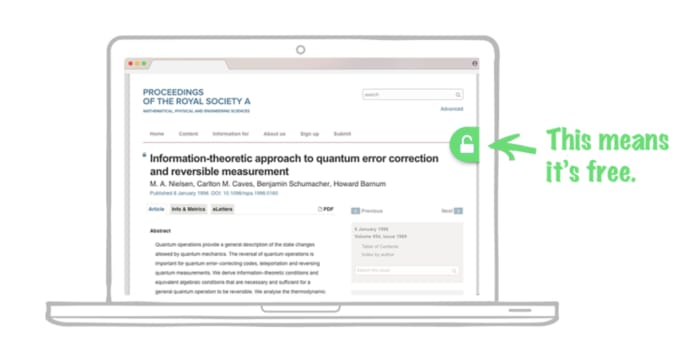
Okay, Unpaywall isn’t really an app — rather it’s a free Chrome extension. How it works is, you’ll conduct your research as usual. And when you come upon a paywalled research paper, the extension looks for a free version posted on another site. If something is available, Unpaywall displays a green icon on the right side of your screen — click it to read the article, free.

Now, it doesn’t work on everything, but it will make your life easier, especially if you need to find some stats that make your article all the more credible.

Wrapping up

The best writing tools aren’t necessarily a choice between whether you prefer Scrivener over Google Docs or Microsoft Word.

Rather, the goal is to develop a productivity stack that works for you.

We’ll say this from experience — little tasks like formatting and finding good sources can eat up a lot of time, on par with surfing the internet when we should be working.

All the features of Gmail’s 2019 refresh

Gmail has a new look for 2019. What else is new?

Last year, we got email snoozing and a nudging feature where Gmail gently reminds you to follow up time-sensitive actions.

Arguably, Gmail’s best update of 2018, however, was smart reply, the AI update that literally finishes your sentences, so you can put minimal effort into your “just following up” replies.

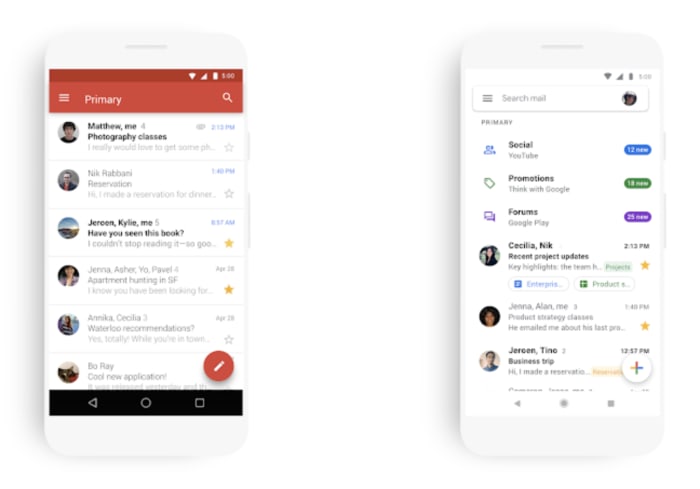
This year, Gmail’s gone all white and made inbox clean up a little easier.

The 2019 updates aren’t quite as dramatic as last year’s, but they might help you focus.

Google says the new look is minimal use of color, designed to help you focus on the content you think is important, not that pesky red bar at the top (RIP??).

Gmail’s most recent changes

gmail

Why the whitewashing?

According to Google’s blog, the new look is part of an effort to make the full G Suite feel like a family of products, not separate apps.

So, on a visual level, we’re getting new design elements. For one, Gmail has made the switch to the Google Sans (or Pixel) font, ditched the familiar red bar, and replaced it with a minimalist search bar that promises not to get in the way.

Of course, it looks great — certainly in line with those work environment apps that give you a blank canvas so you can organize those digital thoughts. It’s amazing what taking away that red bar can do.

old gmail new gmail 2019

What else is new?

On mobile, Gmail offers a handful of new features that make it easier to review messages on your phone.

You can now look at photos or attachments from your inbox, without opening the originating message. The benefit is you’ll save some time. No more clicking through each entry in the thread to locate a specific document.

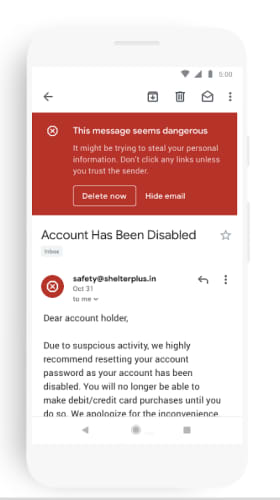
While Google has done away with its signature red bar, they are still using the color, but it’s more intentional. For example, a thick red bar warns you if someone is attempting a phishing attack.

gmail's bar now just for phishing alerts

Right-click options expanded

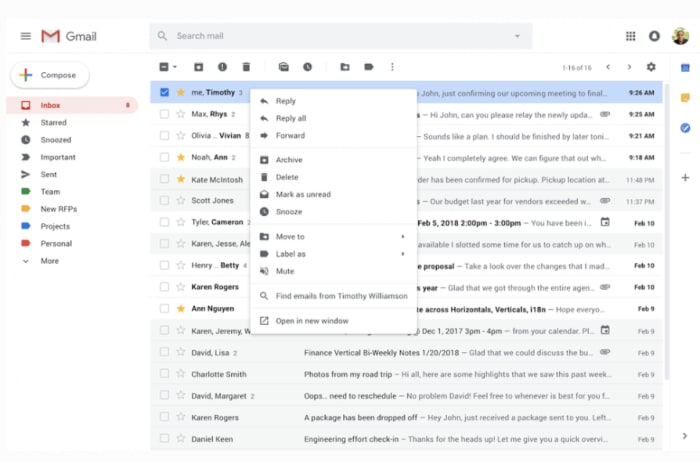
gmail's expanded right click options

Aside from the bright white makeover, Gmail has added some convenient shortcuts that make it a whole lot easier to clean up the inbox.

As it stands, right-clicking on any given Gmail message only gives you three options: mark as unread, delete, and archive.

The limited menu has worked out fine for the past several years. However, the lack of options has been a slight annoyance since the birth of Gmail.

New options allow you to take more actions from the inbox without opening the message. A quick rundown of what you can expect to find now:

  • Reply to an email or forward it along to another user.
  • Search for all emails from a specific sender
  • Search for emails with the same subject
  • Add a label or move an email
  • Open multiple emails in new windows

Menu options change depending on whether “conversation view” is enabled.

Conversation view is the setting within Gmail that allows you to set whether emails of the same subject are grouped together — alternatively, you can keep this turned off, so emails appear in the order they were sent.

TL/DR: 2019 changes are small but positive

Gmail’s latest updates seem like small potatoes compared with the big deal offerings Google gave us last year. The new interface does have a different feel — but after you adjust to the shocking bright white, you’ll probably like it better.

After nearly a full decade of smartphone apps layered one on top of the next, we’re starting to feel overwhelmed by all of our tools. Google’s material redesign doesn’t mean much for functionality, but it does answer a small call for help — an uncluttered space where you can reliably get some thinking done.

As far as the mobile updates go — the right-click menu has been an annoyance since Gmail came on the scene. Less clicking around might not seem like much, but it’ll shave seconds off of your quest for inbox zero. Hey, it all adds up.

Instagram wrestles with mental health concerns

Can Instagram allow free expression without encouraging self-harm?

phone depression

Earlier this month, Instagram announced they’d be cracking down on self-harm imagery. Or rather, they’ve doubled down on the sensitive content filters implemented in 2017.

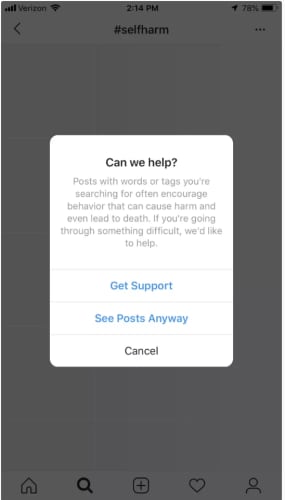
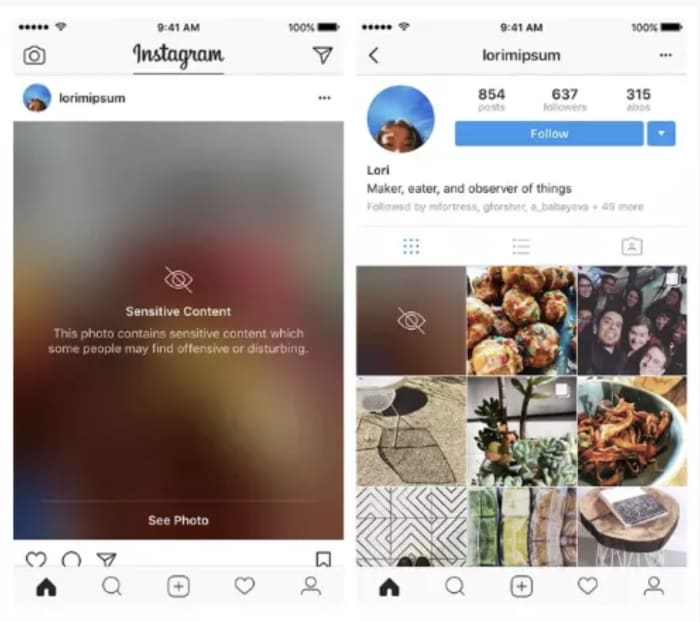
The filters, or “sensitivity screens,” blur out content related to suicide or self-harm and users can tap the screen to view the image. The idea was to reduce the likelihood of stumbling upon unwanted or harmful content.

Since then, Instagram has been dubbed the worst social media platform for mental health, particularly among young people.

From body dysmorphia to eating disorders, self-harm, and low self-esteem — the platform is an undeniable minefield for all kinds of mental health issues.

The initial filters didn’t ban images of cutting or other forms of self-harm, as Instagram didn’t want to ban posts from those who were struggling.

While most of the dialog surrounding social media and mental health has focused on things like FOMO and body image issues, the conversation has shifted toward what content should be banned in an effort to protect vulnerable users.

Here’s a little more about Instagram’s push toward a healthier platform–and why.

Why is Instagram increasing controls on sensitive content?

The decision to ramp up controls over self-harm posts came two years after 14-year-old Molly Russell took her own life. Molly’s parents believe that content found on Pinterest and Instagram may have played a role in her death.  Her father, Ian Russell has been vocal about the failure of social media companies to protect their young users.

In the wake of the tragedy, UK health secretary Matt Hancock warned Facebook (who, of course, owns Instagram) that he would take legal action to protect young people from harmful content. In a letter to “social media bosses,” Hancock said it is appalling how easily young people can access content that “leads to self-harm and suicide.”

Adam Mosseri, the head of Instagram, responded by announcing that they would roll out sensitivity screens blocking images that depict self-harm.

self-harm Instagram

“We still allow people to share that they are struggling,” Mosseri stated. The app’s policy only bans images that “glorify” self-harm. The platform does hide posts that reference self-harm or post non-graphic depictions.

As it stands, the app does ban promoting content that relates to self-harm or suicide. However, they’ve struggled to gain control over the content the algorithm recommends — allowing graphic imagery to pass through the filters anyway.

Instagram’s algorithm is set up so users receive personalized recommendations based on past activity. So, despite Instagram’s efforts, the platform guides users seeking self-harm content toward other posts/accounts that align with their “interests.”

Mosseri admits in an op-ed that the platform hasn’t done enough to keep these images out of feeds. While the 2017 effort was a step in the right direction, this latest move involves allocating more resources to fighting back — content moderators and engineers.

Is it Instagram’s responsibility to ban sensitive content?

Instagram sensitive content

Early reports of the tool in action show Instagram did censor certain hashtags — obvious ones like #selfharm or #selfinjury came with the sensitive content label, but the issue was, users could just add new hashtags and circumvent the filters.

Like some of the biased algorithms we’ve seen in the news recently — problems aren’t evident until something bad happens. A tool isn’t programmed to have racist inclinations or built-in gender bias, but once it’s out in the wild, dealing with real people, it doesn’t have the “training” to respond appropriately to every situation.

It’s troubling that the platform has been recommending sensitive content to a vulnerable audience. But it’s unclear if Instagram’s ban will extend to accounts that raise awareness for mental health issues or speak out about their experience with depression.

As we’ve seen with Facebook’s crackdown on fake news and political ads, many accounts may find themselves subject to penalty. But, it’s certainly a step in the right direction.

Instagram Direct brings DMs to the desktop

Big things are coming for users of Messenger, WhatsApp, and Instagram.

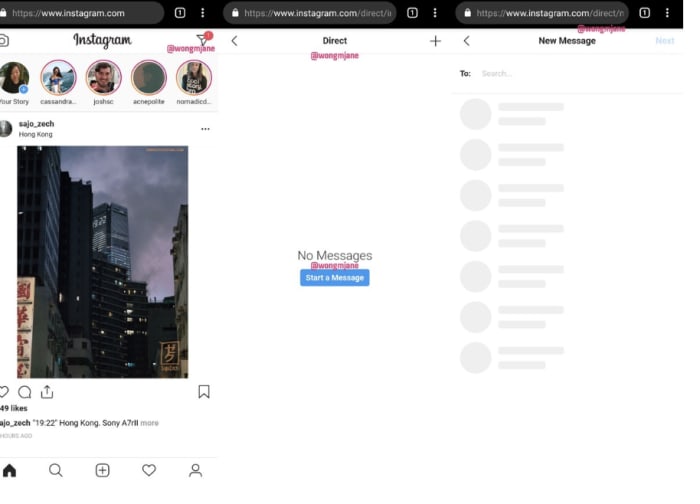
Instagram is testing a new direct message app for the web. Jane Manchun Wong, a reverse engineer pro broke the news to TechCrunch. Wong discovered the mobile-centric app was testing a web version internally by messing around with the URL structure.

Here’s what it looks like:

Instagram DM app preview

Weirdly, some apps (Instagram…) still don’t provide the cross-platform functionality that has become par for the course.

Instagram, long the mobile-only holdout, seems to be following WhatsApp and Facebook, experimenting with a standalone DM app — available on both web and mobile devices.

What will we get from Instagram Direct?

No stories, no pics here. Instagram Direct won’t bring the eye candy to the table like Instagram proper.

Sure, Instagram is a photo app, but the web version will be a standalone chat app, no filters or uploads included.

It seems that the main idea here is to make it easy to respond to text-based messages, as most of us can type faster on a keyboard than the phone.

There are also rumors floating the web about potential support for the iPad. Which again, likely won’t include bringing the full Instagram set-up to the tablet (likely because they take bad pictures?), but presents another way to chat with friends and customers.

Unified messaging with WhatsApp and Facebook is a driving factor

Instagram’s move toward more desktop functionality comes after the big, controversial announcement that Facebook would be combining WhatsApp, Facebook Messenger, and Instagram Direct by the end of this year.

The idea is, the apps will continue to function on their own, but on the backend, the three will be integrated — so users can communicate across platforms. But, as the New York Times reported last month, unifying the backends of the chat apps will require engineers to completely reconfigure the technical infrastructure of all three from the ground up.

Of course, people have not been happy about the announcement, citing privacy issues and security concerns. And the rollout of Instagram Direct represents progress in this whole unification effort.

Businesses can already respond to Instagram DMs via Facebook

A few weeks back, Instagram debuted web-based DMs, by way of Facebook.

Right now, you’ll need to have a business account to access DMs online. But access isn’t limited to a small group of beta testers. Anyone with a business page and an active Instagram can take advantage of the “all-in-one” messaging system.

Facebook recently announced that they’d be rolling out the feature in combination with the Facebook inbox. While it’s not a standalone app, users in the US and Brazil can now toggle between inboxes.

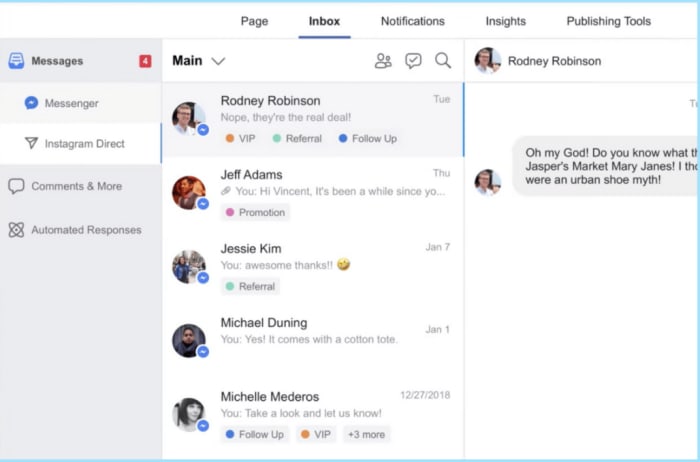
The Instagram marketing platform Later.com recently shared a post that showcased Instagram Direct in action. As you can see below, both Messenger and Instagram Direct show up when you click on the Facebook Inbox.

Instagram direct for business

Facebook says that this allows businesses to manage their conversations and respond to customer questions and comments faster than they can on mobile. Makes sense. The fact that Instagram has been clinging to mobile-only seems a bit outdated.

These days, we’ve grown to expect our apps to work on any platform — we’ve entered the era of cross-platform convenience.

Facebook stands to profit from web SMS

Facebook is promoting integration as a way to bring more convenience to the platform — which it does. But, the real benefit for Facebook is two-fold — one, as we mentioned, it’s a step closer to uniting WhatsApp, Instagram, and Facebook.

Two — it’s an opportunity to monetize. Facebook doesn’t directly monetize Instagram Direct right now.

However, an SMS-supported, cross-platform DM app presents a new platform for advertisers to push out ads while users wait for the next message to arrive.

Still, the promise of convenience hangs in the air. And, while Instagram Direct won’t come with photos, stories, and hashtags, it will make responding to messages a little easier.