8 best apps for Instagram collages in 2019

Want to fuse multiple pictures for an Instagram collage? Here are your best bets.

There are a few different ways to make collages on Instagram.

For those new to the concept, an Instagram collage is a collection of pictures that almost look like the grid view in your feed. The difference is, the collage is uploaded as one photo.

You’ll probably notice the collage trend near the end of every year, as many of your friends probably post their “top nine” collections.

That said, if you’re new to the collage game, you need to know that Instagram collages require a third-party download. You can’t make collages in the Instagram app — between these 8 apps, there’s something for the total beginner, the sticker fiend, and the editing pro.

Best Instagram collage apps

1. Layout

Instagram collage Layout

Instagram’s Layout app leads the charge when it comes to creating everything from top nine collages to merging a few photos together for a unique effect.

The app is easy to use and allows you to re-mix up to nine photos at a time from your camera roll — or photos taken in the moment. You won’t find crazy stickers or tons of templates in Layout, but you will find the straightforward editing and arranging features that make for a high-quality end result.

Layout from Instagram Download free ►
7

2. Top Nine

top nine 2018

Top Nine is one of the most popular collage apps in the game, mentioned by big names in the press like Refinery 29, Cosmopolitan, New York Magazine, and Mashable. The app is less of a creative tool and more of a fun “generator” that puts together a collage of your best posts of the year.

While it’s a fun trick, we only recommend Top Nine in late December unless you feel like being way ahead of (or behind) the curve.

7
Instagram Download Now ►
7

3. Collage Maker

collage maker features

Collage Maker brings a lot of choices to the collage process. Like stickers? Emoji? Then this one’s for you.

Download the app and you’ll gain access to over 60 different frames, 48 layouts, and five ratios for a customizable experience. We liked that the app was super easy to use and that it came with a lot of features. There were a couple of downsides, though. Collages end up being pretty big downloads and the app features a ton of ads.

Collage Maker - Photo Editor Photo Collage DOWNLOAD FREE ►
6

4. Photo Collage Pro Editor

Photo Collage Editor

Want even more variety? Look no further than Photo Collage Pro Editor. This third-party app comes with 120 different frame variations and a ton of layouts, stickers, and colorful backgrounds. We liked that the editor was super easy to use and allows you to customize photos with the various features.

What we didn’t like we’re all of the popup ads. We get that they’re a compromise that allows us to use apps for free, however, they’re still pretty annoying when you’re trying to find the perfect sticker to put on your friend’s face.

Photo Collage Pro Editor DOWNLOAD FREE ►
6

5. Pic Collage

pic collage template

Pic Collage has a distinctive, feminine aesthetic, so it might not be everyone’s style. Still, the app comes with some interesting design options, the ability to adjust the brightness, hue, and saturation, as well as some stickers. Customize your borders, play with different layouts — Pic Collage is a great way to create cute collages to dress up your feed. Again, the site comes with ads—and collages display a watermark.

Pic Collage download free ►
6

6. Pic Jointer

pic jointer screenshots

This simple app does photo grids and not much else. We recommend this for a couple of reasons — ads are relegated to the bottom of the screen (no popups) and it’s super easy to use. While the more tech-savvy Instagrammer is not going to be impressed, Pic Jointer gets the job done when you just want to get something posted right away.

Pic Jointer – Photo Collage, Camera Effects Editor download free ►
7

7. Moldiv

Moldiv photo editor

Moldiv is an all-in-one Instagram editing solution. Use this app to tighten up your selfies, edit your food pics, and build some seriously creative collages. Where Moldiv really shines is in the editing department — it’s great for those beauty enhancements and comes with 135 layouts, 310 different frames, and the ability to change aspect ratios.

There is a slightly higher learning curve compared to the simplistic Pic Jointer, and the ads can be kind of intrusive.

MOLDIV - Photo Editor, Collage & Beauty Camera download free ►
8

8. KD Collage

KD Collage for Android

KD Collage brings together ease of use with a lot of options. While there is no built-in editing tool, KD Collage does allow you to create collages using 80+ backgrounds and 90 collage templates. You can also add text to your handiwork — and customize the color, size, and font style. In all, a solid app that makes collaging a breeze.


KD Collage Free download free ►
8

Is Instagram destroying the art world or making it better?

selfie

From coffee to cocktails to culture, the Instagram-friendly business is everywhere.

Marked by cool accent walls, big bold quotes, and pops of color, these functional pop-ups have transformed the dining scene, museum culture, and really, how we interact with the world.

Is that a good thing? Is everything we value now tied up into the quality of photograph we end up with?

What happens to comfort food that looks messy on the ‘gram?  Or meaningful art that requires IRL observation?

Experiencing…what?

This past year or so, we’ve started to see more examples of pop-ups created for the sheer purpose of being captured on camera—Refinery 29’s 29 Rooms, the Color Factory, the Museum of Ice Cream, the Museum of Selfies, and Candytopia are the more popular examples.


View this post on Instagram


A post shared by КАТЯ ВАРНАВА (@kativarnava) on Jan 18, 2019 at 11:03pm PST

A few years back, regular museums became social media stars — but we’ve removed the pretext of “culture” and started approaching the museum in, we suppose, a more honest way.

Museums featuring, oh anything by Yayoi Kusama still attract big crowds. But the concept has been distilled down to the essence — these pop-up experiences that remove the didactics and docents from the equation. It’s all about the ‘gram, baby.

Art on the wall has been replaced by the interactive ball pit, human-sized egg cartons, and branded #content decked out in bright colors.

In any case, it’s becoming easy to create an installation with some whimsical elements, and watch people pay to wait in line and promote that experience on social media.


View this post on Instagram


Bachelor Monday’s got me like ?

A post shared by Lauren Tom (@laurentom26) on Jan 28, 2019 at 4:00pm PST

Instagram Download Now ►
7

Business is defined by performance

In this pay-to-pose world, exhibits need to photograph well or people just won’t come. Because the experience is second to the photos captured during the experience.

selfies in action museum of ice cream

That’s fair when it comes to say, tracking online stores or even offline businesses like restaurants and coffee shops, which have always relied on ambiance or charm to keep customers coming back.

With food, we do have a natural tendency to “order with our eyes” so there’s no doubt that food needs to appear appetizing.

Where it gets a little murky is when you start to think about art, in the traditional sense. Some art doesn’t photograph well, but is something to behold, in person. With food, you’re seeing chefs who create food that looks good on Instagram, sometimes at the expense of taste.

Eggslut’s Alvin Cailan told Eater he was done playing into the Instagram culture — but it’s worth pointing out that the runny egg-focused restaurant already had a cult following in Los Angeles. Those just getting started have to play the game, at least if they want to be commercially successful.

Additionally, when you put the experience first, how do things like meaning and making a statement come into play?

What does the art world think of the so-called “Instagram Trap?”

Artnet featured a piece by critic Ben Davis who wrote about the Instagram playground Dream Machine for the magazine. He mentions that some elements seemed “dumpy” in real life, but photographed quite well — Davis describes the experience as being something that looks like art, but at the same time, defeats the normal approach to art.

dream machine better in the photos

He further explains this by saying, the experience is secondary to the photos collected (a higher brow Pokemon Go?), participation trumps observation (a hallmark of the art criticism process), and individual experience matters less than the social experience.

AdWeek offered an interesting take on how brands have moved from considering the role of social media at events and establishments to building everything around social media.

It wasn’t so much a criticism of social optimization, but they point to the need for brands to create meaningful experiences — i.e. more than an opportunity to stand in line to take a photo.

2019 Ultimate Guide to Resume Apps 

It’s safe to say that the internet has changed almost everything about jobs. Interviewing for jobs, identifying opportunities, and doing your job.

The whole cycle has been disrupted.

This is all well-documented — we live in a world where preparing for an interview means knowing how to impress an algorithm.

What hasn’t gotten a lot of attention is how to upgrade the stodgy old resume.

Sure, social media and digital portfolios have taken over many traditional CV duties, you still need to have a solid resume on hand.

Just because you’ve been hoping it might fade away along with fax machines and stamps (just us?), you still need to put some effort into creating a memorable, professional one-pager.

To help you out, we’ve pulled together a list of apps that make the formatting, editing, and polishing process relatively painless.

Best resume apps for 2019

Cake Resume

Cake Resume example

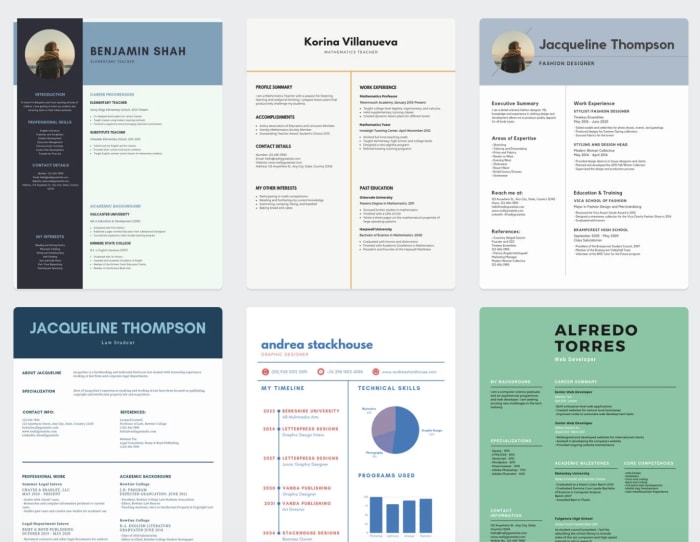
Cake Resume is a drag-and-drop-style resume editor that allows you to customize your design without being held back by the confines of a pre-designed template.

The result is a slick-looking resume that looks more like a well-designed website. How it works is, you’ll fill in each field: name and intro, experience, education, etc., plus photos, links to projects, or anything else that makes sense to include.

From there you can customize the layout — move things around, add, delete, resize — however you please.

If you’re not sure where to start, Cake Resume offers tons of examples of resume creations organized by industry. Because real people create them, some examples look better than others. Still, you’re bound to get some ideas for how you can present yourself.

Though the process is pretty easy, some users might feel a little overwhelmed, if they don’t have any design experience.

The process is similar to a landing page builder — so marketers and designers should be able to get the hang of Cake Resume right out of the gate. For everyone else, the site does come with tutorials that can help you out.

Canva

canva resume templates

Canva isn’t just for creating logos and custom graphics; you can also use the web app to make your resume pop. Resume designs span a range of styles — some colorful and artsy, others minimal, and many, somewhat traditional. Sort through the template selection by choosing a categoryand finding the one you like best.

Choose from literally thousands of templates — adjust fonts, colors, and make it your own by adding photos, icons, and illustrations from Canva’s library.

Change the font and color, update the details, resize the various elements, and move things around.

Playing around with the tool — those who stand to get the most out of it will change nothing but the details. For a more personalized approach, you will need a bit of design savvy, as it’s easy to mess up the individual elements.

Canva is free if you stick to the tool’s free design elements, plus a dollar per graphic if you add in premium graphics.

10

Visme

Visme does offer fewer templates and graphics than Canva, which means that you can’t customize your CV to the same extent. But, it also makes things easier on people without a design background.

Right away, we were impressed with Visme’s aesthetic. They’ve got a more defined look than Canva—which sources designs from professionals around the world.

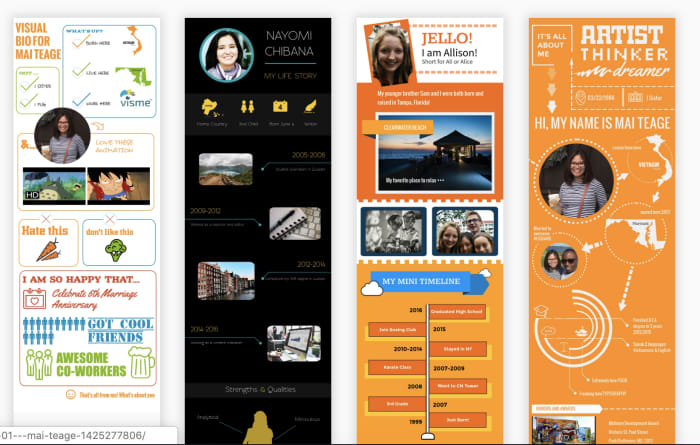
Where Visme brings something fresh to the table is the infographic resume templates. These might not be right for every industry, but they do stand to help you stand out in a sea of white paper.

We should mention, that the resume section isn’t clear upfront. The site is used for creating graphics spanning slide shows and social media designs to infographics.

CV Engineer

CV Engineer mobile app for resumes

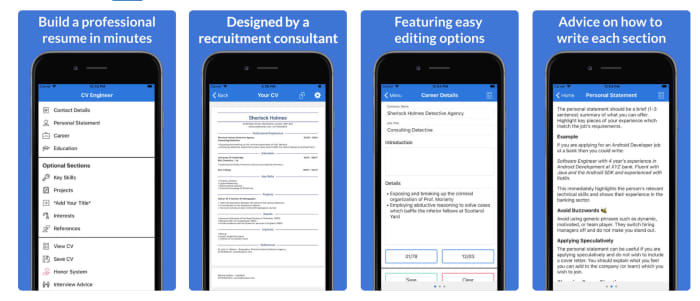
CV Engineer allows you to put together a resume from your phone. While you won’t get the same visual components as Visme or Canva, the app makes it easy to organize your details in a clear, concise way that employers are sure to appreciate.

You’ll get started by filling out each section (skills, references, education, interests, and experience) and CV Engineer chimes in with little tidbits of advice, as you move through the process.

Once you’ve filled everything out, CV Engineer pulls everything together, and from there, you can save your final copy to your Google Drive.

The app is free, but you can tip the developer later on — you know, if the resume lands you a job.

CV Engineer - Free Resume Builder CV Template Download Free
8

Vizualize.me

Visualize me visual resume

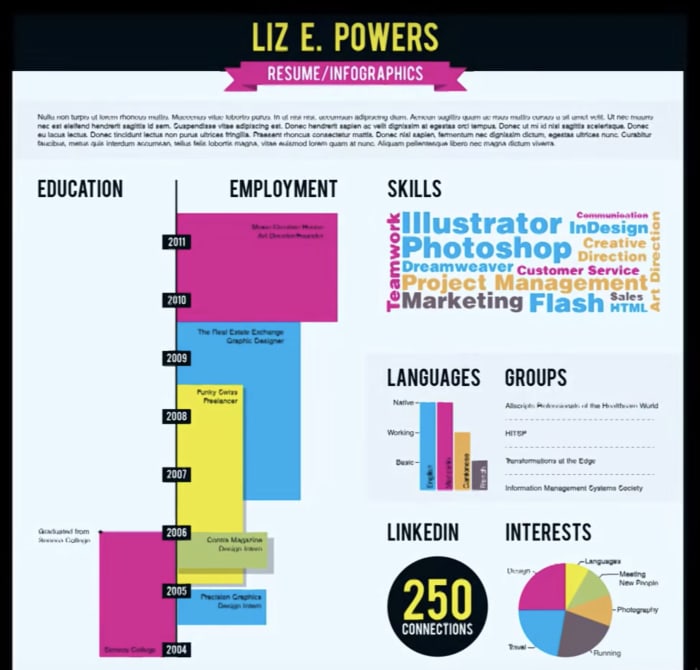
Vizualize.me is an infographics maker with a mission to give the traditional resume a much-needed makeover. The app instead takes your LinkedIn details and compiles your professional achievements into a simple, yet visually engaging graphic.

While the tool is in beta, it already has some pretty rad features. Compile your experience in the form of a colorful timeline, add skills by way of bubble charts, and compile your “stats” as a pictogram — in case you’re wondering “stats” might be how many LinkedIn connections you have or deals you’ve wo n— you know, those little brags.

CVOne

CV One Video Resume

CVOne is a video resume builder that comes with a scrolling teleprompter you can use, so you don’t forget your lines.

While the tool is free, you are forced to share your CV by way of branded URL, which might be a deal breaker for someone trying to put their most professional foot forward. Still, what we liked about this option is, it’s an easy solution for creating a video in a pinch.

We’ve come across job postings that ask for a video — and admittedly, the prospect is a little daunting for those who don’t make a lot of videos in their personal or professional lives.

Microsoft Word

Word for Resume Templates

Okay, you’re probably thinking — wait, my resume is already in a Word doc, this isn’t new information.

Fair assumption, but hear us out.

Word isn’t the most exciting option on the block, but they do offer several good looking templates, and chances are, you already know your way around the platform. Resume options are free (if you have an account) and designed by Moo — you know, the business card folks.

There are also some super simple options for those who prefer to stick to the old school approach —important details, easy to read.

Microsoft Word Download Free
8

Meet the decentralized versions of YouTube, Google Docs, and Google Photos

Looking for privacy? Want to earn cryptocurrency? Check out these versions of your favorite sites.

blockchain

When we talk about blockchain technology, the conversation usually surrounds big idea topics. How cryptocurrency can save developing nations or save us from being slaves to big tech and ISP monopolies. But there are a whole host of decentralized apps that offer an accessible, and secure alternative to some of our most used regular apps.

Decentralized apps, otherwise known as DApps connect developers and end users without the middle man. Users get to access a tool without dealing with the Amazons or Facebooks of the world.

This is the source of appeal for privacy-focused consumers. But, without centralization, you need to have incentivization, which is why just about every blockchain-based system comes with some sort of coin attached.

Below, we’ve highlighted a few DApps that you’re bound to find useful—-whether or not you care about trading in digital currency. Oh.. and you buy them in the Dapp Store — how cute is that?!

Graphite Docs

Graphite Docs blockchain alternative Google

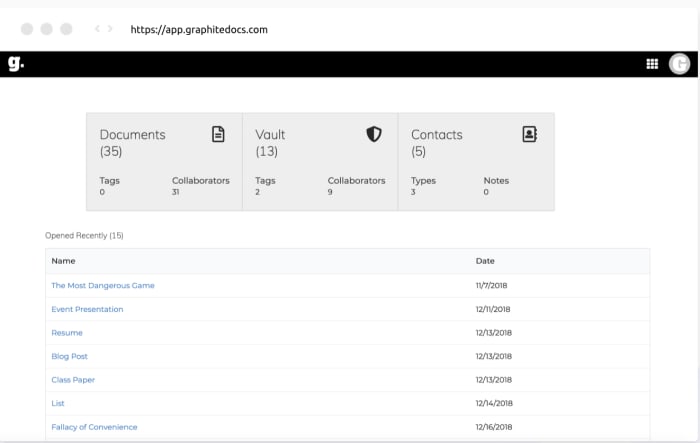
Graphite Docs is the decentralized solution to Google Docs, only Graphite comes with the promise of full control over your data and who gets to access it. The basic premise is the same as Google’s solution — create documents, share files, and collaborate with others.

Interface-wise, Graphite looks pretty good. It’s incredibly minimal but in a good way. Black and white design, a clean dashboard that makes it easy to organize your documents, and cross-device functionality. Unlike some blockchain platforms, Graphite Docs doesn’t make it a hassle to log in, but doesn’t compromise on privacy.

Overall, this looks like a good solution for those seeking an alternative to Google. And, it potentially presents an opportunity for legal professionals, journalists, and businesses handling sensitive data to benefit from the cloud.

DTube

DTube blockchain YouTube

DTube, as you might have guessed is the decentralized answer to YouTube. The app looks similar to the familiar video site, but there are a few key differences. Content creators can upload videos and have the opportunity to earn cryptocurrency.

The app is censorship resistant, claiming that only the users can censor content through the power of upvotes and downvotes. There are no ads and creators don’t have to worry about algorithms prioritizing popular content over new posts.

We browsed around, finding that most of the content is about crypto and blockchain topics. Granted, that’s probably because DTube isn’t exactly widely publicized on mainstream internet publications or social networks.

DTube is easy to use, though some users might find the payout system a little confusing. Rewards come from the STEEM blockchain, which unlike Ethereum or Bitcoin, just keeps printing money, which is then given out as rewards.

As a point of reference, STEEM is a currency made for social platforms — offering immediate revenue streams for bloggers and content creators.

One downside? Videos are currently deleted after 60 days. As a DTube SysAdmin wrote on Reddit, “Our storage system scales nicely, our funding does not.” Another issue is that the search bar doesn’t seem to return any results for anything. Might wanna jump on that, DTube.

Bounties Network

Bounties Network jobs

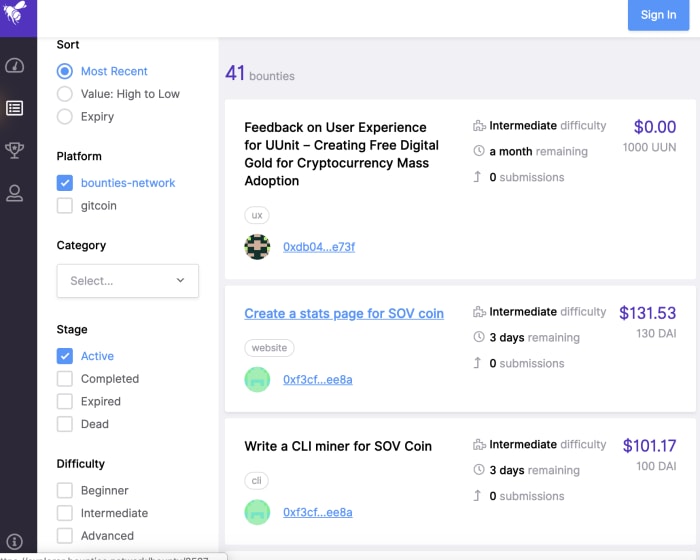
The Bounties Network is a website that aims to change the way we collaborate. What that actually means is, the app is designed to help people self-organize, whether they’re starting a grassroots movement or looking for a fair freelancing agreement.

Look around the website, and there’s almost sort of an Upwork or Fiverr vibe. It’s a list of tasks worth varying amounts (all in crypto). Tasks range from designing a graphic for a hoodie to performing user testing. And bounties are token agnostic, so one person might pay out in ETH while another uses DAI.

Indorse

Indorse home page

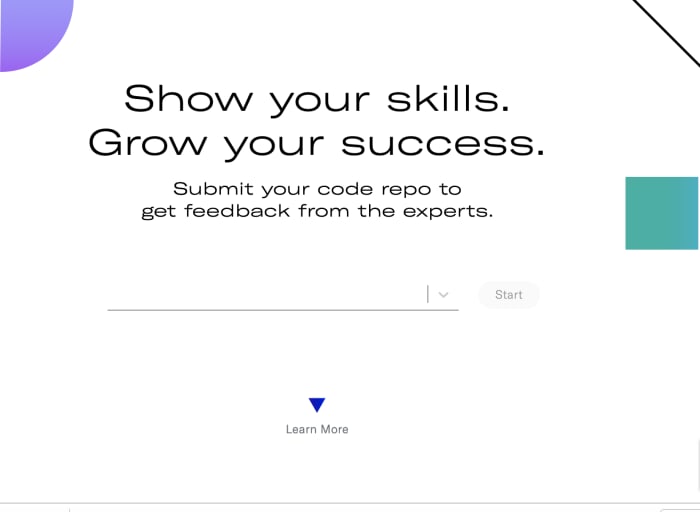
Indorse is a blockchain-based platform with the tagline, “a revolutionary way to validate skills.” In essence, Indorse is a pared-down linked in for blockchain, primarily for coders. How it works is, you’ll submit your code through the platform and an expert will validate your skills. From there, the idea is, you’ll be able to find jobs based on merit over connections and earn rewards for claiming and validating skills. For companies, Indorse presents qualified candidates with proven skills — which ideally, cuts back on the time spent recruiting new candidates.

Textile Photos

textile photos secure photo sharing

Forget the iCloud, Textile Photos brings your memories to a secured blockchain platform. It’s a simple photo app, how it works is, when you take a picture, your photos sync across all your devices. From there, you can create private threads to share content, and according to the official website, be yourself without worrying that photos will fall into the wrong hands.

Textile Photos is censorship resistant, open source, and fully encrypted. And this one doesn’t require a trip to the DApp store, you can find it in the App Store and Google Play, too.

How humans and AI are currently working together

Will AI take your job, make your life better, or both?

humans and robots

Artificial intelligence has become good at so many things we once believed were the domain of humans and humans alone. From providing top-notch customer service to diagnosing cancer, bots are beating us in all kinds of industries from logistics to medicine.

We talk about collaboration a lot, but generally, it’s between humans working together toward a common goal. With robots, we’re dealing with a new class of coworkers, those with contrasting strengths and perhaps, less capacity for humor.

Companies like Tesla, Apple, and Facebook lead the charge on technological advances, but artificial intelligence has made its way into businesses of all sizes. Only about 41% of adults support advancing AI, and those folks tend to be wealthy, tech-savvy males.

Those who stand to see an influx of these new coworkers likely won’t fit the description of your average AI enthusiast.

Here are some examples of how humans and bots are already working together:

Chatbots — retailers across the board

Chatbots are the most obvious example of automation in the workplace — or at least the most visible sign of change.

Chatbots offer 24-hour support and the ability to take on tedious customer service tasks and free up support staff. According to a report from Juniper research, chatbots will bring roughly $11 billion in cost savings by 2023 across healthcare, retail, and financial services sectors.

Today’s customers care most about receiving top-notch service at their convenience, so the industry-wide investment in chat makes total sense. Gartner predicts that AI will take over more customer service tasks, which allow companies to better manage the customer experience.

Dealing with more automation is changing the role of the customer service rep, to be sure. On the human side, this role is more strategy-based — focused on improving the customer experience at every touch point.

Tech-enhanced brick and mortar staff

Marty

Marty is a tall gray robot that can navigate grocery store aisles on its own, using a collection of cameras and sensors to find and report safety issues like spills. Giant Food Stores have plans to add Marty robots to all of the chain’s 172 locations. Marty’s main purpose is to spot hazards, but other robots offer shoppers and stores a variety of benefits.

There’s the LoweBot, an autonomous service robot there to help customers find items and answer basic questions. The bot has been around for a couple of years now, and helps users figure out what type of tool they need and can process requests in multiple languages. Additionally, the LoweBot can help workers keep track of inventory.

Walmart’s autonomous scanners reduce issues caused by frequent stock shortages. The big box chain says that unavailable items are a major pain point for customers, and it can be a time-consuming task for employees to scan for items that customers can’t find.

Robot janitors

Walmart is about to unleash an army of robotic janitors in their stores. The company put out a call for bids and recently announced a partnership with a company called Brain Corp. Walmart will employ 360 cleaning machines, equipped with a platform called BrainOS.

The goal is to keep the stores sparkling clean with no human oversight required. The existing scrubbers require a human operator to guide them down the store’s aisles each time the store needs to be cleaned. The initial onboarding phase requires someone to ride each robot around the entire store, so it memorizes the layout. After that first ride, the robot is ready to work without a human on its back.

Walmart says that the aim of this new initiative is to allow employees to focus on helping customers, rather than performing tedious cleaning tasks.

Because the stores are currently in the midst of training the robot janitors, we don’t know how this will impact employees. As it stands, Walmart employs more workers than any other U.S. company, so it could have a negative impact on the economy.

Robots in the medical sector

medical robot

Given the startling statistics regarding patient infections in hospitals, medical staff need all the help they can get when it comes to keeping things germ-free. A study by the CDC found that using germ-killing robots can reduce the rate of hospital infections by 30 percent.

Vanderbilt University Medical Center has started using robots to do follow up job after humans perform normal sterilizations. The robots use ultraviolet radiation to kill germs, which allows hospitals to catch germs that human cleaners leave behind.

There’s also robotic surgery. The concept isn’t exactly new, but technology has improved dramatically in recent years.

The Senhance System is a surgical robot that was just cleared by the FDA for use in minimally invasive procedures. How it works is, surgeons use software to control surgical instruments, performing surgery remotely using three separate robotic arms. Senhance-based surgery stands to improve patient outcomes

Wrapping up

Resistant as we may be to tech entering the workplace, we won’t be able to avoid it for long. It’ll be interesting to see how human job descriptions and duties shift in roles like customer service and medicine.

Customer service is becoming a more skilled job than it has been in the past. The role is now more strategic than being on hand to answer calls and assist customers. Medicine stands to change in the way that doctors might increasingly work with software, rather than directly performing surgery.

It seems robots are fitting in okay, though they’re still relatively new at this whole workplace thing. In the end, we will have to rethink the human scope of work — and find roles that align with every skill set.

How to create a solid freelance portfolio

If you want to be a freelancer, you need to show your skills. Here’s how to make your portfolio pop!

portfolio

If you’re currently working as a freelancer or thinking of diving into self-employment, you already know that your portfolio is one of the biggest assets for growing your business.

The goal is, your portfolio will help you market yourself, find new clients, and differentiate yourself from the competition.

Word of mouth is great, but if you’re a writer, designer, or web developer, showing always beats telling, hands down.

But, if you’ve ever looked at other peoples’ professional portfolios, it can be a real zap for your confidence.  Or maybe you’re just not sure where to start.

In this post, we’ll go over some of the ways that you can create a digital portfolio built to impress.

What a good portfolio website should accomplish:

  • Increases visibility
  • Provides a way for contacts to get in touch
  • Creates new opportunities
  • Proves professionalism
  • Stands out
  • Demonstrates where you can add value

If you went to school for art, design, or web development, you’re already familiar with the idea of a portfolio. But a school portfolio tends to include a little bit of everything you’ve learned during your academic career. A freelance portfolio should focus exclusively on the work you want to be known for.

Which areas are you an expert in? Do you write about food and beverage? If that’s your space, then your portfolio should not be loaded with content about your thoughts on the latest iPhone or training dogs.

Instead, it should have a clear focus on recipes, nutrition, ingredients, and so forth. There may be a broader theme — think wellness and health, along with some restaurant reviews, but everything should tie together.

What if I don’t have much to show?

worker

There are two main ways to build up your body of work when you’re just starting out. The first is by showing off your personal projects.

Personal projects are a great way to drum up attention — especially if you’re already creating a lot of material on your own time. A consistent personal project—like a web comic, a blog, or a series of photos — can help you showcase your talents.

This won’t work if the personal project doesn’t match up with how you plan on earning money. However, posting illustrations to Instagram can help you show off your design skills to a captive audience.

Personal works depend a lot on consistency. If your goal is to build a following on Instagram that you can then leverage into paying clients, you need to consistently push out content.

The second way you can build a portfolio is to do some work for free. We don’t recommend advertising your services for free. This can lead to low-paying gigs — a cycle that unfortunately, can be hard to break.

You can do pro bono work for a friend or family member with a small business or a company that you admire that falls within your niche. Provided you do good work, potential clients won’t know that you worked for free in the past — consider it a marketing expense.

Additionally, if you do good work for a pro bono client, they may be more inclined to refer you to others in their network.

Other things you can do to bulk up your portfolio:

Shorter samples

thinking

Call these snippets, excerpts, shorts. Whatever you decide, consider making a selection of shorter samples that give prospects a taste of what they can expect from working with you.

Write the introduction to an article, compile a selection of mock-ups for an app, or design templates, and write a short description that offers some context.

The point is to show prospects that you have the skills to help them achieve their goals.

Fake projects

Fake projects are another way to show that you have what it takes to help brands level up.

This is especially effective for designers, as it’s easy to present visuals as if they were part of a real portfolio.

You might create a social media campaign for a fictitious brand — with stock photos, logos, and custom typography.

While you can’t use logos from real brands on your site, this is a great way to present your creativity in a way that looks and feels professional.

Create a downloadable resource

Creating a free download isn’t the right move for everyone, but if you can create a resource that people would genuinely like, this is a great way to collect leads.

lead magnet for your site

Here, you might create an eBook that shows users how to get started as a blogger or a set of custom templates readers can use for email newsletters or a set of icons. In any case, the resource should be helpful, and prove your expertise.

Where should my portfolio “live?”

When it comes time to pull the trigger and get your stuff up there, you’ll want to collect all of your assets.

Make a checklist that includes all of the items that you’ll be using on the site.

It doesn’t have to be fancy, in fact, you’ll be just fine with one of the many website builders on the market.

Popular (and easy) options include:

Wix, Weebly, and Squarespace are all incredibly easy to set up, even if you don’t have much experience setting up websites.

That said, Squarespace is definitely the best-designed option in the lineup. WordPress is slightly more complex, but it offers more custom features and tons of themes.

Squarespace example templates

We should mention, too, that visual assets come into play, as well. Obviously, this isn’t a problem for designers, but writers may have some trouble picking images that don’t feel cliche.

Search for “freelance writer websites” and you’ll see a lot of typewriters and close-ups of vintage letterpresses. If you’re looking for free stock photo sites, Jeff Bullas has put together a good, long list. We’ve got our own list.

Alternatively, Clippings, a portfolio site for journalists and online writers presents a way for writers to quickly put together a decent-looking portfolio without all the stress of setting up the visual elements that go with a traditional website. Contently is another good option.

Beyond the work — key elements every portfolio site needs

A portfolio is more than a collection of work.

Rather, it’s a curated collection of samples and information that makes clear how you can help a client reach their specific goals. Take Samar Owais’ home page, for example. There’s not much writing, but it’s instantly attractive and gets right down to business.

copywriting portfolio example

Or look at Matt Olpinski’s site. He’s clearly laid out what he can do for prospective clients looking for a UX/UI designer:

freelance portfolio page

Your “about” page is more about your education, your background, and who you are. The rest of the site should focus on how you can help clients accomplish their goals.

If you’re a copywriter, it makes sense to highlight specific metrics — you’ll triple conversions and increase email open rates, for example.

Beyond playing into the emotional side of the business, you need to spell out exactly what services you provide.

If you’re a writer, mention your areas of expertise: do you cover fashion, food, Apple products? Spell it out.

Beyond niche, what types of services do you provide? Do you write social media captions, blog posts, eBooks, or web copy? All of the above? Make it clear what you provide and what you don’t. This way, you won’t be fielding a bunch of inquiries asking for video scripts if that’s outside of your wheelhouse.

Other important things to include:

  • Call to action: How do you make prospective clients’ lives easier?
  • Lead capture form
  • Contact information
  • Social media links
  • A way to display your projects and any required descriptions

Don’t forget about portfolio rights

Before you begin a relationship with your new clients, you’ll want to set up a contract. Ideally, you’ll want a contract that explicitly states that you can use their non-confidential work in your portfolio.

In some cases, the client might retain rights to your content/design, but it’s smart to build this into the process, as this will provide a steady stream of updated material to use to grow your business.

What we know about Amazon’s foray into self-driving cars

Is Amazon going to swallow the self-driving car industry?

self-driving cars

Amazon just made a significant investment into the self-driving space.

Led by venture capital firm Sequoia Capital, Aurora’s Series B funding round raised a whopping $530m with the help of the tech giant. The contribution is a sign that Amazon doesn’t want to get out of the self-driving race.

Why Aurora, and why now? Well, based on a statement released by Amazon, autonomous technology stands to make the company safer and more productive.

It’s also important to point out that Amazon has been investing in autonomous everything for the past few years. They partnered with Toyota back in 2017, and they’ve been working with Embark, a driverless trucking company for at least a few months.

What is Aurora Innovation?

Aurora isn’t super well-known at this point, however, with Sequoia and Amazon as investors, and autonomous tech vets from Google, Tesla, Uber, and SpaceX, the company already has a decent amount of credibility.

CEO Chris Urmson says most of the money will go toward building out a staff of engineers, as well as roles like HR and operations.

Aurora’s primary focus is on developing a software package that aims to function as a nervous system for cars.

The plan is to market the software as a full-stack solution that automakers can drop into existing makes and models, thus allowing them to take advantage of the tech without fronting the time and money on their own R&D.

What’s interesting about Aurora is, the company doesn’t have any exclusive deals with automakers and doesn’t plan on pursuing such partnerships.

Urmson says that they don’t want to box themselves in with one type of car — which could be part of the appeal for Amazon, as they look for new ways to transport toilet paper, books, and inevitably, counterfeit beauty products across the globe.

They wouldn’t want to limit themselves by working with a company that say, only uses Hondas, Toyotas, or Fords.

Amazon self-driving trucks & more

self-driving traffic

Just last month, CNBC found that Amazon was testing driverless deliveries with the self-driving truck startup, Embark.

Like Aurora, Embark doesn’t build their own vehicles. They integrate their software into existing semis, such as Peterbilt, and operate with a test driver inside to ensure everything runs smoothly.

Amazon and General Motors are reportedly in talks to invest in Rivian Automotive, an electric truck company.

Amazon announced they would begin field testing Scout, a six-wheeled delivery robot that aims to take on what’s called last mile delivery.

While Amazon said they created the robot, TechCrunch reported that the tech giant quietly acquired robotics startup, Dispatch.

It’s clear that Jeff Bezos and company are put their eggs in just about every autonomous basket.

Final thoughts

Amazon is obviously interested in leading the autonomous charge — between delivery drones and Aurora, Scout, and potentially, the Rivian deal — they could rule the space when full adoption becomes a reality.

Still, we’re a long way off from riding to work in self-driving cars. But it will be interesting to see where self-driving trucks or robots show up outside of a test setting.

These are the most important digital privacy tools in 2019

Follow our recommendations to stay safe while online!

The average person isn’t overthinking their digital footprint.

They might think, “Hey, I’m not doing anything embarrassing or illegal, why should anyone care what I’m doing?”

Still, if you’ve looked at the news at all in the last year, you know that things have never looked worse for our data. Not to sound like those alarmist dark web commercials, but keeping your data within your control has never been more critical.

While you may have nothing to hide, advertisers are after your data, phishing attacks remain rampant, and sensitive information is there for the taking.

Here, we’ve compiled a list of things you should add to your digital toolbox, you know, just in case.

Most important digital privacy tools

internet security

Spyware Removal Tools

Spyware is a type of malware that hides inside your systems and collects information about you without your knowledge. It could enter the system by way of a seemingly legit download, an email attachment, or a malicious link. The danger is, spyware monitors your keystrokes to learn your passwords — which, of course, puts you at risk for identity theft.

Some recommendations:

Bitdefender

A user-friendly antivirus program, Bitdefender doesn’t ask you a ton of questions at the point of install. Instead, it works to eliminate any security risks quickly.

Bitdefender 2018 Download now ►
7

Malwarebytes Anti-Malware

One of the most effective malware removes on the market, Malwarebytes detects ransomware, adware, and works well with your existing antivirus program. The tool targets and removes security threats and performs deep scans that remove unwanted programs that mess with your system.

Malwarebytes Download now ►
8

Emsisoft Emergency Kit

This app is a portable app that allows you to use the program on your own devices, as well as anytime someone you know needs help fighting off a virus. Keep the app stored in the cloud or USB drive for easy access. Like other malware removal options, Emsisoft keeps a database of current threats, so it requires an internet connection to keep things up to date.

Emsisoft Emergency Kit download free ►
8

VPNs

vpn

Internet service providers often record information like connection times, metadata, and more. Without a VPN, ISPs have access to every website you visit. And, in the U.S., the UK, and Australia, governments require internet companies to keep track of this information.

VPNs, or virtual private networks, are used to route all internet traffic through a secure server. This process hides your browsing history and allows you to access blocked or banned online content.

While there are some free VPNs out there, most fail to conceal your online activity completely, or worse; they could be scams.

You don’t have to spend a lot; in fact, NordVPN ($2.99 per month) ExpressVPN ($6.99 per month), and VPNArea.com ($4.92) all provide comprehensive privacy for just a few bucks.

Adblocking and Tracking Prevention

Good adblockers are essential in this era of autoplay ads and tracking. From a security standpoint, adblocking is crucial, because advertisers are recording your online activity so they can show you targeted ads.

The best ad blocking stack depends on your needs — you might look for an option built into a private browser or VPN, or seek out a tool designed to work across all your devices.

As you can imagine, there are countless options. uBlock Origin is a popular choice; it’s a general blocker that filters ads and prevents tracking. More advanced users might prefer something like uMatrix, a tool that blocks Javascript from running. AdGuard is a paid option that works with Windows, Mac, iOS, and Android.

The benefit of AdGuard over simply using a browser extension is, it brings more blocking capabilities to the table. See, browser extensions do a decent job keeping ads from getting out of control, but they don’t fully prevent companies from accessing your data.

Password manager

password

Chances are, you’re using the same weak, easy to remember password you’ve been using for years. Most people stick to the same few passwords — and tend to share them with family members or whoever asks them for access to Netflix.

The problem is, if someone gets their hands on one credential, they can log into bank accounts, credit cards, and social profiles.

LastPass, 1Password, and Dashlane all make it easy to create and save unique, complex passwords that don’t require you to remember a long list of special characters, numbers, and a mix of cases.

Apple users with the latest OS, Mojave have access to a free password manager, too. So, there’s no excuse.

Consider changing your browser

Browsers are the portal to the rest of the web. Unfortunately, as you surf the web, you leave a digital imprint on every site you visit. Chrome, for example, automatically logs you into the browser when you log into a Google site.

Users do have the option to switch back to basic mode (which doesn’t access your password. Still, you need to choose this option. Otherwise, Chrome will keep logging you in automatically.

All activity in the Chrome browser links to your Google account, which keeps tracking scripts on the sites you visit.

If this concerns you, consider switching to a browser that offers more privacy features. A few options:

Brave

Brave’s whole selling point is that they don’t treat you like a product. The platform automatically blocks ads and trackers, allowing you to navigate the web with your privacy intact. Brave is one of the best options for privacy — it’s built on the open-sourced Chromium project and promises load times up to 8x faster than Safari and Chrome.

Tor Browser

Tor Browser doesn’t have the flashiest website, but don’t let the poor user interface prevent you from giving this a chance. Tor comes equipped with privacy add-ons, encryption, and an advanced proxy. You also don’t need to install anything on your computer. Instead, it comes as a pre-configured web browser you can run off of a USB drive.

Firefox

Perhaps the most mainstream of our three recommendations, Firefox has upped their privacy game in recent years. Their private browsing settings automatically erase online information like cookies, passwords, and browsing history, so that every time you exit the browser, you don’t leave anything behind.

It’s important to note that the default configurations don’t come with the privacy settings enabled. However, several add-ons make Firefox a reliable private browsing option. Features like tracking protection, HTTPS Everywhere, uBlock Origin, NoScript, Stop Fingerprinting and Windscribe come together for a more secure experience.

Mozilla Firefox Download free ►
7

A better trash bin

You might move unwanted files and photos into the trash bin and call it a day, but unfortunately, that doesn’t mean it’s actually been destroyed. The data still exists and could potentially be recovered.

In most cases, the recycling bin is fine — so long as the information you’re getting rid of doesn’t contain identifying details. Sensitive information, on the other hand, should be treated as such.

CCleaner and CleanMyMac are free services that allow you to securely erase files — which matters if you loan your computer to someone, take your device to the shop or return a laptop to your employer. What’s more, should your device get stolen, identity thieves know to head for the hard drive when for valuable data.

CCleaner Download Now ►
8
CleanMyMac download now ►
7

Encrypted hard drive

Speaking of hard drives, an encrypted version is essential. While you might spend a good deal of time using cloud-based tools, your information could be exposed when you download — think tax forms, financial information, trade secrets, and so on.

Hard drive encryption works like this: data is encrypted through a cryptographic algorithm. This renders all data unreadable unless it’s unlocked with a secret key. We don’t recommend using an encrypted hard drive to store items that do not include sensitive information, because again, data is unreadable without the secret key.

As such, you’ll need to make sure you keep this passcode in a safe, secure place — if you lose it, it could be gone forever.

Is the dark web really such a scary place?

Curious about the Dark Web? Here’s what you should know.

dark web

You’ve seen the commercials. The ones that run late at night, seemingly for the express purpose of scaring old people.

“Your information could be on the dark web…” Spooky….

So, what’s the deal, is the dark web as dangerous as the ads would have us believe?

Here’s a dark web primer — a little background on the dangers lurking, and the benefits of going dark.

What is the dark web?

The dark web is the part of the internet that isn’t indexed by search engines. Websites and networks included in the dark web are heavily encrypted and hidden from your average Googler.

The dark web is actually one subsection of the deep web. Deep and dark are often used interchangeably, but there is an important distinction between the two terms.

The deep web covers all parts of the web currently hidden from the average internet user. It’s essentially a whole mess of data, web pages, or anything that requires credentials to view. This includes website backends — just about every website has some elements that live on the deep web.

While it’s true that a ton of illegal activity does take place here, the dark web is also a super private way to access the web — a haven for those who live in areas with strict speech regulations and banned content.

Where a lot of people get confused is grasping the concept of how one actually logs onto the dark web.

Generally speaking, you’ll need to invest in some tools; a good VPN, which obscures your online activity from the government and your internet provider, as well as a new browser.

The most common option is Tor, a private browser that lives on a USB drive, rather than your computer. There are other options, too — but you may want to read some forums for best practices before diving right in.

Why the dark web has a bad rep

The main reason the dark web has a reputation for being the seedy underbelly of the network is, well, it really does play host to the internet’s criminal activity.

You can buy drugs, guns, and credit card numbers, access hacked Netflix accounts, and find software that helps you break into other peoples’ computers.

It’s important to know that the dark web does not exist for criminal activity alone. There are some perfectly valid reasons for being there.

Aside from guns, drugs, and illegal porn, here are a couple of reasons you might opt to go dark:

Access to hidden services

Hidden services are sites protected by Tor, and therefore, not accessible to those using Google or Firefox. Websites protected by Tor are visible to the public, but their IP addresses are hidden from view.

Anonymity

In this day and age, it’s not surprising that some people want to sidestep all of the data collection methods, ad tracking, and other privacy issues facing the mainstream web. In some cases, people live under governments that track their online activity.

The dark web can keep dissenters protected online, especially in cases where they could be in danger should their identity become known.

Others just want to browse the web securely. While most people don’t care too much if Google has access to their data or Facebook pushes targeted ads, others are deeply troubled by the current state of things. The dark web presents an opportunity to opt out without ditching technology altogether.

Are there actual dangers with visiting?

circuit

Yes and no. The biggest dangers on the dark web apply to those actually engaging in illegal activity. It is not illegal to access this hidden part of the web.

If you’re trying to buy drugs or credit card numbers, you run the risk of undercover law enforcement tracking you down. And there are all of the usual risks associated with doing business with criminals: fraud, blackmail, and other forms of exploitation.

Less obvious is the risk of exploitation. There are a lot of bad actors, with sophisticated hacking skills. As such, people could be identified during their visit, tricked into providing information, and subject to malware hidden in downloads.

Best practices for the dark web

While accessing the deep web isn’t the big deal those exploitative late-night commercials make it out to be, there are some safety precautions you wouldn’t usually need to consider while online.

Never use your real name, email address, or photos. You’ll also want to avoid using any passwords you use on the “regular web.” Any snippets of your life can potentially be used against you.

Disconnect your microphone, tape up your webcam, and turn off the sound. Additionally, we should mention that your camera can be accessed even while turned off.

It might sound crazy, but hackers can find their way into your videos and photos, as well as record your voice without your knowledge.

Naturally, if you want to dive into the dark web, you should really spend some time researching the place before you go — you know, just like you might do ahead of a trip to a foreign country.

A good place to start is this guide, posted on, you guessed it, Dark Web News.

Know your worth: 5 best salary comparison tools

Are you being paid what you’re worth? Here’s how to find out.

salary comparison

Are you making less than your coworkers? Undercharging clients? Bummed out by wage gap statistics.

Well, you’re definitely not alone.

But making changes requires some research into market rates, experience, and preparing for negotiation.

It literally pays to arm yourself with information, otherwise, you could be leaving some serious cash on the table.

Setting on a number and making the case for it, however, is no easy feat. With that in mind, we’ve put together our shortlist of the best salary comparison tools that provide more insight into how much you should be getting paid for your hard work. Let’s take a look.

5 best salary comparison tools online

Payscale

Payscale

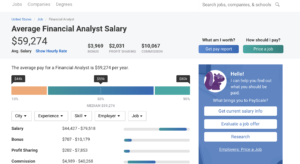
Payscale is a salary calculator that offers a free salary report in exchange for some information from you. The tool will ask you some questions about your background — location, skills, education, title, function, and information about extras like benefits, bonuses, and stock options.

The nice thing about Payscale is, it gives you a snapshot of how you stack up against your peers. There’s a gender breakdown, cost of living calculator, location comparison, and more. What we liked about this tool is — it’s free, yet still provides a lot of useful information about the factors that affect your pay.

LinkedIn Salary

Linked in salary tool

LinkedIn’s salary tool is relatively new, but it provides a long list of salary insights free of charge. Like Payscale, LinkedIn’s tool shows the base salary alongside stock options and bonuses.

The tool can be adjusted to reflect your experience, education, type of company you’re working for, industry, location, and more. According to LinkedIn, their tool is a bit different than the competition, because it provides more context into the why behind salary differences for similar roles.

What’s more, LinkedIn’s aim is to help professionals maximize earning potential by highlighting some of the steps they can take to increase their perceived worth. So, the tool might show that the biggest salary increases come by earning an MBA or taking a similar role in a different industry.

Salary.com

salary.com research tool

Salary.com is one of the most popular salary sites. The tool lists every position within a field and includes information beyond the cold hard numbers. You can review salaries by industry, career level, and region. The site is one of the older options and doesn’t have the polish you’ll find with some of the other tools.

Still, age is an advantage when it comes to data. The tool is ideal for learning more about similar positions in your area — i.e. how you compare with your peers, but a personalized report will cost you $29.95+. While you’ll get some useful info in that paid report, it’s probably not worth the cash — as LinkedIn and Payscale offer similar insights free of charge.

Glassdoor

glassdoor

Glassdoor is one of the best-known options on the web. The site hosts a comprehensive collection of company reviews and employee feedback, which prove invaluable for job hunters looking for red flags before the interview process is underway.

The platform also provides a solid look at salaries, though it’s a bit different than some of the competitors. Where Payscale and LinkedIn look at salary comparisons by region, field, and other factors, Glassdoor provides specific data for specific companies. What’s more, employees can share information about benefits, interview questions, and what the company culture is like.

SalaryList

SalaryList home

SalaryList gets its data from official company reporting or through the United States Department of Labor, so there’s no question of accuracy here. The site breaks salary info down into a variety of lists: which companies pay most, which roles come with the highest salary, and so on. You can enter your salary to see how it ranks nationally and enter a few more details for a free report.

Wrapping up

It’s a daunting task to determine what your time is worth. And that’s before negotiations and interview awkwardness come into play. Still, doing your research can serve you well. Instead of starting negotiations with an uninformed “I should be paid this much” approach, you’ll have data on your side.

And, when a company comes at you with a low offer, it’s smart to point back at one of the reports generated from any of the apps above. Once you know your worth, that’s where the work begins: perfecting that negotiation game.