How payment apps make money without charging any fees

These apps may be free, but you could be paying with your privacy.

You may use Venmo, PayPal, or QuickPay to send your friends money after they picked up the tab for dinner or paid for the hotel room. Maybe you use them to pay your share of rent or utilities. These so-called person-to-person (P2P) payment apps often don’t have transaction fees.

These types of apps are on the rise. Last year, eMarketer predicted that the number of people using P2P mobile payment products in the U.S. would rise 30 percent to encompass 82.5 million people. So, how exactly do these peer-to-peer apps make money? That largely depends on the app.

How payment apps make money without charging any fees

payment apps

Making money

Everyone who uses apps is used to advertising banners and pop-ups within apps. It’s how most apps make money. Payment apps, however, lack these obvious ways of advertising. Instead, these apps sometimes generate funding through transaction fees.

Venmo, for example, doesn’t charge a fee to transfer funds through a major debit card or checking account. But they do charge a small 3% fee for any payments made via a credit card. Perhaps more importantly, Venmo is owned by payment giant PayPal, so even though Venmo doesn’t really make any money, it extends the reach of PayPal, which makes a ton of money.

In fact, larger companies using payment apps as part of a broader strategy seems to be a trend. Square, the creator of the Cash App, is building an empire. In addition to the Cash app, they have payment products for merchants where they charge low fees and in return gain heaps of data. How will they use the data? Some financial experts suggest the data could be used to provide marketing recommendations that match specific users previous purchases. Only time will tell.

Venmo and Cash are both owned by parents that would be classified as technology companies. Zelle, on the other hand, was originally developed — and is still owned — by a group of banks. Launching a product to compete with the likes of Venmo is a way for these banks to ward off competition from new, tech-savvy companies entering their industry.

As you can see, the question for many P2P payment apps isn’t how much money they’re making on their own, but how they fit into a company’s larger strategy. It’s worth remembering that in the long run, detailed data on when and why people send money to each other is extremely valuable, much more so than the money these companies would make charging small payment fees right now.

Person-to-person apps

People are no longer interested in carrying wads of cash when making purchases or during nights out with friends. Instead, person-to-person apps fill in the gap in a way that makes sense in this age of smartphones and online banking. How they make money varies, as do the ways they use your data, so always read the fine print when using one of these apps.

If you’re trying to figure out which payment app is best for you, take a look at this comparison between Square Cash and PayPal.

Watch the video below for more information on person-to-person payment apps.

4 free apps for editing photos on your smartphone

Ready to upload that photo to Instagram? Run it through these free apps to make your picture look its best!

camera phone photo

Photoshop is an expensive and complex photo editing software, but thanks to the advancing technology of mobile apps, there are far easier options. Here are four great photo editing apps available for free on most smartphones.

4 free apps for editing photos on your smartphone

Pixlr allows you to select images from your camera roll or take new pictures within the app and edit them in a hurry. One of the best features of Pixlr is that you can place two or more photographs on top of each other, adjusting for opacity and size. In addition to the usual editing tools, there are plenty of effects and borders to choose from, and you can add text to your images as well. These features make Pixlr the closest mobile app to Photoshop.
PicsArt - Photo Studio Download Free ►
8
PicsArt is an excellent photo-editing app, and has more than 500 million installs. It lets you zoom in on a particular part of the photo while using any of the tools within the app. The menu at the bottom allows you to choose different effects such as lens flare, drawing implements, and masks. You can also choose from millions of stickers created by PicsArt users and use their collage maker to really make your photos stand out.
9
Developed by Google, Snapseed is a very user-friendly app. Most of the features are accessible through swiping. Along with the typical editing features, unique filters are also available within the app that don't require any manual editing. You can compare the original photograph with the edited version by holding down the photo, just like in Instagram’s editing tool. This app is great to use if you want to quickly edit a photo and get results that look professional.
Photo Grid Download Free ►
7
With more than 100 million installs, Photo Grid is a must-have app for anyone who wants to edit photos and videos on their phone. But it does more than that: You can also collage photos and videos, create memes and GIFs, edit photos specifically for Instagram, and include AR filters, stickers, slideshows, and more. If you want a photo-editing app that can do it all, Photo Grid is your best option.

How Instagram decides which photos to show you first

Ever wonder how Instagram picks the photos you’re scrolling through? Here’s what’s happening behind the scenes.

Back in 2016, Instagram changed the way users saw the photos in their feed. They claimed that this was because users were missing around 70 percent of the photos that were posted. They switched from a chronological feed to a feed that was driven by an algorithm, in hopes that users would see more relevant content. Not much was known about how this algorithm worked, however. At the time, Instagram said that the new order of the photos was based on a user’s relationship with the person posting, when the photo was posted, and the odds that the user would be interested in the content.

Since implementing the algorithm, Instagram has seen a huge jump in engagement. This would suggest that their algorithm is actually working as intended: users really are seeing more of the content that interests them. Fast forward to today, and the inner workings of the algorithm have been revealed. In the summer of 2018, Instagram finally explained how it all worked — and confirmed many users’ long-held suspicions.

How Instagram decides which photos to show you first

instagram selfie

1. Instagram wants to show you posts from people you engage with

Before the algorithm, users were only seeing about 50 percent of posts from their friends and family. Now they’re seeing about 90 percent of posts. That’s a huge jump. But it all depends on who you engage with, too. If you never comment on or like posts from your crazy uncle, then you’ll likely see fewer posts from your crazy uncle.

Whenever you like a post, you’re basically saying that this content interests you and you want to see more of it. If you want to see more posts by a particular brand or account, consider engaging with their content more. This will help to make sure that their photos are prioritized in your feed.

2. Instagram chooses photos based on your behavior

How do you interact with others on Instagram? This is a big force behind the new algorithm. It pays attention to which brands you like, which posts you like, and even what type of content you like. So, the photos that Instagram shows you first depend a lot on how you’ve behaved in the past. It also takes into consideration how often you look at Instagram to determine which accounts or photos to prioritize.

3. Instagram wants to show you recent posts

Instagram still takes into account when a photo was posted. In fact, they recently adjusted the algorithm to factor this aspect more. So each time you log in to Instagram now, you should be seeing a lot more recent photos. However, if you don’t log in all that often, you’ll likely see older posts first.

4 video platforms challenging YouTube

YouTube isn’t the only game in town. Here’s where to find more great free video and where you could share your content.

streaming video

It might sometimes feel like YouTube is the only video service out there. But you may be surprised to learn that there are some outstanding up and coming companies hoping to provide a higher quality of service to their audiences. Take a closer look at a few of the best YouTube challengers today.

4 video platforms challenging YouTube

Instagram

Sure, it’s your favorite place to post selfies, but Instagram is also a fantastic video application. Videos on Instagram are typically short and provide for some fun GIF making, but users can also create longer videos (thanks to IGTV) or air live videos. The site is very widely used, too, which means your videos can get in front of people easily. Have you checked Insta today? We bet you have. The audience is just waiting for you…

Facebook

It’s still the largest social media platform in the world, so this is a great alternative to YouTube. Facebook video is easy enough to use, especially its Facebook Live feature. It’s also an ideal choice for those who are looking to build a video library without having to pay anything to do so. It’s important to build videos just for Facebook though, as the content and formatting can be tricky to perfect.

8

Pluto TV

Pluto TV is a bit more like traditional television, but that’s one of the reasons some publishers simply love it. You can make money with it using interstitial videos as well as with banner ads. The platform also curates videos from numerous publishers and then places them on over 100 channels. It’s simple to use, which is another reason for its growth in popularity. If you’d like to submit your content to Pluto TV, click here.

Vimeo

If you hate YouTube ads, then you’ll love Vimeo’s ad-free player. This is a great platform for artists and brands to post their personal videos or for teams to collaborate. Vimeo also features high-quality live streaming (with real-time engagement), TV episodes, music videos, documentaries, and much more. You can join Vimeo with a free basic plan or else upgrade to one of their Plus, Pro, Business, or Premium plans.

Any of these video platforms could be worth the investment and give you the chance to put your content in front of a large audience. Play around with the different platforms and see which one works best for you.

How to create your own publication on Medium

Ready to start an ongoing publication with Medium? Here’s how.

writing

Got opinions to share? Axes to grind? Stories about your life? Or a 12-part sci-fi saga about an alien war brewing on the far edge of Galaxy 17? Medium.com is a simple and easy platform for sharing your writing. It’s very similar to typing up something in Google Docs, except once you hit the “publish” button, the whole world can discover it. Ready to dive in?

How to create an ongoing publication on Medium

To write and start your publication, the first step is to create a free account. Sign up with Google or Facebook.

sign up for medium

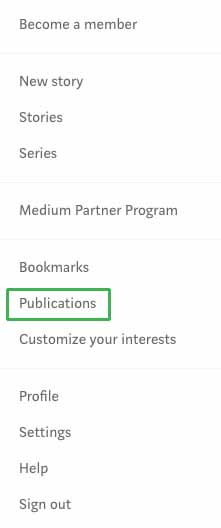
Easy, right? Now that you’ve made an account, it’s time to dig in. From a PC or laptop, click on your avatar and then click on the option for publications.

medium publicationsA new screen will open. Click on the “New Publication” button near the top.
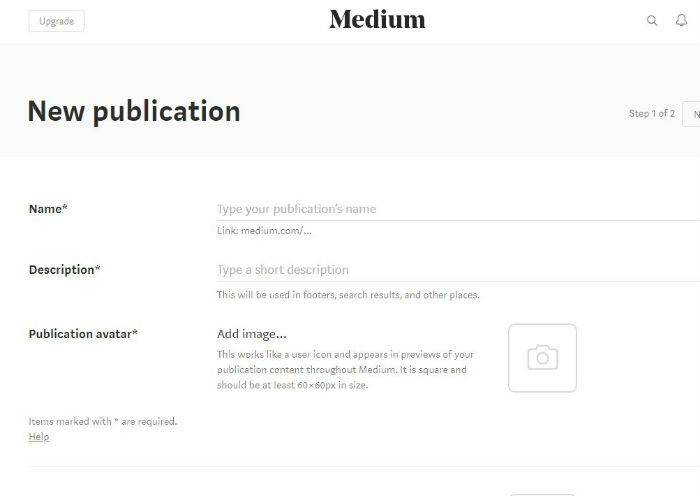
Now, let’s fill in the blanks.

Name your publication. This is the medium.com/XXX web address your readers will use to find you. If you already have an established brand, use it. Medium will let you know how many characters you have to play with.

What is your publication about? Fill in the description space to let potential readers learn more about what to expect.

Gather up your logo, your avatar, and consider your header. Let’s add personality to this page. Upload a publication avatar. You’ll want to use a square image at least 60 x 60px. Each time you write an article or leave a comment, your image will follow. Make sure you choose a clear and memorable image.

When someone lands on your articles, they will now see a header image. This space represents your brand, so make it good. Upload a transparent 600px wide and 72px tall image.

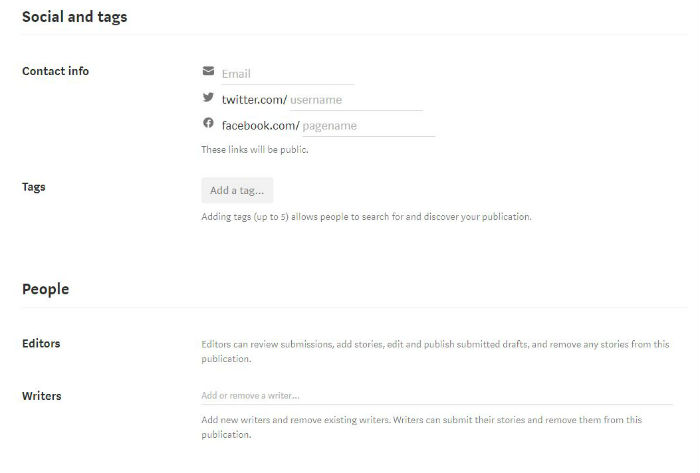
Social networks and tags are just as important to the growth of your publication on Medium as they would be on any other content management system. Fill in your email address, as well as your Twitter and Facebook usernames.

You can use your email address to sign into Medium. The social network additions allow your readers to follow you beyond on just Medium.

Next, work on your tags. Medium allows each publication to choose five different tags to describe its work. As you begin to type, Medium will share suggestions.

Choose the terms that best describe what you plan to create or what you are importing from a previous website.

Is your publication a solo gig? If so, you can skip the People section. Otherwise, this is the space where you can add in your editors and writers. These jobs have different roles.

Editors can go over submitted articles, edit articles, and publish drafts submitted by themselves and others. Writers, on the other hand, can only submit stories and drafts.

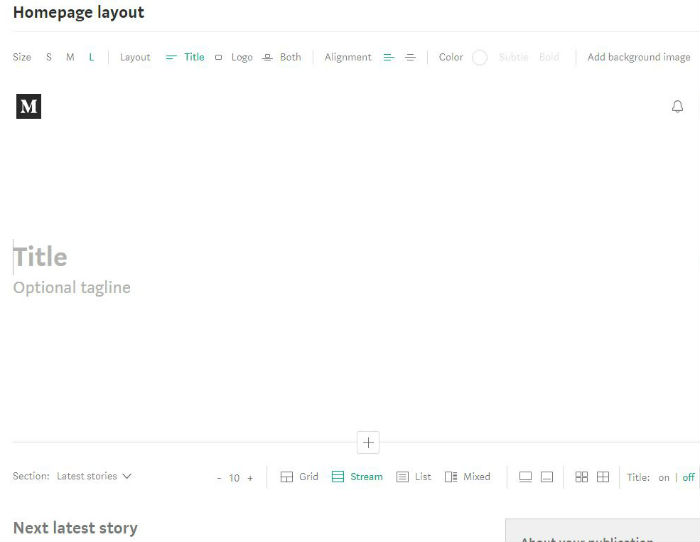
Your homepage would be boring without the next step. Upload a background header image or use a text headline. For an image header, you can change the size or click on where you want the image to center by clicking on the background image drop-down menu icon.

Add in your title and your tagline. You can play with the header size for these items too.

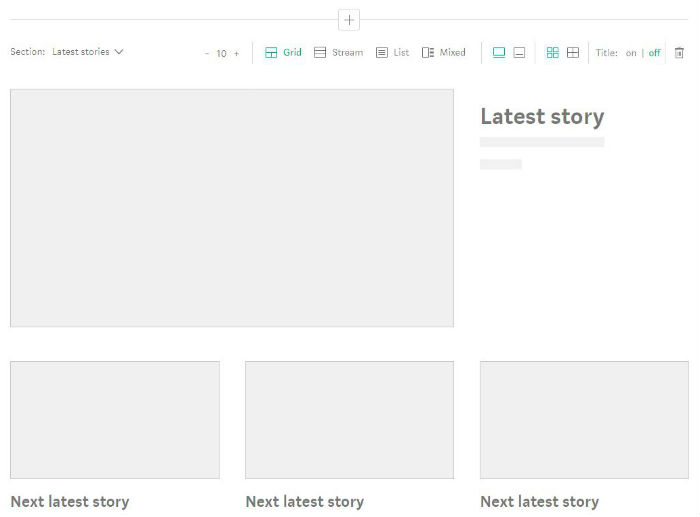
Jump down to the first content section, which is set to “Latest stories” by default. How do you want your content to display on your home page? Choose between grid, stream, list, and mixed content, and decide how many items should appear on your homepage.

Make your selections and then click “Create” to make it happen. Ta-da! You’ve just created your first Medium publication. The more you publish, the more readers you’ll attract, so get typing!

5 great apps for tracking your exercise

Ready to get fit? These apps will help you drop weight and add muscle.

Regular exercise is an integral part of a healthy lifestyle. There’s just no way around it: If you want to look and feel your best, you’ve got to work out.

Already committed to gym life, but just looking for a good routine-planning app? Wish you could get killer gains without leaving your living room? Just starting out and don’t want to feel intimidated by all the gym jargon? There’s an app for all of that. In fact, there are lots of them. Here are a few of the very best exercise-tracking apps out there.

5 great apps for tracking your exercise

Fitbod Workout Log Download Free ►
8
FitBod is a great all-around fitness tracker and accountability buddy. Log your workouts and get personalized suggestions to help you maximize your next trip to the gym. FitBod has an impressive library of exercises to help keep your routine from getting stale. You can also track your progress and share your achievements with the community. Bonus: If you have a Strava (running and cycling tracking) account, you can connect it to your FitBod account.
GymBook - Strength training Download Free ►
7
GymBook is all about helping you become your fittest self. Log and analyze your workouts to see where you need to step it up, and then create your own customized workouts. GymBook creates a handy line graph to help you track your progress and lets you add notes to your workout logs. There are tons of exercises in the database, and you can group them however you want. If you’re serious about customizing your workout, GymBook even lets you create your own exercise moves.
Freeletics Download free ►
8
If you’re looking for something a bit more intense, Freeletics is here for you — and it is not messing around. No gym, no equipment, no excuses. All the exercises on the app use your own body weight for resistance, eliminating the unnecessary and maximizing your results. A personal coach will analyze the details of your workouts and design short, intensive workout sessions just for you. Connect with other users to compare results and stay motivated.
Runtastic Download Free ►
7
There are plenty of running apps out there, but Runtastic is a user favorite. Runtastic tracks your running progress in real time (and place). At the end, you’ll get a readout of the area you covered. Plus, see your average speed and plenty of other cool and helpful metrics to help you analyze everything about your workout. There are lots of ways you can customize the way Runtastic works, like having it keep track of how far you’ve run in a particular pair of shoes or comparing your stats across time. You'll also get a personalized voice coach feature to keep you on track.
JEFIT Workout Planner Gym Log Download free ►
7
Jefit has a clean, user-friendly fitness tracking platform. Track your results and get data readouts in every form — whether line graphs are your thing or you’re more into pie charts. Choose from a vast number of exercises in Jefit’s database, complete with illustrations and videos. Use them to tailor workout programs based on your goals and your progress. Jefit also offers access to a huge community of fellow fitness enthusiasts in case you’re ever looking for advice or encouragement, or you just want to show off the rock-hard abs you’ve been cultivating.

How to create a wedding registry on Amazon

Here’s how to create your wedding registry with the world’s biggest online store.

So you’re getting married. Congratulations! There’s so much to do when you’re going to get married, and some wedding-planning chores are more enjoyable than others. One thing that should always be fun is putting together your wedding gift registry. Instead of spending hours in your local big box stores with a scanner in your hand, consider using Amazon’s wedding registry feature. It’s simple, easy to set up, and it lets you access literally millions of products without leaving your couch.

How to create a wedding registry on Amazon

Creating your Amazon wedding registry


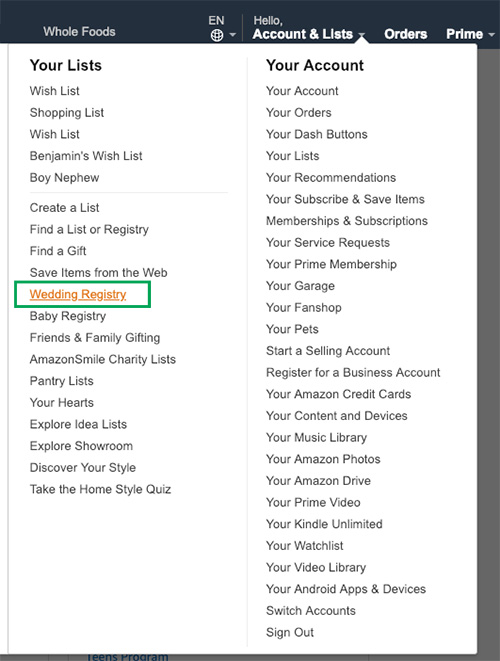
Go directly to the Wedding Registry page, or choose “Wish List” from the “Lists” pull-down menu located at the top right of any Amazon screen. From there, click on “Wedding Registry,” displayed along the top of the screen.

amazon wedding registry

Once you’re on the registry page, click on the “Create your Registry” button. Now you’ll be prompted to enter some information. This includes you and your partner’s name, your shipping address, and the details about your event. Get as specific as you want. You can include your wedding date only, or you can add the venue, number of guests, and more.

Once you’ve entered all your information, you can adjust the settings of your registry. Choose whether you want all your gifts shipped directly to you from the sellers, or tell your guests that you’d prefer your presents sans gift wrap. (Wedding protip: Get those gifts delivered to your home. You don’t want to worry about cramming everything in your car the night of your wedding.)

You can also edit your privacy settings, choosing who can see the registry. Here, you’ll have 3 choices:

  • Anyone can see your registry.
  • Only people who have a link can see the registry.
  • Only you can see the registry.

The last setting is nice for when you’re still working on your gift registry and aren’t quite ready to share it with anyone yet.

A few more things you’ll have to decide on include whether you’d like your registry to be searchable on Amazon partner TheKnot, and whether you want email updates or discount offers.

Once you’ve entered all the information, click the “Submit” button. Now you can start adding stuff to your registry. Anything on Amazon is fair game for your registry. You can enter specific search terms such as “hot pink oven mitts” or just browse by category.

When you see something you want to add, just click on the “Add to Wedding Registry” button under the checkout box. You must be logged in for this button to appear.

A few final tips for creating a wedding registry on Amazon

  • It can take several hours for your registry to show up on TheKnot.com if you selected that option.
  • You can change any of the information or settings on your registry at any time by visiting your registry page and clicking on “Manage Your Registry,” then selecting “Your Registry Information.”
  • You can visit the “Registry Suggestions” page to see registry favorites and items recommended just for you.
  • The shipping information you provide will be kept confidential, and will not be displayed to people who visit your registry.

Now all that’s left to do is plan your wedding, pay for it, and try to enjoy your big day without Uncle Steve wrestling away the microphone because he’s got a decades-old ax to grind.

5 Chrome extensions that can make you more productive

Get more work done in less time with these great extensions.

productivity

Everyone gets a bit distracted now and then. How many tabs do you have open right now? We surf from one website to the next, checking our social media pages — just looking, reading, browsing. Fun stuff — but it can tank your productivity quickly. However, many people need to remain online to complete their work. This can be particularly difficult for remote workers who may not have a constant watchful eye.

So, what do you do? You make yourself productive. These five Chrome extensions take seconds to download, cost you nothing, and can significantly boost your productivity in minutes.

5 best Chrome extensions for productivity

Strict Workflow Download Free
8
This easy-to-use extension keeps you focused and on task for 25 minutes at a time. Once you download the extension to Chrome, you click the button to start the timer. During that time, you can limit your access to certain sites — such as eBay or Facebook. And, when you know you will get a 5-minute break from your work in 25 minutes, you’ll likely stay on track.
Boomerang for Gmail Download Free
8
Managing your email inbox is a task in itself — and it can be pretty time-consuming. One of the benefits of using Boomerang for Gmail is you can schedule emails to go out at a specific time. For example, you can work through your inbox, write emails to go out, and then set a time for them to send. This way, you don’t have to worry about responses in the middle of the night. In short, you tell it when to send emails out, which helps control when people can respond to you.
RescueTime Chrome productivity meter Download Free
7
Sometimes the best way to really boost your productivity is to see just how bad it really is. What are you accomplishing in that hour? With this extension, you can do what you want and when you want to. But, it tracks how much time you spend over the course of time at various domains. This is a real eye-opener for those who may learn they are spending 30 percent (or more!) of their time on social media.
Lastpass Download free
8
Many people find that passwords slow them down. And now that every site requires you to change them frequently, it gets even more difficult to remember what’s what. With LastPass, a password manager, you can keep secure while you browse from site to site. The best part? You don’t have to waste your time trying to remember passwords.
Grammarly for Chrome Download free
8
Available in a free and paid version, this app gives you the help you need with your writing. That might mean fixing a typo or catching that awkwardly-worded phrase. The extension is very easy to use and works automatically.

Which of these productivity tools are you using? Could updating your productivity methods help you to get more done? Maybe it’s time to try one out. And if you need more extension ideas, we’ve got your back.

6 apps that will help you ace your next test

Got a big test coming up? Here’s how to get an “A.”

Few life events stress us out as much as an upcoming exam — especially one that weighs heavily on our final grade. Luckily, today’s students can use technology to get a leg up. Check out these great resources to supercharge your test-prep efforts.

6 apps that will help you ace your next test

1. Cite This For Me

It’s not enough to write a great report. You also have to cite your sources properly. APA, Harvard, Chicago, MLA — it’s a lot to learn! Good thing Cite This For Me exists. Use it to totally nail your bibliographies, references, and citations.

2. iTunes U

Looking for materials to help you put together a killer paper or nail that big exam? iTunes U provides access to loads of lectures, books, videos, and other collegiate-level learning resources from respected higher-ed institutions (Yale, Stanford, Oxford, MIT, and more). Plus, it’s all free.

7

3. Grafio

Visual learners, rejoice! Grafio is an app that helps you create diagrams for days. There are some similar apps out there, but this one is by far the most polished. Turn your notes into diagrams and charts so you can create a study map that makes sense to you. The app also supports integrated audio recordings to help you further customize your visual aids.

Grafio 3 - Diagram Maker Download Now ►
8

4. Notability

This note-taking app lets you do notes your own way. Import files and data, convert your handwritten notes, or “write” directly in the app. You can also create, sign, and share documents using Notability. Additionally, the app lets you record and play back audio.

Notability Download Now
7 ►

student-smartphone-class

5. My Study Life

If getting through the semester feels like chaos, try organizing your workload with My Study Life. This app is a student’s best friend — especially an organizationally-challenged student. Get reminders about study groups, upcoming exams, due dates, classes, and more. Use the app to carve out time to study, and set alarms to help you stick to it.

My Study Life Download Free ►
7

6. Quizlet

Remember those good old flashcards? They’re actually a very effective way for many people to absorb and remember information. Quizlet lets you create your own virtual flashcard sets to study. The app also lets you make your own cool learning aids, such as games that make studying a lot less boring.

10

3 augmented reality tools for decorating your home

Ready to give your home a makeover? Use these three apps to visualize your dream.

paint swatches

Thank you, cutting-edge technology! Augmented reality apps have made it much easier (and more fun!) to carry out a range of tasks and activities. For example, one of these tasks is decorating the interior of your home thanks to these innovations at our fingertips.

Below, we’ll take a look at some of the best ways to do just that. Check out three different apps that offer inspiration when you want to spruce up your space.

3 augmented reality tools for decorating your home

1. ColorSmart by Behr

Available on iOS and Android, Behr’s innovative app allows users to choose the perfect paint colors to suit their space. When you point your camera at a given wall, you can fill different sections with different paint colors to compare them and make the best decision. They also have a store locator feature to help you find the nearest Home Depot so you can get started on your project immediately.

ColorSmart by BEHR Mobile Download free
7

2. Wayfair

It can be tough to imagine pieces of furniture in a given space and envision how they’ll go with the overall vibe of a room. Thanks to the Wayfair app’s View in Room feature, you don’t have to just imagine it — you can preview it! Use the feature by selecting a piece of furniture you’re interested in, and then tap the View in Room button under the picture of the item. Then just move your phone to look around the room, and you’ll be able to get an idea of what the piece would look like in your home. Pretty cool, right?

Wayfair Download free
8

3. magicplan

Home improvement is made easy with magicplan! This app provides a virtual pin and grid that can mark corners of a given room and determine its dimensions. This makes it easy to get accurate and painless measurements of a space and allows for the simple design of a floor plan. This app also integrates well with Amazon, making it easy to get the necessary products to tackle a project.

MagicPlan Free Download ►
7

Augmented reality apps are increasing in popularity — and for good reason! They do a great job in helping with home improvement projects to make your house the best it can be.