Warning: Android apps collect your data without permission

Android apps have the ability to collect your data through hidden channels.

Privacy

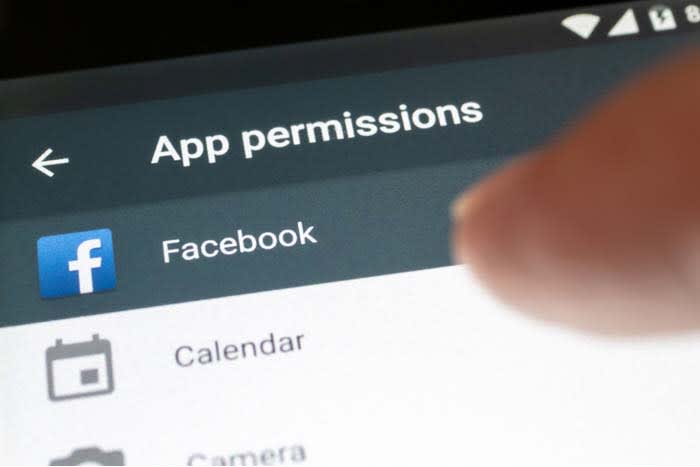
After you tell an app that it does not have permission to collect any of your data, you expect that to be the end of the story.

However, a recent article from CNN says that these apps continue to collect your information even after you told them to stop. According to the article, there are thousands of apps have the ability to still collect data through hidden channels on your phone. About 60 apps were discovered to be doing this. This is potentially affecting millions of Android users. 

This was uncovered by researchers from the nonprofit research center International Computer Science Institute. They reported the issue to Google who compensated them for their work and said that the issue will be fixed in a future update.

Although the issue is concerning, apps that are taking data may not be doing so maliciously or intentionally. In some cases, apps that have permission to collect data and then stored it on the phone’s SD card. From there, apps without permission were able to access the data.

Wrapping up

Although we do not know whether or not apps were collecting data with malicious intent, this is still a major privacy concern. Although the iPhone isn’t faring much better these days, it’s within your best interest to make sure you update your phone to avoid having your data stolen.

Google Chrome has 11,000 cookies skimming your data

Chrome is sending your personal data to businesses and advertisers.

Stealing data

Switching browsers has never sounded better.

According to the Washington Post, more than 11,000 tracker cookies were found in Google Chrome. These tracker cookies were making profiles for companies and marketers to help advertise products to you. Interestingly enough, the writer discovered that all of them were blocked when he browsed with Firefox. 

How does Google track my data?

If you’re logged into Chrome, these tracker cookies are stealing and sending your personal data. However, even if you aren’t logged in, Google is still working to take your info. 

If you have an Android, Google is sending your location data whenever you make a search. Even if you have your location settings turned off, Google will send coordinates instead.

If you are logged into Gmail, Google will track your data just the same as if you’re logged into Chrome.

7
Chrome is a young, fast browser that can browse any web page. It supports all major technologies and standards such as HTML5 and Flash.

How to block and kill tracker-cookies on Chrome

Chrome tracking

If you are looking to clear out the tracker cookies Google has on you while you’re browsing the internet and block sites from tracking you, there is a way. However, please note that this will sign you out of most websites, so make sure that you remember your passwords!

On your desktop browser

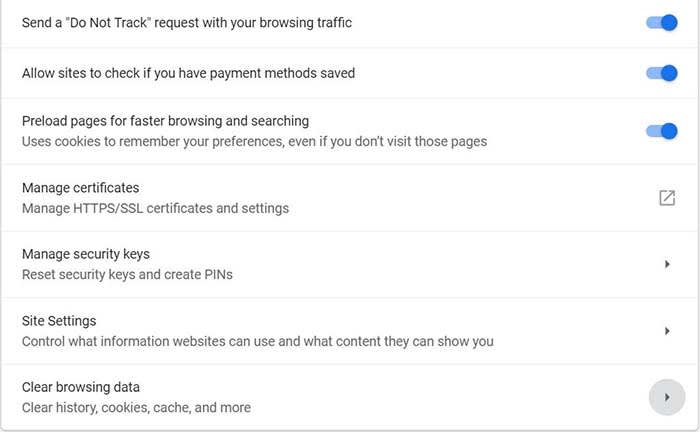
  1. Open Chrome
  2. Click on the three vertical dots in the top right
  3. Go to Settings
  4. Click Advanced to reveal Privacy and Security
  5. Enable the option to send a “Do to track” request with your browsing traffic
  6. Scroll down further to the option to clear browsing data
  7. Choose how long you want to clear cookie data
  8. Select the option to clear cookies and other site data
  9. That’s it, you’re all done

On mobile

Chrome mobile

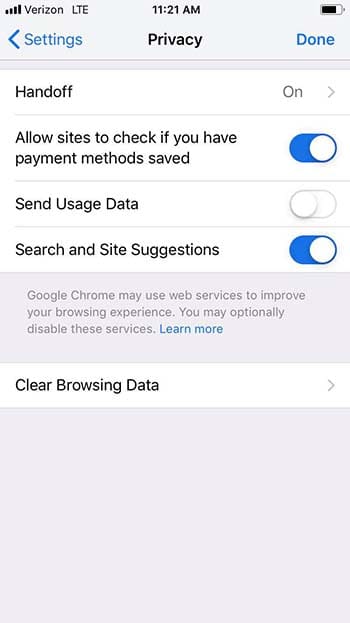
  1. Open the Chrome app
  2. Click the three horizontal dots at the bottom right corner
  3. Click settings
  4. Click privacy
  5. Select the option to not send usage data
  6. Go to Clear Browsing Data
  7. Make sure Cookies, Site Data is selected
  8. Click Clear Browsing Data
  9. You’re all set

Please note that not all websites will stop collecting data on you despite you requesting that they do not track your data. 

“Many websites will still collect and use your browsing data – for example, to improve security, to provide content, services, ads, and recommendations on their websites, and to generate reporting statistics,” according to Google.

What should I do?

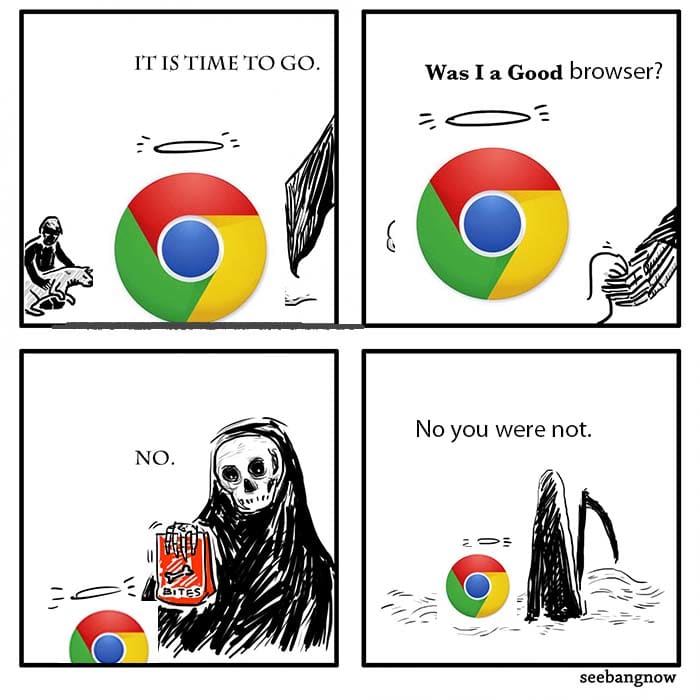
Chrome comic

This isn’t the first piece of despairing new info about Chrome to come out lately. Google recently announced that ad blockers essentially won’t work on Chrome unless you pay. 

That said, we strongly recommend choosing another browser if you want to keep your personal data safe.

The Brave browser has built-in ad blocking. You can also use your favorite Chrome extensions.

Enjoy private, secure and fast browsing with Brave.

Firefox has a whole host of tools that help keep you safe on the internet. From blocking cryptomining attacks to stopping invasive ads, there is no better time to start browsing with Firefox.

Chrome may have the largest market share, but they’re starting to flex that power in scary ways. It’s best to get familiar with a new browser now before something drastic happens that makes you regret hanging on too long.

Airport charging stations could give your phone malware

Think twice before charging your device in public.

Airport charging station

By 2019, you probably know it’s not safe to hop on the internet without a safety net in place: Anti-malware protection, a firewall, a solid VPN, and a secure password manager. We create quintillions of bytes of data every day, and it’s easy to make an innocent mistake that puts it at risk. Now that innocent mistake can include plugging your phone into a charger at an airport.

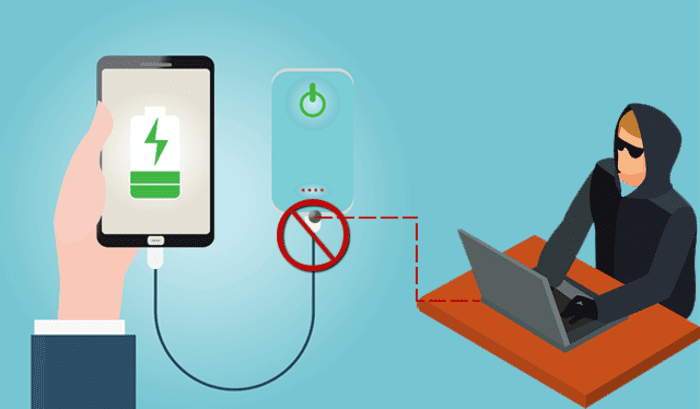
It’s no secret that public Wi-Fi can be sketchy at best, and while it’s convenient to charge your phone at the nearest port, it’s not necessarily safe. Free public phone chargers can be used to secretly install malware on your device, malware that can eat up your data in a process called “juice jacking.”

What’s juice jacking?

It sounds like tinfoil hat propaganda, but in reality, it’s an underrated but serious security threat. ‘Juice jacking’ was coined back in 2011, and refers to a hack attempt that uses public charging terminals to install malware on your device. It does so covertly via USB charging port, and it copies your phone’s data, pictures, and email into someone else’s hands.

juice jacking
Hackers can use public USB charging terminals to copy your personal data

“All they really need to do is load malware on the USB port,” explains IBM cybersecurity expert Charles Henderson. It’s unlikely you’ll even know it’s happened until it’s too late. “There’s really no way to tell,” says Henderson. “You really have to be extremely technologically savvy to detect such an attack.”

3 easy solutions to stay safe in airports

1. Use a portable charger

The best thing you can do is avoid airport charging terminals altogether. These days it’s not too hard to get your hands on a cheap, reliable portable charger. It’s a safe, convenient way to keep your phone charged and ready to go without putting your data at risk with a public outlet.

2. Use an electrical outlet instead

It should also be noted juice jacking can’t be done unless it’s via USB, so as long as you opt for an electrical outlet instead you’ll be safe.

3. Turn off your phone first

Lastly, if you’re in a situation where you’ve got no choice but to charge with a public USB port, completely powering off the device beforehand will prevent the download and transfer of your data.

Luckily, preventing your phone from being juice jacked is pretty easy. Just remember that any time you use public charging stations or Wi-Fi, your online activity could be at risk. Follow these easy steps, and stay informed!

BlueKeep security issue threatens nearly one million Windows users

If you’re running an older version of Windows, your data could be at risk.

Microsoft

There’s a reason people update to new versions of Windows: Old versions don’t get updated, and that makes them more susceptible to issues, both internal and external. While not every Windows update is a move forward, transitioning to a newer OS is almost always a smart step. Google is making the same assertion, too: If you haven’t upgraded to Windows 8 or 10, now’s a very good time; anything older is now putting you at risk.

Windows 10 Download
7
Update to a safer OS

The BlueKeep vulnerability

Just like old browsers are full of holes for malware to enter, an old OS can start becoming fallible as new threats emerge and evolve. Technically known as CVE-2019-0708, BlueKeep is a remote code execution vulnerability that exists in Remote Desktop Services. It’s when an unauthenticated attacker connects to a target system using RDP, and then starts sending requests. A successful hack attempt could then start to inflict arbitrary code on the targeted system, installing programs, deleting data, or creating new accounts that still mimic your user rights. It’s a nasty pre-authentication vulnerability in older Windows Operating Systems, and therefore doesn’t require any user interaction before it latches on.

Which OS is at risk?

Anything less than Windows 8. So if you’re running 7, 2008 R2, Vista, Server 2008, or XP, BlueKeep leaves your computer open to infection. How many people are running these old versions of Windows? Almost a million, Microsoft discovered in a recent report. Frighteningly, that’s not even including the computers on corporate networks. Errata Security predicts that anyone using an older OS probably has a month or two before BlueKeep worms its way in.

How to tell if you’re already infected

If you’re running an older OS, now’s the time to upgrade. In the meantime Errata Security’s Rob Graham has put together binaries on Github to scan for BlueKeep. If you think your PC might be infected, go to the link in his tweet and run the scan:

Hopefully, both your computer and network have not been compromised, but trust us – you don’t want to procrastinate on things like this. Get Windows 8 or 10 today and stay secure!

Your iPhone is probably packed with thousands of trackers sending private data

A report shows that trackers guzzled 1.5 gigabytes worth of data over a month.

Phone data

The Washington Post tested an ordinary iPhone and found it had more than 5,400 trackers that were sending private data without the owner’s awareness.

This data included email addresses, phone numbers, and location data. 

In the story, the writer, Geoffrey Palmer, conducts an experiment to see how much data his iPhone is sending while he sleeps. It turns out that even though he isn’t actively using his phone, apps are sending data to entities like marketing companies and research firms in the background.

Over the course of a month, these trackers would have guzzled 1.5 gigabytes of data. 

How serious is this problem?

Believe it or not, a lot of apps do have legitimate reasons for sending your data. For example, GrubHub needs to know where you are if you want food delivered.

According to an article from 9to5Mac, many credit card and banking apps regularly use data to send signals to help detect fraudulent activity. In cases like these, you absolutely need these apps to send data.

Finally, many free apps are only free because of ads. In order to show you these ads, these apps need to send and receive data. If there are no ads, there are no free apps.

Alternatively, there are instances where apps are problematically sending your data.

Although there are legitimate reasons as to why an app would send personal information, Palmer did raise a good point.

“The problem is, the more places personal data flies, the harder it becomes to hold companies accountable for bad behavior — including inevitable breaches,” Palmer wrote.

What can Apple do to help?

App permission

If you’ve ever downloaded a new app on your iPhone, you’ve probably seen the message asking for your permission to allow the app to access your data.

This is routine for apps you download on iPhone as Apple wants/needs to be transparent. However, the transparency stops here as it often doesn’t tell you what the app is doing in the background. 

Most apps don’t tell you what companies are collecting your data and how they are keeping it safe. This opens the door for concern as you have no idea whether or not the data that has already been collected is safe.

Palmer suggests that Apple should be more accountable about what apps are doing with your personal data.

“Apple could require apps to label when they’re using third-party trackers,” Palmer wrote. “If I opened the DoorDash app and saw nine tracker notices, it might make me think twice about using it.”

DoorDash Download now ►
7

Should I be worried?

If you’re concerned about what apps are doing in the background, we would recommend downloading Datally. Unfortunately, that’s only available for Android phones.

9

Through Datally, you can disable apps that run in the background, and you can whitelist apps that you want to have unrestricted access.

As to whether or not you should be worried about your phone sending data, the answer is kinda. 

Apps send data in the background all the time. Heck, it seems like we write a story about Facebook acting irresponsibly with personal data once a week. Oh look, there’s another one!

There are plenty of reasons why you should throw your phone out the window and go off the grid altogether. However, if you pay close attention to what you are downloading and the permissions you give it, you can keep your data safe. Use common sense and best practices to protect your privacy, and you can keep yourself protected.

Facebook cracks down on personality quizzes

Personality quizzes may be leaving Facebook in an attempt to protect our data.

Facebook quizzes

We’ve all seen them: personality quizzes on Facebook. They’re all pretty much the same. Your balding, overweight Facebook friend posts quiz results stating that if they were a superhero, they would be Wolverine.

7

Although these can be fun from time to time, we wouldn’t miss them if they bit the dust.

Facebook recently updated its platform policies. The update says that apps with minimal utility, such as personality quizzes, “may not be permitted on the platform.”

According to a company spokesperson, personality quizzes and other apps will heavily be scrutinized

“The update also clarifies that apps may not ask for data that doesn’t enrich the in-app, user experience,” wrote Director of Product Management at Facebook Eddie O’Neil in a blog post.

What does this have to do with the Cambridge Analytica Scandal?

massive password and email leak

The Cambridge Analytica Scandal occurred a few years ago when millions of Facebook users’ data was stolen. The stolen data fell into the hands of political campaigns.

At the heart of the scandal was a quiz.

A quiz was created using the Facebook app “thisisyourdigitallife.” The quiz collected data from about 87 million users. The people who took the quiz allowed the quiz to collect their data, but they didn’t know that it was going to go to aid politicians. As a result of the scandal, Facebook ended up deleting several hundred data-stealing apps. 

Where do personality quizzes fit into this?

Facebook personality Quiz

Believe it or not, personality quizzes can reveal details about your password and security questions. Quizzes can ask questions that ask for things like the name of your first pet, or who you saw at your first rock concert. Both of these are common security questions that can lead to someone logging into your account.

Facebook has also said it is revoking expired permissions for apps. Apps that haven’t used or accessed  permissions from Facebook users during the last 90 days “may be considered expired.”

Is this going to make a difference?

Mark Zuckerberg

Facebook has undergone a great deal of scrutiny over the past few years. The U.S. Department of Housing and Urban Development recently charged Facebook with discrimination. This, paired with the Cambridge Analytica Scandal and other data-stealing scandals, has made users cautious of Facebook.

Along with users deleting their account altogether, about 40% of users have taken a break from the social media juggernaut.

We can’t say for certain whether or not this move will remove personality quizzes altogether. We also don’t know if it will put a decisive dent in the war against data theft. This is a step in the right direction. Only time will tell if that step is a tip-toe or a leap.

How to make money selling your personal data

If other companies are making money off your personal data, why can’t you?

Facial recognitionForget the Facebook scandal; consumers are catching onto the fact that countless companies have long been taking their data in exchange for access to a free app. It’s a bum deal.

If you’ve been following any news related to the blockchain space, you’ve maybe come across this concept of selling your personal information to companies, rather than giving it away for free.

When you consider the money made by advertisers and platform companies like Facebook and Amazon, it’s understandable that there has been a recent influx of new apps that aim to put control back in the hands of the people.

The question is, however, is there money to be made by selling personal data? Or will big companies simply say, “Why buy what we can get for free?”

Are there places you can sell data?

Yes, there are a few options out there.

Is it side gig money? Not exactly. We came across a few solutions that allow users to connect various accounts and earn money passively, but it generally amounts to a few cents here and a dollar there.

Digi.me

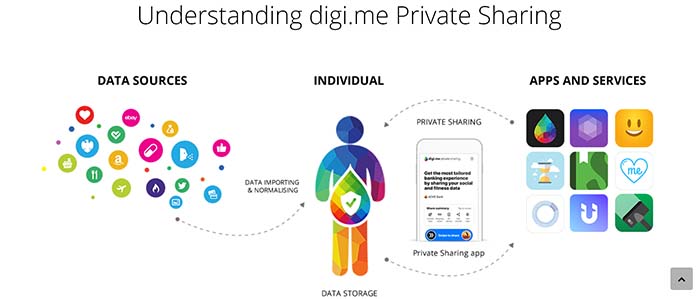
Digi.me appDigi.me is an app that collects your personal data from a cloud-based folder, then organizes your digital footprint in one central hub. This app isn’t actually a means of monetizing your data, but it does help users control who sees what, as well as understand what information is already available.

The site makes it clear that they operate in compliance with GDPR privacy rules, and that the app’s architecture prevents the company from viewing or storing your personal data.

You can watch a video below showing how you can use Digi.me.

10

Datacoup

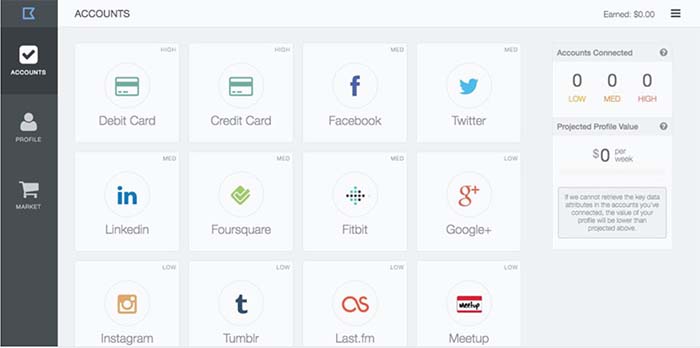
Datacoup siteDatacoup almost reminds us of an app like Acorns or your bank’s “save the change” app. We’ll explain: Datacoup acts as a data broker that allows account holders to control and sell data to companies interested in learning more about your habits.

This subscription-based service allows you to connect your accounts — from debit and credit cards to your LinkedIn page or Meetup account.

Once you’ve connected these accounts, you can view them in your data profile — a dashboard that shows how much money you’ve earned by essentially doing nothing. It’s a few bucks here and there — but it’s very set-it-and-forget-it. Over time, you might amass a little extra cash.

Killi

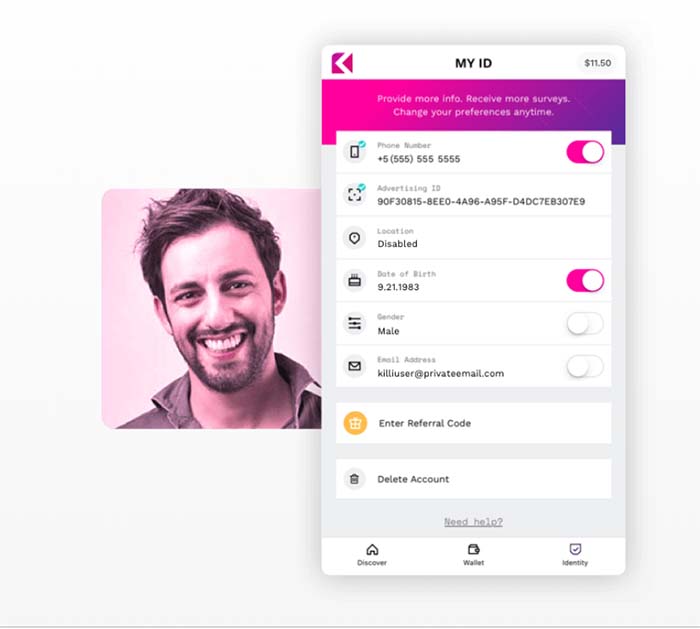
KilliAn app developed by Freckle IoT, Killi is an app that claims to give users the chance to take back control over the use of their personal data.  The Killi site says they believe customer data is worth more than the $30 Facebook suggests.

You’ll create an account and make money based on opting in to share your info with specific brands. The bulk of the activity is answering surveys for between a few cents and a few bucks a pop. Their FAQ section acknowledges that this isn’t much, but points to the first wave of Uber drivers as an example of where things could go in the future.

Google Opinion Rewards

Google Opinion Awards

An app that prompts you to answer questions about businesses you’ve visited based on your location data and demographic information. Answer enough questions and Google will give you credits you can use in the Play store.

Google Opinion Rewards Download Now ►
9

What is your data worth, anyway?

Stacking coins

According to an article from the Financial Times, the average person’s data is worth less than a dollar. But values change based on a variety of factors:

  • You’re gearing up for a significant purchase — an international vacation, a new car, or a house
  • You have a major life event — you’re getting married, expecting a child, or getting a divorce
  • You’re a millionaire
  • You hold loyalty cards
  • You’re interested in fitness, weight loss, travel, finance, or political topics

The FT site offers a calculator, so you can get a sense of how much your data is actually worth.

We tested this with two different people and we were valued in the $1 ballpark on both attempts. It isn’t exactly the downpayment on a Lamborghini we were hoping for, but we’ll take it.

An article from Investopedia looked at how much Facebook stands to make from personal data. Interestingly, those with poor health have more valuable data than their healthy counterparts.

Same goes for the “recently divorced” who — on average, are 10-20% more valuable than those who are single or married.

It’s hard to pin down an accurate number. But Statista reports Facebook had 230 million U.S. users in 2018. Even if everyone has data worth 50 cents or so, that’s still a crazy amount of money.

Economies of scale limit the ability to profit from personal data

Ultimately, the reason our data is such big business for brands and not the other way around boils down to the economy of scale.

Think about it, billions of people use Facebook every day. So, if one person’s search history and online activity are worth a couple of cents, the platform still rakes in serious cash.

The motivation behind these startups is admirable. We should be able to control who has access to our data — and sell it as the valuable resource it is.

For change to happen, people will need to demand transparency in greater numbers. We’ve long taken free tools like Google and Facebook for granted, never second-guessing the permissions we allow them.

Opting out of these platforms means skipping out on convenience and social norms, too. Short of an all-out, global boycott of the big tech companies, it’s hard to envision what it will take for change to happen.

How to delete what Google knows about you

Google knows so much about you. Here’s how to regain your privacy.

data privacy

News of Facebook data breaches hardly come as a surprise anymore, but Google is hunched over in the corner, just as guilty of watching your every move under a microscope. Like everyone’s favorite social media platform, Google, too, shares your data with advertisers and third parties. It does so in hopes that it will help them better target advertisements your way. Google generally doesn’t make a ruckus about having a lot of dirt on its users, but it’s not a secret that they’re watching you.

The new My Activity page for Google users is proof that they’re trying to be more upfront with the data you’re giving them every day – it’s their new Data Transparency Policy. That’s just the beginning though. If you’re tired of feeling like a lab rat, here’s how to find out what Google has on you, and how to take control of what you share with them:

Google knows where you are and where you’ve been

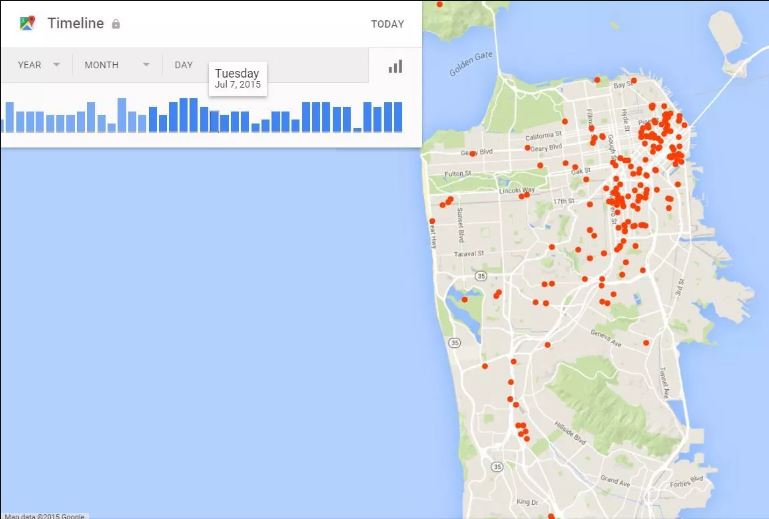
Even if your location history is turned off on your mobile device, Google still stores your precise location and is likely doing it without your permission. Google’s timeline page functions as a Google Map and allows you to select specific dates and times and see where you were. How accurately it gauge this is largely dependent on whether you were signed into Google during your time of travel.

Needless to say, it’s creepy.

Lucky for you, these can be managed and deleted.
Those red dots? Those are places Google knows you’ve been.

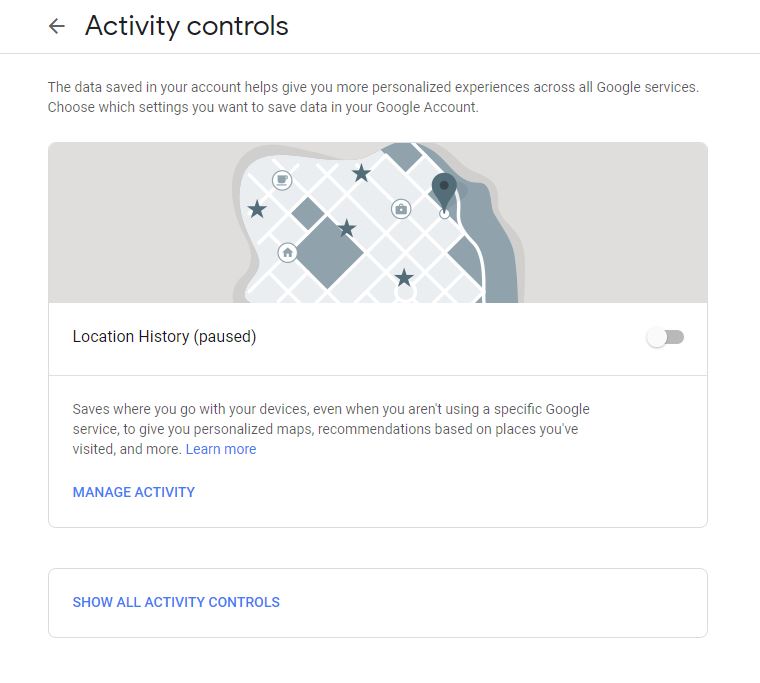
To stop Google from geo-tracking you, go to the location page and disable the switch for Location History. Still, that won’t stop Google from knowing where you’ve already been. To remove that history, double-click any of the red dots on the map. As Google maps out the route you took with disconcerting accuracy, you’ll be afforded a ‘trash can’ icon that lets you delete select entries.

This saves where you go with your devices, no matter the device.
Pause your location history until you need Google to help navigate.

Search history

Even if you delete your history Google still tracks your searches. They’ve got a detailed record of all the things you’ve looked for on their search engine. If you don’t believe us you can check out this page. Prepare to be alarmed.

Time to start using DuckDuckGo.
It’s not just your browser that tracks your searches. Google does it too.

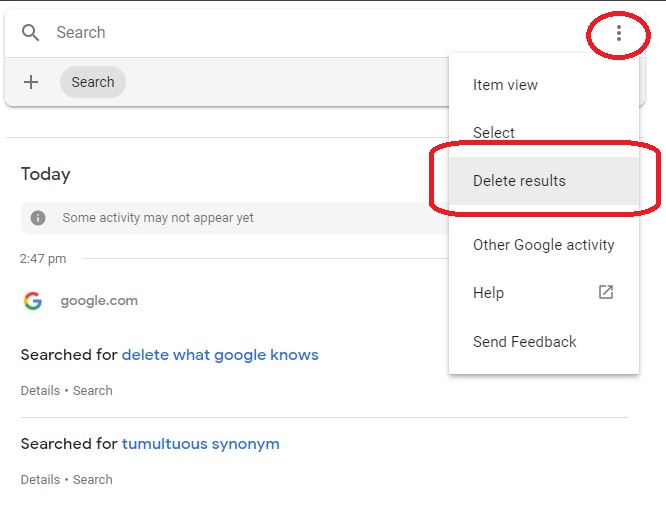
To remove an item, click the ellipsis in the top right corner of an entry. There, you’ll get the option to Delete. Clearing your basic search history is much easier, but removing searches from Google is different: Wiping browser history works for the computer you’re using, but it will still be in your Google history. Clearing it from this page instead will include any searches from any computer where you were logged into your Google account.

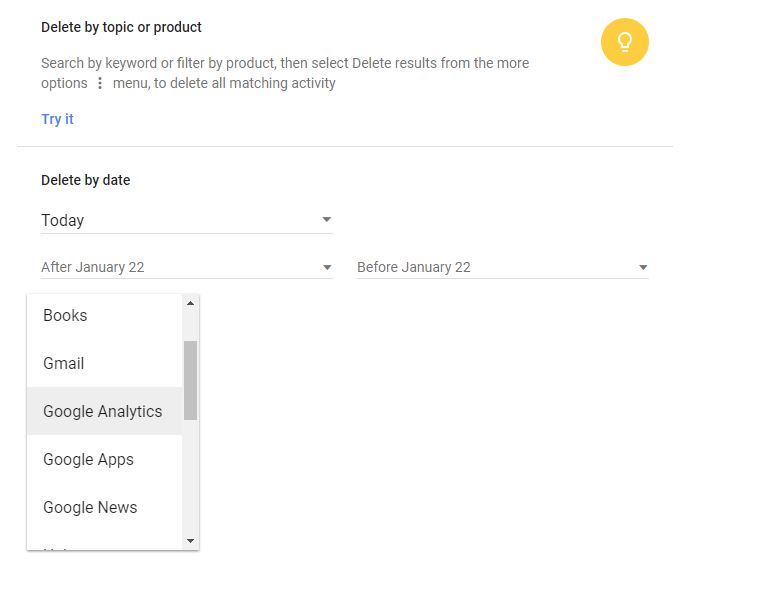
That goes for gmail, books, analytics, and news.
Filter the time frame from which you want to delete specific content

But wait, there’s more. You can go beyond just deleting your history. You can actually download it, too.

Download your Google history

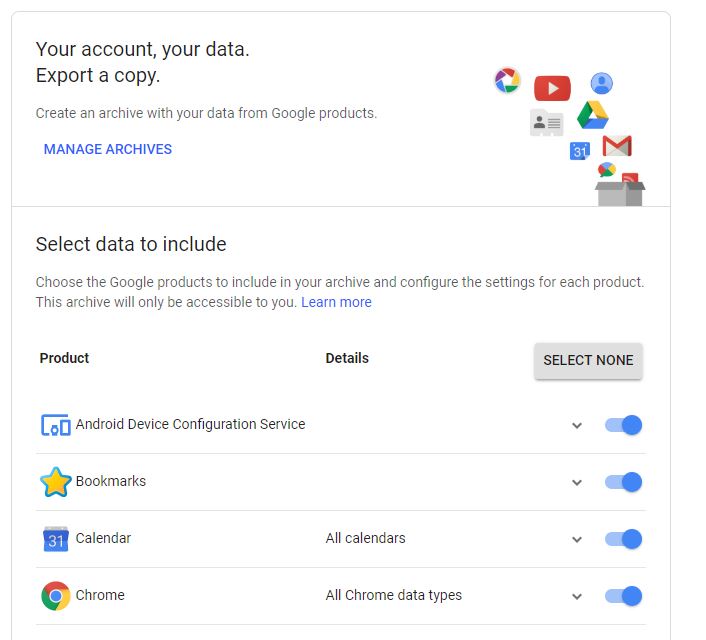
Besides seeing and deleting the data Google keeps on you, you may also choose to keep a copy for yourself. To do so go to your Google Dashboard and click ‘Download your data.’ It will take you to this page:

If they have the information, shouldn't you?
Get your own copy of what Google knows about you.

Here you can filter what data you want a copy of, how you want that data formatted (we recommend .zip) and how you want the archive to be delivered to you. Choices include Drive, Gmail, or Dropbox – ironically all of which are Google products.

Viewed tabs

If you’re a Chrome user, Google also keeps track of all the web pages you’ve viewed in the browser. You can see the list here and remove individual entries by clicking the three dots and clicking Delete, just like in the step above.

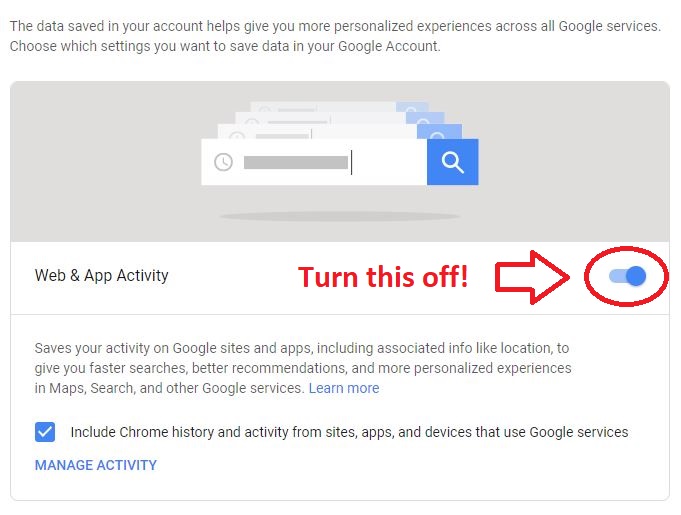
To stop Chrome from collecting any further information on your activity, open this page and turn off the switch next to Web & App Activity. It should look like this:

Definitely uncheck that box too.
Toggle this off and Google won’t store as much information about you.

Ad settings

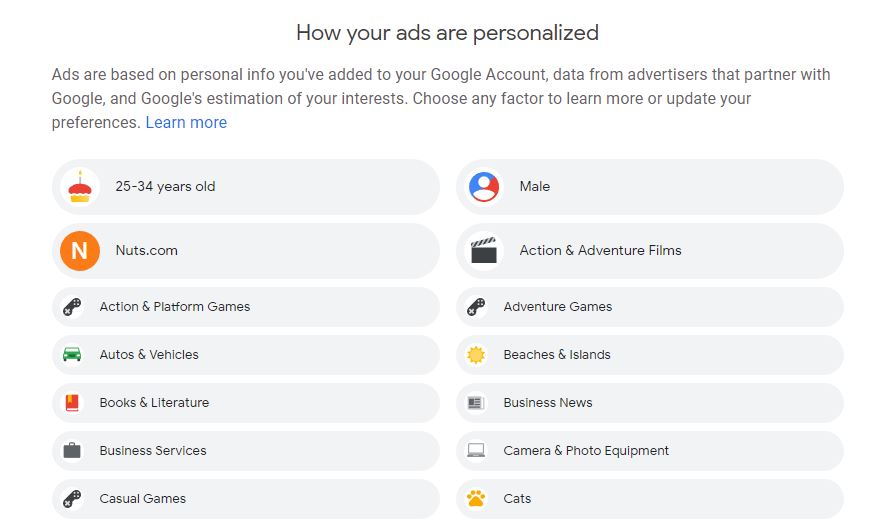
Most irritating of all might be the way Google tracks your search history, demographic, and page views as a means to throw advertisements at you. You can see some of the details that Google has gathered based on your habits on this page:

Expect to see more irrelevant ads though.
Tired of aggressively-targeted ads? Manage your ‘demographic’ here.

You can scroll through the list and manually disengage any factors that you like. You can also update factors like age, music choices, gender, or education if you want – here you can control whether Google keeps sending you ads that suit the demographic they pegged you as.

Delete your Google account

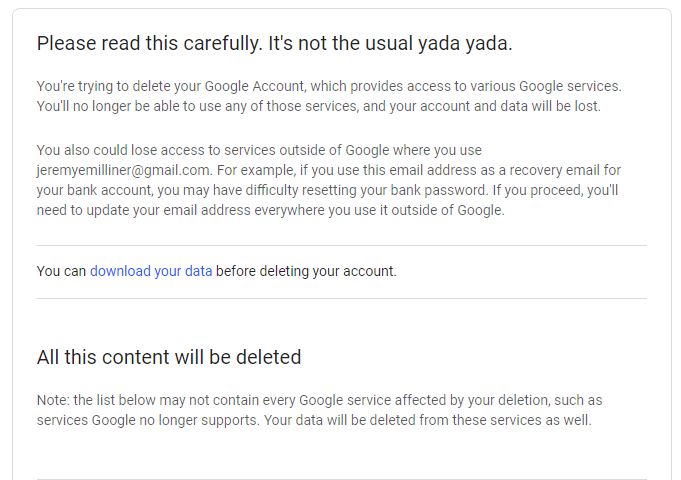
If everything we’ve mentioned above still isn’t enough to make you help you sleep at night, your best course of action may be to simply delete your Google account completely. The call is yours to make, and if you decide to go for it click here. Scroll down to the bottom, check the boxes, and hit the big ‘Delete Account’ button.

Odds are if you're here you've already made your decision.
Make the call whether you want to wipe everything. The option is there.

Doing this will delete your files in Google Drive, all the conversations in your Gmail, contacts, Google calendar, your photos, YouTube videos associated with your Google profile, and even your synced bookmarks in Chrome. Consider your data carefully before making the final decision!


Brave is a partner of Softonic. When you download Brave, Softonic may receive a commission or fee.


Operate more privately with Brave

Managing what Google knows about you is a slippery slope, and it’s equally dangerous to sever all ties with them – particularly if you’re relying on Gmail to communicate with people, your YouTube channel for income, or the documents you have saved in Google Drive. For a browsing experience that’s just as fast as Chrome, but way more focused on privacy and security, get Brave.

Brave is a web browser that automatically blocks all trackers, banners, ads, and pop-ups. “The browser that puts your privacy first” was founded by Brian Bondy and Brendan Eich (Eich is also the inventor of JavaScript and the co-founder of Mozilla and Firefox) and who’d have thought – making a browser that blocks any unwanted interruptions also serves to radically speed up page load times. On desktop, you can expect to see pages load twice as quickly, while on mobile you might even get pages loading eight times faster.

Browse the web up to 8x faster than Chrome and Safari. DOWNLOAD NOW ►
10
Enjoy private, secure and fast browsing with Brave.

But ads help small businesses!

True. Brave has a solution to that too: The Basic Attention Token.

The BAT is a new form of e-currency that works like monetized attention. While you never have to look at ads or banners on Brave, choosing to do so will reward you (and the publisher) with BATs. For more information about how the Basic Attention Token works, and for more information about Brave, check out our article on the topic.

In the meantime don’t let Google steal your soul. Follow our above tips and keep close tabs on your My Activity page.

10 tips to keep your data private

Your security is at stake. Follow these 10 tips to stay safe online.

data privacy

While it lacks the festive pizzazz of Christmas or New Year’s Eve, Data Privacy Day rolls around every January 28, and it’s as good a day as any to evaluate your Internet safety before the year really gets rolling. Data refers to any information converted into binary digital form. That’s your emails, your Google searches, your browser history – even the number of times you’ve clicked on a ‘like’ button. Every day we create 2.5 quintillion bytes of data, and that statistic is growing exponentially! We’ve actually generated 90% of data in the world in the last two years alone.

You’re not paying out of your own pocket when you search on Google or share a Bandcamp page to your Twitter page. But you are giving those companies information about yourself: your interests, your investments, your purchases, and your social connections. If you’ve noticed pop-ups, banners, and ads playing that suspiciously cater to your Internet searches, you’ve likely been pegged.

It’s not just keeping your data protected from corporate fat cats, either: Scammers, fraudulent sites, hackers, and spammers can slip into any crack you haven’t sealed. It sounds like a cheesy horror movie, but the reality is that data breaches are happening on bigger scales every day and if you’re going to ford the waters of the Internet you need to start wearing a life preserver. Here are 10 tips that should keep your data private in 2019.

10 tips to keep your data private

1. Keep your software updated

Those OS updates you keep getting from Windows are certainly annoying. Nobody wants to restart their computer in the middle of a workday, or watch download bars as they inevitably stall at the 90% mark. As irritating and time-consuming as these updates are, however, they are crucial to keeping your data safe. Often these updates are installing security updates or adding patches to your OS. Additionally, these updates will boost your device’s overall functionality, so make it a point to run these a soon as they’re available. Just be aware that installing beta updates can be risky.

2. Invest in anti-malware protection

Operating online without anti-malware protection is like driving a car without insurance; it’s playing with fire in an environment where you can be very easily burned. Whether it’s running Windows Defender and crossing your fingers or paying for the full Kaspersky Antivirus 2018, this is your computer’s first line of defense if something gets through the firewall. Make sure your defense game is strong with these powerful tools.

3. Encrypt your data

While encrypting data used to be reserved to nerdy programmers or mathematicians a lot has changed in recent years. Encrypting is no longer as difficult or as superfluous as it’s often falsely considered being. GPG for Mail, for example, is a simple open-source plug-in from the Apple Mail program. The software scrambles your data and protects your files from would-be hackers and tenacious trackers.

4. Use a firewall

Even the simplest firewall can assist in blocking viruses, spyware, or dangerous programs before they can even get into your system. There are various firewalls you can download and install to put up a barrier between malicious forces and your data, and there are also hardware-based firewalls that can go right in your router to provide tighter security still. Don’t go online without a firewall, just like you would don’t ride a bike without a helmet.

5. Use a secure password manager

password

Having a good password is a start, but there’s a lot more you can do: Change your passwords regularly (Data Privacy Day is a good time!) and if you’re looking for a place to safely store passwords you should invest in a strong password manager. Don’t forget that this starts with your computer but in 2019 that’s far from where it ends. Change your router codes, mobile devices, email accounts – even your baby monitors.

6. Configure app privacy settings

More and more, people are turning to their mobile devices for Instagram, Facebook Messenger, Google Searches, WhatsApp, or SnapChat. Trust us: the mobile door is just as open to hackers as your desktop – maybe even more so. Check the Settings menu on your device; most apps offer some form of privacy settings. This will give you some vestige of freedom when it comes to deciding how much information you’re going to share. We recommend you choose the least. You can also invest in a mobile security provider such as Norton Mobile Security.

7. Use a VPN

If you’re concerned about keeping your connection secure and safe, you should invest in a VPN. A good VPN will provide online freedom, allow access to any site on the web, and permit you to browse the Internet without leaving a footprint, running into blocked streaming services, or getting DDoSed in an online game. There are many good VPN providers but we recommend PureVPN for its protocol support, huge number of servers, and extensive app optimization.

8. Be cautious about public Wi-Fi

By now most home Wi-Fi is encrypted. Unfortunately that’s not a guarantee for public connections. While it’s certainly convenient to use free Wi-Fi at Starbucks there’s no way to know who’s watching that Internet traffic. That means that your online activity is at risk when you’re on public Wi-Fi. Worse still, malware from someone else’s device can sometimes latch onto yours and plague you with the same infection. If you do use public Wi-Fi, be sure not to convey private information on it, and to take that extra security measure when you log on. We’d recommend a firewall and a VPN.

9. Use DuckDuckGo

Google has established themselves as the biggest, most powerful search engine, coming 66% ahead of Bing, which is number two. As you likely know, Google mines, tracks, and collects your data profile so that advertisers can follow you around the Internet. They’re also embedded in literal millions of sites and apps. Google makes a lot of its money from placing ads on other sites, and their ad game is scary strong. In fact, in 2017 Princeton’s WebTAP learned that Google has trackers installed on 75% of the top million internet websites.

DuckDuckGo doesn’t track any of your personal data, so you can search without anyone watching over your shoulder. Every time you search on it it’s as though it’s your first time. There are no purple-highlighted links and no banner ads suspiciously catered to your personal life. “We simply don’t store anything that can tie your searches to you personally,” they assert, “or even tie them together into a search history.” It’s all spelled out clear as day in their online privacy policy.


Brave is a partner of Softonic. When you download Brave, Softonic may receive a commission or fee.


10. Use Brave

Lastly, your browser is the vessel with which you’ll be exploring the vast seas of the Internet. If you want your data to be safe, your best bet is Brave. “The browser that puts your privacy first” was founded by Brian Bondy and Brendan Eich (Eich is the inventor of JavaScript and the co-founder of Mozilla and Firefox). The browser automatically blocks any and all trackers. That means anything that could cramp your browsing style like cookies, pop-ups, ads, demographic targets, and location settings – none of that even makes it past the first line of defense.

Culling all ads and trackers from your browser is the secret sauce that makes Brave twice as fast as other desktop browsers, and up to eight times faster than browsers on mobile. If you’re worried about fledgling sites no longer generating income since you’ve axed the ads, Brave has a solution for that too: If you choose to toggle ads back on, both the user and the publisher of the content are rewarded appropriately. This concept called for a new form of currency – Brave’s new Basic Attention Token.

Browse the web up to 8x faster than Chrome and Safari. DOWNLOAD NOW ►
10
Enjoy private, secure and fast browsing with Brave.

Follow these 10 tips and you should be well on your way to keeping your data safe, your Internet free from unwanted intrusions, and your passwords safe. Stay tuned for more tips, and happy browsing!

Privacy-invading software scans your babysitter’s social history

Before you let someone babysit your kids, should you get a full picture of their social media history?

predictim service for babysitters

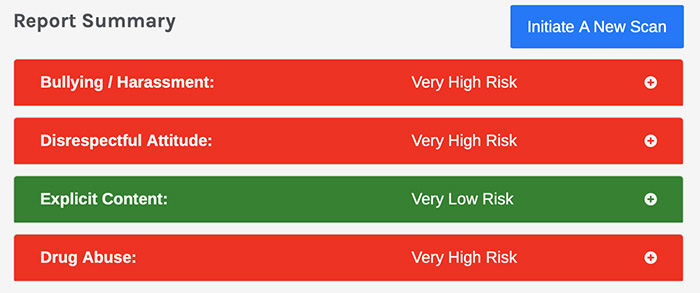
So, a few weeks back, the Washington Post ran a story that had a disturbing tinge running through it. The article centered on a software called Predictim. It’s a service that scans potential babysitters’ Twitter feeds, Facebook pages, and Instagram stories to provide concerned parents automated risk ratings for things like drug use and bullying.

Less objective measures like a bad attitude or disrespectfulness were also included in the report — which, really?

It’s certainly understandable that parents want to check out the person watching their child. But this technology presents some new issues that go beyond general workplace spying.

Here’s a little background on Predictim, and a look at what’s looming over the horizon when it comes to new ways to invade peoples’ space.

How does Predictim work? What’s the deal?
predictim

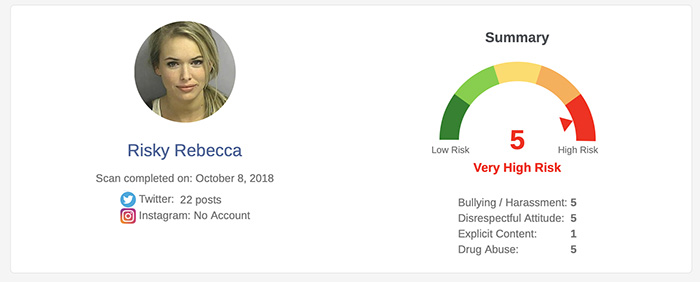
Predictim scans the digital footprint of a prospective babysitter to determine their risk to parents. The app was created by Sal Parsa and Joel Simonoff who set out to develop an AI solution that can generate personality assessments based on the candidate’s digital footprint.

The app used natural language processing (NLP) to sort through social media platforms, scanning photos, tweets, and captions for risk factors — Parsa and Simonoff say that traditional background checks or interviews don’t paint the full picture of who a person might be.

With Predictim, the algorithm considers billions of data points and can scan them within a matter of minutes — spitting out a report with predicted traits, behavior, and a brief summary of their digital history.

Reports cost $24.99 a pop and come with a risk assessment score — green being not risky to red, very risky. A small price to pay for identifying potential bullies and abusers who might otherwise slip through the cracks.

What are some of the issues?
predictim

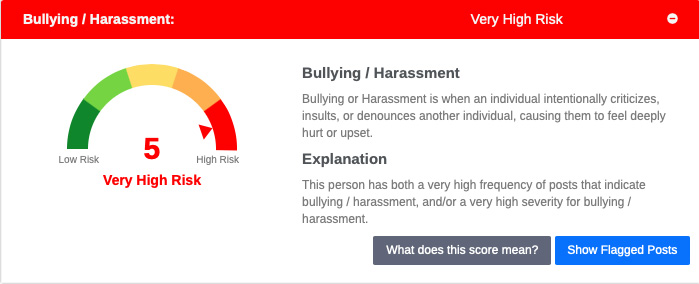
Critics of the tool say that technologies like the solution that Predictim has presented present some clear dangers, especially given that these tools are being used to make decisions about someone’s ability to find work.

The first problem that comes to mind, of course, is bias. Often AI tools don’t show bias until they’ve been deployed and someone starts to pick up on this unfortunate pattern.

Gizmodo’s Brian Merchant decided to experiment with Predictim and his post-mortem highlights some major problems. Merchant says he tested the app using his actual babysitter, an African American woman, and a white male friend. The friend got a better rating than the babysitter, despite the fact that he shares a lot of vulgar content on Twitter. Merchant’s babysitter was flagged for being disrespectful.

Joel Simonoff, the CTO, says that they don’t look at things like race or ethnicity, but we’ve seen other tools develop biases, too. Amazon’s recruitment AI didn’t especially like women and software used by many of the nation’s prisons routinely rates black inmates as more likely to commit a crime in the future.
predictim

Another issue is this tool turns up a lot of personal data. Predictim pulls up addresses, phone numbers, email addresses, and names of relatives — to, you know, ensure that the person running the scan knows, just for sure, that they’ve got the right person.

Finally, these recruitment apps are classist. Increasingly, we’re developing tools that disproportionally subject low wage workers to robot-based scrutiny. While Predictim does need to obtain the babysitter’s consent before processing the report, if the sitter opts out—surprise, they’re not going to get the job.

Other tools like HireVue and Fama work with companies—reporting back on things like attitude and demeanor.

Fama scans social media channels for toxic behavior and alerts the bosses, while HireVue analyzes tone and demeanor to predict on the job performance — candidates are encouraged to smile at the bot for best results.

Facebook and Instagram blocked the tool

Facebook pulled most of Predictim’s access to users, as the company was found to be in violation of the platform’s privacy policy on how personal data can be used. Predictim is still scraping public data for their reports, but Facebook may end up pulling them completely.

Twitter says, when they became aware of the platform, they blocked it as well. A spokesperson for the company said that Twitter prohibits the use of their data and APIs for surveillance purposes.

Still, Predictim isn’t giving up. The founders are currently in talks with shared economy companies to provide vetting services for rideshare services or accommodation hosting. We’re sure there are some big names involved.

While it’s heartening that the social media giants have shut this tool out — there are so many of these vetting platforms that keep cropping up. And, you’re looking at things like a bad attitude or evaluating personalities with algorithms, there’s going to be a problem in the power dynamic between employers and those vying for opportunities from the babysitting gig down the street to gig economy sites and the traditional 9-5.

What’s next?

It looks like the media scrutiny offered more blowback than Predictim, uh, predicted. Visit the site now and you’ll see a statement at the top:

“We have been overwhelmed by the interest, press coverage, and input regarding our project. To be honest, this attention came earlier than we expected, and certainly before we had fully launched our contemplated services. We received some very helpful feedback on ways we could make Predictim even better. Clearly, people are hungry for better ways to make decisions in marketplaces where character, reputation, and trustworthiness are important. As a result, we have decided to pause our full launch and put our heads down to focus on evaluating how we offer our service and making changes to address some of the suggestions we received. While we are not offering any services at this time, please stay tuned and check back often for updates: we will be back!”

Ultimately, it doesn’t seem like Predictim and similar apps are going away anytime soon. Even if Facebook and Twitter keep blocking the platform from scraping private data, there’s always the chance the companies reach a compromise if there’s enough money on the table.

The fact that enough people are willing to use this service to spy on the neighborhood teen is a bit troubling, and it’s a sure sign that we need to start fighting for our privacy before it’s too late.