The eyePhone and eyeOS has some crazy skills!

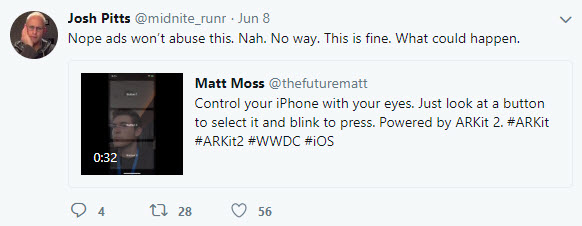
The biggest announcement from last week’s WWDC by Apple was undoubtedly iOS 12. Apple’s latest operating system for iPhones and iPads comes packed with plenty of new bells and whistles, but one developer, Matt Moss, noticed a particularly cool innovation.  ARkit 2.0 includes eye tracking, which means your phone will be able to follow your eye movements and understand exactly what you’re looking at. This cool video below shows you just how good the iPhone, or should we say eyePhone, will be at tracking your eye movements.

Some people took to Twitter to decry what this will mean for the types of ads we’ll see in the future, but Moss was keen to highlight what it’ll mean for accessibility.

This technology will make it a hell of a lot easier for people with disabilities interact with the digital world. If you add Microsoft’s recent Xbox gamepad designed for disabled gamers, it has been a good couple of weeks for progressive developments in tech.

Join the Bitdefender 2019 BETA and test the future of cybersecurity!

Softonic is one of the world’s leading download portals where you can safely download all of the best apps and programs for your PC, Mac, iOS, and Android devices. To help us do this we proudly partner with the world’s leading software developers.

One of our partners is Bitdefender. Bitdefender is a leading global cybersecurity-technology company protecting hundreds of millions of users worldwide in more than 150 countries.

Bitdefender is looking for beta-testers for the 2019 version of Total Security suite and has asked if we can relay the following message to our users.

Bitdefender is almost ready to launch a brand new series of cybersecurity products for 2019 and needs some of the world’s most rigorous BETA testers. Therefore, we’re now putting together a strong team of forward thinkers from around the world to help us deliver brilliant, flawless cybersecurity products. You are most welcome to join us!

How it will happen

Starting with June 14th, you’ll be invited to try out and give feedback on Bitdefender Total Security 2019. The new version packs significant improvements of Bitdefender’s industry-leading attack prevention technology and a new layer of ransomware protection. The product interface and interaction with 2019 version products on Windows, Mac and Android is improved, so it’s much easier to find what you need and make use of all the cybersecurity features. Parental Control has also been improved with additional functionality on mobiles.

We are looking forward to hearing what you think about it!

Apply for this challenge now!

How to apply

First, fill out this survey: https://www.bitdefender.com/site/view/beta2019.html

We will choose only 150 people to be part of the Bitdefender 2019 BETA.

Once you’re enrolled and accepted, you will receive a welcome e-mail with a download link to get you started. After the campaign begins, we will rely on your willingness to continually communicate and provide feedback to the Bitdefender team and help us improve the product which, at this stage, may have bugs.

All interactions will take place on a secure online platform, available to the testing team only. Members can participate in individual beta testing tasks as well as engage in-group discussions with other members.

Please note that the program is only available in English.

What’s in it for you?

Not only will you be the first to get the newest awesome products to come out of the Bitdefender Labs, but you’ll have the opportunity to improve them with your feedback and become one of the ”good guys” of the cyber world. We’ll be grateful to you and try to show it by throwing in some extra goodies such as Bitdefender products and Amazon vouchers as well.

But the real reward will come from the millions of future users who will be safer and better-protected thanks to your effort. So apply for this challenge now!

4 myths and facts about Wi-Fi networks

Wi-Fi networks are a key part of millions of people’s lives worldwide. They are so important to us that it’s common to get to a hotel and the first thing we’re given – besides the keys, of course – is the Wi-Fi password. Thing is, there are tons of myths about Wi-Fi, so at Softonic we’ve made a list of four myths and facts about Wi-Fi networks

Public Wi-Fi networks are unsafe

Myth or fact? Fact. Every time you connect to an open public Wi-Fi network, you have a high chance of getting your information intercepted by somebody. Remember that with this type of connection, data travels without encryption. That’s why it’s important you don’t connect to one without a password. Even if it has a password, our advice is that you try to stay away from them, barring exceptional circumstances.

We should note that when we use websites like Gmail or banking portals, their own certificates encrypt the content. But we urge you: stay away from them as much as possible. If you must use public Wi-Fi, be sure to use a VPN.

Wi-Fi networks are harmful

Myth or fact? Myth. This is one of the most widespread… and dangerous myths. We’ve heard over and over again that Wi-Fi networks can cause cancer, increase sexual dysfunction, etc. ALL of this is false.

It’s well verified that Wi-Fi networks aren’t dangerous. In fact, they’re well under the threshold set by the World Health Organization. After all, every day we receive hundreds of electromagnetic waves, both artificial (such as Wi-Fi networks) and natural (such as the planet’s electromagnetic field). Have no fear!

One Wi-Fi network can cause interference with another

Myth or fact? Fact. Though it usually doesn’t happen due to huge advances in technology, there’s a chance that your Wi-Fi network can interfere with your neighbor’s. This usually happens where there are dozens of Wi-Fi connections in a small area. It’s likely that one is intruding on your frequency and giving you problems. But there’s a solution.

If you notice this happening, our advice is that you restart your router so the connection doesn’t suffer interference. Likewise, you can add a password if you haven’t already. Never leave your Wi-Fi network unprotected.

Walls can affect Wi-Fi connection

Myth or fact? Fact. Electromagnetic waves from Wi-Fi can go through walls, of course, but their quality can be affected depending on several variables. That’s why experts advise that the router is always placed in a central location of the home, since the distribution of waves will be better.

On the other hand, we should talk about those other “variables” we mentioned earlier. It depends if you have a wall with tiles, mirrors or metals. Each kind of material affects Wi-Fi waves, not to mention any obstacles along the way.


Facebook unveils the first of its funded news shows

Facebook has been awash with scandal for quite some time now. From fake news to data leaks, the social network has done a lot to make the world a worse place than it was before Facebook came along. The service has even been banned by one country that wants to test the negative effects social media is having on its citizens. Facebook has been telling us that it is working to counter the many crises it faces, and one particular initiative will come to fruition this summer. In a bid to counter the spread of fake news, Facebook Watch will begin broadcasting funded news programs.

Facebook Access Facebook
7

Facebook Watch is Facebook’s video tab that has been around in the U.S. since last September. The tab offers users access to well-produced video content, and this latest announcement from Facebook means users will soon be able to tune into current event news programs also.

https://www.facebook.com/facebookwatch/videos/1691576720925605/

Facebook is creating a dedicated section for news shows that have been produced exclusively for the social network. The content will come from a host of award-winning journalists and well-known media outlets. Facebook is promising to showcase a mix of daily briefings, deep dives into important topics, and live breaking news coverage. There will be more shows announced in the run-up to launch, later this summer, but for now, Facebook has released the first batch of news shows that users will be able to tune into on Facebook Watch:

  • ABC News’ “On Location” [wt] is a daily news show with ABC News journalists from around the globe delivering on-the-ground reporting and the top headlines that are driving the day.
  • Advance Local’s “Chasing Corruption” In Alabama Media Group’s Chasing Corruption’s weekly series, host Ian Hoppe and the Reckon by AL.com team travel across the USA to meet some of America’s toughest watchdog journalists — and the stories of conspiracy, bribery, fraud and more they’ve uncovered.
  • ATTN:’s “Undivided ATTN:” is a weekly explainer show that breaks down the biggest issue of the week. In 3-5 minute episodes hosted by a rotating cast of social influencers, Undivided ATTN: will provide context on the stories everybody’s talking about.
  • CNN’s “Anderson Cooper Full Circle” is a daily global brief on the world, M-F evenings featuring Anderson Cooper and a roster of guests. The interactive program will air live from Anderson’s New York City newsroom in mobile-friendly vertical video.
  • FOX News’ “Fox News Update” will focus on up-to-the minute breaking news and the most compelling stories of the day. FNC’s chief news anchor Shepard Smith will report the latest news each weekday afternoon, with Carley Shimkus updating viewers every morning. Additionally, Abby Huntsman will provide the latest headlines once each morning throughout the weekend.
  • Mic’s “Mic Dispatch” reveals the world as we see it: complicated, diverse and full of potential. Mic correspondents on this new, twice-weekly show go beyond the headlines to profile the underrepresented, the problem-solvers and the provocateurs.”
  • Univision’s “Real America with Jorge Ramos” Award-winning journalist, anchor and author Jorge Ramos travels the country to talk to immigrants of diverse backgrounds and situations, delivering a rarely covered view of today’s America from their perspective. Univision will also cover the top stories in Spanish at noon every day on Watch with “Noticiero Univision Edición Digital.”

Facebook has also confirmed that all of the shows will be completely independent of Facebook with the creators retaining full editorial control.

(function(d,s,id){var js,fjs=d.getElementsByTagName(s)[0];if(d.getElementById(id))return;js=d.createElement(s);js.id=id;js.src=’https://embed.playbuzz.com/sdk.js’;fjs.parentNode.insertBefore(js,fjs);}(document,’script’,’playbuzz-sdk’));

From this summer on, you’ll be able to watch well-produced and independent news programs right there on Facebook. The plan is for you to be able to access news on local as well as national and international issues.

Image via: Mail&Guardian

Are you happy with this development? Do you think it will counter the spread of fake news across social networks? Let us know in the comments.

You will soon be able to trade stocks and shares for free on your phone!

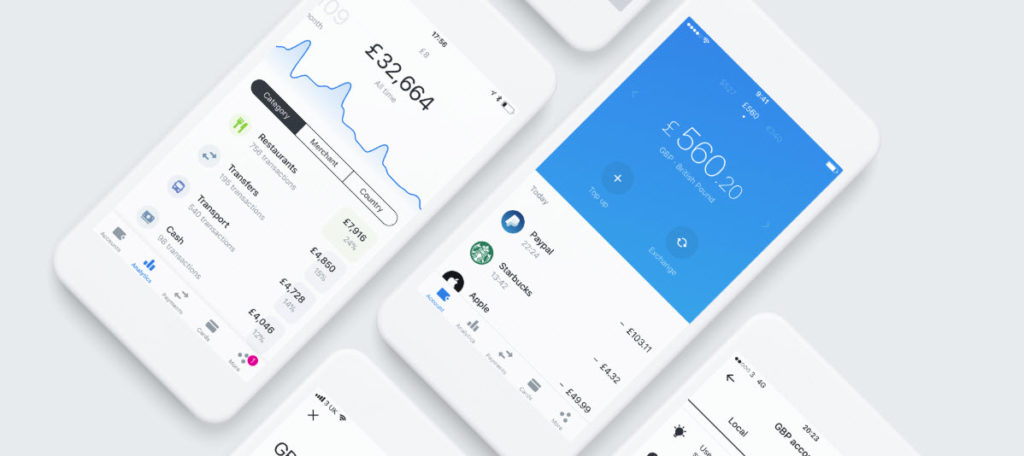
Revolut has been around for a while now and has proved itself to be a very handy app. Originally its purpose was allowing users to transfer and spend money in 120 currencies around the world. Users could spend the cash from their digital wallets or by using a pre-paid card connected to their account. It has since grown to offer so much more. Users can insure their phones, buy and sell cryptocurrencies, and even take out travel insurance that automatically kicks in when you move from one country to another.

Image via: Revolut

The growth in services offered by Revolut has been matched by a growth in users. Revolut now has around 2 million users, and they’re all about to gain access to a brand new service that Revolut will provide commission free. Revolut has announced today that users will soon be able to trade stocks and shares through the app for free.

Revolut Download Now
8

Speaking to the Financial Times, Revolut Chief Executive, Nikolay Storonsky, said:

“Brokers are charging people as much as £5 per trade and the user interfaces are typically clunky, slow and confusing for consumers… The pain points are clear for us and the room for improvement is massive.”

He added:

“To put it bluntly, we are going to cause the same disruption in investments as we have done in banking,”

Although Revolut is currently only available in the EU, the company has plans for a global expansion in the coming months. The U.S., Canada, Singapore, Hong Kong, Australia and New Zealand could all see Revolut coming their way around the same time as this new share-trading option rolls out to current users. As of now, there is no exact date for when the new feature will start will become available.

Revolut Download Now
8

Revolut’s basic features are very useful to anybody doing a spot of traveling or just going on holiday. If you haven’t tried it already, it is definitely worth a look, for what it offers now. If you think you’d like to try your hand trading shares then soon, it’ll be the easiest, and cheapest, way to do so.

Would you like to try share trading with Revolut?

The FIFA World Cup 2018 comes to your mobile for free

Image via: Cricket Rank

Next Thursday, June 14, is the big day when the FIFA World Cup 2018 kicks off in Russia. The hosts will take on Saudi Arabia, in what will be one of the few games of the tournament that you’ll want both teams to lose. If only it were possible. Then from Friday, June 15, we’ll be treated to at least three World Cup matches a day until the group stages conclude on June 28.

Why stop there? Why not take the action with you wherever you go? Why not be a part of the action? Go on your own search for glory! You can do both with the official FIFA Mobile Soccer game. The free-to-play mobile game for iOS and Android now has its very own World Cup mode complete with all 32 of the teams that’ll be taking part later this month.

There will also be separate story mode that includes 16 nations that failed to qualify for the tournament.

Other modes include a VS mode, which sees players facing off against each other in real match and fantasy match situations.

With so much on offer and for free, what is stopping you from giving FIFA Mobile World Cup a shot this summer? Do it. Play your way to immortality!

FIFA Mobile Soccer Play Now
9

5 tips for saving data on iOS and Android

Arcade Fire was spot-on with Infinite Content. The internet is awash with viral videos, celebrity tweets, and epic fail compilations, all readily available in the palm of our hands. Yes, smartphones are officially our browsing device of choice, and while that might make life more interesting when you’re waiting for the bus, you pay the price in dollars and cents.

Every time you tap an app, whether it’s to watch YouTube, update your status, or find your way home, those gigabytes start crumbling away like a cookie left in milk too long. Unless you’re on an unlimited data plan (which are often expensive), go beyond your allowance and you’re slapped with big bills, throttled speeds, or no internet access at all.

So what can you do about it?

The simplest answer is to save data wherever you can. This is easier than it sounds, and you won’t really need to change your habits too much – just follow our tips below. 

Disable background data and push notifications

Both iOS and Android apps have a nasty habit of gobbling up data when you’re not using them. Also, some apps periodically use data to notify you of a new event (like an email).

How to turn off background app data and notifications on iOS (Apple)

To turn off background app data, navigate to Settings > General > Background App Refresh and change it to Off or Wi-Fi.

To turn off push notifications, head to Settings > Notifications > select an app > toggle Allow Notifications off.

Android (Samsung, HTC, Google, etc.)

To turn off background app data, go to Settings > Data Usage > click the three vertical dots in upper right corner > select Restrict Background Data.

To turn off push notifications, head to Settings > Notifications > select an app and toggle Off.

Track usage, cap data, and set alerts

If you know you’ve only got 2GB of data each month, track your usage and set alerts for when you’ve used it up. On Android, you can even place a data cap that’ll stop all mobile data once you’ve reached your limit.

Both Apple and Android smartphones have data tracking services built in, but only Android includes a native alert and data cap feature (nice work, Google). For alerts on iOS, you’ll need to download a data management app like My Data Manager.

My Data Manager Download Free
7

How to track data usage on iOS

Head to Settings > Mobile Data > scroll down to see your usage for the current period. Make sure you reset data statistics every billing cycle (from within the same menu), as iOS won’t do this automatically.

How to track data usage, cap data, and set alerts on Android

Head to Settings > Connections > Data Usage > Mobile Data Usage

To limit data: toggle Data Limit on > tap Data Limit > set limit value > tap SET

To track usage and set an alert: toggle Data Warning on > set the alert value > Start billing cycle on > set your billing dates > tap SET

Use Wi-Fi wherever possible

Seems obvious, but it’s easy to forget there are millions of free Wi-Fi spots around the globe, most commonly found in restaurants, cafes, public institutions, and shops. Though do use a VPN where possible, as public Wi-Fi is easily exploited by hackers (and don’t use them to transmit sensitive information, such as bank details).

If you’re unsure where to find free Wi-Fi near you, apps like Wifi Map can help. So next time you’re out and about, connect to free Wi-Fi instead of chewing through your data like a beaver on a breadstick. 

WiFi Map Download Now
7

View videos, maps, and webpages offline

Whether it’s Netflix movies or photo albums, download them to your device over Wi-Fi instead of using cellular data. Similarly, Google Maps can also be downloaded for offline use, making it easier to get around your local area without devouring data. Even web pages can be stored for offline viewing with apps like Pocket.

Pocket Download Free
9

Turn off “autoplay”

Facebook, Instagram, and other social media networks do whatever they can to keep you hooked. A particularly clever trick is autoplaying videos that churn through your mobile data without your permission. Thankfully, these apps do give you the option of turning this feature off, so head to the relevant app’s settings and disable autoplay now.

Hopefully these tips keep your data within budget. If all else fails, you can simply disable cellular data completely from your phone’s mobile data settings. It’s an extreme measure, but with so much free Wi-Fi, it’s a valid one.

Yes, Facebook did deliberately share your data with over 60 companies

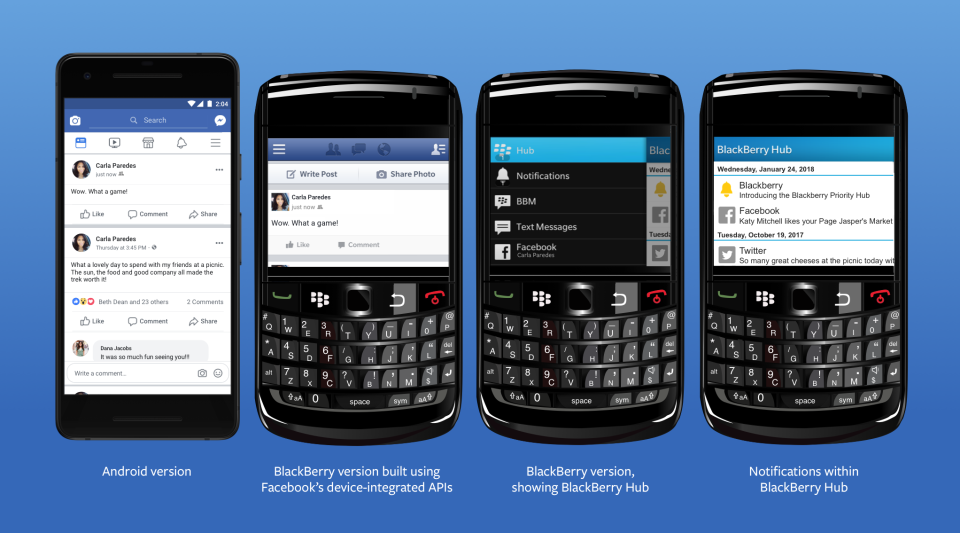
A New York Times investigation has revealed that Facebook has been purposely sharing your information. The findings, which Facebook has since confirmed in a blog post, show that Facebook reached an agreement to share user data including religion, relationship status, and political inclination with around 60 companies. These companies include the likes of Blackberry, Microsoft, Apple, and Samsung. The investigation also alleges that Facebook even gave access to user’s friends’ data, without consent.

Responding to the New York Times report, Facebook claims that the sharing of your information was legitimate and above board. According to Facebook, the agreement goes back years to a time when mobiles had app stores. Facebook agreed to share your data with third-party mobile manufacturers to facilitate the creation of bespoke Facebook experiences on their respective devices.

Image via: Facebook

Of the deal, Facebook’s VP of Product Partnerships, Ime Archibong, said:

“These partners signed agreements that prevented people’s Facebook information from being used for any other purpose than to recreate Facebook-like experiences. Partners could not integrate the user’s Facebook features with their devices without the user’s permission.”

Archibong also went on to say that Facebook is satisfied with the agreement as it has no record of any partner abusing the deal. Facebook also denied including access to friends’ data, without consent, as a part of the deal saying:

“Contrary to claims by the New York Times, friends’ information, like photos, was only accessible on devices when people made a decision to share their information with those friends.”

(function(d,s,id){var js,fjs=d.getElementsByTagName(s)[0];if(d.getElementById(id))return;js=d.createElement(s);js.id=id;js.src=’https://embed.playbuzz.com/sdk.js’;fjs.parentNode.insertBefore(js,fjs);}(document,’script’,’playbuzz-sdk’));

Although Facebook has moved to address the findings of the report, people are still angry at the revelations. It looks like Mark Zuckerberg may have lied to Congress when he said users have complete control over who sees their data. One Senator called Facebook’s response completely unacceptable. Senator Richard Blumenthal, a Connecticut Democrat and ranking member of the Senate subcommittee on consumer protection said:

“I think this explanation is completely inadequate and potentially disingenuous… I think Mark Zuckerberg’s testimony raises very serious and severe questions about Facebook’s credibility.”

The Cambridge Analytica scandal still fresh in everybody’s minds and the company has been stumbling from one crisis to another since the revelations first broke. It is almost a matter of when and not if we’ll hear about the latest way that the social network has been exploiting our private data to facilitate its bottom line.

Do you believe Facebook’ VP of Product Partnership? Are you satisfied that your data was shared with third-party companies in an appropriate manner? Let us know in the comments below.

PuBG vs Fortnite: which is better?

If you’re a gamer, you’ll know Battle Royale games have taken the world by storm.

Player Unknown’s Battlegrounds (PUBG), a game based on battle royale mods and developed by South Korean studio Bluehole, has taken the gaming world by storm. It has racked up huge sales numbers, an Xbox One port, and now a well-received mobile version.

With such success, the game was never going to be alone for long. Enter Fortnite, a rival battle royale produced by American studio Epic Games.

Both games offer the high-stakes, white-knuckle survival fix gamers know and love, but each has a slightly different approach. So, which is better? We’ll compare the major features to help you decide which is the one for you.

Playerunknown's Battlegrounds Download Now
9
Fortnite: Battle Royale Download Fortnite: Battle Royale
10

Graphics

Both games offer a unique graphical style. PUBG is all about gritty, environmental realism, so the color palate is subdued and washed out. Fortnite is the complete opposite, embracing a bubblegum-bright, cartoonish style, with outlandish outfits and weapons.

PUBG environments look like they come straight out of The Walking Dead. 

While Fortnite‘s visual style is more Disney than Day Z.

PUBG has gained notoriety among PC users for bad frame-rates and stuttering, even on high-end machines. There are plenty of guides to getting the most FPS from your rig, but until Bluehole fixes the bugs, you might need to play on lower settings. Not that that’s necessarily a bad thing, if you’re a pro player.

Fortnite seems better optimized graphically, and the minimum specs are much lower than PUBG’s, so a wider variety of rigs will be able to run the game.

Gameplay

Generally speaking, the goals of each game are the same: drop in, loot, kill your enemies, and stay within boundaries that shrink as time passes. Gunplay, though, is significantly different.

PUBG boasts realistic gun handling, and you have to account for things like bullet drop. This makes fights difficult and combat tense, but also more rewarding when you win an engagement. You have to plan your moves carefully, and the game rewards patience.

In Fortnite, the style is much looser. Hit points will fly out of player’s heads as you pummel them with a mini-gun, for example. It’s a lot simpler, and easier to grasp. In general, the weapons are a lot more forgiving than those in PUBG, so Fortnite is kinder to beginners.

Tension

We play games to relax, right? Not in Battle Royale.

Clutching your mouse in a death grip while scanning for the bullet that could end it all… Both games have a very different approach to creating this atmosphere.

Broadly speaking, Fortnite is faster, tighter, and the action takes place in a smaller area. When you hear gunshots, it usually means it’s too late to defend yourself.

PUBG is the opposite. Games are about the silence between engagements, the tension drawing out until you finally have someone in your sights. Then all hell breaks loose.

Late game

The key part of any Battle Royale is the late game, and this is where PUBG and Fortnite differ the most.

Fortnite introduced a building system, so you can quickly scoot up difficult terrain using stairs and ramps. Late game encourages players to build towers that overlook rapidly shrinking maps. Then you simply pick off your opponents who didn’t plan ahead by collecting building materials as well as weapons.

PUBG’s late game can be a little frustrating. It usually ends with eight players slowly crawling through fields or holing themselves up in one location, waiting for someone else to slip up and reveal themselves. While it’s nail-biting, it can deflate some of the early game excitement.

Map

Not in Kansas anymore, Dorothy…

Another key part is the actual battleground. Currently, Fortnite has only one map, but the developers are continually adding and polishing up locations.

PUBG has two maps, selected randomly when you join a match. The original map has a bleak, Soviet bloc feel, while the second is a desert. The change of scenery definitely helps keeps things fresh.

Price

PUBG has moved out of early access, and costs $29.99 for a digital download key.

Epic chose to make Fortnite completely free. You can purchase outfits and weapon skins from their store, but there’s no pay-to-win advantages to buying an item.

Both PUBG and Fortnite are the leading lights in the newly revitalised Battle Royale genre. However, both will appeal to a slightly different kind of player. 

If you’re looking for something casual that’s easy to learn but hard to master, then Fortnite is for you. 

If you’re a fan of heart-pounding tension, steep learning curves, and big rewards, then PUBG is the way to go.


Google confirms Gmail updates will be available to everybody next month

Google has been drip-feeding us news of its big Gmail update for a while now. It has also been running an opt-in trial of the new features via its Early Adopter Program (EAP). It seems that this trial has been going well as Google has confirmed in a blog post that the new features will be receiving a general availability (GA) launch next month. That means we’ll all have access to them by the end of July 2018.

A more detailed timetable of the, as laid out in the blog post, looks like this:

“In July 2018, G Suite admins will have the following options in the Admin console:

  • Immediately transition their users to the new Gmail. For a period of time, users will still have the option to opt out.
  • Allow their users to opt in to the new Gmail at the time of their choice. For a period of time, users will still have the option to opt out.
  • Wait approximately four weeks until their users are allowed to opt in to the new Gmail. For a period of time, users will still have the option to opt out.
  • This is the default setting. During this four-week period, users will not have the option to opt into the new Gmail.”

gmail black header

This means that come August all users will be able to opt in to the new Gmail system. The blog post goes on to say:

“Approximately 12 weeks after the GA announcement in July, any users who’ve opted out of the new Gmail will be automatically migrated to the new experience, with no option to opt out. Users who’ve already transitioned to the new Gmail will lose the ability to opt out.”

Which means once October rolls around, everybody will be using the updated Gmail and nobody will be able to opt out

We’ve laid out all the best features of the new Gmail for you here, and even shown you how to try out the new system now. If you want to try out new email features including self-destructing emails, auto-response, reminders, and offline mode you can. All you have to do to give it a whirl is head to Gmail menu cog and click Try the new Gmail. If you don’t like it, you can go back, but make sure you pay attention to the timetable laid out above, as soon you won’t have the option.