
Sophos harnesses artificial intelligence to turbocharge its free antivirus software

Sophos Home is one of our top recommendations for antivirus software in 2020. Get it now!

Sophos

Since its development in the late 1940’s, artificial intelligence (AI) has been used for everything from game playing to helping to improve healthcare. Broadly speaking, AI involves writing algorithms – a set of rules used in mathematics and computer programming languages – to enable a computer to observe a situation and make decisions that lead to a certain goal. AI has been used, for example, by beer maker Carlsberg to analyze the flavor and aroma profiles created by yeast and other ingredients to then predict how certain recipes will taste – without the company ever having to actually brew the beer.

While AI has taken a while to develop, thanks to more powerful computers and the availability of more digital data than ever before, it is now advancing at astounding speeds. And while it continues to be used in every field from finance to video games, it has been largely absent from the world of cybersecurity. That is now starting to change, with cybersecurity company Sophos helping to lead the way.

While many antivirus programs focus on databases of known malware, Sophos focuses on a specific type of AI called “deep learning” to help its software identify malware that’s never been seen before. Even more remarkably, the company has built this groundbreaking technology into both the free and premium versions of its software.

How it works

Deep learning takes place across computers equipped with neural networks. These networks are basically layers in decision trees used by the computer to process information and then update itself as new patterns emerge. 

For example, a system might have one layer that decides that an image is present on a certain webpage. That page can then be passed to another layer that traces the outline of the image and decides what layer to forward it onto based on the basic shape. The layers get deeper and deeper, allowing the machine to hone its observations and provide remarkable accuracy.

Sophos feeds its neural network over 2.8 million malware samples each week for analysis, deconstruction, and comparison. Because neural networks thrive on enormous amounts of data, this provides the fuel for it to recognize not simply malware code – but malware behavior. This makes it one of the most robust antivirus software programs on the market today, enabling it to not only spot – and stop – widespread malware threats, but smaller anomalies that might just be starting to affect one or two computers on a network. Sophos embeds this technology in its antivirus programs, which is available in both free and paid versions of Sophos Home. 

It’s rare to find such cutting-edge tech in even high-priced antivirus software systems. The fact that Sophos is making it available for free truly shows the company’s dedication to remaining one step ahead of cybercriminals, who are constantly developing more and more complex malware. For this reason, Sophos Home is one of our top recommendations for antivirus software in 2020.
 

WhatsApp infects millions of Android phones with malware

About 25 million Android users have been hit with a Malware attack that sends them malicious ads.

WhatsApp

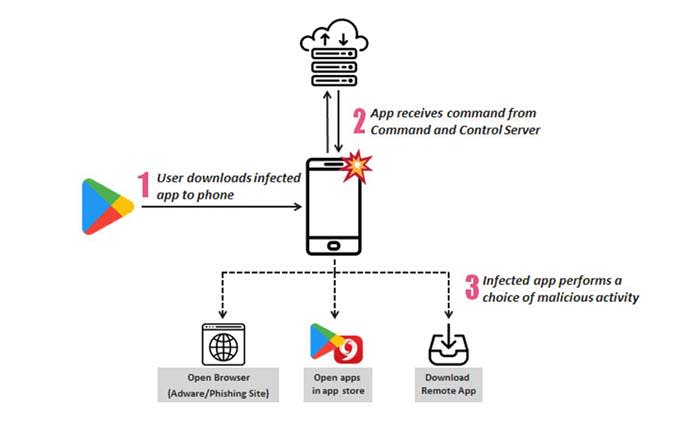
About 25 million Android phones were infected with malware hidden inside WhatsApp, according to an article from Forbes. Essentially, the virus replaced certain apps (including WhatsApp) with fake versions that bombard the user with ads. 

Because it is copying and replacing apps with a malicious version, the Malware virus has been named Agent Smith based on the character from “The Matrix.”

How did this happen and what is it doing?

A third-party app store called 9apps.com is responsible for the spread. If you downloaded your apps from the Play Store, you should be safe. You can still download WhatsApp from the website, but we’d recommend downloading it from us just to be safe.

WhatsApp Messenger Download Now ►
8

As of now, the only thing that the malware appears to be doing is bombarding the user with malicious ads. However, Agent Smith has lots of harmful potential. Since it can hide in plain sight, the virus can present a privacy risk without the user knowing what’s happening. 

Most of the infected Android phones are in India (about 15 million). However, there are still about 300,000 infected phones in the U.S. and about 137,000 in the U.K.

What should I do?

If you downloaded anything from 9apps.com, you should uninstall all of those apps immediately just to be safe. Although WhatsApp was the main app infected with Agent Smith, there were others.

You should also regularly scan your phone for viruses. Free apps like Malwarebytes can do that for you lickety-split.

Malwarebytes Download now ►
8

Should I uninstall WhatsApp forever?

Although WhatsApp has had virus attacks in the past including a spyware attack a few months back, this one doesn’t seem to be their fault. Only downloads from 9apps.com appear to be harmful.

If you enjoy using WhatsApp or if you need it on a daily basis, you can still keep doing so. Just make sure you download it from a safe source.

Ransomware scams hold cities hostage

Two cities in Florida have been forced to pay a small fortune to regain access to their files!

a hacker for bitcoin

Ransomware stole all the headlines in 2016 as the particularly nasty malware variant began rearing its ugly head around the world. As if viruses and malware weren’t already bad enough, ransomware added to the misery by holding all the data stored on a particular device hostage. Later, hackers then demanded ransom for its safe return. Yep, 2016 was the year we all had to start worrying about being blackmailed whenever we were on the internet.

Things seemed to quiet down after the original big scores had come and gone, but the threat has always lingered. It was big organizations that were always the most vulnerable. Think hospitals and schools and you’ll have a good idea about what the early victims were like. Unfortunately, ransomware is back in the headlines as it seems another type of major organization is susceptible to ransomware attack: cities.

Florida cities held hostage

It is easy to think of ransomware being some Hollywood type event from something like Netflix’s “Black Mirror.” We do something embarrassing online (or in the episode “Shut Up and Dance,” illegal and morally deplorable) and then the hacker uses that against us to force us to pay money or do something else illegal.

In reality, ransomware is much more benign. There is little worth in targeting individuals with ransomware as A) we don’t have much money and B) most of us don’t have much on our hard drive we’d pay to get back.

Black Mirror ransomware attack
In Black Mirror an individual was targeted by ransomware. This does happen in real life, but it is more usual for large organizations to fall victim to ransomware attacks.

This is why larger systems like schools, hospitals, or now even cities make better targets for ransomware hackers. By blocking access to data on large systems immediately, the hackers put immense pressure on the organization. If a hospital can’t access its admin system, people could die. A school can’t run properly when its systems are down. A city won’t know who is who until it can check its databases.

This final reason is why officials in Lake City, Fla. have just joined officials from Riviera Beach, Florida in handing over a small fortune in Bitcoin to an unknown hacker or group of hackers. They paid $500,000 and $600,000 respectively. The Lake City computer systems were down for two weeks before the officials buckled. While they were down, citizens were unable to make municipal payments online and city employees couldn’t access their email accounts.

If Bitcoin ransoms don’t sound like something taxpayer money should pay for, fear not. According to the Lake City mayor, the city is covered by insurance, which will pay all but $10,000 of the $500,000 ransom.  If you don’t think the city should bow to the will of criminals, you should spare a second to think about Baltimore. Recently, the mayor of Baltimore refused to pay a ransom of around $76,000 and estimates suggest the stance cost the taxpayer around $18 million.

Wrapping up

Ransomware is here now and the cities we live in all have a target on their backs. Welcome to 2019, people. This just got real.

These apps are leaving malware all over your Android

These apps were downloaded hundreds of millions of times. Learn what they do, and how to avoid them.

Android

Google recently released its annual Android security report, which covered 2018’s biggest malware trends.

The report found that there are a lot of scammy apps in the Play Store, with the amount of downloaded malware up 100% since the year before.

However, Google downplayed the findings, stating that the bulk of the PHAs (potentially harmful apps) available for download were click-fraud apps.

Yet, it’s hard to ignore the sheer volume of reports about the platform and the security risks lurking inside seemingly harmless apps. The malware program Trickbot was recently found in a large number of devices around tax season.

For Android, we found the worst offenders and the sheer number of downloads these malicious apps had:

Android malware list

The Android malware list just keeps getting longer, proving that Google’s filters need some work.

Here are the latest developments in Play Store malware news:

Aggressive adware

Avast’s cybersecurity team recently found roughly 50 apps in the Play store pretending to be “lifestyle” apps, but install malware on user devices in an effort to get as many clicks as possible.

HiFit app
One of the apps in question

According to the report, the SDK is easy to spot in the code. However, checking the code for signs of adware is not necessarily something most people know how to do.

If you’d like to see what adware looks like in action, here’s a short clip:

Check Point

Check Point researchers found a code called Simbad in just over 200 Android apps in the Google Play store. They found it had been downloaded a total of 150 million times.

Simbad is an adware code hidden inside a software development kit or SDK. It is designed to install adware on your phone without your knowledge, then displays ads.

Check Point infographic
Infographic courtesy of Check Point

The Check Point investigation found that apps containing the code made it look like the user was clicking on ads repeatedly. The fraudulent clicks are an effort to generate ad revenue, and the activity takes place without the user’s knowledge.

According to Bullguard’s security blog, these are the top 10 downloads from this batch:

  • Snow Heavy Excavator Simulator – 10 million downloads
  • Hoverboard Racing – 5 million downloads
  • Real Tractor Farming Simulator – 5 million downloads
  • Ambulance Rescue Driving – 5 million downloads
  • Heavy Mountain Bus Simulator 2018 – 5 million downloads
  • Fire Truck Emergency Driver – 5 million downloads
  • Farming Tractor Real Harvest Simulator – 5 million downloads
  • Car Parking Challenge – 5 million download
  • Speed Boat Jet Ski Racing – 5 million downloads
  • Water Surfing Car Stunt – 5 million downloads

You can read the full list here. It might be a good idea to check it out if you have a thing for games that let you drive anything from tractors to emergency services vehicles.

Exodus

It was recently discovered that hackers hid government spyware in plain sight inside Android apps on the Play Store.

While the malicious decoy apps appear to be hidden in the Italian version of the store, this discovery shows that Google’s filters aren’t as airtight as they say.

Exodus in the Play Store

The government spyware, known as Exodus, could extract passwords, chat logs, contacts, and recordings from rooted phones. It also collects basic details about a phone.

It’s worth pointing out that Google patched a Linux exploit called DirtyCOW back in 2016 to block access.

This means any new or recently-updated phone is immune to the attack, provided you stick with the phone’s built-in security settings. It’s when you start messing around with the customization options that you get into trouble.

Gutstuff

Gutstuff is a trojan targeting crypto investing apps. It is aiming for “mass infections and maximum profits.” How’s that for a corporate mission statement?

How Gutstuff works is through a good old-fashioned phishing attack by way of “web fakes.” Hackers set up apps that look like regular applications such as BitPay, Coinbase, and Bitcoin Wallet, as well as traditional banking institutions like Bank of America and Wells Fargo.

Infected users attempting to use one of the applications will be redirected to a fake page. From there, they’ll enter sensitive details so that hackers can steal from their accounts.

Signs that your Android has malware

Phone malware

Look, while Google says that most malware isn’t malicious, it can slow you down.

According to Norton Antivirus, malware is often programmed to perform repetitive tasks that use up your phone’s resources.

If you’ve been racing a lot of tractors or using third-party lifestyle apps, you might notice the following signs:

  • Your phone is slower than usual
  • The battery drains faster than normal
  • You’re seeing more pop-up ads
  • You’re going over data limits
  • You’ve noticed apps on your phone that you don’t remember downloading

If you notice malware on your phone, turn your phone on safe mode and uninstall the apps in question. If you’re unsure whether your phone is protected, it might be worthwhile to look into a paid antivirus program from a reputable company. After all, many anti-virus apps are adware themselves.

Malwarebytes Download now ►
8

Do I need antivirus for Android?

AVG android

No, but you do need to be careful.

A report from AV-Comparatives found that most Android antivirus apps don’t do anything but take up space. The reason they can get away with this is most malware isn’t a full-on attack. They instead trigger the little stuff like apps that generate pop-ups or collect information about your personal habits.

AVG AntiVirus Free Download now ►
8

Given that most malware apps are a racket, you’ll need to get smart about your security settings and what you choose to download.

Most items in the Google Play Store are vetted by Google’s review system. Most of what slips through the cracks are data harvesting apps or some kind of advertising scam, as we’ve mentioned above.

If you want to avoid these apps, keep your wits about you. If something sounds too good to be true or possibly malicious, it probably is.

Trickbot malware rising

Find out how to stop this virus from stealing money from your tax return.

Hacker stealing money

Trickbot scams have reached a high point leading up to Tax Day.

The virus has been stealing tax information and is sending fraudulent reports to steal peoples’ tax returns. 

What is Trickbot and what is it doing?

Trickbot is a trojan virus that has been around since 2016. It affects Windows computers

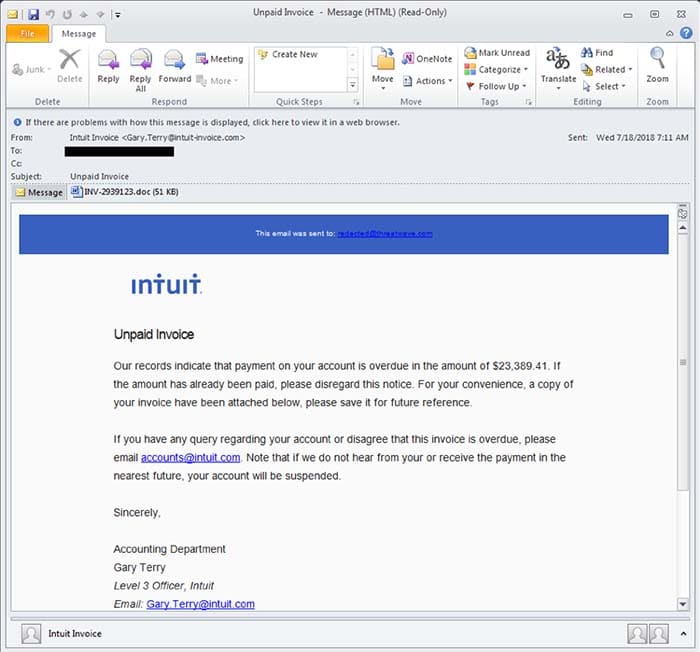
It typically comes from opening a maliciously crafted email. The emails typically impersonate a payroll provider and look like this:

Trickbot spam emailTrickbot sifts through your computer looking for password and login information typically related to your banking. The virus then sends the information back to the attacker. 

Trickbot has evolved throughout the years to target more and more financial information. Now, Trickbot has the ability to even steal cryptocurrency. 

Trickbot is especially concerning for businesses. The virus just needs to trick one unlucky person, and then it can potentially access all of a company’s financial information. 

The solution

The solution is simple: frequent virus scans with an app like Malwarebytes.

Malwarebytes Download now ►
8

To further protect yourself, Malwarebytes also recommends the following actions.

  • Identify the infected machine(s)
  • Disconnect the infected machines from the network
  • Patch for EternalBlue
  • Disable administrative shares
  • Remove the Trickbot trojan
  • Change account credentials

For a bit of extra caution, check the charges on your credit cards for suspicious activity. 

Malwarebytes scans your device in its entirety, showing you the problematic items found once complete. From there, you decide what to remove, and what to keep. 

Trickbot does not have symptoms visible to the average user. However, according to the Malwarebytes website, a network admin will likely see changes in traffic or attempts to reach out to blacklisted IPs and domains.

Trickbot is, well, tricky. You should run a virus scan daily to ensure that you aren’t at risk, and that you won’t have your hard-earned money stolen.

Scam apps are all over the Play Store

The Google Play Store is packed with dangerous apps. Here’s what to look for.

scam apps

At the end of last year, the App Store and the Play Store removed a fake Alexa set-up app that was stealing users browser history and sending data to an unknown Chinese server.

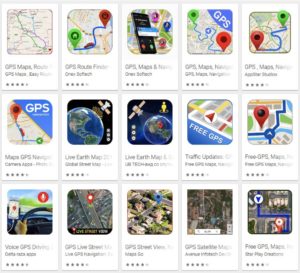
We also recently posted an article covering the fraudulent GPS apps lurking in the Play store, and popular apps like WhatsApp and Fortnite are repeat targets of scammers trying to get a cut of the action.

Suffice to say, users from both the Apple and Android sides of the aisle should tread carefully when it comes to downloads.

Scam apps have long been a problem, yet, it’s difficult for the platforms to get ahead of these bad actors.

Widespread ad fraud

A few months back, Buzzfeed published an article that revealed a massive fraud ring in the Google Play Store. A company, called, We Purchase Apps was responsible for stealing millions in ad revenue. The story broke back in October 2018, and it looks like the company has since taken down their website.

And then there are instances like this one involving Cheetah Mobile and Kika Tech in December 2018. It was discovered that the two popular apps were engaging in ad fraud, by way of three malicious SDKs: AltaMob, BatMobi, and YeahMobi.

In this case, the scheme was something called app install attribution abuse, which means SDKs fake the number of new downloads to receive the payout from the developer. Google did remove the apps in question, demanding that they remove the SDKs.

It’s easy to ask why Google doesn’t just pull these apps automatically and inform consumers of fraudulent activity. But the sheer volume makes this a near-impossible task. Mobile attribution firm, AppsFlyer looked at 17 billion app installs spanning 7,000 apps globally. According to their findings, more than a quarter of those apps have engaged some form of install fraud.

The reason is, anyone can create and upload an app — and with so many amateur developers competing for space on the platform, there are plenty of opportunities for scammers to slip through the cracks.

A look at some of the biggest Play Store scams in recent memory

Fortnite fakers

Like WhatsApp, scammers are capitalizing on another one of the biggest apps in the game; Fortnite. Fortnite is a prime target for scammers, as the app is free and can be played across game consoles, phones, and PCs. While scams have spanned a range of mediums—the Play store has been walloped by fake apps.

One example is this Google Play app that claimed to help users earn free V-Bucks. As you can see in the image below, the scammers benefitted by including a link that “automatically gives the app a five-star rating.” That skewed results and prompted more downloads.

fortnite android scam

Navigation apps

Researcher Lukas Stefanko of ESET found that the Google Play Store is loaded with navigation apps that pass Google Maps off as their own, then run ads over the program. Stefanko says that creating these fake apps is easy — all scammers need to do is add a small modification and they can start making ad revenue.

While the problem may be more of an issue for advertisers, consumers have found that the apps ask for a lot of information that has nothing to do with the program.

fake google map fraud

Fake WhatsApp

Over a million people were tricked into downloaded fake Android apps posing as WhatsApp. Initially, the fraudulent app was called “Update WhatsApp,” then it changed its name to “Dual Whatsweb Update” when users started to catch on.

Battery saver and performance booster fakes

battery saver apps

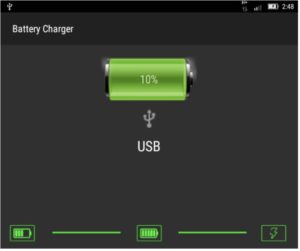
Many of the fraudulent apps currently lurking in the Play Store are apps that claim to save your battery charge or boost performance by freeing up RAM.

These apps are BS. They don’t do anything except give you a little animation to look at;  a technical representation of how “hard” the tool is working to generate more power.

Avoid these so-called performance boosters, as their advertised benefits are things your phone does automatically.

Apple users aren’t off the hook

Sure, Google might get more attention for their massive collection of scammy Android apps, but the App Store has its own share of problems.  One example is a Touch ID scam, a tactic that asks for your thumbprint or Face ID to authorize charges that, according to Wired, range from $90 to $120 each.

There have been several instances of these scams showing up in fitness assistant or health-focused apps, like this heart rate monitor or a since-removed app called Fitness Balance.

Tips for staying safe while shopping Google Play

The common wisdom for Play Store installs is; don’t download anything from malicious third-party apps. Unfortunately, fraudsters are becoming increasingly sophisticated.

These days you’ll need to be more careful; try the following preventive measures to lower your risk of installing infected apps:

  • Make sure you download from reputable sources only. Okay, duh. But, just a reminder: the top search result is usually the “official” version of the app you’re looking for. Double-check that the official developer posted the app. Additionally, add-ons or “cheat” apps like the Fortnite example from third-parties are especially risky, so be extra careful with these.
  • Read the reviews. Chances are, an infected app will have some low ratings, along with several bad reviews.
  • Do not change any security settings or root your device.
  • Use a reputable anti-virus scanner. While PCs are the usual malware victims, hackers can also break into your phone.
  • Check app permissions before downloading. Make sure permissions make sense. Granting access to sensitive data should be a red flag, so just double check that the fine print seems within the normal range.

Remember that you can also download apps from Softonic’s catalog as well, and we ensure that the apps we carry are free from any malware. Stay safe out there!

New year, new scams: what to watch out for in 2019

Protect yourself against these evolving threats.

phishing scams

No matter how often we’ve been warned about phishing scams and shady web-based transactions, we still fall for the fraudsters. According to an article in Forbes, costs associated with cybercrime are expected to top $2 trillion next year.

The Better Business Bureau Scam Tracker shows over 142,000 scams were reported this year in the U.S. — ranging from healthcare and Medicare scams to counterfeit products and online purchases.

And it’s not just the elderly falling victim to fraud. According to the FTC, 40% of consumers who reported fraud were between the ages of 20 and 29.

In any case, here are some of the biggest scams to watch out for in the coming year.

Online scams to avoid in 2019

Phishing — evolved

Phishing isn’t exactly new. This form of fraud has been with us for a long time now. But as tech gets ever more sophisticated, so does phishing.

In the past, phishing attacks were more numbers game than anything. Hackers would cast a wide net using a generic email asking for credit card info, passwords, or other pieces of sensitive information.

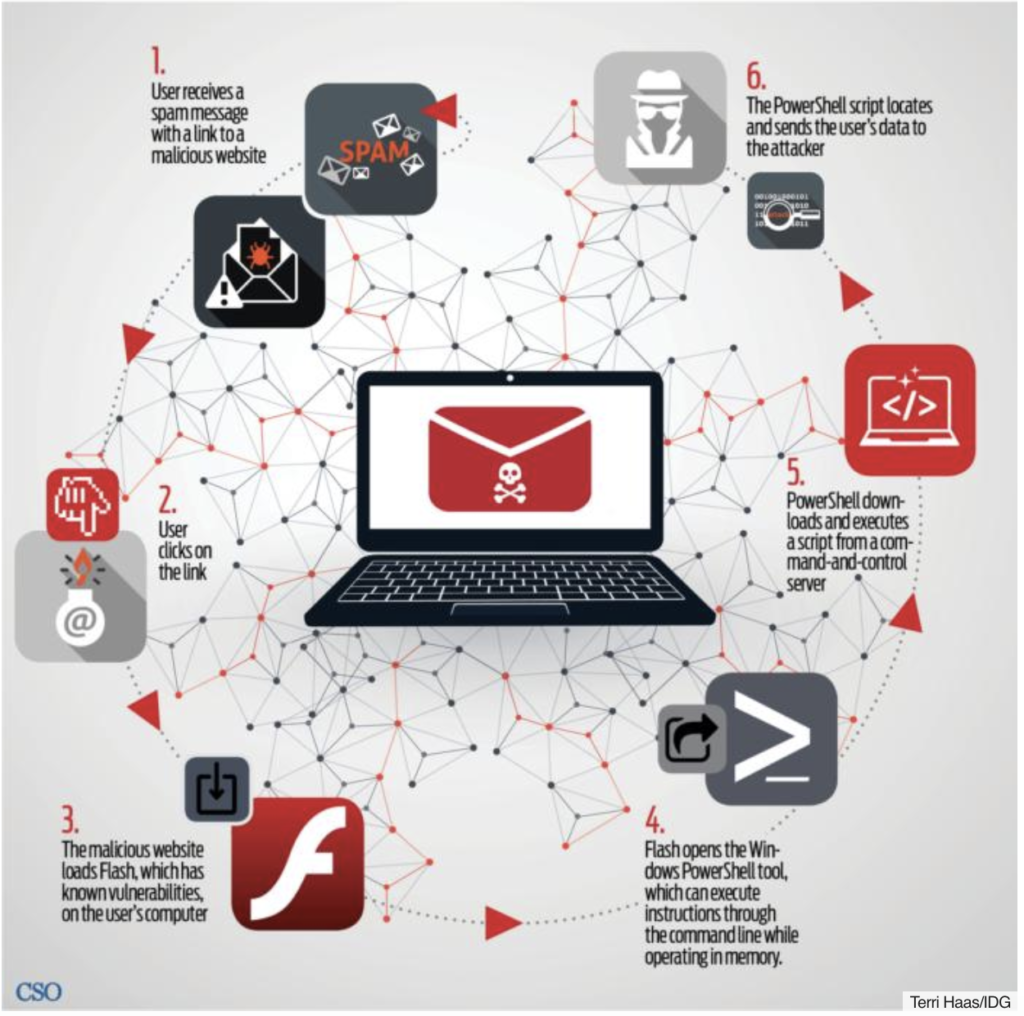
Today, phishing attacks look more like they came from a specific company. Called “spearfishing,” hackers might pose as your bank, credit card company, or a site like Dropbox or PayPal. Generally, targets receive an email that looks as if it came from a legitimate business. You might be prompted to click on a link to “verify account details” and from there, fileless malware is installed on your device.

Where you once had to download a file or an app to get malware, it’s now a matter of clicking a link. These fileless attacks are also more difficult to detect, as most antivirus programs only scan your hard drive.

Here’s a look at how fileless phishing works, courtesy of CSO Online:

Fileless malware

Mobile fraud

With the rise of mobile traffic, it’s no major surprise that fraudsters are meeting victims on their turf. Losses from mobile fraud are reportedly in the billions, expected to rise.

Mobile fraud comes in a few different forms. One example is click flooding, or click spamming, which takes advantage of users of some unpaid apps. When someone installs certain free apps, a serious of fraudulent clicks take place — which makes it seem like people are clicking on a paid ad.

Click flooding is an issue for advertisers more than consumers — as this form of fraud messes brands’ marketing strategies.

Marketers might think they’re getting a high volume of organic clicks and end up paying more for ads that ultimately don’t work.

phone scams

Then there’s a newer form of mobile ad fraud, SDK spoofing. This involves a bot that hides on an app, which is essentially a cheaper way to buy fake followers.

With SDK spoofing, bots create fake requests made from an app to the servers of attribution companies and app publishers. The fake requests make it appear that a certain amount of users are running an app, though in reality, the app was never opened.

Social security scams

According to Consumer Reports, fraudsters are increasingly making harassing calls posing as the Social Security Administration.

The SS scam is the new IRS scam, and it’s more dangerous for a couple of reasons. Today, crooks have their hands on robocalling technology, so they can call more people, playing the numbers game until someone eventually pays. Second, it’s gotten easier to spoof caller IDs.

You might have noticed this on your cell phone. Often, scammers call using a number from your local area code — and a similar phone number. In the case of the social security scam, scammers are using an 800 number that looks like a real deal call from the administration.

What to look out for: this scam is generally preying on Medicare patients and the elderly. Scammers reportedly have told people they’re going to lose their benefits and ask for personal information to keep those benefits.

Tech support fraud

According to Experian, tech support scams were responsible for over $15 million in losses in 2017. These scams take a few different forms.

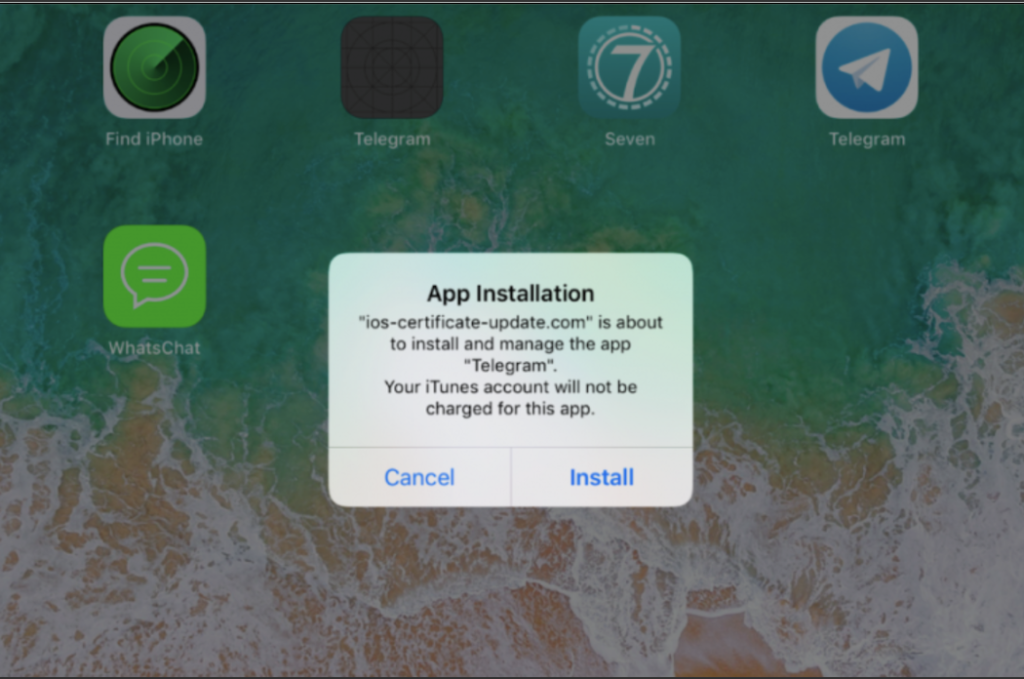
One example involves using phishing emails as a way to send Apple users to a fake website where malicious code is inserted into apps like WhatsApp and Telegram. The code collects information like SMS data, photos, and contact details, which may be used for blackmail later on.

Users might receive a message like the one below, which looks like a routine update.

fake apple support scam

Other forms of tech support fraud include things like phone calls claiming your computer is infected with a virus, or you’ll receive a pop-up message or locked screen prompting you to call a fake company.

Credit report scam

The credit report scam targets job seekers and apartment hunters. Generally, you’ll run into this one on Craigslist and other online job boards.

The scam occurs when the prospective employer asks that you submit a credit report as part of the application process. If you agree they’ll send you to a specific reporting service, and you might end up having to pay for the report.

In some cases, the fake employer will ask you to send your social security number along with an application or an image of your license or a utility bill. These reports serve as a way to obtain personal information for later use.

Protect yourself

So, how can you defend yourself against spearfishers or robocalls that seem legit?

The usual advice is: never click a link in an email that comes from a bank, government agency, or commercial institution. If the link comes from a company, check your account by going directly to the website by typing the URL into the navigation bar manually.

Sound advice, but protection is limited to web apps. With mobile attacks, watch out for links that come by way of text message.

While the concept is the same as traditional phishing, mobile users tend to be more distracted and may inadvertently click on a bad link without realizing it.

The FTC also recommends that you hang up on recorded calls, avoid free trial offers, and be aware of how you pay for things online.

Finally, it might be worth looking into virus protection software for your computer, too.