WhatsApp’s new feature could help your smartphone battery last longer

WhatsApp is getting a dark mode.

Battery dark mode update

We’ve been seeing a trend rippling across the tech industry recently. It started out as an aesthetic choice given to users, but recently it has taken on a greater significance, particularly on mobile devices with OLED screens. Dark modes allow users to make the color scheme of their apps much darker so that they produce less screen glare and are easier to use at night. We’ve recently seen Facebook Messenger make the change and now it seems that Facebook owned WhatsApp is joining the party too.

WhatsApp is getting a dark mode

WABetaInfo reports that a dark mode for WhatsApp on Android is currently under development. It was back in October when WABetaInfo released screenshots of the iOS version of the WhatsApp dark mode and now it seems a feature is finally coming to Android phones, too. Many people choose to use dark modes on their apps simply because they like the look better than the normal mode. The black background and grey text is a favorite of some users.

dark mode screenshots
Image via: WABetaInfo – Scereenshots of WhatsApp’s dark mode on iOS

In the last few weeks, however, we’ve seen that dark modes can have an unexpected positive side effect. During an internal investigation, Google discovered that displaying darker colors on an OLED screen uses less power than displaying lighter colors. Displaying black uses the least power while displaying white uses the most power. Google’s findings mean that apps that display predominantly dark colors while you’re using them will use up less battery power. In short, using an app in dark mode will make your battery last longer.

A dark mode coming to WhatsApp then is good news for anybody who wishes their battery would last longer than it does. The bad news, however, is that WABetaInfo only reports that feature is under development and offers no timescale for a release, even for the advanced beta testing version of the app. In fact, there are few details about the dark mode for Android at all. All we have so far is a promise that one “should be available in the future” and a guess that it will likely look a lot like the iOS dark mode shown above.

We’ll just have to wait then until we learn more details about the WhatsApp dark mode for Android and when we can expect to see it. In the meantime, if you are having problems with your smartphone battery life make sure you check out our tutorials below, which will give you plenty of tips for making your battery go the extra mile.

Facebook payments and beyond — why big tech is slowly taking over our wallets

A monster disruption to the banking industry is coming.

internet money

Fintech startups have been working to overtake the stronghold of traditional banks on the financial services industry for several years at this point.

And to some extent, they’ve been successful. However, it’s the so-called “platform companies” that banks need to keep an eye on.

McKinsey and other consulting groups have warned the financial sector that Amazon, Facebook, and others are poised to shake up the space in a way that fintech just couldn’t swing.

And there’s the fact that a growing number of millennials believe that tech companies could feasibly wipe out traditional institutions and replace them with their own take on financial products.

Every so often, new moves by Apple, Google, Amazon, and Facebook make headlines for their latest foray into finance. Think Apple Pay or Facebook’s relationship-building attempts with banks.

But, what’s on the horizon? Are we looking at a future where we buy our homes on Amazon or apply for auto loans using a social credit score?

Here’s a look at what’s happening with the platforms.

How big tech is making a play for your wallet

Convenience and branding bring big advantages

According to an Accenture survey from 2016, one in three banking and insurance customers would consider switching their accounts over to Google, Amazon, or Facebook if it were an option. And a report from Bain and Co. suggests tech companies are succeeding where alt-finance failed for a few reasons.

For one, tech firms already have the name recognition, trust, and the massive customer base required to drive change. Fintech startups, by contrast, had more niche appeal than anything and can be hard for the average consumer to understand.

It makes sense that Amazon could start successfully offering loans alongside bulk paper towels and unauthorized beauty supplies. It’s easy.

As American tech companies are wading into the banking space, Asian companies are diving in. Japan’s Rakuten, the country’s largest online marketplace and messaging app, already offers credit cards, mortgages, and securities services.

China’s Alibaba also functions as a lender and payments processor and AliPay and WeChat Pay are massively popular payment platforms that sidestep traditional banks altogether.

From Facebook to Apple, what’s big tech got planned for our wallets?

Facebook started dabbling in payments back in 2015 and hired PayPal’s CEO to lead its messaging products group and added the ability to send payments to friends across the platform.

Then last year, the social networking behemoth enhanced the platform by allowing people to use PayPal as a funding source.

Which—fine. Square Cash and Venmo work more or less the same way. Plus, PayPal made similar deals with Slack and Skype anyhow.

But over the past year or so, the noise about tech giants making a play for the banking space has gotten louder—which left us wondering, is something big planned?

In August, we learned that Facebook was trying to climb deeper inside our collective wallets, and now, Amazon and Apple are doing the same.

Apple is in the midst of launching a credit card with Goldman Sachs, while Amazon is working on a peer-to-peer payments function where you can just tell Alexa to send money to a friend.

The big push into finance makes a lot of sense. Americans are increasingly using online banking—as well as taking advantage of convenience from things like Venmo, mobile deposits, and so on.

Facebook’s whole deal was more about streamlining existing payment platforms than creating their own payments infrastructure.

The benefit for Facebook is, despite the fact that they’re not creating new products, they will gain access to new datasets. And that’s where banks will lose if they don’t embrace automation and faster processing.

Why banks need to worry about losing data

data

When you move small payments and transactions into Facebook Messenger or the WhatsApp chat box, it’s those apps reap the real reward: data.

And banks, of course, lose out on that valuable resource.

While it sounds like a real “who cares” situation, there might be a cost down the line.

When banks don’t have data, they have a hard time developing new financial services and delivering accurate risk mitigation. Meaning, we might have to place our trust in big tech instead.

And after Facebook’s myriad privacy gaffes, it might be a pretty big risk. On the customer side, those who continue to use traditional financial products may see lower quality offerings.

For example, it’s harder for banks to identify risks without access to large datasets—which could impact investments down the line.

Final thoughts

While we’re still enamored with our devices, many of us are starting to look at tech giants through a similar lens as we viewed big banks and Wall Street.

Platform companies have huge power as it stands. They’ve provided the infrastructure powering the gig economy and the sharing economy, which have had significant ripples throughout the economy-economy.

While financial products are bound to get better when reimagined by tech, there’s the risk that too much power falls in the hands of this small group of companies. Banks need to respond with better products and an improved customer experience — or risk the same fate as taxis or travel agents.
How to send documents using WhatsApp

Use WhatsApp to share virtually anything!

whatsapp

WhatsApp is a useful and intuitive messaging tool — but there’s no denying that many of its features are underused. Why? Simple: Its users are too busy making use of its main services. Have you ever used it for document sharing? Though relatively few people take advantage of it, it is one of the most useful and easiest tasks to master.

Sharing documents over WhatsApp can be done in four short steps. Once you’ve got a handle on these steps, the entire process shouldn’t take more than 30 seconds. (Note that these instructions are for sending docs in the WhatsApp mobile app. If you’re using the desktop app, you can simply use the attachment button at the top right of the screen. It looks like a paper clip, just like in most email applications.)

How to send documents using WhatsApp

1. Open or start a conversation (often referred to as a “chat”)

Open WhatsApp and select one of your conversations. If you wish to share a document with a person or group you have not previously communicated with on WhatsApp, first create a conversation with them.

WhatsApp Messenger Download WhatsApp ►
8

2. Tap Attach

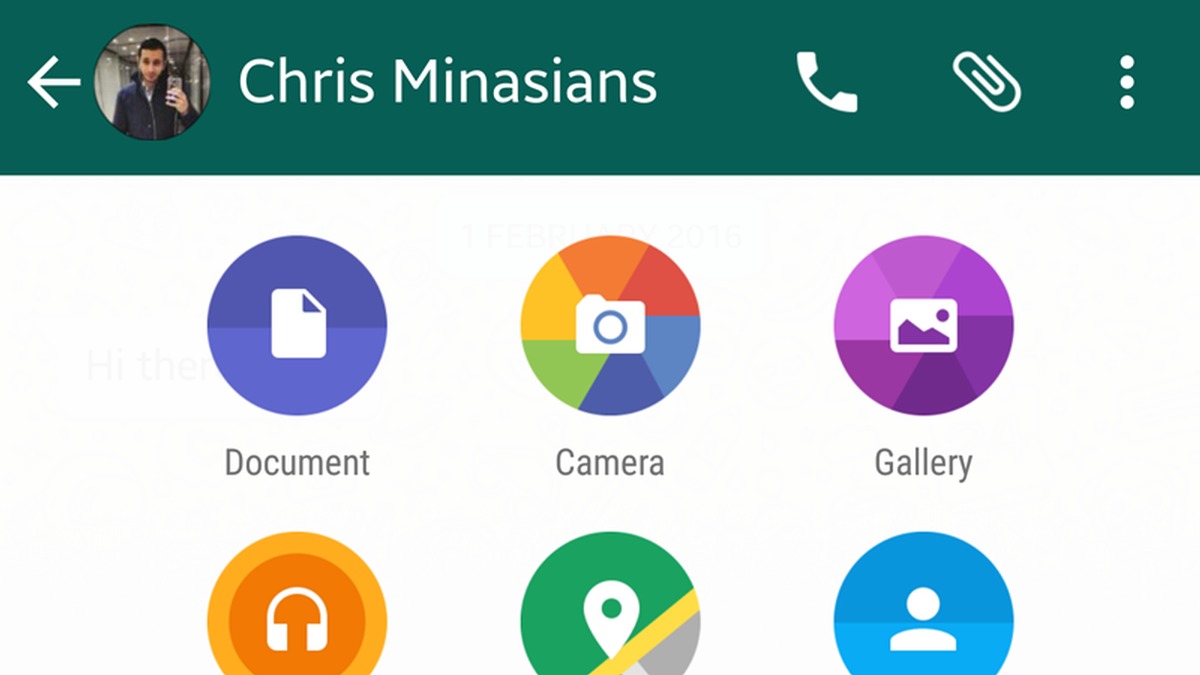
For iPhones: If the keyboard is closed, the “+” icon is at the bottom left corner of the screen. If the keyboard is open, the icon is right above it on the left side of the screen. On Android, tap the paperclip icon to attach a document.

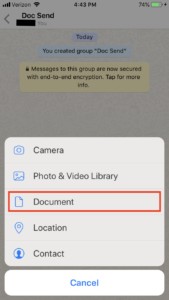
3. From the menu, choose “Document”

Once you have selected this option, at the top of your screen, another menu will appear for you to select the document you want to send.

4. Select the desired document to send and select send

Once you’ve chosen the document you want to send, click the “Send” button. The document should shortly be sent to your desired contact. Please note that depending on your internet reception, larger documents will take a longer time to send.

With these four steps in mind, sharing documents over WhatsApp should be straightforward and intuitive. Want to message slides to your colleagues the night before a presentation or send your feuding friends a scanned copy of the restaurant bill? You can do it quickly and easily, without the rigid and formal structure of email.

WhatsApp voice notes get a great new feature

WhatsApp ‘Consecutive voice messages’ feature will allow users to play voice notes back to back

WhatsApp voice notes have grown in prominence over the last few years. Voice notes started as quite a niche feature, but they’ve now been widely adopted by many users. Whether we’re sending small voice notes when we can’t be bothered to type or we’re sending epic 15-minute-long podcasts, we all use voice notes in different ways. It is the hands-free nature of voice notes that makes them so popular. For both sender and recipient, voice notes are easy to use because there is no fiddling about required. You simply hit record or play and away you go.

WhatsApp Messenger Download WhatsApp ►
8

That is, of course, unless you have just received a stream of multiple voice notes. If that is the case, you have to hit play to start each of them individually. This slight annoyance is in WhatsApp’s sights and there seems to be an update on the way that will do away with the need to hit play every time one voice note ends and you want to start the next one.

WhatsApp ‘Consecutive voice messages’ feature will allow users to play voice notes back to back

Thanks to another leak by the writers over at WABetaInfo, we can bring you details of this new feature for WhatsApp voice notes. Code for the new Consecutive voice messages feature has been spotted in the latest beta version of WhatsApp for Android.

The feature still has a way to go, however, before public testing will begin but the code for the new feature and various screenshots showing the feature in action have been published. When it finally does roll out, the feature will allow multiple voice notes to play continuously without the receiver having to hit play. It will work automatically whenever two or more voice notes are detected by WhatsApp.

Image via: WABetaInfo

Whenever you receive multiple voice notes, you will only have to hit play on the first voice note. After that, all other messages will begin playing automatically after the one before it has finished playing.

Interestingly, we might be about to start hearing brand new WhatsApp tones. The WhatsApp Web notification has become one of the most recognizable notification tones out there and the new consecutive voice note tones may be set to join it. There will be two new WhatsApp tones introduced with this feature. The first will let you know that the voice note you’re listening to is finished but that you have another one to follow it. The second tone will let you know that the final voice note has finished and there are no more to come.

This feature is yet to arrive on the WhatsApp beta, but it doesn’t look like WhatsApp beta users will have to wait long before they get to give it a try. The rest of us, however, will have to wait much longer for this feature to receive a wider roll-out. Make sure you stick with us to stay up to date with all the latest news relating to WhatsApp and your other favorite apps.

You definitely want to avoid this WhatsApp “update”

You need to ignore all invitations to receive to update to WhatsApp Gold

whatsapp gold martinelli fake update scam

There has been a scam making the rounds on WhatsApp and it is very important that you don’t fall for it. We’re always trying to keep you informed about WhatsApp scams and fake updates and we first reported on this scam back in 2016, but it seems to be back again. The scam is called WhatsApp Gold and it is spreading across WhatsApp via Status updates and chats forwarded from other users.

You need to ignore all invitations to receive to update to WhatsApp Gold

Downloading the fake WhatsApp Gold update will infect your phone and compromise your data. According to those who have been targeted, the WhatsApp Gold fake update is now being linked to another WhatsApp hoax called Martinelli. People have been receiving a strange message in their inboxes saying that a video called Martinelli will be released and, if opened, it will install a virus on the victim’s phone. The message is quite confusing and says:

“Today the radio was talking about WhatsApp Gold and it is true. There is a video that will be released tomorrow on WhatsApp and is called Martinelli. Do not open it. Enter your phone and nothing you do will fix it. Spread the message if you know someone. If you receive a message to update Whatsapp Gold Do not open it! They just announced that the virus is serious. Send it to everyone.”

The Martinelli video warning made the rounds on social media last year. Warnings were sent around telling people not to open the video as it would infect their phone. It turned out to be a complete hoax, however, as no video actually existed. It seems that the real WhatsApp Gold threat has, for some unknown reason, become attached to the fake Martinelli video warning.

The key here is to ignore any messages you might receive about WhatsApp updates. The real threat in this situation is the fake WhatsApp Gold update, which will install malware onto your phone if you install it. Any updates that ask you to download an apk file, to manually install on your device, are fake. WhatsApp updates occur automatically, so you never have to download or update anything.

Furthermore, you should make sure you only get your downloads and news about software updates from trusted sources like Softonic. We’ll bring you regular updates about WhatsApp from trusted sources like the official WhatsApp blog or WABetaInfo. To stay ahead of the news in a safe and secure way, sign up to our email newsletter by putting your email address in the box at the bottom of the page.


WhatsApp’s latest update could get you in trouble

WhatsApp will soon enable video previews in push notifications

whatsapp multimedia notifications

Back in July, we told you that WhatsApp was going to completely overhaul its notification system. WhatsApp notifications will begin to include the media from the messages they are notifying you about. If a message contains an image, then you’ll be able to view and download the image right there in the notification tray. We’re still waiting for a wider roll-out of the new notification system, but we’ve since learned that when it comes, it may contain a little added spice on top of what we first thought we were going to get.

WhatsApp Messenger Download WhatsApp ►
8

WhatsApp will soon enable video previews in push notifications

This news comes courtesy of the guys over at WABetaInfo. They reported via Tweet that some users have started to notice videos, from the messages they’re receiving, playing in their notification tray. What is interesting about the users talking about this is that they are not users of the WhatsApp beta, they are regular users. It looks like WhatsApp has begun rolling out this new feature to regular users. With no official word from WhatsApp, however, we’ll just have to wait and see how this unfolds over the next few days.

Once this update hits your device, it means that images and even videos will be visible on your lock screen!

Playing videos automatically on the lock screen and in the devices notification tray definitely opens up a number of privacy issues. If a device is left unattended or if the person using it is in a crowded environment, then there won’t be much stopping other people from seeing the videos playing in the user’s notifications. According to the reports, the previews don’t play the whole video, but there could still be enough on display to cause embarrassment or, even worse, some sort of security issue.

For people worried about scenarios like the ones we’ve described above, you’ll be glad to know that you’ll have the option to turn off the feature. Once we’ve received the update, we’ll make sure we post a tutorial on how to prevent images and videos showing up on your lock screen and in your notification tray. To make sure you don’t miss out on that, pop your email address in the box at the bottom of the page to receive our regular email updates.

This is just the latest of a number of new WhatsApp features on the horizon. Soon, we can also expect to see a new search function for WhatsApp Stickers, an updated contact sharing feature, and WhatsApp has even extended its iOS beta testing program.

Make sure you stick with us for all the latest WhatsApp related breaking news.

Big WhatsApp update incoming

WhatsApp has introduced a new group call feature on iOS

whatsapp group calls ios

We’ve had a lot of WhatsApp activity recently. From the proposed introduction of ads to the status tab to a brand-new way to share your contact details with new friends, big changes are coming to the popular messaging service. We’ve even seen the strange quirk that WhatsApp will soon start ranking your friends! We now have more WhatsApp news for you that will be interesting to anybody who is involved in at least one group chat.

WhatsApp Messenger Download WhatsApp ►
8

WhatsApp has introduced a new group call feature on iOS

Group chats have become an integral part of the WhatsApp experience. We are all now members of many different types of WhatsApp group chat: the family group, the sports practice group, the vacation planning group, the cool new films/TV series group, etc. With so many WhatsApp group chats flying around, some people are getting tired of the constant pings they receive.

One solution to receiving too many text messages is to call more. Thanks to a leak by the guys at WABetaInfo, it looks like WhatsApp is working on a way to allow us to call more while also benefiting from the dynamic we get from group chats. A new group call button has been spotted in the latest beta version of WhatsApp for iOS.

Image via: WABetaInfo

WhatsApp users who have the beta version for iOS installed on their phone will see a new group call button in their group chats. According to WABetaInfo, “When tapped, WhatsApp will present in a sheet a list of all possible participants you can start a call with… only 4 participants can be in a group call, you can only select 3 participants.”

This means that when the feature lands on your phone, you’ll be able to make group calls with up to three people from your contact list. Attempting to add more than three people to a call will set off an alert, warning you that three contacts plus yourself is the maximum amount you can add to a group call.

This new group call functionality marks an improvement over past attempts to add group calls to WhatsApp. In the past, you could only activate a group call after you’d started a private call, which was annoying, to say the least. The new mode makes it easier to start group calls directly and to easily decide whether to perform a group voice or video call.

At the moment, the feature is only available on iOS and only for users with the beta installed on their device. Group calls are not available on Android yet, but they will be available in the future.

iOS WhatsApp users can now see into the future

There is now an official public beta version of WhatsApp on iOS

WhatsApp

Here at Softonic, we’re constantly trying to keep you updated on all the big news relating to your favorite apps. We scour the beta versions of apps to try and figure out which new features are on the horizon. We now have some very interesting news relating to the beta version of WhatsApp, which Facebook uses to test new features.

WhatsApp Messenger Download WhatsApp ►
8

There is now an extended official public beta version of WhatsApp on iOS

There has been an official beta version for Android users of WhatsApp to test out upcoming features for quite some time now. Even the classic Windows Phone operating system had a beta version. For iPhone, however, the beta testing program, which forms an important part of the development process for new features, was always limited to select users. This has now changed with WhatsApp opening its iOS beta program to more users.

How to sign up for WhatsApp beta for iOS

  1. To join the WhatsApp beta for iOS program, you will need to download an app called TestFlight. TestFlight allows users to test various beta apps on iOS, tvOS, and watchOS devices.
  2. Once TestFlight is installed, click this link to request an invite to the beta testing program.
  3. After requesting your invite, you’ll be redirected to the appropriate TestFlight page, where you’ll be asked to accept your invite to the WhatsApp beta for iOS program.
  4. Before hitting install, it is a good idea to back up all of your chat history, even though installing the beta version of WhatsApp shouldn’t delete your chats.

The whole point of the beta testing phase is for the developers to receive real-world feedback on the new features they are testing. This means that the apps could well be unstable and cause issues on your phone. Also, and this is a very important point, if you do decide to join the beta program and then experience a technical issue, you should contact the developers to let them know. As you’re reporting on an app known to be in the test phase, the developers will pay more attention to what you are saying.

In the WhatsApp beta for iOS program app, all you have to do to report an issue is hit Contact Us in the settings menu and then give a brief description of the issue you faced.

WhatsApp will make it easier to share your contact details

A QR code enhanced “Add New Contact” feature has been spotted in a recent beta version of WhatsApp

wechat

Anybody who has ever used China’s biggest messaging app, WeChat, will be familiar with just how easy it is to share your contact details with new friends. All you have to do is open up your sharing page, which contains a QR code with all your details and your new friend simply needs to scan the code to put your details in their phonebook. The new Nametag feature on Instagram works the same way and it now looks like something similar is coming to WhatsApp.

WhatsApp Messenger Download WhatsApp ►
8

A QR code enhanced “Add New Contact” feature has been spotted in a recent beta version of WhatsApp

It seems that for regular users of WhatsApp there is a big update on the way. We’ve recently seen a slew of new features introduced to the advanced beta testing version of the app. Features like Picture-in-Picture display, which will allow users to watch videos while chatting have been spotted but are yet to receive a wider rollout. We can now add a new user interface feature for quickly adding new contacts to the list of expected features as the guys over at WABetaInfo have spotted the feature in the latest updated version of the WhatsApp beta app.

There is a similar feature that WhatsApp has run in the past, but this new updated version will completely replace it and build on its functionality. The new system requires users to hit Add contact and then select the country where the new contact is based. WhatsApp will automatically add the correct country code and then, when you’ve added the contact’s phone number, will tell you if the user is already on WhatsApp. It is a much simpler system for adding new contacts to the one currently found on WhatsApp.

The major change is the introduction of the QR code contact detail sharing system. The QR code will work in a similar way to how you activate WhatsApp web on a new computer. Users will be able to create their own contact details code and then share the code with new friends. When the code is scanned by another device, a new contact will be created and all the details held in the code will automatically fill out the contact on the new device.

This new feature was spotted on the iOS beta version of WhatsApp, but it is believed that it will also come to the Android version of the app, too. This makes complete sense as WhatsApp tries to push into the business world more and more as it gives businesses a great way of getting their official WhatsApp Business accounts out there and easy to find by regular users.

This small WhatsApp update will make a big difference

You’ll soon be able to search for different WhatsApp Stickers right in the app

whatsapp

WhatsApp’s recently introduced stickers feature offers users a new way of adding creative and fun elements to their WhatsApp chats. The feature, however, is still very new and accordingly is a little rough around the edges. That could be about to change soon though as WhatsApp looks set to add a basic yet important feature to WhatsApp Stickers.

WhatsApp Messenger Download WhatsApp ►
8

You’ll soon be able to search for different WhatsApp Stickers right in the app

At the moment, if you want to send a sticker on WhatsApp you have to open up the sticker tab and then search through the different categories you have on your device. They’re broken down into happy, sad, and surprised as well as most used and favorites. You can also click on the + sign to search for other sticker packs online that you can then download. Again, this needs to be done by scrolling through various categories and different packs until you find what you’re looking for.

According to WABetaInfo, this could all be about to change. They tweeted that a new magnifying glass search icon has been spotted in a beta version of WhatsApp for Android as well as a search bar for typing in your search queries. This could make it easier to find the exact sticker you are looking for, but the search terms could end up being rather strange. Searching for something like a crying poo siting on the toilet is just a little bit weird, to say the least.

The report by WABetaInfo only mentions the search feature coming to Android. There is no information at all about the feature coming to iOS yet. As always with these rumors, there is no guarantee that the feature will even make it to Android. There are a lot of prospective features on the WhatsApp horizon though, so there is a good chance that we could see one big update with all of the new features coming at once. We’ll just have to wait and see.