What does the Facebook Messenger, WhatsApp, and Instagram merger mean for you?

Will the Facebook, WhatsApp and Instagram merger affect my privacy?

Facebook has announced to the world plans to merge its three major products Facebook Messenger, WhatsApp, and Instagram. Facebook has owned WhatsApp and Instagram for a while now, but it promised both products would remain independent back when it acquired them. The planned merger then, sees Facebook going back on its word, but what else does it mean for users of the three big programs? Let’s take a look.

The Facebook Instagram and WhatsApp merger

First off, according to the report in The New York Times that first broke the story of the big merger, only the back end of each program will merge. This means that each product will remain distinct from each other. We won’t be getting one big social network that will replace Messenger, Instagram, and WhatsApp.

Instead, the merger will be a behind-the-scenes affair with the technology that makes each app run being linked rather than the apps on our phones. This does mean, however, that once the merger has gone through, WhatsApp users should be able to send messages to Messenger and Instagram users and vice versa.

Will the Facebook, WhatsApp and Instagram merger affect my privacy?

For this cross-app compatibility, the trade-off is privacy. Some lawmakers in the U.S. have already raised the alarm as the issue relates to both the past and the future. California congressman Ro Khanna (D) believes there should have been more scrutiny when Facebook acquired Instagram and WhatsApp in the first place. “Imagine how different the world would be if Facebook had to compete with Instagram and WhatsApp. That would have encouraged real competition that would have promoted privacy and benefited consumers,” Khanna said.

When Facebook bought Instagram and WhatsApp, it killed off competition, which could have led to the development of different profit models for social networks – profit models that might not have included the wholesale harvesting of data relating to everything you do online.

Moving forward, the merger brings together the data of users who’ve signed up to different social networks for different reasons. Your Facebook Messenger account may be much more open than your Instagram and WhatsApp account but once merged, all of the data will be kept together. In theory, this could offer Facebook a new way to monetize your data by cross-referencing your anonymous data with your more public profiles.

The flip side to this is encryption. Facebook claims that the merger will bring WhatsApp’s famous end-to-end encryption to Facebook Messenger and Instagram. Another potential benefit is the stronger anti-fraud protections that could come from consolidating three of your major social media accounts. It would be harder for somebody to pretend to be you if they weren’t using one of your main linked accounts.

The encryption issue, however, might not be that easy to implement. It could create an increased likelihood of error and crucially, could prevent Facebook from accessing data it already enjoys. Jim Fenton, an independent security expert told Wired, “It [bringing WhatsApp encryption to Messenger and Instagram] is too technically challenging and would cost Facebook access to lots of data.” This means we might never see it.

All of this means that it is still too early to say what the effects of the Facebook Messenger, WhatsApp, and Instagram merger will be. It is highly likely that we’ll be able to message each other across the three platforms but the true privacy implications are, as yet, unknown. Facebook claims to have privacy concerns at the heart of the merger but with lawmakers and privacy campaigners already raising concerns about the potential for abuse of such a big collection of user data, it’d be foolish to take Facebook’s word as it is. With the merger announcement itself breaking past promises from the social giant, it is clear that we should all tread carefully with this one.


Scam apps are all over the Play Store

The Google Play Store is packed with dangerous apps. Here’s what to look for.

scam apps

At the end of last year, the App Store and the Play Store removed a fake Alexa set-up app that was stealing users browser history and sending data to an unknown Chinese server.

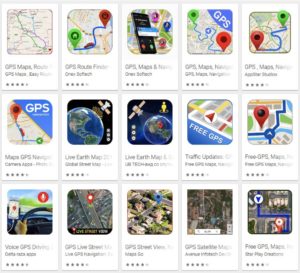
We also recently posted an article covering the fraudulent GPS apps lurking in the Play store, and popular apps like WhatsApp and Fortnite are repeat targets of scammers trying to get a cut of the action.

Suffice to say, users from both the Apple and Android sides of the aisle should tread carefully when it comes to downloads.

Scam apps have long been a problem, yet, it’s difficult for the platforms to get ahead of these bad actors.

Widespread ad fraud

A few months back, Buzzfeed published an article that revealed a massive fraud ring in the Google Play Store. A company, called, We Purchase Apps was responsible for stealing millions in ad revenue. The story broke back in October 2018, and it looks like the company has since taken down their website.

And then there are instances like this one involving Cheetah Mobile and Kika Tech in December 2018. It was discovered that the two popular apps were engaging in ad fraud, by way of three malicious SDKs: AltaMob, BatMobi, and YeahMobi.

In this case, the scheme was something called app install attribution abuse, which means SDKs fake the number of new downloads to receive the payout from the developer. Google did remove the apps in question, demanding that they remove the SDKs.

It’s easy to ask why Google doesn’t just pull these apps automatically and inform consumers of fraudulent activity. But the sheer volume makes this a near-impossible task. Mobile attribution firm, AppsFlyer looked at 17 billion app installs spanning 7,000 apps globally. According to their findings, more than a quarter of those apps have engaged some form of install fraud.

The reason is, anyone can create and upload an app — and with so many amateur developers competing for space on the platform, there are plenty of opportunities for scammers to slip through the cracks.

A look at some of the biggest Play Store scams in recent memory

Fortnite fakers

Like WhatsApp, scammers are capitalizing on another one of the biggest apps in the game; Fortnite. Fortnite is a prime target for scammers, as the app is free and can be played across game consoles, phones, and PCs. While scams have spanned a range of mediums—the Play store has been walloped by fake apps.

One example is this Google Play app that claimed to help users earn free V-Bucks. As you can see in the image below, the scammers benefitted by including a link that “automatically gives the app a five-star rating.” That skewed results and prompted more downloads.

fortnite android scam

Navigation apps

Researcher Lukas Stefanko of ESET found that the Google Play Store is loaded with navigation apps that pass Google Maps off as their own, then run ads over the program. Stefanko says that creating these fake apps is easy — all scammers need to do is add a small modification and they can start making ad revenue.

While the problem may be more of an issue for advertisers, consumers have found that the apps ask for a lot of information that has nothing to do with the program.

fake google map fraud

Fake WhatsApp

Over a million people were tricked into downloaded fake Android apps posing as WhatsApp. Initially, the fraudulent app was called “Update WhatsApp,” then it changed its name to “Dual Whatsweb Update” when users started to catch on.

Battery saver and performance booster fakes

battery saver apps

Many of the fraudulent apps currently lurking in the Play Store are apps that claim to save your battery charge or boost performance by freeing up RAM.

These apps are BS. They don’t do anything except give you a little animation to look at;  a technical representation of how “hard” the tool is working to generate more power.

Avoid these so-called performance boosters, as their advertised benefits are things your phone does automatically.

Apple users aren’t off the hook

Sure, Google might get more attention for their massive collection of scammy Android apps, but the App Store has its own share of problems.  One example is a Touch ID scam, a tactic that asks for your thumbprint or Face ID to authorize charges that, according to Wired, range from $90 to $120 each.

There have been several instances of these scams showing up in fitness assistant or health-focused apps, like this heart rate monitor or a since-removed app called Fitness Balance.

Tips for staying safe while shopping Google Play

The common wisdom for Play Store installs is; don’t download anything from malicious third-party apps. Unfortunately, fraudsters are becoming increasingly sophisticated.

These days you’ll need to be more careful; try the following preventive measures to lower your risk of installing infected apps:

  • Make sure you download from reputable sources only. Okay, duh. But, just a reminder: the top search result is usually the “official” version of the app you’re looking for. Double-check that the official developer posted the app. Additionally, add-ons or “cheat” apps like the Fortnite example from third-parties are especially risky, so be extra careful with these.
  • Read the reviews. Chances are, an infected app will have some low ratings, along with several bad reviews.
  • Do not change any security settings or root your device.
  • Use a reputable anti-virus scanner. While PCs are the usual malware victims, hackers can also break into your phone.

  • Check app permissions before downloading. Make sure permissions make sense. Granting access to sensitive data should be a red flag, so just double check that the fine print seems within the normal range.

Remember that you can also download apps from Softonic’s catalog as well, and we ensure that the apps we carry are free from any malware. Stay safe out there!

WhatsApp changes to fight fake news

WhatsApp is limiting message forwarding to fight fake news

Does WhatsApp spread fake news?

As well as the well-known problems Facebook has been dealing with recently, Facebook-owned WhatsApp has also been grabbing its own fair share of negative headlines. For too long, it has been easy for fake news to spread via the encrypted messaging app. This has led to a controversial far-right politician being elected president in Brazil and a series of brutal murders and lynchings in India.

These developments have had the team at WhatsApp scrambling to come up with a solution to its fake news problem that wouldn’t encroach on the core function WhatsApp has grown to offer. It seems that now, they’ve finally found a way to help curb the spread of fake news without taking away from user privacy or sacrificing any of WhatsApp’s big new features. A test WhatsApp has been running in India for the last few months is now being rolled-out globally.

WhatsApp Messenger Download WhatsApp ►
8

WhatsApp is limiting message forwarding to fight fake news

Fake news has been spreading like wildfire across the WhatsApp network as users have been able to forward any story they received with the simple click of a button. WhatsApp’s encryption has also meant that fact checkers have been unable to verify the information in the stories being spread. The dilemma for WhatsApp was whether to limit the message forwarding feature or allow third-parties access to the messages being sent across the network. WhatsApp chose the former.

The first step was the introduction of the Forwarded label, which shows whenever you receive a message that has been forwarded to you. This was coupled with a test of a limit on the amount of times a message could be forwarded, which was implemented in India last July. The forwarding limit has now been extended to the rest of the world.

In a recent statement, a WhatsApp spokesperson said, “Starting today, all users on the latest versions of WhatsApp can now forward to only five chats at once, which will help keep WhatsApp focused on private messaging with close contacts.” This backed up an earlier report by Reuters that quoted Victoria Grand, vice-president for policy and communications at WhatsApp as saying, “We’re imposing a limit of five messages all over the world.”

The new limit means that you can now only forward messages, images, or documents to a maximum of five contacts or groups. WhatsApp believes that this allows users to continue sharing what they love with their friends and families while stamping out a potential path to abuse. The same WhatsApp spokesperson said of the new limit, “[We] carefully evaluated this test and listened to user feedback over a six-month period. The forward limit significantly reduced forwarded messages around the world.”

According to WhatsApp , progress has been made but the war continues, however, with WhatsApp going on to say, “We’ll continue to listen to user feedback about their experience, and over time, look for new ways of addressing viral content.”

New WhatsApp bug deletes messages

A new WhatsApp bug is randomly deleting old messages from some Android phones

whatsapp

There are many ways that modern messaging apps like WhatsApp and Facebook Messenger mark an improvement on the standard SMS. One of the most obvious, however, is the continuous chat display and the ever-present back up of all your own messages. WhatsApp has even signed a deal with Google to have WhatsApp messages backed up forever and without limits on Google Drive. Permanent backups are a great feature if they work properly but, unfortunately, things don’t always go to plan.

WhatsApp Messenger Download WhatsApp ►
8

A new WhatsApp bug is randomly deleting old messages from some Android phones

People have begun reporting a WhatsApp bug that has been deleting their chat histories. Yep, those chat histories that are supposed to last forever have been disappearing from people’s Android phones. The good news for all you Apple fanboys, however, is that so far, the bug hasn’t been affecting iPhones.

A Moto G4 Plus user who was the first person to highlight the new bug. He brought it to the attention of the guys at WABetaInfo. They then tweeted about the bug, and since then many more users have come forward to report their messages have been disappearing, too.

The bug seems to have been evolving, too. It first appeared to be deleting old chats in chronological order, but it has now begun targeting and deleting chats at random. Interestingly, when WhatsApp recently announced the migration of chat backups to Google Drive, it informed users that they’d have to perform a manual backup at least once, to activate the migration, or the backups would be deleted. It doesn’t appear, however, that the two issues are related.

If you’ve noticed that your WhatsApp chat histories have been disappearing recently, there is a good chance this bug has been affecting you, too. The bad news is that there is no official fix available to help you at this time.

But help may be on the way. In a report by Tech 2, WhatsApp has said, “We are aware of this bug and are working on a fix for the users who have encountered this issue.” The WhatsApp statement, however, doesn’t say whether the fix will help affected users recover their lost messages or will simply stop more users being affected.

If you’ve been affected by this or any other WhatsApp bug, we’d love to hear about it in the comments below or via social media.

WhatsApp on Android is getting a significant security boost

Touch ID authentication is coming to WhatsApp for Android

Touch ID on Android WhatsApp

WhatsApp is famous for the end-to-end encryption on its messages. Messages can’t be intercepted and read thanks to the rigid way WhatsApp encrypts messages once they’re sent and then decrypts them again once they’re received. The problem with that is that if somebody can get their hands on your phone, your messages will be easy prey. To combat this, WhatsApp has added something to the latest beta version of WhatsApp on Android.

WhatsApp Messenger Download WhatsApp ►
8

Touch ID authentication is coming to WhatsApp for Android

It was back in October when WhatsApp started working on adding Touch and Face ID authentication to the iOS version of the app. Now, almost three months later, we can finally tell you that Touch ID, at least, is coming to Android.

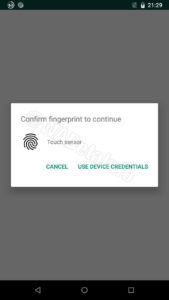
The feature will give Android users the opportunity to set up a fingerprint login specifically for WhatsApp. This will be apart from the regular security credentials for your phone, so if somebody else knows your PIN or has been authorized to use your phone for whatever, they still won’t be able to access WhatsApp. WhatsApp will still offer the ability to login using your device credentials, however, in case of emergencies. The feature will protect the whole app rather just individual chats or groups.

Image via: WABetaInfo

Obviously, if this new feature is going to work on your phone, it will need a fingerprint sensor and to be running a version of Android from Marshmallow onward.

The new feature was spotted by WABetaInfo. As is always the case with this type of feature, WhatsApp hasn’t announced anything officially and there is no word about a specific release date for the feature. If these features make it to a public testing phase, however, it is usually a good indication that they are well on their way to a wider roll-out to all WhatsApp users.

The bad news though, is that this feature isn’t yet available for members of the WhatsApp beta testing program, which means it is still quite a way from receiving a general release. WABetaInfo cites “development reasons” for it still being unavailable to the beta testers and remaining in the alpha phase. There is still a long way to go and a few new features need to be added before WhatsApp will move it along its development path.

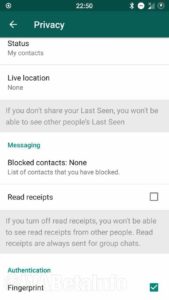
Image via: WABetaInfo

When it does arrive, however, it’ll be found in a brand-new tab that WhatsApp is working on called the Privacy tab. The Privacy tab will be where you’ll be able to control things like Read Receipts, Blocked Contacts, and the sharing of your Live Location. Again though, we have no news about when the Privacy tab will launch so we’ll just have to keep our eyes open for future updates.

WhatsApp Stickers get a huge boost on iOS

Soon you’ll be able to use WhatsApp Stickers on images, videos, and GIFs.

whatsapp stickers on iOS

It was January 2018 when we first told you that WhatsApp would be adding stickers to its chats. It took until October, however, for the feature to finally land on the app. When Stickers first arrived, they were pretty basic, but since then they’ve developed quite a bit getting a new search feature and you can also now make your own sticker sets from photos you’ve taken. It now looks like WhatsApp is planning on adding some new capabilities to the Stickers feature, for iOS users at least.

WhatsApp Messenger Download WhatsApp ►
8

Soon you’ll be able to use WhatsApp Stickers on images, videos, and GIFs

The latest beta version of WhatsApp for iOS has shown a surprising new feature for WhatsApp Stickers. When the update hits the App Store, users may be able to put stickers onto any image, video, or GIF they send via WhatsApp. For example, if you want to put a location sticker onto a photo this new feature will enable you to do so.

Once the feature is live on your version of WhatsApp, it couldn’t be easier to use. When you select an image to send and then click on the emoji sign, you’ll be able to toggle between the Emoji and Sticker tabs. Clicking the Stickers tab will open up the different stickers options you have available on your version of WhatsApp. Once you’ve chosen your sticker, you’ll be able to resize it and move it around the image before sticking it down. For a simple to follow tutorial on how to create your own WhatsApp Sticker packs click the link below.

This update was spotted in the iOS beta version of WhatsApp by the guys over at WABetaInfo. There is no information yet about when we can expect to see this feature roll-out to all WhatsApp users, but at least we know it is on the horizon.

In other recent WhatsApp for iOS news, we’ve seen that a rather handy tool for the more private WhatsApp users out there is finally coming to iOS. The Reply Privately button has been available for Android users of WhatsApp for some time now. The feature allows you to respond privately to a group message by opening up a private chat, with the contact you’re replying to, and quoting the original message and group it came from. Thanks again to the guys at WABetaInfo, we can tell you that this feature is also being tested in the latest beta version of WhatsApp for iOS.

WhatsApp update: This group chat feature for Android is finally coming to iOS

The Reply Privately feature has been spotted in the latest beta version of WhatsApp for iOS

WhatsApp iOS

WhatsApp group chats are great. They put us in contact with lots of different people, all at the same time. This is great if you have something to announce to your friends and family but can be a little frustrating when you have something more private to say. To address this issue, back in October, WhatsApp released a Reply Privately feature for WhatsApp on Android. It now looks like this feature is finally coming to WhatsApp on iOS, too.

WhatsApp Messenger Download WhatsApp ►
8

The Reply Privately feature has been spotted in the latest beta version of WhatsApp for iOS

The Reply Privately feature does what you would expect it to. If you would like to respond to a group message without everybody else knowing what you’ve said, the Reply Privately feature allows you to do so. When the feature receives a wide roll-out to all WhatsApp users on iOS, all participants in groups will be able to respond to messages privately. WhatsApp for iOS previously included a more limited Reply Privately, which only allowed users to reply privately to messages from groups they’d previously left.

The feature has been spotted in the iOS beta version of WhatsApp by the guys over at WABetaInfo and they describe it as working in the same way on iOS as it does on Android.

To reply to a group message privately all you have to do is select the message and then tap the three dots icon to open up the message menu. If you then tap the Reply Privately button, you’ll be taken to the personal chat window for that particular contact and the message from the group chat will be quoted. In the quote, the name of the group will also be included next to the name of the contact you’re replying to.

new whatsaap ios update
Image via: WABetaInfo

All Android users can already use this feature and it has now come to the phones of members of the WhatsApp iOS beta program. According to the report by WABetaInfo, the Reply Privately feature should be a part of the official WhatsApp for iOS update 2.19.10 when that finally hits the app store.

It isn’t often that Android WhatsApp users get the new features before iOS users, but this might just be the exception that proves the rule. If you’d like to sign up for the WhatsApp beta program so that you can get your hands on all the latest WhatsApp features before anybody else, you can do so by clicking the link below and following the simple tutorial we’ve prepared. We’ve also prepared a simple tutorial for signing up to the beta program of many of your other favorite apps, too. You can find that tutorial at the bottom of the page.

New Instagram update gives it one of WhatsApp’s best features

Instagram gets WhatsApp-style voice notes for direct messages.

WhatsApp and Instagram

Once a humble text messaging app, WhatsApp quickly grew to become an all-conquering communication service with lots of incredibly useful features. WhatsApp’s most loved features include the quick and easy voice notes users can send to each other. Voice notes are so popular, WhatsApp has been working on ways to make them better. They’re also so popular that another Facebook-owned service, Instagram, is trying to get in on the action.

Instagram Download Instagram
7

Instagram gets WhatsApp-style voice notes for direct messages

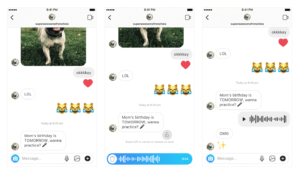
The new Instagram voice notes are easy to use. They work in much the same way as voice notes on WhatsApp. When you’re sending direct messages in Instagram, all you have to do to send a voice note is tap and hold the microphone button that is now found in the text box. Instagram will record your voice note until you release the button and then send it to your friend.

Voice notes are great for when you are messaging in a hurry, but they are also excellent for when you are trying to send a lot of information at once or some sort of complicated explanation. In these situations, if you don’t want to keep holding the microphone button while you are recording your voice note, you can lock the recording, so it will continue once you release the button. To do this, all you have to do is drag your finger up when you are holding the microphone button. If you make a mistake while you are recording a voice note and you want to cancel it, you can do so by either dragging your finger across to the trash can icon or, if you’ve locked the recording, you can simply tap it.

whatsapp style voice notes Instagram

Voice notes are a great feature for any messaging service to have so this is a real boost for anybody who sends most of their direct messages using Instagram.

We’ve recently seen a number of updates coming to the hip social network. The recent Close Friends update makes it easier for you to control who will see your Instagram Stories, and user profiles have also recently been tweaked to emphasize the user bio more, rather than follower count. All of these added to an updated messaging service that now comes complete with voice notes make Instagram a much friendlier social network. One that could help foster genuine communication between real friends rather than open up our lives to a world of new strangers who can peer into our lives from behind the veil of anonymity that the internet provides. This represents a move back towards the original core missions of the first social networks.

Instagram voice notes have already received a global roll-out on both iOS and Android. All you have to do to use them is open up a direct message to one of your friends.

3 businesses that tried using WhatsApp to help customers

Can WhatsApp be the future of customer service?

whatsapp

The WhatsApp Business API has opened a whole new world for businesses to provide customer support. Imagine the possibilities: Rather than wasting hours of your day on hold with customer support, perhaps one day you can WhatsApp message the customer support representatives for numerous businesses around the world. Here are just three of the innovative companies that have tested WhatsApp to provide customer support.

3 businesses that have tested WhatsApp for customer support

1. Wish

Wish is a shopping app where you can buy thousands of items at steep discounts. The company sells products that are brandless, so you don’t have to pay an unnecessary markup. Reports suggest Wish has tested the use of WhatsApp for its customer support.

The reason the app considered WhatsApp for customer support issues is that a lot of their merchandise is being shipped from overseas. That means it can occasionally get lost or damaged in transit. Successfully using WhatsApp for customer support would save many customers from having to wait around on the phone. The CEO of Wish called WhatsApp “a great solution to cut through the noise and connect with customers in the most critical moments of the purchase experience.”

2. Uber

The popular ride-sharing service dabbled with using WhatsApp for customer support. However, Uber didn’t turn to WhatsApp for its customers — it tested WhatsApp for receiving drivers’ questions.

WhatsApp’s role is to connect drivers to members of its team so they can voice any questions or complaints. This could save drivers a lot of time because messaging via WhatsApp is much quicker than the traditional methods of customer support.

Uber’s Head of Product VP noted, “We’re thrilled to partner with WhatsApp to give drivers in cities around the globe a fast, familiar and reliable way to connect with a member of our team and get their questions answered.”

3. Netflix

Netflix was one of the first business partners to explore the WhatsApp business feature of customer support. Netflix has tested this feature both in India and the United Kingdom. Users can expect more than just the basic customer service features on WhatsApp.

Netflix has designed its WhatsApp customer support specifically to send account messages and suggestions regarding what to watch. This means that you can simply message Netflix on WhatsApp about what TV shows you like and receive suggestions for what shows you should watch next. This is certainly some next-level customer support coming from Netflix.

The future of WhatsApp customer support

These innovative companies are truly pushing the boundaries for what customer service can be. With the help of WhatsApp, many large companies like Wish, Uber, and Netflix are discovering how to deliver amazing customer support through the ease of a smartphone application. And who knows what businesses will one day follow suit?

New sharing features coming to WhatsApp

Support for sharing files to multiple contacts at the same time is coming to WhatsApp

New update to whatsapp how to share

WhatsApp is testing a new feature that will make it easier for you to share files with your friends and family. It started as a Multi Share Text feature, which allows users to share text from another app to more than one contact at the same time. Now, it’s evolved into something bigger.

WhatsApp Messenger Download WhatsApp ►
8

Support for sharing files to multiple contacts at the same time is coming to WhatsApp

The beta version of this new feature has already begun rolling out to members of the WhatsApp beta program. It works exactly like the Multi Share Text feature that came before it. To activate the feature, users need to share something from another app with more than two of their contacts. WhatsApp will do the rest. The feature will even show previews of the file and text to be shared, and will even play previews of the audio files that are being sent to each contact.

This is a simple update for WhatsApp, but it’s one that will offer a lot of functionality to users. Although we are all members of multiple WhatsApp groups these days, we’re not always in groups with the people we want to share things. Often, even if we are, we don’t want to share things with everybody else who is in the group. When the Multi Text and Multi File sharing tools get a wider roll-out to all WhatsApp users, we imagine they’ll be popular.

Unfortunately, we don’t know when this update will come to all WhatsApp users. The guys at WABetaInfo aren’t even sure when it will come to the beta testing version of the app, so we can expect it to be a way off for the rest of us. Fortunately, however, they report that WhatsApp is able to remotely enable the feature, so it could be turned on for beta users at any moment.

If you’d like to become a member of the WhatsApp beta program and gain early access to all the new features coming to the app, we can help you. All you have to do is follow the instructions we’ve laid out in the tutorial above. It isn’t just WhatsApp either. The beta testing phase is an important part of app and software development, so almost all big apps have a beta program. We’ve also laid out clear instructions for signing up to the beta testing phases for some of the most popular apps around. Check it out below.

Remember, stick with Softonic to stay one step ahead.