If you haven’t heard about a new web browser called Brave, let’s get you caught up because there’s virtually no reason you wouldn’t want to use it. When it comes to picking a web browser there are primarily three things you want: speed, security, and a personalized UI that caters to your preferences.
Browse the web up to 8x faster than Chrome and Safari.DOWNLOAD NOW
Enjoy private, secure and fast browsing with Brave.
Brave has got those three elements covered, and in ways you didn’t even know you needed. Created by some of the same team that brought us Mozilla Firefox (including its co-founder and CEO, Brendan Eich), what makes this browser so incredible (and so wicked fast) is that it will automatically block all trackers (meaning you won’t need your adblocker here) and eliminates cookies, pop-ups, and ads.
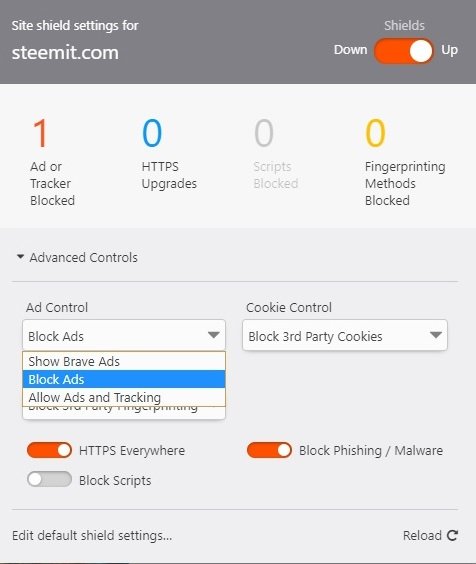
Brave’s default utilities will auto-upgrade any existing connections to websites to HTTPS protocol, which will bump up your safety even more. You can further customize by adjusting firewall and shield preferences in settings.
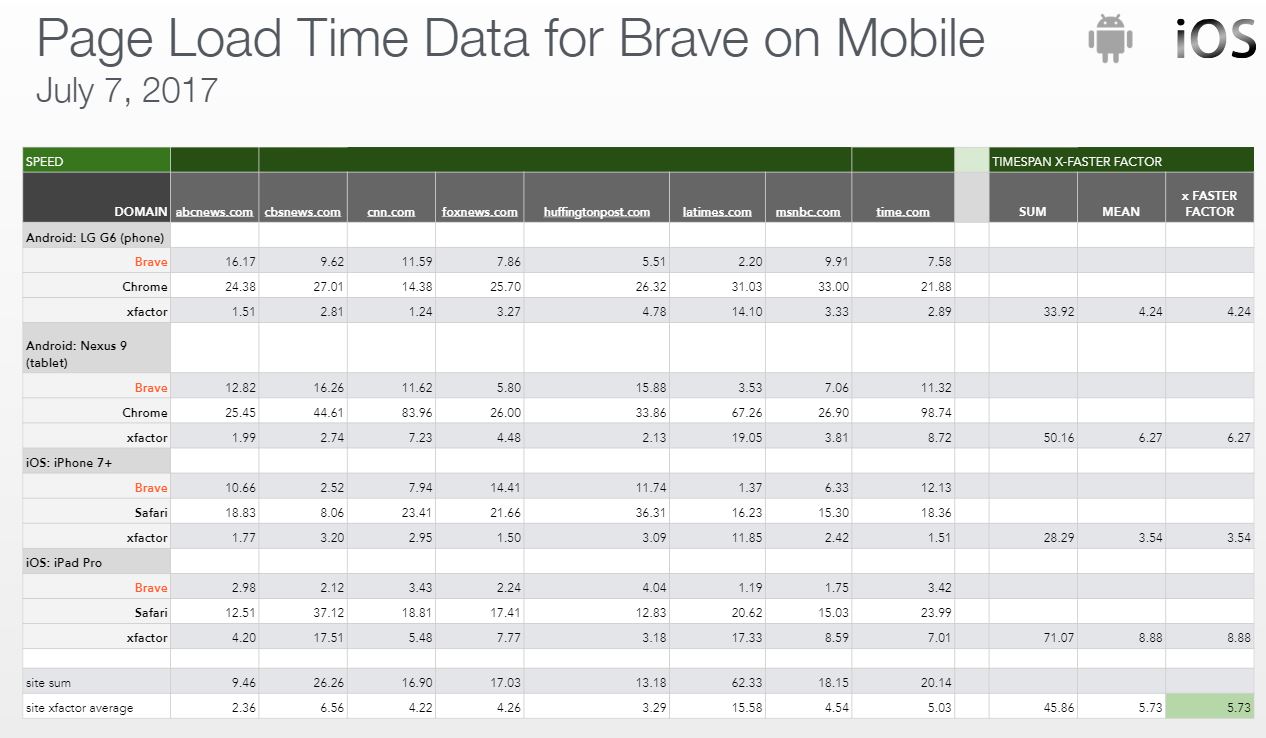
The end result is that your browser is not only safer – it’s way faster, too: You’ll find your browsing speed on desktop and laptop to be about doubled, and it’s even better on mobile devices – pages load as much as eight times faster! If you don’t believe us, check Brave out yourself, 100% free.
Browse the web up to 8x faster than Chrome and Safari.DOWNLOAD NOW
Enjoy private, secure and fast browsing with Brave.
Just click right here and we’ll take you to our download page. Here you’ll be able to download Brave for free. You can also check out our reviews, weigh in on its pros and cons, and even write up your own review or rating.
2. Click the Free Download button
This will download the Brave installer. You can click it as soon as it’s ready, or find it in your Downloads folder. If you’re not downloading it for Windows, be sure to switch it to Mac before you hit download. To do this, simply press the ‘+’ icon in the side description.
3. Open and run the installer
Click ‘Run’ and it’ll do its thing. Less than 30 seconds later, you’ll have an awesome new browser downloaded and ready to work. This installer will download incredibly fast – even if you’re running your device on low power settings.
And that’s literally it.
You now have a browser that’s faster, more secure, will keep you free of targeted ads and banners, never stores your data for its own distribution, and that uses a higher level of versatile functionality that allows you to browse the internet in whatever manner you like.
Import your stuff
A house is not a home, and it’s hard to get excited about switching over to a new browser if you’ve been using the same Chrome, Opera, Edge, or Firefox for as long as you can remember. A new browser doesn’t have the same charm, familiarity, and ‘lived in’ feel as the old.
Except wait, it actually does:
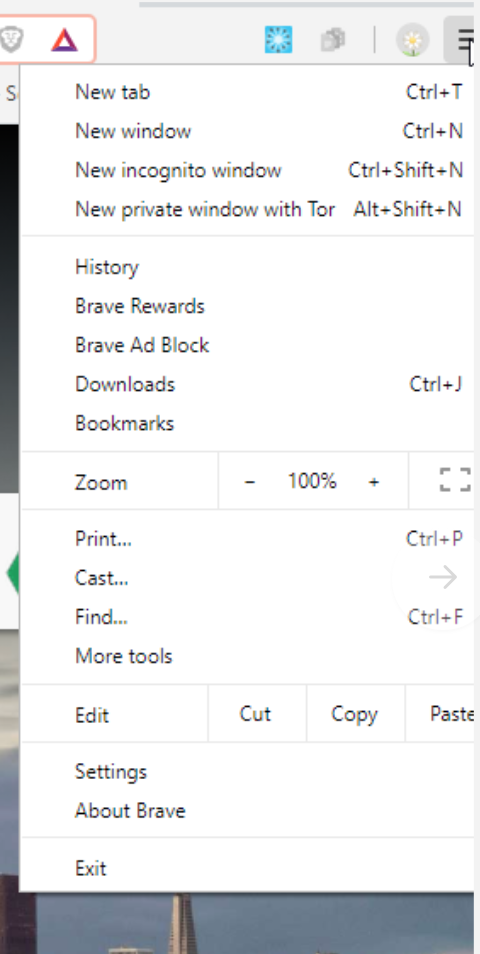
As soon as you open Brave for the first time you’ll see a banner right on the first screen asking if you want to import your bookmarks. If you missed that banner, you can just open your settings by clicking on this symbol on the top right:
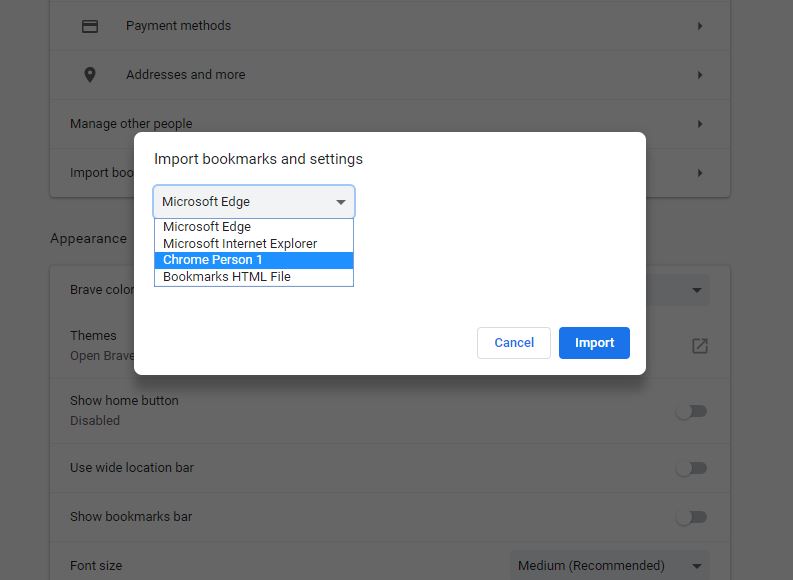
Click Settings and it’ll take you right to the page. Right in the top box of options you’ll see ‘import bookmarks and settings.’
Click that and use the drop-down to select the browser from which you’d like to pull all your bookmarks, like saved YouTube vids, links to websites you frequent, etc. Just click ‘import’ and you’ll see your old bookmarks bar right up top, including a handy folder labeled ‘imported from Chrome’ or ‘imported from Opera;’ whichever browser(s) you pulled from.
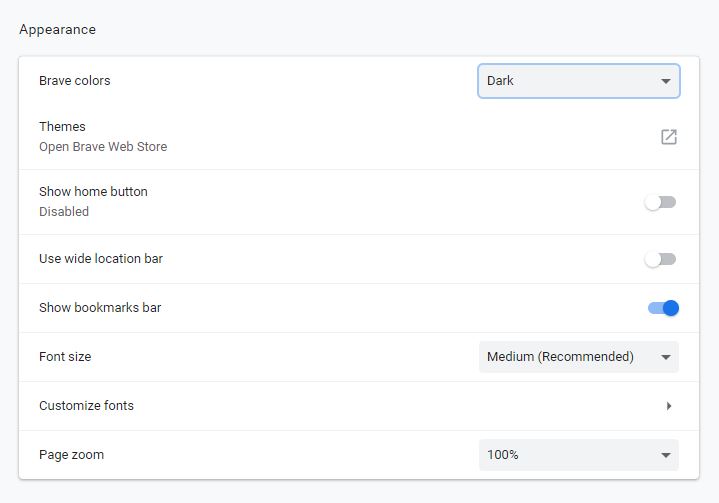
After that, it’s just a matter of adjusting any other settings on that page that you like. That goes for font size, default search engine (we recommend DuckDuckGo with Brave in the US, or Qwant in Europe), control how Brave manages ads and cookies, fingerprinting protection – we were pleasantly surprised that there was even a dark theme.
Once you get comfortable with the basics, you will want to check out other cool features such as Brave Rewards, an interesting way to continue to support the publishers who have lost revenue from blocked ads. It leverages a blockchain-based token system which you can fund directly or earn credits through your browsing and then use them to “tip” your favorite content creators. If you’re still skeptical about whether this faster, safer, ad-free browser is for you, check out our other articles on Brave. Better yet, check it out for yourself right now and you be the judge! Let us know in the comments below if you’re satisfied with a browser that is quick, won’t treat you like a product, and introduces “a new way of thinking about how the web works.”
Browse the web up to 8x faster than Chrome and Safari.DOWNLOAD NOW
Enjoy private, secure and fast browsing with Brave.
The BAT could revolutionize the online content world and get rid of annoying ads.
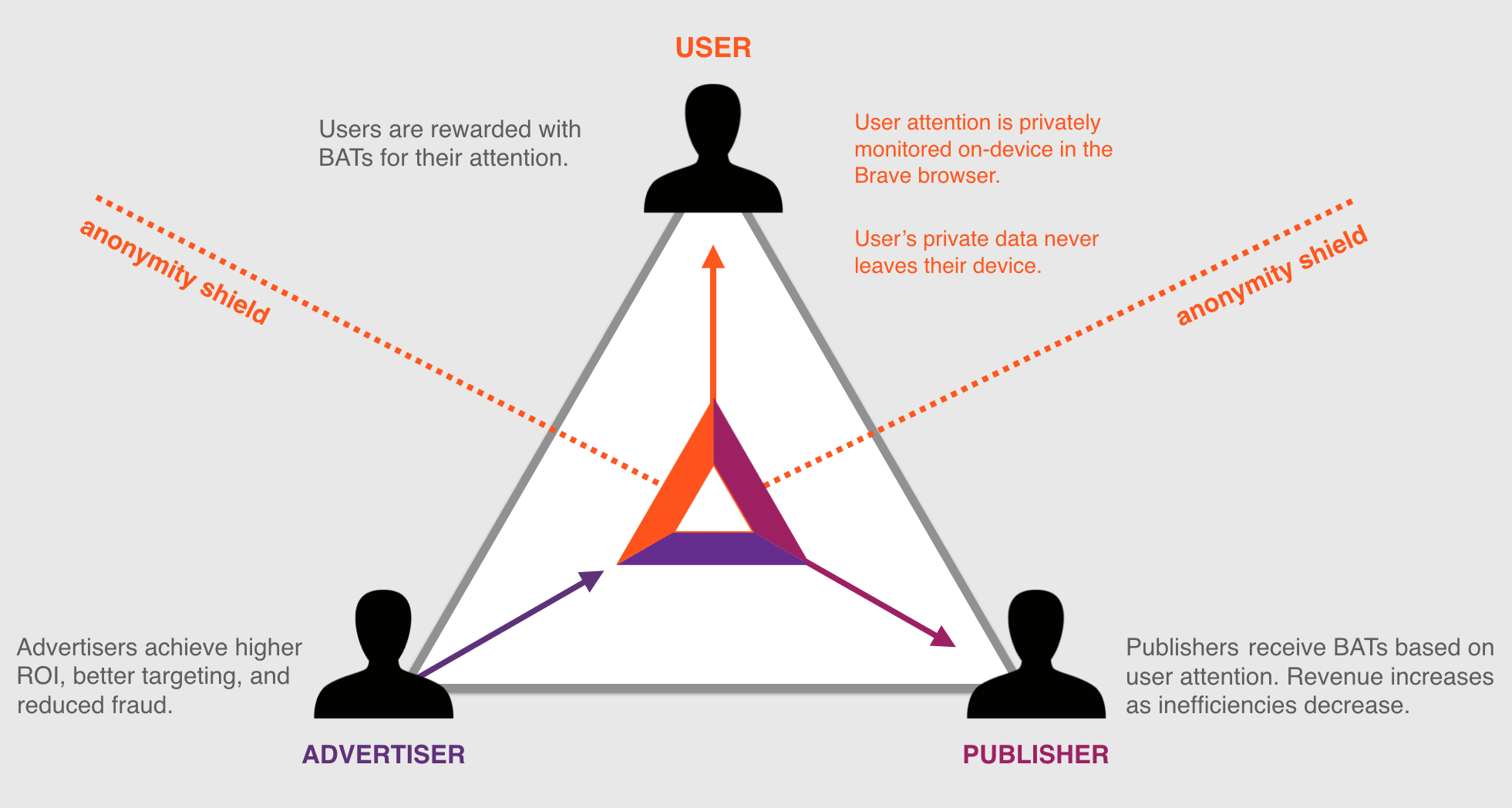
Brave believes the current online ecosystem is broken. The relationship is comprised of three parties: The publishers of content, the advertising and marketing companies, and everyday consumers. Brave’s Ben Livshits calls it “the Bermuda Triangle of advertising,” and it’s a scenario in which none of those three parties are happy. “This is an ecosystem that is ultimately suffering and is not sustainable,” says Livshits. “We’re trying to build something else using our browser; we’re using Brave as the cornerstone.”
Browse the web up to 8x faster than Chrome and Safari.DOWNLOAD NOW
Enjoy private, secure and fast browsing with Brave.
How do users suffer?
“Users suffer from ad overload and tracker overload,” says Brendan Eich, CEO and co-founder of Brave. And he’s not wrong. Popular media sites can have as many as 70 trackers, all vying for your attention at once, taking your bandwidth, costing you money you spend on that bandwidth, and drastically slowing down the loading times of websites. Malware has gone up by 132% in just one year. Users “feel like they’re stalked by ads, they’re tracked by ads, they’re spending more on data plans just to download the ad tracker scripts.”
As it turns out, underlying ad technology can result in up to 60% of a page’s loading time. If that statistic doesn’t phase you, the frightening truth is that upwards of 20% of that loading time is for websites to learn more about you and report that information to the creators of the content, and the advertisers who pay for it.
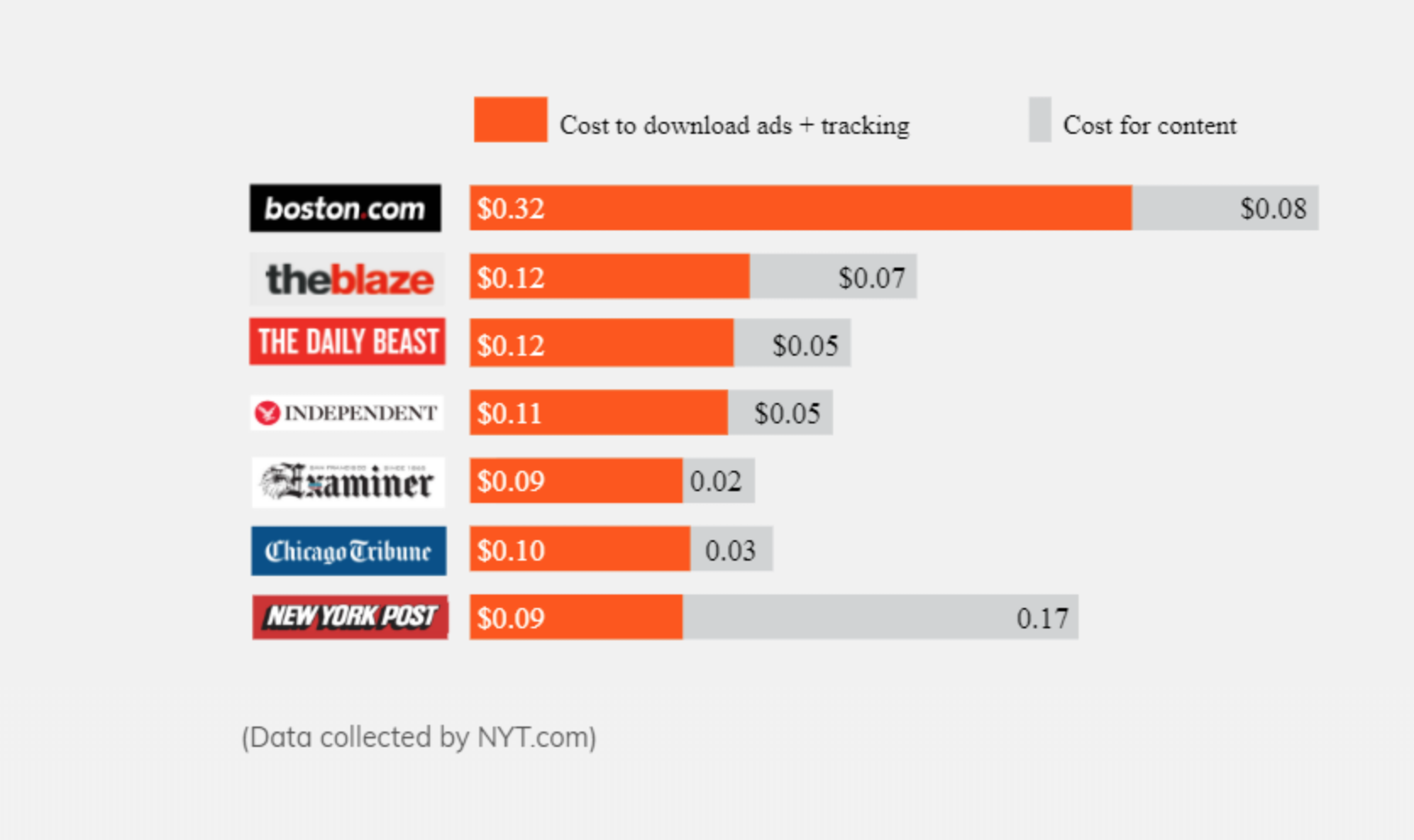
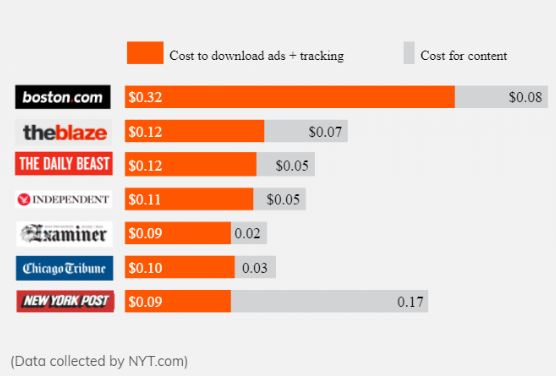
Remember, you’re paying for that bandwidth and it’s being spent on ads, which you never asked for and likely do not want taking up your bandwidth. “It’s hard to believe,” says Eich, “but we’re paying to be bothered by ads!” As much as 50% of the average user’s mobile data is for ads and trackers. According to the New York Times, that sum amounts to about $23 a month – $276 a year! – that’s for your browser to load minutiae that you didn’t want to see anyway. It’s also bogging down your loading times and takes around five extra seconds per page on mobile devices – costing you data and draining as much as 21% of a phone’s battery life.
How do publishers suffer?
Monopoly companies and titanic mergers dominating the global market are sadly not news in 2018, so it probably won’t come as a surprise that the same one-sided battle is hurting the online economy as well. The extent to which it’s happening may surprise you, however: Google and Facebook take 73% of all ad dollars … and experience 99% of all growth. All the small start-ups online may be gaining traction and momentum at their own pace, but their successes fuel the big guys too, and it’s hurting everyone else. Revenue for online publishers has gone down by a demoralizing 66%.
Users may not care right now, but ad blockers could ultimately affect the amount of free content available from places like news sites, forums, or blogs. Why? If companies aren’t generating revenue from ads anymore (due to ad blocking, for example), they need to get that money some other way. That means users will have to start paying for more base content.
Or many of these publisher likely will just go out of business. Over 600 million phones and desktops already run ad blocking and that number is only climbing. It’s leading us to an online economy in which publishers can no longer easily monetize value-added services, and that’s going to affect everyone.
Badly.
How do advertisers suffer?
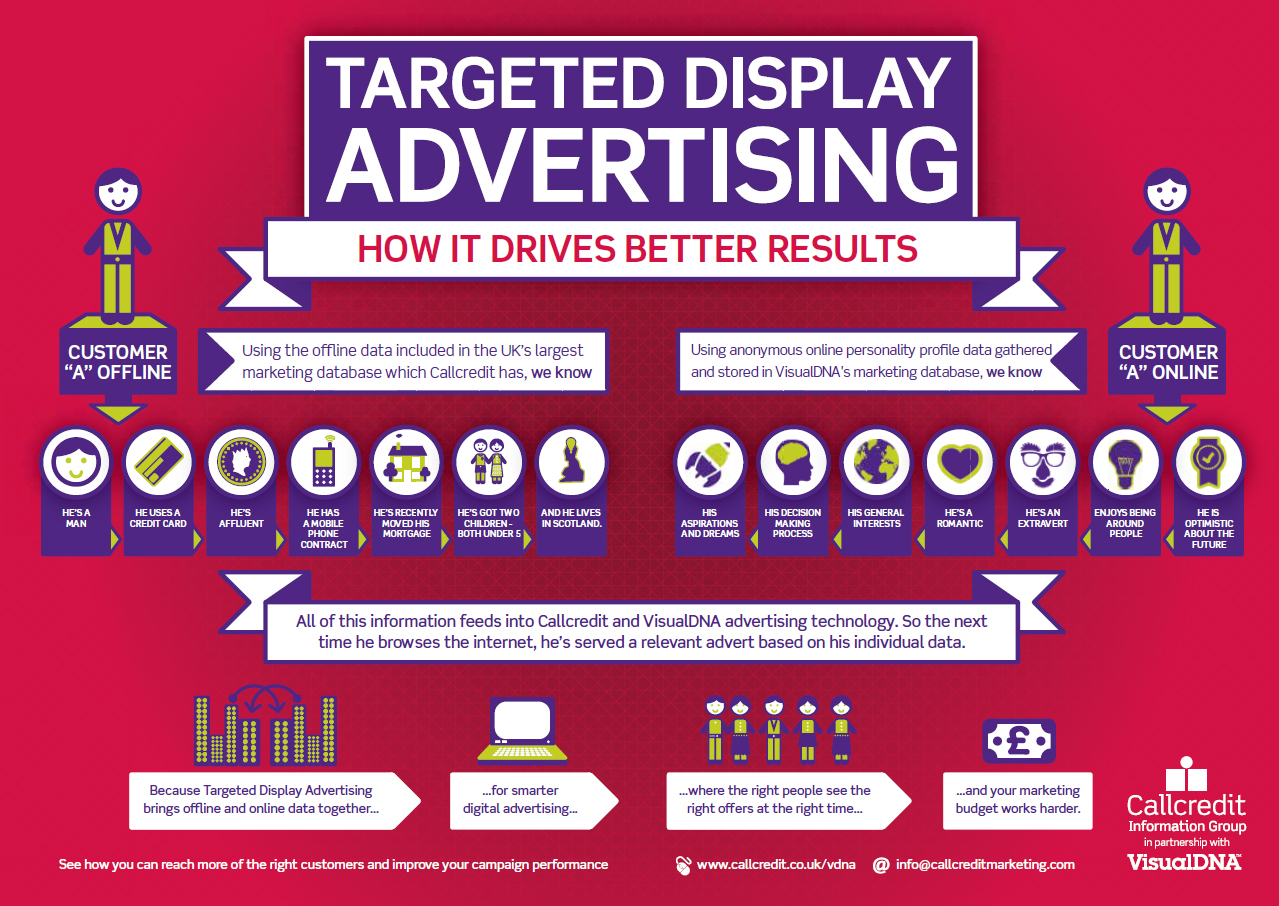
Fraud advertising is an ongoing issue, and AI inflicted over $7.2 billion in fraud just last year. Online, it becomes an expensive guessing game for ad companies to determine where their money is best spent; what exactly they’re choosing to pay for. The reason is that ad targeting is inaccurate and, when it works, comes off as creepy to the user. Users don’t want targeted ads that know your location and demographics, or that know the kind of people you talk to or relationships you keep. When an ad company hits a user in this way it looks really bad for the ad company, too, and certainly doesn’t help their business.
The reason this happens is because marketers are often fooled by fake websites and fraudulent AI that doesn’t hit the mark, often mis-targeting its demographic or targeting it way too close to the mark. “Some of the estimates claim that half of the money that companies spend on ads goes nowhere,” says Livshits. “They’re not seen by anybody, they’re below the fold, and they’re just dropped on the floor.” The result is that ad targeting is not functioning nearly as effectively as it should, and it’s making consumers mistrust or ignore 80% of advertisements they see.
Browse the web up to 8x faster than Chrome and Safari.DOWNLOAD NOW
Enjoy private, secure and fast browsing with Brave.
The answer: Basic Attention Tokens
Basic Attention Tokens, or BATs, are utility tokens based on Ethereum technology that serve as Brave’s units of currency between advertisers, publishers, and users. “The token is derived from, and therefore denominates, user attention,” explains Eich. It’s a new blockchain-based digital advertising and services platform where owning and spending these tokens allows users to earn unique services via the BAT platform, enabling special interactions with the platform.
In layman’s terms, it’s a means for users to be able to collect and use time they spend looking at ads in a positive, constructive way that benefits in equal parts the publisher of content, the advertiser on the page, and ultimately themselves as well; users will have the power to distribute their BAT to companies they support, creating a “web 3.0” atmosphere in which you’ll be able to choose who is financially rewarded by your attention. Users can also opt to directly fund or replenish their Brave Rewards wallet to tip content creators.
Basic Attention Tokens don’t connote any official ownership right or stake, Brave explains, and are not refundable nor intended to be a digital currency. This way, all the Brave Rewards analysis is done without disclosing your identity, keeping the browser as anonymous and secure as they have promised.
Rather, the analysis enters the network by way of the open source Anonize protocol, ensuring that neither Brave nor any other entity can match your web browsing habits with your BAT contributions. “That’s really just focused mental engagement,” says Eich proudly, “on an advertisement, on great content, on whatever the user is looking at.”
With Brave, users can choose to either go ad-free, or switch them back on at the drop of a hat. Users who choose to view ads will be paid to do so, will benefit from better ad-matching, and the data will stay private. Thirty percent of the ‘revenue’ gained from watching the ads goes to Brave, while the other 70% goes directly to the user. How is that kept private? The answer is simple:
Brave integrates an anonymous ledger system which allows for your funding to be made available to your chosen site owners. But the browser still keeps specifics like bookmarks and history completely anonymous.
Should you choose to browse with Brave Rewards you’ll remain completely unidentifiable, while still benefiting from more accurate ad-matching and reception of Basic Attention Tokens. If this sounds like a feature you’d be interested in, you’ll be happy to know over 10,000 content creators and publishers have already registered to receive Brave Rewards.
There will be some instances where the BAT revenue goes to the publishers as well, in which case the user and Brave split their 30% evenly (15% each) and the rest will go to the publisher. This effectively cuts out the middleman while still ensuring privacy to the viewer.
How soon will we see this?
At a recent Web3 Summit Ben Livshits announced that they are looking to ship the first phase of the BAT system in the next couple of months. “This is something we have been experimenting with quite a while,” he said. The most recent beta to be released is said to already be 22% faster than the Brave that’s currently available, and can be downloaded right here. From the looks of it, progress is speeding along pretty encouragingly.
Our new desktop browser has a 22% faster load time on average than our exiting Brave Muon version. That's as much as 8-second faster page loads on certain sites. Details here: https://t.co/d6FYHEmqIi
In the meantime, if you haven’t checked out Brave yet, we encourage you to give it a look! Download it for free right here and we’ll keep you up-to-date with the rest!
Browse the web up to 8x faster than Chrome and Safari.DOWNLOAD NOW
Enjoy private, secure and fast browsing with Brave.
Softonic is proud to partner with Brave. When you download from us, we may earn a commission.
A simple browser switch can have huge benefits for your data plan.
With 2018’s rising number of data breaches, there’s an increasing demand for a way to browse the internet in a more secure environment – one that doesn’t track users, excessively bombard with advertisements, use a plethora of cookies to document user actions, or force people to spend their bandwidth money to watch pop-ups that they didn’t ask for in the first place.
Browse the web up to 8x faster than Chrome and Safari.DOWNLOAD NOW
Enjoy private, secure and fast browsing with Brave.
“Three of the four top browsers in the U.S. have been captured by – or are owned outright by – advertising companies,” explains Brave co-founder and CEO Brendan Eich. If that name rings a bell it’s because he’s the guy who not only created JavaScript while at Netscape, but also gave us Mozilla and Firefox. “This means they will not block advertisements or invisible scripts (JavaScripts) that ads rely on. Therefore their users suffer from ad overload and tracker overload. They feel like they’re stalked by ads, they’re tracked by ads, they’re spending more on data plans just to download the ad tracker scripts.”
Brave is an internet browser that’s been under construction as far back as spring 2015. The browser’s definitive feature is the blocking of ads, trackers, cookies, scripts, and pop-ups. It will even automatically upgrade connections to HTTPS protocol, giving users the highest level of security possible.
“Brave is addressing a pain point for users by building ad blocking and tracking protection into the browser,” explains Eich, “and that differentiates us from almost every other big browser in the west.” Yes, security is Brave’s primary objective, but we’re pretty thrilled about what else that means for those of us on the user end: Fewer ads, banners, cookies, and pop-ups mean load times are up to 60% faster.
A new browser for our desktop or laptop is all well and good (provided you’re willing to try something new), but today more than 50% of web browsing is done over mobile devices. Safari for iPhone, Dolphin for Android, and of course the elephant in the room – Google Chrome – have been the go-to mobile browsers of choice for years. What’s the chance that an upstart like Brave will dethrone any of these behemoths?
Why Brave is the best mobile browser
Let’s start by asking why you use your default browser (if you do): It’s convenient. It does the job quickly and without too much hassle, and for people who aren’t constantly using their mobile device for internet browsing it’s often enough. For those who want a faster, smoother approach, Google Chrome is the most popular mobile browser.
It’s got speed, runs all the scripts correctly, offers lots of extensions, and after ten years in the market it’s got a cozy familiarity. Brave was built on Chromium, an open-source project that literally serves as the basis of Chrome. Boot up Brave and you’ll see a few core similarities with its look and feel. Most importantly you’ll be able to use all your favorite Chrome extensions.
But is Chrome a secure, private browser? No, it’s definitely not. Brave, on the other hand, champions user security, privacy, and user attention going where it’s supposed to. Like we said at the start, safety and privacy are growing concerns, and they’re making platforms like Brave awfully enticing.
Privacy and ad prevention are the main reasons people switch over to Brave; they’re looking for a faster, safer browsing experience. Brave’s ability to ward off ads, trackers, and cookies is the cornerstone of the browser, and both their desktop and mobile UI is indicative of that design. Brave’s mobile interface makes accessing the browser’s shields and blocking parameters easy and intuitive. It’s as simple as opening the settings menu:
Browse the web up to 8x faster than Chrome and Safari.DOWNLOAD NOW
Enjoy private, secure and fast browsing with Brave.
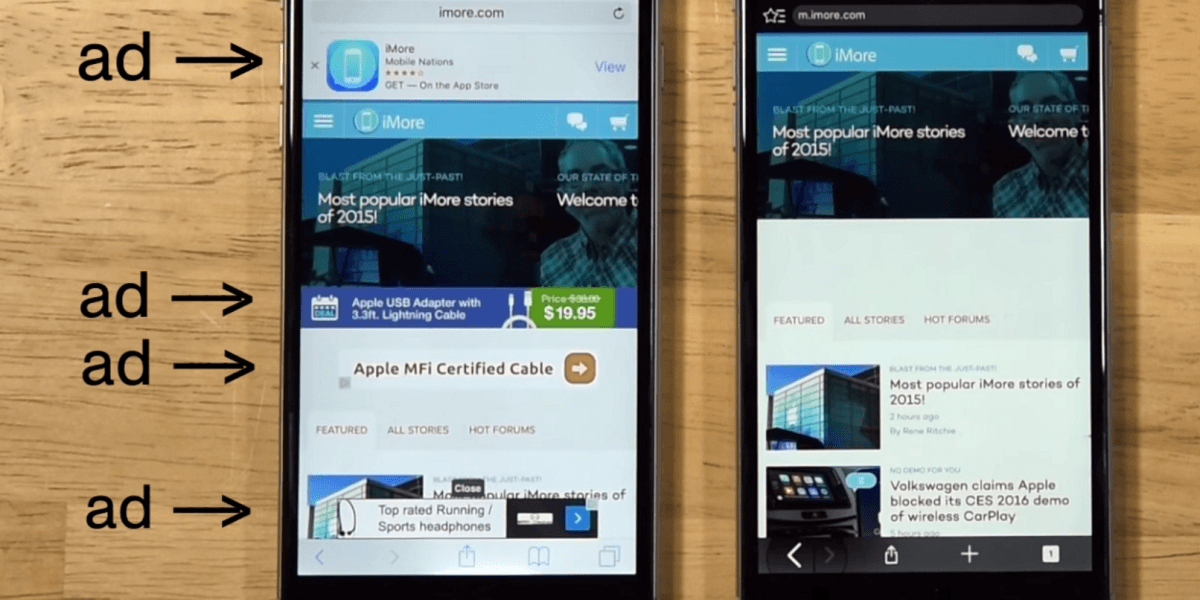
Chrome’s got speed, but when the page is loaded, you’re still faced with numerous ads, banners, and pop-ups. And that’s only what you’re seeing. What you’re not seeing are the, in some cases, hundreds of trackers, cookies, and scripts keeping tabs on your location, demographic, clicks, double-clicks, and how long you spend on the site. This makes for a bloated browsing experience, and Brave’s shielding mechanism essentially bypasses all of that, giving the user what they asked for plain and simple.
As far back as 2017, Fossbytes ranked Brave 4th place in its list of top 10 browsers for Android. They praised it for its tracker blocking and privacy, particularly valuing that Brave has high-quality protection as is its default: Brave requires no additional ad blockers, extensions, password managers, or privacy plugins to do what it’s famous for; it’s all there already. Besides the stellar security, Brave’s mobile browser still has all the usual features you would expect, including bookmarks, easy accessibility, and password management. And if you want true incognito browsing, it has a Tor tabs feature.
Brave mobile is faster than Chrome, safer than Firefox, and sports a more intuitive UI than Safari. Make the switch.
So to recap
1. Brave mobile is fast
Lightning fast. Surprisingly, Brave on mobile is actually marginally faster than Brave on desktop. On PC, major news sites will load twice as fast as Chrome or Safari, and that bumps up to a whopping eight times faster on mobile.
2. Brave will save you money and time
You don’t have to pay a cent to give it a try. In fact, you’re actually saving money since you’re no longer paying extra bandwidth just to load ads and pop-ups.
3. It’s got all the settings you’re familiar with
Brave has extensive bookmarks, a local browsing history (that is never shared or mined!), private tabs, multiple window functionality, and dark theme – all the facets you’ve come to expect. Additionally Brave also offers still more features regarding global privacy settings and settings per site. And since it’s based on Chromium, it will support all your favorite extensions.
4. Brave shields you from pesky ads
If we haven’t said it enough already, this is really the browser’s calling card. It goes double for mobile, though, as the last thing you want when you’re checking the Internet on the go is a site that can’t load fast enough because it’s plagued by pop-ups, banners and trackers. And soon Brave promises to bring to mobile a feature already available on its desktop browser, Brave Rewards. Brave Rewards gives users an interesting way to continue to support the publishers who have lost revenue from blocked ads–a blockchain based solution for tipping your favorite content.
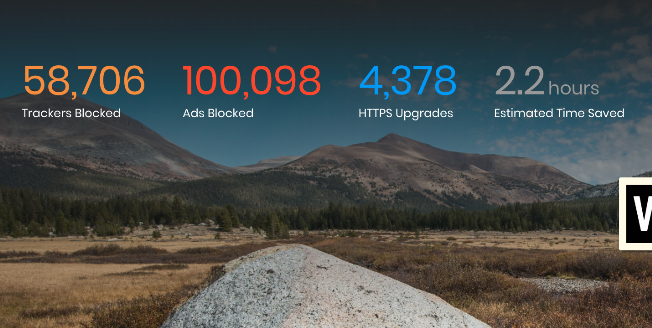
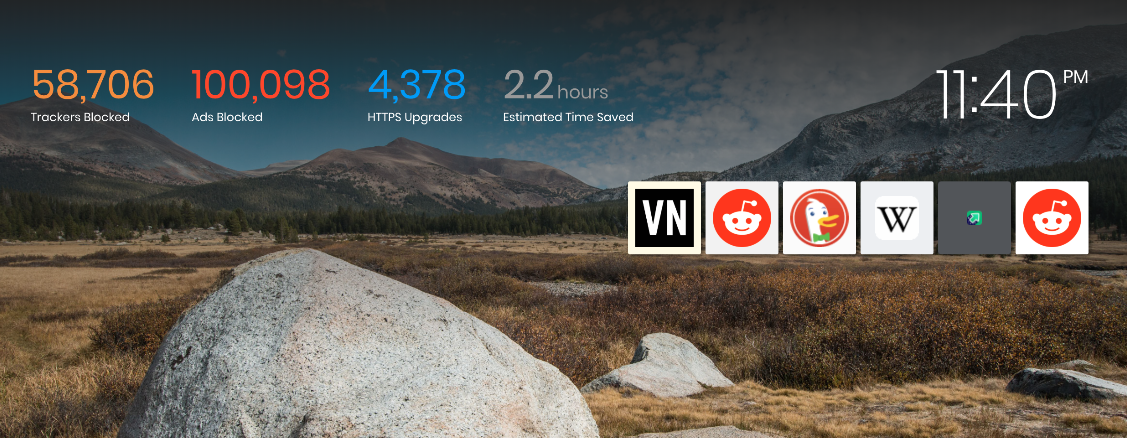
As with the desktop and laptop versions of Brave, the mobile variant allows you to see how many ads and trackers it has blocked, how many times it’s upgraded to HTTPS, how many scripts it’s blocked, and phishing attempts evaded.
5. Brave is less taxing on your battery life and data
Brave works to load web content, not ads. As such you’ll find your mobile device’s battery life is chugging along much more steadily than with other browsers. That means more battery life is available for you to use on other apps that matter, and fewer trips to recharge your phone.
Brave exceeded one million downloads via the Google Play store as far back as November 2017. That number is still climbing, and “user growth remains strong,” said Brave in a blog post in April 2018. “We anticipate millions more by the end of 2018.” Will you be one of them?
Browse the web up to 8x faster than Chrome and Safari.DOWNLOAD NOW
Enjoy private, secure and fast browsing with Brave.
The Internet is a vast sea of information, social media, news, downloadable content, forums, bloggers and yes, cat videos, from all across the globe. So if the Internet is the sea, then your browser is your sailing vessel. Much like choosing a good boat, your browser’s got to be reliable, safe, fast, and versatile.
If you haven’t heard of Brave before, it’s probably because the first stable release hit the internet for iOS back in early August. Now it’s available on iOS, Android, macOS, Windows, and Linux. Despite its only-recent foray, the software was actually developed (by Brave Software) and founded as far back as May 2015. The coolest part? It was founded by Brian Bondy and Brendan Eich, Eich being the inventor of JavaScript and the co-founder of Mozilla Firefox.
Brave is open source and has been built by a team that’s focused on privacy and performance. “It’s more than a browser;” says Eich, “it’s a new system for properly valuing user attention.” How does it accomplish this? Let’s dive in.
Browse the web up to 8x faster than Chrome and Safari.DOWNLOAD NOW
Enjoy private, secure and fast browsing with Brave.
Protection and privacy are paramount
Right off the bat, Brave automatically blocks any and all trackers. That means anything that could cramp your browsing style like cookies, pop-ups, ads, demographic targets, and location settings – none of that even makes it past the first line of defense. After that first line of defense, the rest is up to the user:
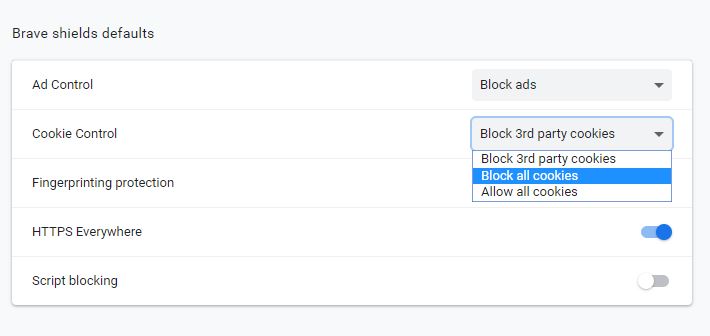
Brave’s shield customization and firewall settings allow for extensive fine-tuning of what gets through the net. If you want to block cookies, you got it. If you want to allow them, that’s fine too. If you only want to block third-party cookies, that’s an option as well.
The same level of highly organic protection applies to Brave’s script blocking, fingerprinting protection, payment methods, addresses, passwords, trackers, and practically everything else. There’s even an innate function that automatically upgrades your existing connection to an HTTPS protocol, making sure you get the highest level of security that a site can offer.
If this sounds like a lot of ruckus about pop-up ads, you’re not seeing the bigger picture. This is about so much more than just blocking ads or getting faster load times.
The problem with ads on sites
If you own a smartphone and you use it to browse the internet, a chunk of that bandwidth that you’re paying to receive is being spent on loading a bunch of superfluous garbage that you never asked for and would never want. It’s waved in front of you in the form of cookies, trackers, and ads. “It’s hard to believe,” says Eich, “but we’re paying to be bothered by ads!” According to the New York Times even as far back as 2015 that sum amounts to about $23 a month – $276 a year! – for your browser to load minutiae that you didn’t want to see anyway.
Browse the web up to 8x faster than Chrome and Safari.DOWNLOAD NOW
Enjoy private, secure and fast browsing with Brave.
Popular media sites can have as many as 70 trackers, all vying for your attention at once, taking your bandwidth, costing you the money you spend on bandwidth, and drastically slowing down the loading times of websites. We started using Brave as soon as we heard about it, and it honestly feels like driving with an EZ Pass, seeing all the poor souls stuck on a congested highway while you zip along to your destination.
Brave loads freakishly fast
Google Chrome is possibly the fastest browser around, but it accomplishes this by drawing upon more of your desktop’s RAM. Chrome’s ad filtering has gotten harsher this year, and is a welcome improvement. Slap an ad blocker on Chrome and you’ll have less harassment from pop-ups and trackers, but you might also accidentally block more than just ads:
YouTube and Intercom, for example, are often erroneously blocked. Additionally, there’s also the chance that you’re hurting the livelihood and income of fledgling sites and business that are dependent on those ads to generate income. While the average user may not care, it could ultimately affect the amount of free content available from places like news sites, forums, or blogs.
Brave loads fast. How fast? On a laptop or desktop, you’ll see load times anywhere from 50% to 100% faster. It’s even more noticeable on mobile devices, and you could be seeing pages load up to eight times faster than on your smartphone’s default browser (i.e. Safari or Chrome).
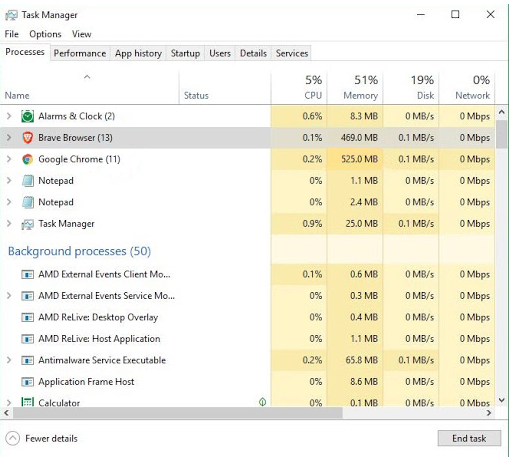
What’s so astonishing about this, though, is that Brave is able to accomplish this without being more taxing on your computer. Brave does not eat up as much RAM as Chrome, and requires less CPU and less memory. It’s not as bloated, and still matches (and even surpasses) the speed of Chrome. And it does this without adding cumbersome or faulty ad blockers; it’s all there by default.
Blockchain advertising
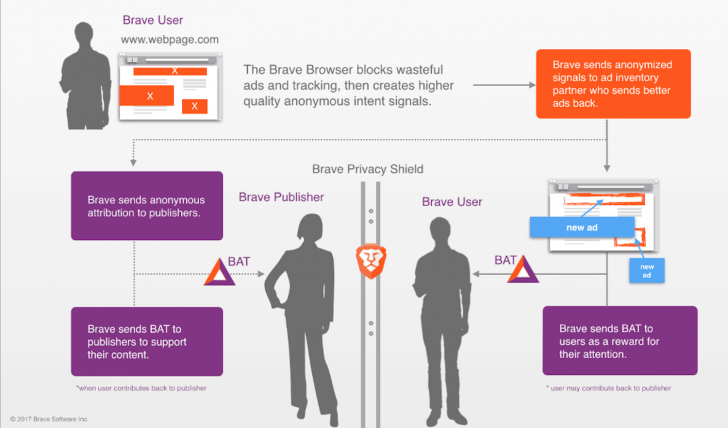
That still doesn’t solve the problem of ad blocking being harmful to a website’s economy. Brave thought of this, too, and proposed a radical idea: Brave employs a ledger system that rewards sites based on user attention. It then attempts to decentralize ad exchange, meaning that should you accept advertisement from a publisher, that relationship (and subsequent profit) will remain between the two of you; none of it goes to third-party sources or middlemen.
In layman’s terms, it works like this: You never have to look at push banners, pop-ups, or advertisements with Brave. Period. But if you choose to, then both the user and the publisher of the content are appropriately rewarded. This concept called for a new form of currency – Brave’s new Basic Attention Token.
Browse the web up to 8x faster than Chrome and Safari.DOWNLOAD NOW
Enjoy private, secure and fast browsing with Brave.
Basic Attention Tokens
If you choose to accept advertisements (and again you never have to with Brave), then you’ll receive Basic Attention Tokens (BATs) each time you choose to view them. “The token is derived from, and therefore denominates, user attention,” explains Eich.
Brave will monitor your attention as you view pages and tabs, and does so both accurately and privately. It then compiles the time (and attention) you gave these ads, and rewards you with digital tokens. “That’s really just focused mental engagement – on an advertisement, on great content, on whatever the user is looking at.” The result is far fewer instances of fraudulent marketing and malvertising.
Your data (like search history or bookmarks) is all local. Brave’s servers never see or store any of it. That information stays on your own device until you decide to delete it. Brave never sells your personal data to third parties.
So then where do these tokens go?
Short answer: To the publishers of the content.
When an ad is viewed, tokens are given to both you and the publishers. As a user, you have the power to pay BATs to a publisher you support. It’s a way to more reliably and directly engage with them, and more accurately distribute your ‘monetized attention’ toward your chosen candidates.
The result is that you essentially now get to choose who receives your attention. It’s certainly better than being forced to watch the same commercial for something you don’t want dozens of times in a row; your bandwidth money is going towards it either way.
The neat part about the BAT system is that when you pay a publisher with these tokens, they can then reward users in various ways – ads more tailored to your preference, or even discounts for that publisher’s products. Sites can also elect to charge BATs for premium content, which means that you’re effectively getting rewarded for your attention.
Give back to the sites you frequent
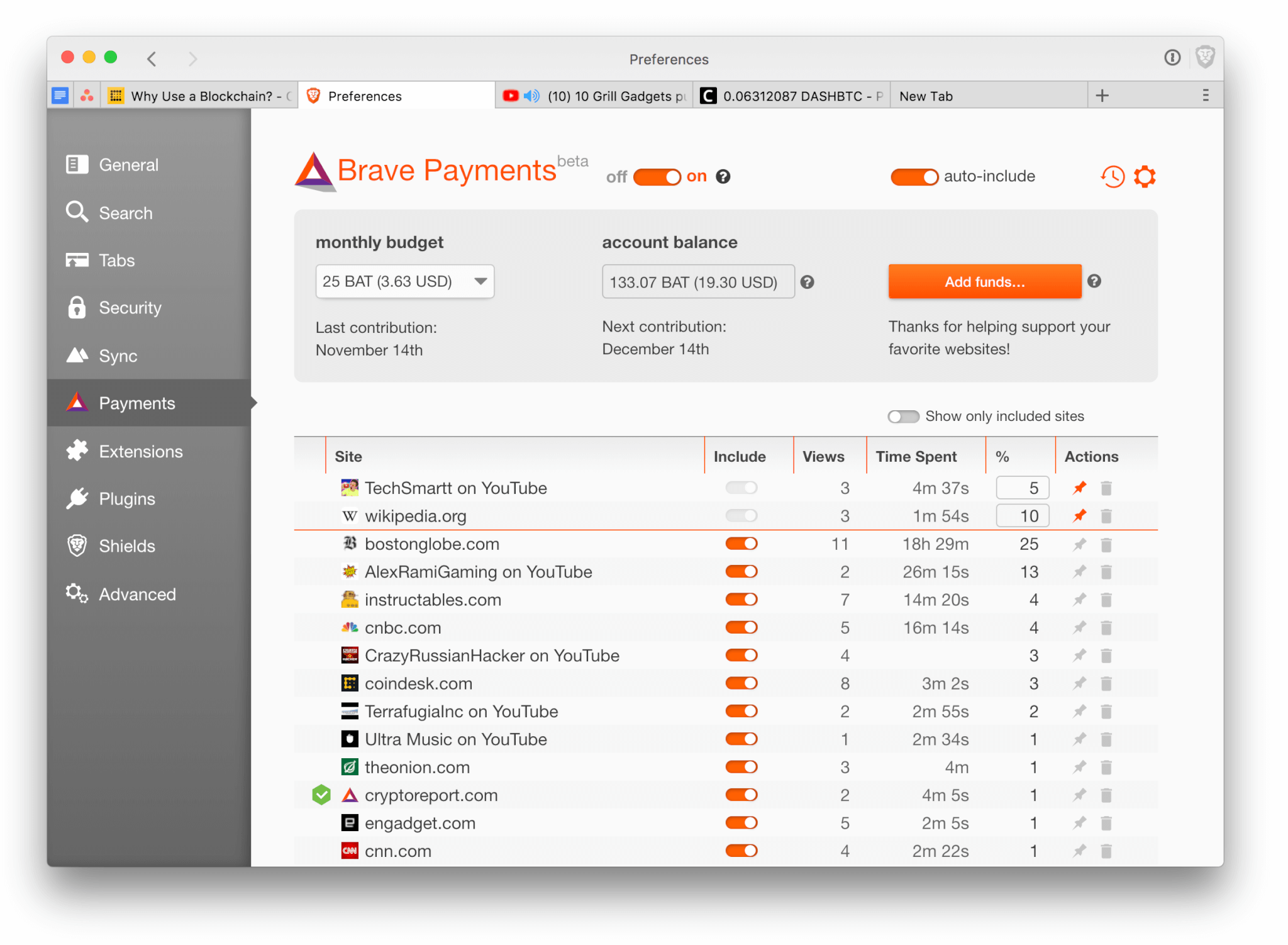
Brave has an integrated (but completely optional) Brave Rewards system. With this engaged, you can choose a contribution amount that works for you – something like a few dollars a month to divide among your favorite sites and content creators. It’s a way to promote the sites and publishers that you like. If that sounds like too much micro-managing you can choose for Brave to do it for you – distributing your contributions automatically, based on the sites you spend the most time on.
If you choose to use Brave Rewards, know that your browsing history will still always be private. Brave’s anonymous ledger system allows your funding to be made available to your chosen site owners, but still keeps you unidentifiable. If this sounds like a feature you’d be interested in, you’ll be happy to know over 10 thousand content creators and publishers have already registered to receive Brave Rewards.
If all this doesn’t sound like a feature you’d like, no worries! Simply browsing on Brave is 100% free, and you can always elect to do so without any ads at all. It’s really all up to your preference.
If you’re unsure whether Brave is the right browser for you, we recommend installing it and seeing for yourself. The download and installation is completely free, and we’ll walk you through it right here.
Browse the web up to 8x faster than Chrome and Safari.DOWNLOAD NOW
Enjoy private, secure and fast browsing with Brave.
Reports claim that Blizzard is working on a Warcraft AR game
Do you remember the summer of 2016? That was the summer when AR (augmented reality) first caught everybody’s attention. A little game called Pokémon Go was behind the whole thing. The game took the world by storm and had millions of people looking at the real world through the windows of their smartphones and searching for cute and cuddly little Pokémon. The insane levels of popularity that Pokémon Go achieved have since waned, as has public interest in AR, but the game still has a healthy following. AR games may be about to get a new lease on life, however, as another gaming behemoth looks set to receive the Pokémon Go AR game treatment.
Reports claim that Blizzard is working on a Warcraft AR game
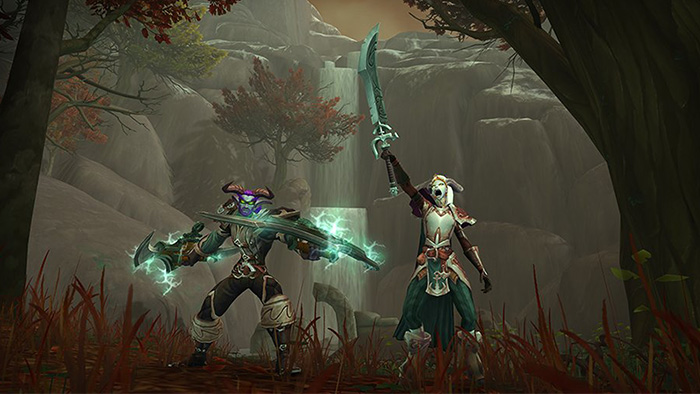
According to a report by Kotaku, World of Warcraft lead designer Cory Stockton is a massive Pokémon fan and he has managed to persuade Blizzard to start working on a Warcraft game similar to Pokémon Go. The report says that the Blizzard “incubation team” is currently working on the game that will eventually see a release across multiple mobile platforms.
There isn’t much more information about the game available. Those mentioned in the Kotaku report, however, did mention that they’ve actually had a chance to play it, which means it is already a fair way along its development path. They also mentioned that the game will offer a much richer experience than that offered by Pokémon Go.
It can’t be understated just how popular Pokémon Go was at the height of summer in 2016. The extremely popular Pokémon series seemed like a perfect fit for trying out a new technology. In truth, Pokémon Go was a repetitive game and it was rife with bugs even as millions and millions of new users were downloading the game every day. Building collections of Pokémon, however, overruled all of these problems. Only the most devout players would be able to collect every Pokémon, which meant there would always be new Pokémon out there for you to find, if you could be bothered going out to find them. Could a Warcraft game, styled on Pokémon Go, offer something similar to users? Could we be about to see another global phenomenon?
How to prepare for World of Warcraft’s Battle for Azeroth
The lore behind Warcraft certainly is rich enough to offer an experience engaging enough to continuously drag you off the couch and into the real world. Warcraft is an incredibly popular series, too, which means it has a massive fanbase it can call on to get things started. With no info about the gameplay mechanics, however, it is impossible to say how successful this new game could be. We’ll have to wait until we get to see some screenshots or Blizzard decides to release some more details before we’ll know more. One thing is for sure though, we’re excited by this news and look forward to legions of Warcraft cosplayers taking to the streets armed only with their smartphones yet prepped to battle for God knows what.
A future update to Windows 10 will include a “Light” mode
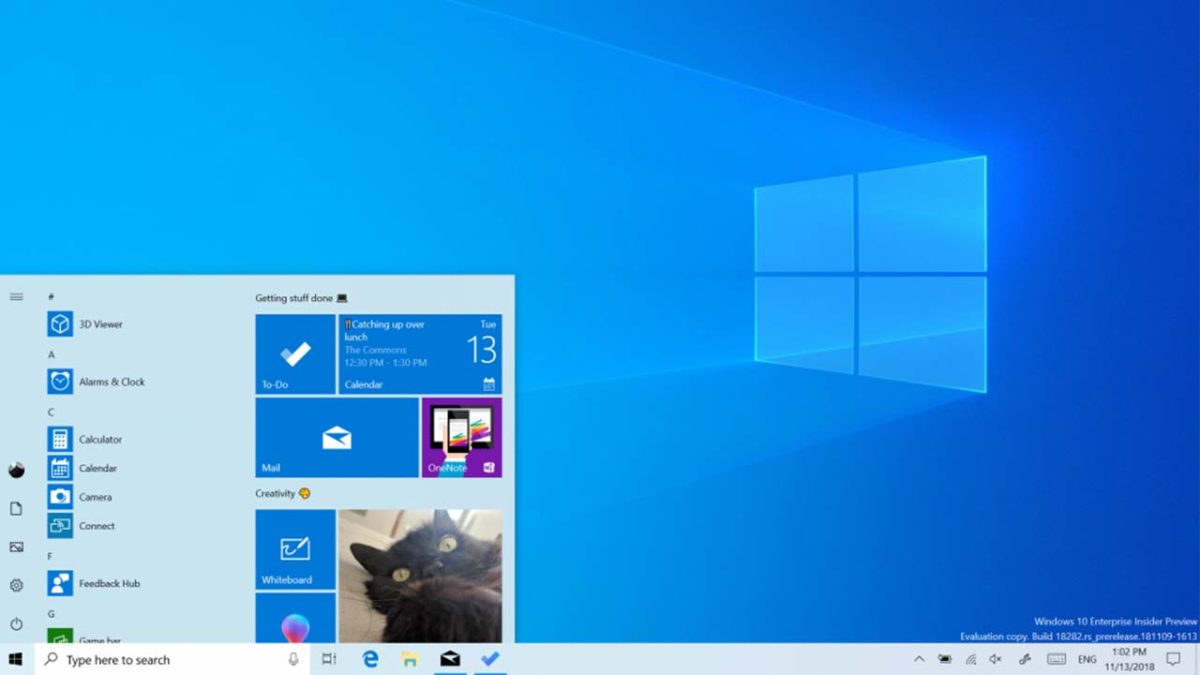
The Windows 10 Insiders program may have been resolutely ignored when it told Microsoft that the Windows 10 October 2018 update wasn’t ready, but it is still positioned as the best place to learn about what may be coming to Windows 10 in the future. Accordingly, there is an interesting addition to the latest Windows Insider beta build for Windows Insiders.
The latest and greatest version of Microsoft's operating system.
A future update to Windows 10 will include a “Light” mode
Google has just announced that dark colors are much better for battery life on devices with OLED screens. That came as bad news for Google as it is currently in the process of implementing its Material Design update, which brings a lot of white into all of its apps. Dark modes are better for battery life and Google is changing all of its apps to be much lighter. D’oh! For Windows 10, this isn’t the case.
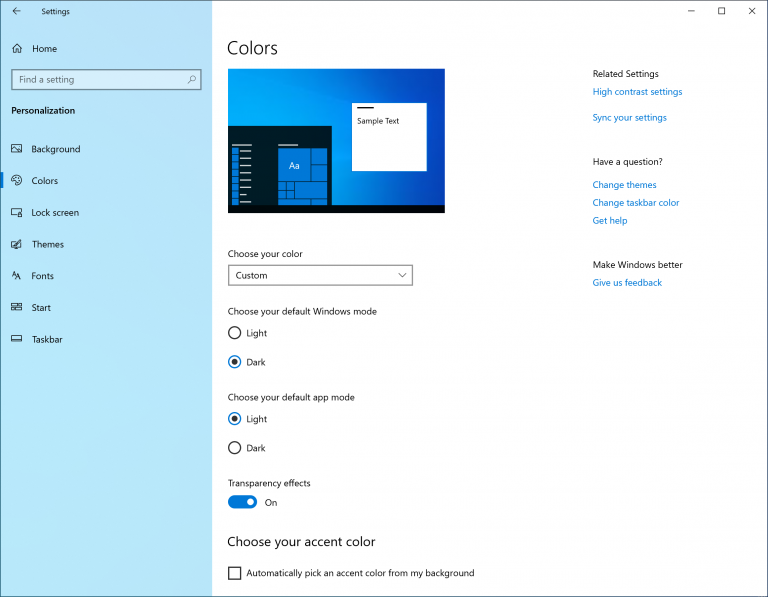
Windows 10 ships with a dark theme right out the box. You can change the color of the theme for Windows 10, and for apps open in the operating system, but that is about it. We now know, thanks to members of the Windows Insider Program, that we might soon have more options when it comes to customizing Windows 10.
You can change the color of your theme, but there is no choice between a light and dark m ode
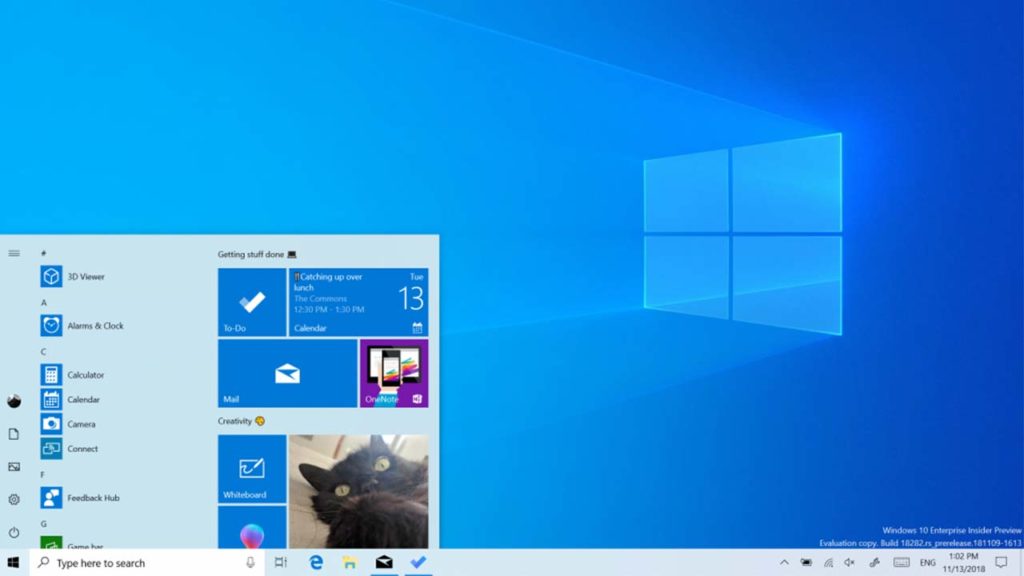
Leaked images show the ability to switch between a Light and Dark mode for both the Windows Operating System and individual apps. Opening up the Windows Settings menu, clicking Personalization, and hitting Colors will open up the new options. Selecting Light mode will make the ever-present Windows elements like the Start Menu, Action Center, and touch keyboard have a more semi-transparent white appearance. There is also a lighter version of the standard Windows 10 desktop background.
Via: Microsoft – The next update will introduce a “Light” mode for both Windows and Apps
Obviously, the issues that Google highlighted about mobile phone usage won’t affect Windows PCs as much, but it is still interesting to see both companies pushing in different directions at the moment. While mobile app developers are looking to add darker elements to their software, Microsoft decides to give Windows 10 users the choice to go with a lighter option.
What are your preferences? As we’ve mentioned before, many people decide to go dark, not for any practical reason, but purely for the aesthetics. At the end of the day, the choice between the light and dark on your laptop or PC will be just that, an aesthetic choice based on your personal tastes.
We learnt about the new “Light” mode for Windows 10 in the recent Insiders Preview from Microsoft. We’ll be going through all we can expect to see in Microsoft’s next update very soon. If you want to make sure you don’t miss that, sign up for our regular newsletter at the bottom of the page.
Google Duplex has begun rolling out to select Google Pixel owners
Every year, Google holds its annual I/O conference to talk about all the big new features it plans to introduce over the next 12 months. This year was no exception as Google wheeled out all kinds of new products and features. Most announcements centered around Google’s impressive progress with AI, but one new product, in particular, stood out and even ruffled a few feathers. Of all the announcements Google made in May, Google Duplex was by far the most controversial. Now, Google is pushing ahead with its plans.
Google I/O 2018: The biggest news stories about Android, Maps, Photos, Assistant, and more
Google Duplex has begun rolling out to select Google Pixel owners
Google Duplex is a new feature for Google’s ubiquitous AI Assistant, which it is baking into all of its new products. It is, by far, the most impressive of all new features to come to any of the AI assistants available today. It’s so good, in fact, that when it was announced, it was a victim of its own success. Duplex will make appointments for you by calling up restaurants and hairdressers and talking to the people on the other end as if it is your human personal assistant. Google’s demos showed staff none the wiser as Duplex’s human-like hesitations pulled the wool over their eyes as it booked the appointment. It was this duplicity that upset a few onlookers who believed it wasn’t right the people on the other end of the phone weren’t aware they were talking to a machine.
Despite this, Google is pressing ahead with Duplex’s roll-out, although it will be a “slow roll-out.” According to a report by VentureBeat, Google has opened up Duplex’s capability to a “small group” of Google Pixel phone owners in “select cities.” Google has previously announced that it will be running pilot programs for Duplex in New York, Atlanta, Phoenix, and San Francisco, so there is a good chance these are the “select cities” Google is talking about. Until now, the feature had only been available to a “set of trusted tester users.”
If you’re a Google Pixel owner in one of those cities, you might be able to have Duplex start booking your appointments. If you want to book a hair appointment, however, you will be in for a little disappointment. For now, Duplex will only be making restaurant reservations.
How make a restaurant reservation with Google Duplex
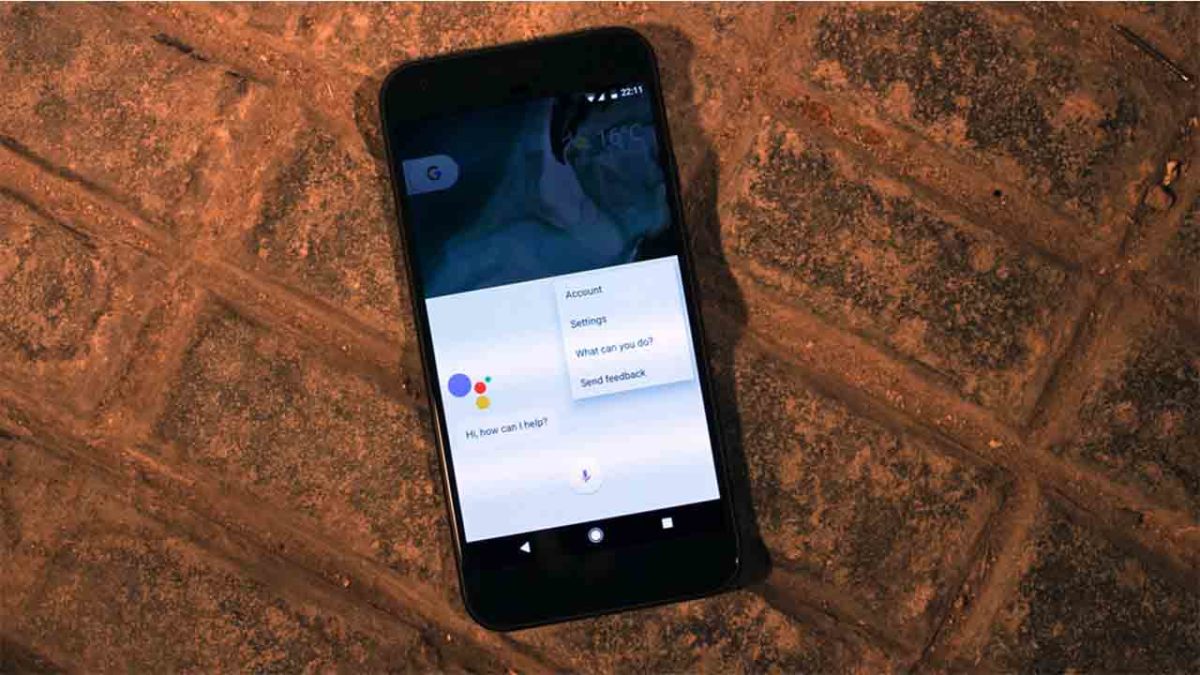
There are a number of commands you can give Google Assistant to have Duplex make a reservation. Say, “Hey Google, make a restaurant reservation,” or, “Hey Google, reserve a table.” You could also add a particular neighborhood to the end your command.
This will open a list of options based on things like the type of cuisine. From here, you can select your restaurant. Alternatively to steps 1 and 2, you can search for a specific restaurant and then hit “Request a table there.”
Google Assistant will then ask you a series of questions about the reservation. This will include details like date, time, size of party, and a contact telephone number.
The reservation will then be added to your “My Reservations” list alongside other appointments that Google has pulled from your emails and calendar.
Google has noted that as well as only receiving a limited roll-out to a select number of Pixel users, not all restaurants will work with the feature. According to VentureBeat, if you try to book with an incompatible restaurant, you’ll receive a message saying, “Unfortunately, that restaurant only takes reservations online. So, you’ll have to book with them directly.”
What are your thoughts on Google Duplex? Do you think it is a useful feature and can’t wait to start using it or has it already begun to shake your belief in the world around you? If the person on the end of the phone could be a robot, what about everybody around you? Let us know your thoughts in the comments below.
Google’s Find My Device app is getting indoor map support for some buildings
Apple’s Find My iPhone and Google’s Find My Device features have been common for quite some time now. They use the data our devices constantly share with the cloud to show us a fairly accurate location of where our devices are at any given moment. This is particularly useful if you misplace your device; especially if you add features like remote locking of your device, remotely deleting all your device’s data, and sending notifications to your device so that you can listen when you are near the coordinates the apps have given.
There has always been a limit to the usefulness of the apps, however. If you lost your device in a building, there has been no way of seeing an accurate location. If the building has multiple stories, the device could be on any of those stories. Google wants to change this, and the latest update to Google Find My Device is huge step in the right direction.
Google’s Find My Device app is getting indoor map support for some buildings
If you have location service enabled on your Android, you’ve probably received occasional notifications when entering certain landmarks like shopping malls and airports. This is because Google has been working on indoor maps for a while. Opening up one of those notifications will offer you information on wherever you are as well as a detailed floor plan, complete with the little blue dot showing exactly where you are.
This type of feature is a perfect fit for an app that is designed to help absent-minded people retrieve their lost devices. When you download the latest version of the Google Find My Device app, you’ll be able to accurately locate your device should you lose it in certain large indoor spaces like shopping malls and airports.
There are a number of ways to use Google’s Find My Device app once you’ve lost your phone or tablet, but one stands out as the easiest. If you ever lose your Google device all you have to do is log in to your Google Account on another device, type “Find my phone” into Google, and hit search. This will open up the Find My Device tab right there in the Google search engine.
Indoor map support is a cool new feature for Google to add to the Find My Device app. It should help a lot of users locate their phones should they lose them. The best way to make sure you don’t lose your phone, though, is to keep an eye on it in the first place.
Hackers are changing the contact details of banks on Google Maps to try and catch you out
We recently learned exciting news about a Google Maps update that makes it easier for you to contact the businesses you need to use from inside the Google Maps app. Messages is a brand new feature that opens up a whole new world of functionality to Google Maps and pits it against other big apps like Facebook Messenger and the fairly new WhatsApp Business. Now we have to bring you news of new way that scammers are targeting banks on Google Maps
Hackers are changing the contact details of banks on Google Maps to try and trip you up
Google Maps allows users to submit changes and corrections to listings on the navigation app. This allows fraudsters to change the contact details of financial institutions like banks so that when customers try to call or message their banks the fraudsters can intercept the correspondence. With the first interactions with financial institutions always being confirming security details on the account, this leaves customers very vulnerable to having their accounts compromised.
This scam was first reported in India and picked by local newspaper The Hindu. After receiving more than three complaints from the Bank of India, Police in the state of Maharashtra notified Google and put out a local warning relating to the scam. There is nothing stopping scammers in other parts of the world from trying the scam in their area.
In the story reported by The Hindu, Google acknowledged the problem but didn’t mention any specific fix. A Google spokesperson said, “Overall, allowing users to suggest edits provides comprehensive and up-to-date info, but we recognise there may be occasional inaccuracies or bad edits suggested by them. When this happens, we do our best to address the issue as quickly as possible. The Google Safety Center outlines tips to help consumers stay safe online.”
There doesn’t seem to be any sort of automatic defense against this problem in development, but Google will act quickly whenever an incident comes to its attention.
How to stay safe
This all means then that we need to be extra careful when we’re searching online for contact details to financial institutions like banks. If you do find yourself looking for a phone number online, don’t trust it unless the number is also listed on the bank’s official website. Should you come across the number through Google Maps or some other third-party website, a simple Google search including the number and the name of the financial institution in question should yield the contact page on the official website. If it doesn’t, you should suspect the number in question and think about reporting it.
For more tips on consumer safety online, check out the Google Safety Center here.
Google’s Digital Wellbeing feature lands on Android
For a while now, it has been trendy among the big tech elite to recognize that too much tech can be bad for your health. Apple’s iOS 12 came packed with a Screen Time feature so users can monitor their smartphone usage and Facebook has also released something similar. Google is now joining the party with the introduction of a new feature to Android smartphones.
Does Facebook want you to spend less time on Facebook?
Google’s Digital Wellbeing feature lands on Android
Google first started talking about the Digital Wellbeing app back at its I/O conference back in May. We were promised a “control panel that will tell us how much time we spend on our phone, what we spend it on, and even recommend that we take breaks.” The app was discussed further when Google launched Android Pie but then didn’t ship with the update when it started rolling out last month. A beta version was released for Pixel owners, but it didn’t offer the full functionality as was talked about at I/O.
This has now changed with the full app now available on all Google Pixel devices and phones running the Android One software.
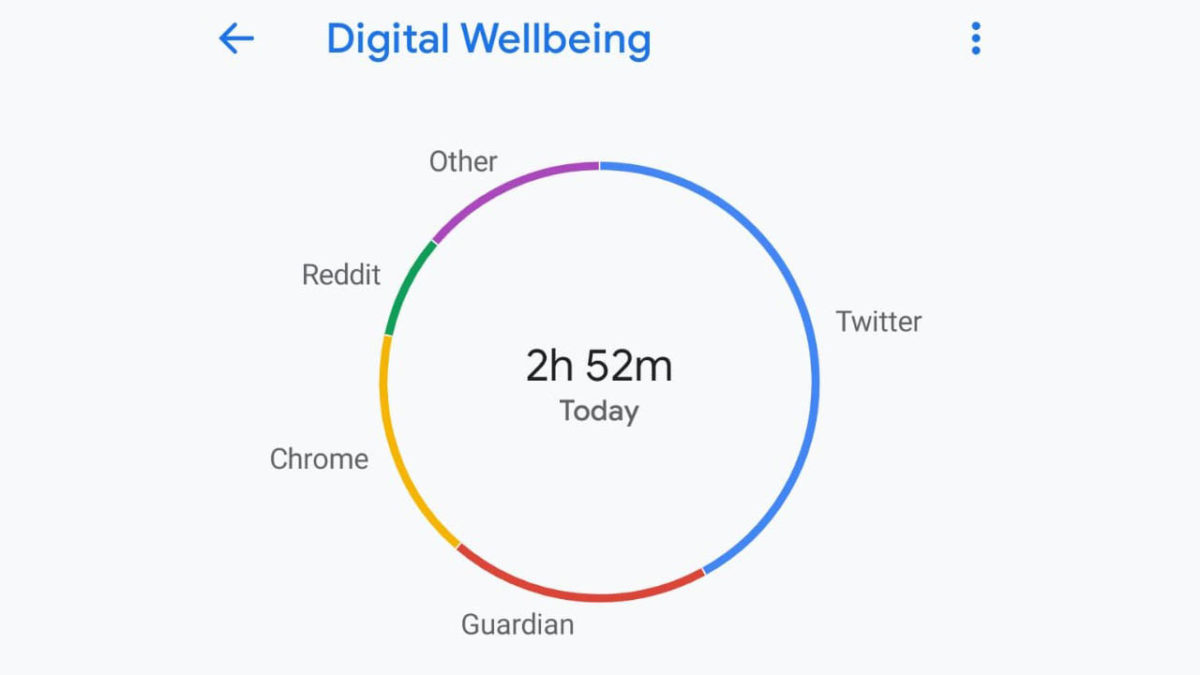
A big day for Brexit had me spending too much time on Twitter!
Digital Wellbeing can be found in the Settings menu between the Accessibility and Google menus. Opening up Digital Wellbeing will present you with what Google is calling their dashboard. Here, you’ll be able to see all of the apps you’ve been using alongside the amount of time they’ve spent on each.
Another key feature found in the Digital Wellbeing dashboard is the ability to set app timers. Here you’ll be able to click on each of your apps and set a timer. The defaults are No Timer, 15 minutes, 30 minutes, and 1 hour. There is, however, the ability to set a custom timer.
Once the timer is set, it will run in the background whenever you’re using the app. You’ll receive a one-minute warning when your time is low and then the app will be paused for the day, once the time has run out. If you don’t use up all of the time the app timer will be reset to zero at midnight.
Wind Down is another Digital Wellbeing feature, which will be useful for people who feel they use their phone too much before going to bed. It includes a Night Light feature that tints the screen, so it is easier to look at in dark conditions, and a bedtime reminder that removes all the color from the screen when it is time to go to bed. Do not disturb will also make sure you won’t be disturbed once you get your head down for the night.
The panel also offers comprehensive control over app notifications so that you can keep on top of how often your phone actively tries to grab your attention.
Google I/O 2018: The biggest news stories about Android, Maps, Photos, Assistant, and more
For now, Digital Wellbeing is only available on Pixel and Android One devices, but Google has stated that it will be coming to other devices too. If you’re an Android user and you think you use your phone too much hang in there, help is on the way.