What you need to know about passive income online

Can you sit back and get paid for doing nothing?

Passive income, by way of the web, often seems too good to be true.

There’s no shortage of spam comments, weird pop-ups and affiliate blogs claiming that if someone’s mother-in-law or step-cousin can make six figures with minimal effort, you too, can make things happen.

Now let’s be clear, passive income is not the same thing as “making your money work for you” through smart investments.

Instead, we’ll take a look at the reality of affiliate incomes, drop shipping, and other money-making schemes that promise comfortable living.

Guide to popular passive income options

passive income

What is passive income?

Traditionally, passive income includes things like a limited partnership in a company, real estate ownership, or dividends from investments. Online, however, other passive income opportunities promise a way to game the system.

Admittedly, it’s hard to find any information on passive income tips and tricks that don’t feel like junk. Much of the online content consists of ebooks and courses and yes, mom blogs that rake in the residuals.

So, how do you separate the fakers from the legit opportunities — and is it even possible?

Affiliate sites

Digital entrepreneurship and affiliate links are a fact of life on the web. A good chunk of your favorite sites engage in some affiliate partnership; they’re embedded in articles, YouTube videos, and online games.

A quick refresher: affiliate links are a type of advertising that pays sites a commission based on clicks and sales. Online content creators can sign up with Amazon or other eCommerce programs and promote links within their blog posts and videos.

It’s not just Amazon, either. Uber has an affiliate program, as does iTunes, and others.

affiliate marketing

The issue with affiliate marketing isn’t that it’s a scam. You can make some money this way, but it’s not something that you can set up, forget about and get rich overnight.

For one, you need to have a website that generates enough traffic to result in income. You’ll need to have a blog or popular website to do this — and, of course, that takes time and its skillset.

Affiliate programs also need to match your content. If you write a food blog then adding affiliate links for fishing gear and motorcycle parts isn’t going to work. For one, customers will think that you’ll shill anything, thus compromising your authenticity.

Second, those visitors likely are on your website because they want to learn how to make a chocolate cake that doesn’t stick to the pan. They’re not going to see a link and think — hey, I do need a new fishing pole.

In addition to creating content, maintaining a website, and finding affiliate links that fit, you also need to have some marketing savvy to make this work. You’ll have to start an email list and create landing pages that you promote to encourage new sign-ups.

There’s more to affiliate marketing than what we’ve listed here, but the point is, it’s hard. If you’re considering this path, you should want to create a blog/site anyway.

Drop Shipping or Retail Arbitrage

Drop shipping, and its cousin, retail arbitrage, are something of a shortcut to establishing an online store. Instead of selling your products, you sell products from other companies. Customers submit an order through your website, but the company who makes the product ships it. The benefit is, you don’t have to buy inventory and maintain stock levels. As such, drop shipping is often promoted as easy money.

That said, you need to find a way to promote your store in a crowded space. Cosmetics and vitamins are popular products in the drop shipping space, for example. You might run into a lot of competitors with the same products.

With retail arbitrage, you buy up items on discount or clearance at your local brick-and-mortar store and flip them online for retail prices. In this case, you do the shopping, the packaging, and the shipping. Not super passive.

With either method, you will need to field customer service inquiries, which involves answering questions about other peoples’ products and order statuses that may be out of your control. But customer service dealings may only take up a couple of hours here and there.

We should note, drop shipping needs to be approached with some caution. For example, many drop shippers are scammy. You also need to look for products that are trending and that you know enough about your audience to market effectively.

This article from Shopify is a good source for someone looking for a primer on drop shipping. For retail arbitrage, check out these videos.

Sell a digital resource

Digital resources include things like memberships, e-books, online events, and so on. These items are known as information products, and there’s no shortage of bloggers promoting their own set of paid content.

The benefit of digital resources is, you’re making almost 100% profit margin — you create a product once, and sell it over and over.

The only thing is, to make any money, people need to know who you are and you need to make something people want. Do you have knowledge that other people can’t find with a simple online search?

Sell courses

If you have an online audience and a skill that people want to learn, you could earn some passive cash by offering digital courses. Skills like photography, video editing, SEO best practices, e-commerce basics, and so on could all potentially net you some money here and there.

Creating courses that add value to your audience is not remotely passive. Up front, it’s an investment that requires time and some cash. Thankfully, it gets easier after the initial push.

To do this, you’ll need to create an email list as a means to promote your course to readers.

Wrapping up

It’s important to realize that there’s no such thing as a truly passive income. Affiliate marketing, selling products, and monetizing digital resources all depend on your ability to drive traffic and create something that people want.

It’s not simple, and it isn’t passive. Instead, you need to be able to handle web hosting, copywriting, content creation and have a firm grasp of digital analytics.

And, those skills are just the starting point. It’s a whole other skill set to find and promote affiliate links that make sense for your audience. Developing online resources that have professional polish is a separate skill, too.


Everything you need to know about Facebook Messenger’s unsend feature

Here’s how to use Unsend, and why it may not solve all our problems.

messenger

It’s finally here.

Facebook Messenger now lets you unsend messages that perhaps should never have gone out in the first place. You’ll have 10 minutes to make up your mind, too.

If you’re a WhatsApp user, you’re already familiar with the app’s unsend feature — and its generous 60-minute unsend period. Or, Instagram’s unlimited window for takebacks.

And many of us have long been users of the Gmail unsend add-on, and lately, ephemeral apps that range from the fun (Instagram Stories, Snapchat) to the secure (Signal, Telegram).

Facebook Messenger Download Free
8

The basic rundown: what is Facebook Messenger Unsend?

We’ve already gone over how to “unsend messages.” But there’s been a lot of noise surrounding the topic since the feature was initially announced last year.

The new feature is available in version 191.0 of the app and Facebook says it comes in handy if you send the wrong information, photo, or message the wrong thread.

The feature allows you to rethink that text, and take it back. However, many critics feel that the timeframe is too short, and the feature doesn’t go far enough. Facebook says the limits imposed are an attempt to cut back on bullying.

We looked back at how the media reported on the feature — and there were several reports of bullying experts saying the feature was a bad thing — a step in the wrong direction for combatting the problem of cyberbullying. In April, experts told Business Insider that deleting messages could be used to gaslight victims.

Or this point raised by Sarah Jeong, who worries that the feature would allow sexual harrassers to send and unsend evidence.

Interestingly, the feature was announced Facebook employees discovered Mark Zuckerberg himself had been deleting messages.

Of course, this resulted in an uproar; users were not happy that Facebook execs like Zuckerberg could delete messages while average Joe Facebook could not.

Can you delete a message before someone reads it?

Yes, provided you act fast enough.

The reality is — you can’t control whether someone sees your message before you delete it.

So hopefully, you luck out. The difference between Facebook’s unsend and Gmail’s is, Gmail builds in a delay — that’s why you only have a few seconds to make your choice.

Facebook sends the message as usual but gives you a window of time to delete it. They don’t let you control who sees the message.

Facebook’s Help section says that there’s nothing keeping from people seeing your message — which, given that Messenger is a chat app, it’s likely they’ll see the message come through right away.

This means you still need to be careful about what you send.

Can you delete messages from both sides?

The unsend feature aims to reduce that embarrassment that goes hand-in-hand with sending out a text-based mistake. Or maybe a photo. You’ll have two options, you can choose to remove a message from your end only or remove for everyone.

Facebook unsend settings

Unfortunately, once that 10-minute period expires, the “remove for everyone” option is off the table — and your friend now owns that message.

The second is the less useful, “Remove for You,” which clears your screen of unwanted missives. There’s no time limit on this one — and it lets you at least forget about the embarrassing messages you’ve sent to your friends, even if it’s too late to erase it from their side of the thread.

We tried researching some workarounds for deleting messages after the 10-minute limit. Unfortunately, the advice is all quite convoluted and involves marking messages as spam or abuse. Or, flat out deleting your account.

Not exactly helpful.

You also can’t permanently delete messages

Should you be able to delete messages at any point? We don’t actually know how long Facebook hangs on to chat records.

We do know that if, say, you’re harassing someone online and delete the evidence, Facebook can still access the initial record.

Admittedly, we thought this feature was meant to be a convenience. Along the lines of Gmail’s unsend, the initial interpretation was: I can delete that message that I immediately regretted. Or, “Oh god, there’s an error,” etc.

In the end, it’s never been more obvious that if privacy features like being able to completely delete a record are important to you, Facebook isn’t the messaging app that meets your needs.

We’re torn on whether we think anything is wrong here — we like the crackdown on hate speech and the moves toward reducing cyberbullying are admirable.

However, this is a good reminder that all apps come with a certain set of risks — and it’s a good idea to familiarize yourself with how all of Facebook’s features work.

If you’re worried about Facebook storing your messages, it might be a better idea to use a fully encrypted app instead.

Here are a couple of options:

Signal Private Messenger Download Free ►
8
9

Quitting time: signs that it’s time to look for a new job

These days, nearly every job is temporary. Here’s how to know when to move on.

We all have bad days at work, but when it feels like you haven’t had a good day in recent memory, it might be time to pack your things and move along.

Quitting your job can be scary, and it’s not the kind of decision you can make lightly. Whether you’re daydreaming about a more challenging role or you’re dealing with some nasty coworkers, it’s important to know when it’s time to pull the plug.

Here are some signs that it’s time to get out.

How to know when you should quit your job

quitting job

1. Your skills are being underused

One of the most disheartening realizations you can have on the job is that management doesn’t recognize what you have to offer.

This might hit after being passed up for a promotion or later on as you ask for challenging projects repeatedly to no avail.

It’s not uncommon that starting a new job means easing into more and more responsibilities. But, if you’ve been waiting too long for your boss to call you up to the big leagues, it’s time to start looking at other options.

Our brains like tackling problems on a daily basis, and when you’re stuck in a role that feels like it’s centered on moving data around or writing emails — it can feel like your brain is just rotting away.

2. There are no learning opportunities

If there is little in the way of learning opportunities, it’s a sure sign that it’s time to look for a new job. Sure, you can’t expect to learn something new every day you’re at work.

But if you’ve leveled up as much as possible in this role, sticking around can cause your career to stall out. If you’re not learning anything new and you’re sitting around watching others get promotions — get out fast.

When you start looking for work, make sure you look for companies that support professional development. Look at company websites, read employee reviews, and ask the right questions.

Example questions might include:

  • Do you have mentorship opportunities?
  • What does success look like in this role?
  • How do you support continuous learning?
  • Do you typically promote from within?

3. Company culture isn’t a fit

bad office

Whether the office culture is just plain toxic or it’s not a match, when your daily grind isn’t quite right, it can feel as though you’re trying to be something you’re not.

It could be the people you work with, the set-up in the office, the approach to meetings. Maybe you hate the in-office foosball or catered lunches that prevent you from going outside midday.

Additionally, if you don’t share the company’s values or the direction they’re moving in just plain sucks, it likely feels disingenuous to work toward a goal that doesn’t mean anything to you.

4. Your job is affecting your personal life or health

Feeling overworked and miserable can impact the rest of your life in harmful ways. You might have a shorter fuse with your spouse or children. Or, you’ve started ignoring your friends. Maybe anxiety and stress are keeping you from enjoying yourself outside of work.

Stress symptoms affect more than relationships, they affect your body, too.

Left unchecked, you could start seeing your blood pressure climb, or develop heart disease, obesity, or diabetes. According to the American Psychological Association, stress impacts just about every major system in the body — so your unhappiness at work could turn into chronic pain, upset stomachs, and a whole lot of colds.

5. You dread going to work or can’t be bothered to care

If it feels like pulling teeth to perform basic tasks, it’s time to move on.

That said, you could simply be experiencing burnout. We experience burnout even at jobs we love — so if possible, take a vacation or a couple of days off to evaluate your feelings about the situation.

If that sense of dread is omnipresent and you find yourself watching the clock day in, day out, it’s time to get out of there. 40+ hours a week is a lot of time to dedicate to something that makes you miserable.

Additionally, if others can sense your unhappiness, it can impact your relationship with your boss and your colleagues. It might even be interpreted as a performance issue.

6. You don’t feel valued

There are several ways that a workplace might make you feel undervalued. One example is if colleagues routinely leave you out of the loop when discussing project details or scheduling meetings. In other cases, your ideas are not acknowledged or other people take credit for your accomplishments.

These slights add up over time — and you may become resentful, unmotivated, or just plain angry.

The other way this might play out is if you’re underpaid. If your responsibilities demand a bigger paycheck, it’s time to reevaluate your market value. Do some salary research to learn the average rate for your role — and maybe start applying for jobs.

Final thoughts

Hanging around a bad job can hurt your career, your relationships, and your self-worth. If you’re not growing or you’re just not happy—it’s time to leave.

Don’t burn bridges and keep things professional during the job hunt and transition period. Instead, explain that you’re leaving to pursue the next phase in your career.

10 apps where you can win or earn real money

Turn your phone into an ATM with these great apps.

money apps

Money making apps are a real mixed bag. The ones that actually provide a payday are more in the realm of gig economy apps like Uber, Lyft, and Instacart. Those looking for a free lunch (snack?) and a way to pass some time may have something else in mind.

Most of these options don’t provide much in the way of actual income, and some are outright scams. Others demand too much of a time investment before you get any return whatsoever.

Here’s a list of apps that will deliver some cash, points, or another form of payout.

First of all, we should mention, “free money” apps fall firmly within two camps. There are the games — where you win prizes by answering questions, playing the lottery, and so on. And the something-for-almost-nothing types. The latter covers things like rebate apps or those that let you earn points you can trade for prizes.

10 apps that pay real money

1. Ebates

ebates deals

Ebates is a favorite among bargain hunters. The app awards you with up to 40% cash back on items you purchase. Set up the app to remind you any time there’s a new coupon available across the 2,500+ participating retailers.

What’s more, if you’re looking for a specific purchase — say a new TV or a laptop — Ebates will show you which stores have that item and how much you can expect in your rebate. Available for iOS and Android.

2. Slidejoy

slide joy screenshots

Slidejoy is an app that lets you make some money by checking promotions or news stories on your phone.

How it works is, you’ll register for an account. Once you’re in, you’ll receive a notification with news or an ad every time you open your phone. Slide the screen up to see news, right to access your home screen, left to see more information and down to access notifications. Available for Android.

8

3. Ibottaibotta earn money shopping

Ibotta makes getting groceries like a game, allowing you to earn some cash back as you shop.

It’s kind of like a high-tech version of couponing, and all you need to do is select the items you purchased from a list of available rebates and scan your receipt. Ibotta deposits cash back to PayPal within 48 hours. Available for iOS and Android.

4. Sweatcoin

sweatcoin app

Sweatcoin is an app that turns your daily steps into new stuff. The app’s motto is, “it pays to walk.” And we suppose if you’re already walking around, might as well get something out if it, right?

Every 1,000 steps is worth 0.95 in Sweatcoin, which you can save up for fitness gear, experiences, or donate to charity. Available for iOS and Android.

Sweatcoin Download free ►
8

5. HQ Trivia

HQ Trivia Quiz App

HQ Trivia is likely the biggest game in the apps with prizes category. The live trivia game is available on Android and iOS and is a challenging series of questions that—if answered correctly, promise some big bucks.

Between the engaging multi-player approach and quizmaster personality Scott Rogowsky, the app has become a major phenomenon. While winning big is a long shot, it’s a fun time — and hey, you never know. Available for iOS and Android.

HQ - Live Trivia Game Show Download free ►
6

6. Grand: Save Money and Win

grand save money

Grand: Save Money and Win rewards users for saving money by gamifying the experience. The app makes saving into a lottery game. How it works is, you’ll link your checking account to the app’s FDIC-insured savings account which enables you to earn one percent. Every time you add money to your account, you are entered to win a weekly drawing. Winners can receive up to $1,000, which is transferred to your account.

Banking details are encrypted with bank-level security protections. So rest assured, your data is safe. Available for iOS and Android.

7. SwagIQ

swag iq app

SwagIQ does sound a bit like an HQ knockoff, but who cares? If you’re a trivia buff, there are two opportunities to play to win. Swag is a live trivia game show you can play on your phone to win cash prizes and gift cards. Available for iOS and Android.

8

8. Long Game Savings

long game saving app

Long Game Savings helps you achieve your financial goals through cash prizes. Like Grand, Long Game aims to make saving “fun.”

How it works is, you’ll create an account, link your bank, and deposit money into the app-provided secure bank account. The app gives you “missions” which align with long term goals, and along the way, you can play games to win coins. Games have different prizes — cryptocurrency or a $1M cash prize. Available for iOS and Android.

Long Game Savings download free
7

9. Lottery — Play the Powerball

play the powerball app

If you’d rather play the real lottery than trick yourself into saving money through a lottery-like game, the Lottery’s mobile app allows users in select states to play the Mega Millions and Powerball. You don’t actually pay anything through the app — but you will receive alerts when the jackpot is especially high and you can track lottery tickets. Available for iOS and Android.

10. Perk Pop Quiz

pop quiz app

Perk Pop Quiz is a trivia game built for pop culture fiends. If you’re the type of person who rattles off movie quotes and knows the ins and outs of popular shows — this game is a real treat.

The game doesn’t pay in cash. However, you can turn your in-depth “Game of Thrones” knowledge into gift cards for Amazon, Target, Starbucks, and more. Available for iOS and Android.

Perk Pop Quiz download free ►
8

How to respond to (and learn from) constructive criticism

Accepting criticism is a key part of advancing your life. Here’s how to do it without losing your cool.

Whoever said feedback was a gift never experienced the racing heartbeat, hurt feelings, and sense of embarrassment that comes with a cryptic, “we should talk.”

If you struggle to deal with feedback gracefully, know that you’re far from alone. None of us like to have our flaws pointed out, but the fact is, others can provide some valuable perspectives on our shortcomings.

Being sensitive to criticism can hold you back. Avoiding confrontation can damage relationships with colleagues and stand in the way of professional growth.

How to handle criticism

criticism

What is constructive criticism vs. just plain criticism?

Criticism is a term that refers to an evaluation or judgement — and it could be good or bad.

Constructive criticism is used to help people grow and improve. It’s thoughtful feedback that presents some form of actionable advice.

By contrast, criticism is not constructive if the main point made is “you suck” with no feedback on why that is and how to improve.

Naturally, if you’re dealing with negativity at work in the form of personal attacks, it’s best to shut it down, ignore it, or report your problem to HR or your boss.

Controlling your reaction

If you’ve ever tried to hide your feelings, you know that it’s not easy. Try not to take things personally.

Do not blurt out the first reaction that comes after hearing something critical. Take a breath and process what’s going on here. That initial impulse to be defensive is not going to serve you well.

Right off the bat, your first instinct might be to explain your actions or shut down the conversation.

In this initial moment, take a few seconds to remind yourself that feedback is a powerful tool. This is a chance to improve your skills, better your relationships, and get on the same page with the person giving the feedback.

That less-than-stellar performance review doesn’t reflect on your personality. Instead, it’s an opportunity to learn about your weaknesses.

On the spot, controlling your feelings is a bit more difficult. If you’re feeling overwhelmed, consider asking the person giving the feedback if they have time to chat about it later.

This will allow you to take a walk, listen to music, and calm down a bit. You may also want to write down your stresses, and reflect.

Listen closely

negative review

When it comes time to have that hard conversation, approach the situation with an open mind. If a colleague says you were too aggressive in a meeting, consider how your actions made them feel — what did you say or do that rubbed them the wrong way? Do you get excited about sharing your own ideas and cut others’ off mid-sentence? Maybe you’ve been inadvertently dismissive.

Whether you agree or not, your critic might have a point. We have to exist in this world with others, and it makes things easier when we bring up the things we don’t like.

If you can see things from the other person’s point of view, you can better understand why they brought this issue up. So, if you’re blowing past deadlines you don’t consider important, your boss might call you out on your time management skills. Or, assume you don’t take your job seriously. You might think these deadlines are arbitrary, or an extra step.

Let them go over how your actions impact their ability to finish their work. Your boss might say that you need to turn a client proposal early because it allows them to review milestones and assign tasks to others. Then, it’s understandable that operating on your own timeframe can cause your boss to stress.

The point is, when we understand why something is important to someone else, it can inform how we set our priorities.

Ask questions

You might find yourself in a situation where you receive vague feedback that doesn’t seem to have a clear solution attached.

Often, the person tasked with giving the feedback isn’t stoked about the situation, either. Your manager might not be comfortable with this aspect of their role, and instead, try to deliver news as gently as possible.

In this case, ask questions and get specifics. Sure, it’s counterintuitive to stay in this moment for longer than necessary, but the more details you can dig up, the better.

Ask questions like “do you have any suggestions for how I can improve?” “What would you add or change about X?”

When you make a point of asking for advice, you show that you’re flexible and willing to learn, even when it’s hard.

Responding the right way

working

Responding is the hardest part for a lot of us.

For one, even the most productive forms of criticism can leave us feeling hurt, humiliated, or downright defensive. And, if you’re prone to tears, then your focus may be on trying to make it out of a situation without crying in front of a boss or colleague.

If you don’t agree with the criticism, take a deep breath and say something like, “from my end, it seems like XX…”. Or, “I’m sorry, I didn’t realize I came across that way, __ is what I really meant.” This gives you a chance to explain your decisions and emphasize the subjective nature of our work and interactions with others.

If the critic has some valid points, try to respond positively. Set aside your ego and make it clear that you hear what they’re saying, and that you’ll use that feedback in the future.

Focus on being solutions-based

Building on the importance of responding to feedback gracefully, talking about your feelings too much misses the point.

Instead, come up with a game plan for enacting change. Are there tools you can use to become a better time manager? Do you need to work on being a better listener? Responding to emails faster? Whatever it is, come up with some steps for improvement.

That said if someone is being cruel or calling you out in front of a group of colleagues, that crosses a line. It’s perfectly acceptable to say, “hey, next time can you bring this up in private?” Or, “I’d rather not have you CC the whole team about this issue.”

Best journaling apps in 2019

Looking to keep track of your life with a journal? Here are our favorite apps for that.

Science has found that journaling comes with a whole host of benefits — from dealing with stress, anxiety, or depression, to creating a judgment-free space for self-expression.

The journaling trend, if you can call it that, also makes it look like you need to know the ins and outs of collaging and journaling fonts.

You’ve seen ‘em:

A journaling app, on the other hand, makes it easy to keep things neat, documented, and even safe from prying eyes.

Paper and pens are all well and good. Those planner journals are all the rage, require a certain command of art supplies and the time to decorate your schedule.

If you’re of the mindset that journaling is a self-improvement tool, then it might be more practical just to go digital already.

However, an app can bring more to the table. While nothing can replace the feeling of fresh pen and ink, we’ve rounded up a few of our favorite apps for keeping track of your thoughts, goals, and to-dos.

Best journal apps for 2019

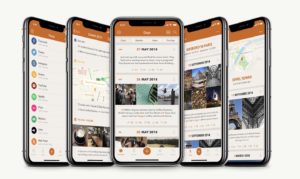
Day One Journal

day one app

Day One Journal is one of the most popular journaling apps out there, for a good reason. The app offers a wide range of features set to take your journaling experience to the next level.

You’ll get all the core journaling features — things like text-based entries, custom reminders, and the ability to insert photos and videos. You can also add metadata to enrich your entries — which will input things like location or weather automatically.

Day One’s reminders feature is pretty cool — for example, instead of a simple email notification, you can set up prompts that ask for your thoughts at the end of the day, the morning, or whenever.

The app is free, but you’ll need to pay $34.99 per year for premium features.

Day One Journal Download Free ►
8

Journey

journey cross platform journal

Journey’s real selling point is, the app is a cross-platform journaling app. So, you can create your account, make a list from your computer, then reflect on the day while laying in bed with your phone.

Similar to Day One, this solution allows you to create text-based journal entries, as well as those with photo, video, and geo-location tagging. The app supports multiple images, and you can export to your Google Drive or other formats.

Journey is free on Web, iOS, and Android, $16.99 for Mac and $17.99 for Windows. Premium mobile features may be unlocked for $4.99.

Journal (by Journey) Download Free ►
10

Momento

momento social media journal

Momento is the journaling app of choice for social media lovers. If you’re already documenting away on Facebook, Instagram, or writing on Medium, this app brings these things together into one place, allowing you to keep a full-on digital archive of your online life.

Momento provides automated journaling. Naturally, this isn’t a great solution for that journaling for mental health reasons or productivity. But it’s perfect for those who want to keep detailed accounts of what was happening in their lives on a daily basis. Still, those who want the traditionally written entry can find that here, too.

Momento is free for users with up to three social feeds. The premium plan is $3.99 and allows you to add multiple photos, more feeds, app integrations, and themes.

Momento - Diary / Journal DOWNLOAD FREE ►
7

Penzu

penzu private journal

Penzu is a journal app with a strong emphasis on privacy. The app allows you to create journal entries with photos and you can sync your content across devices.

This app isn’t the most feature-stocked entry on our list, but it gets the job done. Writing an entry looks a lot like creating a blog post in WordPress or similar. The benefit, though, is the app stores your entries as a journal — so they’re together, rather than saved as separate files.

What’s more, you can set custom reminders, so you stick with your new habit.

Creating an account is free.  However, if you want access to all of the features, you’ll need to pay $4.99 per month or $19.99 a year. The pro plan comes with a passcode for journals, unlimited photos, journals, and custom journal covers.

Grid Diary

grid diary journaling app

Grid Diary aims to simplify the web app journal. The journal is as easy as filling out a form, and presents you with 8 question prompts that ask you things that may make you evaluate your lifestyle choices. Examples include: “how much money did I spend today?” Or “what sports did I do to improve my health?”

That said, you can customize the prompts yourself if documenting your sports participation isn’t on your list of priorities. This app probably isn’t the one for those who like to free write their heart out, but it is a good choice for someone looking to become more self-aware — without being too flowery or intimidating.

Grid Diary is free, but you can upgrade for $4.99 to unlock pro features. The pro plan includes multiple reminders, customizable formatting, passcode locking, syncing with iCloud and Dropbox, and Evernote integration.

Grid Diary 2 DOWNLOAD FREE ►
8

Is it legal to rip your own DVDs and Blu-Rays?

Here’s what you need to know about digitizing your movie collection.

DVDs and Blu-Rays

Ripping DVDs to your computer or an external hard drive comes with a clear set of benefits.

You’ll have a backup in case the physical discs become scratched, easy, centralized access to your favorite flicks, the list goes on.

Plus, dealing with discs these days is a pain. They take up space, they skip, and we’ll go out on a limb here — they’re not exactly a beautiful object that adds value in the way that records or hard copies of books do.

But, the legalities of digitizing your collection can be a bit murky. Try googling the title of this article, and you’ll see exactly what we mean.

While you’re most likely going to be fine ripping DVDs here and there, there are some key things you should know about the law.

Ripping copy-protected DVDs is illegal… technically

Laws are kind of all over the place when it comes to ripping DVDs for personal use. See, it’s perfectly legal to rip DVDs that are not copies of copyrighted work. But chances are, most of the movies you’re planning on digitizing have several layers of copyright protections.

In the U.S., it is still illegal to rip DVDs of copyrighted work for personal use, though there are several groups working to change this law.

Title 17 of the U.S. State Code explicitly states that it is illegal to reproduce a copyrighted work. So, just about anything that comes with a label indicating copyright, which includes basically any movie you can think of.

Most DVDs and Blu-Rays come with encryption attached and breaking that encryption is illegal. If you happen to come across an unencrypted DVD, ripping it for personal use is A-OK.

Where it gets confusing is, CDs have laxer rules regarding ripping for personal use. You can, for example, easily upload your old discs to iTunes and digitize your library with minimal effort — and zero legal repercussions.

Title 17 states that making a copy of an original work without the creator’s consent, is considered copyright infringement. The law doesn’t make any exceptions for personal use — or creating digital backups.

But, it also doesn’t say that you can’t copy the content on your own devices. Confusing, right?

The bottom line here is, you’re likely not going to be fined or jailed for ripping your DVDs for personal use.

Redistribution is where you’ll run into trouble

The thing about ripping DVDs is, you’re probably not going to get caught.

Government agencies have too much on their plate to care that you’ve digitized your director’s cut “Lord of the Rings” DVDs.

The issue really comes into play if you start redistributing content. So long as your goal isn’t setting up a bootleg DVD stand outside or adding your full movie library to a download site like BitTorrent, you should be in the clear.

How to rip DVDs and Blu-Rays

Ripping DVDs to an Apple device presents a problem. In the case of Apple, which is a U.S. company, they need to maintain relationships with movie studios. Unfortunately, that means you can’t copy DVDs to your iTunes account like you can with your CDs.

Again, while it’s technically illegal to rip DVDs for personal use, people rarely face consequences. We want to remind you to stay on the right side of the law. Watch this radical PSA for a refresher:

To rip DVDs for your personal use, you’ll want to make sure you use a reputable third-party software. You’ll need an intermediary program to successfully digitize your DVDs. There are several DVD ripping programs out there, but many of them come equipped with spyware and tracking that can put you and your devices at risk.

Free software is often unregulated, though there are some decent options available, usually in the form of a free version of a paid software.

We recommend the following options:

WinX DVD Ripper Download Free ►
7
Handbrake Download Free ►
7
WonderFox DVD Video Converter Download Free ►
9

7

How to look for a new job without your boss finding out

Ready to find a new job? Here’s how to scout for a new one without jeopardizing your current gig.

We’ve talked about it before; it’s essential to have a strong online presence if you’re looking for a new job. That’s all well and good, when you’re unemployed, self-employed, or not being monitored by your boss.

But, attempting to job hop while employed in a full-time situation is a whole other story.

Sure, most employers aren’t completely blindsided when an employee gives notice. It’s the way of the world, especially in 2019, when no one stays at a job for long.

Still, looking for a job while on the job can be a minefield. Will you get fired if you get caught? How will you schedule interviews? What happens if your employer finds out you’re looking for greener pastures and the search takes longer than expected?

Below, we’ll dive into some of the concerns job hunters have while keeping up the charade at a job they’re not exactly thrilled about.

Doing a secret job search — how to find work on the DL

hiding worker

Don’t search at work

If you work in an office, it’s hard to fight the urge to do some job hunting while you’re on the clock. But, by all means — don’t do it. Write your cover letters at home, fill out your applications at the coffee shop, and stay off of company networks.

For one, you’ll still need to be respectful of your company while you’re on the clock. They are still paying you to work for them, not going out and wooing some new company.

Second, employers are increasingly spying on their staff. In some cases, companies are looking at internet histories, keeping tabs on social accounts, and reading their emails. As such, it’s smart to avoid using any company equipment for personal business. Like anything else in this digital age, your online activity can affect your reputation down the road. Tread carefully.

For timely responses, limit your email replies to your phone. Or pack your personal laptop and have lunch in a local coffee shop.

TL/DR, do the heavy lifting at home.

Social media precautions

Again, social media is an essential tool for job hunters. Secret job hunters, not so much. Where freelancers and the unemployed can benefit from sharing their goals publically, employed seekers must err on the side of discretion.

LinkedIn will be one of the first places that a hiring manager will visit before deciding to schedule a call. Make sure your photos are in good shape, current, and that your job information is up to date.

Beyond keeping your social media sites clean and current, be careful about what you’re posting online. This means no Facebook posts about your job hunting process, no tweeting at potential employers, and so forth. Even if your boss doesn’t look at your profiles, someone else might pass the word along and blow your cover.

Building on staying mum on social, we should also mention that it’s smart to avoid posting your resume in any public settings.

What if interview times conflict with your real job?

This is a hard one.

One of the best parts of being alive in the digital era is that it’s super easy to submit online applications — rather than running your resume around town. Still, if you plan on working in an office setting at least some of the time, prospective employers and recruiters will want to meet you in person.

You’ll want to schedule your interviews carefully — early in the morning or at the tail end of the day make the most sense — as these short absences are easier to explain — you have to pick up your kid, go to the doctor, etc. Another smart idea is to schedule a few interviews on the same day — and use a vacation day.

If you do plan on leaving early or coming in late, you’ll want to bring a change of clothes. Many offices tend toward the casual and showing up in a suit when you’re usually a jeans person will draw some unwanted attention to yourself.

Recruiters can blow your cover

coworker spying

Most recruiters will say that they’ll be discreet, but they may accidentally blow your cover if you aren’t careful. Make sure you let them know your situation and be completely upfront about not revealing your name unless a prospect is serious.

Another concern is, the recruiter might work for your current employer. Recruiters, of course, don’t work for the job seekers. They get paid by the employer that uses them to find qualified candidates. As such, you need to remember these folks aren’t on your side. Be careful about what you tell the recruiter about your salary requirements, other prospects, and current job situation.

What if you do get caught?

Letting your employer know you’re thinking about moving on isn’t an easy conversation. But, if someone sees through your stealth attempts to duck out of the office for the latest “dental” appointment, it’s not a bad idea to clue your employer into your plan.

If you have a good relationship with the management team, they may try to convince you to stay — but they’ll likely understand this is the best move for your career.

Alternatively, it might be an awkward situation for the next few weeks, months, and so on.

As far as whether or not you can get fired, it depends. Hourly employees are getting paid for their time, so getting caught scrolling for openings while on the clock can undoubtedly result in loss of employment. Salaried employees might have an easier time, as schedules are often flexible so long as projects are completed.

Finally, make sure you don’t give notice until you have a firm offer and you’ve accepted it. In some cases, the new employer might withdraw an offer, so don’t put in your two weeks’ until you’ve signed a contract.

Can we (and should we) build a new internet?

We know today’s internet is broken. Are we ready for something new?

future internet

The idea of a new internet goes beyond being a key plot point in “Silicon Valley.”

With data breaches, ISP monopolies, and the whole fake news trash fire taking over the digital space, it’s understandable that one might want to hit delete on the whole internet.

We technically have the technology to make a new internet. It’s here, and chugging along like a clunky prototype. But the point is, we could pull a re-do on the web if we really wanted.

The problem is getting people to switch away from an existing system with oh, just 3.2 billion+ users is no small feat. And those aforementioned prototypes tend to come with a blockchain component — which sounds all well and good. BUT — a good chunk of that 3.2 billion truly has no idea what a blockchain is — much less how it works.

So… some challenges stand in the way. Still, there are some advantages to a hypothetical clean slate.

Here are a few reasons that maybe, starting over isn’t such a bad idea.

Why we might want to consider a total re-do of the internet

The net neutrality factor

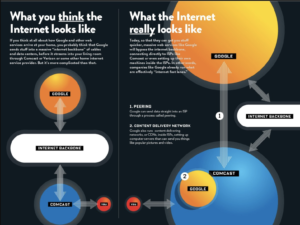
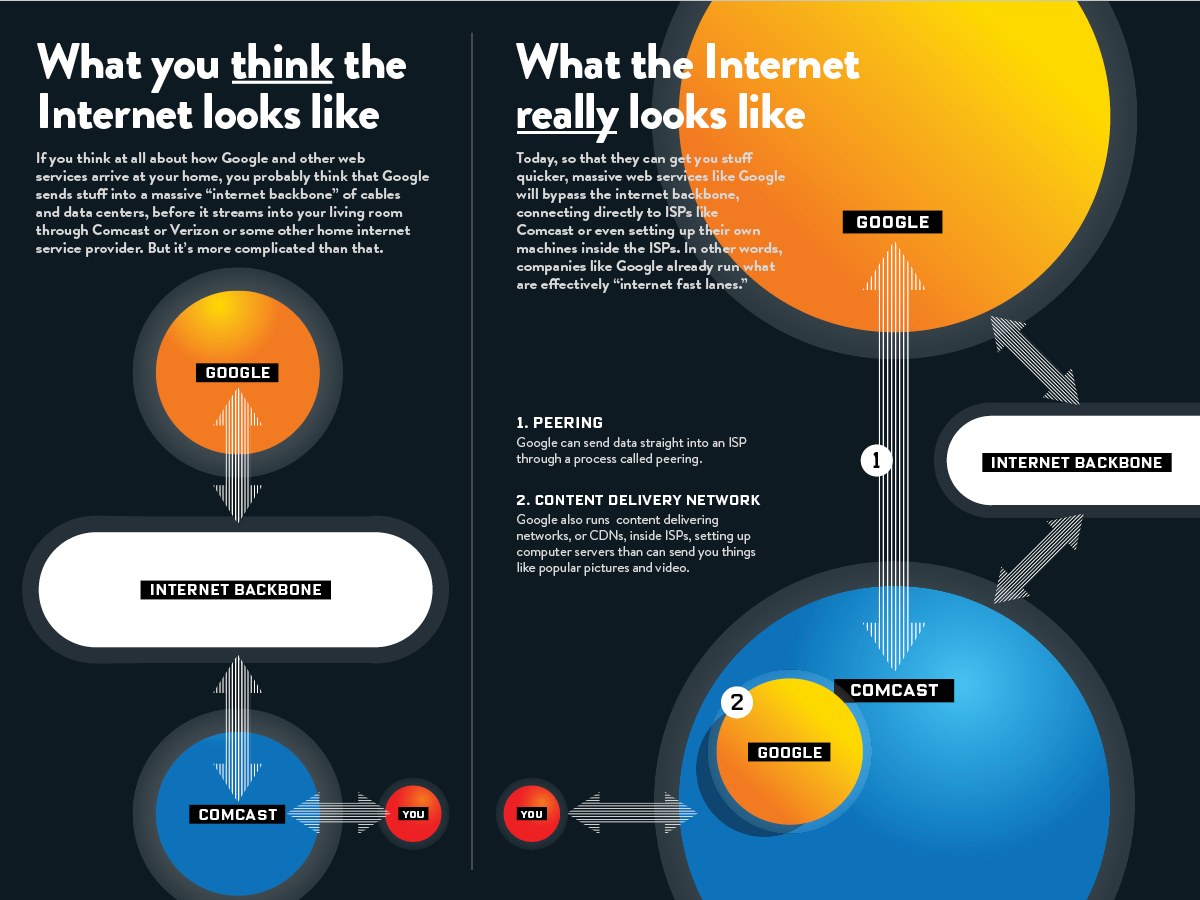
Technically, no one owns the internet. But, a select few companies make up the “backbone” of the internet. The backbone is the primary data route that provides networking access to a handful of companies like AT&T, Comcast, Google, and others. The way that it’s set up is, we need to sign up with a provider to access the internet.

If that doesn’t make sense, refer to this “backbone graphic” courtesy of High Tech Forum:

internet backbone graphic

These ISPs don’t necessarily run the internet, but they do control how you can access it. The end of net neutrality means that all web traffic is no longer treated equally. The old rules prevented ISPs from offering paid access to digital fast lanes or blocking traffic.

Now, ISPs can collect more data and can search and share user search history.

Since the ruling, people have begun looking at “new internets” more seriously.

In some cases, communities are banding together to break free of ISP control. Take for example the Equitable Internet Initiative, a community-owned wireless internet that bypasses ISP control.

If you’d like to learn more about the project, you can check out this short video:

Users don’t come first anymore

The idea of a user-first internet is an exciting one. Even Mr. Internet himself, Tim Berners-Lee, is behind it and working to create an open sourced project, Solid, which seeks to restore the power and agency of web users.

We’re at a strange crossroads where the biggest tech companies — and now, even smaller ones — are collecting data about us and using that to drive profits under the guise of better engagement.

The challenge with adoption lies in the fact that while we can get angry reading about black box data storage systems, we generally don’t notice that there’s any violation taking place. Some of the high profile breaches have captured the public’s attention, but there’s still this issue of convenience and resistance to change.

Do we want to change from Google Docs to Graphite Docs, from Twitter to Mastodon? Or get used to an encrypted email system?

Well, some of us might.

And there are some obvious benefits. But the average internet user often feels that they don’t have much to hide — so what if Facebook knows where I shop or the same ads keep stalking me around the web? No biggie.

Back to the idea of Solid. Berners-Lee says that the platform is designed to work on our existing internet, but that users will create their own pods — essentially a personal data store — allowing them to decide where their data lives and who has access.

Developers will need to integrate Solid into their apps and websites. As of now, there are only a handful of developers doing so. Still, this vision paints a picture of users adding a layer of active consent into their internet activity.

Decentralized internet

internet

There’s an awful lot of promise associated with the idea of the decentralized internet. Those proponents of the idea — from startup founders to activists — talk about decentralization as this beacon of hope. It’s a digital utopia that aims to solve all of our social justice woes and keep our online activity super secure.

One of the key benefits of a decentralized internet is the idea that artists, coders, and writers can share their creations with the world, without the risk of someone stealing their work. Blockchain-based internet could help keep digital assets secure — released if and when someone pays up.

On the flip side, there’s something about the method of creating a permanent online identity that’s a bit unsettling.

Like the idea that a blockchain record could hypothetically stick around permanently is great if you’re looking at it through the lens of severe internet bullying or criminal activity.

But when you consider it in the context of — say, an embarrassing comment or bad review, it could hurt you down the line. When stuff like that happens in the real world, it’s generally limited to a smaller circle and forgotten.

To succeed, the new internet must learn from old mistakes

The internet once represented this positive force of global connectivity.

Today, it’s become the scapegoat for our most pressing social problems. We’re talking about inequality, hate speech, violence, and of course, social isolation.

While net neutrality alone makes a strong case for starting over, we still need to face the mess we made on our current internet, lest we make the same mistakes.

Maybe it comes down to new regulations that limit the reach of tech giants like Facebook. Perhaps it’s creating better decentralized tools that connect with all users, not just the super techy among us.

In the end, the internet is a digital reflection of the world — something we can make better, sure — but there’s no quick fix.

Which apps are best for making new friends?

Looking to make new friends? Here are the pros and cons of 6 popular apps.

making friends

Dating apps are commonplace these days. No shame in meeting the love of your life (or love of the week) online.

Part of what makes the process, well, weird, is, some dating apps have a friendship option, in addition to the usual fare. Others adopt the dating model — incorporating friendship quizzes, detailed profiles, and in-app messaging.

So, why are friend-focused apps the subject of skepticism and stigma? It’s arguably way harder to form platonic friendships from scratch after you’ve completed college than it is to meet a potential suitor.

Those looking for new blood for the friend group or a fresh perspective face some challenges,where do you look for new faces? We’ve covered friendship apps in the past, narrowing down our recommendations to the best ones available.

Here, we’ll look at which options work and which ones you might want to skip.

What friendship apps are worth your time?

Meetup

meetup groups home page

Meetup is the one app that anyone suggests when someone wants to meet more people. It’s one of the better apps, in that norms are a bit more established than you’ll find with the apps that take the dating model and put a platonic label on it.

Meetup is maybe both the best and the worst app in this category. Why? Well, for a few reasons. The breadth is staggering. There are groups focused on massive impersonal singles events, and others with dedicated regulars — book clubs, hiking groups, people that want to meet for happy hour.

Facebook Groups

Facebook Groups aren’t usually anyone’s favorite place online — they’re usually forced on you because you signed up for a class or a neighbor invited you to a community page.

But don’t write them off! There are tons of Facebook Groups and many of them center around shared interests like Meetups do. Because there’s usually a purpose behind each group, it’s a less awkward way to find new people than the one-on-one date-style interactions you’ll find on something like Bumble BFF.

8

MeetMe

meet me dating or friends?

MeetMe is an app that allows you to find people nearby that want to meet up on a whim.

It’s unclear if the app is a dating site, a place for friends or both. We’ve found that this app doesn’t have great reviews, it’s one of the only co-ed friending apps on the market — compared to Hey! Vina and Bumble BFF that primarily target women.

Users create a profile that includes a short bio, location, and details like age and sexual orientation and from there, you can chat with other users. We like that MeetMe is less formal than Meetup, which is focused on events—and sometimes there’s a long wait before there’s something to do.

Still, this app doesn’t seem too promising — and may come with awkward interactions where one person isn’t aware they’re on a date.

MeetMe: Chat & Meet New People Download Free ►
10

We3

We3 friend app

This app explicitly states that it’s not for dating. Instead, it’s supposed to work like a mini meetup. You meet in groups of three, which mitigates some of the awkwardness involved with things like Bumble BFF or the bygone Tinder Social.

The algorithm looks at over 150 factors that help determine who you get matched with. What we liked about this option is — We3 gets that sprawling mixers are basically worthless for meeting friends. And, one-on-ones can be awkward.

Bumble BFF

bumble for friends

Bumble BFF is an interesting one. If you listen to the founder speak about the Bumble brand, you’ll get the vision — it’s evolved into a one-stop shop for networking, friending, and, of course, dating.

All well and good, except the app still features a lot of users with pictures they put up for their dating profiles. So, as you scroll through the pool of potential besties — you’re presented with this lineup of people — ostensibly judging them based on appearance.

Still, the one-on-one approach is refreshing if you’ve only used larger meetups to expand your circle. We’ve found that a lot of people text back and forth for a long time — and things fizzle fast. With that in mind, it’s worth it to be more proactive about setting up a time to meet and making a point of following up with the people you actually like.

Bumble — Meet, Date & Network Download Now ►
8

Hey! Vina

hey vina app

Hey! Vina, which we’ve also looked at in the past, is exclusively built for finding friends. Like apps like OK Cupid, the process involves taking some quizzes, uploading a few picks, and receiving matches based on what the algorithm spits out. You’ll get an automated message from a Vina employee “making an introduction,” but it’s the same thing every time.

The process is basically the same as what you’ll get with Bumble BFF. You’ll message matches and decide to meet up. The app is cute, and we like the idea. However, it can be tricky to get over that initial hurdle of the date-ness of the whole thing.

Hey! VINA DOWNLOAD FREE ►
7

Final thoughts

Friend-dating requires as much time and energy as regular dating. People take that for granted. You might meet friends at work, or through doing a regular hobby — but those seemingly effortless friendships were built on repeat exposure to each other. Did we miss your favorite app for meeting friends? Let us know in the comments below.