{
"de-DE": "",
"en-US": "Trevor Hutchins writes screenplays, novels, and articles from his home in La Mirada, California. He self-published hist first novel, 'Wynden's Legacy,' on Amazon in May of 2017 and hasn't stopped writing since.",
"es-ES": "",
"fr-FR": "",
"it-IT": "",
"ja-JP": "",
"nl-NL": "",
"pl-PL": "",
"pt-BR": "",
"social": {
"email": "",
"facebook": "https://www.facebook.com/trevor.hutchins.31",
"twitter": "",
"linkedin": "",
"web": "http://trevorhutchins.com"
}
}
Venmo exchanges money between users, whether by connecting directly to a bank or acting as a temporary account for funds. Thanks to their excellent security, the ease of payment (if someone is in your phone’s contact list, you can quickly send or request money from them) makes Venmo an excellent way to settle small debts: pay your friend for a meal, buy a refrigerator, or send the security deposit for a house.
However, the app also contains an interesting feature: public transactions.
When finalizing a transaction in Venmo, you’re given the option to make the purchase open to the Public, visible to Friends, or entirely Private. However, the default is set to Public:
There’s no need to be concerned yet! As shown in the two pictures above, Venmo protects user privacy by only releasing four pieces of information: the profile picture of the transaction’s initiator, names of the people involved, how long ago the exchange occurred, and a short, user-created description of the purpose. Also, don’t forget that the privacy setting is up to the user’s choice.
Still, the question is: why does Venmo put transactions in the open?
Surprisingly, Venmo says little about this issue, which can be seen by visiting the Venmo Help Center. Their self-description simply notes the app is, “a social way to pay your friends when you owe them money and don’t want to deal with cash”.
For some, this may be too much. It’s understandable that public transactions come dangerously close to releasing financial information.
For others, this may be seen as a sign of changing times: while the idea of protecting personal information won’t disappear, the age of technology and digital information encourages people to put their information in the open. Why shouldn’t financial transactions be next?
Of course, it’s your choice to decide! If you’re connected to people who use Venmo regularly but you don’t want anything open to the public, go into menu, choose “Settings,” and head to “Privacy.” From there, you can alter the default setting for transactions from public to friends or private. Not only that, but it’s possible to alter the setting for all past exchanges as well, and block certain users.
While some people may be fine with Public transactions, we hope this better informs your personal decision!
To create movie or television scripts, you need a screenwriting program. That’s it. Planning can happen outside on other applications, but the screenwriting itself shouldn’t be completed on a notepad or in a word document; it’s the difference between using a laptop and scratching words out on a stone tablet.
Okay, maybe not that bad, but still.
If you’re starting out, there’s no need to pay the starting fee of $250 for Final Draft 10 (Final Draft’s program is the industry standard for screenwriting and will essentially be required of all professionals). Celtx offers many of the same resources for free, the most important being the screenwriting environment itself.
Celtx has two formats: the online website and downloadable app. They work differently from each other in a few ways.
Website
If you want to work with others or have a greater range of capabilities, try the Celtx website.
Don’t be concerned when Celtx asks you to choose a plan: they simply offer more benefits with a subscription. Choose the basic, unpaid version, and you’ll automatically receive a free month with the full plan. Then, try out the note cards and story boards and decide whether you’d like to invest.
Now that you’re in the system, you get to create a project!
Projects are essentially file folders. Choose how to name your projects carefully: when the first month ends, you’re only allowed 3 projects at a time, and you can’t change the names. Therefore, it may be best to create categories like Drama, Comedy, and Mystery, and then fill those with individual scripts later.
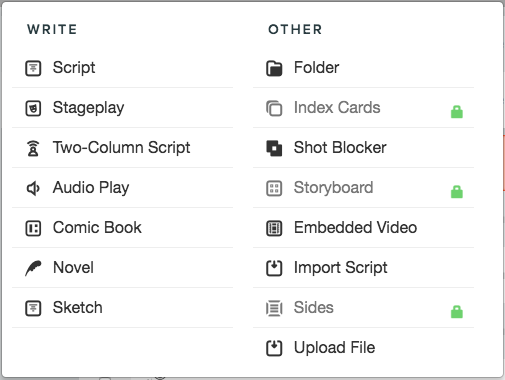
Within your project, you now create a new file. Most screenplays or teleplays will fall under the designation of “Script”.
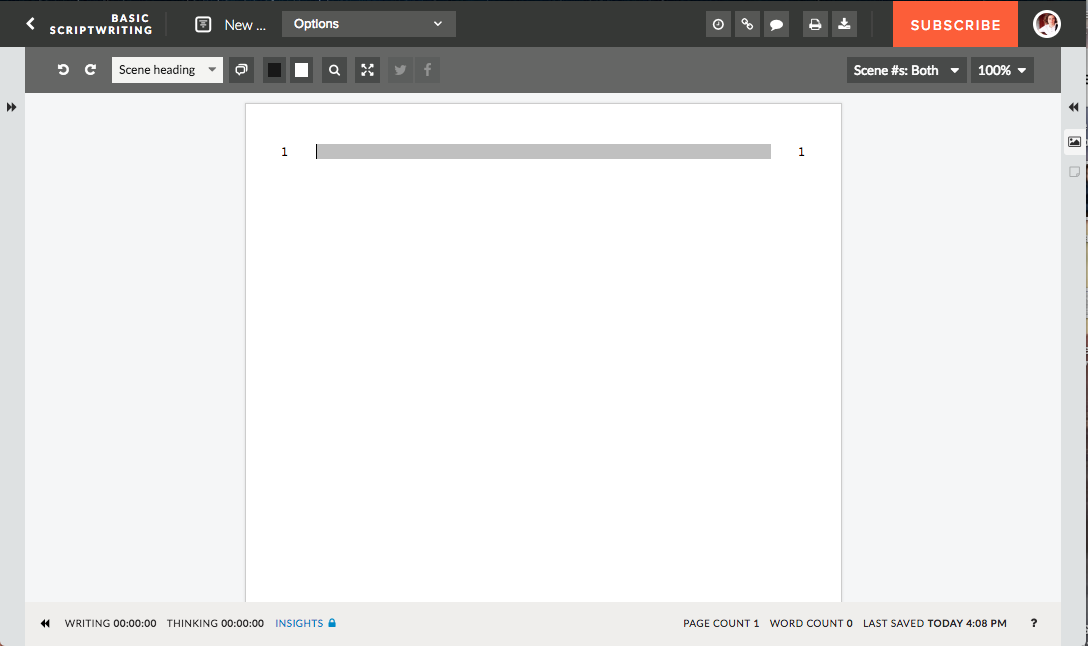
When you open up the new window, you’ve entered the work environment:
You can now get to writing! However, before we go on, there are a few things to notice here. We’ll go left to right, top to bottom.
1. The Top Bar: the arrow at the top left will take you back to your studio and the other projects. Clicking the “New Screenplay” slot allows you to rename the document. The other buttons allow you to share, comment, print the document, and visit your profile.
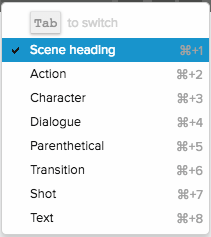
2. Lower Bar: your tool chest awaits here, much akin to any other Word processor. This is where you find the Undo/Redo buttons, font color, and page size. However, Celtx also offers some script-specific items: type mode, simultaneous dialogue, and scene selection (all shown below).
3. Side Bars: these allow you to see notecards and other functions. They will be unavailable in the free version.
4. Main Window: this is where you type! Celtx makes screenwriting easier with the ability to switch between type modes with the “tab” button, or the mode selector mentioned above. When you get used to system, you’ll be able to switch between scenes, dialogue, and action with ease. Just remember, it’s like an instrument: learn to work with it, and then you can start singing.
5. Lower Bar: here, Celtx shows how much long the document has been active/inactive, the page and word count, and when everything was saved last. Also, there’s a small question mark for help.
Now, your hard work as a screenwriter comes into play! Although Celtx makes screenwriting far easier, it’s up to you to learn how screenwriting itself works. Make sure to read other screenplays to improve your skills and understanding of how screenwriting works!
(NOTE: the website version requires a consistent internet connection.)
App
The Celtx app is free on mobile devices, but must be purchased on a laptop for $20. Unlike the Website, it can be used online or offline.
The main difference? Aside from a desktop folder with unlimited storage, the work window appears more sparse. A few functionalities, like simultaneous dialogue, have been removed:
Still, the clean environment may be perfect for some. It helps improve focus and still has the type mode functionalities required to make screenwriting an easier process.
Final Words
Remember that the most important requirement for finishing any long-term project is determination. Consistency also helps, so try to plan on writing for a minimum amount of time, at a certain point of the day. Celtx will help you move along easier once you get the hang of it, so keep working, and we wish you the best!
Halo Infinite received a trailer at E3 2018, which sparked much excitement in the Xbox gaming community:
This came along with a blog post on the Halo Waypoint site, which details the thoughts and feelings about the new game from the viewpoint of 343 Industries. So far, many exciting plans seem to be in the works: the vaunted Slipspace Engine being one of the main attractions.
But will Halo: Infinite bring back the community?
It’s no secret that after Bungie left Halo and 343 Industries began on game 4, many fans started to leave. At first, this trend could’ve been mainly attributed to a change of office; when the game’s developer changes, someone’s gonna leave. However, as time went on and Halo 5 came out, it’s become clear that something else is lacking.
First, we’ll analyze what might be wrong, and then move on to whether or not Infinite will solve the problem.
Ironically, humanity’s distaste for change never changes. In a well-established series like Halo, there was no way the change wouldn’t throw off a good number of people. To be fair to those who left, Halo couldn’t possibly remain the same, and there was certainly a marked difference with the new administration.
The Story
It started with Halo 4, which followed the Master Chief after he and Cortana were lost in space. Right of the bat, Cortana wakes the Chief after a run-in with scanner over the planet Requiem, leading eventually to battle against a surviving Forerunner warrior called the Didact (the Ur-Didact, that is, but that’s another issue altogether).
While this may sound exciting, notice that the story avoids Halo’s familiar storyline. While a lost, radical branch of the Covenant were featured along with the UNSC Infinity, humanity’s battle against the Great Journey and the Flood are in the past, while rising Forerunner threats take precedence. Since the story of Halo 1-3 created much of the draw for original fans, this alteration often didn’t live up to nostalgia.
Also, Cortana “died.” Sorta.
Then came Halo 5. 343 Industries attempted to bring back some of the old Halo. Most importantly they reintroduced our boi, the Arbiter, in the midst of a battle against surviving Covenant rebels on Sanghelios.
[Very Late Spoilers Ahead] However, 343 also made a few controversial changes. Master Chief isn’t the sole focus in 5, after the addition of team Osiris, lead by Captain Locke.
Finally – and this is the biggie – the story revolves around Chief trying to find Cortana, which leads to the realization that she has essentially become an Artificial Intelligence warlord and plans to subjugate the universe… for its own good, of course.
Needless to say, a lot of fans disliked seeing Cortana’s story continue in this fashion. The best theory currently goes something like: in Halo 5, we’re just seeing a fragment of her personality that was torn off by rampancy and then given power by the Domain, a Forerunner artifact.
Only time will tell if this reaches a satisfying conclusion.
The Game Mechanics
Halo 5 plays much quicker than others in the series, with the addition of boost, unlimited sprint, and quicker shield depletion. Although the new pace may be more fast, fun, and furious, some have noted that Halo’s multiplayer strays dangerously close to becoming a Call of Duty.
Also, Halo 5 completely dropped Halo’s tradition of split screen for a boost to “graphic quality.” 343 already apologized for the decision and plans to bring it back for Infinite. Which brings us to:
Why Fans Will Probably Come Back
First, as we’ve mentioned, many gamers will likely return for the reintroduction of split-screen multiplayer. If you’re like us, many great memories were built off of playing Halo with friends, back when you didn’t need multiple Xboxes. Despite being such a simple change, we believe this decision will speak volumes to the Halo community.
Also, if you’ve seen the new trailer, you may have noticed that 343’s Slipspace engine really does look fantastic. Specifically, the blog post discusses the plans to use the engine’s powerful abilities to bring a modern edge to some of the most popular Halo graphics from across all eras. Take, for example, the crisp yet classic armor for Master Chief:
Last but not least, Halo: Infinite promises to engage with the new storyline in ways we haven’t seen before. Fans will remember the original Halo 5 trailers, which seemed to feature a battle between Blue team and team Osiris:
Since this never really occurred in Halo 5, we assume there was some turmoil on the back end of story development. In contrast, 343 seems far more put together on Infinite at this point. If they hold together through testing and release, its likely fans will begin to accept Halo’s new direction.
(Speculation Corner: Infinite may take place on the Halo ring once inhabited by The Primordial. This might spell a re-emergence of the Flood… but who knows?)
Conclusion
When it comes down to it, any number of factors can drive a game community away: story, gameplay, mechanics, developer, the economy, etc. However, it seems like 343 Industries truly took community feedback to heart and plans on tightening down their plot, answering gamer’s prayers for improvements, and preparing to welcome a new generation of Halo fans. In fact, the relative failure of Halo 5 – still a fun to play despite apparent issues – may have weakened nostalgic expectations, leaving Infinite less restricted as it creates the bright future of Halo.
Have you seen them? If you haven’t, get back into Fortnite for Season 5! Golf carts recently hit the battlefield, along with a number of other changes to the familiar island we’ve come to love.
Despite Fortnite’s new rifts, skins, emotes, locations, and sports balls, the addition of driving to Fortnite likely deserves to be called the best change. Since many other battle Royale games – Player Unknowns Battlegrounds, for example – already allowed the use of vehicles, players have long expected some automobile in Fortnite. Now that it’s here, we’re glad to see the carts were designed with Fortnite’s characteristic charm.
There are a few technical details you should know. First, carts can be found in good supply at Lazy Links and Paradise Palms, two of the new locations which were ostensibly pulled into the landscape after the Great Rift of Season 4. Each cart sits four people: driver, shotgun, and two passengers on the back. They can be destroyed by gunfire with apparent ease. At top speed, they move much faster than a sprinting player and the roof acts like a bounce pad…
So what about combat?! To discuss this, we’ll go step by step and check through each position of the cart. Every one has a different role, and the successful completion of those could spell a Victory Royale; failure could mean a destroyed cart and a lost game, so read on!
Driver
Your job is to drive, naturally.
However, there’s more to that than you might expect. For one, you should know that the carts deal damage when they run into other players:
If you see the chance to run someone over, don’t waste the opportunity, and don’t miss!
At the same time, beware. As we’ve mentioned, the carts can be destroyed by gunfire, and are not very strong! If your enemies see you coming, it may be best to stay farther away and let your passengers engage in combat. When this happens, follow the Driver’s Number 1 Rule: keep moving, and avoid fire. A stationary vehicle makes an easy target, and a vehicle traveling straight ahead at the same speed isn’t much better. Get jiggy with it!
Finally, the driver is the parent/guardian of the vehicle. You’re responsible for making sure everyone’s inside. Don’t leave your friends amongst enemies or running through the storm!
Shotgun
Like the passengers, shotgun position can fire weapons. While driving across the landscape, you should be watching for signs of enemies ahead.
Once engaged with an enemy, note that the roof may impede your vision and doesn’t offer much cover. While this makes shotgun a difficult position, it still offers a huge plus: you’re closer to the front of the cart, and the ground…
That means building!
Is there a mountain in your way? Shotgun can build a ramp as the cart goes up. Are there people on both sides? Shotgun can create a wall to avoid a two-front war. Stay on top of it, keep fighting, and build well!
You are the brawlers. When driving, keep your head up and scour the landscape for signs of danger. You may see a group of enemies running before they spot you. When this happens, have your weapon ready and score a few hits before the building starts. Also, don’t forget to crouch back down if someone starts firing back!
Now, we admit that this requires excellent aim while moving. If you aren’t that type of fighter, no worries: once the enemies begin fighting you can always hop off and start building from the ground while your teammates keep rolling. Then, continue fighting the usual way!
Transport
Fortnite has an unspoken rule: transportation is combat.
On one hand, this relates to the storm. Since Fortnite’s weather itself deals damage, simply outrunning the storm may be your key to winning a fight. Why lose health when the environment will take care of your opponents? But on the flip side, you don’t want to be the team left behind, running for your lives. If the clouds are coming, get to that cart quick before anyone else does!
On the other hand, “transportation combat” can relate to positioning. Many battles are won with the use of jump pads and bouncers, all of which may help you get behind the enemy, on top of their fort, or simply to a safe place for healing. In terms of the cart, this may mean running, moving to higher ground, or a flanking maneuver.
(To flank: if you’re a passenger, hop off the cart while your teammates keep driving around. If you’re lucky, you may come up behind the other team while they’re distracted and catch them from multiple sides. If that doesn’t work, don’t panic: you may be the perfect distraction while your teammates get into position.)
Fun
Of course, don’t forget that we’re playing Fortnite here. Take nothing too seriously! Build a ramp, drive off cliffs, have drag races. If you’ve acquired one of the sports ball emotes, you can use the carts to get around Lazy Links for some golf, or visit the many other sports fields for a good time. Also, once the next set of Battle Pass challenges arrive, you can be sure the carts will help. Whatever the case, don’t forget to enjoy Fortnite’s new vehicles!
Everyone should make a budget. They give you a secure understanding of your financial situation and can help plan for a deficit of funds or ensure that expenditures are below income. Whether you’re looking forward to the next financial year, going on a vacation, or planning a wedding, budgets are there for one thing: to help you make the most of your cash!
Despite the benefits, it’s not hard to imagine why many people don’t make budgets: working with numbers on a spreadsheet or paper can be seen as boring or time-consuming. Neither of these things needs to be true! Open up Google Spreadsheet and get ready to change your life.
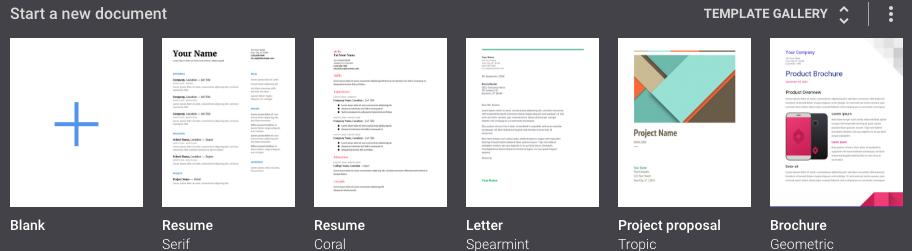
In Google Spreadsheets, you are given the option of a few templates, two of which are “Annual Budget” and “Monthly Budget”. Both provide easy tools which will help you track your funds.
Annual Budget
When opening the Annual Budget, you’ll see a spreadsheet with multiple tabs. We’ll go through each, explain the easy process for using it, and finally discuss how to quickly and thoroughly analyze the results!
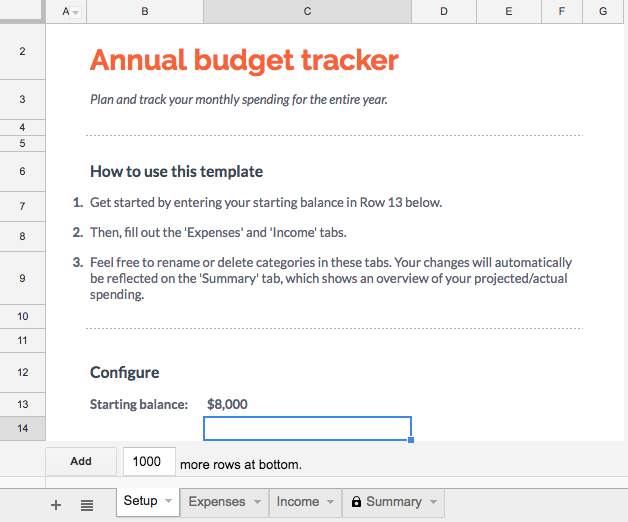
On this first tab, enter your starting balance. This may be however much you have in savings, or it could be the maximum amount you wish to spend for the year.
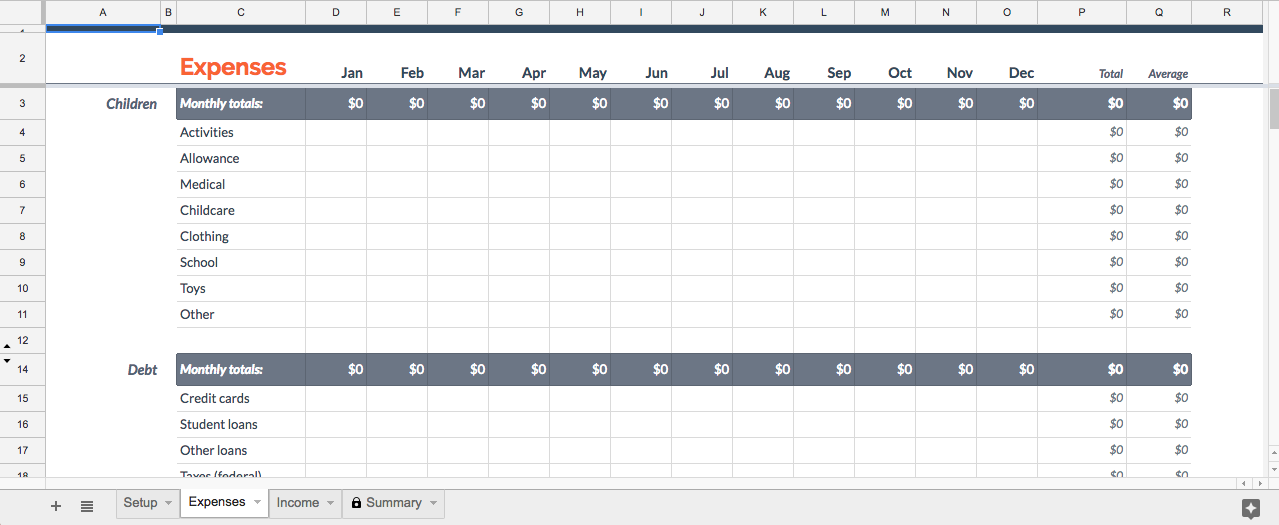
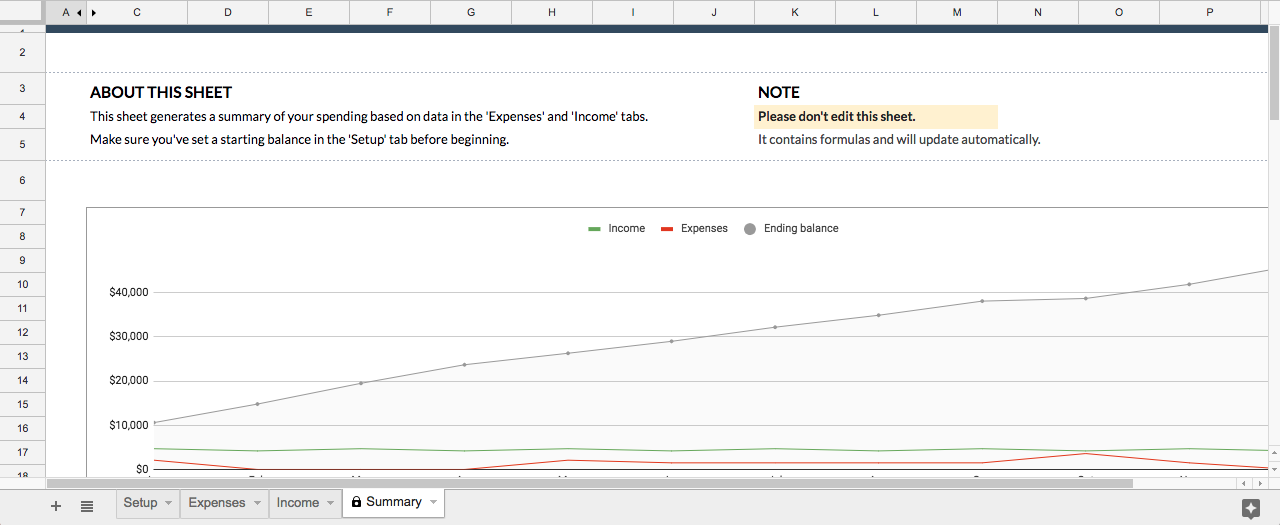
The next tab is for expenses. Simply fill in either how much you spent, or how much you plan to spend in each area:
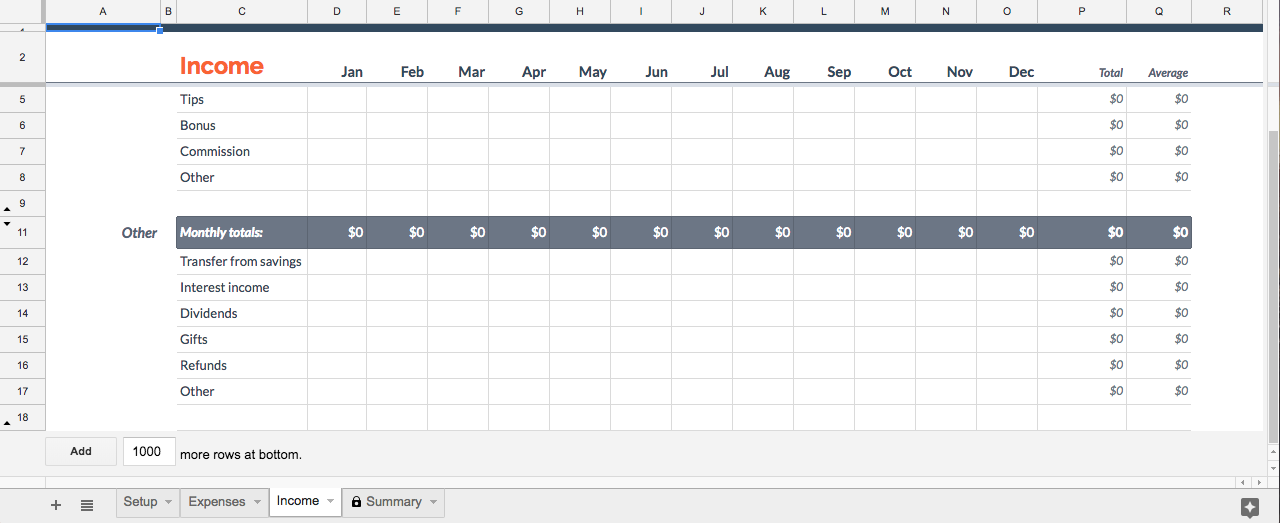
The next tab is income, and works much the same as expenses:
Finally, once this is finished, you can check out the summary page!
Before looking at the data below, check the graph. It quickly shows you where your income and expenses are, and where your initial balance has ended up.
If you haven’t already, now’s the time to ask questions like: where do I want the gray line to end up? If it’s falling, am I okay using up savings this year? If it’s going up, do I want to spend the extra money, keep it the same, or save even more?
If you’re okay with the results, great! If not, it’s time to head to the summary below the graph. Here, you’ll be able to see how you’re spending and earning money. The more you understand about your own cash movements, the easier it will be to figure out what needs to change to achieve your financial goals.
Spreadsheet’s Monthly Budget option looks a bit different, but works generally the same. There are two pages to work with, the first being “Summary”:
Here, you see the change in Starting Balance. Below, you also get a very simple and effective summary of expenses and income.
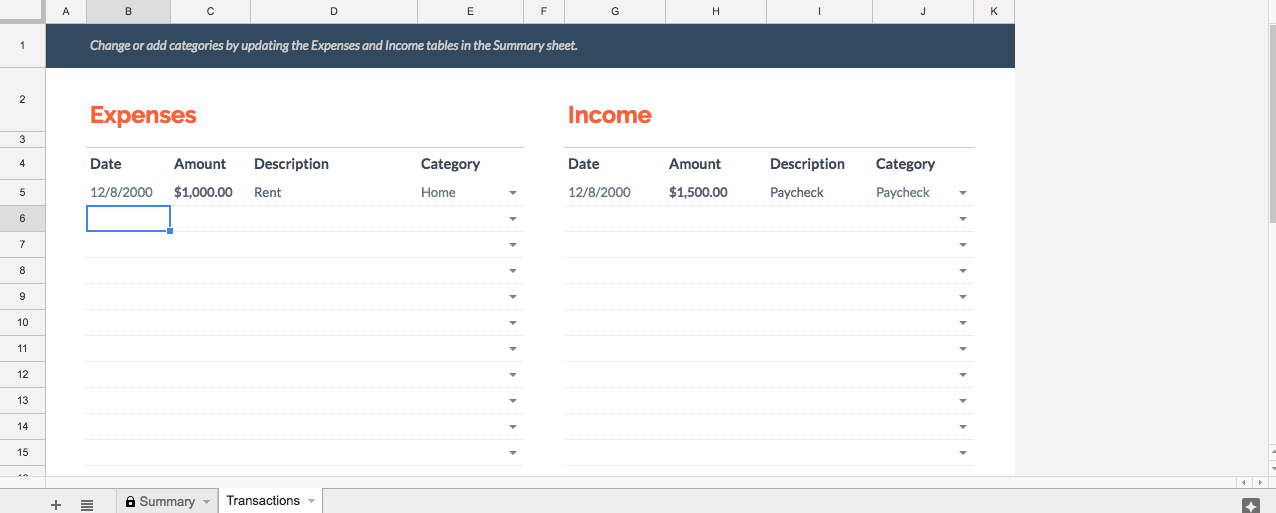
However, you probably should go to the second page, where the transactions are actually entered:
Once all the information is in place, you’re ready to head back to the summary page. As with the Annual Budget, look at what’s happening to the Starting Balance to make sure you’re where you want to be. If not, there’s no shame in that. Just check your transactions and see what can be done: either lowing expenditures or increasing income. You’ll be back on track before you know it!
Option 2: Make Your Own
If you don’t like the templates that Google provides, you are able to create your own. Both Spreadsheets and Drive offer the ability to create a blank spreadsheet document, at which point you can develop to your heart’s content.
Remember, the most important aspects of a budget are: what money is going out, what’s coming in, and what’s the overall change? From there, you can add all sorts of bells, whistles, and analyses.
Last Words
If you create a budget for past events, you may need to get help from your bank to remember what was spent/earned. On the flip side, when you’re creating a budget for future events, avoid this issue by keeping track of spent cash!
If you haven’t joined the online community of a game, you’re missing out on something special. There are a number of ways to do it and there are a whole lot of game communities, but joining the team almost always feels great. Almost always, because let’s be honest, some communities are, well…
That being said, gaming alone and gaming with a community is the difference between celebrating your birthday alone or grabbing pizza with the squad. If you haven’t already, we’d recommend giving it a try!
Choose a Method
As we’ve said, there are tons of ways to join a community, which makes it difficult to create discussable categories. But we worked together three pretty solid sections: console, online, and in-person communities.
Console
Many consoles like PlayStation and Xbox allow users to meet, collaborate, and communicate over games.
For example, Microsoft provides every game on the Xbox with a “Game Hub”, where users can collectively discuss, post videos, develop Clans, and create Group Requests, which joins the players in a party chat. Altogether, these abilities work great for games like Halo 5, where cooperative “fireteams” of Spartans go head to head in futuristic battles. Depending on those involved, the teamwork involved can bring teams together as friends.
So, whatever game you’re playing, make sure to check what your console offers. You may discover long-time teammates or a few buddies you can talk with to make gaming a bit more fun and friendly.
Also: many games, Fortnite especially, allow users to meet in-game. Here are some articles that discuss the topic more in-depth.
The main question to ask is, what do you want? There are many online resources that help communities gather, and even more application that can be used for the same purpose. Here are a few:
Reddit. Commonly called “The Front Page of the Internet”, this site offers numerous discussion pages, called subreddits, for literally anything. If you’re a game, make a Reddit account and subscribe to r/gaming. Do you have a specific game you enjoy? How about r/halo, r/bloodborne, or r/breath_of_the_wild? The downside to Reddit is that although posting, commenting, and discussing works well, it may be hard to find a specific group of people.
Facebook. A classic. Facebook excels at allowing users to create small or large groups. Thanks to the personalization, this makes it easier to plan events or work together, rather than posting memes. On the other hand, Facebook’s relative intimacy means you may need to search a while for the right group for you.
Twitch. This site does more than let you watch games: the following, commenting, and friending services enable the development of community like the other sites we’ve mentioned. However, in contrast with Reddit and Facebook, Twitch takes users right to the games with live feed videos of players. This hands-on style may be up your alley.
If a site wasn’t mentioned, we apologize. Please mention it in the comments below and remember: you don’t need to tie yourself down to one website. Most users have accounts on multiple sites. What matters most is what works best for each person!
In Person
Despite being in the communication age, meeting face-to-face can still create one of the best gaming experiences.
Keep an eye and ear out for opportunities in your community. Yes, it’s possible that nobody in your area actually plays the games you enjoy… but that’s highly unlikely. More often, you can discover fellow players through conversations about your interests. A number of gamer clans have been developed by adults who met in the office!
For the younger crowd, schools create the perfect environment to meet friends. If you’ve tried to discover teammates with no luck, consider making your own club or event: schools are often glad to accommodate student-run activities. With a little initiative, you may bring together a group of fellow gamers!
Looking to launch your career as a world-famous gamer? Live-streaming your gameplay from the Xbox requires a small amount of effort and a large amount of thought. The basics are easy, so we’ll start with choosing how to stream, then move toward using streaming programs. Finally, we have a bonus section with extra tips and tricks!
Choose how to stream
To be straightforward, you’re probably going to want to download Mixer or Twitch from the Microsoft store (no worries, they’re free). While YouTube Streaming is certainly a possibility, it’s far more difficult. Especially if you have a Mac laptop. That being said, we recommend Mixer or Twitch. If you are unfamiliar…
Mixer is Microsoft’s official streaming service and only works for the Xbox. This specialization means a smaller viewership compared to other services. Despite this, the app has notable strengths. For example: group streaming, which means multiple screens and Xboxes at once. If you’re looking for an easy program and aren’t worried about monetization, Mixer has a lot to offer.
Twitch currently leads the streaming industry. It’s well equipped to connect gamers with viewers and has notable perks like video storage, which allows your past gameplay to be preserved online. It is available on numerous devices, including phones and computers. You can download it here:
A quick note: if you plan on streaming yourself, you may enjoy watching others as well! On the other hand, if you’re confused by the idea of watching others play games, we have a few explanations: first, watching a good streamer feels like having a game night with friends. Alternatively, it can allow competitive gamers to watch over the shoulders of elite players and learn better techniques. Try it and see!
Create an Account
Whatever streaming route you choose, you’ll need to create an account. Be prepared with an email and phone number in case you need to verify the account.
Some apps may not allow you to make an account from the Xbox itself. If you find this to be the case, use another device (computer, phone, etc.) to make the account and then sign on with your Xbox afterward.
Using Your Program
By now you should have Mixer or Twitch downloaded on your Xbox and be signed in to the new account. Congratulations! At this point, each app works differently:
Mixer
As the official Microsoft app, Mixer is part of the built-in broadcast system. Click the “Home” button on the Xbox controller (shown below) to go the main screen.
Next, move to the “Broadcast and capture” tab. From here, you are given the choice to start broadcasting. Click on this button, and you will begin streaming on Mixer!
(There are a few extra settings. For example, you can choose whether or not to include your headset’s audio feed in the broadcast.)
Twitch
Twitch is not the official Xbox streaming app. So, to use this program you’ll need to open both your game and the app at the same time.
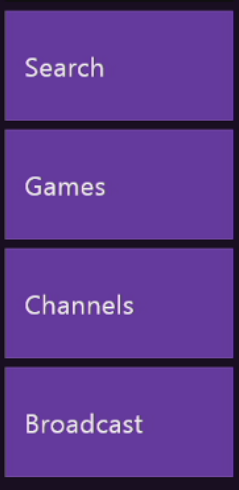
Once this is finished, enter the Twitch app. There should be a bar with four buttons, the bottom one being “Broadcast.” Select this button.
Doing so allows you to begin streaming! The app will take you through a few more steps while displaying a sample of how the broadcast will look. After this is finished, you can return to your game. You’ll know the broadcast is going when a small blue broadcast box appears.
The Other Considerations
You’ve begun streaming! We’re glad for you, but would like to serve up some food for thought. A few items to mull over:
How’s your internet speed? If you’re experiencing slow internet (possibly due to the proverbial “McDonald’s Wi-Fi”), you may run into serious lag while trying to play your game online.
What game are you streaming? If you’re trying to pick up subscribers, well-established streaming games like Fortnite, Overwatch, and Rocket League may not be for you. Try to find new games that are becoming popular and get ahead of the hype.
What are your expectations? Even if you find a good, new game, streaming requires a lot of hard work and good luck to become big. Those looking for quick fame and fortune should beware. On the other hand, passion and persistent work will give you a better chance at success.
Overall, remember this: business, business, business. The fact that you’re trying to stream games probably means you already enjoy video games, but good streaming is a holy combination of fun and business. This means: stick to a schedule so your viewers know when to expect you, look for opportunities to expand your audience outside of streaming itself (conventions, friends, etc.), and consider your brand. How do the things you say, wear, and do, define your type? Are you the master gamer? The fun but competent guy-next-door? The gaming comedian? Be careful about deciding who to be when you are online, especially in a live broadcast setting that can be seen by many people.
Admittedly, this is a lot to think about when you begin streaming. With persistence and mindfulness, we believe in your ability to master the ins and outs of video game streaming.
Want to start collaborating with other people on a project in Google Docs? Follow these easy steps so every member of your team can join in.
Google Docs provides one of the best word processing tools for free. Likely, its one downside comes from the need to connect online… but this also leads to one of its greatest strengths: real-time collaboration.
Before online collaboration, word processing documents had to be sent via email or flash drive to the other members. Now, a group can work together at the same time with a few easy steps!
Working in Google Docs requires simply creating an account. If you have a Gmail already, there’s no need to worry: sign into Docs with your usual email and password.
In fact… if you’re signed in to Gmail you may be automatically taken to the welcome screen of your fresh Docs page!
2. Create a Document
The top of the page should show various document types to choose from. Select any of these to start your new project:
If, instead, you see the “New” button shown below, you are in probably in Google Drive, not Google Docs. Don’t worry: Google Drive simply collects all your documents from Google Docs, Spreadsheets, and Slides. Aside from that, it performs most of the same functions.
That said, clicking the “New” button gives you the choice of creating a new word document, spreadsheet, or slideshow. Unlike Google Docs, it doesn’t offer pre-formatted templates.
3. In the Document, Hit the “Share” Button
The button should look something like this:
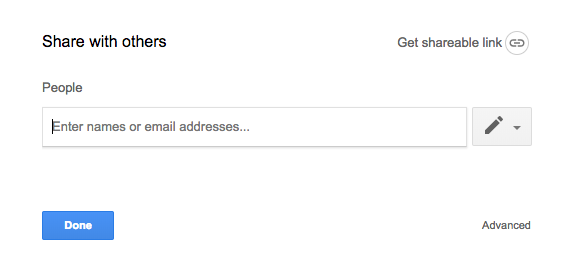
Tapping the button leads you to the share screen:
This is where you choose who to collaborate with. Any address can be entered, Gmail or not. You can choose whether or not that person can view, edit, or become the owner. Be careful with ownership, however: once ownership is transferred to someone else, you cannot get it back yourself.
So, project invites have been sent! The email will include a simple and efficient link to the project. As long an account has editing privileges, the user can change things at the same time as others.
NOTE: you can tell when multiple users (or the same user on different devices) are viewing the document. An icon will appear at the top right for each device currently using the page.
Collaboration can now begin!
5. Moving Forward
From here on out, there are a few more tools that may be useful for your team.
First, the view mode:
Selecting this button allows you to choose whether you are editing, suggesting, or viewing. We’ll focus on suggesting: the suggesting option allows you to harmlessly enter changes which then appear as (pause for effect) suggestions! This can be useful for communicating in group projects.
If you need to leave a more detailed message, try the comment button:
Comments are attached to specific items – letters, words, or phrases – within the project.
Bonus Tip
You can add collaborators to a project or even an entire file from the main page of Google Drive as well. Clicking the “Add Person” button below pulls up the familiar “Share” window.
Memes add a certain spice to life. Although they are one of the simplest forms of communication – possibly just a picture and a few words – memes help people laugh about everything from relatable human issues to the age-old slapstick fail. They can be entertainment or healing, satire or sarcasm.
If you’re like us, extensive viewing of memes on sites like iFunny or Reddit’s subreddit r/funny will eventually lead to the desire to create memes yourself. To become…
A Meme Lord.
Having trouble starting your path to Lordship? We’re here to help!
First, choose your tools
When deciding how to make memes, you’ll have to figure out what program to use. This can be difficult because there is a huge range of applications that have the right features. To save time, we’ll discuss the features themselves.
1. Image capture: some memes are simply photos or screenshots that need no explanation to be hilarious:
2. Image editing: as long as you have image capture, you’ll want to be able to crop images and place them together or in a sequence. Many interesting combinations are possible when different pictures are spliced together. Take, for example, the magic of photoshopping:
3. Captioning/doodling: this comes in all shapes and sizes. Some applications allow you to put words above or below your picture, place them over the image, or use them as memes themselves. These applications range from Snapchat all the way to professional editing software like Adobe Illustrator.
Doodling in action:
4. The Extras. Gathering images, editing, and making captions will take you a long way. Still, there are tons of other ways to make memes: create gifs and add words. Do silly things with Instagram tools. Create cartoons yourself. While enjoying memes, watch what other users are doing and then experiment with whatever you enjoy!
NOTE: some programs are made expressly for meme-making purposes. For example: Mematic, which offers captioning and image editing functions. Food for thought!
Every journey starts with a single step. In this case, we’d like to suggest two ways to go: using an old meme format or making something new. These are just suggestions to help you get the gears turning.
Use an Old Meme Format
A meme format is a meme type that has been used often. For example the “invisible camo” memes:
As long as you’re using the old joke in a new way, you can both pay homage to the original content while adding to it.
Make Something New
Have a good idea off the top of your head? Make it as soon as possible, or write the idea down for later! Whether or not the idea becomes a one-hit wonder or a popular meme format, you should feel proud of what you made.
Once you’re done, send your meme out!
After Posting
So you’ve released your project into the wild. The next step is: gauge your audience’s reaction and learn from it! If your post went well, what factors came together to reach success? If it went badly, what could have happened? Was your meme posted at a bad time? Is the image quality good? Gather data and prepare better for the next time and never forget: persistence breeds luck.
Honestly? There are no announcements that a Fortnite 2 is even in development or that it will ever be created at all…
That being said, we like to imagine what a Fortnite 2 could look like! Years down the road, what if Epic Games made the decision to create a sequel or a prequel to Fortnite? What type of game would it be? What would it focus on?
Game series tend to follow a few paths: continuation of the story and game mechanics crossover. We’ll go through each of these and see what a Fortnite 2 might have to offer.
Believe it or not, Fortnite contains a hidden story. This has became more and more obvious over Season 4, which began with meteors crashing into the map, after which the “hop rocks” left at the craters were transported to Snobby Shores and the Villain’s Lair, and recently has continued with the lair firing a rocket towards Tilted Towers and accidentally opening an ever-growing portal over the map.
What does this story mean? Our best theory is the events are a tie-in between Fortnite’s Battle Royale mode and Save the World modes. Basically, the Battle Royale events are leading up to the zombie apocalypse.
In regards to a sequel, this could mean a Fortnite 2 in the vein of Mad Max, which takes places in a desert environment and possibly features a few wandering zombies amongst the Battle Royale landscape. Better yet, there may be a new story mode following a group of humans surviving the apocalypse: something with the run-n-gun excitement of Left 4 Dead with the Fortnite’s signature building shenanigans.
Mechanics Crossover
Sometimes, a sequel carries on the tradition in name and mechanics only.
In this case, we’d naturally expect to see the same Battle Royale style that we’ve come to know and love, along with the build-n-shoot combat from the original. However, this Fortnite 2 could also bring out an entirely new location, a few additional ways to fight, and, most likely, a new apocalypse to overcome.
We love the idea of new locations for Fortnite. Currently, the game features a somewhat hilly and homogenous environment, perfect for the game’s current iteration. However, in a Fortnite 2 there would be great possibility for expansion. Imagine running and building through a desert or a crowded jungle. Or fighting for Victory Royale in a gigantic cave underground or on top of a large, snowy mountain…
Also, there are a number of ways that Fortnite 2 could expand upon the combat. The current game includes a number of interesting items like the hop rocks, but the closest they’ve come to a vehicle was the short-lived jetpacks. The second installation of this game might see the introduction of vehicles and other clever items… space suits, perhaps? Portal guns? Thanks to the tongue-in-cheek way Fortnite currently introduces its updates, anything could be on the table.
Finally, what new apocalypse would Fallout 2 feature? With the rockets and meteors currently heralding the changes between seasons, we’re in the mood for an alien invasion. However, there are other alternatives: a world war? Nuclear fallout? A huge volcanic explosion? A second Ice Age? Time shenanigans? Whatever the case, you can be sure to expect epic battles against a new, interesting backdrop.
But really, a volcanic jungle island would be epic. Cue “Battle of Heroes”, by John Williams, right? (Seriously. Cue it. We’ll wait.)
A Vision
Since Fortnite 2 probably won’t happen, here’s our daydream, combining the best parts of what we’ve already considered:
Fortnite 2 takes place on an island chain being surrounded by encroaching deep-sea lava. This creates the game’s circle, although there are rivulets and streams of lava that must be avoided in other places as well.
By the way, this island is Jurassic World. There are dinosaurs.
Cars are now included, but there are no boats. The only way to get from island to island is by building rafts, which consist of at least one floor panel and a “wall” panel that becomes a sail whenever built on a boat. Falling into the boiling lava water slowly takes away health , so be prepared for epic boat battles, where constructing a strong warship may be the secret to success… especially if the final circle happens to land over a segment of ocean!
Whatever the case, we love Fortnite and are excited to see what new heights the game reaches in the future, whether or not that includes a sequel.