Win cash prizes on Facebook game shows

Facebook’s Watch tab has been a bit of a flop. The new video platform, designed to showcase professionally produced shows, hasn’t really taken off at all but Facebook is not giving up on it just yet. We recently told you about the first of Facebook’s funded news shows, and now Facebook has released details of a cool new initiative that could bring more interactive content to­­­­ Facebook. Even better, interactive content that could see you winning real cash prizes.

Polls and Quizzes. Facebook says this is just the beginning.

If you think this sounds a little like the trivia game show apps that became sort of a big deal at the beginning of the year, you’d be right. Rather than building their own app to compete against the likes of HQ Trivia, Facebook has decided to launch an entire platform to make it easier for content creators everywhere to broadcast interactive game shows on Facebook. If you’re a content creator and publisher and think this is something you could do you can sign up for early access here.

HQ - Live Trivia Game Show Download Now
6

Facebook believes that video doesn’t have to be a one-way, passive experience and it isn’t alone. With Netflix recently announcing that it is going to start streaming video games, how we consume media could be about to get a major overhaul.  Netflix wants to start offering us stories with choices, along the lines of the extremely popular Telltale Games franchises. Facebook, however, has a slightly different idea:

“Today, we’re announcing new ways for creators and publishers to create interactive videos. We’re starting with polling for both Live and on demand videos, as well as gamification for Live. With these tools, our partners can add a range of new interactive features to videos such as: polls, quiz questions, challenges, and more. These can all be used within an individual video or to create a standalone game show.”

These changes aren’t exactly revolutionary, but they mark a good start if Facebook is going to take people away from passive viewing experiences. Passive consumption of too much social media content can be harmful to users.

Facebook Access Facebook
7

Polling works similarly to how we see polls working on regular shows already. It allows show creators to gauge public opinion on various elements of their content and could potentially shape the direction they’ll take with future content.

Gamification for live broadcasts will bring in the sort of elements we’ve seen popularized by the gameshow apps we’ve already mentioned. Facebook sees massively multiplayer game shows taking place or even head to head battles between different shows and their respective super fans.

You could become part of the show.

The key here is that Facebook is opening up a new avenue for content creators to explore and has even announced the first partnerships, along with details of the shows they’ll be creating:

  • “Confetti by INSIDER: A live interactive game show made in partnership with INSIDER that will air daily. It will challenge people to answer pop culture trivia questions alongside — and with the help of — their friends. Players can see which friends are playing at the same time, and be able to see how friends answered questions. Players who answer all questions correctly may be eligible to split a cash prize.
  • Outside Your Bubble by BuzzFeed News: An all-new game show made in partnership with BuzzFeed News that challenges contestants to step outside their “bubble” and reach across the cultural divide to guess what their opponents on the other side are really
  • What’s in The Box by Fresno: A live and participatory game show, made in partnership with Fresno, where viewers can win prizes for correctly guessing the contents of a closed box. It’s simple. It’s goofy. It’s tons of fun.”

These opening shows on Facebook’s new platform will be coming to the social network in the next few weeks, but Facebook promises there will be many following later on.


 

Is WhatsApp helping the spread of fake news?

Disturbing stories are coming in from around the world about crimes being carried out due to misinformation spread via WhatsApp. The Guardian reports that Indian police have linked dozens of murders and serious assaults to WhatsApp rumors. One incident, in particular, saw two men, who were returning from a trip to a waterfall, dragged from their car and beaten to death:

“The villagers got suspicious of the strangers as for the last three or four days messages were going around on WhatsApp, as well as through word of mouth, about child lifters roaming the area,”

Other incidents include a yellow fever outbreak taking hold in Brazil after WhatsApp was used to spread anti-vaccine videos and audio messages, politically motivated fake news spread in Kenya, and fake news about the divorce of David and Victoria Beckham distributed in the UK.

WhatsApp has over 1.5 billion users worldwide and its lauded end-to-end encryption means it is almost impossible for the content of messages sent across the messaging service to be monitored. Everything sent across WhatsApp is private and arrives at its destination precisely as it was sent. There isn’t any sort of algorithmic interference ranking content based on the supposed interests of the recipient or the factual accuracy of the content. This means that big companies like Cambridge Analytica can’t pay to manipulate what users are seeing, but it also means that false information can quickly spread across the messaging service.

According to a report by the University of Oxford’s Reuters Institute, more and more people are turning to WhatsApp for news, as the credibility of other more public social networks has been drawn into question. The nature of the messaging service, however, means that it acts more as a conduit for gossip than a reliable newswire. The idea of being in on a secret is just too alluring for some to bother checking the news they’ve received before they send it on again.

Does WhatsApp spread fake news?
WhatsApp knows it has a fake news problem.

A WhatsApp spokesman has said that the company is aware of the problem and that they’re working to prevent the spread of fake news:

“We’ve made it easy to block a phone number with just one tap – and are constantly evolving our tools to block automated content. We’re working to give people more control over private groups, which remain strictly limited in size. We’re also stepping up our education efforts so that people know about our safety features, as well as how to spot fake news and hoaxes.”

A recent update, highlighting forwarded messages, does make it easier to see if you’re receiving fraudulent messages. With robust encryption meaning there is no way for fact checkers to verify information sent across WhatsApp, there is still a lot more work for the messaging service to do if it is going to help prevent the spread of fake news. As Nic Newman, who co-authored the Oxford University report, says on WhatsApp’s fake news story:

“It’s very early days but I’ve got a hunch this is going to become a much bigger story.”

Do you ever receive news stories via WhatsApp? We’d love to hear from you if you have.


Work with PDFs? It’s time you got this software

The PDF file system is one of the simplest way to manage digital documents. Created in 1993 by the code ninjas over at Adobe, the PDF has made it super easy for everyone to view and edit documents, whether you’re a Mac or PC user. 

Today, the PDF is one of the most versatile file formats. Not only is it happy with text and images, but it supports links, multimedia, forms, and even 3D models – not bad for a file system that’s over 25 years old.

But to work with PDFs, you need a PDF program, and sadly, not all are created equal. We’ve been playing around with the best of them to find one that truly outshines the others, and we think we’ve found it in Ashampoo’s PDF Pro.

PDF Pro is an all-in-one program to view, create, edit, and convert PDF files. Let’s take a look at what it can do for you.

1. Full editorial control

PDF Pro lets you edit PDFs as easily as if they were MS Word documents. Is that a big deal? Absolutely, because most PDF programs don’t offer such flexibility without conversion or exporting to another program. This makes copyediting an article, story, magazine, or academic paper a piece of cake, and saves hours of messing around with different formats.

PDF has all the tools you’d expect of a document editor, including a spell checker, a built-in change log so you can keep track of your changes, and a find and replace tool which also has the option of changing content across multiple documents. These tools let you work on your PDF natively, without ever leaving the program.

If want to collaborate with others on your PDFs, either at work or school, PDF Pro supports annotations and comments, so you can share your opinions within the PDF rather than in a separate file. And if you’re working on a bunch of PDFs at once, PDF Pro will merge them together for you, and give you full control over page ordering and orientation. For big projects like dissertations, legal documents, or academic papers, this feature is a real time-saver.

2. Super easy file conversion

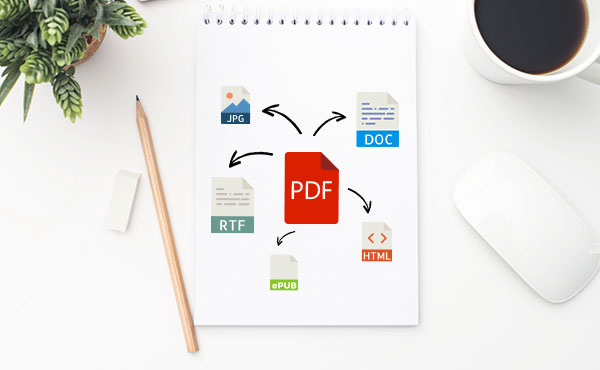
While PDFs are great, sometimes you need different output formats for specific tasks – if you’re writing an ebook, for example, or want to code a webpage. PDF Pro makes it quick and easy to convert your source PDF into different formats, including EPUB, HTML, JPEG, and RTF, without losing detail or structure.

This works the other way round, too. PDF Pro’s powerful OCR (Optical Character Recognition) engine means you can scan just about anything for fast, flexible editing using PDF Pro or your favourite office tools. 

3. Security against fraud and intellectual property theft

With so much of our work done online, it’s even more tempting for cybercriminals to steal our data. PDF Pro secures your documents with 128-bit AES encryption, the same level of security used by the US National Security Agency (NSA). You decide what your recipients see, which helps protect you against fraud, theft, and data tampering. 

Ashampoo’s PDF Pro combines everything you need to read, edit, and manage PDFs in one tidy package. For a limited time, you can enjoy the program for just $29.99 – over a 60% discount on the retail price. With that much PDF power at your fingertips, we think it’s a steal.

Nowhere left for cheats to hide

Have you ever been annoyed as a teacher has taken your phone from you just as you entered an exam hall? This is a modern phenomenon, it wasn’t long before phones could only call and not much longer before you only had them in your house, but these days it is a regular occurrence. Smartphones put the power of the internet in our pockets, and accordingly, they’re incredible tools for cheating on exams.

Asking holy spirits to help from Unexpected

So some teachers take phones, but in Algeria, they’ve gone one further. To prevent people from cheating on exams, they cut off internet access across the country from June 20 to June 25. The hardline stance comes after high school exams were leaked online back in 2016. Last year social media was banned, but this year they’ve gone one further and cut off the whole internet.

Internet on lockdown

Internet services will be switched off for two to three hours a day once exams get started, but Facebook will be off for the entire period. Clearly, this story can still go further, and we’ll wait and see what happens next year.

The ASL interpreter smashing it at hip hop concerts

If you’re not familiar ASL, it stands for American Sign Language. A visual representation of spoken communication, sign language allows deaf people to communicate effectively and efficiently. It can even bring music to life for people who can’t hear it. Sign language can even bring rap to life in a brand new way of offering a new element of vitality to a medium that is already bursting with life. Check out Holly Maniatty.

Holly is a famous ASL interpreter and is renowned for efforts to bring the work of rappers like Snoop Dogg, Jay-Z, the Wu-Tang Clan, and the Beastie Boys. Above she is signing at an Eminem concert, and she is ripping it up. She puts an awful lot of work into making sure she can do what she does so well. Talking on CBC, she explained:

“For example, when I was getting ready for the Wu-Tang show, they talk about riots in the street. And at that time, the Ferguson riots were just kind of finishing up so of course your mind would jump there because that’s a current event but you kind of have to take a moment… Go see when that song was written and see that they’re probably talking about the L.A. riots. And then think about something that’s more iconic about the L.A. riots in terms of visual accessibility and kind of build your interpretation that way to make it as authentic and close to the meaning of the person who wrote it… You just want to make sure that you’re providing the most authentic interpretation you can.”

Hip Hop sign language

It is a great move for rappers to be adding ASL interpreters to their lineups to make them more inclusive. If they’re all as good as Holly Maniatty, we might be looking at the birth of a brand new art form in itself.

Gmail notifications to be more useful and less annoying

Back at Google’s big I/O conference in May, Google made a small announcement that crept under the radar due to all the other big news. The company said it was going to try and improve Gmail notifications so that you’ll only get the useful ones you need, rather than be bombarded by everything that comes into your email inbox.  Google has now announced that this change is now available on iOS and is coming to Android soon.

Gmail Access now
8

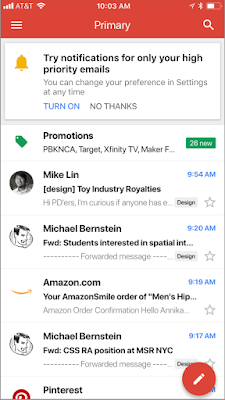
Google claims that these new notifications will use Gmail’s advanced machine learning and artificial intelligence algorithms to learn which emails you may want to read first. If you’re an iOS Gmail user, Google has laid out the following instructions for you to try out the new high priority email notification setting:

“To enable the feature, select “High priority only” from the Notifications drop-down in the settings menu of your Gmail iOS app.”

Image via: Google

For anybody who feels overrun by the constant pings coming from their phone, this will be a great feature. If Google can get this right, there will be a lot of people clicking enable. This will be tricky to get right, however, as if it filters out essential emails it will be impossible to use and next to useless. We’ll be trying this new feature out over the next few days to see how it works, and keeping an eye out for an Android release date.

Let us know your thoughts on the important notification feature for Gmail in the comments below.

Is this what the new Windows 10 version of WhatsApp will look like?

WhatsApp’s current app offering on Windows doesn’t do much. It is a port of its web app, which itself has a few shortcomings. Using the web app or the current Windows app, you can send and receive messages, images, files, voice notes, and videos but there is no voice or video calling. As WhatsApp voice and video calls have continued to improve this has become more of something WhatsApp’s desktop offerings needs to add. It now looks like WhatsApp and Microsoft are working closely on a Universal Windows Platform (UWP) version of the popular messaging service.

8

This is an important development for both Microsoft and WhatsApp, so it makes sense that we’re starting to hear about it. WhatsApp still updates its current Windows phone app, but this is a Silverlight based app, built for Windows 8.1 devices. If Microsoft were to release new mobile devices, like the rumored Andromeda (surface mini) foldable phones, users wouldn’t be able to download WhatsApp. With Windows 10 being a multi-device platform any app designed for Windows 10, will work across all devices, including both concept phones for the future, and current desktop PCs.

Image via: Windows Central

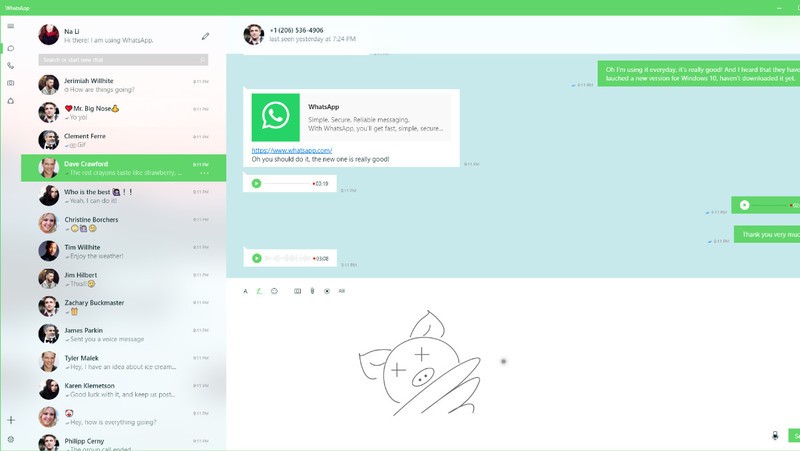
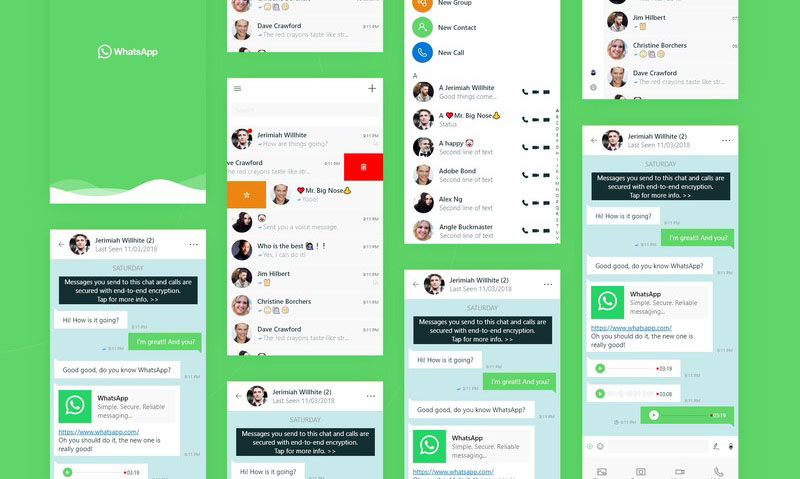
A design concept for the UWP WhatsApp project appeared on the website Behance. The design was then removed, when Windows Central approached the designer, who posted it, for comment. Windows Central did manage to get their hands on the paragraph the designer posted with the design:

“WhatsApp is a free cross-platform app owned by Facebook. You can make video calls and send text messages, voice messages, documents, and user locations. I have been supporting the team with porting WhatsApp from Silverlight to UWP. We want them to bring their app to Windows 10 desktop and integrate unique Windows 10 features like Ink and Fluent Design. The project had [a] successful result which led to WhatsApp partnering with Microsoft, and we earned high praise from the WhatsApp team.”

Image via: Windows Central

The design concept clearly shows call buttons, meaning WhatsApp on your desktop could soon be able to make audio and video calls, just like it can on your smartphone. Of course, this would make the app a direct competitor to Microsoft owned Skype, so there is a chance this functionality might be retained for hybrid devices like the Andromeda.

So far, all we have are these concept designs so we still might not be getting a new version of WhatsApp for Windows 10. These designs certainly point to an interesting future partnership between WhatsApp and Windows, but we’ll have to wait for official confirmation before we can start to get really excited about this one. Stick with us, and we’ll keep you informed as soon as we know more.


English Learning Hub! Free Courses

Whether you’re taking those first few steps in learning English as a second language, brushing up on your business English, or just someone looking to improve your English language skills, Alison has the best courses for you.

With more than 60 English language courses to choose from, join over 2 Million students worldwide who have studied English and certified on Alison.

Master the most widely spoken language in the world with Alison’s English Learning Hub, a comprehensive suite of free online English courses. All their English language courses are written by experts, and align with internationally recognised exams such as IELTS and Cambridge. What’s more, their courses follow the levels distinguished by the CEFR.

No matter what your reason is for learning or improving your English. Choose your courses based on your level of fluency, or focus on a skill you want to improve. With their extensive range of English language courses, you’ll never need to go anywhere else to learn English!

Choose your level

10
At Beginner level, you are able to use very simple, everyday expressions and talk about yourself in a basic way. You are able to have a conversation if the other person talks slowly and clearly.
Elementary Level English START LEARNING FOR FREE NOW
10
If you are at Elementary level, you can understand sentences and commonly used expressions. You can talk about simple things on familiar topics, such as yourself, your family, your job, and where you live.
Intermediate Level START LEARNING FOR FREE NOW
10
At Intermediate level, you can deal with most situations when travelling, describe your experiences, events, dreams, hopes and ambitions. You’re able to give reasons and explanations for opinions and plans.
Upper-Intermediate Level START LEARNING FOR FREE NOW
10
If you’re able to talk to native speakers with a degree of fluency and spontaneity, you are at Upper-Intermediate level. You’re able to talk clearly and in detail on a wide range of subjects, and explain your view on a topical issue.
10
At Advanced level, you can express yourself fluently. You use language flexibly and effectively for social, academic and professional conversations. You produce well-structured and detailed text on complex subjects.


9 out-of-this-world features on your favorite apps that NOBODY knows about

Our favorite apps are updated almost every week. The bad news is that these updates usually go unnoticed. Did you know that Facebook helps you look for public Wi-Fi? Or that Gmail can write your emails for you? So you don’t miss out on the best new features on your favorite apps, we’ve compiled the best updates in recent months. 

1. Gmail writes your emails for you

Gmail offers an option called “Canned Responses.” This feature saves messages or phrases that you use most often and suggests them when you draft an email, saving you time.

Want to enable this option? You have to go to the settings section in Gmail called Labs. Gmail Labs is a testing center with “far-fetched” experiments (according to Google) of all kinds. You can access Gmail Labs here.

The feature you’re looking for is called “Canned Responses” and all you have to do is click on “Enable” and then “Save Changes” at the bottom of the page. 

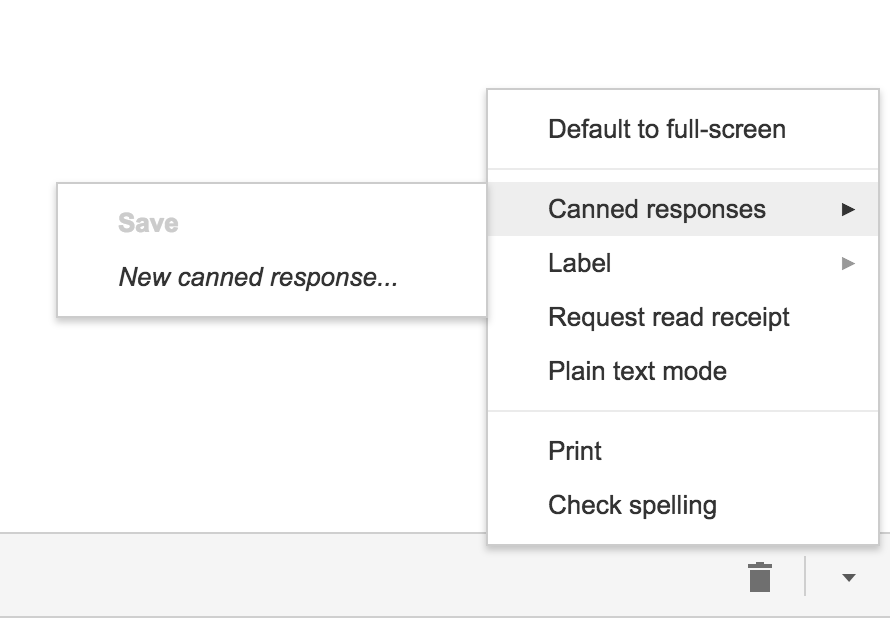
Next time you compose an email you’d like to save as a canned response, click the little triangle on the lower right-hand side of the screen. That opens a menu with an option for “Canned responses.” Just move over and click “Save” if you’d like to save that email so you can fire it off again someday.

You may have noticed a basic AI version of this at the bottom of messages you read on the Gmail app on your phone. They look like this:

2. Gmail’s most invisible feature

It’s unlikely that you’ve noticed this Gmail update because it’s designed to go unseen.

Haven’t you noticed lately that you’ve received fewer spam emails with suspicious links? Gmail has enhanced its ability to detect and delete this type of email even before it reaches your inbox. It’s not yet 100 percent foolproof, but it’ll keep you safer than before.

3. Make wish lists on Google Maps

Google Maps lets you make lists of places you’d like to visit. Imagine that you’re planning a vacation to Paris. You can make a list of those museums, restaurants, and attractions that you’d like to visit. And you can share the list with those you’re traveling with. Or with anybody, for that matter!

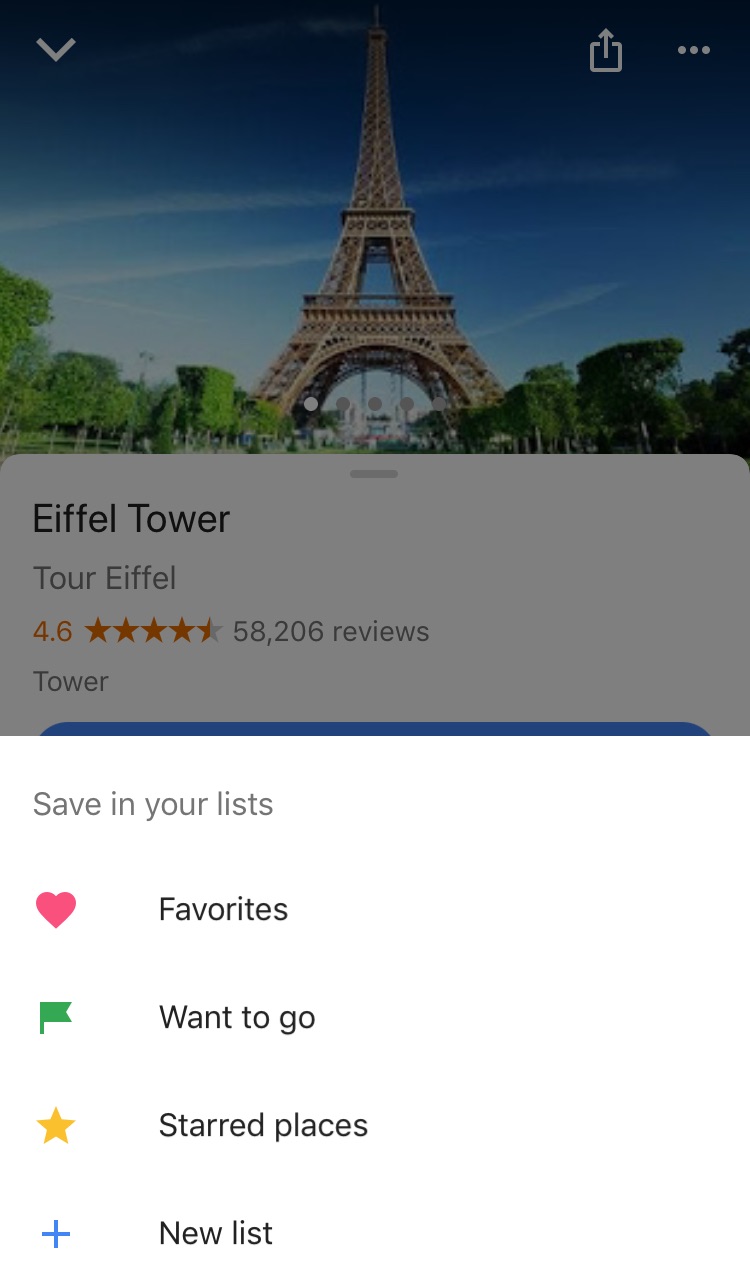
Google Maps users are making the most of this feature to share recommended places or themed attractions. To use this feature, it’s as easy as pinpointing a place in the app, clicking “Save” and choosing the list with the green label that says “Want to go.”

4. Share anything with WhatsApp

WhatsApp lets you share any file type (mp3, videos…) between contacts provided that these files do not exceed 100MB in size. Instead of sending 100 photos one-by-one, why don’t you send them as a .zip file, for example?

5. WhatsApp gets their act together…kind of

It’s taken a while, but WhatsApp now has filters, like Instagram and the rest! At the time of writing this article, there are just five filters and they’re only available on iOS; no news on when they’ll arrive on Android.

6. Facebook helps you find Wi-Fi

Facebook has a relatively new feature called “Find Wi-Fi.” It’s a little bit hidden. First you have to click on the three horizontal lines on the lower menu bar. Click on “See More.” There you’ll find it and you can enable “Find Wi-Fi.”

After enabling it, Facebook will show you a map with the closest Wi-Fi hotspots as well as details about these hotspots, like which businesses they belong to.

7. Download movies and TV series from Netflix

Taking a plane somewhere? Bring your tablet packed with your favorite Netflix movies and shows! Not all Netflix offerings are available: pay attention to the download icon that appears on the TV series or movie listing. Amazon Prime also offers this feature.

8. Spotify Codes

Spotify has a feature called Spotify Codes. Have you noticed that below songs, playlists, and albums, there is a barcode in the shape of a sound wave? If you don’t see it, click on the three dots to access Spotify’s advanced options.

You can exchange these sound codes with your friends and they only have to open the Camera feature within Spotify for apps to scan them.

Also, Spotify Codes are an excellent way for artists to become known, as they can insert their codes on social media so the rest of the world can quickly access their songs.

9. Muting on Twitter

Got some people on Twitter who won’t stop spoiling your favorite TV series or spewing goofy conspiracy theories? Don’t want to block them because sometimes you talk to them and some of their Tweets are interesting?

Twitter now lets you mute whoever you want. Muting means that their messages will not appear on your feed, all without their knowledge. You’ll receive notifications if they mention you in a Tweet or if you receive direct messages from them. And you can check their Tweets when you feel like it.

Muting is as easy as clicking on the “down arrow” on one of their Tweets. You’ll see this option, among others.

Have you found any hidden features you’d like to share? Let us know in the comments!


Google Translate gets a new AI boost no matter where you are

If you use Google Translate a lot, you’ll have probably noticed that over the last couple of years the translations it offers have improved a lot. The reason Translate got better at its job is machine learning. AI algorithms, specifically named neural machine translation (NMT), have allowed Google Translate to offer much more accurate translations.

Google Translate Download now
8

For the last two years, however, there has been a catch in that the NMT has only worked when happening on Google’s hardware. In short, it only works if you’re connected to the internet when you’re using Google Translate

Google Translate offers language specific download packs. If you think you’ll be offline or if you don’t want to use international roaming you can download a language pack and use Google Translate when you’re offline. Although useful, this phrase-based machine translation (PBMT), as Google calls it, falls short of the NMT available if you can connect to Google’s servers.


On-device AI translations much better than the old PBMT but not as effective as AI translation done on Google’s servers


Google has now announced that it is bringing a version of NMT to mobile devices. You’ll be able to benefit from AI assisted translation even if you’re using a downloaded language pack and you’re not connected to Google’s servers.

Amazingly, Google Translate language packs only take up 35-45mb of space, so they’re well worth having. Google points out that the on-device version of NMT still isn’t as effective as the online version but that it is much more accurate than the previous PBMT method. Google says it will be rolling out the new On-device NMT in 59 languages in the next few days and offered these instructions to those wanting to take advantage of it:

“To try NMT offline translations, go to your Translate app on Android or iOS. If you’ve used offline translations before, you’ll see a banner on your home screen which will take you to the right place to update your offline files. If not, go to your offline translation settings and tap the arrow next to the language name to download the package for that language. Now you’ll be ready to translate text whether you’re online or not.”

Offline translation is a really useful feature. If you’re low on data, traveling abroad, or you’re simply prudent enough to want to take advantage of Wi-Fi whenever you have it these new On-device AI algorithms will make a big difference to your language translations.