3 online scams to watch out for in 2018 (and how to avoid them)

No matter what precautions we take online, cybercriminals will eventually find a way around them. So what can be done?

Well, half the battle is being aware. Scams are a lot like the common cold virus: they mutate all the time. Once we defeat one, a new and unfamiliar one comes along. This makes catching them all the more difficult, and why antivirus software just isn’t enough.

We won’t ever know the details of every scam in existence, but we can learn their general appearance and practice common sense. Technology is so ingrained in our lives, there are thousands of different vulnerabilities hackers can exploit. But if we’re vigilant, if we “arm” ourselves with the knowledge of scamming practices, we can parry these attacks before they do us harm.

So let’s take a look at the scams to watch out for in 2018.

Phishing attacks

A phishing attack is when a criminal tricks you into revealing personal information by pretending to be a trusted person or institution, such as a friend, colleague, bank, or even a service like Netflix.

The most common phishing attacks are by email, and often include links to fake sites that capture your details. Everything, including logos, language, and design, is made to look as close to a genuine email as possible, so you’ve got to be on your guard. They’re usually easy to spot if you hover your mouse over the sender to reveal the real email address.

Over the years, phishing scams have become ever more elaborate. They’ve spread to social media, where hackers pose as friends to encourage you to click links to fake sites that steal your data. There are even fake apps that do the same. Perhaps most worrying is hackers’ use of artificial intelligence to convince you they’re genuine.

What action can you take?

  • Check the real email address of senders by hovering your mouse over the sender’s address – if it looks strange, don’t open it.
  • Don’t open any links from friends unless you’re 100% sure it’s authentic (if in doubt, speak to the friend first).
  • Hover your mouse over links and you’ll see the URL at the bottom left of your browser. Only click if it’s genuine – if you’re not sure, use a URL Checker.
  • Download solid antivirus, anti-malware, anti-spam, and anti-phishing software with real-time protection.

Ransomware

Ransomware is type of malicious software (malware) that essentially locks down your device until you pay a ransom to the attacker. Or it can steal sensitive information and then blackmail you. Attackers usually demand ransoms in decentralized currency like Bitcoin.

Ransomware is particularly frightening because once it happens, there’s very little you can do to fix it. They’re often used to create botnets, which are networks of hijacked computers doing the bidding of cybercriminals.

Ransomware usually starts with downloading an attachment from a fake email, but it can propagate without the user doing anything. WannaCry, the devastating ransomware that infected thousands of computers in 2017, used Microsoft Windows vulnerabilities to spread.

What action can you take?

  • Check the real email address of senders by hovering your mouse over the sender’s address – if it looks strange, don’t open it.
  • Don’t open any links or attachments from friends unless you’re 100% sure it’s authentic (if in doubt, speak to the friend first).
  • Download solid antivirus, antimalware, anti-spam, and anti-phishing software with real-time protection.

Fake news

Fake news is propaganda on steroids. In the past, the war of words between opposing factions took place in newspapers, on television, and at podiums. You knew who was speaking. You knew their biases, so could take what was written or said with a grain of salt.

But the internet has allowed the power-hungry and malicious to challenge truth itself. This is done by creating alternative “truths” through the propagation of fake news. It’s news that’s designed to look, sound, and feel “real”, despite being entirely false or grossly misinterpreted.

Because we all live in social media bubbles, fake news can continuously bounce around our news feeds, amplified by comments from like-minded friends or other fake stories. This creates a false sense of credibility to rumors, hearsay, and outright lies. The tribalism it creates divides societies – it can even influence elections.

What action can you take?

Hopefully, this list has equipped you with the knowledge you need to stay safe online. Remain vigilant, protected, and be wary of things that seem too good to be true.
 

How to stop Facebook from sharing your data

Mark Zuckerberg’s congressional testimony was a joy to watch. Whether it was the naivete of senators’ questions, or the Facebook creator squirming under oath, you can’t deny it was great TV.

Zuckerberg was testifying as part of a scandal involving data analytics firm, Cambridge Analytica. The London-based firm harvested up to 87 million Facebook users’ personal data, and then sold it to politicians to influence voters in U.S. elections.

Although Facebook admitted their error, Zuckerberg’s apology rings false. Facebook’s business model is based on targeted advertising, so it knows how easy it is to use personal data to manipulate and influence people. In other words, Mark should’ve known better. 

So I’m going to step in and do Mark’s job for him. Here’s our list of tips to prevent Facebook from sharing data about you. (You can send my  $1M check in the mail, Mark.)

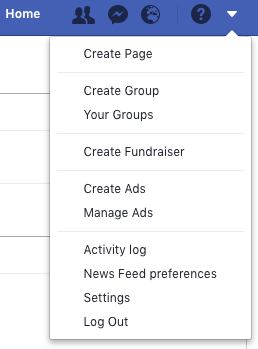
Log out of Facebook when you’re not using it

When you’re logged in but browsing other sites, Facebook can track you, so the safest bet is to log out every time you’ve finished using the app.

Settings Log out

Don’t use Facebook to log into other apps and services

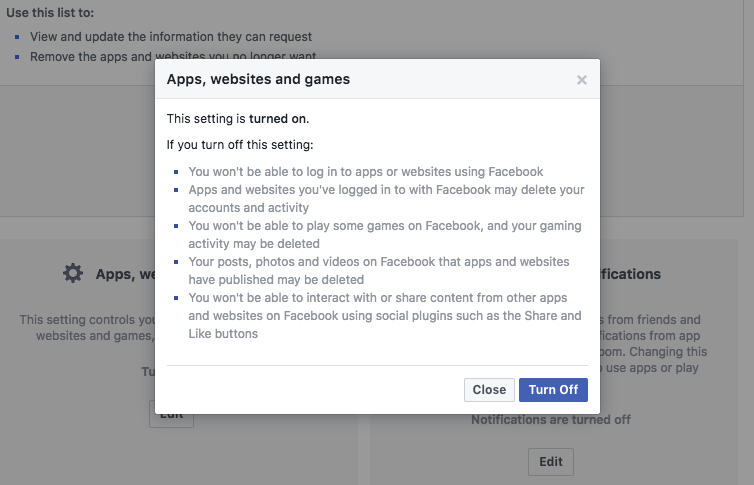
From Facebook Settings, you’ll see an option on the left sidebar for Apps and websites. Click this, and you’ll see all the apps and websites you’ve allowed to use your Facebook data.

You can view and change what you share with these apps and websites individually, but if I were you, I’d remove sharing altogether. To do this, head to Apps, websites and games > edit > Turn off.

This might delete log-ins for apps you sign into using Facebook, so don’t be surprised if you have to start using an email address next time you sign into Spotify, for example. Better that than having your data used against you.

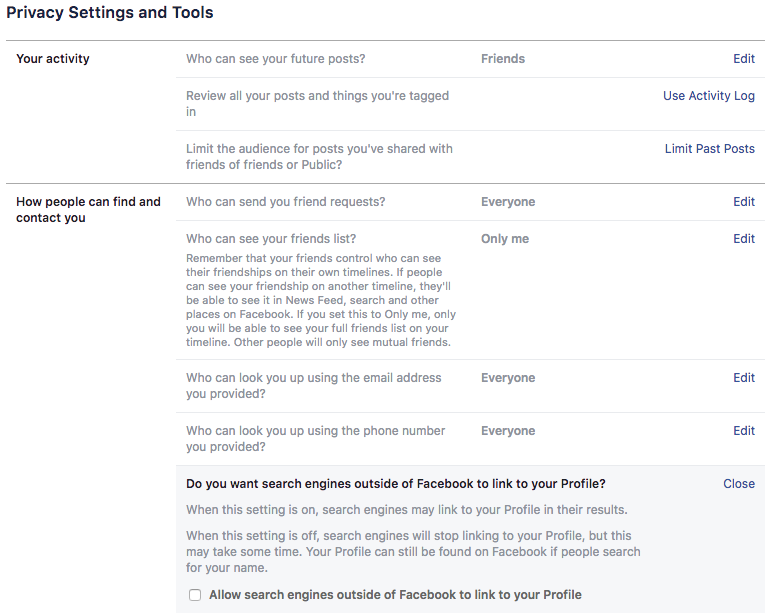
Stop search engines from linking to your profile

If you don’t want to be found through internet searches, you’d better turn this feature off, too. This allows search engines to link directly to your Facebook profile whenever someone searches for you by name.

Settings > Privacy > Do you want search engines outside of Facebook to link to your profile? > Edit > No

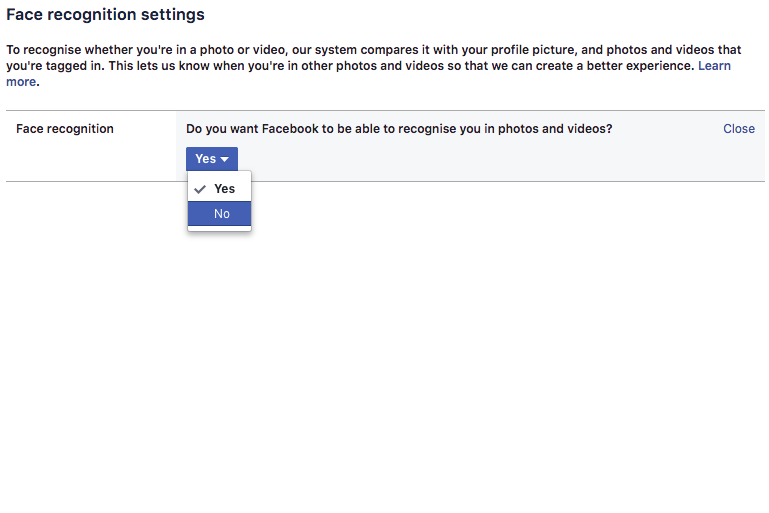
Stop Facebook from recognizing you in photos

You might find this handy when tagging lots of people in photo albums, but to us, it’s a bit creepy. You wouldn’t tell your boss you were partying all night before work, so why risk Facebook revealing it all with unfortunate tag of you knocking back tequila at the bar?

Settings > Face recognition > Do you want Facebook to be able to recognize you in photos and videos? > Edit > No

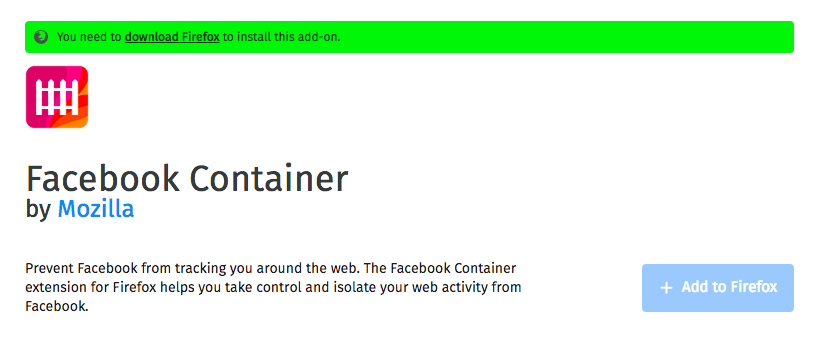
Use Mozilla’s Facebook Container extension (or another tracker blocker)

Now Firefox Quantum is here, Chrome has a fight on its hands. It’s blisteringly fast, contains a native screenshot tool, and uses less power (and battery life).

Even better, the Facebook Container extension ring-fences your Facebook activity so nothing gets out. If you’d rather stick with Chrome, you can try tracker blockers like Ghostery or Privacy Badger which do a similar thing.

Don’t share your data for ad purposes

You might be surprised by how much of your information Facebook uses to show you ads. Some people like relevance, but others think it’s manipulation. Either way, you can change the settings to a level you’re comfortable with.

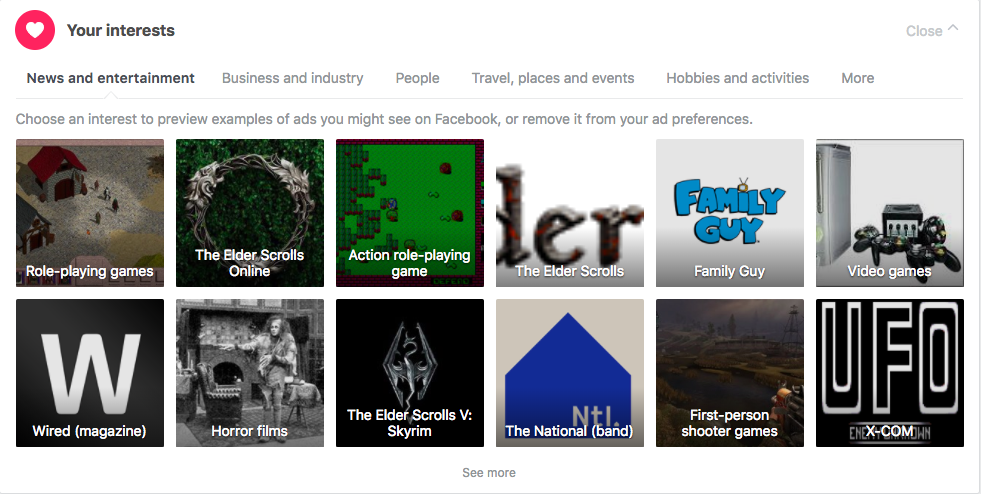
First, remove or change your Facebook interests. You can see an example ad each interest generates, so maybe try that first to see if you’re happy.

Settings > Ads > Your interests

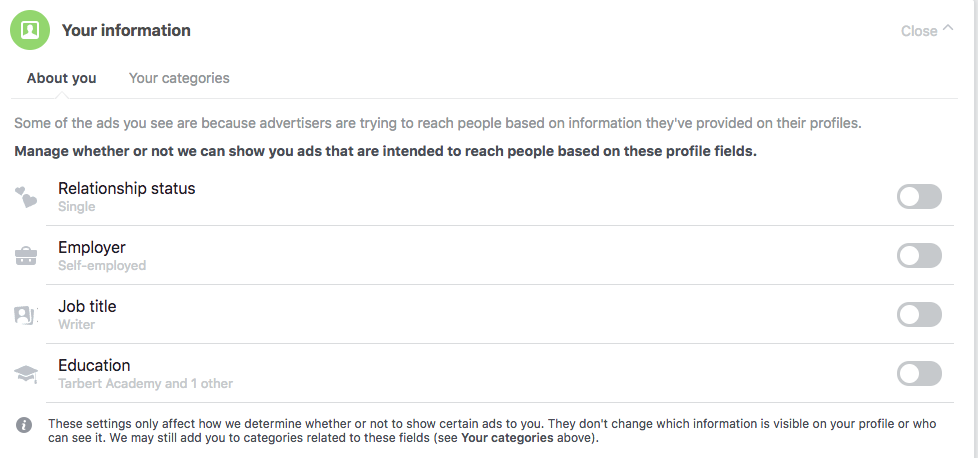
Then review which elements of your Facebook profile you want ads to target.

Settings > Ads > Your information > toggle off or on

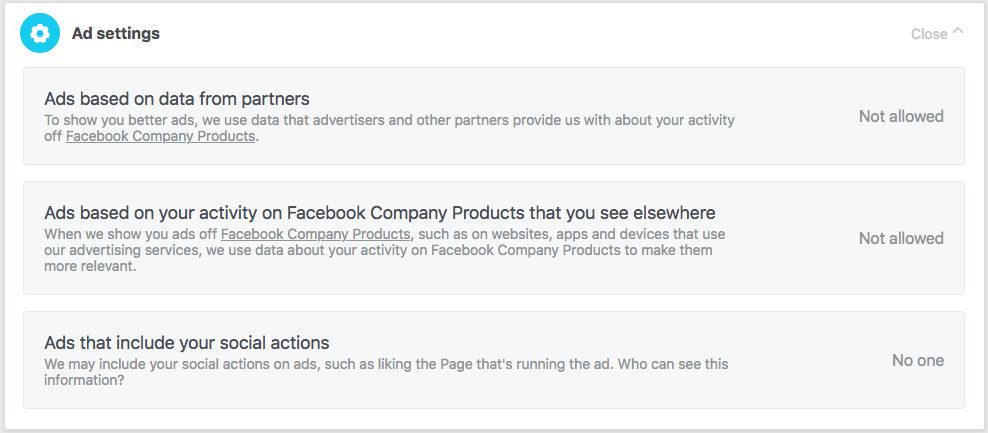
Finally, you can disallow Facebook ads from using data learned about you from other “Facebook Company Products”, such as Messenger, Instagram, and AR Studio.

Settings > Ads > Ad settings > select each section and change to Not allowed or No one

Remember: Facebook isn’t the product, you are the product. Everything you do generates ad revenue. While that’s fine in principle (everyone’s gotta eat – even Mark ” the billionaire” Zuckerberg), taking the steps above will prevent people from using your online behavior to dictate what you think, feel, or do.


How do driverless cars work?

Imagine you’re a passenger in a driverless car. A group of children runs from between parked cars and into the road. The car has no time to brake.

What should it do?

  1. Brake anyway and hope the children aren’t hurt, or
  2. Swerve into the sidewalk, risking your life (or a pedestrian’s) in the process?

If you agree with utilitarianism, a philosophy founded by Jeremy Bentham, the moral answer is sacrificing one person to save the group. A cynic, on the other hand, might argue that the practical answer depends on who’s driving.

Driverless cars could make our roads safer than they are today. Computers don’t get drunk or use drugs. They don’t speed. They don’t get tired. They don’t joyride. But to avoid ethical dilemmas like the one above, they must be able to recognize and monitor their environment and respond quickly and accurately in emergency situations.

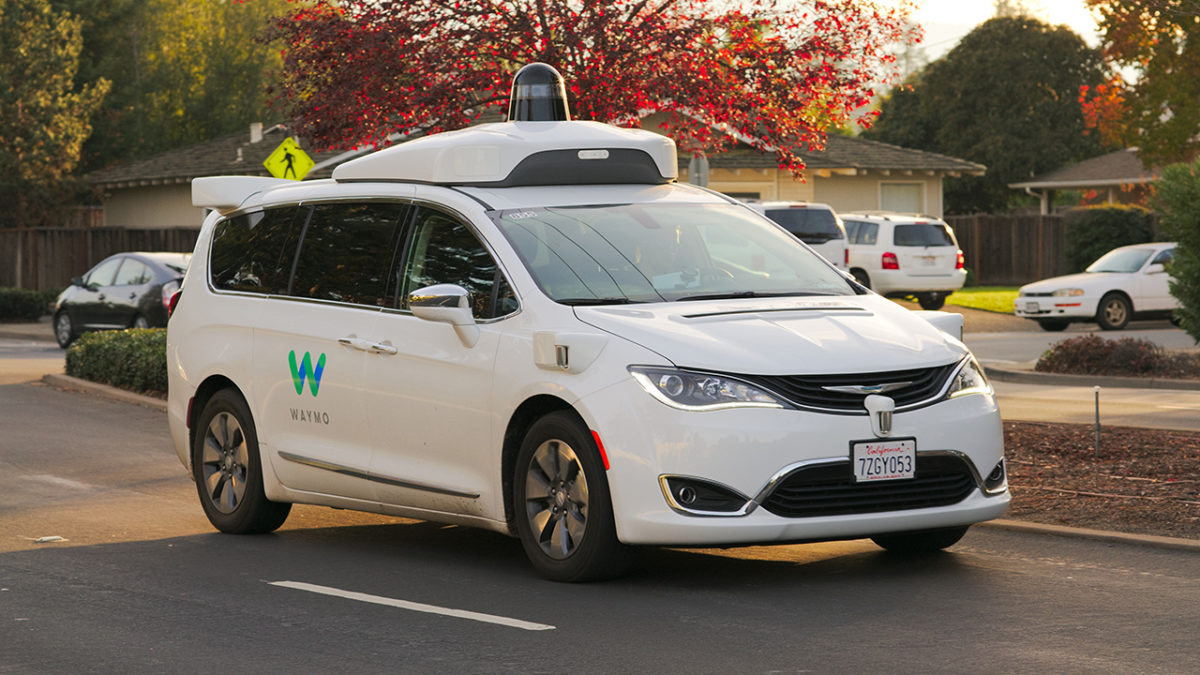
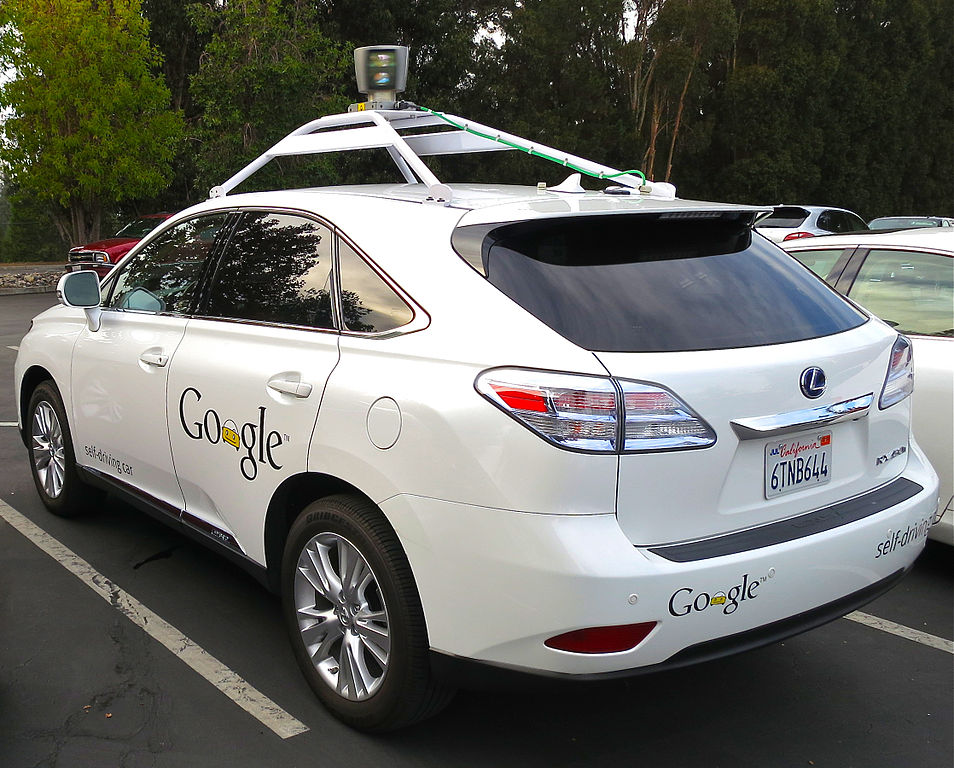
Driverless cars use a range of technology to safeguard themselves and others around them. First, they have cameras that help calculate distances and recognize objects such as other cars, people, and signs.

Since it would take forever to program a driverless car with every conceivable driving scenario, drive computers use deep neural networks to learn through practice. Using preloaded data on roads, vehicles, pedestrians, and so on, they learn to identify others in test and virtual drives.

The cars also use sensors to build a detailed, dynamic representation of their environment. Lidar, an array of lasers that continuously spin through 360 degrees, builds up a real-time image. Radar measures the distance and velocity of nearby objects. These sensors feed into the driving computer, and together with camera data, give the car a thorough understanding of what’s going on around it.

Environmental data doesn’t give its location, however. Upgrades to the Global Positioning System (GPS) will make geolocation accurate to around 30cm, which is better than one to two meters currently, but not sufficient for a car to drive safely on the road. Therefore, as well as GPS, a driverless car uses triangulation algorithms (using road signs, traffic lights, and other landmarks) and high-definition maps to accurately pinpoint its location to within a few centimeters.

Finally, when the drive computer knows where the car is and what’s around it, it can plan a route to the desired destination. When driving, the car responds to other objects, both moving and stationary, and modifies its behavior accordingly (such as slowing down at roundabouts, giving other vehicles way when obliged to, and so on).

Ideally, the car’s projected trajectory and its actual one should be identical, but as other objects can interfere, and precise maneuvering is difficult, they’re sometimes a bit different. In real life, this happens all the time with human drivers, but engineers are shrinking the gap all the time.

Driverless cars are the future. By replacing human drivers with sensors, data, and machine learning code, we remove human error (behind the wheel, at least). This might not resolve every ethical dilemma, but if every vehicle on the road is a driverless one, it should make our roads much safer for everyone. 


Is WhatsApp helping the spread of fake news?

Disturbing stories are coming in from around the world about crimes being carried out due to misinformation spread via WhatsApp. The Guardian reports that Indian police have linked dozens of murders and serious assaults to WhatsApp rumors. One incident, in particular, saw two men, who were returning from a trip to a waterfall, dragged from their car and beaten to death:

“The villagers got suspicious of the strangers as for the last three or four days messages were going around on WhatsApp, as well as through word of mouth, about child lifters roaming the area,”

Other incidents include a yellow fever outbreak taking hold in Brazil after WhatsApp was used to spread anti-vaccine videos and audio messages, politically motivated fake news spread in Kenya, and fake news about the divorce of David and Victoria Beckham distributed in the UK.

WhatsApp has over 1.5 billion users worldwide and its lauded end-to-end encryption means it is almost impossible for the content of messages sent across the messaging service to be monitored. Everything sent across WhatsApp is private and arrives at its destination precisely as it was sent. There isn’t any sort of algorithmic interference ranking content based on the supposed interests of the recipient or the factual accuracy of the content. This means that big companies like Cambridge Analytica can’t pay to manipulate what users are seeing, but it also means that false information can quickly spread across the messaging service.

According to a report by the University of Oxford’s Reuters Institute, more and more people are turning to WhatsApp for news, as the credibility of other more public social networks has been drawn into question. The nature of the messaging service, however, means that it acts more as a conduit for gossip than a reliable newswire. The idea of being in on a secret is just too alluring for some to bother checking the news they’ve received before they send it on again.

Does WhatsApp spread fake news?
WhatsApp knows it has a fake news problem.

A WhatsApp spokesman has said that the company is aware of the problem and that they’re working to prevent the spread of fake news:

“We’ve made it easy to block a phone number with just one tap – and are constantly evolving our tools to block automated content. We’re working to give people more control over private groups, which remain strictly limited in size. We’re also stepping up our education efforts so that people know about our safety features, as well as how to spot fake news and hoaxes.”

A recent update, highlighting forwarded messages, does make it easier to see if you’re receiving fraudulent messages. With robust encryption meaning there is no way for fact checkers to verify information sent across WhatsApp, there is still a lot more work for the messaging service to do if it is going to help prevent the spread of fake news. As Nic Newman, who co-authored the Oxford University report, says on WhatsApp’s fake news story:

“It’s very early days but I’ve got a hunch this is going to become a much bigger story.”

Do you ever receive news stories via WhatsApp? We’d love to hear from you if you have.


Nowhere left for cheats to hide

Have you ever been annoyed as a teacher has taken your phone from you just as you entered an exam hall? This is a modern phenomenon, it wasn’t long before phones could only call and not much longer before you only had them in your house, but these days it is a regular occurrence. Smartphones put the power of the internet in our pockets, and accordingly, they’re incredible tools for cheating on exams.

Asking holy spirits to help from Unexpected

So some teachers take phones, but in Algeria, they’ve gone one further. To prevent people from cheating on exams, they cut off internet access across the country from June 20 to June 25. The hardline stance comes after high school exams were leaked online back in 2016. Last year social media was banned, but this year they’ve gone one further and cut off the whole internet.

Internet on lockdown

Internet services will be switched off for two to three hours a day once exams get started, but Facebook will be off for the entire period. Clearly, this story can still go further, and we’ll wait and see what happens next year.

How to find out what data Windows 10 is storing about you

Have you ever wondered what data Windows 10 stores about you? Especially since Facebook’s data shenanigans came to light, data privacy is at the top of our minds. If you’re a Windows 10 user, here’s how to know what Microsoft is monitoring.

Windows 10 Download Windows 10
8
The latest and greatest version of Microsoft's operating system.

Diagnostic Data Viewer

Windows 10 has many different apps for getting the most out of the operating system. One of them is Diagnostic Data Viewer, which basically analyzes all the info the firmware has. This info is sent to Microsoft so it knows what’s going on.

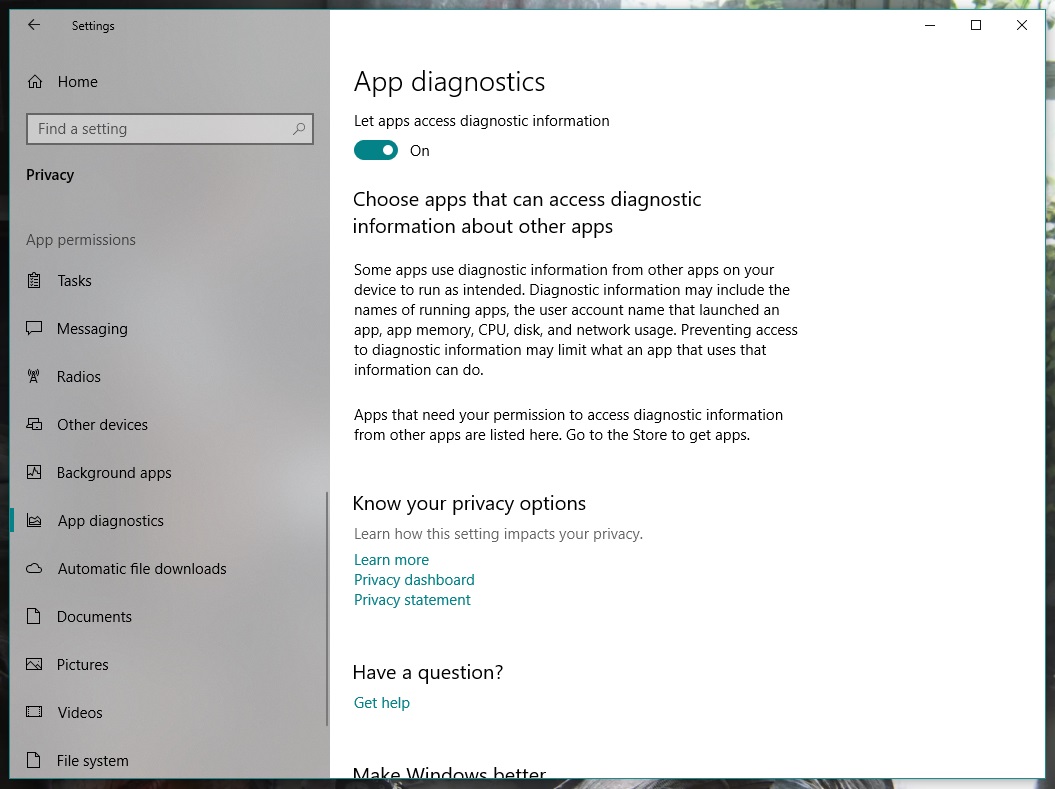
Before downloading it, enable the corresponding button. To do this, go to “Settings” and click on “Privacy.” From the different categories that appear on the left, go all the way down to one called “App diagnostics.” Make sure it’s set to “On.”

Once that’s done, now it’s time to download the Diagnostic Data Viewer. It’s a free tool from the Microsoft store. Here’s a direct link

Now for the important part. When you open the app for the first time, look for the bar on the left. These “events” or “processes” are collecting all the data that is sent to Microsoft. Using the search bar, you can find the programs that most interest you. Once you’ve got one, click on “Export Data” and a CSV file will be downloaded with all the relevant info.

If you don’t like the info that Microsoft is storing about you, you can delete it. Seriously. Just click on the button “Delete” on the “Settings” pageand say goodbye the problem.

WhatsApp will now notify you when you receive potentially dangerous messages

The latest version of the WhatsApp beta has something new: a feature that will alert you when you receive a message forwarded from another chat. This will make it much easier for you to spot spam messages and potential scams.

Specifically, the notice will appear at the top of the message, with a little arrow pointing it out:

If you use WhatsApp often, you will no doubt be familiar with messages advising you to click a link unless you want to start paying for WhatsApp. Or messages that offer free trials of Netflix if you click a link and input your data.

All these messages are traps designed to steal your info. The new warning will show that these messages are a part of a chain, alerting you to the potential scam. The notification will simply highlight that message has been forwarded so you might also see it if somebody passes you a funny meme, highlights a news story, or is spreading the latest viral phenomenon.

WhatsApp Messenger Download WhatsApp
8

For now, this feature is only available in the beta version of WhatsApp, but it is expected to get a wider roll out soon.


Asleep at the wheel

There have been a number of car accidents this year because people don’t seem to understand exactly what Tesla’a Autopilot system is. Autopilot is a semi-autonomous driving system designed to offer advanced cruise control and auto-steering, but it isn’t fully autonomous. The driver needs to be paying attention to the road with hands on the wheel. Seemingly, people letting their guard down when using Autopilot has led to accidents and even caused deaths. This is a problem for Tesla as these misunderstandings can whip up a lot of negative press for the car company.

A new video coming out of California then might make things worse. The video seems to show a Tesla employee napping, while Autopilot is engaged and will no doubt confuse the issue even further.

Tesla isn’t happy about the video, telling Mashable, “We take safety very seriously and are investigating this incident.”

A lot is said about how many lives can be saved once humans no longer drive cars. It is human error that accounts for most car accidents so if we can remove it from the equation we’ll also be able to remove the accidents. In the meantime, however, confusion over the capabilities of self-driving cars is causing fatal problems. This’ll likely end up leading to prohibition of human drivers in the future, but for now, those leading the charge towards a fully autonomous future need to take responsibility for properly educating those using their technology. You’ve dropped the ball here Tesla, and you need to sort it out before more people die.

Join the Bitdefender 2019 BETA and test the future of cybersecurity!

Softonic is one of the world’s leading download portals where you can safely download all of the best apps and programs for your PC, Mac, iOS, and Android devices. To help us do this we proudly partner with the world’s leading software developers.

One of our partners is Bitdefender. Bitdefender is a leading global cybersecurity-technology company protecting hundreds of millions of users worldwide in more than 150 countries.

Bitdefender is looking for beta-testers for the 2019 version of Total Security suite and has asked if we can relay the following message to our users.

Bitdefender is almost ready to launch a brand new series of cybersecurity products for 2019 and needs some of the world’s most rigorous BETA testers. Therefore, we’re now putting together a strong team of forward thinkers from around the world to help us deliver brilliant, flawless cybersecurity products. You are most welcome to join us!

How it will happen

Starting with June 14th, you’ll be invited to try out and give feedback on Bitdefender Total Security 2019. The new version packs significant improvements of Bitdefender’s industry-leading attack prevention technology and a new layer of ransomware protection. The product interface and interaction with 2019 version products on Windows, Mac and Android is improved, so it’s much easier to find what you need and make use of all the cybersecurity features. Parental Control has also been improved with additional functionality on mobiles.

We are looking forward to hearing what you think about it!

Apply for this challenge now!

How to apply

First, fill out this survey: https://www.bitdefender.com/site/view/beta2019.html

We will choose only 150 people to be part of the Bitdefender 2019 BETA.

Once you’re enrolled and accepted, you will receive a welcome e-mail with a download link to get you started. After the campaign begins, we will rely on your willingness to continually communicate and provide feedback to the Bitdefender team and help us improve the product which, at this stage, may have bugs.

All interactions will take place on a secure online platform, available to the testing team only. Members can participate in individual beta testing tasks as well as engage in-group discussions with other members.

Please note that the program is only available in English.

What’s in it for you?

Not only will you be the first to get the newest awesome products to come out of the Bitdefender Labs, but you’ll have the opportunity to improve them with your feedback and become one of the ”good guys” of the cyber world. We’ll be grateful to you and try to show it by throwing in some extra goodies such as Bitdefender products and Amazon vouchers as well.

But the real reward will come from the millions of future users who will be safer and better-protected thanks to your effort. So apply for this challenge now!

Yes, Facebook did deliberately share your data with over 60 companies

A New York Times investigation has revealed that Facebook has been purposely sharing your information. The findings, which Facebook has since confirmed in a blog post, show that Facebook reached an agreement to share user data including religion, relationship status, and political inclination with around 60 companies. These companies include the likes of Blackberry, Microsoft, Apple, and Samsung. The investigation also alleges that Facebook even gave access to user’s friends’ data, without consent.

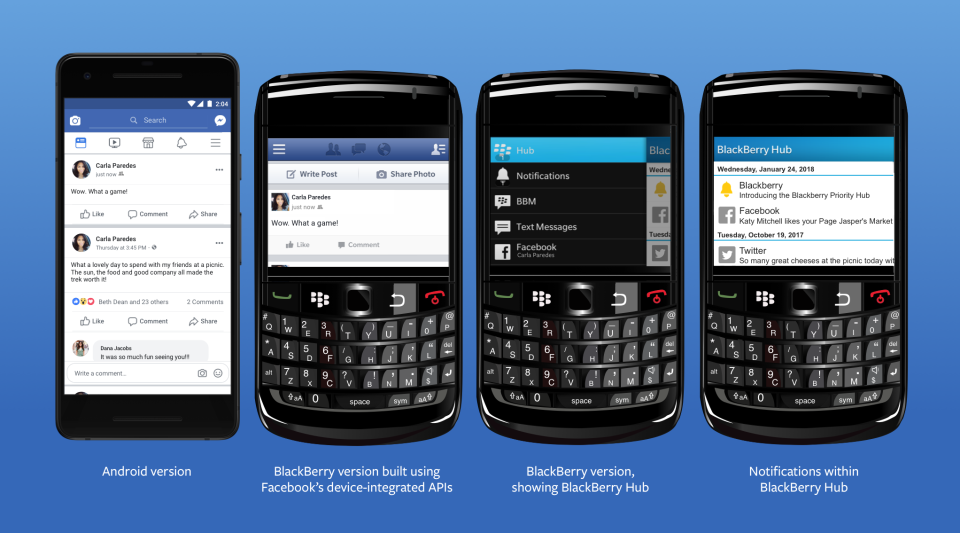
Responding to the New York Times report, Facebook claims that the sharing of your information was legitimate and above board. According to Facebook, the agreement goes back years to a time when mobiles had app stores. Facebook agreed to share your data with third-party mobile manufacturers to facilitate the creation of bespoke Facebook experiences on their respective devices.

Image via: Facebook

Of the deal, Facebook’s VP of Product Partnerships, Ime Archibong, said:

“These partners signed agreements that prevented people’s Facebook information from being used for any other purpose than to recreate Facebook-like experiences. Partners could not integrate the user’s Facebook features with their devices without the user’s permission.”

Archibong also went on to say that Facebook is satisfied with the agreement as it has no record of any partner abusing the deal. Facebook also denied including access to friends’ data, without consent, as a part of the deal saying:

“Contrary to claims by the New York Times, friends’ information, like photos, was only accessible on devices when people made a decision to share their information with those friends.”

(function(d,s,id){var js,fjs=d.getElementsByTagName(s)[0];if(d.getElementById(id))return;js=d.createElement(s);js.id=id;js.src=’https://embed.playbuzz.com/sdk.js’;fjs.parentNode.insertBefore(js,fjs);}(document,’script’,’playbuzz-sdk’));

Although Facebook has moved to address the findings of the report, people are still angry at the revelations. It looks like Mark Zuckerberg may have lied to Congress when he said users have complete control over who sees their data. One Senator called Facebook’s response completely unacceptable. Senator Richard Blumenthal, a Connecticut Democrat and ranking member of the Senate subcommittee on consumer protection said:

“I think this explanation is completely inadequate and potentially disingenuous… I think Mark Zuckerberg’s testimony raises very serious and severe questions about Facebook’s credibility.”

The Cambridge Analytica scandal still fresh in everybody’s minds and the company has been stumbling from one crisis to another since the revelations first broke. It is almost a matter of when and not if we’ll hear about the latest way that the social network has been exploiting our private data to facilitate its bottom line.

Do you believe Facebook’ VP of Product Partnership? Are you satisfied that your data was shared with third-party companies in an appropriate manner? Let us know in the comments below.