Lots of us use Outlook as a program to check our email. But did you know you can also use this software to read Gmail messages? It’s true! Today we’ll show you how to set up your Gmail in Outlook.
Enable Gmail
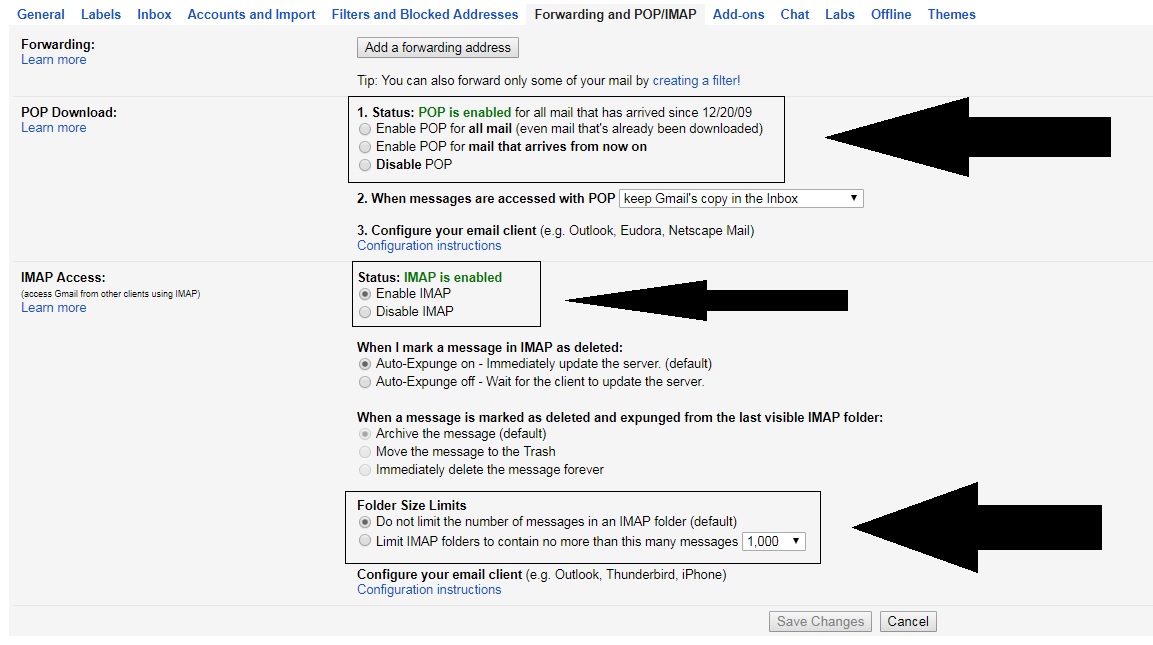
First of all, you must see if your Gmail account is enabled to send and receive email from other platforms. To do this, go to “Settings” and click on the field “Forwarding andPOP / IMAP” (depending on the version of Gmail you have, it can change names). Once inside, check three areas specifically:
“POP Download” is enabled.
“IMAP Access” is enabled.
The size limit of folders has no limits .
That done, let’s hop over to Outlook.
Quick and easy
Once you have Outlook open, it’s as quick and easy as clicking on the icon of three lines at the top and going to the “Information” section. Here, look for the first option that appears: “Add account.”
If you click on it, a pop-up window will appear where you can add your email address and password. After enabling everything in the previous step, the approval will take only a few minutes (and shouldn’t give you any trouble).
Congratulations! Now your email can find you wherever you go!
Fake news spread via the WhatsApp messaging service is causing extreme violence across India and the government has called on the messaging service to take action. Will it be that easy to halt a problem spreading across one of the biggest messaging services in the world?
We recently told you about disturbing stories coming in from around the world relating to the spread of fake news over WhatsApp. Particularly nasty stories have been coming out of India, with people being lynched and beaten to death to due to fake reports of child snatching spread across the messaging platform. The Indian government has now responded to this fake news crisis and has asked the Facebook-owned company to take action.
“Instances of lynching of innocent people have been noticed recently because of large number of irresponsible and explosive messages filled with rumors and provocation are being circulated on WhatsApp… Deep disapproval of such developments has been conveyed to the senior management of the WhatsApp and they have been advised that necessary remedial measures should be taken to prevent proliferation of these fake and at times motivated/sensational messages.”
WhatsApp has a massive presence in India and needs to work with the government to help the spread of fake news.
Events like this are troubling, and it isn’t the first time that Facebook-owned messaging platforms have been used to spread fake news and incite violence. Messenger has been used to incite violence in Myanmar with the UN pointing out that Facebook played a decisive role in the Rohingya crisis.
The Indian government’s statement on the current crisis engulfing WhatsApp makes it abundantly clear that it expects WhatsApp to act, saying:
“The Government has also conveyed in no uncertain terms that WhatsApp must take immediate action to end this menace and ensure that their platform is not used for such malafide activities.”
The statement, however, only talks about using “appropriate technologies,” to halt the spread of fake news, so it doesn’t offer a roadmap towards implementation. The problem is WhatsApp’s, and India expects it to act.
WhatsApp definitely needs to do more, but this is a very simple position for the Indian government to take. It is a position that ignores the cultural issues that are maybe contributing to the spread of fake news. After all, WhatsApp is available in countries around the world, but most of the violence caused by the spread of fake news is coming out of India.
This report from the BBC shows the extent of the problem facing WhatsApp and the Indian Government – Warning: contains disturbing scenes.
“Like the government of India, we’re horrified by these terrible acts of violence and wanted to respond quickly to the very important issues you have raised…”
But then adding that it is a problem:
“…that requires government, civil society and technology companies to work together.”
The messaging service cites a number of recent changes that should help stem the spread of fake news. These include forwarded message notifications, increased admin control over groups, and the funding of academic research on misinformation and fake news. These actions alone, however, will not solve this problem. Education is going to be the most significant tool available to the people trying to fix it.
The people using WhatsApp need to learn to recognize fake news stories before spreading them or, even worse, becoming involved in a mob that will act on them. WhatsApp has committed to efforts in this direction with fact-checking organizations like Boom Live already available on the messaging service but is also clear that it is a job for the Indian government to take up also.
Fake news can spread quickly, and cause harm, if people don’t take the time to read and scrutinize stories before sharing them.
The spread of fake news and resulting acts of misplaced violence is a serious and complicated problem that will not go away soon. The Indian government, WhatsApp, and individual community leaders will have to work together to help bring it to an end. A long and challenging education program lies ahead, but fortunately, everybody involved has the perfect weapon for teaching important lessons to people in rural parts of a country like India. WhatsApp alone isn’t to blame for the recent violence in India, but it is part of the problem. If used correctly, there is nothing to stop it from being part of the solution also.
Is Siri the most useless of all the AI assistants? Well, objectively speaking, probably, but Siri’s lack of practical use can lull iPhone users into a false sense of security. Despite a lot of Softonic tutorials on mobile security, it is easy to forget that once activated, Siri is always listening.
If Siri was listening in the Houses of Parliament, where else was she listening?
Although it isn’t ideal to forget that your PHONE could be listening to everything you say, most of us can get away with the oversight. If you’re the Defense Secretary of the United Kingdom, however, there are a lot of things that you or the people around you might be saying that you don’t want to a hackable device to hear. In the UK Parliament yesterday, UK Secretary of Defense Gavin Williamson was interrupted by Siri trying to answer a query while he was talking about Syria. Siri is set to “always listening” on his phone. Let that sink in. Siri is listening to everything that UK Secretary of Defense is saying.
So just how vulnerable is Siri and, accordingly, all of the classified secrets that UK Secretary of Defense has to talk about on a daily basis?
Well, in September, Chinese researchers discovered a shocking backdoor into voice assistants from Google, Amazon, Microsoft, and yes, Appl,e too. Called DolphinAttack, the vulnerability plays on the fact that digital assistants can hear frequencies that lay outside the range of human hearing. This allows attackers to issue normal voice commands at such a high frequency that it is inaudible to human ears.
DolphinAttack means that anybody within a few feet could be issuing silent commands to a smartphone’s digital assistant. The researchers didn’t just stick to basic commands either. Using only basic equipment, the researchers were able to get iPhone’s to make calls and even initiate FaceTime video calls. Incredibly, they were even able to make Alexa unlock IoT connected smart locks or redirect the navigation systems on Audi A3. If a user is wearing an Apple Watch, it allows these ultrasonic attacks to take place from further away.
The implications of such an attack could be severe for a man, like Williamson, with high-security clearance. Anybody passing him in the street could issue an ultrasonic command, which could open a certain website on his mobile browser. From there, the website could automatically install malware onto the phone that would open up the contents of the phone and possible communications to exploitation.
Siri is supposed to only respond to the voice of the user who trained it, but with convincing deep-fake technology becoming more and more prevalent it is easier than ever to reproduce somebody else’s voice. In this particular case, it doesn’t matter that Siri was responding to Williamson’s voice. As Jordan Peele adeptly demonstrates below, it wouldn’t be hard to fake him saying “Hey Siri,” and then feed the fake command through the ultrasonic processors.
It is all well and good laughing at Siri’s interruption in the House of Commons, and coming up with a witty response to make light of the embarrassing situation. Is there something more, however, that we need be seeing. Does Siri’s intervention highlight a worrying lack of insight into the implications of modern technology at the highest levels of the Conservative government in the UK? A lack of insight that could be putting the security of the British nation and her allies at risk? Is it a laughing matter if the man in charge of security for an entire country can’t even manage the security settings of his own mobile phone?
If the zombie apocalypse broke out today, 5 apps could save your life. Don’t wait until the walking dead are shambling your way. Download these apps now!
There are two types of people in this world: those who prepared for the zombie apocalypse, and those who get eaten.
The undead have been around in popular culture for decades now. While we’ve all enjoyed watching determined survivors stand against never-ending waves of flesh-hungry zombies, we don’t always take the time to prepare ourselves. One day you might be the one holed up in an abandoned shopping mall. So ask yourself one question: are you ready?
Fortunately, we live in a world where access to technology means help is always at your fingertips, and here at Softonic, we’ve taken the time to put together a list of apps that would be most helpful in the event of an apocalyptic zombie outbreak.
It’s highly likely that your phone has a flashlight, which will help you navigate dark areas when the power is out. But what if you see a group of survivors and need to get their attention? Shouting is all well and good until the zombie horde descends on you. Instead, this helpful little app will let you flash out the international sign for distress (SOS).
At some point, you have to sleep. And in a world overrun by zombies, there’s more to worry about than your partner stealing the all the blankets, or getting up in the dark and stubbing your toe.
To sleep peacefully, safe in the knowledge that your safe-house hasn’t been overrun by the undead, you need this handy little app. Set your smartphone camera to overlook a door or window and it will raise an alarm if anything moves – it’ll even take a photo of what it saw.
For most apps, if your mobile data runs out, or the signal’s bad, it’s game over. You might as well sprinkle some herbs on your head and let the zombie horde enjoy feasting on your brains à la provençal.
Fortunately, this app allows you to browse highly compressed, offline map data, with full GPS support, offline search, and routing by foot and car. You can bookmark safe-houses and useful locations, and then share them with other survivors.
While this app won’t help if one of your group gets bitten, it’s worth having when you’re hurt. There’s likely to be a lot of dangerous ground and territory to cover, and you don’t want a simple cut or sprain slowing you down, or turning into something far more deadly. Instead, use the Red Cross’s First Aid Training app to deal with all minor injuries.
If there’s one thing that separates the living and the dead in a post-apocalyptic world, it’s cardio. When you’re running for your life, being able to do a 5K could save your life.
This app helps you get a head start. You are a runner en-route to one of humanity’s last remaining outpost. As you run, you gather supplies and rescue other survivors. Just be ready to speed up whenever you hear zombies on your tail. And when the apocalypse comes, just remember that you don’t always need to outrun the zombies, you just need to outrun at least one other survivor.
That completes our round-up. Hopefully, you’ll find something here that will help you and your friends get ready for the rise of the undead. Stay safe out there, survivors!
It probably won’t come as a big surprise, but Facebook isn’t the only big tech company sharing your personal data all over the internet. Google is doing the same in a somewhat shocking manner. According to a report in The Wall Street Journal (WSJ), Google is allowing third-party app developers access to your inbox so that they can read your emails.
App developers have access to your Gmail inbox and can read your private emails
“The vetting process involves checking whether a company’s identity is correctly represented by its app, its privacy policy states that it will monitor emails, and the data that the company is requesting makes sense for what the company does.”
This means that Gmail app developers will get access to Gmail user data, which will include people’s emails, private details, who they’re writing to, and when emails were sent.
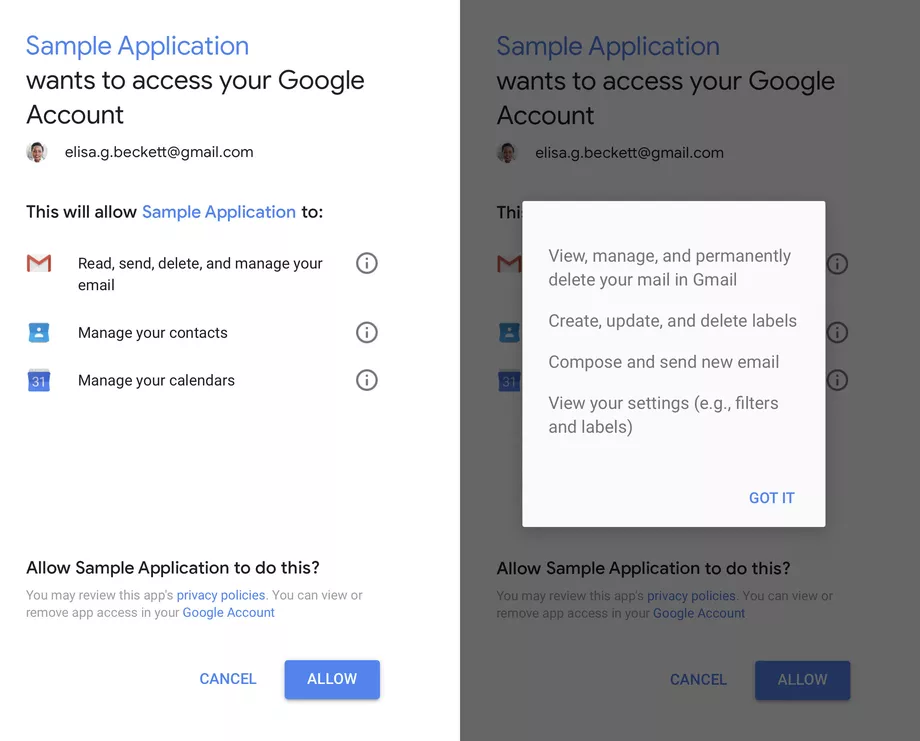
The real shocking revelation to come out of the report from The WSJ is that it isn’t just machines which are scanning for Metadata. Real people have access to the content of users’ emails and can read even the most private correspondence. User consent is required, but as always it is buried in confusing language. The example below shows an example of a consent form users receive. It shows that the app will have access, but there is no mention of human access.
Image via: Google
If you’re shocked by the revelation that strangers can read your emails and would like to review which apps have access to your account, you can do so here. If you’re not happy with the apps that have access to your Gmail, you’ll be able to revoke permission also.
Do you regularly use Facebook and its comment feature? Comments on the social network are becoming more and more important to users, so much so that Facebook is constantly making updates to enhance this feature. Despite all these changes, many Facebookers don’t know the latest advances. If you’re one of them, today we’re bringing you the top six tricks for Facebook comments.
Add visual effects
Facebook has implemented a series of completely free and automatic visual effects. For example, if you add a “Congratulations” to the comments, the social network will add balloons and lots of confetti. Users won’t see it unless they hover their mouse over it, so it’s like a secret… but not that hidden. Also, there are other words such as “xoxo,” “hugs and kisses” or “congratulations.” Try them out, they’re great.
Remove visual effects
We’ve told you how to enable visual effects using words, but maybe you don’t want to have these specific animations. You can disable them. To do this, just click on the three dots that appear to the right of each comment. In addition to the classic commands of “edit,” “delete,” etc., you’ll also see one that says “Remove text effects.” Click there and say goodbye to the problem.
Edit comments
We’ve mentioned this above, but it’s key to highlight: you can edit your comments, too. Click on the three dots and click “Edit.” This way, you’ll be able to change any error you may have made. Of course, we’ll warn you that once you edit a comment, you’ll have to wait a little while to go back and edit it again if you want to.
Change the text font
Facebook doesn’t let you change the default font, but you can paste a text from another source to the social network. For example, Lingojam is one of the most popular web pages for recreating this effect. You just have to write the text you want and in the box to the right, the font will appear as requested. Copy and paste it into the Facebook comment box.
Change the privacy settings
Every post you write on Facebook has several privacy options. By default, it usually comes with comments enabled for friends only, but you can make it so your comments also appear for “friends of friends” or the general “public.” Our advice is that you set the privacy settings to friends only, though it’s up to you.
It may be a little hidden, but there are several icons on the comments bar. The first is for emoticons, the second is for uploading an image… and the third is for GIFs! This effect brightens up any comment, so go nuts! Facebook’s database is bigger every day, so you’ll definitely find the GIF you want.
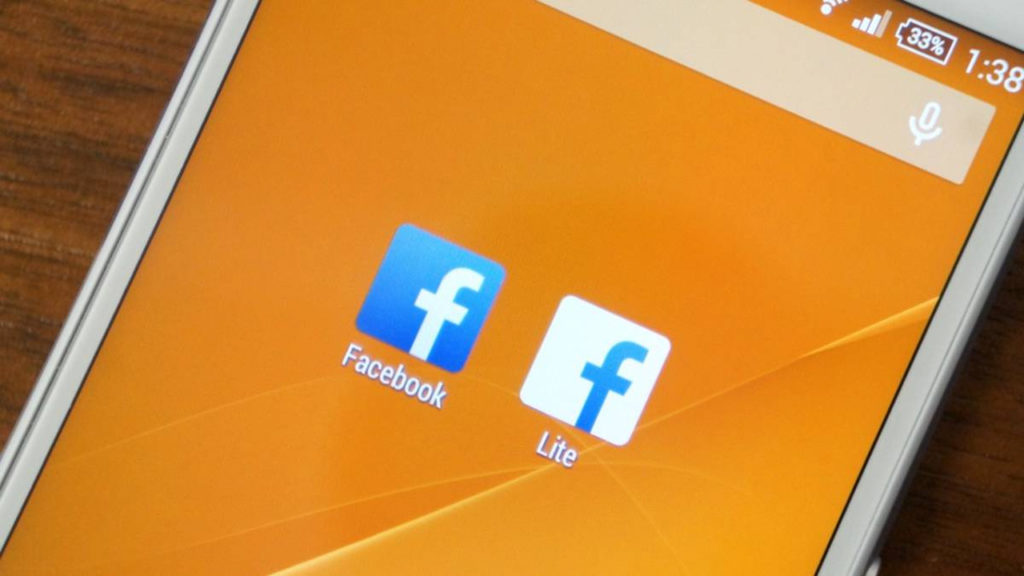
Facebook vs Facebook Lite: What are the differences between the apps?
Unless you’ve been living under a rock, you’ll know that Facebook has been going through quite the crisis recently. Trust in the big blue social network has been severely dented and head honcho Mark Zuckerberg was called to testify in front of Congress.
Since the first reports of the Cambridge Analytica scandal, Facebook has been under increasing pressure to disclose more details about what user data it shares and who with. We recently reported on the latest chapter of the scandal, which saw 61 companies being given extended access to user data. The pressure grew further when it emerged that Chinese companies like Huawei we’re getting their hands on Facebook user data.
In response to the growing pressure, Facebook has decided to release a list of the companies, which you can see below, that were granted special access to user data. Each company had, according to the BBC:
“… been given a temporary exemption to a block on apps accessing details about users’ friends.”
The 61 companies Facebook allowed special access to your data
ABCSocial, ABC Television Network
Actiance
Adium
Anschutz Entertainment Group
AOL
Arktan / Janrain
Audi
biNu
Cerulean Studios
Coffee Meets Bagel
DataSift
Dingtone
Double Down Interactive
Endomondo
Flowics, Zauber Labs
Garena
Global Relay Communications
Hearsay Systems
Hinge
HiQ International AB
Hootsuite
Krush Technologies
LiveFyre / Adobe Systems
Mail.ru
MiggoChat
Monterosa Productions Limited
never.no AS
NIKE
Nimbuzz
NISSAN MOTOR CO / Airbiquity Inc.
Oracle
Panasonic
Playtika
Postano, TigerLogic Corporation
Raidcall
RealNetworks, Inc.
RegED / Stoneriver RegED
Reliance/Saavn
Rovi
Salesforce/Radian6
SeaChange International
Serotek Corp.
Shape Services
Smarsh
Snap
Social SafeGuard
Socialeyes LLC
SocialNewsdesk
Socialware / Proofpoint
SoundayMusic
Spotify
Spredfast
Sprinklr / Sprinklr Japan
Storyful Limited / News Corp
Tagboard
Telescope
Tradable Bits, TradableBits Media Inc.
UPS
Vidpresso
Vizrt Group AS
Wayin
What does this all mean?
This special access was granted after May 2015, when Facebook updated to a more restrictive system. Until then app developers were able to request Facebook data including name, gender, birthdate, location, photos, and page likes. The new system enacted a more stringent review process and removed access to friend’s data, but the above companies were given an exemption, of up to 6 months from the May 2015 deadline, before having to sign up to the system.
Facebook hasn’t explained why the 61 companies were given the extra time before having to comply with the new, stricter rules.
Google knows a lot about you. So much, in fact, that it can show you personalized ads. Starting now, you can carefully control what Google shows you in ads byremoving categories that it has “assigned” you.
This Google option, which can be found at this link, lets you see the profile that the company has on you, based on your online behavior and any data that you’ve given out: age, sex, and tastes. Think a category doesn’t represent you? (According to Google, I’m a man.) Or simply don’t want to be shown ads from certain categories? Just click on that category and then “Disable.”
In addition to this option, Google now gives you more info about why you see certain ads for its products, such as YouTube. If you click on “Why am I seeing this ad” within an ad, it will explain in detail why it’s being shown to you (because of your tastes, where you live, etc.).
Of course, these new options don’t mean that Google will stop having info about you, but at least now you can call the shots by controlling the profile Google keeps on you.
This option reminds us of Facebook, which a while back included a section with all the info it was storing on you. In the article “How to find out what Facebook knows about you,” we explain this in detail.
What do you think about Google storing so much info on us?
Facebook is still reeling from one of the company’s most significant security breaches. Thousands of users around the world decided to delete their accounts after millions of accounts were compromised, while others simply stayed on the social network to wait for improvements. Beyond the usual privacy settings, we’re going to teach you the top five privacy tricks for Facebook.
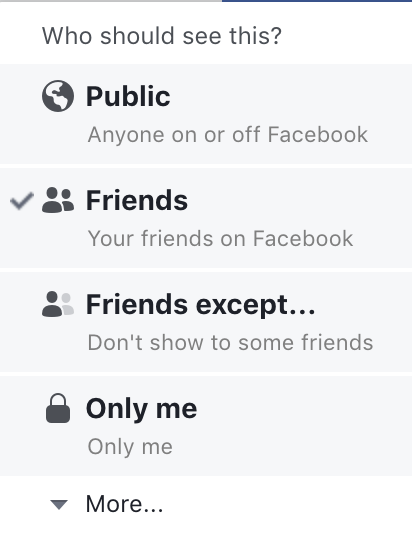
Every time you write a post on Facebook, carefully check the box to the bottom right of “News feed.” As you can see, here you can set the privacy level of the post you’re writing. You can choose “Friends Only,” “Friends of Friends” or “Public” for everybody to see. Likewise, you can also change these settings once posted. Just click on the icon that appears by the publication date and change the setting of “Who should see this?”
Use restricted lists
This feature is a little more hidden, but it’s worth knowing about: restricted lists. Restricted lists give you the option to move certain contacts into a specific category. This is similar to blocking the user, but they won’t notice a thing (you even stay on their friends list). Just go to the profile you want to restrict, click on “Friends” in their cover photo and then “Add to another list.” Here several categories will appear, but you’re interested in the last one “Restricted.”
Manage who can contact you
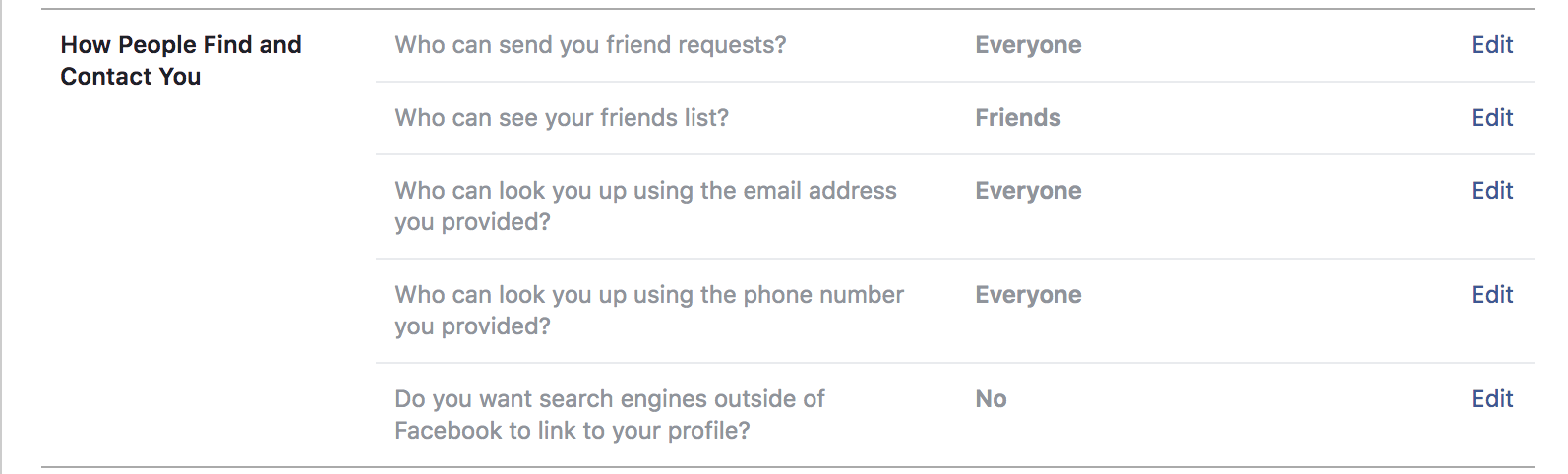
Want only a few people to be able to contact you? In general, Facebook enables public mode by default, so anybody can add you as a friend or send you a message (it’s another thing if you accept or read them, of course). However, it’s possible to change this. Just head to “Settings,” “Privacy” and change the options under the field “How people find and contact you.”
Disable others’ posts on your timeline
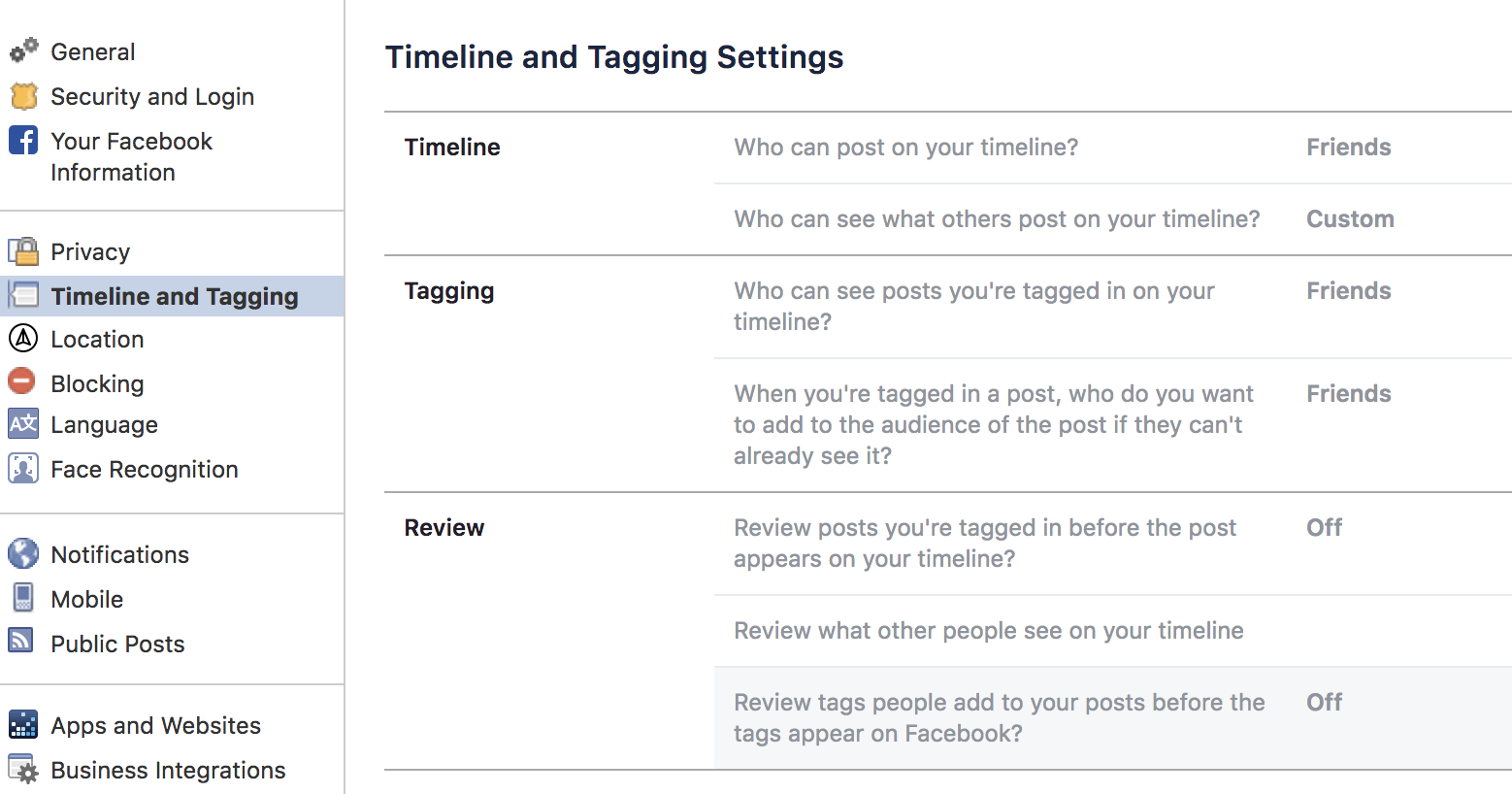
In the point above, we showed you how to restrict contacts; now we’re going to do the same for comments on your timeline. Right under the previously mentioned category “Privacy,” you’ll see one called “Timeline and tagging.” If you go here, you can change all these settings, including who can post on your wall or photos you’re tagged in.
Hide your data
The last trick or tip is to hide your personal data on Facebook as much as possible. People that haven’t added you may still be able to see lots of your private info. To change this, just go to your profile and click on “About.” In each one of the categories, you can change who can see what. Our advice is that you set it to “Friends Only” or “Friends of Friends” maximum. Never “Public.”
We are now starting to see the first devices that support WPA3, and it could be the beginning of the end for WPA2. WPA3 offers a number of security upgrades over WPA2 and is mostly invulnerable to cyber attack.
Last year, the KRACK attack vulnerability left hundreds of thousands of Wi-Fi routers around the world vulnerable to exploitation. The problem lay in the WPA2 security protocol, which for more than a decade had been the industry standard. Many fixes were posted online, and there are many, many ways to secure your home Wi-Fi network. However, as the vulnerability was a fundamental part of the underlying system found in all Wi-Fi routers, many experts believed that the only way to truly protect users against further KRACK like breakdowns of security was to develop a new underlying system.
How Do I Know if Someone Is Stealing my Wi-Fi Connection?
We are now starting to see the first devices that support WPA3, and it could be the beginning of the end for WPA2.
A collective of tech companies called the Wi-Fi Alliance certifies devices capable of data transmission over Wi-Fi. Since the KRACK vulnerability hit last year, developers have been working on an enhanced security protocol, WPA3, which is much more secure than its predecessor and the Wi-Fi Alliance has begun certifying devices as WPA3 compliant.
The new WPA3 protocol offers a step up in security in a number of ways. It is almost invulnerable to hackers attempting to guess people’s passwords. It also provides “robust protection,” if people use weak passwords to protect their Wi-Fi networks; and also features device specific data encryption.
The localized encryption is the critical factor here. Encryption makes public Wi-Fi networks much more secure if they’re run on WPA3 certified devices. It also specifically addresses the main issues that allowed KRACK exploits. KRACK, allowed hackers, in range of a Wi-Fi network to intercept traffic and gain access to critical information like email credit card numbers, passwords, and phone numbers. More advanced hackers could even inject packets of malicious data, which could include malware, into the network traffic. This type of malicious behavior will not be possible on WPA3 Wi-Fi networks.
For now, the Wi-Fi Alliance is still allowing the development of new WPA2 devices, but as time goes by it is expected that more and more devices will receive the WPA3 certification. Eventually, it is expected that if a device is going to transmit Wi-Fi, it’ll need a WPA3 accreditation to do so.