Skype lets you mute the people trying to talk to you

Skype will soon let you mute the other person’s microphone when you’re making a call.

Muting your microphone has been a common feature on voice and video calls since forever. This small element of control is invaluable at times. Whether you’re in the middle of a long call but somebody is trying to grab your attention or you suddenly get caught in a gust of wind or a loud car flies past. You can make the call flow smoother if you just hit mute and stop your microphone picking up all of the sonic interference going on around you.

The mute button allows you to control the call on your end, but what if the other side of the conversation is the loud one? What if that car is flying past the person you’re chatting to or what if that person is just chatting on and on and you’re not really listening? We’ve all pulled our phones away from our ears at some point.

Skype will soon let you mute the other person’s microphone when you’re making a call

Skype mute private calls

A brand-new Skype preview has been spotted, and it includes an interesting new feature. Skype is giving you the ability to cut off the other person’s microphone, so you don’t have to listen to what they’re saying.

This feature is already available in group calls, where it makes a lot more sense. If you’re talking to a few people at once and they’re all trying to get a word in at the same time, silencing the racket is a sensible move. For one-on-one calls though, it isn’t as clear why you would need to cut off the other person’s microphone. There is a chance the microphone could be picking up high-pitched interference, which could irritate your ears, but the most likely use is to save yourself the irritation of having to listen to something you don’t want or can’t be bothered to hear.
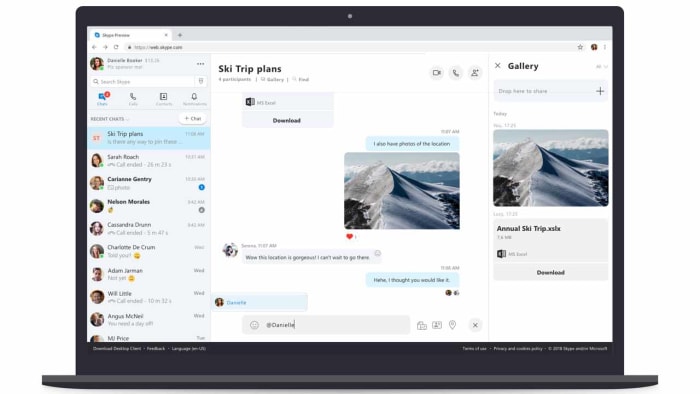
In the post announcing the new feature, Skype offered no explanation as to why it was introducing this new feature. The post simply said, “…we’re making it easier for you to control your calls! While you may have already noticed that you can mute people in a group call, we’ve brought that to your one-to-one calls as well.”

The post did mention another new feature coming to Skype, however: a “View profile” feature. As the name suggests, this will enable you to look at the profile of whoever is on the line.
Skype version 8.42.76.54

These two new features are both available now in Skype Preview versions 8.42.76.55 and 14.42.54.0 on desktop and Windows Store. There is still no news, however, about when they’ll roll-out to all versions of Skype on Android, iOS, Mac, and Windows.

This followed an earlier announcement this week from Microsoft, that introduced image preview on Skype, similar to that found on WhatsApp. Now, whenever you send an image on Skype you’ll be able to preview it before it is sent.

Facebook Messenger gets another WhatsApp feature

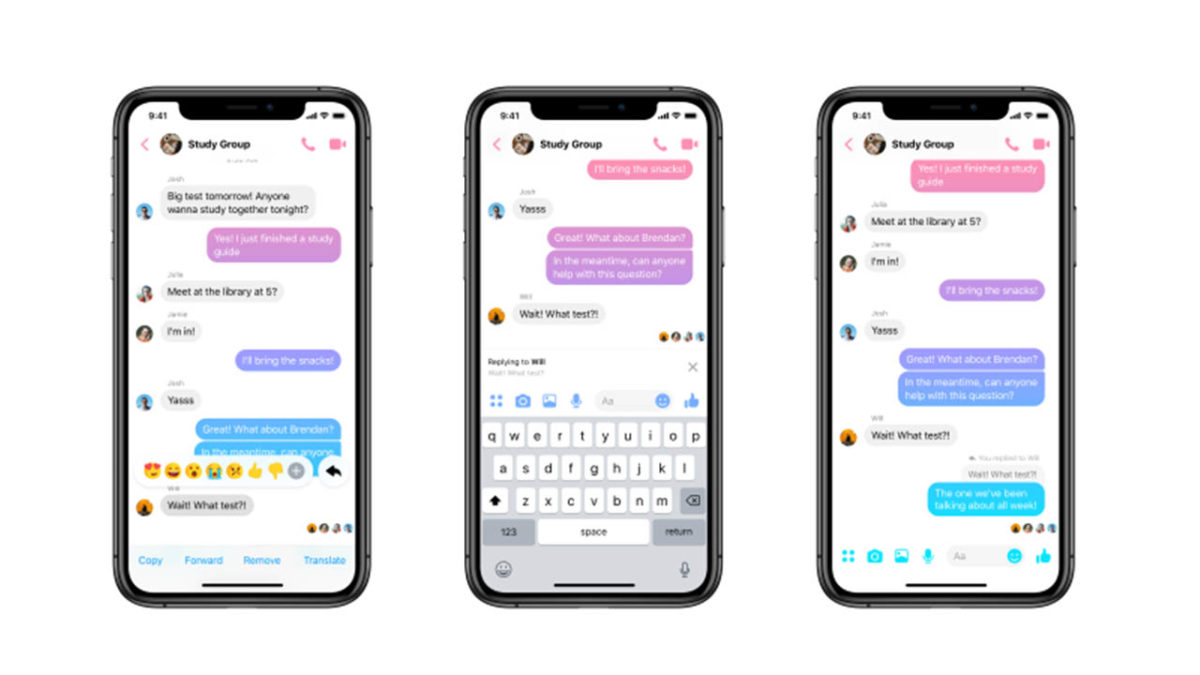
You can now send Quote Replies on Facebook Messenger.

Ever since Facebook bought WhatsApp, it has been cannibalizing all the messaging app’s best features. Over the years we’ve seen Facebook Messenger bolstered with WhatsApp features like the Delete for Everyone feature and the Unsend message feature. With WhatsApp being such a popular and easy to use messaging app, it makes sense for Facebook to want to emulate its success. So it is no surprise that Facebook Messenger now has another WhatsApp feature to call its own.

You can now send Quoted Replies on Facebook Messenger

Facebook Messenger Quote reply
Image via: Facebook

Quoted replies are an incredibly useful feature for a messaging app. Even in one-on-one chats, things can move too quickly for a conversation to flow simply and in one direction. This means you can end up answering a question that has since been pushed off your screen by other messages and replies. In a group chat, this problem is magnified. That is why being able to highlight the particular point you’re responding to and linking it to your response can help conversations flow smoothly and more naturally.

Messenger Download Messenger
7

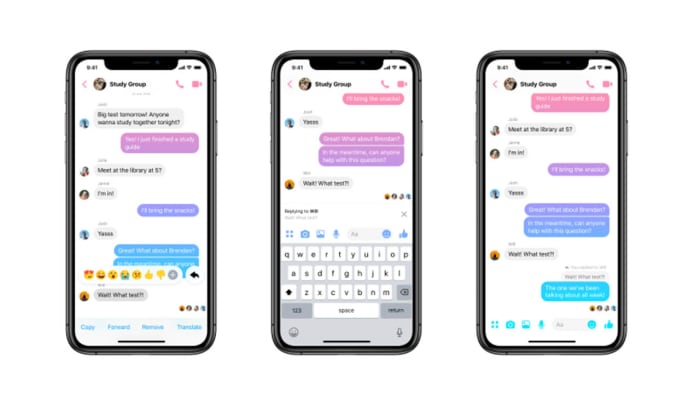
WhatsApp has had this feature for a while and now Facebook Messenger has it, too. Furthermore, Facebook Messenger replies will appear chronologically, exactly like they do in WhatsApp. (That’s different from messaging apps such as Twitter or Slack, where replies open up their own threaded conversations.) You can reply to a message with text, an image, a GIF, or a video and it will appear in the chat just like any other message, except it will have the quoted message you’re replying to attached to the top.

How to reply to messages on Facebook Messenger

There are two slightly different methods for replying to messages on the Facebook Messenger app for mobile and on desktop. Let’s have a look at how to do both:

Replying to messages on Facebook Messenger on Desktop
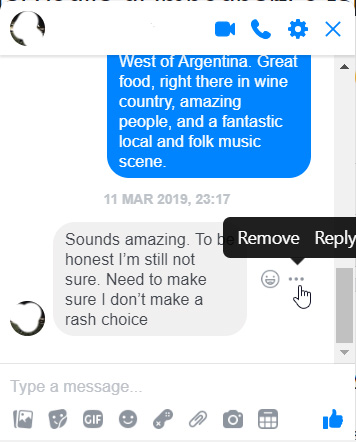
  1. Find the message you want to reply to and hover the mouse cursor over it.
  2. You should see a small emoji icon and a three-dot “…” icon appear next to the message.
  3. Click the three-dot icon and then hit Reply.
  4. Respond to the message however you see fit.

how to reply to messages on Facebook Messenger

Replying to messages on Facebook Messenger for Mobile
  1. Find the message you want to reply to and hold your finger down on it.
  2. Press the Reply button.
  3. Respond to the message.

There you have it, a simple way to better organize your Facebook Messenger chats. This method is available now to all Facebook Messenger users. It is worth noting, however, that at the time of writing, the feature wasn’t working on the Messenger Lite app.

You could soon earn money just by posting memes to Reddit

Reddit is currently testing a real-money inter-user tipping system.

If you use Reddit, you’ll probably know about Reddit Silver, Gold, and Platinum. These coins or badges, depending on how you see them, give users a way to reward other users whenever they make a particular post that they absolutely love. Reddit coins show up next to the post they’ve been awarded to and some of them bestow particular bonuses upon the user who receives them. A Gold award gives a week’s free access to Reddit Premium while Platinum gives a month’s access.

Whereas access to the ad-free Reddit Premium certainly has its perks, there is nothing in this world like hard cash-money. The big news? Reddit is working on a tipping system that will allow users to give other Reddit users real cash.

Reddit is currently testing a real-money inter-user tipping system

Reddit is testing a tipping feature

The new tipping feature is currently only available in one subreddit and only a single user on the whole site is currently able to receive tips. The subreddit in question is r/shittymorph and that lucky user is, well, u/shittymorph.

The new feature was announced in a post on the shittymorph subreddit and laid out just how it will work. The post reads, “Anyone in r/shittymorph can now tip u/shittymorph for the content he posts to this subreddit. Tipping is only available on new Reddit. Furthermore, this is an experimental feature available only in this subreddit, and no other community… Tip payments are handled entirely by Stripe. We don’t store any of your payment information.”

Tips received for a comment show up where you’d normally see Reddit Silver, Gold, and Platinum awards and at the time of writing r/shittymorph had received $81 in tips for his top comment on the post.

Below each post r/shittypost makes, there is now a new tip button. Clicking the button opens up a tip box, which shows four tipping options. Users can tip $3, $5, $10 or select other and tip anything up to $100. According to the post announcing the new feature, the recipient will receive around 78.5% of all tips given. Reddit will receive a massive 18.5% and Stripe, which handles all the payments will take 3% of every tip.

When users decide to make a tip, the tip box will give the option to input credit card details and then Stripe will handle the transfer.

There is no news yet about a general roll-out but this is a very interesting feature for Reddit to be testing. The Reddit community is vast, and conversations cover all sorts of topics. Some of the most heartwarming Reddit stories, however, come from users seeking financial advice during times of hardship and other users responding with offers to send food or even cash. It’ll be interesting to see if tips will soon be sent in such situations.

There’s also the potential for some shady activity, as Reddit is often a promotional tool for adult models, who are already asking fans to support them financially in exchange for certain photos or videos. We’ll have to stay tuned to see how this all plays out.

Facebook Privacy: It is now easier for Android users to hide their location

Is Facebook finally getting the message about user privacy?

facebook privacy

It is no secret these days that Facebook wants to know absolutely everything about us. So much so that the social giant even tracks people who aren’t members of Facebook and keeps tracking people who are even when they’re not using the Facebook app. Now, in a gesture that’ll make you ask why they even had to do this in the first place, Facebook is making it easier for Android users to stop its app from tracking their location when they’re not using it.

Is Facebook finally getting the message about user privacy?

Location settings have always been a little more nuanced on iOS than they have been on Android. Android Facebook users have a simple on/off switch for sharing their location with Facebook and other apps. iOS users, however, have always had the option to share their location with the app always, never, or only when the app is in use.

Practically, this makes a huge difference, as it means iOS users can have full location services when using Facebook and not have to worry about Facebook tracking their location for the rest of the day. Android users, on the other hand, have always had to manually switch location services on and off again should they want to use them but then not be tracked. In practice, this usually ends with Android users leaving location tracking on all the time.

Facebook location services
Does Facebook know where you are?

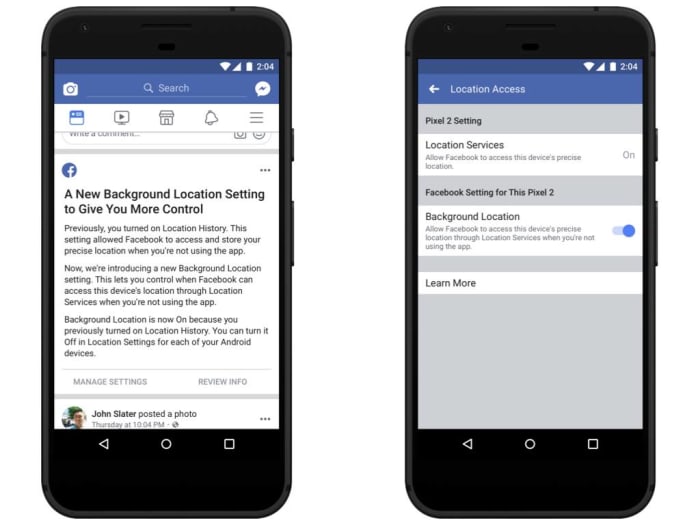
Now though, this has changed. The blog post announcing the change had this to say, “Today we’re introducing a new background location control on Facebook for Android so people can choose if they want us to collect location information when they’re not using the app… Until today, people using these features were asked to enable Location History. If you enabled this setting, two things happened: you would share your location when you weren’t using the app and you would allow Facebook to store a history of your precise locations. With this update, you’ll have a dedicated way to choose whether or not to share your location when you aren’t using the app.”

Facebook FB location settings on Android phones

This is a big change as it now makes it easier for Android users to take advantage of location services without having to submit to 24/7 surveillance. It also means that Facebook features like “Nearby Friends” will no longer show your location, even if you’re not on the app.

iOS users won’t see any change, and neither will Android users who have always had location services set to off. Those privacy-minded Android users won’t be affected as their location services will remain off.

Twitter news: We’re slowly moving toward an “Edit Tweet” button

Twitter is working on a way to “clarify” past tweets and give them new meaning

Even though Twitter has recently upped its maximum character count from 140 to 280, it is still a quick and lean social machine. Thanks to their short length, tweets can come and go at breakneck speed. The flip side of promoting a fast-flowing platform for streams of consciousness as well as factual news reporting is that people often get things wrong. You’ll commonly see tweets with spelling mistakes or bad grammar and you’ll even see tweets that just don’t make sense.

At the heart of all this apparent madness is the lack of an “Edit Tweet” button. People have been calling for such a button since what seems like the beginning of time, but Twitter has always remained steadfast in its refusal to add one. Recently, Twitter CEO, Jack Dorsey, said that the reason there was no edit button is because Twitter didn’t want to facilitate fake news by giving people the ability to change the tweets that first broke the story. He did, however, recognize that the issue needed addressing and it looks like he might finally be coming good on that promise. Sort of.

Twitter is working on a way to “clarify” past tweets and give them new meaning

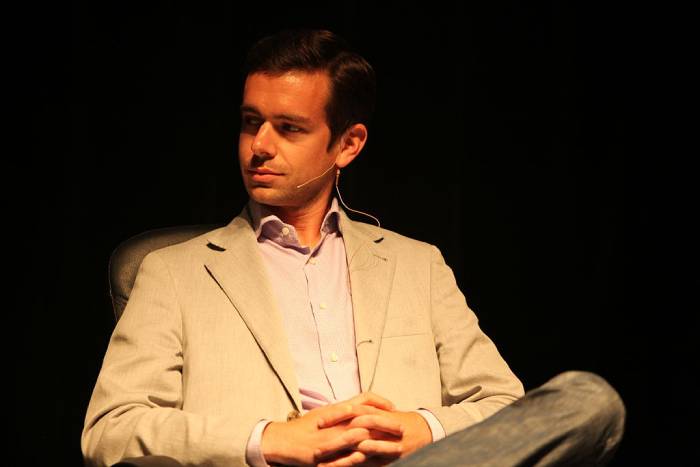
Twitter CEO Jack Dorsey
Twitter CEO, Jack Dorsey

Speaking at a Goldman Sachs event in San Francisco on February 14, Dorsey again spoke about the ability to change old tweets, but what he said is not quite what everybody has been waiting for. When addressing the recent cultural scandals that have arisen from past tweets, like James Gunn being dropped by Disney for things he tweeted years ago, Dorsey said that Twitter was working on a way to allow people to clarify something they’ve said in the past. In this way, they could add more words to their old tweets to show that they’ve grown beyond the original comment.

This sounds suspiciously like a quote retweet, but Dorsey did go further to show how the feature would work differently. The Twitter CEO said, “How do we enable people to quickly go back… and to add some context and some color on what they might have tweeted or what they might have meant. By doing so you might imagine that the original tweet then would not have the sort of engagement around it. Like you wouldn’t be able to retweet the original tweet, for instance. You would just show the clarification, you would be able to retweet the clarification, so it always carries around with it that context.” He also went on to say that Twitter isn’t working on the feature specifically, but that those are the sorts of questions the social network is asking itself.


If we were to see a feature like the one Dorsey has described, it would give users the chance to take old tweets and turn them into something else, while the original tweet remained intact. The original text would still be visible but there’d be other text explaining what is going on in it. This would work just as well for clarifying spelling mistakes and bad grammar as it would for clarifying jokes you made back when you were in college.

As we’ve pointed out, there is still no news on whether this feature will make its way onto Twitter, but as soon as we hear more news, we’ll let you know.

Twitter update will make it easier to see who is behind the threads you’re reading

Twitter tests a new Profile Preview feature for mobile.

twitter

Twitter is an amazing tool for keeping yourself updated on all the latest news and developments around the world. If you follow the right people, they’ll keep you updated with short tweets and longer threads of tweets about the issues they specialize in. Your feed isn’t just made up of tweets and threads by the people you follow, though. When scrolling through your Twitter feed, you’ll also see tweets from people you don’t know, with a small “Liked by…” or “Retweeted by…” at the top of the tweet.

Your Twitter feed will show tweets that have been liked or retweeted by anybody you follow. If you add comments and replies, your comments can be fed back to your network as well. Because of the ease of tweets and threads crossing networks, you may not know anything about who has written the tweet or thread you’re currently reading. Twitter is now moving to change this.

Twitter tests a new Profile Preview feature for mobile

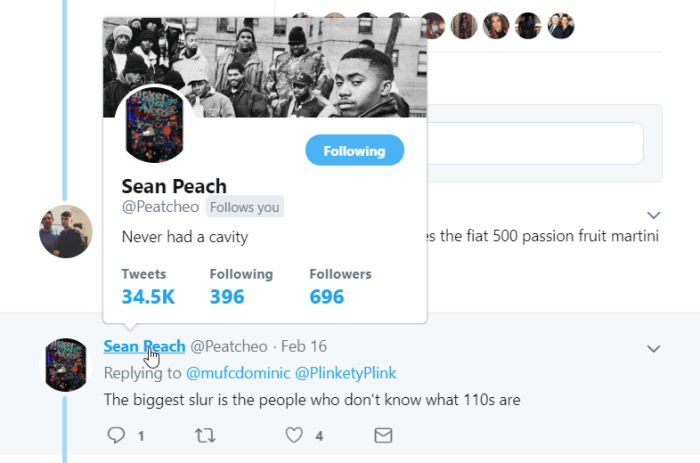
The new feature is designed to address the situation outlined above, particularly relating to long threads of tweets. Should you be reading through an interesting thread and see a comment that catches your eye, the new profile preview feature will allow you to see who made that comment much more easily.

The feature allows you to simply tap on the Twitter user’s @ handle to see a floating preview of their Twitter information. This will include their full bio, follower count, and the date they joined Twitter. Furthermore, the feature will also work on your main feed as well as in comment threads. This means if you see that somebody you follow has retweeted, liked, or commented on a tweet about Nike 110s, you’ll then be able to easily find out that that person has “never had a cavity.”

Profile Preview on Desktop
Twitter has had a Profile Preview feature on desktop for some time now.

According to Twitter, the new Profile Preview Feature is being tested first on iOS devices. This means it is likely that the feature will get a roll-out to iPhone users first once the testing phase is over.

This might not be a massive change by Twitter, but it will allow users to stay focused on what they’re reading. At the moment, if you want to see who has said something in a comment thread, you have to click on their @ handle and go to their Twitter homepage. This creates a break in the thread and then there is no guarantee you’ll be returned to the comment you were just reading. As the saying goes, small changes can make big differences.

Facebook Messenger: Is this the new feature we’ve all been waiting for?

How to unsend messages on Facebook Messenger

facebook messenger

Being able to communicate with our friends at the click of a button on our smartphones has revolutionized modern life. We can now easily and securely talk to our friends anywhere in the world using any one of a number of free messaging apps. Despite our new technologically influenced powers, we all remain human, which means we can all make simple mistakes. This is why WhatsApp introduced the “Delete for everyone,” feature that allows users to delete messages they’ve sent in error. Facebook Messenger now has a similar feature too. You can now Unsend messages on Facebook Messenger.

As Facebook owns WhatsApp, it will probably come as no real surprise that the new Facebook Messenger Unsend feature is very similar to the WhatsApp Delete for everyone feature.

Messenger Download Messenger
7

How to unsend messages on Facebook Messenger

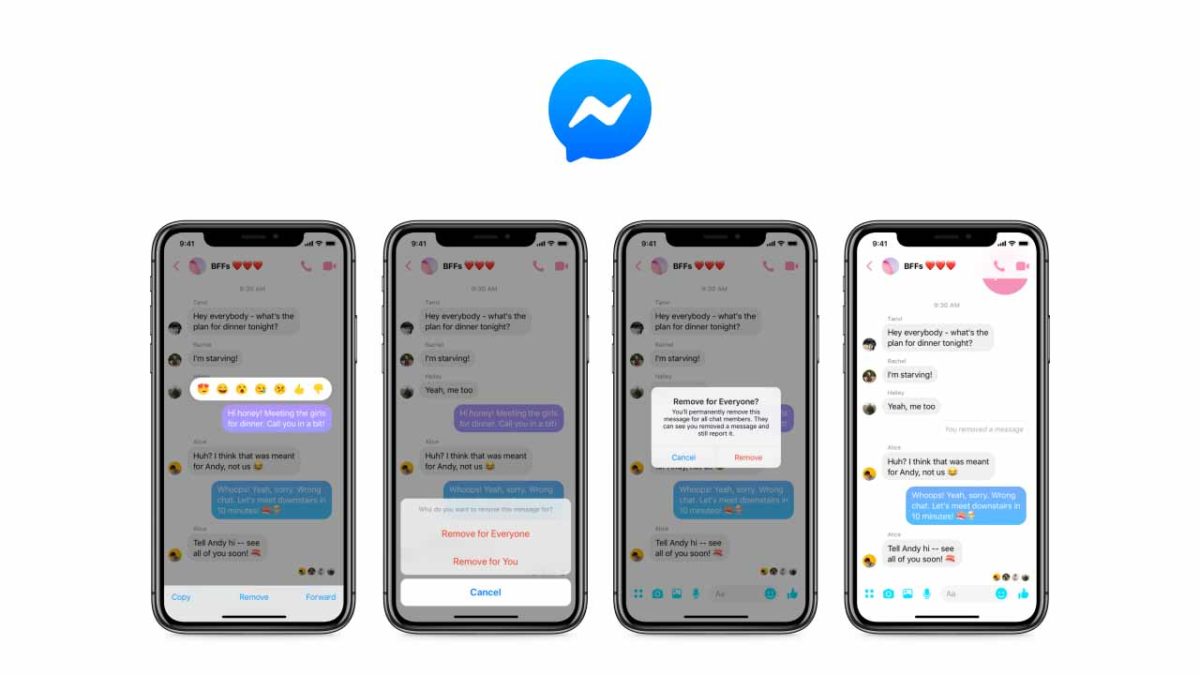
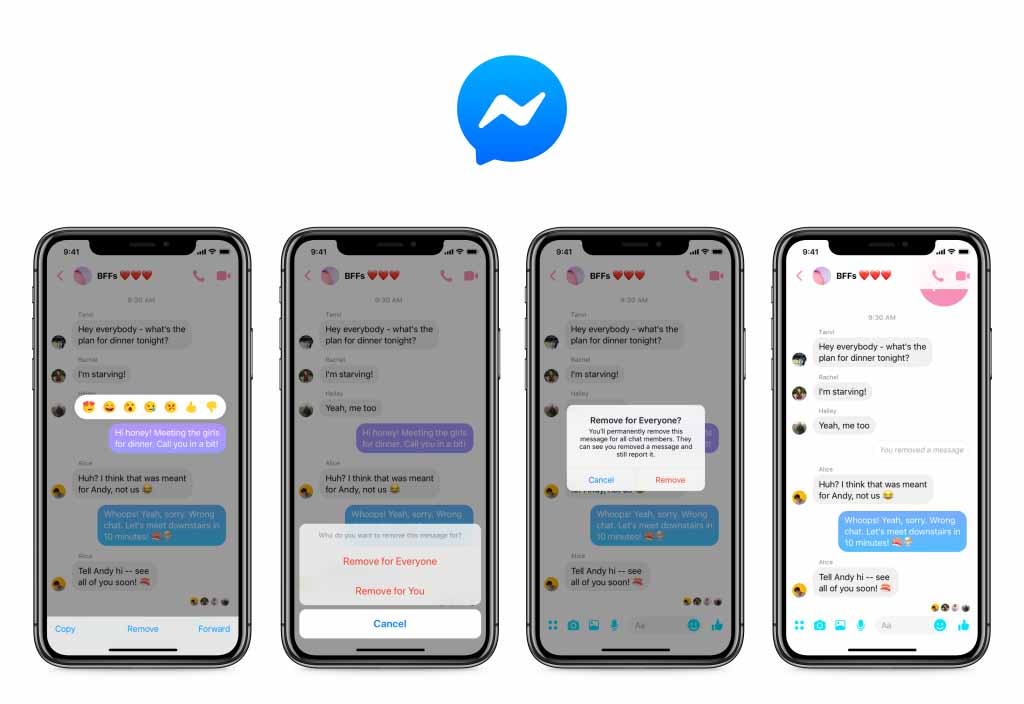
Thanks to this change, you now have 10 minutes to select messages they’ve sent but don’t want anybody to see. To select a message to be unsent, all you have to do is tap it to open up the message menu. From there you simply click the “Remove for Everyone” option and Messenger will delete it. Just like on WhatsApp, the message will be replaced with a notification for everybody involved in the conversation that says a message has been deleted.

As well as the Remove for Everyone option, Messenger also has a “Remove for You” setting. Selecting this option will delete the message in question from the local chat on your device. It will remain, however, for everybody else who is involved in the conversation.

Screenshots of Messenger unsend for everyone

It was back in April when Mark Zuckerberg first acknowledged the fact that the company has been deleting his and other Facebook exec messages for some time. The feature was first developed after the Sony Corp. data hack back in 2014 but only as a way for Facebook execs to delete their messages. It wasn’t originally planned for a general roll-out. The public response to Zuckerberg’s admission, however, pushed the social giant to start work on bringing the feature to all users.

With all users now having a 10-minute grace period that allows them to delete messages from their friends’ inboxes after they’ve been sent, Facebook can say it has come good on the promise it made back in the Spring. The only caveat to the roll-out of the Unsend for Everyone feature is that it is only available on Messenger for mobile. If you use Messenger on an Android or iOS device, you should already have the option to Unsend for Everyone. If you use Messenger on a PC or Mac, however, the option will not be there. Facebook hasn’t said whether the Unsend feature will make it to Messenger for desktop.

You won’t believe how many accounts WhatsApp bans every month

WhatsApp bans a staggering number of fake accounts every month

whatsapp

WhatsApp has seen its fair share of controversy recently. Like Facebook, which owns the messaging app, WhatsApp has been guilty of facilitating the spread of fake news. This has seen the rise of a far-right politician winning the presidential elections in Brazil and a series of brutal murders and public lynchings in India. Pressure has been mounting for some time then, for WhatsApp to act and try to prevent some of the problems that have been spreading across the app.

WhatsApp Messenger Download WhatsApp ►
8

We recently saw a move to prevent messages being forwarded more than five times, which cut at the heart of the spread of fake news. WhatsApp has also now released information about the number of accounts its banning on a monthly basis due to misuse of the platform.

WhatsApp bans more than 2 million accounts every month

This news comes via a white paper WhatsApp published in the build-up to the Indian general election, which is due to take place in May. Known as the Lok Sabha general election, the Indian election is the biggest democratic election on earth meaning there is massive potential for democracy-skewing efforts taking place across social networks and messaging apps.

The white paper states that over the last three months, WhatsApp has banned over 2 million accounts a month. Staggeringly, a huge 75% of these accounts were banned after they were reported by other users with 20% of blocked accounts being caught when they first registered. It is clear that users still have a huge role to play in rooting out abusive WhatsApp accounts.

Whatsapp bans accounts
WhatsApp is banning over 2 million accounts every month for misusing the platform

A report by First Post also highlights efforts WhatsApp has been making to try and improve detection of automated accounts. The messaging app is constantly being targeted by fake accounts run on emulators or machines that are then used to amplify the spread of fake news and bombard genuine users with spam messages. One such effort is the platform’s new ability to detect accounts that continuously send messages without activating the text bar or typing cursor.

WhatsApp has been coming under increasing fire from the Indian government due to the well-documented problems it has been causing in the country. With such a huge democratic exercise fast approaching this year, however, there is global pressure on the messaging app to get its house in order. Banning abusive accounts and improving detection methods should represent just the tip of the iceberg. If the world watches WhatsApp help skew the biggest democratic elections on the planet, it may be the messaging app itself that faces a public execution.

WhatsApp’s newest app gets some new features

WhatsApp Business now has Quick Replies, Labels, and Chat List Filtering.

whatsapp business

WhatsApp is a fantastic communication tool. With more than 1.5 billion users, downloading WhatsApp offers an easy, free, and secure way of communicating with a huge chunk of the world’s population. The problem though, was that WhatsApp didn’t offer a secure way for businesses to create their own WhatsApp accounts in order to communicate with their customers using the messaging service. Anybody could start an account pretending to be any business. This is why WhatsApp recently launched a brand-new app, WhatsApp Business.

WhatsApp Business Download WhatsApp Business Now
7

WhatsApp Business allows businesses to set up a WhatsApp account their customers know is legitimate. Although WhatsApp charges businesses to use its official new app, the messaging giant claims over 5 million businesses around the world have signed up to use the new service. If you own one of those businesses or if you are a customer of one of those businesses, you’ll be happy to know that WhatsApp is adding three new features to WhatsApp Business.

WhatsApp Business now has Quick Replies, Labels, and Chat List Filtering

Twelve months after WhatsApp Business’ official launch, three new features have been added to the app. In the blog post announcing the update, WhatsApp said, “We’re excited to keep growing WhatsApp Business and introducing new features that make it easy for customers to find and engage with businesses that are important to them.”

It is now possible for businesses to set up Quick Replies that can be quickly and easily sent to questions they’ve received before or receiver regularly. Sending Quick Replies needs to be an easy process and WhatsApp has made it so. All businesses need to do to access all of their previously saved Quick Replies is type the ‘/’ symbol into the text field. This will then show up all of the previously saved quick replies ready for the right one to be selected.

download whatsapp business

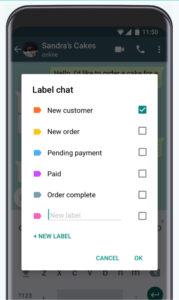
Another key feature to come with the WhatsApp Business update is Labels. Labels can be used to organize both chats and contacts adding an extra layer of organization to the app. WhatsApp Business Labels come in different colors making it easy to highlight chats and contacts based on varying criteria like outstanding payments, new clients, ongoing contracts etc.

new labels for WhatsApp Business
Labels make it easier to organize client lists

The final big change to come in the WhatsApp Business first anniversary update is Chat List Filtering. This feature will allow WhatsApp Business users to filter chats by unread messages, groups, or broadcast lists.

If you’re one of the 5,000,000 businesses reported to have signed up to WhatsApp Business, then these tools will help you both communicate more effectively with your customers and also save time while doing so. If you’re a customer of one of those businesses,you could expect smoother communication with them but also greater potential to receive promotional materials as it’ll now be easier for them to label the type of customer you are, and coordinate WhatsApp promotional campaigns better. This, of course, is all on top of the new ads, which WhatsApp has promised to introduce in the near future.

What does the Facebook Messenger, WhatsApp, and Instagram merger mean for you?

Will the Facebook, WhatsApp and Instagram merger affect my privacy?

Facebook has announced to the world plans to merge its three major products Facebook Messenger, WhatsApp, and Instagram. Facebook has owned WhatsApp and Instagram for a while now, but it promised both products would remain independent back when it acquired them. The planned merger then, sees Facebook going back on its word, but what else does it mean for users of the three big programs? Let’s take a look.

The Facebook Instagram and WhatsApp merger

First off, according to the report in The New York Times that first broke the story of the big merger, only the back end of each program will merge. This means that each product will remain distinct from each other. We won’t be getting one big social network that will replace Messenger, Instagram, and WhatsApp.

Instead, the merger will be a behind-the-scenes affair with the technology that makes each app run being linked rather than the apps on our phones. This does mean, however, that once the merger has gone through, WhatsApp users should be able to send messages to Messenger and Instagram users and vice versa.

Will the Facebook, WhatsApp and Instagram merger affect my privacy?

For this cross-app compatibility, the trade-off is privacy. Some lawmakers in the U.S. have already raised the alarm as the issue relates to both the past and the future. California congressman Ro Khanna (D) believes there should have been more scrutiny when Facebook acquired Instagram and WhatsApp in the first place. “Imagine how different the world would be if Facebook had to compete with Instagram and WhatsApp. That would have encouraged real competition that would have promoted privacy and benefited consumers,” Khanna said.

When Facebook bought Instagram and WhatsApp, it killed off competition, which could have led to the development of different profit models for social networks – profit models that might not have included the wholesale harvesting of data relating to everything you do online.

Moving forward, the merger brings together the data of users who’ve signed up to different social networks for different reasons. Your Facebook Messenger account may be much more open than your Instagram and WhatsApp account but once merged, all of the data will be kept together. In theory, this could offer Facebook a new way to monetize your data by cross-referencing your anonymous data with your more public profiles.

The flip side to this is encryption. Facebook claims that the merger will bring WhatsApp’s famous end-to-end encryption to Facebook Messenger and Instagram. Another potential benefit is the stronger anti-fraud protections that could come from consolidating three of your major social media accounts. It would be harder for somebody to pretend to be you if they weren’t using one of your main linked accounts.

The encryption issue, however, might not be that easy to implement. It could create an increased likelihood of error and crucially, could prevent Facebook from accessing data it already enjoys. Jim Fenton, an independent security expert told Wired, “It [bringing WhatsApp encryption to Messenger and Instagram] is too technically challenging and would cost Facebook access to lots of data.” This means we might never see it.

All of this means that it is still too early to say what the effects of the Facebook Messenger, WhatsApp, and Instagram merger will be. It is highly likely that we’ll be able to message each other across the three platforms but the true privacy implications are, as yet, unknown. Facebook claims to have privacy concerns at the heart of the merger but with lawmakers and privacy campaigners already raising concerns about the potential for abuse of such a big collection of user data, it’d be foolish to take Facebook’s word as it is. With the merger announcement itself breaking past promises from the social giant, it is clear that we should all tread carefully with this one.