Famously secretive organization joins Instagram

What will the CIA be willing to share?

Instagram is an open network, and a visual one, too. Posts are images with text playing a very small part in the makeup of an Instagram post. You would think that this makes Instagram a hard place to keep a secret; quite the opposite, in fact. Instagram is the place you go to announce things. Your vacation, that new lipstick you’re using, that old friend you’ve just seen, or how amazing your breakfast looks. Instagram is about sharing information not withholding it. This is why a recent announcement is a little bemusing, to say the least.

The CIA is about to launch its own Instagram account

CIA on Instagram

During a national security forum at Auburn University in Alabama, CIA Director General Gina Haspel made the surprise announcement. She said, “Just to talk a moment about transparency, of course, CIA does have a Twitter account… Our office of public affairs is getting ready to launch our Instagram account.” Details about what we might expect to see on said account, however, were thin.

The aforementioned CIA Twitter account is very real and has over 2.5 million followers. Its tweets are rather mundane, however, as you might expect. Rather than sharing details about daring missions on foreign soil, it acts as more of a showcase for CIA history and is used as a way to recruit new agents. It also advises on upcoming forums like the one that Haspel dropped the Instagram news at and revels in letting everybody know when former deputy directors find themselves on TV.

If we take the CIA Twitter account as our guide, we can expect photos of people receiving medals rather than secret photos taken using classified spy plane technology. There’ll likely also be recruitment drives and photos of interesting items and artifacts used by various CIA personnel through the years.

Interestingly enough, the CIA won’t be the only government intelligence agency looking to share on Instagram. The FBI is already way ahead of them with more than 400,000 followers. If the movies are anything to go by, these two agencies have a testy relationship at the best of times, so it could be fun to see them head off against each other to see who can get the most Instagram Likes and followers.


View this post on Instagram


Over the years, the #FBI seal has undergone several significant changes. In its early years, the Bureau used the Department of Justice seal. . The first official FBI seal was adopted in 1935, modifying the Department of Justice logo by adding “Federal Bureau of Investigation” and “Fidelity, Bravery, and Integrity” to the outer band. . In 1940, Special Agent Leo Gauthier—a draftsman, artist, and illustrator—presented a new design based on an earlier Bureau flag that he had created. . Each symbol and color in the FBI seal has special significance. The dominant blue field of the seal and the scales on the shield represent justice. The endless circle of 13 stars denotes unity of purpose as exemplified by the original 13 states. The laurel leaf has, since early civilization, symbolized academic honors, distinction, and fame. There are exactly 46 leaves in the two branches, since there were 46 states in the Union when the FBI was founded in 1908. The significance of the red and white parallel stripes lies in their colors. Red traditionally stands for courage, valor, strength, while white conveys cleanliness, light, truth, and peace. As in the American flag, the red bars exceed the white by one. The motto, “ Fidelity, Bravery, Integrity,” succinctly describes the motivating force behind the men and women of the FBI. The peaked beveled edge which circumscribes the seal symbolizes the severe challenges confronting the FBI and the ruggedness of the organization. The gold color in the seal conveys its overall value. . #fbiseal #history #fbihistory #dyk

A post shared by FBI (@fbi) on Mar 11, 2019 at 11:00am PDT

There is no news yet about when the CIA will start posting on Instagram. There is an account claiming to be the “Official Account of the CIA” that links to the CIA homepage but as yet, there are no posts. Also, the page has Leviticus 20:13 in its bio, which is a Bible passage that is often used to attack same-sex relationships. We don’t know what that means, but we have to believe this isn’t the official account of the CIA. We’ll just have to wait and see.

Leaked Instagram update shows hidden “like” count

A new leak shows that Instagram may hide how many likes a post generated from the poster’s audience

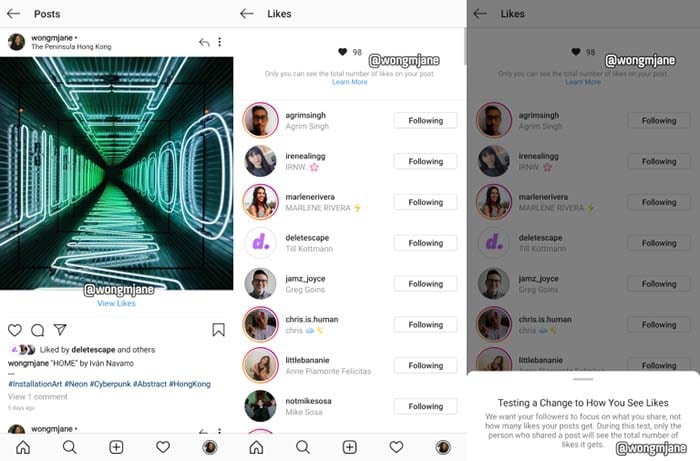
Instagram prototypeIn a leak discovered by reverse engineer Jane Manchun Wong, Instagram might be bidding adieu to the like-counter.


The prototype shows that audience members who view posts won’t be able to see how many likes a post gained.

“We want your followers to focus on what you share, not how many likes your posts get,” Instagram writes in an in-app message. “During this test, only the person who shares a post will see the total number of likes it gets.

Instagram Download Now ►
7

In an interview with Techcrunch, an Instagram spokesperson confirmed that the leak is a prototype from Instagram

“We’re not testing this at the moment, but exploring ways to reduce pressure on Instagram is something we’re always thinking about,” the spokesperson said.

Whether removing the like count from audiences’ eyes will “reduce pressure” remains to be seen. Not having to worry about your post being judged by its amount of likes, but for its content sounds good in theory. We’re up for anything that helps our mental health. If Instagram can prove that hiding like totals helps us feel better, we can only hope that Facebook and Twitter follow suit. 

How do I break my social media addiction?

Do you find yourself reaching for your phone to check apps like Facebook? We can help break your addiction.

Smartphone addict

Social media connects us to new people and ideas — for better or worse. It’s also a massive time suck that can wipe out a whole day and get in the way of accomplishing goals.

The word “addiction” brings to mind drugs and alcohol. It might seem too strong a word to apply to something like social media, right?

Well, not exactly. Though social media addiction has yet to secure an official spot in the DSM, it’s already become quite prevalent in the U.S. and Europe. It is affecting up to 8.2% of the general population.

How often are you on track, knocking tasks off your to-do list when a friend request or Instagram comment derails your progress? One second you’re typing up an email, and the next, you’re deep into some acquaintance’s 2016 vacation pics.

All of us are susceptible to succumbing to these distractions, but there are some things you can do to fight full-blown social media addiction.

Here are some tips you can use to regain control:

Learn why you’re addicted to social media

Facebook addict

What is it you hope to gain from opening social media? Uncovering the “why” behind your bad habit does require some introspection.

You might not have a good reason for your endless scrolling. If that’s the case, take a closer look at your motive. Do you hit the ‘gram when you’re stressed or overwhelmed? Or, is it when you’re trying to put off a project you don’t want to start?

Perhaps, you’re seeking connections with the outside world or accessing new information.

In any case, we tend to lean on social media to fill a void. Psychology Today describes this endless scroll as this “wanting activity.” Meaning, we tend to keep looking at our feeds because we’re anticipating some reward.

It’s also a lot easier to veg out in front of your feed than picking up a book or phoning a friend. This just adds to the temptation.

Reset

Going on a hike

One way to fight social media addiction is by taking a day off. Consider taking a day each week where you avoid using the phone or your computer.

This gives you some space to schedule some in-person social time. Do some analog reading, or you know, go outside.

That said, a full day of no socializing might add to your anxiety for a lot of people. If that’s you, aim for a couple of hours at a time.

Set ‘micro-boundaries’

Micro-boundaries is a concept developed by University College London researchers. It refers to a handful of ways to set distance between you and your bad social media habits.

The researchers say there are four types of micro-boundaries.

  • Digital: Separating accounts or using apps that block out certain websites
  • Physical: Choosing to leave a device at home or keeping it in a drawer at work
  • Social: Turning your phone on airplane mode or do-not-disturb during social situations
  • Temporal: Turning alerts off or setting the phone to do-not-disturb for specific hours

The UCL paper does acknowledge that you may need to let others know about these digital boundaries. If you’re a quick responder, then you might need to give people a heads-up.

Focus on what you can add to your life

Woman meditatingLike going on a diet, prohibiting the use of social media isn’t sustainable for the long-term. Instead, you should try setting achievable goals. Habit formation depends on training the brain to get that reward satisfaction from a healthier source.



Plan a cell phone-free dinner once a week, get into hiking, biking, or exploring your neighborhood.

Disable your alerts

Alerts play into our brain’s reward center, providing a rush of dopamine when we hear those familiar sounds.

According to Harvard researchers, Instagram likes, and text messages activate the same release of dopamine you’d receive from completing a “successful social interaction.” The article also notes that dopamine paths are often dysfunctional in people will any type of addiction, be it substance abuse, gambling, or Facebook.

The thing about disabling notifications is, you still have access to everything you want from your phone/computer. However, it provides a level of separation between you and your apps.

Wrapping up

Women socializing

Most of the notifications you receive don’t contain critical time-sensitive information. But for a lot of people, opting out of push notifications can present interpersonal challenges. Your mom or your partner might get annoyed when you don’t respond ASAP.

This study, aptly named The Do Not Disturb Challenge had interesting results. They found that while participants felt more productive after turning off their notifications, they also felt anxious about not being as responsive as expected.

So, again, success may depend on convincing your colleagues and text-happy friends to take a more moderate approach to social media.

How to activate Messenger dark mode

How to activate Dark Mode in Facebook Messenger.

New Facebook Messenger Dark Mode
Image via: Facebook

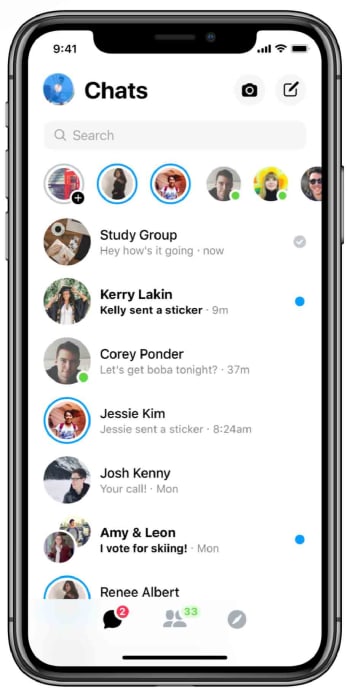
Last month, we first told you about Facebook Messenger’s new Dark Mode. Facebook did make the feature available to all users but hid it behind a kind of secret code. To unlock it, you had to send a crescent moon emoji to one of your friends. Now though, Facebook has finally announced that the new feature is now built-in to the settings menu for all Messenger users.

How to activate Dark Mode in Facebook Messenger

To activate Dark Mode in Facebook Messenger all you need to do is:

Step 1

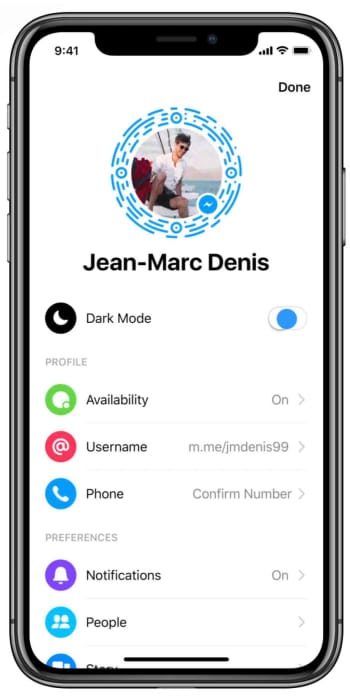
Open Facebook Messenger on your phone and tap your profile photo to access the Settings menu.

How to enable dark mode in Messenger

Step 2

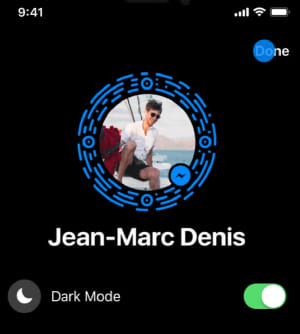
Tap the Dark Mode toggle button to switch it to the on position.

How to enable dark mode in facebook messenger

Step 3

Hit Done in the top-right of the screen and get on with whatever you were doing in Messenger.

How to enable dark mode in Messenger

Now that there is no secret Easter Egg activation to go through, activating Messenger’s dark mode couldn’t be simpler. The dark mode will be easier on your eyes, won’t glare so much when used at night, and according to research by Google, will save your phone’s battery if you have a device with an OLED screen.

Facebook Messenger might be coming home to the main app

A limited messaging facility has been spotted in some advance code of a Facebook app update.

Back in 2011, Facebook made waves by forcing everybody who wanted to message their Facebook friends to download a standalone app. In a heartbeat, Messenger was created and it has since gone on to have over 1.3 billion active monthly users. Now, almost eight years later, it looks like there is a new strategy at Facebook HQ and that it could include users once again being able to send messages to their Facebook friends via the main app.

A limited messaging facility has been spotted in some advance code of a Facebook app update

Facebook messaging is coming back to the main app
You might soon be able to message your Facebook friends from within the main app

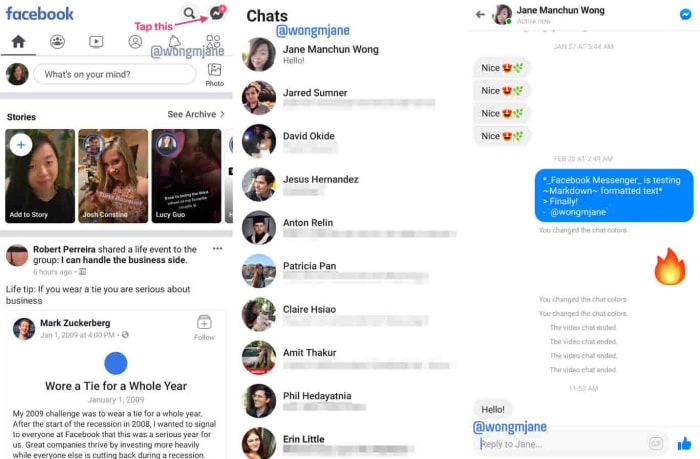
The code has been spotted in a special version of Facebook, which the social giant uses to test new features. According to tech tipster Jane Manchun Wong, the test app includes something all Facebook users will be familiar with but that causes a very different outcome. This is the Messenger chat bubble.

If you open the Facebook app you have on your phone right now and then click the Messenger bubble, your phone will open the separate Messenger app. In the advanced test version of Facebook, this bubble opens up a messaging service right there in the Facebook app.

Chat with friends in the Facebook app
Image via: Twitter

It isn’t quite time to get too excited just yet, as it also appears that Facebook is limiting the functionality of the new in-app messaging to the basics. You can type out messages to your friends but anything more than that and you’ll have to switch over to Messenger. If you’re the type of person who likes to communicate using emojis or GIFs, or if you want to make a call or send photos, you won’t be impressed by the new features.

This all fits with the new “Merger” strategy that Facebook is working toward as it plans to integrate Facebook, Instagram, and WhatsApp. The apps will retain their individual functions, but the plan is to make it easier for users to communicate with each other across the three apps. This latest move to bring messaging back to the Facebook app isn’t supposed to replace Messenger, it is just supposed to bring the Facebook app into the inter-operability that the merger is hoping to achieve.

8

This has all been confirmed by Facebook, which told The Verge, “We are testing ways to improve the messaging experience for people within the Facebook app… Messenger remains a feature-rich, stand-alone messaging app with over a billion people using it monthly to connect with the people and businesses they care about most.” It is understood that if a user tries to do something with the new Facebook Chats feature that it can’t do, they’ll then be prompted to open Messenger.

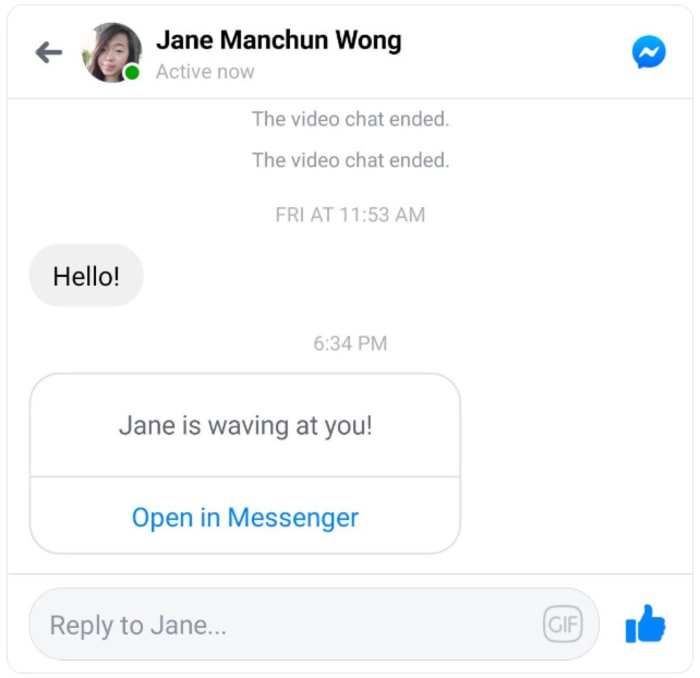
Facebook Chats invite to Messenger
Image via: Twitter

There is no word yet about when the new Facebook Chats feature will roll-out to all Facebook users. When we know more, we’ll let you know.

Twitter dark modes get even darker

Twitter rolls out new even-darker mode features and themes on iOS.

These are dark times indeed. There is a lot going on in the world to warrant such an ominous moniker, but we’re not going to get into them now. These are dark times because dark modes are on the march and it looks like no app is safe from their dark touch. We’ve seen dark modes arrive on Facebook Messenger, and we know that one is coming to WhatsApp. They’re everywhere, and the world is a little darker place for it.

Twitter has a new black dark mode

Things aren’t dark enough for Twitter users, though. Again, we’re not talking about the type of darkness you need to download a web extension to block out, but almost. In response to popular demand, and maybe to get one over on all the other apps that have been adding dark modes lately, Twitter is rolling out an even darker mode.

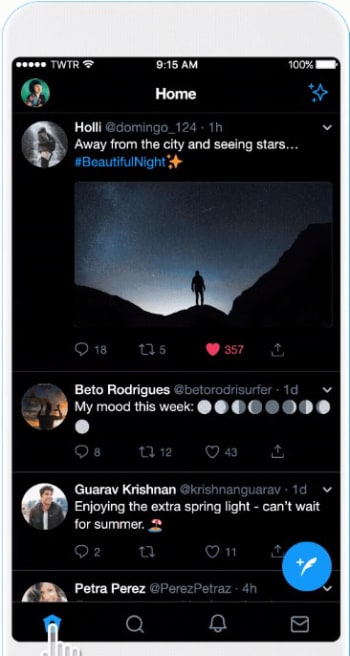
Twitter rolls out new dark mode features and themes on iOS

According to Twitter, iOS users now have access to a “Dim” dark mode and a “Lights Out” theme. The Dim dark mode uses the dark blue and grey color scale that anybody who has ever used Twitter’s dark mode will already know. The new Lights Out dark mode makes everything jet black. Funnily enough, until now Twitter had always referred to its dark mode as “Night mode” but this has now officially changed, for iPhone users at least.

How to activate Twitter’s new dark modes on iOS

If you’re an iPhone user and you want to activate the new dark modes, all you need to do is follow these simple instructions. To activate dark mode on Twitter for iOS you need to:

  1. Open the sidebar menu and tap Settings and privacy.
  2. Then hit Display and Sound at the top of the General Settings menu.
  3. Switch on Dark mode by hitting the toggle button found beneath Media previews.
  4. Once you hit the toggle button the two new options will open beneath it. Select Dim if you want Twitter’s traditional dark blue dark mode or Lights out if you want the new jet-black dark mode.
Twitter's new black dark mode
Twitter’s new black dark mode.

Another cool new feature, which Twitter has added is the automatic dark mode. If you activate this feature, Twitter will automatically switch to dark mode at certain hours, like when you’re in bed.

This feature should now be live to all Twitter users who have the app on their iPhone. If you can’t see it on your version of the app you should try closing Twitter completely and then reopening it, as that has worked for a number of users according to a report by 9to5Mac.

Unfortunately, there is still no word about when this feature might land on Twitter for Android. As soon as we hear more on this, we’ll let you know.

How to add a contact to WhatsApp

This is how to add new contacts to WhatsApp on Android and iPhone.

WhatsApp is one of the most popular messaging apps on the planet with over 1.5 billion users. This makes it one of the world’s leading forms of communication. WhatsApp works very much like SMS messaging does. It isn’t like Facebook Messenger that allows you to search for other users so that you can communicate with them. Instead, you have to know the mobile number of the person you want to speak to and add them to your contact list.

There are two slightly different ways of how to add someone on WhatsApp, depending on whether you use the app on an iPhone or on Android. Let’s have a look at both methods now.

How to add a contact on WhatsApp

How to add a contact to WhatsApp on Android

Step 1

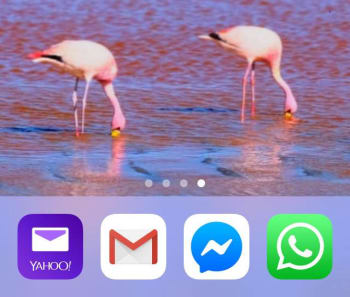
Unlock your Android phone and open WhatsApp.

WhatsApp icon on Android

Step 2

Hit the Chat bubble icon, found in the bottom right of the screen.

WhatsApp Android new chat button

Step 3

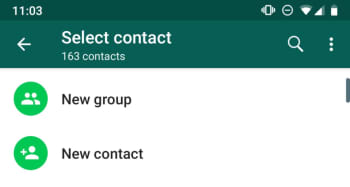
Hit the New contact button at the top of the list, just below the New Group button.

New Contact button, WhatsApp Android

Step 4

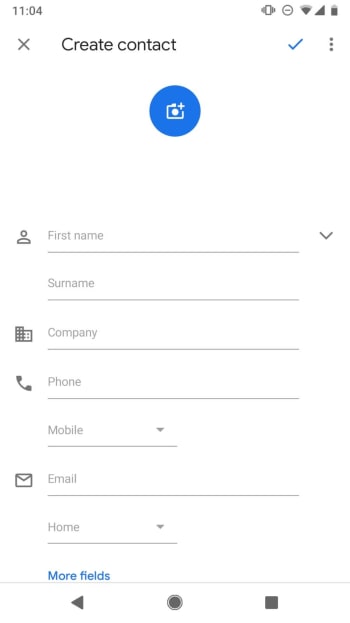
This will take you to the Create Contact page of your Android Phone app. Fill out the contact details as you would normally fill out any other new contact. It is important to save the number including the full international dialing code, if it is a foreign number.

New Contact on Android

Step 5

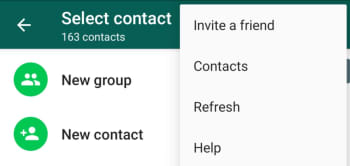
Hit Save. You can then wait for WhatsApp to recognize the new contact and add it to your WhatsApp contact list, or you can tap the New chat icon and then open the three-dot “…” More Options menu in the top right of the screen and hit Refresh.

Refresh contact list WhatsApp on Android

WhatsApp Messenger Download WhatsApp ►
8

How to add a new contact to WhatsApp on iPhone

Step 1

Unlock your iPhone and open WhatsApp.

WhatsApp on iPhone

Step 2

Hit the New Chat icon, found in the top right of the screen.

New Chat on WhatsApp for iPhone

Step 3

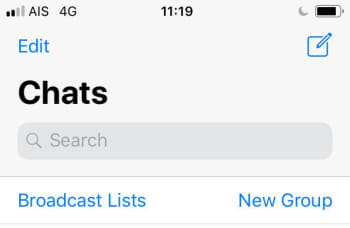
Hit the New Contact button at the top of the page, found below the Search box and the New Group button.

New Contact and New Group on WhatsApp iOS

Step 4

Fill in the details of the new contact including, name, country, and number. If you wish, you can also hit the more fields button to add information like Company, Email, and Address to the contact.

New Contact WhatsApp iOS

Step 5

Hit Save. This will take you the new Contact details page. If the new contact is on WhatsApp, you’ll be able to open a chat with them from this page. If not, you’ll see the Invite to WhatsApp button instead.

WhatsApp Contact Details iOS

The interesting thing to note about adding contacts to WhatsApp on iOS is that it also adds the contact to your normal phone book.

Both methods described above tell you how to add contacts from within WhatsApp. The messaging app also automatically recognizes contacts from your phone’s regular list of contacts, if you’ve given it permission to access them. This means if you add a contact to your phone book the same you always do, WhatsApp should find it and automatically add it to your WhatsApp contact list.

Take an early look at WhatsApp’s brand-new dark mode

Check out these screenshots from the beta version of WhatsApp’s dark mode.

It just seems like every app and program needs a dark mode these days. Recently, Facebook Messenger became the latest app to jump on the bandwagon, even if its new dark mode is still hiding behind an emoji. Now though, it is Messenger’s sister app WhatsApp that seems in line for the app world’s hottest new feature.

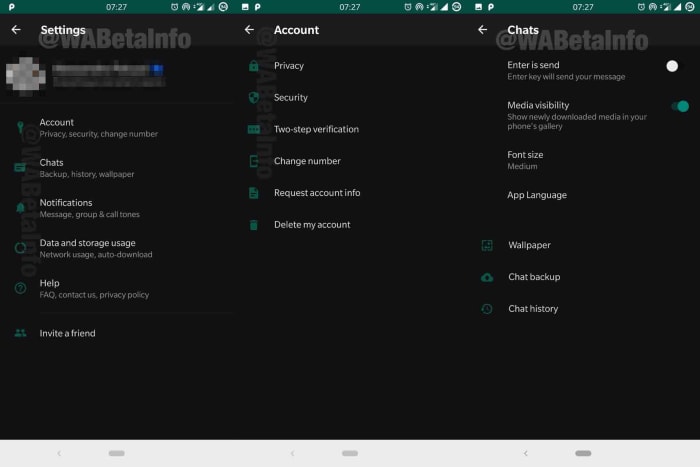
Check out these screenshots from the beta version of WhatsApp’s dark mode

A WhatsApp screenshot and the logo

Once again, we need to thank the guys at WABetaInfo for bringing these advanced screenshots to the public. WhatsApp  recently released an update to the Google Play Beta Program. Beta version 2.19.85 brings the new dark mode although, as yet, it still unavailable, even to members of the WhatsApp beta program. Fortunately, however, a few screenshots have still made their way through.

Screenshots of the new WhatsApp dark mode
Images via: WABetaInfo

WhatsApp is still working on a number of improvements to the feature before it rolls it out. This means, unfortunately, there is no news about when it’ll be available on the beta program, never mind for all WhatsApp users.

Another new innovation to come with the latest beta version of WhatsApp is a cool little feature that will display the file names of all audio clips. Whenever an audio clip is shared in a conversation or group chat, the file name will appear below the play button and progress bar.

WhatsApp audio file name
Image via: WABetaInfo

As well as the dark mode and the audio filename display features, the upcoming authentication feature has also been spotted in a more advanced form in WhatsApp’s latest beta. It was in January when we first brought you news that WhatsApp is planning on introducing fingerprint ID to its security protocols. Since then, news has been thin, but now it seems that work has been going on in the background. The authentication feature now has a better user interface and added features. It still isn’t available, but it is heartening to see that progress has been made.

WhatsApp Messenger Download WhatsApp ►
8

All in all these, three features will add useful and important capabilities to the popular messaging app. With dark modes being proven to save battery on devices with OLED screens, it should prove a very popular addition among WhatsApp users. Security conscious users will also be happy to see and added level of security placed on top of their private WhatsApp messages and communications.

The audio file name display feature isn’t as earth-shattering as the two features we’ve already mentioned. If, however, it ties in with the improvements to WhatsApp voice notes that we’ve reported on in the past, it could see WhatsApp moving towards becoming an impressive audio recording and playback app in its own right.

This Chrome extension wants to help you trust the news again

Nobias will help you determine if a news story is trustworthy and whether it has a political leaning.

We’re living in an age when it is harder than ever to know whether you can believe the news story you’re reading. This is about so much more than the “Fake News” the president talks of any time a critical story comes out about him or members of his administration. This is about stories that come to us via social media and other communication platforms like WhatsApp. There are now thousands of stories being shared on a daily basis that present false facts or some sort of political agenda.

Fake news on your laptop

With political chaos spreading around the world, it is clear that these polarizing fake news stories and one-sided opinion pieces are causing real problems. It is now more important than ever to know that the news you’re basing your opinions on is objective fact rather than subjective opinion.

Nobias will help you determine if a news story is trustworthy and whether it has a political leaning

It wasn’t too long ago when Microsoft introduced NewsGuard technology into the Microsoft Edge browser for mobile. NewsGuard automatically flags fake and untrustworthy sites so that you know the story you’re reading shouldn’t be trusted. Now, thanks to Nobias, Google Chrome users will have something similar.

Nobias is a free extension for Google Chrome. According to the Nobias homepage, the extension fits perfectly with the company’s mission of, “promoting responsible/inclusive technology to protect consumers from deceptive or misleading content on the internet.”

There is also an education element.  The Nobias site says, “We hope to help people understand the landscape of media bias and to give them the power over the algorithms that shape what they read and see online.” The extension then aims to show users a clear message about the story they’re currently reading while also showing how current technology is influencing the news stories they’re seeing more often.

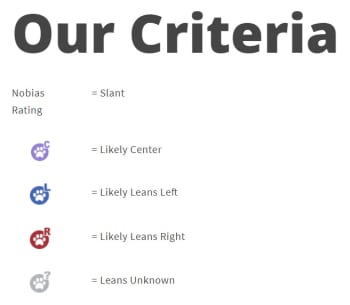
The Nobias extension uses a machine learning algorithm to look out for certain keywords and phrases. It is then able to show whether there has been a political slant to the left or right written into the story. As well as this, the extension also gives each publisher and author a credibility rating so that readers know whether they can be trusted or not. Publications get a score from one to five, with one being the highest and writers are ranked on the credibility of their employer as well as whether they’ve won any prestigious journalism awards. For more information on how Nobias determines political bias, click here.

The nobias extension fights fake news

Nobias is currently available for all Chrome users. It can be added for free here. The team behind it is currently working on bringing extensions to other browsers too including Safari, Firefox, and Opera. With the Democratic primary already hotting up and Trump up for re-election next year, it could be a good time to start protecting yourself against the dangers of fake news.

WhatsApp update: More details on how WhatsApp will fight the spread of fake news

WhatsApp update includes message Forwarding Info and Frequently Forwarded tags.

The latest WhatsApp beta update submitted to the Google Pay Beta Program includes insight into a couple of interesting new features that should help slow the spread of fake news. The WhatsApp fake news scandal has gripped the messaging app all over the world, as it has helped put a far-right politician into the president’s office in Brazil and seen gangs lynching innocent victims in India off the back of fake stories spread across the app.

WhatsApp fake news

With pressure increasing on the Facebook-owned app all the time due to these horrible events, it is good to see changes on the horizon.

WhatsApp update includes message Forwarding Info and Frequently Forwarded tags

Forwarded messages on WhatsApp have been tagged for quite some time now. Whenever you forward a message you’ve received to somebody else, it shows with a small Forwarded tag above the message text. The same goes for any time you receive a message from somebody who wasn’t the original sender. This allows users to know if the messages they’re receiving are original or not or if they’re being multiplied across the WhatsApp network from user to user. Alone, however, this feature is very limited as it doesn’t show much information at all.

WhatsApp Messenger Download WhatsApp ►
8

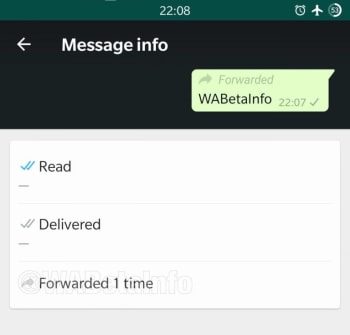
The latest WhatsApp beta update aims to flesh this feature out a little more with two new innovations. The first is Forwarding Info, which can be found in the Message info section of the app. By clicking on Forwarding Info, a user will be able to see how many times a message has been forwarded.

Strangely enough, according to the report on the new feature, you’ll only have access to the Forwarding Info tab once you’ve forwarded the message yourself. If you don’t want to add to the chain and pass the message forward yourself, just to learn how many times that it has already been forwarded, you could do so by forwarding it to a  group you’re the only member of.

New message forwarding info coming to WhatsApp
Image via: WABetaInfo

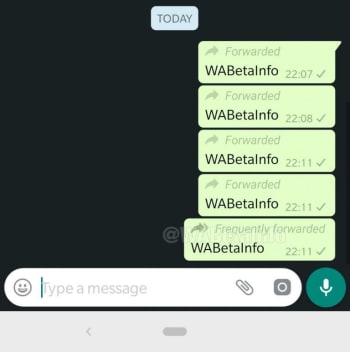
The other new feature is the Frequently forwarded tag. This new tab marks an update on the classic Forwarded tab as it illustrates the difference between a message that has simply been forwarded from a friend or family member and a message that has been shared more than four times. Any time a message has been shared more than four times, the Forwarded tag will be updated to a Frequently forwarded tab. This will show that the message has likely come from beyond your immediate network and so shouldn’t be trusted in the same way you trust messages you get from your contacts.

New frequently forwarded update for whatsapp
Image via: WABetaInfo

These two features offer some hope for the future, but still give WhatsApp more work to do in the fight against misinformation and fake news. Unfortunately, however, there is still no official word on when these two fake news fighting features will receive a general roll-out. Stick with us and we’ll let you know as soon as the news breaks.