
How to recover deleted WhatsApp conversations

Whether or not you meant to delete them, we can help you bring back WhatsApp conversations.

WhatsApp

In most cases, if you deleted a conversation on WhatsApp it wasn’t by accident.

Maybe your friend sent you a bunch of spoilers for the next big Marvel movie, and you want to avoid those at all cost. Perhaps that guy you met on Tinder is now annoying you. After deleting those conversations, you might regret it after realizing all of the messages now lost to the ethers of WhatsApp.

Regardless of your reasoning, if you need to recover those conversations, we can help you. 

WhatsApp Messenger Download Now ►
8

There are several methods with which you can recover WhatsApp conversations, so breathe easy. You can read those messages that you thought were lost forever.

How to recover WhatsApp conversations on Android
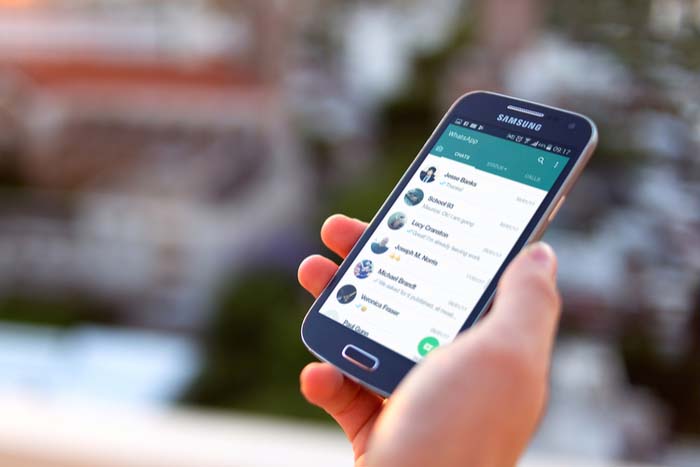
WhatsApp Android

Step 1: Make sure you have the backup function activated

WhatsApp for Android has a backup function that saves all your conversations on the app and keeps them even if you erase them for a week. If you erase something and regret it, you will be able to recover it easily.

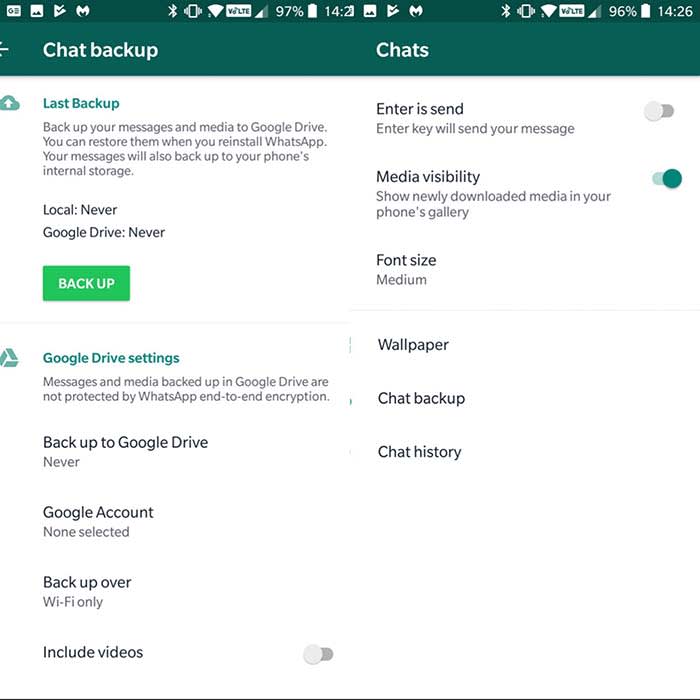
First, make sure you have the backup function enabled. To do this open WhatsApp on your phone, click on the three dots in the upper right corner, and then click “Settings.”

Once inside the Settings menu, click on “Chats” and then on “Backup.” Click on “Save” to make a backup. You will also have the option of selecting the frequency with which you want this backup to be made. Options include: never, only when I hit”save,” daily, weekly, and monthly.

For more security, you can link your WhatsApp account with Google Drive by clicking on “Google Drive Settings.” This way, your messages do not take up space and these are automatically saved in the Google cloud.

Step 2: Recover your deleted messages
WhatsApp Android

Now that we know that WhatsApp will keep a backup copy of our messages, here’s how you will be able to recover them. Remember that these copies exist for just seven days, so you will not be able to recover them without altering the files on your phone after that window.

To recover your messages, you will have to delete the app from your phone. We’re not joking. Erase the application in its entirety and download it again.

Once reinstalled, click on the “Restore” option to recover all the history of messages that you had saved in your backup. Voilà! Your messages will reappear by magic.

How to recover WhatsApp conversations on iPhone
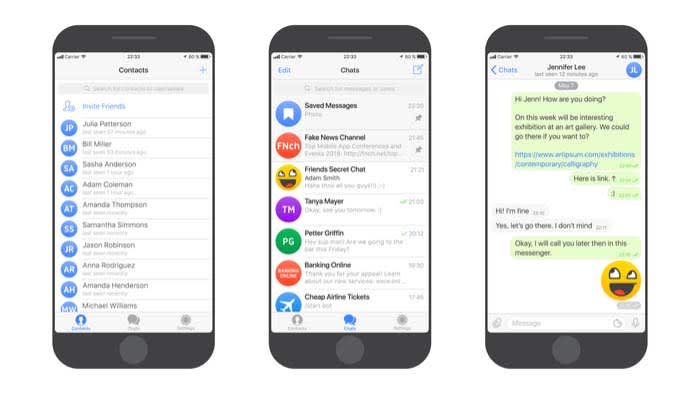
WhatsApp on iPhone

Step 1: Make sure you have activated iCloud

Unlike the Android version, where messages are stored on your phone, if you are an iPhone user, your conversations will be stored in iCloud. To recover them, you must have this option activated.

Activating iCloud is very simple. Access iCloud in your settings. Follow the prompts and your info should synchronize automatically.

You can always just ask Siri to help you out as well. 

Step 2: Configure WhatsApp to create backup copies

Once we have activated and configured the iCloud, it’s time to configure the backup system of WhatsApp.

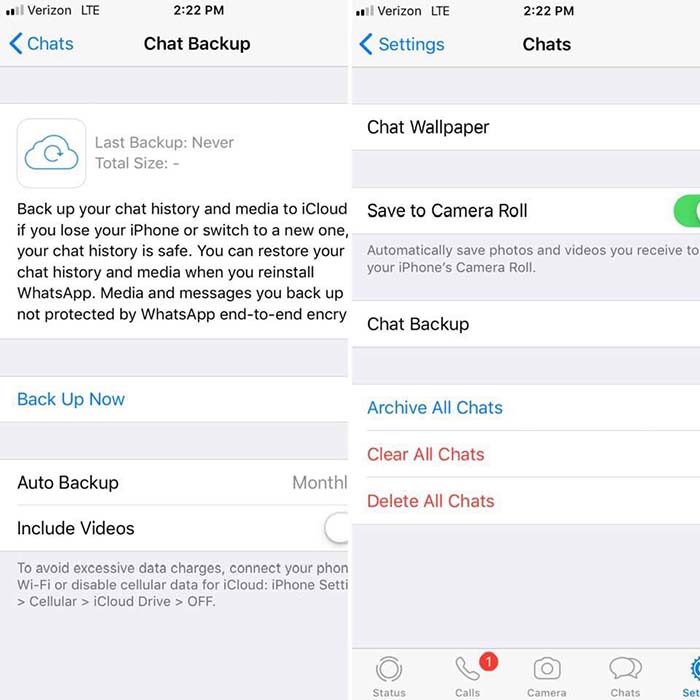
To activate it first open the WhatsApp application, click on “Settings,” followed by “Chats.” Finally, click on “Backup.” From here, click on “Auto Backup” to choose how often your conversations will be saved in iCloud.
WhatsApp iPhoneStep 3: Recover your conversations from the iCloud

Finally, to recover the messages deleted by mistake, you must first delete WhatsApp from your iPhone and then reinstall it. Once the phone is verified, select the “Restore backup” option and your messages will appear on your iPhone again.


WhatsApp: How to talk to someone who has blocked you

Save a friendship before its too late; message someone who blocked you on Whatsapp.

WhatsApp block a call

Maybe it was something you said. Maybe it was a misunderstanding. Or, maybe the friendship just ran its course. Regardless, when someone blocks you on WhatsApp, it can hurt.

WhatsApp Messenger Download Now ►
8

There is no specific or magical way with which we can make your contact unblock you on WhatsApp. However, there are a few simple steps with which you will be able to communicate with the person and, if all goes well, get back in touch with them.

How to talk to someone who blocked you on WhatsApp

Step 1: Are you sure your contact has blocked you?

Before starting, it is a good idea to spend a few minutes and think whether that person really blocked you. Sometimes people are busy or just do not look at their phone as often as before. Just because someone does not answer your messages in a few seconds does not mean you are blocked.

If someone blocked you, it might be in your best interest to wait before reaching out to them again. Sometimes the friendship needs time to heal before you can work on rebuilding.
Step 2: Talk to this person in a group

Group Chat

Group messages can be fun, but they can also be annoying when you get a new message every two seconds. If you are a member of a group with the person who blocked you, you’re in luck! You will be able to get in touch with them.

Although WhatsApp has created a function to block direct messages to a user, it has not yet done so in group conversations. So, if you do not mind that the other members of the group become part of your particular soap opera, you can always send a message and wait for your friend to respond.

Keep in mind that if the person who has blocked you leaves the group, this will not work.

Step 3: Ask the administrator of a group to add the person who has blocked you.

WhatsApp does not allow us to add people who have us blocked to a group, but you can ask the administrator to do it for you. Talk to them and explain the situation.  If you have a just reason as to why you need to contact them, the administrator should help you out. 

Step 4: Try to recover the lost friendship

Friends having a conversation

Once that person who has blocked you is in the group, be calm, patient and sincere. Ask them why they blocked you. Above all, put yourself in their shoes before telling them how you feel. It is likely that something happened or that you damaged that person without realizing it. A simple “I’m sorry” can recover the friendship.

Hopefully, this tutorial has helped you when it comes to making peace with a contact who blocked you. Life is too short to be angry with someone you love; do not let a misunderstanding destroy a beautiful friendship.

Complete Guide to WhatsApp in 2019

See all the great new features WhatsApp offers.

WhatsApp

WhatsApp has already been a news cycle staple in 2019, given Facebook’s recent announcement to merge the app with Messenger and Instagram. There’s also the fake news issue and the recent release of WhatsApp Business for iOS.

WhatsApp Messenger Download WhatsApp ►
8

Oh yeah, and the app just celebrated its 10th birthday in February. So far, this year has brought several new features into the mix, from playful stickers to better security protections.

Here is a look at just a few of the many new WhatsApp features to check out.

WhatsApp upgrades: 2019 Edition

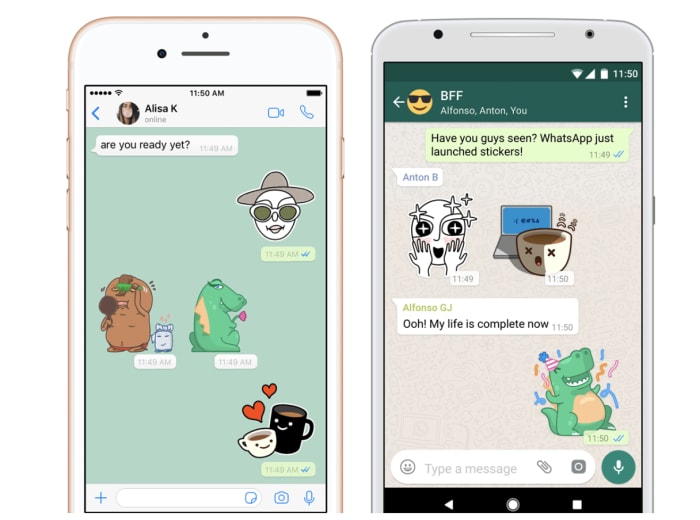
Sticker integration

WhatsApp rang in 2019 by adding stickers to the mix. The app comes equipped with its own set of stickers, but you can also integrate third-party packs into your account for more options.

whatsapp sticker integration

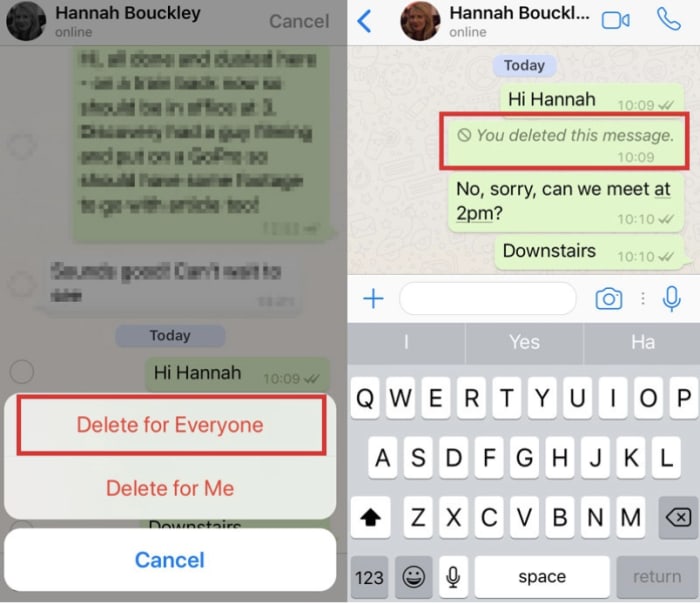
Unsend messages

Like Facebook, WhatsApp recently debuted an unsend feature that allows you to take back that stupid thing you sent. You’ll have an hour to make up your mind and can choose to delete a message for yourself or for everyone. Like Facebook, that doesn’t mean you can prevent someone from reading the initial message, but you can remove it from their feed.

whatsapp message delete

Listen to voice messages without headphones

Okay, fine, WhatsApp has always been able to play voice messages on the loudspeaker. What’s different about this latest feature is, you now have the ability to listen to voice recordings as if it were a phone call.

All you’ll need to do is put it up to your ear and play the message. It will softly whisper the recording so no one else can hear it.

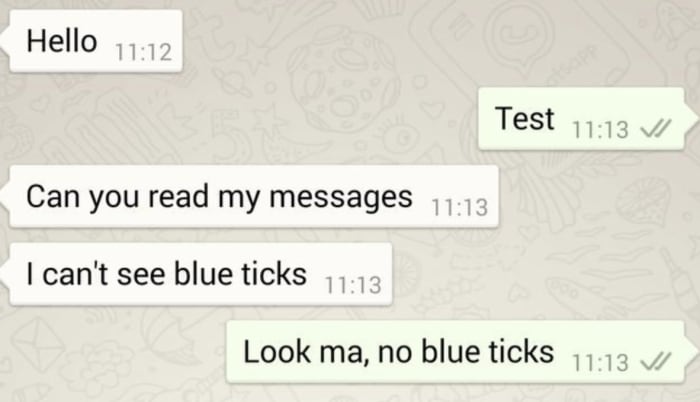
Check messages without going online

People will never know you left them on “read.”

Unlike Facebook Messenger, WhatsApp now lets you view your messages without letting the sender know that you’ve opened the message.

Alternatively, they’ve also made it easier to see who has reviewed the messages you’ve sent to others. This might not be the healthiest way to engage with your messaging system, but WhatsApp’s resolution for 2019 is choices.

whatsapp check messaging no read receipts

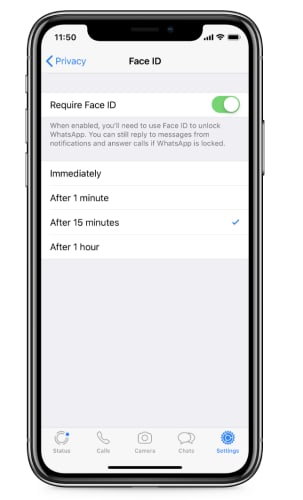
FaceID and TouchID Access

new authentication features for whatsapp

This isn’t the most exciting feature, but it is pretty heavy in demand. WhatsApp just added a new authentication feature to the stack for an extra layer of privacy.

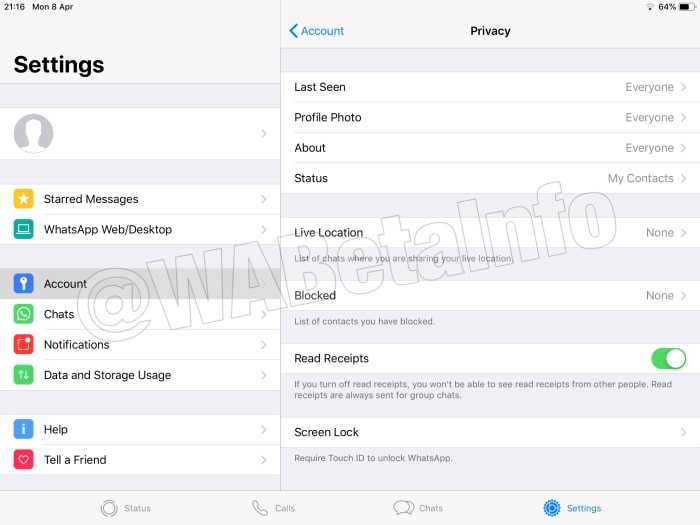
Find it by tapping: WhatsApp Settings > Account > Privacy

It enables users to enable authentication before WhatsApp opens and shows your messages. It’s a lot like banking apps where you need to provide Touch ID or FaceID to access your account. The benefit with the new feature is that if someone gets ahold of your unlocked phone, they can’t access your chats.

How relevant this is to you depends on what you’re hoping to protect yourself from. If it’s a matter of making sure the average stranger, your kids, or a nosy partner don’t open your messages, it’s pretty useful. Although, this is all assuming they don’t know your PIN.

What’s new with WhatsApp’s battle against fake news?

Last year, the app faced some major challenges in India with backlash from citizens over the spread of misinformation. The problem was, WhatsApp’s encrypted messaging limited the company’s ability to track the source of the problem.

This year, WhatsApp said that it had refined its spam detection tool, making it easier to report bad actors. Still, it’s hard to say whether there’s been any impact so far.

If you look on the app’s FAQ page, WhatsApp makes some recommendations for avoiding spam and hoax messages. It states that they have the right to ban users who they believe are in violation of the app’s terms of service.

Finally, the platform rolled out the WhatsApp tip line. It is a reporting tool that allows users to report misinformation. As of now, the feature is only available to users based in India — and it’s unclear when or if this is coming to the rest of the world.

tip line for whatsapp india

Group chats are now more secure

new options for whatsapp group chats

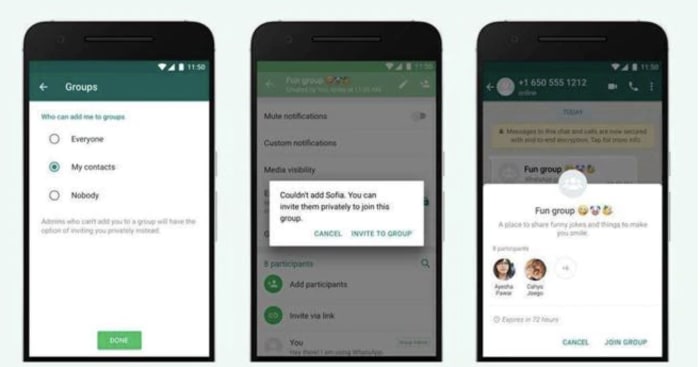
Another brand new feature for the platform is an additional privacy setting for group chats. Group chats now come with the following options:

  • Everyone — This setting means that the user can always be added to group chats.
  • My Contacts — This means that the user can always be added to groups if the admin is listed in their contacts. If the invite comes from someone outside of the contact list, they will receive an invitation to join.
  • Nobody — The user cannot be added to a group chat automatically. If another user wishes to add them to a thread, they will receive an invite and can choose whether to join or decline.

The new security features eliminate the issue of being added to random chats, which has increasingly become a problem for those users who just want to communicate with family and friends.

Wrapping up

We didn’t even cover every feature that WhatsApp has released in 2019. After 10 years, the private texting app has come a long way, offering cute stickers along with extra security protections.

WhatsApp developing a new way to ignore chats you don’t want to see

WhatsApp’s “Vacation mode” could become the “Ignore Archived Chats” feature.

We’ve known that WhatsApp has been working on a “Vacation Mode” since last October. The feature gives users the ability to silence certain chats for a certain amount of time. Not much has been heard of the feature since it was first spotted in the WhatsApp for iOS beta back then but there is finally something new to report on the update.

WhatsApp’s ‘Vacation mode’ could become the ‘Ignore Archived Chats’ feature

WhatsApp world

The way Vacation mode was due to work was by blocking archived chats from becoming unarchived whenever they receive a new message. At the moment, when you receive a message to an archived chat, WhatsApp believes the chat to be active again and unarchives it. This means you get a notification as usual and the message jumps to the top of your inbox.

WhatsApp’s proposed Vacation Mode blocked this process, which meant chats would remain archived, even if they received a new message. The name Vacation Mode was given to the feature as it would give a good way for employees to stop work messages from pinging away in their pockets when they were taking vacation time from work. They’d still receive the messages; they just wouldn’t be bothered every time one came through.

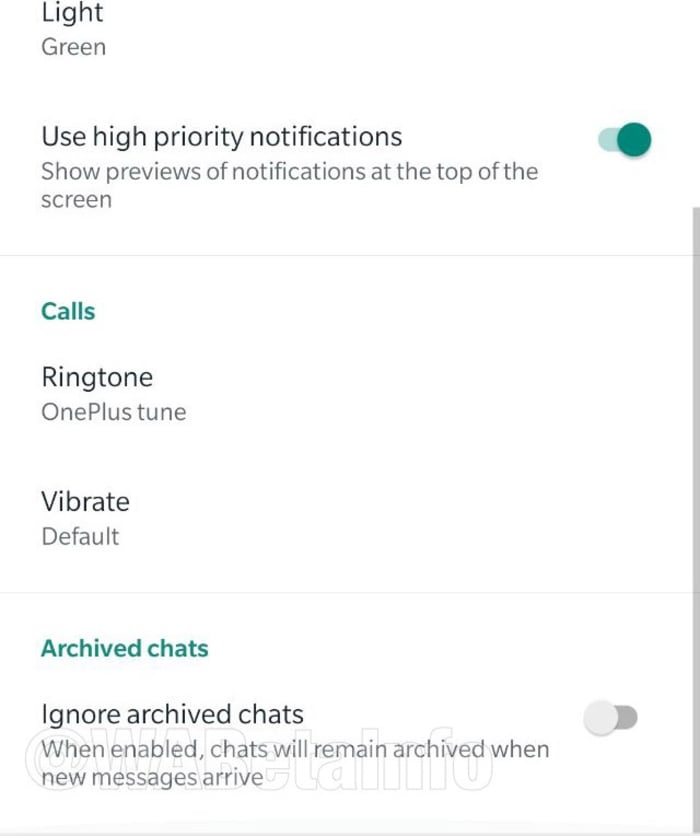
Now in the latest WhatsApp beta, it seems like the feature has been developed further but the name Vacation mode has been dropped. It now looks like the feature is imaginatively being called the “Ignore Archived Chats” feature.

New ignore archived chats feature for WhatsApp
Image via: WABetaInfo

By going to the Notifications tab in the WhatsApp settings menu, members of the WhatsApp beta program can enable the new Ignore Archived Chats feature and stop these chats becoming active again whenever they receive a message.

Apart from the introduction of a new Archived cell to show which chats have been archived in your regular chat inbox, there doesn’t seem to be much difference between the new Ignore Archived Chats feature and the previously talked about Vacation mode.

New WhatsApp Archived message tab
Image via: WABetaInfo

WhatsApp has been busy working on a number of new features recently. We’ve seen quite a few additions to various versions of the WhatsApp beta. We’ve seen improvements to the Forwarded message tabs, greater capabilities for audio file organization and sharing, a new dark mode, and WhatsApp Business has finally been released for iOS devices. On top of all that, WhatsApp is also working on an official app for iPad, which has been a long time coming.

If you’re planning on taking a vacation anytime soon, this new and novel way to take a break is still only in the early stages of development. There is no word yet on when the feature will roll out to all WhatsApp users but as soon as we hear, we’ll let you know.

WhatsApp launches its new app for the iPhone

WhatsApp Business brings a number of commerce-focused features to iPhone.

WhatsApp Business was a long time coming. We got our first glimpse of it back in the summer of 2017 and further images of the new app from WhatsApp leaked onto the internet later that year. The beta version dropped a little later the same year, just before Halloween, and the app finally received a wider roll-out in January last year. At least it did if you use WhatsApp on Android.

For iOS users, WhatsApp Business was nowhere to be seen, and it has remained that way until now. Almost 16 months after it became available on Android, WhatsApp Business is now available for iOS users, too.

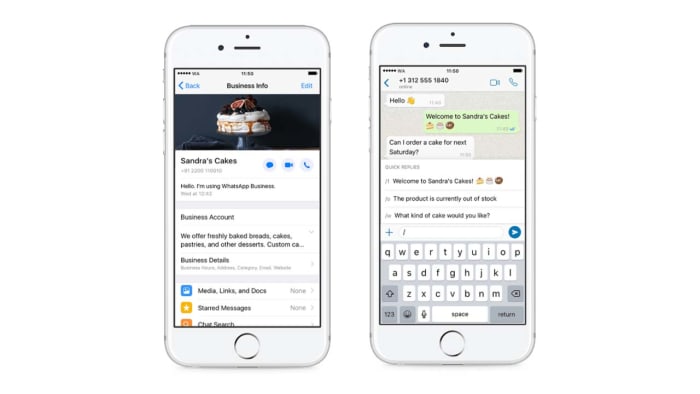
WhatsApp Business brings a number of commerce-focused features to iPhone

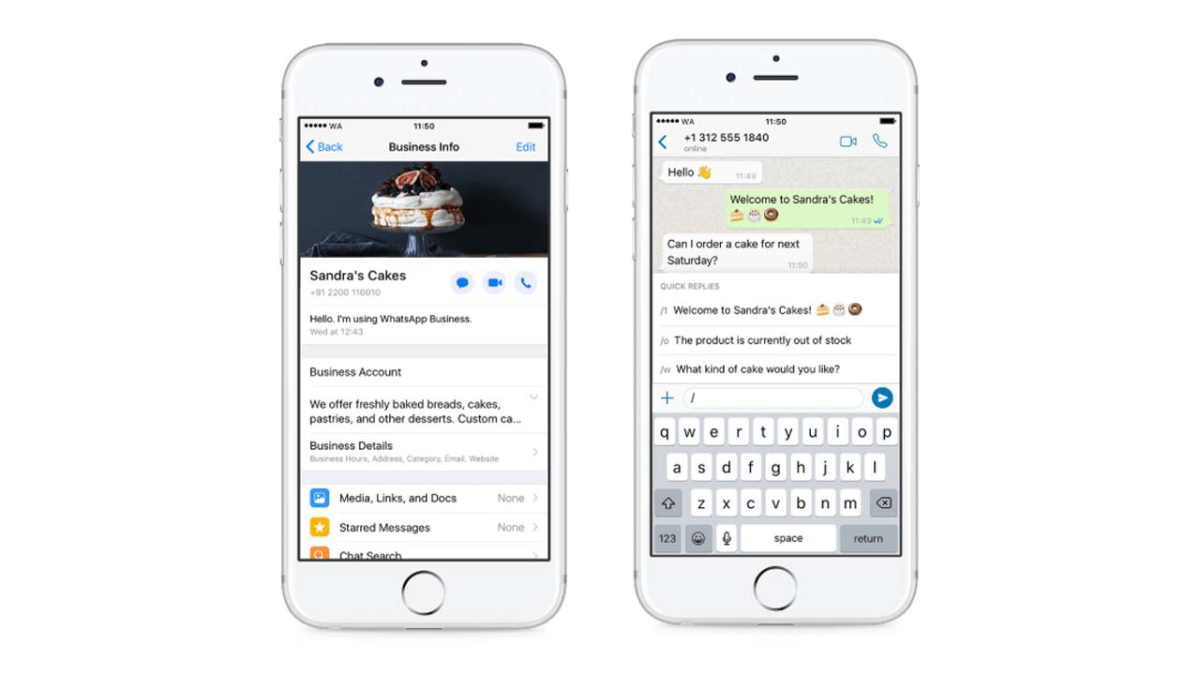
Screenshots of WhatsApp Business on iPhone

According to WhatsApp, millions of businesses have started using WhatsApp Business since it first launched on Android. The WhatsApp blog post announcing the move to bring WhatsApp Business to iPhone users says that the team behind the app has received a lot of requests to give small business owners the chance use the app on their device of choice, rather than being forced to use it on Android. In answer to these requests, WhatsApp Business is now available for free on the Apple App Store.

WhatsApp Business Download Now ►
7

As you may have guessed, WhatsApp Business isn’t aimed at the individual user, but rather business owners. As WhatsApp Business levies a charge for its use, it provides businesses a way to communicate with their customers while also offering WhatsApp a way to monetize its use. WhatsApp has long struggled to make money, and WhatsApp Business is one of the latest ways it is trying to do so.

WhatsApp Business employs a number of enterprise-friendly features, to help businesses stay in touch with their clientele. These include:

  • “Business Profile: Share useful information about your business such as a business description, email or store addresses, and website.
  • Messaging Tools: Respond to customers easily with efficient messaging tools — quick replies to provide fast answers to frequently asked questions, greeting messages to introduce customers to your business and away messages to let them know when to expect a reply.
  • WhatsApp Web: Chat from your desktop to manage conversations and send files to customers.”
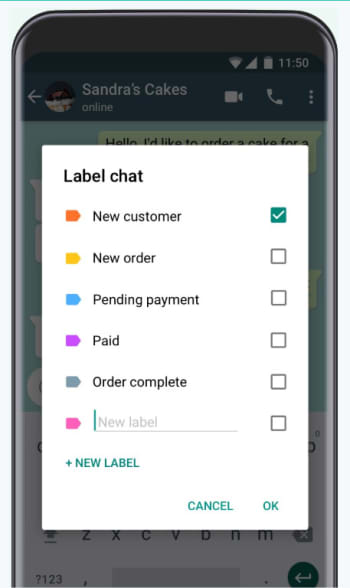
Labels provide a great way for Businesses to organize their chats

If you’re a business user who uses an iPhone, then this will be good news as it offers you a new way to communicate with your users. For now, though, that is only true if you’re in one of the countries where the app is available. WhatsApp Business is now available in Brazil, Germany, Indonesia, India, Mexico, the U.K., and the U.S. but WhatsApp has promised that it will be available all over the world in the coming weeks.

WhatsApp tries to snuff fake news ahead of Indian election

WhatsApp has launched a new fact-checking service for its Indian users.

Facebook and WhatsApp have been slow to react to the fake news crises that have spread across both networks. Recently, however, it has been encouraging to see WhatsApp begin kicking up operations to try and smother fake news. Limiting the amount of people users can forward messages to slows the wholesale spread of untrustworthy articles and labeling messages with the number of times they’ve been forwarded gives users more information about the messages they’re receiving.

A report by Reuters, however, shows that, quite rightly, the WhatsApp team are going even further in a bid to stamp out the spread of dangerous fake news across the network.

WhatsApp has launched a new fact-checking service for its Indian users

WhatsApp looks at fake news
The new WhatsApp helpline will help the company gain a better understanding of the fake news stories being spread via the app.

Reuters reports that WhatsApp has set up a new fact-checking line in India. The news comes at a crucial time as Indians are going into national elections later this month. With a population of well over a billion people, the national elections in India are the biggest democratic exercise on the planet, so it is clear to see why WhatsApp appears to be beefing up its fake news fighting operation in the build-up to such an important event. It is estimated that WhatsApp has well over 200 million users in India.

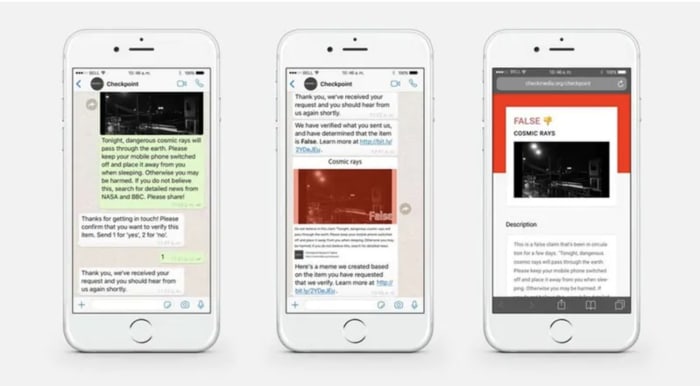
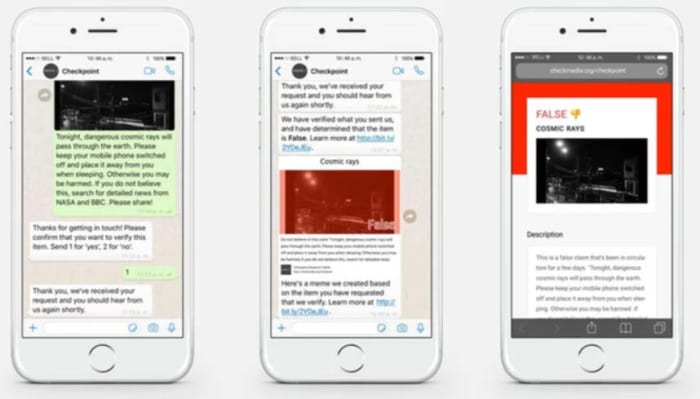
This new move sees WhatsApp teaming up with a local startup called Proto. According to a WhatsApp statement, users will be able to share messages with Proto so that the startup can verify their authenticity. With a user base of 200 million users in the grip of a fake news crisis, this is quite the remit for a local startup. In fact, since the WhatsApp statement announcing the partnership earlier this week, it has since come out that it is indeed too large a task for the Proto team to carry out.

A subsequently released FAQ page on the Proto website explains that not all users will receive a response if they send messages to the startup. The page says, “The Checkpoint tipline is primarily used to gather data for research and is not a helpline that will be able to provide a response to every user. The information provided by users helps us understand potential misinformation in a particular message, and when possible, we will send back a message to users.”

The Proto partnership is more about learning about fake news than preventing its spread in the immediate-to-short term.

Screenshots of the new WhatsApp Checkpoint partnership

The FAQ page goes on to say, “We would like to verify every rumor, but we know that will not be possible given the diversity of information we will receive and the limitations of any verification research.” When both Reuters and Buzzfeed ran tests on the service, they confirmed that not all messages will get a response from the Proto team. The Reuters team had no response after two hours of waiting and the Buzzfeed staff reported no responses to messages even after a 24-hour period.

This new effort from WhatsApp has to be applauded, but again it seems like too little too late. If this method of collecting data proves efficient, the WhatsApp team will be able to learn a lot about the types of fake news stories people are sending via the messaging app. Unfortunately, this project will do little-to-nothing to prevent the spread of fake news during the campaigning season for the Indian national elections. As one TED research fellow who specializes in misinformation told Buzzfeed, “This should have happened years ago.

If you receive a message you believe to be fake, you can send it to the new fake news tipline by clicking here or sending it via WhatsApp to +91- 9643-000-888. You might not receive an answer on your particular message but you will help the long term battle against the dangerous spread of misinformation.
WhatsApp coming to iPad

An official WhatsApp for iPad is currently being developed.

WhatsApp updates are usually about new features or tweaks to old ones. Apart from the recent introduction of WhatsApp Business, it is never about a new app altogether. Well, alongside the addition of WhatsApp Business the Apple App Store, WhatsApp users on iOS will soon have another brand-new app available to them.

An official WhatsApp for iPad is currently being developed

New official WhatsApp for iPad incoming

With each new release of an updated WhatsApp beta version, we learn about future tweaks coming to our favorite messaging app. Version 2.19.40 for iOS, however, has something much bigger. As well as the usual adjustments and bug fixes, 2.19.40 also has information on an official WhatsApp for iPad.

Until now, the only way to use WhatsApp on your iPad has been through using WhatsApp Web via your iPad’s web browser. This has meant that you’ve needed to maintain an active connection to the internet (via your linked mobile phone) to work WhatsApp on your iPad. If your phone has no connection to the internet, even if your iPad does, you can’t use WhatsApp on your iPad. It now looks like this situation is due to change.

The first major thing to note about the official WhatsApp for iPad is that it requires a new registration, including a new mobile phone number. Don’t worry if your iPad doesn’t have a SIM card slot, however, as you can still receive your account confirmation code on another device and then simply input it on your iPad. The only thing you will need is a unique mobile phone number that isn’t already attached to a WhatsApp account.

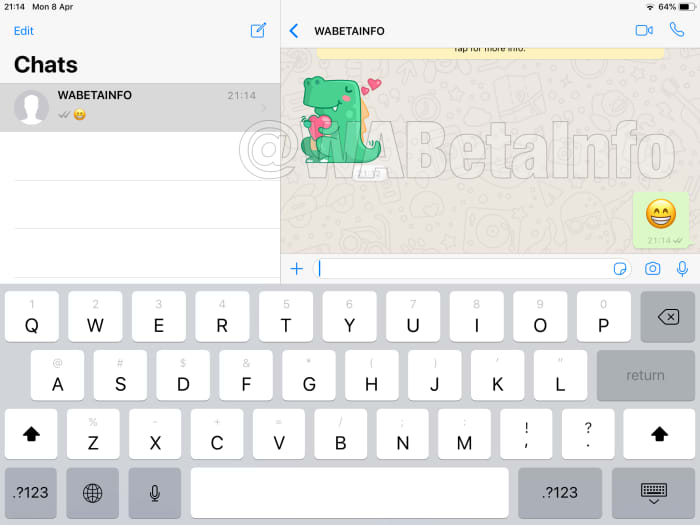
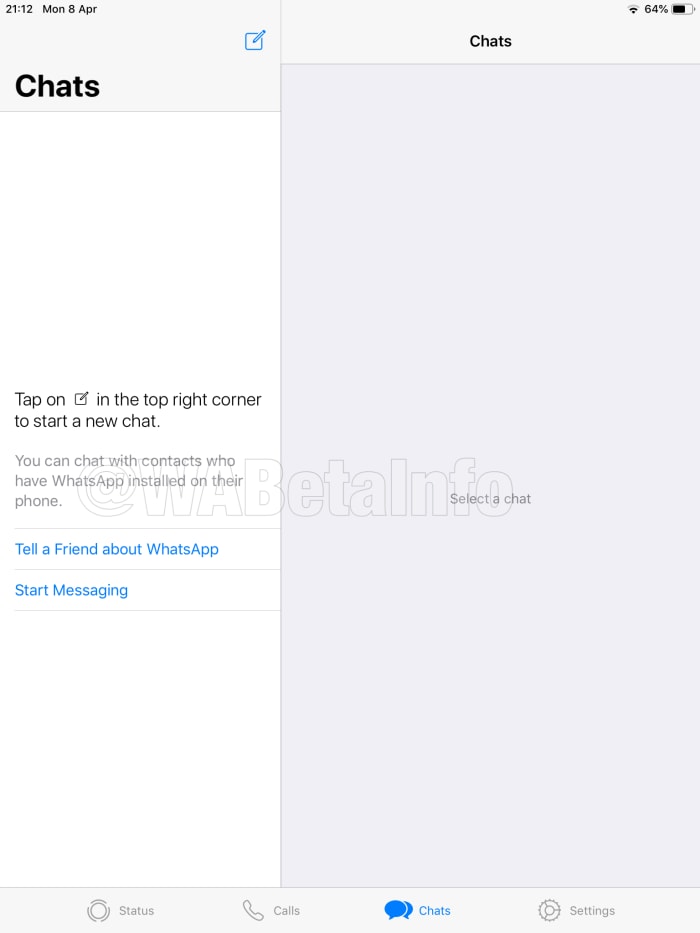
From there, the differences are mostly aesthetic with the iPad WhatsApp taking advantage of the increased screen size found on the iPad. You can see below that you’ll be able to see both the list of all your chats and your current active chat at the same time, both in portrait and landscape mode.

new WhatsApp ipad app
Image via: WABetaInfo
Portrait WhatsApp ipad app
Image via: WABetaInfo

This will make it much easier to chat with multiple friends at once, skipping between different chats without having to change the screen you’re looking at, like on an iPhone. This also gives the upcoming official iPad WhatsApp a bit of a Facebook Messenger feel.

This split screen aesthetic will also carry over to the Calls screen, with a list of all calls showing next to the particular call you’ve selected at the time. The Settings menu too will appear with the split screen presentation, showing the general settings menu on the left of the screen and the options of the currently selected menu on the right.

WhatsApp ipad settings menu
Image via: WABetaInfo

Mostly, the app will be the same as the iPhone app, it’ll just be able to show more on the screen as iPad screens are much bigger. According to WABetaInfo, who discovered the code for the iPad WhatsApp, the only real difference is the lack of a Camera tab in the new app.

The official WhatsApp for iPad still isn’t available, even for WhatsApp beta users. All we know now is that WhatsApp is working on a new app for iPad. When we have more about when we can expect to see it in the Apple App Store, we’ll let you know.

WhatsApp update: More on fake news and better audio file organization

New “Frequently forwarded” message control coming to WhatsApp Groups and a new file system for audio files is on the way, too

As the days roll on, more news comes through about exciting new features that will be coming to WhatsApp. Coming soon, you’ll get a new feature to group chats that could help prevent the spread of fake news and another feature that could see the app become more than just the messaging app we know and love.

New frequently forwarded message control coming WhatsApp Groups; new file system for audio files

We first broke the news of the incoming Frequently forwarded message tabs to WhatsApp. The tabs are an update on the forwarded tabs WhatsApp introduced a while back. Whenever a message has been forwarded from one user to another more than four times it will show “Frequently forwarded” above the message text. The hope here is that this extra information will give people more control over the information they consume via WhatsApp. Yep, it is all about fake news.

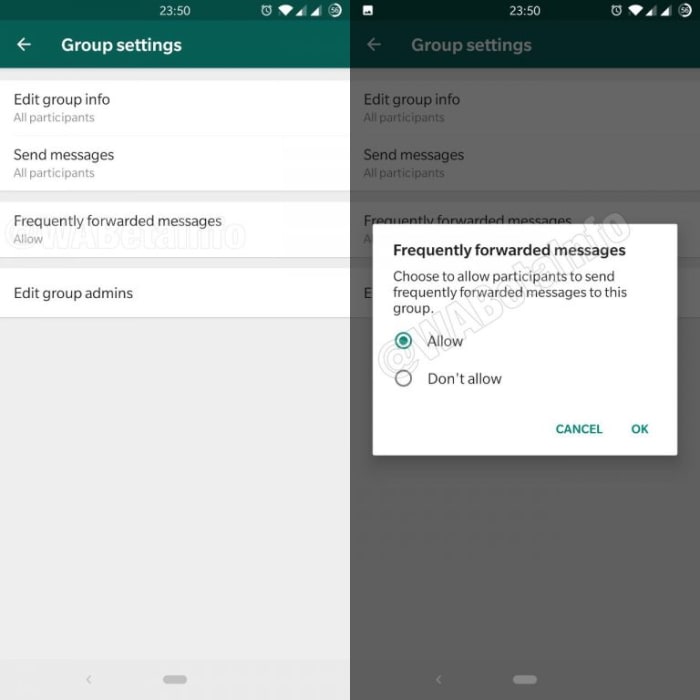
Today, we’re bringing you news of an update the Frequently forwarded message feature. The update will give greater control over who can send Frequently forwarded messages in groups. The feature has been spotted in the latest beta version of WhatsApp for Android, although it still isn’t available for use by beta testers. Basically, the feature will allow Group admins to block Frequently forwarded messages from being sent in their groups.

New Fake news block controls for WhatsApp groups
Image via: WABetaInfo

This is a good feature for WhatsApp to introduce, but if you look at how fake news was spread via WhatsApp during the recent national elections in Brazil, you’ll see that it still isn’t a perfect solution. In Brazil, huge WhatsApp groups were set up and run by supporters of the far-right politician, and now President of Brazil, Jair Bolsonaro, and then used to disseminate fake news. This feature will do nothing to stop such actions in the future.

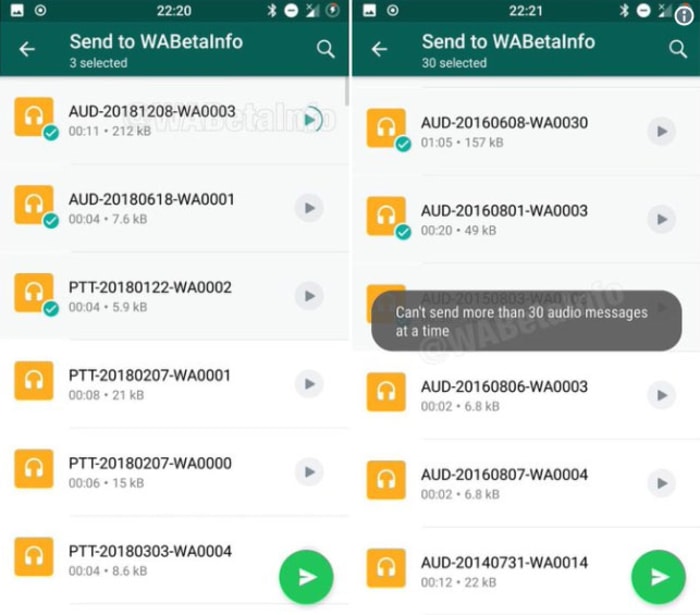
The other new feature that has been spotted in the latest WhatsApp beta is a new way of organizing your WhatsApp audio files, playing them before sending them, and simplifying the process of sending multiple audio files at the same time.

Audio picker WhatsApp update
Image via: Twitter

The new audio file feature should be available now to all WhatsApp beta users. If you have access to the feature, you should be able to send up to 30 audio messages at once. When coupled with other recent updates to voice notes and the way you can send audio files across WhatsApp, this marks another step along WhatsApp’s evolution towards becoming a handy standalone digital audio player.

There is no news yet on when either of these new features will receive a wider roll-out to all WhatsApp users. Stick with us though, and we’ll let you know as soon as the news breaks.

Two great new and improved WhatsApp features

WhatsApp consecutive voice notes land on the beta for Android and an improved Picture-in-Picture mode is coming, too.

WhatsApp is an evolving app. Although the core feature of messaging our friends and family always stays the same, new features are being added all the time to help make the whole process easier. As well as adding new features, it is good to see the WhatsApp team working on old features to make them bigger, better, and, stronger. This is what today’s news is about, older WhatsApp features that are getting an upgrade.

WhatsApp consecutive voice notes land on the beta for Android and an improved Picture-in-Picture mode is coming, too

In December, we first brought you news of the WhatsApp consecutive voice notes feature. The new feature automatically plays voice notes one after another once you’ve hit play on the first one. The feature only works on voice notes that have been received consecutively and uninterrupted, so voice notes received later on in the conversation won’t play once the string is up. It also includes new tones that’ll let you know when a voice note has finished and also when the last voice note has finished.

WhatsApp Messenger Download WhatsApp ►
8

Back in December, it was only a bit of code that had been spotted in the WhatsApp beta. It wasn’t usable. This has now changed. The Android WhatsApp beta version 2.19.86 includes a working version of the feature. Consecutive voice notes are officially out for public testing.

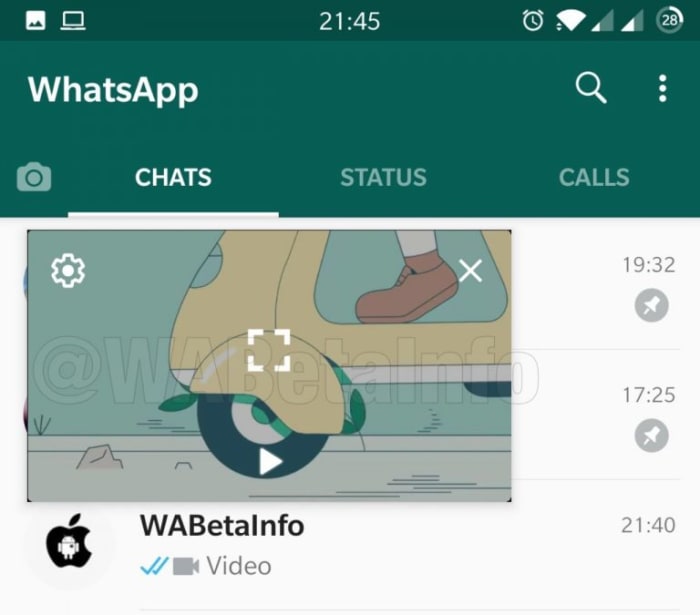
The other feature that WhatsApp is working on improving is the Picture-in-Picture mode. That allows you to watch certain types of videos that you’ve been sent in chats while you’re still chatting to your friend. The feature starts up a mini video player for videos from YouTube, Facebook, Instagram, and Streamable that hovers and plays while you’re chatting away.

WhatsApp Picture in Picture mode on the inbox
Image via: WABetaInfo

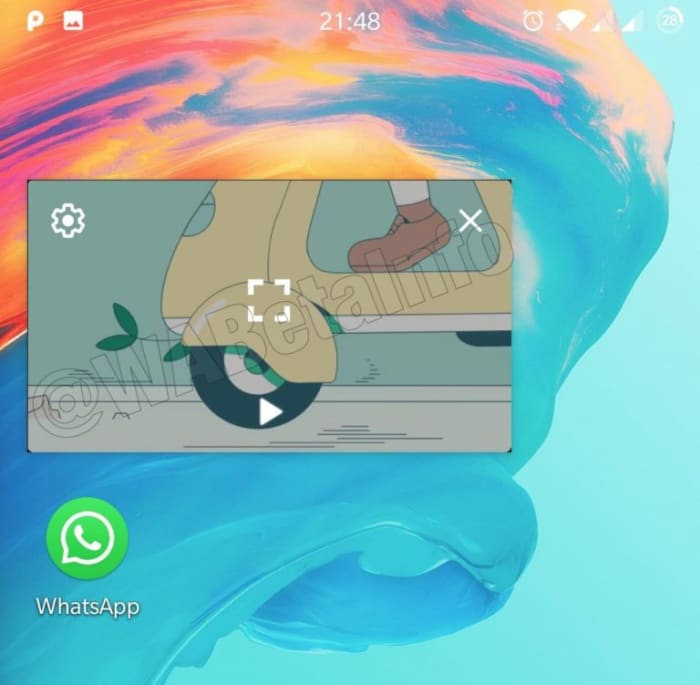
Although useful, the feature has quite a few shortcomings, but it is now clear that WhatsApp is working to give it a bit more power. The biggest frustration with Picture-in-Picture is that you still have to close the video you’re watching if you want to switch between chats. Code in the latest WhatsApp beta indicates that this problem is being fixed. Also, it looks like WhatsApp is going further and making it possible to continue watching your video even when WhatsApp has been minimized and is only running in the background. It appears like these improvements to Picture-in-Picture will be available for Android 8 and newer when it receives a wider roll-out.

Picture in Picture WhatsApp minimized
Image via: WABetaInfo

Unfortunately, with these features only making just making it into the beta version now, there is still no telling when they’ll make their way onto regular WhatsApp. Consecutive voice notes seem to be further down the development path than the improvements to Picture-in-Picture but there is still no official word about when either will be ready for general release. As soon as we know more, we’ll let you know.

How to add a contact to WhatsApp

This is how to add new contacts to WhatsApp on Android and iPhone.

WhatsApp is one of the most popular messaging apps on the planet with over 1.5 billion users. This makes it one of the world’s leading forms of communication. WhatsApp works very much like SMS messaging does. It isn’t like Facebook Messenger that allows you to search for other users so that you can communicate with them. Instead, you have to know the mobile number of the person you want to speak to and add them to your contact list.

There are two slightly different ways of how to add someone on WhatsApp, depending on whether you use the app on an iPhone or on Android. Let’s have a look at both methods now.

How to add a contact on WhatsApp

How to add a contact to WhatsApp on Android

Step 1

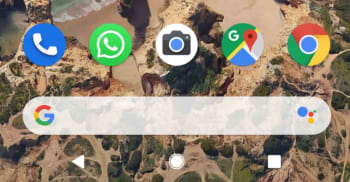
Unlock your Android phone and open WhatsApp.

WhatsApp icon on Android

Step 2

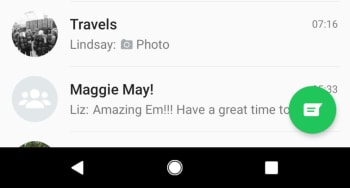
Hit the Chat bubble icon, found in the bottom right of the screen.

WhatsApp Android new chat button

Step 3

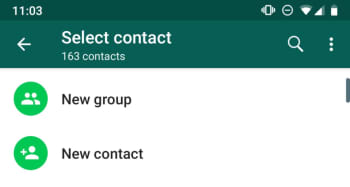
Hit the New contact button at the top of the list, just below the New Group button.

New Contact button, WhatsApp Android

Step 4

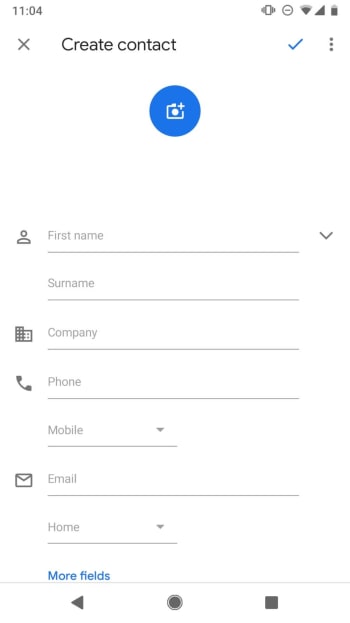
This will take you to the Create Contact page of your Android Phone app. Fill out the contact details as you would normally fill out any other new contact. It is important to save the number including the full international dialing code, if it is a foreign number.

New Contact on Android

Step 5

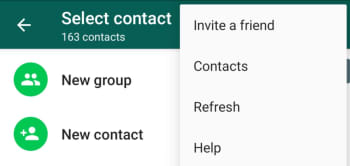
Hit Save. You can then wait for WhatsApp to recognize the new contact and add it to your WhatsApp contact list, or you can tap the New chat icon and then open the three-dot “…” More Options menu in the top right of the screen and hit Refresh.

Refresh contact list WhatsApp on Android

WhatsApp Messenger Download WhatsApp ►
8

How to add a new contact to WhatsApp on iPhone

Step 1

Unlock your iPhone and open WhatsApp.

WhatsApp on iPhone

Step 2

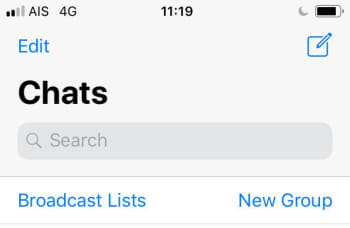
Hit the New Chat icon, found in the top right of the screen.

New Chat on WhatsApp for iPhone

Step 3

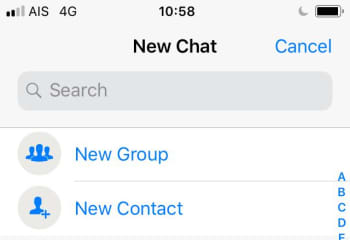
Hit the New Contact button at the top of the page, found below the Search box and the New Group button.

New Contact and New Group on WhatsApp iOS

Step 4

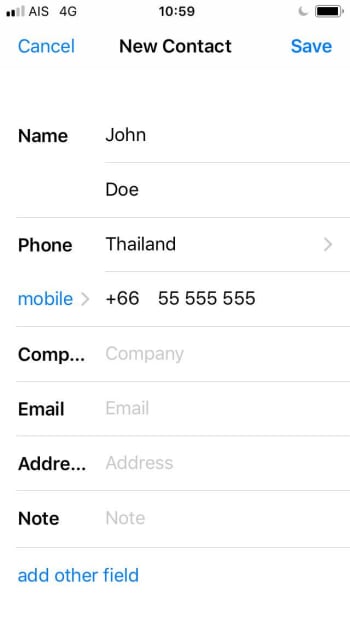
Fill in the details of the new contact including, name, country, and number. If you wish, you can also hit the more fields button to add information like Company, Email, and Address to the contact.

New Contact WhatsApp iOS

Step 5

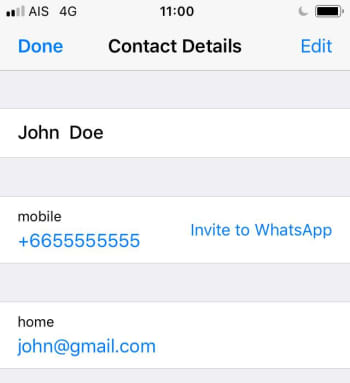
Hit Save. This will take you the new Contact details page. If the new contact is on WhatsApp, you’ll be able to open a chat with them from this page. If not, you’ll see the Invite to WhatsApp button instead.

WhatsApp Contact Details iOS

The interesting thing to note about adding contacts to WhatsApp on iOS is that it also adds the contact to your normal phone book.

Both methods described above tell you how to add contacts from within WhatsApp. The messaging app also automatically recognizes contacts from your phone’s regular list of contacts, if you’ve given it permission to access them. This means if you add a contact to your phone book the same you always do, WhatsApp should find it and automatically add it to your WhatsApp contact list.