
WhatsApp dark mode is back in development and testing

WhatsApp dark mode is coming, and it will be called Night Mode.

WhatsApp

We like to keep you updated on all the updates and new features that are coming to WhatsApp. Trouble is, WhatsApp very rarely makes announcements about these types of things. This means we have to scan through the beta versions of WhatsApp for iPhone and Android and use what we find there to determine what is on the way.

With this being the case, that code is sacred. We can only talk about what is in that code, or sometimes what isn’t in it. When we recently looked at the WhatsApp beta, one thing was missing that had been there before; the upcoming dark mode. The dark mode was gone from the code, Twitter wasn’t happy about it, and it led us to ponder whether we’d ever see a WhatsApp dark mode. Well, now we can put those doubts to bed.

WhatsApp Messenger Download Now ►
8

WhatsApp dark mode is coming, and it will be called Night Mode

We’ve already seen screenshots of the upcoming dark mode, which made it all the more perplexing when it was gone from recent versions of the WhatsApp beta. The dark mode is now back in the code, however, and we have new screenshots to add to those we’ve already seen.

The WhatsApp dark mode will be called Night Mode and it looks like it is well along the development path. Night mode is already compatible with the Chats, Status, and Calls tabs on the app but there is a chance that there might still be a few aesthetic changes to come before the feature rolls out to all WhatsApp users. WABetaInfo hypothesizes that the green buttons you can see in the screenshots will change to white for example.
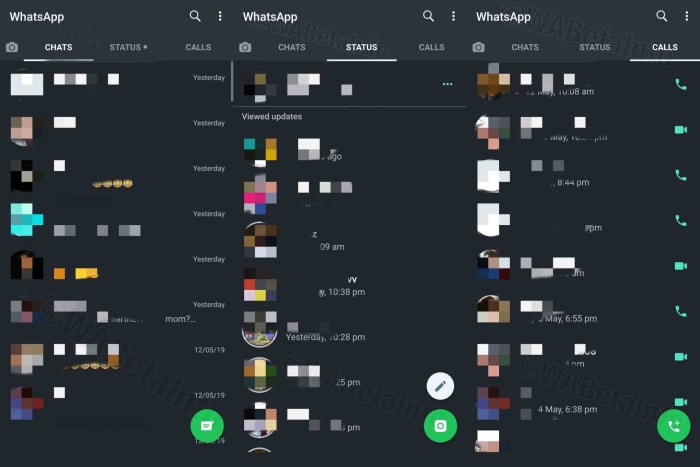
WhatsApp night mode
Screenshots via: WABetaInfo

As well as the core features of the app, a more recent update to the WhatsApp beta has shown more WhatsApp pages and screens receiving the Night Mode treatment. WhatsApp beta version 2.19.139 has brought with it some rough night mode screens for the Contacts and Contact Info screen, and the Group Info screen
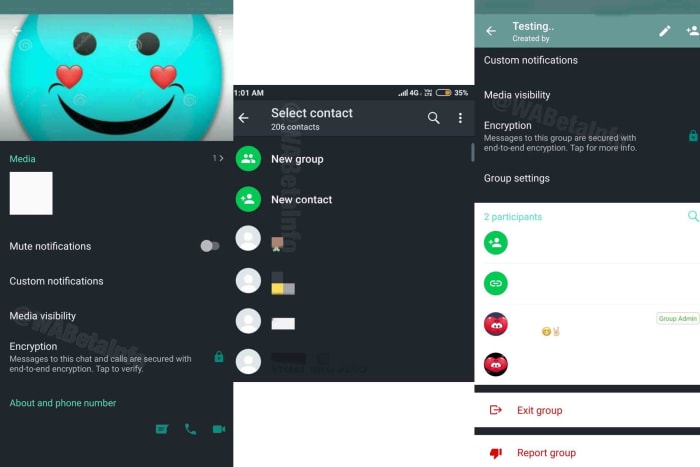
WhatsApp dark mode screenshots
Screenshots via: WABetaInfo

As you can see from the screenshots above, however, these still don’t look complete, which means WhatsApp still has work to do on the night mode aesthetics before regular WhatsApp users will begin to see it on their phones.

As well as aesthetics, however, it is likely that WhatsApp still has a lot of work to do on the backend of the night mode feature to ensure a bug-free experience when it finally rolls out to everyone. This is, of course, one of the major reasons apps go into beta testing before getting a full release.

Signing users up to beta programs helps developers iron out any creases from the code, while also giving them early access to new features. The flip side of this is the unstable nature of the new features. If you’re OK with this and would like to try out new WhatsApp features, like night mode, before everybody else gets them, check out our tutorial below.
How to tell if your WhatsApp has spyware

How can I tell whether or not I was affected by the WhatsApp security breach?

WhatsApp

After WhatsApp’s recent security breach which led to personal data being compromised, users have been trying to figure out whether or not they were affected.

The first thing you can do is to update the app. However, the problem is that there is no concrete way of knowing whether you were affected by the breach.

The good news is that there ways you might be able to tell if your device was compromised.

WhatsApp Messenger Download Now ►
8

Look for signs of odd behavior

See if other programs are running slower than usual: Are YouTube videos not loading as quickly as they typically do? Is Instagram taking forever to refresh the page? Is that new app you’re downloading taking a small lifetime? These signs can mean that your phone is doing background tasks that are slowing down your phone.

Check your battery usage: If your battery power is depleting faster than normal, it might mean your device is sending and receiving lots of data.

Check to see if your phone is running hot: If your phone is hot to the touch, it might mean that it is sending and receiving data due to the spyware.

Just nip it in the bud with an antivirus app

If your phone has spyware or another virus, you typically can solve it with your standard antivirus app like Avira or Malwarebytes.

Avira Free Antivirus Download Avira ►
8
Malwarebytes Download now ►
8

If you think you have spyware or a virus, antivirus apps can scan your phone and remove anything problematic. It’s a smart idea to check for a problem rather than waiting around to see if you have one.

What are the chances that I was affected?

The main target of the spyware attack was a human rights lawyer in London. The alleged spyware is called Pegasus and it was made by the Isreali cyber-intelligence organization called NSO Group.

We’re going to go out on a limb and say that you are probably not affiliated with either the Israeli intelligence organization or the human rights lawyer in London who is suing them.

That said, it is in your interest to use these best practices to regularly check for signs of spyware on your device. Although you probably weren’t compromised in this spyware attack, it doesn’t mean you won’t get caught up in a different one.

WhatsApp spyware attack: how to protect yourself

Hackers found a flaw in WhatsApp’s security system to steal personal data from users.

WhatsApp updateUpdate WhatsApp right now. A dangerous malware threat has been discovered that could give hackers access to your data.

In the attack, targets received a WhatsApp call. Even if you didn’t answer, the malware could still infect your device. That would give the attackers access to your personal information, including location data and private messages. The threat applies to Android and iOS devices.

So stop what you’re doing right now and protect yourself by upgrading WhatsApp to the latest version here.

This attack appears to be targeting specific people. The Financial Times reports the U.S. Department of Justice was notified about the hack this week. This is important because we know Jared Kushner uses WhatsApp to conduct official White House business.

“The attack has all the hallmarks of a private company reportedly that works with governments to deliver spyware that takes over the functions of mobile phone operating systems,” a WhatsApp spokesperson said.

Be sure to stay with Softonic for the latest news on this story and any other cybersecurity threats.

WhatsApp will soon stop working on some phones, will your phone be affected?

Phones running the Windows Phone operating system will stop supporting WhatsApp by the end of the year

WhatsApp icon

WhatsApp’s official blog is a bit strange. It is very rare that new posts are published, despite the multitude of updates and new features that the app regularly sees. Then, if there are new posts, with new information about the messaging app, they don’t appear as regular articles. Instead, many WhatsApp blog posts come via new answers on the WhatsApp FAQ page.

This is how we’ve found out about a rather chilling development. Come the beginning of next year, there will be a whole host of phones that will no longer be able to use WhatsApp.

Phones running the Windows Phone operating system will stop supporting WhatsApp by the end of the year

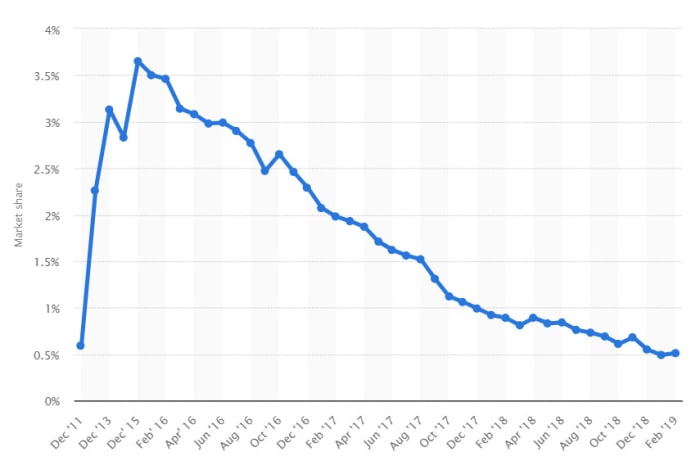
Yep, it is an updated FAQ answer page that has brought the news of doom and gloom to all Windows Phone users. On December 31, 2019 WhatsApp will stop working on Windows Phones. According to Statista, Windows Phone’s market share (in the UK) has dropped to just above 0.5%, but, to be fair, it was never that high to begin with. It enjoyed its largest market share at the end of 2015, and even then, it topped off at only 3.65% of mobile users. Less than 1% might not sound like a lot, but when you consider that we’re talking about all smartphone users, you see that the number of people who are about to fall off a WhatsApp cliff is quite high.

People still use Windows Phones
Not many people still use Windows Phones, but Windows Phone users are out there and come the turn of the year they’ll no longer be able to use WhatsApp.

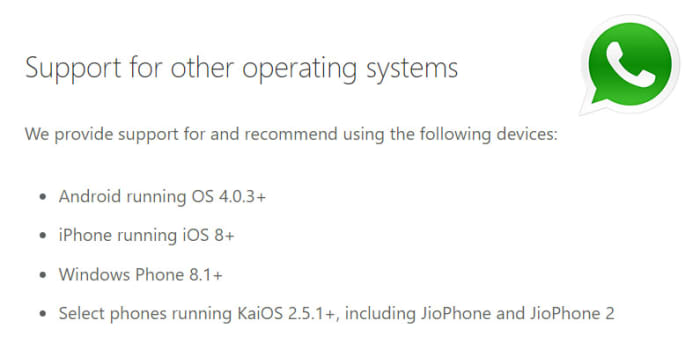
The updated FAQ page relates to which versions of the most popular mobile operating systems enjoy WhatsApp support. The page also states,

“For the following operating systems, you can no longer create new accounts, nor reverify existing accounts. However, you’ll be able to continue using WhatsApp on:

  • Android versions 2.3.7 and older until February 1, 2020
  • iOS 7 and older until February 1, 2020”

With iOS 7 being from 2013 and Android 2.3.7 being from 2010, the biggest news from the page is the Windows Phone bombshell. Hardly anybody will be affected by the lack of support to the older Android and iOS versions, but if you are still running the older software, the page warns that some functions could stop working at any moment.

All mobile operating systems that support WhatsApp
These are the mobile operating systems that support WhatsApp

Anybody running Android 4.03 or iOS 8 or newer will be able to continue using WhatsApp unhindered.

The real bad news for Windows Phone users is that come December 31, 2019, they’ll be cut off on from WhatsApp altogether. In what could be seen as another slap in the face there is, as yet, no WhatsApp FAQ answer page telling Windows Phone users what to do after that date. In the lack of any official advice from the messaging company, all we can say is get yourself an Android smartphone that’s not yet nine years old or an iPhone from the last six years.

If you use WhatsApp or Facebook Messenger, you have to check out the Opera browser

No more switching tabs to message people on WhatsApp or Messenger. Opera browser has fully-featured WhatsApp and Messenger integration.

There aren’t many web browsers that stand out for having truly unique features. These days we’re all looking for a quick and secure browser and pretty much all of the big ones can offer this. After that, there isn’t too much to choose between them. Sure, privacy advocates veer towards Firefox and Apple fanboys use Safari, but it is difficult to put your finger on discernible differences between the offerings of the big web browser developers. That is, apart from Opera.

New features come to the internet all the time but has any web feature had such a huge impact on our daily lives as instant messaging? Who doesn’t have a separate tab or window with either Facebook Messenger or WhatsApp open right now? Well, Opera has long been studying how we use the web and innovating new features designed to accommodate common web practices. The Opera browser now has fully integrated versions of WhatsApp and Messenger built into the browser.

No more switching tabs to message people on WhatsApp or Messenger

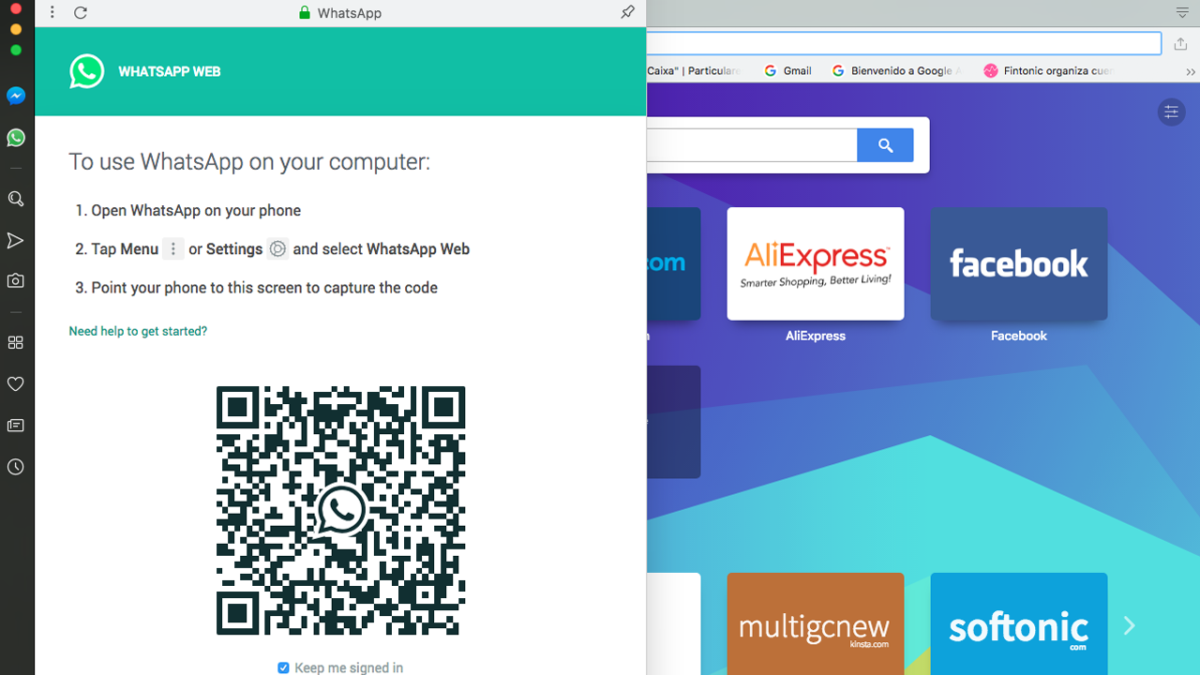
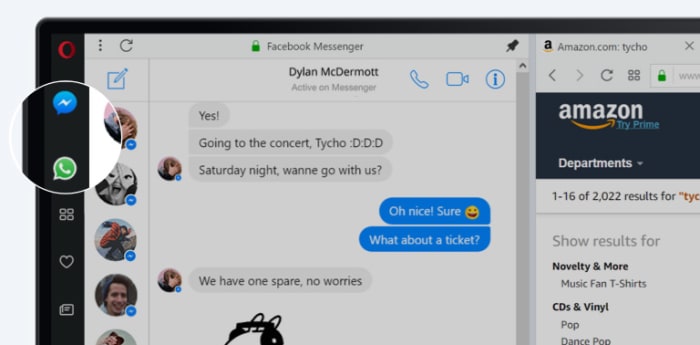
One of Opera’s key features for a while now has been its sidebar, which sits stealthily at the left-hand side of the browser. The sidebar gives quick and easy access to common web tools like search, downloads, favorites, etc. Last October, Opera also added two new buttons to the sidebar; the WhatsApp and Messenger chat bubbles.

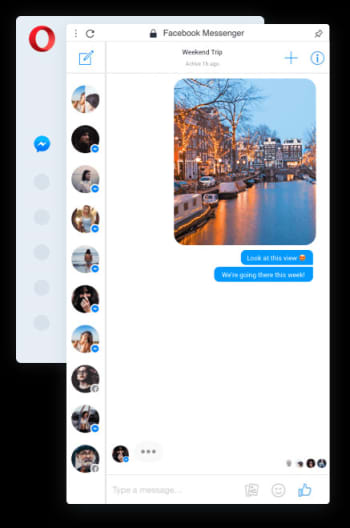
Messenger Opera integration

Clicking the WhatsApp and Messenger icons opens out fully functional and well-designed chat widgets from the sidebar. They offer all the features you’ll find on the web versions of both apps, but sit above the web page you’re currently browsing and only cover about a sixth of the page.

With the integrated messengers being so small, the design is key, and Opera has pulled it off nicely. All the buttons and features are there but they’re tastefully placed in a way that feels right. Contact icons are down the left and hand side, with the conversation taking up most of the display space.

Messenger Opera integration chat bubble

On top of the neat design and full feature sets, the Opera browsers WhatsApp and Messenger integrations offer other key messaging app tools to ensure you’ll never have to leave the web page you’re browsing to check your messages again. You can activate in-browser notifications for incoming messages, pin your favorite chats, mute conversations, or log off from the services altogether.

The key here is that when you get a new message all you have to do is click the icon to the left of your page, read the message, and then respond, should you feel the need. Throughout that whole process, there is no need to switch tab and the web page you’re viewing stays on the screen the whole time.

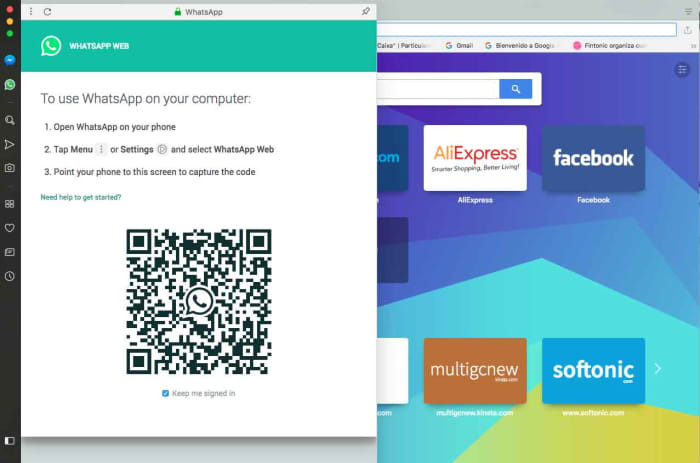
WhatsApp web on Opera browser

In the tech world, small things make big differences, but with WhatsApp and Facebook Messenger integration, Opera has added a large feature to its browser that creates a smoother workflow and makes it harder to become distracted from what you’re doing. This is more than a big difference; this is a big deal.

Softonic is proud to partner with Opera. When you download from us, we may earn a commission.

WhatsApp update: Is dark mode dead?

There has been no sign of a dark mode in the last two beta versions of WhatsApp for Android.

WhatsApp shocked emoji

There seems to have been a bit of a backlash on Twitter to news about an upcoming feature that looked like it was coming to WhatsApp. It wasn’t long ago that we were bringing you advance screenshots of how WhatsApp’s new dark mode will look when it finally lands on the app. Now, however, this has all changed and it looks like WhatsApp won’t be getting a dark mode at all. Users aren’t happy.

There has been no sign of a dark mode in the last two beta versions of WhatsApp for Android

Dark modes really have been taking the tech world by storm recently. App after app from Google Chrome to Facebook Messenger has been introducing the feature to much praise from their user bases.

A dark mode is useful for an app for a number of reasons. They’re designed to protect a user’s eyes if they’re browsing their phone at night or in dark surroundings. Lighter colors can create quite a bit of glare, so the dark mode switches the usual brightly colored white background to black, dark grey, or sometimes dark blue. The text is then cut into the dark mode using lighter colors. As well as this very functional feature, dark modes also have a pleasing aesthetic and many users choose to use them for this reason alone. People like the way dark modes look.

On top of the two reasons listed above, recent research from Google has also shown that dark modes can actually have a positive effect on battery usage. The research shows that on devices with OLED devices, brighter colors require more battery power than showing darker colors. This means that whenever an app is in dark mode it puts a lot less stress on the device’s battery if the device has an OLED screen.

So, considering all this, it came as no surprise when news broke that WhatsApp was working on a dark mode and that there was a positive response when the first screenshots hit the internet. This now seems to have changed. According to WABetaInfo, the last two versions of the WhatsApp beta for Android (versions 2.19.123 and 2.19.124) have not included a single reference to the dark mode that had been there before.

Understandably, users have not been happy by this apparent decision from WhatsApp HQ. It is bad enough when a feature you want isn’t there, but it is much worse when you’re told it is coming and then, out of nowhere, it is taken away again.

As is always the case with these types of leak, however, there is no official word from WhatsApp on its dark mode position. There is still a chance that the removal of the dark mode code from the beta is relating to a planned redesign or a link to the Android Q system-wide dark mode, which is on the way. For now, though, all we know is that there is no dark mode in the latest WhatsApp beta.

WhatsApp Web: Will calls be added to the desktop version of WhatsApp?

WhatsApp is working on adding calls to WhatsApp Web.

WhatsApp logo

The Facebook Developer Conference kicks off today in San Jose. It is fair to say that Facebook has had a very bad year with scandal after scandal rocking the social media giant. The annual F8 conference then could be a good way for Facebook to divert eyes away from its shady past and towards its future.

In truth, however, this year’s Facebook Developer Conference doesn’t seem likely to include a headline-grabbing announcement that could distract the masses. There’ll likely be talks on AI, as well as privacy and encryption. There’ll also likely be news on an Oculus update and new takes on augmented reality, and we’ll likely see something about what Facebook is doing with blockchain. Nothing too exciting, though.

What we’re hoping for, however, is nothing to do with Facebook itself, but rather Facebook-owned WhatsApp. What we’d most like to hear at F8 this year is confirmation of some of the many WhatsApp updates we’ve seen added to the WhatsApp beta over the last weeks and months. These include a new dark mode, improved security features, stickers 2.0, and a vacation mode. On top of these, however, we’d love to hear about another feature we’ve only just learned has been added to the beta.

WhatsApp is working on adding calls to WhatsApp Web

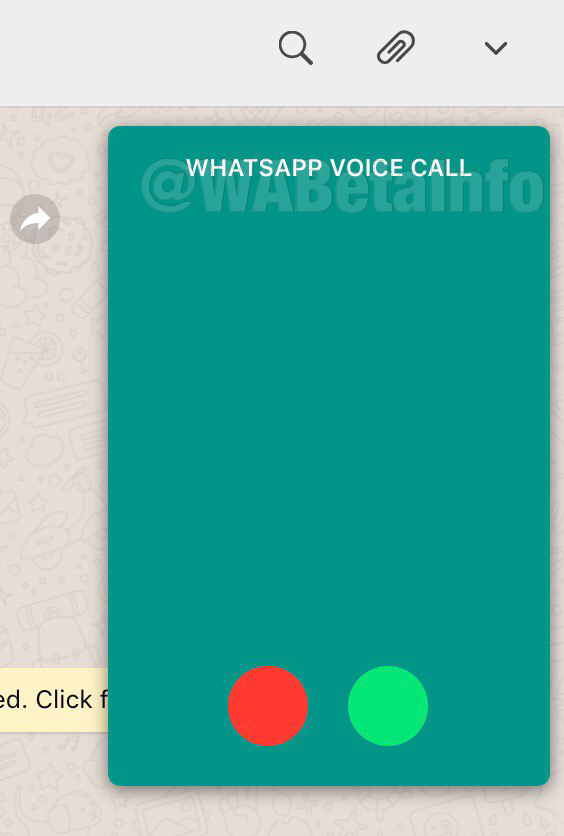
The new calls feature for WhatsApp Web is still in the very early stages of development, but a few screenshots of the feature in action have been leaked onto the internet thanks to WABetaInfo. These are only images of the voice call feature, however, as the video call feature for WhatsApp Web is still in the alpha development stage.

New voice call feature for WhatsApp Web
Image via: WABetaInfo

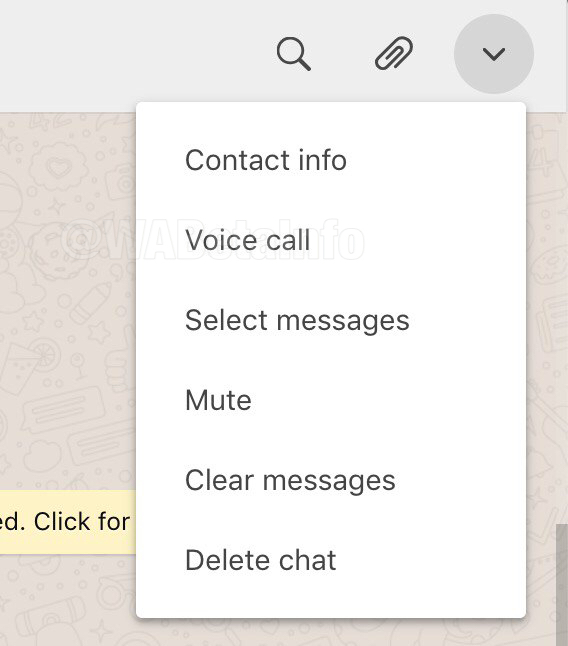
The calls feature on WhatsApp Web will be activated by clicking the settings menu icon found in the top-right of any chats screen. You’ll simply open the chat of the contact you want to call, click the icon in the top-right, and then hit voice call. It is a safe assumption that once it moves further along the development path the video call feature will also be found here.

WhatsApp voice calls on desktop

This feature is still a long way off from a general roll-out, however, as the screenshots show. Even the voice call feature is incomplete as WhatsApp still has work to do before it can release a full version to the beta community.

Even though the new calls feature is still a way off from completion, there is still a chance it might come up at the Facebook Developer Conference. Should we hear anything from the conference on calls or any of the other WhatsApp features we’ve reported on over the last few months, we’ll make sure you hear about it first.

WhatsApp stickers and emojis get an upgrade

WhatsApp is working on animated stickers and will introduce the official emojis.

pop up WhatsApp icon

We’ve reported on a lot of big WhatsApp news recently. Various analyses of the WhatsApp beta indicate that we can soon expect to see features like a dark mode, an improved vacation mode, and that WhatsApp may even be shaping up to become a decent audio player. Not all new features have to make such a big splash, however. The updates we’re reporting on today won’t make any fundamental changes to the popular messaging app, but you’ll definitely notice them when they roll out to all WhatsApp users.

“

WhatsApp is working on animated stickers and will introduce the official emojis to Doodle

Stickers have been around on WhatsApp for quite some time now, and they’ve added a fun way to customize your chats. You can even create your own WhatsApp sticker packs from photos you’ve taken or received from friends. The latest WhatsApp beta, however, shows that the Facebook-owned app is now working on an official way to kick them up to the next level. Rather than stickers appearing as static images, it looks like soon we’ll be able to send each other animated stickers that move.

Image via: WABetaInfo

There have only been a couple of examples spotted so far, but they look impressive, nonetheless. One is what appears to be a squirrel or small fox rolling around laughing and the other is a rocket ship blasting upwards into space. It also looks like WhatsApp will support animated stickers from third parties, too. Of course, there is no limit to what these animated stickers could become in the future. This is a small change to WhatsApp, but it opens up some interesting and exciting possibilities.

Image via: WABetaInfo

The other small change coming to WhatsApp is the implementation of official emojis in WhatsApp doodle. When this change lands on the full app, the emojis you can stick onto the images, GIFs, and videos you’re sending your friends will change from the specialized WhatsApp set of emojis to the more standardized emojis you see across the rest of WhatsApp and other apps. I’m sure you’ll have noticed that at the moment these emojis look different to the emojis you see when you send them in chats. Again, this isn’t the biggest change, but when it drops, you’ll definitely notice the difference.

WhatsApp emoji v Official emoji
Image via: WABetaInfo

There is no news yet about when these small tweaks to WhatsApp will land on the main app. It is likely, however, that as they are only small changes, we could get to see them sooner rather than later. With the bigger changes, like some of those mentioned at the beginning of this article, further development and testing may be needed before they can be fully implemented across the whole app. With smaller features like stickers and emojis, however, there likely won’t be much more work needed.

You need to look out for this new WhatsApp scam

WhatsApp hackers are trying to trick users into clicking fake links that will lock their accounts.

WhatsApp is quite a secure app and its end-to-end encryption is renowned for protecting user privacy. The latest security features can only go so far, though. There is one element that will always remain vulnerable even if an app is up to date with all the latest security features and protocols. That rogue element, so to speak, is us. The human factor can help hackers break through even the most secure defenses an app could possibly have.

It is the human factor that sits at the heart of the latest WhatsApp scam to do the rounds. You need to look out for this one or you could fall victim, too.

WhatsApp hackers are trying to trick users into clicking fake links that will lock and steal their accounts

WhatsApp windows wallpaper

This latest WhatsApp warning is coming out of the Middle East where the Telecommunications Authority of the UAE has published a warning against this new type of scam. Unfortunate victims have seen their WhatsApp accounts completely hijacked with hackers then able to read their messages and, even scarier, send messages on their behalf.

WhatsApp Messenger Download Now ►
8

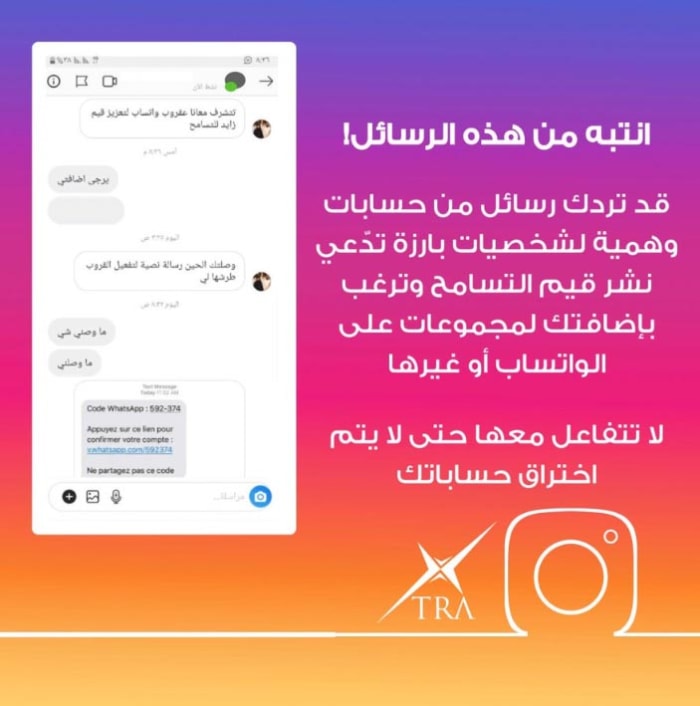
The scam works by sending a link to users who’ve recently installed WhatsApp on a new phone. What normally happens when this happens is WhatsApp sends a verification code to the user in order to prove their identity. In this case, however, the scammers are sending the code, along with a link, to users as a text message and asking them to click the link to prove their identity. The problems arise for users when they click the link.

Clicking a link on WhatsApp
If you click the fake link, you could lose your WhatsApp account

Whenever a user clicks the link, they confirm to WhatsApp that it is them, but they do it via the hacker. This then authorizes the hacker to control the user’s WhatsApp account and freezes them out.

The warning from the UAE says, “Mobile users should not share the verification code that is sent to them by SMS, otherwise, their account will be compromised. Many WhatsApp accounts were hacked this way, and subscribers lost all their details.” The scam has already claimed a lot of victims who no longer have control of their WhatsApp accounts. Worryingly, there are also reports that the scam has since been translated from Arabic into English and French, which means it could be coming to the U.S. and Europe.

beware this new whatsapp scam
Image via: Twitter – The scam has since been translated from Arabic to English

You always need to be extremely careful when opening attachments and clicking links that you’ve received in messages, particularly when the message comes from somebody you don’t know. Phishing scams, which try to trick you into handing over sensitive information, are on the rise globally. They’ve become increasingly sophisticated in recent times meaning it is much harder to spot scam attempts.

Fortunately, we’ve prepared an infographic containing 10 key steps you should take, if you’re suspicious about a message you’ve received. You can check out our guide for avoiding phishing scams by clicking here.

WhatsApp: new security update and improved Doodle feature

WhatsApp is adding a Conversation Screenshot Blocker and improving the Doodle user interface.

WhatsApp has been on fire with recently with a spate of updates to the WhatsApp beta promising new and updated features for the main app. These have included a Dark Mode, a better way to ignore chats you don’t want to deal with, a much improved audio file organization system, and a new advanced search feature. It seems there is no rest for the wicked at WhatsApp HQ because today we can bring you news of two more updates that have landed on the WhatsApp beta.

WhatsApp is adding a Conversation Screenshot Blocker and improving the Doodle user interface

WhatsApp

In January when we first broke the news that WhatsApp was working on introducing fingerprint authentication as a way to add an extra layer of security to your chats. The added authentication will work on top of the phone’s security to give users a chance to put the WhatsApp inbox behind two separate security protocols.

WhatsApp Messenger Download Now ►
8

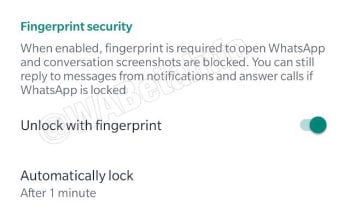
There is no news to report on this feature’s development, but it has been spotted in the latest WhatsApp beta for Android, with an interesting note next to it. The settings page for the new security feature includes this snip bit, “When enabled, fingerprint is required and conversation screenshots are blocked…” There is no other context given to the feature, the note goes on to talk about being able to answer calls and reply to messages if WhatsApp is locked, but it seems clear that WhatsApp is working on a way to stop users taking screenshots of chats.

New feature coming to WhatsApp
Image via: WABetaInfo

At this point, this is the only information we have on this new and mysterious feature, but it could mean that soon you might be able to set WhatsApp to block your friends from snapping screenshots of your chats. We’ll have to wait for more information before we can confirm this.

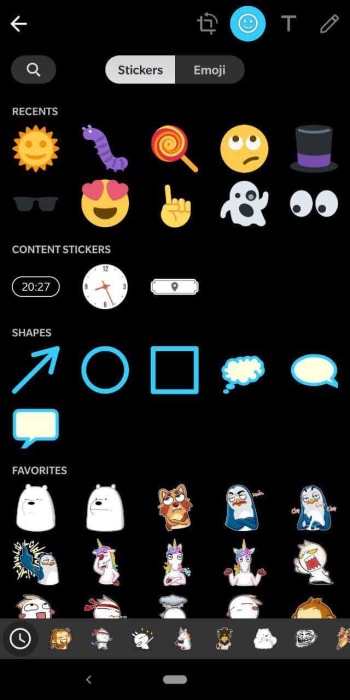
The other key thing in the latest WhatsApp beta for Android is the improved UI for WhatsApp Doodle. Doodle is WhatsApp’s way of allowing you to draw on top of any media you’re sharing and also add stickers and emojis, too.

New Doodle UI for WhatsApp
Image via: WABetaInfo

The update adds separate tabs for Stickers and Emojis and then also groups stickers into Favorites and Categories. This should make it much easier for you to manage the stickers, emojis, and shapes you want to put on top of any images, videos, or GIFs you might be sending to your contacts.

We’ve got the guys at WABetaInfo to thank for sharing all the data from the latest beta version of WhatsApp for Android and, as always, need to point out that as yet there is no official word from WhatsApp about when we can expect these features to make it to the main app. If you’d like to give the WhatsApp beta a try, check out our tutorial below.