Take an early look at WhatsApp’s brand-new dark mode

Check out these screenshots from the beta version of WhatsApp’s dark mode.

It just seems like every app and program needs a dark mode these days. Recently, Facebook Messenger became the latest app to jump on the bandwagon, even if its new dark mode is still hiding behind an emoji. Now though, it is Messenger’s sister app WhatsApp that seems in line for the app world’s hottest new feature.

Check out these screenshots from the beta version of WhatsApp’s dark mode
A WhatsApp screenshot and the logo

Once again, we need to thank the guys at WABetaInfo for bringing these advanced screenshots to the public. WhatsApp  recently released an update to the Google Play Beta Program. Beta version 2.19.85 brings the new dark mode although, as yet, it still unavailable, even to members of the WhatsApp beta program. Fortunately, however, a few screenshots have still made their way through.
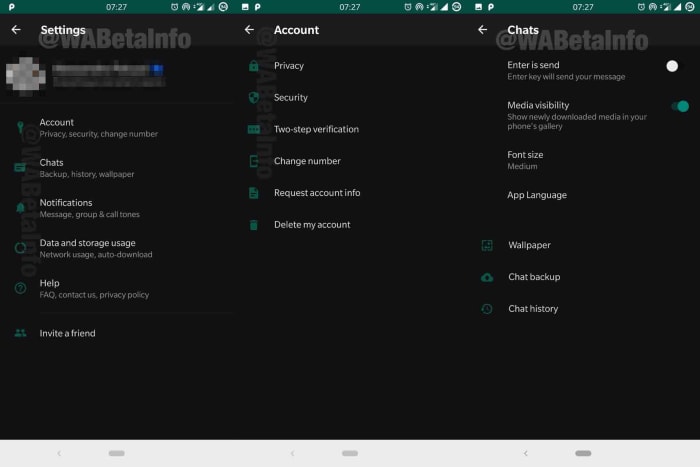
Screenshots of the new WhatsApp dark mode
Images via: WABetaInfo

WhatsApp is still working on a number of improvements to the feature before it rolls it out. This means, unfortunately, there is no news about when it’ll be available on the beta program, never mind for all WhatsApp users.

Another new innovation to come with the latest beta version of WhatsApp is a cool little feature that will display the file names of all audio clips. Whenever an audio clip is shared in a conversation or group chat, the file name will appear below the play button and progress bar.

WhatsApp audio file name
Image via: WABetaInfo

As well as the dark mode and the audio filename display features, the upcoming authentication feature has also been spotted in a more advanced form in WhatsApp’s latest beta. It was in January when we first brought you news that WhatsApp is planning on introducing fingerprint ID to its security protocols. Since then, news has been thin, but now it seems that work has been going on in the background. The authentication feature now has a better user interface and added features. It still isn’t available, but it is heartening to see that progress has been made.

WhatsApp Messenger Download WhatsApp ►
8

All in all these, three features will add useful and important capabilities to the popular messaging app. With dark modes being proven to save battery on devices with OLED screens, it should prove a very popular addition among WhatsApp users. Security conscious users will also be happy to see and added level of security placed on top of their private WhatsApp messages and communications.

The audio file name display feature isn’t as earth-shattering as the two features we’ve already mentioned. If, however, it ties in with the improvements to WhatsApp voice notes that we’ve reported on in the past, it could see WhatsApp moving towards becoming an impressive audio recording and playback app in its own right.


This Chrome extension wants to help you trust the news again

Nobias will help you determine if a news story is trustworthy and whether it has a political leaning.

We’re living in an age when it is harder than ever to know whether you can believe the news story you’re reading. This is about so much more than the “Fake News” the president talks of any time a critical story comes out about him or members of his administration. This is about stories that come to us via social media and other communication platforms like WhatsApp. There are now thousands of stories being shared on a daily basis that present false facts or some sort of political agenda.

Fake news on your laptop

With political chaos spreading around the world, it is clear that these polarizing fake news stories and one-sided opinion pieces are causing real problems. It is now more important than ever to know that the news you’re basing your opinions on is objective fact rather than subjective opinion.

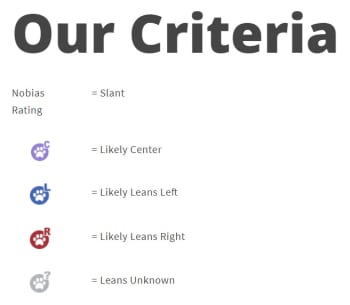
Nobias will help you determine if a news story is trustworthy and whether it has a political leaning

It wasn’t too long ago when Microsoft introduced NewsGuard technology into the Microsoft Edge browser for mobile. NewsGuard automatically flags fake and untrustworthy sites so that you know the story you’re reading shouldn’t be trusted. Now, thanks to Nobias, Google Chrome users will have something similar.

Nobias is a free extension for Google Chrome. According to the Nobias homepage, the extension fits perfectly with the company’s mission of, “promoting responsible/inclusive technology to protect consumers from deceptive or misleading content on the internet.”

There is also an education element.  The Nobias site says, “We hope to help people understand the landscape of media bias and to give them the power over the algorithms that shape what they read and see online.” The extension then aims to show users a clear message about the story they’re currently reading while also showing how current technology is influencing the news stories they’re seeing more often.

The Nobias extension uses a machine learning algorithm to look out for certain keywords and phrases. It is then able to show whether there has been a political slant to the left or right written into the story. As well as this, the extension also gives each publisher and author a credibility rating so that readers know whether they can be trusted or not. Publications get a score from one to five, with one being the highest and writers are ranked on the credibility of their employer as well as whether they’ve won any prestigious journalism awards. For more information on how Nobias determines political bias, click here.

The nobias extension fights fake news

Nobias is currently available for all Chrome users. It can be added for free here. The team behind it is currently working on bringing extensions to other browsers too including Safari, Firefox, and Opera. With the Democratic primary already hotting up and Trump up for re-election next year, it could be a good time to start protecting yourself against the dangers of fake news.

WhatsApp update: More details on how WhatsApp will fight the spread of fake news

WhatsApp update includes message Forwarding Info and Frequently Forwarded tags.

The latest WhatsApp beta update submitted to the Google Pay Beta Program includes insight into a couple of interesting new features that should help slow the spread of fake news. The WhatsApp fake news scandal has gripped the messaging app all over the world, as it has helped put a far-right politician into the president’s office in Brazil and seen gangs lynching innocent victims in India off the back of fake stories spread across the app.

WhatsApp fake news

With pressure increasing on the Facebook-owned app all the time due to these horrible events, it is good to see changes on the horizon.

WhatsApp update includes message Forwarding Info and Frequently Forwarded tags

Forwarded messages on WhatsApp have been tagged for quite some time now. Whenever you forward a message you’ve received to somebody else, it shows with a small Forwarded tag above the message text. The same goes for any time you receive a message from somebody who wasn’t the original sender. This allows users to know if the messages they’re receiving are original or not or if they’re being multiplied across the WhatsApp network from user to user. Alone, however, this feature is very limited as it doesn’t show much information at all.

WhatsApp Messenger Download WhatsApp ►
8

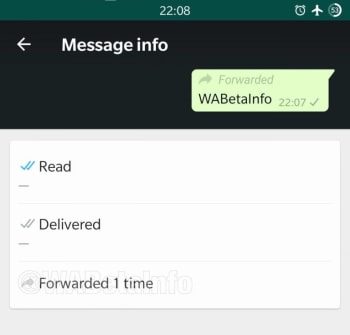
The latest WhatsApp beta update aims to flesh this feature out a little more with two new innovations. The first is Forwarding Info, which can be found in the Message info section of the app. By clicking on Forwarding Info, a user will be able to see how many times a message has been forwarded.

Strangely enough, according to the report on the new feature, you’ll only have access to the Forwarding Info tab once you’ve forwarded the message yourself. If you don’t want to add to the chain and pass the message forward yourself, just to learn how many times that it has already been forwarded, you could do so by forwarding it to a  group you’re the only member of.

New message forwarding info coming to WhatsApp
Image via: WABetaInfo

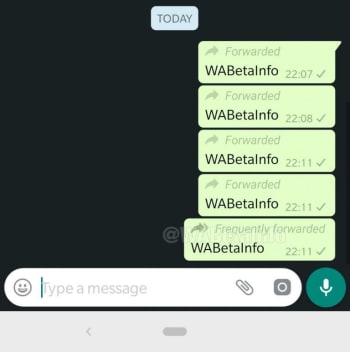
The other new feature is the Frequently forwarded tag. This new tab marks an update on the classic Forwarded tab as it illustrates the difference between a message that has simply been forwarded from a friend or family member and a message that has been shared more than four times. Any time a message has been shared more than four times, the Forwarded tag will be updated to a Frequently forwarded tab. This will show that the message has likely come from beyond your immediate network and so shouldn’t be trusted in the same way you trust messages you get from your contacts.

New frequently forwarded update for whatsapp
Image via: WABetaInfo

These two features offer some hope for the future, but still give WhatsApp more work to do in the fight against misinformation and fake news. Unfortunately, however, there is still no official word on when these two fake news fighting features will receive a general roll-out. Stick with us and we’ll let you know as soon as the news breaks.

Facebook Messenger gets another WhatsApp feature

You can now send Quote Replies on Facebook Messenger.

Ever since Facebook bought WhatsApp, it has been cannibalizing all the messaging app’s best features. Over the years we’ve seen Facebook Messenger bolstered with WhatsApp features like the Delete for Everyone feature and the Unsend message feature. With WhatsApp being such a popular and easy to use messaging app, it makes sense for Facebook to want to emulate its success. So it is no surprise that Facebook Messenger now has another WhatsApp feature to call its own.

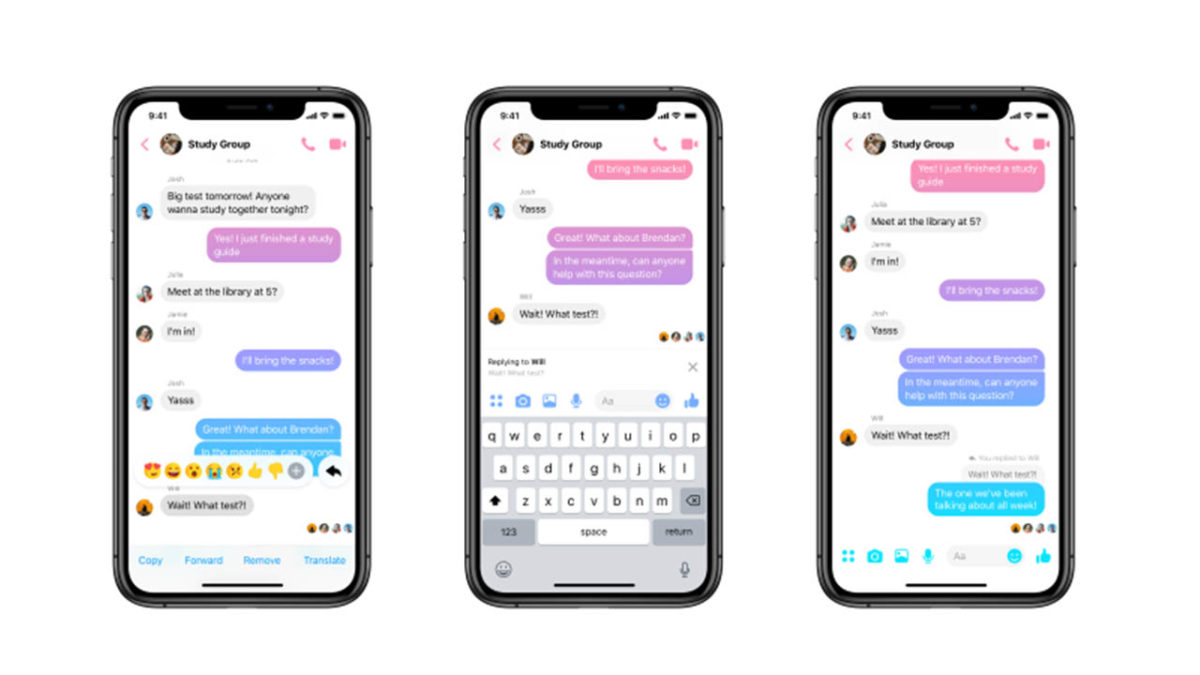
You can now send Quoted Replies on Facebook Messenger

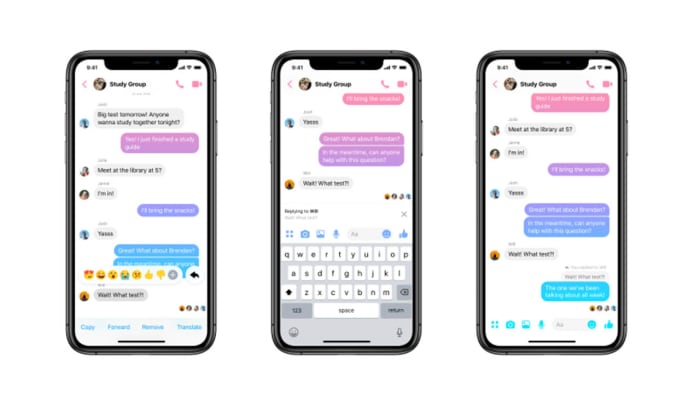
Facebook Messenger Quote reply
Image via: Facebook

Quoted replies are an incredibly useful feature for a messaging app. Even in one-on-one chats, things can move too quickly for a conversation to flow simply and in one direction. This means you can end up answering a question that has since been pushed off your screen by other messages and replies. In a group chat, this problem is magnified. That is why being able to highlight the particular point you’re responding to and linking it to your response can help conversations flow smoothly and more naturally.

Messenger Download Messenger
7

WhatsApp has had this feature for a while and now Facebook Messenger has it, too. Furthermore, Facebook Messenger replies will appear chronologically, exactly like they do in WhatsApp. (That’s different from messaging apps such as Twitter or Slack, where replies open up their own threaded conversations.) You can reply to a message with text, an image, a GIF, or a video and it will appear in the chat just like any other message, except it will have the quoted message you’re replying to attached to the top.

How to reply to messages on Facebook Messenger

There are two slightly different methods for replying to messages on the Facebook Messenger app for mobile and on desktop. Let’s have a look at how to do both:

Replying to messages on Facebook Messenger on Desktop
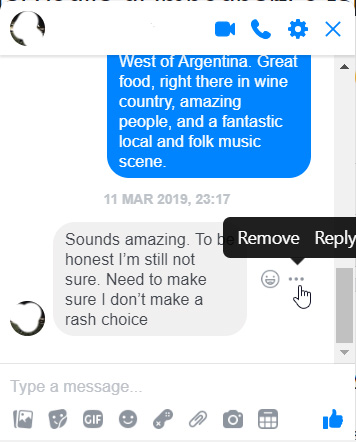
  1. Find the message you want to reply to and hover the mouse cursor over it.
  2. You should see a small emoji icon and a three-dot “…” icon appear next to the message.
  3. Click the three-dot icon and then hit Reply.
  4. Respond to the message however you see fit.

how to reply to messages on Facebook Messenger

Replying to messages on Facebook Messenger for Mobile
  1. Find the message you want to reply to and hold your finger down on it.
  2. Press the Reply button.
  3. Respond to the message.

There you have it, a simple way to better organize your Facebook Messenger chats. This method is available now to all Facebook Messenger users. It is worth noting, however, that at the time of writing, the feature wasn’t working on the Messenger Lite app.

WhatsApp is banning certain users and deleting their chat history

GB WhatsApp users and WhatsApp Plus users are currently being targeted with temporary bans.

An FAQ page on the WhatsApp blog indicates that WhatsApp is taking action against users of unsanctioned versions of the messaging app. While it is highly recommended that you only use the official versions of all your favorite apps, people still end up with unofficial versions on their phones. If you’re using an unofficial version of WhatsApp or if you’re not sure which version you’re using, you need to take action now.

WhatsApp is banning users of unofficial mods
Have you received a temporary ban?

GB WhatsApp users and WhatsApp Plus users are currently being targeted with temporary bans

WhatsApp Messenger Download WhatsApp ►
8

The new WhatsApp FAQ page is designed to help users of two of the most common unofficial versions of WhatsApp: GB WhatsApp and WhatsApp Plus. These have become popular among users for a variety of reasons including added features like themes, hiding online status, sending big files etc., but it looks like time is finally up. As well as offering instructions on how to transfer your account from the two unofficial mods to the official app, the page also shows that users of the modded WhatsApps have been receiving temporary bans on their accounts.

This is the first time WhatsApp has bothered to name any such unofficial apps and the reason seems to be security concerns. The FAQ page states, “Unsupported apps, such as WhatsApp Plus and GB WhatsApp, are altered versions of WhatsApp. These unofficial apps are developed by third parties and violate our Terms of Service. WhatsApp doesn’t support these third-party apps because we can’t validate their security practices.” As WhatsApp can’t guarantee the security protocols on these modded apps, it is now moving to block users of its network from using them.

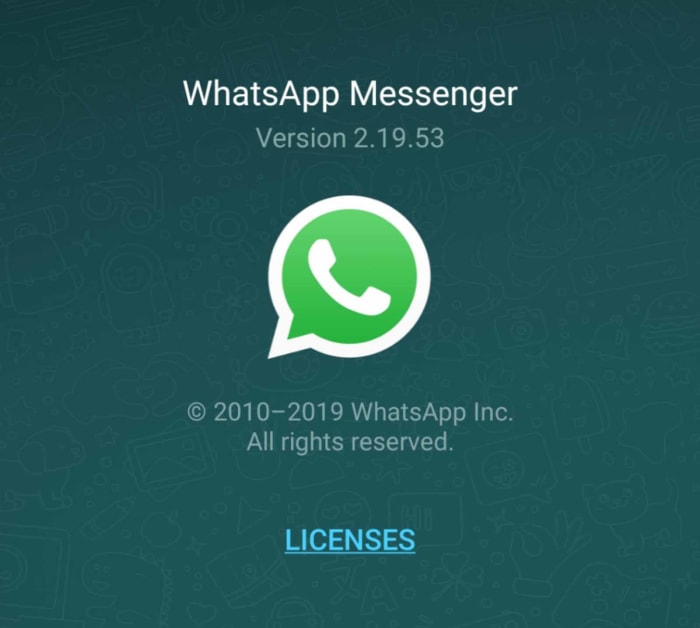
The official WhatsApp will look like this
If your version of WhatsApp doesn’t look like this, you may need to take action now

To check what version of WhatsApp you’re using you need to open the More options menu, then hit Settings, then Help, and finally App info.

According to the FAQ page, these temporary bans are WhatsApp’s way of gaining user’s attention so they can no longer continue to use these unsanctioned apps. The kicker is that migrating over to the official app may cause users to lose their chat histories. Fortunately, WhatsApp offers clear instructions on how users of GB WhatsApp and WhatsApp Plus can save and transfer their chat histories

How to save and transfer your chat history from GB WhatsApp

If you are using GB WhatsApp and you want to transfer your chat history to the official app you need to follow these steps:

  1. In GB WhatsApp, tap More options, Chats, and finally Back up chats.
  2. Go to Phone Settings, tap Storage, and then hit Files.
  3. Find the GB WhatsApp folder and hold your finger on it to select it.
  4. In the upper right corner tap More then Rename and rename the folder to WhatsApp.
  5. Download the official version of the WhatsApp app.
WhatsApp Messenger Download WhatsApp ►
8
  1. Open WhatsApp and verify your phone number.
  2. When you see the Backup found screen, tap Restore and then Next.

Once you’ve carried out all of those instructions you should have the official version of WhatsApp open with your complete chat history.

How to save and transfer your chat history from WhatsApp Plus

For users of WhatsApp Plus, the transfer of the chat history will happen automatically, if it is has been saved previously. If you haven’t already saved your chat history, you need to:

  1. Open WhatsApp and hit More options, then Settings, Chats, Chat backup, and finally Backup.
  2. Once your chat history is saved all you need to do is download the official version of WhatsApp, launch the app, and verify your phone number.
  3. You should then have access to the official version of WhatsApp, complete with your WhatsApp Plus chat history.

These temporary bans should be taken seriously. If you are a GB WhatsApp or WhatsApp Plus user, as soon as your temporary bans are over, you should follow the instructions laid out above and transfer your chat history over to the official app. Although there is no official confirmation, this move from WhatsApp is likely a part of Zuckerberg’s big push for “privacy”, that he is using to justify the merger of WhatsApp, Instagram, and Facebook Messenger. It is highly likely that if you don’t transfer your chat history sooner rather than later, you’ll lose it forever.

WhatsApp search is finally being upgraded

WhatsApp is developing a new advanced search feature.

If you’ve ever been frustrated because you’ve been searching through old messages on WhatsApp and you couldn’t find what you were looking for, good news could be on the horizon. It isn’t that the current WhatsApp search function is bad, it is just that it is very basic and has been due an upgrade for quite some time. It looks like that upgrade might finally be on the way.

WhatsApp is developing a new advanced search feature

New advanced search feature coming to WhatsApp

As usual, WABetaInfo has been poring through the latest WhatsApp beta code to find out what the messaging app is working on. The new WhatsApp advanced search feature has been spotted in the iOS beta version of the app, meaning it is likely that iPhone users will see the feature before Android users do. The WABetaInfo report, however, does quote ‘sources’ as saying the feature will come to Android, too.

WhatsApp Messenger Download WhatsApp ►
8

Unfortunately, this feature is still at a very early stage of development, which means even members of the WhatsApp for iOS TestFlight beta program still can’t access it. All that has been spotted so far is the code that indicates that the advanced search feature is on the way.

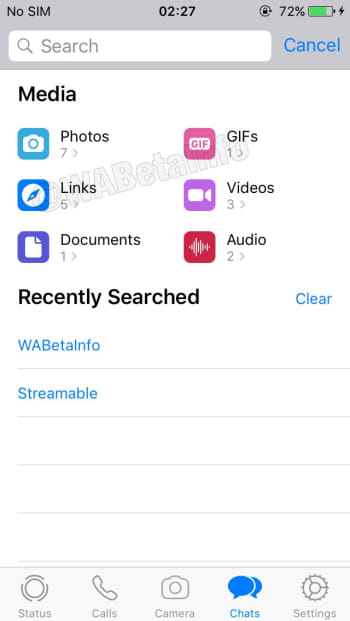
a screenshot of the upcoming WhatsApp advanced search feature
Image via: WABetaInfo

The advanced search will be different from basic search in a number of ways. First off, rather than merely searching text messages, the advanced search feature will allow you to search through different types of messages. These include Photos, GIFs, Videos, Documents, Links, and Audio. The advanced search feature will also show how many messages of each type you have in your WhatsApp storage, and a recent search history.

Another nice feature of the new advanced search is the ability to click on the different types of messages to open up lists of that particular type of message. For example, if you click photos, you’ll see a list of all the different photos you’ve received including previews. This works for all the different types of message and WABetaInfo reports that the preview option will even work for voice notes when advanced search gets a full roll-out. If WhatsApp later adds titles to voice notes, this would make the app a competent voice recording app, too.

As we’ve already said, the advanced search feature is still a long way off, but it is good to see that it is in development. Being able to search through your past messages in an important part of any messaging app. When it does land, the advanced search feature will give WhatsApp one of the best search functions available across all the major messaging apps.

WhatsApp will make it easier to control annoying groups

WhatsApp group invites update could let you reject invitations to new groups.

whatsapp

WhatsApp groups are one of those things in life that you either love or hate. We’re not talking about the concept, we’re talking about individual groups. You either love them or you hate them. Some groups can be funny, informative, entertaining, a vital way to stay in contact with lots of people you love and care for, or a quick and easy way to find out important information.

WhatsApp Messenger Download WhatsApp ►
8

Other groups though, are different. The annoying groups send you too many notifications, offer little of value, or make you want to throw your phone at the wall. WhatsApp is now moving to help you stay on top of all those bad groups.

WhatsApp group invites update could let you reject invitations to new groups

The new Group Invitation System has been spotted in an upcoming beta version of WhatsApp for Android. A report by WABetaInfo claims that the feature will be available for all users of WhatsApp TestFlight beta program when it next updates. The report also claims that the feature will be coming to Android users too, although it doesn’t offer a time-frame on when that might happen. Although the feature isn’t available just yet, it looks like its development has come a long since WABetaInfo first mentioned something about it back in May last year.

The new Group Invitation system will work by giving all users the ability to control who can invite them into groups in the first place. By opening WhatsApp Settings and clicking Account, then Privacy, and Groups, users will come to the WhatsApp Group Invitation menu where they’ll be able to control who can and can’t add them to groups. There, users will find the following settings:

  • Everyone: the user can be always added in groups. No invites will be received.
  • My Contacts: the user can be always added in groups from his contacts. He will receive an invite to join a group from people not in his contacts list.
  • Nobody: the user cannot be directly added in groups, in any situation. He will receive a request every time someone wants to add him in a group.
WhatsApp Group Invitation screenshots
Image via: WABetaInfo

The key point here is that if somebody doesn’t have permission to add a user to groups, whenever they try, the user will receive an invite rather than being added automatically. The invite will remain active for 72 hours and after that, it will expire, and the invited user will no longer be able to join the group. The user will need to receive a new invite before they can then join the group and only one active invite per group will be permitted at a time.

When this feature does get a general roll-out the “Nobody” option will be best as it will always give you the chance to accept or decline an invitation to new groups. If you feel uncomfortable leaving groups you’ve been added to, this option will give you total control over the groups you join.

Facebook Messenger: Is this the new feature we’ve all been waiting for?

How to unsend messages on Facebook Messenger

facebook messenger

Being able to communicate with our friends at the click of a button on our smartphones has revolutionized modern life. We can now easily and securely talk to our friends anywhere in the world using any one of a number of free messaging apps. Despite our new technologically influenced powers, we all remain human, which means we can all make simple mistakes. This is why WhatsApp introduced the “Delete for everyone,” feature that allows users to delete messages they’ve sent in error. Facebook Messenger now has a similar feature too. You can now Unsend messages on Facebook Messenger.

As Facebook owns WhatsApp, it will probably come as no real surprise that the new Facebook Messenger Unsend feature is very similar to the WhatsApp Delete for everyone feature.

Messenger Download Messenger
7

How to unsend messages on Facebook Messenger

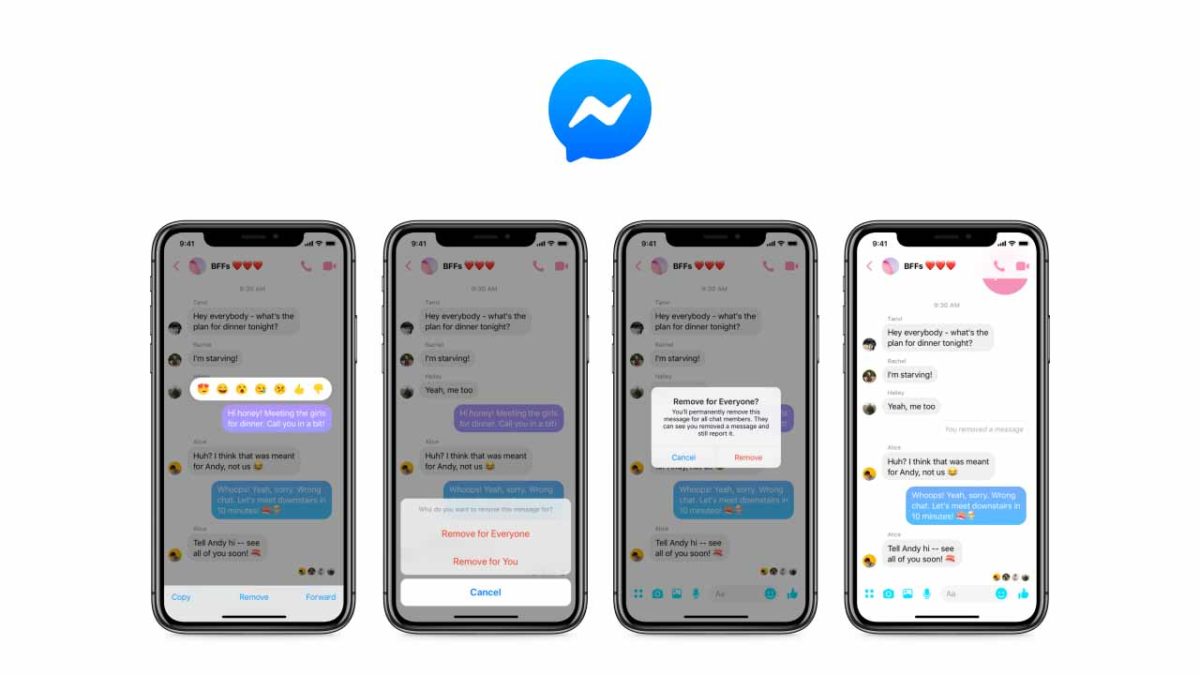
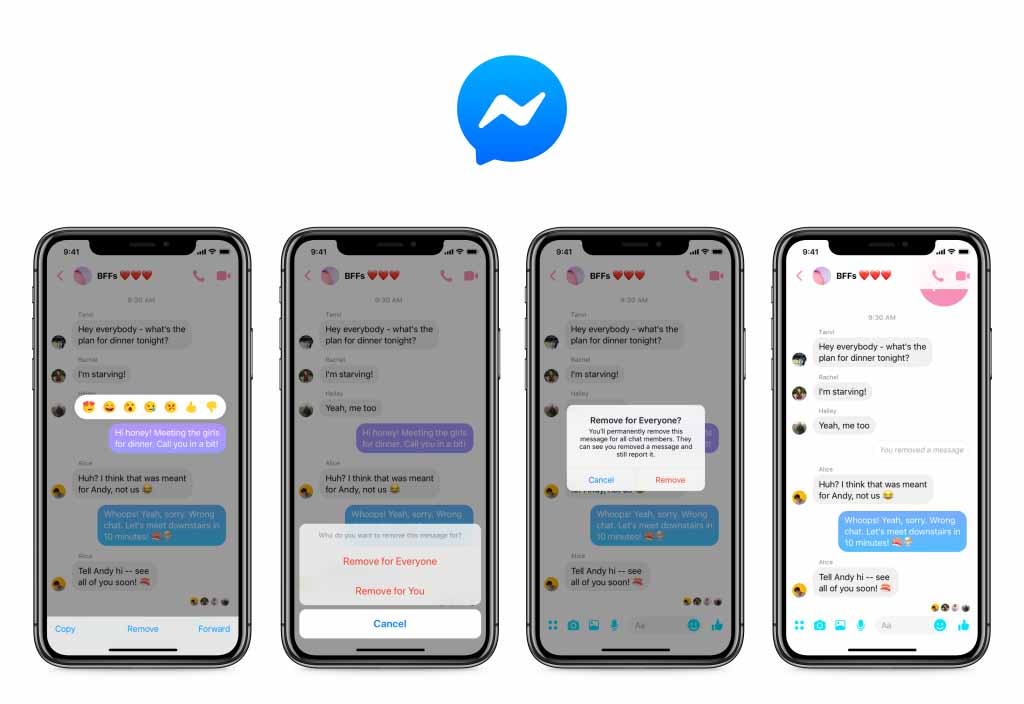
Thanks to this change, you now have 10 minutes to select messages they’ve sent but don’t want anybody to see. To select a message to be unsent, all you have to do is tap it to open up the message menu. From there you simply click the “Remove for Everyone” option and Messenger will delete it. Just like on WhatsApp, the message will be replaced with a notification for everybody involved in the conversation that says a message has been deleted.

As well as the Remove for Everyone option, Messenger also has a “Remove for You” setting. Selecting this option will delete the message in question from the local chat on your device. It will remain, however, for everybody else who is involved in the conversation.

Screenshots of Messenger unsend for everyone

It was back in April when Mark Zuckerberg first acknowledged the fact that the company has been deleting his and other Facebook exec messages for some time. The feature was first developed after the Sony Corp. data hack back in 2014 but only as a way for Facebook execs to delete their messages. It wasn’t originally planned for a general roll-out. The public response to Zuckerberg’s admission, however, pushed the social giant to start work on bringing the feature to all users.

With all users now having a 10-minute grace period that allows them to delete messages from their friends’ inboxes after they’ve been sent, Facebook can say it has come good on the promise it made back in the Spring. The only caveat to the roll-out of the Unsend for Everyone feature is that it is only available on Messenger for mobile. If you use Messenger on an Android or iOS device, you should already have the option to Unsend for Everyone. If you use Messenger on a PC or Mac, however, the option will not be there. Facebook hasn’t said whether the Unsend feature will make it to Messenger for desktop.

You won’t believe how many accounts WhatsApp bans every month

WhatsApp bans a staggering number of fake accounts every month

whatsapp

WhatsApp has seen its fair share of controversy recently. Like Facebook, which owns the messaging app, WhatsApp has been guilty of facilitating the spread of fake news. This has seen the rise of a far-right politician winning the presidential elections in Brazil and a series of brutal murders and public lynchings in India. Pressure has been mounting for some time then, for WhatsApp to act and try to prevent some of the problems that have been spreading across the app.

WhatsApp Messenger Download WhatsApp ►
8

We recently saw a move to prevent messages being forwarded more than five times, which cut at the heart of the spread of fake news. WhatsApp has also now released information about the number of accounts its banning on a monthly basis due to misuse of the platform.

WhatsApp bans more than 2 million accounts every month

This news comes via a white paper WhatsApp published in the build-up to the Indian general election, which is due to take place in May. Known as the Lok Sabha general election, the Indian election is the biggest democratic election on earth meaning there is massive potential for democracy-skewing efforts taking place across social networks and messaging apps.

The white paper states that over the last three months, WhatsApp has banned over 2 million accounts a month. Staggeringly, a huge 75% of these accounts were banned after they were reported by other users with 20% of blocked accounts being caught when they first registered. It is clear that users still have a huge role to play in rooting out abusive WhatsApp accounts.

Whatsapp bans accounts
WhatsApp is banning over 2 million accounts every month for misusing the platform

A report by First Post also highlights efforts WhatsApp has been making to try and improve detection of automated accounts. The messaging app is constantly being targeted by fake accounts run on emulators or machines that are then used to amplify the spread of fake news and bombard genuine users with spam messages. One such effort is the platform’s new ability to detect accounts that continuously send messages without activating the text bar or typing cursor.

WhatsApp has been coming under increasing fire from the Indian government due to the well-documented problems it has been causing in the country. With such a huge democratic exercise fast approaching this year, however, there is global pressure on the messaging app to get its house in order. Banning abusive accounts and improving detection methods should represent just the tip of the iceberg. If the world watches WhatsApp help skew the biggest democratic elections on the planet, it may be the messaging app itself that faces a public execution.

WhatsApp’s newest app gets some new features

WhatsApp Business now has Quick Replies, Labels, and Chat List Filtering.

whatsapp business

WhatsApp is a fantastic communication tool. With more than 1.5 billion users, downloading WhatsApp offers an easy, free, and secure way of communicating with a huge chunk of the world’s population. The problem though, was that WhatsApp didn’t offer a secure way for businesses to create their own WhatsApp accounts in order to communicate with their customers using the messaging service. Anybody could start an account pretending to be any business. This is why WhatsApp recently launched a brand-new app, WhatsApp Business.

WhatsApp Business Download WhatsApp Business Now
7

WhatsApp Business allows businesses to set up a WhatsApp account their customers know is legitimate. Although WhatsApp charges businesses to use its official new app, the messaging giant claims over 5 million businesses around the world have signed up to use the new service. If you own one of those businesses or if you are a customer of one of those businesses, you’ll be happy to know that WhatsApp is adding three new features to WhatsApp Business.

WhatsApp Business now has Quick Replies, Labels, and Chat List Filtering

Twelve months after WhatsApp Business’ official launch, three new features have been added to the app. In the blog post announcing the update, WhatsApp said, “We’re excited to keep growing WhatsApp Business and introducing new features that make it easy for customers to find and engage with businesses that are important to them.”

It is now possible for businesses to set up Quick Replies that can be quickly and easily sent to questions they’ve received before or receiver regularly. Sending Quick Replies needs to be an easy process and WhatsApp has made it so. All businesses need to do to access all of their previously saved Quick Replies is type the ‘/’ symbol into the text field. This will then show up all of the previously saved quick replies ready for the right one to be selected.

download whatsapp business

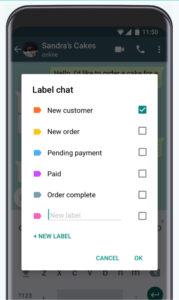
Another key feature to come with the WhatsApp Business update is Labels. Labels can be used to organize both chats and contacts adding an extra layer of organization to the app. WhatsApp Business Labels come in different colors making it easy to highlight chats and contacts based on varying criteria like outstanding payments, new clients, ongoing contracts etc.

new labels for WhatsApp Business
Labels make it easier to organize client lists

The final big change to come in the WhatsApp Business first anniversary update is Chat List Filtering. This feature will allow WhatsApp Business users to filter chats by unread messages, groups, or broadcast lists.

If you’re one of the 5,000,000 businesses reported to have signed up to WhatsApp Business, then these tools will help you both communicate more effectively with your customers and also save time while doing so. If you’re a customer of one of those businesses,you could expect smoother communication with them but also greater potential to receive promotional materials as it’ll now be easier for them to label the type of customer you are, and coordinate WhatsApp promotional campaigns better. This, of course, is all on top of the new ads, which WhatsApp has promised to introduce in the near future.